• 开源镜像
  • 开源沙龙
  • 媛宝
  • 猿帅
  • 注册
  • 登录
  • 息壤开源生活方式平台
  • 加入我们

开源日报

  • 开源日报第654期:《读轮子 Learn-Vue-Source-Code》

    29 12 月, 2019
    开源日报 每天推荐一个 GitHub 优质开源项目和一篇精选英文科技或编程文章原文,坚持阅读《开源日报》,保持每日学习的好习惯。
    今日推荐开源项目:《读轮子 Learn-Vue-Source-Code》
    今日推荐英文原文:《KISS, DRY, and Code Principles Every Developer Should Follow》

    今日推荐开源项目:《读轮子 Learn-Vue-Source-Code》传送门:GitHub链接
    推荐理由:现在在前端开发中使用框架已经成为兵家常事了,毕竟框架带来的益处可不是三两句话就能说清楚的事情。但是知其然而不知其所以然终归还是会留下些隐患的,在涉及到一些细节时,有必要对框架做更加深入的了解。这个项目是作者对三大家族之一 Vue 的源码解析,按照功能分成了九大类进行介绍,可以帮助读者更好的了解 Vue 的工作原理。
    今日推荐英文原文:《KISS, DRY, and Code Principles Every Developer Should Follow》作者:Mahdhi Rezvi
    原文链接:https://medium.com/better-programming/kiss-dry-and-code-principles-every-developer-should-follow-b77d89f51d74
    推荐理由:作者分享的代码编写经验

    KISS, DRY, and Code Principles Every Developer Should Follow

    The secrets of successful software engineers

    Introduction

    When you start programming, your first challenge will be to write functioning code. But when you grow as a developer, your skills should grow as well. Your code should evolve from ordinary functioning code to clean, efficient, understandable and maintainable code. That is the real challenge of a developer.

    In this post, we discuss five principles that help you achieve the super code status.

    KISS (Keep It Simple Stupid)

    When a program grows in size, the complexity of the code tends to increase. This would give you a hard time debugging, as debugging complex code is a gruesome task. Nobody loves to maintain complex code. This principle states that you should always keep your code simple. If you have a complex piece of code, always try to break it into smaller more maintainable code.

    It is harder to write simple clean code than to write complex BS. The more you grow as a developer, the cleaner and more meaningful your code should become.

    YAGNI (You Aren’t Gonna Need It)

    There are at times where you should be prepared for the future, but not in programming. People tend to write code that they may need in the future but not at the moment. These types of code increase the size of your program unnecessarily, as the written code is never implemented. Even more, most of the programmers never use this code in the future. This habit of programmers bloats your code unnecessarily.

    This principle states not to implement something until it is necessary. This is a piece of advice every developer should follow.

    DRY (Don’t Repeat Yourself)

    This principle is crucial for writing simple and easy-to-modify code. Repeated code is a common mistake among programmers. This principle states that a piece of code should be implemented in just one place in the source code. If you notice the same chunk of code being written over and over again, you’re breaking this principle.

    The opposite of DRY code is WET code: write everything twice.

    You can create a common function or abstract your code to avoid any repetition in your code.

    SoC (Separation of Concerns)

    SoC principle is all about minding your own business — literally. This principle advises you to partition your complex code into different sections or domains. Each section is independent of each other, and that’s why each section can be tackled independently. Also, it becomes easier to maintain, update, and reuse the code.

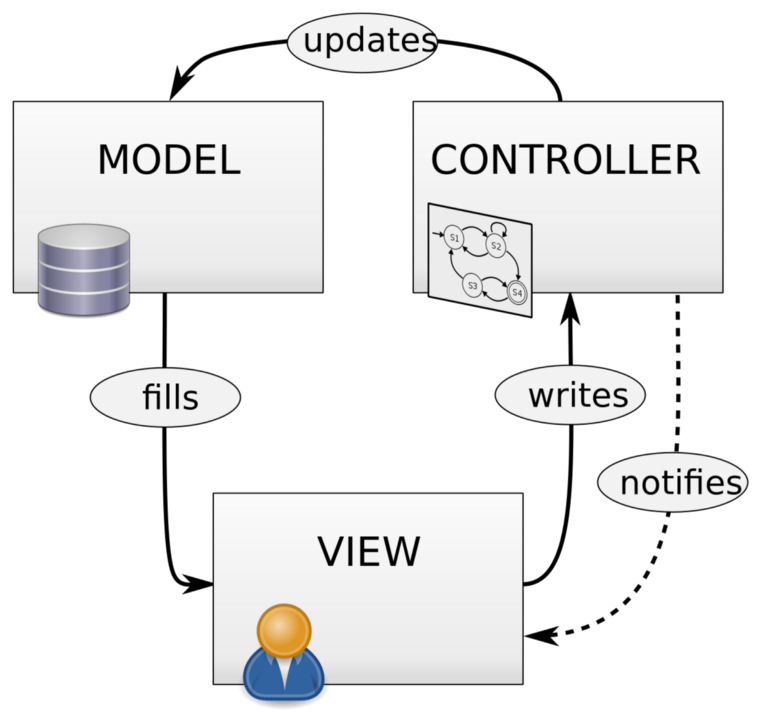
    One good example of SoC is the MVC Architecture. This separates a program into three areas: the data (model), the logic (controller), and what the end-user sees (view). MVC is heavily implemented in modern-day frameworks.

    Source: Wikimedia

    Avoid Premature Optimization

    We would all prefer our code to be optimized. But this principle states that you should not optimize your algorithm at the early stage of development.

    This principle is quite similar to the YAGNI principle. The difference is that the YAGNI principle speaks about the tendency to implement unnecessary functions while this principle speaks about the tendency to speed up algorithms before they are necessary.

    The problem with premature optimization is that you can never really know where a program’s bottlenecks will be until after the fact. You can guess, of course, and sometimes you may even be right. But more often than not, you’ll waste valuable time trying to speed up a function that isn’t as slow as you think or doesn’t get called as often as you’d expect.

    Conclusion

    “Always code as if the guy who ends up maintaining your code will be a violent psychopath who knows where you live. “ — Martin Golding
    When you grow up as a developer, you will realize that the success of your project heavily depends on your team. The above principles help you write code that can be maintained — not only by yourself but by anyone else who may end up working on the software at some point in the future. After all, a one-man show will not lead your team anywhere.

    Hope you learned something from this. What are your experiences with poor coding? Mention them in the comments.

    Happy coding!
    下载开源日报APP:https://opensourcedaily.org/2579/
    加入我们:https://opensourcedaily.org/about/join/
    关注我们:https://opensourcedaily.org/about/love/
  • 开源日报第653期:《再创作 github-markdown-css》

    28 12 月, 2019
    开源日报 每天推荐一个 GitHub 优质开源项目和一篇精选英文科技或编程文章原文,坚持阅读《开源日报》,保持每日学习的好习惯。
    今日推荐开源项目:《再创作 github-markdown-css》
    今日推荐英文原文:《Why Companies Should Be Just as Worried About Cultural Debt as Technical Debt》

    今日推荐开源项目:《再创作 github-markdown-css》传送门:GitHub链接
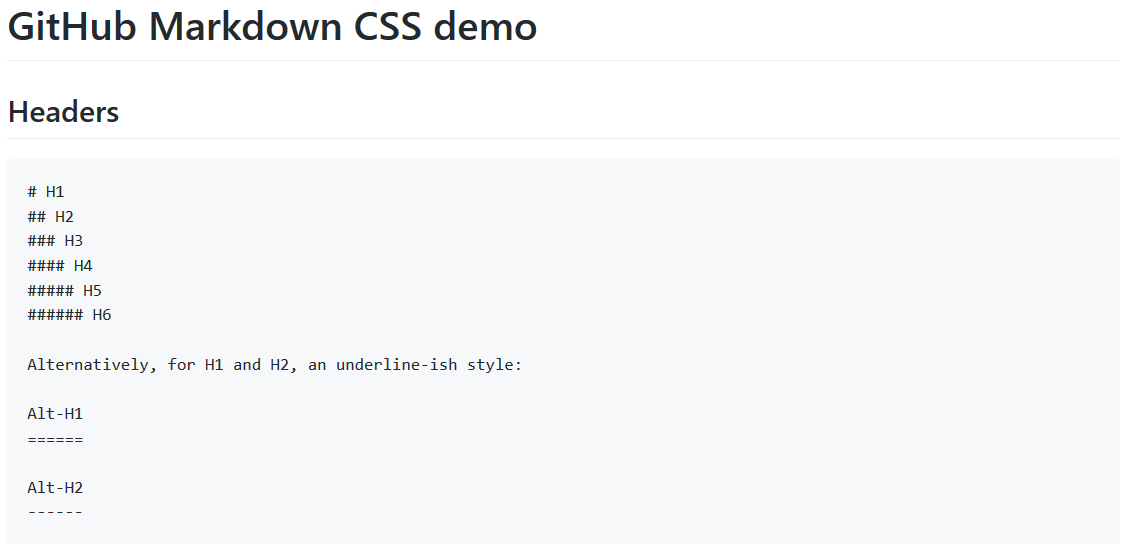
    推荐理由:随手点开 GitHub 的一个项目,显示的自然就是它的 Readme.md 了。这个项目用 CSS 重现了 GitHub 中显示 markdown 文件的格式,相似度高到如果不开 F12 确认一下的话可能会以为和 GitHub 上面是一个玩意了,大可以在其他需要显示 markdown 文件的场合以假乱真。

    今日推荐英文原文:《Why Companies Should Be Just as Worried About Cultural Debt as Technical Debt》作者:John Rauser
    原文链接:https://marker.medium.com/dont-let-cultural-debt-bring-down-your-business-ec8c42e4539f
    推荐理由:如果说技术债务会危害产品,文化债务就是危害队员的

    Why Companies Should Be Just as Worried About Cultural Debt as Technical Debt

    Technology decisions that ignore cultural debt will involve more cycles and greater risk

    Businesses today are faced with myriad challenges to innovate and optimize. In doing so, we often need to make decisions that borrow against the future. This can come in a tangible form, such as taking money from investors to fund growth, or in more inconspicuous forms, such as making tradeoffs in technical decisions. When we make such tradeoffs, we expect them to come at the cost of additional technical work in the future; however, these decisions can also borrow against an externality that is often overlooked: culture.

    What is technical debt?

    Technical debt occurs in the development of software when the “easy path” is taken to solve a problem rather than using the best overall solution. The concept implies that the time saved now will need to be paid back later (with interest!) in the form of rework.

    Ideally, technical debt is incurred knowingly — that is, a decision to take a shortcut is made deliberately to increase velocity, and it is flagged to be fixed before becoming a compound problem. In calling out technical debt as such, we can better analyze our decisions, considering their net present value and future opportunity costs. By documenting it, we gain better insight into the responsiveness and flexibility of the code base. Having a strategy around managing technical debt has, therefore, become an essential discipline in the management of software products.

    Technical decisions also have an impact on the culture of a company, though, and this facet of technical management is often overlooked. “Cultural debt” can be taken on unknowingly, and the unmanageability that flows from it can be difficult to ascertain.

    What is cultural debt?

    Cultural debt happens when we make a technical decision that borrows against the culture of the organization. Such decisions can introduce divisions between teams, deteriorate communication, or even weaken the effectiveness of leadership.

    These types of decisions need to be made regularly throughout the software development life cycle, and it is therefore critical that we begin to identify them, call them out, and manage them accordingly. If the interest goes unpaid we can end up with a toxic environment that is difficult and onerous to manage — we risk a paradox wherein attempts to innovate can stifle progress.

    A closer look

    Just as with technical debt, a business ideally will have a strategy for managing cultural debt rather than allowing it to accumulate and bog down the business. Typically, decisions that involve cultural debt will impact on areas such as:
    1. Mission: Ensuring connection to the company mission and that there is minimal variance in how the mission is understood by different teams and departments.
    2. Values: Effective and reliable transmission of company values, the ability to apply them consistently, and ensure that they are clear and tangible.
    3. Communication: Fostering openness and the ability to discuss, providing channels for communication, and using channels effectively with clarity of purpose and minimal “noise.”
    4. Visibility: Providing the ability for everyone to see up, down, and across their organization.
    5. Attitude: Happiness of employees, their effectiveness, and retention.
    6. Leadership: Ability for leaders to govern effectively, and influence across departments.
    When making technical decisions, we need to think outside the box and consider how our decisions will affect these cultural dimensions of the business.

    To reinforce the concept, let’s look at some current issues that the modern enterprise is being confronted with:
    1. Domain-Specific Tooling: As roles become increasingly specialized, a best-of-breed approach provides the tools needed to perform complex tasks. Unfortunately, tools create silos, and more tools means more fragmentation. Furthermore, in a world where tools are proxies for business processes, domain-specific tooling can cut off teams from processes, reducing visibility, and impeding communication. This means the business will need to devote cycles to meetings, emails, and other noisy distractions just to pay down the interest and get the visibility and coordination needed for cross-functional effective leadership. Paying down the debt requires tool integration, and without an infrastructure to reduce the cost of integrating, domain-specific tools can be a heavy debt to carry.
    2. Customization: Often we see the introduction of new tooling without the requisite investment to customize them to the business. Tools such as ServiceNow or Salesforce are highly valuable for being specialized to their use cases, but they still require customization to be effective. For example, when customer data is stored in notes fields rather than using structures data captured in the tool, visibility and reporting are gradually reduced and employee frustration abounds. The decision to introduce tooling should be made with the understanding that customization will be required and must be maintained over time to keep pace with the organization’s culture as it changes.
    3. Bimodal IT: One strategy for enabling cutting-edge technologies is the use of a “bimodal” structure with essentially two IT organizations that operate under different constraints—one optimized for velocity, the other for stability. While bimodal IT may be valuable for encouraging the adoption of new technologies, it also encourages confusion of responsibilities, cross-team rivalry, knowledge silos, and double work. The longer the structure remains, the deeper cultural divide and the more difficult an eventual transformation will be. The decision to introduce new technologies or practices using a bimodal structure should be done deliberately, cautiously, and with clear goals in mind.
    4. Technology Selection: Often we are presented with new technologies that promise to deliver great benefits. Let’s assume that the new technology passes a technical assessment and is found to deliver on the promises: For example, a language such as Clojure or Kotlin really will simplify development and increase velocity, or a new delivery tool does indeed remove a key bottleneck. Adopting such a technology invariably creates some cultural debt — developers unfamiliar with the new language may feel alienated, new silos will form around knowledge and expertise, and tribes could be forcibly broken apart. Technology decisions that ignore cultural debt will involve more cycles and greater risk, while those that recognize it will implement new technologies with those issues in mind, providing the cross-training and collaboration needed to ensure success.
    5. DevOps: The dirty secret about DevOps is that it involves the introduction of a number of technologies and technical practices that carry a large amount of cultural debt. This can actually tear an organization apart if that debt is not managed closely, and it is therefore why DevOps — despite being closely associated with technical practices such as automation, infrastructure-as-code, and CI/CD — is regarded as primarily a cultural movement. In the enterprise, DevOps technologies threaten roles, responsibilities, and livelihoods. The cultural debt actually does outweigh the benefits, and DevOps transformations need to focus on cultural issues first before attempting to implement the associated technologies. This is common sense that we learned from observing lean manufacturing transformations in the ’90s, which involved a similar change situation where technical practices became a function of culture.
    Cultural debt, like technical debt, can be hard to detect. If your business does not have a strategy for paying off the debt, or at least one for paying down the interest, the result will be a heavy load of cultural issues weighing down decisions and processes.

    Key Measures for Managing Cultural Debt

    • Understand your stakeholders. In an agile world, it is easy to overlook stakeholders. We can learn from the disciplines of business analysis and project management, though, where stakeholder analysis is a core competency and key practice in work management. It is not possible to do a thorough breakdown of stakeholders for every technical decision, but an actively maintained stakeholder matrix will increase your mindfulness and can be referred to for a free sanity check when needed.
    • Understand your culture. Your organization is filled with cultural artifacts — if you are not aware of them and taking the time to manage them, you will not be able to assess cultural impacts. These artifacts can include mission and value statements, organizational and tribal structures, meeting cadences and compositions, control systems, routines, rituals, symbols, and even legends. Think through your cultural artifacts and ensure that they match intention and are understood by leadership.
    • Obtain buy-in. Getting buy-in means giving people a stake in the game. Imposing technology decisions on people will not only result in a requirements mismatch, but it fosters discontent and mistrust. You can make a large down payment on your cultural debt by bringing affected parties into the decision-making processes early. This has been shown to be very effective in helping pass decisions even when they have negative consequences.
    • Embrace the “Three Ways.” We can borrow from the DevOps movement the Three Ways, which provide a solid foundation for undertaking any technical work: Systems thinking encourages considering how decisions impact the whole system, not just the local area; feedback loops allow continuous feedback and communication about impacts; and continual experimentation and learning ensures that the organization is adaptive and resilient. Leadership that embodies the Three Ways is issued debt on very good terms.
    Peter Drucker is quoted as saying that “Culture eats strategy for breakfast,” and the examples we’ve seen here highlight this. The best technology in the world cannot compensate for a broken culture, and a broken culture can be the result of a succession of ill-considered technology decisions.

    Understanding cultural debt is a key differentiator in being able to leverage Conway’s Law rather than be trapped by it. A key aspect of managing technology going forward will, therefore, be to identify and control this cultural debt as it is being created, and ensure that the organization is able to function with full-capacity engagement.
    下载开源日报APP:https://opensourcedaily.org/2579/
    加入我们:https://opensourcedaily.org/about/join/
    关注我们:https://opensourcedaily.org/about/love/
  • 开源日报第652期:《创心 14th》

    27 12 月, 2019
    开源日报 每天推荐一个 GitHub 优质开源项目和一篇精选英文科技或编程文章原文,坚持阅读《开源日报》,保持每日学习的好习惯。
    今日推荐开源项目:《创心 14th》
    今日推荐英文原文:《Angular in 2020 and Beyond》

    今日推荐开源项目:《创心 14th》传送门:GitHub链接
    推荐理由:这个项目是第十四届 D2 前端技术论坛中所用到的 PPT 合集。这次的内容包含了基础的语言框架,工程化和最近热门的无服务和微前端等,如果想要回顾这次会议的话自然是不容错过,对下次会议感兴趣的话也可以就此开始了解,毕竟那个乐队看起来还有点帅。

    今日推荐英文原文:《Angular in 2020 and Beyond》作者:Kalhara Perera
    原文链接:https://medium.com/better-programming/angular-in-2020-and-beyond-b2e98543ef17
    推荐理由:三大家族之一的未来发展

    Angular in 2020 and Beyond

    Pros, cons, and what will be next

    First, let’s talk about what the benefits of Angular are, what will change, and is Angular better than React?

    I’m mainly focusing on Angular’s future and what will change. Normally, to learn about Angular, I browse their repository on GitHub, which you can visit here. This is a great place to keep updated about what they’re changing in their code and which features they’re adding. You can also check for issues and be aware of them when using Angular for projects.

    Weaknesses Where Angular Needs Improvement

    Angular’s biggest problem is that the apps you build with it are relatively large. That means the project has a high file size. That happens because of the JavaScript bundles within them, which are because of the Angular CLI. If you compare these bundles split with the bundles you get by creating a React app, the Angular app is bigger.

    At runtime, you won’t find any difference. Runtime performance is pretty good, but the loading can take longer because the app is relatively big, even for simple apps.

    Secondly, the Angular app can be very complex. Angular is a complete framework. Not only that, but it is also a complete platform of features and tools. And that means learning Angular can be a bit more challenging than learning React. With React, you focus only on building components that are related to the use-case of the system. Later, React added some new features, but its core is based on building components. It’s only partly about global state management, services, and dependency injection, which we have in Angular but don’t exist in React. For an HTTP or AJAX request, you need a separate library for React, but it’s built into Angular. Routing is also the same.

    This is why, when compared to React and Vue JS, Angular is a bit challenging to learn because it has more relationships built in. This also relates to the apps. That, of course, can be challenging, but this is also a huge strength because, since this is always built in, you can always rely on the features to exist, and they will perform really well. Since the same team that develops Angular’s core also works on things like form validation and routing, you can rely on these parts of the framework being up to date, following best practices, and being compatible with versions of Angular. That’s not something you can do with third-party apps used in React. If you use a routing library, it might not be updated to the latest version of React, or it might not support all the features of React. It will take some time to update third-party libraries to the same level.

    Strengths Where Angular Shines

    Since angular has more dependencies and components built inside, no matter what your project is, Angular has you covered. This is its biggest strength. You have many features to choose from. You have a clear set of rules, clear syntax, and typescripts to follow good practices. You have a clearly defined style guide and tons of resources and tutorials to learn Angular.

    A new version of Angular is released every six months. That doesn’t mean everything changes, but the framework slowly evolves over time. That’s the core of these Angular updates. Every update is fully backward compatible, and since the first release of Angular 2, only smaller changes have happened, like small API changes. Slow but constant improvement is always good.

    In the angular website, they have a blog post called “A plan for version 8.0 and IVY,” explaining their plans for version 8 and the future. This is worth reading, and it gives a preview of Opt-in-Ivy. Ivy is an internal Angular Renderer. A Renderer is an entity engine that takes your instructions and converts to DOM. Render is hidden, and that doesn’t change the way you can work with Angular.

    When you work with Angular, you have small and high-performance apps. In the future, like 2020 and beyond, it will come with differential loading of modern JavaScript, Opt-in Ivy preview, and the angular team is working on implementing Bazel, which is a compiling tool developed by Google in the Angular CLI, which should also help with improving file size, producing smaller bundles, and may be a faster building process for an overall enhanced general developer experience. That will be available soon.

    They will have smaller applications and therefore get rid of these weaknesses. Instead, they’ll have strengths: a lot of features, clear syntax, and structure. Then you have small and high-performance apps. And again, Angular team’s goal is to avert drastic API changes, but again, of course, they can see some alternative ways of creating components. And maybe, by getting rid of NG modules with IVY, that might be possible, so we could just focus on components.

    Therefore, the present of Angular is already pretty good, and it’s very popular and works well. The apps are getting a bit bigger, but that’s not a big issue.
    下载开源日报APP:https://opensourcedaily.org/2579/
    加入我们:https://opensourcedaily.org/about/join/
    关注我们:https://opensourcedaily.org/about/love/
  • 开源日报第651期:《冒险地图编辑RPG-MapMaker》

    26 12 月, 2019
    开源日报 每天推荐一个 GitHub 优质开源项目和一篇精选英文科技或编程文章原文,坚持阅读《开源日报》,保持每日学习的好习惯。
    今日推荐开源项目:《冒险地图编辑RPG-MapMaker》
    今日推荐英文原文:《How to make an old computer useful again》

    今日推荐开源项目:《冒险地图编辑RPG-MapMaker》传送门:GitHub链接
    推荐理由:还记得当年 Gameboy 上恢弘的游戏地图和经典的2D像素世界吗?这款软件拥有 Android 和 Windows 版本,里面涵盖了超多的 Rpg 地图元素。这次,由我们来创造自己的冒险大陆吧。

    今日推荐英文原文:《How to make an old computer useful again》作者:Howard Fosdick
    原文链接:https://opensource.com/article/19/7/how-make-old-computer-useful-again?utm_medium=Email&utm_campaign=weekly&sc_cid=7013a000002DEfSAAW
    推荐理由:你家里有闲置的旧电脑吗?洗洗还能吃,你可以用比平板更大的屏幕做一些更有趣的事情。当然,除非更换硬件,否则应该是挖不了矿的。

    How to make an old computer useful again

    Refurbish an old machine with these step-by-step instructions.

    (Image by : LSE Library. Modified by Opensource.com. CC BY-SA 4.0)
    Have an old computer gathering dust in your basement? Why not put it to use? A backup machine could come in handy if your primary computer fails and you want to be online with a larger screen than your smartphone. Or it could act as a cheap secondary computer shared by the family. You could even make it into a retro gaming box.

    You can take any computer up to a dozen years old and—with the right software—perform many of the same tasks you can with new machines. Open source software is the key.

    I’ve refurbished computers for two decades, and in this article, I’ll share how I do it. We’re talking about dual-core laptops and desktops between five and 12 years old.

    Verify the hardware


    Step one is to verify that your hardware all works. Overlooking a problem here could cause you big headaches later.

    Dust kills electronics, so open up the box and clean out the dirt. Compressed air comes in handy. Be careful that you’re grounded whenever you touch the machine. And don’t rub anything with a cleaning cloth. Even a static shock so small you won’t feel it can destroy circuitry.

    Then close the clean computer and verify that all the hardware works. Test:
    • Memory
    • Disk
    • Motherboard
    Run any diagnostic tests in the computer’s boot panels (the UEFI or BIOS panels). This list tells you which program function (PF) key to press to access those panels for your computer.

    Free resource kits like Hirens BootCD or Ultimate Boot CD enable you to test what your boot panels don’t. They contain hundreds of testing programs; all are free, but not all are open source. You don’t have to install anything to run these kits because they’ll boot from a USB thumb drive or DVD drive.

    Be thorough! Run the extended tests for memory and disk—not just the short tests. Let them run overnight. That’s the only way to catch transient (sporadic) errors.

    If you find problems, my Quick guide to fixing hardware will help you solve the most common hardware issues.

    Select the software


    The key to refurbishing is to install software appropriate for the hardware resources you have. The three essential hardware resources are:
    1. Processor (number of cores and speed)
    2. Meory
    3. Video memory
    You can identify your computer’s resources in its boot-time UEFI/BIOS panels. Write down your findings so that you don’t forget them. Then, look up your processor at CPU Benchmark. That website gives you background on your CPU plus a CPU Mark that indicates its performance.

    Now that you know your hardware’s power, you’re ready to select software that it can efficiently run. Your software choices are divided into four critical areas:
    1. Operating system (OS)
    2. Desktop environment (DE)
    3. Browser
    4. Applications
    A good Linux distribution covers all four. Don’t be tempted to run an unsupported version of Windows like 8, Vista, or XP just because it’s already on the computer! The risk of malware is too great. You’re much better off with a more virus-resistant, up-to-date operating system.

    How about Windows 7? Extended support ends January 14, 2020, meaning you get security fixes only until that date. After that, zilch. Now is the perfect time to migrate off Windows 7.

    Linux’s big benefit is that it offers many distros specifically designed for older hardware. Plus, its design decouples DEs from the OS, so you can mix and match the two. This is important because DEs heavily impact low-end system performance. (With Windows and MacOS, the OS version you run dictates the DE.)

    Other Linux advantages: Its thousands of apps are free and open source, so you don’t have to worry about activation and licensing. And Linux is portable. You can copy, move, or clone the OS and applications across partitions, disks, devices, or computers. (Windows binds itself to the computer it’s installed on via its Registry.)

    What can your refurbished computer do?


    We’re talking dual-core machines dating from about 2006 to 2013, especially Intel Core 2 CPUs and AMD Athlon 64 X2 family processors. Most have a CPU Mark of between 1,000 and 4,000. You can often pick up these machines for a song, yet they’re still powerful enough to run lightweight Linux software.

    One caution: be sure your computer has at least 2GB of memory. Upgrade the RAM if you have to. End users on my refurbished machines typically use between 0.5 and 2GB of RAM (exclusive of data buffering); rarely do they go over 2 gig. So if you can bump memory to 2GB, your system won’t be forced to swap, or substitute disk for memory. That’s critical for good performance.

    For example, I removed 1GB RAM from the decade-old rebuild I’m writing this article on, which dropped memory down to 1GB. The machine slowed to a crawl. Web surfing and other tasks became frustrating, even painful. I popped the memory stick back in and, with 2GB RAM, the desktop instantly reverted to its usable self.

    With a 2 gig dual-core computer, most people can do whatever they want, so long as they run a lightweight distro and browser. You can web surf, email, edit documents, do spreadsheets, watch YouTube videos, bid on eBay auctions, post on social media, listen to podcasts, view photo collections, manage home finance and personal scheduling, play games, and more.

    Limitations


    What can’t these older computers do? Their concurrency is less than state-of-the-art machines. So run a fast browser and block ads, because that’s what slows down web surfing. If your virtual private network (VPN) can block ads for you and offload that work from your processor, that’s ideal. Disable autoplay of videos, Flash, and animation. Surf with a couple of tabs open rather than 20. Install a browser extension so you can toggle JavaScript.

    Direct the processors to what you’re working on; don’t keep a ton of apps open or run lots of stuff in the background. High-end graphics and video editing may be slow. Virtual machine hosting is out.

    How about games? The open source software repositories offer literally thousands of games. That’s why I listed video memory as one of the three essential hardware resources. If your box doesn’t have a video card, it likely has only 32 or 64MB of VRAM. Bump that to 256 or 512MB by adding a video card, and you’ll find that processor-intensive games run much better. Here’s how to see how much VRAM your computer has. Be sure to get a card that fits your computer’s video slot (AGP, PCI-Express, or PCI) and has the right cable connector (VGA, DVI, or HDMI).

    What about Windows compatibility?


    People often ask about Windows compatibility. First, there’s a Linux equivalent for every Windows program.

    Second, if you really must run a specific Windows program, you can usually do that on Linux using Wine. Look up your application in the Wine database to verify it runs under Wine and learn any special install tricks. Then the auxiliary tools Winetricks or PlayOnLinux will help you with installation and setup.

    Wine’s other benefit is that it runs programs from old Windows versions like Vista, XP, ME/98/95, and 3.1. I know a guy who set up a fantastic game box running his old XP games. You can even run thousands of free DOS programs using DOSBox. One caution: if Windows programs can run, so can Windows viruses. You must protect your Wine environment inside Linux just as you would any other Windows environment.

    How about compatibility with Microsoft Office? I use LibreOffice and routinely edit and exchange Word and Excel files without problems. You must, however, avoid using obscure or specialized features.

    Which distro?


    Assuming Linux is the OS, you need to select a DE, browser, and applications. The easy way to do this is to install a distribution that bundles everything you need.

    Remember that you can try out different distros without installing anything by booting from a live USB thumb drive or DVD. Here’s how to create a bootable Linux from within Linux or Windows.

    I rebuild computers for charity, so I can’t assume any knowledge on the part of my users. I need a distro with these traits:
    • User-friendly
    • Lightweight interface
    • Bundles lightweight apps
    • Big repository
    • Solid track record
    • Large user community with an active forum
    • Stability through long-term support releases (not rolling releases)
    • Prioritizes reliability over cutting-edge features
    • Configurable by a GUI rather than by text files
    Many distros fulfill these criteria. The three I’ve successfully deployed are Mint/Xfce, Xubuntu, and Lubuntu. The first two use the Xfce desktop environment, while the latter runs LXQt. These DEs use less processor and memory resources than alternatives like GNOME, Unity, KDE, MATE, and Cinnamon.

    Xfce and LXQt are very easy to use. My clients have never seen Linux before, yet they have no trouble using these simple, menu-driven interfaces.

    It’s vital to run the fastest, most efficient browser on older equipment. Many feel Chromium wins the browser race. I also install Firefox Quantum because people are familiar with it and its performance rivals that of Chromium. I toss in Opera because it’s speedy and has some unique features, like integrated ad-blocking and a free virtual private network. Opera is free but not open source.

    Whatever browser you use, block ads and trackers! Minimize browser overhead. And don’t allow videos or Flash to run without your explicit say-so.

    For applications, I rely on the lightweight apps bundled with Mint/Xfce, Xubuntu, and Lubuntu. They address every possible need.

    Go for it


    Will you be happy with your rebuild? The computers I’ve been using lately are both over a decade old. One has an Intel dual-core processor (eMachines T5274a) while the other features an AMD Athlon 64 x2 processor (HP dc5750). Both have 2 gig memory. They’re as effective for my office workload as my quad-core i5 with 16GB RAM. The only function I miss when using them is the ability to host virtual machines.

    We live in an amazing era. You can take a five- to 12-year-old computer and, with a little effort, restore it to practical use. What could be more fun?


    下载开源日报APP:https://opensourcedaily.org/2579/
    加入我们:https://opensourcedaily.org/about/join/
    关注我们:https://opensourcedaily.org/about/love/
←上一页
1 … 95 96 97 98 99 … 262
下一页→

Proudly powered by WordPress