• 开源镜像
  • 开源沙龙
  • 媛宝
  • 猿帅
  • 注册
  • 登录
  • 息壤开源生活方式平台
  • 加入我们

开源日报

  • 开源日报第1038期:《一键部署,开箱即用的 OpenAI 接口管理 & 分发系统 :one-api》

    9 12 月, 2023

    开源日报每天推荐一个 GitHub 优质开源项目和一篇精选英文科技或编程文章原文,坚持阅读《开源日报》,保持每日学习的好习惯。

    今日推荐开源项目:《one-api》
    今日推荐英文原文:《How small memos can make large organizational changes》


    开源项目

    今日推荐开源项目:《one-api》传送门:项目链接

    OpenAI 接口管理 & 分发系统,支持 Azure、Anthropic Claude、Google PaLM 2、智谱 ChatGLM、百度文心一言、讯飞星火认知、阿里通义千问、360 智脑以及腾讯混元,可用于二次分发管理 key,仅单可执行文件,已打包好 Docker 镜像,一键部署,开箱即用. OpenAI key management & redistribution system, using a single API for all LLMs, and features an English UI.


    英文原文

    今日推荐英文原文:《How small memos can make large organizational changes
    》

    推荐理由:养成记备忘录的好习惯,凡事都有轻重缓急,有规划有条理的做好 TODO 也是非常重要的能力!


    How small memos can make large organizational changes

    Monsieur Hulot encounters a massive office culture in Jacques Tatit’s 1967 film Playtime

    Amber Case is author of Calm Technology and a Research Director at the Metagovernance Project. A frequent design consultant across many industries, she was previously a fellow at MIT’s Center for Civic Media and Harvard’s Berkman Klein Center for Internet & Society.

    When you’re working deep within a large organization, it may seem impossible to effect change.

    With thousands of people working separately in very different departments, often in offices across the globe, most of us feel frustrated by organizational problems, and hopeless that they can ever be changed.

    But I have found that within some of the largest and most successful organizations, the very opposite is true.

    How Large Orgs Embrace Memos to Help Effect Change

    Someone I know saw this first-hand during a visit to a division of Amazon, a company of over 1 million workers. Executives invited them to put together several ideas for improving new divisions of the company, but instead of a typical slide-based presentation, they were told to create 2 page Memos. The next thing they said was surprising.

    ‘We’ll select your best two proposals,’ the executive told them, ‘and you can pitch them directly to Jeff.’”

    Yes: Jeff, as in Bezos. As it turns out, writing and reading Memos are integral to Amazon management.

    One of Amazon’s organizational advantages is a culture that centers Memos — detailed, structured, and persuasive proposals shared within an organization.

    In 2004, early in Amazon’s growth into an Internet giant, Bezos sent a company-wide email that banned the use of PowerPoint in executive meetings. Instead, whenever they were expected to present on an important managerial decision, he requires executives to write a detailed Memo.

    What’s a Memo?

    Sometimes simply called Memos or Memorandum (depending on the institution), Memos offer clarity and precision in communicating problems. They reduce ambiguity, foster collaboration, and are focused on actionable next steps.

    The Memo format has a history of leading to tangible outcomes in large institutions. An enlisted member of the US military recently told me about the importance of memorandums within the armed forces — especially after the launch of the Reserve Forces Policy Board Overview, an independent advisory that sends policy recommendations directly to the Secretary of Defense.

    Though junior in terms of command structure (an enlisted officer below the officer class) -– she wrote two Memos that passed all the way up the chain of command. Notably, one of these Memos outlined ways to improve how sexual harassment is reported within the ranks, so that that victims would not feel as isolated. After a 12 month review process, the proposalwas actually implemented, creating a major change in an organization with almost 50,000 members.

    I’ve experienced the power of Memos myself. A Fast Company editor recently told me that my essay on LED lights, “Why tech’s favorite color is making us all miserable” was viewed over 2 million times; I even had friends who text the essay to me without realizing I was the author

    Several years after publishing a Medium post on the problems with touchscreen interfaces in cars, several automotive companies contacted me, asking my advice on implementing my ideas.

    These essays, which functioned much like Memos, lead to a greater awareness of issues in the design of technology, and inspired trackable changes in both the design of car cabins and blue light accessories. I realized that articles were basically “design” Memos, fleshed out for a mass media readership.

    Sometimes, organizations might have systems that make them look like they are open to feedback, but the feedback has no way of being implemented. Concepts like Suggestion Boxes might be present at companies or organizations, but only convey the illusion of enabling input.

    Not all memos in every organization are effective. Memo culture requires organizations that are open to embracing feedback.

    Just as important, if not more so, is the quality of the Memo itself. Ranty or overly verbose Memos tend to be ignored, as do those which offer no concrete, actionable solutions.

    After many discussions about Memos, I realized the approach was not as broadly known as it should be, especially among newer organizations. But what makes an effective Memo? And how can anyone create a short document that can affect organizational change?

    Components of an Ideal Memo

    Memos are structured communication tools used to convey problems, intents, rationales, and solutions. Good Memos aid in ensuring clarity and alignment across teams and stakeholders when considering changes.

    Since Memos cater to diverse stakeholders, it’s crucial they appeal on various levels, and include these qualities:

    • ETHOS: Highlight your expertise and reason for authority.
    • PATHOS: Evoke emotions for deep resonance.
    • LOGOS: Anchor with facts.
    • ACTION: Outline clear implementation steps.
    • CONTACT: Share your role, brief background, and how to reach you for further queries.

    Brevity is also key. Memos should be tailored for succinct yet impactful content. Memos that fit on two pages or less is an ideal target range.

    This very post roughly follows this structure: I began by stating my credentials, highlighted the frustration and helplessness most of us in large organizations feel, included case studies which offered a solution, then outlined an action plan for broadly implementing that solution.

    A 10 Step Guide for Writing a Successful Memo

    1. Think! Identify an issue or problem within your organization that you want to address.
    2. Brainstorm why this problem exists. Think deeply and investigate the problem. Why does the problem exist? Where did it come from? Why? What kind of solutions might help eliminate this problem? Try to find the real core of the problem, not just the problem’s surface.
    3. Analyze stakeholders: Who might support or oppose a potential solution? What ideas do they care about? Map them out to consider their perspectives.
    4. Choose a solution to propose and structure the Memo. Common formats include introduction, problem, solution, conclusion.
    5. Write an Introduction stating the problem and proposed solution briefly.
    6. In the Problem section, describe the issue and its impact on the org in 1–3 paragraphs.
    7. In the Solution section, explain your proposed solution in one paragraph.
    8. In the Conclusion portion, briefly summarize your memo without restating everything.
    9. Consider your audience’s biases and motivations. For instance, if you know a senior person cares about efficiency, flavor your Memo to appeal to that initiative.
    10. Limit your Memo to two pages. People are busy. Short Design Memo have far greater chance of being read and acted upon.

    Submitting Memos inside Large Organizations

    While some Memos are about changing the world, most Memos are about internal change. This is where Step 3 of the above process, “Analyze stakeholders”, comes in. Generally, you’ll want your immediate supervisor’s buy-in and feedback incorporated into the Memo, so that they become advocates for it. You can even include approval letters from targeted stakeholders in the Memo’s attachments, so that it can gain momentum as it to key stakeholders in the organization.

    Once you’ve released your Memo, you might not hear back for a while, or ever, until the Memo actually gets implemented. Again, it’s taken my military friend a year or two for her Memos to reach that stage. “I use them for when something is really important, and it’s okay if they move slowly,” as she puts it. She’s made change in big ways this way.


    下载开源日报APP:https://opensourcedaily.org/2579/
    加入我们:https://opensourcedaily.org/about/join/
    关注我们:https://opensourcedaily.org/about/love/

  • 开源日报第1037期:《Build in-app AI chatbots: CopilotKit》

    8 12 月, 2023

    开源日报每天推荐一个 GitHub 优质开源项目和一篇精选英文科技或编程文章原文,坚持阅读《开源日报》,保持每日学习的好习惯。

    今日推荐开源项目:《CopilotKit》
    今日推荐英文原文:《Top 10 tricky JavaScript questions that I used to ask in interviews》


    开源项目

    今日推荐开源项目:《CopilotKit》传送门:项目链接

    Build in-app AI chatbots 🤖, and AI-powered Textareas ✨, into react web apps.


    英文原文

    今日推荐英文原文:《Top 10 tricky JavaScript questions that I used to ask in interviews
    》

    推荐理由:前端面试高频出现的 JavaScript 问题,比较基础


    Top 10 tricky JavaScript questions that I used to ask in interviews

    Some tricky interview scheduling questions you will face. These questions seem easy, but there is something fishy about them. So today I’m going to show you 10 tricky questions to ask yourself before a programmer interview.

    1. Given a string, reverse each word in the sentence
    var string = "Welcome to this Javascript Guide!";
    
    var reverseEntireSentence = reverseBySeparator(string, "");
    
    var reverseEachWord = reverseBySeparator(reverseEntireSentence, " ");
    
    function reverseBySeparator(string, separator) {
      return string.split(separator).reverse().join(separator);
    }

    Read More: Frequently Asked Questions: Interview Questions for JavaScript

    1. How to empty an array in JavaScript?
    var arrayList =  ['a', 'b', 'c', 'd', 'e', 'f'];

    Method 1

    arrayList = [];

    The above code sets the arrayList variable to a new empty array. This is recommended if you don’t have references to the original ArrayList elsewhere, as it actually creates a new empty array.

    Method 2

    arrayList.length = 0;

    The code above clears the existing array by setting its length to 0. This way of emptying the array also updates all reference variables that point to the original array.

    Method 3

    arrayList.splice(0, arrayList.length);

    The above implementation will also work just fine. Emptying the array in this way also updates all references to the original array.

    1. How would you check if a number is an integer?

    A very easy way to check if a number is a decimal or an integer is to check if there is a remainder when divided by 1.

    1. Please explain what a callback function is and give a simple example.
    function modifyArray(arr, callback) { 
    
     arr.push(100); 
    
     callback(); 
     } 
     var arr = [1, 2, 3, 4, 5];
     modifyArray(arr, function() { console.log("array has been modified", arr); });
     ```
    A callback function is a function that is passed as an argument to another function and executed after an operation completes. Below is an example of a simple callback function that logs into the console after performing a few operations. 5. Given two strings, returns true if they are anagrams of each other
    
    5. Given two strings, return true if they are anagrams of one another
    An “anagram” of a “string” is another character string containing the same characters, only the order of the characters can be different. For example, “abcd” and “dabc” are anagrams of each other.
    ```js
    var firstWord = "Mary";
    var secondWord = "Army";
    isAnagram(firstWord, secondWord); // true 
    function isAnagram(first, second) {
       // For case insensitivity, change both words to lowercase. 
       var a = first.toLowerCase();
       var b = second.toLowerCase();
       // Sort the strings, and join the resulting array to a string. Compare the results 
       a = a.split("").sort().join("");
       b = b.split("").sort().join("");
       return a === b;
    }</code></pre>
    <ol start="6">
    <li>What will be the output of the following code?
    <pre><code class="language-js">var y = 1;
    if (function f() {}) {
    y += typeof f;
    }
    console.log(y);</code></pre>
    <p>The above code would output 1 undefined. If the conditional statement is evaluated with eval, then eval(function f() {}) returns function f() {}, which is true when the statement code is executed. typeoff returns undefined because when the statement code is executed at runtime, the statement inside the if condition is evaluated at runtime.</p></li>
    </ol>
    <p>Read Also : How JavaScript Works: An Overview Of The Engine, The Runtime, And The Call Stack?</p>
    <ol start="7">
    <li>What will the following code output?
    <pre><code class="language-js">(function() {
    var a = b = 5;
    })();
    console.log(b);</code></pre>
    <p>The above code prints 5 even though it looks like the variable was declared inside a function and is not accessible outside of it. It’s because</p>
    <pre><code class="language-js">
    var a = b = 5;</code></pre></li>
    </ol>
    <p>is interpreted the following way:</p>
    <p>var a = b; b = 5;</p>
    <pre><code>8. What will the following code output?
    ```js
    for (var i = 0; i < 4; i++) {
      setTimeout(() => console.log(i), 0)
    }

    The classic pitfall here is the Zero delays. setTimeout(callback, 0) doesn’t mean that the callback will be fire after zero milliseconds.

    Here’s what happen on the event loop side:

    Current Call Stack is set to the first setTimeout().
    windows.setTimeout() is considered as a Web APIs (for better Non-Blocking I/O). So the call stack sends this part of code to correct Web APIs. After 0 milliseconds, the callback (here an anonymous function) would be sent to the Queue (not to the call stack).
    As the call stack is free, for-loop can continue to the second setTimeout …(repeat after we meet this condition i < 4)…
    Now the loop is over and i === 4. JS can now execute the callback queue one by one. Each console.log(i) will print the 4.

    1. Palindrome Problem
      A palindrome is a word, phrase, or other type of string that can be read backwards or upside down. For example, “racecar” and “Anna” are palindromes. “Tisch” and “Juan” are not palindromes because they do not read the same from left to right and from right to left.

      const palindrome = str => {
      // turn the string to lowercase
      str = str.toLowerCase()
      // reverse input string and return the result of the
      // comparisong
      return str === str.split('').reverse().join('')
      }
    2. Find the Vowels
      This is probably one of the less challenging challenges (no pun intended) — in terms of difficulty — but that doesn’t detract from the fact that you could come across it during a job interview. It goes like this.

      const findVowels = str => {
      let count = 0
      const vowels = ['a', 'e', 'i', 'o', 'u']
      for(let char of str.toLowerCase()) {
      if(vowels.includes(char)) {
        count++
      }
      }
      return count
      }

      That’s all for today. Thanks everyone for reading it till the end. Keep learning 🙂


      下载开源日报APP:https://opensourcedaily.org/2579/
      加入我们:https://opensourcedaily.org/about/join/
      关注我们:https://opensourcedaily.org/about/love/

  • 开源日报第1036期:《分析微信聊天记录生成报告 WeChatMsg》

    7 12 月, 2023

    开源日报每天推荐一个 GitHub 优质开源项目和一篇精选英文科技或编程文章原文,坚持阅读《开源日报》,保持每日学习的好习惯。

    今日推荐开源项目:《WeChatMsg》
    今日推荐英文原文:《5 React useState Mistakes That Can Put Your Job at Risk: Avoid These Pitfalls!》


    开源项目

    今日推荐开源项目:《WeChatMsg》传送门:项目链接

    推荐理由:可以提取微信聊天记录,将其导出成HTML、Word、CSV文档永久保存,对聊天记录进行分析生成年度聊天报告,还挺有趣的


    英文原文

    今日推荐英文原文:《5 React useState Mistakes That Can Put Your Job at Risk: Avoid These Pitfalls!》

    推荐理由:useState 5个实用方法,避免在工作中出现意想不到的错误


    🚫⚠️ 5 React useState Mistakes That Can Put Your Job at Risk: Avoid These Pitfalls! 🔥💥

    Hey, React developers! We all love the power and simplicity of the useState hook, but let’s face it, even the most experienced coders can make mistakes.

    When it comes to managing state in React, a wrong move can cause bugs, performance issues, and even worse — put your job on the line.

    In this article, we’ll unveil five common useState mistakes that you should avoid at all costs.

    Stay tuned, learn from these pitfalls, and keep your React code in tip-top shape!

    1. Ignoring the Immutable Rule 🧱🚫:

    React state is immutable, meaning you should never mutate it directly. One common mistake is accidentally modifying the state object instead of creating a new one.

    Mutating the state can lead to unpredictable behavior and make it difficult to track changes.

    Always use the setter function provided by useState to update the state and ensure immutability.

    Remember, immutability is key to maintaining a stable and predictable state in your React components.

    Example of a mistake:

    // Incorrect: Mutating the state directly  
    const [count, setCount] = useState(0);  
    
    function increment() {  
      count += 1; // Avoid this!  
      setCount(count); // Will not trigger re-render  
    }
    

    Correct approach:

    // Correct: Updating the state immutably  
    const [count, setCount] = useState(0);  
    
    function increment() {  
      setCount((prevCount) => prevCount + 1);  
    }
    

    2. Misunderstanding Asynchronous Updates ⏳😨:

    React’s state updates may be asynchronous, which can lead to unexpected results when performing multiple updates in a row.

    If you rely on the previous state when updating, using the setter function’s callback syntax is crucial to ensure accurate results.

    Failing to account for the asynchronous nature of state updates can cause data inconsistencies and leave you scratching your head in confusion.

    Example of a mistake:

    
    // Incorrect: Not accounting for asynchronous updates  
    const [count, setCount] = useState(0);  
    
    function incrementTwice() {  
      setCount(count + 1);  
      setCount(count + 1);  
      console.log(count); // Outputs 0, not 2  
    }

    Correct approach:

    
    // Correct: Using the callback syntax for accurate updates  
    const [count, setCount] = useState(0);  
    
    function incrementTwice() {  
      setCount((prevCount) => prevCount + 1);  
      setCount((prevCount) => prevCount + 1);  
      console.log(count); // Outputs 2  
    }

    3. Overusing State for Derived Values 🎯💡:

    The useState hook is ideal for managing simple stateful values, but it’s not meant for calculating complex derived values.

    Relying heavily on state for derived values can result in unnecessary re-renders and negatively impact performance.

    Instead, leverage memoization techniques (such as useMemo or custom memoization functions) to compute and store derived values, reducing the computational load and optimizing your React components.

    Example of a mistake:

    
    // Incorrect: Using state for derived values  
    const [count, setCount] = useState(0);  
    const doubleCount = count * 2; // Derived value  
    
    function handleClick() {  
      setCount(count + 1); // Unnecessary re-render of doubleCount  
    }

    Correct approach:

    
    // Correct: Using memoization for derived values  
    const [count, setCount] = useState(0);  
    
    const doubleCount = useMemo(() => count * 2, [count]);  
    
    function handleClick() {  
      setCount((prevCount) => prevCount + 1); // Only updates count, not doubleCount  
    }

    4. Neglecting to Group Related State Variables 👥📦:

    As your React components grow, it’s easy to end up with a long list of individual useState hooks for each state variable.

    However, this approach can make your code harder to manage and understand.

    Instead, consider grouping related state variables into objects or custom data structures.

    By organizing your state logically, you can improve code readability, reduce clutter, and make it easier to reason about your component’s state.

    Example of a mistake:

    
    // Incorrect: Individual useState hooks for each variable  
    const [name, setName] = useState('');  
    const [age, setAge] = useState(0);  
    const [city, setCity] = useState('');  
    // ... more individual state variables

    Correct approach:

    
    // Correct: Grouping related state variables  
    const [user, setUser] = useState({  
      name: '',  
      age: 0,  
      city: '',  
      // ... more related properties  
    });  
    
    function handleInputChange(event) {  
      setUser((prevUser) => ({  
        ...prevUser,  
        [event.target.name]: event.target.value,  
      }));  
    }

    5. Violating the Single Source of Truth Principle 📚🔒:

    In React, it’s important to follow the principle of having a single source of truth for your state.

    When multiple useState hooks or state variables hold the same or related data, inconsistencies and synchronization issues can occur.

    To avoid this mistake, consider centralizing your state management using more advanced state management libraries like Redux or Context API, ensuring a single source of truth and enabling better control and coordination of your app’s state.

    Example of a mistake:

    
    // Incorrect: Multiple useState hooks for related data  
    const [firstName, setFirstName] = useState('');  
    const [lastName, setLastName] = useState('');  
    const [fullName, setFullName] = useState('');  
    
    function handleInputChange(event) {  
      // Updating multiple state variables, risk of inconsistency  
      if (event.target.name === 'firstName') {  
        setFirstName(event.target.value);  
        setFullName(`${event.target.value} ${lastName}`);  
      } else if (event.target.name === 'lastName') {  
        setLastName(event.target.value);  
        setFullName(`${firstName} ${event.target.value}`);  
      }  
    }
    
    // Correct: Centralizing state management  
    const [user, setUser] = useState({  
      firstName: '',  
      lastName: '',  
      fullName: '',  
    });  
    
    function handleInputChange(event) {  
      setUser((prevUser) => ({  
        ...prevUser,  
        [event.target.name]: event.target.value,  
        fullName: `${prevUser.firstName} ${prevUser.lastName}`,  
      }));  
    }

    Congratulations! By avoiding these common useState mistakes, you’re on your way to becoming a React pro.

    Remember to respect immutability, handle asynchronous updates correctly, use state for its intended purpose, organize related state variables wisely, and follow the single source of truth principle.

    With these tips, you’ll keep your React code clean, efficient, and free from career-threatening mistakes.

    Happy coding and may your React apps flourish! 💪💻✨


    下载开源日报APP:https://opensourcedaily.org/2579/
    加入我们:https://opensourcedaily.org/about/join/
    关注我们:https://opensourcedaily.org/about/love/

  • 开源日报第1035期:《Three.js实现多窗口通信 multipleWindow3dScene》

    6 12 月, 2023

    开源日报每天推荐一个 GitHub 优质开源项目和一篇精选英文科技或编程文章原文,坚持阅读《开源日报》,保持每日学习的好习惯。

    今日推荐开源项目:《Multiple Window 3D Scene using Three.js》
    今日推荐英文原文:《It’s 2023, Please Stop Using “&&” for Conditional Rendering in React》


    开源项目 multipleWindow3dScene

    今日推荐开源项目:《Multiple Window 3D Scene using Three.js》传送门:项目链接

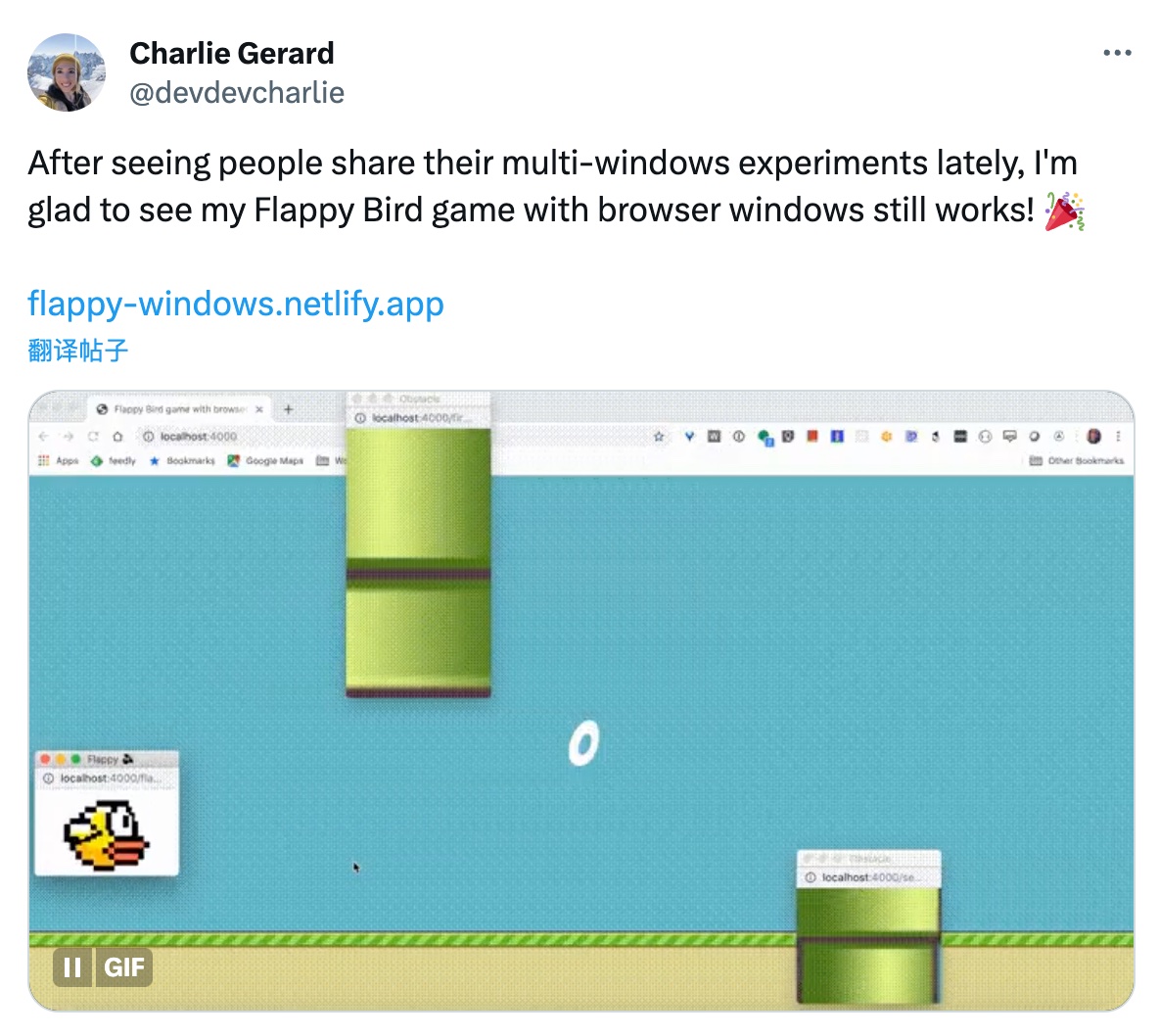
    推荐理由:最近国外一些浏览器跨窗口通信的一些实现效果非常火
    例如

    原推地址
    这个开源项目也是一个类似的实现项目,主要是用 localStorage 通信,可以 clone 看看如何实现的


    英文原文

    今日推荐英文原文:《It’s 2023, Please Stop Using “&&” for Conditional Rendering in React》

    推荐理由:关于 react 的条件渲染,写工程代码时非常实用


    Hey there, React developers! It’s time to step into the future and leave old habits behind.

    We’re in 2023, and there’s a better way to handle conditional rendering in React than using the “&&” operator.

    In this article, I’ll show you a more elegant and expressive approach to conditional rendering that will make your code cleaner and easier to read.

    So, let’s bid farewell to “&&” and embrace a more modern way of conditional rendering in React.

    Let’s get started!

    The Old Way: Conditional Rendering with “&&”:

    In the past, many of us used the “&&” operator to conditionally render components or elements based on a condition.

    For example, we would write code like this:

    function MyComponent({ isLoggedIn }) {  
      return (  
        <div>  
          {isLoggedIn && <p>Welcome back, User!</p>}  
        </div>  
      );  
    }

    This approach works, but it can become ==cumbersome== and less readable when dealing with multiple conditions or more complex rendering logic.

    Luckily, React has evolved, and we now have a more elegant solution.

    The Modern Way: Conditional Rendering with Ternary Operator or Logical OR:

    Instead of relying solely on the “&&” operator, we can leverage the power of the ternary operator or the logical OR (||) operator for conditional rendering.

    Let’s explore both options.

    1. Conditional Rendering with Ternary Operator:

    The ternary operator allows us to write concise conditional expressions, making our code more expressive. Here’s an example:

    function MyComponent({ isLoggedIn }) {  
      return (  
        <div>  
          {isLoggedIn ? <p>Welcome back, User!</p> : null}  
        </div>  
      );  
    }

    In this code, if the “isLoggedIn” prop is true, we render the <p> element with the welcome message. Otherwise, we render null, effectively hiding the element.

    2. Conditional Rendering with Logical OR (||) Operator:

    The logical OR (||) operator provides another approach to conditional rendering.

    It allows us to specify a default value when the condition is false. Here’s an example:

    function MyComponent({ username }) {  
      return (  
        <div>  
          <p>Welcome, {username || "Guest"}!</p>  
        </div>  
      );  
    }

    In this code, if the “username” prop is provided, it will be rendered in the <p> element. If the "username" prop is falsy (e.g., empty string or undefined), the logical OR operator will return the default value of "Guest".

    Benefits of the Modern Approach:

    By using the ternary operator or the logical OR operator, we gain several benefits over the old “&&” approach:

    1. Readability: The code becomes more expressive and easier to understand, especially when dealing with more complex conditions or multiple render options.
    2. Flexibility: With the ternary operator, we can handle both true and false conditions, allowing for more control over the rendering logic.
    3. Default Values: The logical OR operator provides a convenient way to specify default values when the condition is false, reducing the need for additional logic.

    In 2023, it’s time to bid farewell to the old “&&” approach for conditional rendering in React.

    Embrace the modern way by using the ternary operator or the logical OR operator. These approaches offer improved readability, flexibility, and the ability to set default values.

    So, let’s leave the “&&” operator behind and write cleaner, more expressive code.

    Upgrade your React skills and adopt the modern approach to conditional rendering. Happy coding in the future!


    下载开源日报APP:https://opensourcedaily.org/2579/
    加入我们:https://opensourcedaily.org/about/join/
    关注我们:https://opensourcedaily.org/about/love/
1 2 3 … 262
下一页→

Proudly powered by WordPress