• 开源镜像
  • 开源沙龙
  • 媛宝
  • 猿帅
  • 注册
  • 登录
  • 息壤开源生活方式平台
  • 加入我们

开源日报

  • 开源日报第666期:《666 SixClear》

    10 1 月, 2020
    开源日报 每天推荐一个 GitHub 优质开源项目和一篇精选英文科技或编程文章原文,坚持阅读《开源日报》,保持每日学习的好习惯。
    今日推荐开源项目:《666 SixClear》
    今日推荐英文原文:《We’re Killing the Mobile Web》
    今日推荐开源项目:《666 SixClear》传送门:GitHub链接
    推荐理由:难得的 666 期当然要来一个 666 的项目啊。这个项目是一个名字就叫做 666 的六边形消除游戏,把六边形摆到平台上然后三消的玩法看似简单,但是玩到后面没有规划的话总是会被封死……希望这个 666 能够帮助各位新年都变得 666 起来。

    今日推荐英文原文:《We’re Killing the Mobile Web》作者:Danny Moerkerke
    原文链接:https://medium.com/better-programming/were-killing-the-mobile-web-be5c5662c807
    推荐理由:现在的趋势的确是移动端应用占了上风,但是移动端网页的潜力依旧存在

    We’re Killing the Mobile Web

    But we may be able to save it as well

    Has this ever happened to you?

    You’re browsing the web on your mobile phone or tablet and a banner appears on the top of the screen, urging you to install the site’s native app. This is the first time you ever visit this website, and so you decide not to install the app.

    But when you visit the website a few more times, the banner keeps appearing, and after a while, you decide to give their native app a try.

    You go to the store and download it. You open the app and start to use it. But you notice that what the app offers isn’t very different from what you got on the website.

    But the user experience is better. There are no white screens when you go from page to page, and when you open the app, it launches immediately.

    So you decide to use their native app instead of their website, even though it takes up tens of megabytes of storage on your mobile device and you regularly get nagged by endless updates.

    Actually, speed and a better user experience are the main reasons people prefer native apps over mobile websites.

    In fact, users are willing to go through the hassle of installing a native app and giving up storage space on their device just for the convenience and good user experience native apps provide.

    And that’s a shame because the mobile web has strong advantages when it comes to ease of use, size, and discoverability, but this has no value when mobile websites offer a bad user experience.

    The Web Can Do Much Better

    Many native apps can easily be replaced by a well-crafted mobile website and offer the user the exact same, or an even better, user experience.

    But instead, we offer a lousy user experience or no experience at all when we chase them away and tell them to install the native app instead.

    That’s why the two main reasons users prefer native apps over mobile websites are user experience and speed. These are the areas where our mobile websites need to improve if we want to make the web relevant on mobile. Because right now, the mobile web is simply not relevant.

    A whopping 90% of the time people spent on their mobile devices is spent on apps, and a mere 10% is spent on mobile websites. This is in stark contrast to desktop, where web-based applications are a huge success.

    Why are we not able to achieve the same success on mobile? Here are some reasons:

    We’re Actively Chasing Users Away

    The nagging banners that we put on our mobile websites to urge people to download our native app are hurting the mobile web. The message they convey is that this website is not good enough to view on your mobile device and we didn’t even bother to make it better.

    Instead, we want to hog another ~100MB of your phone’s storage to give you the exact same experience we could’ve given you with a mobile website, but we didn’t.
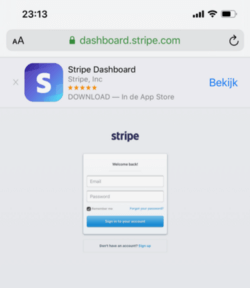
    What’s wrong here?

    It’s not my intention to pick on Stripe in particular, but their native app doesn’t offer any added value compared to their website. Yet the website is practically unusable on mobile devices, starting from the tiny login screen.

    The same is true for the native app of this website, Medium.

    On the mobile Medium website, you’ll see a banner telling you to install the native app. After clicking it away for a couple of months, I finally decided to give the native app a try.

    It’s a 58MB app that basically gives you the same experience as the mobile website. The only added value it brings is that it enables you to write a story, which isn’t possible with the website on a mobile device.

    For some reason, it’s not possible to reply to a comment from the native app. And when the number of claps for a story is, for example, 1,256, it will simply show as 1.2K with no option to see the exact number.

    On top of that, the banner that shows on the mobile website doesn’t go away after you’ve installed the native app.

    Even worse, now a second banner shows up, urging you to open the native app.
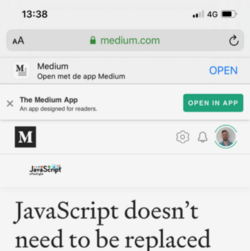
    Really, Medium?

    Responsive Design Should Be Mobile First

    It’s not enough to view your website in the responsive view of your browser’s dev tools and shoehorn it into the smaller screen of a mobile device. This basically reduces it to a dumbed-down version of the desktop website.

    We need to get out of the “desktop first” mindset and start developing for mobile devices first. Our users are increasingly on mobile devices, and many are on mobile devices only.

    A “mobile-first” design will ensure we’ll design for a complete user experience on mobile devices that can then be augmented for desktop. We shouldn’t design for desktop first and then take away features just to fit it on mobile devices.

    This is a subtle yet crucial difference.

    But making sure your website looks good on a small device isn’t enough either. You need to actually experience your web app on a mobile device, and that means testing your app on a real device under real conditions.

    What runs smoothly on your fancy development laptop might not run so smoothly on a cheap Android phone on a 3G connection. Not everybody has the latest iPhone or Samsung phone (in fact, the majority of people don’t).

    Mobile-first means your users get the best user experience possible on a real mobile device under real conditions.

    Too Much JavaScript

    This also means we really need to cut down on the amount of JavaScript we send to our users. In the last decade, the amount of JavaScript we send has increased by about 636% to a median of 385KB gzipped.

    Now, 385KB might not seem like an awful lot, but keep in mind that this unzips to around 2.5MB of JavaScript that needs to be parsed and executed as well. And that takes place on the main thread, which means it’s render-blocking.

    Sending that amount of JavaScript to your users on an average Android phone on an average 3G network just doesn’t cut it. It may take your site tens of seconds or even a minute to reach Time to Interactive, which basically makes it unusable on those devices.

    You can see for yourself how your site performs on mobile devices under real network conditions.

    We Misunderstand “Offline First”

    Designing your web app for “offline first” doesn’t mean that your app should provide the exact same user experience when users are offline.

    It means that your users are increasingly on mobile devices, and mobile devices can have slow and intermittent connections. A native app will just launch and show a default screen with some (stale) content that will be updated as soon as the connection is back.

    Most web apps will leave the user looking at a white screen for a long time or just fail. This is one of the two most important reasons users prefer native apps over web apps: The user experience of web apps is simply not good enough.

    Native apps have the advantage that they don’t need to download their UI or scripts before you can use them. Everything is already installed and the only thing they basically need is data.

    Web apps can now accomplish the same thing by using a Service Worker. When a user visits your website for the first time, the service worker makes sure all assets like HTML, CSS, JavaScript, and images are downloaded and stored on the user’s device. So on subsequent visits, everything needed to launch it is already there. There should be no reason to download these assets again on each visit unless something changed.

    This way, your web app can provide an optimal user experience even when users are offline or on a bad connection.

    We’re Not Using Web Features Enough

    I’ve searched the web many times to find the opening times of a certain nearby store or its nearest location. Most of the time, I have to enter my location or zip code so the website can determine my current position.

    The Geolocation API that can determine my exact position through GPS has been supported since IE9(!), but it’s still sparingly used by websites. These websites also have access to the camera, microphone, and all the sensors of modern smartphones, but they hardly make use of that.

    Native apps, on the other hand, do utilize these features, and it seems people and even developers think websites can’t do that.

    How We Can Save the Mobile Web

    For many websites, the majority of traffic now comes from a mobile device, yet only 10% of the time people spend on mobile devices is spent on the mobile web.

    Native apps are the clear winner here, and online retailers make the most money through native apps. The amount of downloaded native apps is also rising steadily, but there is an important downside here.

    While more apps are downloaded every year, most people download zero new apps per month. Only a few apps are making most of the money with the majority of apps not being downloaded and not making any money at all.

    This is a huge opportunity for web apps.

    Web apps can offer nearly the same user experience as native apps, using only web technology and at a fraction of the cost. Any mobile website can be turned into a Progressive Web App, which means it can behave like a native app, including working offline and being installed on the home screen.

    With only one code base, you’ll be able to provide a mobile website and an app that can be installed on the home screen of your mobile device and on desktop.

    And it doesn’t stop there.

    These Progressive Web Apps can be installed by just visiting the website. There’s no App Store or Google Play Store involved, and your app can simply be discovered through Google. Sharing your app is as simple as sending someone the URL.

    The installed app will only take up a fraction of the size of an average native app and updates happen automatically. Whenever there’s a new version of the app, it will be deployed to the webserver and all installed apps will be updated on the next visit.

    We can do this today.

    But right now, people are willing to go through the inconvenience of having to install a native app and giving up precious storage space, only because the mobile web doesn’t give them the user experience they want.

    The future of the web is mobile, and we need to make sure we offer our users the best user experience possible.

    A Better Mobile Web Starts With Us Developers

    We developers usually have fancy, powerful devices that we test the stuff we build on. We need to realize that this doesn’t reflect reality since most users won’t use our apps on such devices.

    Most people can’t even afford to buy the latest MacBook or iPhone. We need to make sure that our apps give the best user experience possible even on the average devices that most people use.

    Test your apps on real devices under real network conditions. If you don’t have access to physical devices, you can use webpagetest.org to see how your app performs on a whole range of devices.

    Viewing your website in the responsive view in Chrome dev tools is not enough. A website that only adapts its layout to the device it’s viewed on is not enough.

    We need to really adapt our apps so our users get the best user experience possible on all devices and under all circumstances. You can use the Network Information API to get info on the user’s network circumstances and adapt your app as needed.

    Make sure your app works offline and on a bad network by caching static assets that don’t need to be downloaded on every visit. You can do so by adding a Service Worker to your website, which is supported in all modern browsers.

    The web already won on desktop, and now, it’s time to take over mobile as well.
    下载开源日报APP:https://opensourcedaily.org/2579/
    加入我们:https://opensourcedaily.org/about/join/
    关注我们:https://opensourcedaily.org/about/love/

  • 开源日报第665期:《Python精选 Awesome Python》

    9 1 月, 2020
    开源日报 每天推荐一个 GitHub 优质开源项目和一篇精选英文科技或编程文章原文,坚持阅读《开源日报》,保持每日学习的好习惯。
    今日推荐开源项目:《Python精选 Awesome Python》
    今日推荐英文原文:《How to Stay Motivated — When it’s Easier to Stop》

    今日推荐开源项目:《Python精选 Awesome Python》传送门:GitHub链接
    推荐理由:2020,Python 依旧大火。Awesome Python 是一个资源收集库,包含了 Python 的超多的精选资源(还有超长的目录!),如各种算法,Web 框架,深度学习,数据分析,游戏开发,各种实用工具等等,希望能帮到您。
    今日推荐英文原文:《How to Stay Motivated — When it’s Easier to Stop》作者:djemal ua
    原文链接:https://medium.com/wellness-stacks/how-to-stay-motivated-when-its-easier-to-stop-977de711b7f5
    推荐理由:在日复一日的学习工作中如何保持活力

    How to Stay Motivated — When it’s Easier to Stop

    Ever since I was young I’ve had a sweet spot for music. That music love has stayed with me, even when others have long since gone. Music of any kind will move me. Sometimes it’s a dancing move, while a different song will move me emotionally. And there are always those songs that will lift my spirits whatever the state of my mind. It’s a permanent connection that lives within me.

    One such song is Straight Ahead by Kool & the Gang (and still smile at that band name). A snippet of the lyrics go like this:

    • Keep your head above and your heart in love
    • Keep your feelings now
    • Keep moving straight ahead
    • Straight ahead
    Dispersed between pumping disco beats, this an uptempo shoe-shuffler. I’m smiling and doing my best not to fall over while moving to it.

    On a deeper level I like the the happy and positive message it’s trying to get across. Keep my head above the troubled sea of life, and make sure there’s room in your heart for love. Don’t look to the past or the future to be happy, but keep your feelings now. Keep moving forward, just keep moving.

    If I’m looking for motivation to do something I will always find a song that will do that, move me onward. But music is not for everyone so I’ve put down a few ideas that help me keep moving to a loving and purposeful life.

    What rocks your boat?


    I needed to find my go to when I needed a dose of inspiration and motivation. Music helps me but it wasn’t the only thing I rely on. I use these to rock my boat onward on calm windless days.

    “The Way Get Started Is To Quit Talking And Begin Doing.” Walt Disney

    Do a test run


    There’s less pressure in doing something that is not permanent. It needs less motivation and I can start right away with little planning. And starting something is the hardest thing to do when I lack motivation. So I’ll go for a test drive. And anyone who’s been looking for a car knows that once you’re behind the wheel of that shiny new car, the motivation to buy it suddenly appears.

    Get accountability


    Write it down, Write down what you want to do, and how you plan to do it in a simple one-page scribble/doodle. No need for artwork here, I don’t want it to seem so serious, that it needs a computer flowchart diagram. It will be quick and plant the seed for the motivation to grow from.

    “Accountability breeds response-ability.” Stephen R. Covey

    The next step adds the spark to the waiting fire. I tell people about what I want to do and how I want to do it in brief. They don’t need to know the details or I’ll have to get them to sign a non-disclosure agreement! Brief is all it takes to set up a commitment between yourself and others. I am pushed forward by my desire to follow through on what I said I was going to do. This commitment has more to do with me than it is them. I’m not doing it for them (even though they may benefit in some way), I’m doing it to uphold my life values. I want to do what I say. To be honest, reliable, and trustworthy.

    Where’s the fun in it?


    If it’s no fun, it has little chance of motivating me. There needs to be some lights of joy no matter how hard or serious the work. My energy is not infinite, but I’ve found that a sense of humor keeps my batteries charged for longer.

    “The Pessimist Sees Difficulty In Every Opportunity. The Optimist Sees Opportunity In Every Difficulty.” Winston Churchill

    I’m looking to be the clown in the room. I don’t need to make anyone laugh, but I can look on the bright side of what I’m doing. And a smile here and there is the tonic to someone else’s gin.

    Rewards in values, feelings, and experiences


    I don’t need a carrot, a vegetable or diamond kind. What motivates me is to live on purpose. I want to feel like I am giving something back to the world I live in. If I’m helping others that’s more than enough motivation I need to keep moving forwards. If what I’m doing is reducing a bad habit and increasing a good one, then I’m all for it.

    “If you’re looking for immediate rewards, you’re only looking for the money.” Eartha Kitt

    If my rewards add something to my values, feelings, or experiences then I’ll be a better person for it. These are not physical rewards but add a lot more value than physical ones can. I look forward to reviewing my spiritual balance each month, and it’s more important than any bank balance.

    Keep it simple


    I try not mix and match my workload. I’ll focus on one thing at a time, without the need to multitask. I’ve never found trying to do more than one thing at a time productive or successful.

    “Knowing Is Not Enough; We Must Apply. Wishing Is Not Enough; We Must Do.” Johann Wolfgang Von Goethe

    Too much input will hinder my motivation too. I like music, but I will not have it playing in the background while I’m working. The same goes for the environment I’m in. The more noise and distractions there are the less motivated I am to focus on my task. Less is definitely more. A clutter-free quiet working environment is seriously good motivation. So the local coffee shop at any time of day is not coming near me soon.

    Make space for work


    I’ve made the time for work now I need to make space for it. This is two-fold. My space needs to be clean and clutter-free, but I also need to allow enough space in my day to be creative and productive. I could have the minimal office space, with white walls and designer furniture, but if I’m so busy that I rush from one task to another then my motivation will flop like a wet biscuit.

    I will schedule breaks and overestimate the time it will take me to do something. This way I reduce the pressure on the task and free up some down time to let the creative juices ferment.

    Walk forward


    Go for a walk or do some exercise. It helps me get creative and relax. If I’m relaxed I’m thinking straight. There are less reasons to back off finishing my tasks if I’m healthy in mind and body. A quick walk and I’m back fully charged and motivated to carry on.

    Watch and listen to others


    To watch or listen to someone who has experienced something close to what you want to do is great motivation. So I’ll watch a video or listen to a podcast to get me moving. There are so many it can be hard to choose the right one. I’m never one for watching things the minute they’re released so I can rely on the opinions and ratings of others.

    It’s a learning experience and a motivating one. So there’s no need to expand on this one any further. Just don’t waste time scrolling through endless pages trying to make a choice. Pick one and keep moving.

    I’ve listed eight of the motivation tools I use. It’s a personal thing but I do hope one or two will help you as they help me. And rest assured Kool and the Gang is still on my favorites list.

    下载开源日报APP:https://opensourcedaily.org/2579/
    加入我们:https://opensourcedaily.org/about/join/
    关注我们:https://opensourcedaily.org/about/love/
  • 开源日报第664期:《第三方登录的开源库: JustAuth》

    8 1 月, 2020
    开源日报 每天推荐一个 GitHub 优质开源项目和一篇精选英文科技或编程文章原文,坚持阅读《开源日报》,保持每日学习的好习惯。
    今日推荐开源项目:《第三方登录的开源库: JustAuth》
    今日推荐英文原文:《Open Source Office Suites Can Replace Microsoft Office》

    今日推荐开源项目:《第三方登录的开源库: JustAuth》传送门:GitHub链接
    推荐理由:史上最全的整合第三方登录的开源库。目前已支持Github、Gitee、微博、钉钉、百度、Coding、腾讯云开发者平台、OSChina、支付宝、QQ、微信、淘宝、Google、Facebook、抖音、领英、小米、微软、今日头条、Teambition、StackOverflow、Pinterest、人人、华为、企业微信、酷家乐、Gitlab、美团、饿了么和推特等第三方平台的授权登录。 Login, so easy!
    今日推荐英文原文:《Open Source Office Suites Can Replace Microsoft Office》作者:Vinayak Ramachandra Adkoli
    原文链接:https://opensourceforu.com/2020/01/open-source-office-suites-can-replace-microsoft-office/
    推荐理由:OpenOffice Writer的工作方式与Word相同。现在,OpenOffice更加流行,称为Apache OpenOffice,与LibreOffice非常相似,可以成为MS Word甚至其他一些熟悉的MS Office应用程序的有效替代品。

    Apache OpenOffice是一套完全免费的程序。它包括可与MS Word相媲美的文字处理器,可与MS Excel相媲美的电子表格,可与Power Point相媲美的演示软件,可与MS Access相媲美的数据库,甚至还有类似于MS Office中包含的绘图和数学方程式工具。

    Open Source Office Suites Can Replace Microsoft Office

    An office suite is designed to make things easy. It is a bundle of software put together to facilitate the work of an organisation. Open source office suites like OpenOffice and LibreOffice have evolved considerably in recent years, and smaller businesses can benefit by using these free software in place of Microsoft Office.

    A single new office suite can change the way we think about office automation. Inventing it using AI, ML, etc, remains a challenging struggle for a creative programmer. Programmers belonging to the open source community are now using better code to reconstruct the decades-old king of the office – Microsoft Office. This has resulted in the birth of the following new open source office suites:

    • Apache OpenOffice, which is a comprehensive suite for Windows, MacOS and Linux.
    • Open Document Foundation’s LibreOffice, which is a fork of Open Office for Windows, MacOS and Linux.
    • NeoOffice, a Java based branch of OpenOffice for MacOS.
    • Calligra, which runs on Windows, Linux, free Berkeley Software Distribution (BSD) and MacOS.
    Closed and licence based office suites like Microsoft Office and Word Star have somehow ruled the enterprise and personal desktop for several decades.

    Popular open source office suites: OpenOffice and LibreOffice

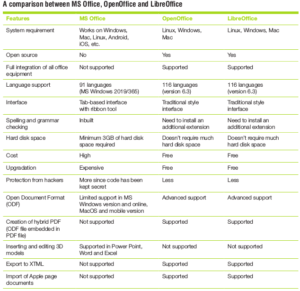
    If you are thinking of purchasing MS Word, remember that it may cost you US$ 100 or perhaps even less to purchase and install it on your computer. OpenOffice Writer works the same way as Word. Now more popularly known as Apache OpenOffice and very similar to LibreOffice, OpenOffice can be an effective alternative to MS Word and even some other familiar MS Office applications.

    Apache OpenOffice is a completely free suite of programs. It includes a word processor comparable to MS Word, a spreadsheet comparable to MS Excel, presentation software comparable to Power Point, a database comparable to MS Access, and even drawing and math equation tools similar to those included in MS Office.

    OpenOffice currently doesn’t have all of the advanced features that MS Office offers. It can, in fact, read and write documents created with MS Office. This means that you can happily exchange documents with people who use MS Office.

    The documents created by OpenOffice may look different when opened in MS Office. The programs are compatible with each other in that they can both read and write the same file formats, but in practice, they are not identical. Minor and occasionally major reformatting is required while exchanging documents between the two. If this minor inconvenience matters, OpenOffice may not be the best choice for you. OpenOffice is available for Microsoft, Mac and Linux. It looks exactly the same no matter what platform you use. OpenOffice is completely free. Just download, install and use it.

    LibreOffice is a separate version of OpenOffice. These two office assistants are still very similar and LibreOffice includes OpenOffice Basic. However, Apache OpenOffice may not be able to keep up with the speed of development in LibreOffice.

    There are many reasons why LibreOffice can win. First of all, it has many more programmers working on it and comes with better community support. Second, LibreOffice’s choice of open source licence gives it an advantage. Third, LibreOffice has a better marketing strategy. This includes faster development, better distribution, a light website and a greater focus on meeting the customer’s needs.

    LibreOffice is becoming more customer focused. It is trying to look sleek and professional, attracting users by providing a more polished product. The code of both OpenOffice and LibreOffice is smaller, less buggy and crash-resistant. Besides, LibreOffice has added features. For example, if one wants to create an Adobe PDF-like file, this is possible in LibreOffice but not in OpenOffice. The performance of LibreOffice on Microsoft and Apple file formats has improved considerably, and Windows-specific improvements such as the ability to work with Microsoft’s Active Directory have been introduced.

    MS Office versus open source office suites

    MS Office is still more powerful and easier to use. It has also more applications and is compatible with the vast majority of Word documents. Today, MS Office 365 is an ecosystem that includes online versions, a terabyte of online storage, and touch-oriented apps for Windows phones, Google Android, and Apple iPads and iPhones. OpenOffice and LibreOffice don’t have a vast number of programs, nor the cloud infrastructure or money to compete with MS Office.

    OpenOffice offers a language-independent application programming interface (API) which allows users to program the software in different programming languages (e.g., C++, Java, Python, the command line interface (CLI), OpenOffice Basic, JavaScript, object linking and embedding (OLE), etc). The popularity of the standardised Open Document format for office applications is growing. Corporate users often demand the integration of office productivity with existing workflows and applications. They also often require additional functionality and the special customisations of existing features. That is one of the main goals of OpenOffice. Small businesses don’t have the budgets for enterprise applications. So, in such cases, open source can provide free options. These businesses can replace MS Office in a full-blown ERP system.


    Presently, Windows has the highest share in the PC market, followed by Apple’s MacOS. Linux and other open source OSs have only a tiny market share. Even if one wants to stick to closed source OSs (MacOS is partially closed source), the business can still take advantage of a vast amount of open source software. The use of an open source alternative can provide good financial benefits. Open source suites are compatible with MS Office file formats such as .doc and .xls.

    LibreOffice is doing well in Europe, South East Asia, North and South America. it is experiencing massive growth even in countries like India, Japan and Taiwan. Still, there are two regions that remain a challenge for LibreOffice. These are China (mainly due to language barriers and the lack of information flow in and out of the country) and Africa (mainly due to economic conditions).The downside for LibreOffice is that since volunteers work on it in their free time, it can’t evolve as fast as a product developed by a private company with dedicated development teams. Still, it manages to release improved versions every six months.

    The future of LibreOffice

    The future belongs to the cloud and mobile. So one of the most recent releases of LibreOffice is LibreOffice Online. Creating this was more challenging than people think. LibreOffice is a massive and complex piece of software, and the code has to be considerably reduced to its essentials to run on the cloud.

    Once LibreOffice acquired group editing capabilities, the community started reducing its essential features to reduce the code base to run easily on a server. Google Docs and Office 365 are already running successfully on the cloud as online versions. Looking at these products, the LibreOffice community team brought in lots of modifications and improvements. One needs a file synchronisation and storage solution to manage documents. LibreOffice currently works with Netcloud, Seafile, Pydio and other such services for its online version.

    The mobile version is more complicated than the cloud one. One has to further reduce everything down to a very small code base that can run on mobile devices without hungrily eating into the battery and system resources. Presently, the LibreOffice View app is available to view documents on mobiles. The full-fledged LibreOffice mobile app is still a work in progress.

    Interoperability is the big challenge for LibreOffice. Despite the creation of ODF (Open Document Format) as an ISO standard for documents, Microsoft has worked on its own standard, which is called Office Open XML (OOXML), and has got it approved as an ISO standard in a controversial manner. This has resulted in interoperability challenges, as a result of which most people end up going back to MS Office and OOXML. As far as individuals are concerned, the best advice is to create documents and store them in ODF format.

    The right way to switch from MS Office to LibreOffice is through migration. Recently, Italy’s Ministry of Defence migrated some 25,000 to 30,000 desktops to LibreOffice from Microsoft Office. It executed a different plan for each of its combat units (Air Force, Army and Navy). Now, its document management software is compatible with both LibreOffice and MS Office.

    LibreOffice has come a long way in the past seven years. It is now a very mature and stable project. MS Office isn’t available for Linux and has been a second class citizen on MacOS for a very long time. For someone who jumps between MacOS, Windows and Linux, LibreOffice is the only choice. As far as Ubuntu tablets are considered, LibreOffice works great on them.

    LibreOffice is now a very mature and stable project. This powerful and free office suite is used by millions of people around the world. Its clean interface and feature-rich tools help to unleash creativity and enhance productivity.


    下载开源日报APP:https://opensourcedaily.org/2579/
    加入我们:https://opensourcedaily.org/about/join/
    关注我们:https://opensourcedaily.org/about/love/
  • 开源日报第663期:《或者是另一个 30-Days-Of-Python》

    7 1 月, 2020
    开源日报 每天推荐一个 GitHub 优质开源项目和一篇精选英文科技或编程文章原文,坚持阅读《开源日报》,保持每日学习的好习惯。
    今日推荐开源项目:《或者是另一个 30-Days-Of-Python》
    今日推荐英文原文:《Mastering JS console.log like a Pro》

    今日推荐开源项目:《或者是另一个 30-Days-Of-Python》传送门:GitHub链接
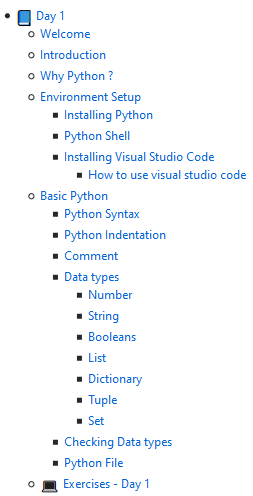
    推荐理由:网络上教程多如繁星,好好思考一下总会找到一个你感兴趣的点。这个项目是 Python 的三十天挑战,说到 Python 自然会想到它能用在机器学习方面,比起大多数人起步的 C 语言来说,Python 的语法限制相对较少,在用作脚本或者后台方面都能一展身手,而这个教程同样从配环境和语法等开始起步,即使是初学者也不需要担心太多。

    今日推荐英文原文:《Mastering JS console.log like a Pro》作者:Harsh Makadia
    原文链接:https://medium.com/javascript-in-plain-english/mastering-js-console-log-like-a-pro-1c634e6393f9
    推荐理由:这玩意的确很适合当 print 使,但是除此之外它还能做到更多

    Mastering JS console.log like a Pro

    Still, using only console.log( ) to debug? Well, there’s a lot more.

    Printing messages in the browser console have definitely come to rescue to all the developers out there. console.log( ) messages are like medicines for most of your diseases while debugging some wired problems in your code.

    Most of the devs out there are like — Let’s print the message in the browser to know more about this issue. I’m sure that I’m not the only one doing this. ?
    Debugging is like being the detective in a crime movie where you’re also the murderer — Filipe Fortes ?
    Apart from the most commonly used console.log( ) message to print the message in the browser there are plenty of different ways to make your debugging process a lot easier. Let’s take a look at them one by one with examples.

    console.log( ) | info( ) | debug( ) | warn( ) | error( )

    These will directly print the raw string with appropriate color based on the type of event that is provided to them.

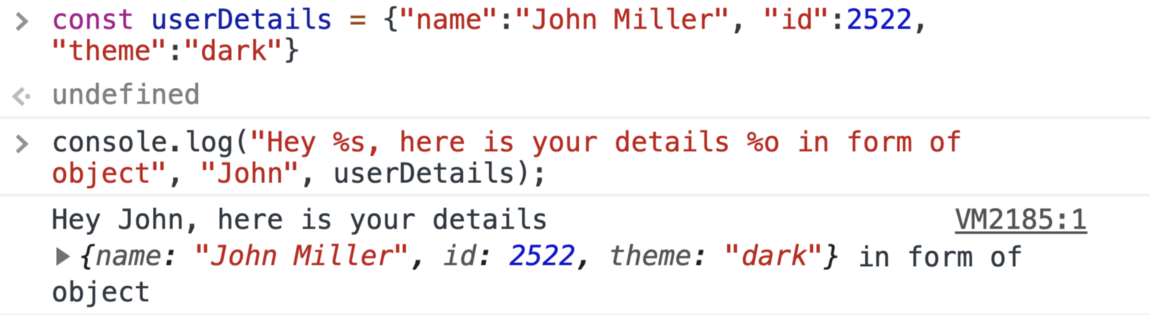
    Use placeholders

    There are different placeholders that can be used as listed below
    %o — which takes an object,
    %s — which takes a string, and
    %d — which is for a decimal or integer

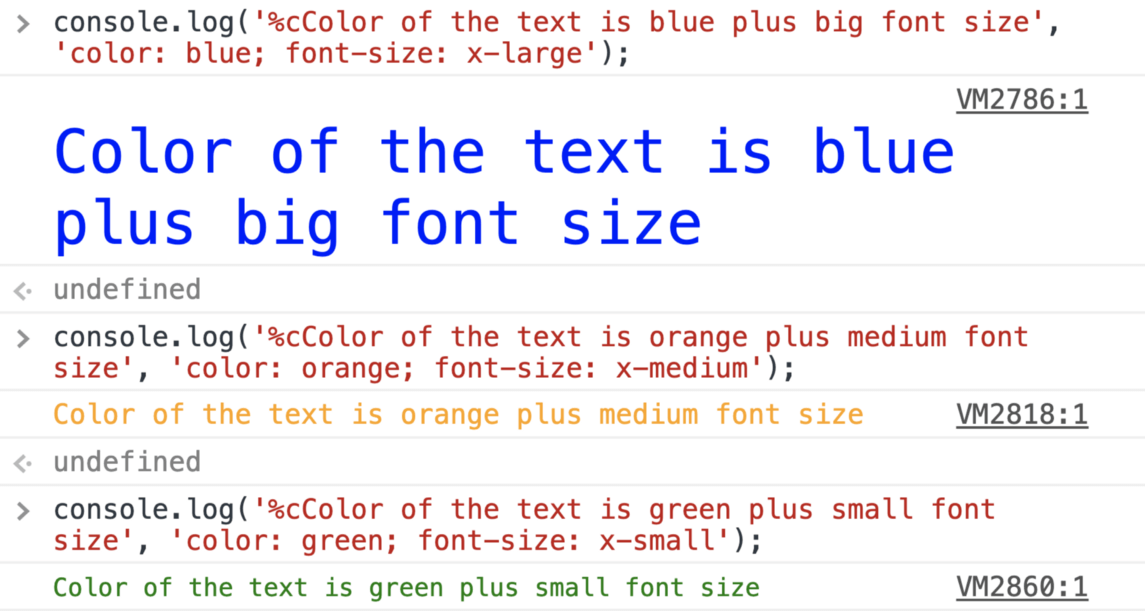
    Add CSS to console messages

    Do all of your console messages look the same? well, it won’t be the same from now on, make your logs look more catchy for what matters the most to you.

    What to color only a specific word from the log message? Here you go ?

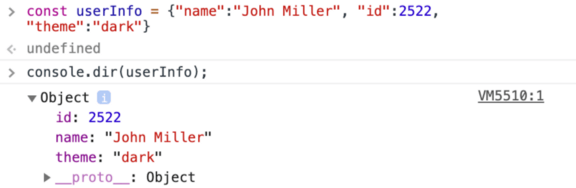
    console.dir( )

    Prints a JSON representation of the specified object.

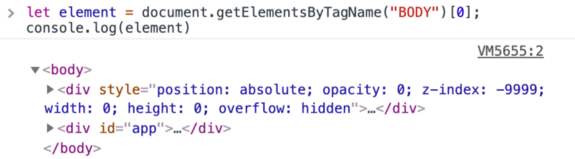
    HTML elements in console

    Get the HTML elements in the console just like inspecting elements

    console.table ( )

    Want to view JSON in a proper and easily understandable way?

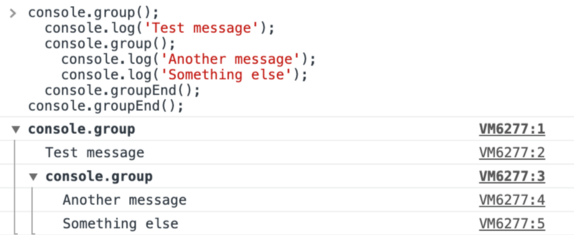
    console.group( ) & console.groupEnd( )

    It is quite possible to group the messages with the console

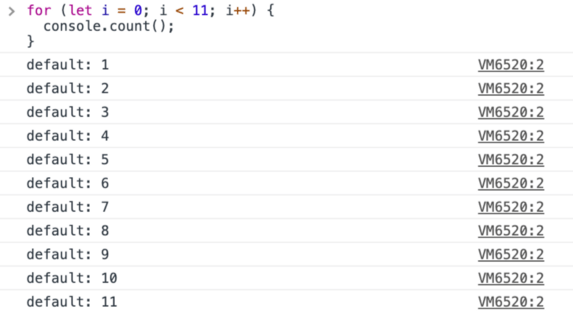
    console.count( )

    This function logs the number of times that this particular call to count() has been called. This function takes an optional argument label.

    If label is supplied, this function logs the number of times count() has been called with that particular label.

    If label is omitted, the function logs the number of times count() has been called at this particular line.

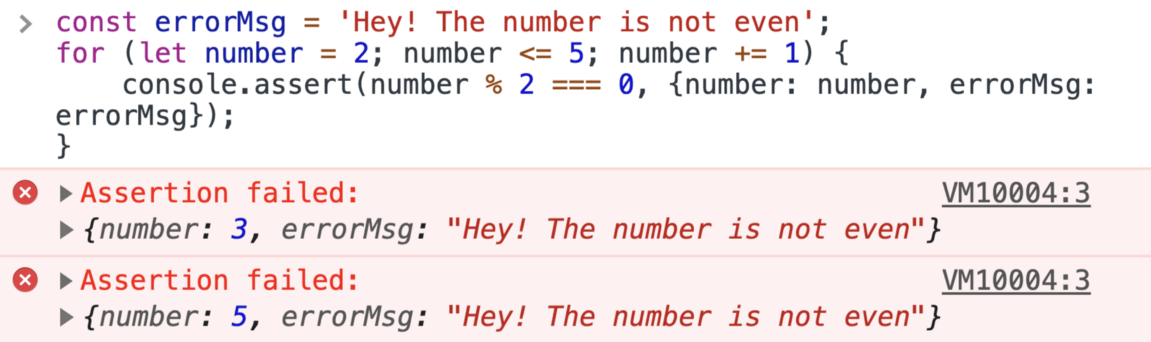
    console.assert( )

    This comes quite handy when you only want to print some selected logs i.e. it will only print the false argument. It does nothing at all if the first argument is true.

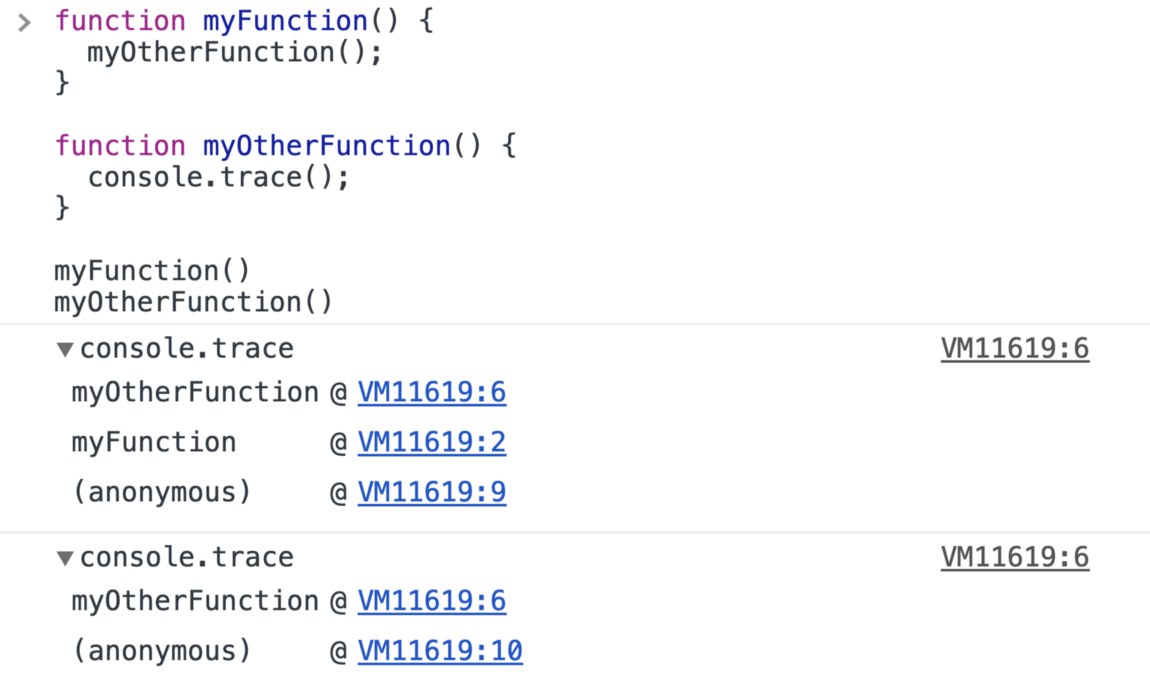
    console.trace( )

    This method displays a trace that shows how the code ended up at a certain point.

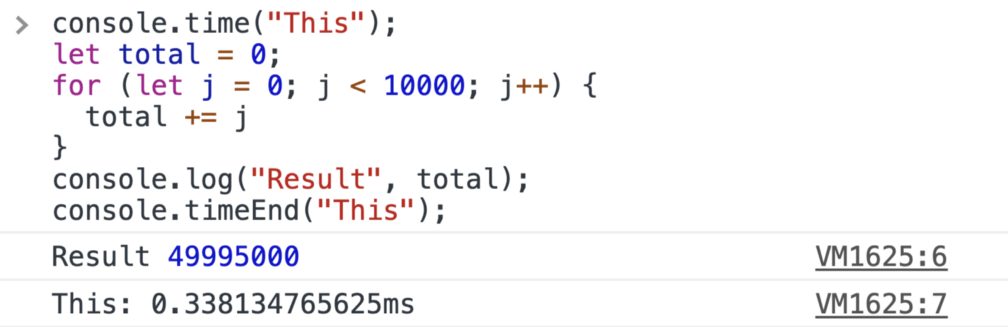
    console.time( )

    A dedicated function for tracking the time taken for actions, console.time() is a better way to track the microtime taken for JavaScript executions.

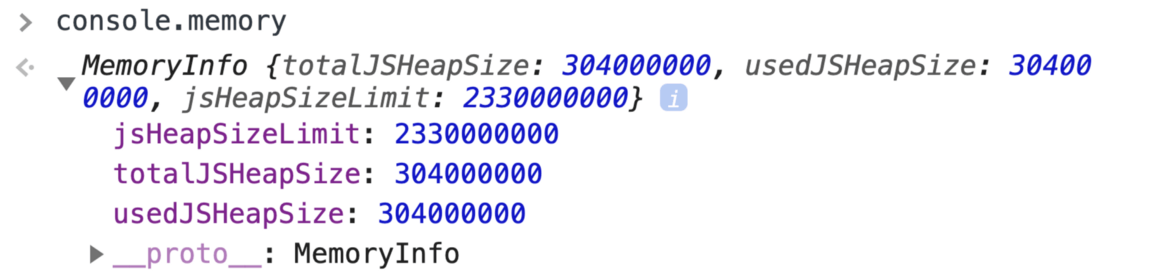
    console.memory( )

    Wondering how our JavaScript applications are using browser memory?

    console.clear( )

    This one is the last but not the least ?, To clear all the above console messages which you’ve learned, It’s time to destroy them with clear() command

    Here is the gist for all above snippets
    Link — https://gist.github.com/Harshmakadia/fc25e56cb8f49145f4c9b3528f04215f
    // time and time end
    console.time("This");
    let total = 0;
    for (let j = 0; j < 10000; j++) {
      total += j
    }
    console.log("Result", total);
    console.timeEnd("This");
    
    // Memory
    console.memory()
    
    // Assertion
    const errorMsg = 'Hey! The number is not even';
    for (let number = 2; number <= 5; number += 1) {
        console.assert(number % 2 === 0, {number: number, errorMsg: errorMsg});
    }
    
    // Count
    for (let i = 0; i < 11; i++) {
      console.count();
    }
    
    // group & groupEnd
    console.group();
      console.log('Test message');
      console.group();
        console.log('Another message');
        console.log('Something else');
      console.groupEnd();
    console.groupEnd();
    
    
    // Table
    const items = [
      {
        name: "chair",
        inventory: 5,
        unitPrice: 45.99
      },
      {
        name: "table",
        inventory: 10,
        unitPrice: 123.75
      },
      {
        name: "sofa",
        inventory: 2,
        unitPrice: 399.50
      }
    ];
    console.table(items)
    
    // Clear
    console.clear()
    
    // HTML Element
    let element = document.getElementsByTagName("BODY")[0];
    console.log(element)
    
    // Dir
    const userInfo = {"name":"John Miller", "id":2522, "theme":"dark"}
    console.dir(userInfo);
    
    // Color
    console.log('%cColor of the text is green plus small font size', 'color: green; font-size: x-small');
    
    // pass object, variable
    const userDetails = {"name":"John Miller", "id":2522, "theme":"dark"}
    console.log("Hey %s, here is your details %o in form of object", "John", userDetails);
    
    // Default 
    console.log('console.log');
    console.info('console.info');
    console.debug('console.debug');
    console.warn('console.warn');
    console.error('console.error');
    

    下载开源日报APP:https://opensourcedaily.org/2579/
    加入我们:https://opensourcedaily.org/about/join/
    关注我们:https://opensourcedaily.org/about/love/

←上一页
1 … 92 93 94 95 96 … 262
下一页→

Proudly powered by WordPress