• 开源镜像
  • 开源沙龙
  • 媛宝
  • 猿帅
  • 注册
  • 登录
  • 息壤开源生活方式平台
  • 加入我们

开源日报

  • 开源日报第1006期:《AmericaOpposeAmerica》

    13 1 月, 2021
    开源日报 每天推荐一个 GitHub 优质开源项目和一篇精选英文科技或编程文章原文,坚持阅读《开源日报》,保持每日学习的好习惯。
    今日推荐开源项目:《AmericaOpposeAmerica》
    今日推荐英文原文:《Fall in Love With Single-Div Illustrations》

    今日推荐开源项目:《AmericaOpposeAmerica》传送门:项目链接
    推荐理由:一本很老的书,靠着 OCR(机器与人力)还原了。讲的是关于美国具有两种相对力量的有关话题,所以用了美国反对美国这个看似很不合逻辑的名字。
    今日推荐英文原文:《Fall in Love With Single-Div Illustrations》作者:Albert Walicki
    原文链接:https://medium.com/better-programming/fall-in-love-with-single-div-illustrations-674ddeb51c62
    推荐理由:如何使用一个 div 元素进行绘画

    Fall in Love With Single-Div Illustrations

    I’ve always admired people who create single-div illustrations in CSS. One div, multiple background layers, tons of CSS code, and boom! You have an illustration. I always thought that it must be challenging and I could never create such a thing. I was wrong.

    To create a simple image, you only need to know one thing: how backgrounds work in CSS. That’s it. You don’t have to use CSS variables. They help to maintain clean code. It’s much easier to read those images with variables, but it’s not required.

    Simplest Illustration

    Let’s start with something straightforward. If you understand this example, you will be ready to go:
    //HTML
    <div></div>
    
    
    //CSS
    div {
      width: 100px;
      height: 100px;
      background: linear-gradient(#9B59B6, #9B59B6);
      background-position: 0px 0px;
      background-size: 100px 100px;
      background-repeat: no-repeat;
    }
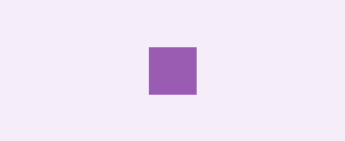
    
    CSS and HTML for the first example

    Our first single-div image!

    OK, what we have here? A 100x100px rectangle with a linear-gradient starting and ending with the same colour. Our first background has also defined background-position: 0px 0px; on the X-axis and 0px on the Y-axis. This means that our background starts on the top left corner. Then we have background-size: 100px 100px;, which obviously defines the size of our purple colour. And the last one, background-repeat: no-repeat;, is to prevent replying to our layers.

    Conclusion:
    • Our div is the solid #9B59B6 colour because we start and end the gradient with the same colour.
    • It is 100x100px.
    Great, let’s move on and add one more layer:
    //HTML
    <div></div>
    
    //CSS
    div {
      width: 100px;
      height: 100px;
      background: linear-gradient(#fff, #fff), linear-gradient(#9B59B6, #9B59B6);
      background-position: 35px 35px, 0px 0px;
      background-size: 30px 30px, 100px 100px;
      background-repeat: no-repeat;
    }
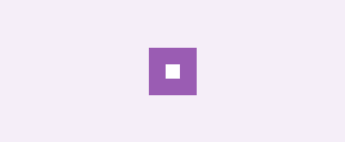
    
    CSS and HTML for the first example with an additional layer

    First example with an additional layer

    And that’s it! We have two linear-gradient layers on each other. Pay attention to the layer order! Earlier layers are on top of the others. Think about it as a z-index.

    I don’t like having properties broken into pieces, so let’s clean up a bit:
    div {
      width: 100px;
      height: 100px;
      background: 
        linear-gradient(#fff, #fff) 35px 35px / 30px 30px,
        linear-gradient(#9B59B6, #9B59B6) 0px 0px / 100px 100px;
      background-repeat: no-repeat;
    }
    
    Background shorthands

    The forward slash separates background-position values and background-size values. The formal syntax requires the slash.
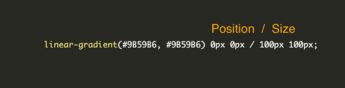
    Linear gradient position and size

    If we have more background layers, things might be a little bit messy. You probably won’t remember if line 31 of the background goes for a window or maybe a fence.

    This is much cleaner!
    div {
      --white-square: linear-gradient(#fff, #fff) 35px 35px / 30px 30px;
      --purple-square: linear-gradient(#9B59B6, #9B59B6) 0px 0px / 100px 100px;
      width: 100px;
      height: 100px;
      background: 
        var(--white-square),
        var(--purple-square);
      background-repeat: no-repeat;
    }
    
    The previous example with CSS variables

    Small House

    You already know enough to create illustrations. To warm up before the final exercise, let’s make a small house.

    We need a few layers:
    • Front of the house
    • Door
    • Left part of the roof
    • Right part of the roof
    • Window 1 and Window 2
    //HTML
    <div></div>
    
    //CSS
    
    div {
      --roof-one: linear-gradient(15deg,#9c7842 12%,transparent 12.5%) 50px -10px / 380px 30px;
      --roof-two: linear-gradient(-15deg,#9c7842 12%,transparent 12.5%) -330px -10px / 380px 30px;
      --window-one: linear-gradient(#fff, #fff) 20px 40px / 10px 10px;
      --window-two: linear-gradient(#fff, #fff) 70px 40px / 10px 10px;
      --house-door:  linear-gradient(#635327, #635327) 40px 40px / 20px 30px;
      --house-front: linear-gradient(#cc943f,#cc943f) 0px 20px / 100px 50px;
      width: 100px;
      height: 70px;
      background: 
        var(--window-one),
        var(--window-two),
        var(--roof-one),
        var(--roof-two),
        var(--house-door),
        var(--house-front);
      background-repeat: no-repeat;
    }
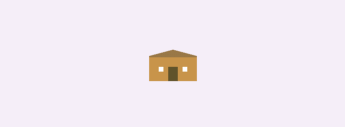
    
    HTML and CSS for single-div house

    Single-div house

    You can play with this house here on CodePen.

    Triangles

    The most challenging part of this house is to create triangles. Let’s split this code into pieces.

    Let’s work on this example:
    //HTML
    <div></div>
    
    //CSS
    
    div {
      width: 100px;
      height: 100px;
      background: linear-gradient(0deg,#9c7842 50%, red 50%) 0px 0px / 100px 100px;
      background-repeat: no-repeat;
    }
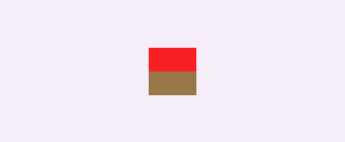
    

    Linear-gradient with 50%/50% red and brown colours

    Our goal is to create a triangle for our roof. Currently, our gradient has a zero-degree angle, so let’s change it. I would like to have a small roof slope angle, so I changed it to 12 degrees:
    //HTML
    <div></div>
    
    //CSS
    
    div {
      width: 100px;
      height: 100px;
      background: linear-gradient(12deg,#9c7842 50%, red 50%) 0px 0px / 100px 100px;
      background-repeat: no-repeat;
    }
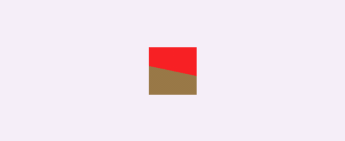
    

    Linear-gradient with 50%/50% red and brown colours and 12-degree angle

    I think you know what you should do now. Let’s decrease the percentage of the gradient. I changed it to 19 degrees to have a perfect starting point on the right side:
    //HTML
    <div></div>
    
    //CSS
    div {
      width: 100px;
      height: 100px;
      background: linear-gradient(12deg,#9c7842 19%,red 19%) 0px 0px / 100px 100px;
      background-repeat: no-repeat;
    }
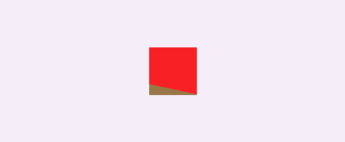
    

    Triangle almost done

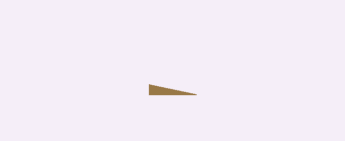
    Lastly, we need to replace the red background with a transparent one:
    //HTML
    <div></div>
    
    //CSS
    
    div {
      width: 100px;
      height: 100px;
      background: linear-gradient(12deg,#9c7842 19%,red 19%) 0px 0px / 100px 100px;
      background-repeat: no-repeat;
    }
    
    HTML and CSS

    Our roof element

    And here we have a nice roof with a right angle.
    下载开源日报APP:https://opensourcedaily.org/2579/
    https://opensourcedaily.org/wp-admin/edit.php加入我们:https://opensourcedaily.org/about/join/
    关注我们:https://opensourcedaily.org/about/love/

  • 开源日报第1005期:《Edge扩展 osc-edge-extension》

    12 1 月, 2021
    开源日报 每天推荐一个 GitHub 优质开源项目和一篇精选英文科技或编程文章原文,坚持阅读《开源日报》,保持每日学习的好习惯。
    今日推荐开源项目:《Edge扩展 osc-edge-extension》
    今日推荐英文原文:《Are Your Virtual Events Accessible to All?》

    今日推荐开源项目:《Edge扩展 osc-edge-extension》传送门:项目链接
    推荐理由:该项目是开源中国 (oschina.net) 的 Microsoft Edge 浏览器插件,聚合开源中国每日最新资讯、推荐精品专区文章、最新收录开源软件等优质内容。
    今日推荐英文原文:《Are Your Virtual Events Accessible to All?》作者:Vijay S Paul
    原文链接:https://medium.com/better-marketing/are-your-virtual-events-accessible-to-all-c48b3390f9b5
    推荐理由:“卡了”、“听不清”、“没画面”、“进不去”,上网课时这样的信息似乎再正常不过,同时也说明网络上的沟通还有很多障碍。如何有效地向目标群众传达准确的信息,作者在文中给出了一些建议。

    Are Your Virtual Events Accessible to All?

    How to make sure you’re being inclusive in the digital space

    A few weeks back I was attending a Zoom webinar. The speaker had a few slides that were absolutely illegible. As in bright-pink-text-on-white-background illegible.

    While virtual events have made knowledge sharing more accessible for people across the globe, this does bring about new barriers. How many of us have even considered whether all these virtual events are accessible to people with disabilities? Or what are the various concerns these people might face?

    In the last nine months, I have been part of 200+ virtual meetings/webinars. Based on this experience, and my limited knowledge about accessibility, here’s a virtual event accessibility checklist.

    Before the Event

    Promotions

    • Ensure that the event website, posters, banners, etc have the same information in text format too. People who use screen readers will not be able to access the information in the posters otherwise. Also, ensure that your website has a proper strategy to follow these guidelines.
    • For social media promotions, ensure that you adhere to the platform’s accessibility guidelines. Some of these links are given below in the “Resources” section.

    Registrations

    • Check the accessibility of your whole registration process. Is it possible to complete the whole process using a screen reader? Are decisions based on text-based options (Yes/No) or are they inaccessible as colour based options (Red/Green)?
    • Make sure proper alt-text is available whenever images/buttons are used.
    • Ask registrants to let you know about any special accessibility needs they might have.

    Technology

    • Check the accessibility of the virtual platform. Can people with hearing, motor, or vision disabilities use the platform? Is there live captioning available?
    • How easily accessible is the virtual platform? For example, Zoom and Webex do not necessarily require an installed software to function. They can be used via the browser, which makes it easier.
    • While not exactly technology specific, it is important to request sign language interpreters for your event, if needed.

    For Speakers

    • As an organizer, prepare a virtual event accessibility checklist for the speakers to help them prepare for their session. Some pointers to include:
    • Try to make the presentations not too dependent on visuals. This allows people with vision disabilities or the ones accessing the event through the phone to have a better experience.
    • Ensure the main copy is at least 18px.
    • Avoid using fancy fonts that are difficult to read.
    • Use proper colour contrast. Have a foreground and the background contrast ratio of at least 7:1. Test your contrast with the WebAIM Contrast Checker.
    • Make the document or presentation more accessible — Google Docs has a good resource on this.
    • Present slides with automatic captions — to display the speaker’s words, if presenting through Google Slides.
    • Use plain and simple language. Hemingway App would prove helpful.
    • Use the Alt Decision Tree to understand how to use alt-text better.
    • Speak to the lowest common audience. Do not assume that all your audience knows everything that you are talking about.
    • Stray away from acronyms unless they are prominent in your field.
    • Ask the speakers if they will have their camera on. This enables people who are lip readers to follow what is being said.
    • If speakers are using a virtual background, ensure there is ample contrast. This makes their face more visible and further helps the lip readers.

    During the Event

    • Ensure the platform’s accessibility features are working.
    • Ask every person to identify themselves before speaking. This helps people relying on their auditory senses to differentiate between speakers.
    • Share information through multiple channels to the participants about if and when the event recordings will be shared.
    • Let the participants know if live captioning is available.
    • Ask the speaker/moderator to describe any images used in their session.
    • Repeat verbal questions in written format (when possible) and vice versa.

    After the Event

    • For event recordings, ensure that the videos have captioning enabled. Do not always rely on live captioning as it isn’t perfect.
    • Make transcripts of the sessions also available.
    • Ensure that all event content is available on an accessible platform. For example, if the content is behind a separate paywall or login, that platform/process should also be accessible.
    • Ask for feedback from your audience. They will almost always provide the perfect answer to what could have been done better.

    Few Resources To Help You Out

    Apart from the virtual event accessibility checklist given above, here are a few resources you might find useful.

    • Web Content Accessibility Guidelines (WCAG)
    • A11Y Project Accessibility Checklist
    • Zoom Accessibility Features
    • Webex Accessibility Features
    • Facebook Accessibility Page
    • Twitter — How to make images accessible
    Thanks to Forum One and Internet Society for helping with additional ideas and resources.
    下载开源日报APP:https://opensourcedaily.org/2579/
    加入我们:https://opensourcedaily.org/about/join/
    关注我们:https://opensourcedaily.org/about/love/

  • 开源日报第1004期:《public-apis》

    11 1 月, 2021
    开源日报 每天推荐一个 GitHub 优质开源项目和一篇精选英文科技或编程文章原文,坚持阅读《开源日报》,保持每日学习的好习惯。
    今日推荐开源项目:《public-apis》
    今日推荐英文原文:《US records more than 4,000 COVID-19 deaths in one day for first time》

    今日推荐开源项目:《public-apis》传送门:项目链接
    推荐理由:PublicApis:公共API目录大全是一个通过MaShape市场整合的世界上最全的API接口目录,支持关键词搜索和添加API数据,方便开发者快速的找到自己想要的API,目已经收录5321种API接口。
    今日推荐英文原文:《US records more than 4,000 COVID-19 deaths in one day for first time》作者:Sean Keane
    原文链接:https://www.cnet.com/health/us-records-more-than-4000-covid-19-deaths-in-one-day-for-first-time/
    推荐理由:美国周四单日死于COVID-19的人数超过4000人。据《纽约时报》报道,至少有4111人死亡,每日冠状病毒病例也创下新纪录,新感染28028人。

    US records more than 4,000 COVID-19 deaths in one day for first time

    The US on Thursday recorded more than 4,000 deaths from COVID-19 in a single day for the first time. There are at least 4,111 deaths, and daily coronavirus cases hit a new record as well, with 280,028 new infections, The New York Times reported.
    It comes as the long-awaited COVID-19 vaccine rollout suffers delays. “I think it would be fair to just observe what happens in the next couple of weeks,” Dr. Anthony Fauci, head of the National Institute of Allergy and Infectious Diseases at the National Institutes of Health, told NPR on Thursday. “If we don’t catch up on what the original goal was, then we really need to make some changes about what we’re doing.”
    On Friday, Food and Drug Administration Commissioner Stephen Hahn told reporters he wants states to start being “more expansive in who they can give the vaccine to,” according to CNBC. The Centers for Disease Control and Prevention recommended prioritizing health-care workers and nursing homes, but Hahn noted that a wider distribution should be driven by “data and science.”
    下载开源日报APP:https://opensourcedaily.org/2579/
    加入我们:https://opensourcedaily.org/about/join/
    关注我们:https://opensourcedaily.org/about/love/

  • 开源日报第1003期:《打字 ityped》

    10 1 月, 2021
    开源日报 每天推荐一个 GitHub 优质开源项目和一篇精选英文科技或编程文章原文,坚持阅读《开源日报》,保持每日学习的好习惯。
    今日推荐开源项目:《打字 ityped》
    今日推荐英文原文:《Please Don’t Say Just Hello In Chat》

    今日推荐开源项目:《打字 ityped》传送门:项目链接
    推荐理由:在网站首页里经常会用到打字机效果动画,这玩意能令简单的文字也能拥有吸引视线的效果。这个项目则将这一类型的动画整合成一个 JS 库,可以通过元素选择器直接生效而不需要关注太多实现细节,支持对延时,循环,光标与完成后回调等各种参数的调整。
    今日推荐英文原文:《Please Don’t Say Just Hello In Chat》
    原文链接:www.nohello.com
    推荐理由:直入主题而不要在打招呼上浪费时间

    Please Don’t Say Just Hello In Chat

    2010-07-19 12:32:12 you: Hi
    2010-07-19 12:32:15 co-worker: Hello.
    ## CO-WORKER WAITS WHILE YOU PHRASE YOUR QUESTION
    2010-07-19 12:34:01 you: I'm working on [something] and I'm trying to do [etc...]
    2010-07-19 12:35:21 co-worker: Oh, that's [answer...]
    
    It’s as if you called someone on the phone and said “Hi!” and then put them on hold!

    Please do this instead:
    2010-07-19 12:32:12 you: Hi -- I'm working on [something] and I'm trying to do [etc...]
    2010-07-19 12:33:32 co-worker: [answers question]v
    
    Note that you get help minutes sooner, and you don’t make them wait. Instead, the co-worker can start thinking about your question right away!

    You’re trying to be polite by not jumping right into the request, like you would do in person or on the phone. But Chat is neither of those things. Typing is much slower than talking. Instead of being polite, you are just making the other person wait for you to phrase your question, which is lost productivity.

    The same goes for “Hello — Are you there?”, “Hi Bob — quick question.”, “Do you have a sec ?”, “yt?” and “ping”. Just ask the question!

    If you feel it’s brusque to simply say “Hi” and ask the question, you can do something like this:
    2010-07-19 12:32:12 you: Hi -- if you're not busy I was wondering if I could ask a question.  I'm working on [something] and I'm trying to do [etc...]
    
    Additionally, asking your question before getting a reply allows asynchronous communication. If the other party is away, and you leave before they come back, they can still answer your question, instead of just staring at a “Hello” and wondering what they missed.
    下载开源日报APP:https://opensourcedaily.org/2579/
    加入我们:https://opensourcedaily.org/about/join/
    关注我们:https://opensourcedaily.org/about/love/
    v
←上一页
1 … 7 8 9 10 11 … 262
下一页→

Proudly powered by WordPress