• 开源镜像
  • 开源沙龙
  • 媛宝
  • 猿帅
  • 注册
  • 登录
  • 息壤开源生活方式平台
  • 加入我们

开源日报

  • 开源日报第694期:《自动驾驶模拟器 CARLA》

    21 2 月, 2020
    开源日报 每天推荐一个 GitHub 优质开源项目和一篇精选英文科技或编程文章原文,坚持阅读《开源日报》,保持每日学习的好习惯。
    今日推荐开源项目:《自动驾驶模拟器 CARLA》
    今日推荐英文原文:《Building a community of practice in 5 steps》

    今日推荐开源项目:《自动驾驶模拟器 CARLA》传送门:GitHub链接
    推荐理由: CARLA 是自主驾驶研究的开源模拟器,已经从基层发展到支持自动驾驶系统的开发、培训和验证。除了开源代码和协议外, CARLA 还提供为此创建的开放的数字资产(城市布局、建筑、交通工具),可以自由使用。仿真平台支持传感器套件和环境条件的灵活规范。
    今日推荐英文原文:《Building a community of practice in 5 steps》作者:Tracy Buckner
    原文链接:https://opensource.com/article/20/2/building-community-practice-5-steps
    推荐理由:一个有活力的实践社区能够让团体,尤其是开源组织时刻保持创造力,能够让每个人乐于投入其中。本文介绍了如何组建一个实践社区的方法。

    Building a community of practice in 5 steps

    A community of practice can kickstart innovation in your organization. Here’s how to build one—and ensure it thrives.

    (Image by : Opensource.com)
    In the first part of this series, we defined community as a fundamental principle in open organizations, where people often define their roles, responsibilities, and affiliations through shared interests and passions, not title, role, or position on an organizational chart. Then, in the second part of the series, we explored the many benefits communities of practice bring to open organizations—including fostering learning, encouraging collaboration, and offering an opportunity for creative problem-solving and innovation.

    Now you know you’d like to start a community of practice, but you may still be unsure where to start. This article will help define your roadmap and build a plan for a successful community of practice—in five simple steps (summarized in Figure 1).
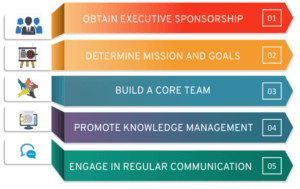
    (Figure 1: Steps for creating a community of practice)

    Step 1: Obtain executive sponsorship


    While having a community manager focused on the day-to-day execution of community matters is important, an executive sponsor is also integral to the success of the community of practice. Typically, an executive sponsor will shoulder higher-level responsibilities, such as focusing on strategy and creating conditions for success (rather than implementation).

    An executive sponsor can help ensure the community’s goals are aligned with the overall strategy of the organization. This person can also communicate those goals and gather support for the community from other senior executives (potentially instrumental in securing financial support and resources for the community!).

    Finding the right sponsor is important for the success of the program. An executive leader committed to fostering open culture, transparency, and collaboration will be very successful. Alternatively, you may wish to tap an executive focused on finding new ways to grow and reskill high-potential employees.

    Step 2: Determine mission and goals


    Once you’ve established a vision for the community, you’ll need to develop its mission statement. This is critical to your success because the mission begins explaining how you’ll achieve that vision. Primarily, your community’s mission should be to share knowledge, promote learning in a particular area, and align that work with organizational strategy. However, the mission statement may also include references to the audience that the community will serve.

    Here’s one example mission statement:
    • To identify and address needs within the cloud infrastructure space in support of the organization’s mission of defining the next generation of open hybrid cloud.
    After articulating a mission like this, you’ll need to set specific goals for achieving it. The goals can be long- or short-term, but in either case, you’ll need to provide a clear roadmap explaining to community members what the community is trying to achieve.

    Step 3: Build a core team


    Building a core team is essential to the success of a community. In a typical community of practice—or “CoP,” for short—you’ll notice four main roles:
    • CoP program manager
    • CoP manager
    • Core team members
    • Members
    The CoP program manager is the face of the community. This person is primarily responsible for supporting the managers and core teams by resolving questions, issues, and concerns. The program manager also guides new communities and evangelizes the communities of practice program inside the organization.

    The CoP manager determines community strategy based on business and community needs. This person makes the latest news, content, and events available to community members and ensures that the CoP remains focused on its goals. This person also schedules regular meetings for members and shares other events that may be of interest to them.

    The CoP core team is responsible for managing community collateral and best practices to meet the community’s goals. The core team supports CoP manager(s) and assists with preparing and leading community meetings.

    Members of a community attend meetings, share relevant content and best practices, and support the core team and manager(s) in reaching community goals.

    Step 4: Promote knowledge management


    Communities of practice produce information—and members must be able to easily access and share that information. So it’s important to develop a knowledge-management system for storing that information in a way that keeps it relevant and timely.

    Over time, your community of practice will likely generate a lot of content. Some of that content may be duplicated, outdated or simply no longer relevant to the community. So it’s important to periodically conduct a ROT Analysis of the content validating that the content is not Redundant, Outdated, or Trivial. Consider conducting a ROT analysis every six months or so, in order to keep the content fresh and relevant.

    A number of different content management tools can assist with maintaining and displaying the content for community members. Some organizations use an intranet, while others prefer more robust content management such as AO Docs or Drupal.

    Step 5: Engage in regular communication


    The secret to success in maintaining a community of practice is regular communication and collaboration. Communities that speak with each other frequently and share knowledge, ideas, and best practices are most likely to remain intact. CoP managers should schedule regular meetings, meet-ups, and content creation sessions to ensure that members are engaged in the community. It is recommended to have at least a monthly meeting to maintain communication with the community members.

    Chat/messaging apps are also a great tool for facilitating regular communication in communities of practice. These apps offer teams across the globe the ability to communicate in real-time, removing some collaboration boundaries. Members can pose questions and receive answers immediately, without the delay of sending and receiving emails. And should the questions arise again, most messaging apps also provide an easy search mechanism that can help members discover answers.

    Building your community


    Remember: A community of practice is a cost-effective way to foster learning, encourage collaboration, and promote innovation in an organization. In The Open Organization, Jim Whitehurst argues that “the beauty of an open organization is that it is not about pedaling harder, but about tapping into new sources of power both inside and outside to keep pace with all the fast-moving changes in your environment.” Building communities of practice are the perfect way to do just that: stop pedaling harder and to tap into new sources of power within your organization.


    下载开源日报APP:https://opensourcedaily.org/2579/
    加入我们:https://opensourcedaily.org/about/join/
    关注我们:https://opensourcedaily.org/about/love/
  • 开源日报第693期:《两手准备 degoogle》

    20 2 月, 2020
    开源日报 每天推荐一个 GitHub 优质开源项目和一篇精选英文科技或编程文章原文,坚持阅读《开源日报》,保持每日学习的好习惯。
    今日推荐开源项目:《两手准备 degoogle》
    今日推荐英文原文:《How to Pick the Right Language to Display on Your Website》

    今日推荐开源项目:《两手准备 degoogle》传送门:GitHub链接
    推荐理由:不要把所有的鸡蛋放在一个篮子里,为日常使用的各种工具准备替代品能让你不会在出错时手忙脚乱——也可以让你的选择不会被限制。这个项目收集了一系列能够代替 Google 服务的替代品,不管是希望在 Google 坏掉的时候寻找 Plan B,还是不再信任 Google 而希望寻找新服务,这都能派上用场。
    今日推荐英文原文:《How to Pick the Right Language to Display on Your Website》作者:Tom Feron
    原文链接:https://medium.com/better-programming/how-to-pick-the-right-language-to-display-on-your-website-37ec0338a659
    推荐理由:大道至简,比起自己猜要显示什么语言,还是让用户自己选择语言更快

    How to Pick the Right Language to Display on Your Website

    Localisation on the web can be frustrating sometimes. Sadly, this is a problem you only encounter if you travel, you live abroad, or if you live in a multi-lingual country. That covers a lot of people but not necessarily those in charge of a web project.

    It seems that the default choice made is to select a language based on the country the user is in — this, in turn, is based on their IP address. Even though this works if you’re an English-speaker living in Palo Alto, it fails miserably in a lot of other cases.

    Indeed, it relies on the assumption that countries have one language and all people in said country speak that language as their primary language (or at all). This is utterly wrong. For example, in the U.S., only about 80% of the population uses English as their first language and about 13% uses Spanish instead. In Belgium, we have three official languages, namely Dutch (55% of the population), French (38%), and German (0.4%).

    Not only does the default choice gives wrong answers, but it’s also overly complicated. In order to implement it, you would probably have to integrate with an external API, making your application more complex than it has to be and maybe less responsive. All of that for a suboptimal solution.

    HTTP Has You Covered

    The HTTP protocol specifies the header Accept-Language for that specific purpose. With every request, the browser sends a list of languages with optional weights representing the preferences of the user.

    Here are some examples from MDN’s documentation:
    Accept-Language: de
    Accept-Language: de-CH
    Accept-Language: en-US,en;q=0.5
    
    By default, browsers send the language of their graphical interface, which is quite likely to be the user’s preferred language.

    It’s not a silver bullet, though, and should be used as a last resort when we have no other ways of knowing the user’s preference in this particular instance. For example, my browser is in English but I would rather see the website in French, my mother tongue, when I log in to the Belgian tax website.

    So how else could we know what language to choose?

    Explicit and Implicit Choices

    Of course, if the user made an explicit choice by picking a language in a menu or in their settings if they’re logged in, then this must be the language they’re shown. But there are also implicit choices.

    Most of the time, traffic is coming from somewhere else rather than having the visitor type the URL in the address bar. This can give you a clue as to the language preferred by the user. If I Google something and see a result in English, I want to see the English version when I click on the link.

    Some websites hide the language in a cookie or in the session. It’s better to put it straight into the URL. That way, any link already contains an implicit choice. Search results will lead to the correct version and so will links on social media or any other pages.

    Fallback Strategy

    OK, but maybe someone actually types the domain name in the address bar and has changed the browser’s settings to send Accept-Language: * or something like that. What do you do then?

    It might be tempting to guess based on IP geolocation, but there is another dead-simple solution. So simple and obvious, in fact, that I don’t understand why more websites don’t use it.

    Just ask.

    You might not know what language the user speaks and might not be able to make a good guess, but the user knows.

    After all this, there is still a possibility that you made the wrong choice. Make it easy for users to change the language. It’s not rare to see websites where it’s genuinely difficult to find the language menu. Most often it’s because the menu is written in the current language (which the user might not speak) without any visual cue. Use flags or some icon that can be understood by everyone.

    In summary, a more reasonable way of picking a language goes like this:
    • If the user has made another explicit choice, use it. Try putting the language in the URL for any page that might be indexed by search engines or shared.
    • If there is an implicit choice — e.g., from the URL — use that language.
    • Otherwise, use Accept-Language.
    • If none of this works, just ask the user.

    下载开源日报APP:https://opensourcedaily.org/2579/
    加入我们:https://opensourcedaily.org/about/join/
    关注我们:https://opensourcedaily.org/about/love/

  • 开源日报第692期:《python小例子:python-small-examples》

    19 2 月, 2020
    开源日报 每天推荐一个 GitHub 优质开源项目和一篇精选英文科技或编程文章原文,坚持阅读《开源日报》,保持每日学习的好习惯。
    今日推荐开源项目:《python小例子:python-small-examples》
    今日推荐英文原文:《3 steps for product marketing your open source project》

    今日推荐开源项目:《python小例子 python-small-examples》传送门:GitHub链接
    推荐理由:Python有趣的小例子一网打尽。Python基础、Python坑点、Python字符串和正则、Python绘图、Python日期和文件、Web开发、数据科学、机器学习、深度学习、TensorFlow、Pytorch,一切都是简单易懂的小例子。
    今日推荐英文原文:《3 steps for product marketing your open source project》作者:Kevin Xu
    原文链接:https://opensource.com/article/20/2/product-marketing-open-source-project
    推荐理由:本文旨在分享一些知识和具体的操作项目,以帮助开源创建者将产品营销理解为一个概念,以及如何自行引导产品营销,直到项目达到新的发展水平。

    3 steps for product marketing your open source project

    I frequently get questions from open source project creators or new founders of commercial open source software (COSS) companies about the best way to market their product. Implicit in that inquiry lies more foundational questions: “What the hell is product marketing? How much time should I spend on it?”

    This article aims to share some knowledge and specific action items to help open source creators understand product marketing as a concept and how to bootstrap it on their own until a project reaches the next level of traction.

    What is product marketing?

    Product marketing for COSS is materially different from product marketing for proprietary software and from general marketing practices like ads, lead generation, sponsorships, booths at conferences and trade shows, etc. Because the source code is open for all to see and the project’s evolutionary history is completely transparent, you need to articulate—from a technical level to a technical audience—how and why your project works.

    Using the word “marketing” in this context is, in fact, misleading. It’s really about product education. Your role is more like a coach, mentor, or teaching assistant in a computer science class or a code bootcamp than a “marketing person.”

    Proprietary software products rarely need this level of technical education because no one can see the source code anyway. Therefore, these companies focus on educating their audience about the product’s business value, not its technical advantages.

    To build a successful open source project (and any commercial product that may be derived from it), you must educate your audience on both its technical details and business value.

    While this may sound like extra work, it’s an advantage inherent to COSS because so much buying power for technology products is shifting to developers. They care deeply about technical details and want to see and understand the source code. Being able to learn, appreciate, and have confidence in a project’s technical design, architecture, and future roadmap are key to its adoption.

    Also, developers often treat open source technology as a way to scratch their technical itch and stay sharp in a fast-moving technology landscape. It’s an audience that yearns for education, above all.

    Being able to speak to an audience that has these goals and desires is what product marketing and education in the COSS context is all about.

    How to bootstrap product marketing

    So you (or maybe one or two other engineers) are laboring away to create your open source project, likely in the evening after your day job or on the weekends. How do you bootstrap some effective product marketing on your own?

    I recommend a three-step process to yield the best return for your time:

    1. Peruse online forums
    2. Write content
    3. Do in-person meetups
    Online forums

    Rummaging through forums—from general ones like HackerNews and Reddit to ones like Discourse or Slack channels geared to projects that are closely related to what you are building—is a great way to figure out what questions developers have in your space. Starting with this step is less about inserting your project into the discussion and more about gathering ideas on what you should focus on when putting together educational materials about your project.

    Effectively, what you are doing is akin to “listening to your customer.”

    Let’s be honest; you already spend a lot of time on these forums anyway. The only change is one of mindset, not behavior: Have more focus, jot ideas down actively, practice absorbing critiques (you may see threads critical of your project), and develop some intuition about what developers are thinking about.

    This step assumes you don’t already have an active community where developers are asking questions directly. The long-term goal is to build your own community, and good product marketing directly helps with this.

    Write

    Now that you have gathered some ideas, it’s time to produce some content. Compared to formats like videos and podcasts, writing is the highest-leveraged medium. It has the best long-tail benefits, is most suited for ongoing reference material, and can be most easily repackaged into other mediums. Another factor: open source has a global audience, many of whom might speak English as a second (third, or fourth) language, and written content is easily consumable at a person’s own pace.

    Focus your writing on three categories that answer three fundamental questions:

    • What problem does your project solve? In other words: Why should it exist?
    • How is the project architected, and why is it done that way? Is this a technically well-designed solution that has potential, thus worth investing time in?
    • How do I get a taste of it? How quickly can I get some value out of it? This is crucial to reducing your time-to-value metric to the shortest amount possible. For more on this topic, please read my article A framework for building products from open source projects.
    A smart way to begin is by writing three blog posts, each addressing one of the three points. The posts should be canonical to your specific project so that repackaging them into different formats (e.g., slide decks, Quora answers, Twitter threads, podcast interviews, etc.) for different channels should be straightforward.

    After you publish the posts, work the materials into your GitHub, GitLab, Bitbucket, or other repository along with the project’s documentation. This is important because your public repo will likely be the face of your project for a long time, even if also you have a dedicated website. A repo with strong educational content will go a long way in building your social proof in the form of stars, forks, and downloads and may even yield some contributions.

    One note on writing: Be patient! Your words likely won’t go viral overnight (unless you are a celebrity developer). But if the material is educational, useful, and accessible (no need for fancy language), it will draw attention to your project in time. You do your part, and let Google’s SEO algorithm do its part.

    In-person meetups

    With a few posts out in the wild, the next step is to find an in-person meetup where you can give a presentation about your project using your writing as foundational material to build a compelling talk.

    You may wonder: “Why? Isn’t doing something in-person the biggest time suck? I’d rather code!”

    True. You are not wrong. I recommend this step specifically at this moment, not earlier or later, because you’ll get feedback on your output more quickly than what the internet can give. Comments and feedback on your posts will trickle in, but giving a talk at a meetup, taking questions, and chatting with attendees afterward over pizza is valuable and immediate.

    The goal is not to shamelessly pitch your project (reminder: you are an educator, not a marketer), but to listen for the kinds of questions you get when you put your project (and yourself) out there. Another benefit is that it gives you practice delivering presentations, which will become important as your project grows, and you need to present in higher-stakes situations, including large conferences, demos with prospective users, etc.

    I know this may not be practical if you don’t live in a tech hub where meetups are aplenty. You may want to look for groups that are open to doing virtual meetups via video or work this into your existing travel plans. (But don’t fly across the world to talk at one meetup.)

    In-person meetups can feel scary. Public speaking is not for everyone, and it’s a legitimate source of fear. My main tips: Just think of yourself as free entertainment, lower your expectations, don’t overthink it, and offer yourself up to meetup organizers proactively because they will love you! Having been both a presenter and a meetup organizer, I know developer-focused meetups are very hungry for good technical education.

    Final words

    There’s a lot more nuance, strategy, and sheer work to effective product marketing, but I hope this post gives you enough guidance and specific action items to bootstrap it. Ultimately, you should still spend the bulk of your time building your technology. And if you have some revenue or funding, it’s worth hiring someone who has deep expertise in product marketing, even as a part-time adviser.

    Frankly, product marketing talent is hard to find. You need someone with both the technical chops and curiosity to learn about your project on a deep level and the communication skills to compellingly tell the world about it.


    下载开源日报APP:https://opensourcedaily.org/2579/
    加入我们:https://opensourcedaily.org/about/join/
    关注我们:https://opensourcedaily.org/about/love/

  • 开源日报第691期:《命令行的艺术 the-art-of-command-line》

    18 2 月, 2020
    开源日报 每天推荐一个 GitHub 优质开源项目和一篇精选英文科技或编程文章原文,坚持阅读《开源日报》,保持每日学习的好习惯。
    今日推荐开源项目:《命令行的艺术 the-art-of-command-line》
    今日推荐英文原文:《Customize your internet with an open source search engine》

    今日推荐开源项目:《命令行的艺术 the-art-of-command-line》传送门:GitHub链接
    推荐理由:熟练使用命令行是一种常常被忽视,或被认为难以掌握的技能,但实际上,它会显著提高工程师的灵活性以及生产力。该项目是许多作者和译者编写的关于命令行使用的文章,主要为 Linux 所写,但在仅限 OS X 系统章节和仅限 Windows 系统章节中也包含有对应操作系统的内容。
    今日推荐英文原文:《Customize your internet with an open source search engine》作者:Seth Kenlon
    原文链接:https://opensource.com/article/20/2/open-source-search-engine
    推荐理由:互联网早已变得异常庞大,如何从互联网上寻找有用的信息就显得十分重要,不同于 google 等主流搜索引擎之外,本文介绍了一款开源p2p搜索引擎 YaCy 。YaCy引擎基于点对点连接,而不是通过中央服务器进行搜索查询,其自由搜索是自由用户和自由信息的关键所在。

    Customize your internet with an open source search engine

    Get started with YaCy, an open source, P2P web indexer.


    A long time ago, the internet was small enough to be indexed by a few people who gathered the names and locations of all websites and listed them each by topic on a page or in a printed book. As the World Wide Web network grew, the “web rings” convention developed, in which sites with a similar theme or topic or sensibility banded together to form a circular path to each member. A visitor to any site in the ring could click a button to proceed to the next or previous site in the ring to discover new sites relevant to their interest.

    Then for a while, it seemed the internet outgrew itself. Everyone was online, there was a lot of redundancy and spam, and there was no way to find anything. Yahoo and AOL and CompuServe and similar services had unique approaches, but it wasn’t until Google came along that the modern model took hold. According to Google, the internet was meant to be indexed, sorted, and ranked through a search engine.

    Why choose an open source alternative?


    Search engines like Google and DuckDuckGo are demonstrably effective. You may have reached this site through a search engine. While there’s a debate to be had about content falling through the cracks because a host chooses not to follow best practices for search engine optimization, the modern solution for managing the wealth of culture and knowledge and frivolity that is the internet is relentless indexing.

    But maybe you prefer not to use Google or DuckDuckGo because of privacy concerns or because you’re looking to contribute to an effort to make the internet more independent. If that appeals to you, then consider participating in YaCy, the peer-to-peer internet indexer and search engine.

    Install YaCy

    Install YaCy To install and try YaCy, first ensure you have Java installed. If you’re on Linux, you can follow the instructions in my How to install Java on Linux article. If you’re on Windows or MacOS, obtain an installer from AdoptOpenJDK.net. Once you have Java installed, download the installer for your platform. If you’re on Linux, unarchive the tarball and move it to the /opt directory:
    $ sudo tar –extract –file yacy_*z –directory /opt
    Start YaCy according to instructions for the installer you downloaded.

    On Linux, start YaCy running in the background:
    $ /opt/yacy/startYACY.sh &
    In a web browser, navigate to localhost:8090 and search.

    Add YaCy to your URL bar


    If you’re using the Firefox web browser, you can make YaCy your default search engine in the Awesome Bar (that’s Mozilla’s name for the URL field) with just a few clicks.

    First, make the dedicated search bar visible in the Firefox toolbar, if it’s not already (you don’t have to keep the search bar visible; you only need it active long enough to add a custom search engine). The search bar is available in the hamburger menu in the upper-right corner of Firefox in the Customize menu. Once the search bar is visible in your Firefox toolbar, navigate to localhost:8090, and click the magnifying glass icon in the Firefox search bar you just added. Click the option to add YaCy to your Firefox search engines.
    Once this is done, you can mark it as your default in Firefox preferences, or just use it selectively in searches performed in the Firefox search bar. If you set it as your default search engine, then you may have no need for the dedicated search bar because the default engine is also used by the Awesome Bar, so you can remove it from your toolbar.

    How to a P2P search engine works


    YaCy is an open source and distributed search engine. It’s written in Java, so it runs on any platform, and it performs web crawls, indexing, and searching. It’s a peer-to-peer (P2P) network, so every user running YaCy joins in the effort to track the internet as it changes from day to day. Of course, no single user possesses a full index of the entire internet because that would take a data center to house, but the index is distributed and redundant across all YaCy users. It’s a lot like BitTorrent (as it uses distributed hash tables, or DHT, to reference index entries), except the data you’re sharing is a matrix of words and URL associations. By mixing the results returned by the hash tables, no one can tell who has searched for what words, so all searches are functionally anonymous. It’s an effective system for unbiased, ad-free, untracked, and anonymous searches, and you can join in just by using it.

    Search engines and algorithms


    The act of indexing the internet refers to separating a web page into the singular words on it, then associating the page’s URL with each word. Searching for one or more words in a search engine fetches all URLs associated with the query. That’s one thing the YaCy client does while running.

    The other thing the client does is provide a search interface for your browser. Instead of navigating to Google when you want to search, you can point your web browser to localhost:8090 to search YaCy. You may even be able to add it to your browser’s search bar (depending on your browser’s extensibility), so you can search from the URL bar.

    Firewall settings for YaCy


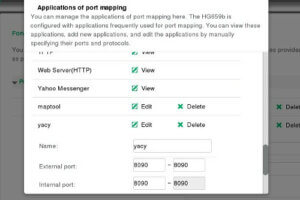
    When you first start using YaCy, it’s probably running in “junior” mode. This means that the sites your client crawls are available only to you because no other YaCy client can reach your index entries. To join the P2P experience, you must open port 8090 in your router’s firewall and possibly your software firewall if you’re running one. This is called “senior” mode.

    If you’re on Linux, you can find out more about your computer’s firewall in Make Linux stronger with firewalls. On other platforms, refer to your operating system’s documentation.

    A firewall is almost always active on the router provided by your internet service provider (ISP), and there are far too many varieties of them to document accurately here. Most routers provide the option to “poke a hole” in your firewall because many popular networked games require two-way traffic.

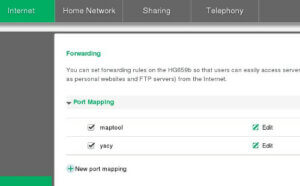
    If you know how to log into your router (it’s often either 192.168.0.1 or 10.1.0.1, but can vary depending on the manufacturer’s settings), then log in and look for a configuration panel controlling the firewall or port forwarding or applications.

    Once you find the preferences for your router’s firewall, add port 8090 to the whitelist. For example:
    If your router is doing port forwarding, then you must forward the incoming traffic to your computer’s IP address, using the same port. For example:
    If you can’t adjust your firewall settings for any reason, that’s OK. YaCy will continue to run and operate as a client of the P2P search network in junior mode.

    An internet of your own


    There’s much more you can do with the YaCy search engine than just search passively. You can force crawls of underrepresented websites, you can request the network crawl a site, you can choose to use YaCy for just on-premises searches, and much more. You have better control over what your internet looks like. The more senior users there are, the more sites indexed. The more sites indexed, the better the experience for all users. Join in!


    下载开源日报APP:https://opensourcedaily.org/2579/
    加入我们:https://opensourcedaily.org/about/join/
    关注我们:https://opensourcedaily.org/about/love/

←上一页
1 … 85 86 87 88 89 … 262
下一页→

Proudly powered by WordPress