• 开源镜像
  • 开源沙龙
  • 媛宝
  • 猿帅
  • 注册
  • 登录
  • 息壤开源生活方式平台
  • 加入我们

开源日报

  • 开源日报第698期:《Chrome插件英雄榜:ChromeAppHeroes》

    25 2 月, 2020
    开源日报 每天推荐一个 GitHub 优质开源项目和一篇精选英文科技或编程文章原文,坚持阅读《开源日报》,保持每日学习的好习惯。
    今日推荐开源项目:《Chrome插件英雄榜:ChromeAppHeroes》
    今日推荐英文原文:《Is open source software licensing broken?》
    今日推荐开源项目:《Chrome插件英雄榜:ChromeAppHeroes》传送门:GitHub链接
    推荐理由:Chrome插件英雄榜, 为优秀的Chrome插件写一本中文说明书, 通过gif,视频讲解,让电脑小白快速上手,让Chrome插件英雄们造福人类.
    今日推荐英文原文:《Is open source software licensing broken?》作者:Scott K Peterson (Red Hat)
    原文链接:https://opensource.com/article/20/2/open-source-licensing
    推荐理由:开放源码许可的不同之处在于它支持协作开发,这使得开放源码如此伟大.通过本文,我们将会了解开源许可证的概念及其背后的重要意义.

    Is open source software licensing broken?

    Practices and expectations that one may have developed in working with conventional software licensing may lead to frustration when confronting open source software. The modest request, “Please, just show me the license” may be met with an unsatisfying response. While sometimes the response is very simple, often, the license information for open source software is more complicated and does not match the expectations set by conventional software licensing.

    What’s up? Is open source software licensing broken? No. Differences, not just in the type of license terms, but in how the software is developed, lead to differences in how software license information is conveyed. In part, this results from tradeoffs between lawyer convenience and developer convenience.

    To say that open source software can be developed ‘collaboratively’ does not begin to capture the extent to which open source development activities may differ from those for conventionally-licensed software. While there are open source projects that, like conventionally-licensed software, are maintained by a single person or by a small, fixed group, collaboration on open source projects can take occur between a wide range of potential contributors. For example, GitHub’s annual Octoverse report for 2019 says that over 350,000 people contributed to the top 1,000 projects). But it is not just the number of contributors that sets this apart from the development of conventionally licensed software. The people contributing to an open source project may have no connection among themselves other than having discovered some shared interest in that software project. Participation may evolve over time. The original developer(s) may move on and leave others to continue the development of the project. All this may take place without planning or an overarching governance organization.

    Rather than following prescriptive governance rules, open source collaborative activities can be not merely lightweight, but much more responsively ad hoc than would be expected for conventionally licensed software. Practices concerning open source license information are adapted to such collaborative development.

    1. The terms in open source licenses facilitate collaborative development by providing the needed permissions—copy, modify, distribute—not just for binaries, but for source, too. The Open Source Definition has proven to be a valuable aid in focusing attention on licenses that meet its requirements.
    2. License information for open source software is embedded in the source code. When one obtains the source code, one receives the corresponding license information. Imagine, at the scale of millions of contributions each year, could separate license management be at all workable? Also, by embedding the license information in the source code, that license information can reflect license-related details that would be impractical to represent in some separately managed license process. For example, embedding in the source code makes it practical to indicate which license terms apply to which portions of the software. To illustrate what open source license practices accomplish, consider the following example software project: it began five years ago; 50 contributors have contributed so far; several features have been added by adapting portions of software from other projects; the developer of the original code moved on after three years; several commercial enterprises have come to depend on this software, either in one of their products or in-house; this software could have a future of 5-10 more years if updated to take into account changes in other software and relevant aspects of the computing world.

    The course of such a project is readily accommodated by existing, commonly used approaches to representing license information in open source projects. With no advance planning, contributors can come and go from the project; portions of the project have different license terms; commercial enterprises can continue to share the work of maintaining the software with little governance overhead cost, and while retaining the ability to go completely independent with their fork of the software, if cooperation with others falls apart.

    In contrast, how would conventional approaches to software licensing have operated to support this development? Would this collaboration even have been possible? Are we going to have a whole license infrastructure to keep track of the applicability of thousands of “master software development and distribution agreements?” Are we going to simplify licensing by having a few companies control everything?

    Let’s return to the question, “What is the license?” My purpose in talking about the characteristics of open source development is to illustrate that there are important non-legal considerations that contribute to how open source license information is represented. The representation of license information in open source software often does not match the expectations of conventional licensing. But, the differences are not a sign of a broken system. Rather, these are differences that support large scale collaborative development of software, an approach to building software that has proven, over the last two decades, to be remarkably powerful.

    What does open source license information look like?

    In general, one considers the license terms for each “software component.” A software component might be visible to users as an application program, or it might be something less apparent to users, like a library that provides certain functionality when combined with larger programs.

    For many software components, the license is simple: one of a dozen of the most common open source licenses applies to all of the software in the component. Beyond those most common licenses, there is a long tail of licenses with text variations that are not frequently used. But, with the guidance of the Open Source Definition, the permissions and restrictions in open source license terms stay within certain bounds.

    If you are going to do software development that integrates open source software into other software, then one needs to understand any copyleft terms (such as in the famous GPL family of licenses) that apply to the software being integrated.

    For reasons that may be apparent from my discussion of how open source software is developed, license information can be more complicated than a single license.

    • While there may be one main “project license” for a software component, there may be portions of the software licensed under other licenses. This may result in different license notices in various parts of the source code.
    • Some projects have a practice of putting copyright notices in each source file. Others primarily rely on the presence of one or more files that contain license text.
    • Copyright notices give an indication of who might be copyright owners of portions of the software (however, given the variability of copyright notice practices, that indication may be weak).
    • The source code from which a software component is built may include software that is not reflected in the resulting component, such as tests or build-related files. This might matter to someone who is using a no-GPL rule (a project might include GPL-licensed files, but not in the files from which the executable program is built).

      This fine-grained license information is most efficiently conveyed in the source code, as much of the detail concerns which portions of software certain license information relates to. At the most detailed level, the source code is the license. When the license information is in the source code, that license information can be maintained in the same way as the source code, such as in a version control system, and the information is inherently available to anyone who obtains the source code.

    It might seem straightforward to extract the license information from the source code and create a summary of the license terms. However, what might be a good summary for one person or company might be inadequate for another. Different people may focus on different license details. One might want to know exactly which components of the software are under copyleft terms. Someone else might not be concerned about a component-by-component summary. Someone else might want all of the license notices, including every different copyright notice.

    What license information details do you want to see? Software development is rich with tools. Tools that scan and extract and report license information exist are an active subject of continuing development. Now, “What is the license?” might be reframed as, “Show me a report of the license information,” where that report might include a range of different details depending on what matters to the person requesting the report. At the most detailed level, the source code is the license.

    Conventional software licensing and open source software licensing address different worlds—software being built in different ways. Be prepared. Have different expectations.
    下载开源日报APP:https://opensourcedaily.org/2579/
    加入我们:https://opensourcedaily.org/about/join/
    关注我们:https://opensourcedaily.org/about/love/
  • 开源日报第697期:《两全其美 nyancss》

    24 2 月, 2020
    开源日报 每天推荐一个 GitHub 优质开源项目和一篇精选英文科技或编程文章原文,坚持阅读《开源日报》,保持每日学习的好习惯。
    今日推荐开源项目:《两全其美 nyancss》
    今日推荐英文原文:《5 Reasons Why You Should Write Technical Blog Posts as Developer》

    今日推荐开源项目:《两全其美 nyancss》传送门:GitHub链接
    推荐理由:只需要编写纯 CSS 代码就能获得 CSS in JS 的方便效果,这个项目将 CSS 进行了强化,使你可以按照语法编写纯 CSS 就能够在 JS 中获得代码复用等好处,而且不管是纯 HTML 还是主流的 React,Vue 等框架都能使用,在经常需要复用样式等的项目中非常实用。
    今日推荐英文原文:《5 Reasons Why You Should Write Technical Blog Posts as Developer》作者:JS Dev Ray
    原文链接:https://medium.com/better-programming/5-reasons-why-you-should-write-technical-blog-posts-as-developer-30cd349ece60
    推荐理由:软件开发者要点出一个写作技能来的原因

    5 Reasons Why You Should Write Technical Blog Posts as Developer

    In this piece, I want to give you the five reasons I started writing technical blog posts early in my career as a developer.

    I’m happy that, early in my career as a developer, I wrote technical posts on HTML, CSS, and JavaScript.

    Writing tutorials, documentation or complete technical guidance is not just for experienced developers! It’s for developers with all levels of experience.

    1. Use Writing as Your Teacher

    Because I write about everything I have learned in my career, I have found I process the information much better.

    At school, I was not the perfect student (I write more about this in “7 Lessons I Learned While Being a Developer for 10 Years”). But because I started to share everything I learned, I discovered how my brain works.

    When I was a student I hated writing summaries about stories or other learning materials. But now I know that the science proves that “Learning by writing” works.

    If you dive into a topic you process information, but when you want to write it down, you’re thinking a lot deeper about it than just “learning.”

    2. Train Your Brain to Explain

    When you write about a topic you’re not comfortable with, you use all the information and write it in your own words.

    You don’t have to start with a difficult topic — start with something simple and small.

    Pick a topic you are comfortable with.

    Let someone else read your writing and ask for feedback. Both in terms of grammar and if it makes sense technically.

    Be explaining more and more it will make you a writer.

    Writing repeatedly on technical topics will eventually make it easier for you to write.

    3. Show Your Knowledge and Expertise

    Blog posts show others the knowledge you have. This can be a benefit when changing jobs and growing your career.

    When you put everything online, you create an online presence for yourself. It doesn’t have to be perfect. But it will show others that you dive into things that matter to you. It can even turn you into an expert in a specific field of your work.

    A great example is Harry Roberts, a well-known Frontend Developer. His career started to grow because of blogging. Read about it on “CSS Wizardry creator, Harry Roberts, talks to Honeypot”.

    4. Write It First for Yourself, Then for Others

    Before you start writing for others, write it for yourself!

    This will be your online documentation — before long you will find yourself working with a technology that you have written about. You Google, “how do I do this,” then you run to your own documentation. Great!

    So write those posts for yourself first!

    When you’ve gained more experience in writing technical blog posts, you can shift your focus towards others. Yes, it’s important that others can understand it, but don’t expect it to be perfect the first time.

    5. You Can Start for Free

    Now we have four reasons to start writing. But I like practicality, so I will show you how you can start for free.

    Currently, you’re probably reading this on Medium.com. Well, if you’ve created an account, you’re ready to start.

    Click on your profile icon and then, in the dropdown menu, click on “New story”.

    Now you have a full-blown editor inside your browser.

    Medium has a great editor with lots of functionalities to embed photos, videos and code snippets.

    If you want to write offline, use any editor you like and move it when you’re done. This is how I do it.

    You can also contact several Medium publications on Medium to write for. This will help you reach much higher.

    But the most important thing is to just start writing!

    Conclusion

    Thanks for reading!

    I’m happy that I started writing early. It’s never too late! So take courage and start writing.

    If you need any help with technical writing, please ask in the comments.

    Good luck!
    下载开源日报APP:https://opensourcedaily.org/2579/
    加入我们:https://opensourcedaily.org/about/join/
    关注我们:https://opensourcedaily.org/about/love/
  • 开源日报第696期:《精选Windows工具 Awesome》

    23 2 月, 2020
    开源日报 每天推荐一个 GitHub 优质开源项目和一篇精选英文科技或编程文章原文,坚持阅读《开源日报》,保持每日学习的好习惯。
    今日推荐开源项目:《精选Windows工具 Awesome》
    今日推荐英文原文:《My First Line Of Code》

    今日推荐开源项目:《精选Windows工具 Awesome》传送门:GitHub链接
    推荐理由:该项目包含 Windows 上优质或精选的最佳应用程序及工具列表。开源和免费软件在项目中都有标注,看看有什么需要的吧。
    今日推荐英文原文:《My First Line Of Code》作者:Adam Momen
    原文链接:https://medium.com/@adammuman81/my-first-line-of-code-763bcad822a5
    推荐理由:还记得你的第一个“Hello World!”吗?本文叙述了作者编程经历的开端,黑屏上打出的第一个Hello World,在 Stack Overflow 上提的第一个问题,是否也是你记忆的一部分呢?

    My First Line Of Code


    Flashing back two years ago, on my first freshman year at college I had a programming course on my curriculum, it is similar to cs50 course but away simpler, it is designed to teach students fundamentals of programming which was taught in C++, at that time I will walk you through the story of my first line of code ever that was the beginning of my career at programming.

    The Dark Side Of “Hello World”


    (Hello World on the black screen of the complier)
    My first programming lecture ever, I have entered the classroom seeing a bunch of geeks wearing glasses, at that moment I was thinking what in the world am I doing here, however, I pulled my self together and I saw an empty desktop, and I sat down. I looked around I saw my teacher, she was a young lady in her mid-twenties and was recently graduated, few minutes had gone by, we have started to introduce each other, I realized that she is friendly, and you probably think that everything went fine and this is the end of the story, oh no no no!, that is only happening in Disney land, however, out of nowhere she told us to turn on the computer and to prepare ourselves for a programming test, it was shock, I felt like a lightning just stroke me, she told us to write a program that shows “Hello World” on the black screen, and you have to finish it before the end of the period, at that time for the course material we were using a TurboC compiler which was old compiler which is programmed in DoS and require emulator to run the compiler, TurboC has a user interface colour of blue and grey, without mentioning the black screen prison when you that logs the compiled code, and there isn’t even a mouse cursor to navigate.

    I was freaking out, I didn’t know what to do. I was saying to my self how in the world would I do that. I was thrown off on my head banging my head to the wall trying to solve it I was thinking that programming is hard and requires intelligent people to code!. But I started to put more effort and time to understand and learn from each mistake I make, sooner I have started to solve problems! more and more, and I was amazed by the emotional reward, I have started to have different perspective toward programming. I guess that writing code is not that hard after all.

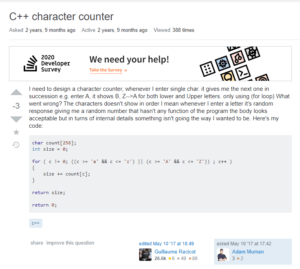
    My First Stack Overflow Question!

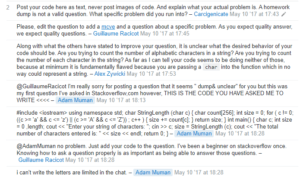
    (My first question on StackOverflow (Character Counter))
    One day in the middle of the semester my teacher gave us a problem it was at end of the week when she started to explain the problem, the bell rang it was the end of the period, everyone one started to pack up and get ready to leave, but I have decided to stay a little bit longer to work on the problem.

    I remember on that day, the problem was the only thing on my head I have opened my laptop started digging the problem trying to solve it. After two days of banging my head to the wall not being able to solve it, I have started googling the problem. I have discovered for the first time StackOverflow. I was amazed by it. I did not know that there is a community of programmers all over the world on one platform, so I wrote my first question at stack overflow, guess what it was terrible.
    (Replies of my question on Stack Overflow)
    I have posted the entire code snippet in the comment section and everyone started to rage out as it was against the rules of StackOverflow question asking. Don’t worry I am sort of google’s ready software engineer, but I have learnt from mistakes, however, multiple people suggested some answers, but most of them were not that related to my problem until one guy gave me pseudocode which was the key to solve the problem. back then I was very happy with the solution.

    Next day at school, it was the beginning of the week, and it was the time to submit the solution of the problem, surprisingly I found out that I was the only one who solved it. It was one of the moments of life which I felt like I have achieved something special.

    Now each time I remember these memories I feel nostalgic know how my passion for programming grew with me the motivation and driving force that keeps pushing me forward towards learning and discovering.


    下载开源日报APP:https://opensourcedaily.org/2579/
    加入我们:https://opensourcedaily.org/about/join/
    关注我们:https://opensourcedaily.org/about/love/
  • 开源日报第695期:《计算机视觉: computervision-recipes》

    22 2 月, 2020
    开源日报 每天推荐一个 GitHub 优质开源项目和一篇精选英文科技或编程文章原文,坚持阅读《开源日报》,保持每日学习的好习惯。
    今日推荐开源项目:《计算机视觉: computervision-recipes》
    今日推荐英文原文:《Minicomputers and The Soul of a New Machine》

    今日推荐开源项目:《计算机视觉: computervision-recipes》传送门:GitHub链接
    推荐理由:该存储库提供了用于构建计算机视觉系统的示例和最佳实践准则。该存储库的目标是构建一套全面的工具和示例,以利用计算机视觉算法,神经体系结构和此类系统的最新进展。
    今日推荐英文原文:《Minicomputers and The Soul of a New Machine》作者:Matthew Broberg
    原文链接:https://opensource.com/article/20/2/minicomputers-and-soul-new-machine
    推荐理由: 在通往现代计算机的道路上,最重要也是最容易被人们遗忘的机器是微型计算机。 它是从主机到PC发展过程中的一个关键环节。在推动个人电脑革命(主要是操作系统)的软件开发中也发挥了及其重要的作用。

    Minicomputers and The Soul of a New Machine

    The Command Line Heroes podcast is back, and this season it covers the machines that run all the programming languages I covered last season. As the podcast staff puts it:

    “This season, we’ll look at what happens when idealistic teams come together to build visionary machines. Machines made with leaps of faith and a lot of hard, often unrecognized, work in basements and stifling cubicles. Machines that brought teams together and changed us as a society in ways we could only dream of.”

    This first episode looks at the non-fiction book (and engineering classic), The Soul of a New Machine, to look at a critical moment in computing history. It covers the transition from large, hulking mainframes to the intermediate step of the minicomputer, which will eventually lead us to the PC revolution that we’re still living in the wake of.

    The rise of minicomputers

    One of the most important machines on the path to modern machines, most of us have since forgotten: the minicomputer.

    It was a crucial link in the evolution from mainframe to PC (aka microcomputer). It was also extremely important in the development of software that would fuel the PC revolution, chiefly the operating system. The PDP-7 and PDP-11—on which UNIX was developed—were examples of minicomputers. So was the machine at the heart of The Soul of the New Machine.

    This episode takes us back to this important time in computing and explores this forgotten machine—both in terms of its hardware and software.

    From 1963 to 1977, minicomputers were 12 to 16-bit machines from computing giants DEC (PDP) and rival upstart Data General (Nova, Eclipse). But in October 1977, DEC unveiled the VAX 11/780, a 32-bit CPU built from transistor-transistor logic with a five megahertz cycle-time and 2 megabytes of memory. The VAX launched DEC into second place in the largest computer company in the world.

    The jump from a 12-bit to a 32-bit CPU is a jump from 4,096 bytes to 4,294,967,296 bytes of data. That increase massively increased the potential for software to do complex tasks while drastically shrinking the size of the computer. And with a 32-bit CPU, the VAX was nearly as powerful as an IBM/360 mainframe—but much smaller and much, much less expensive.

    The episode goes into the drama that unfolds as teams within Data General race to have the most marketable minicomputer while working through company politics and strong personalities.

    Revisiting The Soul of a New Machine

    The Soul of a New Machine was written in 1981 by Tracy Kidder, and chronicles a small group of engineers at the now-former tech company, Data General, as they attempt to compete with a rival internal group and create a 32-bit minicomputer as a skunkworks project known as “Eagle.” For those okay with spoilers, the computer would eventually be known as the Eclipse MV/8000.

    Earlier this year, Jessie Frazelle, of Docker, Go, and Kubernetes fame, and Bryan Cantrill, known for DTrace, Joyent, and many other technologies, publicly wrote about reading the non-fiction classic. As it’s written, Cantrill mentioned the book to Frazelle, who read it and then wrote an enthusiastic blog post about the book. As Frazelle put it:

    “Personally, I look back on the golden age of computers as the time when people were building the first personal computers in their garage. There is a certain whimsy of that time fueled with a mix of hard work and passion for building something crazy with a very small team. In today’s age, at large companies, most engineers take jobs where they work on one teeny aspect of a machine or website or app. Sometimes they are not even aware of the larger goal or vision but just their own little world.

    In the book, a small team built an entire machine… The team wasn’t driven by power or greed, but by accomplishment and self-fulfillment. They put a part of themselves in the machine, therefore, producing a machine with a soul…The team was made up of programmers with the utmost expertise and experience and also with new programmers.”

    Inspired by Frazelle’s reaction, Cantrill re-read it and wrote a blog article about it and writes this beautiful note:

    “…The Soul of a New Machine serves to remind us that the soul of what we build is, above all, shared — that we do not endeavor alone but rather with a group of like-minded individuals.”

    Frazelle’s and Cantrill’s reading of the book and blog sparked a wave of people exploring and talking about this text. While it remains on my book list, this dialogue-by-book-review is at the heart of the CLH season 4 as it explores the entire machine.

    Why did the minicomputer go the way of the Neanderthal?

    As we all know, minicomputers are not a popular purchase in today’s technology market. Minicomputers ended up being great technology for timesharing. The irony is that they unwittingly sealed their own fate. The Internet, which started off as ARPANET, was basically a new kind of timesharing. They were so good at timesharing that at one point, the DEC PDP 11 accounted for over 30% of the nodes on ARPANET. Minicomputers were powering their own demise.

    Minicomputers paved the way for smaller computers and for more and more people to have access to these powerful, society-changing machines. But I’m getting ahead of myself. Keep listening to the new season of Command Line Heroes to continue the story of machines in computing history.


    下载开源日报APP:https://opensourcedaily.org/2579/
    加入我们:https://opensourcedaily.org/about/join/
    关注我们:https://opensourcedaily.org/about/love/
←上一页
1 … 84 85 86 87 88 … 262
下一页→

Proudly powered by WordPress