• 开源镜像
  • 开源沙龙
  • 媛宝
  • 猿帅
  • 注册
  • 登录
  • 息壤开源生活方式平台
  • 加入我们

开源日报

  • 开源日报第710期:《无代码:nocode》

    8 3 月, 2020
    开源日报 每天推荐一个 GitHub 优质开源项目和一篇精选英文科技或编程文章原文,坚持阅读《开源日报》,保持每日学习的好习惯。
    今日推荐开源项目:《无代码:nocode》
    今日推荐英文原文:《What my day looks like as a sysadmin》

    今日推荐开源项目:《无代码:nocode》传送门:GitHub链接
    推荐理由:编写安全可靠的应用程序的最佳方式是: 不编写任何应用程序,不进行任何部署.从不写任何代码开始。
    今日推荐英文原文:《What my day looks like as a sysadmin》作者:Jörg Kastning
    原文链接:https://www.redhat.com/sysadmin/my-day
    推荐理由:系统管理员的一天是怎样的?这篇文章将会告诉我们答案.作者负责虚拟化平台、数据中心防火墙和负载均衡器。

    What my day looks like as a sysadmin

    Before you join the sysadmin corps, let me show you what a typical day in the life of a sysadmin looks like. In fact, I would like to share a whole week. So, read on and enjoy.

    First, I would like to talk about what I actually do. I work in the central IT department of Bielefeld University. In my job, I take care of our virtualization platform, data center firewalls, and load balancer. I’m also one of several Linux admins running services on top of Red Hat Enterprise Linux.

    Now, let’s look at my week.

    Monday

    My typical work week starts on Monday at 7am. When I’m the first in the office, the task with the highest priority is, of course, getting the coffee machine up and running, and then the second is to pour myself a cup of the black gold to get ready for work. Like almost every morning, I check my email to see if anything happened over the weekend or overnight that I need to take care of. Today, there is nothing special or urgent, so I could go and read a paper (as I discuss in “Tuesday”). Doing that task today helps me prepare for a meeting so I won’t get caught on the wrong foot.

    This Monday is special because I’m attending a training course to increase my social communication skills. I’m glad that it’s not uncommon for my employer to offer training to increase hard and soft skills, and I appreciate that these trainings take time during office hours. After training, there is business as usual, such as taking virtual servers down, provisioning new storage for my colleagues, and cleaning up network and firewall configs. At 4:30pm I’m out of coffee, so it’s time to head out.

    Tuesday

    The day starts at 7:04am, with coffee, checking email, the first short meeting, writing email, the team meeting, checking for new hardware deliveries, and (finally) lunchtime. Not all of the requests I receive include all of the necessary information to complete a task, so today I have to visit colleagues to gather that information and make an action plan for the next two days.

    At 3:15pm is the last meeting for the day. We discuss the paper I mentioned yesterday. All attendees agree to act according to the paper, so we are good there. It’s 5pm and time to go home. See ya tomorrow.

    Wednesday

    No meetings today. That means there is a lot of time for real sysadmin tasks, so I spent the day creating three new roles for Ansible to help deploy new Linux VMs and configure the existing ones to be compliant with our current baseline. To do this, I had to read a lot of Ansible documentation and go through a lot of testing and trial and error until everything worked to my satisfaction.

    This process took almost the whole day, and at the end of the day, I deployed the first VM from the new roles for a colleague. That task gave me the chance to get a second pair of eyes looking at the result of my day’s work, and I learned that there were still bits missing that I could add before the end of this working day. Finally, mission accomplished.

    Thursday

    After that, I started creating two email templates. One is for my users to order a new VM, providing all of the necessary information that I need to deploy a handmade, highly customized pet machine. The second one is a template I could use to inform the users when the new VM is ready to use including the last steps the users have to take before they go to production.

    Note: You may wonder why I call it a pet machine. If so, read this article written by Randy Bias in 2016: The History of Pets vs Cattle and How to Use the Analogy Properly. As you might guess, I’m dealing with both pets and cattle.

    At 9:15am sharp, we have the first meeting of the day. Our team discussed what happened in the past few days, what tasks were completed, and what we would do until next Thursday. Sometimes I think our meetings take too long, but in the end, the time is well spent. In a highly dynamic workspace, these meetings are the only chance to keep your team coordinated and focused on their goals. This way, everybody on the team can keep up.

    What comes after the first meeting? Right, the second one, but this one was fine. I met with a colleague from campus for lunch and we discussed topics around open source, Linux, experiences with support contractors, and so on. Time flew by. Far too early, we had to attend to other duties, but we agreed to meet more often.

    In the afternoon I worked on more typical sysadmin tasks. Unfortunately, parts of our core infrastructure are not fully functional at the moment, and we are still trying to figure out the root cause. This process gets annoying because vendor support has no idea either and is guessing. Tasks like this can be frustrating, but they are part of the sysadmin job, too.

    Friday

    This is the best day of the week because the weekend is ahead. I guess we have something special on our site. In our datacenter, no one has to work during the weekend or holidays. There are no operators present in the data center and there is no one on call, and that’s absolutely fine since our systems usually don’t start breaking down because we left them alone for a few days.

    Now, let’s get to my tasks for this day. Each Friday, our office has the sysmaster role, which means that we become the point of contact in case other departments have incidents. We keep a close watch on our monitoring and reporting systems on that day. When we find something odd or out of balance, we triage the issue and give the sysadmin who manages the related system a call.

    But, because we operate in a more or less stable environment, the sysmaster may leave the room to attend to other duties. On this day, I checked our maintenance and support contracts for due dates, updated my schedule for the upcoming week, and attended a knowledge transfer. So, today was easygoing.

    Conclusion

    As you could read from my week’s diary above, the sysadmin’s job is not only about hacking and configuring cool hardware, software, etc., it’s also a lot of email, meetings, and contract checking.

    This job has so many facets that it won’t get boring. Do you like what you see? If so, enroll now.


    下载开源日报APP:https://opensourcedaily.org/2579/
    加入我们:https://opensourcedaily.org/about/join/
    关注我们:https://opensourcedaily.org/about/love/
  • 开源日报第709期:《快速Web Goxygen》

    7 3 月, 2020
    开源日报 每天推荐一个 GitHub 优质开源项目和一篇精选英文科技或编程文章原文,坚持阅读《开源日报》,保持每日学习的好习惯。
    今日推荐开源项目:《快速Web Goxygen》
    今日推荐英文原文:《How You Can Stand Out as a Junior Developer》

    今日推荐开源项目:《快速Web Goxygen》传送门:GitHub链接
    推荐理由:Goxygen 旨在快速地建立一个新项目以节省时间,“能在几秒钟内使用Go 、 Angular 、 React 、 Vue 或者 MongoDB 生成一个 Web 项目”。
    今日推荐英文原文:《How You Can Stand Out as a Junior Developer》 作者:Daan
    原文链接:https://medium.com/better-programming/how-you-can-stand-out-as-a-junior-developer-441bdab697af
    推荐理由:给初级开发人员的几个建议

    How You Can Stand Out as a Junior Developer

    Advice on how you can become a better developer, today

    (Photo by Rupert Britton on Unsplash)
    Life as a junior developer isn’t always a bed of roses. Software development is hard. The technology improves quickly and things change at a rapid pace. The knowledge that you have today can be outdated tomorrow.

    As a junior developer, this can be quite overwhelming. And since you lack experience, it gets even harder.

    You’re at a point in your early career where you want to grow as a developer. Since there is so much left to learn for you, you want to know about the things that can make you stand out as a junior developer.

    This article is a piece of advice to all junior developers that want to grow as a developer and need a little push in the right direction. We’ll be going over a list of things that you could focus on that will make you stand out as a junior developer.

    Source Control

    To more experienced developers, source control is just a basic skill. However, most junior developers struggle with source control — at least to some degree. Some of them struggle with what source control does and why it’s useful.

    If you really want to stand out as a junior developer, you should focus on a little bit more than just pulling, committing, and pushing. These are the bare essentials that every developer is supposed to know.

    But what makes you stand out as a junior is knowing how to stash files, cherry-pick, fix merge conflicts, and know the basic flow of how to create hotfixes and releases.

    Make sure that you also understand the theory behind each of these features. Know what each feature does and when you should use it. Once you know how to do these things you’ll be ahead of the curve.

    It’s perfectly fine to work with a GUI tool, like Sourcetree. In fact, I’d highly recommend it when you’re new to source control.

    A GUI tool abstracts the most common operations behind a few clicks. It’s faster, easier, more reliable, and gives you way more insight into what’s actually happening behind the scenes.

    If you want to do source control like a real pro you could start clamping in commands via the terminal. However, it’s not something that I would recommend for beginners.

    Just get familiar with source control and all of its possibilities. Learning the commands is much easier once you have a better understanding of what source control is and how it works.

    Coding

    Since you’re a developer, you’re hopefully going to be coding most of your time. It’s the most exciting part of your job. However, writing code as a junior developer can be quite a challenge.

    One of the most common mistakes that junior developers make is writing fancy code. You can recognize the junior developer by quirky one-liners and making simple things overly complex. All this does is make your code become more verbose than it needs to be — which leads to an increased risk of bugs.

    If you want to stand out as a junior developer you should try to write code that’s straightforward. But the thing with writing straightforward code is that it’s hard. And it’s something that most junior developers don’t do.

    This is the point where you can really shine compared to other junior developers. Writing simple code requires thoughtfulness. It requires several rounds of refactoring until the code is just right. You should try to stick with the KISS principle: Keep it simple, stupid.

    What’s also important for junior developers is to go through the whole development cycle at least once. This way, you know what a software project involves. Working from zero to a fully-functioning product will give you so many new insights.

    You’ll probably make tons of mistakes along the way, but making those simple mistakes is where you will learn the most. Try to go through a whole development cycle as soon as you can.

    Another valuable skill for any developer is knowing what questions to ask once you’re stuck. You’ll eventually run into a problem that you don’t know how to solve.

    Most junior developers need to be provided with the necessary resources or a big push in the right direction once they’re stuck. Knowing what questions to ask and how to follow up these questions with the right actions is what will make you truly stand out.

    Contributing to Your Team

    I’m flabbergasted by the number of junior developers that I’ve seen trying to impress their teammates by taking on the most complex user story of the sprint.

    There’s really no need to impress your teammates. They’d rather have you actually contributing something to the team. Because most of the time, when a junior developer takes on the complex user stories, it ends up in a disaster where another developer has to basically babysit the junior developer throughout the entire process.

    I admire the courage but don’t overestimate yourself. No one wants to babysit you since everybody’s got work to do. If you really want to contribute something to the team you should take on the easiest tasks first.

    These can be the user stories with the least amount of points. Or you could do some small bug fixes that just take a few lines of code. This way, you can get a better understanding of the code base and actually contribute to the team.

    Most more experienced developers like to do the more complex stuff since there’s more of a challenge in it — which is great for you because it leaves the “easy” stuff open for you.

    Learn, Learn and Learn

    It’s a fact that a junior developer has less knowledge than the average developer. It’s important to keep learning so you can close the knowledge gap that is required to get to the next level. Try to consume as much information as you can.

    Read every merge request thoroughly even though you’re probably not the one approving it. There’s valuable information in it for you. By looking at every merge request, you get insight into how other developers solve certain problems and the thought process behind it.

    If you’ve got the chance to pair program with one of your teammates you should take that chance with both hands.

    You should be the developer that’s in the driver’s seat and let yourself be coached by your teammate. Make sure to code out loud, so your teammate gets to know your thought process and give feedback accordingly.

    And last but not least, you’ve got to spend time behind the keyboard in order to become a master of your tech stack. Practice makes perfect. You need to do a lot of programming, make mistakes and fix them. This is the only way that you’re going to get better.

    And if you really want to go the extra mile as a junior developer, you could try to get familiar with best practices and learn about architecture, performance, security, etc.

    “Continuous learning is the minimum requirement for success in any field.” — Brian Tracy


    下载开源日报APP:https://opensourcedaily.org/2579/
    加入我们:https://opensourcedaily.org/about/join/
    关注我们:https://opensourcedaily.org/about/love/
  • 开源日报第708期:《鼠标?不存在的 vimium》

    6 3 月, 2020
    开源日报 每天推荐一个 GitHub 优质开源项目和一篇精选英文科技或编程文章原文,坚持阅读《开源日报》,保持每日学习的好习惯。
    今日推荐开源项目:《鼠标?不存在的 vimium》
    今日推荐英文原文:《How to Deal With the Difficulties of Programming》

    今日推荐开源项目:《鼠标?不存在的 vimium》传送门:GitHub链接
    推荐理由:对于那些极度追求效率的家伙们来说,把手从键盘切换到鼠标上是一个很麻烦的工作——所以这世界上有了 Vim 这样的编辑器能让你丢开鼠标。这个浏览器插件发扬了丢开鼠标的伟大理想,让你只需要键盘上使用快捷键就能完成一系列操作,如果你的确有想要挑战键盘流极限的理想的话完全值得一试。
    今日推荐英文原文:《How to Deal With the Difficulties of Programming》作者:Cem Eygi
    原文链接:https://medium.com/better-programming/how-to-deal-with-the-difficulties-of-programming-4258887922f9
    推荐理由:不管什么困难我们都不要怕,要微笑着面对它。

    How to Deal With the Difficulties of Programming

    Anyone can learn to program with the right effort and enough time

    One of the biggest arguments about programming is whether it’s a difficult profession to do or not. You may hear from some people saying programming is easy, which I personally disagree with as a software engineer and a front-end web developer.

    My intention for writing this article is to motivate people who are struggling with the difficulties of programming but not to scare them. I’ll spot some difficulties in programming and suggest ways to deal with them, based on my own experiences.

    So if you aren’t comfortable with programming, thinking programming is hard or even hate programming, this article is for you.

    Is Programming Really Difficult?

    I think programming is a difficult profession. But should we lose our motivation for writing code? Should we quit just because it’s hard? Absolutely not!

    Every profession has difficulties, upsides and downsides, and so does programming. There are ways to deal with them — let’s see what these difficulties are and how I have dealt with them so far.

    1. The Learning Process

    The very beginning of my learning process was the most difficult part for me. When I was a software-engineering student around 10 years ago, the education I was receiving was poor, and there were very few tutorials and articles, unlike today. We didn’t have as many learning options and resources as we have today.

    Thanks to the content creators, this has changed, and maybe that’s the reason why so many people (including me with a channel and a blog) started to create programming tutorials, write e-books, and share their knowledge on various platforms on the internet.

    Tip #1: Give yourself time

    The important thing to understand here is if you’re new to programming, you’ll learn slow. You’ll forget quickly unless you practice enough and truly understand how things work. That’s why you need to keep trying, read what you’re reading again, solve the same exercises again, and replay the tutorials again and again until you have a complete understanding.

    Learning a programming language is similar to learning a new language like German, Spanish, or Chinese. You can’t learn Chinese or German in one day, right? The same goes for learning a programming language. It’ll take a couple of months to get familiar with the concepts. Give yourself time.

    Photo by Leonardo Toshiro Okubo on Unsplash

    Tip #2: Learn the fundamentals first — then you can learn any programming language

    What I learned at school and what I’m doing today are completely different.

    The first programming language we learned at school was C. After that, we learned data structures and algorithms with C — and then object-oriented programming with C++. And what am I doing now as a job? HTML, CSS, and JavaScript.

    Regardless of what you did or learned before, you can always switch between programming languages, jobs, and even working fields. For example, you can start your career as a back-end developer and switch later to be a mobile-application developer.

    Photo by NeONBRAND on Unsplash

    It’s possible because once you learn the fundamentals of programming (with C, C++, or JavaScript, etc.), later you can learn any programming language, any syntax. Sure, there are differences between them, but once you understand the concepts of programming, later learning another programming language will be much easier and faster.

    Tip #3: Take online courses, watch tutorials, and read e-books

    Regardless of having no idea how to write code — and whether you’re a junior or a veteran with several years of experience — taking an online course or watching tutorials is always helpful.

    Coding tutorials show step by step how to implement/code something with a specific language or how to use a tool. We can read documentation, e-books, or articles and understand way faster than before. Or we can watch videos, online courses, or tutorials, and since we’re able to see the instructor’s screen, we can exactly see how things are implemented.

    Finally, when we get stuck somewhere, we can ask questions in the comment section — the instructor or someone else watching that course can reply and help us. Online resources are today a big part of our learning process.

    Tip #4: Practice

    The last tip for this section is to practice — write code. This one is also difficult at the beginning. But it’s the strongest way to learn how to program.

    So what you can do is:
    • Start with writing the code you see/read on tutorials
    • Solve exercises and answer questions you find on the web
    • Start working on personal projects, even if you don’t earn money
    • Open a GitHub account — collaborate on other projects, and upload your projects open source
    • Discuss and share ideas with your friends/colleagues
    • The best learning comes by teaching, so learn by teaching

    2. Dealing With Problems/Errors Every Day


    Photo by Tim Gouw on Unsplash

    At some point, each of us feels stuck like this guy in the picture. In daily programming, you’ll face various errors during the development process, and sometimes you’ll have no idea how to fix them.

    Furthermore, sometimes you won’t receive errors and your code will run — but not as expected. So what should you do?

    Tip #5: Learn reading the errors

    Errors are an important part of the development process. When you run your code and it fails by receiving errors, don’t panic.

    Errors tell you what or where something is wrong.

    If you understand what the error message means, you can fix it immediately. Otherwise, you can google the error message and probably someone else has already asked it, and there you can find out what’s wrong.

    Tip #6: Learn debugging

    As I mentioned above, when we see errors, defects, or unexpected things in our code during the development process, the best way to advance is through debugging.
    “Debugging is the process of finding and resolving defects or problems within a computer program that prevent correct operation of software or a system”. — Wikipedia
    Learning how to debug is an important skill and very helpful for finding errors and bugs. This video by Web Dev Simplified gives great debugging tips and examples of errors.

    Tip #7: Ask for help

    If you’re still struggling, then you can ask a colleague on your team or another team — or your friend, instructor, etc. They can see maybe what you can’t see. Sometimes the mistake is just in front of you, but you can’t see it.

    Communication and helping others is a part of programming.

    Even if programming looks like an antisocial job, it’s not. The more you communicate with other people, the more successful you and your code becomes. Asking for help and helping others is a really good way to solve problems.

    Tip #8: Leave it and come back tomorrow

    I don’t know how many times this has happened to me, but it’s like magic: The day before I got stuck somewhere and can’t solve the problem. I turn off the computer and go home, and when I come back the next day, I solve it within five minutes.

    You need to rest, but your brain continues thinking about the problem. You go to sleep, and your brain still thinks about it. Sometimes, it finds where the problem is, and you even don’t realize it. And when you go back to work, suddenly you find the solution. This happened to me many times — it’s kind of funny, but leaving and coming back the next day can help too.

    3. Following Rapid Changes in Technology

    Since we’re working inside the tech and development sector, everything changes rapidly. Almost every year comes with a new framework, library, tool, and many more things. And, unfortunately, what we already know becomes outdated.

    So what you can do is:
    • Sign up for a couple of newsletters from blogs that follow what’s new in tech
    • Follow social-media accounts and trends over on Twitter, Facebook, and other platforms
    • Listen to podcasts (which is really time-saving)
    • Remember, we can’t know everything. We can’t follow every new thing, so just invest your time in what’s really needed/important based on your work and project.

    Conclusion

    So these are the three common difficulties of programming I’ve seen so far. There are even others I might cover in another article later. Every profession has upsides and downsides, and none of them are easy. I believe personal interest plays a huge role in success in our careers. I hope the experiences I’ve explained in this article help and motivate you to move on and become a better developer.

    If you want to learn more about programming, feel free to visit our blog and channel.

    Thank you for reading!
    下载开源日报APP:https://opensourcedaily.org/2579/
    加入我们:https://opensourcedaily.org/about/join/
    关注我们:https://opensourcedaily.org/about/love/
  • 开源日报第707期:《新冠数据库:COVID-19》

    5 3 月, 2020
    开源日报 每天推荐一个 GitHub 优质开源项目和一篇精选英文科技或编程文章原文,坚持阅读《开源日报》,保持每日学习的好习惯。
    今日推荐开源项目:《新冠数据库:COVID-19》
    今日推荐英文原文:《The Top 10 Open Source Web Servers in 2019》

    今日推荐开源项目:《新冠数据库:COVID-19》传送门:GitHub链接
    推荐理由:这是2019年新型冠状病毒视觉仪表盘的数据储存库,由约翰·霍普金斯大学系统科学与工程中心运营。 此外,由 ESRI 生活地图集团队和约翰·霍普金斯大学应用物理实验室(JHU APL)支持。
    今日推荐英文原文:《The Top 10 Open Source Web Servers in 2019》作者:Dr Anand Nayyar
    原文链接:https://opensourceforu.com/2020/02/the-top-10-open-source-web-servers-in-2019/
    推荐理由:这篇文章介绍了2019年十大开源网络服务器的特征,优势等,我们可以从中选取自己所需要的资源和服务。

    The Top 10 Open Source Web Servers in 2019

    A new year has begun and it’s the right time to take stock of the software that was popular over the past year. So here is a list of the top ten open source Web servers in 2019.

    A Web server can refer to hardware or software, or both working together.

    On the hardware side, a Web server is a computer that stores Web server software and a website’s component files (e.g., HTML documents, images, CSS style sheets and JavaScript files). It is connected to the Internet, and supports physical data interchange with other devices connected to the Web.

    On the software side, a Web server includes several parts that control how Web users access hosted files; at the minimum, it is an HTTP server. An HTTP server is software that understands URLs (Web addresses) and HTTP (the protocol your browser uses to view Web pages). It can be accessed through the domain names (like mozilla.org) of the websites it stores, and it delivers their content to the end user’s device.

    At the most basic level, whenever a browser needs a file that is hosted on a Web server, it requests the file via HTTP. When the request reaches the correct Web server (hardware), the HTTP server (software) accepts the request, finds the requested document (if it doesn’t, then a 404 response is returned), and sends it back to the browser, also through HTTP.

    Publishing a website requires either a static or a dynamic Web server.

    A static Web server, or stack, consists of a computer (hardware) with an HTTP server (software). We call it static because the server sends its hosted files as is, to your browser.

    A dynamic Web server consists of a static Web server plus extra software, most commonly an application server and a database. We call it dynamic because the application server updates the hosted files before sending them to your browser via the HTTP server.

    The following are the main features of a Web server:

    Creates one or more websites.

    Configures log file settings, including where the log files are saved, what data is included in the log files, etc.

    Configures website/directory security. For example, based on requirements and subsequent configuration, the Web server either allows or prevents a particular website being viewed, as well as which IP addresses are/aren’t allowed to view the website, etc.

    Creates an FTP site.

    Creates virtual directories, and maps them to physical directories.

    Configures/ nominates custom error pages. This allows the users to build and display user friendly error messages on the website.

    Specifies default documents, which are displayed when no file name is given. For example, it specifies which files should be displayed if the user opens http://localhost. This is typically index.html or something similar, but it doesn’t need to be.

    Web servers have come a long way since the CERN httpd was developed by Tim Berners-Lee in 1990, as part of the project that resulted in the first Web browser. Some of the leading providers of Web servers provide closed source options for corporations, but many are still open source (based on Linux). Some Web servers are designed for certain special needs, some receive updates frequently, some are designed for certain technologies only, and some are known for their stability-cum-security because of the latest updates.

    This article lists out the top ten open source Web browsers in 2019.

    Apache HTTP

    Apache HTTP is an open source, cross-platform Web server software, released under the terms of Apache License 2.0. It is developed and maintained by an open community of developers under the Apache Software Foundation. It powers around 46 per cent of the world’s websites. It works on a large number of operating systems, including Linux, FreeBSD, Solaris, Windows, MacOS X, Novell Netware, OS/2, and so on (and probably any UNIX-like system).

    Apache supports a variety of features, many implemented as compiled modules which extend the core functionality. These can range from authentication schemes to supporting server-side programming languages such as Perl, Python, Tcl and PHP. Popular authentication modules include mod_access, mod_auth, mod_digest, and mod_auth_digest, the successor to mod_digest. A sample of other features include Secure Sockets Layer and Transport Layer Security support (mod_ssl), a proxy module (mod_proxy), a URL rewriting module (mod_rewrite), custom log files (mod_log_config), and filtering support (mod_include and mod_ext_filter). Popular compression methods on Apache include the external extension module, mod_gzip, implemented to help with reducing the size (weight) of Web pages served over HTTP. ModSecurity is an open source intrusion detection and prevention engine for Web applications. Apache logs can be analysed through a Web browser using free scripts, such as AWStats/W3Perl or Visitors.

    Virtual hosting allows one Apache installation to serve many different websites. For example, one computer with one Apache installation could simultaneously serve example.com, example.org, test47.test-server.example.edu, etc.

    Features

    Loading of dynamic modules, handling of static files, index files, auto-indexing and content negotiation.

    IPv6 and HTTP/2 support.

    Custom logging and rotation, IP address-based geo location, user and session tracking, concurrent connection limiting, CGI support, FTP and XML support.

    URL rewriting, fine-grained authentication and authorisation access control.

    Fault tolerance and failover handling, and multiple load balancing mechanisms.

    Latest version: 2.4.41

    Official website: https://httpd.apache.org/

    Apache Tomcat

    Apache Tomcat, an open source Web server written in Java, was designed by the Apache Foundation with the credit of invention given to James Duncan Davidson, a software architect. It is termed an open source implementation of the Java-Servlet, JavaServer Pages, Java Expression Language and WebSocket technologies. Apache Tomcat software powers numerous large-scale, mission-critical Web applications across a diverse range of industries and organisations.

    Tomcat is made up of multiple components — Catalina, Coyote, Jasper, Cluster, etc. Catalina is termed as Tomcat’s servlet container. Coyote is the connector component for Tomcat that supports HTTP 1.1. as the Web server, allowing Catalina, nominally a Java servlet or JSP container, to also act as a plain Web server that serves local files as HTTP documents. Jasper is Tomcat’s JSP engine. It parses JSP files to compile them into Java code as servlets that can be handled by Catalina. The Cluster component is added to manage large applications. It is used for load balancing, which can be achieved through many techniques. Clustering support currently requires the JDK version 1.5 or higher.

    Features

    Lightweight and highly flexible.

    Very stable and has an extra level of security.

    Well-documented and the most widely used Java application server.

    Supports HTTP/2, OpenSSL for TLS support with the JSSE connectors.

    Support for TLS virtual hosting, Web application memory leak protection and detection.

    Advanced IO capabilities and refactored clustering.

    Latest version: 9.0.30

    Official website: https://tomcat.apache.org/

    Nginx

    Nginx is a free and open source Web server based on a BSD-like licence. It is also an HTTP and reverse proxy server, mail proxy server and a generic TCP/UDP proxy server. It has been designed by Igor Sysoev. Nginx is capable of handling more than 10,000 simultaneous connections with a very low memory footprint of about 2.5MB. This is all possible due to its asynchronous, event driven nature. Nginx supports a large number of Web server languages, but it doesn’t have any native support and thus third-party modules have to be used; for instance, it requires PHP-FPM to be installed separately to process PHP scripts. Even though Nginx is used as a standalone Web server, nowadays many developers use it as a static content server in front of the actual server. Some sites dynamically handle the requests at the back-end, and cache them for Nginx to serve when the content is requested by the user.

    Nginx can be deployed to serve dynamic HTTP content on the network using FastCGI, SCGI handlers for scripts, WSGI application servers or Phusion Passenger modules, and it can serve as a software load balancer.

    There are two versions of Nginx — OSS Nginx and Nginx Plus. The latter offers additional features not included in OSS Nginx, such as active health checks, session persistence based on cookies, DNS-service-discovery integration, a cache purging API, AppDynamic, Datalog, Dynatrace New Relic plugins, Active-Active HA with configuration synchronisation, on-the-fly (with zero downtime) updates for upstream configurations, as well as key value stores using the Nginx Plus API and Web application firewall (WAF) dynamic module.

    Nginx was designed to outperform the Apache server by serving static files, using less memory and handling four times as many requests per second.

    Features

    Handles 10,000 concurrent connections with low memory; handles static, index files and offers auto-indexing.

    Name- and IP address based virtual servers.

    IPv6 compatible.

    Supports TLS/SSL with SNI, offers OCSP stapling support, gRPC support and HTTP/2 support. Configuration upgrade and execution is done without client connection loss. Supports SMTP, POP3 and IMAP proxy.

    Reverse proxy with caching.

    Modular architecture: Filters include gzipping, byte ranges, chunked responses, XSLT, SSI, and an image transformation filter. Multiple SSI inclusions within a single page can be processed in parallel if they are handled by proxied or FastCGI/uwsgi/SCGI servers.

    Latest version: 1.17.6

    Official website: https://www.nginx.com/
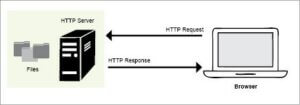
    Figure 1: How the Web server works

    H2O Web server

    H2O is a new generation HTTP server that has full-featured HTTP/2 implementations of all the current Web servers in use. With H2O as the Web server, users can take advantage of new features of the HTTP/2 specifications, like latency optimisation, server-push and server-side prioritisation, which can take advantage of modern browser features that are seldom talked about. H2O is powered by libh2o, which contains all the Web serving power of H2O itself. libh2o is also packaged separately for third party use. It is MIT licensed. H20 is written in C and can also be used as a library.

    Features

    Supports HTTP 1.0/1.1/2.0, Websocket and TLS.

    Supports TCP Fast Open, FastCGI, reverse proxy.

    AEAD ciphers, OCSP stapling, mime-type configuration, forward secrecy, chunked encoding. Server push, negotiation methods: NPN, ALPN, upgrade, direct.

    Latest version: 2.3.0

    Official website: https://h2o.examp1e.net/

    Caddy

    Caddy is an open source, HTTP/2 enabled Web server, designed by Matthew Holt and written in the Go language. It is a strong alternative to Apache Web Server. It is easy to configure and use, and is loaded with the latest features like IPv6, Markdown, WebSockets, FastCGO, templates and other out-of-the-box features. Caddy activates HTTPS by default for sites with qualifying domain names (names for which a TLS certificate can be negotiated via the ACME protocol) and redirects HTTP requests to HTTPS. It obtains certificates as needed during startup and keeps them renewed during the lifetime of the server.

    An alternate configuration method allows Caddy to obtain certificates only as needed during TLS handshakes rather than at startup, a feature dubbed as ‘on-demand TLS’. To enable this feature, the user must specify a maximum number of certificates that can be issued this way. It is available for Windows, MAC, Linux, BSD, Solaris and Android.

    Features

    Fast HTTP requests, minimal configuration with fast deployment.

    No installation, portable executables, and runs on multiple CPUs/cores.

    Supports IPv6, creates login custom format.

    Serves FastCGI, has reverse proxy, rewrites and redirects, clean URL and Gzip compression, directory browsing, virtual hosts and headers.

    Supports VirtualHost, load balancing with health checks, URL rewriting, basic access authentication, Gzip compression, file browsing, QUIC, etc.

    Latest version: 2.0 beta 12

    Official website: https://caddyserver.com/

    Lighthttpd

    Lighthttpd is “a secure, fast, compliant, and very flexible Web server that has been optimised for high-performance environments.” It has a very low memory footprint compared to other Web servers and takes care of CPU load. Also called Lighty, it is an alternative to Apache Web Server.

    The configuration file is /etc/lighttpd/lighttpd.conf, while the standard directory for files is /home/ginarm/domains/opensourcedaily.org/public_html/localhost/htdocs/.

    Its advanced feature set (FastCGI, CGI, Auth, output-compression, URL-rewriting and many more) makes Lighttpd the perfect Web server software for every server with load problems.

    Features

    Supports TLS/SSL with SNI via OpenSSL, server-side.

    Flexible virtual hosting, chroot support, authentication against LDAP server.

    Supports modules, WebDev, servlet, HTTP compression using mod_compress and the newer mod_deflate.

    URL rewriting and efficient event notification schemes like kqueue and epoll.

    Latest version: 2.0

    Official website: https://www.lighttpd.net/

    LiteSpeed Web Server (LSWS)

    LiteSpeed Web Server (LSWS) is, as its name suggests, a lightweight Web server developed by LiteSpeed Industries Inc. and is compatible with commonly used Apache features, including mod_rewrite, .htaccess, and mod_security. LiteSpeed has become fairly popular and is capable of handling thousands of concurrent connections despite having a smaller memory. The purpose of introducing this Web server was to read Apache configuration files. However, according to the company, a single LiteSpeed server is capable of handling data equivalent to two Apache servers.

    LSWS 5.0 was the first popular Web server to support HTTP/2. An add-on with the 5.0 version is LiteMage Cache, which is a full page caching solution to enhance the speed of Magneto stores. It is available as a free version as well as a paid option. LiteSpeed Web Server is a high-performance, highly scalable Web server. LSWS can load Apache configuration files directly and works as a drop-in replacement for Apache while fully integrating with popular control panels — replacing Apache in less than 15 minutes with zero downtime. Unlike other front-end proxy based solutions, LSWS replaces all Apache functions, simplifying usage and making the transition from Apache easy, while also allowing your team to move confidently with little or no retraining.

    Features

    Supports HTTP/2, QUIC and HTTP/3.

    ModSecurity and Control Panel compatible, CloudLinux integration, Apache drop-in replacement. HTTPS / TLSv1.3 certificate, mass hosting support, zero downtime maintenance, fastest PHP, Ruby + Python app server.

    SSL handshake offloading, LSCache engine with ESI.

    Latest version: 5.4.1

    Official website: https://www.litespeedtech.com/products/litespeed-web-server

    Eclipse Jetty

    Jetty is an open source project providing an HTTP server, HTTP client and javax.servlet container capable of serving static and dynamic content either from a standalone or embedded instantiation. From Jetty-7 onwards, the Jetty Web server and other core components are hosted by the Eclipse Foundation.

    Jetty is a lightweight, highly scalable Java based Web server and servlet engine. The primary objective is to support Web protocols like HTTP, HTTP/2 and WebSocket with high-volume low latency, providing maximum performance while retaining the ease of use and compatibility that’s come from years of servlet development. Jetty is a modern, fully async Web server, which has a long history as a component-oriented technology that’s easily embedded into applications while still offering a solid traditional distribution for Web app deployment.

    Jetty has been designed for scalable performance under realistic loads of many simultaneous connections. It can achieve excellent results with many tens of thousands of HTTP connections and hundreds of thousands of simultaneous WebSocket connections. These benchmarks have been developed using real applications under realistic loads, and have been validated by real users achieving the same results in production environments. Unlike other Web server packages, Jetty has a remarkably small footprint. This allows both developers and administrators to deploy Jetty in their environments without worrying about unwanted overhead or memory usage. A small memory footprint also allows you to run more instances of the server on virtual hardware, which is often memory constrained, making Jetty very cloud friendly.

    Jetty is used in products such as Apache ActiveMQ, Alfresco, Scalatra, Apache Geronimo, Apache Maven, Apache Spark, Google App Engine, Eclipse, FUSE, iDempiere, Twitter’s Streaming API and Zimbra. Jetty is also the server in open source projects such as Lift, Eucalyptus, OpenNMS, Red5, Hadoop and I2P.

    Features

    Asynchronous, flexible and extensible.

    Enterprise scalable, yet has a small footprint.

    OSGI, JNDI, JMX, JASPI and AJP support.

    Supports HTTP/2, WebSocket server, Java ServletAPI with JSP.

    Latest version: 10.0.0

    Official website: https://www.eclipse.org/jetty/

    Cherokee

    Cherokee is an extremely lightweight, efficient, fast, flexible, open source cross-platform Web server that runs on Linux, BSD, Solaris, OS X and Windows. It provides strong support for a wide range of technologies – FastCGI, SCGI, PHP, CGI, SSI, TLS and SSL encrypted connections, VirtualHosts, authentication, load balancing and Apache compatible log files. It handles concurrent connections on low memory, and enhances hardware performance with an easy-to-use GUI interface.

    It has a completely new modular architecture with a neat and clean code base. Cherokee can be modified, updated and even extended to anything. It provides strong administration with wizards to configure the Web server to perform specific tasks or run frameworks and applications. These provide support for PHP through FastCGI, Ruby on Rails, ColdFusion, GlassFish, Django, Alfresco, GNU Mailman, .NET with Mono, rTorrent, Symfony, and Zend Engine, plus generic video streaming and uWSGI.

    Features

    Reverse HTTP proxy, traffic shaping, authentication via htdigest, htpasswd, LDAP. MySQL, PAM, plain and fixed list.

    Server side includes (SSI) and on the fly gzip and deflate compressions.

    Chroot support, RRDtool statistics and the ability to launch Web applications on demand.

    Supports video streaming, content caching, etc.

    Latest version: 1.2.103

    Official website: https://cherokee-project.com/

    GlassFish

    GlassFish is an open source application server project started by Sun Microsystems for the Java EE platform, later sponsored by Oracle Corporation, and now hosted by the Eclipse Foundation and supported by Payara, Oracle and Red Hat. GlassFish is free software and was initially dual-licensed under two free software licences: the Common Development and Distribution License (CDDL) and the GNU General Public License (GPL) with the classpath exception.

    GlassFish supports Enterprise JavaBeans, JPA, JavaServer Faces, JMS, RMI, JavaServer Pages, servlets, etc. This allows developers to create enterprise applications that are portable and scalable, and which integrate with legacy technologies. Optional components can also be installed for additional services.

    In fact, GlassFish is more than just a generic Java EE application server. It’s the reference implementation of the Java EE standard. This means that GlassFish is used to showcase Java EE capabilities, and it gets contributions from the same people who define Java EE standards. Therefore, GlassFish will always support the latest Java EE features first.

    GlassFish server supports Java EE 7, which provides the basis for delivering dynamic and scalable hypertext language applications. For example, the Java API for WebSocket allows bi-directional low-latency communication, while the Java API for JSON processing simplifies information analysis for transportable applications. The Java API for RESTful Net Services 2.0, the performance utilities for Java EE and Servlet 3.1, add competency options to change extremely scalable applications to handle additional HTML5 buyers at the same time. The modular design of GlassFish is based primarily on the standards of the OSGi Alliance and ensures that the GlassFish server only starts with the modules than the square footage required for application that only measures the measurement. As a result, the boot times and the memory consumption decrease.

    Features

    Lightweight and extensible core, based on OSGi Alliance.

    Web container with easy-to-use admin console.

    Highly available clustering and load balancing.

    Latest version: 5.1

    Official website: https://www.oracle.com/middleware/technologies/glassfish-server.html
    下载开源日报APP:https://opensourcedaily.org/2579/
    加入我们:https://opensourcedaily.org/about/join/
    关注我们:https://opensourcedaily.org/about/love/

←上一页
1 … 81 82 83 84 85 … 262
下一页→

Proudly powered by WordPress