• 开源镜像
  • 开源沙龙
  • 媛宝
  • 猿帅
  • 注册
  • 登录
  • 息壤开源生活方式平台
  • 加入我们

开源日报

  • 开源日报第734期:《炒股 RL-Stock》

    1 4 月, 2020
    开源日报 每天推荐一个 GitHub 优质开源项目和一篇精选英文科技或编程文章原文,坚持阅读《开源日报》,保持每日学习的好习惯。
    今日推荐开源项目:《炒股 RL-Stock》
    今日推荐英文原文:《The Art of Discarding for Programmers》

    今日推荐开源项目:《炒股 RL-Stock》传送门:GitHub链接
    推荐理由:机器学习是一种工具,要怎么用完全看人的想法——当然也可以用在炒股上。通过在过去的数据上进行模拟炒股演练来学习行动策略,从而用于未来的炒股行动中,尽管机器学习会总结过去的经验,但是风险依然存在,机器学习对未来股市的不确定性依然需要注意。
    今日推荐英文原文:《The Art of Discarding for Programmers》作者:Tanmay Deshpande
    原文链接:https://medium.com/better-programming/the-art-of-discarding-for-programmers-73a9696d59bd
    推荐理由:在开发过程中的丢弃学

    The Art of Discarding for Programmers

    Recently I came across a very interesting book: “The Art of Discarding: How to Get Rid of Clutter and Find Joy” by Nagisa Tatsumi.

    This book talks about ways to discard things in your life that are of no use to you but that you have difficulty letting go.

    The more I read about this topic, the more I felt this is true for software professionals too. Hence, I thought I’d write an article.

    The book consists of three sections:
    • Ten attitudes to help get rid of things
    • Ten strategies for discarding
    • Alternative ways of throwing
    Here’s the summary of these sections from a software professional’s point of view.

    Don’t Keep It “For Now”

    Often, we have a dead code block that somebody wrote for some feature to be implemented someday. Or we have some job/task running that you know isn’t being used, but since you inherited it, you;re afraid to shut it down. For all such things, people end up saying, “Let’s keep it for now.”

    The author suggests, if you haven’t used this code/job/task in some time, it’s better to discard it. It’ll probably not be useful in the future either.

    Avoid Temporary Storage — Decide Now

    While designing systems, I’ve come across situations where people end up saying , “Let’s keep this data/table here temporarily, and we’ll change it later.” Or they say, “Let’s use this method for now, and we’ll change it later.”

    Another way to look at this is when we ask people to discard something, they end up moving things to temporary storage. The author suggests if you plan to discard something, act now and don’t think of moving things to temporary storage.

    Sometime Never Comes

    When asked to discard something, people tend to say, “This might be useful sometime.”

    The author says most people don’t discard things, convincing themselves these things will be useful in the future. But most of the time, that time never comes. Hence if you find something not to be useful, discard it right away.

    Nothing’s Sacred

    If you’re inheriting a giant piece of software code, there will always be some classes, scripts, and code blocks that are treated as sacred, and people fear if you make any changes to those, it’ll end up breaking things.

    We need to understand that with time, certain functionalities and features get disabled, and it’s important to keep the code up to date by removing the dead code. This will help you keep your system lean and clean.

    Don’t Worry About Getting Rid of Something Useful

    This is the biggest fear when discarding things. It’s always good to identify when something’s useful or not useful.

    But there are times when you’ll be unsure if something is really being used. In such cases, it’s better to go step by step in discarding these types of things. For example, you might be running a job/task that, even after doing research about its usage, you don’t know if its being used. In such cases, instead of completely discarding the job/tasks, you can start with disabling the execution from the schedule.

    This will help you identify if something is really being used, and if something breaks, you’ll be able to enable it quickly.

    Don’t Aim for Perfection

    It takes time to master the art of discarding, so you shouldn’t try to aim for it on day one. You can start small. And keep practicing the pros and cons of doing or not doing something.

    Eventually, you’ll be able to master the art.

    Regular Discarding

    It shouldn’t be the case that you take up discarding as a yearly activity. You may want to do it frequently — maybe every quarter. This will help you strip unnecessary loads from your system.

    These days we use the cloud for most software deployments, and we pay for what we use. Regular discarding may even help you reduce costs a bit.

    Establish Discarding Criteria

    It shouldn’t be one individual who’s deciding what to discard. It might good to establish criteria — this helps to make the decision-making process easier.

    For example:
    • Is there any active consumer of the feature/functionality/job?
    • Is there any noise after temporarily disabling the feature/functionality/job?
    • Is there any cost reduction if we discard the feature/functionality/job?
    • Is there any performance improvement if discard the feature/functionality/job?
    • Does discarding some jobs help reduce stress on the operations team? Will they be able to put their focus on business-critical jobs/functionalities?

    Don’t Think of It As Waste

    The author keeps emphasizing this. We have certain things because we wanted them at some time.

    Over a period of time, requirements, users, and demands change, which, in turn, make certain things not useful. Hence, they need to be discarded. If you keep this attitude, discarding will be much easier.

    Conclusion

    In summary, be it life or software, things get aged over a period of time, and, hence, it’s important to master the art of discarding to keep your life and system lean and clean.
    下载开源日报APP:https://opensourcedaily.org/2579/
    加入我们:https://opensourcedaily.org/about/join/
    关注我们:https://opensourcedaily.org/about/love/

  • 开源日报第733期:《制作简历 Reactive-Resume》

    31 3 月, 2020
    开源日报 每天推荐一个 GitHub 优质开源项目和一篇精选英文科技或编程文章原文,坚持阅读《开源日报》,保持每日学习的好习惯。
    今日推荐开源项目:《制作简历 Reactive-Resume》
    今日推荐英文原文:《The Art of Modeling》

    今日推荐开源项目:《制作简历 Reactive-Resume》传送门:GitHub链接
    推荐理由:我们数年的经历,最终呈现在别人眼前的,不过一张简历而已。简历上面的每句话,都是脚印。
    今日推荐英文原文:《The Art of Modeling》作者:The AI LAB
    原文链接:https://medium.com/swlh/the-art-of-modeling-dece4322fe77
    推荐理由:建模一直是科学与工程研究的核心内容之一。数学是一门艺术,用算法和逻辑构造的模型当然也是。

    The Art of Modeling

    Modeling is a topic that has implicitly been in the center of research in science and engineering since its beginnings. It has been considered as a side issue for long time. During the last 40 years it has gained more attention and becomes nowadays a sub-discipline in many disciplines.

    The earliest source of systematic model consideration we know is Heraklit with his λoγoς (logos). Model development and model deployment is almost as old as the mankind, however.

    Essentially, it is an old sub-discipline of most natural sciences with a history of more than 2.500 years. It is often restricted to Mathematics and mathematical models what is however to much limiting the focus and the scope. The modeling method is a specific science method that uses models as instruments with certain intention or goal, e.g. for solving a task.

    A Model is an Adequate and Dependable Instrument

    A model is a well-formed, adequate, and dependable instrument that represents origins. Its criteria of well-formedness, adequacy, and dependability must be commonly accepted by its community of practice within some context and correspond to the functions that a model fulfills in utilization scenarios.

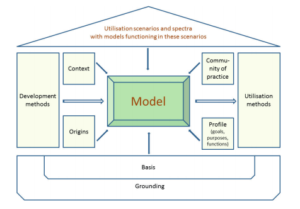
    Figure 1 represents a model of the model. The development and utilization methods form the enabling aspects of the modeling method. Driving directives are
    • (1) origins to be represented by the model,
    • (2) purposes or goals or functions of models ,
    • (3) the community of its users and developers, i.e. the community of practice, and
    • (4) the context into which the model is embedded.
    (Fig 1. Model of a Model)
    Typical functions of models are;
    • a) cognition,
    • b) explanation and demonstration,
    • c) indication,
    • d) variation and optimization,
    • e) projection and construction,
    • f) control,
    • g) substitution, and
    • h) experimentation.
    Models are used in various scenarios, e.g. communication, system construction, perception, analysis, forecasting, documentation, system modernization and optimization, control, management, and simulation.

    Models and their Foundational Framework

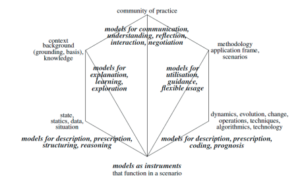
    The different orientations are the basis to distinguish the six concerns for models: community of practice, back- ground/knowledge/context, application scenario and stories of model utilization with their specific frames, situation/ state/data, dynamics/evolution/change/operations, and models as representations and instruments.

    Figure 2 shows the relation between the concerns and the functions a model might have.

    (Fig 2. Concerns and functions of a model)
    Models are used as
    • perception models reflecting someone’s understanding,
    • mental models that combine various perception models and that make use of cognitive structures and operations in common use,
    • domain-situation models representing a commonly accepted understanding of a state of affairs within some application domain,
    • experimentation models that guide experimentation,
    • formal models based on some kind of formalism,
    • mathematical models that are expressed in some mathematical language and based on some mathematical methods,
    • conceptual models which combine models with some concept and conception space,
    • computational models that are based on some (semi-)algorithm ,
    • informative models that used to inform potential users about origins,
    • inspiration models that provide an intuitive understanding of something,
    • physical models that use some physical instrument,
    • visualization models that provide a visualization,
    • representation models that represent things like other models,
    • diagrammatic models that are based on some diagram language with some kind of semantics,
    • exploration models for property discovery,
    • prototype models that represent a class of similar items,
    • mould models that are used for production of artifacts,
    • heuristic models that are based on some Fuzzy, probability, plausibility etc. relationship, etc.
    Models should thus be considered to be the third dimension of science. Disciplines and also human communication, human interaction, and human collaboration have developed a different understanding of the notion of model, of the function of models in scientific research and communication. Models are often considered to be artifacts. In reality, they are however instruments that are used with a certain intention. Models might also be perception models that incorporate mentalistic concepts. Models are used in various utilization scenarios such as construction of systems, verification, optimization, explanation, and documentation. In these scenarios they function as instruments and thus satisfy a number of properties as seen in Fig 3.

    (Fig 3. Different use cases of models)
    Model-based reasoning enhances classical reasoning such as reasoning mathematical calculi or logical derivation. There are several kinds of reasoning that are more appropriate and widely used: Evidence-based modeling and reasoning is one of the main approaches for quantitative models.

    Models only represent acceptable possibilities. Each model captures a distinct set of possibilities to which the current description refers. Possibilities are consistent with the premises and the knowledge gained so far what makes them intrinsically uncertain because they mirror only some properties they represent.

    In investigative and quantitative modeling, models can be proxy-driven where the the structure of the model corresponds to the proxies it represents. They might also include abstractions such as negation models.

    Evidence-based modeling and reasoning uses pragmatic reasoning schemata, e.g. A causes B; B prevents C; therefore, A prevents C. The calculus may use several implication forms, e.g. deterministic conclusions (A cause B to occur: given A then B occurs) and ordered sets of possibilities (A enables B to occur: given A then it is possible for B to occur).

    Hypothetical and investigative modeling considers different assumptions in order to see what follows from them, i.e. reasons about alternative possible worlds (i.e. states of the world), regardless of their resemblance to the actual world. Potential assumptions with their possible world conclusions and assertions are supported by a number of hypotheses (allowing to derive them). It is often combined with abductive reasoning. Evidence against hypothesis is performed by testing its logical consequences, i.e. exploring different alternative solutions in parallel to determine which approach or series of steps best solves a particular problem.

    Causal reasoning and modeling is a specific variant of inductive reasoning and justification-backed truth maintenance with assertions (beliefs, background) and justifications within some context (current beliefs, justifications, arguments). It establishes the presence of causal relationships among events based on methods of agreement, difference, concomitant variation, and residues. It uses assumptions and thus avoids inconsistent sets (‘no good’ environment). The environment consists of a set of assumptions, premises, assumed statements, and derived statements for the world view. Justifications (e.g. data-supported) represent cause. Hypotheses are not derived from evidence but are added to evidence. They direct the search for evidence. They are tested by modus tollens ((H → I ) ∧ ¬I ⇒ ¬H ).

    Network reasoning uses models that are expressed as networks. Nodes carry justification (arguments) and status (in, out, believed, relevant, necessary, …). Edges, hyper-edges, or directed edges have an antecedent (support nodes) and conclusions. They may also be non-monotonic and enable back-tracking for dependencies (causality, chronological, space, etc. Labels also express the degree of consistency and believability. Queries can be expressed as subgraphs and are evaluated by query embedding into the network.

    Model-based reasoning is an interactive and iterative process that helps to digest a theory and to develop the theory. Therefore, model-based reasoning integrates many reasoning approaches, e.g. deduction, induction, abduction,

    Model refinement might also be based on inverse modeling approaches. Facets of the last one are inductive learning, data mining, data analysis, generic modeling, universal applications, systematic modeling, and pattern-based reasoning.

    While modeling is a very in-depth field, it certainly requires some level of systems thinking. After all, isn’t 21st century the age of big data and advanced tech systems all of which can be considered as separate models.


    下载开源日报APP:https://opensourcedaily.org/2579/
    加入我们:https://opensourcedaily.org/about/join/
    关注我们:https://opensourcedaily.org/about/love/
  • 开源日报第732期:《计算器:calculator》

    30 3 月, 2020
    开源日报 每天推荐一个 GitHub 优质开源项目和一篇精选英文科技或编程文章原文,坚持阅读《开源日报》,保持每日学习的好习惯。
    今日推荐开源项目:《计算器:calculator》
    今日推荐英文原文:《Open source fights against COVID-19, Google’s new security tool written in Python, and more open source news》

    今日推荐开源项目:《计算器:calculator》传送门:GitHub链接
    推荐理由:该应用程序是一个用 c + + 编写的现代 Windows 应用程序,预装在 Windows 上。 该应用程序提供标准,科学和程序员计算器功能,以及一套转换器之间的各种计量单位和货币。
    今日推荐英文原文:《Open source fights against COVID-19, Google’s new security tool written in Python, and more open source news》作者:Scott Nesbitt
    原文链接:https://opensource.com/article/20/3/news-march-28

    推荐理由:在这篇文章中,我们可以看到 Google 新型冠状病毒的开源解决方案,Google 的新安全工具,Uber 的代码清理软件.

    Open source fights against COVID-19, Google’s new security tool written in Python, and more open source news

    Using open source in the fight against COVID-19

    When COVID-19 started its march around the world, open source stepped up to try to help stop it. That includes using open data to create tracking dashboards and apps, designing ventilators, and developing protective gear.

    Scientists at the University of Waterloo in Canada have teamed with artificial intelligence firm DarwinAI to create an open source tool “to identify signs of Covid-19 in chest x-rays.” Called COVID-Net, it’s neural network “that is particularly good at recognizing images.” The dataset the researchers are using is available on GitHub, which includes a link the software.

    Additionally, many open source hardware projects are underway to expedite the search for a cure.

    Google releases tool to fight USB keystroke injection attacks

    One of the sneakiest and potentially most malicious ways to hack a computer is a USB keystroke injection attack. Using a compromised USB device connected to a computer, a hacker can run commands without you even noticing. Google’s making it easier for Linux users to fight back against these kinds of attacks by releasing an open source detection tool.

    Called USB Keystroke Injection Protection, the tool detects “if the keystrokes have been made without human involvement”. It does that by measuring “the timing of keystrokes coming from connected USB devices.” Sebastian Neuner of Google’s Information Security Engineering Team said that while the USB Keystroke Injection Protection tool isn’t the last word in defense against these kinds of attacks, but offers “another layer of protection and to defend a user sitting in front of their unlocked machine by them seeing the attack happening.”

    You can find the Python source code for the tool on GitHub.

    Uber makes code deletion tool open source

    As applications get bigger, they often contain code that’s either no longer used or which is obsolete. That added code make software more difficult to maintain. To help solve the problem of quickly finding that redundant code, Uber recently open sourced a tool called Pirhana.

    Pirhana scans code for feature flags, looking for ones that are no longer used. The software then deletes the unused flags from the code. At the moment, Pirhana works with software written in the Objective-C, Swift, and Java languages. Uber’s developers hope the number of supported languages will increase “now that outside developers have an opportunity to contribute to the project.”

    You can grab Pirhana’s source code from its repository on GitHub.
    下载开源日报APP:https://opensourcedaily.org/2579/
    加入我们:https://opensourcedaily.org/about/join/
    关注我们:https://opensourcedaily.org/about/love/
  • 开源日报第731期:《客户端研发 DoraemonKit》

    29 3 月, 2020
    开源日报 每天推荐一个 GitHub 优质开源项目和一篇精选英文科技或编程文章原文,坚持阅读《开源日报》,保持每日学习的好习惯。
    今日推荐开源项目:《客户端研发 DoraemonKit》
    今日推荐英文原文:《Your Team Just Went Remote…Now What?》

    今日推荐开源项目:《客户端研发 DoraemonKit》传送门:GitHub链接
    推荐理由:DoraemonKit /’dɔ:ra:’emɔn/,简称 “DoKit” ,是一款功能齐全的客户端( iOS 、Android、微信小程序 )研发助手。中文名 “哆啦A梦”,意味着能够像哆啦A梦一样提供给他的主人各种各样的工具。

    Just Do Kit.
    今日推荐英文原文:《Your Team Just Went Remote…Now What?》作者:Stephen Younge
    原文链接:https://medium.com/better-programming/your-team-just-went-remote-now-what-b643e58fad61
    推荐理由:团队的管理从来不是一件容易事,在疫情持续的现在更是如此。

    Your Team Just Went Remote…Now What?

    For leaders, now is the time to act

    (Photo by Jérémie Crémer on Unsplash)
    Your team, like many others, probably started working from home in the past few weeks.

    Fortunately, software development is possible anywhere on the planet. In fact, many technology companies have operated with remote teams for years.

    The sudden switch to a fully remote team creates unforeseen challenges:
    • Individuals are under tremendous stress from the daily news, school closures, and isolation.
    • Team members may lack remote working experience and skills.
    • People may need furniture or equipment for a productive home office.
    • Collaboration via casual chats or hallway conversations can grind to a halt.
    • Teams losing connection due to a lack of shared meals, coffees, and “water cooler” talk.
    You can surmount these challenges with leadership and a concerted effort from the team. As the team ramps up, there are multiple benefits:
    • Focusing on the work provides a welcome distraction from the constant drip of unsettling news. People stay grounded by keeping busy and maintaining a daily schedule.
    • Collaborating with peers maintains connectivity and combats feelings of isolation. In this time of social distancing, coworkers provide an important source of interpersonal connection.
    • Staying productive helps the company weather the coming economic storm. Seeing the development team continue to deliver increases morale and focus for everyone.
    If your team is accustomed to working in an office, you can ease the transition by following these tips.

    Needs of Individual Employees

    One-on-ones

    The one-on-one meeting is an important tool for managing and coaching individual employees. In this unique time, it’s more important than ever to stay connected. Employees process daily news and stress differently. Listen patiently and show empathy.

    Ask how much prior remote experience the employee has. Those less experienced need coaching to build effective skills and habits. More experienced people can provide mentoring to those who need it. Keep an eye out for those who are struggling and provide extra help.

    Ask how you can accommodate the employee’s needs while they’re working from home. Some team members may volunteer valuable information about their living situation:
    • If they live alone, social distancing can be isolating. Socializing with the team will be especially important to them.
    • If they have kids, they are coping with school closures and increased parental duties. Tell them to step away from work whenever needed. Say that family noise, kids, and pets in the background of video calls is perfectly fine.
    • If they’re caring for a relative, they have an added source of stress. Ask if there are accommodations that you or the team can make to ease the burden.
    • If they are in a high-risk group for Covid-19, they may need extra assistance to safely obtain essentials.
    Use the factors above to decide the frequency of your one-on-one meetings with each employee. While the team ramps up, touch base with everyone at least weekly. Some employees will warrant getting in touch with every other day or so.

    Use video for one-on-ones. Studies have proven that body language is 55% of communication. This is a critical time to understand everyone’s level of stress and provide support.

    The daily hello

    In addition to frequent one-on-ones, say a quick hello over chat on a daily basis. This might be via direct message or in team channels, but be sure to check in. If you sense that someone needs to talk, reach out to them and propose a quick video call.

    Home office needs

    Working at home full-time is more intense than doing so on a periodic or part-time basis. Eye, neck, and back strain can result from prolonged computer work and poor ergonomics.

    Touch base with each employee to assess any home office issues. How does their setup compare to a workstation in the company office? Find out if a monitor, stand, keyboard, mouse, headset, camera, or docking station would help.

    Create a spreadsheet of the team’s equipment needs. Ask your HR or Facilities department for approval for employees to order what they need.

    Remind employees of key elements of good ergonomics when working at a computer:
    • Elbows, hips, and knees should all be at 90° angles.
    • Wrists should be straight.
    • Eyes should be horizontally aligned with the upper 1/4 of the monitor.
    For more information (and diagrams) from the Mayo Clinic, see here.

    Volunteering

    Inform the team of your support for community-level volunteering. Empowering employees to mitigate the impact of Covid-19 builds morale for the entire team.

    Ask employees to be transparent about how volunteering impacts work schedules. Track time spent in a centralized spreadsheet — you might be asked to provide the data later. (Alternatively, your company may have everyone enter it into the HR system.)

    Performance management

    Set the right tone regarding work output — these are extraordinary circumstances, and flexibility is important. Be transparent about your expectations and provide accommodations that employees need.

    Assessing a remote worker’s performance can be difficult at first. You need to adapt to not seeing work schedules and interactions in the office. For remote employees, measure the quantity and quality of their output.

    Keep notes of your own observations, and seek peer feedback on a regular basis. Raise any concerns immediately and candidly.

    Hiring and onboarding

    If you have open positions to fill, don’t let Covid-19 slow you down! All new hires will start as remote employees, so gauge your candidates’ ability to ramp up as new team members from home. Ask them where the biggest challenges will be and brainstorm how the team can help.

    Onboarding a remote employee isn’t easy, but you will be successful with the right approach:
    • Plan on a one-on-one meeting every other day for the first month or two.
    • Designate a mentor with a three-month commitment. They should touch base daily via video for the first month.
    • Remote pair programming can be an effective tool for ramping developers up in the codebase.

    Needs of the Team

    Coach your team on the following remote communication techniques.

    Less typing, more talking. When team members are distributed, it is easy to overly rely on email, chat, and pull requests. Actually talking, in real-time, can feel like a hassle. Coach your team members to resist the urge to overuse text. Talking over video is more efficient (saves time) and more effective (better communication).Sometimes it is best to say mid-chat, “let’s hop on video for a sec.”

    Find out how many work-related ad hoc conversations employees had over the past week. If it feels like people aren’t connecting enough, encourage more reaching out over video.

    Keep calendars up-to-date. Employees can configure their calendars with their default working time. Team members can also block out times during the day when they have non-work commitments.

    Remote meetings

    Keeping everyone engaged in remote meetings can be a struggle. Effective facilitation is critical.

    Show up on time. Engagement suffers when people wait for others to dial in.

    Use video, always. This reduces the boredom (and the resulting multi-tasking) that comes with long conference calls. It keeps all-important body language visible. Team members might feel self-conscious about kids or family life in the background. Make everyone feel comfortable with a reminder that schools are closed. Family noise on video calls will be the norm during Covid-19.

    Use multi-user collaboration tools. Use a virtual whiteboard for collaborative brainstorming or design sessions. Concurrent editing makes meetings faster and much more engaging.
    • Google Docs, Sheets, and Slides for creating and editing.
    • Trello for card/story/task creation, grouping, and sorting.
    • Miro for distributed whiteboarding.
    • planningpoker.com for story sizing.
    Call on the lurkers to contribute. Introverted or less assertive team members tend to listen quietly without speaking. Draw them into the discussion by calling on them directly. This will keep them engaged — and they often have great ideas.

    Virtual socializing

    Teams must compensate for the loss of the office as the team’s social hub. The end of ad hoc chats, water cooler chats, and team happy hours means socializing must be intentional.

    Encourage spontaneous banter. Chat about non-work topics, especially how people are dealing with all of the changes. You can encourage banter in team channels by going first or asking how people are doing. Your team might even set up a dedicated channel(s) — #watercooler, anyone (or better yet, #atthekombuchatap)?

    Schedule video happy hours. Socializing over video isn’t ideal, but it’s much better than not at all. Schedule a happy hour early enough to avoid conflicts with family time. Encourage everyone to grab their favorite beer, or suggest a cocktail (or mocktail) for people to make. Use an online tool like icebreaker.range.co to break the ice — it might provide welcome relief from discussing Covid-19.

    Working as a fully remote team is going to be a fact of life for a while — so settle in. With the correct techniques, you will be as productive, collaborative, and connected as ever.

    Remember these tips:
    • One-on-ones (over video) at least once a week
    • Get into the habit of a daily hello over text.
    • Address home office equipment needs.
    • Support employee volunteering and track their time.
    • Master the art of facilitating effective remote meetings.
    • Encourage spontaneous online banter.
    • Schedule virtual happy hours.
    Keeping your team motivated and focused during these extraordinary times won’t be easy. As a leader, you have what it takes to be successful.


    下载开源日报APP:https://opensourcedaily.org/2579/
    加入我们:https://opensourcedaily.org/about/join/
    关注我们:https://opensourcedaily.org/about/love/
←上一页
1 … 75 76 77 78 79 … 262
下一页→

Proudly powered by WordPress