• 开源镜像
  • 开源沙龙
  • 媛宝
  • 猿帅
  • 注册
  • 登录
  • 息壤开源生活方式平台
  • 加入我们

开源日报

  • 开源日报第790期:《强化版本 htmx》

    1 6 月, 2020
    开源日报 每天推荐一个 GitHub 优质开源项目和一篇精选英文科技或编程文章原文,坚持阅读《开源日报》,保持每日学习的好习惯。
    今日推荐开源项目:《强化版本 htmx》
    今日推荐英文原文:《How to Be Creative Under a Deadline》
    今日推荐开源项目:《强化版本 htmx》传送门:GitHub链接
    推荐理由:我们拿着 HTML 元素建造商店,拿着 CSS 样式表给门口贴上装饰,再聘用一些 JS 来负责买卖事项,三部分分别各司其职已经是既定事项了。但是有的时候一些每天都在重复的功能的确可以被简化一下:这个项目就诞生了,为你的 HTML 提供更高端的功能(虽然背后依然是 JS 在完成工作)而不需要你去操作 JS 代码。虽然这损失了一些代码可读性,但是适应之后只需要更少的功夫就能完成你平时需要重复一遍遍差不多的 JS 来完成的日常工作。
    今日推荐英文原文:《How to Be Creative Under a Deadline》作者:Mythili the dreamer
    原文链接:https://medium.com/better-programming/how-to-be-creative-under-a-deadline-95d357a3e847
    推荐理由:这可不是你拖到最后一天晚上再通宵的理由

    How to Be Creative Under a Deadline

    Tight time frames don’t have to be a bad thing

    Deadlines don’t have to be a bad thing. Our brains crave constraints and deadlines can help us focus on what’s important and what isn’t. Here are few ideas on how to stay productive and creative in difficult circumstances.

    Use Your Deadlines

    Teresa Amabile, a Professor of Business Administration at Harvard Business School, studied 177 people working for some of the top companies in the United States. She asked them to keep diary entries for their workdays and note when they thought they were under various types of pressure and how creative they were.

    She found that although tight deadlines did hinder creativity, so did mild deadlines.

    Employees working to tight deadlines simply weren’t making an impact, so they didn’t see enough meaning in the work to think creatively. They faced crises, ad-hoc tasks, and the proverbial fire drills that kept them busy but got them no closer to finishing their core project.

    Mild deadlines were to the detriment of creative thinking as well. They did not give enough creative motivation to the team to bring fire to the task at hand. Work simply became routine and mundane.

    Now the interesting part.

    Workers who were under a low to moderate deadline — the middle option between tight and mild — showed the most creativity across each organization. The stress of a due date may not be exciting, but a time-sensitive environment can give your work the focus it deserves and help you fend off the distractions that can derail an inspired train of thought.

    “If people and companies feel that they have a real deadline, they understand it, they buy into it,” Amabile wrote in a Forbes article. “They understand the importance of what they’re doing, and the importance of doing it fast — and if they’re protected … so they can focus, they’re much more likely to be creative”.

    So far so good.

    But how do you create a moderate deadline? You’ve already been given a deadline and you can’t change it.

    Well, you can’t change the single looming deadline. But what you can do is break it into smaller mini-deadlines. Using mini-deadlines as part of a bigger project allows you to compartmentalize your work and see progress as you finish each task.

    Smaller deadlines take the stress off having to complete overwhelming amounts of work and instead let you focus on the tasks at hand. Every mini-deadline accomplished by you gives you added motivation to reach the final goal.

    Switch Tasks Frequently

    In a recent behavioral study conducted by Columbia Business School, researchers had participants engaged in creative brainstorming for multiple projects while using one of three work styles.

    One group could not switch projects. Another group was told to work on multiple projects at the same time. A third group was told to switch projects at a set interval.

    The results were fascinating.

    Group three, the task-switching group, turned out to be the most creative.

    “When attempting problems that require creativity, we often reach a dead end without realizing it,” the study’s authors explain in Harvard Business Review. “Regularly switching back and forth between two tasks at a set interval can reset your thinking, enabling you to approach each task from fresh angles.”

    Frequently changing gears forces you to change your view of each task as you revisit it. This style of working fosters more creativity and avoids the rigid thinking that can occur when you focus for too long on the same project.

    So, if you are stuck in a rut in a coding task, leave it and switch to testing. If you’re in a writer’s block and not getting any ideas, leave it and switch to reading. And so on.

    Changing tasks not only clears your brain of cobwebs, it also gives you the impetus to think differently.

    Brainwrite Instead of Brainstorm

    Brainstorming is de rigueur in almost every professional environment.But here’s the thing: it doesn’t work in pressure situations.

    In pressure situations anchoring sets in place. With anchoring, we tend to put undue weight on the first idea of a piece of information we’re presented with. Everything else afterward is judged on its relative merit compared to that piece of information.

    What really happens is that the group assembles for discussion and zeroes in on the first idea that comes out (the easy way out). All further discussions focus around this first idea and before you realize it half the day has gone without anything worthwhile being accomplished.

    That’s where brainwriting comes in.

    Leigh Thompson, Professor of Management and Organizations at the Kellogg School of Management says that if everyone writes down their ideas before the meeting, and then comes to discuss them, it removes the difficulty in discussing simple ideas. It also prevents people from trying to game the system by taking up an easy solution and then staying silent for the rest of the meeting.

    An “initial ideas” period before the meeting gives people the time to think and to come up with an array of ideas, without the pressure of the brainstorming session

    Divorcing the idea generation aspect of brainstorming from the discussion session is the only way to get truly great creative ideas, especially during pressure situations.

    Don’t Give in to Impostor Syndrome

    In a 1978 paper, psychologists Pauline Clance & Suzanne Imes reported a surprising level of anxiety in high-achieving women — PhDs and professors. They coined the term “impostor syndrome,”:
    • [When someone] persists in believing that they are really not bright and have fooled anyone who thinks otherwise. Numerous achievements, which one might expect to provide ample object evidence of superior intellectual functioning, do not appear to affect the impostor belief.
    Although the original study focused on women, later examinations have shown that both genders suffer from it. Everyone has it to some degree and it seems to be more common the greater success a person has.

    You externalize your success, crediting other people’s poor judgment or pity for your achievements. You feel like your ability to do meaningful creative work is so transient and fragile that it could soon be gone forever.

    Here are some ways to battle impostor syndrome and stop it from interfering with your creative mindset.
    • Embrace it — it’s OK to be scared.
    • Keep a log of your achievements to remind yourself of your successes (no matter how small).
    • Keep a folder of “confidence boosters” (e.g., nice comments people have left on your work)
    • Document your processes to stop doubting your methods.
    • Avoid negative people (but listen to constructive criticism).

    Finally, Control the Sparrow

    Worrying about deadlines is like a sparrow sitting on your shoulder — jabbering on about all the awful things that could happen to you, how dreadful they will be and how little you can do to prevent them. Spend too long listening to the sparrow and you start to believe it. It will erode your confidence.

    So, the next time the sparrow starts jabbering away in your ear, stop and listen to it for a moment. Don’t try to block it out, just listen to the anxious sparrow-like voice, and recognize that it’s not you and it’s not telling you the truth about you or your situation.

    Look around you, take a walk, move around and reconnect with friends — all the while keeping the sparrow’s voice in your awareness without getting caught up in it. A bit like when you have the radio on in the background, but you’re not really listening to it — the sound goes in and out of your awareness, without capturing your attention.

    The more you practice doing this, the more the worry of failure will fade into the background, the clearer your thinking will be and the calmer you will feel.

    As Ron Bennet has said,
    “Instead of worrying about what you cannot control, shift your energy to what you can create.”

    下载开源日报APP:https://opensourcedaily.org/2579/
    加入我们:https://opensourcedaily.org/about/join/
    关注我们:https://opensourcedaily.org/about/love/
  • 开源日报第789期:《virtual-environments》

    31 5 月, 2020
    开源日报 每天推荐一个 GitHub 优质开源项目和一篇精选英文科技或编程文章原文,坚持阅读《开源日报》,保持每日学习的好习惯。
    今日推荐开源项目:《virtual-environments》
    今日推荐英文原文:《Trump signs an executive order taking direct aim at social media companies》

    今日推荐开源项目:《virtual-environments》传送门:GitHub链接
    推荐理由:本仓库包含可以用于执行 GitHub Actions 所需要的各种虚拟环境,包括 ubuntu,macOS,windows系统. 这将让开发者可以更轻松的跨平台运行自己的项目.
    今日推荐英文原文:《Trump signs an executive order taking direct aim at social media companies》作者:Taylor Hatmaker
    原文链接:https://techcrunch.com/2020/05/28/trump-social-media-executive-order/
    推荐理由:周四,特朗普总统签署了一项行政命令,针对互联网公司赖以保护其免受用户创建内容责任的法律条文。总统长期以来指责诸如 Twitter,YouTube 和 Facebook 这样的大型社交平台公司故意压制保守派观点,这会对这些社交平台产生巨大的影响.

    Trump signs an executive order taking direct aim at social media companies

    On Thursday, President Trump signed an executive order targeting the legal shield that internet companies rely on to protect them from liability for user-created content. That law, known as Section 230 of the Communications Decency Act, is essential to large social platforms like Twitter, YouTube and Facebook, the kind of companies the president has long accused, without evidence, of deliberately suppressing conservative views.

    Trump was joined during the signing by Attorney General William Barr, who has previously expressed interest in stripping away or limiting the same legal protections for tech companies.

    We previously examined a draft of the executive order that’s nearly identical to the just-released final version, embedded below. Among other things, the draft argued that platforms forfeit their rights to legal protection when they moderate content, as in the case of Twitter modifying the president’s tweet with a fact-checking disclaimer.

    This will be a Big Day for Social Media and FAIRNESS!

    — Donald J. Trump (@realDonaldTrump) May 28, 2020

    “The choices Twitter makes when it chooses to edit, blacklist, shadowban are editorial decisions, pure and simple,” Trump said during the signing. “In those moments, Twitter ceases to be a neutral public platform and they become an editor with a viewpoint. And I think we can say that about others also, whether you’re looking at Google, whether you’re looking at Facebook.”

    Tech companies and internet rights advocates believe that interpretation of Section 230 inverts the original spirit of the act. They say Section 230 was designed to protect internet companies from being sued for the content they host while also empowering them to make moderation choices without being liable for those decisions.

    Twitter itself called the order a “reactionary and politicized approach to a landmark law.” Facebook also released a statement, asserting that the company “believe[s] in protecting freedom of expression on our services, while protecting our community from harmful content including content designed to stop voters from exercising their right to vote.”

    This EO is a reactionary and politicized approach to a landmark law. #Section230 protects American innovation and freedom of expression, and it’s underpinned by democratic values. Attempts to unilaterally erode it threaten the future of online speech and Internet freedoms.

    — Twitter Public Policy (@Policy) May 29, 2020

    Google also weighed in against the order. “We have clear content policies and we enforce them without regard to political viewpoint,” a Google spokesperson said. “Our platforms have empowered a wide range of people and organizations from across the political spectrum, giving them a voice and new ways to reach their audiences. Undermining Section 230 in this way would hurt America’s economy and its global leadership on internet freedom.”

    While the idea of dismantling Section 230 does pose an existential threat to internet companies, it’s not clear that the White House will be able to actually legally enforce its threats. But even if the order doesn’t result in substantial repercussions for social media companies, it might serve to intimidate them from further enforcing platform policy decisions like ones that inspired the president to retaliate against Twitter this week.

    Going to war with Twitter, Trump threatens critical social media legal protections

    On Tuesday, Twitter added warning labels to two tweets from the president that made false claims about vote-by-mail systems. The labels, which did not hide the tweets or even actually outright call them false, pointed users toward a fact-checking page. The move enraged the president, who lashed out at the company through tweets, specifically targeting Yoel Roth, Twitter’s head of site integrity.

    The executive order makes it clear that the president’s spat with Twitter inspired the action, though some of its language is likely recycled from an abandoned effort at a similar order last August.

    “Twitter now selectively decides to place a warning label on certain tweets in a manner that clearly reflects political bias,” the unusual order reads. “As has been reported, Twitter seems never to have placed such a label on another politician’s tweet.”

    Civil rights groups and internet freedom watchdogs denounced the order Thursday, with Oregon Senator Ron Wyden, the co-creator of the law in Trump’s crosshairs, denouncing his actions as “plainly illegal.”

    “As the co-author of Section 230, let me make this clear — there is nothing in the law about political neutrality,” Wyden said of the order.

    “It does not say companies like Twitter are forced to carry misinformation about voting, especially from the president. Efforts to erode Section 230 will only make online content more likely to be false and dangerous.”

    Whatever happens with Trump’s big move against social media companies, it’s likely to energize the president’s base and his allies in Congress and other corners of the government around the issue. And even if adding politically advantageous stipulations to Section 230 proves legally difficult or untenable for the White House, the threat may allow the president to wield new power over some of tech’s most powerful, often untouchable companies just the same.
    下载开源日报APP:https://opensourcedaily.org/2579/
    加入我们:https://opensourcedaily.org/about/join/
    关注我们:https://opensourcedaily.org/about/love/

  • 开源日报第788期:《好看的文本 rich》

    30 5 月, 2020
    开源日报 每天推荐一个 GitHub 优质开源项目和一篇精选英文科技或编程文章原文,坚持阅读《开源日报》,保持每日学习的好习惯。
    今日推荐开源项目:《好看的文本 rich》
    今日推荐英文原文:《Want to Become a Better Programmer? Take Advice From Writers》

    今日推荐开源项目:《好看的文本 rich》传送门:GitHub链接
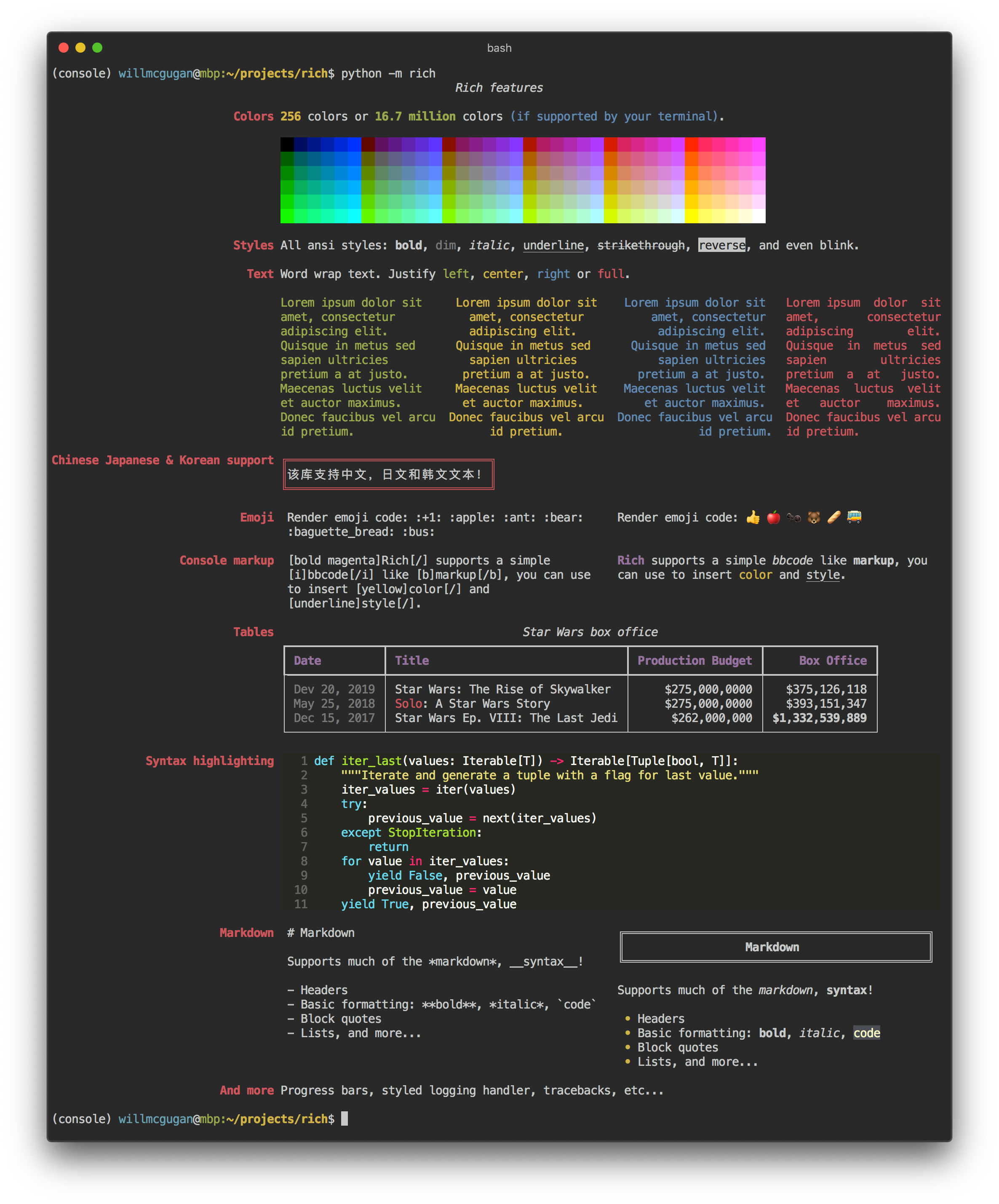
    推荐理由:Rich 是一个 Python 库,用于向终端呈现富文本和漂亮的格式。使用该项目能够非常容易地向脚本或程序中添加彩色文本和各种样式。
    今日推荐英文原文:《Want to Become a Better Programmer? Take Advice From Writers》作者:Szymon Adamiak
    原文链接:https://medium.com/better-programming/want-to-become-a-better-programmer-take-advice-from-writers-d4042250b92a
    推荐理由:一个好的项目和一篇好文章一样,也需要起承转合。

    Want to Become a Better Programmer? Take Advice From Writers

    How learning to write can help you write better code

    (Photo by Aaron Burden on Unsplash.)
    I recently started writing. It’s something new to me, so I decided to approach the skill in the same way that I approached other skills: by immersing myself in books, articles, and style guides to get some advice.

    A few weeks into my journey, I discovered that I’ve already heard similar suggestions. Even better, I had given advice of my own — not to aspiring writers but junior developers. It turns out programming is much more similar to writing than I expected. Here are some helpful tips from the best writers that you can use in your coding.

    Create Your First Draft

    You should think before you start writing. It doesn’t matter if you want to write a great novel or a great app. Thinking is crucial. But never let overthinking stop you from doing actual work. It’s easy to get stuck in considerations about the best approach to the problem, but to achieve something, you need to get your hands dirty.

    At first, you don’t need to make your code perfect. You need to create any code that resembles the final solution. Don’t be afraid of failure. Assume you’ll fail at first. Done is better than perfect — at least for now.

    Write your first draft as fast as possible. Maybe it won’t be any good, but you’ll explore some options and check if your approach is viable at all. Fast feedback is the best feedback. If your method failed, try another one. If the code works, you can build from there.

    Thinking in drafts takes the pressure off. You know that this is the first of many attempts, so your expectations regarding the quality are lower and you can start rapidly. The faster you start, the quicker you’ll progress. Create drafts until your code works. Now is the time for ruthless editing.

    (Think of your code as a map. Photo by Annie Spratt on Unsplash.)

    Know Your Audience

    Writing and programming are both about communication. But who are you communicating with? Many programmers, especially early in their careers, think they need to communicate only with the machine. After all, the computer needs to understand instructions to execute them. But in reality, programmers communicate mostly with other programmers.
    “Any fool can write code that a computer can understand. Good programmers write code that humans can understand.” — Martin Fowler
    Almost every non-trivial application is created by multiple programmers. What’s more, code is read much more often than it is written. You need to communicate with other programmers efficiently, so making the code readable is crucial. It helps to work faster, simplifies maintenance, and facilitates further development.

    You may think that your side project’s readability is not essential. After all, you’re the only developer and you know what you’re doing. But do you? Imagine you need to take a break from the project for half a year. Are you sure you’ll understand that code line or that magical number in six months? I don’t think so.

    Think of your code as a map. A map only you can use is, well, useless. Your map is for other people. Everyone who understands the map-reading basics should get it. Strive for this level of clarity in your code.

    Here are some tips to make your code more like a map and less like a personal diary.

    Write to express — not to impress

    You can implement a tree traversal algorithm in 80 characters. That’s impressive, but what about all the programmers who don’t have your skill?

    Next month or next year, someone will bump into your code and need to add or change something. How long will it take to understand the codebase? Writing code is not a contest. You are a part of the team.

    Your team doesn’t want to be impressed by you — just to understand. When we want to be astonished, we can take a look at your code katas. In our project, we’d rather appreciate your consideration.

    Follow the conventions

    To become a successful writer, you need to follow ground rules. It’s the same with coding. Countless problems have already been solved. You should take advantage of that.

    Follow the patterns created by your predecessors, and you’ll be understood. You don’t need to be a slave to others’ opinions. Just be sure you know why you’re breaking convention and if it’s worth it.

    Cut excess fat

    The longer it takes to create the application, the more cluttered the code will be. Remember to get rid of unnecessary things that impede code understanding.

    Remove unused variables, misleading comments, and overly complicated abstractions. Leave only the code that solves the problem you need to address.

    Also, make the code more concise as long as it doesn’t impair the readability.

    (Reading great code will make your code better. Photo by Fabian Grohs on Unsplash.)

    Read Great Writers

    Proficient writers are proficient readers. It’s much easier to become a great programmer if you take the time to read quality code.

    Open-source is a great place to start looking for exquisite samples. Try to understand them. The unique code will let you get into its writer’s head. And if the writer is a good programmer, you certainly want to get into their head. It’s all for free!

    You’ll be amazed at how many new patterns and ways of solving problems you can learn. There were many giants in the industry before you. Take a sip from their well of knowledge. Dissect the code you admire, imitate better programmers. It’s all waiting for you.

    Don’t worry about encountering lousy code. You can learn from it too. Analyze mistakes in sloppy code and tiny bugs in edge cases. Reading code will let you develop and understand complex applications. Learn to distinguish between superb code and bad code, and try to make yours a bit better.


    下载开源日报APP:https://opensourcedaily.org/2579/
    加入我们:https://opensourcedaily.org/about/join/
    关注我们:https://opensourcedaily.org/about/love/
  • 开源日报第787期:《传奇画师续作 purecss-gaze》

    29 5 月, 2020
    开源日报 每天推荐一个 GitHub 优质开源项目和一篇精选英文科技或编程文章原文,坚持阅读《开源日报》,保持每日学习的好习惯。
    今日推荐开源项目:《传奇画师续作 purecss-gaze》
    今日推荐英文原文:《Use the Documentation — Not StackOverflow》

    今日推荐开源项目:《传奇画师续作 purecss-gaze》传送门:GitHub链接
    推荐理由:他来了他来了,他带着新作走来了。这个项目是经常拿着 HTML+CSS 就上场画画去的项目作者的续作,这个表现出来的效果一如既往的令人惊讶,如果你不打开浏览器控制台,很难想像这真的不是一张图片而且一个个 HTML 元素堆砌起来的成果……
    今日推荐英文原文:《Use the Documentation — Not StackOverflow》作者:Brett Fazio
    原文链接:https://medium.com/better-programming/use-the-documentation-not-stackoverflow-45fe4663b94e
    推荐理由:如果不是火烧眉毛,花点时间帮助未来的自己总不是坏事

    Use the Documentation — Not StackOverflow

    Understanding how to do something is much better than a quick fix

    When faced with a problem, our first instinct is to Google to find the specific solution. This may be fine in other disciplines, but not in computer science.

    Most of the time when we Google our problem, we are presented with a forum, like StackOverflow, that consists of a similar question and a specific answer. We read through the question to see if it fits ours, then we proceed to copy and modify the accepted answer to fit our needs. Problem solved, right? Well, not really.

    Yes, you may have found a block of code on the internet that, with the magic of copy-paste, fixed your problem. But in the longer term, your understanding wasn’t really deepened. When faced with a similar problem again, you’ll probably have to resort to the same forum question. When faced with a more difficult problem, you’ll have to drain your energy trying to piece together seven or eight different solutions on the internet hopefully arriving at something that resembles good, working code.

    Why Use Documentation Instead?

    When I first got into iOS development, I used the BigNerdRanch iOS development books — they were the ones that looked the best at my local bookstore. One of the key things they hammered home was Shift+Command+0 — this keystroke brings up the documentation when using Xcode.

    They didn’t suggest instantly giving up and Googling; the authors wanted me to use the documentation. This was great advice.

    While forums online usually read like a quick fix, documentation reads like a textbook or a manual. I think a textbook is an apt comparison here because we use textbooks in school to deepen our understanding of an unfamiliar topic, and I think we should use documentation the same way.

    If, for example, you were writing a Make file to compile your C++ app and one of the lines in your Make file kept resulting in an error, you could probably Google the error and find a line of Make code to fix your problem.

    But what if you had looked at the documentation instead? Yes, it will take longer to scour through the documentation, but you will gain a deeper understanding of what’s going on. In doing so, you’ll be able to make connections between your newfound understanding of Make and the current problem at hand. Now, the next time you encounter a problem, you’ll be able to refer back to that deeper understanding and solve the problem yourself.

    Should I Never Use StackOverflow Again?

    No. There’s a time and place for everything. StackOverflow — and sites like it — are a great tool to figure out problems. But it shouldn’t be your primary source of learning and it shouldn’t be the first place you go when you have a problem.

    If you refer to the documentation first but are unable to understand it or still can’t fix your code, going to StackOverflow next to ask the question is a logical next step — but now your question will be better. You can refer to the parts of the documentation that you looked at and still don’t understand, and try to connect that to your specific problem when you ask your question. Your question will be better.

    People won’t view your question as just another person looking for someone else to fix their code. They’ll view your question as someone who’s really trying to understand something in order to fix a problem but just needs a little help. That’s a much better look.

    With the long-term outlook in mind, being able to become the person who can solve your own programming problems, rather than relying on forums will make you a much better developer. It’s not to say that there isn’t a time and place for StackOverflow; if you’ve tried to learn it yourself but still can’t get it, StackOverflow is a perfect place to go.

    Trying to learn things yourself should always be your go-to when a problem arises.
    下载开源日报APP:https://opensourcedaily.org/2579/
    加入我们:https://opensourcedaily.org/about/join/
    关注我们:https://opensourcedaily.org/about/love/
←上一页
1 … 61 62 63 64 65 … 262
下一页→

Proudly powered by WordPress