• 开源镜像
  • 开源沙龙
  • 媛宝
  • 猿帅
  • 注册
  • 登录
  • 息壤开源生活方式平台
  • 加入我们

开源日报

  • 开源日报第802期:《山水画:shan-shui-inf》

    13 6 月, 2020
    开源日报 每天推荐一个 GitHub 优质开源项目和一篇精选英文科技或编程文章原文,坚持阅读《开源日报》,保持每日学习的好习惯。
    今日推荐开源项目:《山水画:shan-shui-inf》
    今日推荐英文原文:《Microsoft says it won’t sell its facial recognition tech to police》

    今日推荐开源项目:《山水画:shan-shui-inf》传送门:GitHub链接
    推荐理由:该项目可以展现中国山水画形成的过程,并且使用一些数学方法形成山和树等景物的模型.它由javascript编写,输出格式是SVG.
    今日推荐英文原文:《Microsoft says it won’t sell its facial recognition tech to police》作者:Ry Crist
    原文链接:https://www.cnet.com/news/microsoft-bans-police-from-using-its-facial-recognition-software/
    推荐理由:美国的示威游行抗议活动给美国政府带来了很大的压力.微软公司作为全美知名的技术公司在这个时候明确表示自己不会将用户的面部信息出售给政府,是对用户隐私的负责.

    Microsoft says it won’t sell its facial recognition tech to police

    Microsoft won’t sell its facial recognition software to police and law enforcement until federal regulations for facial recognition tech are in place, company president Brad Smith told The Washington Post during an interview Thursday morning. The move follows nationwide protests against police brutality and similar steps by Amazon and IBM regarding facial recognition systems.

    “The bottom line for us is to protect the human rights of people as this technology is deployed,” Smith told the Post, adding that the company hasn’t previously sold the technology to law enforcement.

    Consumer advocates and civil liberties groups have long warned about facial recognition technology, particularly with respect to the police. Two years ago, the ACLU began calling on tech giants to stop providing the technology to governments and law enforcement agencies, arguing that it posed a potential threat, especially to immigrants and people of color. Last year, Microsoft quietly took down a massive facial recognition database, consisting of more than 10 million images culled from the internet, after the database was linked to the Chinese government’s crackdown on ethnic Muslims.

    “When even the makers of face recognition refuse to sell this surveillance technology because it is so dangerous, lawmakers can no longer deny the threats to our rights and liberties,” said Matt Cagle, a technology and civil liberties attorney with the ACLU of Northern California.

    “For the past two years we have been focused on developing and implementing strong principles that govern our use of facial recognition, and we’ve been calling for strong government regulation,” a Microsoft spokesperson told CNET. “We do not sell our facial recognition technology to US police departments today, and until there is a strong national law grounded in human rights, we will not sell this technology to police departments.”

    That might not be enough to win over the ACLU, which would like to see companies like Microsoft keep their facial recognition tech closed off to law enforcement indefinitely.

    “Congress and legislatures nationwide must swiftly stop law enforcement use of face recognition, and companies like Microsoft should work with the civil rights community – not against it – to make that happen,” Cagle said. “This includes halting its current efforts to advance legislation that would legitimize and expand the police use of facial recognition in multiple states nationwide.”

    “We’re committed to working with others to advocate for the legislation that is needed,” the Microsoft spokesperson says. “We’re also taking this opportunity to further strengthen our review processes for any customer seeking to use this technology at scale.
    下载开源日报APP:https://opensourcedaily.org/2579/
    加入我们:https://opensourcedaily.org/about/join/
    关注我们:https://opensourcedaily.org/about/love/
  • 开源日报第801期:《一些灵感 app-ideas》

    12 6 月, 2020
    开源日报 每天推荐一个 GitHub 优质开源项目和一篇精选英文科技或编程文章原文,坚持阅读《开源日报》,保持每日学习的好习惯。
    今日推荐开源项目:《一些灵感 app-ideas》
    今日推荐英文原文:《Coca-Cola Nearly Died Because of One Decision》

    今日推荐开源项目:《Coca-Cola Nearly Died Because of One Decision》传送门:GitHub链接
    推荐理由:对开发者很实用的一些项目和详细介绍。不仅能够提升编程能力,还能提供许多方向的好点子。
    今日推荐英文原文:《Coca-Cola Nearly Died Because of One Decision》作者:Sean Kernan
    原文链接:https://medium.com/better-marketing/coca-cola-nearly-died-because-of-one-decision-9f49c9a7fdc6
    推荐理由:可口和百事老对手了,可口可乐的这一出糗事说明了很多人还是更喜欢经典的可乐。“If it ain’t broke, don’t fix it”,这句话有时挺有用的,要是没有坏,就先用着。

    Coca-Cola Nearly Died Because of One Decision

    Over $30 million down the drain — how it happened

    Coca-Cola’s decades of dominance would soon end.

    Through the 1940s and ’50s, it held more than 60% of the market. Pepsi had been around but they’d floundered, going bankrupt several times while attempting to sink their teeth into the market.

    However, by the 1970s, Pepsi had found its stride after several hit marketing campaigns. Where Coke’s primary demographic was older adults, Pepsi was winning over an expanding, younger demographic.

    By 1980, Pepsi was only trailing coke by 3%.

    This, unsurprisingly, made Coke very uncomfortable. They then did what one should never do when under pressure: overreact.

    They changed the original recipe.

    But they hadn’t made this decision without favorable data. So what went wrong?

    The Crack in the Process

    Months earlier, Coca-Cola had begun “Project Kansas.” It sounds like a nuclear experiment but it was just a testing project for the new flavor.

    In individual surveys, they’d found that more than 75% of respondents loved the taste, 15% were indifferent, and 10% had a strong aversion to the taste to the point that they were angry.

    When researchers did surveys in group settings, they noticed the angry 10% exerted subtle peer pressure effects on the group.

    When New Coke was released, that 10% manifested in a big way. They began getting loud about their displeasure in the new recipe. News outlets began picking up on them, amplifying their voices, causing things to snowball.

    A consumer action group, Old Cola Drinkers of America, formed and began to collectively protest the new recipe (some people clearly have a lot of time on their hands).

    Additionally, Coke made a big cultural mistake. Coke is headquartered in the Deep South (Atlanta).

    Many patrons from the region saw the flavor change as another concession to the north, to the liberal minds that liked Pepsi.

    At the time, Coca-Cola had a customer hotline. It was flooded with more than a thousand phone calls a day with people airing their grievances.

    Confused at the sudden backlash, Coke executives hired a psychiatrist to listen in who later said, “Some people sounded as if they were discussing the death of a family member.”

    Pepsi pounced — running their own ads making fun of Coke’s mistake. In turn, Pepsi and Coke’s market shares drew even.

    Major media publications, smelling blood, pounced as well.

    Invariably, Coke saw a decline in sales and, far more importantly, major damage to their golden brand perception.

    The Bizarre Switch

    It’s interesting that so much of the data had been favorable beforehand.

    Where surveys had shown more than 70% preference for New Coke, surveys afterward showed less than 13%.

    Where professional critics had said good things in prior surveys, they now became more negative, with Mimi Sheraton saying, “New Coke seems to retain the essential character of the original version…It tastes a little like classic Coca-Cola that has been diluted by melting ice.”

    The trend factor proved to be massive in the perception of the new flavor. It got to the point where fans booed Coke commercials in sports arenas.

    Just three months after the release of New Coke, the president of Coca-Cola aired a commercial announcing that coke would return and took the unprecedented step of announcing they’d made a mistake.

    And hence, today, you will notice that all Coca-Cola either says “classic” on the can or “original” on the container holding the cans.

    Coke lost $30M in the unsold New Coke inventory and the $4M on research it spent. This is approximately $82 million in 2020 dollars.

    Today, the story of New Coke is a poster child for marketing disasters. It is taught in nearly every marketing program in the United States.

    So where is the nuance in all this? Why did Coke catch so much crap just for changing a recipe? Three reasons:

    1. They ignored the unrelenting power of peer pressure. Many users in public found themselves avoiding New Coke for fear of judgment.
    2. They learned the importance of honoring your biggest brand advocates. The heaviest consumers of your products will have exponentially louder voices. This is why filmmakers tasked with doing remakes and sequels have such a treacherous job.
    3. They forgot the cultural value of Coke. Coke has a long history and brings feelings of nostalgia to its drinkers.
    Not all products are like cars and electronics. They can’t just be tweaked and changed like a new version of an iPhone.

    With the New Coke disaster, it seems there has never been a more applicable use of the phrase, “If it ain’t broke, don’t fix it.”
    下载开源日报APP:https://opensourcedaily.org/2579/
    加入我们:https://opensourcedaily.org/about/join/
    关注我们:https://opensourcedaily.org/about/love/
  • 开源日报第800期:《里程碑 Milestones》

    11 6 月, 2020
    开源日报 每天推荐一个 GitHub 优质开源项目和一篇精选英文科技或编程文章原文,坚持阅读《开源日报》,保持每日学习的好习惯。
    今日推荐开源项目:《里程碑 Milestones》
    今日推荐英文原文:《Ouch, JavaScript Is Killing Me》

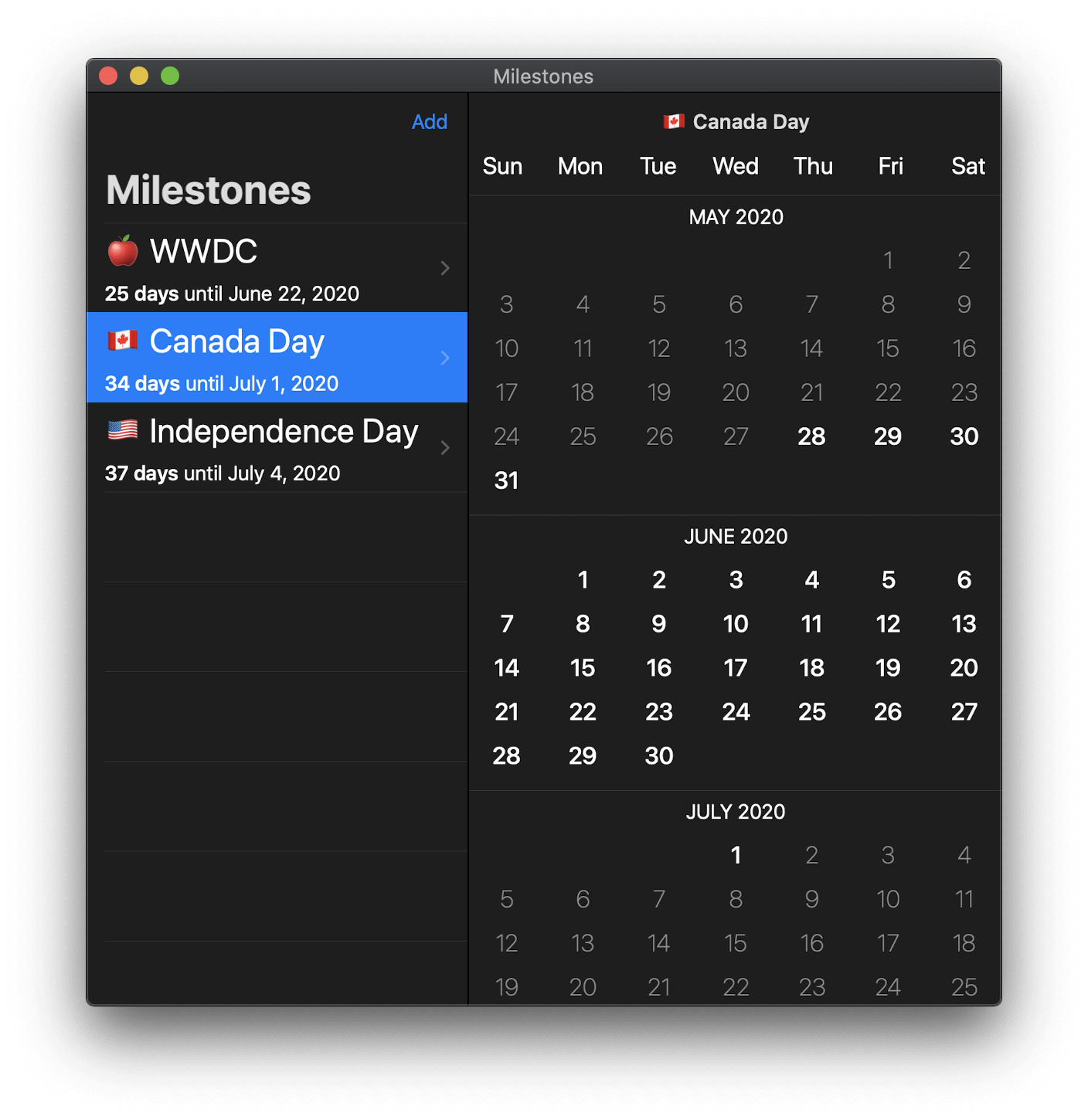
    今日推荐开源项目:《里程碑 Milestones》传送门:GitHub链接
    推荐理由:这个项目是一个专门为了里程碑倒数计时制作的应用,日历虽好,但是这个项目专注于里程碑的设计让它也能在日历之外发挥它的作用。

    到达第 800 期对我们来说只不过是一个迟早会到达的里程碑,接下来还有无数里程碑等着我们呢。
    今日推荐英文原文:《Ouch, JavaScript Is Killing Me》作者:Alice Wang
    原文链接:https://medium.com/better-programming/ow-javascript-is-killing-me-8aa0600e049b
    推荐理由:下一个里程碑,在几周内改正自己的工作姿势

    Ouch, JavaScript Is Killing Me

    Ergonomics and how you can set up a healthy workstation

    Many of us spend hours at a time on the computer, squinting at code. It doesn’t take long to develop aches and pains. I started to wonder if our computer habits could be permanently damaging our bodies.

    I did some research on the risks associated with spending long hours on the computer. This article discusses what to watch out for and ways to stay healthy while programming.

    Neck and Back


    Long hours of sitting, especially in postures that are bad for the spine, can cause chronic pain. The best way to cope with this problem is to prevent the pain in the first place.

    The UCLA Spine Center recommends standing up, stretching, and walking for 1-2 minutes for every 30 minutes of sitting in order to loosen up muscles, joints, ligaments, and tendons.

    In addition, it’s important to maintain a neutral, upright spine while sitting. Sit in a natural, upright position, and look straight ahead — avoid tilting your head up or down.


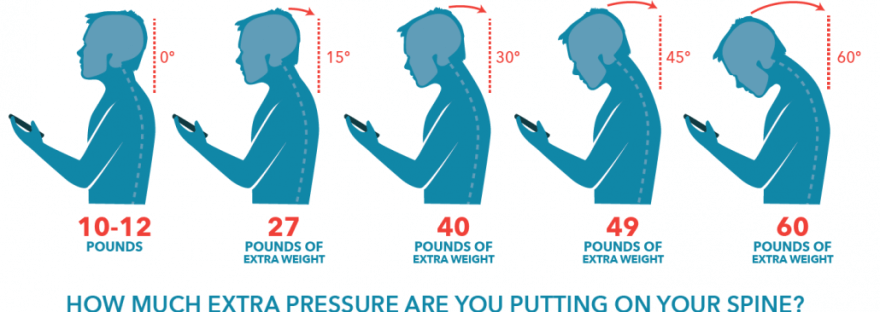
    “When you look straight ahead, the weight of your head is between 10 and 12 pounds. Even if you only bend your neck forward 15 degrees to look at your phone, it doubles the weight of your head, making your head weigh around 27 pounds. Imagine bending your neck at 45 degrees — that’s almost 50 pounds of weight your neck muscles, upper back and shoulders are supporting.” — Spine Institute of North America

    Any time our carriage is misaligned, some muscles have to strain themselves to support the load, while others become weakened. Overworked muscles can become inflamed, causing arthritis in nearby joints.

    Strengthening the muscles that hold the body upright is an effective way to correct and prevent posture-related pain. The Cleveland Clinic recommends trying these muscle-strengthening exercises:
    • Superman. Lie on your stomach, and simultaneously raise your arms and legs just a couple inches off the ground. Hold, relax, and repeat.
    • Core. Crunches, planks, and leg extensions all help strengthen your core muscles.
    • Neck extension. Sit comfortably, and press your head firmly backward into your chair (or car) headrest or into your hands. Hold for 30 seconds multiple times to build strength.
    • Shoulder blades. Work your trapezius and rhomboid muscles to help pull your shoulders back. Hold an exercise band in front of you at shoulder height, then stretch it across your chest, bending your arms slightly. Return to the starting position, and repeat.
    If you are looking for corrective exercises, this UK National Health Service’s list supplies ways to fix common bad habits.

    Eyes

    Our eyes are a delicate part of our body. Staring at a screen for too long can lead to tired eyes. This is due to two factors: (1) drying up the surface of the eye, (2) tiring the muscles that hold the eyes in place and contract the eye lens when looking at objects at a close distance.

    I’ve long wondered if I’ve been wearing down my eyes permanently each time I look at something for too long. The good news is that according to the American Academy of Ophthalmology, eye strain doesn’t lead to permanent damage.

    It’s important to remember to blink while using computers because blinking recoats the eye in a tear film that keeps it hydrated. It’s also good to alternate looking at further distances.

    The most consistent piece of advice I found is the 20–20–20 rule: Every 20 minutes, take a 20 second break and look at something 20 feet away. This will help prevent eyestrain.

    I was considering getting a pair of blue-light glasses, but there’s conflicting evidence on whether or not they help, though any antireflective glasses can reduce harsh glare.

    Arms and Wrists


    Repetitive strain injury (RSI) is a catchall term used to describe conditions like tendonitis and carpal tunnel syndrome, in which there’s a gradual buildup of damage to muscles, tendons, and nerves from repeating the same motion over time. Symptoms of RSI include swelling, tingling, numbness, stiffness, weakness, and sensitivity to cold or heat.

    Just by doing a brief online search, I found stories of three different programmers suffering from arm and wrist pain. I learned that overtaxing one’s wrists can lead to potentially career-ending pain:

    “I reduced my computer interaction but I kept trying to do work. The pain in my arms continued to get worse. What started out as some wrist pain while I worked, evolved into what felt like a sunburn down both of my arms. It hurt to pick up or use my phone. It hurt to touch a computer. At this point I would describe myself as in a state of “very freaked out” My career was largely centered around designing through writing on a computer. My internal perceived value was tied to my ability to manipulate, produce, and delete code. Would I need to change careers? Could I use some dictation software to code? What am I going to do? What careers involve no computering? My head was filled with stressful questions.” — mrmrs, “I Got RSI and What Happened Next Wasn’t Surprising At All”

    Taking regular breaks is important in preventing RSI. According to the Harvard RSI Action group, if you have mild symptoms of RSI, you can continue typing as long as you find out how long you can type without symptoms and take a break 10 minutes before reaching that point so as to prevent the build-up of tissue damage that can lead to permanent pain.

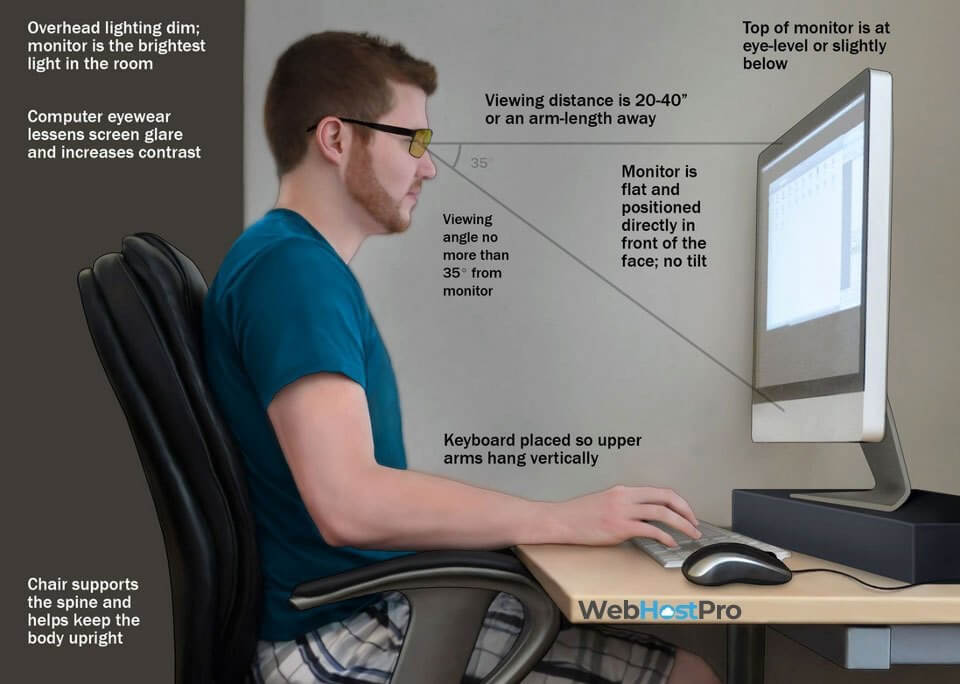
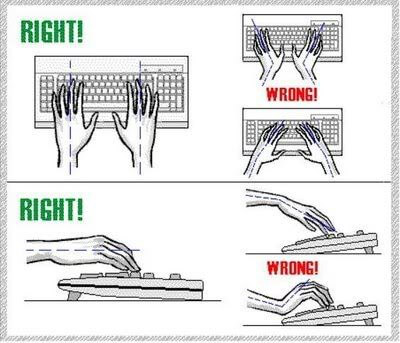
    It’s also important to keep your hands in a natural position while typing. I learned in elementary school that I shouldn’t rest my wrists on my keyboard while typing because this puts pressure on the carpal tunnel nerve, but typing this article was the first time I noticed that my hands splay out and my wrists curve inward while typing.

    I often have my computer on my lap, and I have to do a T-Rex thing with my arms because my elbows drop below the level of my keyboard. Simply fixing my posture so that my forearms run parallel to the keyboard and my wrists are straight while typing took away the tingling I was feeling.


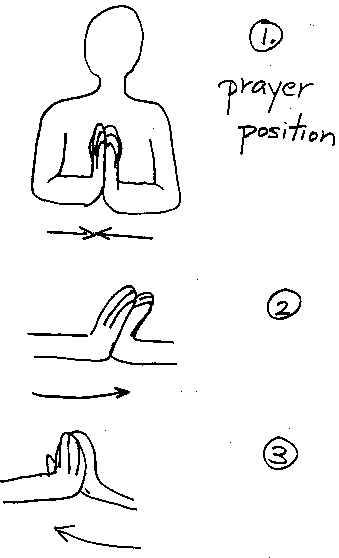
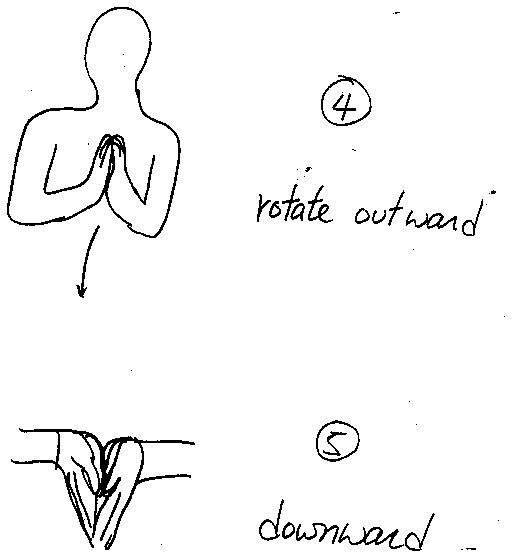
    Lastly, a few sources recommended regular preventative stretching. This simple stretch can be helpful for both preventing and alleviating RSI:


    (1) Prayer Position. (2) Push fingers to the left. Then the right. (3) Rotate fingers towards the body. (4) Point fingers away from the body. (5) Point downwards. Hold for 15-30 seconds each. Don’t overdo. Source: Harvard RSI Action

    Conclusion

    It’s important to take care of your health while programming.

    The best medicine is preventative medicine. Take breaks, stretch, exercise, and go easy on your eyes and wrists. If you’re experiencing chronic back pain or symptoms of RSI, see a physical therapist and take action now to stop the buildup of damage to your body.
    下载开源日报APP:https://opensourcedaily.org/2579/
    加入我们:https://opensourcedaily.org/about/join/
    关注我们:https://opensourcedaily.org/about/love/
  • 开源日报第799期:《绝对看不懂 printf-tac-toe》

    10 6 月, 2020
    开源日报 每天推荐一个 GitHub 优质开源项目和一篇精选英文科技或编程文章原文,坚持阅读《开源日报》,保持每日学习的好习惯。
    今日推荐开源项目:《绝对看不懂 printf-tac-toe》
    今日推荐英文原文:《5 Simple Ways to Do More in Less Time》
    今日推荐开源项目:《绝对看不懂 printf-tac-toe》传送门:GitHub链接
    推荐理由:这个项目是一个井字棋项目——如果我没有事先告诉你,在你的眼睛从那堆完全莫名其妙的代码上扫过一遍之后你绝对无法理解这到底和井字棋有没有半毛钱的关系,直到你接着往下翻为止。这个项目是用于参与 IOCCC 的,虽然你可能大概已经通过这个诡异的代码风格猜测出这个竞赛的目的了……为了你的生命安全,在日常生活中绝对不要这么干。
    今日推荐英文原文:《5 Simple Ways to Do More in Less Time》作者:Mythili the dreamer
    原文链接:https://medium.com/better-programming/5-simple-ways-to-do-more-in-less-time-c3450b38fc65
    推荐理由:一些能够提高工作效率的行为习惯

    5 Simple Ways to Do More in Less Time

    Some productivity strategies to get more out of your eight-hour workday

    What makes a programmer productive?

    That was the topic of a study conducted by the Indian Institute of Management some years back. The institute surveyed thousands of programmers across the country, and the results were interesting:
    • 5% of the programmers completed their work in record time due to their natural grasping abilities. They were the super-programmers.
    • 15% of the programmers continuously updated their knowledge, which helped them to complete their work faster.
    • 10% took help from others.
    • 20% slogged long hours to complete their work within the schedule.
    • And a whopping 50% admitted to having used some productive technique to better manage their time and thereby complete their work.
    So in a nutshell, time management is the key to higher productivity. The better you manage time, the more productive you become at your work.

    Here are some productive strategies that can help you get more out of your eight-hour workday.

    Adopt a Preventive Focus on Work

    Psychologists define two ways to look at any task.

    Promotional focus

    Here, you do something because you see it as a way to end up better than you are now. For example, “If I do this, my boss will be happy and I will get a promotion.” In other words, you treat the task as a milestone to be achieved and you are eager and motivated to finish it.

    Sounds good, right?

    But there is a flip side to this focus. What if you are not able to complete your task? This thought will burn inside you and make you anxious. And anxiety will start undermining your motivation level. In the end, you may not even attempt to do the task. You will fail before you even start.

    Prevention focus

    So what you ideally need is a mechanism by which you can harness the power of doubt or anxiety to your own advantage. This brings us to the prevention focus of doing any task.

    Instead of thinking of ending up better, what if you see any task as a means to safeguard what you already have? In other words, prevent any damage to your current situation. “If I don’t do this task, I will never be considered for promotion. Worse, I may be pink-slipped.” There is a threat, but that threat motivates you to complete the task.

    Decades of research, described by Daniel Goleman in his book Focus, shows that preventive motivation is actually enhanced by anxiety about what might go wrong. When you are focused on avoiding loss, it becomes clear that the only way to get out of danger is to take immediate action. The more worried you are, the faster you get out of the woods.

    So go ahead, scare the shit out of yourself. It is awful, but it works.

    Use If-Then Planning if You Don’t Feel Like Completing a Task

    In his excellent book The Antidote: Happiness for People Who Can’t Stand Positive Thinking, Oliver Burkeman points out that much of the time, when we say things like “I just can’t get out of bed early in the morning” or “I just can’t get myself to exercise,” what we really mean is that we can’t get ourselves to feel like doing these things.

    Physically, nothing is stopping you. You just don’t feel like it. But as Burkeman asks, “Who says you need to wait until you ‘feel like’ doing something in order to start doing it?”

    The problem is over-dependence on willpower. We depend too much on willpower to motivate us to finish a task. Do yourself a favor and embrace the fact that your willpower is limited and that it may not always be up to the challenge of getting you to do things you find difficult, tedious, or otherwise awful. Instead, use if-then planning to get the job done.

    If-then planning is simple. It just helps you decide what specific steps you need to take to complete an activity and when and where you will take them. For example:
    • If it is 2:00 p.m., I will start refactoring that horrible code.
    • If it is 6:00 a.m., I will go to the gym and do 45 minutes of cardio.
    • If it is a Sunday, I will devote 45 minutes to writing before lunch.
    And so on.

    The beauty here is that you are deciding in advance what you are going to do and when you are going to do it. So when the time comes, there is no confusion. There is no procrastination. In fact, if-then planning has been shown in over 200 studies to increase rates of goal attainment and productivity by 200-300% on average.

    Create a Most Important Task Method (MIT) To-Do List.

    A Most Important Task (MIT) is a critical task that will create the most important results you’re looking to achieve.

    The principle is simple. Every day, you have a finite amount of time and energy to do things, and all the items you need to do will not be equally important. Some will be critically important and others might not be that important. So it makes logical sense for you to focus your time, effort, and energy to focus on those tasks that give the biggest results before spending it on other items.

    At the beginning of every day, create a list of 2-3 MITs, then focus on getting them done as quickly as possible. Keep this list separate from your general to-do list or task-tracking system. It is not that you are only doing three tasks a day. It only means that you will not do anything else before you complete these three most important tasks.

    As productivity expert James Clear rightly says:
    “If you do the most important thing first each day, then you’ll always get something important done. I don’t know about you, but this is a big deal for me. There are many days when I waste hours crossing off the 4th, 5th, or 6th most important tasks on my to-do list and never get around to doing the most important thing.”
    Remember, the core idea is to make your eight-hour day as productive as possible. If you can complete the 1-3 essential tasks, everything else becomes secondary or even unnecessary.

    Work Using the 52–17 Method

    DeskTime, a productivity app, did a study of the most productive employees to pinpoint the exact time that leads to maximum productivity. The results were surprising.

    The most productive people worked for 52 minutes at a time, then took a break for 17 minutes before getting back to the work. The secret of achieving the highest level of productivity over the span of a workday is not working longer but working smarter with frequent breaks.

    This is because the shorter periods of working time are treated as intense sprints. Productive employees make the most of those 52 minutes by working with intense purpose, but then they rest up to be ready for the next burst. In other words, they work with purpose.

    These 52-17 blocks of time are called proactive and reactive blocks, respectively. Proactive blocks are when you focus on important tasks that you must get done. This is when you make progress on important code blocks, draft critical technical specifications, or sketch out a prototype for your next great product. Reactive blocks are when you allow time for requests and interruptions, such as email and impromptu meetings.

    And while the rest period might appear a trifle longer, it offers a plethora of benefits. Research has proved that working for long periods of time can be detrimental to your level of engagement with a certain task. Repetitive high-intensity tasks lead to cognitive boredom, which in turn halts your ability to thrive at whatever you’re doing. The human brain just isn’t designed to work for eight hours straight. The better approach to refresh your brain’s creative ability is to take a break.

    By forcing yourself to work within a rigid structure and accomplish tasks in a given time, you ensure laser-sharp focus on every important task you are doing.

    Lastly, Ascertain Your Most Productive Period Using Attention Management

    Lydia K., an MIT master’s student who blogs for MIT Admissions, rightly says:
    “You have limited time and energy; the biggest challenge here is deciding what to do with it.”
    So when do you pay the most attention? Graham Allcott answers this question in his book How to Be a Productivity Ninja, where he describes three types of attention.
    • Proactive attention: You’re at your productive best, feeling good, and working steadily on priority tasks. Work on your biggest, most important, and scariest tasks at this time.
    • Active attention: You’re trying to stay focused and get some work done, but you can easily become distracted. Use this time to attend to short, easy, and repetitive tasks that don’t require your best attention.
    • Inactive attention: You are either taking a break or just pretending to work. Use this time for mindless tasks like cleaning out your desk, refilling your printer paper, or even just puttering around doing nothing. This might not be the best use of your time, but it’s better than nothing.
    With that said, it is a bad idea to push yourself to work when you are unproductive. You just end up wasting time, producing crap, and incurring stress, leading you to question your very ability. Zeroing in on the times when you’re most focused not only produces the best results but also keeps procrastination at bay.

    Remember, the goal here is to use your highest-energy, peak productive hours to make real progress on your most important work. Real productivity is not about time. It is all about doing the right thing at the right time in the right place.

    As Peter Drucker rightly said:
    “Until we can manage time, we can manage nothing else.”

    下载开源日报APP:https://opensourcedaily.org/2579/
    加入我们:https://opensourcedaily.org/about/join/
    关注我们:https://opensourcedaily.org/about/love/
←上一页
1 … 58 59 60 61 62 … 262
下一页→

Proudly powered by WordPress