• 开源镜像
  • 开源沙龙
  • 媛宝
  • 猿帅
  • 注册
  • 登录
  • 息壤开源生活方式平台
  • 加入我们

开源日报

  • 开源日报第854期:《代码模板 Code-gen》

    4 8 月, 2020
    开源日报 每天推荐一个 GitHub 优质开源项目和一篇精选英文科技或编程文章原文,坚持阅读《开源日报》,保持每日学习的好习惯。
    今日推荐开源项目:《代码模板 Code-gen》
    今日推荐英文原文:《NASA’s Latest Rover Is Now Headed for Mars》

    今日推荐开源项目:《代码模板 Code-gen》传送门:GitHub链接
    推荐理由:该项目是一款代码生成工具,可自定义模板生成各种不同的代码, Java8 环境即可。
    今日推荐英文原文:《NASA’s Latest Rover Is Now Headed for Mars》作者:ExtremeTech
    原文链接:https://medium.com/extremetech-access/the-power-of-perseverance-nasas-latest-rover-headed-for-mars-2afc70b4ed20
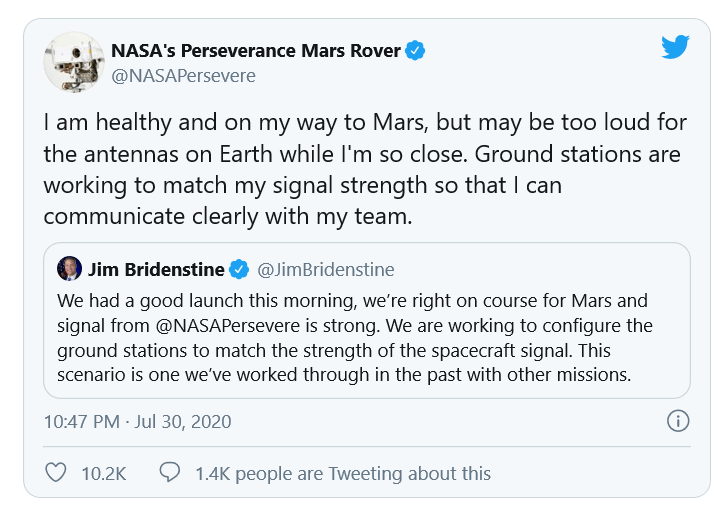
    推荐理由:在我们“天问一号”启程的同时,人家也没闲着。7月30日, NASA 最新的火星探测器“毅力”(Perseverance)成功升空。如果一切顺利的话,它将在二月到达红色星球。值得一提的是,“毅力”上装载有名为 MOXIE 的火星氧气实验项目,试图利用火星上现有的大气产生少量氧气,为未来载人登陆提供氧气供应。

    NASA’s Latest Rover Is Now Headed for Mars

    by Joel Hruska

    NASA announced a successful liftoff for its latest Mars rover, Perseverance (also known as the Mars 2020 Rover) on Thursday. If all goes well, the vehicle will reach the Red Planet in February.

    At first glance, Perseverance looks like a repeat of Curiosity. The two spacecraft are built on a similar platform, but Perseverance has larger, more robust wheels with a larger diameter. These are intended to avoid the damage Curiosity has sustained during its time on Mars. Perseverance also carries MOXIE (Mars Oxygen ISRU Experiment), which will attempt to produce a small amount of oxygen using the existing atmosphere on Mars.

    The MOXIE unit aboard Perseverance is a 1 percent scale model of a full-sized production plant. If the experiment is successful, it may mean astronauts traveling to the planet could use Mars’ atmosphere to create both breathable air and their own supply of propellant for the return trip. This would represent a substantial weight savings — most of the weight of a spacecraft is fuel, and any journey to another planet has to either carry the fuel for the return trip or make it at the destination. If MOXIE works, NASA could land an automated facility to begin creating oxygen before astronauts even arrive on Mars, ensuring a ready supply of available air from the moment they touchdown.

    (The Perseverance rover. Credit: NASA)
    Perseverance also carries Ingenuity, a small (1.8kg / 4lb) helicopter intended to demonstrate the practicality of flight on Mars. Ingenuity doesn’t carry any scientific instruments, but it’s intended to scout potential routes for the rover and to demonstrate that flight on Mars is something we can accomplish remotely in the first place. Perseverance will also carry spacesuit samples to Mars to determine how they hold up to the rigors of the environment. Power is provided via an multi-mission radioisotope thermoelectric generator (MMRTG) containing enough plutonium to provide ~110W of power. The rover also carries two lithium-ion batteries to provide additional energy during peak requirements.

    Both Perseverance and Curiosity use the same CPU, a RAD750 built by BAE. The RAD750 is based on the PowerPC 750, which debuted in 1997 as the CPU inside the original iMac. Once Perseverance arrives on Mars, PowerPC will dominate CPU deployments, with 60 percent of the total Mars rover market and 100 percent of the functional Mars rovers. Is this the spacecraft equivalent of being big in Japan?

    (Jezero Crater. Image Credit: NASA/JPL-Caltech/MSSS/JHU-APL)
    In all seriousness, the reason NASA continues to send such underpowered hardware into space is due to radiation hardening. Newer CMOS processes tend to be more vulnerable than old ones, and for a rover on another planet, reliability is the top concern. We can afford to wait for Perseverance to spend a while crunching data. We can’t afford for its CPUs to be scrambled by incoming cosmic rays. Perseverance appears identical to Curiosity, with 256MB of onboard RAM, a backup BAE750 CPU in case the first fails, 2GB of onboard flash memory, 256MB of RAM, and a 256K EPROM. Clock speeds between the two rovers are identical, at 200MHz.

    (The night before the Perseverance launch. Credit: NASA)
    One major difference between the two rovers is that Perseverance has the ability to drill into Martian rocks and extract core samples. These samples can then be analyzed and stored for future retrieval in an as-yet unplanned mission. The SuperCam unit is also a significant upgrade from the ChemCam aboard Curiosity and should be capable of assessing biosignatures and making a more thorough search of the environment for signs that Mars once supported life. It’s headed for Jezero Crater, which shows all the signs of having held a substantial body of water for a long period of time, making it one of the better places to search for life.


    下载开源日报APP:https://opensourcedaily.org/2579/
    加入我们:https://opensourcedaily.org/about/join/
    关注我们:https://opensourcedaily.org/about/love/

  • 开源日报第853期:《再放送 rrweb》

    3 8 月, 2020
    开源日报 每天推荐一个 GitHub 优质开源项目和一篇精选英文科技或编程文章原文,坚持阅读《开源日报》,保持每日学习的好习惯。
    今日推荐开源项目:《再放送 rrweb》
    今日推荐英文原文:《Programming Is an Art — Stop Treating It Like It’s Not》

    今日推荐开源项目:《再放送 rrweb》传送门:项目链接
    推荐理由:这个项目是一个 JS 库,可以用于记录用户的操作并重放。它的录制部分用于记录下用户的操作,并将对应的事件传入函数中;在需要回放的时候,可以选择项目自带的回放功能或是它提供的附带播放器。而且对于一些不希望在回放中展现出的保密内容,只要为 HTML 元素添加指定类就能在回放中通过添加空占位元素等方式无视它。
    今日推荐英文原文:《Programming Is an Art — Stop Treating It Like It’s Not》作者:Zachary Minott
    原文链接:https://medium.com/better-programming/programming-is-an-art-stop-treating-it-like-its-not-85fb82d14a4b
    推荐理由:编程的艺术性体现在使用更好的想法设计与编写代码,使其能够满足可读性可拓展性等未来可能出现的需求

    Programming Is an Art — Stop Treating It Like It’s Not

    It’ll make you a much better programmer

    On the surface, programming appears to mask itself as a science that serves to power the functionality of the applications that we work with on a daily basis. But really, it is so much more than that. Code is very intricately crafted, and when put together into its cohesive structure, we can see that it outputs the most beautiful and interactive experiences.

    Essentially, we as programmers aren’t just problem-solvers and critical thinkers, but we’re artists and creators. We have the power to utilize skills and ingenuity to generate objects of beauty. Objects that’ll impact and change lives, just as a painter or musician inspires those with their work.

    What I believe sets a great programmer apart from a good programmer is the perspective they take towards their work and the relationship they build with their craft.

    The Issue With Not Focusing on Carefully Crafted Code

    The problem is that most programmers don’t treat the craft as an art form. They focus too much on achieving the desired outcome rather than crafting the most elegant solution. Throwing around algorithms, an endless amount of code, and meaningless variable names like a five-year-old finger painter just smearing paint all over the canvas. See, you still get a painting, but by no means does it signify a thing of beauty.

    I believe the dreaded “If it works, don’t touch it” is extraordinarily bad advice.
    “It is not enough for code to work.”―Robert C. Martin, Clean Code: A Handbook of Agile Software Craftsmanship
    If it works on the first go, that’s simply just the rough draft. You must refactor and think very carefully about what other programmers will think and do when they see your code. Do they understand the functions? Are there unnecessary comments vomited everywhere? Do the variables and functions have clearly defined names about what they do? Are the functions and classes small? Is this reusable? Can it be extended?

    Or is it just absolute chaos that makes other developers cringe because it amounts to a monolithic wall of text that is very difficult to understand or modify?

    Great code is something that anyone can look at and be able to grasp in a very minimal amount of time. Make your code very readable and self-commenting not only for the purpose of others but for yourself. Too often, we write code just to leave without knowing or remembering what we’ve done.

    Great code is also something that doesn’t need to be modified and can be extended with ease. You don’t want your entire program to break because there was a simple modification to the code. A function should serve a specific purpose and maintain that purpose throughout its lifetime.

    So stop running around like a headless chicken banging what used to be your head against your keyboard until you’ve got something that works. Programming is hard — I get it. But not designing your code like an artist details their work makes it seem like you didn’t put much thought or effort into writing it in the first place.
    “If you can get today’s work done today, but you do it in such a way that you can’t possibly get tomorrow’s work done tomorrow, then you lose.”―Martin Fowler, Refactoring: Improving the Design of Existing Code

    Why You Must Embody the Mind of an Artist

    Leonardo da Vinci was perhaps one of the greatest artists of all time, with masterful paintings such as the Mona Lisa and The Last Supper. What separated him from other artists of his time? He paid great attention to detail. He would study cadavers to understand the anatomy of the human body, which he used to craft very realistic paintings where every brushstroke he took was purposeful and with care.

    Be the Da Vinci of programming. Pay great attention to the way you write your code. Notice the details, understand the purpose, think about its reusability and utility. Direct your thoughts towards masterfully writing beautiful and elegant code. Be an engineer, be a painter, be a writer, be a musician, and think about how everything you write will ultimately come together into one cohesive application that’ll function with extreme fluidity.

    That being said, enjoy the path to creation. Enjoy focusing on the purpose and detail of your code. Ultimately, seeing yourself as an artist will allow you to take unique approaches to your code and experiment with it in new ways. It’ll not only improve your skills as a developer, but it’ll also make you happier and more productive as a result because it’ll make you realize that you always had more freedom, autonomy, and creative power in the work that you created than you formerly thought.
    “The best programs are written so that computing machines can perform them quickly and so that human beings can understand them clearly. A programmer is ideally an essayist who works with traditional aesthetic and literary forms as well as mathematical concepts, to communicate the way that an algorithm works and to convince a reader that the results will be correct.”―Donald E. Knuth, Selected Papers on Computer Science

    Conclusion

    I’m not saying that your code has to be perfect. Perfect code and software don’t exist, but what I’m saying is that you shouldn’t just be splattering paint on a canvas. You’re creating something amazing out of nothing, and your goal should be to create something that others would love to interact with. To create something that’ll change lives.

    So use that goal to motivate yourself to create the best code you can possibly write. It’ll create the best outcome and afford your application more room for potential growth.
    “You Can’t Write Perfect Software. Did that hurt? It shouldn’t. Accept it as an axiom of life. Embrace it. Celebrate it. Because perfect software doesn’t exist. No one in the brief history of computing has ever written a piece of perfect software. It’s unlikely that you’ll be the first. And unless you accept this as a fact, you’ll end up wasting time and energy chasing an impossible dream.” — Andrew Hunt, The Pragmatic Programmer: From Journeyman to Master

    下载开源日报APP:https://opensourcedaily.org/2579/
    加入我们:https://opensourcedaily.org/about/join/
    关注我们:https://opensourcedaily.org/about/love/

  • 开源日报第852期:《搜狗:workflow》

    2 8 月, 2020
    开源日报 每天推荐一个 GitHub 优质开源项目和一篇精选英文科技或编程文章原文,坚持阅读《开源日报》,保持每日学习的好习惯。
    今日推荐开源项目:《搜狗:workflow》
    今日推荐英文原文:《How to improve your privacy in Chrome, Safari, Firefox, Edge and Brave》

    今日推荐开源项目:《搜狗: workflow》传送门:项目链接
    推荐理由:搜狗公司的后端 C++ 编程标准,是一套企业级的程序引擎。主要功能和特点: 这是一个基于 C++11 std::function 的异步引擎。用于解决一切关于串行,并行和异步的问题。 作为网络框架,完全协议无关,并且直接面向应用。 原生包含了多种常有互联网协议的实现,并且以统一的方式使用。
    今日推荐英文原文:《How to improve your privacy in Chrome, Safari, Firefox, Edge and Brave》作者:Rae Hodge
    原文链接:https://www.cnet.com/how-to/how-to-improve-browser-privacy-in-chrome-safari-firefox-edge-brave/
    推荐理由:现在, 隐私已经成为浏览器开发优先考虑的因素之一, 但是与网络上无所不在的广告追踪器斗争时, 对用户隐私的保护可能达不到期望的水平. 下面介绍如何通过调整隐私设置来保护隐私.

    How to improve your privacy in Chrome, Safari, Firefox, Edge and Brave

    Privacy is now a priority among browser makers, but they may not go as far as you want in fighting pervasive ad industry trackers on the web. Here’s a look at how you can crank up your privacy settings to outsmart that online tracking.

    Problems like Facebook’s Cambridge Analytica scandal have elevated privacy protection on Silicon Valley’s priority list by showing how companies compile reams of data on you as you traverse the internet. Their goal? To build a richly detailed user profile on you so that you can become the target of more accurate, clickable and thus profitable advertisements.

    Apple and Google are in a war for the web, with Google pushing aggressively for an interactive web to rival native apps and Apple moving more slowly in part out of concern those new features will worsen security and be annoying for users. Privacy adds another dimension to the competition and to your browser decision.

    Apple has made privacy a top priority in all its products, including Safari. For startup Brave, privacy is a core goal, and Mozilla and Microsoft have begun touting privacy as a way to differentiate their browsers from Google’s Chrome. It’s later to the game, but Chrome engineers have begun building a “privacy sandbox” despite Google’s reliance on ad revenue.

    For all of the browsers listed here, you can give yourself a privacy boost by changing the default search engine. For instance, try DuckDuckGo. Although its search results may not be as useful or deep as Google’s, DuckDuckGo is a longtime favorite among the privacy minded for its refusal to track user searches.

    Other universal options that boost privacy include disabling your browser’s location tracking and search engine autocomplete features, turning off password autofills, and regularly deleting your browsing history. If you want to take your privacy to the next level, consider trying one of the virtual private networks CNET has reviewed which work with all browsers.

    In the meantime, though, here are some simple settings you can change in your current browser to help keep a good portion of advertising trackers off your trail.

    Chrome

    Unfortunately, the world’s most popular browser is also generally thought to be one of the least private when used straight out of the box. On the plus side, however, Chrome’s flexible and open-source underpinnings have allowed independent developers to release a slew of privacy focused extensions to shake off trackers.

    In the Chrome Web Store, click Extensions on the left and type the name of the extension you’re looking for into the search bar. Once you find the correct extension in the search results, click Add to Chrome. A dialog will pop up explaining which permissions the extension will have for your browser. Click Add extension to bring the extension into your browser.

    If you change your mind, you can manage or remove your extensions by opening Chrome and clicking the three dot More menu on the right. Then select More Tools and then Extensions. From here, you’ll also be able to see more about the extension by clicking Details.

    Here are four extensions to look at as you get started: Cookie Autodelete, uBlock Origin, Privacy Badger and HTTPS Everywhere.

    If you’re on Android, sorry: extensions don’t work. So you’ll have to switch browsers altogether to something like DuckDuckGo’s app.

    In the same three-dot menu in Chrome, you can also block third-party cookies by selecting Settings, then scrolling down to the Privacy and security section and clicking Cookies and other site data. From here, select Block third-party cookies.

    Safari

    By default, Safari turns on its proprietary Intelligent Tracking Prevention tool to keep you a step ahead of privacy pests. Even so, the tool hasn’t always worked smoothly since its 2017 debut. Google researchers spotted how Intelligent Tracking Prevention itself could be used to track users, though Apple buttoned down the problem.

    Safari 14, announced in June and arriving later in 2020 with new MacOS Big Sur, will be able to tell you which ad trackers are running on the website you’re visiting and give you a 30 day report of the known trackers it’s identified while you were browsing. It’ll also tell you which websites those trackers came from.

    To check that blocking is on, open Safari and click Preferences, then Privacy. The box beside Prevent cross-site tracking should be checked. While you’re there, you can also manually delete your cookies. Click Manage Website Data to see which sites have left their trackers and cookies hanging out in your browser. Click Remove next to any of the individual trackers you’re ready to get rid of, or just nuke the whole list by clicking Remove All at the bottom of your screen.

    Cookies can be helpful, not just invasive, but for stronger privacy you can block them altogether — both first-party cookies from the website publisher and third-party cookies from others like advertisers. To do so, check the box beside Block all cookies. Apple will start blocking most third-party cookies by default with MacOS Big Sur and iOS 14.

    If you’re still looking for another layer of privacy, you can also install helpful extensions from the App Store like AdBlock Plus for or Ghostery Lite for Safari.

    Edge Microsoft’s Edge browser includes some simplified privacy and tracker blocking options on its Tracker prevention screen. Within Edge, select the three dot menu icon in the top right corner and select Settings. From the menu that then appears on the left, select Privacy and services.

    You’ll be offered three settings to choose from: Basic, Balanced and Strict. By default, Edge uses the Balanced setting, which blocks trackers from sites you haven’t visited while still being lenient enough to save most sites from some of the loading problems that may come with tighter security. Likewise, Edge’s Strict setting may interfere with how some sites behave, but will block the greatest number of trackers. Even the Basic setting will still block trackers used for cryptomining and fingerprinting.

    Firefox

    Firefox’s default privacy settings are more protective than those of Chrome and Edge, and the browser has more privacy options under the hood, too.

    From inside Firefox’s main menu — or from inside the three lined menu on the right side of the toolbar — select Preferences. Once the Preferences window opens, click Privacy & Security. From here, you’ll be able to choose between three options: Standard, Strict and Custom. Standard, the default Firefox setting, blocks trackers in private windows, third party tracking cookies and cryptominers. The Strict setting may break a few websites, but it blocks everything blocked in Standard mode, plus fingerprints and trackers in all windows. Custom is worth exploring for those who want to fine tune how trackers are being blocked.

    To apply your new tracking settings after you’ve selected your level of privacy, click the Reload All Tabs button that appears.

    Brave

    When it comes to antitracking tools, Safari’s latest privacy updates are still short of most of those found in the Brave browser. By default, Brave blocks all ads, trackers, third party cookies and third-party fingerprinters while still achieving blazing speeds. Brave also offers a built in Tor private browsing mode, a heavy duty tracker blocking option, and added a built in VPN for iOS users.

    Inside Brave’s main menu, select Preferences to reveal the Settings panel on the left. Select Shields to see a list of privacy options on the right side of the screen. By selecting the Advanced view, you’ll be able to choose which kinds of trackers to block. By scrolling down, you’ll also be able to block login buttons and embedded content from Facebook, Twitter, Google and LinkedIn. For even more protection and privacy fine tuning, explore Additional Settings on the left, and select Privacy and security.


    下载开源日报APP:https://opensourcedaily.org/2579/
    加入我们:https://opensourcedaily.org/about/join/
    关注我们:https://opensourcedaily.org/about/love/

  • 开源日报第851期:《移动GitHub OpenHub》

    1 8 月, 2020
    开源日报 每天推荐一个 GitHub 优质开源项目和一篇精选英文科技或编程文章原文,坚持阅读《开源日报》,保持每日学习的好习惯。
    今日推荐开源项目:《移动GitHub OpenHub》
    今日推荐英文原文:《The 2 Most Important Ways Programming Changed the Way I Perceive the World》

    今日推荐开源项目:《移动GitHub OpenHub》传送门:GitHub链接
    推荐理由:OpenHub 是一个开源的 GitHub Android 客户端应用,支持多种语言,而且快速简洁,能够完成大部分网站上的操作。
    今日推荐英文原文:《The 2 Most Important Ways Programming Changed the Way I Perceive the World》作者:Zachary Minott
    原文链接:https://medium.com/better-programming/the-2-most-important-ways-programming-changed-the-way-i-perceive-the-world-ac79d005a5a8
    推荐理由:我们看待世界的方式一直都在发生变化,可能有许多是 CS 所带来的。

    The 2 Most Important Ways Programming Changed the Way I Perceive the World

    It’s all in the details

    As I’ve grown as a developer, I’ve begun to see programming as much more than it really is. On the surface, programming can be seen as a technical skill that serves as a utility to create programs and software to resolve real-world problems. But quite honestly, it is so much more than that. Programming is an art form. And similarly to art, the final product of all the code that was written not only serves to change the lives of the audience that the program is put in front of but also the lives of the creators in unexpected ways.

    While reflecting on the few years I’ve spent as a developer, I noticed that I no longer follow the same patterns of thought as I used to. I approach problems differently. I respond to failure differently. I think much differently. I perceive the world differently. The consistent practice of programming not only furthered my technical skills, but it also taught me a lot about life.

    Here are the lessons I’ve learned from programming.

    How to Think

    Before I started programming, I saw the world with a relatively superficial level of understanding. I didn’t look much deeper into how things actually were. I didn’t read books. I wasn’t curious.

    When looking at a program, you can break everything apart into smaller and smaller components until all you have are classes, functions, and variables. We can see with complete transparency what exactly allowed this program to function the way it does. What exactly does this tell me about how the world functions? How the world is structured?

    Everything can be deconstructed

    Every single thing can be deconstructed into its base components. Atoms and isotopes. The building blocks of reality and the material world. Like the code used to build the beautiful universes we’re able to experience in a video game, everything in our universe functions in the exact way its biological code, chemistry, and the physics of our universe allow it to.

    I began to gain a curiosity about the world around me, causing me to look more closely at the smaller details in that which surrounds me. I have come to perceive the world in a more fascinating light. I could look at a simple leaf and imagine how the complexities of nature’s processes have slowly brought this leaf into the state that I’m viewing it in that singular moment.

    This made me realize that the world is a product of step-by-step processes and systems in the same way that we build a program variable by variable, function by function, class by class, and component by component until we finally conjure a cohesively complete and functional application. Something that was truly made from nothing. A program that follows the rules and laws that we defined for it.

    Why thinking this way is important

    When I began to think this way, I noticed that nothing in our life can be achieved without breaking apart our goals into specific processes. Everything requires incremental steps and growth. Rarely is anything achieved in one fell swoop. Be it a business, a new hobby, a new skill, or whatever your goal may be, it takes time and patience.

    Responding to Failure

    As programmers, we have to deal with an immense amount of failure on a daily basis. Some of you may be familiar with the 90-90 Rule of software engineering. If not, it is beautifully explained by Tom Cargill of Bell Labs:
    “The first 90 percent of the code accounts for the first 90 percent of the development time. The remaining 10 percent of the code accounts for the other 90 percent of the development time.”
    Basically put, the majority of the time spent writing code is actually spent debugging it. In light of this fact, it’s important to understand that not everything works out on our very first try. Debugging is all about understanding our failures, finding out what caused the failure in the first place, and then making the appropriate adjustments to overcome that failure. Wash, rinse, and repeat. The important thing is that we don’t quit until the code we wrote runs the way we intended it to.

    Trial and error ultimately leads to success

    Imagine if every time we ran into an error or a bug in a program, we just gave up. Nothing would ever be accomplished. Nothing would ever be created. If anything is to be achieved in this world, we must overcome the failures in front of us. If there is anything debugging has taught me, it would be this.

    Failure can be frustrating. It can make us feel like we’re not moving forward. It can make us feel like we don’t know enough. But that’s the point. Failure should inspire us to learn more, think about different approaches we can take, and adopt a different perspective. It allows us to understand our problems to the point where we won’t run into them again. Trial and error ultimately drives us towards progress and becoming better as people. So don’t be afraid to experiment and be bold in your decisions.

    I know that in the past when I didn’t succeed at first, I wouldn’t allow those things to slow me down. I would keep trying and trying until I had a marginally low percentage of error in my performance of that activity. It’s exactly what allowed me to become a Division 1 athlete. It’s what allowed me to become regularly recognized for my performance at my current company. It’s what allowed me to exude the most value I possibly could to those around me. So my advice would be to never quit. Keep trying and be persistent. Learn from your mistakes. And use the reason that you started in the first place to keep driving you forward.

    Final Thoughts

    There is so much that we could learn from the simple actions we take and the work we perform on a daily basis. You just have to look closer and notice what you’re gaining from what’s in front of you and exactly how this thing is shaping you as a person. It’ll allow you to see exponentially more value and purpose in your work.

    Programming has taught me so much more than just these two things, but our ability to overcome failure and our ability to think differently are two superpowers that I believe everybody can truly benefit from.


    下载开源日报APP:https://opensourcedaily.org/2579/
    加入我们:https://opensourcedaily.org/about/join/
    关注我们:https://opensourcedaily.org/about/love/
←上一页
1 … 45 46 47 48 49 … 262
下一页→

Proudly powered by WordPress