• 开源镜像
  • 开源沙龙
  • 媛宝
  • 猿帅
  • 注册
  • 登录
  • 息壤开源生活方式平台
  • 加入我们

开源日报

  • 2018年3月15日:开源日报第7期

    15 3 月, 2018

    每天推荐一个 GitHub 优质开源项目和一篇精选英文科技或编程文章原文,欢迎关注开源日报。交流QQ群:202790710;电报群 https://t.me/OpeningSourceOrg


    今日推荐开源项目:《网页滚动特效库basicScroll》

    推荐理由:basicScroll是用来实现页面滚动时特效的JavaScript库,当页面中元素相对于屏幕发生改变时,basicScroll通过改变元素css属性值而实现特效。


    优势

    1. basicScroll具有灵活的动画效果,开发者可以直接在CSS中使用变量来得到想要的动画效果,也可以使用JS来更好的控制动画.
    2. basicScroll是一个的轻量小型独立的现代化框架。basicScroll高度优化,开发者可以使用它创造出优雅平滑的动画。
    3. basicScroll的响应式做的也非常好,它可以在不改变代码行的情况下从小屏幕到大屏幕切换。

    安装

    可以通过Bower或者npm安装basicscroll

    bower install basicScroll 
    npm install basicscroll
    

    安装完成后,在HTML文件中引用(根据文件的位置自行调整)

    <script src="dist/basicScroll.min.js"></script>
    

    实现一个简单的特效

    以图片随页面下拉逐渐淡化为例

    首先在HTML中加载一张图片,假设将图片的类设置为image

    设置image类的css属性:

          .image{
                opacity: var(--opacity);
                will-change: opacity;
          }
    

    在JavaScript代码中:

    /*
    *创建一个实例
    */
    const instance = basicScroll.create({
          /*
           *取类为image的元素为目标
           */
          elem: document.querySelector('.image'),
          /*
           *设置触发效果的位置
           */
          from: 'top-bottom',
          to: 'top-top',
          /*
           *设置效果
           */
          props: {
                '--opacity': {
                      from: .01,
                      to: .99
                }
          }
    })
    
    /*
     *启用创建的实例        
     */
    instance.start()
    

    效果演示
    实例API

    basicScroll还有许多实例API,比如:

    开始

    开始动画实例。basicScroll将跟踪滚动位置并相应地调整实例。仅当滚动位置改变时才会执行更新。

    instance.start()

    停止

    停止动画实例。实例的所有效果将保持其最后的值。

    instance.stop()

    更新

    触发实例的更新,即使实例当前已停止。

    const props = instance.update()

    ……(更多API可以在GitHub文档中查阅)

    CSS的力量

    basicScroll中有很多用CSS变量控制的动画,作者认为CSS变量的力量是不应该被低估的。CSS自定义属性 – 如规范命名 – 可以比SASS变量做更多的事情。它们是属性,它们像普通属性一样级联。

    使用CSS变量,可以消除多余的样式。开发者从编程语言的函数中了解得原理适用于CSS自定义属性,定义一次,可以重复使用,无需重复编写相同的代码。

    (参考文章《CSS变量的力量》)

    进入官网了解更多basicScroll:https://basicscroll.electerious.com/


    今日推荐英文原文:《Top JavaScript Libraries & Tech to Learn in 2018》

    Top JavaScript Libraries & Tech to Learn in 2018

    First, software ate the world, the web ate software, and JavaScript ate the web. In 2018, React is eating JavaScript.
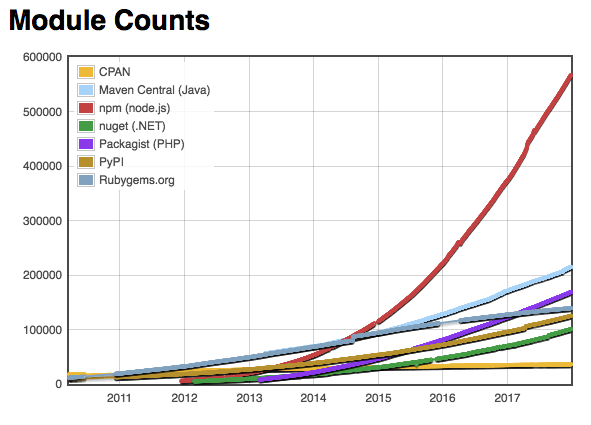
    2018: The Year of React

    React won the popularity battle in 2017.

    There are still lots of developers working on Angular code bases, which shows up in Google trends:
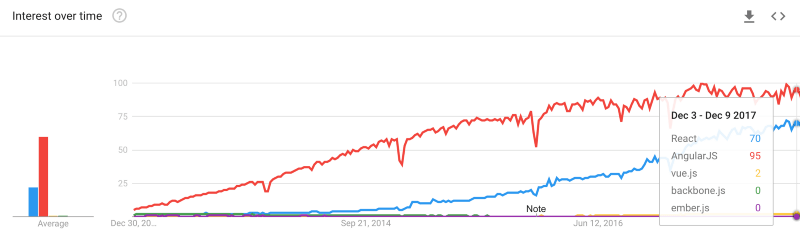
     

    But as React continues to win customer satisfaction surveys, React growth has left Angular (and everything else) in the dust.

    What About Vue.js? I Heard it’s Hot

    Everybody loves paying lip service to alternatives like Vue.js. Here’s what I said about it last year:

    Vue.js has a ton of GitHub stars and downloads. If things continue the way they are going, it will do very well in 2017, but I don’t think it will unseat either React or Angular (both of which are also growing fast) in the next year or so. Learn this after you have learned React or Angular.

    Vue.js did do very well in 2017. It got a lot of headlines and a lot of people got interested. As I predicted, it did not come close to unseating React, and I’m confident to predict it won’t unseat React in 2018, either. That said, it could overtake Angular in 2018:
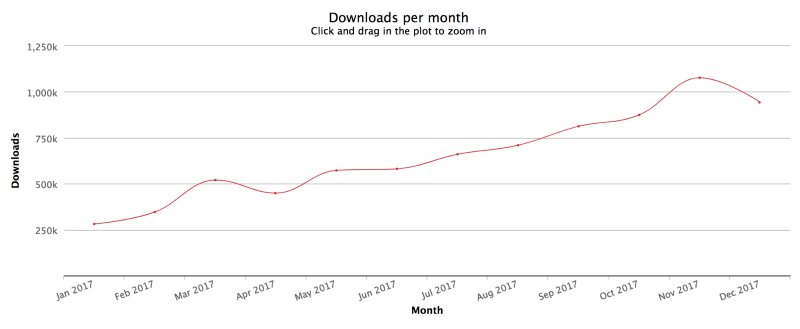
     
    Vue.js downloads/month

    As you can see, Vue.js is gaining on Angular downloads:
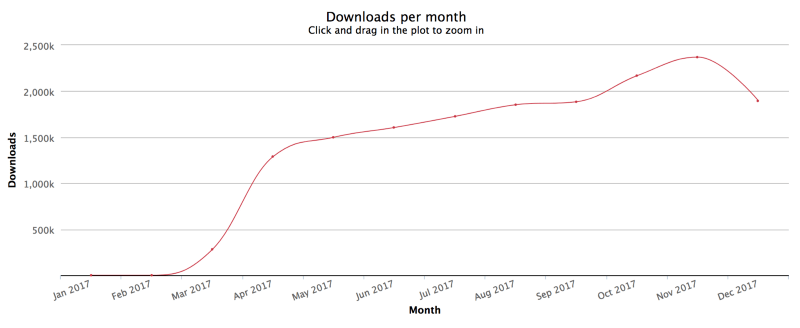
     
    angular/core downloads/month

    But React has a strong lead and a strong growth rate to match:
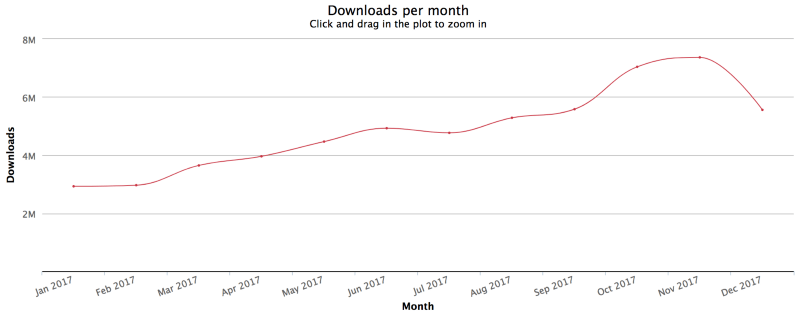
     
    React downloads/month

    Vue.js is still growing faster than React. Why should it be any different than React vs Angular in 2017?

    At the end of 2016, the JavaScript world was ready for a new framework. Angular users were very unsatisfied, React users were very satisfied, lots of people wanted to learn React, and very few wanted to learn Angular. At the end of 2017, Angular 2+ user satisfaction is still less than half, at 49%.

    The story is very different for React vs Vue.js. React is beating Vue.js in user satisfaction (93% to 90%). The big incentive to switch from React in early 2017 was because of confusion over the React license. Facebook heard the users and switched the license.

    At this stage, I simply don’t see compelling evidence that the market is motivated to switch from React to anything else. Vue.js is going to have a much harder time stealing users from React than they are having stealing users from jQuery and Angular.

    There’s plenty of room for Vue.js to pick up a lot of Angular and jQuery users at a fast clip, but they will likely hit a brick wall when they have to start stealing users from React to continue the growth streak.

    I predict strong Vue.js growth for another year or two, followed by a much harder battle with React in the top spot and Vue.js relegated to second fiddle unless something big changes to upset the balance.

    Jobs

    jQuery has fallen.

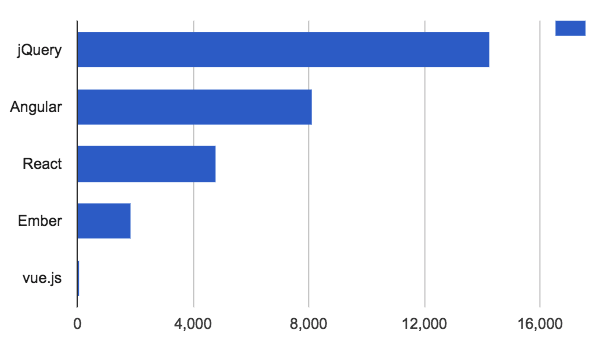
    In the job listings, React completely took off and blew right past jQuery — the first library to pass jQuery in job popularity in a decade.¹ What we’re witnessing here is the end of an era.
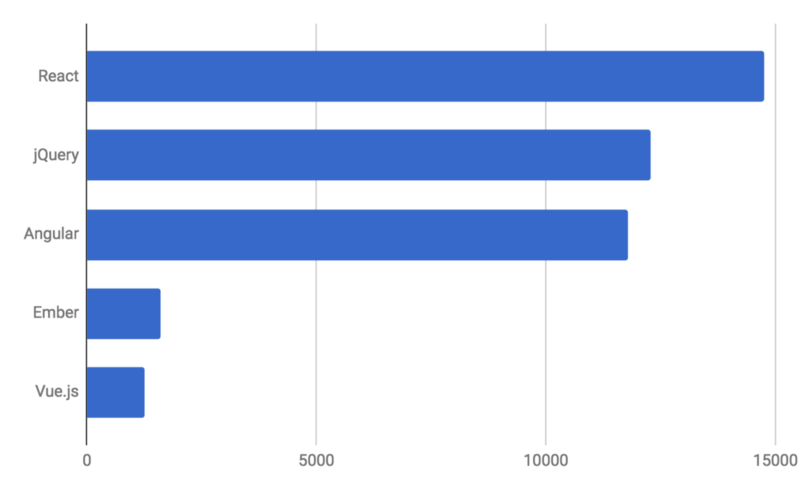
     
    React Rising — the first library to unseat jQuery this decade (source: Indeed.com)

    Compare to last year’s chart:

    jQuery is so 2016

    What’s really interesting in these charts is that other libraries grew a lot more than jQuery fell. The total open jobs mentioning a front-end framework are up by more than ~10k over last year.

    With the job growth, we have also seen a boost in average salaries, too: $110k compared to $93k at the end of 2016. The inflation rate for the same period stayed below 2%, accounting for only a small percentage of the salary boost.

    Clearly, it’s still a candidate’s market in 2018.

    1. Methodology: Job searches were conducted on Indeed.com. To weed out false positives, I paired searches with the keyword “software” to strengthen the chance of relevance, and then multiplied by ~1.5 (roughly the difference between programming job listings that use the word “software” and those that don’t.) All SERPS were sorted by date and spot checked for relevance. The resulting figures aren’t 100% accurate, but they’re good enough for the relative approximations used in this article.

    Framework Recommendations

    After looking at this year’s numbers, I’m prepared to strongly recommend React for most general app development use cases, including mobile apps (PWAs, React Native), web applications, most office productivity applications, and desktop media content production apps (see Electron).

    Notable category exceptions where something else may serve you better: Featherweight marketing landing pages (skip the framework entirely), 3D games, AR/VR. For 3D content, check out Unity, Unreal, or PlayCanvas. That said, React is being used for 3D content UIs, too.

    I’m rating all other front-end frameworks strictly optional this year. This doesn’t mean they’re not cool, just not serious contenders to React in the job market. Remember, this list is about learning ROI, not which tech is the “best”.

    Why so Much Interest in React?

    Browsing through the React job listings, I noticed an interesting trend — a lot of them were for things that we don’t think of as front-end web work:

    • React Native (for perspective, there are more of these openings than the total number of Vue.js openings)
    • React for IoT
    • React for AR/VR (with Oculus Rift leading the hiring charge)
    • React for obscure computing thing you’ve never heard of

    React has broken free of its web roots.

    Versatility is one of the big selling points of React. Unlike many other frameworks, buying into React doesn’t entail buying into some baked in data model, or even the browser or DOM itself. In fact, I found quite a few React job listings that didn’t even mention JavaScript.

    React also offers a rich, vibrant ecosystem piggybacking on React’s de-facto standards — something the JavaScript world hasn’t seen since jQuery plugins ruled the web.

    The question is no longer “which framework?”
    The question is “which tech pairs best with React?”

    Nothing is going to unseat React in 2018 (maybe even 2019). You’re safe. JavaScript fatigue seems to be settling down. We have a great framework to build apps on now, and there’s a great ecosystem settling in around React.

    Which Topics Should You Study?

    Like last year, you can’t go wrong focusing on the essentials, but you should place more emphasis on functional programming for React apps.

    React is great for two primary reasons:

    • Deterministic view renders
    • Abstracting the view layer away from direct DOM manipulation

    Determinism is best served by building applications using pure functions, which is essentially the definition of functional programming.

    With that in mind, here are some topics you should study:

    • Basic ES6 syntax
    • Class syntax and its many pitfalls — It’s OK to use class for React components, but avoid extending from your own classes, avoid instanceof, and avoid forcing users of your classes to use the new keyword.
    • Functional programming & software composition
    • Currying
    • Closures
    • Pure functions
    • Promises
    • Generators & async functions
    • TDD
    • The RAIL performance model
    • Progressive Web Applications (PWAs): See “Native Apps are Doomed” & “Why Native Apps Really Are Doomed”
    • GraphQL matured a lot in 2017, and is quickly taking over from REST APIs. Apollo is adding built-in offline first client cache architecture that will make Apollo+GraphQL a serious alternative (or complement) to Redux in 2018.

    Libraries & Tools

    These are the libraries and tools I’m finding most useful:

    • React
    • Redux
    • Redux-Saga to manage async I/O and isolate side-effects
    • Next.js — SSR with Node & Express, automatic bundle splitting, styled-jsx
    • Material UI
    • Storybook
    • Cheerio for unit testing React components (I prefer this over Enzyme)
    • Lodash (I prefer utilities from lodash/fp). Import just the utilities you need to avoid blowing up your bundle size.
    • Babel: Used to compile ES6 to work on older browsers.
    • Webpack: The most popular bundler for standard JavaScript look for simple starter kit/boilerplate config examples to get things running fast)
    • ESLint: Catch syntax errors and style issues early. After code review and TDD, the third best thing you can do to reduce bugs in your code.
    • Ramda — mostly for lenses and transducers.
    • Node & Express
    • RxJS: Observables for JavaScript. I’ve been using transducers more, lately. Remember to use pipeable operators to avoid blowing up your bundle size.

    TypeScript did well in 2017, but I’ve seen it get in the way and complicate apps more than it helped. It’s primary shortcomings are over reliance on annotations as opposed to inference, and an inability to properly type higher-order functions without indescribable contortions. I gave it a full-time daily trial for a while, but these still apply: “The Shocking Secret About Static Types” &“You Might Not Need TypeScript”. Flow shares the same problems and the developer tools are not as good as TypeScript’s.

    Tech to Watch in 2018

    All of these areas of R&D are creating real jobs in 2018:

    • Progressive Web Apps (PWAs)
    • Blockchain & fintech
    • Medical technology
    • AR/VR — Hololens, Meta, and ODG are shipping today. ODG R-9 was scheduled to ship in 2017 but will likely ship in 2018 instead. MagicLeap has promised to ship in 2018. AR will transform the human experience more than the cell phone did.
    • 3D printing
    • AI
    • Drones

    Quantum computing is also poised to transform the world, but it may be 2019 or later before the disruption really starts. There are working quantum computers online, but they can’t do much yet. It’s still too early for most developers to even begin to experiment productively. Microsoft recently announced its Q# programming language for quantum computing. Meanwhile, IBM and Google also continue to invest heavily to own the embryonic cloud quantum computing market.

    If you want to be prepared to learn quantum computing, you’ll want to study up on linear algebra. There are also functional explorations of quantum computing based on lambda calculus.

    It’s likely that, as we’ve seen with AI, cloud APIs will be developed that will let people with less math background take advantage of some of the capabilities of quantum computing.


    每天推荐一个 GitHub 优质开源项目和一篇精选英文科技或编程文章原文,欢迎关注开源日报。交流QQ群:202790710;电报群 https://t.me/OpeningSourceOrg

  • 2018年3月14日:开源日报第6期

    14 3 月, 2018

    每天推荐一个 GitHub 优质开源项目和一篇精选英文科技或编程文章原文,欢迎关注开源日报。交流QQ群:202790710;电报群 https://t.me/OpeningSourceOrg


    今天推荐开源项目:《高效、可靠、支持并发的Go语言》;GitHub地址

    推荐理由:GO 语言是谷歌在2009年发布的第二款开源编程语言,同时也是近几年发展最快的编程语言之一。如果你错过 Python,或者不喜欢 Python,完全可以试试 Go语言。它专门针对多处理器系统应用程序的编程进行了优化,使用Go编译的程序可以媲美C或C++代码的速度,而且更加安全、支持并行执行。

    Go 的目标是希望提升现有编程语言对程序库的依赖性(dependency)的管理,这些软件元素会被应用程序反复调用。由于支持并行编程模式,因此这一语言也被设计用来解决需要多处理器完成的任务。

    特点

    1. 简洁 快速 安全
    2. 并行 有趣 开源,
    3. 内存管理,数组安全,编译迅速

    Go 适合用来做什么

    1. 服务器编程,以前你如果使用 C 或者 C++ 做的那些事情,用 Go 来做很合适,例如处理日志、数据打包、虚拟机处理、文件系统等。
    2. 分布式系统,数据库代理器等。
    3. 网络编程,这一块目前应用最广,包括 Web 应用、API 应用。
    4. 云平台,目前国外很多云平台在采用 Go 开发。

    如何编写 Go 代码

    编写 Go 代码前,首先有一个概览:

    1. Go 程序员通常将他们所有的 Go 代码保存在一个工作区中。
    2. 工作区包含许多版本控制存储库 (例如,由 Git 管理)。
    3. 每个存储库都包含一个或多个包。
    4. 每个软件包由一个目录中的一个或多个 Go 源文件组成。
    5. 包的目录的路径决定了它的导入路径。

    但注意,这与其他编程环境不同,在这些编程环境中,每个项目都有一个单独的工作区,工作区与版本控制存储库紧密相关。

    关于 Go 的工作区:

    工作区是一个目录层次结构,其根目录包含三个目录:

    1. src 包含 Go 源文件,
    2. pkg 包含包对象
    3. bin 包含可执行命令。

    该 go 工具构建源包并将生成的二进制文件安装到 pkg 和 bin 目录。

    该 src 子目录通常包含多个版本控制存储库(例如 Git 或 Mercurial),用于跟踪一个或多个源包的开发。

    导入路径:

    一个导入路径是唯一标识一个包的字符串。程序包的导入路径对应于其在工作区内或远程存储库中的位置。来自标准库的软件包被赋予诸如”fmt”和的短导入路径 “net/http”。对于你自己的软件包,你必须选择一个基本路径,这个基本路径不可能与未来添加到标准库或其他外部库中相冲突。

    第一个 Go 程序:

    要编译并运行一个简单的程序,首先选择一个包路径(我们将使用 github.com/user/hello)并在工作区内创建一个相应的包目录:

    $ mkdir $ GOPATH / src / github.com / user / hello
    

    接下来,创建一个名为hello.go该目录内的文件,其中包含以下Go代码。

    package main
    import "fmt"
    func main() {
        fmt.Printf("Hello, world.\n")
    }
    

    现在,您可以使用该go工具构建和安装该程序:

    $ go install github.com/user/hello
    

    请注意,您可以从系统上的任何位置运行此命令。该 go工具通过查找github.com/user/hello指定的工作区内的程序包 来查找源代码 GOPATH。

    Go语音程序例子:

    用Go写成的“hello world”例子:

    package main
    import "fmt"
    func main() {
             fmt.Println("Hello, World")
    }
    

    通过 Go 语言仅需几行程序码就完成 HTTP 网页服务器的实现:

    package main
    import (
        "io"
        "net/http"
    )
    func hello(w http.ResponseWriter, r *http.Request) {
        io.WriteString(w, "Hello world!")
    }
    func main() {
        http.HandleFunc("/", hello)
        http.ListenAndServe(":8000", nil)
    }
    

    Go 语言的垃圾回收

    Go 的垃圾回收在1.5版本之前是采用了标记-清理的方法,即先标记出需要清理的内存,然后清理掉。实际上,标记清除法是一种常见垃圾回收算法。下面就介绍一下常见的垃圾回收算法。

    常见的垃圾回收(GC)算法

    引用计数法

    在每个对象内加入一个整数值,这个对象被引用时加一,从被引用的状态中解除时减一,然后清理掉引用计数为0的对象。

    这种方法的缺陷在于无法处理循环引用,当对象A与B互相持有对方的引用时,无法回收它们。


    标记清除法

    顾名思义,这个方法分为标记和清除两步。

    标记:从程序的根节点开始,递归地遍历所有的对象以确定所有还在使用的对象,然后标记他们

    清除:没被标记的就全部回收就好了

    当然了这个算法也会有应该缺陷,在发动时必须暂停整个程序,不然发动时一些对象的状态如果被其他的代码改变,就可能把这些对象中不该回收的回收掉。而且当对象很多时,会消耗很多时间,让整个程序暂停的时间太长对用户体验会造成极其不好的影响。GO 语言1.5之前使用的是这个算法。


    三色标记法

    这种方法是对标记清理法的一种改进,最大的好处就是不再需要暂停程序了。

    1. 首先建立三个集合:白,灰,黑,之后把所有的对象放入白集合中。
    2. 从根节点遍历所有对象,不需要递归,遍历到的对象放入灰集合
    3. 遍历灰色集合,被灰集合引用的对象从白集合中移到灰集合中,直到灰集合中没有任何对象
    4. 通过 write-barrier 检测这个过程中对象的变化,有变化时重复上面几步,当对象没有变化时,把灰集合中的对象移入黑集合
    5. 回收白集合中的对象

    这个算法的缺陷就在于,如果程序中垃圾产生的速度大于清理的速度,就会让垃圾无法被清理,这个算法应用于 GO 1.5和 GO 1.6


    分代收集法

    这个方法也是对标记清理法的一种改进,因为绝大多数对象的生命周期都很短,所以按照它们的生命周期来分代,一般来说是分为三代的:第0代,第1代,第2代

    原理如下:

    1. 新对象视为第0代
    2. 当内存用量超过一定程度时(通常很低),对第0代进行标记清理
    3. 没被清理掉的第0代对象归入第1代
    4. 当内存用量超过一定程度时(通常较高),对第1代进行标记清理
    5. 以此类推

    因为新对象的数量比较少,所以收集时会很快,当内存消耗过大时才触发1代和2代收集,目前在使用这种算法的语言(平台)有 jvm , .NET


    今日推荐英文原文:《The art of the error message》

    The art of the error message

    Writing clear, helpful copy for when things go wrong • by Marina Posniak & Tamara Hilmes

    The concept of “embracing failure” is big in the tech industry. Fail fast, fail often! is almost an industry mantra. But there’s an everyday type of failure that doesn’t get much attention in the product development process.

    That’s right. The humble error message.

    Why error messages matter

    We’ve probably all seen an “incorrect password” error once in a while (or, um, daily). While it can be frustrating when things don’t work as expected, we usually just brush it off, no big deal. But what’s the cumulative effect of these small moments?

    Each error message is a tiny roadblock that gets in the way of what we were trying to do. Depending on the context, an unhelpful message can be the difference between continuing or giving up. There’s even some research to suggest that there’s a physical stress response: error messages can raise cortisol levels.

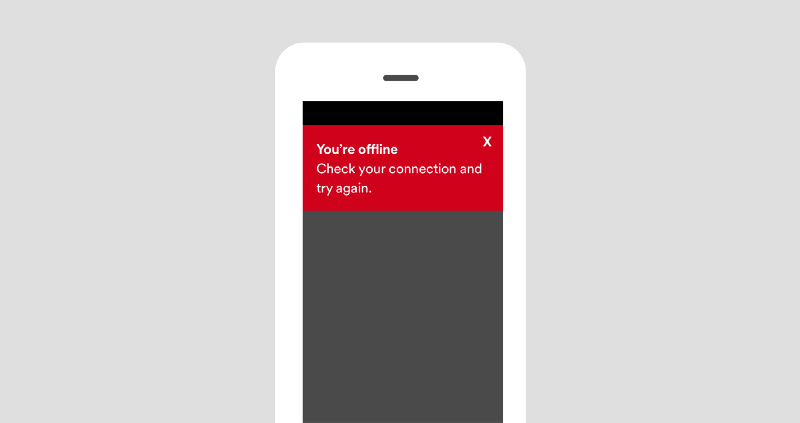
    Just think of the difference between seeing something like this:

     Needs work

    And seeing something more actionable, like this:

     Better!

    So what can design teams do?

    If you’re a writer, designer, or developer working on an app, you can help reduce your users’ frustration by being more thoughtful about the errors you display.

    To start, ask yourself if you even need the error message. Before writing anything, consider if there’s a way to redesign the experience so there’s no error at all. Is there a way to just make it work? (Really, the best error message is no error message.)

    But if you do need it, think carefully about the message. When things go wrong and the app “fails,” say something useful. The message should help the user solve the problem and move on.

    Tips for writing helpful error messages

    If you can’t fix the underlying issue and need to show an error message, here are some things to keep in mind.

    1. Say what happened and why

    A lot of error messages are vague. Really vague. When possible, be clear about what’s going on. Give the right amount of detail, but don’t get too technical. Write in a way that anyone could easily understand. Ahem. That means no jargon.

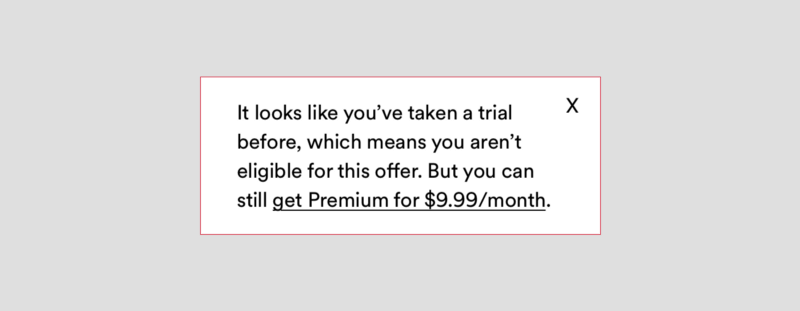
    Imagine you see an ad about oh, say, Spotify Premium, and you click on the link to start a free trial. Then, you land on a page and see something like this:

     Needs work

    It’s not clear why you’re ineligible, especially since you just got an email saying, “Hey, get this thing.” What’s the deal?

    In this case, it’s important to tell the user what happened (they’re ineligible) and why (they signed up for a free trial before).

     Better!

    And yes, this message did get longer — but sometimes we need to add information to make it useful.

    2. Suggest a next step

    After you say what happened, tell the user what they can do to resolve the issue: include a button, link, or other type of call to action. And write a clear headline that gets the point across quickly.

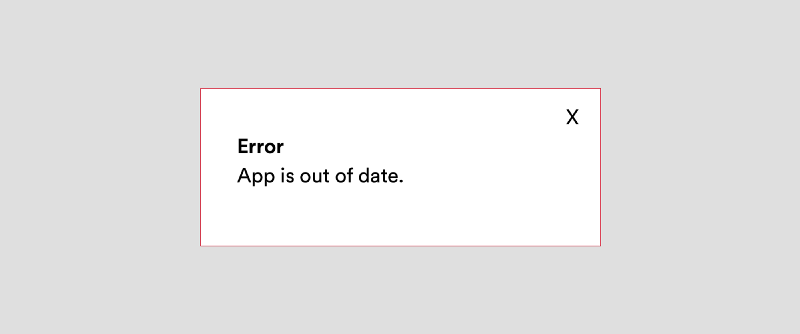
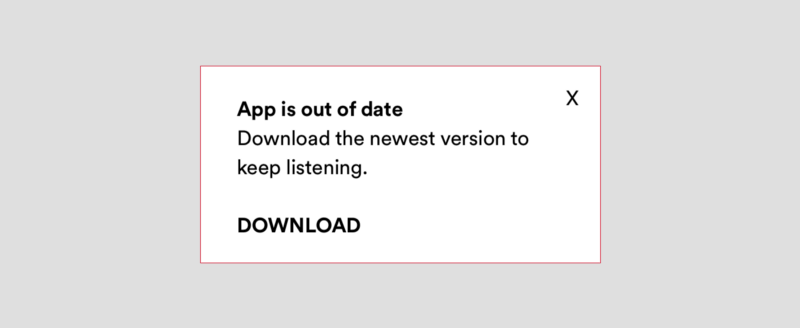
    Imagine you want to look for some new podcasts. You fire up the app, and see an error message that says:

     Needs work

    This tells you that something went wrong, but it doesn’t suggest a next step. It’s better to include a clear headline (App is out of date) and call to action (the download button).

     Better!

    3. Find the right tone

    As UX writers, we want to convey the right information at the right time. But it’s not only about what we say, it’s how we say it. When it comes to tone, we try to find the right balance, or as we say in Sweden, lagom.

    Tone refers to the character, or the attitude of the language. Within the same brand voice, your writing can take on a different tone depending on the situation. It can be more serious, or neutral, or friendly—it all depends on who you’re writing for, and what you’re writing about. You vary your tone constantly—just think about the way you talk to your friends, your parents, or your boss.

    OK. So how do you choose the right tone? You can start by asking yourself:

    • How might the user feel in this situation? If it’s a stressful or serious issue, then a silly tone would be inappropriate.
    • Would you actually say this? Reading the message out loud can help you pinpoint words or phrases that need to be revised.
     

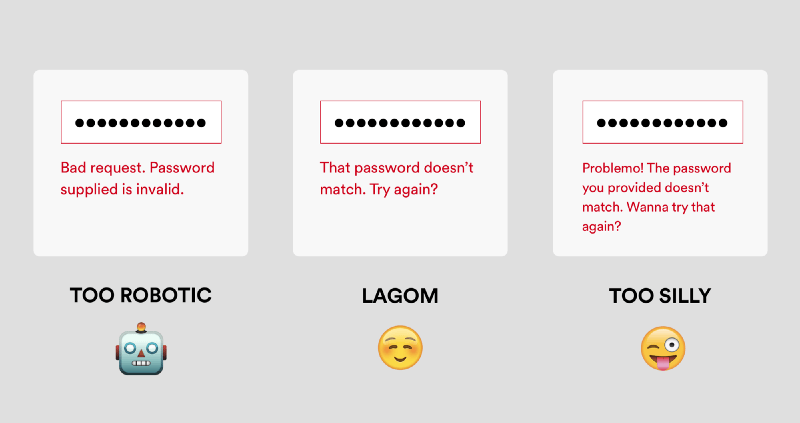
    Bad request. Password supplied is invalid. → Words like “bad request” and “supplied” make it sound robotic.

    That password doesn’t match. Try again? → This one’s pretty clear and approachable. Nice.

    Problemo! The password you provided doesn’t match. Wanna try that again? → Would you actually say this? It’s a bit too silly.

    These three messages communicate the same thing, but the tone is different. When you’re writing an error message, choose the tone that best fits the audience and context.

    A quick recap

    When it comes to a good or bad user experience, the difference is often in the details. Writing clear error messages can reduce frustration and help people continue using your app or service. So it’s worth it to give these little guys some love.

    The next time you’re writing an error message, keep these tips in mind:

    • Say what happened and why
    • Suggest a next step
    • Find the right tone

    And lastly, don’t forget to read the message out loud and take out any pesky jargon words.

    We’d love to hear what you think. If you have more tips or different approaches writing error messages, please share in the comments!


    每天推荐一个 GitHub 优质开源项目和一篇精选英文科技或编程文章原文,欢迎关注开源日报。交流QQ群:202790710;电报群 https://t.me/OpeningSourceOrg

  • 2018年3月13日:开源日报第5期

    13 3 月, 2018

    每天推荐一个 GitHub 优质开源项目和一篇精选英文科技或编程文章原文,欢迎关注开源日报。交流QQ群:202790710;电报群 t.me/openingsource


    今天推荐开源项目:《开源项目精选:图片风格转换工具FastPhotoStyle》;GitHub地址

    推荐理由:在此之前便有过不止一种试图实现这个功能的算法,但他们的效果往往并不理想,而且效率极低。而 FastPhotoStyle将源照片的风格融入目标照片中,能够实现快速的风格转变。

    对比

    开源项目精选:图片风格转换工具FastPhotoStyle

    a,b分别为源照片与目标照片,c,d为其他算法得到的结果,e为该算法得到的结果


    原理

    在FastPhtoStyle中,处理分为风格化与平滑化两个过程,而风格化阶段主要是通过Photo WCT转换(Whitening and Coloring Transform/白化与着色变换)(自行google)将两图进行合成得到一张过渡图片(没有示例图),但是这张图片会有叠影与失真的情况,

    注:WCT是所有数据泛用的转换,Photo WCT是针对图像优化的转换


    于是,便有了第二步,平滑化,在该阶段中,会将目标图片与过渡图片的邻近区域进行对比,并把相近的像素套入相同的风格,强化图片空间的一致性,然后还会进行检查,避免结果偏离以维持整体风格


    这也是与现有的需要迭代优化的算法不同的地方,两个步骤独立并有着针对的解决方案,使得处理的速度是原有算法的60倍,而且得到的效果的好评是原有的2倍


    参考

    Github:https://github.com/NVIDIA/FastPhotoStyle

    论文:https://arxiv.org/abs/1802.06474

    用户手册:https://github.com/NVIDIA/FastPhotoStyle/blob/master/USAGE.md

    许可证:https://github.com/NVIDIA/FastPhotoStyle/blob/master/LICENSE.md

    安装与使用自行参考以上链接


    关于labelme

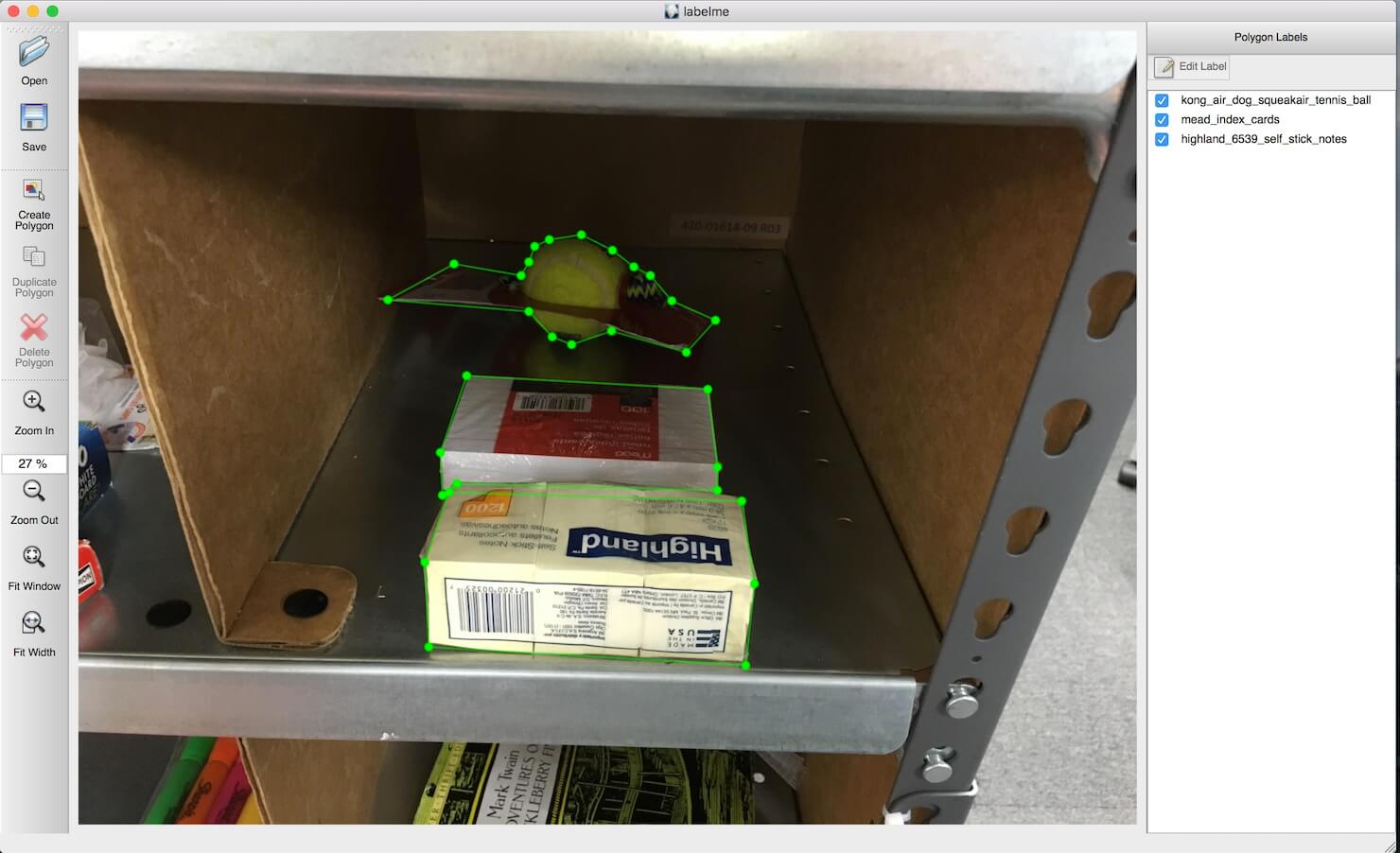
    labelme是一个python的图像注释工具

    安装了labelme后,在提供内容的图片和提供风格的图片里用画多边形的方式各标出一片区域,这两个区域需要有相同的标签,标签会存在一个“.json”的文件中供我们使用。这让我们可以在图片中选取部分内容和部分风格进行修饰。

    开源项目精选:图片风格转换工具FastPhotoStyle

    作者介绍

    • 刘洺堉,曾是三菱电子研究实验室的首席研究员,有马里兰大学帕克分校的电气和计算机工程的博士学位。他研制出了基于商业视觉的机器人料仓拣选系统的主要部分等创新科技产品。喜欢练功,博客上全是各种功夫的概要
    开源项目精选:图片风格转换工具FastPhotoStyle
    • Yijun Li,大学浙大,硕士上交大,博士加利福尼亚大学在读
    • Si-Yuan,中科大学生

    今日推荐英文原文:《Start Your Open Source Career》

    推荐理由:如何开始自己的开源人生?这名作者介绍了自己最初开始的契机一直到最后因此而踏上这段开源生涯,读别人的故事,启迪自己的人生。

    Start Your Open Source Career

    This year I gave a talk about how to make open source projects successful by ensuring everything is in place to attract all kinds of contributions: issues, documentation or code updates. After the talk, the feedback I got was “It’s nice, you showed how to make projects successful, but how do I even start doing open source?“. This blog post is an answer to that question; it explains how and where to start contributing to projects and then how to create your own projects.

    The knowledge shared here is based on our experience: at Algolia, we have released and maintained multiple open source projects that proved to be successful over time, and I have spent a good amount of time practicing and creating open source projects too.

    Getting your feet wet

    A key moment for my career was six years ago at Fasterize (a website performance accelerator). We faced an important memory leak on our Node.js workers. After searching everywhere except inside the actual Node.js codebase, we found nothing that could cause it. Our workaround was to restart the workers every day (this reset the memory usage to zero) and just live with it, but we knew this was not a very elegant solution and so I wanted to understand the problem as a whole.

    When my co-founder Stéphane suggested I have a look at the Node.js codebase, I almost laughed. I thought to myself: “If there’s a bug, it’s most probably our code, not the code from the developers who created a revolutionary server-side framework. But, OK, I’ll have a look”. Two days later my two character fix to the http layer of Node.js was merged, and solved our own memory leak.

    Doing this was a major confidence boost for me. Amongst the thirty other people who had contributed to the http.js file were folks I admired, like isaacs (npm creator)— making me realize that code is just… code, regardless of who wrote it.

    Are you experiencing a bug with an open source project? Dig in and don’t stop at your local workaround. Your solution can benefit others and lead you to more open source contributions. Read other people’s code. You might not fix your issue right away, it might take some time to understand the code base, but you will learn new modules, new syntax and different ways to code that will make you grow as a developer.

    Opportunistic contributions

    First contributions labels on the the Node.js repositoryFirst contributions labels on the the Node.js repository

    “I don’t have an idea” is a common complaint by developers who want to contribute to open source but think they don’t have any good ideas or good projects to share. Well, to that I say: that’s OK. There are opportunistic ways to contribute to open source. Many projects have started to list good contributions for first-timers via labels or tags.

    You can find contribution ideas by going through these websites: Open Source Friday, First Timers Only, Your First PR, CodeTriage, 24 Pull Requests, Up For Grabs, Contributor-ninja and First Contributions.

    Build some tooling

    Tooling is a nice way to publish something useful to others without having to think too much about complex problems or API design. You could publish a boilerplate for your favorite framework or platform that would gather the knowledge of many blog posts and tools into a nicely explained project, ready with live reload and publishing features. create-react-app is one good example of such tooling.

    Screenshot of GitHub's search for 58K boilerplate repositories There are 58K boilerplate repositories on GitHub, it’s easy and rewarding to publish one

    Today you can also build pure JavaScript plugins for Atom and Visual Studio Code like we did with our Atom autocomplete module import plugin. Is there a very good plugin for Atom or Sublime Text that does not yet exist in your favourite editor? Go build it.

    Finally, you could also create plugins for webpack or babel that are solving a particular use case of your JavaScript stack.

    The good thing is that most platforms will explain how to create and publish plugins so you won’t have to think too much about how to do it.

    Be the new maintainer

    When browsing through projects on GitHub, you might sometimes find and use projects that are abandoned by their creator. They are still valuable, but many issues and pull requests are sitting in the repository without any answer from the maintainer. What are your options?

    • Publish a fork under a new name
    • Be the new maintainer

    I recommend you do both at the same time. The former will help you move forward with your project while the latter will benefit you and the community.

    How to become the new maintainer, you ask? Drop an email or a tweet to the maintainer and say “Hey, I want to maintain this project, what do you think?”. This usually works well and is a great way to start your open source career with a project that is already known and useful to others.

    Example message sent to maintain an abandoned repository

    Example tweet sent to revive an abandoned project

    Creating your own projects

    The best way to find your own project is to look at problems that today have no good solutions. If you find yourself browsing the web for a particular library solving one of your problems and you don’t find it, then that’s the right time to create an open source library.

    Here’s another key moment for my own career. At Fasterize we needed a fast and lightweight image lazy loader for our website performance accelerator —not a jQuery plugin but a standalone project that would be injected and must work on any website, on every browser. I spent hours searching the whole web for the perfect already-existing library and I failed at it. So I said: “We’re doomed. I can’t find a good project, we can’t do our startup”.

    To this, Stéphane replied: “Well, just create it”. Hmm.. ok then! I started by copy pasting a StackOverflow answer in a JavaScript file and ultimately built an image lazy loader that ended up being used on websites like Flipkart.com (~200M visits per month, #9 website in India). After this success, my mind was wired to open source. I suddenly understood that open source could be just another part of my developer career, instead of a field that only legends and mythical 10x programmers fit into.

    Stack Overflow screenshot


    A problem without any good solution: solve it in a reusable way!

    Timing is important. If you decide not to build a reusable library but rather inline some workaround code in your own application, then that’s a missed opportunity. At some point, someone will create the project you might have created. Instead, extract and publish reusable modules from your application as soon as possible.

    Publish it, market it and share it

    To be sure anyone willing to find your module will indeed find it, you must:

    • Create a good README with badges and vanity metrics
    • Create a dedicated website with a nice design and online playground. Want some inspiration? Have a look at Prettier.
    • Post your project as answers to StackOverflow and GitHub issues related to the problem you are solving
    • Post your project on HackerNews, reddit, ProductHunt, Hashnode and any other community-specific aggregation website
    • Propose your new project to the newsletters about your platform
    • Go to meetups or give talks about your project

    Screenshot of Hacker News post

    Show your new project to the world

    Don’t fear posting to many websites; as long as you truly believe what you have made will be valuable, there is no such thing as too much information. In general, communities are really happy to have something to share!

    Be patient and iterate

    In term of “vanity metrics” (number of stars or downloads), some projects will skyrocket on day one but then have their growth stopped very early. Others will wait one year before being ready for HN frontpage. Trust that your project will be at some point noticed by other users, and if it never does, then you have learned something: it’s probably no use to anyone but you  — and that is one more learning for your next project.

    I have many projects that have 0 stars (like mocha-browse), but I am never disappointed because I don’t have high expectations. That’s how I always think at the beginning of a project: I found a good problem, I solved it the best way I could, maybe some people will use it, maybe not. Not a big deal.

    Two projects for a single solution

    This is my favourite part of doing open source. At Algolia in 2015 we were looking at solutions to unit test and freeze the html output of our JSX written React components for InstantSearch.js, our React UI library.

    Since JSX is translated to function calls, our solution at that time was to write expect(<Component />).toDeepEqual(<div><span/></div). That’s just comparing two function calls output.But the output of those calls are complex object trees: when run, it would show “Expected {-type: ‘span’, …}”. The input and output comparison was impossible and developers were getting mad when writing tests.

    To solve this problem, we created algolia/expect-jsx that allowed us to have JSX string diffs in our unit tests output instead of unreadable object trees. Input and output of the test would be using the same semantics. We did not stop there. Instead of publishing one library, we extracted another one out of it and published two libraries:

    • algolia/react-element-to-jsx-string transforms JSX function calls back to JSX strings
    • algolia/expect-jsx does the linking between react-element-to-jsx-string and mjackson/expect, the expectation library

    By publishing two modules that are tackling one problem together, you can make the community benefit from your low-level solutions that can be reused on a lot of different projects, even in ways you never thought your module would be used.

    For example, react-element-to-jsx-string is used in a lot of other test expectations frameworks along with being used on documentation plugins like storybooks/addon-jsx.Today, to test the output of your React components, use Jest and snapshots testing, there’s no more the need for expect-jsx in those situations.

    Feedback and contributions

    A fake issue screenshot

    That’s a lot of issues. Also, it’s faked just to have a nice picture ?

    Once you start getting feedback and contributions, be prepared to be open minded and optimistic. You will get enthusiastic feedback, but also negative comments. Remember that any interaction with a user is a contribution, even when it seems like just complaining.

    For one thing, it is never easy to convey intentions/tone in written conversations. You could be interpreting “This is strange…” as: it’s awesome/it’s really bad/I don’t understand/I am happy/I am sad.  Ask for more details and try to rephrase the issue to better understand where it’s coming from.

    A few tips to avoid genuine complaints:

    • To better guide users giving feedback, provide them with an ISSUE_TEMPLATE that is displayed when they create a new issue.
    • Try to reduce the friction for new contributors to a minimum.Keep in mind that they may not yet be into testing and would gladly learn from you. Don’t hold Pull Requests for new contributors because there’s a missing semicolon;, help them feel safe. You can gently ask them to add them, and if that doesn’t work, you can also merge as-is and then write the tests and documentation yourself.
    • Provide a good developer experience environment in terms of automated tests, linting and formatting code or livereload examples.

    That’s it

    Thanks for reading, I hope you liked this article to the point where you want to help or build projects. Contributing to open source is a great way to expand your skillset, it’s not a mandatory experience for every developer, but a good opportunity to get out of your comfort zone.

    I am now looking forward to your first or next open source project, tweet it to me @vvoyer and I’ll be happy to give you advice.

    If you love open source and would like to practice it in a company instead than doing it on your free time, Algolia has open positions for open source JavaScript developers.

    Other resources you might like:

    • opensource.guide, Learn how to launch and grow your project.
    • Octobox, your GitHub notifications as an email. Awesome way to avoid the “too many issues” effect by focusing on the ones that matter
    • Probot, GitHub Apps to automate and improve your workflow like closing very old issues
    • Refined GitHub provides an awesome maintainer experience for GitHub UI at many levels
    • OctoLinker makes browsing other people’s code on GitHub a great experience

    Thanks to Ivana, Tiphaine, Adrien, Josh, Peter and Raymond for their help, review and contributions on this blog post.


    每天推荐一个 GitHub 优质开源项目和一篇精选英文科技或编程文章原文,欢迎关注开源日报。交流QQ群:202790710;电报群 t.me/openingsource

  • 2018年3月12日:开源日报第4期

    11 3 月, 2018

    每天推荐一个 GitHub 优质开源项目和一篇精选英文科技或编程文章原文,欢迎关注开源日报。交流QQ群:202790710;电报群 t.me/openingsource


    今日推荐开源项目:《用 proton-native 创建跨平台桌面应用》;GitHub地址

    推荐理由:proton-native 是一个结合了 node, libui, react 的一个产物,使用 node 的环境, react 的语法和 libui 的跨平台调用 ui 控件的能力。proton-native 可用于构建跨平台的桌面应用,构建方式简单,构建的包轻量。

    使用

    在安装了 node 环境的前提下开始创建一个 app,注意 node 版本,自己测试了一下发现 8.0 会报错,用了最新的 9.7.1 才不会出问题,使用最新的 node 8.9.4 LTS 版本也应该问题不大。

    # install the cli app
    npm install -g create-proton-app
    # create your project
    create-proton-app my-app
    # move to your project directory
    cd my-app
    # run your app
    npm run start

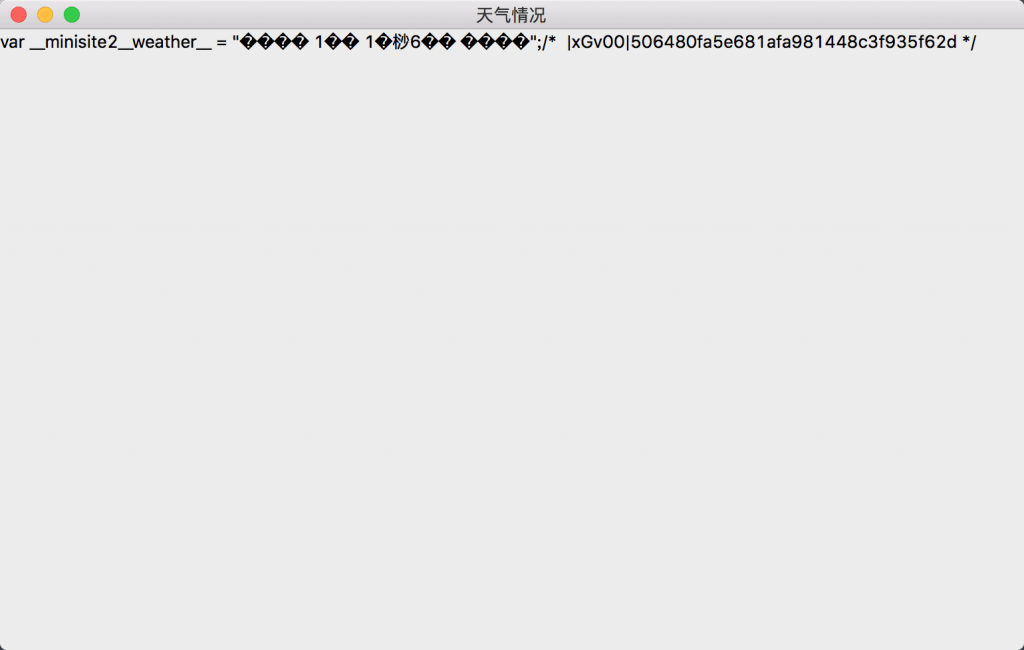
    写了一个小 Demo,获取天气信息并展示出来

    import React, { Component } from 'react'; // import from react
    import { render, Window, App, TextInput, Grid, Box, Menu, Text } from 'proton-native'; // import the proton-native components
    import http from 'http';
    
    class Example extends Component {
        constructor(props) {
            super(props);
            this.state = {
                text: ''
            }
        }
        render() {
            return (
                <App>
                    <Menu label="HI">
                        <Menu.Item>Hi</Menu.Item>
                    </Menu>
                    <Window title="天气情况" size={{w: 500, h: 500}}>
                        <Grid padded={true}>
                            <Box>
                            <Text>{this.state.text}</Text>
                            </Box>
                        </Grid>
                    </Window>
                </App>
            );
        }
    
        componentDidMount() {
            //使用 node 的 http 模块
            http.get({
                hostname: 'mat1.gtimg.com',
                path: '/weather/inc/minisite2_125.js'
            }, (res) => {
                let rawData = '';
                res.setEncoding('utf8');
                res.on('data', (chunk) => { rawData += chunk; });
                res.on('end', () => {
                    try {
                        this.setState({text: rawData});
                    } catch (e) {
                        console.log(e);
                    }
                });
            });
        }
    }
    
    render(<Example />); // and finally render your main component


    只是纯粹获取信息展示出来,但是目前 proton-native 的表现还是非常糟糕的。

    感想

    初步使用 proton-native 后感觉和想象中还是有很大的差距,在构建 UI 方面确实没有 Electron 一类来得方便,并且在功能上还有很多缺失,连最基础的 Text 都会出现很多问题。从目前的扩展性和自由度角度出发还很难构建一个商业化的产品,但是对于自己尝试玩玩的小项目还是值得一试的。

    如果要构建一个产品化的东西还是先考虑,Electron 和 Nwjs,React-Native 也有桌面版的在 macOS 下的 react-native-macos,当然如果要考虑跨平台的话,做一个壳放个 webview 也是一个选择哇。


    今日推荐英文原文:《How I Hacked My University’s Registration System with Python and Twilio》

    推荐理由:学校的选课系统经常没法用?或者选不上心仪的课?…..不用担心,看看这位小哥,是如何使用 Python 和 Twilio 来 hack 掉他们学校的选课系统的。不过,建议最好不要在你们自己的学校做这件事….别人学校…嗯,可能也不合适。


    How I Hacked My University’s Registration System with Python and Twilio

    University students know the pain of trying to register for a class only to realize it’s full. At my university we didn’t even have a waitlist system for most classes. We had to resort to logging in and checking the site multiple times a day. This seemed like something a computer could do, so I set out to automate it with a bit of Python and the Twilio API.

    Getting Started

    Because the university’s course registration system is behind a password login, we’re going to use a simplified site I set up. For the purposes of this demo, it alternates each minute between having no open seats in CS 101 and having one open seat.

    We’re going to use a few libraries to help us with this project. Assuming you already have pip installed, go ahead and install them by running the following pip command:

    pip install requests==2.17.3 beautifulsoup4==4.6.0 redis==2.10.5 twilio==6.3.0 Flask==0.12.2

    We’ll dive into using each one of these libraries as we get further along.

    Scraping the Registration System

    We need to write a program that can determine whether there are seats available in a given course. To do this, we’ll use a technique called web scraping, in which we download a page from the internet and find the important bits. Two popular libraries that make this easy are Requests and BeautifulSoup. Requests makes it easy to get a web page, and BeautifulSoup can help us find the parts of that page that are important to us.

    # scraper.py
    import requests
    from bs4 import BeautifulSoup
    
    URL = 'http://courses.project.samueltaylor.org/'
    COURSE_NUM_NDX = 0
    SEATS_NDX = 1
    
    def get_open_seats():
        r = requests.get(URL)
        soup = BeautifulSoup(r.text, 'html.parser')
        courses = {}
    
        for row in soup.find_all('tr'):
            cols = [e.text for e in row.find_all('td')]
            if cols:
                courses[cols[COURSE_NUM_NDX]] = int(cols[SEATS_NDX])
        return courses

    The meat here is in the get_open_seats function. In this function, we use requests.get to download a page’s HTML source, then we parse it with BeautifulSoup. We use find_all('tr') to get all the rows in the table, updating the courses dictionary to indicate the number of seats available in a given course. find_all can be used more powerfully than this simple example, so check out the documentation if you’re interested in learning more. Finally, we return the courses dictionary so that our program can look up how many seats are in a given course (i.e. courses['CS 101'] is the number of seats available in CS 101).

    Hooray, now we can determine whether a course has open seats. A great way to test this function out is in the Python interpreter. Save this code into a file called scraper.py, then run the script and drop into interactive mode to see what this function does:

    $ python -i scraper.py
    >>> get_open_seats()
    {'CS 101': 1, 'CS 201': 0}

    While this is great, we’re not quite to a solution; we still need some way to notify users when a seat opens up. Twilio SMS to the rescue!

    Getting Updates via SMS

    When building a user interface, we want simple things to be simple. In this case, users want to get notified when seats in a course open up. The simplest way for them to communicate that intent to us is sharing the course number. Let’s implement a subscription functionality by setting up and handling a webhook. I’m choosing to use Redis (a tool which provides data structures that can be accessed from multiple processes) to store subscriptions.

    # sms_handler.py
    from flask import Flask, request
    import redis
     
    twilio_account_sid = 'ACXXXXX'
    redis_client = redis.StrictRedis(host='localhost', port=6379, db=0)
    app = Flask(__name__)
     
    @app.route('/sms', methods=['POST'])
    def handle_sms():
        user = request.form['From']
        course = request.form['Body'].strip().upper()
     
        redis_client.sadd(course, user.encode('utf-8'))
     
    if __name__ == '__main__':
        app.run(debug=True)

    Here we use a web framework for Python called Flask to create a little service that handles SMS messages. After some initial setup, we indicate that requests to the /sms endpoint should be handled by the handle_sms function. In this function, we grab the user’s phone number and the course they were looking for, and store them in a set named after the course.

    This is great as far as capturing the subscriptions, but it is a frustrating user interface because it doesn’t provide any feedback to users. We want to get back to users and tell them whether we’re able to service their request as soon as possible. To do that, we’ll provide a TwiML response. The additional lines needed for that are highlighted below.

    # sms_handler.py
    from flask import Flask, request
    import redis
    from twilio.twiml.messaging_response import MessagingResponse
     
    twilio_account_sid = 'ACXXXXX'
    my_number = '+1XXXXXXXXXX'
    valid_courses = {'CS 101', 'CS 201'}
     
    redis_client = redis.StrictRedis(host='localhost', port=6379, db=0)
    app = Flask(__name__)
     
    def respond(user, body):
        response = MessagingResponse()
        response.message(body=body)
        return str(response)
     
    @app.route('/sms', methods=['POST'])
    def handle_sms():
        user = request.form['From']
        course = request.form['Body'].strip().upper()
        if course not in valid_courses:
            return respond(user, body="Hm, that doesn't look like a valid course. Try something like 'CS 101'.")
     
        redis_client.sadd(course, user.encode('utf-8'))
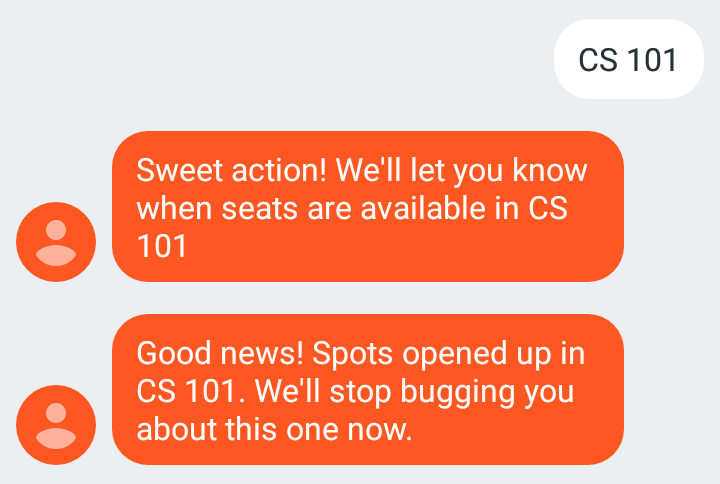
            return respond(user, body=f"Sweet action. We'll let you know when there are seats available in {course}")
     
    if __name__ == '__main__':
        app.run(debug=True)

    We’ve made two major changes in the code above. First, we validate that the user is asking for a valid course. Second, we respond to users when they ask for updates. In the respond function, we construct a TwiML response to a given number with a given message.

    Make sure to install Redis and start it up with the redis-server command. Save the above code into a file called sms_handler.py and then run python sms_handler.py.

    Admittedly, the response messages here are a bit silly, but I was surprised to see how much users enjoyed them. In some contexts a personal touch can make for a better user experience.

    Let’s extend our earlier scraping script to actually notify those people now that we know who wants to be notified of a course opening up.

    # scraper.py
    from twilio.rest import Client
    
    client = Client(twilio_account_sid, token)
    redis_client = redis.StrictRedis(host='localhost', port=6379, db=0)
    
    def message(recipient, body):
        message = client.messages.create(to=recipient, from_=my_number, body=body)
    
    
    if __name__ == '__main__':
        courses = get_open_seats()
        for course, seats in courses.items():
            if seats == 0:
                continue
    
            to_notify = redis_client.smembers(course)
            for user in to_notify:
                message(user.decode('utf-8'), 
                        body=f"Good news! Spots opened up in {course}. " + \
                              "We'll stop bugging you about this one now.")
                redis_client.srem(course, user)

    We can run this scraper on a one-off basis to test it by running python scraper.py.

    Keeping Tabs on Courses with a Cron Job

    While simplifying the process of checking the course registration site into a single script is nice, we want the script to automatically run every few minutes. This problem is easily solved by using Cron. We can add a task to run every three minutes by running crontab -e and adding the following line:

    */3 * * * * /path/to/scraper.py

    With that code in place, the Cron daemon will run our scraper every three minutes. We can see the scheduled tasks by running crontab -l. And that’s it! We can subscribe to updates for a class and get back to the important things in life. As a fun side benefit, your friends will be very appreciative when you get them into that packed “Rest and Relaxation” course. While getting into the classes I wanted was plenty of reward for the work, it also ended up helping around a dozen people get their ideal schedules.

    Using the techniques from this post, you can set up notifications for a wide variety of things. For instance, someone used Ruby and Twilio to track craft beer availability. To get all the code from this post, check out this gist. You can also contact me via:

    • [email protected]
    • @SamuelDataT

    Disclaimer: Make sure to check that setting up notifications will not violate your university’s student system terms of service. When in doubt, ask someone who knows!


    每天推荐一个 GitHub 优质开源项目和一篇精选英文科技或编程文章原文,欢迎关注开源日报。交流QQ群:202790710;电报群 t.me/openingsource


←上一页
1 … 258 259 260 261 262
下一页→

Proudly powered by WordPress