• 开源镜像
  • 开源沙龙
  • 媛宝
  • 猿帅
  • 注册
  • 登录
  • 息壤开源生活方式平台
  • 加入我们

开源日报

  • 2018年4月12日:开源日报第35期

    12 4 月, 2018

    每天推荐一个 GitHub 优质开源项目和一篇精选英文科技或编程文章原文,欢迎关注开源日报。交流QQ群:202790710;电报群 https://t.me/OpeningSourceOrg


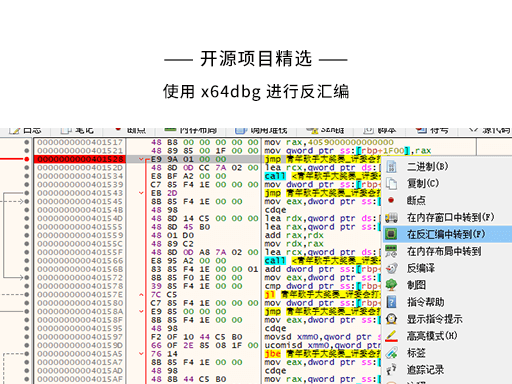
    今日推荐开源项目:《使用 x64dbg 进行反汇编》

    推荐理由:x64dbg是一个调试器,可全功能调试 dll 和 exe 文件。
    下载地址:https://github.com/x64dbg/x64dbg/releases

    解压后运行release\x96dbg.exe,根据程序的类型选择对应的dbg。哪怕不知道该选哪个也没关系,你可以随便选一个,然后用它去打开你想要逆向的程序,如果不是对应的程序,会在程序的下方给出提示。

    基本功能:

    1、控制软件运行

    调试器的最基本功能就是将一个飞速运行的程序中断下来,并且使其按照用户的意愿执行。调试器是靠迫使目标程序触发一个精心构造的异常来完成这些工作的。

    2、查看软件运行中信息

    查看软件的当前信息,这些信息包含但不限于当前线程的寄存器信息,堆栈信息、内存信息、当前 EIP 附近的反汇编信息等。

    3、修改软件执行流程

    修改内存信息、反汇编信息、堆栈信息、寄存器信息等等。

    组成:

    该调试器由三大部分组成:

    • DBG
    • GUI(这款调试器的图形界面是基于Qt的)
    • Bridge

    简介:

    这个软件与 OD 一样是开源软件,熟悉 OD 的一定会发现,这款软件的界面与 OD 的界面极其的相似,当然也有着与 OD 相同的功能。鉴于 OD 已经好几年没有更新,是时候试试这款可以反汇编64位文件的软件了(ps:软件本身就有中文版哦)。

    它有着更加清晰的颜色区分,并且背后的团队还在不断的更新中哦(越来越多的插件)

    直接把要调试的文件拖进来!它的操作几乎与 OD 相同,再加上中文的界面,还是十分友好的。

    基本操作:

    • 下断点

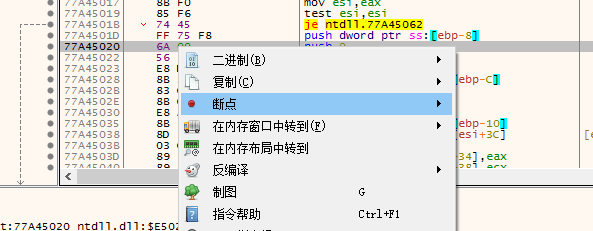
    F2 或者右键而且在 x64dbg 里你还可以直接点左边的小灰点

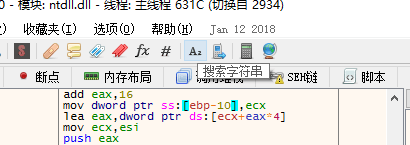
    • 搜索字符串

    • 修改完成后就保存吧

    本人对反编译以及汇编这个方面并不擅长,因此选择把自己写的小程序拿来分析,将汇编指令跟源代码进行比对。以下是测试的结果。

    程序的初始化会占用大量的汇编指令,而这部分是我们平时写程序时看不到的。
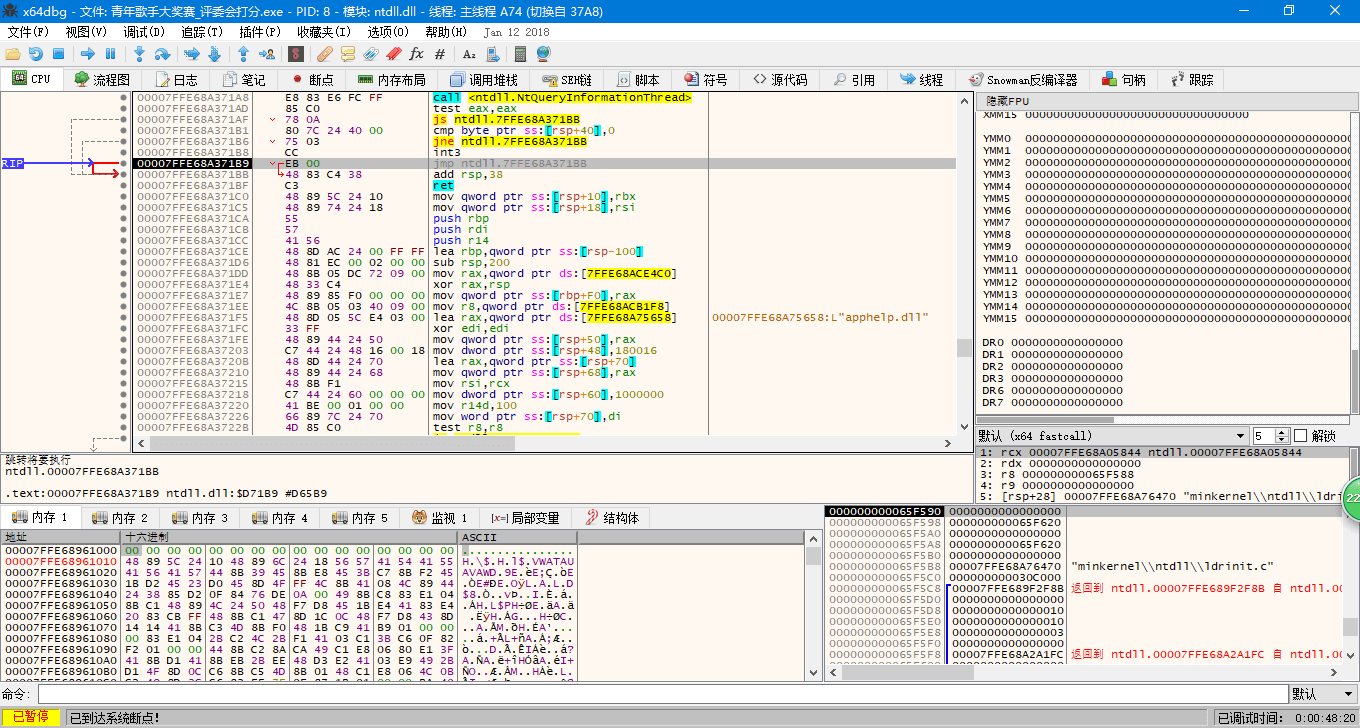
    初始化完成后的启动位置会被注释为 EntryPoint 。
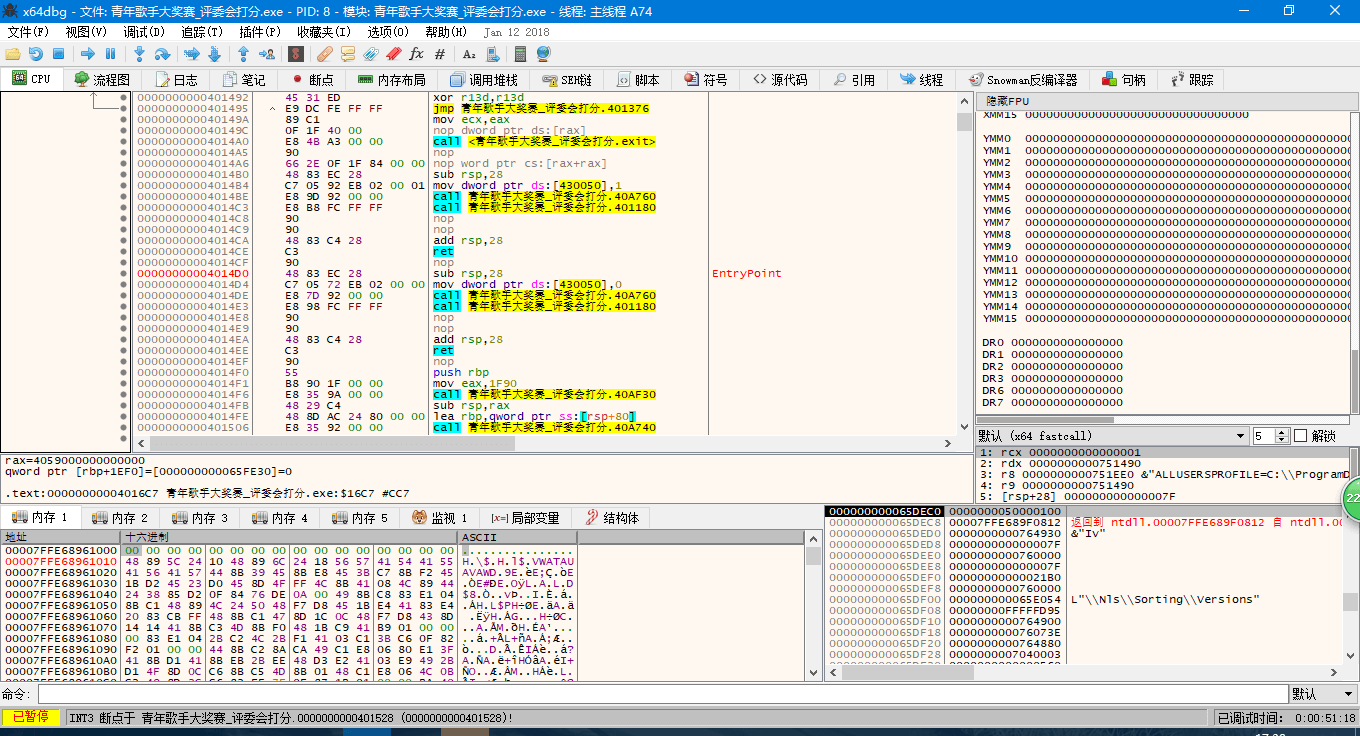
    之后开始脚本正文。

    前两句是初始化数组 array[] 与计数变量 n , i 等,这里略过。

    之后会运行如下代码:

    <while(scanf("%d",&n)!=EOF)
    
    {
          ……………………
    }>

    是的,这是一道 ACM 的题,因为很简单所以拿来分析也方便一点……

    对于这个结构,汇编代码给出的解释如下:
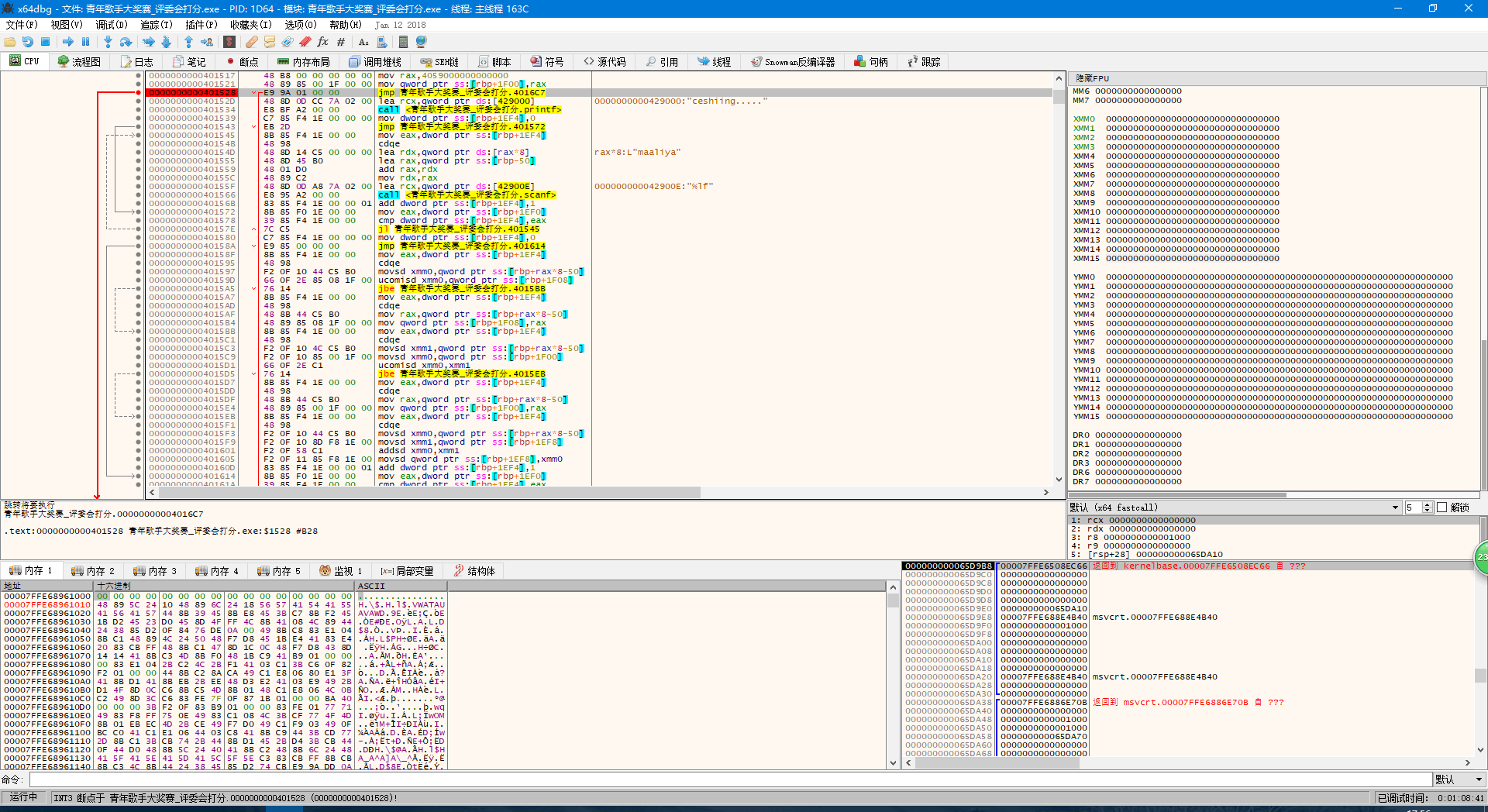
    箭头指向的地方就是 while() 里的判定,让我们跟过去。
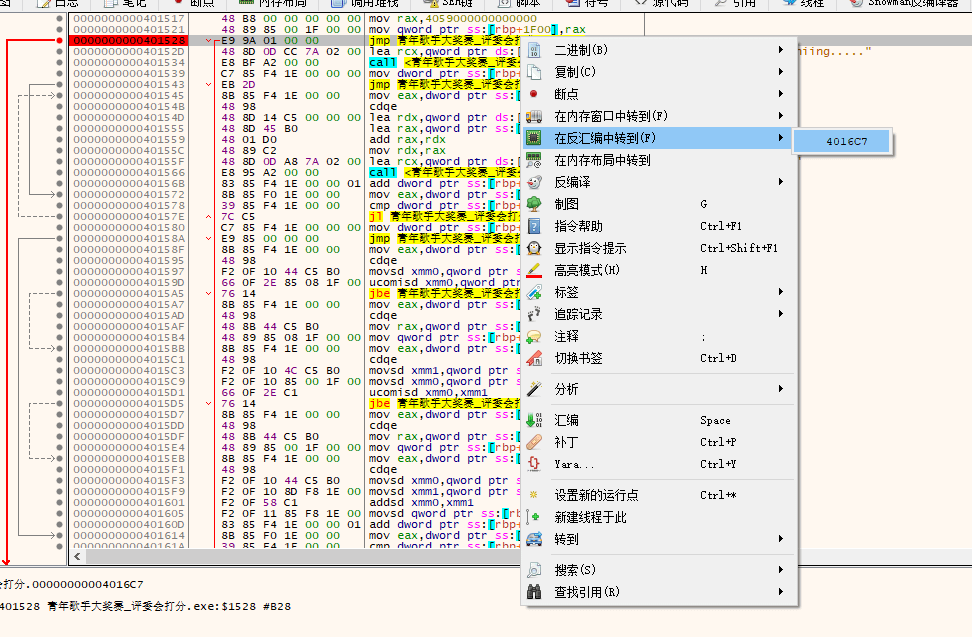
    大家都看见了左边有个指向上方的灰色箭头,不用说也知道是指向回刚刚的判断条件之后的内容。实际上在这里汇编代码的逻辑是很清晰的,一层层调用起来,一层层返回,与函数有异曲同工之妙。例如这里会调用 scanf 函数,在你输入了之后又会经过重重代码,最后到达的指令就是 scanf 指令的下一条指令。
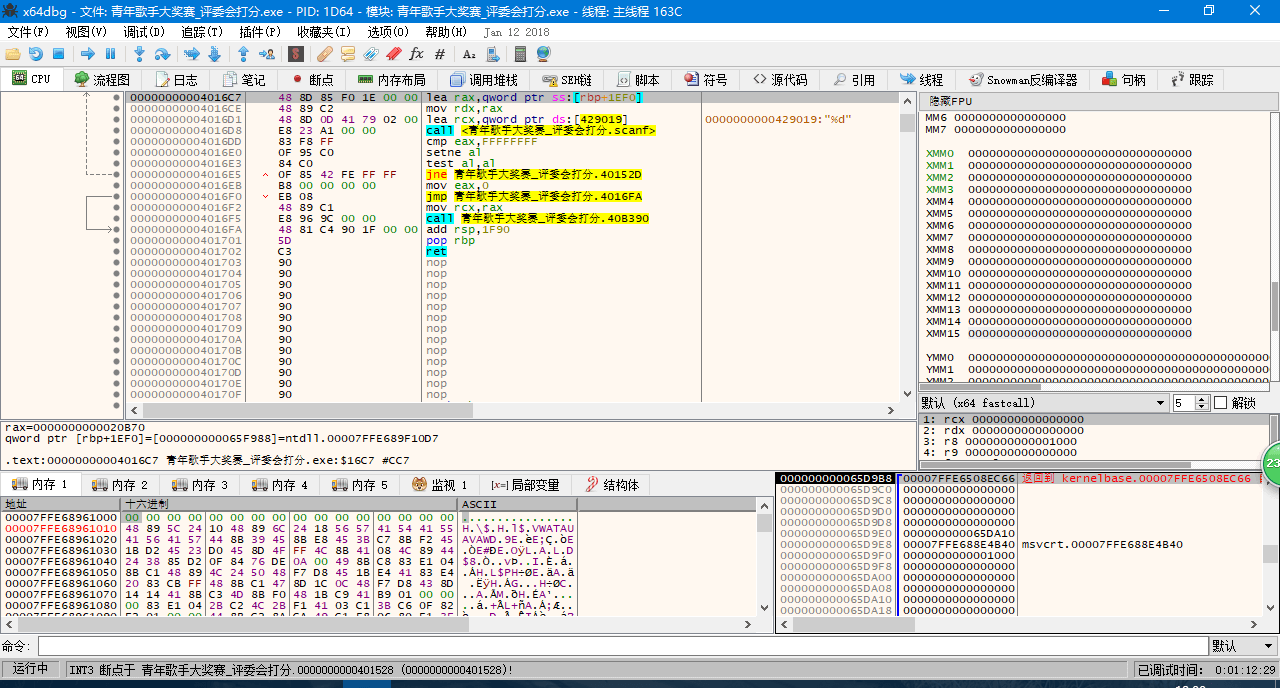
    将输入的整型数据处理完毕并进行判断以后,寄存器回到 while 循环区,并开始执行循环内的第一条代码。

    < printf("ceshiing.....");>
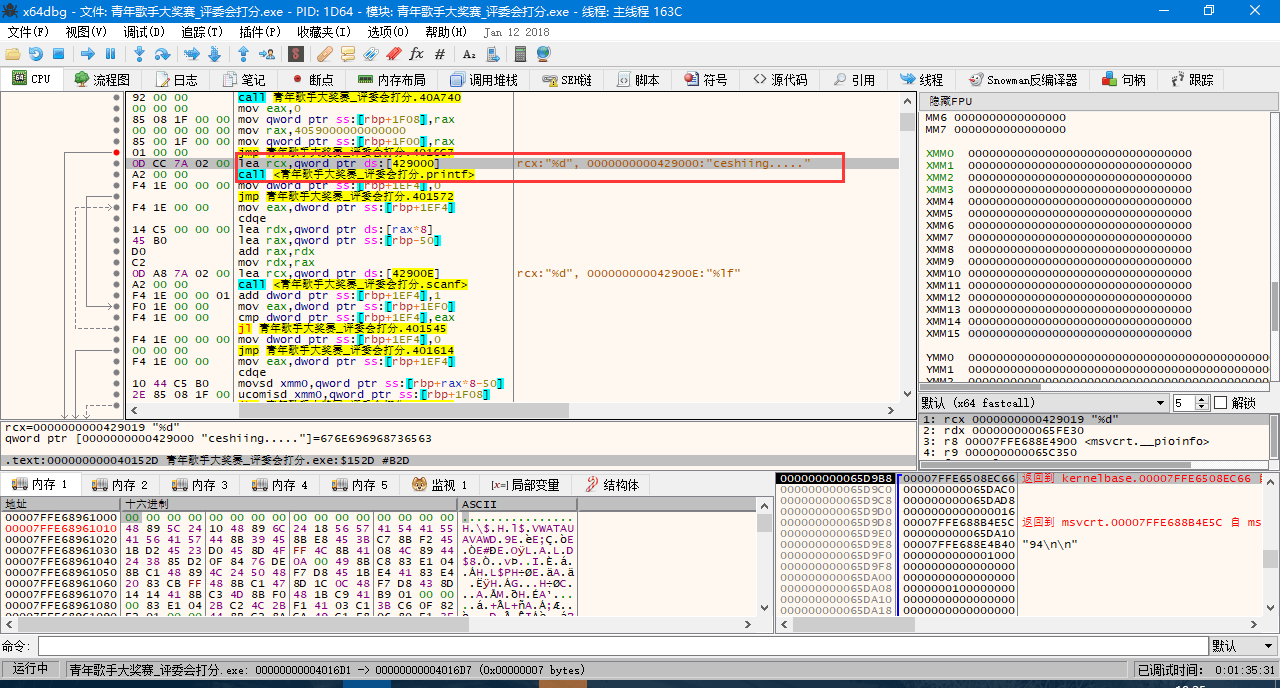
    

    x64dbg 显示有两条命令处理这个函数,第一个是获取显示内容,第二个是执行显示,第二个还会调用大量的汇编指令,这里不多加赘述。

    接下来是两个 for 循环与 if 判断语句:

    < for(i=0;i<n;i++){scanf("%lf",array+i);}
    
                     for(i=0;i<n;i++)
    
                     {if(array[i]>nmax)nmax=array[i];
    
                      if(array[i]<nmin)nmin=array[i];
    
                      sum+=array[i];                       
    
                     }>

    汇编指令中将这个过程非常直观地表示了出来。
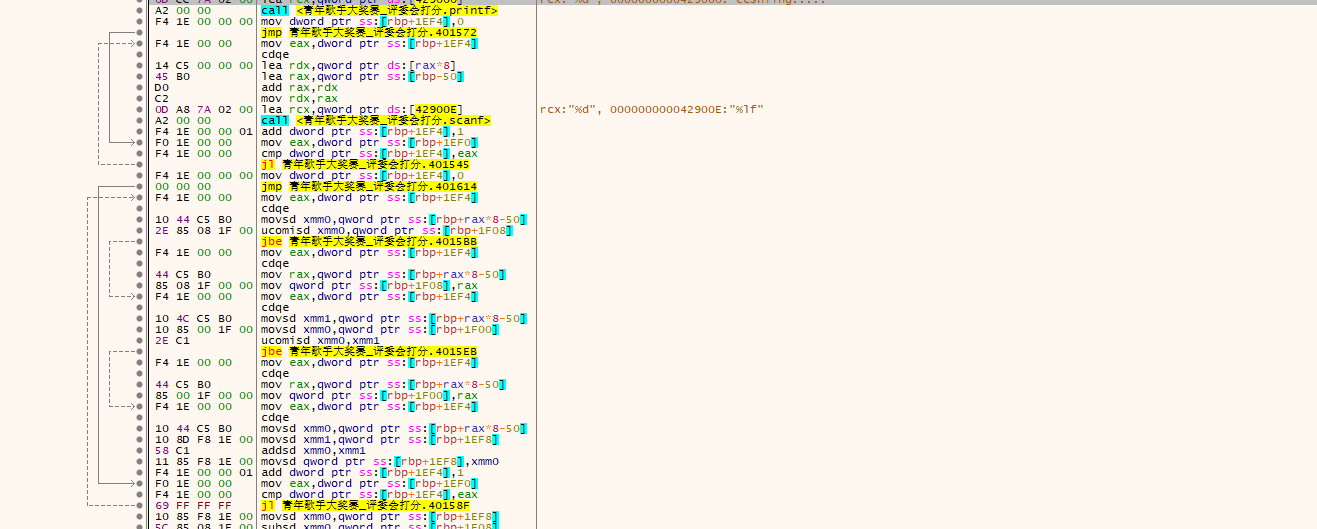
    第一个循环用于输入每个评委给的分数。 jmp 无条件指令跳转, jl 按找参数的正负符号跳转, jl 的前一条 cmp 将两个值相减,用来给 jl 是否跳转提供依据。

    第二个循环用于寻找最大值与最小值。可以从结构看出, if 语句中满足条件的话就 不会发生跳转。

    最后执行以下代码,完成一次大循环:

    < sum-=nmax,sum-=nmin;
    
                     sum=sum/(n-2);
    
                     printf("%.2lf\n",sum);
    
                     //初始化数据
    
                     nmax=0,nmin=100,sum=0;>
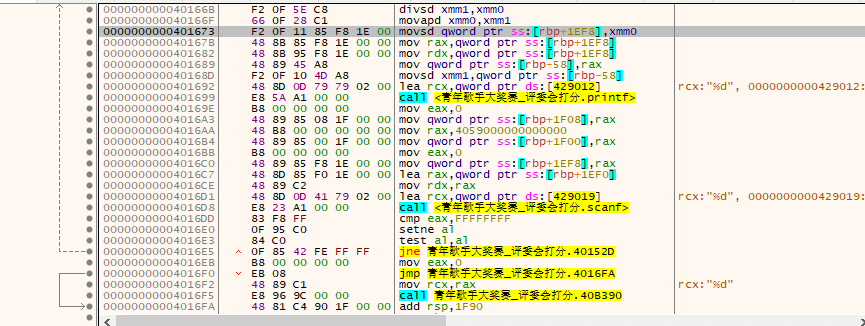
    是不是很熟悉?又回到了最开始判定的地方。初始化完成后,就是判定,判定是的话又会返回 while 循环区的第一条代码……直到循环完成。再后面的汇编代码都是一些定义了,之前有许多 call 指令的目标便在这里被定义。包括 printf , scanf 都被封装在下面。

    那么本次延展的主要内容就到这里结束了。汇编指令相较高级语言来说要晦涩许多,哪怕是以底层著称的C语言译转为汇编指令以后依旧会变得如此复杂。尽管这样,汇编指令也富有逻辑性。Call指令使程序变得模块化,使得C语言中连续的内容不会被分散。简洁的跳转指令构成了完善清晰的循环结构。我们可以看出,程序的代码部分会集中在一个小区域,也就是 EntryPoint 之后的一部分内容,这位我们解析代码提供了便利。对程序的逆向或破解有兴趣的同学可以去看看网上更多的与此相关的内容哦,这篇文章仅供简介这个程序的解析过程的入门。

    最后是我们可爱的开发人员们:

    mrexodia

    Sigma

    tr4ceflow

    Dreg

    Nukem

    Herz3h

    Torusrxxx


    以及贡献者们:

    blaquee

    wk-952

    RaMMicHaeL

    lovrolu

    fileoffset

    SmilingWolf

    ApertureSecurity

    mrgreywater

    Dither

    zerosum0x0

    RadicalRaccoon

    fetzerms

    muratsu

    ForNeVeR

    wynick27

    Atvaark

    Avin

    mrfearless

    Storm Shadow

    shamanas

    joesavage

    justanotheranonymoususer

    gushromp

    Forsari0


    今日推荐英文原文:《Simple Cloud Hardening》原作者:Kyle Rankin

    原文链接:https://www.linuxjournal.com/content/simple-cloud-hardening

    推荐理由:如果你打算把 Linux 操作系统作为云端服务器的话,怎么可以加固系统防止入侵、保障安全和隐私呢?这篇文章提供了一个简单可行的操作方法。

    Simple Cloud Hardening

    Apply a few basic hardening principles to secure your cloud environment.

    I’ve written about simple server-hardening techniques in the past. Those articles were inspired in part by the Linux Hardening in Hostile Networks book I was writing at the time, and the idea was to distill the many different hardening steps you might want to perform on a server into a few simple steps that everyone should do. In this article, I take the same approach only with a specific focus on hardening cloud infrastructure. I’m most familiar with AWS, so my hardening steps are geared toward that platform and use AWS terminology (such as Security Groups and VPC), but as I’m not a fan of vendor lock-in, I try to include steps that are general enough that you should be able to adapt them to other providers.

    New Accounts Are (Relatively) Free; Use Them

    One of the big advantages with cloud infrastructure is the ability to compartmentalize your infrastructure. If you have a bunch of servers racked in the same rack, it might be difficult, but on cloud infrastructures, you can take advantage of the technology to isolate one customer from another to isolate one of your infrastructure types from the others. Although this doesn’t come completely for free (it adds some extra overhead when you set things up), it’s worth it for the strong isolation it provides between environments.

    One of the first security measures you should put in place is separating each of your environments into its own high-level account. AWS allows you to generate a number of different accounts and connect them to a central billing account. This means you can isolate your development, staging and production environments (plus any others you may create) completely into their own individual accounts that have their own networks, their own credentials and their own roles totally isolated from the others. With each environment separated into its own account, you limit the damage attackers can do if they compromise one infrastructure to just that account. You also make it easier to see how much each environment costs by itself.

    In a traditional infrastructure where dev and production are together, it is much easier to create accidental dependencies between those two environments and have a mistake in one affect the other. Splitting environments into separate accounts protects them from each other, and that independence helps you identify any legitimate links that environments need to have with each other. Once you have identified those links, it’s much easier to set up firewall rules or other restrictions between those accounts, just like you would if you wanted your infrastructure to talk to a third party.

    Lock Down Security Groups

    One advantage to cloud infrastructure is that you have a lot tighter control over firewall rules. AWS Security Groups let you define both ingress and egress firewall rules, both with the internet at large and between Security Groups. Since you can assign multiple Security Groups to a host, you have a lot of flexibility in how you define network access between hosts.

    My first recommendation is to deny all ingress and egress traffic by default and add specific rules to a Security Group as you need them. This is a fundamental best practice for network security, and it applies to Security Groups as much as to traditional firewalls. This is particularly important if you use the Default security group, as it allows unrestricted internet egress traffic by default, so that should be one of the first things to disable. Although disabling egress traffic to the internet by default can make things a bit trickier to start with, it’s still a lot easier than trying to add that kind of restriction after the fact.

    You can make things very complicated with Security Groups; however, my recommendation is to try to keep them simple. Give each server role (for instance web, application, database and so on) its own Security Group that applies to each server in that role. This makes it easy to know how your firewall rules are being applied and to which servers they apply. If one server in a particular role needs different network permissions from the others, it’s a good sign that it probably should have its own role.

    The role-based Security Group model works pretty well but can be inconvenient when you want a firewall rule to apply to all your hosts. For instance, if you use centralized configuration management, you probably want every host to be allowed to talk to it. For rules like this, I take advantage of the Default Security Group and make sure that every host is a member of it. I then use it (in a very limited way) as a central place to define any firewall rules I want to apply to all hosts. One rule I define in particular is to allow egress traffic to any host in the Default Security Group—that way I don’t have to write duplicate ingress rules in one group and egress rules in another whenever I want hosts in one Security Group to talk to another.

    Use Private Subnets

    On cloud infrastructure, you are able to define hosts that have an internet-routable IP and hosts that only have internal IPs. In AWS Virtual Private Cloud (VPC), you define these hosts by setting up a second set of private subnets and spawning hosts within those subnets instead of the default public subnets.

    Treat the default public subnet like a DMZ and put hosts there only if they truly need access to the internet. Put all other hosts into the private subnet. With this practice in place, even if hosts in the private subnet were compromised, they couldn’t talk directly to the internet even if an attacker wanted them to, which makes it much more difficult to download rootkits or other persistence tools without setting up elaborate tunnels.

    These days it seems like just about every service wants unrestricted access to web ports on some other host on the internet, but an advantage to the private subnet approach is that instead of working out egress firewall rules to specific external IPs, you can set up a web proxy service in your DMZ that has more broad internet access and then restrict the hosts in the private subnet by hostname instead of IP. This has an added benefit of giving you a nice auditing trail on the proxy host of all the external hosts your infrastructure is accessing.

    Use Account Access Control Lists Minimally

    AWS provides a rich set of access control list tools by way of IAM. This lets you set up very precise rules about which AWS resources an account or role can access using a very complicated syntax. While IAM provides you with some pre-defined rules to get you started, it still suffers from the problem all rich access control lists have—the complexity makes it easy to create mistakes that grant people more access than they should have.

    My recommendation is to use IAM only as much as is necessary to lock down basic AWS account access (like sysadmin accounts or orchestration tools for instance), and even then, to keep the IAM rules as simple as you can. If you need to restrict access to resources further, use access control at another level to achieve it. Although it may seem like giving somewhat broad IAM permissions to an AWS account isn’t as secure as drilling down and embracing the principle of least privilege, in practice, the more complicated your rules, the more likely you will make a mistake.

    Conclusion

    Cloud environments provide a lot of complex options for security; however, it’s more important to set a good baseline of simple security practices that everyone on the team can understand. This article provides a few basic, common-sense practices that should make your cloud environments safer while not making them too complex.


    每天推荐一个 GitHub 优质开源项目和一篇精选英文科技或编程文章原文,欢迎关注开源日报。交流QQ群:202790710;电报群 https://t.me/OpeningSourceOrg

  • 2018年4月11日:开源日报第34期

    11 4 月, 2018

    每天推荐一个 GitHub 优质开源项目和一篇精选英文科技或编程文章原文,欢迎关注开源日报。交流QQ群:202790710;电报群 https://t.me/OpeningSourceOrg

    今日推荐开源项目:《Intel读取内存漏洞Meltdown》

    推荐理由:几个月前闹得沸沸扬扬的 Intel 处理器漏洞事件,想必很多朋友都关注过,nuo,现在就有一个在 GitHub 上非常受关注的开源项目,一起看看。

    概述

    Meltdown 是影响 Intel x86 微处理器和一些基于 ARM 的微处理器的硬件漏洞。 它允许流氓

    进程读取所有的内存,即使它没有被授权这样做。

    原理

    Meltdown 利用 Intel CPU 的乱序执行漏洞,通过对内存的响应时间差来建立一个侧信道攻击,以此读取整个内核空间。

    Intel CPU 采用乱序执行来提高运行效率,但乱序执行都会碰到一个问题,从原理上讲它仅适用于纯顺序执行的指令,一旦遇到分支,即条件跳转指令,因为不执行到条件跳转指令本身,是没法知道程序转向何处执行的,也就是条件跳转指令的下一条指令在未执行前不确定,因此无法预先取得条件跳转指令的后续指令,这时乱序执行会失效,因为它们的前提是预先取得后续指令,为解决这个问题,Intel CPU 采用了分支预测。但分支预测不能保证一定预测成功,当失败时,就会执行指令的回滚以回到正确的分支上,虽然将错误的指令撤销,相应内存块已经读入到了 cache,因为存于 cache 的数据访问速度极快,这可以被作为“侧信道”利用的。

    攻击者会利用分支预测故意访问非授权的地址a,检测出非法访问时,所有的数据被清除,但是 cache 中并未删除,此时遍历整个内存,测试访问的速度,访问时间极短则则判断出该地址被 cache,从而推断出该地址是地址a的内容。

    检测

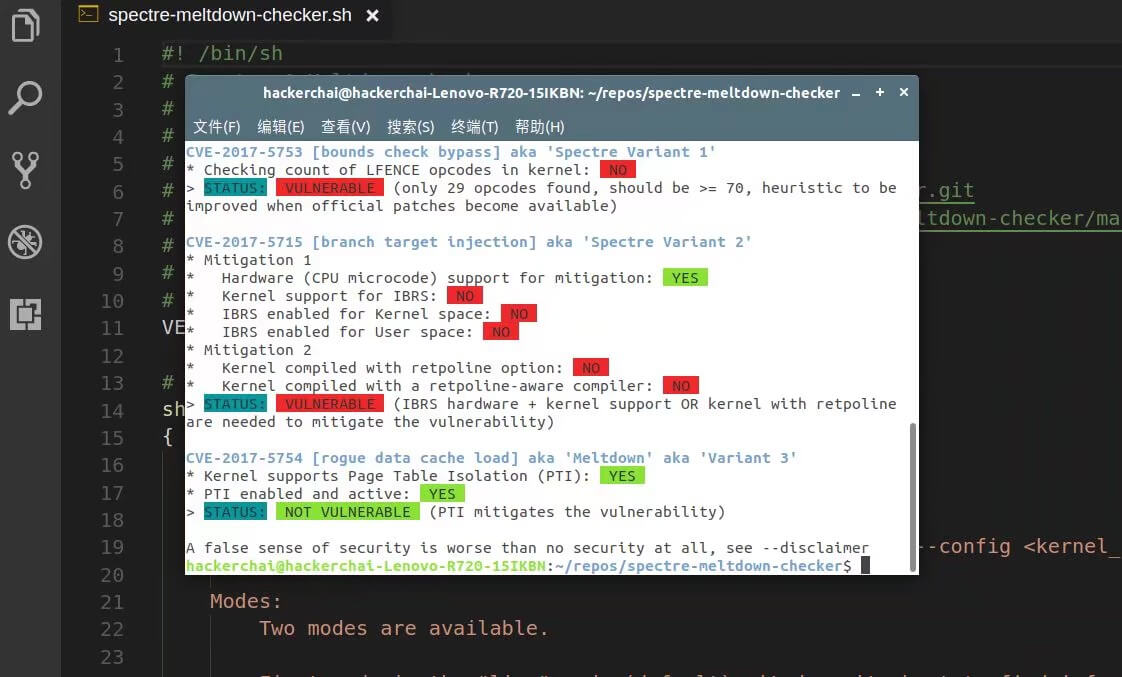
    对于Linux用户,虽然有 KALSR 技术来参与保护缓冲区溢出问题的计算机安全,但是官方文档仍然提到了通过 Meltdown 漏洞来破解 KALSR 的方法。不过在实际使用当中,寻找时间比较长。对于漏洞检测,可以参见开源检测项目 spectre-meltdown-checker

    对于Windows用户,通过使用微软公司发布的检测 PowersShell 脚本,能够判断Windows系统是否受到漏洞的影响:

    首先,安装相应的 PowerShell 模块,打开 powershell,对应命令:

    Install-Module SpeculationControl
    

    其次,需要调用相关脚本,对应命令:

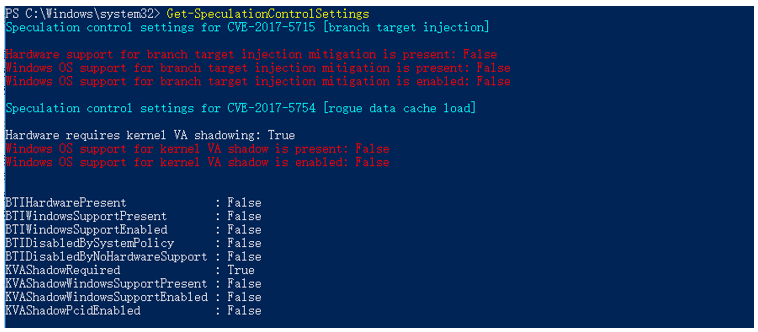
    PS> PS> Get-SpeculationControlSettings

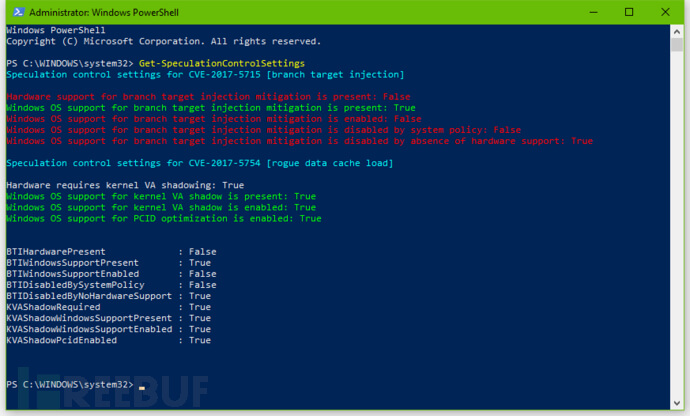
    其中,开启的保护会显示为 True,未开启的保护则会显示为 False,如下图所示:

    Intel CPU漏洞修复

    对于Windows10用户:

    如果你是Windows10的话,那么这个更新的代号叫做 KB4056892

    具体方法:选择“开始” 按钮,然后依次选择“设置” >“更新和安全” >“Windows 更新”。选择“检查更新”。如果有可用更新,请安装它们。

    (这表明:Meltdown 补丁已经安装成功,但是 Spectre 漏洞修复不完整。红色的文字内容是指改名用户还是需要额外的芯片组固件更新)

    注:微软官方给出的安全建议:Protect your Windows devices against Spectre and Meltdown

    对于BIOS组件的芯片组:

    对于BIOS组件的芯片组的固件升级,要去查询主板提供商,根据自己的电脑型号,在下载界面下载对应的 .exe文件

    注:List of OEM /Server device manufacturers):Protect your Windows devices against Spectre and Meltdown

    对于Linux用户:

    为了修补漏洞,Linux内核团队将内核页表隔离(PTI)和 IBRS patch series 两项技术加入内核之中来对抗 Meltdown 和 Specture。用户只需要将系统升级到长期发行版本或者现在正在更新迭代周期的系统(Artful 17.10)即可获得更新.

    教训

    设计CPU追求速度快是理所当然的,但速度和安全性之间要有平衡点,微结构无论怎样追求高速优化,屁股要擦干净,不要向宏观体系结构泄漏内部信息。

    1965年 Intel 创世人之一、时任仙童半导体公司电子工程师的戈登摩尔提出了摩尔定律,对人类的计算之路的快速进步做出了预言。过去二十年,人类在互联网的带动下,信息化发展一路狂奔。这种对速度的追求一定程度上,透支的是安全的掉队。也许这正是一个重新定义平衡点的时刻。

    不要走开,后有彩蛋。


    有的小伙伴可能希望上手试用这一漏洞,详情可参考开源周报2018年第3期

    但应提出警告:

    警告#1:代码原装提供。您有责任保护您自己,您的财产和数据以及其他人免受此代码造成的任何风险。此代码可能会导致您的计算机上出现意想不到的行为。此代码可能无法检测到您的计算机上的漏洞。

    警告#2:如果您发现计算机容易出现崩溃错误,您需要避免将其用作多用户系统。Meltdown 会破坏CPU的内存保护。在易受 Meltdown 漏洞攻击的机器上,一个进程可以读取其他进程或内核使用的所有页面。

    警告#3:此代码仅用于测试目的。不要在任何生产系统上运行它。不要在任何可能被其他人或实体使用的系统上运行它。


    今日推荐英文原文:《The current state of Linux video editing 2018》作者: Seth Kenlon

    原文链接:https://opensource.com/article/18/4/new-state-video-editing-linux

    推荐理由:Linux 其实在很多领域都发挥着重要的作用,比如视频编辑,影视制作,只是很多人不太了解,这篇文章介绍了2018年 Linux 上的一些优异的视频编辑软件,可以让你见证很多奇迹,原来, Linux 真的不是适合做服务器。

    The current state of Linux video editing 2018

    The current state of Linux video editing 2018
    Image by : opensource.com

    It’s pretty well known that Linux is a big deal in modern movie making. Linux is the standard base, a literal industry standard for digital effects but, like all technology with momentum, it seems that the process of cutting footage still defaults mostly to a non-Linux platform. Slowly, however, as artists seek to simplify and consolidate the post-production pipeline, Linux video editing is gaining in popularity.

    It can be difficult to talk about video editing objectively because it means so many different things to different people. For instance, to some people a video editing application must be able to generate fancy animated title sequences, while professional users balk at the idea of doing serious work on titles in their video editor. It’s not unlike the debate over professional SLR cameras that happened when digital cameras in phones became contenders for serious photography.

    For this reason, a pragmatic overview of a Linux-based video editor needs two broad qualifiers: How it performs for home users, and how it might integrate into a professional pipeline.

    Defining key terms

    • Independent: For the purposes of this article, I’ll call a workflow that begins and ends with either one video editing software or one computer system either “independent” or “hobbyist.” In other words, an independent or hobbyist filmmaker is likely to use one application to do video editing, maybe a few other applications for specialized tasks like audio sweetening or motion graphics, and then they’re done. Their project is exported and delivered.
    • Professional integration: A “professional” editor probably also uses only one application to edit video, but that’s because they’re a cog in a larger machine. A professional editor might get their footage from a producer or director, and when they’re done they probably aren’t exporting the final version that their audiences are going to see, but they’ll pass their work on to audio engineers, VFX artists, and colorists.

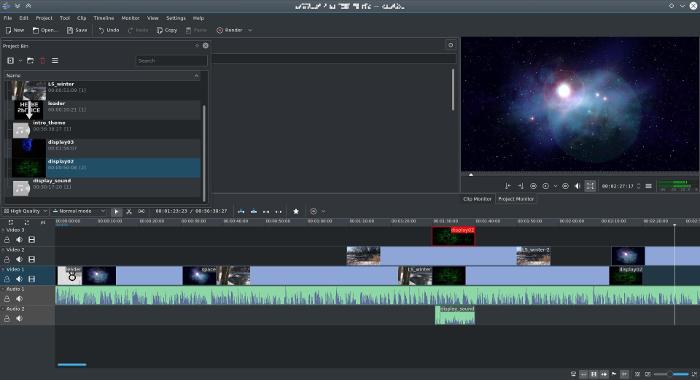
    Top pro pick: Kdenlive

    Kdenlive is the best-in-class professional open source editing application, hands-down. As long as you run a stable version of Kdenlive on a stable Linux OS, use reasonable file formats, and keep your work organized, you’ll have a reliable, professional-quality editing experience.

    Kdenlive

    Strengths

    • The interface is intuitive for anyone who has ever used a professional-style editing application.
    • The way you work in Kdenlive is natural and flexible, allowing you to use both of the major styles of editing: cutting by numbers and just mousing around in the timeline.
    • Kdenlive has plenty of capabilities beyond just cutting up footage. It can do some advanced visual effects, like masking, all manner of composting (see this, this, and this), color correction, offline “proxy” editing, and much much more.

    Weaknesses

    • The greatest weakness of open source editing is also its greatest strengths: Kdenlive lets you throw nearly anything you want at it, even if that sometimes means its performance suffers. You should resist the urge to take advantage of this flexibility and instead manage your assets and formats smartly. Instead of using an MP3, convert the MP3 to WAV first (which is what other editors do for you, but they do it “behind the scenes”). Don’t throw in an animated GIF without first breaking it out into a series of images. And so on. Gaining flexibility means you gain the responsibility for maintaining a sensible media library.
    • The interface, while accounting for both “traditional” editing styles and the “modern” style of treating the timeline as a sort of scratchpad, wouldn’t really satisfy an editor who wants to cut by numbers. Currently, there’s no way, for instance, to modify or move clips with quick number-pad entries (typing +6, for instance, has no effect on a video region’s placement in the timeline).

    Independent

    • If anything, Kdenlive could be overkill for home users who aren’t accustomed to professional-style editing. Basic operations of the interface are mostly intuitive, but new editors might feel that there’s a learning curve for advanced operations (like layered composting and offline editing).
    • On the other hand, it scales down well. You can use a fraction of its features and find it a pretty simple, mostly intuitive editor.
    • And for serious home editors and independent movie makers, Kdenlive is worth learning and using, and it is likely to satisfy all requirements. It may not always be a drop-in replacement if you’re transitioning from some other editor, but it’s familiar enough to keep the learning curve manageable.

    Professional integration

    • If you’re working in a production environment with an established workflow, then any change to your editor requires adaptation.
    • Kdenlive saves projects as an XML file, so it’s possible to convert an existing edit decision list (EDL) to a Kdenlive project file, although there aren’t any official auto-converters available yet, so round trips (i.e., returning to the original application) out of Kdenlive would require intervention. Alternately, round trips can be done with lossless clip exports, which can be reintegrated into a project after whatever has been applied from the external application.
    • The same holds true for audio. You can render audio to a file and import into an external digital audio workstation (DAW), but currently there’s no native, built-in audio-export target for popular formats like Open Media Framework (OMF).
    • For the most part, as long as your pipeline isn’t perilously rigid, Kdenlive can exist within any professional environment. It can output video, audio, and image sequences, and it’s hard to imagine a workflow where such generic output isn’t acceptable.

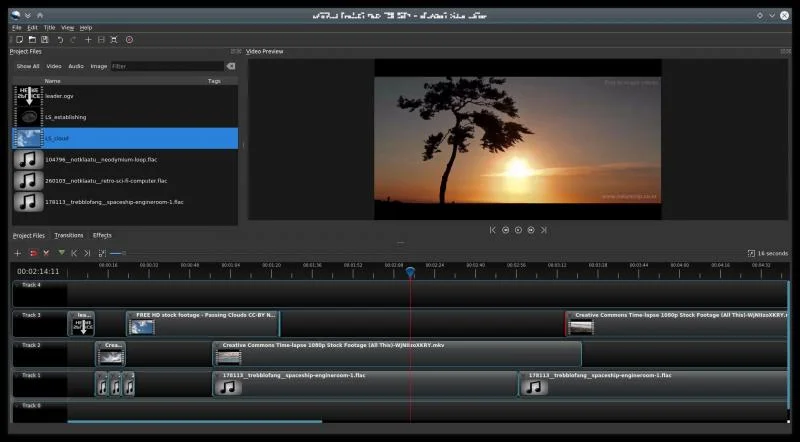
    Hobbyist pick: OpenShot

    OpenShot is a simple but robust video editor. If you’re not interested in learning the finer details on how to edit video, then OpenShot is for you. It doesn’t scale up; a professional editor will find it restrictive, but for a quick and easy edit, OpenShot is a great choice on any OS.

    OpenShot interface

    Strengths

    • OpenShot is focused. It understands exactly what its audience wants: the ability to make attractive videos with minimal fuss. Its interface is intuitive, and what you can’t immediately figure out from context, you can access with a right-click.
    • The most common transition, a crossfade, is available by overlapping the edges of two clips. This is such a simple and obvious trick, but it cuts down on so many mouse clicks that you’ll wonder why all video editors don’t do that.
    • It’s also a very conservative application. You won’t see a new OpenShot release every month, and that’s a good thing. You can download OpenShot as an AppImage today and use it for the next year or more. It’s a beautiful, comfortable, simple piece of software.

    Weaknesses

    • A hobbyist’s strengths are a pro’s weaknesses. It’s a deliberately simplified system, and little conveniences like the auto-crossfades are unwelcome to a professional editor who doesn’t necessarily want clips to crossfade when they overlap.
    • OpenShot doesn’t have a very robust engine for real-time effects. Too many dynamic effects severely slow playback.

    Independent

    • An independent or hobbyist editor with simple needs will find OpenShot perfect. It’s an easy install, it has all the usual benefits of open source multimedia (near indifference to codecs, no false limitations or paywalls for advanced features).

    Professional integration

    • Integrating OpenShot with a larger pipeline is possible, but only in the sense that it can output generic video and audio files and image sequences. Its project file format, however, is also open source, and it saves into a JSON format that theoretically could be leveraged for an EDL, but there’s no built-in exporter for that.

    Everything else

    Kdenlive and OpenShot are my top picks, the open source editors an editor ought to turn to for a quick fix, but there are, of course, several others to look at.

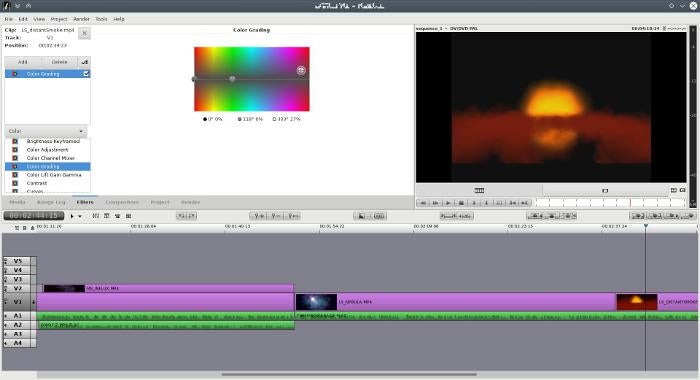
    Flowblade

    Flowblade is a simplified video editor that focuses on the editorial process. If you’re an experienced editor and just want to get down to business, or you ‘re a hobbyist who needs little more than an interface to assemble video clips in sequence, then Flowblade’s minimal interface may appeal to you.

    Flowblade

    Strengths

    • A no-frills, stable application for quick, no-nonsense cutting.
    • Its workflow favors a traditional cutting style: mark in, mark out, dump into timeline. Rinse and repeat.
    • This makes it slightly less convenient to stumble around your project in search of a good edit, but that’s what makes it so efficient and smooth when you know what you want.
    • A professional-level editor who lives to count frames and edit on the keyboard will love Flowblade.

    Weaknesses

    • Flowblade’s interface is arguably overly simple.
    • At the time of this writing, its keyboard shortcuts are not user-definable (although it’s written in Python, so an editor fluent in Python can adjust preferences by brute force).

    Independent

    • Many of the “obvious” things a hobbyist would expect from a video editor just don’t happen in Flowblade. For instance, moving a clip once it’s in the timeline requires activation of an “overwrite” mode, since otherwise clips “float” left.

    Professional integration

    • In addition to generic video and audio files, Flowblade can export to MLT XML for use with the open source multimedia framework that powers it, as well a plain text, parseable EDL. Additionally, Flowblade’s project format is plain text and could be used to extract information for a custom EDL format.
    • These options don’t provide specialized hooks into specific applications, but it’s certainly enough of a variety that a simple converter should be able to import the information.

    Blender

    Blender excels at efficiency. Once you know how to interact with its interface, you can accomplish amazing things amazingly quickly. Transferring this kind of efficiency over to video editing is a dream come true.

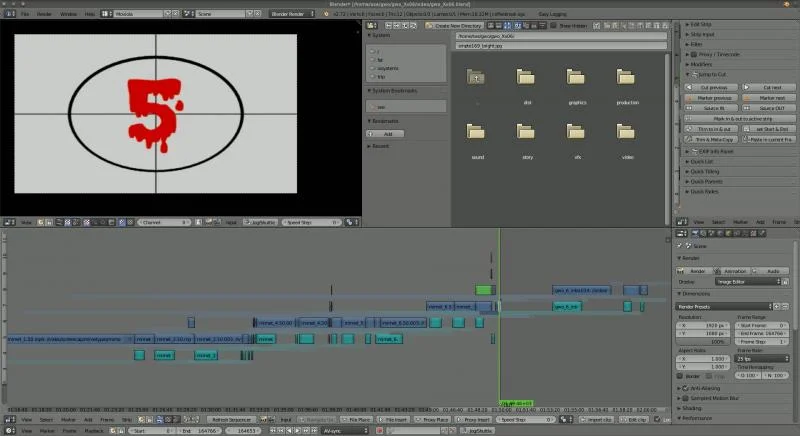
    Blender VSE

    Strengths

    • By default, Blender’s video sequence editor (VSE) is, from what I can tell, optimized for only the most basic “editing” tasks. This makes sense, given that in the animation and VFX world, there isn’t generally excess footage. Artists work on shots that have already been finalized, so the only editing task after all the animation is done is to reintegrate shots into the final cut of the movie. Luckily, though, there are several plugins (such as Easy-Logging and the Blender Velvets) in active development to apply traditional editing interface conventions to Blender’s VSE mode, and they manage to transform Blender into a very usable video editing software.
    • Blender is stable, fully cross-platform, popular, and under steady development. Using it to edit video isn’t exactly common, but the application as a framework for multimedia work is robust and reliable.

    Weaknesses

    • If you’re expecting a traditional editing platform, Blender’s weaknesses are many. Its interface can be confusing, and the UI is unconventional as a video editor, at best. Even with VSE plugins and personal customizations, the interface is mostly utilitarian.
    • Blender’s rendering engines are backends for 3D model rendering. Rendering a video sequence, especially with effects (like color correction, which one would expect to have on each clip in a primary editing application) applied to each clip, takes far longer (10x as long from Kdenlive and Flowblade, in my most recent tests) than rendering from any other video editor. This might be partly because the Blender interface offers no control over FFmpeg threads.
    • The VSE lacks integration with the rest of Blender. You cannot, for instance, attach clips from your VSE edit into the node editor and apply fancy effects. In Blender’s internal pipeline, the VSE is definitely a separate process.

    Independent

    • A hobbyist who knows nothing about Blender will find a steep learning curve. Even with VSE add-ons to make the VSE act more like a “normal” application, anything beyond basic cuts and sequencing just doesn’t work the way most users would expect.
    • Like all powerful applications, however, Blender is by all means worth knowing. In terms of application design, it’s one of the best examples, outside of Emacs, of combining internal logic and consistency with endless extensibility to produce a powerful, unstoppable force of computational wonder.

    Professional integration

    • Depending on your industry, your production house may already be using Blender, if not for video editing then for animation or motion graphics.
    • There are several EDL export add-ons available, and Blender’s seamless integration with Python makes it trivial for a technically minded editor or support staff to export whatever information is necessary to blend Blender into any pipeline.

    Shotcut

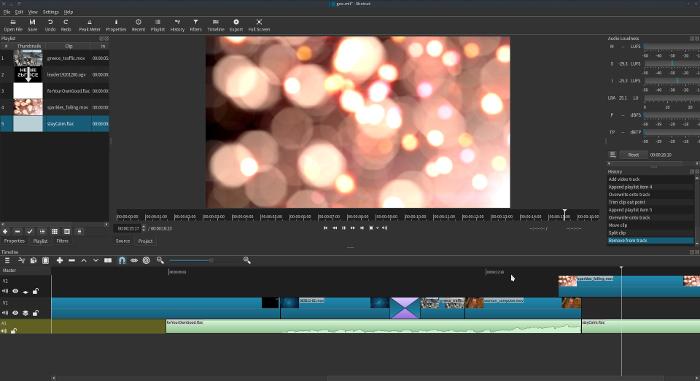
    Shotcut is a video editor being developed by Dan Dennedy, an MLT co-founder and current project lead. It is designed from the ground up to be cross-platform and leverages new technologies like WebVfx (visual effects created with web technologies) and Movit (GPU image processing).

    Shotcut

    Strengths

    • Shotcut is using the latest in open source technology to provide performance unlike any other open source video editor. Its real-time effects are smooth as is, and they will get even better once it’s offloaded onto the GPU.
    • The interface is mostly familiar, although some liberties are taken in the interest of progress. One wonders if mobile devices are on the roadmap, because much of the interface design would work well on a tablet or a large phone screen.
    • Shotcut is JACK-aware, so tethering it to a pro audio application like Ardour is trivial.

    Weaknesses

    • Shotcut is a little progressive, so there’s a learning curve involved where its interface implements something different than the de facto standard. For instance, the workflow in a traditional editor is: bring a clip into your bin, open that clip from the bin, mark in and out, and put it in the timeline. With Shotcut, however, there’s no internal import process to populate your bin (“playlist,” in Shotcut terminology). You can either drag and drop from your file manager or you can open a clip and add that clip to your playlist, or you can bypass the playlist entirely and just add it to your timeline.
    • It’s less esoteric, for example, there’s no way to group select several clips in the timeline to move them. You can insert clips in front of them, but editors used to using their timeline as a scratchpad with lots of groups of edited scenes might find this limitation troublesome.
    • The effect stack is still a work in progress. Important effects, like a chromakey (green screen), are missing. They’re being added as the dev team perfects their interfaces and functionality.

    Independent

    • For basic editing, Shotcut is a breeze. It’s uncluttered, relatively lightweight, and functional. It’s got everything you need and doesn’t offer a lot of options you probably don’t intend to use.
    • In its current state, it doesn’t scale up. When you hit its ceiling, you’ll have to move to another application. For some, this might be when they suddenly realize they need to do complex composites (to be fair, it’s arguable that complex composites shouldn’t be done in a video editing application at all, but that doesn’t change expectations), while for others it will be small interface preferences, like Shotcut’s inability to dynamically create a new audio track when dragging an audio-only clip into a timeline with only one video track.

    Professional integration

    • Shotcut isn’t production-ready yet, but since a true professional is more than the sum of the tools, it could be used in a professional setting. Shotcut can export an EDL, and it stores its project files as MLT XML, so you could extract information for a custom EDL format as needed.

    Non-open editors

    There’s a handful of cross-platform editors that are not open source. However, they can run on an otherwise open stack (in other words, they are fully Linux-compatible), which is a pretty common paradigm in the professional film world.

    A not insignificant advantage to these closed-source solutions is that a team of editors can use the same software regardless of the OS they’re running.

    Lightworks

    A long-time editing solution in Hollywood, Lightworks is now free to download. While its natural approach to editing defers to a traditional film workflow, working in the timeline is possible and new features are constantly being added to make sandboxing in the timeline comfortable. The free version is basically a complete solution for serious editng, but if you pay for a subscription you “unlock” better codec support and a few effects (which are, awkwardly, not cross-platform).

    Strengths

    • Nobody would call Lightworks the industry standard, but it is an Emmy award winner and has a long history of professional use before it became no-cost software independent of its hardware stack. It’s a robust application with some serious pro features, such as timeline effects, codec support, lots of export formats, and a unique but efficient interface.
    • It’s a technical editing environment. It’s very aware of editing decisions and timecode and frame numbers, so if you are a professional editor who needs to know that your edit can conform later in the pipeline, Lightworks won’t let you down.
    • Real-time effects are well supported in Lightworks, so performance is as good as your system specs provide.

    Weaknesses

    • It’s not open source. Its development team announced many years ago that the code would be released in Q3 of 2012; now the official stance in the forums is that “Lightworks is freemium software.”
    • Furthermore, Lightworks is not a lightweight application. It expects a powerful rig, and at a certain point, it bottoms out and just plain won’t run.
    • Lightworks’ default editing style in many ways mimics the traditional film-editing process. Its timeline is designed for keyboard and shuttle control. Hobbyists or editors who were trained to do their editing with the mouse might find Lightworks a little difficult to get used to. With each new version, the timeline gets a little more mouse-friendly, but the overall design is somewhat technical.

    Independent

    • Lightworks is probably overkill for the hobbyist. It works well, but there’s a learning curve and an emphasis on precision and professionalism that will probably get in the way for people who just want to edit.

    Professional integration

    • Lightworks exports to a number of formats, such as OMF and AAF, so it’s prepared to communicate with whatever’s next in your pipeline. If it doesn’t export to what you need, it does export to a variety of video and audio formats.

    Da Vinci Resolve

    Coming from Da Vinci’s color correction suite, and once tied to a proprietary hardware suite, Resolve is a cross-platform editor distributed for $0.

    Strengths

    • Da Vinci has been an industry standard for decades, and while Resolve is technically relatively new, many professionals in the industry have some familiarity with the system in general.

    Weaknesses

    • Resolve, like Lightworks, has hefty hardware requirements. If your system doesn’t meet its requirements, it doesn’t run. There’s no lightweight mode, even if you just want to do some basic edits.
    • Resolve is not open source.

    Independent

    • Resolve is probably overkill for hobbyists, but its interface is flexible and allows for several editing styles. Its interface is fairly intuitive; if you’ve used a video-editing application before, you can probably figure out Resolve with an afternoon and a few online tutorial videos.

    Professional integration

    • Da Vinci exports to several exchange formats as well as video, audio, and image sequences.

    Hiero

    Hiero isn’t, strictly speaking, a video editor, but a show viewer. However, it’s set up such that clips can be arranged and adjusted, so it sometimes gets used as a video editing solution by artists familiar with other Foundry tools.

    All the rest

    Of course, there are still more options. Some, like Pitivi and Cinelerra, are less active and less stable now than they may have once been, others, like Avidemux, are limited in scope, and still others, like using FFmpeg directly, are just too niche to cover.

    The point is that there are plenty of very good video editing solutions for Linux. All you have to do is choose one, and get creative.


    每天推荐一个 GitHub 优质开源项目和一篇精选英文科技或编程文章原文,欢迎关注开源日报。交流QQ群:202790710;电报群 https://t.me/OpeningSourceOrg
  • 2018年4月10日:开源日报第33期

    10 4 月, 2018

    每天推荐一个 GitHub 优质开源项目和一篇精选英文科技或编程文章原文,欢迎关注开源日报。交流QQ群:202790710;电报群 https://t.me/OpeningSourceOrg

    今日推荐开源项目:《一个类 React 组件框架 Nerv》

    推荐理由:Nerv 是由京东凹凸实验室开源的一个类 React 组件框架。Nerv 抓眼球的无非是它突出的特性:无缝对接 React 及其生态,高性能,小体积,兼容 IE8+。

    基本介绍

    Nerv 兼容 React 的组件及生态,但也不是完全兼容,详见后面讲到的『兼容与不兼容』部分。Nerv 有和 React 一样的 Api,命名上的一些不同也只要通过 webpack 配置简单做一下 alias 即可。Nerv 也提供了 nerv-redux,nerv-devtools,nerv-server 等配套设施,想必也是平时沉淀下来的一些实用工具和库。

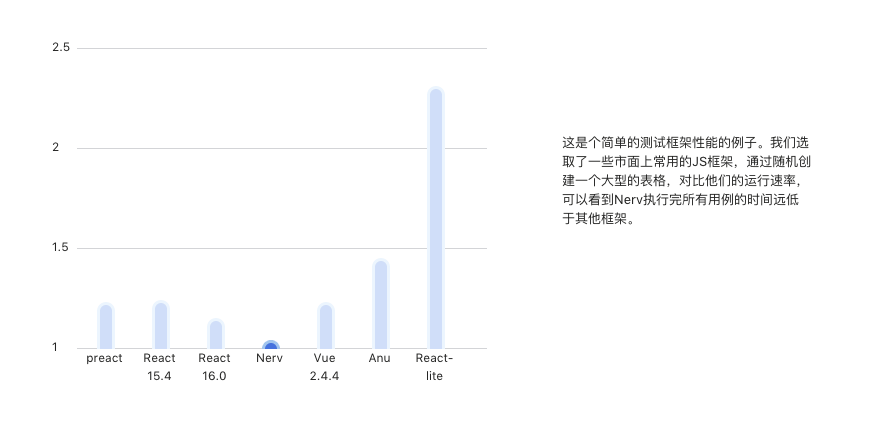
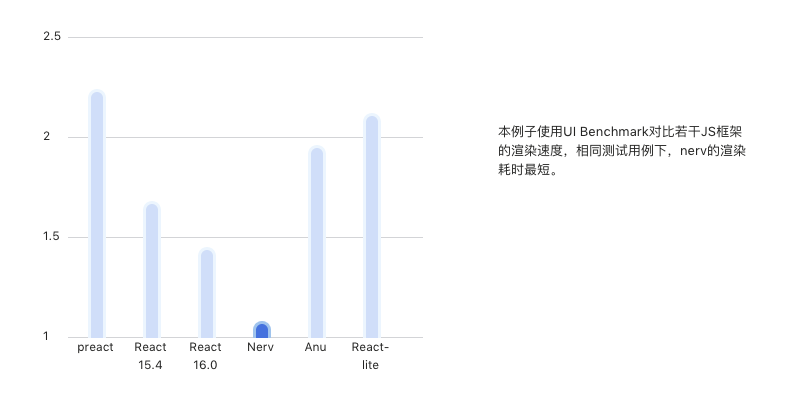
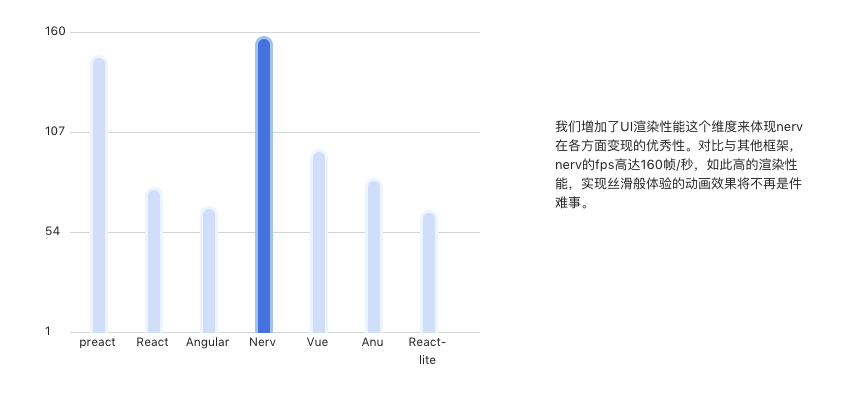
    Nerv 对 virtual dom 相关的算法做了调整,对其优化的结果是性能上的提升。下图是 Nerv 与其它 web 前端框架和类 React 框架之间的性能对比。

    开源项目精选:一个类 React 组件框架 Nerv
    开源项目精选:一个类 React 组件框架 Nerv开源项目精选:一个类 React 组件框架 Nerv开源项目精选:一个类 React 组件框架 Nerv

    Nerv 的体积小,目前在 gizp 之后大约只有 8kb,是 React 体积的 1/4 ,这在移动端下十分友好,但是目前按照其介绍中涉及到的项目好像都是使用在 PC 上的(比如京东首页,奢饰品项目),希望后面其有移动端的涉猎介绍。

    Nerv 的还有一个特点是兼容 IE8+ 和低版本的安卓浏览器,这是对想用 React 的特性但是迫于业务需要兼容 IE8+ 的开发者一大福音啊。Nerv 是如何兼容 IE8+ 的将会在后面讲到。

    这里有一篇文章和一个 issue 讲述了 Nerv 的诞生和业界对其的态度 ,《为什么我们还需要一个 Reac-like 框架》、相关讨论

    使用介绍

    毕竟是一个类 React 框架,Nerv 的使用当然是兼容 React 的 Api 的,详细介绍与使用可以查看 Nerv 的文档。新手和前端进阶学者使用时,我推荐和 React 文档一起看,同时还可以对比两者的不同,会有一定的感悟。

    兼容与不兼容

    Nerv 兼容 IE8+ 主要通过 https://github.com/NervJS/nerv/tree/master/browsers 下面几个文件,是针对一些方法的兼容和补充。

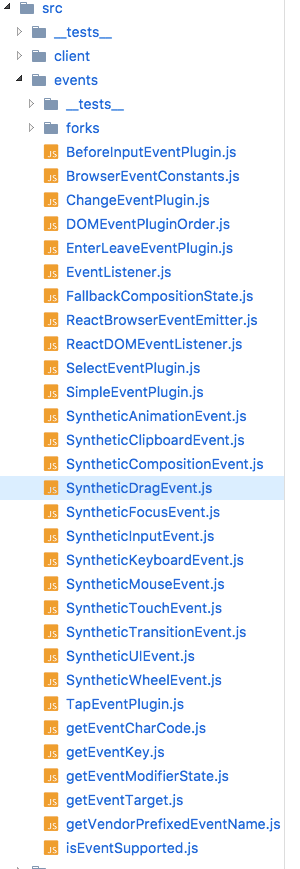
    为了兼容 IE8 还是引入了很多 ployfill 的内容会影响整体文件的大小,但是 Nerv 在增加了这些逻辑后为什么还会比 React 要小 1/4 呢。主要是删除了大量 React 中关于合成事件的逻辑,详见下图相关文件

    开源项目精选:一个类 React 组件框架 Nerv

    Nerv 认为这些复杂而庞大的东东不是很必要的,正因为如此 Nerv 和 React 在事件机制处理上面有点不同,所以不一定所有社区中 React 的组件(特别是视图组件)都能在 Nerv 上无缝地跑起来。文档中这里的介绍会让你感觉使用 Nerv 原来还有真么多坑!

    关于

    Nerv 出自京东深圳的团队凹凸实验室(aotu.io),可以进入他们的官网查看详细介绍和分享的博文,团队的 github 也比较活跃可以关注一下。


    今日推荐英文原文:《Google Brain Residency》原作者:Ryan Daul

    原文链接:http://tinyclouds.org/residency/

    推荐理由:和 Google 顶尖工程师一起研究机器学习一整年,这是他的精华笔记。本文作者Ryan Daul是Node.js的创始人,绝对算是软件工程领域当之无愧的大佬了。他和我们分享了自己在 Google Brain 项目一年中的工作,成果,失败和思考。

    Google Brain Residency

    Last year, after nerding out a bit on TensorFlow, I applied and was accepted into the inaugural class of the Google Brain Residency Program. The program invites two dozen people, with varying backgrounds in ML, to spend a year at Google’s deep learning research lab in Mountain View to work with the scientists and engineers pushing on the forefront of this technology.

    The year has just concluded and this is a summary of how I spent it.

    The motivating goal/demo I have in mind is to clean up old movies and TV shows. Imagine seeing grainy TV shows from the 90s, or black and white movies from the 1960s, in lush and colorful 4K resolution. This seems entirely plausible: we can take good modern media and distort it to be grainy, low-resolution, or black and white, and train a supervised model to do the reverse transformation. Training data is practically infinite. This would be awesome.

    Don’t get too excited—the technology isn’t there yet… but it’s getting closer.

    Armed with little more than this goal, I uprooted myself from Brooklyn and moved, yet again, to the Bay Area in pursuit of technology. I was soon spending my days chatting with ML researchers and viming around Google’s vast software infrastructure.

    If you want to skip the technical bits, jump to the conclusion.

    Pixel Recursive Super Resolution

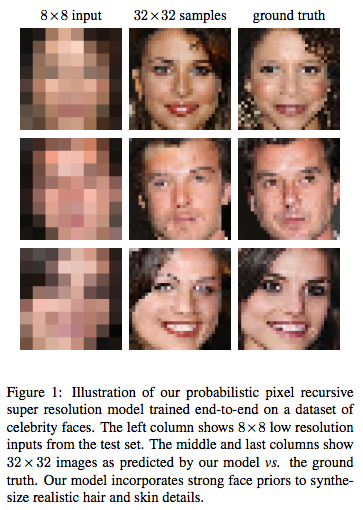
    As everyone knows, the zoom technology presented in CSI is impossible. You cannot arbitrarily zoom into photos. However, it is possible to present plausible hallucinations of what it would look like if you enlarged the image. Being able to crisply increase the resolution of photographs would be a step towards my demo.

    In the literature this problem is called Super Resolution, and it has a long history of attempts.

    Approaching this, we knew that using a ConvNet with input the low-resolution image and output the high-resolution image trained to minimize per-pixel distance (L2) would not completely solve the problem. This kind of loss function learns to output the average of all possible outputs—which looks blurry. We wanted a model that could choose, given a low-res input image, a specific, likely high-resolution image amongst all the possible enhancements. If we were trying to “enhance” a photo of blurry tree, we would want it to choose specific locations for the leaves and branches, even if those weren’t the true locations when the photograph was taken.

    A conditional GAN seemed like it could solve this problem, but having made several failed attempts at building GANs before, we turned to another promising new generative model called PixelCNN. (Shortly after we started on this project, SRGAN was published which applied a GAN to the problem with great looking results.)

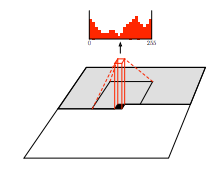
    PixelCNN is a strange and counter-intuitive model. It formulates image generation as choosing a sequence of pixels, one at a time. Gated recurrent networks like LSTMs have been very successful at generating sequences—usually words or characters. PixelCNN cleverly structures a CNN to produce exact probability distributions of pixels conditioned on previous ones. It’s a mixture between an RNN and a CNN.

    Figure by van den Oord et al.
    Surprisingly PixelCNNs generate very natural looking images. Unlike adversarial networks, that precariously balance two objectives, this model has a single objective, and is thusly more robust to hyperparameter changes. That is, it’s easier to optimize.

    My first attempts at Super Resolution with PixelCNN were naively too ambitious, training on large ImageNet images. (ImageNet is a difficult dataset compared to CIFAR-10 or CelebA or LSUN, where lots of generative model research is done). It became immediately apparent that the sequential pixel-by-pixel generation of images was very slow. Outputting images much larger than 64×64 could take hours! However I got some compelling results when I limited it small sizes and restricted datasets like faces or bedrooms.

    At Google, one has relatively unbounded access to GPUs and CPUs. So part of this project was figuring out how to scale the training—because even with these restricted datasets training would take weeks on a single GPU.

    The most ideal way to distribute training is Asynchronous SGD. In this setup you start N machines each independently training the same model, sharing weights at each step. The weights are hosted on a separate “parameter servers”, which are RPC’d at each step to get the latest values and to send gradient updates. Assuming your data pipeline is good enough, you can increase the number of training steps taken per second linearly, by adding workers; since they don’t depend on each other. However as you increase the number of workers, the weights that they use become increasingly out-of-date or “stale”, due to peer updates. In classification networks, this doesn’t seem to be a huge problem; people are able to scale training to dozens of machines. However PixelCNN seems particularly sensitive to stale gradients—more workers with ASGD provided little benefit.

    The other method is Synchronous SGD, in which the workers synchronize at each step, and gradients from each are averaged. This is mathematically the same as SGD. More workers increase the batch size. But Sync SGD allows individual workers to use smaller and faster batch sizes, and thus increase the steps/sec. Sync SGD has its own problems. First, it requires many machines to synchronize often, which inevitably leads to increased idle time. Second, beyond having each machine do batch size 1, you can’t increase the steps taken per second by adding machines. Ultimately I found the easiest setup was to provision 8 GPUs on one machine and use Sync SGD—but this still took days to train.

    The other way you can take advantage of lots of compute is by doing larger hyperparameter searches. Not sure what batch size to use? Try all of them! I tried hundreds of configurations before arriving at the one we published.

    Quantitatively evaluating the results presented another difficult problem. How could we show that our images were better than baseline models? Typical measures of quality in super resolution use pixel-wise distance (PSNR) between the enhanced image and the ground truth. The faces and bedroom images we saw coming out of the model were clearly better in quality, but when comparing pixels to ground truth, they were, on average, farther away than the blurry outputs of the baseline. We tried to use the likelihood measurements from PixelCNN itself to show that it assigned higher probability to our samples vs baseline samples, but that didn’t work either. Finally we resorted to crowd sourcing human raters—asking which images they found more real. That worked.

    The result was this paper: Pixel Recursive Super Resolution

    PixColor: Another Attempt at Colorization

    Two color modes outputted by PixColor.
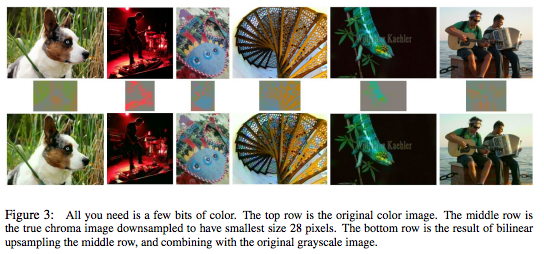
    Sergio Guadarrama, the creator of Slim, had also been toying around with image colorization. He told me about an experiment where he took a 224×224×3 image in YPbPr colorspace (where the grayscale and colors are split), scaled the color channels to a very low-resolution 28×28×2 and scaled them up again using bilinear interpolation. The resulting image looked practically indistinguishable from from the original with high resolution colors.

    This suggested that we could make the colorization problem much easier by only attempting to predict the low-resolution colors. I had been ready to give up on PixelCNN entirely due to its apparent inability to scale beyond small images, but generating 28×28×2 seemed very doable. We simplified the problem further by quantizing the colors to 32 values instead of 256.

    Sergio built a “refinement” network that could clean up the low-resolution color output, pushing colors that bled beyond boundaries back into their proper locations—a feed-forward image-to-image CNN trained with just L2 loss. We also used a good pre-trained ResNet for the conditioning network, which alliviated the need to add an extra loss term, as we had added in the super resolution project.

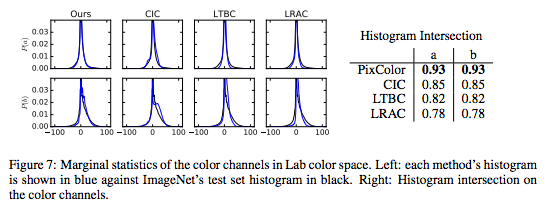
    With all these tricks in place, we were able to achieve state of the art results on ImageNet as measured both by crowd sourced evaluations and by color histogram intersection. Turns out, a properly trained PixelCNN models image statistics very well, without any sort of mode collapse.

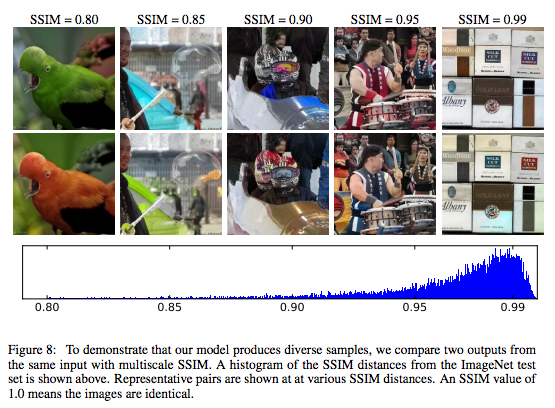
    Since the model yields a probability distribution over possible colorizations, for each grayscale input, we could sample from it multiple times to get multiple colorizations of the same input. This figure nicely describes the diversity distribution using SSIM:

    The model is still far from perfect. ImageNet, although large, is not indicative of all images. The model has a difficult time when applied to non-ImageNet images. We found that real black and white photographs (as opposed to color images that were made grayscale) have different statistics, and contain different objects not seen in color photos. For example, there probably aren’t many color photos of Model T cars, and likely none in ImageNet. These problems could probably be mitigated with a larger dataset and better data augmentation.

    To get a sense of the quality have a look at some images:

    • Our model with intermediate stages on a small set of particularly difficult images
    • Our model on random ImageNet test set images

    For comparison here are some other colorization algorithms applied to the same ImageNet test subset:

    • Let there be Color! (website)
    • Colorful Image Colorization (website)
    • Learning Representations for Automatic Colorization (website)

    Finally here is our paper for all the details: PixColor: Pixel Recursive Colorization

    Negative and Unreported Experiments

    During the year I was momentarily enthusiastic about many side projects that didn’t pan out… I’ll describe some of them here:

    Factoring Large Numbers

    Factoring large numbers is a notoriously difficult and old problem. But even these days, new things are being discovered about the distribution of prime numbers. Perhaps deep neural networks, given enough examples, could learn something new? Mohammad and I tried two approaches. He modified Google’s Neural Machine Translation seq2seq model to take a sequence of integers representing a large semi-prime as input and predict one of its prime factors as output. I tried a simpler model that took a fixed length integer input and used several fully-connected layers to classify prime or not prime. Neither attempt learned more than the obvious patterns (if it ends in a zero, it’s not prime!), and the idea was abandoned.

    Adversarial Dreaming

    Inspired by Michael Gygli’s project, I wanted to see if I could have a discriminator act as its own generator. I set up a simple binary classification CNN which decided if the input was real or fake. To generate images, you would give it noise and have the network update the input with gradients (sometimes called deep dreaming) so that it maximized the “real” classification. The network is trained by alternatingly generating “fake” examples and, like a classic GAN discriminator, updating weights to classify real examples from fake.

    The idea was that maybe this would be easier to train than a normal GAN because you would have fewer architectural decisions. It actually kind of worked on MNIST. Here each column is a noise image getting pushed progressively towards a red MNIST digit.

    I couldn’t get it working on CIFAR-10 and it seemed of limited practical benefit. It’s too bad because “Adversarial Dreaming” would be a cool name for a paper.

    Training a generator with a PixelCNN

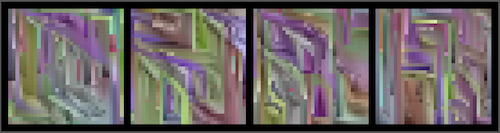
    Frustrated by how long it took PixelCNN to produce samples, I wanted to see if I could train feed-forward image-to-image CNN (8×8 to 32×32 LSUN bedrooms) using a pre-trained PixelCNN. The way I set this up was by auto-regressing on output of the feed-forward network. The weights were updated to maximize the likelihood under the PixelCNN. This didn’t work at all. It produced weird images with line artifacts that like this:

    Exploring Modifications to Async SGD

    As I explained above, Async SGD doesn’t work for many models. A recent paper called DCASGD presents a potential fix to the stale gradient problem by using the difference vector in weight space from where each worker began their step to where they apply their weight. This has the potential to be hugely beneficial to everyone’s training time. Unfortunately I was unable to repeat their results in TensorFlow, nor several similar ideas I had on long those lines. It’s likely a bug. (Contact me internally if you’d like get my implementation.)

    Thoughts, Conclusions

    So I’m a software engineer with not much previous experience in ML. Having just spent the last year deep diving deep learning, I thought I would share my general thoughts on the field, and how I see it in relation to the greater software world.

    I remain bullish that machine learning will transform essentially all industries and eventually improve the lives of every human. There are many industrial processes that can benefit from the smart guesses that ML provides. I believe my motivating demo will be achieved some day soon—you will watch Charlie Chaplin in 4K resolution and it will be indistinguishable from a modern movie.

    That said, I’ve found it very difficult to build, train, and debug models. Certainly much of that difficulty is just my own inexperience, but that itself points to how much experience is needed to effectively train these beasts. My work has been focused on the easiest branch of ML: supervised learning. Even with perfect labels, developing models can be quite difficult. It seems the larger the dimensionality of the prediction, the longer it will take to build the model (like, in hours of your life spent coding and debugging and training). I encourage anyone starting out to simplify and restrict your predictions as much as possible. One example of this came up in our colorization work: we started out having the model predict the entire RGB image instead of just the color channels. The idea being that it would be easy for the network to pass the intensity image through to the output since we were using skip connections. Switching to only color channel predictions still improved performance.

    If I use the word “working” in a subjective, gut-reaction way of describing software: Image classification seems to work robustly. Generative models barely work and are not well understood. GANs have great images, but are almost impossible to build—my experience has been that any small change to the architecture and it will just stop working. I’ve heard reinforcement learning is even more difficult. I can’t speak to recurrent networks.

    On the other hand, it seems that SGD is so robust that even gross mathematical errors may not make a model fail outright. They may only slightly punish performance.

    Because models often take many days to train, it is a very slow edit-run cycle.

    The culture of testing has not sufficiently caught on yet. We need better ways of asserting during training, that various parts of networks maintain certain means and variances, don’t oscillate too much, or stay within ranges. ML bugs make the heisenbugs of my systems past seem delightfully easy.

    Parallelization is of limited benefit. Large hyperparameter searches become easier with more computers, but ideally we would have models that work without the need for such careful tuning. (In fact, I suspect that researchers with limited ability to do hyperparameter searches will be forced to be smarter about their model design, and that results in more robust models.) Asynchronous SGD, unfortunately, doesn’t really help for many models. Synchronous SGD works, but it can’t increase steps/sec faster than a single machine can process one example—more accurate gradients just don’t help much usually. This is why the DCASGD research direction is important.

    From a software maintenance perspective there is little consensus on how to organize ML projects. It feels like websites before Rails came out: a bunch of random PHP scripts with an unholy mixture of business logic and markup sprinkled throughout. In TensorFlow projects it’s an unorganized glob of data pipelining, mathematics, and hyperparameter/configuration management. I believe a beautiful abstraction/organization has yet to be discovered. (Or rediscovered, like how MVC was rediscovered and popularized by DHH.) My own project structure has been evolving, but I would not call it beautiful.

    Frameworks will continue to evolve rapidly. I started with Caffe and appreciate how much TensorFlow enabled. Now projects like PyTorch and Chainer have delighted users with their dynamic computation graphs. The long edit-run cycle is a major roadblock to developing better models—I suspect frameworks that prioritize fast startup and evaluation will ultimately succeed. Despite useful tools like TensorBoard and iPython, it remains difficult inspect what the models are doing during training.

    The signal-to-noise ratio in papers is low. There’s too much volume to keep up with. People are often not upfront about the failures of their models because conferences prefer accuracy over transparency. I would like to see a conference that takes blog post submissions and requires open source implementations. Distill is a laudable effort in this direction.

    It’s an exciting time for ML. There is ample work to be done at all levels: from the theory end to the framework end, much can be improved. It’s almost as exciting as the creation of the internet. Grab a shovel!

    xkcd

    Shoutouts

    Many thanks to Jon Shlens and Mohammad Norouzi who guided me with countless whiteboarding sessions and invaluable advice; David Bieber and Sergio Guadarrama, two amazing hackers that I had the privilege of working closely with; Martin Stumpe, Kevin Murphy, Doug Eck, Leslie Phillips; and the other residents for commiserating when submission deadlines drew near : )


    每天推荐一个 GitHub 优质开源项目和一篇精选英文科技或编程文章原文,欢迎关注开源日报。交流QQ群:202790710;电报群 https://t.me/OpeningSourceOrg

  • 2018年4月9日:开源日报第32期

    9 4 月, 2018
    每天推荐一个 GitHub 优质开源项目和一篇精选英文科技或编程文章原文,欢迎关注开源日报。交流QQ群:202790710;电报群 https://t.me/OpeningSourceOrg


    今日推荐开源项目:《深度学习可视化框架VisualDL》

    推荐理由:目前,大部分深度学习框架都提供了 Python 的用户界面,其训练过程的状态通常以日记的形式被记录下来,这种方式可以观察短期内的训练状态,但是难以从全局把握训练过程中的变化趋势,导致提取信息时受到较多限制。反观 Visual DL,它可以使得深度学习任务变得生动形象,实现可视分析,改变了传统的日记式记录形态,便于用户将训练过程可视化,帮助更好地把控全局。

    开源项目精选: 深度学习可视化框架VisualDL

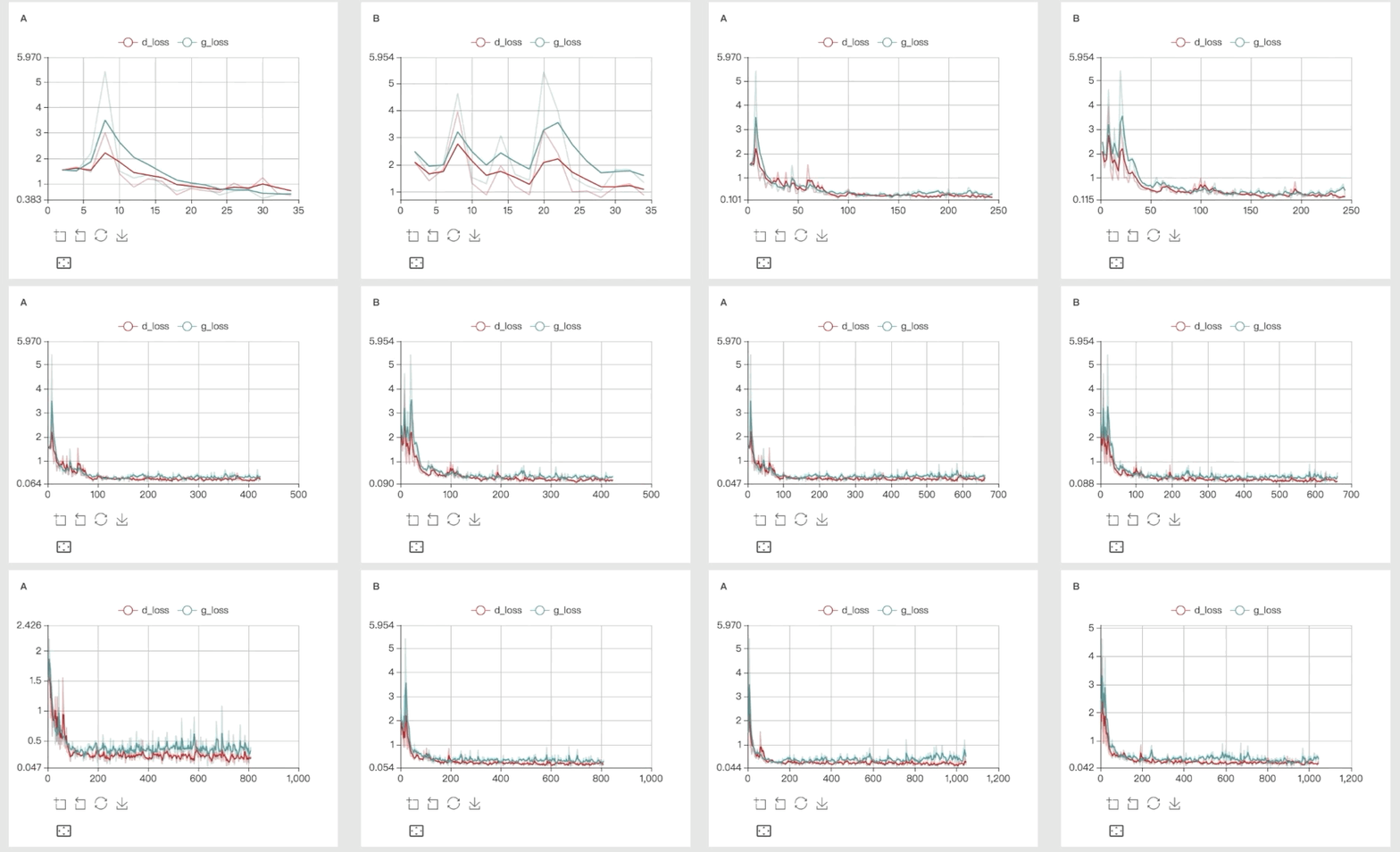
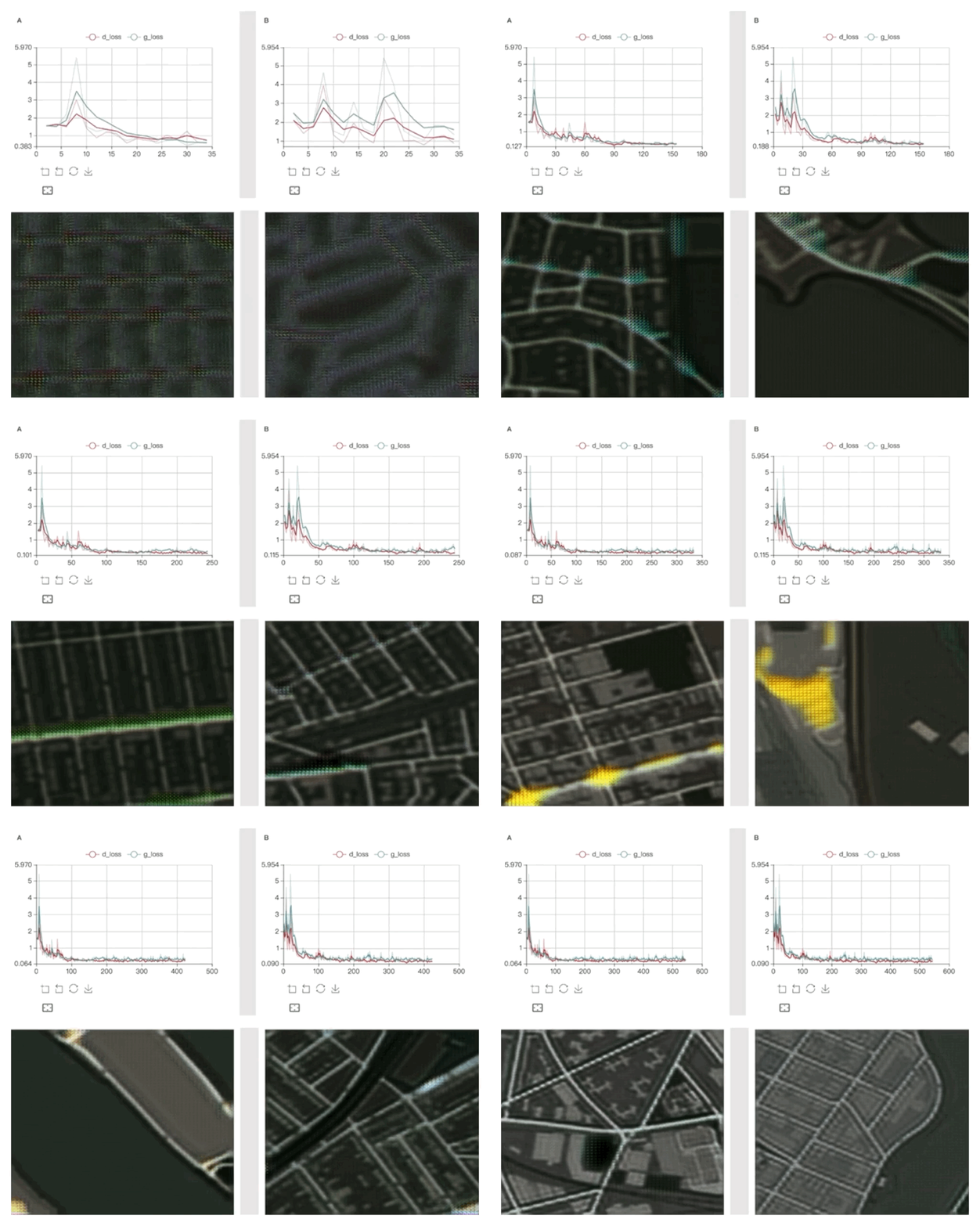
    首先,它的“Scalar”功能支持 Scalar 打点数据展示,可将训练信息以折线图的形式展现出来,方便观察整体趋势,还能在同一个可视化视图中呈现多条折线,方便用户对比分析。

    其次,Visual DL 的“Image”功能支持图片展示,用户可轻松查看数据样本的质量,也可以方便地查看训练的中间结果,例如卷积层的输出或者 GAN 生成的图片。

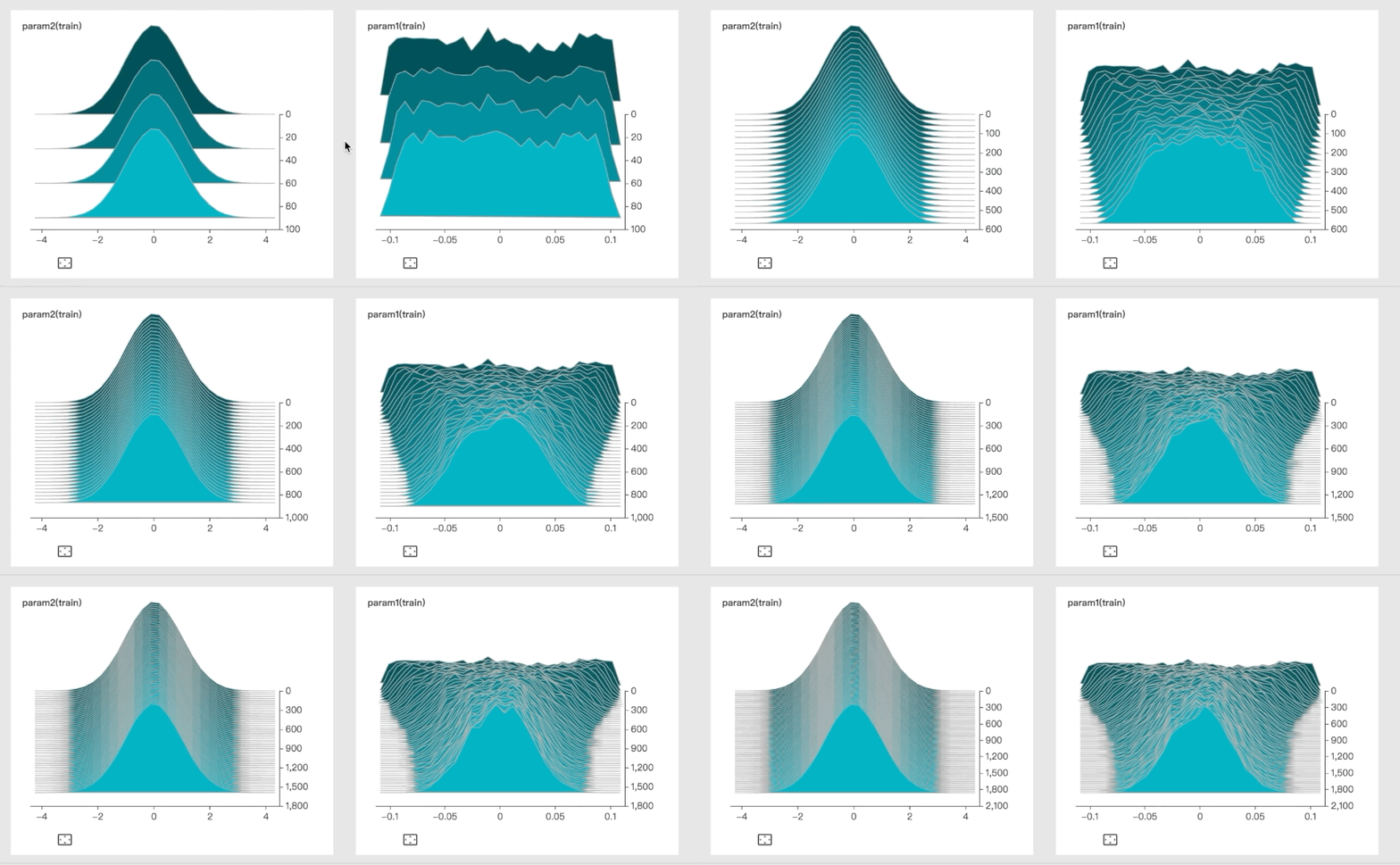
    同时,Visual DL 还具有 Histogram 参数分布展示功能,方便用户查看参数矩阵中数值的分布曲线,并随时观察参数数值分布的变化趋势。

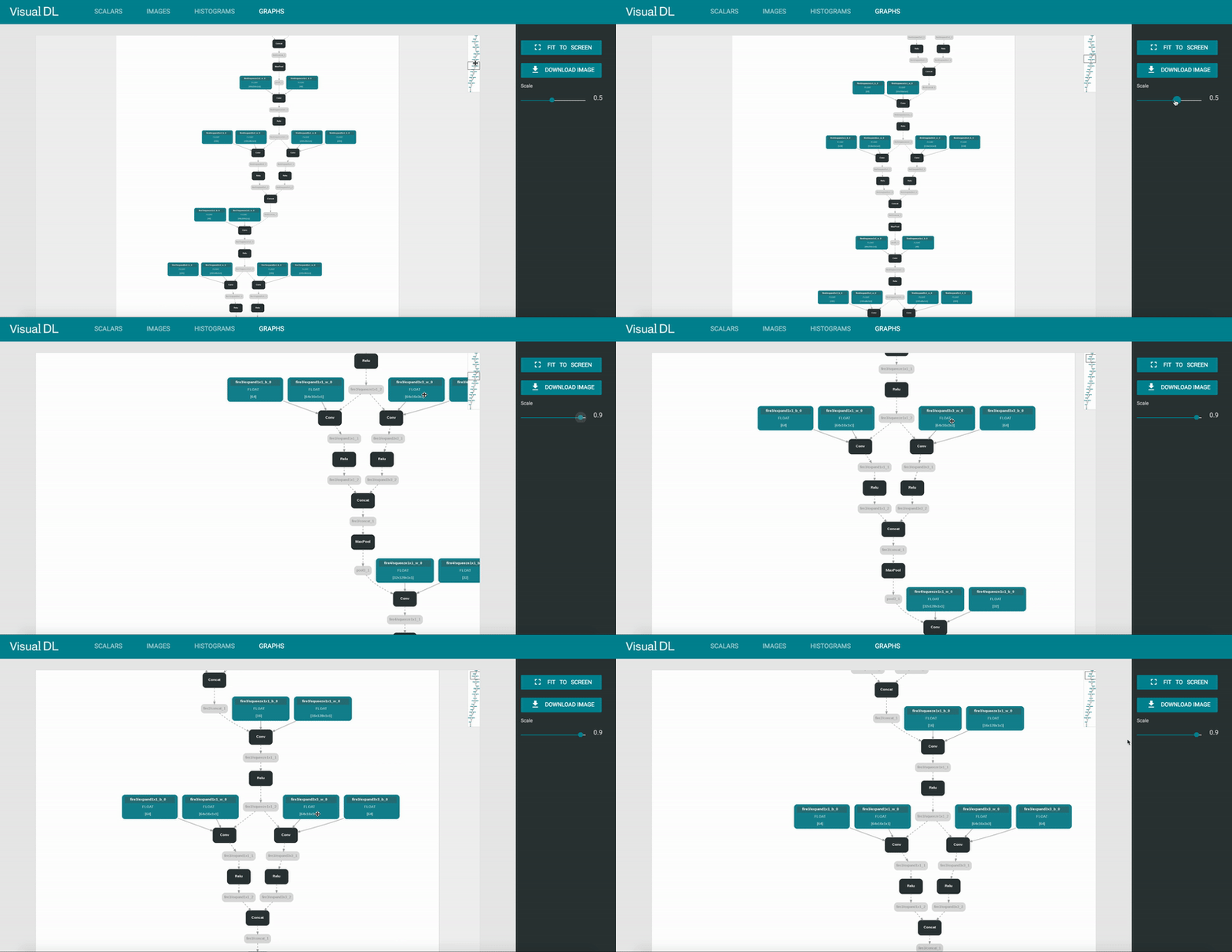
    最后,Visual DL 中的“Graph”还能帮助用户查看深度神经网络的模型结构。据悉,Graph 支持直接对 ONNX 的模型进行预览,由于 MXNet、Caffe2、Pytorch 和 CNTK 都支持转成 ONNX 的模型,这意味着 Graph 可间接支持不同框架的模型可视化功能,让用户便于排查网络配置的错误,帮助理解网络结构。

    Visual DL 除了功能全面以外,还具有易集成、易使用等优势。

    它可提供独立的 Python SDK,若用户的训练任务基于 Python,可直接安装 Visual DL 的 WHL 软件包,随后输入到项目中进行使用,使用方式简单便捷。

    为了满足用户的不同操作需求,用户在其 Python 代码中可加入 Visual DL 日志记录逻辑,启动 Visual DL 后即可通过浏览器查看日志的可视化结果。

    此外,Visual DL 在底层使用 C++ 编写,提供原生的 C++ SDK,用户可将其深入集成到自己 C++ 的项目,以实现更高效的性能。

    值得一提的是,Visual DL 现已完全开放,同时支持大部分的深度学习框架。其 SDK 层面可轻松集成到 Python 或者 C++ 项目中,此外, Graph 通过 ONNX 还可直接支持 PaddlePaddle、TensorFlow、MxNet、PyTorch 和 Caffe2 等流行的深度学习框架。对于开发者来说,Visual DL 可以将深度学习任务的训练过程可视化,减少用户的观察比对时间,让整个训练过程更高效。

    使用

    VisualDL 同时提供了 Python SDK 和 C++ SDK ,我们可以快速地将数据可视化。

    以如何用Python创建一个简单的可视化标量为例:

     import random
     from visualdl import LogWriter
     logdir = "./tmp"
     logger = LogWriter(dir, sync_cycle=10)
    
    # mark the components with 'train' label.
     with logger.mode("train"):
       # create a scalar component called 'scalars/scalar0'
       scalar0 = logger.scalar("scalars/scalar0")
    
    # add some records during DL model running, lets start from another block.
     with logger.mode("train"):
       # add scalars
       for step in range(100):
           scalar0.add_record(step, random.random())


    在训练过程生成了一些日志后,我们可以登录控制面板并查看实时的数据可视化效果,登陆方式只需要在命令窗口输入以下命令:

    visuaIDL --logdir <some log dir>

    相关信息

    VisualDL 是由百度团队PaddlePaddle & ECharts 团队开发的深度学习可视化工具。

    PaddlePaddle是一个易学易用的分布式深度学习平台,提供丰富的算法服务,致力于机器视觉和自然语言理解的研究。

    官方网站:http://www.paddlepaddle.org/;


    今日推荐英文原文:《3 tests for NOT moving to blockchain 》作者: Mike Bursell

    原文链接:https://aliceevebob.com/2018/02/13/3-tests-for-not-moving-to-blockchain/

    推荐理由:这两年来,区块链技术火得不得了,人人都在讨论区块链,hmmm,小编觉得这不是什么好事情,

    3 tests for NOT moving to blockchain

    So, there’s this thing called “blockchain” which is quite popular…

    You know that already, of course.  I keep wondering if we’ve hit “peak hype” for blockchain and related technologies yet, but so far there’s no sign of it.  As usual for this blog, when I’m talking about blockchain, I’m going to include DLTs – Distributed Ledger Technologies – which are, by some tight definitions of the term, not really blockchains at all.  I’m particularly interested, from a professional point of view, in permissioned blockchains.  You can read more about how that’s defined in my previous post Is blockchain a security topic? – the key point here is that I’m interested in business applications of blockchain beyond cryptocurrency[1].

    And, if the hype is to be believed – and some of it probably should be[2] – then there is an almost infinite set of applications for blockchain.  That’s probably correct, but that doesn’t mean that they’re all good applications for blockchain.  Some, in fact, are likely to be very bad applications for blockchain.

    The hype associated with blockchain, however, means that businesses are rushing to embrace this new technology[3] without really understanding what they’re doing.  The drivers towards this move are arguably three-fold:

    1. you can, if you try, make almost any application with multiple users which stores data into a blockchain-enable application;
    2. there are lots of conferences and “gurus” telling people that if they don’t embrace blockchain now, they’ll go out of business within six months[4];
    3. it’s not easy technology to understand fully, and lots of the proponents “on-the-ground” within organisations are techies.

    I want to unpack that last statement before I get a hail of trolls flaming me[5].  I have nothing against techies – I’m one myself – but one of our characteristics tends to be enormous enthusiasm about new things (“shinies”) that we understand, but whose impact on the business we don’t always fully grok[6]. That’s not always a positive for business leaders.

    The danger, then, is that the confluence of those three drivers may lead to businesses deciding to start moving to blockchain applications without fully understanding whether that’s a good idea.  I wrote in another previous post (Blockchain: should we all play?) about some tests that you can apply to decide whether a process is a good fit for blockchain and when it’s not.  They were useful, but the more I think about it, the more I’m convinced that we need some simple tests to tell us when we should definitely not move a process or an application to a blockchain.  I present my three tests.  If your answer any of these questions is “yes”, then you almost certainly don’t need a blockchain.

    Test 1 – does it have a centralised controller or authority?

    If the answer is “yes”, then you don’t need a blockchain.

    If, for instance, you’re selling, I don’t know, futons, and you have a single ordering system, then you have single authority for deciding when to send out a futon.  You almost certainly don’t need to make this a blockchain.  If you are a purveyor of content that has to pass through a single editorial and publishing process, they you almost certainly don’t need to make this a blockchain.

    The lesson is: blockchains really don’t make sense unless the tasks required in the process execution – and the trust associated with those tasks – is distributed between multiple entities.

    Test 2 – could it work fine with a standard database?

    If the answer to this question is “yes”, then you don’t need a blockchain.

    This question and the previous one are somewhat intertwined, but don’t need to be.  There are applications where you have distributed processes, but need to store information centrally, or centralised authorities but distributed data, where one may be yes, but the other “no”.  But if this is question is a “yes”, then use a standard database.

    Databases are good at what they do, they are cheaper in terms of design and operation than running a blockchain or distributed ledger, and we know how to make them work.  Blockchains are about letting everybody[8] see and hold data, but the overheads can be high, and the implications costly.

    Test 3 – is adoption going to be costly, or annoying, to some stakeholders?

    If the answer to this question is “yes”, then you don’t need a blockchain.

    I’ve heard assertions that blockchains always benefit all users.  This is a patently false.  If you are creating an application for a process, and changing the way that your stakeholders interact with you and it, you need to consider whether that change is in their best interests.  It’s very easy to create and introduce an application, blockchain or not, which reduces business friction for the owner of the process, but increases it for other stakeholders.

    If I make engine parts for the automotive industry, it may benefit me immensely to be able to track and manage the parts on a blockchain.  I may be able to see at a glance who’s supplied what, when, and the quality of the steel used in the ball-bearings.  On the other hand, if I’m a ball-bearing producer, and I have an established process which works for the forty companies to whom I sell ball-bearings, then adopting a new process for just one of them, with associated changes to my method of work, new systems and new storage and security requirements is unlikely to be in my best interests: it’s going to be both costly and annoying.

    Conclusion

    Tests are guidelines: they’re not fixed in stone.  One of these tests looks like a technical test (the database one), but is really as much about business roles and responsibilities as the other two.  All of them, hopefully, can be used as a counter-balance to the three drivers I mentioned.


    1 – which, don’t get me wrong, is definitely interesting and a business application – it’s just not what I’m going to talk about in this post.

    2 – the trick is knowing which bits.  Let me know if you work out how, OK?

    3 – it’s actually quite a large set of technologies, to be honest.

    4 – which is patently untrue, unless the word “they” refers there to the conferences and gurus, in which case it’s probably correct.

    5 – which may happen anyway due to my egregious mixing of metaphors.

    6 – there’s a word to love.  I’ve put it in to exhibit my techie credentials[7].

    7 – and before you doubt them, yes, I’ve read the book, in both cut and uncut versions.

    8 – within reason.


    每天推荐一个 GitHub 优质开源项目和一篇精选英文科技或编程文章原文,欢迎关注开源日报。交流QQ群:202790710;电报群 https://t.me/OpeningSourceOrg
←上一页
1 … 251 252 253 254 255 … 262
下一页→

Proudly powered by WordPress