• 开源镜像
  • 开源沙龙
  • 媛宝
  • 猿帅
  • 注册
  • 登录
  • 息壤开源生活方式平台
  • 加入我们

开源日报

  • 2018年4月16日:开源日报第39期

    16 4 月, 2018

    每天推荐一个 GitHub 优质开源项目和一篇精选英文科技或编程文章原文,欢迎关注开源日报。交流QQ群:202790710;电报群 https://t.me/OpeningSourceOrg


    今日推荐开源项目:《Checklist-Checklist 检查表工具》

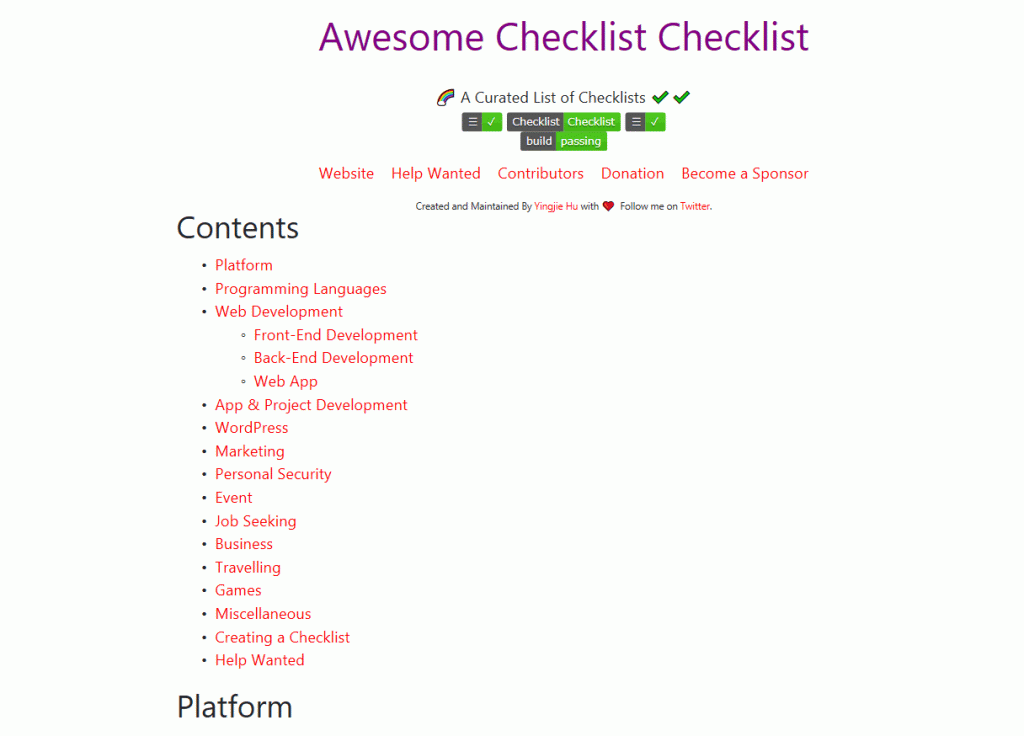
    推荐理由:这并不是一个APP,而是一个提供链接的网站;http://checklist.yingjiehu.com/;网站中的链接是别人分享出来的自己实现某个目标的详细过程,读者能够借鉴别人的实现过程做一个自己的规划。

    Checklist-Checklist 能做什么:

    • 增加新的,或者说你自己的 checklist
    • 提议删除不够完善的 checklist
    • 帮助设计页面的外观
    • 修改文稿的小错误
    • 对任意 checklist 做出修改使其更通俗易懂
    • 提出对 checklist 的不同分类方法
    • 用 [Title](LINK) – DESCRIPTION. 形式输入直接指向该 checklist 的链接,并在新增的条目旁放一个标签:

    PS:标签里checklist的颜色可以更改,把下面的<CODE>改成 red 、blue 等等等等:

    <a href="http://checklist.yingjiehu.com/"><img src="https://img.shields.io/badge/Awesome-Checklist-<CODE>.svg"></a>

    为何要用Checklist-Checklist:

    • 使用checklist可以记录下内容,通过不断的分支统筹规划自己的计划
    • 通过不断完成小分支保持自己 on tack
    • Even a set of basic criteria to maintain quality control or a checklist for larger projects would help.
      哪怕是最基本的准则和备忘录都能对你的工作起很大的帮助。 –沃兹基硕德

    你该如何使用Checklist-Checklist:

    假如你想要安装 Ubuntu,你可以如下所示:

    你所需要做的只是简简单单的在页面上找到你要的链接,点开它,然后就可以愉快的进行阅读了。

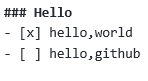
    当然,如果你想要创建你自己的 checkist,作者也给出了一个建议:使用 Github 的 Github Flavoured Markdown 。

    关于GFM:

    基于 Github 的 Markdown 的衍生版本,Markdown 作为一种应用极广的标记语言,在此便不做赘述,仅仅列出GFM与其的几个区别:

    • 不需要像标准MD里一样每行前用4个空格对齐,只要在代码段头尾加上<code></code>标记便能识别出代码段。同时还支持语法高亮。
    • 可能会忽略标准MD中用下划线“_”来实现斜体的做法,建议使用*helloworld*这种格式来实现斜体。
    • 在GFM中写URL链接文本能自动生成URL,并且显示出来的也是链接
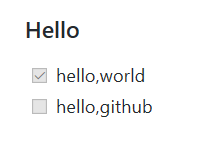
    • 支持带勾选框的任务列表

    效果:

    当然,以上只是GFM的部分特性,如果感兴趣(也可能是必须)请访问这个页面:

    https://help.github.com/categories/writing-on-github/

    关于作者:

    Huyingjie:统计学家,NYC数据科学家(没照片)

    Github主页:https://github.com/huyingjie

    Patreon页面:http://www.patreon.com/yingjiehu

    个人网站:http://yingjiehu.com/


    今日推荐英文原文:《Google Fuchsia Is Not Linux: So, What Is It and Who Will Use It?》作者:Steven J. Vaughan-Nichols

    原文链接:https://www.zdnet.com/article/google-fuchsia-is-not-linux-so-what-is-it-and-who-will-use-it/

    推荐理由:Google 的新操作系统 Google Fuchsia 已经推出很久了,大家也都一直在讨论它,知道它是开源的,很多朋友一听开源操作系统第一反应很可能就是 Linux,然而事实上,Google Fuchsia 并不是 Linux,那么它是什么呢?有什么特点呢?谁会使用它呢?

    Google Fuchsia Is Not Linux: So, What Is It and Who Will Use It?

    Fuchsia, Google tells us in some recently revealed documentation, is not Linux. So, what is it then? And what’s it good for?

    Google Fuchsia: What is it and which devices run it?

    Google has been working on this open-source operating system since the summer of 2016. At first, we thought Fuchsia was for Internet of Things (IoT) devices. We now know it can also power Chromebooks and smartphones.

    Is it a replacement for Android and Chrome OS? Good question. It’s not clear what Google plans for it. We do know it runs on Google’s high-end, Chrome-OS powered Pixelbook. You can also install it on Acer Switch 12 and Intel NUC and, eventually, on a Raspberry Pi 3.

    Unfortunately, on my Pixelbook, or any other platform, you can’t do much with it. For now, the only thing it does on my Pixelbook is show the time. Oh, there’s a real operating system there, but it has barely any functionality. This isn’t even alpha software. It’s still a science experiment.

    Fuchsia developer Travis Geiselbrecht said in a Fuchsia IRC discussion that Fuchsia isn’t “a toy thing.” He added that it’s not a 20-percent project — and “it’s not a dumping ground of a dead thing that we don’t care about anymore.” A 20-percent project is when Google developers work on something because it interests them rather than because it’s part of their job.

    Now that we have a look at the project’s documentation, we know more about what’s happening under Fuchsia’s hood.

    First, it’s built on the Zircon micro-kernel. Besides the microkernel, it includes a small set of userspace services, drivers, and libraries. These are used to boot the system, talk to hardware, load userspace processes and run them, and not much more. The kernel manages several different Object types. Those that are directly accessible via system calls are C++ classes. Fuchsia builds on top of this foundation.

    Objects are an important concept. Fuchsia is a modular operating system. This implies you’ll be able to use it on both low-powered, minimal-resource devices all the way up to PCs. You simply add the object modules you’ll need for each device.

    We also know, since it will support a subset of Portable Operating System Interface (POSIX) conventions, from a developer’s viewpoint, it will look like Unix/Linux. For all the objections about POSIX, it’s held up well over the years.

    Fuchsia uses Google’s Flutter as its software development kit (SDK). With it, you can currently build Chrome OS and Android apps. Fuchsia also supports Apple’s Swift language.

    Google Fuchsia: What’s all this for?

    The most popular theory is to “replace Android and Chrome OS.” No. Just no.

    Both operating systems are popular with users and developers. Android is the world’s most popular operating system. Besides, if you’re a programmer, would you want to move literally over a million Android apps to a new platform? I don’t think so!

    Chrome OS is already the perfect Google operating system. While built on Linux, much of its functionality relies on Google services. It’s also been gaining more users over the years. Why fool around with business perfection?

    I also think Google’s smart enough not to reinvent the wheel. This is a new operating system being built from the kernel up. It will take years before it’s ready for production, never mind replacing an existing popular operating system.

    I suspect Fuchsia will find its home in virtual reality, augmented reality, or other “still to come” technologies. It’s not a replacement for what we already have; it’s a door to a future we’re not living in yet.


    每天推荐一个 GitHub 优质开源项目和一篇精选英文科技或编程文章原文,欢迎关注开源日报。交流QQ群:202790710;电报群 https://t.me/OpeningSourceOrg

  • 2018年4月15日:开源日报第38期

    15 4 月, 2018

    每天推荐一个 GitHub 优质开源项目和一篇精选英文科技或编程文章原文,欢迎关注开源日报。交流QQ群:202790710;电报群 https://t.me/OpeningSourceOrg


    今日推荐开源项目:《一个小巧的 web 前端应用构建框架 hyperapp》

    推荐理由:现在使用 React+Redux “全家桶”的方式构建一个前端应用使用得十分广泛,但是当我们在构建一个简单的小应用的时候,使用 React+Redux “全家桶”的话,引入的 js 文件体积和构建配置等都会觉得有点复杂,但是不要慌,hyperapp 可以让你开发得快又开发得爽。

    基本介绍

    hyperapp 是一个小巧的类 Elm 架构的 web 应用构建框架。

    1. 和 react 一样支持 JSX ,因此对组件的创建十分方便,同样组件书写方式也和 react 相近
    2. 支持服务端渲染,有助于 SEO
    3. 构建在 virtual dom 之上性能有保证
    4. 支持组件生命周期

    如何使用

    在这里给你一段代码,保存为一个 *.html 文件打开它就能看到最基本的效果了。

    <html>
    <body>
    <script src="https://unpkg.com/[email protected]/dist/hyperapp.js"></script>
    <script>
    
    const { h, app } = hyperapp
    
    const state = {
      count: 0
    }
    
    const actions = {
      down: value => state => ({ count: state.count - value }),
      up: value => state => ({ count: state.count + value })
    }
    
    const view = (state, actions) =>
      h("div", {}, [
        h("h1", {}, state.count),
        h("button", { onclick: () => actions.down(1) }, "–"),
        h("button", { onclick: () => actions.up(1) }, "+")
      ])
    
    window.main = app(state, actions, view, document.body)
    
    </script>
    </body>
    </html>

    而你看到引入的 https://unpkg.com/[email protected]/dist/hyperapp.js 这个文件解压后只有 4k 左右,十分轻量。并且不需要使用任何的前端工程构建工具,只要直接引入 js 即可,十分适合快速开发上线的小应用。

    如果你感兴趣,想继续深入可以看看它的文档,如果你是一个前端小白,那尝试去理解文档中的一些概念,然后顺势去寻找相关资料,会让你对的眼界和知识带来非常大的提升,由此框架引申出去的概念都是目前前端开发的 fashion。

    周边生态

    显然周边生态相对于 react, vue 等来说是比较薄弱的,开源社区也没有相关的组件库,react,vue 等框架有应用开发的全套服务是 hyperapp 无法比拟的,但是恰恰正符合 hyperapp 的风格。hyperapp 适用于构建简单小巧的应用,如果有更复杂更工程化的就让 react,vue 一类去干吧。

    但是官方也有 router,logger,html 等一些功能上的增强库,可以去 github 搜索一下还可以看看有没有其他相关的项目

    试用与案列

    在 reddit 淘到一个 demo 来展示使用 hyperapp 的效果.

    你也可以直接在线上编辑代码进行运行查看效果,地址戳我
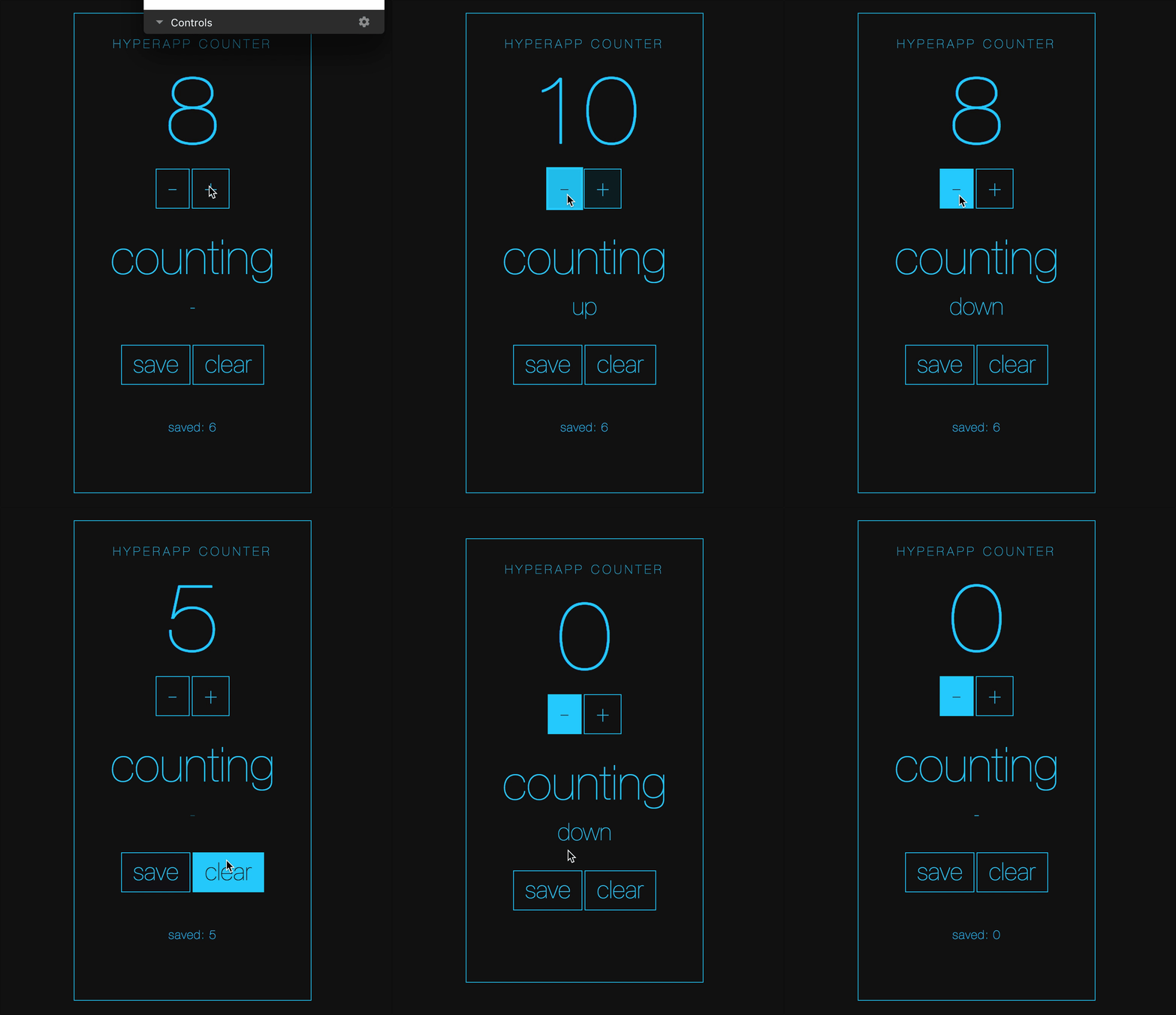
    hyperapp demo

    关于

    hyperapp 目前在 github 有一个 organization ,里面有好多开发者在维护,如果你有兴趣可以先看看如何对项目做贡献。

    hyperapp 从第一次 commit 到现在才过去一年左右的时间,正在不断地发展其生态,肯定会越来越棒,值得一试,小编正在想如何基于此搞点事情~,如果您有兴趣的话赶快去官网看看它的动态吧。


    今日推荐英文原文:《How to think like a programmer — lessons in problem solving》原文作者:Richard Reis

    原文链接:https://medium.freecodecamp.org/how-to-think-like-a-programmer-lessons-in-problem-solving-d1d8bf1de7d2

    推荐理由:像个男人一样去战斗?像个真正的程序员一样去思考?but how?通过解决问题获得了什么经验教训,形成怎样应该有的思考方式?

    How to think like a programmer — lessons in problem solving

    If you’re interested in programming, you may well have seen this quote before:

    “Everyone in this country should learn to program a computer, because it teaches you to think.” — Steve Jobs

    You probably also wondered what does it mean, exactly, to think like a programmer? And how do you do it??

    Essentially, it’s all about a more effective way for problem solving.

    In this post, my goal is to teach you that way.

    By the end of it, you’ll know exactly what steps to take to be a better problem-solver.

    Why is this important?

    Problem solving is the meta-skill.

    We all have problems. Big and small. How we deal with them is sometimes, well…pretty random.

    Unless you have a system, this is probably how you “solve” problems (which is what I did when I started coding):

    1. Try a solution.
    2. If that doesn’t work, try another one.
    3. If that doesn’t work, repeat step 2 until you luck out.

    Look, sometimes you luck out. But that is the worst way to solve problems! And it’s a huge, huge waste of time.

    The best way involves a) having a framework and b) practicing it.

    “Almost all employers prioritize problem-solving skills first.

    Problem-solving skills are almost unanimously the most important qualification that employers look for….more than programming languages proficiency, debugging, and system design.

    Demonstrating computational thinking or the ability to break down large, complex problems is just as valuable (if not more so) than the baseline technical skills required for a job.” — Hacker Rank (2018 Developer Skills Report)

    Have a framework

    To find the right framework, I followed the advice in Tim Ferriss’ book on learning, “The 4-Hour Chef”.

    It led me to interview two really impressive people: C. Jordan Ball (ranked 1st or 2nd out of 65,000+ users on Coderbyte), and V. Anton Spraul (author of the book “Think Like a Programmer: An Introduction to Creative Problem Solving”).

    I asked them the same questions, and guess what? Their answers were pretty similar!

    Soon, you too will know them.

    Sidenote: this doesn’t mean they did everything the same way. Everyone is different. You’ll be different. But if you start with principles we all agree are good, you’ll get a lot further a lot quicker.

    “The biggest mistake I see new programmers make is focusing on learning syntax instead of learning how to solve problems.” — V. Anton Spraul

    So, what should you do when you encounter a new problem?

    Here are the steps:

    1. Understand

    Know exactly what is being asked. Most hard problems are hard because you don’t understand them (hence why this is the first step).

    How to know when you understand a problem? When you can explain it in plain English.

    Do you remember being stuck on a problem, you start explaining it, and you instantly see holes in the logic you didn’t see before?

    Most programmers know this feeling.

    This is why you should write down your problem, doodle a diagram, or tell someone else about it (or thing… some people use a rubber duck).

    “If you can’t explain something in simple terms, you don’t understand it.” — Richard Feynman

    2. Plan

    Don’t dive right into solving without a plan (and somehow hope you can muddle your way through). Plan your solution!

    Nothing can help you if you can’t write down the exact steps.

    In programming, this means don’t start hacking straight away. Give your brain time to analyze the problem and process the information.

    To get a good plan, answer this question:

    “Given input X, what are the steps necessary to return output Y?”

    Sidenote: Programmers have a great tool to help them with this… Comments!

    3. Divide

    Pay attention. This is the most important step of all.

    Do not try to solve one big problem. You will cry.

    Instead, break it into sub-problems. These sub-problems are much easier to solve.

    Then, solve each sub-problem one by one. Begin with the simplest. Simplest means you know the answer (or are closer to that answer).

    After that, simplest means this sub-problem being solved doesn’t depend on others being solved.

    Once you solved every sub-problem, connect the dots.

    Connecting all your “sub-solutions” will give you the solution to the original problem. Congratulations!

    This technique is a cornerstone of problem-solving. Remember it (read this step again, if you must).

    “If I could teach every beginning programmer one problem-solving skill, it would be the ‘reduce the problem technique.’

    For example, suppose you’re a new programmer and you’re asked to write a program that reads ten numbers and figures out which number is the third highest. For a brand-new programmer, that can be a tough assignment, even though it only requires basic programming syntax.

    If you’re stuck, you should reduce the problem to something simpler. Instead of the third-highest number, what about finding the highest overall? Still too tough? What about finding the largest of just three numbers? Or the larger of two?

    Reduce the problem to the point where you know how to solve it and write the solution. Then expand the problem slightly and rewrite the solution to match, and keep going until you are back where you started.” — V. Anton Spraul

    4. Stuck?

    By now, you’re probably sitting there thinking “Hey Richard… That’s cool and all, but what if I’m stuck and can’t even solve a sub-problem??”

    First off, take a deep breath. Second, that’s fair.

    Don’t worry though, friend. This happens to everyone!

    The difference is the best programmers/problem-solvers are more curious about bugs/errors than irritated.

    In fact, here are three things to try when facing a whammy:

    • Debug: Go step by step through your solution trying to find where you went wrong. Programmers call this debugging (in fact, this is all a debugger does).

    “The art of debugging is figuring out what you really told your program to do rather than what you thought you told it to do.”” — Andrew Singer

    • Reassess: Take a step back. Look at the problem from another perspective. Is there anything that can be abstracted to a more general approach?

    “Sometimes we get so lost in the details of a problem that we overlook general principles that would solve the problem at a more general level. […]

    The classic example of this, of course, is the summation of a long list of consecutive integers, 1 + 2 + 3 + … + n, which a very young Gauss quickly recognized was simply n(n+1)/2, thus avoiding the effort of having to do the addition.” — C. Jordan Ball

    Sidenote: Another way of reassessing is starting anew. Delete everything and begin again with fresh eyes. I’m serious. You’ll be dumbfounded at how effective this is.

    • Research: Ahh, good ol’ Google. You read that right. No matter what problem you have, someone has probably solved it. Find that person/ solution. In fact, do this even if you solved the problem! (You can learn a lot from other people’s solutions).

    Caveat: Don’t look for a solution to the big problem. Only look for solutions to sub-problems. Why? Because unless you struggle (even a little bit), you won’t learn anything. If you don’t learn anything, you wasted your time.

    Practice

    Don’t expect to be great after just one week. If you want to be a good problem-solver, solve a lot of problems!

    Practice. Practice. Practice. It’ll only be a matter of time before you recognize that “this problem could easily be solved with <insert concept here>.”

    How to practice? There are options out the wazoo!

    Chess puzzles, math problems, Sudoku, Go, Monopoly, video-games, cryptokitties, bla… bla… bla….

    In fact, a common pattern amongst successful people is their habit of practicing “micro problem-solving.” For example, Peter Thiel plays chess, and Elon Musk plays video-games.

    “Byron Reeves said ‘If you want to see what business leadership may look like in three to five years, look at what’s happening in online games.’

    Fast-forward to today. Elon [Musk], Reid [Hoffman], Mark Zuckerberg and many others say that games have been foundational to their success in building their companies.” — Mary Meeker (2017 internet trends report)

    Does this mean you should just play video-games? Not at all.

    But what are video-games all about? That’s right, problem-solving!

    So, what you should do is find an outlet to practice. Something that allows you to solve many micro-problems (ideally, something you enjoy).

    For example, I enjoy coding challenges. Every day, I try to solve at least one challenge (usually on Coderbyte).

    Like I said, all problems share similar patterns.

    Conclusion

    That’s all folks!

    Now, you know better what it means to “think like a programmer.”

    You also know that problem-solving is an incredible skill to cultivate (the meta-skill).

    As if that wasn’t enough, notice how you also know what to do to practice your problem-solving skills!

    Phew… Pretty cool right?

    Finally, I wish you encounter many problems.

    You read that right. At least now you know how to solve them! (also, you’ll learn that with every solution, you improve).

    “Just when you think you’ve successfully navigated one obstacle, another emerges. But that’s what keeps life interesting.[…]

    Life is a process of breaking through these impediments — a series of fortified lines that we must break through.

    Each time, you’ll learn something.

    Each time, you’ll develop strength, wisdom, and perspective.

    Each time, a little more of the competition falls away. Until all that is left is you: the best version of you.” — Ryan Holiday (The Obstacle is the Way)

    Now, go solve some problems!


    每天推荐一个 GitHub 优质开源项目和一篇精选英文科技或编程文章原文,欢迎关注开源日报。交流QQ群:202790710;电报群 https://t.me/OpeningSourceOrg

  • 2018年4月14日:开源日报第37期

    14 4 月, 2018

    每天推荐一个 GitHub 优质开源项目和一篇精选英文科技或编程文章原文,欢迎关注开源日报。交流QQ群:202790710;电报群 https://t.me/OpeningSourceOrg

    今日推荐开源项目:《竞答游戏辅助工具TopSup》

    推荐理由:最近 GitHub 上有一个很流行的开源项目是来自中国的一名程序员发起,竞答游戏辅助工具,相信在很多活动都可以都可以用得上。作者是 Skye

    关于游戏

    冲顶大会:游戏过程中由一名主持人出题,在线注册观众答题,每期 12 道题,题目范围将涵盖科学、文化、综艺、艺术等各个领域,有 10 秒作答时间。每天有两次游戏机会,通常为中午 1 点和晚上 9 点。全答对的人能分得奖金。

    关于ADB

    全名为 Android Debug Bridge ,直译过来就是安卓调试桥,其实它的作用也就是搭起你的 android设备与 pc间的桥梁,让你能用你的 pc操作管理你的 android设备或者模拟器。在这个项目中主要用来获取截屏。

    注:IOS使用的是 WDA ,详情自行谷歌。

    关于谷歌 Tesseract

    开源 OCR 引擎,使用 c 和 c++ 编写而成,主要用于识别图像中的文本,目前已支持世界上大部分使用较广的语言。当然,你也可以自己进行训练。

    OCR:Optical Character Recognition,光学字符识别,顾名思义,不加赘述。

    Wiki: https://en.wikipedia.org/wiki/Tesseract_(software)

    而该项目使用的是 Python-tesseract:封装过的Tesseract

    https://github.com/madmaze/pytesseract

    关于百度 OCR

    功能相仿,但使用它需要到百度平台上创建应用申请 API Key 和 Secret Key ,所以还是建议使用 Tesseract (=w=)。

    工作原理

    使用 ADB 截屏

    代码链接:https://github.com/Skyexu/TopSup/blob/master/common/screenshot.py

    使用 OCR 识别文本

    代码链接:https://github.com/Skyexu/TopSup/blob/master/common/ocr.py

    除了 Tesseract 的部分以外,还使用了灰度转化的方法增加了识别准确率。

    获取结果,官方文档对三种方式的介绍:

    1. 直接打开浏览器搜索问题
    2. 题目+每个选项都通过搜索引擎搜索,从网页代码中提取搜索结果计数
    3. 只用题目进行搜索,统计结果页面代码中包含选项的词频

    代码链接:https://github.com/Skyexu/TopSup/blob/master/common/methods.py

    然后,因为没法使用(某些特殊原因),所以没有截图,按照官方的说法,可能会识别错误导致你与胜利失之交臂,也有可能无法识别,总之,在有些时候,它可能还不如你使用语音搜索来的快。


    今日推荐英文原文:《SETI: AI Helping Humanity Overcome Its Limitations》原作者:Tony Kontzer

    原链接:https://blogs.nvidia.com/blog/2018/04/13/seti-using-ai/

    推荐理由:搜寻地外文明计划(SETI),是对所有在搜寻地外文明的团体的统称,不是只代表一个组织。这其中较著名的有学术单位包括哈佛大学和柏克莱加州大学,非营利组织SETI协会。这些组织致力于用射电望远镜等先进设备接收从宇宙中传来的电磁波,从中分析有规律的信号,希望借此发现外星文明。而人工智能跟 SETI 会碰撞出什么火花呢?NVIDIA来告诉你。

    SETI: AI Helping Humanity Overcome Its Limitations

    Few organizations are as bullish on AI as the SETI Institute.

    Best known for its ongoing search for extraterrestrial intelligence, the institute is engaged in broad range of complicated science. And for all of humanity’s natural intelligence, it’s the artificial sort that’s most likely to help us succeed long term.

    “AI is the fastest way to move up to enlightenment,” Graham Mackintosh, an AI consultant for space science applications at NASA-STC and SETI, told a roomful of attendees at last month’s GPU Technology Conference.

    It’s also, Mackintosh said, critical to SETI’s mission.

    Only 10 percent of the institute’s work involves the search for extraterrestrial intelligence. The other 90 percent of the time has SETI scientists busy doing everything from searching for new planets and monitoring the behavior of the sun to developing planetary instruments and studying how to create livable environments in the harshest conditions.

    The thread that runs through these missions is our own limitations: We can’t possibly know what anomalies to look for that could interfere with our efforts. And while we’ve long been limited by our intelligence, AI is stretching the boundaries of our knowledge and understanding, a fact of which SETI is taking full advantage.

    Regardless of the field in question — whether it’s planetary sciences, astrobiology, life sciences, cognitive sciences or any of several other sciences — SETI is applying AI to previously unattainable quests.

    “AI, we believe, is going to transform every one of those,” said Mackintosh.

    In each case, SETI is training its models and doing inference on clusters of NVIDIA Tesla P100 GPUs in the IBM cloud. Some of the ways the institute is putting its AI system to use:

    • It’s crunching a vast amount of information generated by the Allen Telescope Array in Northern California. The telescope’s 42 receiving dishes, each 6 meters in diameter, crank out 4.5 TB of data each hour.
    • It’s modeling the shapes of asteroids in an attempt to predict where they will head over the coming decades, as even a slight variation in an asteroid’s shape can significantly alter its path through space.
    • It’s monitoring for “long-period comets,” which Mackintosh said are scary because they’re on such a slow cycle, with orbits that take eons. Prior to the use of AI, we’d never even seen them before.
    • It’s predicting the behavior of the sun, using HD images sent every 12 seconds from the Solar Dynamics Observatory that’s been observing the sun since 2010. It runs these through a neural network model to forecast what the sun will look like 24 hours into the future.
    • It’s simulating space missions and the conditions that humans, vehicles and scientific equipment will face. It does this by evaluating data collected on explorations of mountains that come closest to duplicating the surface of Mars, or on dives into the Arctic ice, where it develops and test tools used to explore icy planets.

    More pressing is the directive NASA is under to send another team of astronauts to the moon — not to visit, but to stay permanently. To do so, SETI scientists are looking to AI to help detect small, crater-like caves that could house habitats safe from the dangerous radiation at the surface.

    “It’s unbelievably hard to find those among all the craters, but a convolutional neural network will do a great job,” said Mackintosh.

    Which brings us back to the notion that we humans need help, and lots of it, if we’re going to answer some of our most burning questions about the universe, such as the search for extraterrestrial life. To find those answers, we have to be able to identify previously undetectable anomalies that could tip us off to the presence of life.

    “Without AI, we’re really not going to be capable of joining the interstellar community,” said Mackintosh. “AI is the best tool to cast a wide net to look for anomalies that exist.”


    每天推荐一个 GitHub 优质开源项目和一篇精选英文科技或编程文章原文,欢迎关注开源日报。交流QQ群:202790710;电报群 https://t.me/OpeningSourceOrg
  • 2018年4月13日:开源日报第36期

    12 4 月, 2018

    每天推荐一个 GitHub 优质开源项目和一篇精选英文科技或编程文章原文,欢迎关注开源日报。交流QQ群:202790710;电报群 https://t.me/OpeningSourceOrg

    今日推荐开源项目:《手把手教你如何用 JADX 反编译 APK》

    推荐理由:JADX 是一个集成化的反编译开发工具,还可以将源文件导出为 Android Gradle 项目。

    1、准备

    JADX 程序:

    下载地址1:https://github.com/skylot/jadx/releases

    下载地址2:https://sourceforge.net/projects/jadx/files/

    (注意:电脑上需要安装 Java:安装教程)

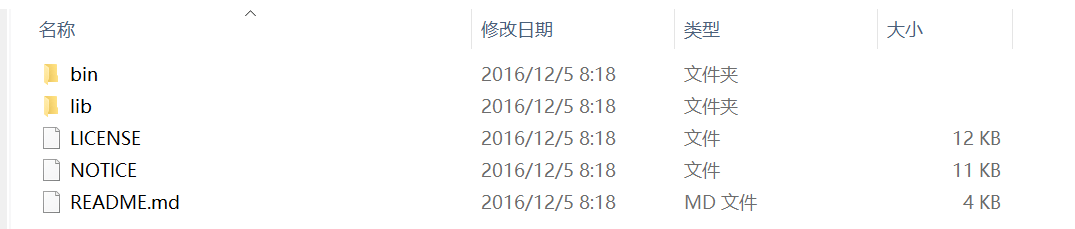
    2、解压下载的压缩包

    如图:

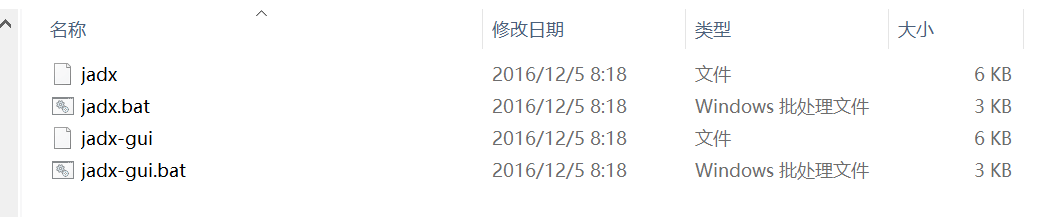
    我们需要关注的是 bin 文件夹里面的 bat 文件

    使用bat文件可以让你在命令行或图形用户界面中使用 JADX

    注意:需以管理员权限运行,不然可能无法正常启动

    3、一个例子(反编译360相机 APK)

    (1)使用图形界面

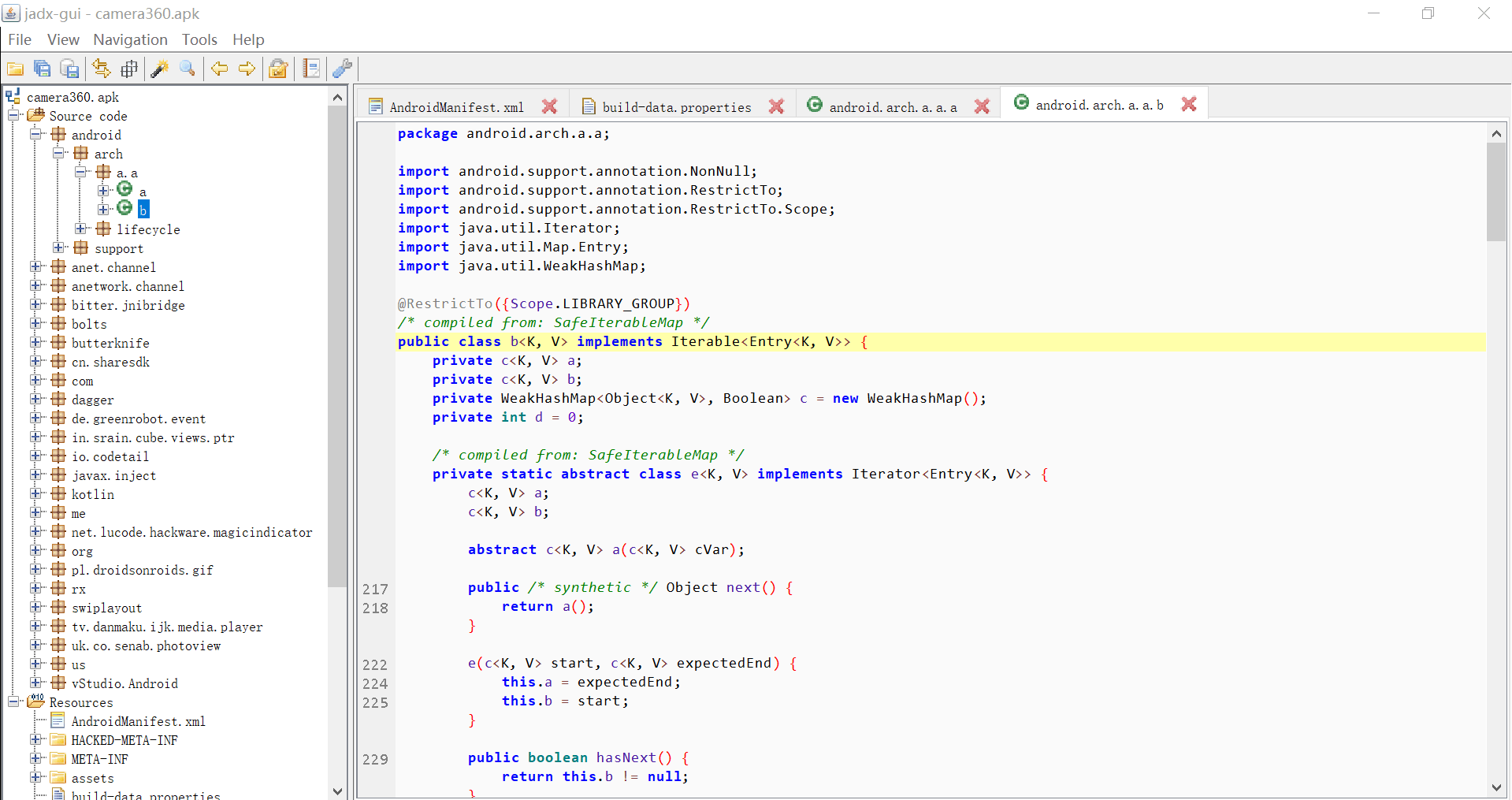
    启动 jadx-gui.bat 文件(在解压文件夹的 bin 文件夹里面)。然后,你会看到如图所示开始界面:

    选择了文件后,JADX 会自动反编译它,界面的左边是资源管理器。 我们这用的是360相机的 APK 文件。

    看起来是不是很炫酷呢?

    点击 file -> save all可以将所有代码保存在一个文件夹里面。

    (2)使用命令行

    打开一个新的命令提示符,切换到 JADX 的 bin目录:

    cd C:\Users\37989\Documents\JADX\jadx-0.6.1\bin

    执行反编译:

    jadx -d C:\Users\37989\Documents\JADX\example2 C:\Users\37989\Documents\JADX\camera360.apk


    注意:输入的目录文件夹应该是已经存在的。

    4、优点

    (1)文本搜索

    点击 Navigation -> Text Search 或者 Navigation -> Class Search 激活它,并且 jadx 的搜索支持四种维度,Class、Method、Field、Code,我们可以根据我们搜索的内容进行勾选,范围最大的就是 Code ,基本上就是文本匹配搜索。

    (2)查找引用

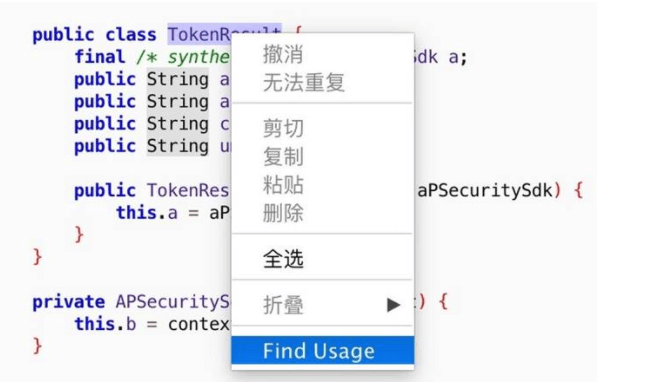
    比如想要找到我们想要的类和代码,那么可以直接使用 jadx 的搜索代码功能,找到我们需要查看的类或者代码,选中点击右键,选择Find Usage。

    这样的话, jadx 就会为你搜索出在此项目中哪些地方使用了这些类或代码.

    (3)反混淆(Deobfuscation)

    一般 apk 在发布出去之前,都是会被混淆的,这基本上是国内 App 的标配,但其实非常不利于我们阅读。我们很难看到一个 a.java 的文件之后,就确定它是哪一个,还需要根据包名来区分。而 Deobfusation 功能,可以为它们起一个特殊的名字,这样它在这个项目中,名字就是唯一的,方便我们识别和搜索。这个功能可以在 Tools -> deobfusation 中激活。

    (4)导出为 Gradle 项目

    jadx-gui 可以直接阅读代码,还是很方便的。但是毕竟没有我们常见的编辑器来的方便。jadx支持将反编译后的项目,直接导出成一个 Gradle 编译的工程。可以通过 File -> Save as gradle project 来激活这个功能。最终输出的项目,可以直接通过 Android Studio 打开。

    5、错误处理方法

    有些 apk 文件的体积比较大的时候,反编译的时候会卡住或者假死,解决方案:

    使用记事本或者 notepad++ 打开 jadx-gui.bat

    更改应用运行内存为1GB

    变更前:

    set DEFAULT_JVM_OPTS=

    变更后:

    set DEFAULT_JVM_OPTS=-Xmx1024M

    (注意等号的后面有个减号)


    今日推荐英文原文:《3 password managers for the Linux command line》 Scott Nesbitt

    原文链接:https://opensource.com/article/18/4/3-password-managers-linux-command-line

    推荐理由:很多朋友会使用密码管理器,不过,那是图形界面的,今天给大家介绍三个命令行下的三个密码管理器。

    3 password managers for the Linux command line

    Password
    Image credits : freeGraphicToday, via Pixabay. CC0.

    We all want our passwords to be safe and secure. To do that, many people turn to password management applications like KeePassX or Bitwarden.

    If you spend a lot of time in a terminal window and are looking for a simpler solution, you’ll want to check out one of the many password managers for the Linux command line. They’re quick, easy to use, and secure.

    Let’s take a look at three of them.

    Titan

    Titan is a password manager that doubles as a file-encryption tool. I’m not sure how well Titan works at encrypting files; I only looked at it as a password manager. In that capacity, it does a solid job.

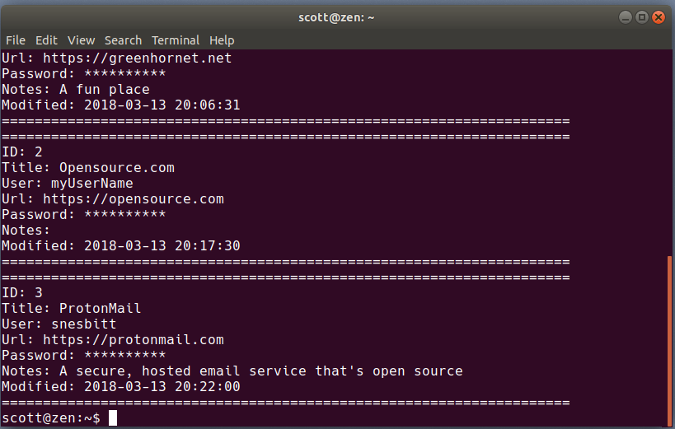
    Titan

    Titan stores your passwords in an encrypted SQLite database, which you create and add a master passphrase to when you first fire up the application. Tell Titan to add a password and it asks for a name to identify it, a username, the password itself, a URL, and a comment about the password.

    You can get Titan to generate a password for you, and you can search your database by an entry’s name or numeric ID, by the name or comment, or using regular expressions. Viewing a specific password, however, can be a bit clunky. You either have to list all passwords and scroll through them to find the one you want to use, or you can view the password by listing the details of an entry using its numeric ID (if you know it).

    Gopass

    Gopass is billed as “the team password manager.” Don’t let that put you off. It’s also great for personal use.

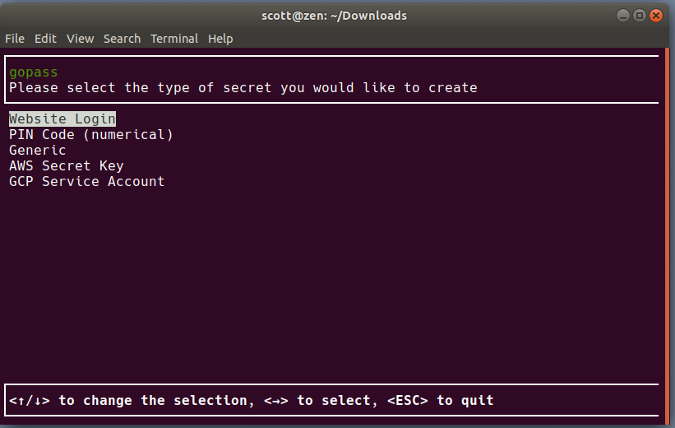
    gopass

    Gopass is an update of the venerable Unix and Linux Pass password manager written in the Go programming language. In true Linux fashion, you can either compile the source code or use an installer to get gopass on your computer.

    Before you start using gopass, make sure you have GNU Privacy Guard (GPG) and Git on your system. The former encrypts and decrypts your password store, and the latter signs commits to a Git repository. If gopass is for personal use, you still need Git. You just don’t need to worry about signing commits. If you’re interested, you can learn about those dependencies in the documentation.

    When you first start gopass, you need to create a password store and generate a secret key to secure that store. When you want to add a password (which gopass refers to as a secret), gopass asks you for information such as a URL, a username, and a note about the secret. You can have gopass generate the password for the secret you’re adding, or you can enter one yourself.

    As you need to, you can edit, view, or delete passwords. You can also view a specific password or copy it to your clipboard to paste it into a login form or window.

    Kpcli

    The open source password manager of choice for many people is either KeePass or KeePassX. Kpcli brings the features of KeePass and KeePassX to your nearest terminal window.

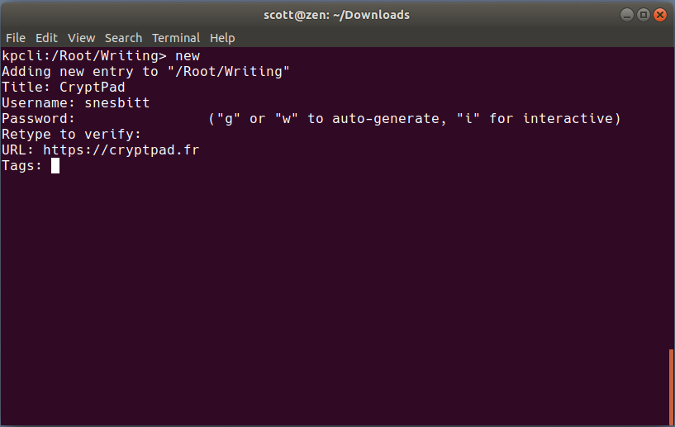
    kpcli

    Kpcli is a keyboard-driven shell that does most of what its graphical cousins can do. That includes opening a password database; adding and editing passwords and groups (which help you organize your passwords); or even renaming or deleting passwords and groups.

    When you need to, you can copy a username and password to your clipboard to paste into a login form. To keep that information safe, kpcli also has a command to clear the clipboard. Not bad for a little terminal app.


    每天推荐一个 GitHub 优质开源项目和一篇精选英文科技或编程文章原文,欢迎关注开源日报。交流QQ群:202790710;电报群 https://t.me/OpeningSourceOrg

←上一页
1 … 250 251 252 253 254 … 262
下一页→

Proudly powered by WordPress