• 开源镜像
  • 开源沙龙
  • 媛宝
  • 猿帅
  • 注册
  • 登录
  • 息壤开源生活方式平台
  • 加入我们

开源日报

  • 2018年4月20日:开源日报第43期

    20 4 月, 2018

    每天推荐一个 GitHub 优质开源项目和一篇精选英文科技或编程文章原文,欢迎关注开源日报。交流QQ群:202790710;电报群 https://t.me/OpeningSourceOrg


    今日推荐开源项目:《编辑器之神——Vim》

    推荐理由:尽管多年过去了,Vim 仍然是热度不减的超级流行开源项目,号称编辑器之神。Vim 是从 vi 发展出来的一个文本编辑器。它类似于vi但又存在区别,因为它功能强大且高度可配置,在vi的基础上进行了很多的改进。代码补全、编译及错误跳转等方便编程的功能特别丰富,在程序员中被广泛使用,还可以创建和更改任何类型的文本,效率非常高。
    开源项目精选: 编辑器之神——Vim

    而从 vi 发展出来的 Vim 具有很多模式,这种独特的设计容易使初学者产生混淆。

    Vim 具有6中基本模式和5中派生模式

    基本模式

    普通模式

    在普通模式中,用的编辑器命令,比如移动光标,删除文本等等。这也是Vim 启动后的默认模式。Vim 强大的编辑能力来自于其普通模式命令。普通模式命令往往需要一个操作符结尾。例如普通模式命令”dd”删除当前行,但是第一个”d”的后面可以跟另外的移动命令来代替第二个”d”,比如用移动到下一行的”j”键就可以删除当前行和下一行。另外还可以指定命令重复次数,”2dd”(重复”dd”两次),和”dj”的效果是一样的。在普通模式中,有很多方法可以进入插入模式。比较普通的方式是按”a”(append/追加)键或者”i”(insert/插入)键。

    插入模式

    在这个模式中,大多数按键都会向文本缓冲区中插入文本。大多数新用户希望文本编辑器编辑过程中一直保持这个模式。在插入模式中,可以按ESC 键回到普通模式。

    可视模式

    这个模式与普通模式比较相似。但是移动命令会扩大高亮的文本区域。高亮区域可以是字符、行或者是一块文本。当执行一个非移动命令时,命令会被执行到这块高亮的区域上。Vim 的”文本对象”也能和移动命令一样用在这个模式中。

    选择模式

    这个模式和无模式编辑器的行为比较相似。这个模式中,可以用鼠标或者光标键高亮选择文本,不过输入任何字符的话,Vim 会用这个字符替换选择的高亮文本块,并且自动进入插入模式。

    命令行模式

    在命令行模式中可以输入会被解释成并执行的文本。例如执行命令(”:”键),搜索(”/”和”?”键)或者过滤命令(”!”键)。在命令执行之后,Vim 返回到命令行模式之前的模式,通常是普通模式。

    Ex模式

    这和命令行模式比较相似,在使用”:visual”命令离开 Ex 模式前,可以一次执行多条命令。

    派生模式

    操作符等待模式

    这个派生模式指普通模式中,执行一个操作命令后 Vim 等待一个”动作”来完成这个命令。Vim 也支持在操作符等待模式中使用”文本对象”作为动作,包括”aw”一个单词(a word)、”as”一个句子(a sentence)、”ap”一个段落(a paragraph)等等。比如,在普通模式下”d2as”删除当前和下一个句子。在可视模式下”apU”把当前段落所有字母大写。

    插入普通模式

    这个模式是在插入模式下按下 ctrl+o 键的时候进入。这个时候暂时进入普通模式,执行完一个命令之后,Vim 返回插入模式

    插入可视模式

    这个模式是在插入模式下按下 ctrl+o 键并且开始一个可视选择的时候开始。在可视区域选择取消的时候,Vim 返回插入模式。

    插入选择模式

    通常这个模式由插入模式下鼠标拖拽或者 shift 方向键来进入。当选择区域取消的时候,Vim返回插入模式。

    替换模式

    这是一个特殊的插入模式,在这个模式中可以做和插入模式一样的操作,但是每个输入的字符都会覆盖文本缓冲中已经存在的字符。在普通模式下按”R”键进入。

    其他

    Evim (Easy Vim)

    Evim(Easy Vim)是一个特殊的GUI模式用来尽量的表现的和”无模式”编辑器一样。编辑器自动进入并且停留在插入模式,用户只能通过菜单、鼠标和键盘控制键来对文本进行操作。可以在命令行下输入”evim”或者”vim -y”进入。在 Windows 下,通常也可以点击桌面上 Evim(Easy Vim)的图标。

    Vim 的正确学习方式

    在正式接触到 Vim 之前,你一定从别人那里听说过 Vim 是多么多么的强无敌,虽然它的命令的确非常方便,但是要正确的入门却不是一件容易的事。一不小心就会弄成《Vim——从入门到放弃》。


    要学习这个工具,首先得明白以下几点:

    1,学习Vim在开始是痛苦的

    2,不要希望你3天就能精通,实际上你可能需要2周甚至更久。

    3,需要不断的练习。

    学习顺序:

    1,在 Insert/Normal 模式下编辑文档(五个命令:i,x,:wq,dd,p)

    2,学习更多的命令(插入模式,移动光标,拷贝/粘贴,Undo/Redo,打开/保存/退出/改变文件)

    3,学习技巧型命令(如何更好,更快,更强)

    4,学习超能力(超能力级功能)

    Vim的常用命令

    Vim中的命令数不胜数,它可以让你只需要看你的键盘就可以完成所有的事情,但是其中并不是所有的命令都那么常用,这里就列举那些最有用的命令。

    这些命令也可以分为以下四级

    1,在 Insert/Normal 模式下编辑文档(五个命令:i,x,:wq,dd,p)

    2,学习更多的命令(插入模式,移动光标,拷贝/粘贴,Undo/Redo,打开/保存/退出/改变文件)

    3,学习技巧型命令(如何更好,更快,更强)

    4,学习超能力(杀手级功能)

    在 Insert/Normal 模式下编辑文档

    打开vim之后默认是Normal模式。Normal模式下你可以操作你的光标,接下来是Normal模式中的一些简单命令,在Normal模式下,几乎所有的键都是功能键。


    i —— 插入模式,这个模式让你你可以像记事本一样的输入文本,如果已经输入完了,按ESC返回Normal模式。

    x —— 删除当前光标所在处的字符

    :w —— 存盘

    :q —— 退出,你可以使用 :wq来同时进行这两个操作

    dd —— 剪切当前行

    p —— 粘贴

    hjkl —— 效果等同于←↓↑→,用于移动光标

    :help<command> —— 显示相关命令的帮助

    学习更多的命令

    除了i之外,还有别的插入模式可以选择

    a —— 在光标后插入

    o —— 在当前行后插入新行

    O —— 在当前行前插入新行

    一些快速移动光标的指令

    0 —— 数字零,到行头

    ^ —— 到本行第一个不是空字符的位置

    $ —— 到行尾

    g_ —— 到行尾最后一个不是空字符的位置

    /pa —— 搜索 pa 这个字符串,按n查找下一个

    关于文件的指令

    :e <path/to/file> —— 打开一个文件

    :saveas <path/to/file> —— 另存为

    :q! —— 不保存退出 :qa!可以退出所有编辑中的文件

    :bn :bp ——当你打开了很多文件,用这个切换到下一个/上一个

    其他的指令

    u —— 撤销

    ctrl+r —— 重做

    学习技巧型命令

    Vim重复自己的方法

    . —— 小数点,重复上次命令

    N<command> —— 重复一个命令N次


    下面是一个特殊的例子

    100imeow[ESC] —— 写下100个“meow”

    . —— 重复上一个命令 也就是再写100个“meow”

    3. —— 重复3次命令 写下3个(而不是300个)“meow”

    进阶级移动光标的命令

    NG —— 移动到第N行 ,:N也可以

    gg —— 到第一行

    g —— 到最后一行

    w —— 到下一个单词开头

    e —— 到下一个单词结尾

    % —— 当光标在括号上时,可以移动到与之对应的另一个括号

    *和# —— 移动到下一个/上一个光标所在的单词上


    实际上这些命令都可以组合输入,格式为:<start position><command><end position> 举个简单的例子

    0y$ —— 0和 $ 是位置,y是指令,这个指令的意思就是从行头拷贝到本行最后一个字符。


    除了 y,还有不少命令可以这么做,比如

    d  —— 删除

    gU/gu —— 变为大写/小写

    v ——可视化选择

    学习超能力

    更高级的移动光标

    Fa/fa —— 移动到上一个/下一个a字符,a可以换成其他字符

    T,/t, —— 移动到逗号后/前的那一个字符,逗号可以换成其他字符

    3fa ——到第三个a字符处

    dt” —— 在遇到”前删除所有内容

    区域选择

    区域选择的命令格式一般为<action>a<object> 和 <action>i<object>

    用一个简单的例子来区别a和i

    假如说有这样一个字符串——[123((abcd))],你的光标在b上

    vi)——会选择abcd

    va)——会选择(abcd)

    v2i)——会选择(abcd)

    v2a)——会选择((abcd))

    自动补齐

    在 insert 模式下输入一个词的开头,然后按ctrl+p或+n,就可以使用自动补齐了

    宏

    qa——开始录制宏,并把你的操作记录在a

    @a—— replay你在a录制的宏

    @@—— replay最新的宏


    今日推荐英文原文:《Why MariaDB Scores Over MySQL》作者:Anand Nayyar

    原文链接:https://opensourceforu.com/2018/04/why-mariadb-scores-over-mysql/

    推荐理由:自从 MySQL 落入 Oracle 之手之后,江湖上就掀起了血雨腥风;Oracle 有着强大的法律部门,但是在对待开源上哟组合不太良好的历史,所以很多开源社区的用户和支持者都不太信任 Oracle,后来就有了 MariaDB,处于对开源精神的坚持,很多用户转而使用 MariaDB,事实上除了更符合开源精神,MariaDB 也从性能上超越了 MySQL,这篇文章就是告诉你这件事情的。

    Why MariaDB Scores Over MySQL

    This article gives readers an insight into MariaDB as well as MySQL. Both are analysed and the differences between them are discussed. There is also a section on why MySQL users should switch to MariaDB.

    Today, organisations have a range of database options to choose from—whether commercial or open source. There was a time when most database management systems (DBMSs) were commercial. But now, with a number of open source databases available, industry professionals prefer to use them. In fact, open source databases have gained a significant share of the market today, because users have the freedom to implement these systems as per requirements and get the best out of them.

    Open source database systems are available from various vendors like Oracle, Microsoft, Google, Amazon and Rackspace. The history of open source DBMSs is not very old. The first operational open source DBMS was MySQL, which was launched in 1995 and till date, lots of significant improvements have been incorporated in it, which has made it a strong competitor even to commercial database software.

    Open source DBMSs are gaining popularity not only because they are feature-rich and low cost, but also due to their operational efficiency. The freedom users enjoy in customising the source code as per individual needs, and with little programming knowledge, is a plus point. Gartner reports that open source DBMSs are growing by 42 per cent each year, and this industry will be worth US$ 8 billion by 2020. About 80 per cent of the users polled for the report use some sort of open source software, including DBMSs. Various commercial vendors like Microsoft and IBM are also offering ‘Express Editions’ of their DBMS software.

    The most widely adopted open source DBMSs are MySQL and MariaDB. This article discusses their similarities, differences and relative merits, before going on to suggest why users ought to migrate to MariaDB.

    Databases

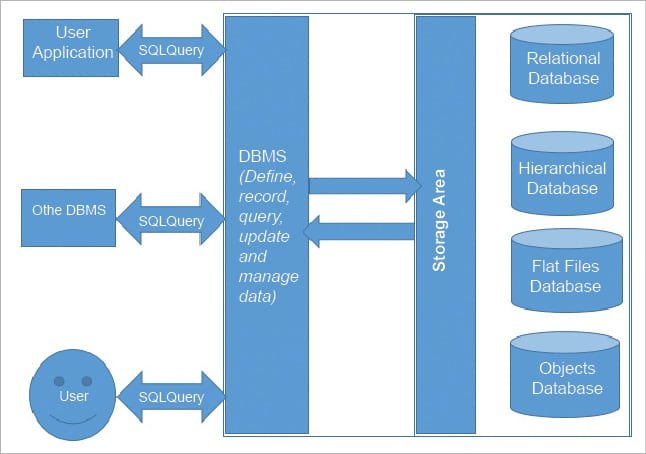
    Databases are specific structures that hold data in the form of tables. The software that enables the flow of data through a table-based structure is called a DBMS. The most widely used DBMS is a relational database management system (RDBMS). A DBMS is a computer software application that interacts with end users, other applications and the database itself to capture data. A general-purpose DBMS allows definition, creation, querying, updation and the administration of databases.

    The functions of a database and its data are:

    Data definition: Creation, modification and removal of definitions that lay the foundation for data organisation

    Data updation: Insertion, modification and deletion of data

    Retrieval: Retrieval of data from the entire database by making specific queries

    Administration: User creation and modification, data security, performance monitoring, data integrity, concurrency control and data recovery

    So, a database system is a combination of a database model, a DBMS and a database.

    MySQL

    MySQL is an open source, multi-threaded, relational database management system (RDBMS) written in C and C++. MySQL was created by a Swedish company, MySQL AB, founded by David Axmark, Allan Larsson and Micheal ‘Monty’ Widenius, and development started in 1994. The first version was launched on May 23, 1995. MySQL is named after co-founder Monty Widenius’s daughter, My. The name of the MySQL dolphin logo, Sakila, was chosen from a huge list of names suggested by users in a ‘Name the Dolphin’ contest.

    MySQL server is suitable for mission-critical, heavy-load production systems as well as for embedding into mass deployed software. It is regarded as a central component of the LAMP stack (Linux, Apache, MySQL and PHP). The MySQL database is available for various operating system platforms like Linux, Windows, MAC, BSD UNIX, etc. Popular websites like Wikipedia, Facebook and YouTube use MySQL.

    MySQL is now a trademark owned by Oracle Corporation and/or its affiliates, and is dual licensed. Users can choose to use the software as open source under the GNU licence and even purchase a commercial

    licence from Oracle.

    MySQL architecture

    The MySQL server is based on a tiered architecture and consists of both primary sub-systems and support components that interact with each other to read, parse and execute queries to return the results.

    The five types of primary sub-systems of MySQL are:

    • Query engine
    • Storage manager
    • Buffer manager
    • Transaction manager
    • Recovery manager

    Query engine: This contains three main interrelated components—the syntax parser, the query optimiser and the execution component. The syntax parser decomposes the SQL commands it receives from calling programs in a form that is understood by the MySQL engine. The ‘query optimiser’ streamlines the syntax for use by the execution component and then prepares the most efficient plan for query execution. The execution component interprets the execution plan, based on the information it receives and makes requests to other components to retrieve the records.

    The storage manager: This interfaces with the operating system to write data to the disk in the form of user tables, indices and logs as well as internal system data.

    The query cache: The MySQL engine uses an extremely efficient result set caching mechanism called query cache, which dramatically enhances the response time for queries that are called upon to retrieve the same data as the previous query.

    The buffer manager: This handles all memory management issues between requests for data by the query engine and the storage manager. MySQL makes use of memory to cache result sets that can be returned, and the cache is maintained in the buffer manager.

    The transaction manager: This sub-system provides a locking facility to ensure that multiple users access the data in a consistent manner without corrupting or damaging the data.

    The recovery manager: This keeps copies of data for the purpose of retrieval in case of any sort of data loss.

    The two support components of MySQL are:

    • Process manager
    • Function libraries

    Process manager: This performs two main functions —managing user connections via modules for network connection management, and synchronisation of tasks and processes via modules for multi-threading, thread locking and performing thread-safe operations.

    Function libraries: This contains general-purpose routines like string manipulation, sorting operations and performing OS-specific functions like memory management and file I/O.

    Features of MySQL

    • Relational database management system: MySQL supports all features, which makes it a complete RDBMS system. It supports full SQL as a standardised language for querying and updating data, and to administer the database.
    • Easy and secure: MySQL is very simple and interactive to use, compared to other DBMS software, and is also highly secure with a solid data security layer providing efficient encryption to data.
    • Client/server architecture: Its simple client/server architecture helps end users to create a server with connectivity to many clients, in order to communicate with the server for inserting, updating and administrating the database.
    • Scalable: MySQL can handle high volumes of data without any hiccups—as much as 50 million rows. It can handle up to 8TB of data without any issues.
    • Cross-platform: It is compatible with almost every operating system, like UNIX, Windows, Linux, MAC OS X, etc.
    • High-performance, flexible and good productivity: MySQL provides faster, highly reliable, cheap storage solutions and supports a large number of embedded applications. It makes use of triggers, procedures and views to deliver better productivity.

    MariaDB

    MariaDB is a forked version of MySQL. It was primarily developed due to concerns that arose when MySQL was acquired by Oracle Inc. MariaDB is a general-purpose DBMS engineered with extensible architecture to support a broad set of use cases via pluggable storage engines. It uses different storage engines to support different use cases.

    MariaDB is an open source, multi-threaded, relational database management system, released under the GNU Public License (GPL). Its lead developer is Michael Monty Widenius, who is also one of the founders of MySQL AB. Many features contribute to MariaDB’s popularity as a database system. Its speed is one of its most prominent features. MariaDB is also remarkably scalable, and is able to handle tens of thousands of tables and billions of rows of data. It can also manage small amounts of data quickly and smoothly, making it convenient for small businesses or personal projects. Another feature that sets it apart from its predecessors is a focus on security. MariaDB’s built-in functions include those for manipulating and formatting text, business and statistical calculations, recording chronological information, as well as speciality features such as those related to GPS mapping.

    MariaDB Server is one of the most popular open source databases in the world. It is available in Debian and Ubuntu, and is now the default database on Arch Linux, Manjaro, openSUSE, Red Hat Enterprise Linux, CentOS, Fedora and SUSE Linux Enterprise. And as one of the most broadly adopted and widely deployed in the world, MariaDB Server receives contributions from companies like Alibaba, Facebook and Google. Recently, Microsoft has also joined hands to support the MariaDB community.

    Features of MariaDB

    • MariaDB is available for use under GPL, LGPL and BSD.
    • It includes a wide selection of storage engines, including high-performance storage engines, for working with other RDBMS data sources.
    • It uses a standard and popular querying language.
    • MariaDB runs on a number of operating systems and supports a wide variety of programming languages.
    • It offers support for PHP, one of the most popular Web development languages.
    • It offers Galera cluster technology.
    • MariaDB also offers many operations and commands unavailable in MySQL, and eliminates/replaces features that impact performance negatively.

    Other features include multi-source replication, fusion IO optimisations, table discovery and online alter table.

    A comparative analysis of MariaDB and MySQL

    MariaDB has a significantly high number of new features, which makes it better in terms of performance and user-orientation. Let’s evaluate both MariaDB and MySQL to determine which one is the better. The choice will ultimately depend on the IT managers and their familiarity with open source databases.

    Some significant differences between MySQL and MariaDB

    1. Usage of the database: Since 1995, MySQL has been regarded as the most implemented and widely used open source database till date. Many IT giants like Twitter, YouTube, Netflix and PayPal, as well as NASA, the US defence forces and Walmart, make use of this database.

    MariaDB, being a more recent arrival, is also taking strong root as back-end software in various IT giant organisations, such as Google, Red Hat, CentOS and Fedora.

    2. Structure of the database and the index: MySQL is a pure relational database integrated with an ANSI-standard information schema, and consists of tables, columns, views, procedures, triggers, cursors, etc. The SQL of MySQL is a subset of ANSI SQL 99.

    MariaDB, on the other hand, is a fork of MySQL and, hence, has the same database structure and index. This facility makes MariaDB a strong choice for users who want to switch or upgrade their back-end directly without any issues of upgrading the database and data structures.

    Everything—from the data, table definitions, structures and APIs—remains identical when upgrading from MySQL to MariaDB.

    3. Binaries and implementation: MySQL was developed using C and C++ and is fully compatible to run with almost every operating system like Microsoft Windows, MAC OS X, Linux, FreeBSD, UNIX, NetBSD, Novell Netware and many others.

    MariaDB was developed using C, C++, Bash and Perl. It is compatible with various operating systems like Microsoft Windows, Linux, MAC OS X, FreeBSD, Solaris, etc.

    4. Replication and clustering: MySQL provides strong replication and clustering through master-master and master-slave replication, and makes use of the Galera Cluster for multi-master clustering.

    MariaDB provides almost the same replication and clustering facilities to end users as MySQL in terms of master-master and master-slave replication. It also uses Galera Cluster from version 10.1 onwards.

    5. Support for databases: MySQL technical support services are provided round-the-clock via Oracle, and the support team consists of professional developers and engineers who provide various facilities like bug fixes, patches and version releases. Oracle offers MySQL premier support, extended support and sustaining support, depending on what users need.

    MariaDB provides strong support to users through the open source community, online forums and even via experts. Round-the-clock support is available for MariaDB via enterprise subscription especially for mission-critical production systems.

    6. Security: In terms of security, MySQL provides a strong encryption mechanism for tablespace data. It provides strong security parameters in terms of choosing good passwords, not granting unnecessary privileges to users, and ensures application security by preventing SQL injections and data corruption.

    MariaDB has had a significant boost in terms of security features like internal security and password check, PAM and LDAP authentication, Kerberos, user roles, and strong encryption over tablespaces, tables and logs.

    7. Extensibility: A database supporting an extensible system can be extended by the user in many different ways like adding new data types, functions, operators, aggregate functions, index methods and procedural languages. MySQL has no support for extensibility.

    MariaDB is built on a modern architecture that is extensible at every layer—client, cluster, kernel and storage. This extensibility provides two major advantages. It allows for continual community innovation via plugins, which means that a variety of storage engines, like MariaDB ColumnStore or Facebook’s MyRocks, can be integrated through MariaDB’s extensible architecture. Additionally, it makes it easy for customers to configure MariaDB to support a wide variety of use cases, ranging from OLTP to OLAP.

    8. JSON support: MySQL supports a native JSON data type that enables efficient access to data in JSON (JavaScript Object Notation) documents. The JSON data type provides the following advantages over storing JSON-format strings in a string column:

    • Automatic validation of JSON documents stored in JSON columns. Invalid documents produce an error.
    • Optimised storage format: JSON documents stored in JSON columns are converted to an internal format that permits quick read access to document elements. When the server later has to read a JSON value stored in this binary format, the value need not be parsed from a text representation. The binary format is structured to enable the server to look up sub-objects or nested values directly by key or array index without reading all values before or after them in the document.

    On the other hand, MariaDB Server 10.2 introduces a comprehensive set of 24 functions for reading and writing of JSON documents. In addition, the JSON_VALID function can be used with a check constraint for validation, while functions like JSON_VALUE can be used with dynamic columns to index specific fields.

    9. Licensing: MySQL offers its code as open source under the GPL, and provides the option of non-GPL commercial distribution in the form of MySQL Enterprise.

    MariaDB can only use the GPL, because its work is derived from the MySQL source code under the terms of that licence.

    10. Performance: MariaDB achieves best-in-class performance with numerous innovations that are absent for MySQL. These include thread pool management to maximise processing efficiency and extensive optimisation features such as defragmentation within the InnoDB data store. So, when rows are deleted from an InnoDB table, the free space immediately becomes available to the operating system. There’s no need to copy data from old tables to new ones, and there are no gaps in the tablespace. MariaDB also offers engine-independent table statistics to improve the optimiser’s performance, speeding up query processing and data analysis on the size and structure of the tables.

    Without these enhancements, MySQL falls short in terms of performance. Thread utilisation in MySQL is sub-optimal and InnoDB tables become fragmented over time, compromising performance.

    MariaDB vs MySQL

    The following points highlight the pros and cons of MariaDB.

    Pros

    • MariaDB has been optimised for performance and is much more powerful than MySQL for large data sets. Elegant migration from other database systems to MariaDB is yet another benefit.
    • Switching from MySQL to MariaDB is relatively easy and is a piece of cake for systems administrators.
    • MariaDB provides better monitoring through the introduction of micro-second precision and extended user statistics.
    • MariaDB enhances the KILL command to allow you to kill all queries from a user (KILL USER username) or to kill a query ID (KILL QUERY ID query_id). MariaDB has also switched to Perl-compatible regular expressions (PCRE), which offer more powerful and precise queries than standard MySQL regex support.
    • MariaDB has applied a number of query optimisations for queries connected with disk access, join operations, sub-queries, derived tables and views, execution control, and even explain statements.
    • MariaDB is purely open source, instead of the dual-licensing model that MySQL uses. Some plugins that are available only for MySQL Enterprise customers have equivalent open source implementations in MariaDB.
    • MariaDB supports significantly more engines (SphinxSE, Aria, FederatedX, TokuDB, Spider, ScaleDB, etc) compared to MySQL.
    • MariaDB offers a cluster database for commercial use, which also enables multi-master replication. Anyone can use it freely and reliance on a MySQL Enterprise system is not required.

    Cons

    • Migration of MariaDB back to MySQL has not been possible since release 5.5.36.
    • For new releases of MariaDB, the appropriate libraries (for Debian) will not be deployed in time, which will result in a required upgrade to a newer version due to dependencies.
    • Cluster version of MariaDB is not very stable.

    Top reasons to migrate to MariaDB

    • First and foremost, MariaDB offers more and better storage engines. NoSQL support, provided by Cassandra, allows you to run SQL and NoSQL in a single database system. MariaDB also supports TokuDB, which can handle Big Data for large organisations and corporate users.
    • MySQL’s usual (and slow) database engines MyISAM and InnoDB have been replaced in MariaDB by Aria and XtraDB respectively. Aria offers better caching, which makes a difference when it comes to disk-intensive operations.
    • MariaDB provides better monitoring through the introduction of micro-second precision and extended user statistics.
    • The cutting-edge features of MariaDB like GIS, dynamic column support, etc, make it a better choice.
    • MariaDB follows good industry standards by releasing security announcements and upgrades at the same time, and handling the pre-release secrecy and post-release transparency in a proper way.

    每天推荐一个 GitHub 优质开源项目和一篇精选英文科技或编程文章原文,欢迎关注开源日报。交流QQ群:202790710;电报群 https://t.me/OpeningSourceOrg
  • 2018年4月19日:开源日报第42期

    19 4 月, 2018

    每天推荐一个 GitHub 优质开源项目和一篇精选英文科技或编程文章原文,欢迎关注开源日报。交流QQ群:202790710;电报群 https://t.me/OpeningSourceOrg
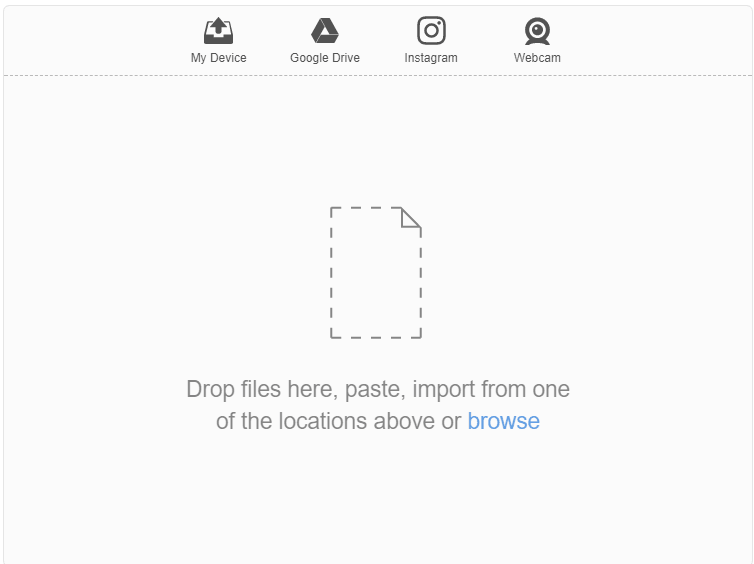

    今日推荐开源项目:《整洁、模块化的浏览器文件上传组件 Uppy》

    推荐理由:Uppy 是一个整洁的,模块化的,几乎可以与任何浏览器结合的文件上传组件,它快速,易用,能让你把心思放在比文件上传组件更重要的事情上。

    如何使用Uppy?

    你可以通过在线尝试快速掌握Uppy的使用

    开源项目精选: 整洁、模块化的浏览器文件上传组件 Uppy

    Uppy应对浏览器崩溃的方法:

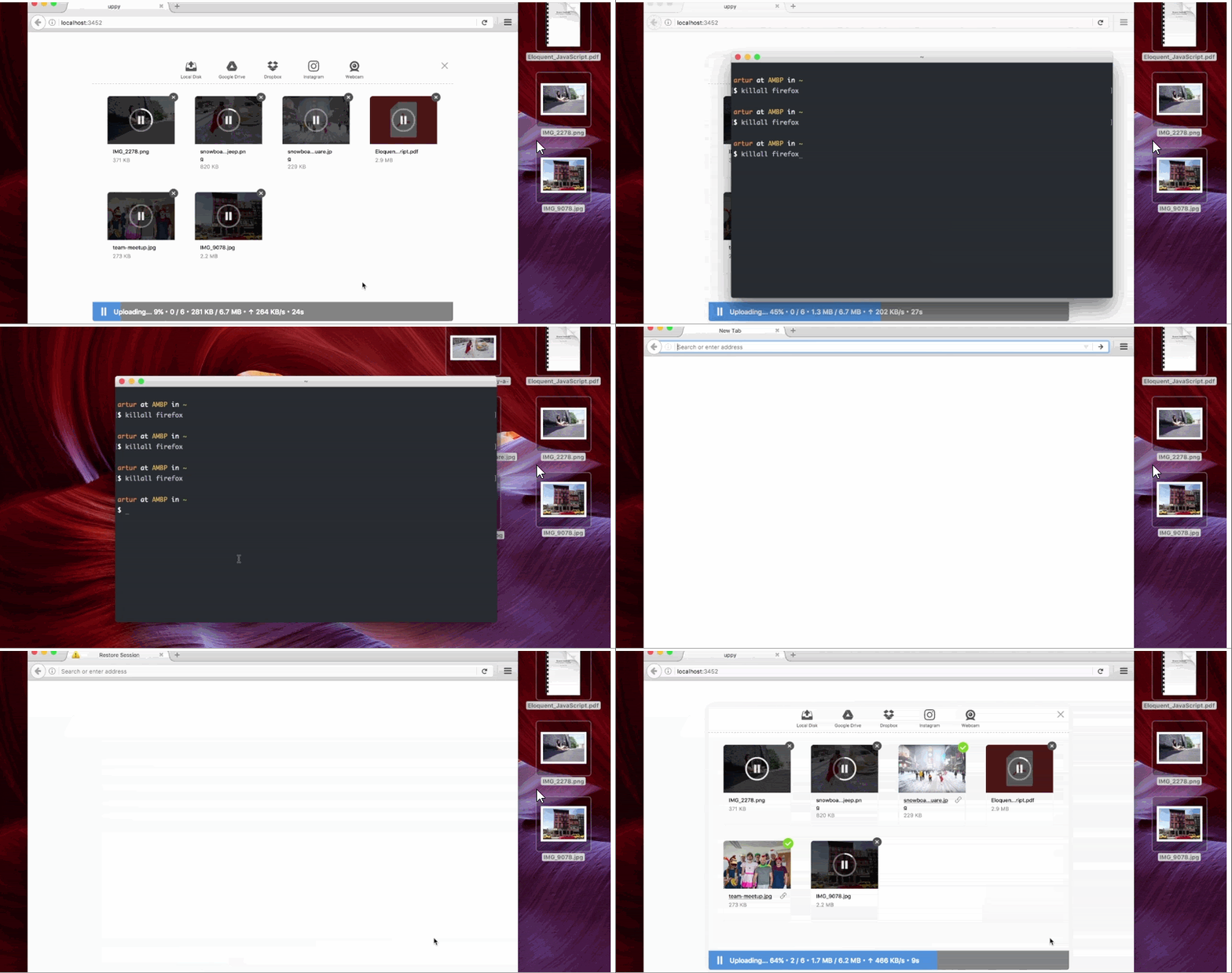
    随着人们每天在网络上不断的进行文件传输,文件传输过程中出现意外已经司空见惯,如何在发生意外时减少使用者受到的损失已经成为了一个重要的问题。而uppy 使用了Golden Retriever 来解决这个问题。Golden Retriever 将你选定的文件保存在你的浏览器缓存之中,这样当浏览器崩溃时,uppy 也能找回所有东西继续上传。但是如果在浏览器崩溃之后没有进行恢复而是进行了某种清理缓存的操作的话……那就没办法了。

    Golden Retriever 通过三种方法结合起来保存数据:

    1. 使用本地存储来保存文件真正的数据,在浏览器启动时恢复它们,但 uppy 不能直接访问这些数据
    2. 使用Service Worker 来保存对文件转变为BLOB(二进制大对象,是一个可以存储二进制文件的容器)之后的引用,虽然这会在浏览器崩溃后失效
    3. IndexedDB 可以永久保存BLOB 文件,但是在储存文件的量上有诸多限制

    所以当uppy 启动时,信息将从本地存储中恢复,从而让uppy可以知道发生了什么。对于BLOB来说,它们将从Service Worker 和 IndexedDB中恢复。当文件成功上传后,或者是使用者决定删除它们时,Golden Retriever将会把它们自动清理掉。

    虽然在有些时候Golden Retriever也无法救回丢失的进度,比如一个非常大的文件在上传时被打断,或者浏览器完全彻底的崩溃。但是至少它能保存一些这个文件的关键信息,比如它的名字和预览,以便让使用者重新添加它们。

    开源项目精选: 整洁、模块化的浏览器文件上传组件 Uppy

    关于tus:

    tus是一个可恢复用户正在上传中文件的上传协议,支持所有平台的客户端和服务器端,当使用者结束当前进行中的上传时,服务器将存储已上传的数据(如果没有发生内部错误或者存储的数据会违反某些规定的话)。当使用者准备恢复上传时,就向相应的URL发送一个请求来获得可用的空间从而继续上传数据。但是如果经过了较长的时间还是没有完成上传的话(比如一周),服务器就将删除未完成的上传文件。

    关于作者:

    Artur Paikin:喜欢旅行,种植蔬菜,泡coffee,编写代码,制作网页,并且致力于家庭的自动化。他用Instagram 上传照片,用Facebook,twitter 写小说。

    开源项目精选: 整洁、模块化的浏览器文件上传组件 Uppy

    个人主页


    今日推荐英文原文:《How to Choose the Right Open Source Database》作者:Vivek Ratan

    原文链接:https://opensourceforu.com/2018/04/how-to-choose-the-right-open-source-database/

    推荐理由:不管你做哪种类型的开发,基本上都离不开数据库,怎么挑选一个合适的开源数据库呢?不同数据库有什么异同?应该从哪些维度去衡量一个数据库软件呢?

    How to Choose the Right Open Source Database

    Databases store data in an organised manner so that its retrieval becomes easy. Also, the management of data is easier when it is stored in a database. There are many factors to be considered, however, before choosing a database for a particular software application. Let’s take a look at how we can make the right choice.

    Considering the number of users working with different online applications nowadays, databases are about the most important part of any software application, and can make a huge impact on its performance. It is really difficult and time consuming for a database to operate if it has a huge load of data or if it has a variety of data sets to operate upon. There are also several other factors like the security of data, as well as the cost (if there is one) associated with the database, impacting the choice of the database. A free database helps users to avoid huge costs. Hence, open source databases have been playing quite an important role in many of the widely used software applications across the globe.

    Different kinds of databases available in the market

    There are various types of databases being used by different users across the globe, based on their requirement. The following is a broad classification of databases.

    1. Relational databases: Relational databases are the most common among all the types. In such databases, the data is actually stored in the form of different data tables. Each of the tables has a unique key field and that key is used to connect one table to the other tables. Hence, different tables are related to each other with the help of various key fields. Such databases are widely used in industries like media, telecom, etc, and this is probably the type of database one is most likely to come across.

    2. Operational databases: An operational database is very important for organisations, as it supports the customer database and the inventory database. It helps companies to keep a track of inventories as well as store details of the customers who buy its products. The data stored in various operational databases can be analysed and used based on the requirements of the company.

    Figure 1: Interaction of a user with a DBMS

    3. Database warehouses: There might be a requirement for different organisations to keep some of the relevant data for several years. Such data sets act as significant sources of information to compare and analyse the present year’s data with that of previous years, which makes it quite easy to determine key trends. All such data from previous years is maintained and stored in a large database warehouse. Since the stored data set has already gone through various kinds of editing, screening and integration, it no longer requires any editing or alteration.4. Distributed databases: Many organisations have several regional offices, manufacturing plants, branch offices and a head office. Each such work group may have its own set of databases, which collectively form the main database of the company. Such a system of databases is known as a distributed database.

    5. End user databases: There is a variety of data available at the workstations of different end users of an organisation. Each workstation acts like a small database in itself, and has data in the form of spreadsheets, presentations, downloaded files, Word files and in Notepad format. All such small databases together form an end user database.

    Now let’s have a look at some of the popular open source databases available in the market.

    MySQL

    MySQL has been in use since 1995 and is currently owned by Oracle. In addition to its open source version, there are a couple of paid editions available as well, which offer some additional features, such as cluster geo-replication and automatic scaling. We all know that MySQL has become an industry standard now, as it is compatible with almost every operating system and has been written in both C and C++. This database option is great for different international users as well, since the server can provide various error messages to the clients in a number of languages.

    Pros:

    • Offers a flexible privilege and password system
    • Can be used even if there is no available network
    • Uses host-based verification
    • It consists of different libraries that can be embedded into various standalone applications
    • It has security encryption for all the password traffic
    • Supports servers as a separate program for the client server networked environment

    Cons:

    • Users feel that MySQL no longer falls under the free OS category
    • It is no longer community driven, so bug fixes and patches do not happen in time
    • Falls behind other similar available options due to its slow updates

    PostgreSQL

    PostgreSQL, also called Postgres, is basically an object-relational DBMS with much emphasis on extensibility and standards compliance. As a database server, its important functions are to securely store data and return the data or data sets in response to different requests made from other software applications. PostgreSQL can handle different workloads, ranging from that of small single-machine applications to even large Internet-facing applications with many concurrent users. It has been developed by PostgreSQL Global Development Group, and is available as free and open source software.

    Pros:

    • It is transactional and ACID (atomicity, consistency, isolation, durability)-compliant
    • Supports updatable views and materialised views
    • Functions, stored procedures, triggers, etc, can be very well used in it
    • Supports concurrency with the help of a system known as MVCC (Multi Version Concurrency Control).
    • Provides three levels of transaction isolation, which are: Read Committed, Repeatable Read and Serialisable
    • Supports serialisability using the serialisable snapshot isolation technique
    • Supports a large variety of data types like Boolean, binary, etc

    Cons:

    It does not have any bug tracker (whereas it supports a bug-submission form, which feeds into the pgsql-bugs mailing list), making it a bit difficult to know the status of bugs.

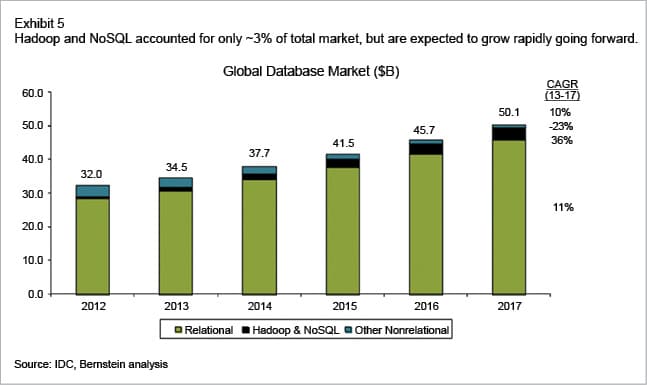
    Figure 2: Global database markets at a glance

    MariaDB

    MariaDB is a database that is widely used by tech giants like Wikipedia, Facebook and even Google. It has been developed by various developers who worked as part of MySQL. It is basically a database server that provides drop-in replacement functionality for MySQL. Data security is one of the most significant concerns and priorities for developers of MariaDB, and almost in each of its solution releases the developers merge in all of MySQL’s security patches and also enhance the same, if required.

    Pros:

    • It provides real-time access to the data sets
    • It supports the maximum number of core functionalities of MySQL (it is an alternative to MySQL)
    • It supports high scalability with easier integration
    • It provides a couple of alternate patches, storage engines and server optimisations

    Cons:

    • It does not provide support for the memcached interface
    • The password complexity plugin is not available
    • Has no optimiser trace

    Choosing the best available open source database

    1. Size of data: When choosing a database, we should always consider the volume of data that we need to retrieve and store as critical application data in a database. The amount of data that we can retrieve and store may vary depending on the combination of the selected data structure, and the ability of any database to differentiate between various data sets available across multiple servers and file systems. Hence, we need to choose our database by considering the overall volume of data generated by a software application at any specific rate, and also the size of data that needs to be retrieved from the database.

    2. Speed and scalability: We must also gauge the speed that we require for reading and writing different sets of available data into the database—the time taken to service all the incoming reads and writes to any specific application. Some databases are designed to optimise read-heavy applications, whereas others are designed to support write-heavy solutions. Selecting a database that can handle our application’s input/output needs can really go a long way to a scalable architecture.

    3. Structure of data: Structure of the data set is all about the manner in which we need to store and retrieve our data. Since an application deals with data present in diverse formats, before selecting a database we should consider picking the right data structure for storing and retrieving the data sets. If we fail to select the right data structure for persisting available data, the application may take more time to retrieve data from the database. This could also lead to more development efforts to work around any of the data issues.

    4. Accessibility of data: We should also think about the number of users that may concurrently access the database in order to perform any operation on available data, and also the level of computation involved in accessing any set of data. The processing speed of software applications may get affected if the database chosen is not really good enough to handle large loads.

    5. Safety and security of data: We must also check the level of security that a database provides for the data stored in it. In case of highly confidential data, we really need to have a highly secured database for the application using it. The different safety measures implemented by a database in case of any system crash or failure are an important factor that you should look at before choosing a database.


    每天推荐一个 GitHub 优质开源项目和一篇精选英文科技或编程文章原文,欢迎关注开源日报。交流QQ群:202790710;电报群 https://t.me/OpeningSourceOrg
  • 2018年4月18日:开源日报第41期

    18 4 月, 2018

    每天推荐一个 GitHub 优质开源项目和一篇精选英文科技或编程文章原文,欢迎关注开源日报。交流QQ群:202790710;电报群 https://t.me/OpeningSourceOrg


    今日推荐开源项目:《微信跳一跳 Python 小助手》

    推荐理由:微信跳一跳想必很多朋友都玩过,但是有想过自己做一个吗?国内就有大神做了个 Python 开源版并且登上热榜,内附 GitHub 地址,动手一起玩吧

    开源项目精选:微信跳一跳 Python 小助手

    核心原理:

    每次落稳之后截图,根据截图算出棋子的坐标和下一个块顶面的中点坐标,根据两个点的距离乘以一个时间系数获得长按的时间。

    识别棋子:

    靠棋子的颜色来识别位置,通过截图发现最下面一行大概是一条直线,就从上往下一行一行遍历,比较颜色(颜色用了一个区间来比较)找到最下面的那一行的所有点,然后求个中点,求好之后再让 Y 轴坐标减小棋子底盘的一半高度从而得到中心点的坐标。

    识别棋盘:

    靠底色和方块的色差来做,从分数之下的位置开始,一行一行扫描,由于圆形的块最顶上是一条线,方形的上面大概是一个点,所以就用类似识别棋子的做法多识别了几个点求中点,这时候得到了块中点的 X 轴坐标,这时候假设现在棋子在当前块的中心,根据一个通过截图获取的固定的角度来推出中点的 Y 坐标。

    最后:根据两点的坐标算距离乘以系数来获取长按时间(似乎可以直接用 X 轴距离)

    开源项目精选:微信跳一跳 Python 小助手

    这个思路非常典型,就是去找所需属性的特征,而且这个游戏的设定完美地避开了这个算法的漏洞:基本上没有与平台相同的颜色(当然相同的话是会被玩家吐槽的),并且游戏的视角没有出现过旋转或者缩放。如果有的话识别上会有一定难度。

    利用背景色色差来识别棋盘:

    跳一跳的背景现在会逐渐变色,有的时候甚至会与下一个平台的颜色一模一样,不过截图也就一瞬间的事,对于这个算法来说并不是什么问题。作者还专门优化了当小人的图案位于下个矩形顶部上方的情况。不过识别平台大小的算法对于杂色效果并不好,笔者测试的时候大部分都是这个时候挂掉的( ̄ε(# ̄) Σ

    对这个程序的探索大概到这里就结束了,这个小项目后续的更新基本上是对识别的进一步优化以及防反外挂机制。本篇延展权当大家学习中的一个小插曲,希望它能让大家在钻研之余轻松一刻。

    开源项目精选:微信跳一跳 Python 小助手

    GitHub 地址:https://github.com/wangshub/wechat_jump_game


    今日推荐英文原文:《LG’s Linux-based webOS Goes Open Source, Again!》作者:Derick Sullivan M. Lobga

    原文地址:https://itsfoss.com/webos-goes-open-source/

    推荐理由:很多早年的机油们可能还记得 Palm 奔迈公司,其出品的掌上电脑和智能手机所用的 Palm OS 当年也是一霸,只可惜后来虎落平阳,接连被 HP 收购,更名为:webOS,宣布开源,后又被 LG 收购,不过它的所有人 LG 公司现在又再一次宣布开源,什么叫再一次?看了文章就知道了。

    LG’s Linux-based webOS Goes Open Source, Again!

    webOS has metamorphosed from Open webOS, HP webOS, Palm webOS and to LG webOS. It was originally developed by Palm for its Personal Digital Assistant. In 2010, HP bought Palm and thus acquired Palm webOS but a few years later, HP sold it to LG Electronics for them to use it on their web-enabled smart TVs replacing its NetCast platform.

    Today, LG has expanded the use of the webOS from smart TVs to IoT devices. And to further expand its reach and lure developers, LG has launched an open source version of webOS called webOS OSE (open source edition). And thus webOS goes open source again.

    Open Source once again

    Did I say again? Yes, because in 2012, HP had open sourced this operating system.

    The slick and user-friendly operating system which HP used to compete with Android and iOS platforms was considered by some at that time as an alternative to Android for Tablets. However, they couldn’t find a ready market and it was shut down abruptly and later sold to LG with LG gaining unlimited access to all of webOS source code and documentation.

    webOS Open Source Edition is a software platform with innovative features that could be applied to different types of display products to home appliances and mobile devices. It is now open for web developers to design apps and services for webOS OSE.

    The initial release can port webOS OSE to Raspberry Pi 3 and thus making it a lucrative option for IoT projects. This will be extended in future to other types of devices as well.

    More open source stuff

    Enact is used as the Web app framework for webOS Open Source Edition. Enact, which is also Open Source is built on React UI library. It has been optimized for webOS and facilitates app development as well as provides a reliable performance for apps in spite of its complexity and size.

    The webOS OSE architecture consists of a set of layers that include Core Applications, Managers and Services, Application Framework, BSP/Kernel and Base Components. Check this out to find a detail of the webOS Open Source Edition Architecture.

    According to LG Electronics CTO, “webOS has come a long way since then and is now a mature and stable platform ready to move beyond TVs to join the very exclusive group of operating systems that have been successfully commercialization at such a mass level. As we move from an app-based environment to a web-based one, we believe the true potential of webOS has yet to be seen.”

    What do you think about this latest development from LG’s webOS going Open Source? Share your thoughts with us in the comment section below.


    每天推荐一个 GitHub 优质开源项目和一篇精选英文科技或编程文章原文,欢迎关注开源日报。交流QQ群:202790710;电报群 https://t.me/OpeningSourceOrg
  • 2018年4月17日:开源日报第40期

    17 4 月, 2018
    每天推荐一个 GitHub 优质开源项目和一篇精选英文科技或编程文章原文,欢迎关注开源日报。交流QQ群:202790710;电报群 https://t.me/OpeningSourceOrg

    今日推荐开源项目:《 HTML控制框架Stimulus》

    推荐理由:Stimulus 是一款炫酷有趣的针对 HTML 的 JavaScript 框架。它可以让你的 HTML 更加闪耀。

    如何使用Stimulus

    1. 安装 Stimulus,可以通过 webpack 将 stimulus 加入 bundle 中或直接在<script>标签中加载stimulus.umd.js:
    2. 若要尝试使用 stimulus,可以运行作者提供的 stimulus-starter。使用方法:
      1. 通过 git 加载 stimulus-starter:
        $ git clone https://github.com/stimulusjs/stimulus-starter.git
        
        $ cd stimulus-starter
        
        $ yarn install
        
        $ yarn start

        完成后就可以在本地编辑,在 http://localhost:9000/ 查看效果 。

      2. 在 Glitch 上在线编辑,免去安装的过程。
    3. 使用范例:

    在 html 文件中加入:

    <div data-controller="hello">  
        <input data-target="hello.name" type="text">
        <button  data-action="click->hello#greet" >Greet</button>
    </div>

    编写控制器:

    // src/controllers/hello_controller.js
    import { Controller } from "stimulus"
    
    export default class extends Controller {
      greet() {
        console.log(`Hello, ${this.name}!`)
      }
    
      get name() {
        return this.inputElement.value
      }
      
      get inputElement() {
        return this.targets.find("name")
      }
    }

    通过 data-controller 连接控制器 hello_controller。

    通过 data-target=”hello.name” 使得控制器可以通过 name 访问 <input> 的输入。

    通过 data-action=”click->hello#greet” 执行控制器中 greet 函数。

    通过 this.targets.find() 可以获取匹配到的元素。


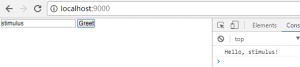
    运行效果:

    为何要用Stimulus

    1. 它通过增加一些效果,使网页看起来更加炫酷。它并不想接管整个前端,相反,它的设计是为了让 HTML 有足够多的行为。这其实是一个普遍的 JavaScript 的思想。
    2. 重要的是,此框架可以与作者的另一个“单页”应用JS客户端框架 Turbolinks 配合的很好。这实现了让web应用可以在移动端达到原生应用的体验。Stimulus是在SPA即单页面应用程序激增的现在应运而生的一个JS框架。
    3. Stimulus 计划将最佳模式汇集到一个适度的小型框架中,围绕三个主要概念:控制,目标,和动作属性。
    4. Stimulus 可以不断刷新页面,只要属性出现或者消失,就会进入页面它适用于DOM的任何更新,无论是整页加载,Turbolinks 页面更改还是Ajax请求。
    5. 上手真的很快,开发者只需要根据 Stimulus 手册花费五分钟就可以写一个控制器。

    SPA(单页应用程序)

    顾名思义,单页 web 应用就是只有一张 web 界面的应用,是加载单个 HTML 页面并在用户与应用程序交互时动态更新该页面的web应用程序。

    优点:主要体现在速度上,它可以给用户更好的使用体验,让用户在 web APP 感受原生 APP 的速度和流畅。

    它快的秘诀在于它同时减少了下载资源的大小(除去第一次加载模板后,后续全部使用 JSON API ),以及极大提高了解析资源的速度(通过 JSON 数据就能更新页面)。

    使用Stimulus不得不知Turbolinks

    Turbolinks 可以在不增加客户端JS框架的复杂性的情况下,获得单页应用程序的性能优势,使用HTML在服务器端呈现您的视图。当 Turbolinks 自动获取网页,不会招致全页面加载的成本。

    关于作者

    Javan Makhmail:供职于 Basecamp,专研于前端开发,网页制作。不仅是 Stimulus,他还有许多的开源项目制作。

    个人主页: GitHub Twitter


    今日推荐英文原文:《Linux is under your hood》作者:Steven J. Vaughan-Nichols

    原文链接:https://www.zdnet.com/article/linux-is-under-your-hood/

    推荐理由:事实上,BMW、雪佛来、本田、特思拉、梅赛德斯,你知道这些品牌的汽车有什么共同特点吗?即使你是一个资深开源爱好者你也不一定知道:它们的汽车都运行着 Linux 操作系统。

    Linux is under your hood

    Way back in 2004, Jonathan Schwartz, then Sun’s chief operating officer, suggested that cars could become software platforms the same way feature phones were. He was right. But, it’s Linux, not Java, which is making the most of “smart cars”.

    That’s because Linux and open-source software are flexible enough to bring a complete software stack to any hardware, be it supercomputer, smartphone, or a car. There are other contenders, such as Blackberry’s QNX and Microsoft IoT Connected Vehicles, but both have lost ground to Linux. Audi is moving to Linux-based Android and Microsoft lost is biggest car customer, Ford, years ago.

    Today, as Dustin Kirkland, then Canonical product VP and now Google Cloud product manager, told me recently, “Ubuntu is in the Tesla and we support support auto manufacturers, but Tesla has gone on its own way. Tesla was so far ahead of the curve it doesn’t surprise me that they did their own thing. But, Canonical expects most car manufacturers will work with Linux distributors to build operating systems that scale out for cars for the masses.”

    Much of that work is done via the Automotive Grade Linux (AGL). This Linux Foundation-based organization is a who’s who of Linux-friendly car manufacturers. Its membership includes Ford, Honda, Mazda, Nissan, Mercedes, Suzuki, and the world’s largest automobile company: Toyota.

    “Automakers are becoming software companies, and just like in the tech industry, they are realizing that open source is the way forward,” said Dan Cauchy, AGL’s executive director, in a statement. Car companies know that while horsepower still sells, customers also want smart infotainment systems, automated safe drive features, and, eventually, self-driving cars.

    I have two young grandsons. I seriously wonder if they’ll learn to drive. Just like many people who no longer know how to drive a stick-shift, I can see people in the next 20 years never bothering with driving classes.

    The AGL is helping this next generation of smart cars arrive with its infotainment source code and software development kit (SDK) AGL Unified Code Base (UCB) 4.0.

    UCB, in turn, is based on Yocto 2.2, a set of tools for creating images for embedded Linux systems. AGL is expanding beyond infotainment to develop software profiles using the UCB for telematics, instrument cluster, and heads-up-display (HUD).

    To support these new projects, AGL has formed a new Virtualization Expert Group (EG-VIRT) to identify a hypervisor and develop an AGL virtualization architecture that will speed up Linux car time-to-market, reduce costs, and increase security.

    The ASL is also now working on car Speech Recognition and Vehicle-to-Cloud connectivity. Led by Amazon Alexa, Nuance and Voicebox, the Speech Expert Group will provide guidance for voice technologies including natural language, grammar development tools, on-board vs cloud based speech, and signal processing for noise reduction and echo cancellation.

    Tesla, however, continues to go its own way. That said, under the hood, Tesla is moving forward. With the 8.1 update (17.24.30), Tesla upgraded its Linux kernel from the archaic 2.6.36 to 4.4.35.

    The AGL isn’t the only group working to integrate Linux and cars. The SmartDeviceLink (SDL) Consortium, which includes Ford, Toyota, Mazda, and Suzuki, is working on Linux-based open-source software for getting smartphones and cars to work together smoothly.

    At the same time, Google has its own Linux for cars: Android Auto. Google is supporting this with the Open Automotive Alliance. Google is hoping to recapture the Open Handset Alliance magic, which led Android to smartphone dominance, in smart cars. This new alliance supporters include Acura, Audi, Cadillac, Ford, GMC, Honda, Hyundai, and many other car manufacturers.

    And it’s not just cars running on Linux. Lyft, the ride-sharing service, has been “running Ubuntu since day one across the board from server to desktop to cloud,” said Kirkland. The company is also using Ubuntu in its autonomous vehicle team.

    Kirkland added, “Top car equipment manufacturers, like Bosch and Continental Auto Parts, increasingly use Ubuntu IoT in their components.” In addition, the GPS device company “TomTom uses Ubuntu on its back end.”

    Looking ahead, Kirkland can see a world where bitheads instead of gearheads will be modifying their car’s software. But, “How much can you legally modify it? Gearheads have been molding for cars for years, but it still has to be street legal. I don’t think we have the infrastructure for a shade-tree software engineer to pass inspection.” Not yet anyway.

    So, whether you’re driving a car, riding in one, or working on its software, Linux is in your automotive future.


    每天推荐一个 GitHub 优质开源项目和一篇精选英文科技或编程文章原文,欢迎关注开源日报。交流QQ群:202790710;电报群 https://t.me/OpeningSourceOrg
←上一页
1 … 249 250 251 252 253 … 262
下一页→

Proudly powered by WordPress