• 开源镜像
  • 开源沙龙
  • 媛宝
  • 猿帅
  • 注册
  • 登录
  • 息壤开源生活方式平台
  • 加入我们

开源日报

  • 2018年5月2日:开源日报第55期

    2 5 月, 2018

    每天推荐一个 GitHub 优质开源项目和一篇精选英文科技或编程文章原文,欢迎关注开源日报。交流QQ群:202790710;电报群 https://t.me/OpeningSourceOrg


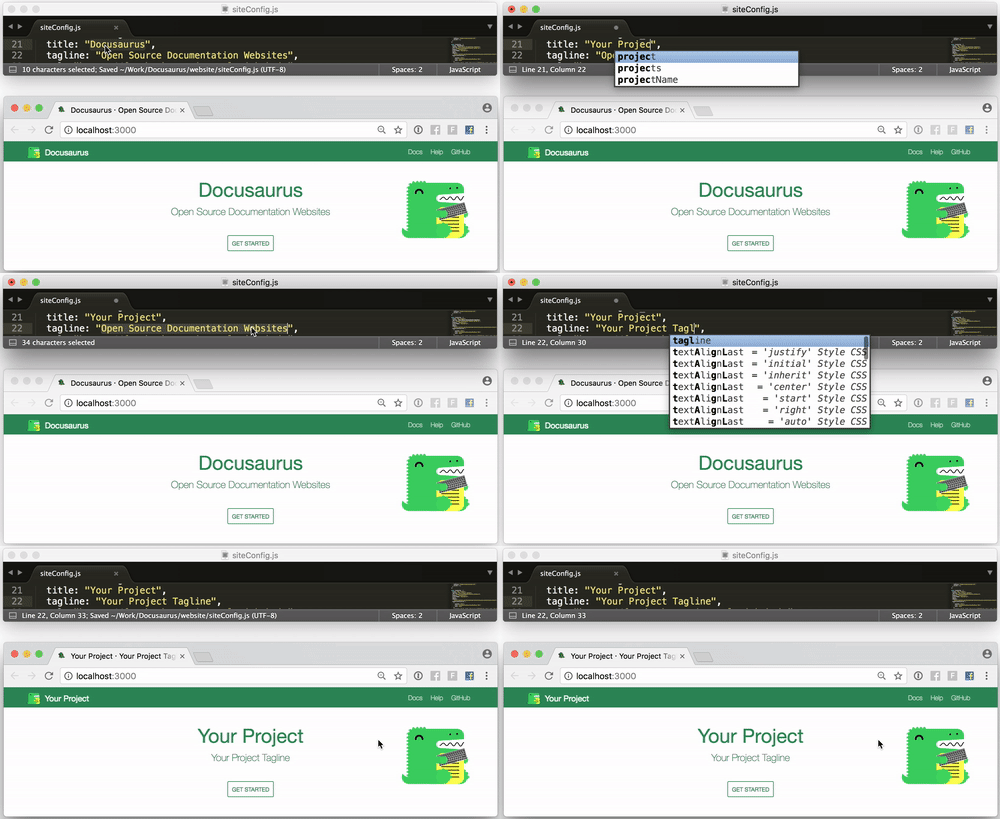
    今日推荐开源项目:《使用Docusaurus轻松构建网站》GitHub 地址:https://github.com/facebook/Docusaurus

    推荐理由:Docusaurus是一个轻松构建,部署和维护开源项目网站的项目,来自 Facebook

    特点 :

    • 启动简单 Docusaurus被构建在尽可能短的时间内容易地启动和运行。我们已经构建了Docusaurus来处理网站构建过程,以便您可以专注于您的项目。
    • 本地化的 Docusaurus 通过CrowdIn 提供本地化支持。通过翻译文档来增强您的国际社区的地位。
    • 可自定义 虽然Docusaurus带有您需要开始的关键页面和部分,包括主页,文档部分,博客和其他支持页面,但它也是可自定义的,以确保您拥有一个独一无二的网站。
    开源周报第0期:GitHub Trending 流行开源项目榜中榜

    今日推荐英文原文:《By the numbers: Python community trends in 2017/2018》作者: Dmitry Filippov

    原文链接:https://opensource.com/article/18/5/numbers-python-community-trends

    推荐理由:Python 开发者发展趋势调查2017-2018版,这是一个在社区里针对 Python 开发者做的调查。可以看到 Python 开发者的一些喜好,以及未来的发展预测。

    By the numbers: Python community trends in 2017/2018

    By the numbers: Python community trends in 2017/2018
    Image by : opensource.com

    This article was co-written with Dmitry Filippov.

    Python is rapidly growing in popularity and drawing more attention in tech news, including reports about Python being used involve more high school girls in computer engineering and a recommendation that intro-level college computing classes teach the programming language. Additionally, Stack Overflow’s 2018 developer survey found Python is the programming language the most people want to learn. Python is seen and used across the web, from simple personal websites to data mining and machine learning at the world’s largest banks.

    What makes Python so special? Who are Python developers? And why is it so popular? To answer these and many other important questions, JetBrains and the Python Software Foundation (PSF) partnered on a developer survey of people who use Python as a primary or supplementary language. Until now, there hasn’t been a Python-specific study to learn how it is being used by diverse developers, what components complement its use, and what makes it one of the most loved languages.

    The survey’s goal was to identify the latest trends in Python and gather insight on how the Python development world looks today. With that motivation in mind, we set out to determine:

    • What’s the current Python 3 adoption rate?
    • How is Python used with other languages?
    • What kinds of projects are Python used for?
    • What are the major types of development among Python users?
    • What are the most popular technologies and tools?
    • Which frameworks and libraries are most common, and how do they complement each other?
    • Who are Python developers?

    The survey was fielded in October 2017. We’ll summarize the results here, and you can dig into more charts and the raw data on the Python Developers Survey 2017 Results website.

    Methodology

    Before we look at the data and insights, it’s important to review the survey’s methodology, including how it was distributed and steps taken to eliminate potential bias and ensure it wasn’t slanted in favor of any specific tool, technology, library, or country.

    We sent the survey to several independent groups, including those subscribed to the PSF mailing lists, blog, Slack, LinkedIn, and Twitter. It was also promoted for several weeks on some of the most visited Python.org pages and publicized via Read the Docs. The majority of responses (62%) came from banners on Python.org; other major sources were the PSF blog and Twitter posts. No product-, service-, or vendor-related channels were used in order to prevent the survey results from slanting in favor of any specific tool or technology.

    The survey was well received by the community and the response rate was higher than predicted. During the collection period, it received more than 10,000 responses. Partial responses and duplicates were filtered out during the post-survey analysis, leaving 9,532 respondents from 150+ countries included in our analysis dataset. The conservative confidence interval that describes the maximum statistical error for such a large sample size is just 1%, which means all results are statistically significant. The main goal for the survey was achieved: we received precise and reliable data!

    pythondata_2-map.png
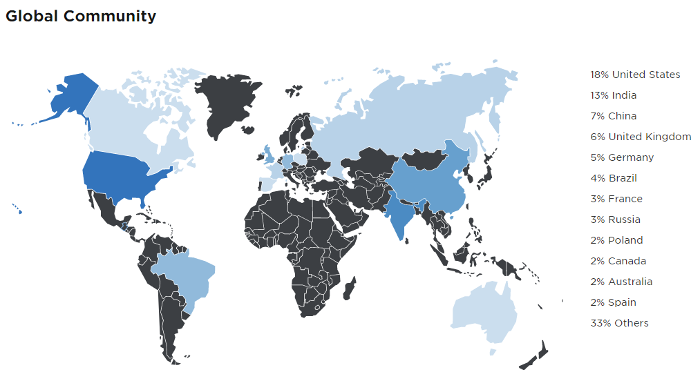
    Python use map

    All images courtesy of the Python Developers Survey 2017 Results website.

    Python developer profile

    We’ll start our journey into the Python world with the most exciting thing about it: The Python community is as diverse as the language and its applications.
    pythondata_3-ages.png

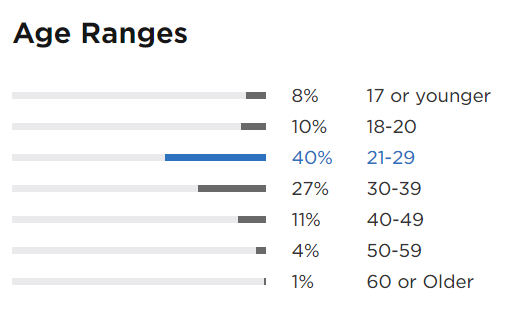
    Ages of Python developers

    Python users range widely in age, but the majority of respondents are in their 20s and a quarter are in their 30s. Interestingly, almost one-fifth of Python users are under age 20. If we compare the Python developers’ age ranges with the general developers age ranges identified by Stack Overflow in its latest survey, the distribution looks similar, with the Python survey reporting slightly more developers under the age of 18. This can be explained by the fact that many students use Python in schools and universities, and it’s a common first language.

    More than half of the respondents work full time as developers, and one in five developers double as data analysts, architects, or team leads. Comparing our data to the Stack Overflow survey, we can see Python developers are less likely than developers in general to be employed full time (52% of Python developers vs. 74% of all developers) and more likely to be self-employed or freelancers (13% of Python developers vs. 9.7% of all developers).

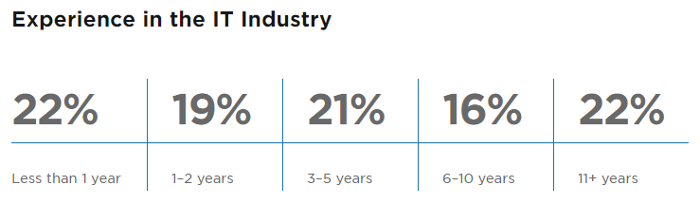
    The Python survey respondents report a wide range of experience; 22% have less than one year of experience, the same percentage has more than 11 years of experience, and there’s a smooth distribution in the middle. This indicates there’s a good balance between newcomers and experienced developers, making Python a sustainable language.
    pythondata_4-experience.png

    Experience of Python developers

    It’s notable that Python has a much higher percentage of newcomers than other languages on average. According to Stack Overflow data, 30% of developers have less than two years of professional experience, compared to 41% in the Python developers survey.

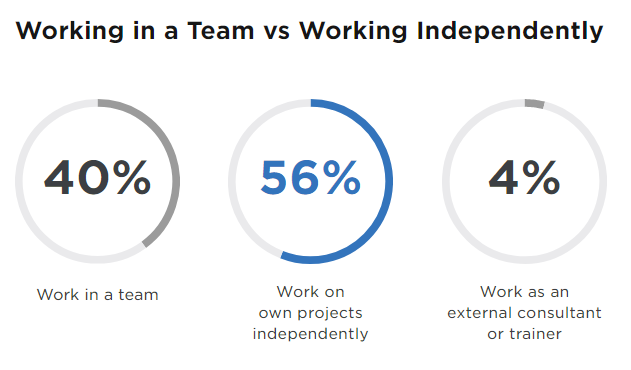
    Large developer groups are uncommon in Python. In our survey, 56% of Python developers say they work on projects independently and 40% work on a team usually of two to seven people. About half the respondents work on one main project with a handful of side projects, while about a quarter focus on one project at a time.
    pythondata_5_team.png

    Working on team vs independently

    In 2016, JetBrains hosted a Python developer survey without the PSF’s involvement. While JetBrains had a large sample size in 2016, its survey was promoted primarily through its own channels, which naturally attracted a larger share of PyCharm users—about 50% users of PyCharm and 50% of other editors. To avoid inevitable bias, the 2016 survey didn’t compare the userbase numbers for different code editors. Even though the 2016 survey results are biased, it is worth comparing some of the 2017 and 2016 survey results. For example, in the 2016 survey, 45% reported working independently on their own projects vs. 51% working on teams. The different ratio in the 2017 survey might be explained by the larger number of newcomers for whom Python is the first language and data scientists who are now on par with the number of web developers using Python.

    Python job opportunities

    As we wrote above, Python was the most desirable language (i.e., the one survey takers are most interested in learning) in Stack Overflow’s 2018 Developer Survey; this is the second consecutive year it’s received that ranking. Python users also ranked it third on the list of most loved programming languages. How do these facts relate to the Python job market?

    Even though the Python Developer Survey didn’t specifically address job popularity, we can gather from other resources that Python developers are in demand for a wide range of jobs all over the world. These include machine learning, databases, data analysis, cloud infrastructure, design, site reliability/testing, web scraping, security, mobile development, APIs, and more. Based on the jobs listed on jobs.python.org, opportunities skew toward international demand, especially in the UK region.

    Searching for “Python developer” on any major job site will yield thousands of job opportunities. In March 2018, the average salary (based on Indeed data) of a U.S. Python developer in the U.S. was $115,835. The high average salary indicates that many companies are competing to hire knowledgeable Python developers and further supports the idea that Python is an in-demand skill.

    Python also has a stake in the best job in America—data science (according to Glassdoor.com in April 2018). Approximately one in five data science jobs involve Python, including the NumPy, pandas, and Matplotlib libraries.

    General Python usage

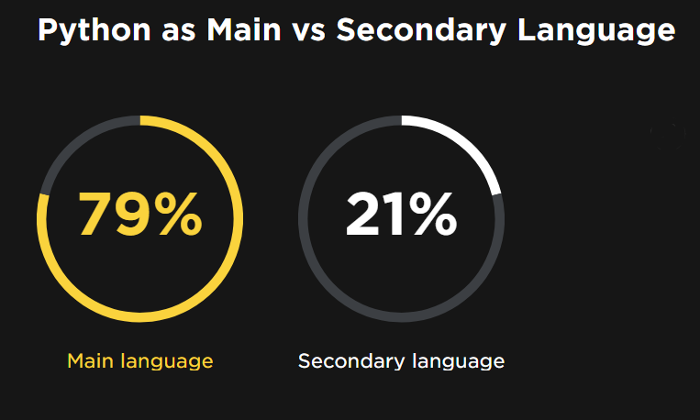
    Almost four out of five Python developers say it’s their main language, a four percent increase from 75% in JetBrains’ 2016 survey.
    pythondata_6-primary-lang.png

    Primary vs. secondary Python use

    Various research shows the number of Python developers, as well as the share of developers using Python as their main language, is growing steadily year by year. In Stack Overflow’s survey, Python popularity has increased from 32% in early 2017 to 38.8% at the end of the year. This can be explained by the rapidly growing popularity of Python for data science, as this segment of users is growing much faster than the others.

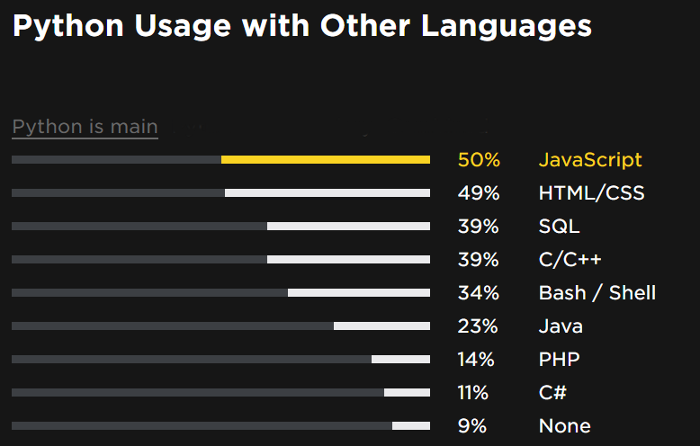
    Python is often combined with other languages:
    pythondata_7-other-lang.png

    Languages used with Python

    Half of all developers using Python as their main language also use JavaScript. JavaScript is used by 79% of web developers but only 39% of those involved in data analysis or machine learning.

    The breakdown is slightly different for those who use Python as their secondary language, as fewer of them use JavaScript (46%) and many more use C/C++ (42%), Java (41%), and C# (24%).

    Types of Python development

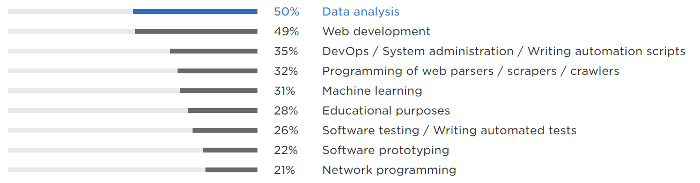
    To identify the most popular types of Python development and their intersections, we asked two similar questions: “What do you use Python for?” to which respondents could select multiple answers, and “What do you use Python for the most?” with only one possible answer. The results showed scientific development is now as popular as web development: half the respondents work on data science projects and half do web development.
    pythondata_8-uses.png

    Python uses

    Responses differ depending on whether the respondent uses Python as their main or secondary language: 54% of those who use Python as their main language are involved in web development compared to 33% of those who say Python is their secondary language. The difference is less significant for data analysis, machine learning, and other types of development.

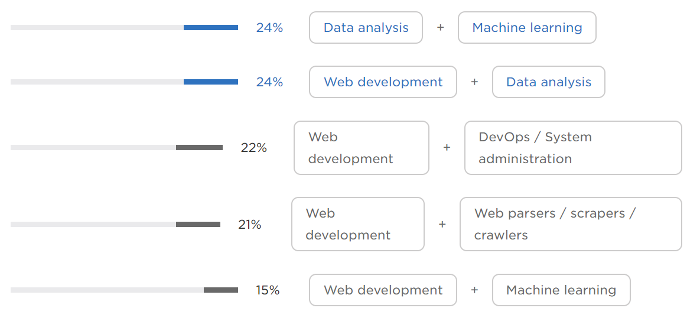
    Many Python developers wear multiple hats. The roles they combine most often are:
    pythondata_9-combined-roles.png

    Combined roles

    The intersection of data analysis and machine learning was expected, but the overlaps between web development and data analysis/machine learning are noteworthy.

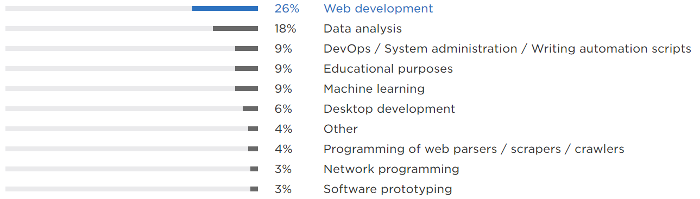
    When asked about the primary type of development they do, 26% of Python users say web development, outpacing data analysis (reported by 18%), by a wide margin.
    pythondata_10-primary-roles.png

    Primary roles

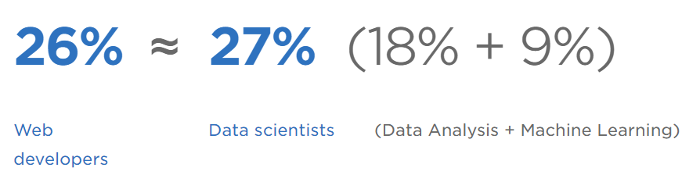
    However, if we combine the 18% who do data analysis with the nine percent whose primary role is machine learning, we learn 27% are primarily doing scientific development. That means there are as many web developers as there are data scientists using Python.
    pythondata_11-primary-use.png

    Web vs. data science

    Interestingly enough, when JetBrains did its Python developers survey in 2016, 38% of respondents identified as web developers and only 21% as scientific developers. That could be evidence of rapid growth of data scientists among Python developers.

    Comparing the trends among those using Python as their main language vs. a secondary language, web development has the biggest gap (29% main vs 15% secondary). The difference is much smaller for data analysis and machine learning. Conversely, more DevOps and system administrators are using Python as a secondary language (13%) than a main language (8%).

    Is data science taking Python by storm?

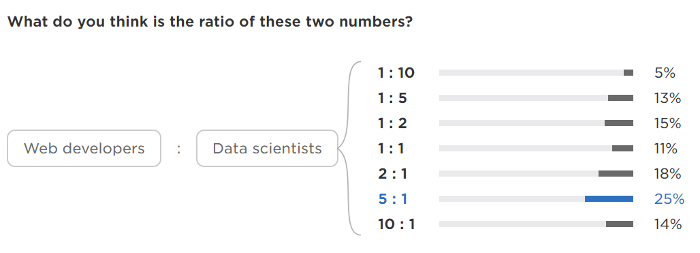
    The most intriguing question in the Python developers survey concerned the ratio of web developers to data scientists in the Python world. We asked respondents to estimate the ratio between web developers and data scientists using Python. Respondents could answer based on their own experience, beliefs, and general “gut feeling.” Because we explicitly asked about types of development, and the sample size is large enough to be statistically significant, we could compare the community’s perception against reality.
    pythondata_12_web-vs-datasci.png

    Perceived ratio of web vs. data science

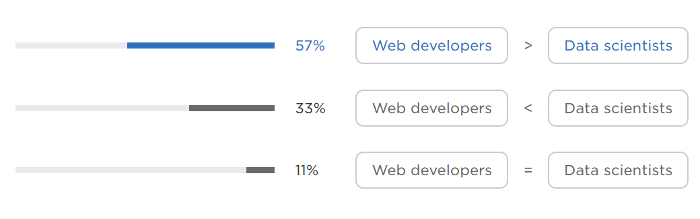
    More respondents (57%) thought web developers were more common than data scientists, while only 33% assumed the opposite.
    pythondata_13_web-vs-datasci2.png

    Perceived ratio of web vs. data science

    Based on the data reported in the previous section (with 26% reporting web development and 27% reporting scientific development as their primary activity), the true ratio is 1:1.

    Only one in nine respondents guessed this correctly; most underestimated the number of data science Python users. Web development is generally perceived as the major application for Python. While this was true a couple of years ago, the number of Python data scientists is growing rapidly and is already on par with the number of web developers.

    Python 2 vs. Python 3

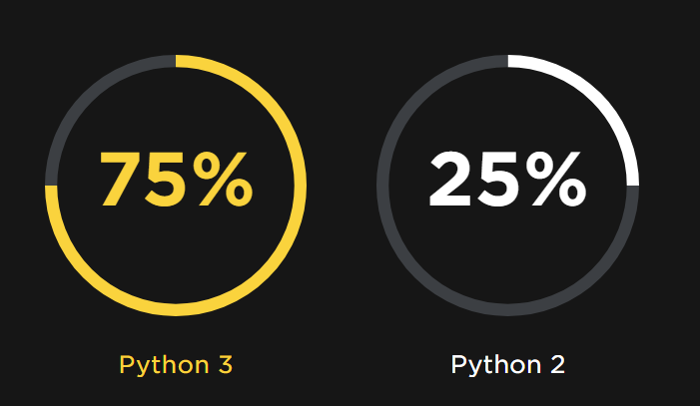
    We asked, “Which version of Python do you use the most?” Python 3 is a strong leader at 75%, and Python 2 is used as the main interpreter by only 25%. Python 3 is growing rapidly; in the 2016 survey, 60% were using Python 2 and 40% Python 3. Python 2 use is declining as it’s not actively developed, doesn’t get new features, and will no longer be maintained after 2020.

    It’s notable that 70% of web developers are using Python 3, compared to 77% of data analysts and 83% of machine learning specialists. This may be because many web developers still have to maintain legacy code while transitioning to Python 3, and many data analysts and machine learning specialists have joined the Python ecosystem more recently and went straight to Python 3.
    pythondata_14-python2or3.png

    Python 2 vs Python 3

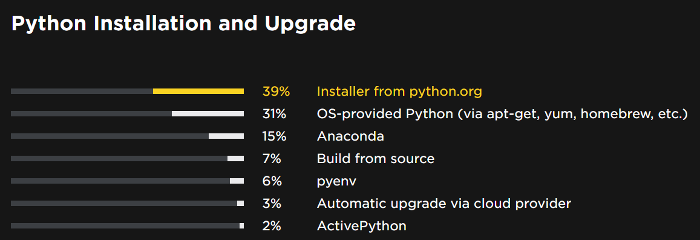
    We also asked developers how they install and update their Python installations.
    pythondata_15-installation.png

    Installation and update methods

    Seventy percent install Python from python.org or with operating system-provided package managers like APT and Homebrew.

    Python frameworks, libraries, and technologies

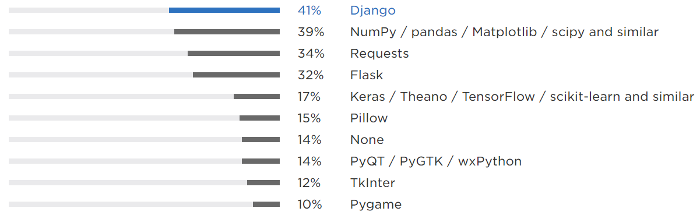
    Django is the most popular framework; it’s used by 41% of Python developers.
    pythondata_16-frameworks.png

    Python frameworks

    Scientific packages such as NumPy, pandas, and Matplotlib, combined, are in close second at 39%. Other popular frameworks and libraries are Requests, Flask, Keras/Theano/TensorFlow/Scikit-learn, and similar. TensorFlow and Django are on StackOverflow’s list of the most loved and wanted technologies.

    Django was selected as the top framework by 76% of web developers compared to only 31% of those working in data science. Curiously, 29% of web developers are using scientific libraries. This corroborates a strong overlap between the two roles.
    pythondata_17-technologies.png

    Python technologies

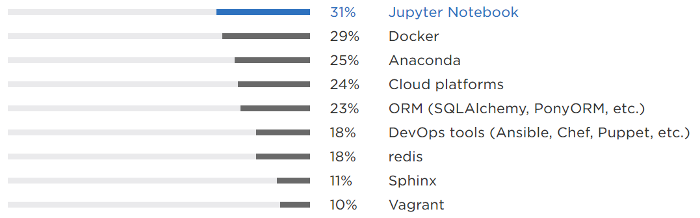
    When asked about technologies used in addition to Python, Jupyter Notebook ranked highest at 31%, which makes sense given the large number of developers involved in data science. Docker trails by only two percent at 29%. Breaking this down by roles, Docker is used by 47% of those mostly involved in web development and only 23% of data scientists. Similarly, cloud platforms such as Amazon Web Services, Google App Engine, Heroku, and others are used twice as often by web developers than by data scientists.

    Comparing 2016’s survey results with 2017’s, Django and Flask, the two most popular web frameworks, have lost share. (Django was used by 51% in 2016 and 41% in 2017; Flask by 40% in 2016 and 32% in 2017). At the same time, use of scientific library and technology frameworks have grown. In 2016, Anaconda, NumPy, and Matplotlib (combined) were used by 36%; at the end of 2017, NumPy, pandas, Matplotlib, SciPy, and similar were used by 39%, and Anaconda was used by 25%.
    pythondata_18-cloud-platform.png

    cloud platforms

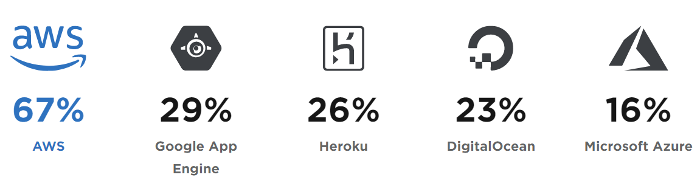
    When asked which cloud platforms they use, cloud-using respondents ranked AWS first at 67%. Google App Engine, Heroku, and DigitalOcean are used far less often. AWS also rates high on the list of most loved and wanted platforms in Stack Overflow’s survey. We were limited on the number of cloud platforms we could list as potential answers; the “other” category collected 13% of responses, including Linode, PythonAnywhere, OpenShift, and OpenStack.

    Tools and features for Python development

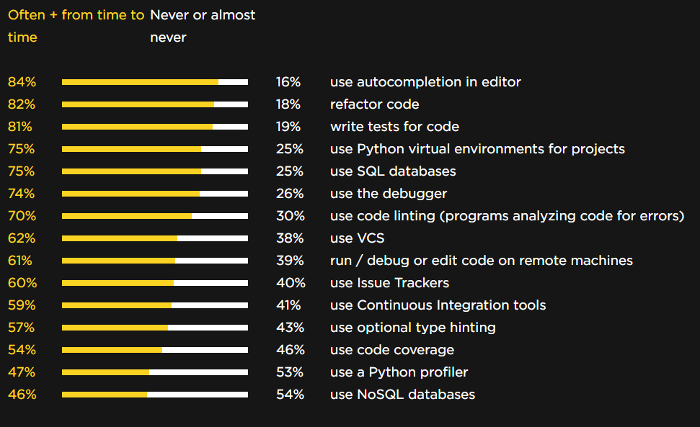
    When we asked about the use of development practices, tools, and features in Python development, the top spots were occupied by code autocompletion, code refactoring, writing unit tests, and using virtual environments for Python projects. NoSQL databases, Python profilers, and code coverage tools were among the most rarely used. These results are very similar to 2016’s data:
    pythondata_19-tools.png

    Tools and features

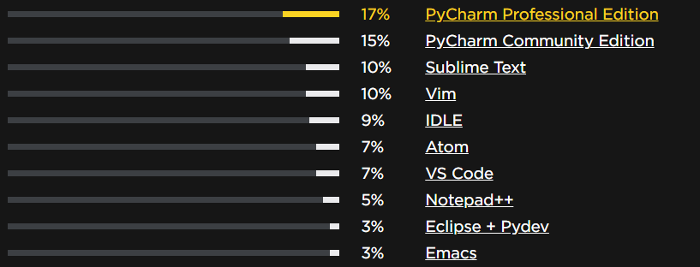
    To identify the most popular editors and IDEs, we asked two questions: “What editors/IDEs have you considered for use in your Python development?” with multiple answers allowed, and a single-answer question, “What is the main editor you use for your current Python development?” Based on more than 8,000 replies to this question, PyCharm is the most popular tool, followed by Sublime, Vim, IDLE, Atom, and VS Code.
    pythondata_20-ides.png

    Editors and IDEs

    Note: We took a number of steps to eliminate bias and ensure the survey was not slanted in favor of any specific tool. To learn more about the survey methodology and the channels used to distribute the survey, please refer to the raw data section of the survey results website.

    Web developers have slightly different editor preferences from data scientists. Web developers highly prefer PyCharm Professional Edition, Sublime text, and Vim, while data scientists clearly prefer PyCharm Community Edition, Jupyter Notebook, and Spyder.

    When we asked, “What editor(s)/IDE(s) have you considered for use in your Python development?” we learned web developers most often consider Sublime Text (47%), followed by Vim (39%) and Atom (32%). Scientific developers most often consider Jupyter Notebook (42%), followed by PyCharm Community Edition (39%), Sublime Text (31%), and Vim (26%).

    We also found that most developers use their editor daily, and about one in five use their editor weekly.

    Survey raw data

    Consistent with the open source philosophy of Python and its community, we have made the raw data available to the public and we welcome additional analyses and conclusions. We intend to repeat the survey in 2018 and future years. Our goal is to keep the survey similar year to year so longitudinal data analysis can be done.

    Before dissecting the raw data, please note the following: data are anonymized, with no personal information or geolocation details. Moreover, all open-ended fields have been pruned to prevent identification of any individual respondent by their verbatim comments. To help others better understand the logic of the survey, we are sharing the dataset, the survey questions, and all the survey logic in English. We used different ordering methods for answer options (alphabetic, randomize, direct). The order in which the answer options were used is specified in each question.

    We’ll be glad to learn about your findings! Please share them on Twitter or other social media mentioning @jetbrains‏ and @ThePSF with the #pythondevsurvey2017 hashtag. We’re also open to suggestions and feedback so we can improve the survey next time. Feel free to open issues here with any comments or questions.

    Key takeaways

    The 2017 Python developer survey was a benchmark for the community. Some of the more important takeaways include:

    • The adoption rate of Python 3 is already at 75% and quickly growing.
    • Currently there are as many Python developers working in data science as in web development, but the rapid growth of Python among data scientists indicates parity may change quickly.
    • For four out of five developers using Python, it is their main language.
    • Django, NumPy, pandas, and Matplotlib are the most popular frameworks and libraries used by Python developers. Jupyter Notebook and Docker are the most popular technologies used with Python. AWS is the most popular cloud platform.
    • PyCharm, Sublime, VIM, Atom, and VS Code are the most commonly used Python editors.
    • Half of those who use Python as their primary language also use JavaScript and HTML/CSS. Python is also used often with SQL, Bash/Shell, C/C++, and Java.

    We hope the survey findings will clarify the current state of the Python developer community, see the big picture, and answer some questions.


    每天推荐一个 GitHub 优质开源项目和一篇精选英文科技或编程文章原文,欢迎关注开源日报。交流QQ群:202790710;电报群 https://t.me/OpeningSourceOrg
  • 2018年5月1日:开源日报第54期

    1 5 月, 2018

    每天推荐一个 GitHub 优质开源项目和一篇精选英文科技或编程文章原文,欢迎关注开源日报。交流QQ群:202790710;电报群 https://t.me/OpeningSourceOrg
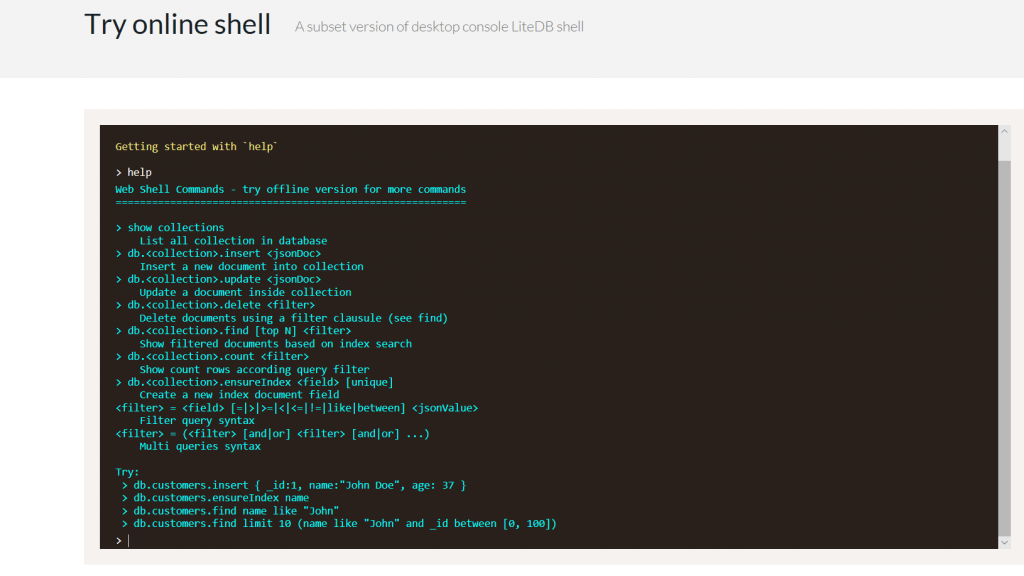

    今日推荐开源项目:《轻量快速的嵌入式数据库 LiteDB》

    推荐理由:LiteDB 是一个单数据文件.NET NoSQL的文档存储。它是一个小型的,轻量,快速的NoSQL嵌入式数据库,可以方便的存储和搜索文档。

    特点 :

    • Serverless NoSQL 文档存储
    • 类似于 MongoDB 的简单 API
    • 100% C# 代码,支持.NET 3.5 / .NET 4.0 / NETStandard 1.3 / NETStandard 2.0,单 DLL (小于 300kb)
    • 支持线程和进程安全
    • 支持文档/操作级别的 ACID
    • 支持写失败后的数据还原 (日志模式)
    • 可使用 DES (AES) 加密算法进行数据文件加密
    • 可使用特性或 fluent 映射 API 将你的 POCO类映射为 BsonDocument
    • 可存储文件与流数据 (类似 MongoDB 的 GridFS)
    • 单数据文件存储 (类似 SQLite)
    • 支持基于文档字段索引的快速搜索 (每个集合支持多达16个索引)
    • 支持 LINQ 查询
    • Shell 命令行
    • 与 SQLite对比相当快
    • 开源,对所有人免费 – 包括商业应用
    • 可以从 NuGet 安装:Install-Package LiteDB

    在线测试:

    开源周报第0期:GitHub Trending 流行开源项目榜中榜
    开源周报第0期:GitHub Trending 流行开源项目榜中榜

    相关资源:


    一个GUI(图形用户界面)查看工具 https://github.com/falahati/LiteDBViewer

    一个GUI(图形用户界面)编辑工具 https://github.com/JosefNemec/LiteDbExplorer

    Lucene.NET目录 https://github.com/sheryever/LiteDBDirectory

    支持LINQPad https://github.com/adospace/litedbpad

    支持F# https://github.com/Zaid-Ajaj/LiteDB.FSharp


    今日推荐英文原文:《Should Software Engineers Care About Ethics?》作者:Mae Capozzi

    原文链接:https://digitalculturist.com/should-software-engineers-care-about-ethics-8b1d98a62b66

    推荐理由:软件工程师应该关注伦理吗?事实上,软件开发的过程会遇到非常多来自道德和伦理的挑战,你的选择是什么?

    Should Software Engineers Care About Ethics?

    In his essay, “Design’s Lost Generation,” Mike Monteiro describes how he shocked a crowd of designers at a San Francisco tech conference by suggesting design — like medicine, law, and even driving — should be regulated:

    “A year ago I was in the audience at a gathering of designers in San Francisco…at some point in the discussion I raised my hand and suggested…that modern design problems were very complex. And we ought to need a license to solve them.”

    In response to the designers’ surprise, Monteiro asked:

    “How many of you would go to an unlicensed doctor?” I asked. And the room got very quiet.

    “How many of you would go to an unaccredited college?” I asked. And the room got even quieter.

    Monteiro understands that software has become too deeply embedded in everything we do for it to remain unregulated. However, companies like Facebook, Uber, and Volkswagen have proven that they do not consider the ethical implications of their products and services by focusing on revenue rather than the safety and security of their users. For example, Facebook has revealed massive amounts of user data to advertisers and companies like Cambridge Analytica without user consent. Uber built software that helped them evade officials in cities where Uber’s services were still illegal. Volkswagen wrote software to cheat emissions tests — tests meant to protect the environment and the people who live in it.

    “Software has become too deeply embedded in everything we do for it to remain unregulated.”

    We have placed our data and our lives in the hands of people unequipped with a guiding set of ethical principles to dictate how they should approach the consequences of the features they are building. As the last line of defense against corrupt products, software engineers need to develop an ethical framework that prevents us from harming our users and finding ourselves complicit in corruption.

    Executives and product managers hold most of the decision-making power when deciding whether a company should build a product or feature. Unfortunately, we’ve become obsessed with shipping features as quickly as possible in a system that values speed over quality. CEOs frequently make decisions based on the promise of securing more funding from venture capitalists, as opposed to assuring the safety and health of their user base.

    While some engineers are lucky enough to work for a company that values ethics, most don’t have that experience. I’d wager that many of us will find ourselves in at least one situation where we need to decide between building features that will hurt our users or refusing and potentially losing our jobs in the process. To prevent hurting users, we can study the actions of Uber, Volkswagen, and Facebook to encourage software engineers to evaluate the ethics of the future products they develop.

    In September of 2015, the Environmental Protection Agency found that many diesel cars built by Volkswagen sidestepped environmental regulations. The BBC reported that “the EPA has said that the engines had computer software that could sense test scenarios by monitoring speed, engine operation, air pressure and even the position of the steering wheel.” Volkswagen’s software could detect when a vehicle was undergoing testing and lower the diesel emissions during that period, thereby violating the Clean Air act.

    The scandal had consequences for the engineers and managers who developed the software. Oliver Schmidt, the former general manager for Volkswagen’s Engineering and Environmental Office, received 7 years in prison for his involvement in the scandal. James Liang was sentenced to 40 months in prison for helping to develop the software that allowed Volkswagen to cheat emissions tests. According to MIT news, the “excess emissions generated by 482,000 affected vehicles sold in the U.S. will cause approximately 60 premature deaths across the U.S.” The software Volkswagen built had fatal consequences, And because engineers did not step up to block the decisions made by the corporation, they were also held accountable for their actions.

    Like Volkswagen, Uber also resorted to illegal behavior to gain a leg up on its competition. In March of 2017, The New York Times reported that Uber had written software as early as 2014 called Greyball, which enabled them to operate in cities like Portland, Oregon where the ride-hailing service was not yet legal. When an official trying to crack down on Uber’s illegal activity tried to hail a ride, Greyball spun up a fake instance of its application populated with “ghost” cars. If an Uber driver accepted a ride with one of those officials, the driver would receive a call instructing them to cancel the ride.

    After the press caught on, Uber tried to spin Greyball as software designed to protect its drivers from potential threats, not just to evade officials:

    This program denies ride requests to users who are violating our terms of service — whether that’s people aiming to physically harm drivers, competitors looking to disrupt our operations, or opponents who collude with officials on secret ‘stings’ meant to entrap drivers.

    The statement tries to make it seem like Uber is the victim in this case. It has a tone of snide derision, especially with the word ‘stings’ in quotation marks. In the statement, Uber doesn’t apologize or admit to any wrongdoing, even though the software is used to break the law. Additionally, Uber uses the excuse of protecting drivers to evade the law, even though it’s well-known that Uber does little to protect or support their drivers.

    While Facebook’s actions have not directly taken lives, the company has been collecting and sharing private user data for years. In 2018, the story brokethat Cambridge Analytica, a data analytics firm, used a loophole in Facebook’s API to access Facebook data from more than 87 million user accounts. The API not only exposed access to a user’s freely-given data, but also data about a user’s “friends” without their consent. Facebook’s documentation dictated that although accessing user data non-consensually was possible, application developers should not do it.

    Cambridge Analytica should not have taken advantage of the loophole in the API, but the brunt of the blame lies with Facebook. Facebook developers exposed personal data not freely given by the user. They enabled the ethical breach that allowed Cambridge Analytica to build a massive marketing database and share that data with political campaigns.

    “The time has come for engineers to take responsibility for their creations.”

    Vox’s Aja Romano explains how the breach of user trust happened:

    The factors that allowed Cambridge Analytica to hijack Facebook user data boiled down to one thing: no one involved in the development and deployment of this technology stopped to consider what the results might look like at scale.

    The software engineers who built the API, the product managers who came up with the feature, and the management at Facebook didn’t think about the ethical implications of the software they were building. They didn’t have a framework to turn to and did not know how to determine whether what they were building was ethical, nor did they try to find out.

    The time has come for engineers to take responsibility for their creations. We can no longer sustain a myopic view of the products we are creating. We can no longer only focus on writing elegant and well-tested code, or shipping the feature on time. We need to understand the context of what we’re building and to validate that it won’t harm our users.

    We carefully select the parts that make up our applications. We might choose a framework that will help us write elegant code and we might carefully write tests to prevent our code from breaking. But what do we see when we step back and evaluate our feature in the context of the larger application? Does it protect and serve its users? Or does it shave years off of people’s lives? Does it negatively influence an election? It doesn’t matter if the parts that make up an application are beautiful. All that matters is whether the product is serving its users in a safe and ethical manner.

    We need software engineers to start thinking deeply about the ethical implications of the world they are creating. Computer science majors should take courses in the humanities. Software should be regulated. Engineers should develop a shared set of ethics that they can turn to when they are asked to build something illegal or unethical, like they have been by Uber, Volkswagen, Facebook, and many other companies. Lives depend on it.


    Mae Capozzi is an English Major turned software engineer living Brooklyn, NY. Her interests include reading, writing, coding, and playing music. Writing clean, maintainable, and ethical code is important to her.


    每天推荐一个 GitHub 优质开源项目和一篇精选英文科技或编程文章原文,欢迎关注开源日报。交流QQ群:202790710;电报群 https://t.me/OpeningSourceOrg

  • 2018年4月30日:开源日报第53期

    30 4 月, 2018

    每天推荐一个 GitHub 优质开源项目和一篇精选英文科技或编程文章原文,欢迎关注开源日报。交流QQ群:202790710;电报群 https://t.me/OpeningSourceOrg


    今日推荐开源项目:《parcel——快速给你的网络应用打包》

    GitHub地址:https://github.com/parcel-bundler/parcel

    推荐理由:非常快,不需要配置的网络应用打包器。

    特点:

    非常快——打包时间快,多核编译,一个文件系统的存储器的重建甚至只需要花费一次重启的时间就能完成。创造性的支持JS, CSS, HTML, file assets,而且不需要安装插件。在使用Babel, PostCSS, PostHTML甚至no_module时可以在需要时自动转变模块。在使用动态import()声明时没有配置代码的分离。建立时支持热插拔。友好的记录错误的方式——语法会自动高亮代码框架帮助找出问题

    使用parcel的优点:

    在使用其他打包器时都会有配置文件和插件,配置文件会占用很多时间,它们不仅复杂而难以调配,而且在每个应用打包时都要再配置一次,而parcel的零配置可以让你只要给它一个入口文件,就可以让它做正确的事。

    parcel运用多核处理器去平行编译你的代码,这会在开始打包时带来巨大的速度提升,而且它会用自己的文件系统存储编译后的代码,使得随后的运行更为迅速。

    现存的打包器一般都会在运行时在一个文件内进行大量的代码转换与生成,这会导致效率的下降,相反parcel使用抽象语法树AST来进行转换,保证每个文件只需要一种语法解析,许多转换,一条代码生成。

    parcel的工作原理:

    许多打包器都是基于JS文件与一种其他格式,但是parcel不会知道文件的格式,它将不需要配置的对你期望的任何文件展开工作。有许多格式的文件会在parcel中有特别的定义——如何将他们转变成特殊的文件类型。

    parcel会将一个资源树转化为一个打包树,在资源树完成时,资源将会被放入打包树中,一个包将会创建给入口文件,而子包会按照动态输入来创建,这导致了代码的分离,子包在文件以不同格式输入时也会被创建。如果一个资源需要更多的包,它将被运到打包树中最近的资源来源,保证一个文件只有一个包。

    在包树生成后,每个包将被依照文件格式决定的打包器写入文件,这些打包器知道如何联合这些文件代码为最终在浏览器上读取的文件。


    今日推荐英文原文:《Writing a Simple Linux Kernel Module》作者:Robert W. Oliver II

    原文链接:https://blog.sourcerer.io/writing-a-simple-linux-kernel-module-d9dc3762c234

    推荐理由:Linux 提供了强大的可扩展的 API ,但是有时候又是不够的,跟某些硬件交互或者一些系统操作可能需要一个 Linux 内核模块

    Writing a Simple Linux Kernel Module

    Linux provides a powerful and expansive API for applications, but sometimes that’s not enough. Interacting with a piece of hardware or conducting operations that require accessed to privileged information in the system require a kernel module.

    A Linux kernel module is a piece of compiled binary code that is inserted directly into the Linux kernel, running at ring 0, the lowest and least protected ring of execution in the x86–64 processor. Code here runs completely unchecked but operates at incredible speed and has access to everything in the system.

    Not for Mere Mortals

    Writing a Linux kernel module is not for the faint of heart. By altering the kernel, you risk data loss and system corruption. Kernel code doesn’t have the usual safety net that regular Linux applications enjoy. If you have a fault, it will lock up the entire system.

    To make matters worse, your issue may not become immediately apparent. Your module locking up immediately upon loading is probably the best-case scenario for failure. As you add more code to your module, you run the risk of introducing runaway loops and memory leaks. If you’re not careful, these can continue to grow as your machine continues to run. Eventually important memory structures and even buffers can be overwritten.

    Traditional application development paradigms can be largely discarded. Other than loading and unloading of your module, you’ll be writing code that responds to system events rather than operates in a sequential pattern. With kernel development, you’re writing APIs, not applications themselves.

    You also have no access to the standard library. While the kernel provides some functions like printk (which serves as a replacement for printf) and kmalloc (which operates in a similar fashion to malloc), you are largely left to your own devices. Additionally, when your module unloads, you are responsible for completely cleaning up after yourself. There is no garbage collection.

    Prerequisites

    Before we get started, we need to make sure we have the correct tools for the job. Most importantly, you’ll need a Linux machine. I know that comes as a complete surprise! While any Linux distribution will do, I am using Ubuntu 16.04 LTS in this example, so if you’re using a different distribution you may need to slightly adjust your installation commands.

    Secondly, you’ll need either a separate physical machine or a virtual machine. I prefer to do my work in a virtual machine, but this is entirely up to you. I don’t suggest using your primary machine because data loss can occur when you make a mistake. I say when, not if, because you undoubtedly will lock up your machine at least a few times during the process. Your latest code changes may still be in the write buffer when the kernel panics, so it’s possible that your source files can become corrupted. Testing in a virtual machine eliminates this risk.

    And finally, you’ll need to know at least some C. The C++ runtime is far too large for the kernel, so writing bare metal C is essential. For interaction with hardware, knowing some assembly might be helpful.

    Installing the Development Environment

    On Ubuntu, we need to run:

    apt-get install build-essential linux-headers-`uname -r`

    This will install the essential development tools and the kernel headers necessary for this example.

    The examples below assume you are running as a regular user and not root, but that you have sudo privileges. Sudo is mandatory for loading kernel modules, but we want to work outside of root whenever possible.

    Getting Started

    Let’s start writing some code. Let’s prepare our environment:

    mkdir ~/src/lkm_example
    cd ~/src/lkm_example

    Fire up your favorite editor (in my case, this is vim) and create the file lkm_example.c with the following contents:

    #include <linux/init.h>
    #include <linux/module.h>
    #include <linux/kernel.h>
    MODULE_LICENSE(“GPL”);
    MODULE_AUTHOR(“Robert W. Oliver II”);
    MODULE_DESCRIPTION(“A simple example Linux module.”);
    MODULE_VERSION(“0.01”);
    static int __init lkm_example_init(void) {
     printk(KERN_INFO “Hello, World!\n”);
     return 0;
    }
    static void __exit lkm_example_exit(void) {
     printk(KERN_INFO “Goodbye, World!\n”);
    }
    module_init(lkm_example_init);
    module_exit(lkm_example_exit);

    Now that we’ve constructed the simplest possible module, let’s example the important parts in detail:

    · The “includes” cover the required header files necessary for Linux kernel development.

    · MODULE_LICENSE can be set to a variety of values depending on the license of the module. To see a full list, run:
    grep “MODULE_LICENSE” -B 27 /usr/src/linux-headers-`uname -r`/include/linux/module.h

    · We define both the init (loading) and exit (unloading) functions as static and returning an int.

    · Note the use of printk instead of printf. Also, printk doesn’t share the same parameters as printf. For example, the KERN_INFO, which is a flag to declare what priority of logging should be set for this line, is defined without a comma. The kernel sorts this out inside the printk function to save stack memory.

    · At the end of the file, we call module_init and module_exit to tell the kernel which functions are or loading and unloading functions. This gives us the freedom to name the functions whatever we like.

    We can’t compile this file yet, though. We need a Makefile. This basic example will work for now. Note that make is very picky about spaces and tabs, so ensure you use tab instead of space where appropriate.

    obj-m += lkm_example.o
    all:
     make -C /lib/modules/$(shell uname -r)/build M=$(PWD) modules
    clean:
     make -C /lib/modules/$(shell uname -r)/build M=$(PWD) clean

    If we run “make”, it should compile your module successfully. The resulting file is “lkm_example.ko”. If you receive any errors, check that your quotation marks in the example source file are correct and not pasted accidentally as UTF-8 characters.

    Now we can insert the module to test it. To do this, run:

    sudo insmod lkm_example.ko

    If all goes well, you won’t see a thing. The printk function doesn’t output to the console but rather the kernel log. To see that, we’ll need to run:

    sudo dmesg

    You should see the “Hello, World!” line prefixed by a timestamp. This means our kernel module loaded and successfully printed to the kernel log. We can also check to see if the module is still loaded:

    lsmod | grep “lkm_example”

    To remove the module, run:

    sudo rmmod lkm_example

    If you run dmesg again, you’ll see “Goodbye, World!” in the logs. You can also use lsmod again to confirm it was unloaded.

    As you can see, this testing workflow is a bit tedious, so to automate this we can add:

    test:
     sudo dmesg -C
     sudo insmod lkm_example.ko
     sudo rmmod lkm_example.ko
     dmesg

    at the end of our Makefile and now run:

    make test

    to test our module and see the output of the kernel log without having to run separate commands.

    Now we have a fully functional, yet completely trivial, kernel module!

    A Bit More Interesting

    Let’s dive a bit deeper. While kernel modules can accomplish all sorts of tasks, interacting with applications is one of their most common uses.

    Since applications are restricted from viewing the contents of kernel space memory, applications must use an API to communicate with them. While there are technically multiple ways to accomplish this, the most common is to create a device file.

    You’ve likely interacted with device files before. Commands that use /dev/zero, /dev/null, or similar are interacting with a device named “zero” and “null” that return the expected values.

    In our example, we’ll return “Hello, World”. While this isn’t a particularly useful function to provide applications, it will nevertheless show the process of responding to an application via a device file.

    Here’s our complete listing:

    #include <linux/init.h>
    #include <linux/module.h>
    #include <linux/kernel.h>
    #include <linux/fs.h>
    #include <asm/uaccess.h>
    MODULE_LICENSE(“GPL”);
    MODULE_AUTHOR(“Robert W. Oliver II”);
    MODULE_DESCRIPTION(“A simple example Linux module.”);
    MODULE_VERSION(“0.01”);
    #define DEVICE_NAME “lkm_example”
    #define EXAMPLE_MSG “Hello, World!\n”
    #define MSG_BUFFER_LEN 15
    /* Prototypes for device functions */
    static int device_open(struct inode *, struct file *);
    static int device_release(struct inode *, struct file *);
    static ssize_t device_read(struct file *, char *, size_t, loff_t *);
    static ssize_t device_write(struct file *, const char *, size_t, loff_t *);
    static int major_num;
    static int device_open_count = 0;
    static char msg_buffer[MSG_BUFFER_LEN];
    static char *msg_ptr;
    /* This structure points to all of the device functions */
    static struct file_operations file_ops = {
     .read = device_read,
     .write = device_write,
     .open = device_open,
     .release = device_release
    };
    /* When a process reads from our device, this gets called. */
    static ssize_t device_read(struct file *flip, char *buffer, size_t len, loff_t *offset) {
     int bytes_read = 0;
     /* If we’re at the end, loop back to the beginning */
     if (*msg_ptr == 0) {
     msg_ptr = msg_buffer;
     }
     /* Put data in the buffer */
     while (len && *msg_ptr) {
     /* Buffer is in user data, not kernel, so you can’t just reference
     * with a pointer. The function put_user handles this for us */
     put_user(*(msg_ptr++), buffer++);
     len--;
     bytes_read++;
     }
     return bytes_read;
    }
    /* Called when a process tries to write to our device */
    static ssize_t device_write(struct file *flip, const char *buffer, size_t len, loff_t *offset) {
     /* This is a read-only device */
     printk(KERN_ALERT “This operation is not supported.\n”);
     return -EINVAL;
    }
    /* Called when a process opens our device */
    static int device_open(struct inode *inode, struct file *file) {
     /* If device is open, return busy */
     if (device_open_count) {
     return -EBUSY;
     }
     device_open_count++;
     try_module_get(THIS_MODULE);
     return 0;
    }
    /* Called when a process closes our device */
    static int device_release(struct inode *inode, struct file *file) {
     /* Decrement the open counter and usage count. Without this, the module would not unload. */
     device_open_count--;
     module_put(THIS_MODULE);
     return 0;
    }
    static int __init lkm_example_init(void) {
     /* Fill buffer with our message */
     strncpy(msg_buffer, EXAMPLE_MSG, MSG_BUFFER_LEN);
     /* Set the msg_ptr to the buffer */
     msg_ptr = msg_buffer;
     /* Try to register character device */
     major_num = register_chrdev(0, “lkm_example”, &file_ops);
     if (major_num < 0) {
     printk(KERN_ALERT “Could not register device: %d\n”, major_num);
     return major_num;
     } else {
     printk(KERN_INFO “lkm_example module loaded with device major number %d\n”, major_num);
     return 0;
     }
    }
    static void __exit lkm_example_exit(void) {
     /* Remember — we have to clean up after ourselves. Unregister the character device. */
     unregister_chrdev(major_num, DEVICE_NAME);
     printk(KERN_INFO “Goodbye, World!\n”);
    }
    /* Register module functions */
    module_init(lkm_example_init);
    module_exit(lkm_example_exit);

    Testing Our Enhanced Example

    Now that our example does something more than simply print a message upon loading and unloading, we need a less restrictive test routine. Let’s modify our Makefile to only load the module and not unload it.

    obj-m += lkm_example.o
    all:
      make -C /lib/modules/$(shell uname -r)/build M=$(PWD) modules
    clean:
      make -C /lib/modules/$(shell uname -r)/build M=$(PWD) clean
    test:
      # We put a — in front of the rmmod command to tell make to ignore
      # an error in case the module isn’t loaded.
      -sudo rmmod lkm_example
      # Clear the kernel log without echo
      sudo dmesg -C
      # Insert the module
      sudo insmod lkm_example.ko
      # Display the kernel log
      dmesg

    Now when you run “make test”, you’ll see the output of the device’s major number. In our example, this is automatically assigned by the kernel. However, you’ll need this value to create the device.

    Take the value you obtain from “make test” and use it to create a device file so that we can communicate with our kernel module from user space.

    sudo mknod /dev/lkm_example c MAJOR 0

    (in the above example, replace MAJOR with the value you obtain from “make test” or “dmesg”)

    The “c” in the mknod command tells mknod that we need a character device file created.

    Now we can grab content from the device:

    cat /dev/lkm_example

    or even via the “dd” command:

    dd if=/dev/lkm_example of=test bs=14 count=100

    You can also access this device via applications. They don’t have to be compiled applications — even Python, Ruby, and PHP scripts can access this data.

    When we’re done with the device, delete it and unload the module:

    sudo rm /dev/lkm_example
    sudo rmmod lkm_example

    Conclusion

    I hope you’ve enjoyed our romp through kernel land. Though the examples I’ve provided are basic, you can use this structure to construct your own module that does very complex tasks.

    Just remember that you are completely on your own in kernel land. There are no backstops or second chances for your code. If you’re quoting a project for a client, be sure to double, if not triple, the anticipated debugging time. Kernel code has to be as perfect as possible to ensure the integrity and reliability of the systems that will run it.


    每天推荐一个 GitHub 优质开源项目和一篇精选英文科技或编程文章原文,欢迎关注开源日报。交流QQ群:202790710;电报群 https://t.me/OpeningSourceOrg

  • 2018年4月29日:开源日报第52期

    29 4 月, 2018

    每天推荐一个 GitHub 优质开源项目和一篇精选英文科技或编程文章原文,欢迎关注开源日报。交流QQ群:202790710;电报群 https://t.me/OpeningSourceOrg


    今日推荐开源项目:《Google boardgame.io》GitHub 地址

    推荐理由:boardgame.io该框架可以让游戏开发者轻松的改变规则来应对某些特定动作,比如当一个特定动作触发的时候,通过几个简单的函数就能描述游戏状态的如何改变,其余的事情就有框架来做。方便对游戏做出修改。

    开源周报第0期:GitHub Trending 流行开源项目榜中榜

    特点:

    • 状态管理:游戏状态在浏览器,服务器和存储器之间自动进行无缝管理。
    • 原型:调试界面甚至在渲染游戏之前模拟移动。
    • 多人游戏:连接到同一游戏的所有浏览器都实时同步,不需要刷新。
    • 日志:具有时间旅行能力的游戏日志(以较早的状态查看棋盘)。
    • UI工具包:React组件用于常见的游戏元素(卡片等)。

    编辑评论 : 就个人而言,这使得游戏维护以及调试变得简单(维护之前没有的bug的时候)。会极大地提高生产效率。针对游戏里面的一些小范围改动,比游戏开发者自己去写代码修改更快,更直接。可以减少代码量,使用现成的框架,可以实现丰富的功能。


    今日推荐英文原文:《Calling all web developers: here’s why you should be using Firefox》作者:Ibrahim Nergiz

    原文链接:https://stories.jotform.com/calling-all-web-developers-heres-why-you-should-be-using-firefox-983f012d4aec

    推荐理由:这是一个来自 Web 开发者的建议,他建议和呼吁所有的 Web 开发者应该使用 Firefox,为什么他这么建议?听听他给的原因和里有。

    Calling all web developers: here’s why you should be using Firefox

    I don’t know how old you are; but, as someone who was born in the late 80s, I remember the rise — and fall — of Firefox well.

    Firefox emerged as an open source competitor to Internet Explorer 6. It was awesome because it had options: for instance, users could add features with various extensions and change visual themes. Everyone loved it.

    A few years later, however, another player entered the ring. It was called — you guessed it — Chrome. Take up of Chrome skyrocketed, quickly surpassing its competitors. In fact, Chrome has been used by so many people, in such a short period of time, that it’s become one of Google’s most valuable assetsever. I’m sure many of you are using it to read this right now.

    But let’s back up for a minute. As a developer, I know how hard it can be to please users.

    And with the development of increasingly complex web technologies, applications and software in general, problems with high RAM and CPU usage are beginning to emerge.

    Deniz, from the JotForm developer team, recently remarked:

    “I have a computer with the latest configuration of the Macbook Pro. When developing (while Chrome DevTools is open), the battery drains too fast.”

    And, if you’re a developer too, I’m sure you’ve made similar comments yourself — or heard them from people around you.

    You might have even — gasp — thought about going further and switching to a browser that isn’t Chrome.

    And that, my friends, is where the new-and-improved Firefox comes in: Firefox Quantum.

    In 2017, Quantum launched for Android, Linux, iOS, Mac and Windows users — over a decade after Mozilla released the iconic first edition of Firefox.

    As well having a beautifully modern new look, it’s rumoured to load websites twice as fast as Firefox 6 was able to — while using 30% less memory than Chrome.

    After 10 years in the game, Mozilla has had to figure out new ways to differentiate Firefox from its competitors without losing its power. No small feat.

    So, to take maximum advantage of a computer’s processing power, almost 4 million lines of code have been rewritten with the help of cutting-edge technologies like Servo, Rust and Quantum/Stylo.

    And it’s paid off.

    In my opinion, Firefox Quantum has a superior performance compared to other browsers.

    Here’s why…

    New technologies

    WebAssembly

    Running large, flashy or complex applications online is many a developer’s dream. Plus, with the recent rise of technologies such as photo and video editing, 3D game editing, and VR/AR, online users’ expectations have increased considerably.

    WebAssembly
    WebAssembly is a new type of code that can be run in modern web browsers – it is a low-level assembly-like language…developer.mozilla.org

    JavaScript engines such as Google V8, Mozilla SpiderMonkey and Microsoft Chakra have been developed to achieve a faster performance for these types of operations.

    Towards the end of 2017, it became possible to run Unity and Unreal game engines on Firefox. And now, the other major scanners have given their support, too.

    A-Frame and WebVR

    One of the biggest recent innovations is Virtual Reality — VR for short. And with mobile phones, browsers, and products like the Oculus Rift and HTC Vive, great progress continues to be made.

    Mozilla has played a huge role in the development of the WebVR infrastructure, but has also worked hard to enhance it with their new web browser. Thanks to A-Frame (supported by Mozilla), an excellent framework for using WebVR has already been made available to us.

    A-Frame – Make WebVR
    A web framework for building virtual reality experiences. Make WebVR with HTML and Entity-Component. Works on Vive…aframe.io
    Mozilla VR
    Virtual Reality for the free and open Web.mixedreality.mozilla.org

    Project Common Voice

    Apple Siri, Microsoft Cortana, Amazon Echo, and Google Home all adopt a proprietary/closed wall approach to the speech recognition technology that underlies the ability of these products to respond to spoken commands.

    And guess what? Mozilla has now launched Common Voice, an open source initiative to make voice recognition available to everyone.

    Common Voice by Mozilla
    Common Voice is a project to help make voice recognition open to everyone. Now you can donate your voice to help us…voice.mozilla.org

    Anyone can contribute to Common Voice by reading sentences aloud and teaching cues to the machine. You can also verify common voice transcriptions to make sure that the recognition engine is on the right track.

    Firefox Devtools

    Test, learn, and build with Firefox DevTools
    Learn about CSS Grid Layout, Firefox Debugger, and more with the Firefox DevTools playground.mozilladevelopers.github.io

    Following the changes in Firefox that I mentioned above, you won’t be surprised to hear that lots of improvements have been made to DevTools. Debugger.html is one of them. The best part? Debugger.html is an open-source project hosted on GitHub, so anyone can contribute to its development.

    Now, let’s examine the new features of debugger.html one by one.

    General — Inspect Tool

    Change Theme

    The new developer tool comes with three different theme options: dark, clear and Firebug. The much-loved Firebug tool is still used by many people, even though active development has ceased.

    There’s even a separate blog post to compare color usage: In-depth blog postat Firefox Nightly News.

    CSS Grid

    One of the latest innovations in CSS is CSS Grid Layout. With DevTools, you can see your “display: grid” featured elements. You can also easily turn on or off features such as line numbers, area names, or extend lines infinitely.

    For more information visit: https://hacks.mozilla.org/2017/06/new-css-grid-layout-panel-in-firefox-nightly/

    Box Model

    Margin and padding values in elements can sometimes become puzzles. With the box model structure, you can easily see — and change — how much space is occupied by properties such as margin, padding, and border.

    For more information visit: https://developer.mozilla.org/en-US/docs/Learn/CSS/Introduction_to_CSS/Box_model

    CSS Variables

    Another CSS innovation is the introduction of variables. While not all browsers support variables yet, their use will undoubtedly increase over time. As the name implies, you can assign any value to a variable. Want to check what the value is? Simply hover your mouse over it.

    For more information visit: https://developer.mozilla.org/en-US/docs/Web/CSS/Using_CSS_variables

    Add/Remove Class

    By pressing the .cls button on the right side of the DevTools dashboard, you can easily add and remove CSS classes of the HTML element you are inspecting.

    Hover

    When you press the button next to the .cls key on the right side, you can easily test the hover, active, and focus states of the current element.

    Font Family

    When you inspect an element, you can also see which font is used in that element, and how it has been added.

    Animations

    Animations are another popular development. In my story ‘How to use CSS animations like a pro’, I wrote a short introduction to animation. You can play the animations slowly or keep track of how they are moving.

    XPath

    Any fellow developers out there will have heard the term ‘web scraping’. If you want to use a scraper to pull some content out of a web page, you can easily get the location of the element on the page via XPath. You can see what I mean in the GIF above.

    CONSOLE

    Console Log

    When we move to the console section, you can easily examine the objects. Plus, the tree structure key makes it easy to select objects and stop them disappearing.

    Console.group

    Did you know that you can make events more organized and legible with console.group () and groupCollapsed ()?

    Debugger

    Breakpoint

    Good tools for JavaScript debugging are indispensable. With Breakpoint, you can quickly insert breakpoints and examine scope details.

    Source Maps

    SCSS, WebAssembly, TypeScript, Babel … these JavaScript or CSS compilations are becoming very popular. As a result, the code structure that ends up in the browser has often been processed into something quite different from what was originally written. You can focus on working with the original source files by using source maps.

    Function Search — Project Search

    One of the best ways to uncover our mistakes is to be able to search for them in our many files.

    Style Editor

    In this editor you can see everything you’ve written for CSS, such as your use of breakpoints.

    Performance

    To ensure that our pages are rendered quickly and smoothly, particularly when animation is involved, the 60 fps rule should not be forgotten. With this, you can track how long each frame takes to display itself.

    Network Monitor

    CSS, JavaScript, images and many other assets are loaded in the Network Monitor section so that the page can be interpreted and displayed properly by the browser.

    You can use this section specifically for performance: observing the status of the files, how long it takes them to upload, and whether or not they can be loaded successfully.

    Storage

    We use cookies or local storage to keep information about users when they visit your website.

    This section gives you the opportunity to inspect, edit, add or delete this information.

    Final thoughts

    The business models of big companies depend on users shifting from third party products to their own proprietary offerings in order to keep consumers locked into their own software ecosystem.

    For example, if you want to watch an Apple Keynote presentation on the web, you can only open the page with Safari. If you want to switch from iOS to Android, you’ll have to say goodbye to iMessage.

    But Mozilla Firefox is not part of a proprietary ‘walled garden’. That’s why changing your browser to Firefox is way easier than doing the things mentioned above.

    Yes, I know it’s still hard to make the move. You have to change habits, shortcuts, browser extensions and saved passwords. But I promise, it’s worth it.

    Give Firefox another chance.

    P.S.

    I have good news for those who read through the end of the article. We have the ability to manage the notifications that we get tired of seeing everywhere.


    每天推荐一个 GitHub 优质开源项目和一篇精选英文科技或编程文章原文,欢迎关注开源日报。交流QQ群:202790710;电报群 https://t.me/OpeningSourceOrg

←上一页
1 … 246 247 248 249 250 … 262
下一页→

Proudly powered by WordPress