• 开源镜像
  • 开源沙龙
  • 媛宝
  • 猿帅
  • 注册
  • 登录
  • 息壤开源生活方式平台
  • 加入我们

开源日报

  • 2018年5月26日:开源日报第79期

    26 5 月, 2018

    每天推荐一个 GitHub 优质开源项目和一篇精选英文科技或编程文章原文,欢迎关注开源日报。交流QQ群:202790710;微博:https://weibo.com/openingsource;电报群 https://t.me/OpeningSourceOrg

    今日推荐开源项目:《Markdown编辑器 MarkText》GitHub链接

    推荐理由:Mark Text 是一款高性能的 Markdown 编辑器,运行于 Mac、Windows 和 Linux 平台。它没有选择左边写作右边预览的模式,而是直接在输入文字之后预览,同时使用 snabbdom 来渲染页面来保证可以流畅的进行书写和预览。它自身支持支持 CommonMark Spec 和 GitHub Flavored Markdown Spec 语法格式,所以允许直接将生成后的文本复制到支持Markdown的社区和网站。而且它还拥有多种编辑模式,可以自动补全,甚至还可以快速添加斗图。


    今日推荐英文原文:《What is the Best Open Source Software to Create an App?》作者:Rahul Mathur

    原文链接:https://opensourceforu.com/2018/05/what-is-the-best-open-source-software-to-create-an-app/

    推荐理由:介绍了可以创建跨平台应用程序的快速开发平台 PhoneGap ,这个开发平台能够使用 CSS,HTML 和 JavaScript 制作用户界面

    What is the Best Open Source Software to Create an App?

    PhoneGap is the most popular open-source software to develop an application and has been downloaded by thousands of developers millions of times. The software can be installed from mobile app stores and directories. This software works with the Apache Software Foundation (ASF) so it will always stay open source and free under the Apache License, Version 2.0.

    While you are planning to build applications for platforms- Android, iPhone, Window, and other different platforms, PhoneGap can solve this by utilizing standard web technologies to link web applications and mobile devices.

    Understanding the PhoneGap

    Understand the PhoneGap in short; it is an application container technology which helps a software development company in creating pre-installed native applications for mobile implementing HTML, CSS, and JavaScript code. The framework is 100% open-source under the Apache Cordova project. We are discussing some standard services thoroughly you could know the PhoneGap deeply-

    PhoneGap API

    PhoneGap offers an API (application programming interface) that enables you for approaching native operating system implementing JavaScript. You can create your application logic with the help of JavaScript code and the API can handle communication with the native operating system. Moreover, you can take benefits of the JavaScript-to-native communication process to customize native plugins in PhoneGap. The Native plugins will allow you to construct your own classes and equivalent JS interfaces for utilizing within PhoneGap applications.

    PhoneGap UI

    PhoneGap user interface is made using CSS, HTML, and JavaScript. The UI layer of a PhoneGap application is known as a web browser view that assumes 100% width and height of the device. You can construct your application with navigational, interactive, content elements, and applications chrome using HTML, CSS based UI.

    The PhoneGap web view is the same that is utilized by the native operating system.   On iOS platform, this is known as the Objective-C UIWebView class and on Android platform, this is recognized as android.webkit.WebView. So, there are many disparities in the web view rendering engines between operating system.

    PhoneGap Application Distribution

    As the PhoneGap applications are created in HTML, CSS, and JavaScript code the finishing step is binary application archive that can be distributed throughout standard application ecosystems. Have a look at the given points-

    • The output for iOS applications is an IPA file, also known as iOS Application Archive.
    • For Android, the output is an APK file, also considered as Android Package.
    • The output for Window application comes as a XAP file which also known as Application package.

    These same application package systems are utilized by Native application and also can be shared throughout the suitable networks like- Amazon market, BlackBerry App World, Window mobile devices market, Android and iOS market etc.

    PhoneGap Application Architecture

    Specific application developers are going to change on a case-by-case base, but most data-driven applications utilize the following basic architecture-

    • The PhoneGap application works as a client for the customers to cooperate with.
    • The PhoneGap client makes contact with an application server to obtain data.
    •  The application server manages business logic and makes connection with a back-end data warehouse.

    PhoneGap can work with any application server utilizing standard web protocols. The server works on business logic and calculations, and usually recovers or endures data from a separate data store – this is generally considered as a relational database, but could be any arrangement or method for data determination.

    PhoneGap Plugin Library

    We are discussing some PhoneGap plugins that can be used in application development for multiple platforms.

    1. Cordova-Plugin-urlhandler

    It can be performed on Android, iOS, and Window platforms.

    Installation code

    $ Cordova plugin add cordova-plugin-urlhandler -variable URL_SCHEME=mycoolapp

    –Usage:-

    <a href="mycoolapp ://"> Open my app</a>
    
    <a href="mycoolapp://somepath">Open my app</a>
    
    <a href="mycoolapp: //somepath?foo=bar">Open my app</a> 
    
    <a href="mycoolapp: //?foo=bar">Open my app</a>

    These all email will work properly while you are launching your application linking with.

    1. Cordova CameraRollLocation plugin

    It will provide you an API for connecting camera-roll photos with moment information and location. It can be performed only on iOS platform.

    Installation code:-

    ionic plugin add Cordova-plugin-add-swift-support –save
     
    ionic plugin add Cordova-plugin-camera-roll-location --save
     
    ionic build ios
    1. PhoneGap Plugin BarcodeScanner

    It can support Android, iOS, Window 8, Window phone 8, Browser, and BlackBerry 10.

    Installation: –

    PhoneGap plugin add PhoneGap-plugin-barcode scanner
    1. Cordova-plugin-parse-pushhandler

    IT can support Android and iOS platform and helps in handling push messages from parse.com.

    1. Cordova-plugin-1password

    It is used for adding 1 Password App Extension into PhoneGap application and supports only iOS environment.

    Installation: –

    cordova plugin add cordova-plugin-1password

    Properties: –

    OnePassword.findLoginForUrl(succesCallback, errorCallback, url)
    
    OnePassword.storeLoginForUrl(succesCallback, errorCallback, username, password,Url, title, sectionTitle)

    Third-Party Tools for PhoneGap

    Some third-party tools are discussed here that can be used with PhoneGap-

    1. ConfiGAP

    ConfiGAP was made to make easy the process of creating config.xml file using the PhoneGap Build.

    1. Theme Builder

    You can use UI elements that suit your application to create custom theme without writing code in CSS.

    1. BuildFire

    It doesn’t require any type of technical skill or proficiency. An iOS or an Android expert could use BuilFire to customize complex applications with very simple steps.

    1. Mobiscroll UI

    It provides necessary products when creating AngularJS application on time with cross-platform UI framework and elements. It is easy to start for Angular developers and offers deep customization features.

    1. Amazon Mobile Ads API Plugin

    The Amazon Mobile Ads API supports Android, IOS, and FireOS. It is compatible with both mobile and tablet. So, you can use it in your Google play store, Amazon app store, and iTunes.

    PhoneGap Community

    PhoneGap has vast global community that helps in contributing different types of projects related to app development. They are active to give any information to you anytime and focus solely on your every project providing decisive solutions for efficient development across the mobile platforms.

    Hope, in this blog you could understand the PhoneGap facilities which makes it top open-source framework for mobile app development. There are several types of software that offering native or cross-platform mobile app development services for different types of devices. PhoneGap definitely can be a perfect choice for creating different types of native applications. Additionally, PhoneGap provides an Adobe AIR app with online training system so you could learn native APIs and fabricate mobile applications using its own platform.


    每天推荐一个 GitHub 优质开源项目和一篇精选英文科技或编程文章原文,欢迎关注开源日报。交流QQ群:202790710;微博:https://weibo.com/openingsource;电报群 https://t.me/OpeningSourceOrg


  • 2018年5月25日:开源日报第78期

    24 5 月, 2018

    每天推荐一个 GitHub 优质开源项目和一篇精选英文科技或编程文章原文,欢迎关注开源日报。交流QQ群:202790710;微博:https://weibo.com/openingsource;电报群 https://t.me/OpeningSourceOrg



    今日推荐开源项目:《图片混合器 deep-painterly-harmonization》GitHub地址

    推荐理由:这是一个深度学习算法的实例,可以让一个图片与一个别的图片混合,然后生成一张毫无违和感的新图片,相信它在未来的艺术设计方面会大展身手的。代码的运行环境要求较为苛刻,需要在安置了 Nvidia 显卡的台式机上安装 Ubuntu 系统作为基础,其次需要安装Python 的 torch 库以及 CUDA 后端,MATLAB 等。


    今日推荐英文原文:《What’s the Difference Between VR, AR and MR?》作者:Scott Martin

    原文链接:https://blogs.nvidia.com/blog/2018/05/23/whats-the-difference-between-vr-ar-and-mr-2/

    推荐理由:VR,MR,AR这三者看似有所关联,即都是由现实发展而来。但是实际上它们之间还是有不少区别的。

    What’s the Difference Between VR, AR and MR?

    Get up. Brush your teeth. Put on your pants. Go to the office. That’s reality.

    Now, imagine you can play Tony Stark in Iron Man or the Joker in Batman. That’s virtual reality.

    Advances in VR have enabled people to create, play, work, collaborate and explore in computer-generated environments like never before.

    VR has been in development for decades, but only recently has it emerged as a fast-growing market opportunity for entertainment and business.

    Now, picture a hero, and set that image in the room you’re in right now. That’s augmented reality.

    AR is another overnight sensation decades in the making. The mania for Pokemon Go — which brought the popular Japanese trading card game for kids to city streets — has led to a score of games that blend pixie dust and real worlds. There’s another sign of its rise: Apple’s 2017 introduction of ARKit, a set of tools for developers to create mobile AR content, is encouraging companies to build AR for iOS 11.

    Microsoft’s Hololens and Magic Leap’s Lightwear — both enabling people to engage with holographic content — are two major developments in pioneering head-mounted displays.

    Magic Leap Lightwear

    It’s not just fun and games either — it’s big business. Researchers at IDC predict worldwide spending on AR and VR products and services will rocket from $11.4 billion in 2017 to nearly $215 billion by 2021.

    Yet just as VR and AR take flight, mixed reality, or MR, is evolving fast. Developers working with MR are quite literally mixing the qualities of VR and AR with the real world to offer hybrid experiences.

    Imagine another VR setting: You’re instantly teleported onto a beach chair in Hawaii, sand at feet, mai tai in hand, transported to the islands while skipping economy-class airline seating. But are you really there?

    In mixed reality, you could experience that scenario while actually sitting on a flight to Hawaii in a coach seat that emulates a creaky beach chair when you move, receiving the mai tai from a real flight attendant and touching sand on the floor to create a beach-like experience. A flight to Hawaii that feels like Hawaii is an example of MR.

    VR Explained

    The Sensorama

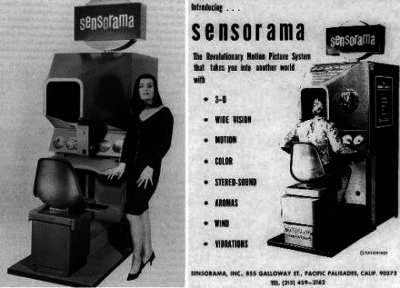
    The notion of VR dates back to 1930s literature. In the 1950s, filmmaker Morton Hellig wrote of an “experience theater” and then later built an immersive video game-like machine he called the Sensorama for people to peer into. A pioneering moment came in 1968, when Ivan Sutherland is credited for developing the first head-mounted display.

    Much has changed since. Consumer-grade VR headsets have made leaps of progress. Their advances have been propelled by technology breakthroughs in optics, tracking and GPU performance.

    Consumer interest in VR has soared in the past several years as new headsets from Facebook’s Oculus, HTC, Samsung, Sony and a host of others offer substantial improvements to the experience. Yet producing 3D, computer-generated, immersive environments for people is about more than sleek VR goggles.

    Obstacles that have been mostly overcome, so far, include delivering enough frames per second and reducing latency — the delays created when users move their head — to create experiences that aren’t herky jerky and potentially motion-sickness inducing.

    VR taxes graphics processing requirements to the max — it’s about 7x more demanding than PC gaming. Today’s VR experiences wouldn’t be possible without blazing fast GPUs to help quickly deliver graphics.

    Software plays a key role, too. The NVIDIA VRWorks software development kit, for example, helps headset and application developers access the best performance, lowest latency and plug-and-play compatibility available for VR. VRWorks is integrated into game engines such as Unity and Unreal Engine 4.

    To be sure, VR still has a long way to go to reach its potential. Right now, the human eye is still able to detect imperfections in rendering for VR.

    Vergence accommodation conflict, Journal of Vision

    Some experts say VR technology will be able to perform at a level exceeding human perception when it can make a 200x leap in performance, roughly within a decade. In the meantime, NVIDIA researchers are working on ways to improve the experience.

    One approach, known as foveated rendering, reduces the quality of images delivered to the edge of our retinas — where they’re less sensitive — while boosting the quality of the images delivered to the center of our retinas. This technology is powerful when combined with eye tracking that can inform processors where the viewing area needs to be sharpest.


    VR’s Technical Hurdles

    • Frames per second: Virtual reality requires processing of 90 frames per second. That’s because lower frame rates reveal lags in movement detectable to the human eye. That can make some people nauseous. NVIDIA GPUs make VR possible by enabling rendering that’s faster than the human eye can perceive.
    • Latency: VR latency is the time span between initiating a movement and a computer-represented visual response. Experts say latency rates should be 20 milliseconds or less for VR. NVIDIA VRWorks, the SDK for VR headsets and game developers, helps address latency.
    • Field of view: In VR, it’s essential to create a sense of presence. Field of view is the angle of view available from a particular VR headset. For example, the Oculus Rift headset offers a 110-degree viewing angle.
    • Positional tracking: To enable a sense of presence and to deliver a good VR experience,  headsets need to be tracked in space within under 1 millimeter of  accuracy. This minimum is required in order to present images at any point in time and space.
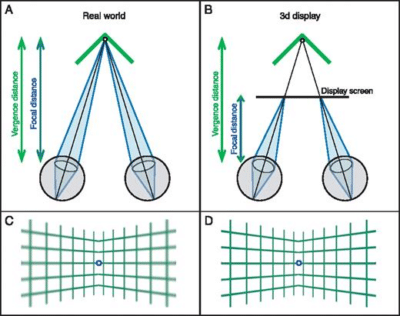
    • Vergence accommodation conflict: This is a viewing problem for VR headsets today. Here’s the problem: Your pupils move with “vergence,” meaning looking toward or away from one another when focusing. But at the same time the lenses of the eyes focus on an object, or accommodation. The display of 3D images in VR goggles creates conflicts between vergence and accommodation that are unnatural to the eye, which can cause visual fatigue and discomfort.
    • Eye-tracking tech: VR head-mounted displays to date haven’t been adequate at tracking the user’s eyes for computing systems to react relative to where a person’s eyes are focused in a session. Increasing resolution where the eyes are moving to will help deliver better visuals.

    Despite a decades-long crawl to market, VR has made a splash in Hollywood films such as the recently released Ready Player One and is winning fans across games, TV content, real estate, architecture, automotive design and other industries.

    VR’s continued consumer momentum, however, is expected by analysts to be outpaced in the years ahead by enterprise customers.

    AR Explained

    AR development spans decades. Much of the early work dates to universities such as MIT’s Media Lab and pioneers the likes of Thad Starner — now the technical lead for Alphabet’s Google Glass smart glasses — who used to wear heavy belt packs of batteries attached to AR goggles in its infancy.

    Google Glass (2.0)

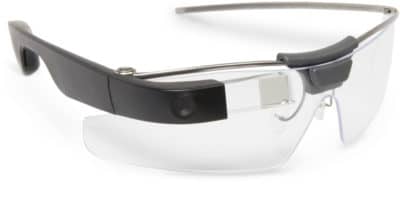
    Google Glass, the ill-fated consumer fashion faux pas, has since been rebirthed as a less conspicuous, behind the scenes technology for use in warehouses and manufacturing. Today Glass is being used by workers for access to training videos and hands-on help from colleagues.

    And AR technology has been squeezed down into low-cost cameras and screen technology for use in inexpensive welding helmets that automatically dim, enabling people to melt steel without burning their retinas.

    For now, AR is making inroads with businesses. It’s easy to see why when you think about overlaying useful information in AR that offers hands-free help for industrial applications.

    Smart glasses for augmenting intelligence certainly support that image. Sporting microdisplays, AR glasses can behave like having that indispensable co-worker who can help out in a pinch. AR eyewear can make the difference between getting a job done or not.

    Consider a junior-level heavy duty equipment mechanic assigned to make emergency repairs to a massive tractor on a construction site. The boss hands the newbie AR glasses providing service manuals with schematics for hands-free guidance while troubleshooting repairs.

    Some of these smart glasses even pack Amazon’s Alexa service to enable voice queries for access to information without having to fumble for a smartphone or tap one’s temple.

    Jensen Huang on VR at GTC

    Business examples for consumers today include IKEA’s Place app, which allows people to use a smartphone to view images of furniture and other products overlayed into their actual home seen through the phone.

    Today there is a wide variety of smart glasses from the likes of Sony, Epson, Vuzix, ODG and startups such as Magic Leap.

    NVIDIA research is continuing to improve AR and VR experiences. Many of these can be experienced at our GPU Technology Conference VR demonstrations.

    MR Explained

    MR holds big promise for businesses. Because it can offer nearly unlimited variations in virtual experiences, MR can inform people on-the-fly, enable collaboration and solve real problems.

    Now, imagine the junior-level heavy duty mechanic waist deep in a massive tractor and completely baffled by its mechanical problem. Crews sit idle unable to work. Site managers become anxious.

    Thankfully, the mechanic’s smart glasses can start a virtual help session. This enables the mechanic to call in a senior mechanic by VR around the actual tractor model to walk through troubleshooting together while working on the real machine, tapping into access to online repair manual documents for torque specs and other maintenance details via AR.

    That’s mixed reality.

    To visualize a consumer version of this, consider the IKEA Place app for placing and viewing furniture in your house. You have your eye on a bright red couch, but want to hear the opinions of its appearance in your living room from friends and family before you buy it.

    So you pipe in a VR session within the smart glasses. Let’s imagine this session is in an IKEA Place app for VR and you can invite these closest confidants. But first they must sit down on any couch they can find. Now, however, when everyone sits down it’s in a virtual setting of your house and the couch is red and just like the IKEA one.

    Voila, in mixed reality, the group virtual showroom session yields a decision: your friends and family unanimously love the couch, so you buy it.

    The possibilities are endless for businesses.

    Mixed reality, while in its infancy, might be the holy grail for all the major developers of VR and AR. There are unlimited options for the likes of Apple, Microsoft, Facebook, Google, Sony, Netflix and Amazon. That’s because MR can blend the here and now reality with virtual reality and augmented reality for many entertainment and business situations.

    Take this one: automotive designers can sit down on an actual car seat, with armrests, shifters and steering wheel, and pipe into VR sessions delivering the dashboard and interior. Many can assess designs together remotely this way. NVIDIA Holodeck actually enables this type of collaborative work.


    每天推荐一个 GitHub 优质开源项目和一篇精选英文科技或编程文章原文,欢迎关注开源日报。交流QQ群:202790710;微博:https://weibo.com/openingsource;电报群 https://t.me/OpeningSourceOrg

  • 2018年5月24日:开源日报第77期

    24 5 月, 2018

    每天推荐一个 GitHub 优质开源项目和一篇精选英文科技或编程文章原文,欢迎关注开源日报。交流QQ群:202790710;微博:https://weibo.com/openingsource;电报群 https://t.me/OpeningSourceOrg


    今日推荐开源项目:《笔记转PDF工具 noteshrink》GitHub地址

    推荐理由:这个项目可以帮你把手写的笔记转化为电脑上的 PDF 文档,它不仅能实现最基础的转化功能,而且会自动将原本颜色有差异的背景整合为同一种颜色,提高了字体的辨识度,同时大大缩小的 PDF 所占的空间。


    今日推荐英文原文:《Ten Popular Open Source Tools for Web Developers》作者:vivek-ratan

    原文链接:https://opensourceforu.com/2018/05/ten-popular-open-source-tools-for-web-developers/

    推荐理由:面向Web开发人员的十大流行开源工具,选择适合的工具可以使工作事半功倍

    Ten Popular Open Source Tools for Web Developers

    Web application development is a dynamic and challenging field. Here’s a quick look at ten cutting-edge Web application development tools that can make the job of developers a lot easier.

    The best as well as, perhaps, the worst part of being a Web developer is that Web applications are constantly changing, be it in terms of the complexity of the application or the technology used. While this makes the task of Web developers quite exciting, it also means that they must always be up-to-date on new techniques or programming languages, should easily adapt to changes, and also be willing and eager to accept new challenges. This may include various tasks such as:

    • Changing the existing frameworks to meet several business requirements
    • Testing a Web application to identify technical glitches
    • Scaling and optimising a website to perform better with the given back-end infrastructure
    • Improve the user experience for the website and make it more user friendly
    • Fulfil different user requirements

    According to a recent ‘Future of Open Source’ survey from Black Duck Software, 65 per cent of organisations use different open source software. Further, open source Web development tools are actually the third-most common type of open source software being used by businesses (just after operating systems and databases) nowadays. Lou Shipley, president and CEO of Black Duck, notes in one of the reports that open source is actually the way applications are being developed today. One of the major reasons for this is that open source software is available free of cost. Also, there is a large community base associated with different open source tools, which makes their maintenance and optimisation quite easy.

    At a time when websites are getting more complex, developers need more advanced and sophisticated Web development tools for their tasks. There are already plenty of such open source tools available in the market and advanced options are constantly being introduced. A proper understanding of these Web application development tools will help developers complete their tasks better and faster. So here’s a quick look at some popular open source tools or frameworks for Web app development.

    AngularJS

    AngularJS is widely used to build different dynamic Web apps. Basically a JavaScript framework, it is mostly used to build single page Web apps. It also helps with the data binding and filters using HTML attributes. It supports DOM (Data Object Model) handling, forms and form validation. This open source tool was developed by Brat Tech LLC under an MIT licence and later made open source. First released in 2009, AngularJS is now maintained by Google.

    For more help: https://angularjs.org/

    Node.js

    Node.js is built using the V8 JavaScript engine of Google. It is a JavaScript runtime environment, which is widely used to develop the server side of Web apps. This open source cross-platform tool facilitates faster and efficient app development. It makes use of the non-blocking and event-driven input/output model for a much better development process. Node.js was initially released in 2009.

    For more help: https://nodejs.org/en/

    Brackets

    Brackets is an editor that was developed by Adobe. Written in JavaScript, HTML and CSS, it is a widely used open source code editor for JavaScript, CSS and HTML. It’s easy to have a complete preview of the editor, which assists in making the Web app development process smarter. It was initially released in 2014.

    For more help: http://brackets.io/

    Bootstrap

    Bootstrap is an open source Web application development tool that’s used to build responsive designs. It is available free of cost, and comes with a set of grids and classes, buttons, forms, containers, JavaScript extensions, navigation and media queries. One of the most popular projects on GitHub, it has more than 38,000 forks and 91,000 stars.

    For more help: http://getbootstrap.com/

    LESS

    LESS is an open source style sheet language, which has a syntax similar to that of CSS. It is the pre-processor of CSS. We can speed up the Web app development process using LESS as it comes with a number of outstanding features like making CSS extendable, themeable and maintainable. Other amazing features include functions variables, mixins and some other important techniques.

    For more help: http://lesscss.org/

    Atom

    Atom is one of the best open source text editors one can find right now. We can easily carry out different cross-platform editing work with it. With Atom, the development of Web apps becomes much quicker as it has the support of AngularJS, Jshint, a built-in package manager, smart auto-completion, turbo-JavaScript, and Atom TypeScript.

    For more help: https://atom.io/

    Notepad++

    Notepad++ is an open source tool that works as the source code and text editor for Microsoft Windows. With the help of Notepad++, we can offer code folding, syntax highlighting and tabbed editing for more than 50 mark-up, scripting and programming languages. Notepad++ comes with a large number of plugins and also has huge community support. It offers support for playback and macro recording, and includes PCRE search/replace and bookmarks.

    For more help: https://notepad-plus-plus.org/

    XAMPP

    XAMPP is a popular cross-platform tool. It used MySQL instead of MariaDB in the earlier days. With XAMPP, it is quite easy to install and configure PHP, MariaDB and Apache, as it has a complete package of its libraries. This is one of the best ways to set up your local Web server.

    For more help: https://www.apachefriends.org/

    Firebug

    Firebug is one of the important tools being used today. An extension for Mozilla Firefox, it helps in carrying out tasks on a live Web page—like debugging as well as editing HTML, JavaScript and CSS. This open source tool was developed by Joe Hewitt and it comes with a variety of features, such as:

    • Managing cookies
    • Tweaking CSS for perfection
    • Finding errors quickly
    • Checking the DOM
    • Inspecting and editing the HTML section
    • Monitoring the activity on the network
    • Visualisation of CSS metrics

    For more help: http://getfirebug.com/

    Ember.js

    Ember.js, developed by Yehuda Katz as an open source JavaScript framework, is actually based on the MVC (Model-View-Controller) pattern. This framework is widely used to design single page websites, while being fairly competent in developing complex Web apps, too. It can be used on multiple platforms.

    For more help: https://www.emberjs.com/

    All the ten options discussed here have some pre-coded and pre-configured features that we can use to make programming easy. These, of course, are just a few among all the available options.


    每天推荐一个 GitHub 优质开源项目和一篇精选英文科技或编程文章原文,欢迎关注开源日报。交流QQ群:202790710;微博:https://weibo.com/openingsource;电报群 https://t.me/OpeningSourceOrg
  • 2018年5月23日:开源日报第76期

    23 5 月, 2018

    每天推荐一个 GitHub 优质开源项目和一篇精选英文科技或编程文章原文,欢迎关注开源日报。交流QQ群:202790710;微博:https://weibo.com/openingsource;电报群 https://t.me/OpeningSourceOrg


    今日推荐开源项目:《艺术二维码生成器——QR-Code》GitHub地址

    推荐理由:一个简单的Python工具,用于生成结合了图片或者gif的二维码,而且操作简单,即使是没有Python的朋友也可以使用exe版本来运行。

    能够做到的效果:


    今日推荐英文原文:《The 9 Rules of Design Research》作者: Erika Hall

    原文链接:https://medium.com/mule-design/the-9-rules-of-design-research-1a273fdd1d3b

    推荐理由:在设计时可能会帮到你的9条提示,兴许在开始设计前看一看会让你的工作顺利不少

    The 9 Rules of Design Research

    Lately, I’ve noticed a lot more ambient enthusiasm for research among both early stage start-ups and established organizations. Businesses have embraced the idea that meaningful innovation requires understanding their customers as humans with complex lives.

    This is fantastic.

    I’ve also been hearing quite a few of the same myths, misperceptions, and hedges repeated. So, in the interests of being helpful—because I do like to be helpful—here is a snackable listicle of simple correctives designed to share far and wide (I’ve been assured that research proves readers enjoy snackable listicles. And puppies.)

    1. Get comfortable being uncomfortable

    “All I know is that I know nothing.” — Socrates

    We’ve all been brought up to value answers and fear questions. We were rewarded for right answers at school and we are rewarded for bright ideas at work. No wonder so many people look for reasons to avoid doing research, especially qualitative research. Anxiety around looking less knowledgable runs deep. At least quant stuff has the comforting familiarity of standardized testing. Maintaining a research mindset means realizing that bias is rampant, certainty is an illusion, and any answer has a short shelf life. A good question is far more valuable in the long run. And you can’t ask good questions—meaning you can’t learn—until you admit you don’t have the answers.

    2. Ask first, prototype later

    “If we only test bottle openers, we may never realize customers prefer screw-top bottles.”—Victor Lombardi, Why We Fail

    So, of course there is a rush to prototype and test the prototype. A prototype is an answer, and it’s tangible, even if it’s simply a sketch on paper. This is comfortable, much more comfortable than just asking questions, even if it is tantamount to setting a large pile of money on fire. To anyone concerned about demonstrating their value by making fast, visible progress, simply asking questions feels as productive as a raccoon washing cotton candy.

    The danger in prototyping too soon is investing resources in answering a question no one asked, and ignoring the opportunity cost. Testing a prototype can help you refine an idea that is already good, not tell you whether you’re solving the right problem. And it’s easy to mistake the polish of a prototype for the quality of the idea (*cough* Juicero *cough*). FWIW, it’s also easy to mistake the gloss of a research report for the value of the insights.

    Instead of saving and defending weak ideas, asking the right questions helps you identify and eradicate bad ideas faster. You just have to be strong enough to embrace being wrong.

    3. Know your goal

    Asking questions is a waste of time unless you know your reason for doing so in advance. And you have to publicly swear that your reason is not “to be proven right.” That is everyone’s secret goal. See #1.

    Often, in the enthusiasm to embrace research, teams will start talking to customers without a clear, shared goal. And then afterwards, they feel like they spent precious time with no idea how to apply what they learned, hence nothing to show for it. This leads to statements like “We tried doing research last year and it was a waste of time.” And, thus, a return to the comfort of building and testing. Or, they walk away with different interpretations of what they heard, which leads to more arguments about who was proven right.

    In large organizations, the unspoken goal is sometimes “demonstrate a commitment to research while allowing our product leaders to do what they want.” This might sound cynical but I’ve talked to many skilled practitioners in well-funded research departments who generate magnificent reports that have zero impact on decision-making. Acknowledging this happens is the first step to stopping it.

    It is perfectly fine, and a great place to start, for your goal to be “We need to level-set and quickly understand the perspective of people who aren’t us.” Just don’t tack on other goals after the fact.

    Only after you have a goal will you know what you need to know. And you have to know your question before you can choose how to answer it.

    4. Agree on the big questions

    “At its core, all business is about making bets on human behavior.”
    — 
    The Power of ‘Thick’ Data, WSJ

    The quality of your question determines the utility of the results. Asking the wrong question is the same as prototyping a solution to the wrong problem. They will both give you something other than what you need. Start with your high-priority questions. These come from the assumptions or areas of ignorance that carry the most risk if you’re wrong.

    The big research question is what you want to know, not what you ask in an interview. In fact, asking your research question directly is often the worst way to learn anything. People often don’t know or are unwilling to admit to their true behaviors, but everyone is really good at making up answers.

    Design research gets conflated with user research all the time. Talking to representative users is just one of many ways of answering high-priority research questions. Not everything you need to know is about users.

    Often the most critical question is a variation of “Based on evidence, what do we really know about our customers/competition/internal capabilities?” This can be a particularly terrifying one to approach in total honesty, but you should be able to answer it within the hour.

    5. There is always enough time and money

    When research is defined as a type of work outside of design, it’s easy to define gathering evidence as something extra and find reasons not to do it.

    Often, teams have to ask permission of someone with authority in order to do work that is categorized as research. Asking questions is inherently threatening to authority. If you’ve ever worked with a leader who was resistant to doing qualitative research as part of a million dollar project, ask yourself whether they would skip doing their own research before buying a $50,000 car. Stated objections are often cover for a fear of being undermined or proven wrong or not looking productive in the right way.

    If you are clear and candid about your goals and high-priority questions, you can learn something useful within whatever time and budget is available to you. Find studies online. Go outside during lunch and observe people. Usability test someone else’s product. Get creative.

    Just avoid doing surveys.

    6. Don’t expect data to change minds

    “It is difficult to get a man to understand something, when his salary depends on his not understanding it.”—Upton Sinclair

    This is often a hard one for highly-trained, specialist researchers to embrace, even though research has demonstrated it to be true. If you are used to working with a community of peers who value a certain kind of data, you may be ill-equipped to convince people who reject it out of hand. And it can feel insulting to one’s professional competence that the data is not enough.

    The whole point of gathering evidence is to make evidence-based decisions. If that evidence undermines or contradicts the ideas of beliefs of the person with authority to make decisions, they will find reasons to reject it or ignore it. This is also at the heart of why qualitative researchers have a hard time in some engineering-driven organizations. People who are comfortable and competent with numbers want answers in numbers, even if the question demands something more descriptive.

    So you have to turn ethnography inward and learn how your peers and leaders make decisions before you try to use data to influence those decisions.

    7. Embrace messy imperfection

    “We’re fickle, stupid beings with poor memories and a great gift for self destruction.” ― Suzanne Collins, Mockingjay

    Human lives are messy. If people didn’t have problems, there would be no need for products and services to solve them and we wouldn’t have jobs. Figuring out the best way to solve problems for people requires some time out in the real, messy world and letting go of a certain amount of control. While an ethical, sufficiently rigorous approach is necessary, there is no qualitative clean room. A clear goal and a good question can withstand all sorts of unpredictable conditions.

    The desire for tidy, comfortable activities that look and feel like expertise made visible leads to the inappropriate use of focus groups, usability labs, eye-tracking, surveys, and glossy reports when something much less formal would be much more effective.

    Incorporating evidence into design decisions is itself a learning process. You will never find the right answer and be done. If the process is working, you will continue to make decisions with increasing levels of confidence.

    8. Commit to collaboration

    Everyone working on the same thing needs to be operating in the same shared reality. The people making decisions about the product need to be the best informed. It doesn’t matter how good the knowledge is, if it’s only in one person’s head (unless you are in London and that person is your cab driver).

    Research without collaboration means that one group of people is learning and creating reports for another group to acknowledge and ignore. Knowledge leaks out of even the most well-meaning teams working like this. Collaboration without evidence means everyone has tacitly agreed whose personal preferences win. Neither of these is the most productive approach.

    Directly involving the people creating the product in asking and answering the questions is the most productive approach. Plus it’s fun. And there are several ways to accomplish this depending on the organization.

    The whole point of asking questions is to establish a shared framework for making decisions so that you can make better decisions faster. I run a workshop on this. It changes lives.

    9. Find your bias buddies

    “We can be blind to the obvious, and we are also blind to our blindness.” ― Daniel Kahneman, Thinking Fast and Slow

    So, you did the work and you found some answers. Now you need to decide what they mean. When it comes to interpreting the results of research, collaboration becomes particularly critical. Everyone with a human brain is burdened by human biases. And there is no way to sense one’s own. We all see what best fits our existing beliefs. So, we have to refer to an external standard (including the pre-established goals and questions) and work together to check each other.

    This has nothing to do with how smart or how well-informed you are. Once you accept this, and as long as you work in a team that evinces psychological safety and mutual respect, it can be a fun game to identify biases and call them out.

    The Wikipedia page has a nice list, along with the Cognitive Bias Codex to print and post on your wall.

    Maybe, just call it design done right

    In sum, what we’re talking about when we’re talking about design research is really doing evidence-based design. Creation, criticism, and inquiry are all integral parts of the design process. Separating them leads to optimizing for the wrong things out of ignorance, ego, or fear.

    Design is an exchange of value. You have to ask what people really need and value and what business value you expect to get in return, before putting anything at all into the world.

    It doesn’t matter what questions you ask or how you find the answers, as long as you are ethical in your approach, honest about what you know, and apply yourself towards a worthwhile goal. There is no one right way and no one right answer. Enjoy the uncertainty! It never ends.


    每天推荐一个 GitHub 优质开源项目和一篇精选英文科技或编程文章原文,欢迎关注开源日报。交流QQ群:202790710;微博:https://weibo.com/openingsource;电报群 https://t.me/OpeningSourceOrg
←上一页
1 … 240 241 242 243 244 … 262
下一页→

Proudly powered by WordPress