5 trending open source machine learning JavaScript frameworks
The tremendous growth of the machine learning field has been driven by the availability of open source tools that allow developers to build applications easily. (For example, AndreyBu, who is from Germany and has more than five years of experience in machine learning, has been utilizing various open source frameworks to build captivating machine learning projects.)
Although the Python programming language powers most of the machine learning frameworks, JavaScript hasn’t been left behind. JavaScript developers have been using various frameworks for training and deploying machine learning models in the browser.
Here are the five trending open source machine learning frameworks in JavaScript.
1. TensorFlow.js
TensorFlow.js is an open source library that allows you to run machine learning programs completely in the browser. It is the successor of Deeplearn.js, which is no longer supported. TensorFlow.js improves on the functionalities of Deeplearn.js and empowers you to make the most of the browser for a deeper machine learning experience.
With the library, you can use versatile and intuitive APIs to define, train, and deploy models from scratch right in the browser. Furthermore, it automatically offers support for WebGL and Node.js.
If you have pre-existing trained models you want to import to the browser, TensorFlow.js will allow you do that. You can also retrain existing models without leaving the browser.
2. Machine learning tools
The machine learning tools library is a compilation of resourceful open source tools for supporting widespread machine learning functionalities in the browser. The tools provide support for several machine learning algorithms, including unsupervised learning, supervised learning, data processing, artificial neural networks (ANN), math, and regression.
If you are coming from a Python background and looking for something similar to Scikit-learn for JavaScript in-browser machine learning, this suite of tools could have you covered.
3. Keras.js
Keras.js is another trending open source framework that allows you to run machine learning models in the browser. It offers GPU mode support using WebGL. If you have models in Node.js, you’ll run them only in CPU mode. Keras.js also offers support for models trained using any backend framework, such as the Microsoft Cognitive Toolkit (CNTK).
Some of the Keras models that can be deployed on the client-side browser include Inception v3 (trained on ImageNet), 50-layer Residual Network (trained on ImageNet), and Convolutional variational auto-encoder (trained on MNIST).
4. Brain.js
Machine learning concepts are very math-heavy, which may discourage people from starting. The technicalities and jargons in this field may make beginners freak out. This is where Brain.js becomes important. It is an open source, JavaScript-powered framework that simplifies the process of defining, training, and running neural networks.
If you are a JavaScript developer who is completely new to machine learning, Brain.js could reduce your learning curve. It can be used with Node.js or in the client-side browser for training machine learning models. Some of the networks that Brain.js supports include feed-forward networks, Ellman networks, and Gated Recurrent Units networks.
5. STDLib
STDLib is an open source library for powering JavaScript and Node.js applications. If you are looking for a library that emphasizes in-browser support for scientific and numerical web-based machine learning applications, STDLib could suit your needs.
The library comes with comprehensive and advanced mathematical and statistical functions to assist you in building high-performing machine learning models. You can also use its expansive utilities for building applications and other libraries. Furthermore, if you want a framework for data visualization and exploratory data analysis, you’ll find STDLib worthwhile.
Conclusion
If you are a JavaScript developer who intends to delve into the exciting world of machine learning or a machine learning expert who intends to start using JavaScript, the above open source frameworks will intrigue you.
推荐理由:Chromebook 是 Google 推出的网络笔记本。随着它的发展,对于它的旧观念已经过时了,这篇文章介绍的就是关于 Chromebook 的十大误区
Everything you knew about Chromebooks is wrong
Google’s slow, limited, browser-only, cloud-centric laptop platform is now the most powerful and capable user platform on the planet.
Yeah, I said it.
Apple fans laugh at this idea, saying that a MacBook Pro can run the Chrome browser and gain all the benefits of a Chromebook, as well as all the benefits and leading-edge content-creation tools of a far more elegant, better designed and better engineered device.
Windows users carp that Chromebooks are cute, but not serious business tools. The Surface Book 2 is also a tiny laptop, they say, but a real computer.
Linux developers concede Chromebooks are interesting but argue they can’t be used for software development.
But these obsolete stereotypes are not compatible with the new reality of Chromebooks.
It’s time to clear up the top 10 myths that are no longer true about Chromebooks.
Myth 1: Chromebooks don’t run apps
The original assumed vision of the Chromebook platform was a laptop and operating system capable of running only the Chrome web browser. You could do anything you wanted, as long as you wanted to stay on the web at all times.
Today, the best new Chromebooks can runs apps from three additional operating systems.
Not only do Chromebooks run apps, but they run more apps without dual- or multi-booting than any other computing platform. Chromebooks can run apps from Android, Linux and Windows concurrently in the same session.
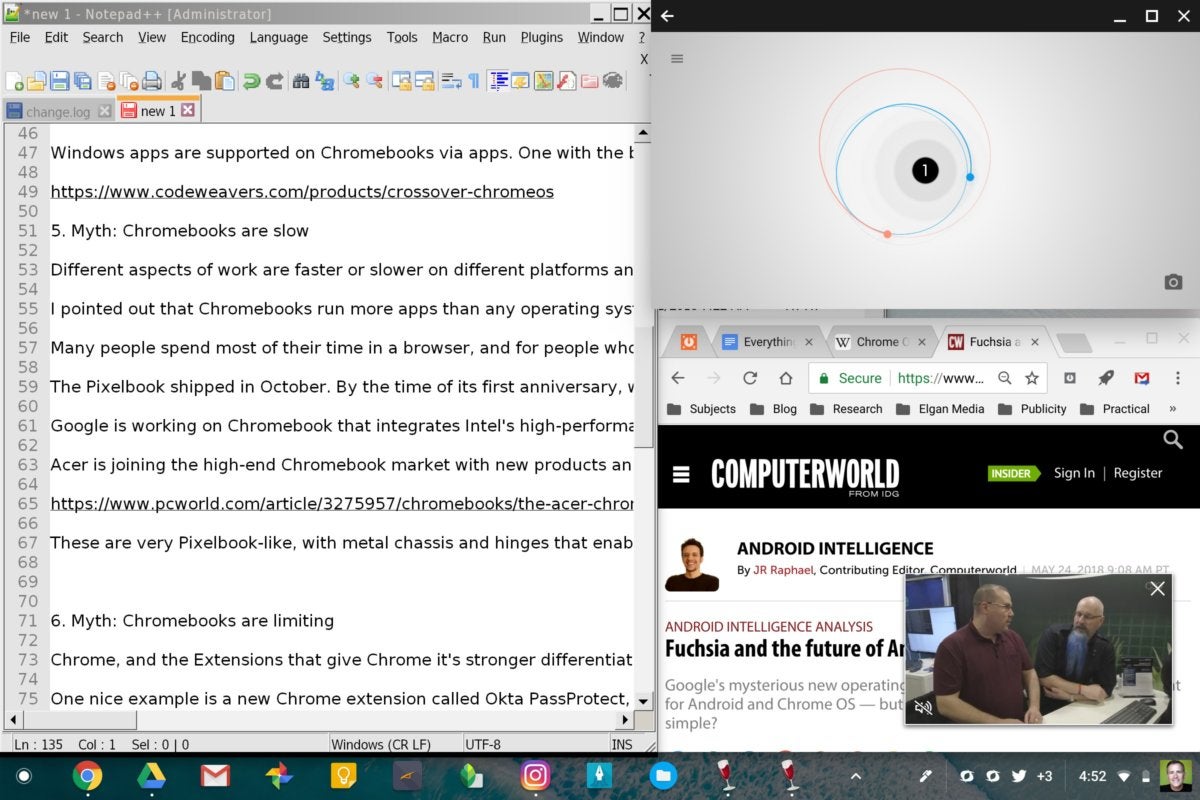
Multiple operating system support on Chromebooks is not about dual-booting. Apps from multiple operating systems run concurrently and side by side. Here I’m running Notepad++ for Windows on the left, an Android game called Orbit in the top right, and below that — why not? — Chrome.
Myth 2: Chromebooks don’t run Android apps well
When I first saw the Android-on-Chrome-OS demo at Google I/O four years ago, I was pessimistic. But now that I’m running Android apps on my Pixelbook every day, I have to admit that I was wrong. The better Chromebooks run Android apps very well, and they run most of them.
Chrome OS is also evolving rapidly into a closer-to-native Android device. Commits in the Chromium Gerrit reveal the forthcoming ability for the Files application in Chrome OS to reveal all the Android files that would normally be accessible to users on an Android phone.
Android support alone makes Chromebooks one of the best platforms for apps, but that’s just the beginning.
Myth 3: Chromebooks don’t run Linux
At the recent Google I/O, the company announced that it’s building a Chrome OS–specific virtual machine for Linux that will start fast and integrate completely. While today there is a range of approaches for running various flavors of Linux on a Chromebook, tomorrow Linux will run well and feel native.
Myth 4: Chromebooks don’t run Windows
Windows apps are supported on Chromebooks via apps. One with a good reputation is the beta version of CrossOver for Chrome OS. It’s not only free, but it currently offers free support as well.
Myth 5: Chromebooks are slow
Different aspects of work are faster or slower on different platforms and devices, and these differences are magnified when you compare Chromebooks to macOS, Windows or Linux devices.
I pointed out earlier that Chromebooks run more apps than any operating system ever. However, most of these run in some kind of emulation and aren’t going to be as fast as on their native platforms.
Many people spend most of their time in a browser, and for people who use Chrome browsers, the experience of using Chrome is far faster on the new generation of Chromebooks.
When I ran Chrome on my MacBook Pro, adding more tabs and extensions caused the entire laptop to slow to a crawl and the fan to spin loudly. Chrome on a MacBook used to crush my productivity.
Using a Pixelbook, I can run dozens of tabs and dozens of extensions, and it flies. (And the Pixelbook doesn’t even have a fan.)
So my MacBook Pro is fast with apps but slow with serious Chrome use.
The Pixelbook shipped in October. By the time of its first anniversary, we’ll see some very powerful alternatives from other companies.
Google is working on a Chromebook that integrates Intel’s high-performance “Kaby Lake G” processors, which feature integrated Radeon graphics.
Acer is joining the high-end Chromebook market with new products announced this week called the Chromebook 13, Chromebook Spin 13 and Chromebook Spin 15. Unlike Acer’s previous education-market Chromebooks, these are powered by eighth-generation Intel chipsets.
They are very Pixelbook-like, with metal chassis and hinges that enable tablet mode. The 15-inch model is the first of that size to offer a Pixelbook-like rotating hinge.
Many more are coming. And they’re very fast.
Myth 6: Chromebooks are limiting
The Chrome web browser — as well as the extensions that give Chrome its main advantage against other browsers — also features a radically underappreciated dimension: the nexus between data and application.
One nice example is a new Chrome extension called Okta PassProtect, which checks your username and password against the “Have I Been Pwned?” database every time you log into any website. The database is a collection of credentials leaked online.
The fact that the extension is built into the browser means security doesn’t rely on the user to remember anything.
Every online application and site gets enhanced by a specific data source.
Another example is a Chrome extension called Hunter from a company of the same name. It adds a button to Chrome that, when pressed, shows you a list of every email address ever used online using the same domain as the one you are currently browsing, making it easy to contact anyone at that company.
The ability to add specific data sets to any website is monstrously powerful.
Another underappreciated aspect of Chrome extensions is the ability to add features to cloud applications not intended or envisioned by the application maker. Services such as Google’s own Gmail are enhanced by hundreds of Chrome extensions, giving that email service new powers such as mail merge, integration between Gmail and Dropbox, or the to-do app Remember the Milk.
Other extensions enter your user credentials for you, enable you to use a highlighter pen on the internet, block ads and a million other features.
Chrome extensions are collectively so powerful that the end result is basically a second internet — a “super internet” that’s way better and more functional than the regular one.
The only problem is that too using many extensions in Chrome bogs down that browser, making the “super internet” super slow on Windows and macOS.
This problem is solved with a high-end Chromebook such as Google’s own Pixelbook, which lets you run dozens of Chrome extensions simultaneously without a noticeable performance hit.
In other words, the “super internet” is available only to Chromebook users. Everyone else is locked out.
Myth 7: Chromebooks can’t be used for software development
From the Google pitch: “Support for Linux will enable you to create, test and run Android and web apps for phones, tablets and laptops all on one Chromebook. Run popular editors, code in your favorite language and launch projects to Google Cloud with the command-line. Everything works directly on a Chromebook.”
Myth 8: Chromebooks can’t be used for photo editing
My personal favorite photo editor has long been Google’s Snapseed. The experience of running Snapseed for Android on a 13-inch touchscreen is far better than on the iPhone that I used to use. Other photographers prefer Polarr, Adobe Lightroom and others, which also run on the Chromebook via Android.
Myth 9: Chromebooks can’t be used offline
A huge number of major cloud services, especially Google ones such as Docs and Gmail, offer easy offline modes. The Chrome Web Store is packed with free extensions that give you offline capability.
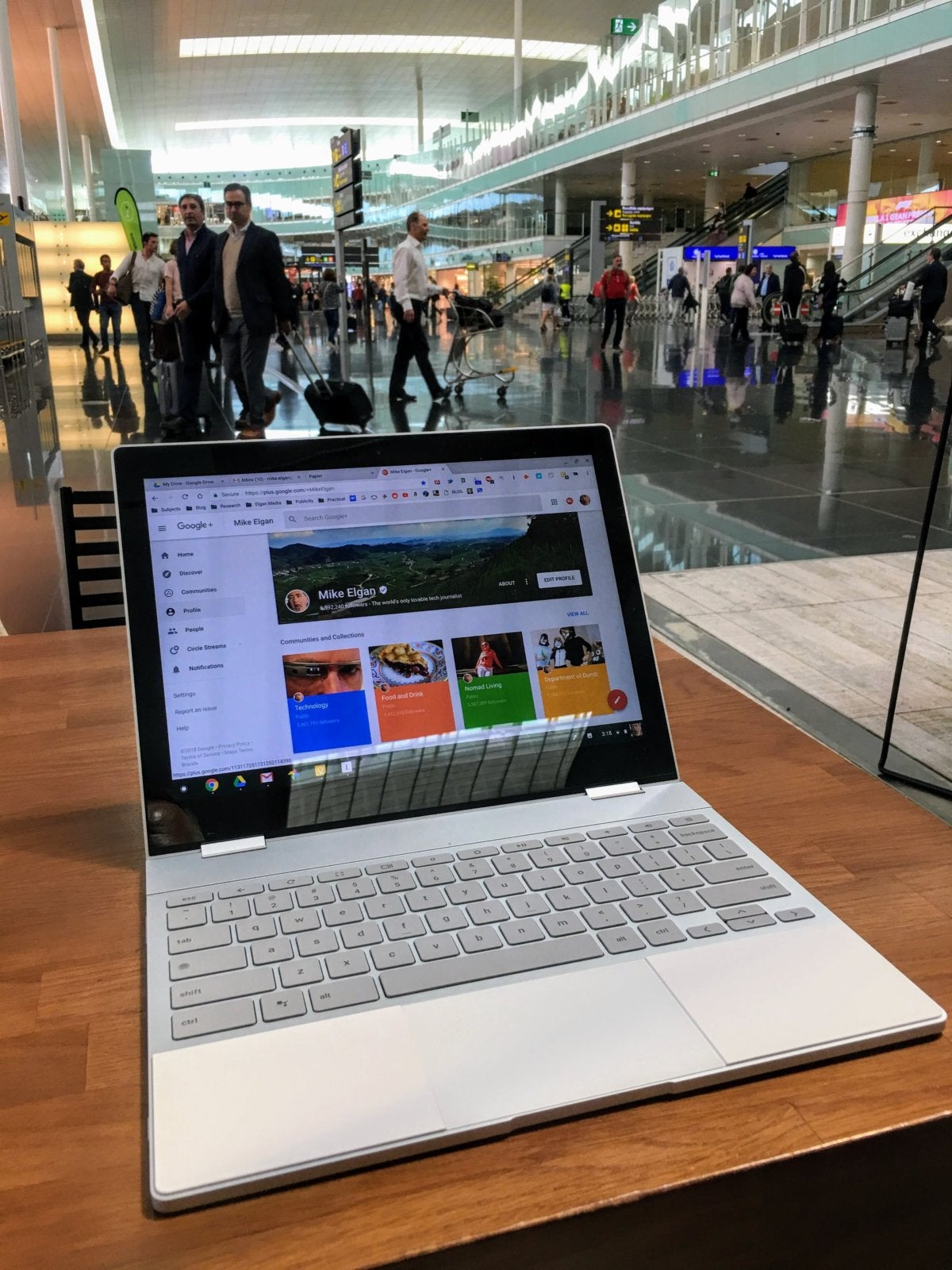
The Chromebook Pixelbook is the perfect travel laptop and is well-designed for running apps and doing work offline.
Myth 10: Chromebooks are cheap
My Pixelbook with 16GB of RAM and 512GB of storage, plus the pen, case and taxes, exceeded $2,000. Yes, some low-end Chromebooks are very cheap. But the powerful new generation is more comparable to a normal laptop.
Here’s what you need to know
Chromebooks aren’t perfect and they’re not for everybody.
As well-designed and well-made as the new Chromebooks are, they still don’t have the fit and finish of the MacBook Pro line. They’re not as capable as full-blown PCs at some tasks, especially processor- and graphics-intensive tasks.
But the new generation of Chromebooks can run more apps than any platform in history.
They have exclusive access to the “super internet.”
And they’re still the most secure computing platform ever.
My advice is to choose the computing platform that suits you best. But base your choice on the new facts, not the old myths.
PHP is regarded as one of the most popular and versatile scripting language. It is really easy to get hands on with PHP. Almost exclusively used in web development, it has gained far reaching recognition. PHP frameworks are popularly known as functional platform. It helps developers to make complex applications quickly and easily. There are numerous PHP frameworks which are there in the market, out of which Laravel is popular due its elegancy and stability.
What is Laravel?
Laravel is a framework created by Taylor Otwell. It is an advanced form of CodeIgniter framework. Laravel is an expressive framework viable for large scale work.
• It is following MVC (Model – View – Controller) architectural pattern.
Laravel is designed to facilitate the users, helping them to work in standardized, elegant and quick manner.
Standardization:
Laravel has a strict Model-View-Controller (MVC) structure. It uses object oriented programming concept and allows easy sharing of the project with the developers. The style and methodology followed in Laravel Applications is almost similar which gives freedom to the developers to easily come in and work instantly with familiar mindset.
Elegance
Documentation of Laravel is neatly structured. It can easily match various versions of Laravel. It is very flexible and one can do same things in a number of different ways. The whole framework provides simple characteristics to help developers write the code in organized and self-documenting manner.
Speed
The speed of building an application is quite fast. Laravel works really well with various third party packages. This indicates that full support for Facebook API, MailChimp API, Loggers, Profilers and other tools can be added easily within strike of few keystrokes.
The Composer
Composer is a dependency manager for PHP, which allows users to manage libraries in a meaningful manner. By dependency, it means the libraries that are required to make a page work. The composer will download all the libraries required in a particular project. Before starting with Laravel, one has to install composer in the system. You can look for the steps to install a composer here.
Installation of Laravel
You can install Laravel in the following three ways:
Laravel Installer
Via Composer Create Project
Download code from Github
We will be using composer to set up Laravel.
1. Open the command prompt.
2. Go to the path in your machine where you wish to install Laravel.
For instance, D:\projects
3. Run the command from the command window D:\projects path:
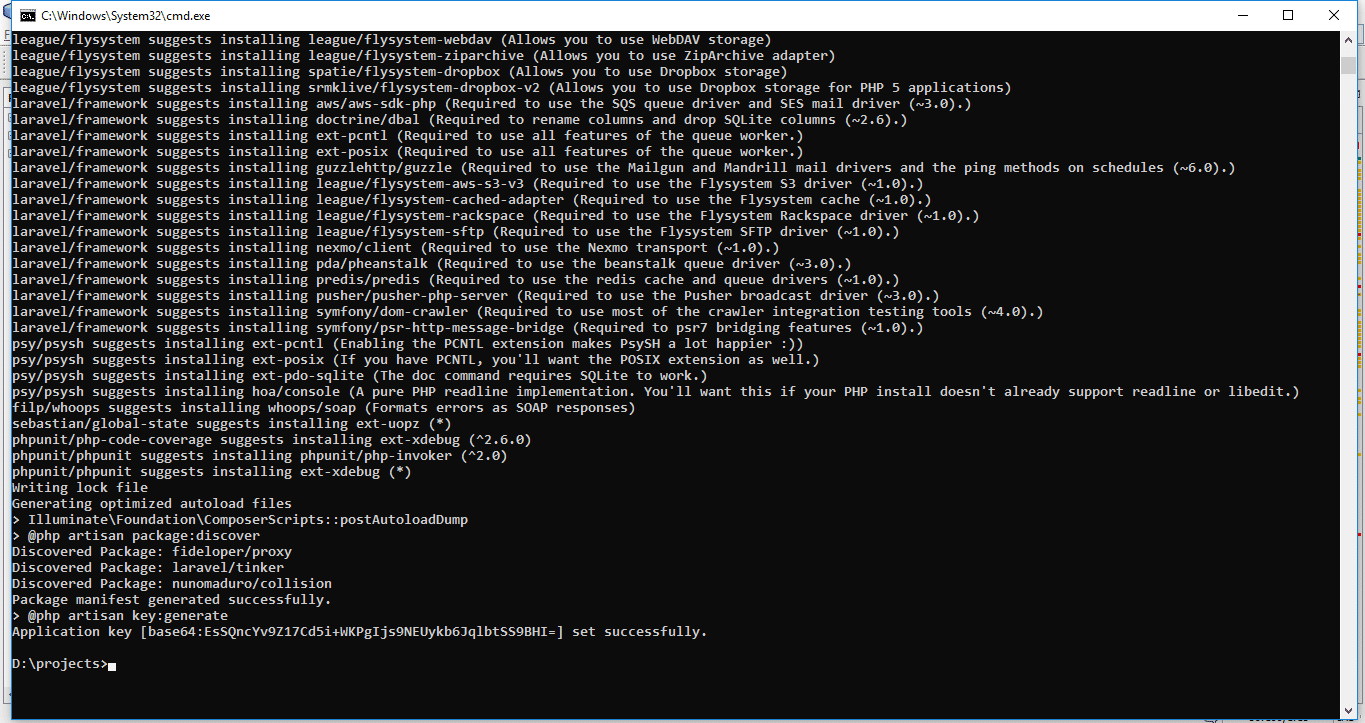
We are keeping the project name: laravel-demo. Once you run the above command it will like the following:
Above command will create a new laravel setup on this path:
D:\projects\ laravel-demo
4. Database Connection
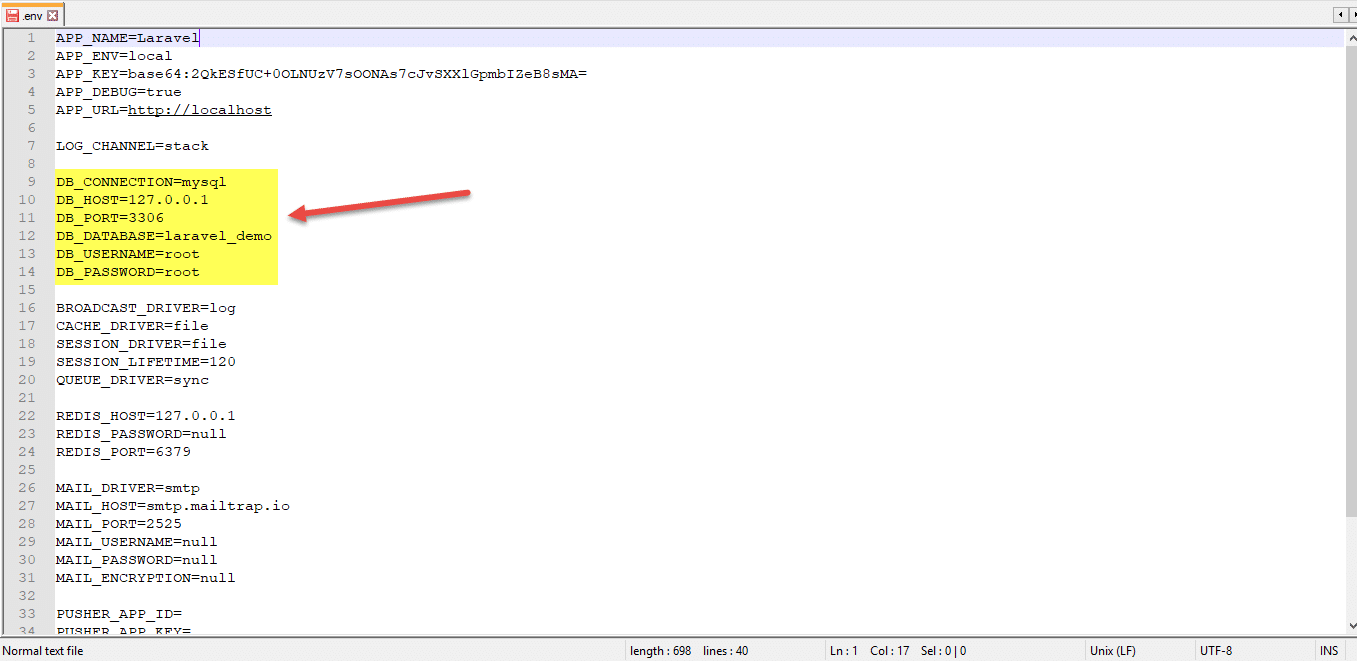
Once installation process will be completed successfully, open .env file from your root directory and setup database configurations in this file as per below mentioned screenshot.
Now, database connection is successful.
5. Run new setup
Here we assume that you have installed PHP on your local server to run our new setup.
Now run the below command from the following:
D:\projects\laravel-demo>php artisan serve
see the screenshot below:
Once you run the command in command prompt, it will show the message like Laravel development server started, as shown in the above screenshot.
Now you can run your new Laravel Application on Browser using the following:
http://127.0.0.1:8000
The default page of Laravel will be displayed after successful completion of the above steps.
Laravel is successfully setup.
Key features of Laravel 5.6
The latest version of Laravel is 5.6, which is out now. Let us explore, what is new in this version
1. Single server Scheduling:
If you have a task scheduler running on multiple servers, a particular task will run on each server. With the help of onOneServer() method you can indicate that a task should run on any one of those servers.
In this example, the rate limit is an attribute of App\User model. It is used to determine the number of requests that are allowed in the given time limit.
3. Broadcast the Channel Classes
The channel classes can be used in routes/channels.php file in place of using closures. make:channel command is introduced in Laravel 5.6. It can be used for generating a new channel class.
php artisan make:channel OrderChannel
Also, you can register your channel in the routes/channels.php file like the following:
use App\Broadcasting\OrderChannel;

Broadcast::channel('order.{order}', OrderChannel::class);
4. API Controller Generation
You can now generate a resource controller for APIs, where unnecessary create and edit actions are avoided. This is applicable to resource controllers returning HTML. Use –api flag to generate a resource controller.
5. Aliases for Blade Component
With Laravel 5.6, we can make alias for blade components in order to have more convenient access.
For instance, suppose a component is stored at resources/views/components/alert.blade.php. In order to make a shorter name, you can use the component() method to alias it.
Blade::component('components.alert', 'alert');
Now you can easily render it with the aliases defined:
@component('alert')
    <p>This is an alert component</p>
@endcomponent
6. Argon Password Hashing
A new password hashing algorithm is supported by Laravel 5.6. One can even control which hashng driver to be used by default in the new configuration file
– config/hashing .php
7. Method for UUID (Universal Unique Identifiers)
For generating Universal Unique Identifiers, two new methods are available in the Illuminate\Support\Str Class.
//<em> The methods return a Ramsey\Uuid\Uuid object
</em>
return (string) Str::uuid();

return (string) Str::orderedUuid();
The orderedUuid()method will generate the first UUID. This will be time-stamped for efficient and simple indexing of database.
8. Bootstrap 4
Laravel 5.6 has covered Bootstrap 4 functionalities to provide better frontend development functions.
The upgrade from version 5.5 to 5.6 will hardly take 30 minutes. I hope you will now be able to easily install the latest version of Laravel. If you have any new thing to say about Laravel, your views are welcomed in the comments below.
推荐理由:面向喜爱 Linux 和开源的孩子们的书籍,兴许等有了孩子之后我们可以推荐给他们看一看,这些书大部分都是简单易懂的
15 books for kids who (you want to) love Linux and open source
In my job I’ve heard professionals in tech, from C-level executives to everyone in between, say they want their own kids to learn more about Linux and open source. Some of them seem to have an easy time with their kids following closely in their footsteps. And some have a tough time getting their kids to see what makes Linux and open source so cool. Maybe their time will come, maybe it won’t. There’s a lot of interesting, valuable stuff out there in this big world.
Either way, if you have a kid or know a kid that may be interested in learning more about making something with code or hardware, from games to robots, this list is for you.
15 books for kids with a focus on Linux and open source
The tiny, credit-card sized Raspberry Pi has become a huge hit among kids—and adults—interested in programming. It does everything your desktop can do, but with a few basic programming skills you can make it do so much more. With simple instructions, fun projects, and solid skills, Adventures in Raspberry Pi is the ultimate kids’ programming guide! (Recommendation by Joshua Allen Holm | Review is an excerpt from the book’s abstract)
This is a classic introduction to programming that’s written clearly enough for a motivated 11-year-old to understand and enjoy. Readers will quickly find themselves working on practical and useful tasks while picking up good coding practices almost by accident. The best part: If you like, you can read the whole book online. (Recommendation and review by DB Clinton)
Written for children ages 8-12 with little to no coding experience, this straightforward visual guide uses fun graphics and easy-to-follow instructions to show young learners how to build their own computer projects using Scratch, a popular free programming language. (Recommendation by Joshua Allen Holm | Review is an excerpt from the book’s abstract)
Whether you’re a student or a teacher who’s curious about how you can use Python for mathematics, this book is for you. Beginning with simple mathematical operations in the Python shell to the visualization of data using Python libraries like matplotlib, this books logically takes the reader step by easily followed step from the basics to more complex operations. This book will invite your curiosity about the power of Python with mathematics. (Recommendation and review by Don Watkins)
From the leader of the movement championed by Sheryl Sandberg, Malala Yousafzai, and John Legend, this book is part how-to, part girl-empowerment, and all fun. Bursting with dynamic artwork, down-to-earth explanations of coding principles, and real-life stories of girls and women working at places like Pixar and NASA, this graphically animated book shows what a huge role computer science plays in our lives and how much fun it can be. (Recommendation by Joshua Allen Holm | Review is an excerpt from the book’s abstract)
This book will teach you how to make computer games using the popular Python programming language—even if you’ve never programmed before! Begin by building classic games like Hangman, Guess the Number, and Tic-Tac-Toe, and then work your way up to more advanced games, like a text-based treasure hunting game and an animated collision-dodging game with sound effects. (Recommendation by Joshua Allen Holm | Review is an excerpt from the book’s abstract)
Written in the spirit of Alice in Wonderland, Lauren Ipsum takes its heroine through a slightly magical world whose natural laws are the laws of logic and computer science and whose puzzles can be solved only through learning and applying the principles of computer code. Computers are never mentioned, but they’re at the center of it all. (Recommendation and review by DB Clinton)
Java is the world’s most popular programming language, but it’s known for having a steep learning curve. This book takes the chore out of learning Java with hands-on projects that will get you building real, functioning apps right away. (Recommendation by Joshua Allen Holm | Review is an excerpt from the book’s abstract)
Kindergarten is becoming more like the rest of school. In this book, learning expert Mitchel Resnick argues for exactly the opposite: The rest of school (even the rest of life) should be more like kindergarten. To thrive in today’s fast-changing world, people of all ages must learn to think and act creatively―and the best way to do that is by focusing more on imagining, creating, playing, sharing, and reflecting, just as children do in traditional kindergartens. Drawing on experiences from more than 30 years at MIT’s Media Lab, Resnick discusses new technologies and strategies for engaging young people in creative learning experiences. (Recommendation by Don Watkins | Review from Amazon)
Jason Briggs has taken the art of teaching Python programming to a new level in this book that can easily be an introductory text for teachers and students as well as parents and kids. Complex concepts are presented with step-by-step directions that will have even neophyte programmers experiencing the success that invites you to learn more. This book is an extremely readable, playful, yet powerful introduction to Python programming. You will learn fundamental data structures like tuples, lists, and maps. The reader is shown how to create functions, reuse code, and use control structures like loops and conditional statements. Kids will learn how to create games and animations, and they will experience the power of Tkinter to create advanced graphics. (Recommendation and review by Don Watkins)
Scratch programming is often seen as a playful way to introduce young people to programming. In this book, Al Sweigart demonstrates that Scratch is in fact a much more powerful programming language than most people realize. Masterfully written and presented in his own unique style, Al will have kids exploring the power of Scratch to create complex graphics and animation in no time. (Recommendation and review by Don Watkins)
From graphic novel superstar (and high school computer programming teacher) Gene Luen Yang comes a wildly entertaining new series that combines logic puzzles and basic programming instruction with a page-turning mystery plot. Stately Academy is the setting, a school that is crawling with mysteries to be solved! (Recommendation by Joshua Allen Holm | Review is an excerpt from the book’s abstract)
Love coding? Make your passion your profession with this comprehensive guide that reveals a whole host of careers working with code. (Recommendation by Joshua Allen Holm | Review is an excerpt from the book’s abstract)
Are you looking for a playful way to introduce children to programming with Python? Bryson Payne has written a masterful book that uses the metaphor of turtle graphics in Python. This book will have you creating simple programs that are the basis for advanced Python programming. This book is a must-read for anyone who wants to teach young people to program. (Recommendation and review by Don Watkins)
These concept books familiarize young ones with the kind of shapes and colors that make up web-based programming languages. This beautiful book is a colorful introduction to coding and the web, and it’s the perfect gift for any technologically minded family. (Recommendation by Chris Short | Review from Amazon)