• 开源镜像
  • 开源沙龙
  • 媛宝
  • 猿帅
  • 注册
  • 登录
  • 息壤开源生活方式平台
  • 加入我们

开源日报

  • 2018年6月7日:开源日报第91期

    7 6 月, 2018

    每天推荐一个 GitHub 优质开源项目和一篇精选英文科技或编程文章原文,欢迎关注开源日报。交流QQ群:202790710;微博:https://weibo.com/openingsource;电报群 https://t.me/OpeningSourceOrg


    今日推荐开源项目:《 Go 博客文章列表 Gopher Reading List 》GitHub链接

    推荐理由:这是一份关于 Go 的文章列表,从为什么要学习 Go 的新手向文章,到创建Web应用程序和垃圾收集等等的这些需要一些基础的文章都有。相信对于正在学习 Go 的朋友来说这会产生不小的帮助。


    今日推荐英文原文:《Data Privacy: Why It Matters and How to Protect Yourself》作者:Petros Koutoupis

    原文链接:https://www.linuxjournal.com/content/data-privacy-why-it-matters-and-how-protect-yourself

    推荐理由:这篇文章主要介绍的是关于隐私的,包括为什么会泄露隐私以及如何保护自己的隐私,在网络发达的现在,保护自己的隐私是相当有必要的。

    Data Privacy: Why It Matters and How to Protect Yourself

    When it comes to privacy on the internet, the safest approach is to cut your Ethernet cable or power down your device. But, because you can’t really do that and remain somewhat productive, you need other options. This article provides a general overview of the situation, steps you can take to mitigate risks and finishes with a tutorial on setting up a virtual private network.

    Sometimes when you’re not too careful, you increase your risk of exposing more information than you should, and often to the wrong recipients—Facebook is a prime example. The company providing the social-media product of the same name has been under scrutiny recently and for good reason. The point wasn’t that Facebook directly committed the atrocity, but more that a company linked to the previous US presidential election was able to access and inappropriately store a large trove of user data from the social-media site. This data then was used to target specific individuals. How did it happen though? And what does that mean for Facebook (and other social-media) users?

    In the case of Facebook, a data analysis firm called Cambridge Analytica was given permission by the social-media site to collect user data from a downloaded application. This data included users’ locations, friends and even the content the users “liked”. The application supposedly was developed to act as a personality test, although the data it mined from users was used for so much more and in what can be considered not-so-legal methods.

    At a high level, what does this all mean? Users allowed a third party to access their data without fully comprehending the implications. That data, in turn, was sold to other agencies or campaigns, where it was used to target those same users and their peer networks. Through ignorance, it becomes increasingly easy to “share” data and do so without fully understanding the consequences.

    Getting to the Root of the Problem

    For some, deleting your social-media account may not be an option. Think about it. By deleting your Facebook account, for example, you may essentially be deleting the platform that your family and friends choose to share some of the greatest events in their lives. And although I continue to throw Facebook in the spotlight, it isn’t the real problem. Facebook merely is taking advantage of a system with zero to no regulations on how user privacy should be handled. Honestly, we, as a society, are making up these rules as we go along.

    Recent advancements in this space have pushed for additional protections for web users with an extra emphasis on privacy. Take the General Data Protection Regulation (GDPR), for example. Established by the European Union (EU), the GDPR is a law directly affecting data protection and privacy for all individuals within the EU. It also addresses the export or use of said personal data outside the EU, forcing other regions and countries to redefine and, in some cases, reimplement their services or offerings. This is most likely the reason why you may be seeing updated privacy policies spamming your inboxes.

    Now, what exactly does GDPR enforce? Again, the primary objective of GDPR is to give EU citizens back control of their personal data. The compliance deadline is set for May 25, 2018. For individuals, the GDPR ensures that basic identity (name, address and so on), locations, IP addresses, cookie data, health/genetic data, race/ethnic data, sexual orientation and political opinions are always protected. And once the official deadline hits, it initially will affect companies with a presence in an EU country or offering services to individuals living in EU countries. Aside from limiting the control a company would have over your private data, the GDPR also places the burden on the same company to be more upfront and honest with any sort of data breach that could have resulted in the same data from being inappropriately accessed.

    Although recent headlines have placed more focus around social-media sites, they are not the only entities collecting data about you. The very same concepts of data collection and sharing even apply to the applications installed on your mobile devices. Home assistants, such as Google Home or Amazon Alexa, constantly are listening. The companies behind these devices or applications stand by their claims that it’s all intended to enrich your experiences, but to date, nothing prevents them from misusing that data—that is, unless other regions and countries follow in the same footsteps as the EU.

    Even if those companies harvesting your data don’t ever misuse it, there is still the risk of a security breach (a far too common occurrence) placing that same (and what could be considered private) information about you into the wrong hands. This potentially could lead to far more disastrous results, including identity theft.

    Where to Start?

    Knowing where to begin is often the most difficult task. Obviously, use strong passwords that have a mix of uppercase and lowercase characters, numbers and punctuation, and don’t use the same password for every online account you have. If an application offers two-factor authentication, use it.

    The next step involves reviewing the settings of all your social-media accounts. Limit the information in your user profile, and also limit the information you decide to share in your posts, both public and private. Even if you mark a post as private, that doesn’t mean no one else will re-share it to a more public audience. Even if you believe you’re in the clear, that data eventually could leak out. So, the next time you decide to post about legalizing marijuana or “like” a post about something extremely political or polarizing, that decision potentially could impact you when applying for a new job or litigating a case in court—that is, anything requiring background checks.

    The information you do decide to share in your user profile or in your posts doesn’t stop with background checks. It also can be used to give unwanted intruders access to various non-related accounts. For instance, the name of your first pet, high school or the place you met your spouse easily can be mined from your social-media accounts, and those things often are used as security questions for vital banking and e-commerce accounts.

    Social-Media-Connected Applications

    Nowadays, it’s easy to log in to a new application using your social-media accounts. In some cases, you’re coerced or tricked into connecting your account with those applications. Most, if not all, social-media platforms provide a summary of all the applications your account is logged in to. Using Facebook as an example, navigate to your Settings page, and click the Apps Settings page. There you will find such a list (Figure 1).

    Screenshot of the Facebook Application Settings Page

    Figure 1. The Facebook Application Settings Page

    As you can see in Figure 1, I’m currently connected to a few accounts, including the Linux Foundation and Super Mario Run. These applications have direct access to my account information, my timeline, my contacts and more.

    Applications such as these don’t automatically authenticate you with your social-media account. You need to authorize the application specifically to authenticate you by that account. And even though you may have agreed to it at some point, be sure to visit these sections of your assorted accounts routinely and review what’s there.

    So, the next time you are redirected from that social-media site and decide to take that personality quiz or survey to determine what kind of person you are attracted to or even what you would look like as the opposite sex, think twice about logging in using your account. By doing so, you’re essentially agreeing to give that platform access to everything stored in your account.

    This is essentially how firms like Cambridge Analytica obtain user information. You never can be too sure of how that information will be used or misused.

    Tracking-Based Advertisements

    The quickest way for search engines and social-media platforms to make an easy dollar is to track your interests and specifically target related advertisements to you. How often do you search for something on Google or peruse through Facebook or Twitter feeds and find advertisements of a product or service you were looking into the other day? These platforms keep track of your location, your search history and your general activities. Sounds scary, huh? In some cases, your network of friends even may see the products or services from your searches.

    To avoid such targeting, you need to rethink how you search the internet. Instead of Google, opt for something like DuckDuckGo. With online stores like Amazon, keep your wish lists and registries private or share them with a select few individuals. In the case of social media, you probably should update your Advertisement Preferences.

    Screenshot of the Facebook Advertisement Preferences Page

    Figure 2. The Facebook Advertisement Preferences Page

    In some cases, you can completely disable targeted advertisements based on your search or activity history. You also can limit what your network of peers can see.

    Understanding What’s at Risk

    People often don’t think about privacy matters until something affects them directly. A good way to understand what personal data you risk is to request that same data from a service provider. It is this exact data that the service provider may sell to third parties or even allow external applications to access.

    You can request this data from Facebook, via the General Account Settings page. At the very bottom of your general account details, there’s a link appropriately labeled “Download a copy of your Facebook data”.

    Screenshot of the Facebook General Account Settings Page

    Figure 3. The Facebook General Account Settings Page

    It takes a few minutes to collect everything and compress it into a single .zip file, but when complete, you’ll receive an email with a direct link to retrieve this archive.

    When extracted, you’ll see a nicely organized collection of all your assorted activities:

    
    $ ls -l
    total 24
    drwxrwxr-x 2 petros petros 4096 Mar 24 07:11 html
    -rw-r--r-- 1 petros petros 6403 Mar 24 07:01 index.htm
    drwxrwxr-x 8 petros petros 4096 Mar 24 07:11 messages
    drwxrwxr-x 6 petros petros 4096 Mar 24 07:11 photos
    drwxrwxr-x 3 petros petros 4096 Mar 24 07:11 videos
    

    Open the file index.html at the root of the directory (Figure 4).

    Screenshot of the Facebook Archive Profile Page

    Figure 4. The Facebook Archive Profile Page

    Everything, and I mean everything, you have done with this account is stored and never deleted. All of your Friends history, including blocked and removed individuals is preserved. Every photograph and video uploaded and every private message sent via Messenger is forever retained. Every advertisement you clicked (and in turn every advertiser that has your contact information) and possibly even more is recorded. I don’t even know 90% of the advertisers appearing on my list, nor have I ever agreed to share information with them. I also can tell that a lot of them aren’t even from this country. For instance, why does a German division of eBay have my information through Facebook when I use the United States version of eBay and always have since at least 1999? Why does Sally Beauty care about who I am? Last time I checked, I don’t buy anything through that company (I am not real big into cosmetics or hair-care products).

    It’s even been reported that when Facebook is installed on your mobile device, it can and will log all details pertaining to your phone calls and text messages (names, phone numbers, duration of call and so on).

    Mobile Devices

    I’ve already spent a great deal of time focusing on social media, but data privacy doesn’t end there. Another area of concern is around mobile computing. It doesn’t matter which mobile operating system you are running (Android or iOS) or which mobile hardware you are using (Samsung, Huawei, Apple and so on). The end result is the same. Several mobile applications, when installed, are allowed unrestricted access to more data than necessary.

    With this in mind, I went to the Google Play store and looked up the popular Snapchat app. Figure 5 shows a summary of everything Snapchat needed to access.

    Screenshot of the Access Requirements for a Popular Mobile Application

    Figure 5. Access Requirements for a Popular Mobile Application

    A few of these categories make sense, but some of the others leave you wondering. For instance, why does Snapchat need to know about my “Device ID & call information” or my WiFi and Bluetooth connection information? Why does it need to access my SMS text messages? What do applications like Snapchat do with this collected data? Do they find ways to target specific products and features based on your history or do they sell it to third parties?

    Mobile devices often come preinstalled with software or preconfigured to store or synchronize your personal data with a back-end cloud storage service. This software may be provided by your cellular service provider, the hardware product manufacturer or even by the operating system developer. Review those settings and disable anything that does not meet your standards. Even if you rely on Google to synchronize your photographs and videos to your Google Drive or Photos account, restrict which folders or subdirectories are synchronized.

    Want to take this a step further? Think twice about enabling fingerprint authentication. Hide all notifications on your lock screen. Disable location tracking activity. Encrypt your phone.

    What about Local Privacy?

    There is more. You also need to consider local privacy. There is a certain recipe you always should follow.

    Passwords

    Use good passwords. Do not enable auto-login, and also disable root logins for SSH. Enable your screen lock when the system is idle for a set time and when the screensaver takes over.

    Encryption

    Encrypting your home directory or even the entire disk drive limits the possibility that unauthorized individuals will gain access to your personal data while physically handing the device. Most modern Linux distributions offer the option to enable this feature during the installation process. It’s still possible to encrypt an existing system, but before you decide to undertake this often risky endeavor, make sure you first back up anything that’s considered important.

    Applications

    Review your installed applications. Keep things to a minimum. If you don’t use it, uninstall it. This can help you in at least three ways:

    1. It will reduce overall clutter and free up storage space on your local hard drive.
    2. You’ll be less at risk of hosting a piece of software with bugs or security vulnerabilities, reducing the potential of your system being compromised in some form or another.
    3. There is less of a chance that the same software application is collecting data that it shouldn’t be collecting in the first place.

    System Updates

    Keep your operating system updated at all times. Major Linux distributions are constantly pushing updates to existing packages that address both software defects and security vulnerabilities.

    HTTP vs. HTTPS

    Establish secure connections when browsing the internet. Pay attention when transferring data. Is it done over HTTP or HTTPS? (The latter is the secured method.) The last thing you need is for your login credentials to be transferred as plain text to an unsecured website. That’s why so many service providers are securing your platforms for HTTPS, where all requests made are encrypted.

    Web Browsers

    Use the right web browser. Too many web browsers are less concerned with your privacy and more concerned with your experience. Take the time to review your browsing requirements, and if you need to run in private or “incognito” mode or just adopt a new browser more focused on privacy, take the proper steps to that.

    Add-ons

    While on the topic of web browsers, review the list of whatever add-ons are installed and configured. If an add-on is not in use or sounds suspicious, it may be safe to disable or remove it completely.

    Script Blockers

    Script blockers (NoScript, AdBlock and so on) can help by preventing scripts embedded on websites from tracking you. A bit of warning: these same programs can and may even ruin your experiences with a large number of websites visited.

    Port Security

    Review and refine your firewall rules. Make sure you drop anything coming in that shouldn’t be intruding in the first place. This may even be a perfect opportunity to discover what local services are listening on external ports (via netstat -lt). If you find that these services aren’t necessary, turn them off.

    Securing Connections

    Every device connecting over a larger network is associated with a unique address. The device obtains this unique address from the networking router or gateway to which it connects. This address commonly is referred to as that device’s IP (internet protocol) address. This IP address is visible to any website and any server you visit. You’ll always be identified by this address while using this device.

    It’s through this same address that you’ll find advertisements posted on various websites and in various search engines rendered in the native language of the country in which you live. Even if you navigate to a foreign website, this method of targeting ensures that the advertisements posted on that site cater to your current location.

    Relying on IP addresses also allows some websites or services to restrict access to visitors from specific countries. The specific range of the address will point to your exact country on the world map.

    Virtual Private Network

    An easy way to avoid this method of tracking is to rely on the use of Virtual Private Networks (VPNs). It is impossible to hide your IP address directly. You wouldn’t be able to access the internet without it. You can, however, pretend you’re using a different IP address, and this is where the VPN helps.

    A VPN extends a private network across a public network by enabling its users to send/receive data across the public network as if their device were connected directly to the private network. There exists hundreds of VPN providers worldwide. Choosing the right one can be challenging, but providers offer their own set of features and limitations, which should help shrink that list of potential candidates.

    Let’s say you don’t want to go with a VPN provider but instead want to configure your own VPN server. Maybe that VPN server is located somewhere in a data center and nowhere near your personal computing device. For this example, I’m using Ubuntu Server 16.04 to install OpenVPN and configure it as a server. Again, this server can be hosted from anywhere: in a virtual machine in another state or province or even in the cloud (such as AWS EC2). If you do host it on a cloud instance, be sure you set that instance’s security group to accept incoming/outgoing UDP packets on port 1194 (your VPN port).

    The Server

    Log in to your already running server and make sure that all local packages are updated:

    
    $ sudo apt-get update && sudo apt-get upgrade
    

    Install the openvpn and easy-rsa packages:

    
    $ sudo apt-get install openvpn easy-rsa
    

    Create a directory to set up your Certificate Authority (CA) certificates. OpenVPN will use these certificates to encrypt traffic between the server and client. After you create the directory, change into it:

    
    $ make-cadir ~/openvpn-ca
    $ cd ~/openvpn-ca/
    

    Open the vars file for editing and locate the section that contains the following parameters:

    
    # These are the default values for fields
    # which will be placed in the certificate.
    # Don't leave any of these fields blank.
    export KEY_COUNTRY="US"
    export KEY_PROVINCE="CA"
    export KEY_CITY="SanFrancisco"
    export KEY_ORG="Fort-Funston"
    export KEY_EMAIL="[email protected]"
    export KEY_OU="MyOrganizationalUnit"
    
    # X509 Subject Field
    export KEY_NAME="EasyRSA"
    

    Modify the fields accordingly, and for the KEY_NAME, let’s define something a bit more generic like “server” Here’s an example:

    
    # These are the default values for fields
    # which will be placed in the certificate.
    # Don't leave any of these fields blank.
    export KEY_COUNTRY="US"
    export KEY_PROVINCE="IL"
    export KEY_CITY="Chicago"
    export KEY_ORG="Linux Journal"
    export KEY_EMAIL="[email protected]"
    export KEY_OU="Community"
    
    # X509 Subject Field
    export KEY_NAME="server"
    

    Export the variables:

    
    $ source vars
    NOTE: If you run ./clean-all, I will be doing a rm -rf
     ↪on /home/ubuntu/openvpn-ca/keys
    

    Clean your environment of old keys:

    
    $ ./clean-all
    

    Build a new private root key, choosing the default options for every field:

    
    $ ./build-ca
    

    Next build a new private server key, also choosing the default options for every field (when prompted to input a challenge password, you won’t input anything for this current example):

    
    $ ./build-key-server server
    

    Toward the end, you’ll be asked to sign and commit the certificate. Type “y” for yes:

    
    Certificate is to be certified until Mar 29 22:27:51 2028
     ↪GMT (3650 days)
    Sign the certificate? [y/n]:y
    
    1 out of 1 certificate requests certified, commit? [y/n]y
    Write out database with 1 new entries
    Data Base Updated
    

    You’ll also generate strong Diffie-Hellman keys:

    
    $ ./build-dh
    

    To help strengthen the server’s TLS integrity verification, generate an HMAC signature:

    
    $ openvpn --genkey --secret keys/ta.key
    

    So, you’ve finished generating all the appropriate server keys, but now you need to generate a client key for your personal machine to connect to the server. To simplify this task, create this client key from the same server where you generated the server’s keys.

    If you’re not in there already, change into the same ~/openvpn-ca directory and source the same vars file from earlier:

    
    $ cd ~/openvpn-ca
    $ source vars
    

    Generate the client certificate and key pair, again choosing the default options, and for the purpose of this example, avoid setting a challenge password:

    
    $ ./build-key client-example
    

    As with the server certificate/key, again, toward the end, you’ll be asked to sign and commit the certificate. Type “y” for yes:

    
    Certificate is to be certified until Mar 29 22:32:37 2028
     ↪GMT (3650 days)
    Sign the certificate? [y/n]:y
    
    1 out of 1 certificate requests certified, commit? [y/n]y
    Write out database with 1 new entries
    Data Base Updated
    

    Change into the keys subdirectory and copy the keys you generated earlier over to the /etc/openvpn directory:

    
    $ cd  keys/
    $ sudo cp ca.crt server.crt server.key ta.key
     ↪dh2048.pem /etc/openvpn/
    

    Extract the OpenVPN sample server configuration file to the /etc/openvpn directory:

    
    $ gunzip -c /usr/share/doc/openvpn/examples/sample-config-files/
    ↪server.conf.gz |sudo tee /etc/openvpn/server.conf
    

    Let’s use this template as a starting point and apply whatever required modifications are necessary to run the VPN server application. Using an editor, open the /etc/openvpn/server.conf file. The fields you’re most concerned about are listed below:

    
    ;tls-auth ta.key 0 # This file is secret
    
    [ ... ]
    
    ;cipher BF-CBC        # Blowfish (default)
    ;cipher AES-128-CBC   # AES
    ;cipher DES-EDE3-CBC  # Triple-DES
    
    [ ... ]
    
    ;user nobody
    ;group nogroup
    

    Uncomment and add the following lines:

    
    tls-auth ta.key 0 # This file is secret
    key-direction 0
    
    [ ... ]
    
    ;cipher BF-CBC        # Blowfish (default)
    cipher AES-128-CBC   # AES
    auth SHA256
    ;cipher DES-EDE3-CBC  # Triple-DES
    
    [ ... ]
    
    user nobody
    group nogroup
    

    You’ll need to enable IPv4 packet forwarding via sysctl. Uncomment the field net.ipv4.ip_forward=1 in /etc/sysctl.conf and reload the configuration file:

    
    $ sudo sysctl -p
    net.ipv4.ip_forward = 1
    

    If you’re running a firewall, UDP on port 1194 will need to be open at least to the public IP address of the client machine. Once you do this, start the server application:

    
    $ sudo systemctl start openvpn@server
    

    And if you wish, configure it to start automatically every time the system reboots:

    
    $ sudo systemctl enable openvpn@server
    

    Finally, create the client configuration file. This will be the file the client will use every time it needs to connect to the VPN server machine. To do this, create a staging directory, set its permissions accordingly and copy a client template file into it:

    
    $ mkdir -p ~/client-configs/files
    $ chmod 700 ~/client-configs/files/
    $ cp /usr/share/doc/openvpn/examples/sample-config-files/client.conf
     ↪~/client-configs/base.conf
    

    Open the ~/client-configs/base.conf file in an editor and locate the following areas:

    
    remote my-server-1 1194
    ;remote my-server-2 1194
    
    [ ... ]
    
    ca ca.crt
    cert client.crt
    key client.key
    
    [ ... ]
    
    ;cipher x
    

    The variables should look something like this:

    
    remote <public IP of server> 1194
    ;remote my-server-2 1194
    
    [ ... ]
    
    #ca ca.crt
    #cert client.crt
    #key client.key
    
    [ ... ]
    
    cipher AES-128-CBC
    auth SHA256
    
    key-direction 1
    
    # script-security 2
    # up /etc/openvpn/update-resolv-conf
    # down /etc/openvpn/update-resolv-conf
    

    The remote server IP will need to be adjusted to reflect the public IP address of the VPN server. Be sure to adjust the cipher while also adding the auth and the key-direction variables. Also append the commented script-security and update-resolv-conf lines. Now, generate the OVPN file:

    
    cat ~/client-configs/base.conf \
        <(echo -e '<ca>') \
        ~/openvpn-ca/keys/ca.crt \
        <(echo -e '</ca>\n<cert>') \
        ~/openvpn-ca/keys/client-example.crt \
        <(echo -e '</cert>\n<key>') \
        ~/openvpn-ca/keys/client-example.key \
        <(echo -e '</key>\n<tls-auth>') \
        ~/openvpn-ca/keys/ta.key \
        <(echo -e '</tls-auth>') \
        > ~/client-configs/files/client-example.ovpn
    

    You should see the newly created file located in the ~/client-configs/files subdirectory:

    
    $ ls ~/client-configs/files/
    client-example.ovpn
    

    The Client

    Copy the OVPN file to the client machine (your personal computing device). In the example below, I’m connected to my client machine and using SCP, transferring the file to my home directory:

    
    $ scp petros@openvpn-server:~/client-configs/files/
    ↪client-example.ovpn ~/
    client-example.ovpn              100%   13KB  12.9KB/s   00:00
    

    Install the OpenVPN package:

    
    $ sudo apt-get install openvpn
    

    If the /etc/openvpn/update-resolv-conf file exists, open your OVPN file (currently in your home directory) and uncomment the following lines:

    
    script-security 2
    up /etc/openvpn/update-resolv-conf
    down /etc/openvpn/update-resolv-conf
    

    Connect to the VPN server by pointing to the client configuration file:

    
    $ sudo openvpn --config client-example.ovpn
    

    While you’re connected, you’ll be browsing the internet with the public IP address used by the VPN server and one that was not assigned by your Internet Service Provider (ISP).

    Summary

    How does it feel to have your locations, purchasing habits, preferred reading content, search history (including health and illness), political views and more shared with an unknown number of recipients across this mysterious thing we call the internet? It probably doesn’t feel very comforting. This might be information we typically would not want our closest family and friends to know, so why would we want strangers to know it instead? It is far too easy to be complacent and allow such personal data mining to take place. Retaining true anonymity while also enjoying the experiences of the modern web is definitely a challenge. Although, it isn’t impossible.


    每天推荐一个 GitHub 优质开源项目和一篇精选英文科技或编程文章原文,欢迎关注开源日报。交流QQ群:202790710;微博:https://weibo.com/openingsource;电报群 https://t.me/OpeningSourceOrg

  • 2018年6月6日:开源日报第90期

    6 6 月, 2018

    每天推荐一个 GitHub 优质开源项目和一篇精选英文科技或编程文章原文,欢迎关注开源日报。交流QQ群:202790710;微博:https://weibo.com/openingsource;电报群 https://t.me/OpeningSourceOrg


    今日推荐开源项目:《区块链技术开发相关资料 Awesome Blockchain》GitHub链接

    推荐理由:这个项目收集了有关于区块链技术的开发资料,从猴子也能看懂的入门教程,到以太坊开发和 Fabric 联盟链入门等等。作者还在文章的末尾开放了以太坊和 Fabric 联盟链相关的专题。对于区块链感兴趣的朋友肯定不能错过这个,单纯想要知道什么是区块链的话来看看入门教程了解一下也是不错的选择。


    今日推荐英文原文:《The Beauty of the Blockchain》作者:Swapnil Kulkarni

    原文链接:https://opensourceforu.com/2018/06/the-beauty-of-the-blockchain/

    推荐理由:这篇文章对区块链做了一个简单的介绍,从区块链技术和其特点到开源的区块链项目,社区及框架。推荐想要了解区块链的朋友一读。

    The Beauty of the Blockchain

    The meteoric rise in the value of bitcoins has put a spotlight on the blockchain, which is the primary public, digital ledger for bitcoin transactions. A blockchain allows digital transactions to be transparent and distributed, but not copied. It is thought to be the brainchild of an anonymous person or group operating under the pseudonym Satoshi Nakamoto.

    The bitcoin network has attracted attention from almost all industries and experts due to its variable market value. These captains of industry and the experts are trying to figure out how this technology can be adapted to and integrated with their work. The dictionary definition of blockchain is, “A digital ledger in which transactions made in bitcoin or another cryptocurrency are recorded chronologically and publicly.” This definition is derived from the most popular implementation of blockchain technology—the bitcoin. But blockchain is actually not bitcoin. Let’s have a look at blockchain technology, in general.

    Distributed ledger technology (DLT)

    Distributed ledger technology includes blockchain technologies and smart contracts. While DLT existed prior to bitcoin or blockchain, it marks the convergence of a host of technologies, including the time-stamping of transactions, peer-to-peer (P2P) networks, cryptography, shared computational power, as well as a new consensus algorithm. In short, distributed ledger technology is generally made up of three basic components:

    • A data model that captures the current state of the ledger.
    • A language of transactions that changes the ledger state.
    • A protocol used to build consensus among participants around which transactions will be accepted by the ledger and in what order.

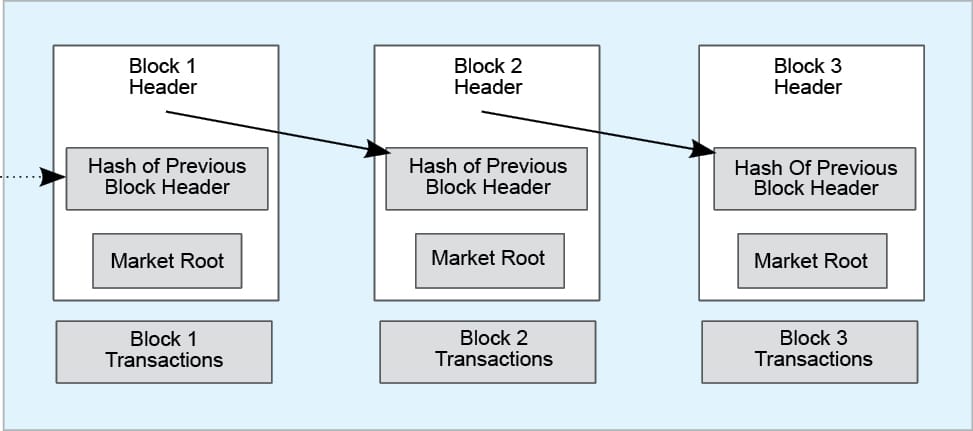
    Figure 1: Structure of a block in the chain

    What is blockchain technology?

    Blockchain is a specific form or sub-set of distributed ledger technologies, which constructs a chronological chain of blocks; hence the name ‘blockchain’. A block refers to a set of transactions that is bundled together and added to the chain at the same time. A blockchain is a peer-to-peer distributed ledger, forged by consensus, combined with a system for smart contracts and other assistive technologies. Together, these can be used to build a new generation of transactional applications that establish trust, accountability and transparency at their core, while streamlining business processes and legal constraints. The blockchain then tracks various assets, the transactions are grouped into blocks, and there can be any number of transactions per block. A block commonly consists of the following four pieces of metadata:

    • The reference to the previous block
    • The proof of work, also known as a nonce
    • The time-stamp
    • The Merkle tree root for the transactions included in this block

    Is a blockchain similar to a database?

    Blockchain technology is different from databases in some key aspects. In a relational database, data can be easily modified or deleted. Typically, there are database administrators who may make changes to any part of the data or its structure and even to relational databases. A blockchain, however, is a write-only data structure, where new entries get appended onto the end of the ledger. There are no administrator permissions within a blockchain that allow the editing or deleting of data. Also, the relational databases were originally designed for centralised applications, where a single entity controls the data. In contrast, blockchains were specifically designed for decentralised applications.

    Types of blockchains

    A blockchain can be both permissionless (e.g., bitcoin and Ethereum) or permissioned, like the different Hyperledger blockchain frameworks. The choice between permissionless and permissioned blockchains is driven by the particular use case.

    A permissionless blockchain is also known as a public blockchain, because anyone can join the network. A permissioned blockchain, or private blockchain, requires pre-verification of the participants within the network, who are usually known to each other.

    Characteristics of blockchains

    Here is a list of some of the well-known properties

    of blockchains.

    • Immutability of data

    The immutability of the data which sits on the blockchain is perhaps the most powerful and convincing reason to deploy blockchain-based solutions for a variety of socio-economic processes that are currently recorded on centralised servers. This ‘unchanging over time’ feature makes the blockchain useful for accounting and financial transactions, in identity management and in asset ownership, management and transfer, just to name a few examples. Once a transaction is written onto the blockchain, no one can change it or, at least, it would be extremely difficult to do so.

    • Transparency

    Transparency of data is embedded within the network as a whole. The blockchain network exists in a state of consensus, one that automatically checks in with itself. Due to the structure of a block, the data in a blockchain cannot be corrupted; hence altering any unit of information in it is almost impossible. Though, in theory, this can be done by using a huge amount of computing power to override the entire network, this is not possible practically.

    • Decentralisation

    By design, the blockchain is a decentralised technology. Anything that happens on it is a function of the network, as a whole. A global network of computers uses blockchain technology to jointly manage the database that records transactions. The consensus mechanism discussed next ensures the correctness of data stored on the blockchain.

    • Security

    By storing data across its network, the blockchain eliminates the risks that come with data being held centrally, and the network lacks centralised points of vulnerability that are prone to being exploited. The blockchain ensures all participants in the network use encryption technologies for the security of the data. Primarily, it uses PKI (public key infrastructure), and it is up to the participants to select other encryption technologies as per their preference.

    What are consensus mechanisms and the types of consensus algorithms?

    Consensus is an agreement among the network peers; it refers to a system of ensuring that participants agree to a certain state of the system as the true state. It is a process whereby the peers synchronise the data on the blockchain. There are a number of consensus mechanisms or algorithms. One is Proof of Work. Others include Proof of Stake, Proof of Elapsed Time and Simplified Byzantine Fault Tolerance. Bitcoin and Ethereum use Proof of Work, though Ethereum is moving towards Proof of Stake.

    What are smart contracts?

    Back in 1996, a man named Nick Szabo coined the term ‘smart contract’. You can think of it as a computer protocol used to facilitate, verify, or enforce the negotiation of a legal contract. A smart contract is a phrase used to describe computer code. Smart contracts are simply computer programs that execute predefined actions when certain conditions within the system are met. Smart contracts provide the language of transactions that allows the ledger state to be modified. They can facilitate the exchange and transfer of anything of value (e.g., shares, money, content and property).

    Open source blockchain frameworks, projects and communities

    Looking at the current state of research and some of the implementations of blockchain technologies, we can certainly say that most enterprise blockchain initiatives are backed by open source projects. Here’s a list of some of the popular open source blockchain projects.

    • Hyperledger is an open source effort created to advance cross-industry blockchain technologies. Hosted by the Linux Foundation, it is a global collaboration of members from various industries and organisations.
    • Quorum is a permissioned implementation of Ethereum, which supports data privacy. Quorum achieves data privacy by allowing data visibility on a need-to-know basis, using a voting-based consensus algorithm. Interestingly, Quorum was created and open sourced by J.P. Morgan.
    • Chain Core, created by chain.com, was initially designed for financial services institutions and for things like securities, bonds and currencies.
    • Corda is a distributed ledger platform designed to record, manage and automate legal agreements between businesses. It was created by the R3 Company, which is a consortium of over a hundred global financial institutions.

    每天推荐一个 GitHub 优质开源项目和一篇精选英文科技或编程文章原文,欢迎关注开源日报。交流QQ群:202790710;微博:https://weibo.com/openingsource;电报群 https://t.me/OpeningSourceOrg

  • 2018年6月5日:开源日报第89期

    5 6 月, 2018

    每天推荐一个 GitHub 优质开源项目和一篇精选英文科技或编程文章原文,欢迎关注开源日报。交流QQ群:202790710;微博:https://weibo.com/openingsource;电报群 https://t.me/OpeningSourceOrg


    今日推荐开源项目:《训练机器学习模型的 JavaScript 库 TensorFlow.js》GitHub链接

    推荐理由:这个 JavaScript 库能够让你在浏览器上训练机器学习模型,当然,如果你已经有 TensorFlow 的模型了,也可以选择转换后导入或是接着调整它。在它的官方文档页面,还有一些DEMO能够让你实际的看到训练出的机器学习模型的效果。

    官网地址:https://js.tensorflow.org/


    今日推荐英文原文:《AI for artists : Part 1》作者:Savio Rajan

    原文链接:https://towardsdatascience.com/ai-for-artists-part-1-8d74502725d0

    推荐理由:这篇文章介绍的是如何通过借助机器学习来创造绘画作品,简单的说,就是将一幅画的画风与另一幅画的内容结合起来, 从而创造出新作品

    AI for artists : Part 1

    Art is not merely an imitation of the reality of nature, but in truth a metaphysical supplement to the reality of nature, placed alongside thereof for its conquest.

    – Friedrich Nietzsche

    The history of art and technology have always been intertwined. Artistic revolutions which has happened in history were made possible by the tools to make the work. The precision of flint knives allowed humans to sculpt the first pieces of figurative art out of mammoth ivory. In the present age , artists work with tools ranging from 3D printing to virtual reality, stretching the possibilities of self-expression.

    We are entering an age where AI is becoming increasingly present in almost every field . Elon Musk thinks it will exceed humans at everything in by 2030 , but art has been viewed as a pantheon of humanity, something quintessentially human that an AI could never replicate. In this series of articles , we will create awesome pieces of art with the help of machine learning .

    Project 1: Neural Style Transfer

    What is neural style transfer ?

    It is simply the process of re-imagining one image in the style of other. It is one of the coolest applications of image processing using convolution neural networks. Imagine you could have any famous artist(for example Michelangelo)paint you a picture of your whatever you want in just milli-seconds. In this article I will try to give a brief description about the implementation details. For more information you can refer paper by Gatys et al., 2015 . The paper achieves what we are trying to do as an optimization problem

    Before we begin , we will cover some basics which can help you understand the concepts better or if you are interested only in code you can go directly to the following link https://github.com/hnarayanan/artistic-style-transfer or https://github.com/sav132/neural-style-transfer . The Andrew Ng course on Convolutional Neural Networks(CNN) is definitely recommended so as to understand concepts on a deeper level.

    Fundamentals

    Let’s think that we are trying to build an image classifier that can predict what an image is . We use supervised learning for solving this. Given a color image (RGB image) which consists of D = W X H X 3 (color depth = 3) be stored as an array .We assume that there are “n” categories to be classified into.The task is to come up with a function which classify our image as being one of “n” images.

    To build this we start with a set of previously classified labeled “training data”. We can use a simple linear activation function [F(x,W,b) = Wx +b] for score function.W — matrix of size n X D called weights and vector b of size n X 1 called biases. To predict probability for each category , we pass this output through something called a softmax function σ that squashes the scores to a set of numbers between 0 and 1 that add up to 1. Let’s suppose our training data is a set of N pre-classified examples xi∈ℝD, each with correct category yi∈1,…,K. To determine the total loss across all these examples is the cross entropy loss:

    L(s)=−∑i log(syi)

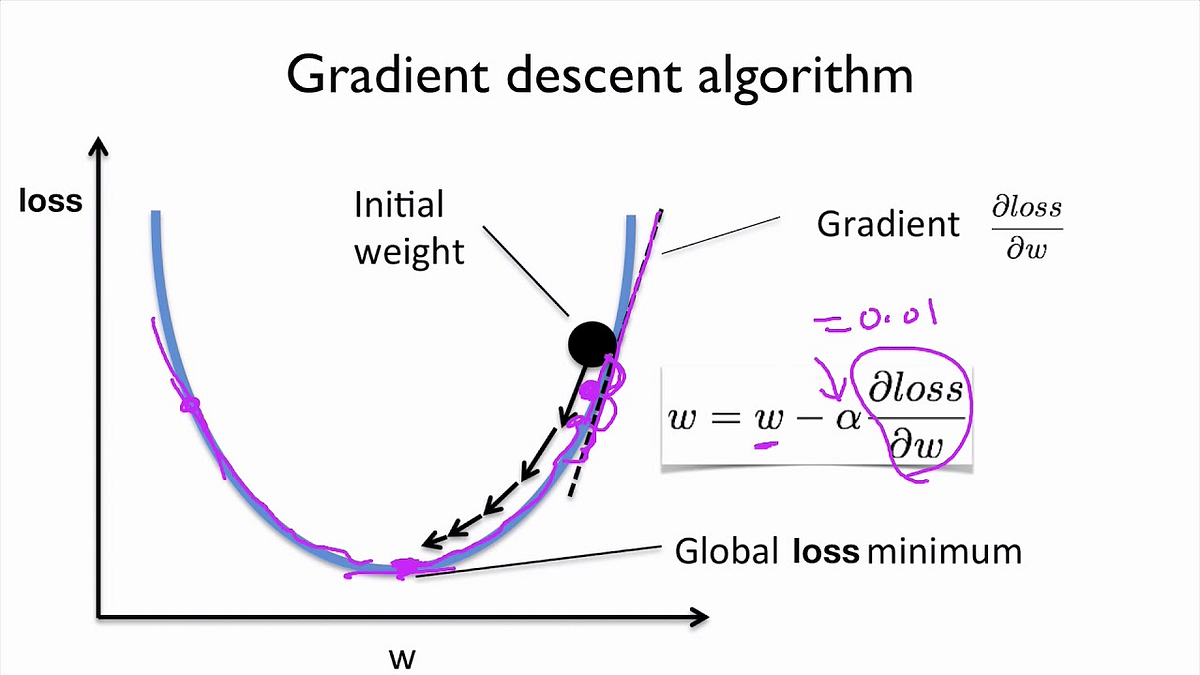
    For the optimization part ,we use gradient descent. We have to find weights and biases that minimizes this loss.

    Our aim here is to find the global loss minimum which is at the bottom of the curve. We also use a parameter called the learning rate(α), which is a measure of how fast we modify our weights.

    Summing it all up, initially we gave some image as a raw array of numbers, we have a parameterised score function (linear transformation followed by a softmax function) that takes us to category scores. We have a way of evaluating its performance (the cross entropy loss function). Then we improve the classifier’s parameters (optimisation using gradient descent). But here the accuracy is less , therefore we use Convolutional Neural Networks to improve accuracy.

    Basics of Convolutional Neural Network(CNN)

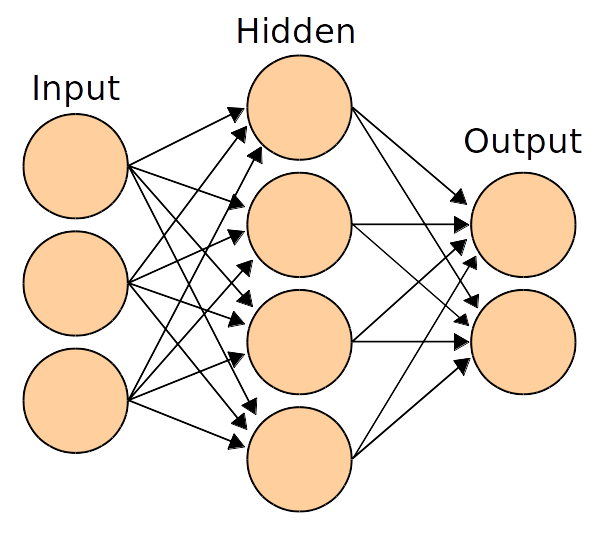
    Diagram of a simple network from Wikipedia

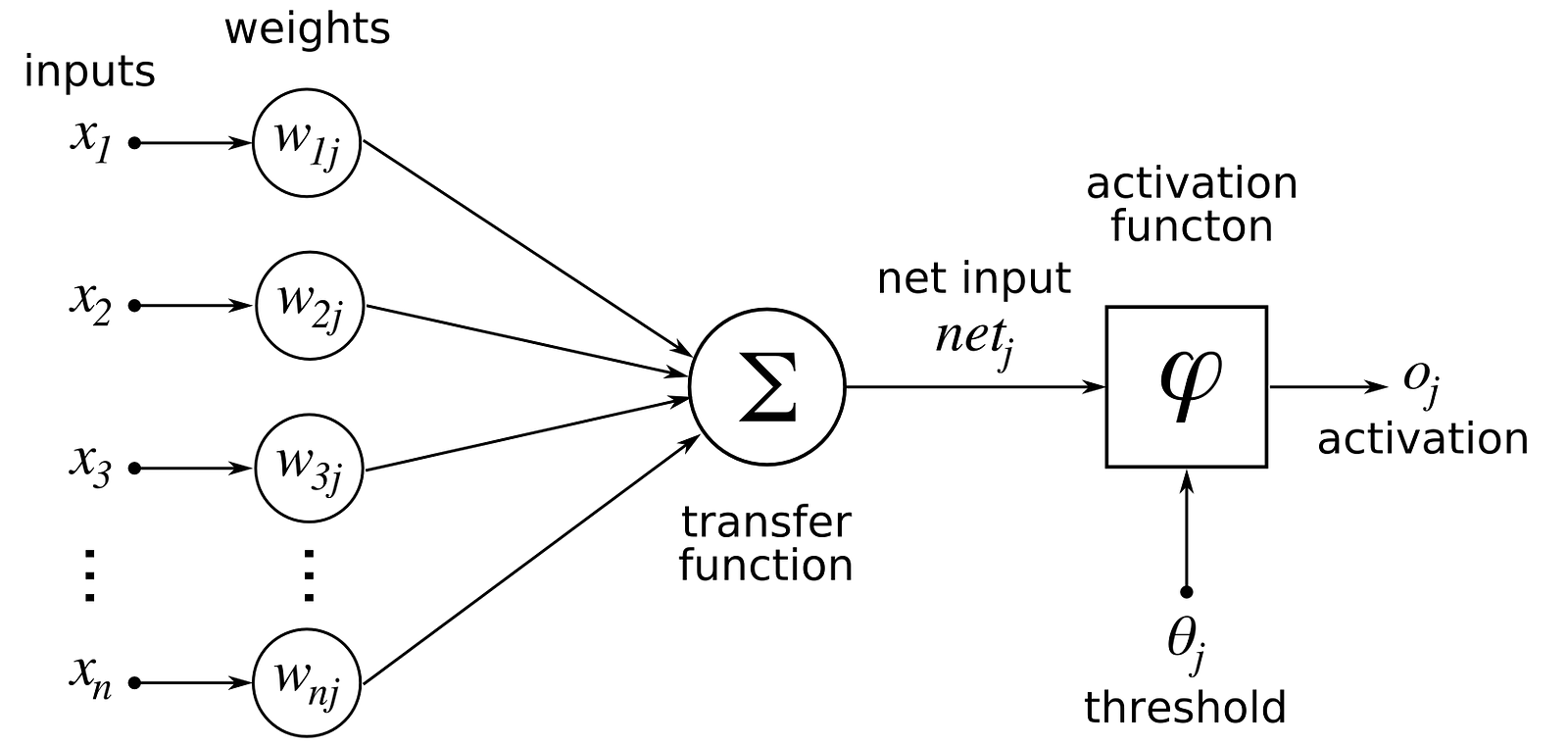
    Previously we used linear score function ,but here we will use non-linear score function.For this we use neurons which are functions which first multiplies each of its inputs by a weight and sums these weighted inputs to a single number and adds a bias. It then passes this number through a nonlinear function called the activation and produces an output.

    Normally to improve the accuracy of our classifier, we’d probably think that it is easy to do so by adding more layers to our score function.But there are some problems to that –

    1. Generally, neural networks entirely disregard the 2D structure of the image . For example if we are working with the input image as a 30×30 matrix, they worked with the input as a 900 number array. And you can imagine there is some useful information in pixels sharing proximity that’s being lost.

    2. Number of parameters we would need to learn grows really rapidly as we add more layers.

    To solve these problems , we use convolutional neural networks.

    Difference between normal networks and CNN is that instead of using input data as linear arrays, it uses input data with width, height and depth and outputs a 3D volume of numbers. What one imagines as a 2D input image (W×H) gets transformed into 3D by introducing the colour depth as the third dimension (W×H×d). (it is 1 for greyscale and 3 for RGB.) Similarly what one might imagine as a linear output of length C is actually represented as 1×1×C. There are two layer types which we use –

    1. Convolutional layer

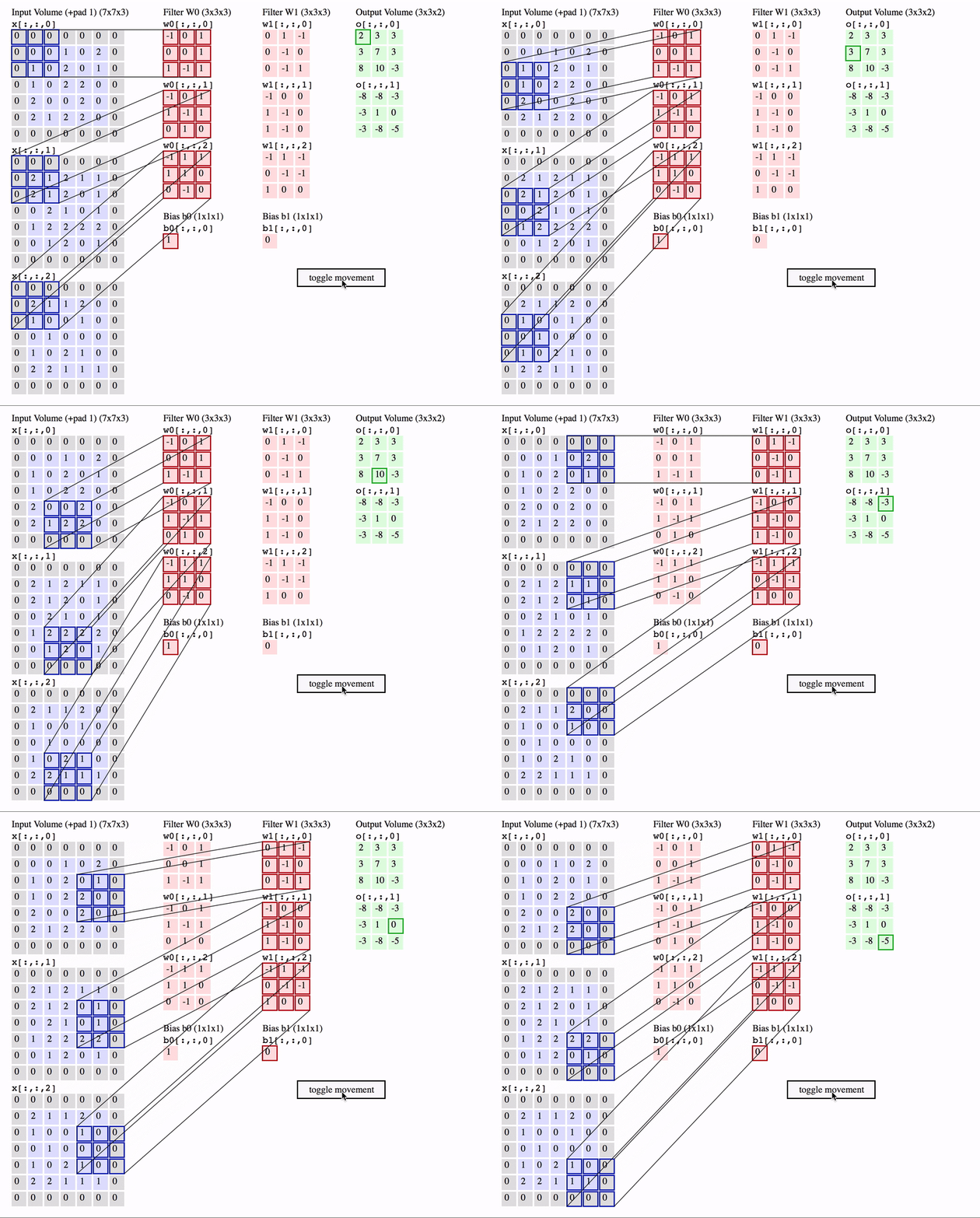
    The first is the convolutional (Conv) layer. Here we have a set of filters. Let’s assume that we have K such filters. Each filter is small , with an extent denoted by F and has depth value of its input. e.g. A typical filter might be 3×3×3 (3 pixels wide and high, and 3 from the depth of the input 3-channel color image).

    Convolutional layer with K = 2 filters, each with a spatial extent F = 3 , moving at a stride S = 2, and input padding P = 1. (Reproduced from CS231n notes)

    We slide the filter set over the input volume with a stride S that denotes how fast we move. This input can be spatially padded (P) with zeros as needed for controlling output spatial dimensions. As we slide, each filter computes dot product with the input to produce a 2D output, and when we stack these across all the filters we have in our set, we get a 3D output volume.

    2. Pooling layer

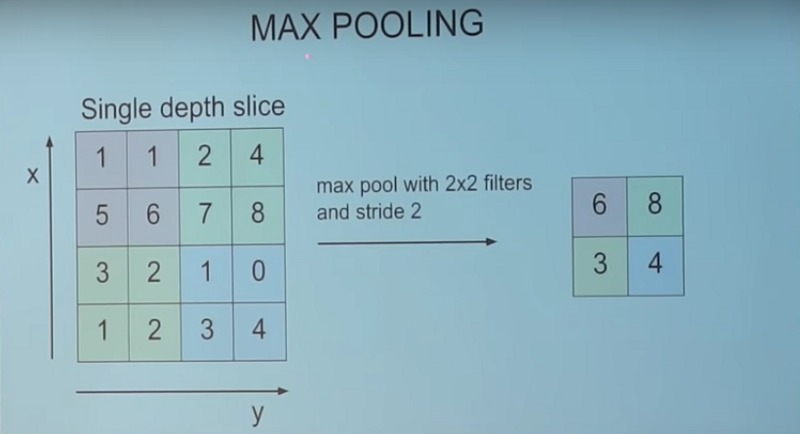
    Its function is to progressively reduce the spatial size of the representation to reduce the amount of parameters and computation in the network. It does not have any parameters to learn.

    For example, a max pooling layer with a spatial extent F=2 and a stride S=2 halves the input dimensions from 4×4 to 2×2, leaving the depth unchanged. It does this by picking the maximum of each set of 2×2 numbers and passing only those along to the output.

    This wraps up fundamentals and I hope you have got the idea about the basic workings.

    Let’s begin !

    Content image and style image

    Content image (c) is the image that you would want to be re-create. It provides the main content to the new output image. It could be any image of a dog, a selfie or almost anything that you would want to be painted in a new style. Style image (s) on the other hand provides the artistic features of an image such as pattern, brush strokes, color, curves and shapes. Let’s call the style transferred output image as x.

    Loss functions

    Lcontent(c,x) : Here our aim is to minimize loss between content image and output image, which means we have a function that tends to 0 when its two input images (c and x) are very close to each other in terms of content, and grows as their content deviates. We call this function the content loss.

    Lstyle(s,x): This is the function which shows how close in style two images are to one another. Again, this function grows as its two input images (s and x) tend to deviate in style. We call this function the style loss.

    Now we need to find an image x such that it differs little from content image and style image.

    α and β are used to balance the content and style in the resultant image.

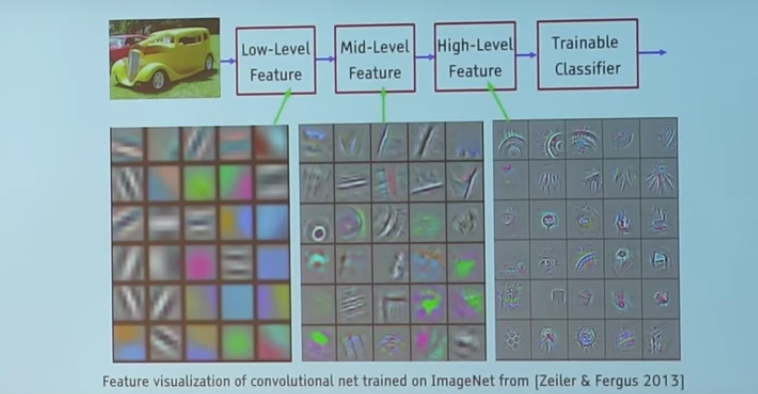
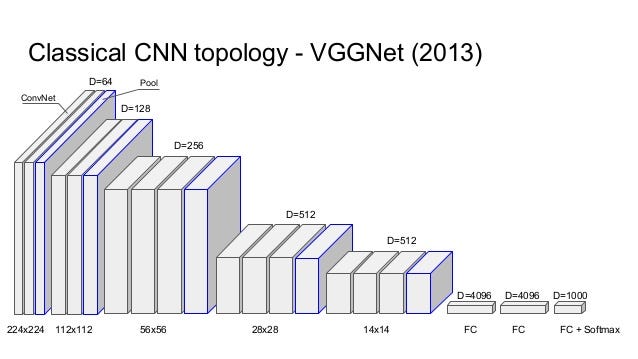
    Here we will be using VGGNet which is a CNN-based image classifier which has already learnt to encode perceptual(e.g., stroke size,spatial style control, and color control) and semantic information that we need to measure these semantic difference terms.

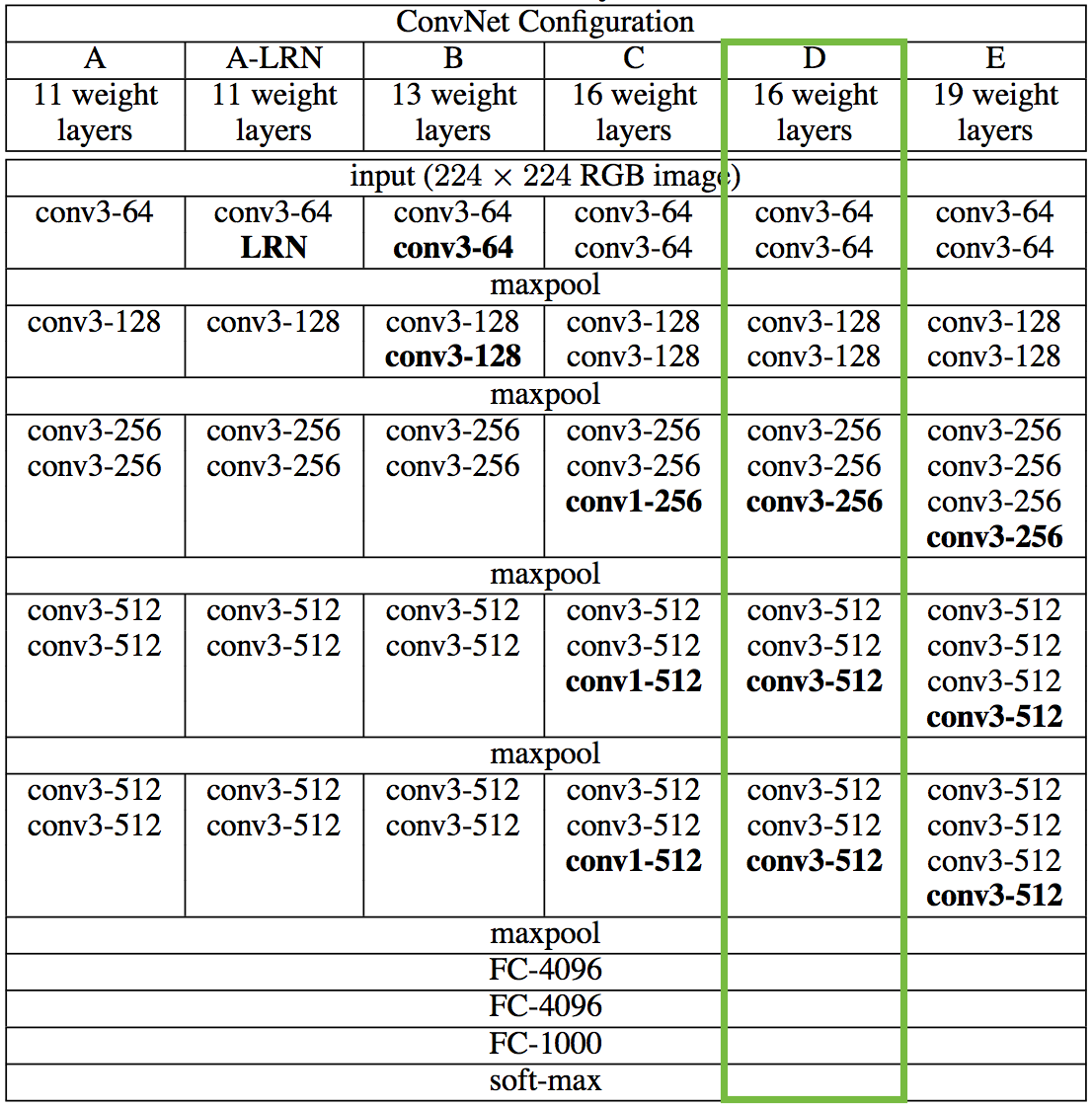
    VGGNet considerably simplified the ConvNet design, by repeating the same smaller convolution filter configuration 16 times: All the filters in VGGNet were limited to 3×3 , with stride and padding of 1, along with 2×2 maxpooling filters with stride of 2.

    We’re going to first reproduce the 16 layer variant marked in green for classification, and in the next notebook we’ll see how it can be repurposed for the style transfer problem.

    Normal VGG takes an image and returns a category score, but here we take the outputs at intermediate layers and build Lcontent and Lstyle. Here we don’t include any of the fully-connected layers.

    Let’s get coding ,

    Import the necessary packages.

    from keras.applications.vgg16 import preprocess_input, decode_predictions
    import time
    from PIL import Image
    import numpy as np
    from keras import backend
    from keras.models import Model
    from keras.applications.vgg16 import VGG16
    from scipy.optimize import fmin_l_bfgs_b
    from scipy.misc import imsave

    Load and preprocess the content and style images

    height = 450
    width = 450
    content_image_path = 'images/styles/SSSA.JPG'
    content_image = Image.open(content_image_path)
    content_image = content_image.resize((width, height))
    style_image_path = 'images/styles/The_Scream.jpg'
    style_image = Image.open(style_image_path)
    style_image = style_image.resize((width, height))

    Now we convert these images into a suitable form for numerical processing. In particular, we add another dimension (beyond height x width x 3 dimensions) so that we can later concatenate the representations of these two images into a common data structure.

    content_array = np.asarray(content_image, dtype='float32') content_array = np.expand_dims(content_array, axis=0) style_array = np.asarray(style_image, dtype='float32') style_array = np.expand_dims(style_array, axis=0)

    Now we need to compress this input data to match what was done in “Very Deep Convolutional Networks for Large-Scale Image Recognition” , the paper that introduces the VGG Network .

    For this, we need to perform two transformations:

    1. Subtract the mean RGB value (computed previously on the ImageNet training set and can be obtained from Google searches) from each pixel.

    2. Change the ordering of array from RGB to BGR .

    content_array[:, :, :, 0] -= 103.939 content_array[:, :, :, 1] -= 116.779 content_array[:, :, :, 2] -= 123.68 content_array = content_array[:, :, :, ::-1] style_array[:, :, :, 0] -= 103.939 style_array[:, :, :, 1] -= 116.779 style_array[:, :, :, 2] -= 123.68 style_array = style_array[:, :, :, ::-1]

    Now we’re ready to use these arrays to define variables in Keras backend . We also introduce a placeholder variable to store the combination image that retains the content of the content image while incorporating the style of the style image.

    content_image = backend.variable(content_array) style_image = backend.variable(style_array) combination_image = backend.placeholder((1, height, width, 3))

    Finally, we concatenate all this image data into a single tensor which is suitable for processing by Keras VGG16 model.

    input_tensor = backend.concatenate([content_image,                                     style_image,                                     combination_image], axis=0)

    The original paper uses the 19 layer VGG network model from Simonyan and Zisserman (2015), but we’re going to instead follow Johnson et al. (2016) and use the 16 layer model (VGG16) . Since we are not interested in image classification , we can set include_top=False so that we don’t include any of the fully-connected layers.

    model = VGG16(input_tensor=input_tensor, weights='imagenet',               include_top=False)

    The loss function we want to minimise can be decomposed into content loss, style loss and the total variation loss.

    The relative importance of these terms are determined by a set of scalar weights. The choice of these values are up to you , but the following have worked better for me

    content_weight = 0.050 style_weight = 4.0 total_variation_weight = 1.0

    For the content loss, we draw the content feature from block2_conv2.The content loss is the squared Euclidean distance between content and combination images.

    def content_loss(content, combination):
        return backend.sum(backend.square(combination - content))
    layer_features = layers['block2_conv2']
    content_image_features = layer_features[0, :, :, :]
    combination_features = layer_features[2, :, :, :]
    loss += content_weight * content_loss(content_image_features,
                                          combination_features)

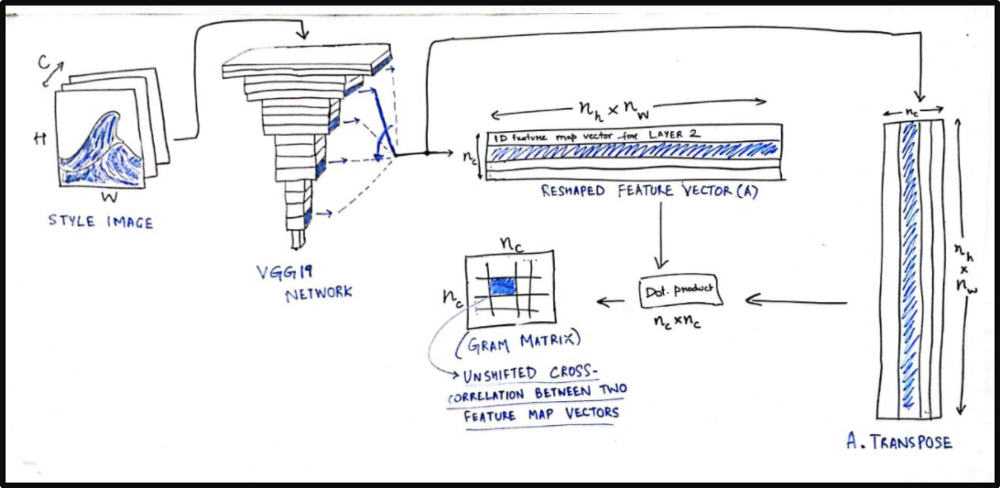
    For the style loss, we first define something called a Gram matrix. Gram matrix of a set of images which represents the similarity or difference between two images. If you have an (m x n) image, reshape it to a (m*n x 1) vector. Similarly convert all images to vector form and form a matrix ,say, A.
    then the gram matrix G of these set of images will be

    G = A.transpose() * A;

    Each element G(i,j) will represent the similarity measure between image i and j.

    def gram_matrix(x):     features = backend.batch_flatten(backend.permute_dimensions(x, (2, 0, 1)))     gram = backend.dot(features, backend.transpose(features))     return gram

    We obtain the style loss by calculating Frobenius norm(It is the matrix norm of a matrix defined as the square root of the sum of the absolute squares of its elements) of the difference between the Gram matrices of the style and combination images.

    def style_loss(style, combination):
        S = gram_matrix(style)
        C = gram_matrix(combination)
        channels = 3
        size = height * width
        return backend.sum(backend.square(S - C)) / (4. * (channels ** 2) * (size ** 2))
    
    feature_layers = ['block1_conv2', 'block2_conv2',
                      'block3_conv3', 'block4_conv3',
                      'block5_conv3']
    for layer_name in feature_layers:
        layer_features = layers[layer_name]
        style_features = layer_features[1, :, :, :]
        combination_features = layer_features[2, :, :, :]
        sl = style_loss(style_features, combination_features)
        loss += (style_weight / len(feature_layers)) * sl

    Now we calculate total variation loss ,

    def total_variation_loss(x):     a = backend.square(x[:, :height-1, :width-1, :] - x[:, 1:, :width-1, :])     b = backend.square(x[:, :height-1, :width-1, :] - x[:, :height-1, 1:, :])     return backend.sum(backend.pow(a + b, 1.25)) loss += total_variation_weight * total_variation_loss(combination_image)

    Now we have our total loss , its time to optimize the resultant image.We start by defining gradients ,

    grads = backend.gradients(loss, combination_image)

    We then introduce an Evaluator class that computes loss and gradients in one pass while retrieving them using loss and grads functions.

    outputs = [loss] outputs += grads f_outputs = backend.function([combination_image], outputs) def eval_loss_and_grads(x):     x = x.reshape((1, height, width, 3))     outs = f_outputs([x])     loss_value = outs[0]     grad_values = outs[1].flatten().astype('float64')     return loss_value, grad_values class Evaluator(object):     def __init__(self):         self.loss_value = None         self.grads_values = None     def loss(self, x):         assert self.loss_value is None         loss_value, grad_values = eval_loss_and_grads(x)         self.loss_value = loss_value         self.grad_values = grad_values         return self.loss_value     def grads(self, x):         assert self.loss_value is not None         grad_values = np.copy(self.grad_values)         self.loss_value = None         self.grad_values = None         return grad_values evaluator = Evaluator()

    This resultant image is initially a random collection of pixels, and we use the fmin_l_bfgs_b() function (Limited-memory BFGS (L-BFGS or LM-BFGS) is an optimization algorithm) to iteratively improve upon it.

    x = np.random.uniform(0, 255, (1, height, width, 3)) - 128.
    
    iterations = 10
    
    for i in range(iterations):
        print('Start of iteration', i)
        start_time = time.time()
        x, min_val, info = fmin_l_bfgs_b(evaluator.loss, x.flatten(),
                                         fprime=evaluator.grads, maxfun=20)
        print('Current loss value:', min_val)
        end_time = time.time()
        print('Iteration %d completed in %ds' % (i, end_time - start_time))

    To get back output image do the following

    x = x.reshape((height, width, 3))
    x = x[:, :, ::-1]
    x[:, :, 0] += 103.939
    x[:, :, 1] += 116.779
    x[:, :, 2] += 123.68
    x = np.clip(x, 0, 255).astype('uint8')
    
    image_final = Image.fromarray(x)

    The resultant image is available in the image_final.

    Raja Ravi Varma painting in Van Gogh style

    Conclusion

    This project will give you a broad idea about the working of CNN and clarify a lot of basic doubts. In this series of articles we will explore the various ways in which deep learning can be used for creative purposes.

    Thank you for your time !

    Reference:

    Artistic Style Transfer with Convolutional Neural Network
    We all have used apps like Prisma and Lucid, but ever wondered how these things works? Like we give a photo from our…medium.com
    Convolutional Neural Networks | Coursera
    Convolutional Neural Networks from deeplearning.ai. This course will teach you how to build convolutional neural…www.coursera.org
    hnarayanan/artistic-style-transfer
    artistic-style-transfer — Convolutional neural networks for artistic style transfer.github.com
    [1409.1556] Very Deep Convolutional Networks for Large-Scale Image Recognition
    Abstract: In this work we investigate the effect of the convolutional network depth on its accuracy in the large-scale…arxiv.org
    • http://cs231n.stanford.edu/
    • ( Neural Style Transfer: A Review) https://arxiv.org/pdf/1705.04058.pdf
    • http://cs231n.github.io/
    • (A Neural Algorithm of Artistic Style) https://arxiv.org/pdf/1508.06576.pdf
    • http://bangqu.com/0905b5.html

    每天推荐一个 GitHub 优质开源项目和一篇精选英文科技或编程文章原文,欢迎关注开源日报。交流QQ群:202790710;微博:https://weibo.com/openingsource;电报群 https://t.me/OpeningSourceOrg

  • 2018年6月4日:开源日报第88期

    4 6 月, 2018

    每天推荐一个 GitHub 优质开源项目和一篇精选英文科技或编程文章原文,欢迎关注开源日报。交流QQ群:202790710;微博:https://weibo.com/openingsource;电报群 https://t.me/OpeningSourceOrg

    今日推荐开源项目:《方便自定的日程表 tui.calendar》GitHub链接

    推荐理由:这是一款基于 JavaScript 的可以方便快速自定义的日程表。这个日程表可以允许你从调整每一天到概览一个月之间转换,当你排了太多日程的时候肯定该试试这个。它最大的特点就是允许你使用鼠标去直接拖动日程,这让调整日程变得极其方便简洁,当然你也可以选择手动更改日程,调整日程的事件类型,地点等等,在更为细致的一周模式和一日模式下你甚至还能写入今天的计划和任务。

    按照惯例,tui 系列提供了试用网址:https://nhnent.github.io/tui.calendar/latest/tutorial-example01-basic.html


    今日推荐英文原文:《11 Javascript Machine Learning Libraries To Use In Your App》作者:Jonathan Saring

    原文链接:https://blog.bitsrc.io/11-javascript-machine-learning-libraries-to-use-in-your-app-c49772cca46c

    推荐理由:继上次提及的五个关于机器学习模型的 JavaScript 框架后,这次要带来的是 JavaScript 中关于机器学习的库,在机器学习这方面上,JavaScript 一样可以是一种选择(brain.js 双双上榜,其实用性可见一斑)

    11 Javascript Machine Learning Libraries To Use In Your App

    “ Wait, what?? That’s a horrible idea! “

    Were the exact words of our leading NLP researcher when I first talked to her about this concept. Maybe she’s right, but it’s also definitely a very interesting concept which is getting more attention in the Javascript community lately.

    During the past year our team is building Bit which makes it simpler to build software using components. As part of our work, we develop ML and NLP algorithms to better understand how code is written, organized and used.

    While naturally most of this work is done in languages like python, Bit lives in the Javascript ecosystem with its great front and back ends communities.

    Bit — Share and build with code components
    Bit makes it fun and simple to build software with smaller components, share them with your team and sync them in your…bitsrc.io

    This interesting intersection led us to explore and experiment with the odd possibilities of using Javascript and Machine Learning together. Sharing from our research, here are some neat libraries which bring Javascript, Machine Learning, DNN and even NLP together. Take a look.

    1. Brain.js

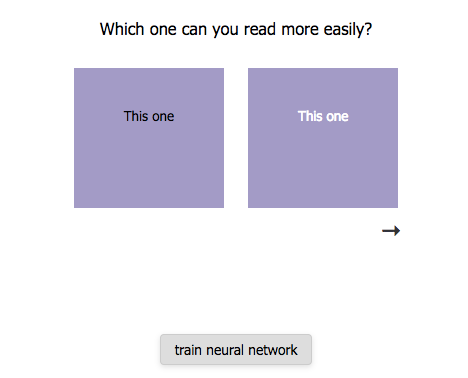
    Brain.js is a Javascript library for Neural Networks replacing the (now deprecated) “brain” library, which can be used with Node.js or in the browser (note computation ) and provides different types of networks for different tasks. Here is a demo of training the network to recognize color contrast.

    BrainJS/brain.js
    brain.js — ? Neural networks in JavaScriptgithub.com
    Training Brain.js color contrast recognition

    2. Synaptic

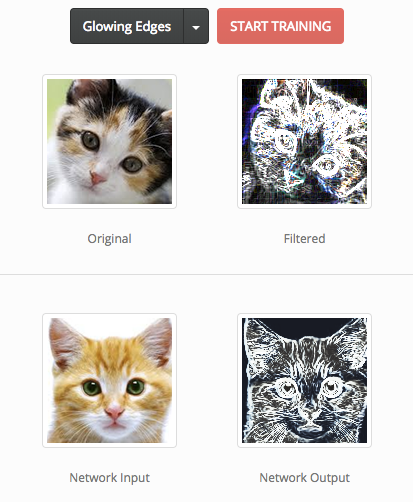
    Synaptic is a Javascript neural network library for node.js and the browser which enables you to train first and even second order neural network architectures. The project includes a few built-in architectures like multilayer perceptrons, multilayer long-short term memory networks, liquid state machines and a trainer capable of training a verity of networks.

    cazala/synaptic
    synaptic – architecture-free neural network library for node.js and the browsergithub.com
    Training Synaptic image-filter perceptron

    3. Neataptic

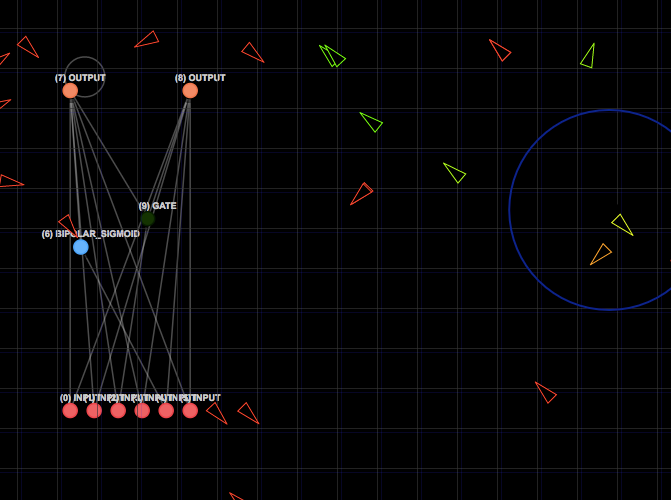
    This library provides fast neuro-evolution & backpropagation for the browser and Node.js, with a few built-in networks including perceptron, LSTM, GRU, Nark and more. Here is a rookie tutorial for simple training.

    wagenaartje/neataptic
    neataptic — :rocket: Blazing fast neuro-evolution & backpropagation for the browser and Node.jsgithub.com

    Neataptic target-seeking AI demo

    4. Conventjs

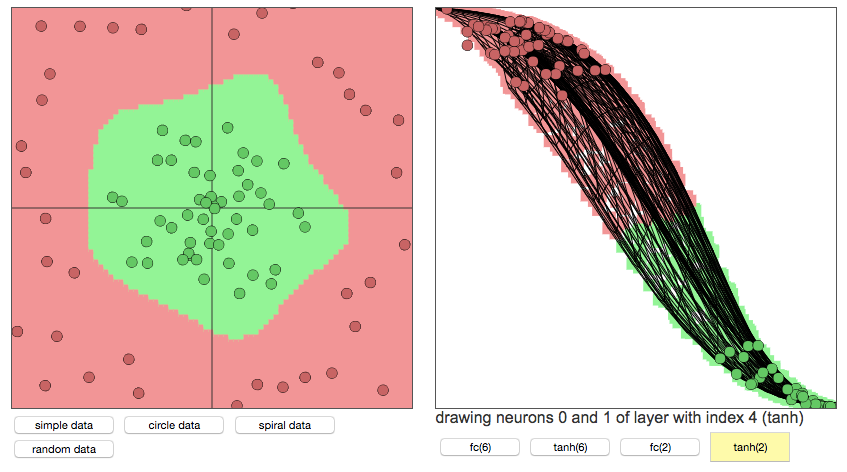
    Developed by Stanford U PhD this popular library hasn’t been maintained for the past 4 years, but is definitely one of the most interesting projects on the list. It’s a Javascript implementation of neural networks supporting common modules, classification, regression, an experimental Reinforcement Learning module and is even able to train convolutional networks that process images.

    karpathy/convnetjs
    convnetjs — Deep Learning in Javascript. Train Convolutional Neural Networks (or ordinary ones) in your browser.github.com

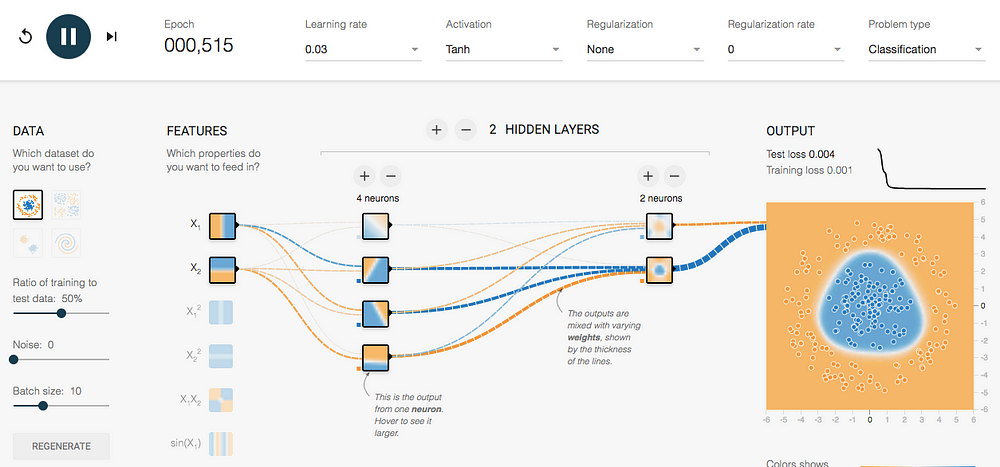
    Conventjs demo for toy 2d classification with 2-layer neural network

    5. Webdnn

    This Japanese-made library is built to run deep neural network pre-trained model on the browser, and fast. Since executing a DNN on a browser consumes a lot of computational resources, this framework optimizes the DNN model to compress the model data and accelerate execution through JavaScript APIs such as WebAssembly and WebGPU.

    mil-tokyo/webdnn
    webdnn — The Fastest DNN Running Framework on Web Browsergithub.com

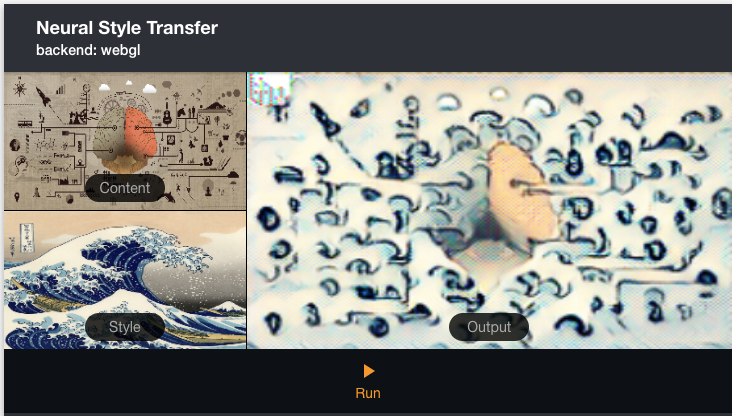
    Neural style transfer example

    6. Deeplearnjs

    This popular library allows you to train neural networks in a browser or run pre-trained models in inference mode, and even claims it can be used as NumPy for the web. With an easy-to-pick-up API this library can be used for a verity for useful applications, and is actively maintained.

    PAIR-code/deeplearnjs
    deeplearnjs — Hardware-accelerated deep learning // machine learning // NumPy library for the web.github.com
    Deeplearnjs teachable machine web-demo

    7. Tensorflow Deep Playground

    Deep playground is an interactive visualization of neural networks, written in TypeScript using d3.js. Although this project basically contains a very basic playground for tensorflow, it can be repurposed for different means or used as a very impressive educational feature for different purposes.

    tensorflow/playground
    playground — Play with neural networks!github.com
    Tensorflow web playground

    8. Compromise

    This very popular library provides “modest natural-language processing in javascript”. It’s pretty basic and straight forward, and even compiles down to a single small file. For some reason, its modest “good enough” approach makes it a prime candidate for usage in almost any app in need of basic NLP.

    spencermountain/compromise
    compromise — modest natural-language processing in javascriptgithub.com
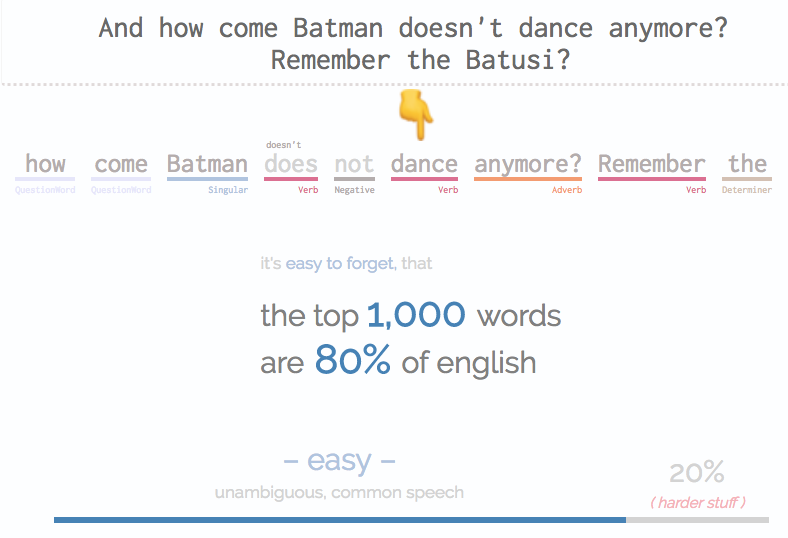
    Compromise reminds us of how simple English really is

    9. Neuro.js

    This beautiful project is a deep learning and reinforcement learning Javascript library framework for the browser. Implementing a full stack neural-network based machine learning framework with extended reinforcement-learning support, some consider this project to be the successor of convnetjs.

    janhuenermann/neurojs
    neurojs – A javascript deep learning and reinforcement learning library.github.com
    Self-driving cars with Neuro.js

    10. mljs

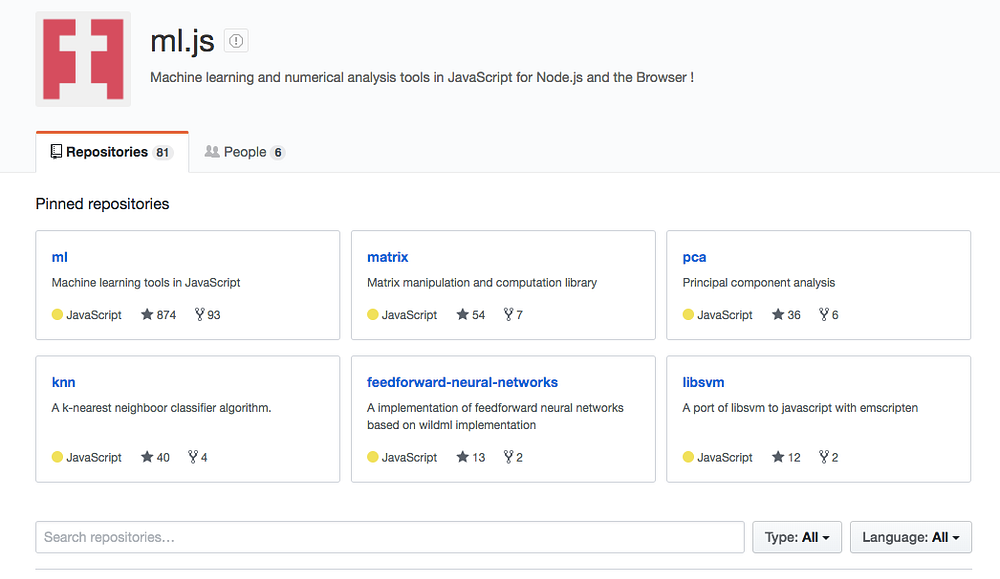
    A group of repositories providing Machine Learning tools for Javascript developed by the mljs organization which include supervised and unsupervised learning, artificial neural networks, regression algorithms and supporting libraries for statistics, math etc. Here’s a short walkthrough.

    ml.js
    GitHub is where people build software. More than 27 million people use GitHub to discover, fork, and contribute to over…github.com
    mljs projects on GitHub

    11. Mind

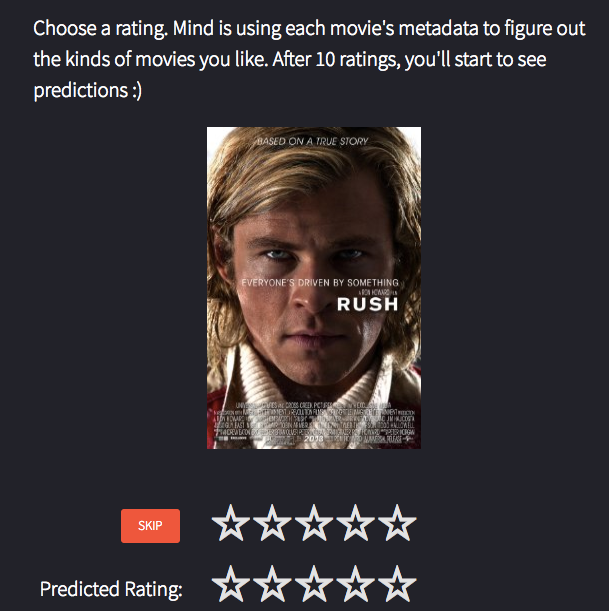
    A flexible neural network library for Node.js and the browser, which basically learns to make predictions, using a matrix implementation to process training data and enabling configurable network topology. You can also plug-and-play “minds” which already learned, which can be useful for your apps.

    stevenmiller888/mind
    mind — A neural network library built in JavaScriptgithub.com
    Really? 0/5? way to predict, mind!

    Honorable mentions:

    Natural

    An actively maintained library for Node.js which provides tokenizing, stemming (reducing a word to a not-necessarily morphological root), classification, phonetics, tf-idf, WordNet, string similarity, and more.

    NaturalNode/natural
    general natural language facilities for nodegithub.com

    Incubator-mxnet

    Apache MXNet is a deep learning framework that allows you to mix symbolic and imperative programming on the fly with a graph optimization layer for performance. MXnet.js brings a deep learning inference API to the browser.

    apache/incubator-mxnet
    incubator-mxnet – Lightweight, Portable, Flexible Distributed/Mobile Deep Learning with Dynamic, Mutation-aware…github.com

    Keras JS

    This library runs Keras models in the browser, with GPU support using WebGL. since Keras uses a number of frameworks as backends, the models can be trained in TensorFlow, CNTK, and other frameworks as well.

    transcranial/keras-js
    keras-js – Run Keras models in the browser, with GPU support using WebGLgithub.com

    Deepforge

    A development environment for deep learning that enables you to quickly design neural network architectures and machine learning pipelines with built-in version control for experiment reproduction. Worth checking out.

    deepforge-dev/deepforge
    deepforge – A modern development environment for deep learninggithub.com

    Land Lines

    Not even as much of a library as a very cool demo / web game based on a chrome experiment by Google. Although I’m not sure what to do with it, it’s guaranteed to become the most enjoyable 15 minutes of your day.

    Land Lines
    Land Lines is an experiment that lets you explore real Google Earth satellite imagery through gesture.lines.chromeexperiments.com
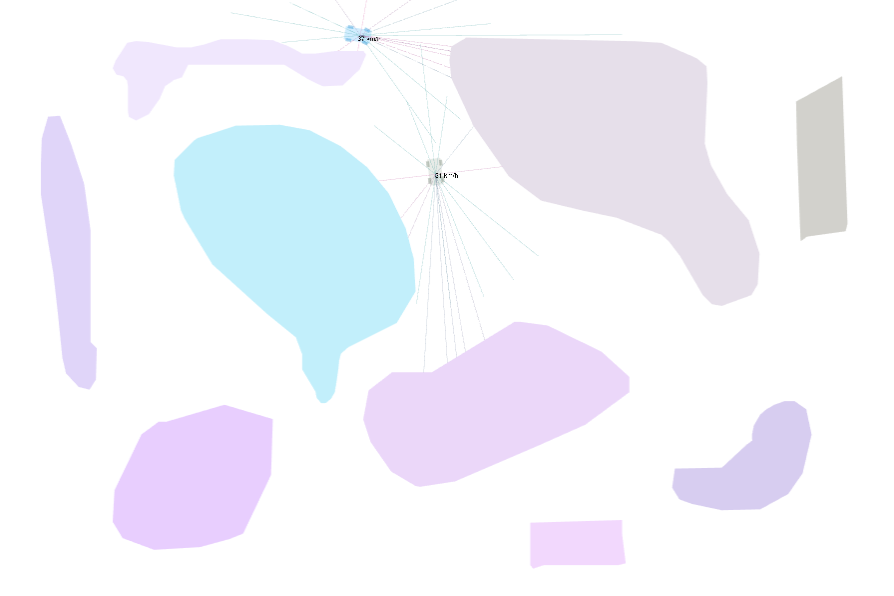
    Land lines by Google

    What’s next?

    Obviously, Javascript isn’t becoming the language of choice for Machine Learning , far from it. However, common issues such as performance, Matrix manipulations and abundance of useful libraries are slowly being bridged, closing the gap between common applications and useful Machine Learning.


    每天推荐一个 GitHub 优质开源项目和一篇精选英文科技或编程文章原文,欢迎关注开源日报。交流QQ群:202790710;微博:https://weibo.com/openingsource;电报群 https://t.me/OpeningSourceOrg
←上一页
1 … 237 238 239 240 241 … 262
下一页→

Proudly powered by WordPress