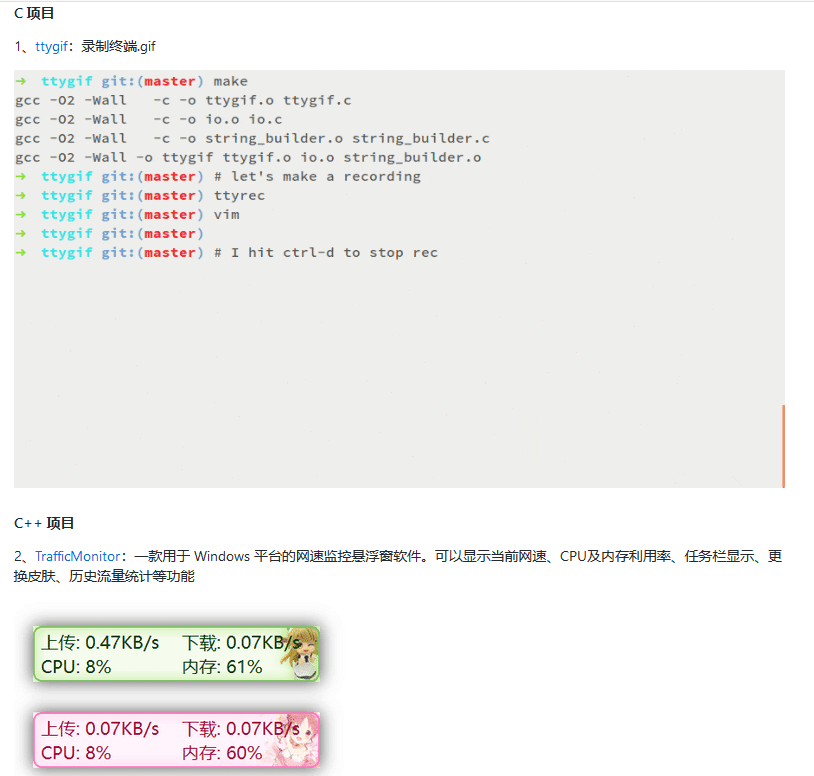
推荐理由:事先声明推荐这个项目并不是让你们去尝试而是去参观的。这是一个用 HTML 和 CSS 去画18世纪风格油画的项目,当我们还在用它们写网页的时候,别人已经开始拿去创造艺术了。作者给自己规定了所有元素必须手工制作,不使用 Atom 以外的编辑器等等的要求,好了废话不多说直接上图来看看别人家的 HTML 和 CSS 到底是什么样的吧。
I’d argue the second one is waaaay more readable. The secret is removing the arguments from the filters and maps.
Let’s see how it works. I promise, once you see how that works, you won’t be able to unsee it anymore.
A Simple Function
Let’s take a sum function
const sum = (a, b) => a + b
sum(1, 2)
// 3
and rewrite it in a different way
const csum = a => b => a + b
sum(1)(2)
// 3
They work the same, the only difference is how you call them: sum accepts two parameters at once, csum accepts parameters one by one. In particular, let’s say you call csum only once with the term 1
csum(1)
// b => 1 + b
then you get back a function that accepts the second term and returns it incremented by one
const plusOne = csum(1)
plusOne(2)
// 3
Operating on Arrays
In JavaScript arrays can be manipulated with various methods. For instance, map is used to apply the same function to each element of an array.
To increment each integer in an array
[1, 2, 3].map(x => x + 1)
// [2, 3, 4]
In other words, x => x + 1 takes an integer and returns its successor. Using plusOne from above the function can be rewritten to
[1, 2, 3].map(x => plusOne(x))
// [2, 3, 4]
But wait a sec, x => plusOne(x) and just plusOne are equivalent, in fact
const otherPlusOne = x => plusOne(x)
otherPlusOne(1)
// 2
plusOne(1)
// 2
For the same reason
[1, 2, 3].map(x => plusOne(x))
// [2, 3, 4]
is equivalent to
[1, 2, 3].map(plusOne)
// [2, 3, 4]
and since plusOne was defined above as const plusOne = csum(1)
[1, 2, 3].map(csum(1))
// [2, 3, 4]
Now your turn, apply the same process used for sum to isBiggerThan so that you don’t need to specify arguments in the filter (ie int =>)
const isBiggerThan = (threshold, int) => int > threshold
[1, 2, 3, 4].filter(int => isBiggerThan(3, int))
Now the code from the intro shouldn’t have any more secrets to you.
creduce should be generic enough to be applied to any problems that require a reduce operation. In other words, it should receive callback, an init value and the array to operate upon.
What the Hell is that `c` in `csum` and `creduce`?
c stands for curried and what you’ve seen above is how curried functions can make your code more readable. To be precise I haven’t used proper curried functions in this article but that’s good enough.
If you want to dig deeper the art and science of curried functions I recommend reading Chapter 4 of Mostly Adequate Guide to Functional Programming. And since you are there, trust me, read the book entirely.
A well designed site should be easy to use, with clear and simple cues to guide the eye towards whats possible. The basic usability principles, commonly reffered to as usability heuristics, help ensure a product’s behavior is predictable, expected, usable and therefore delightful to use. When comparing three of the most popular booking sites, Airbnb, VRBO and Booking.com, we’re going to see how good design creates meaningful experiences for users while bad design can cause pain and frustration, that as designers we should always aim to avoid.
Even though this article is by no means a way to bash on Booking.com, I am merely going to point out possible pain points users experience when using Booking.com, compared to Airbnb and VRBO.
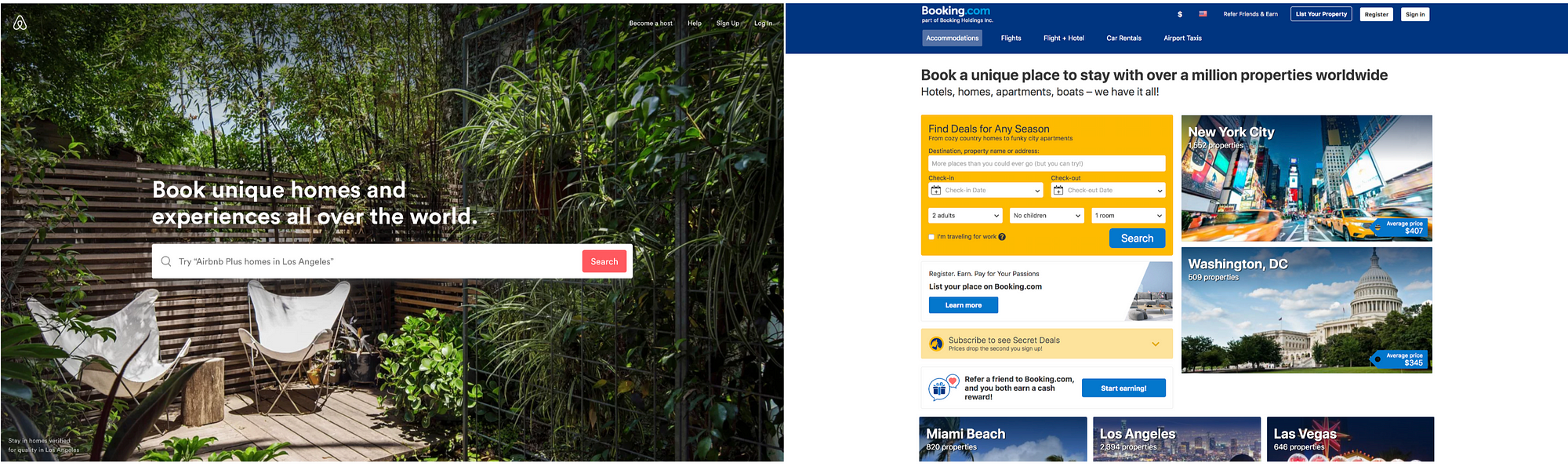
When compared together these two they look completely different in how they look and feel. Which one looks more inviting to you?
AIRBNB
Simplicity meets functionality
Airbnb’s website exceeds expectations when it comes to meeting the demands of the users, without ever letting them know they need it. The easy to navigate structure of the site is primarily acheieved by the use of high resolution images, layout, clearly defined font size and weights, modularity, proximity and consistency.
Airbnb scores high marks with its clean uncluttered design
Let’s go in to a few details and explore further why Airbnb works so well..
The overall feel of the site directly alings with Gestalt principals, in that, when looked as a whole, there is rhythm, harmony and balance, all presented in a structred way. While giving an aesthetically pleasing effect, this creates the sense of wonder and therefore keeps our attention to progress further. The call to action is clear without an overwhelming amount of information at first, to guide the user towards their first step in booking their next adventure. This clear and uncluttered layout keeps the user engaged without creating any distractions. It’s important to note there is nothing preventing us here from experiencing the site with ease.
Creates the sense of wonder and therefore keeps our attention to progress further.
The home screen has one main call to action, the search bar. -Inside the search bar is a search suggestion showing that linking two features is possible. (an “airbnb plus” at the destination “austin”) The uncluttered nature of the simple search bar helps remove pain points from the user by not needing them to input a lot of data to progress further and instead focus on finding a place they will love. On the upper right hand corner, the proximity between the clickable items are grouped closely together, creating a simple but effective toolbar into what other actions are possible. The prioritaztion is given to becoming a host by placing it as the first item on the toolbar, as perhaps this is second main function of the site, airbnb wants us to adopt: Allowing users to host their homes, and earn income by using airbnb.
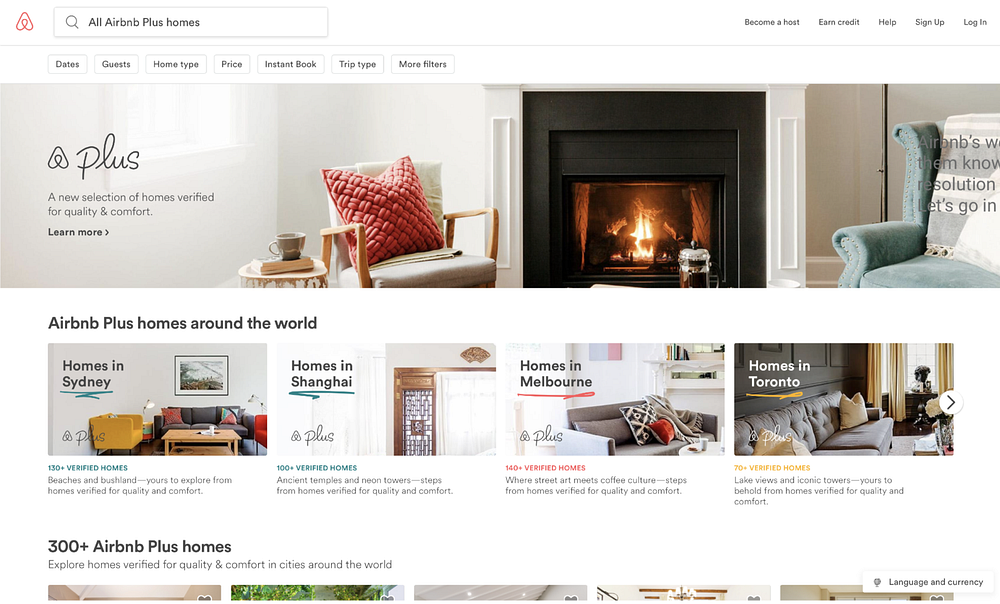
If we choose to scroll down on the first page, we are greeted by vivid images and beautiful photos of homes and destinations we can expect to book. This creates a pleasing experience as the images are inviting, colorful and lively. Airbnb clearly puts a lot of emphasis on the quality of these images so that our desire to book an experience is heightened. They believe in this so much, airbnb will send a photographer to take pictures of your home for you so you can get increased traffic to your listing.
Even though there are quite a few elements on the page, the use of white space combined with the modular boxes give the layout clear visual hierarchy and alignmnent that guide the eye from one section to another section of the page while recognizing proximity and groupings of these elements. Within each box, the header paragraphs are aligned left, using the same font and weight grouping the boxes together into one consistent modular design that is easy to follow and understand. I especially like the touch of hand drawn like color adding splash and vibrance without cluttering the screen.
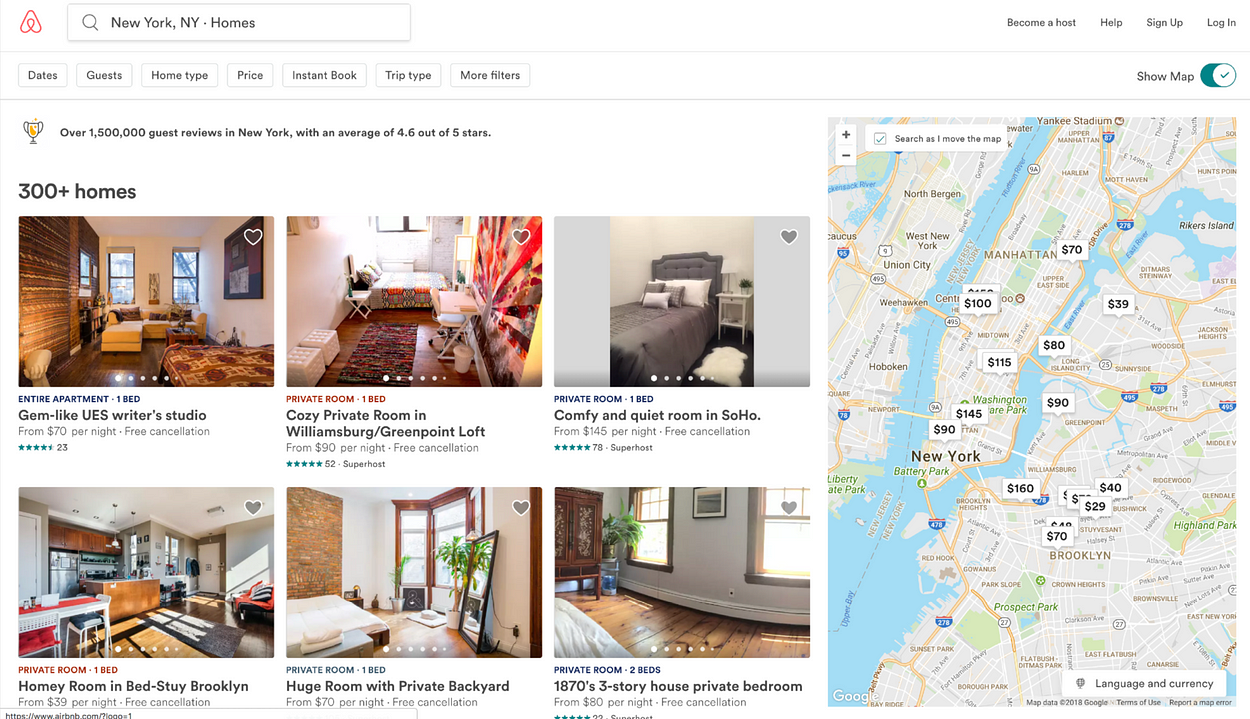
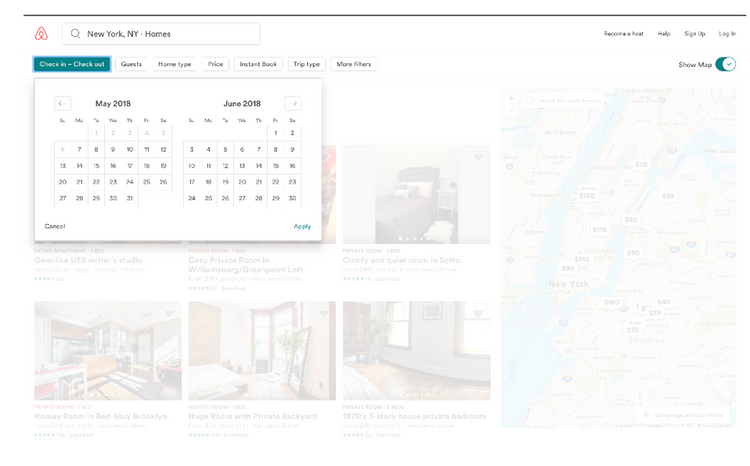
After we select a destination we are presented with only the relevant information at that given point. This is one of the main strengths where Airbnb excels over using a site like Booking.com. Only the information I would want to see at any given point is presented, and I feel at ease. Once our destination is entered, our search results are displayed in large, scrollable picturtes and they pack a lot of useful info at quick glance, organized in a consistent and modular UI language. To the right of the screen we see the location of the displayed search results on the map, allowing us to further search by zooming in to a specific area of the map.
Only the information I would want to see at any given point is presented, and I feel at ease.
Customization and filtering of results is made possible by using elevated buttons in a toolbar setting closely grouped together. When clicked, the use of layers and transparancy achieves simplicity and an uncluttered clean look. The color selection of selected items are consistent, leading way to easier discovery.
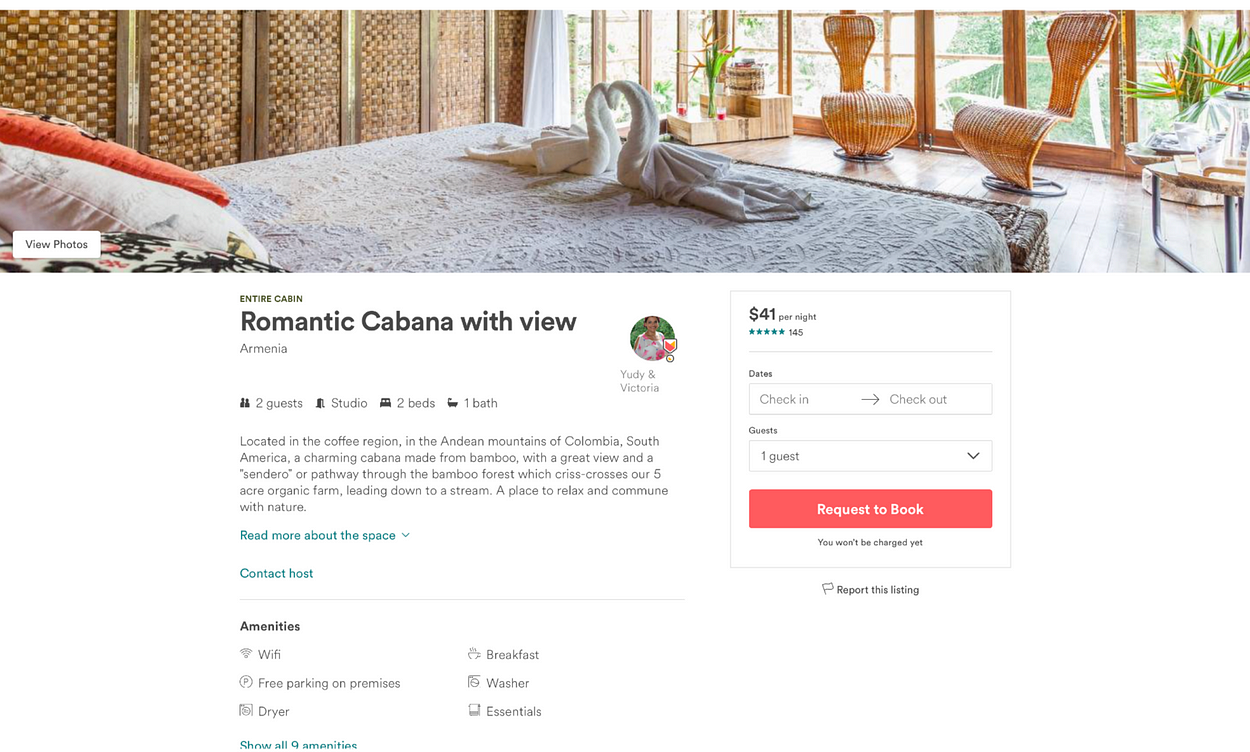
When we get to the booking page, we can clearly see the call to action, the request to book button with the same color as the airbnb logo. Details about the selection are laid out using icons in close proximity with clear descriptions next to them, making them consistent, helpful and easy to notice. More information is presented to the user using dropdown links, and action items are clearly marked using selection colors on text. The user knows what to do and has a great sense of control, since they know what their possible actions are.
A complementary color palette is at play throughout the site and it works really well in how it establishes its action items on each page. The overall brand consistency is acheived and a sense of trust is established by grouping elements together in a conistent design language that is easy to understand and remember throughout each step.
Well done Airbnb!
Now let’s take a look at another well made site, VRBO.
VRBO
So fresh and so clean
VRBO.com is the second largest personal home booking website after Airbnb, and it uses a similar design language to its predecessor, allowing users to find what they want or what they don’t know they want, with ease and flexibility.
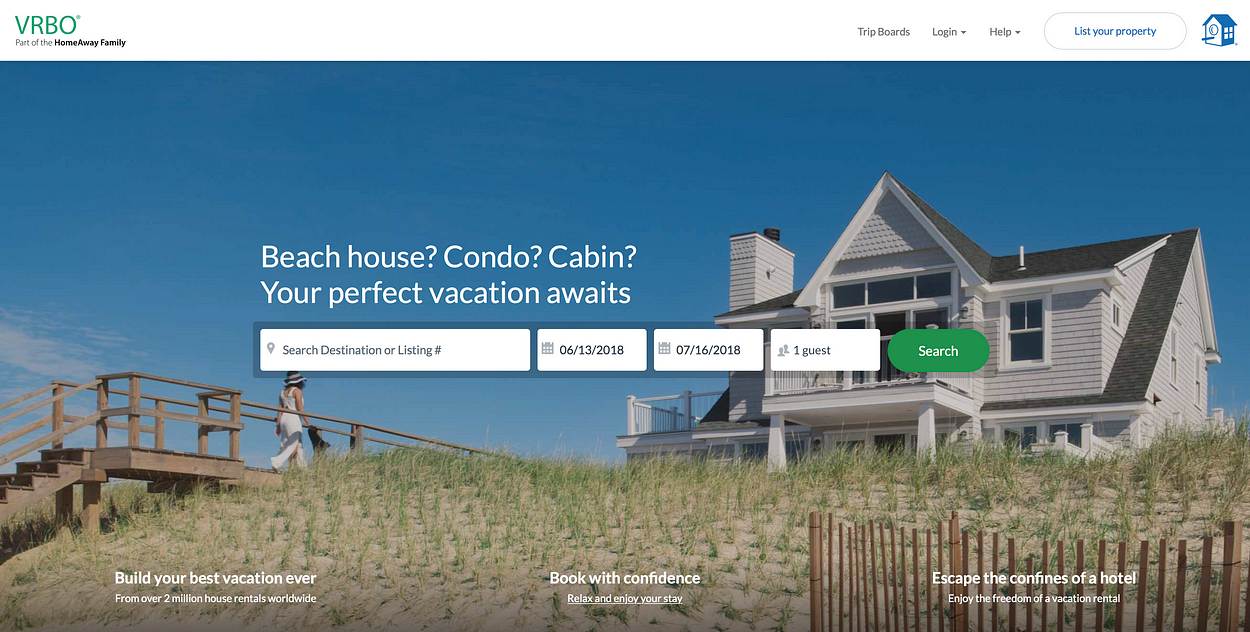
Clutter free landing page creates a sense of ease and wonder to progress further down the road
The landing page for VRBO, has a clear call to action, the search bar. The clean layout and visual hieraerchy allows the eye to be guided naturally to realize whats happening here at a quick glance. The search bar offers us to search by destination or a vague listing#. The vagueness looking at the listing# option sounds like a feature for advanced returning users, although I’m not sure that adds so much value to the interface. Instead, a search function that mimcks the headline would be useful and would clearly add more value to the site, like: “search destination or things like: beach house in Montauk, NY.”
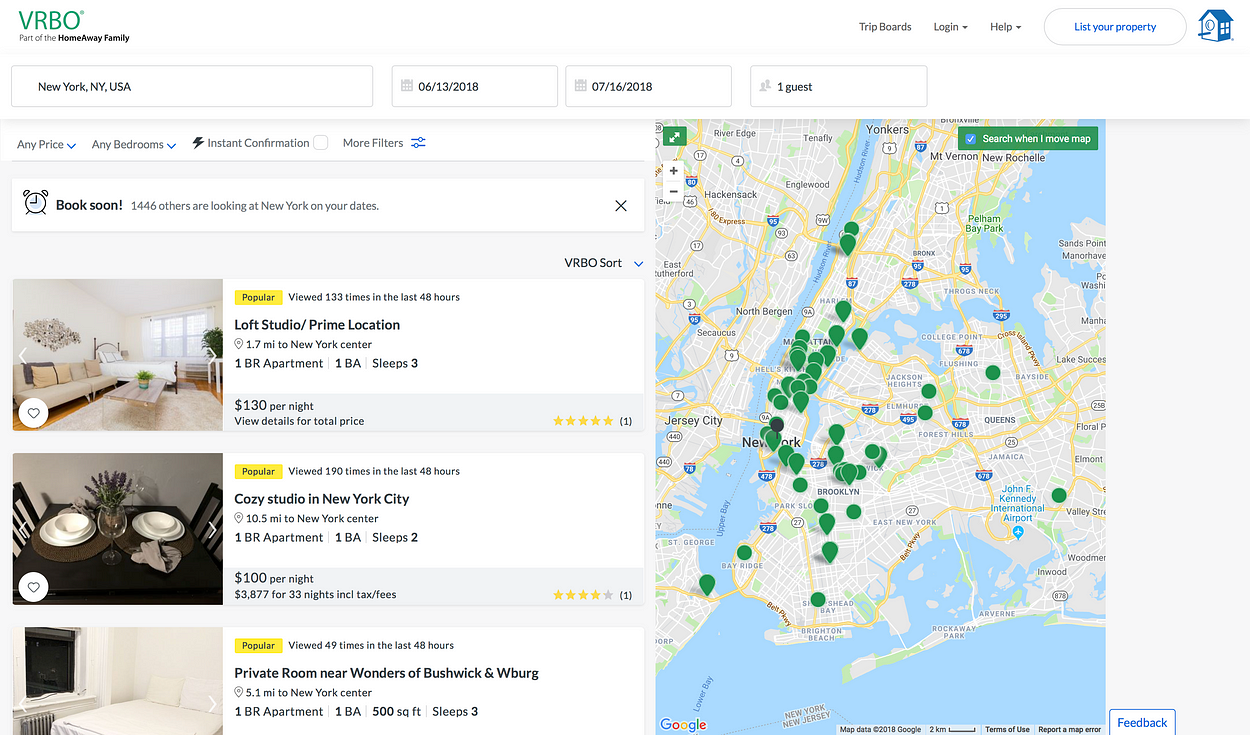
When we input a destination only the relevant results are displayed without any clutter to the page. We see listings organized in modular boxes aligned left, with large pictures and details surrounding the listing to find what we want, quickly.
To the right, a map shows where the listings are located and as we zoom or change the location on the map, the listings are updated, giving us furhter control and flexibility. The usability features of the site allows for easier discovery and frustration free navigation.
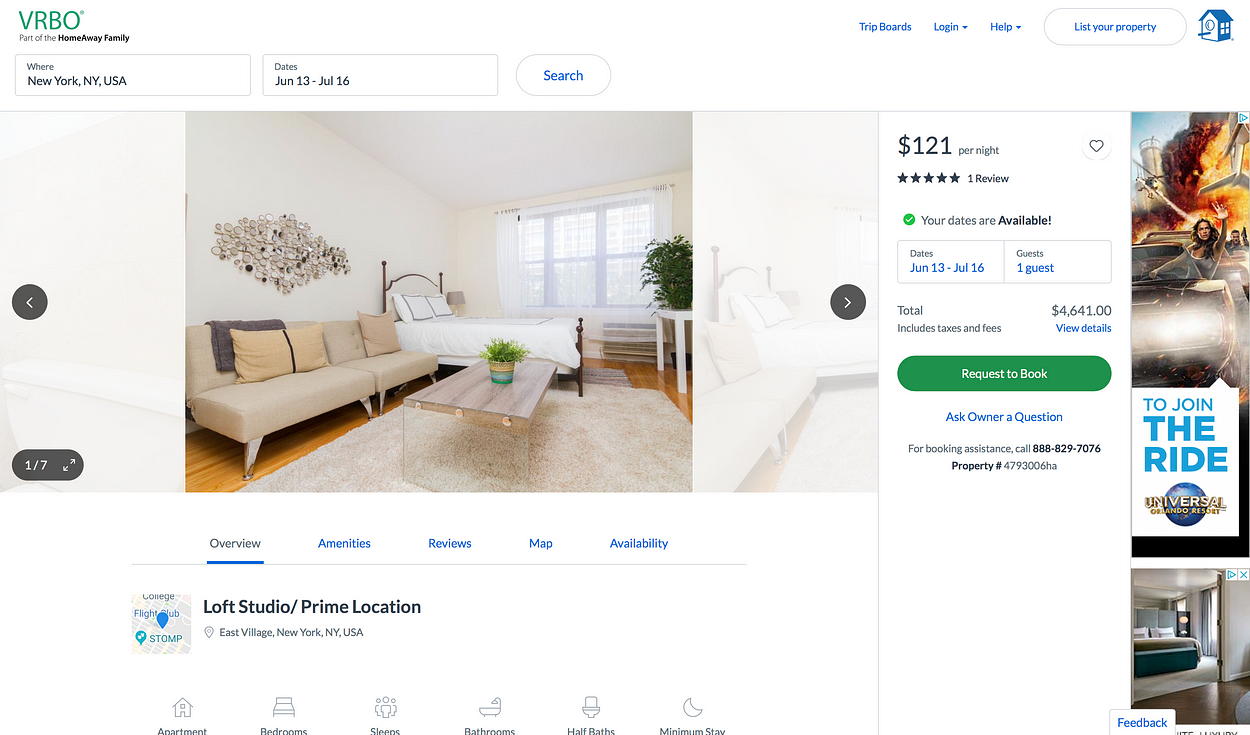
When we get to the booking page the clear call to action and details are displayed to the right. The large request to book button is clearly displayed, and unobtrusive as there are no other main action items visible at first glance. The use of white space gives the website an overall clean and minimal style all while being packed full of features and functionality within each page.
As we scroll down we see more details about our chosen listing. The use of icons are a nice addition here to guide the eye, and again quickly understand the items we’re looking at as well as giving a pleasing effect, and making the site less text heavy.
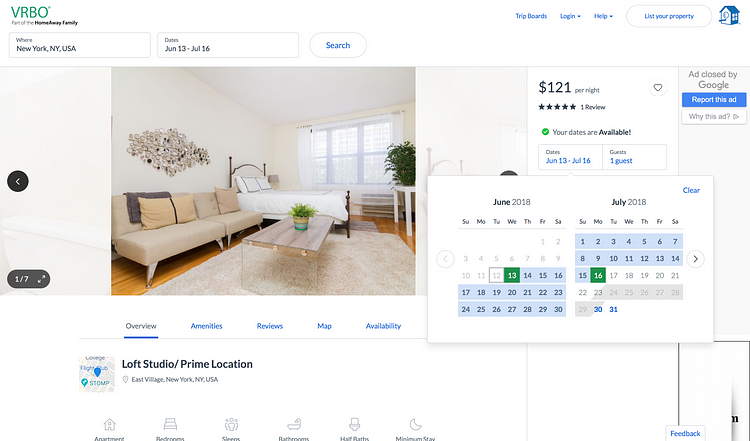
A lot of the functionality within the site is creatively hidden out of sight, allowing the pages to be less cluttered and awkward. If we want to change dates, we just click on the date and pop up tabs appear allowing us to do what we want easily and effectively. This makes the usability of the site almost second nature for first timers.
VRBO manages a comlex task of finding a home easy with its simple and guided layout. Within three clicks I was able to get to the booking page and find my way around without feeling lost.
Booking.com
Great selection of hotels, if you can find it.
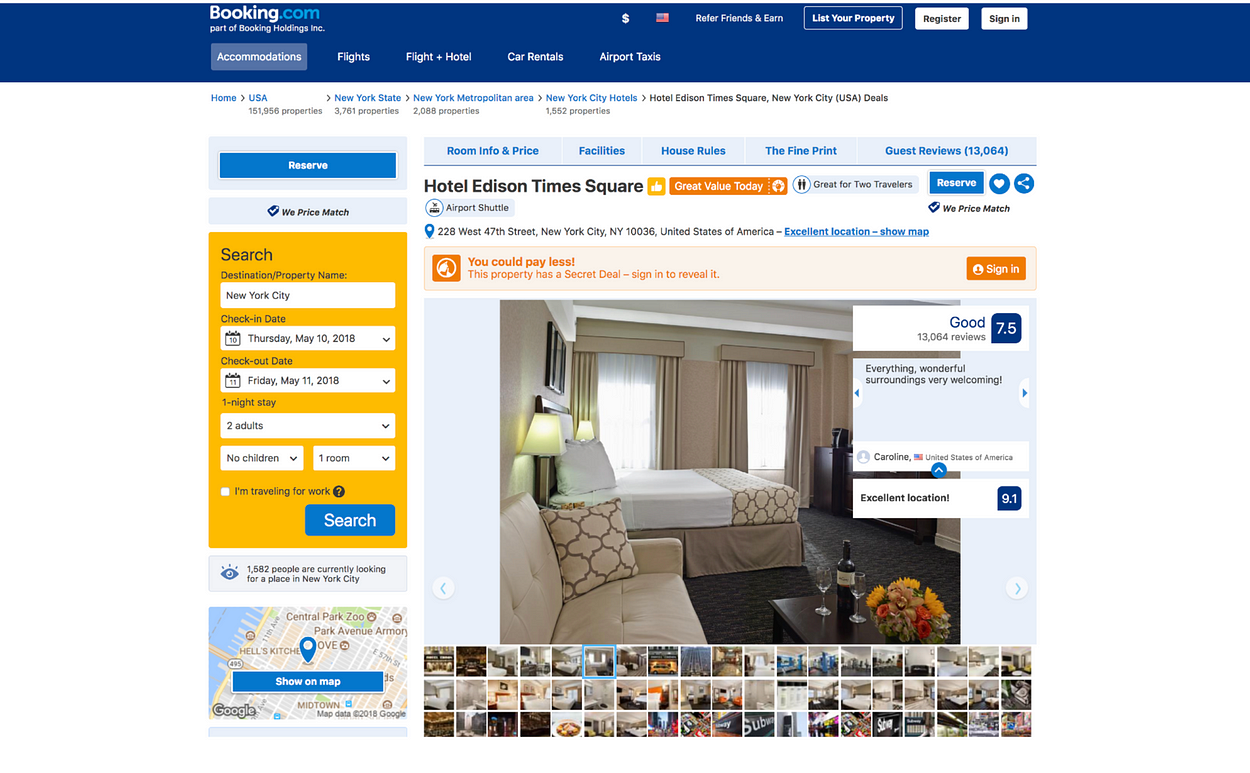
Booking.com is one of the largest sites to primarily book hotels, and after that to book other travel services. The site uses similar design principles at play as Airbnb and VRBO, but when compared together we can see that the overall feel is more cluttered and doesn’t seem to increase the overall expertience for its users.
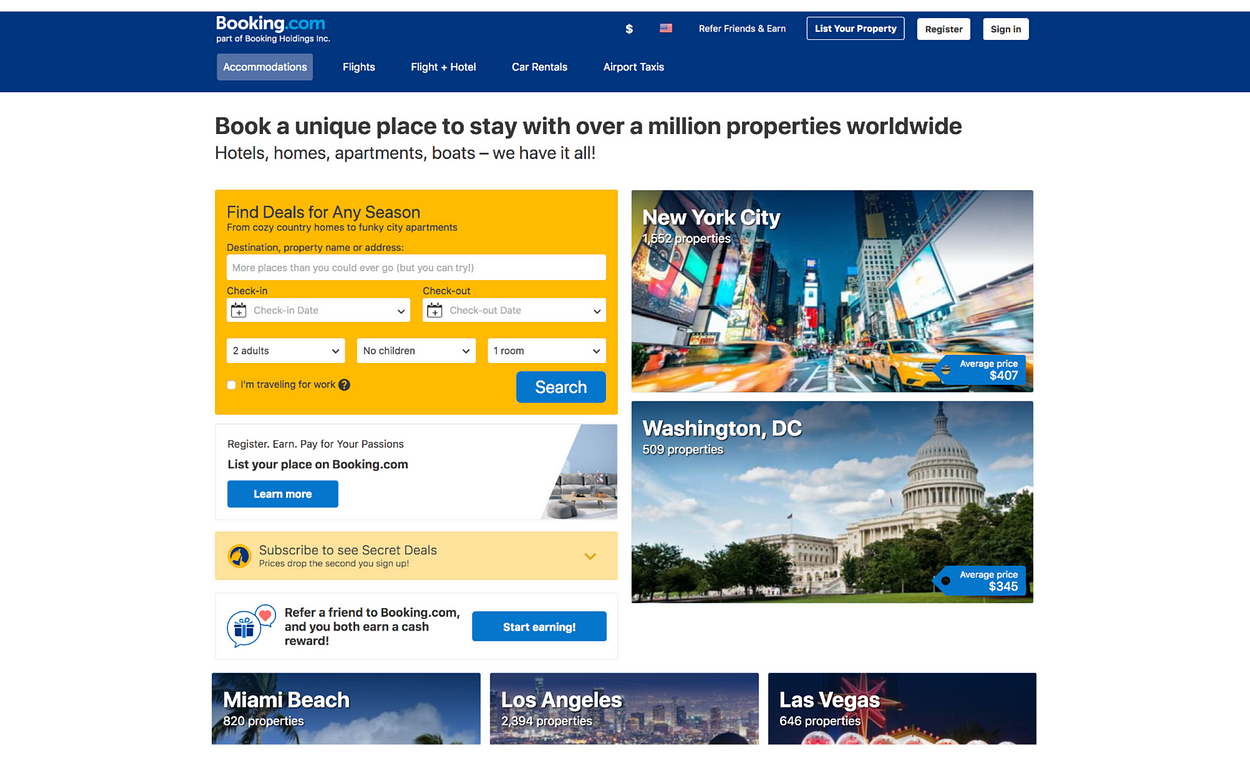
The home screen makes good use of white space, seperating elements. Proximity is used for tabs in top section of the site, but there are two tool bars, competing for space already giving way to a cluttered feel. The eye is left wandering from one section to the next, but the rhythm feels off, because there is so much to take in.
There is no clear call to action, and visual hierarchy is sacrified in favor of options. Perhaps it would be a better fit if there was less call to action items. Lets take a look at what happens when we input our destination.
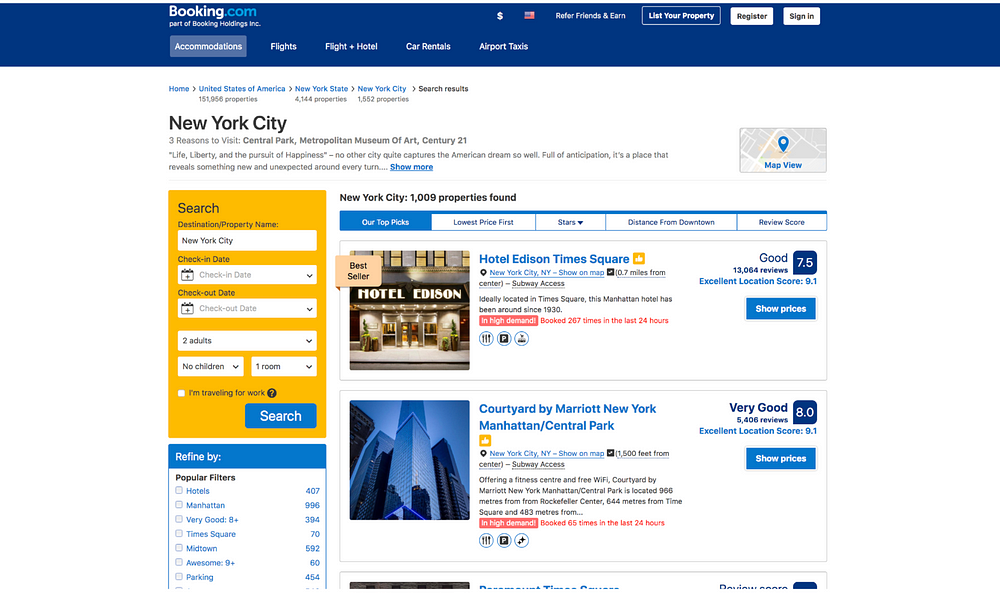
Once we have selected our destination, we are greeted with a new page with a list of selections. Proximity is used well to create sectioned off parts of the site, but again look cluttered.There are far too many grouped elements that are inconsistent in their design, that I think it would be more helpful to create a more consistent design UI language that users can get to recognize.
The results page looks too wordy, and not enough emphasis is given on the actual search results. Pictures are small, and there is no easy way to quickly get a feel for the location through scrollable pictures. -This might be a good addition to increase are chances on staying on the site. Also I’m surprised that Century 21, a department store, is listed in the three reasons to visit New York, what a shame..
Once we are at the booking page, there is no clear call to action to book the room, unless we scroll to the bottom of the page. Which again looks cluttered and filled with too many details that make it hard to see what we’re actually looking for. There are menus, buttons, colors, boxes and clickable items everywhere on the page, resulting us spending an unnecessary amount of time clicking on things -which can lead to mistakes and frustration- without getting to the desired action. The yellow search bar is still prominent on the page, as if asking the user to start over again. A better option might be to minimize the search option into a single search bar, and put the emphasis on letting the users book the room directly.
Gestalt theories can be argued to be in play here. After all Booking.com manages to arrange complex elements into simpler, organized boxes, however the consistency and visual hierarchy don’t indicate which action is important along each step of the process. In return, the space feels more cluttered, the use of colors feel random, the proximity of items feel too close, each element feels too dominant on their own without an overall clean aesthetic.By applying rhythm and balance, I think Booking.com can attract more visitors and make their experience more enjoyable and friendly.
All three sites are ultimtely able to convert first time users to returning users. Although in my humble opinion, both Airbnb and VRBO excel over Booking.com becuase of their better human centered design language and overall aesthetically pleasing choices in design and usability.
What exactly can you do with Python? Here are Python’s 3 main applications.
If you’re thinking of learning Python — or if you recently started learning it — you may be asking yourself:
“What exactly can I use Python for?”
Well that’s a tricky question to answer, because there are so many applications for Python.
But over time, I have observed that there are 3 main popular applications for Python:
Web Development
Data Science — including machine learning, data analysis, and data visualization
Scripting
Let’s talk about each of them in turn.
Web Development
Web frameworks that are based on Python like Django and Flask have recently become very popular for web development.
These web frameworks help you create server-side code (backend code) in Python. That’s the code that runs on your server, as opposed to on users’ devices and browsers (front-end code). If you’re not familiar with the difference between backend code and front-end code, please see my footnote below.
But wait, why do I need a web framework?
That’s because a web framework makes it easier to build common backend logic. This includes mapping different URLs to chunks of Python code, dealing with databases, and generating HTML files users see on their browsers.
Which Python web framework should I use?
Django and Flask are two of the most popular Python web frameworks. I’d recommend using one of them if you’re just getting started.
What’s the difference between Django and Flask?
There’s an excellent article about this topic by Gareth Dwyer, so let me quote it here:
<begin quote>
Main contrasts:
Flask provides simplicity, flexibility and fine-grained control. It is unopinionated (it lets you decide how you want to implement things).
Django provides an all-inclusive experience: you get an admin panel, database interfaces, an ORM [object-relational mapping], and directory structure for your apps and projects out of the box.
You should probably choose:
Flask, if you’re focused on the experience and learning opportunities, or if you want more control about which components to use (such as what databases you want to use and how you want to interact with them).
Django, if you’re focused on the final product. Especially if you’re working on a straight-forward application such as a news site, an e-store, or blog, and you want there to always be a single, obvious way of doing things.
</end quote>
In other words, If you’re a beginner, Flask is probably a better choice because it has fewer components to deal with. Also, Flask is a better choice if you want more customization.
Also, according to my data engineer friend Jonathan T Ho, Flask is more suited for creating these things called REST API’s than Django due to its flexibility.
On the other hand, if you’re looking to build something straight-forward, Django will probably let you get there faster.
Okay, let’s go to the next topic!
Data Science — including machine learning, data analysis, and data visualization
First of all, let’s review what machine learning is.
I think the best way to explain what machine learning is would be to give you a simple example.
Let’s say you want to develop a program that automatically detects what’s in a picture.
So, given this picture below (Picture 1), you want your program to recognize that it’s a dog.
Picture 1
Given this other one below (Picture 2), you want your program to recognize that it’s a table.
Picture 2
You might say, well, I can just write some code to do that. For example, maybe if there are a lot of light brown pixels in the picture, then we can say that it’s a dog.
Or maybe, you can figure out how to detect edges in a picture. Then, you might say, if there are many straight edges, then it’s a table.
However, this kind of approach gets tricky pretty quickly. What if there’s a white dog in the picture with no brown hair? What if the picture shows only the round parts of the table?
This is where machine learning comes in.
Machine learning typically implements an algorithm that automatically detects a pattern in the given input.
You can give, say, 1,000 pictures of a dog and 1,000 pictures of a table to a machine learning algorithm. Then, it will learn the difference between a dog and a table. When you give it a new picture of either a dog or a table, it will be able to recognize which one it is.
I think this is somewhat similar to how a baby learns new things. How does a baby learn that one thing looks like a dog and another a table? Probably from a bunch of examples.
You probably don’t explicitly tell a baby, “If something is furry and has light brown hair, then it’s probably a dog.”
You would probably just say, “That’s a dog. This is also a dog. And this one is a table. That one is also a table.”
Machine learning algorithms work much the same way.
You can apply the same idea to:
recommendation systems (think YouTube, Amazon, and Netflix)
face recognition
voice recognition
among other applications.
Popular machine learning algorithms you might have heard about include:
Neural networks
Deep learning
Support vector machines
Random forest
You can use any of the above algorithms to solve the picture-labeling problem I explained earlier.
Python for machine learning
There are popular machine learning libraries and frameworks for Python.
Two of the most popular ones are scikit-learn and TensorFlow.
scikit-learn comes with some of the more popular machine learning algorithms built-in. I mentioned some of them above.
TensorFlow is more of a low-level library that allows you to build custom machine learning algorithms.
If you’re just getting started with a machine learning project, I would recommend that you first start with scikit-learn. If you start running into efficiency issues, then I would start looking into TensorFlow.
How should I learn machine learning?
To learn machine learning fundamentals, I would recommend either Stanford’s or Caltech’s machine learning course.
Please note that you need basic knowledge of calculus and linear algebra to understand some of the materials in those courses.
Then, I would practice what you’ve learned from one of those courses with Kaggle. It’s a website where people compete to build the best machine learning algorithm for a given problem. They have nice tutorials for beginners, too.
What about data analysis and data visualization?
To help you understand what these might look like, let me give you a simple example here.
Let’s say you’re working for a company that sells some products online.
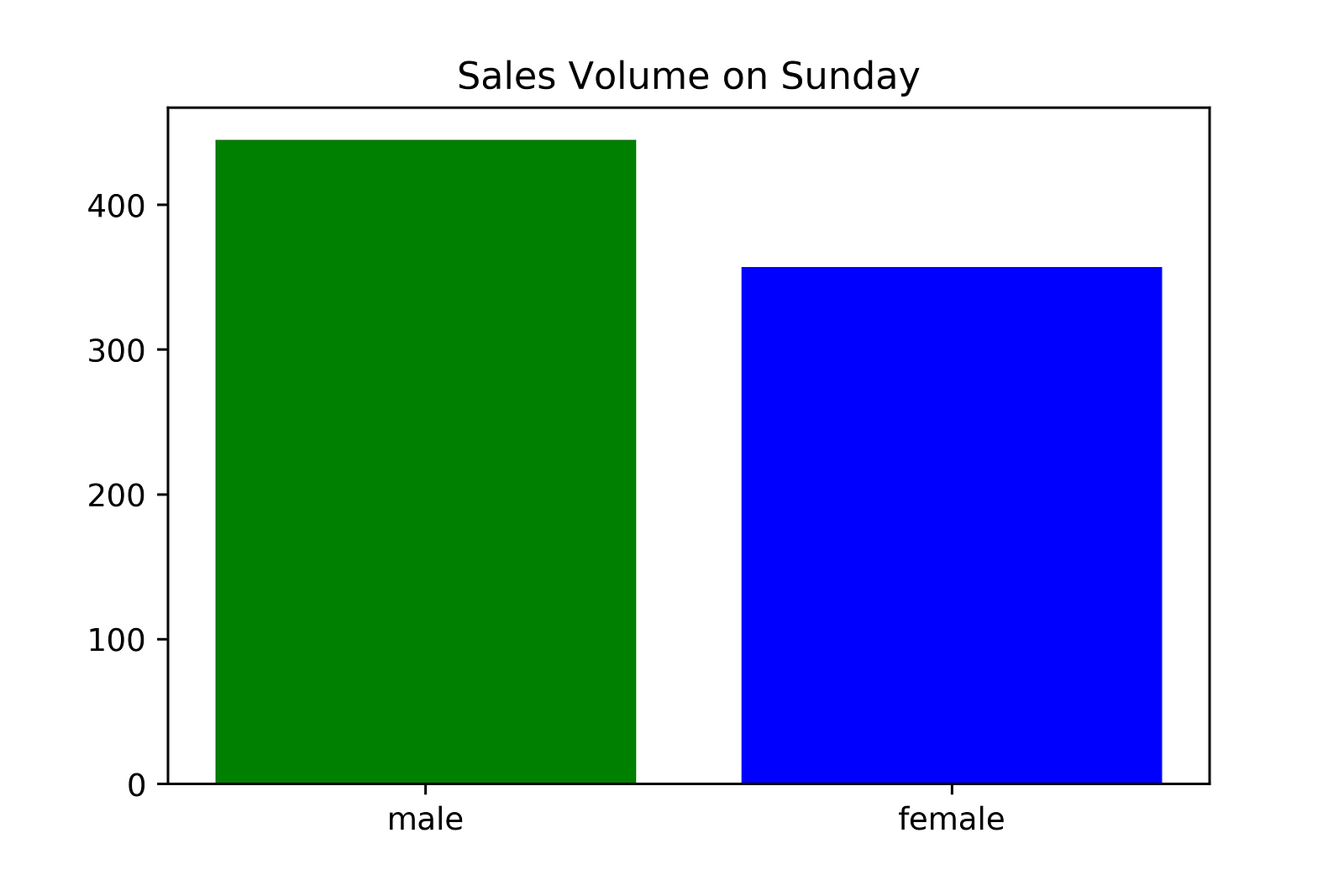
Then, as a data analyst, you might draw a bar graph like this.
Bar Chart 1 — generated with Python
From this graph, we can tell that men bought over 400 units of this product and women bought about 350 units of this product this particular Sunday.
As a data analyst, you might come up with a few possible explanations for this difference.
One obvious possible explanation is that this product is more popular with men than with women. Another possible explanation might be that the sample size is too small and this difference was caused just by chance. And yet another possible explanation might be that men tend to buy this product more only on Sunday for some reason.
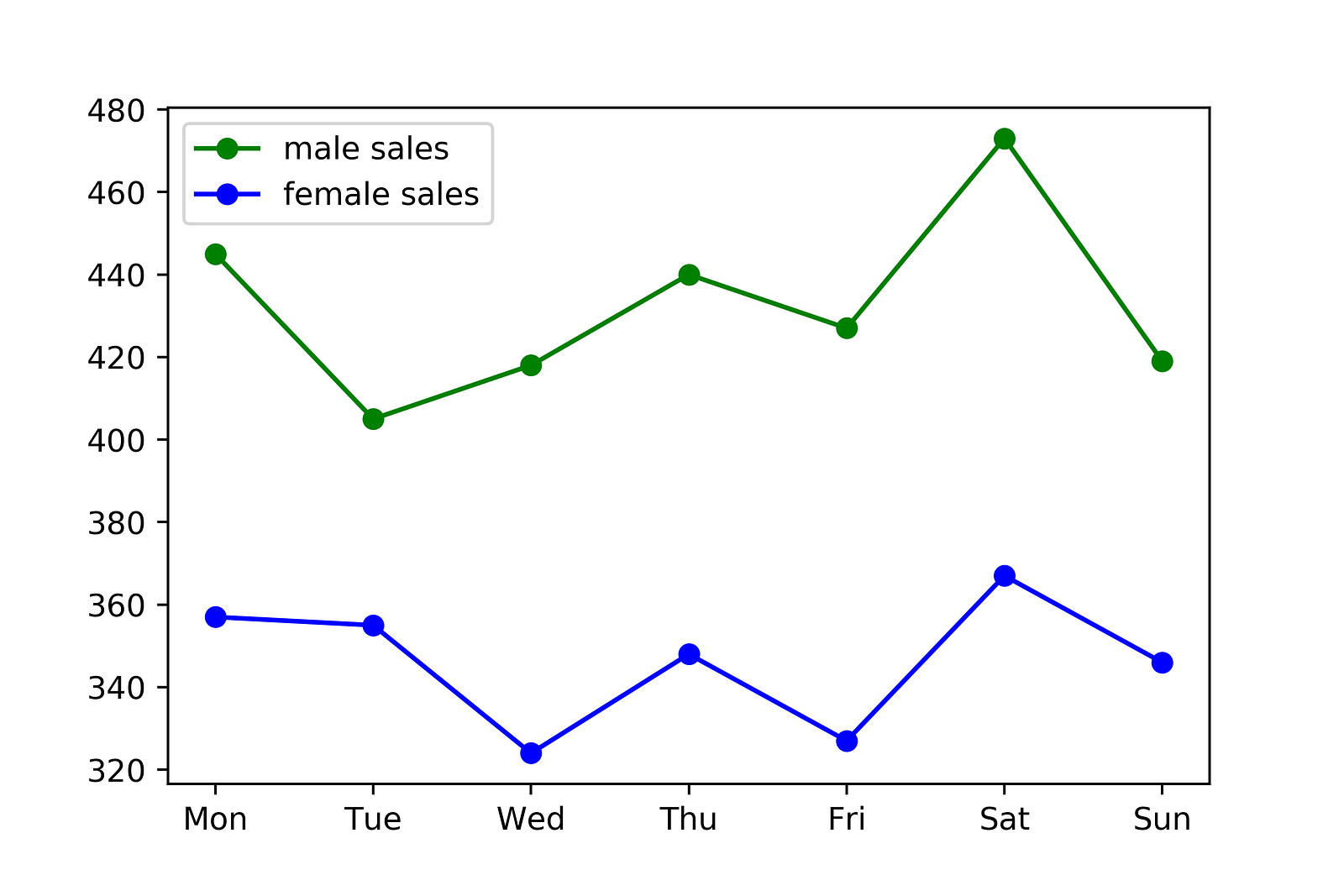
To understand which of these explanations is correct, you might draw another graph like this one.
Line Chart 1 — generated with Python
Instead of showing the data for Sunday only, we’re looking at the data for a full week. As you can see, from this graph, we can see that this difference is pretty consistent over different days.
From this little analysis, you might conclude that the most convincing explanation for this difference is that this product is simply more popular with men than with women.
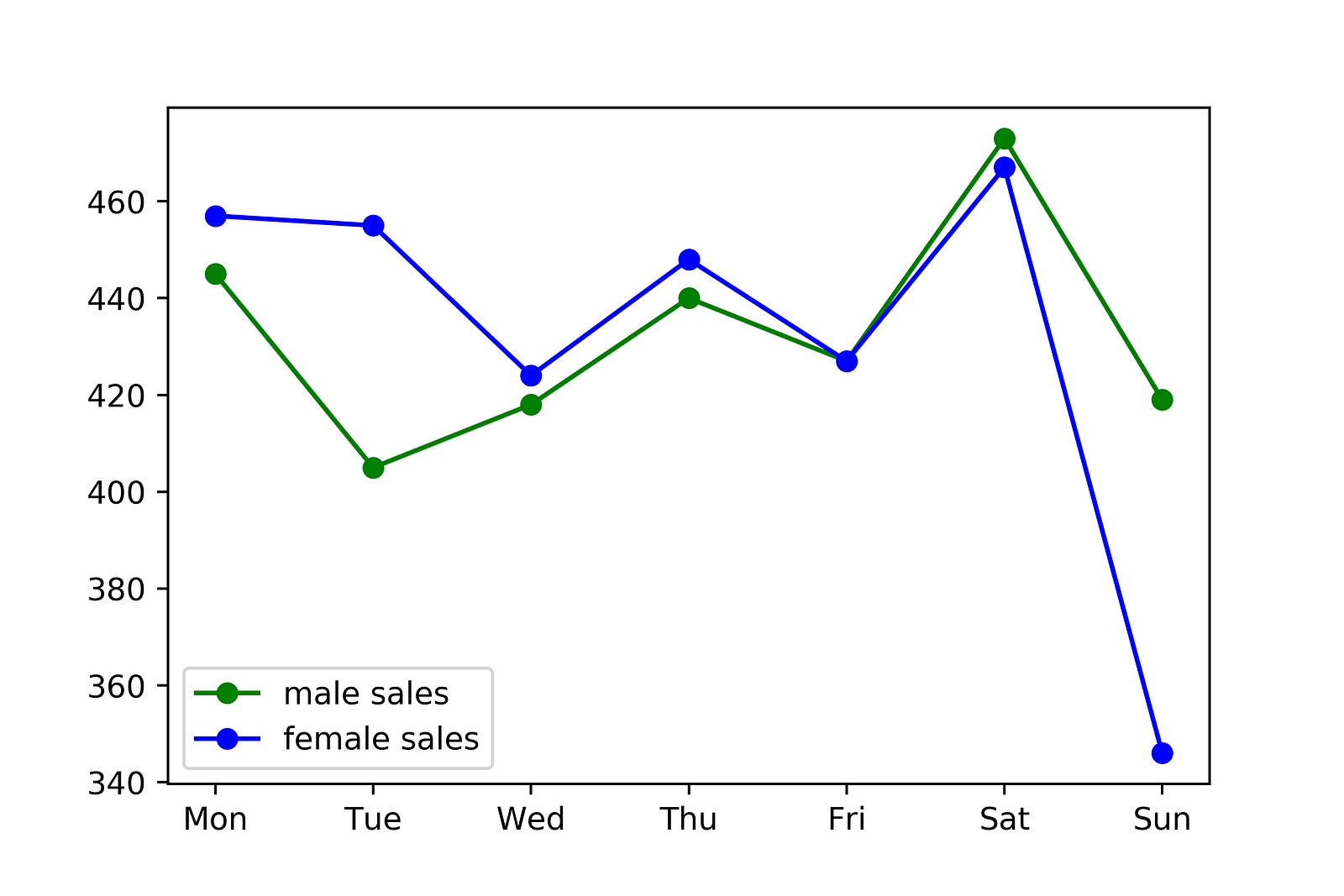
On the other hand, what if you see a graph like this one instead?
Line Chart 2 — also generated with Python
Then, what explains the difference on Sunday?
You might say, perhaps men tend to buy more of this product only on Sunday for some reason. Or, perhaps it was just a coincidence that men bought more of it on Sunday.
So, this is a simplified example of what data analysis might look like in the real world.
The data analysis work I did when I was working at Google and Microsoft was very similar to this example — only more complex. I actually used Python at Google for this kind of analysis, while I used JavaScript at Microsoft.
I used SQL at both of those companies to pull data from our databases. Then, I would use either Python and Matplotlib (at Google) or JavaScript and D3.js (at Microsoft) to visualize and analyze this data.
Data analysis / visualization with Python
One of the most popular libraries for data visualization is Matplotlib.
It’s a good library to get started with because:
It’s easy to get started with
Some other libraries such as seaborn is based on it. So, learning Matplotlib will help you learn these other libraries later on.
How should I learn data analysis / visualization with Python?
You should first learn the fundamentals of data analysis and visualization. When I looked for good resources for this online, I couldn’t find any. So, I ended up making a YouTube video on this topic:
Intro to Data Analysis / Visualization with Python and Matplotlib
After learning the fundamentals of data analysis and visualization, learning fundamentals of statistics from websites like Coursera and Khan Academy will be helpful, as well.
Scripting
What is scripting?
Scripting usually refers to writing small programs that are designed to automate simple tasks.
So, let me give you an example from my personal experience here.
I used to work at a small startup in Japan where we had an email support system. It was a system for us to respond to questions customers sent us via email.
When I was working there, I had the task of counting the numbers of emails containing certain keywords so we could analyze the emails we received.
We could have done it manually, but instead, I wrote a simple program / simple script to automate this task.
Actually, we used Ruby for this back then, but Python is also a good language for this kind of task. Python is suited for this type of task mainly because it has relatively simple syntax and is easy to write. It’s also quick to write something small with it and test it.
What about embedded applications?
I’m not an expert on embedded applications, but I know that Python works with Rasberry Pi. It seems like a popular application among hardware hobbyists.
What about gaming?
You could use the library called PyGame to develop games, but it’s not the most popular gaming engine out there. You could use it to build a hobby project, but I personally wouldn’t choose it if you’re serious about game development.
Rather, I would recommend getting started with Unity with C#, which is one of the most popular gaming engines. It allows you to build a game for many platforms, including Mac, Windows, iOS, and Android.
What about desktop applications?
You could make one with Python using Tkinter, but it doesn’t seem like the most popular choice either.
Instead, it seems like languages like Java, C#, and C++ are more popular for this.
Recently, some companies have started using JavaScript to create Desktop applications, too.
Personally, if I was building a desktop application, I would go with a JavaScript option. It allows you to reuse some of the code from a web version if you have it.
However, I’m not an expert on desktop applications either, so please let me know in a comment if you disagree or agree with me on this.
Python 3 or Python 2?
I would recommend Python 3 since it’s more modern and it’s a more popular option at this point.
Footnote: A note about back-end code vs front-end code (just in case you are not familiar with the terms):
Let’s say you want to make something like Instagram.
Then, you’d need to create front-end code for each type of device you want to support.
You might use, for example:
Swift for iOS
Java for Android
JavaScript for web browsers
Each set of code will run on each type of device / browser. This will be the set of code that determines what the layout of the app will be like, what the buttons should look like when you click them, etc.
However, you will still need the ability to store users’ info and photos. You will want to store them on your server and not just on your users’ devices so each user’s followers can view his/her photos.
This is where the backend code / server-side code comes in. You’ll need to write some backend code to do things like:
Keep track of who’s following who
Compress photos so they don’t take up so much storage space
Recommend photos and new accounts to each user in the discovery feature
So, this is the difference between backend code and front-end code.
By the way, Python is not the only good choice for writing backend / server-side code. There are many other popular choices, including Node.js, which is based on JavaScript.
Liked this article? Then, you might also like my YouTube channel.
I have a programming education YouTube channel called CS Dojo with 440,000+ subscribers, where I produce more content like this article.
ReactJS vs Angular5 vs Vue.js — What to choose in 2018?
Some time ago we published an article with a comparison of Angular 2 and React. In that article, we showed pros and cons of these frameworks and suggested what to choose in 2017 for particular purposes. So, what is the situation in the frontend garden in 2018?
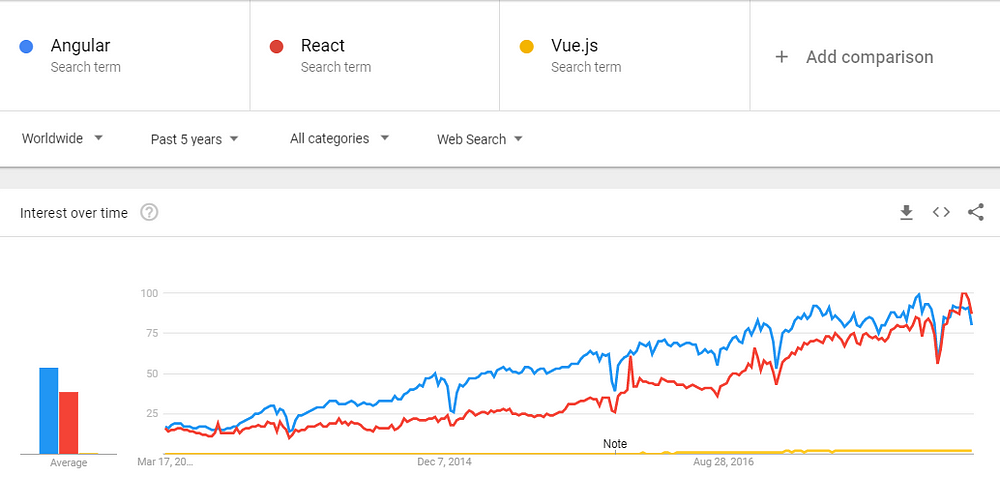
JavaScript frameworks are developing at an extremely fast pace, meaning that today we have frequently updated versions of Angular, ReactJS and another player on this market — Vue.js. Traditionally, let’s have a look at the demand represented in Google Trends for the last 5 years. The blue, red, and yellow lines represent Angular, React, and Vue.js respectively.
It can be seen from the chart that during the 2013–2014 there was a small difference between the number of React and Angular inquiries. Then, we see that deviation between them increased for some short period. From the middle of 2016, these requests balanced and React started to grow and reach to Angular demand closer. The Vue.js framework was still not popular very much, but it was slightly increasing its presence on the market of frameworks, showing a potential for the further growth. In the last years, Angular and React almost balanced meaning that they are most usable frontend frameworks on the market.
Overall, React and Angular develop organically with the relatively the same dynamics. If we try to forecast the demand for these frontend frameworks, then we can see a positive tendency for React while Angular has a bit of declining one. Vue.js is still not clear, but according to its specific convenient structure, it’s going to grow as well, maybe just a bit less than main frameworks.
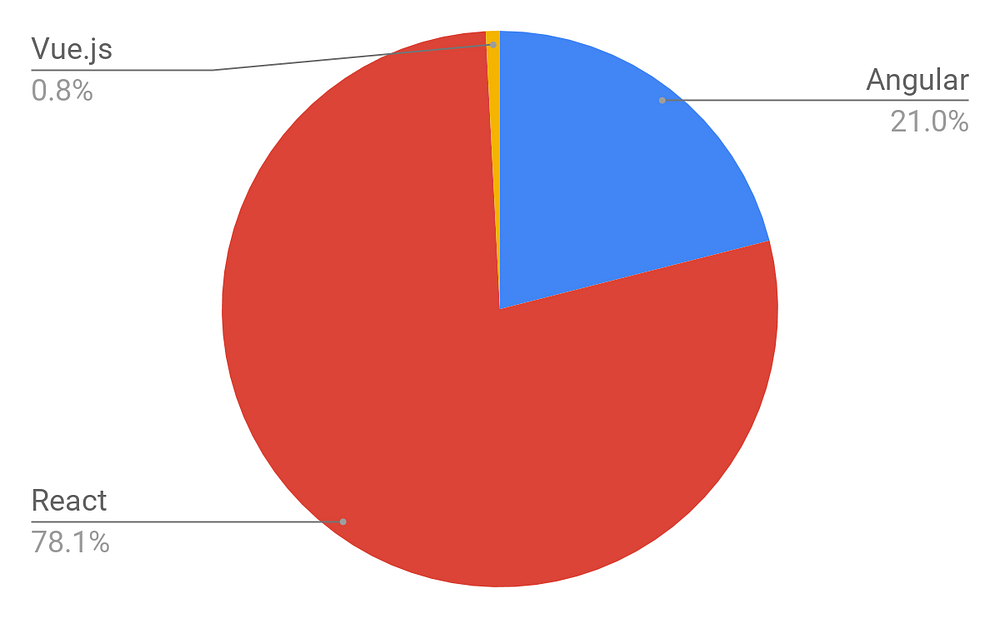
Also, we analyzed the number of open positions worldwide that require a specific knowledge of a certain framework. As a source, we took Indeed.com and got the following distribution according to more than 60,000 job offers.
Taking into account the following data, we decided to share the main advantages and disadvantages of every frontend framework and help tech professionals or engineers to choose the best one for their development needs.
Pros and cons of Angular 5
Angular is superheroic JavaScript MVVM framework, founded in 2009, which is awesome for building highly interactive web applications.
Benefits of Angular 5:
New features like enhanced RXJS, faster compilation (in under 3 seconds), new HttpClient launch.
Detailed documentation that allows getting all necessary information for the individual developer without asking his colleagues. However, this requires more time for education.
Two-way data binding that enables singular behavior for the app which minimized risks of possible errors.
MVVM (Model-View-ViewModel) that allows developers to work separately on the same app section using the same set of data.
Dependency injection of the features related to the components with modules and modularity in general.
Drawbacks of Angular 5:
The complex syntax that comes from the first version of Angular. Nevertheless, Angular 5 uses TypeScript 2.4 which is the least difficult to learn in comparison.
Migration issues which can appear while moving from the older version to the latest ones.
Companies that use Angular 5: Upwork, Freelancer, Udemy, YouTube, Paypal, Nike, Google, Telegram, Weather, iStockphoto, AWS, Crunchbase.
Pros and cons of ReactJS
ReactJS is a JavaScript library, open sourced by Facebook in 2013, which is great for building huge web applications where data is changeable on a regular basis.
Benefits of ReactJS:
Easy to learn. React is much easier to learn because of its simplicity in terms of syntax. Engineers just need to recall their HTML writing skills and that’s it. No need to deeply learn TypeScript like in Angular.
High level of flexibility and maximum of responsiveness.
Virtual DOM (document object model) that allows arranging documents in HTML, XHTML, or XML formats into a tree from which is better acceptable by web browsers while parsing different elements of the web app.
Combined with ES6/7, ReactJS can work with the high load in an easy way.
Downward data binding which means that with this kind of data flow the child elements cannot affect parent data.
100% open source JavaScript library which get a lot of everyday updates and improvements according to the contributions of developers all over the world.
Absolutely light-weighted because the data performing on the user side can be easily represented on the server side simultaneously.
Migrating between versions is generally very easy, with Facebook providing “codemods” to automate much of the process.
Drawbacks of ReactJS:
Lack of official documentation — super-fast development of ReactJS leaves no place for the proper documentation which is a bit chaotic now as many developers contribute it individually without any systematic approach;
React is unopinionated — meaning that developers sometimes have too much choice;
Long time to master which means that React JS requires deep knowledge of how to integrate user interface into MVC framework.
Companies that use ReactJS: Facebook, Instagram, Netflix, New York Times, Yahoo, Khan Academy, Whatsapp, Codecademy, Dropbox, Airbnb, Asana, Atlassian, Intercom, Microsoft.
Pros and cons of Vue.js
Vue.js is a JavaScript framework, launched in 2013, which perfectly fits for creating highly adaptable user interfaces and sophisticated Single-page applications.
Benefits of Vue.js:
Empowered HTML. This means that Vue.js has many similar characteristics with Angular and this can help to optimize HTML blocks handling with a usage of different components.
Detailed documentation. Vue.js has very circumstantial documentation which can fasten learning curve for developers and save a lot of time to develop an app using only the basic knowledge of HTML and JavaScript.
Adaptability. It provides a rapid switching period from other frameworks to Vue.js because of the similarity with Angular and React in terms of design and architecture.
Awesome integration. Vue.js can be used for both building single-page applications and more difficult web interfaces of apps. The main thing is that smaller interactive parts can be easily integrated into the existing infrastructure with no negative effect on the entire system.
Large scaling. Vue.js can help to develop pretty large reusable templates that can be made with no extra time allocated for that according to its simple structure.
Tiny size. Vue.js can weight around 20KB keeping its speed and flexibility that allows reaching much better performance in comparison to other frameworks.
Drawbacks of Vue.js:
Lack of resources. Vue.js still has a pretty small market share in comparison with React or Angular, which means that knowledge sharing in this framework is still in the beginning phase.
Risk of over flexibility. Sometimes, Vue.js might have issues while integrating into huge projects and there is still no experience with possible solutions, but they will definitely come soon.
Chinese background. As far as Vue.js has a bit of Chinese background, a lot of elements and descriptions are still available in Chinese. This leads to a partial complexity on some stages of development, nevertheless, more and more materials are being translated into English.
Companies that use Vue.js: Xiaomi, Alibaba, WizzAir, EuroNews, Grammarly, Gitlab and Laracasts, Adobe, Behance, Codeship, Reuters.
CONCLUSION
For a real engineer, there is no substantial difference which framework to choose, because it just takes some time to get used to the new one. In our company, we grow expertise in mostly ReactJS and Angular 2/4/5, but Vue.js is also on board. Every framework has its own pros and cons, meaning that there should be just a right choice for every single case during the product development.