• 开源镜像
  • 开源沙龙
  • 媛宝
  • 猿帅
  • 注册
  • 登录
  • 息壤开源生活方式平台
  • 加入我们

开源日报

  • 2018年7月4日:开源日报第118期

    4 7 月, 2018

    每天推荐一个 GitHub 优质开源项目和一篇精选英文科技或编程文章原文,欢迎关注开源日报。交流QQ群:202790710;微博:https://weibo.com/openingsource;电报群 https://t.me/OpeningSourceOrg


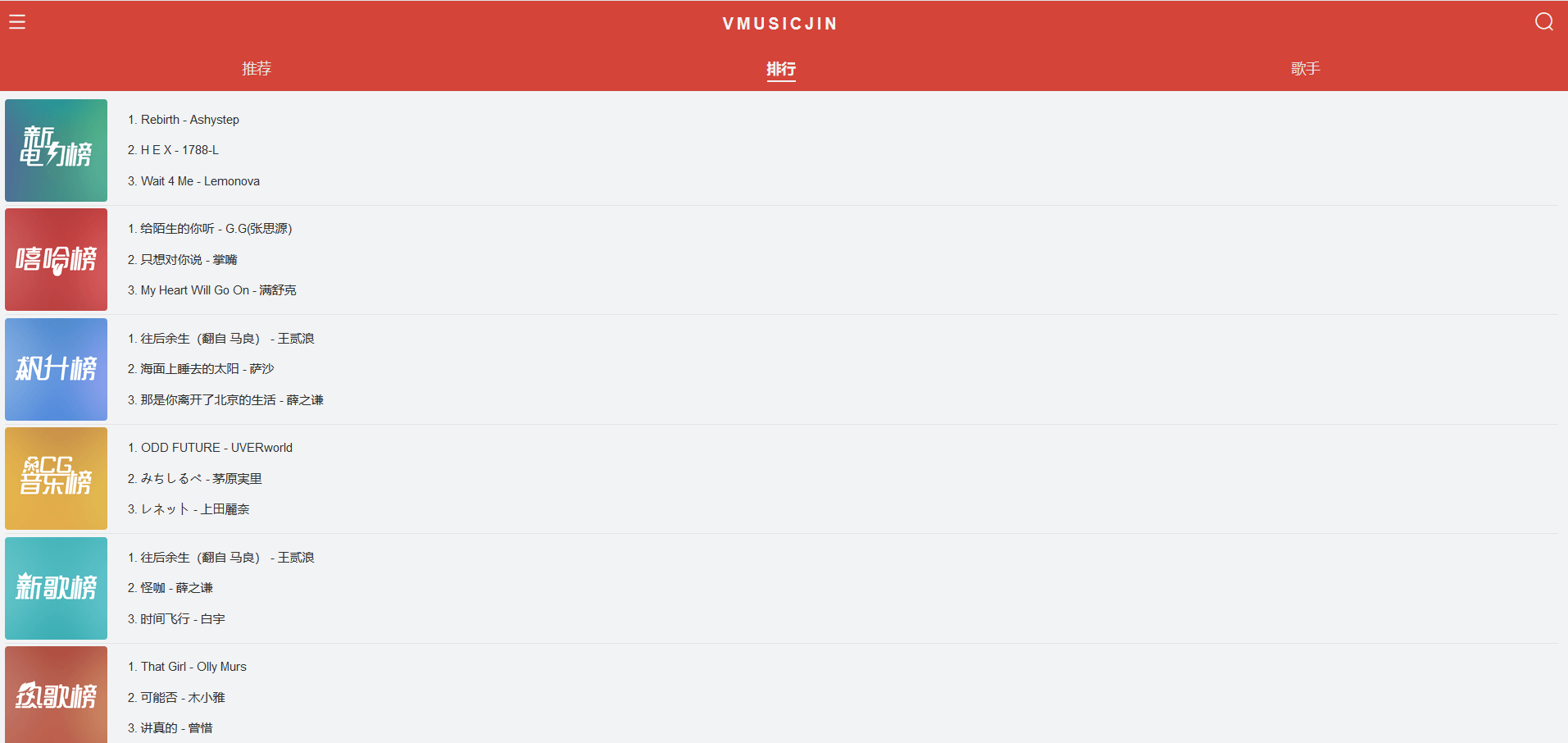
    今日推荐开源项目:《Vue 全家桶制造 vue-music-webapp》GitHub链接

    推荐理由:这个项目是作者为了练习使用 Vue 全家桶而做的音乐 app。界面上太适合移动端所以在电脑上看有点大过头了,而且布局配色上很像网易云音乐……不过这种能够自己动手做去学习的做法是非常好的,任何事情只有自己动手做一遍,才能够积累经验,在这里也鼓励读者朋友们多多自己动手,纸上得来终觉浅,欲知此事须躬行。

    超大电脑版:

    今日推荐英文原文:《How to escape async/await hell》作者:Aditya Agarwal

    原文链接:https://medium.freecodecamp.org/avoiding-the-async-await-hell-c77a0fb71c4c

    推荐理由:虽然异步和等待帮我们解决了回调问题,但是乱用异步和等待会让性能下降,有的时候可以并行的东西就不需要等了

    How to escape async/await hell
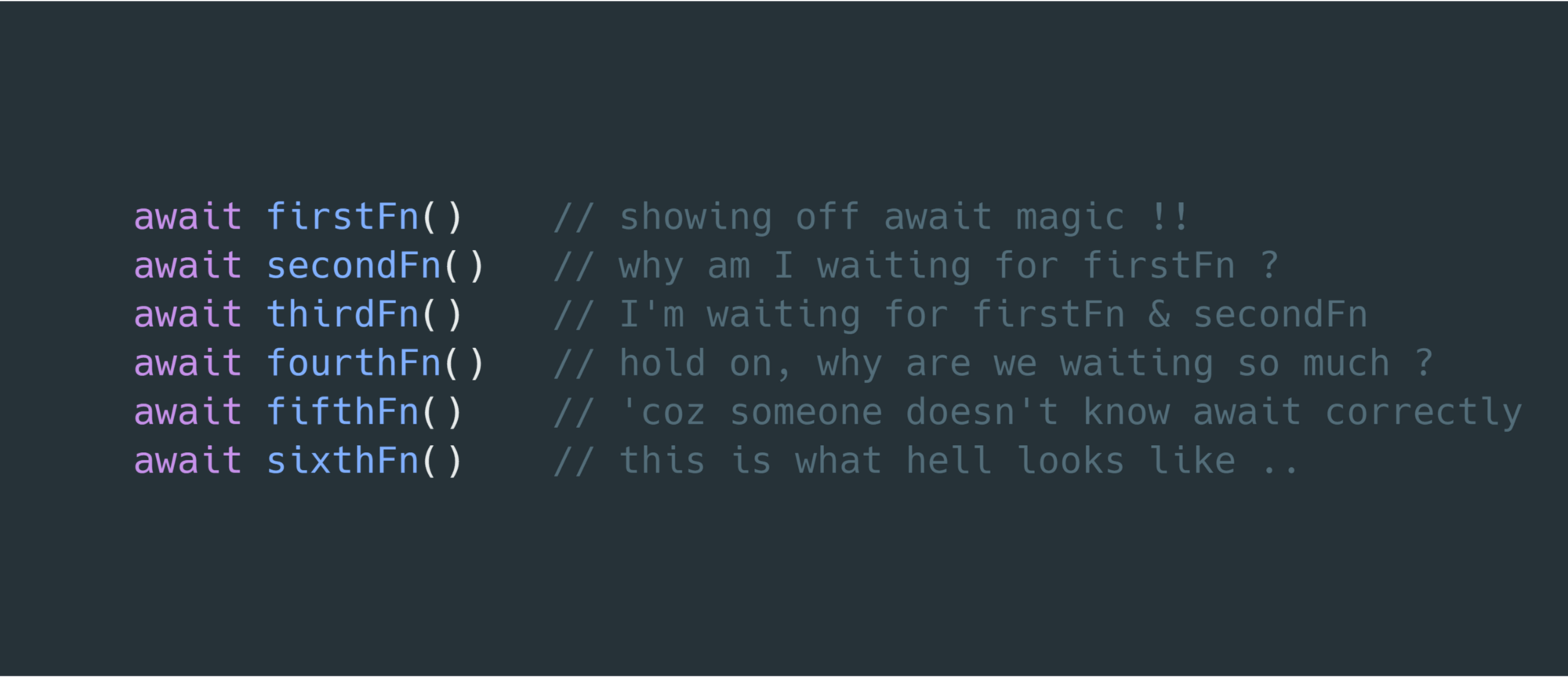
    async/await freed us from callback hell, but people have started abusing it — leading to the birth of async/await hell.

    In this article, I will try to explain what async/await hell is, and I’ll also share some tips to escape it.

    What is async/await hell

    While working with Asynchronous JavaScript, people often write multiple statements one after the other and slap an await before a function call. This causes performance issues, as many times one statement doesn’t depend on the previous one — but you still have to wait for the previous one to complete.

    An example of async/await hell

    Consider if you wrote a script to order a pizza and a drink. The script might look like this:

    (async () => {
      const pizzaData = await getPizzaData()    // async call
      const drinkData = await getDrinkData()    // async call
      const chosenPizza = choosePizza()    // sync call
      const chosenDrink = chooseDrink()    // sync call
      await addPizzaToCart(chosenPizza)    // async call
      await addDrinkToCart(chosenDrink)    // async call
      orderItems()    // async call
    })()

    On the surface it looks correct, and it does work. But this is not a good implementation, because it leaves concurrency out of the picture. Let’s understand what its doing so that we can nail down the issue.

    Explanation

    We have wrapped our code in an async IIFE. The following occurs in this exact order:

    1. Get the list of pizzas.
    2. Get the list of drinks.
    3. Choose one pizza from the list.
    4. Choose one drink from the list.
    5. Add the chosen pizza to the cart.
    6. Add the chosen drink to the cart.
    7. Order the items in the cart.

    So what’s wrong ?

    As I stressed earlier, all these statements execute one by one. There is no concurrency here. Think carefully: why are we waiting to get the list of pizzas before trying to get the list of drinks? We should just try to get both the lists together. However when we need to choose a pizza, we do need to have the list of pizzas beforehand. The same goes for the drinks.

    So we can conclude that the pizza related work and drink related work can happen in parallel, but the individual steps involved in pizza related work need to happen sequentially (one by one).

    Another example of bad implementation

    This JavaScript snippet will get the items in the cart and place a request to order them.

    async function orderItems() {
      const items = await getCartItems()    // async call
      const noOfItems = items.length
      for(var i = 0; i < noOfItems; i++) {
        await sendRequest(items[i])    // async call
      }
    }

    In this case, the for loop has to wait for the sendRequest() function to complete before continuing the next iteration. However, we don’t actually need to wait. We want to send all the requests as quickly as possible and then we can wait for all of them to complete.

    I hope that now you are getting closer to understanding what is async/await hell and how severely it affects the performance of your program. Now I want to ask you a question.

    What if we forget the await keyword ?

    If you forget to use await while calling an async function, the function starts executing. This means that await is not required for executing the function. The async function will return a promise, which you can use later.

    (async () => {
      const value = doSomeAsyncTask()
      console.log(value) // an unresolved promise
    })()

    Another consequence is that the compiler won’t know that you want to wait for the function to execute completely. Thus the compiler will exit the program without finishing the async task. So we do need the await keyword.

    One interesting property of promises is that you can get a promise in one line and wait for it to resolve in another. This is the key to escaping async/await hell.

    (async () => {
      const promise = doSomeAsyncTask()
      const value = await promise
      console.log(value) // the actual value
    })()

    As you can see, doSomeAsyncTask() is returning a promise. At this point doSomeAsyncTask() has started its execution. To get the resolved value of the promise, we use the await keyword and that will tell JavaScript to not execute the next line immediately, but instead wait for the promise to resolve and then execute the next line.

    How to get out of async/await hell ?

    You should follow these steps to escape async/await hell.

    Find statements which depend on the execution of other statements

    In our first example, we were selecting a pizza and a drink. We concluded that, before choosing a pizza, we need to have the list of pizzas. And before adding the pizza to the cart, we’d need to choose a pizza. So we can say that these three steps depend on each other. We cannot do one thing until we have finished the previous thing.

    But if we look at it more broadly, we find that selecting a pizza doesn’t depend on selecting a drink, so we can select them in parallel. That is one thing that machines can do better than we can.

    Thus we have discovered some statements which depend on the execution of other statements and some which do not.

    Group-dependent statements in async functions

    As we saw, selecting pizza involves dependent statements like getting the list of pizzas, choosing one, and then adding the chosen pizza to the cart. We should group these statements in an async function. This way we get two async functions, selectPizza() and selectDrink() .

    Execute these async functions concurrently

    We then take advantage of the event loop to run these async non blocking functions concurrently. Two common patterns of doing this is returning promises early and the Promise.all method.

    Let’s fix the examples

    Following the three steps, let’s apply them on our examples.

    async function selectPizza() {
      const pizzaData = await getPizzaData()    // async call
      const chosenPizza = choosePizza()    // sync call
      await addPizzaToCart(chosenPizza)    // async call
    }
    
    async function selectDrink() {
      const drinkData = await getDrinkData()    // async call
      const chosenDrink = chooseDrink()    // sync call
      await addDrinkToCart(chosenDrink)    // async call
    }
    
    (async () => {
      const pizzaPromise = selectPizza()
      const drinkPromise = selectDrink()
      await pizzaPromise
      await drinkPromise
      orderItems()    // async call
    })()
    
    // Although I prefer it this way 
    
    (async () => {
      Promise.all([selectPizza(), selectDrink()]).then(orderItems)   // async call
    })()

    Now we have grouped the statements into two functions. Inside the function, each statement depends on the execution of the previous one. Then we concurrently execute both the functions selectPizza() and selectDrink() .

    In the second example, we need to deal with an unknown number of promises. Dealing with this situation is super easy: we just create an array and push the promises in it. Then using Promise.all() we concurrently wait for all the promises to resolve.

    async function orderItems() {
      const items = await getCartItems()    // async call
      const noOfItems = items.length
      const promises = []
      for(var i = 0; i < noOfItems; i++) {
        const orderPromise = sendRequest(items[i])    // async call
        promises.push(orderPromise)    // sync call
      }
      await Promise.all(promises)    // async call
    }
    
    // Although I prefer it this way 
    
    async function orderItems() {
      const items = await getCartItems()    // async call
      const promises = items.map((item) => sendRequest(item))
      await Promise.all(promises)    // async call
    }

    I hope this article helped you see beyond the basics of async/await, and also helped you improve the performance of your application.

    If you liked the article, please clap your heart out. Tip — You can clap 50 times!

    Please also share on Fb and Twitter. If you’d like to get updates, follow me on Twitter and Medium. If anything is not clear or you want to point out something, please comment down below.


    每天推荐一个 GitHub 优质开源项目和一篇精选英文科技或编程文章原文,欢迎关注开源日报。交流QQ群:202790710;微博:https://weibo.com/openingsource;电报群 https://t.me/OpeningSourceOrg


  • 2018年7月3日:开源日报第117期

    3 7 月, 2018

    每天推荐一个 GitHub 优质开源项目和一篇精选英文科技或编程文章原文,欢迎关注开源日报。交流QQ群:202790710;微博:https://weibo.com/openingsource;电报群 https://t.me/OpeningSourceOrg


    今日推荐开源项目:《猴子也能模拟的攻击 Infection Monkey》GitHub地址

    推荐理由:这个项目是一个可以攻击你网络的模拟器,它通过模拟真实的攻击者来评估被攻击网络的安全性。它的攻击方式是安全的所以不用担心造成真实的损害,你可以在任何你想运行它来检测一下的时候运行。顺带一提,它的开发者是 GuardiCore Labs ,他们是专门研究网络安全的,有兴趣的朋友可以顺路看看他们的官网:https://www.guardicore.com/labs/


    今日推荐英文原文:《React vs. Vue (vs. Angular)》作者:Yogev Ahuvia

    原文链接:https://medium.com/fundbox-engineering/react-vs-vue-vs-angular-163f1ae7be56

    推荐理由:然后又到了三个前端框架打架的时间。这次它们的目标是决定谁才是能够快速构建出快速可靠而现代化平台,很不幸的是 Angular 因为不向后兼容和不够轻量小巧开局就凉了,所以实际上只有 React 和 Vue 决斗而已,让我们看看究竟哪一个更好(虽然没有决出胜负)。

    React vs. Vue (vs. Angular)

    Overview

    Redesigning a front-end infrastructure requires much thinking, discussing, deciding, planning, managing and implementing. One of the first decisions we had to take was to choose a front-end framework to redesign our products on top.

    We’ve researched for a few long months to support a better decision on this emotional topic; conducting discussions, building a proof of concepts, interviewing colleagues with relevant experience in other companies, and reading tons of material online.

    In this article, I’m comparing the finalists in the run for the next framework we are going to be building our infrastructure with: Angular, React and Vue.

    The Goal

    The goal is to build a new, modern, fast and reliable platform to serve all of our current and future front-end apps.

    The Nominees

    • React
    • Vue
    • Angular

    Angular

    Angular has been dropped early in our process because of two main reasons (a more detailed reasoning can be read here under “Why move then?”):

    1. Angular is our current framework, we’re on v1. Angualr v2 was introduced with many improvements, but it wasn’t backward compatible. That means upgrading to latest Angular requires similar efforts as switching to any other framework. As a result, motivation to use Angular has dropped majorly, within Fundbox and in the industry as a whole as developers was let down.
    2. Angular grew to become a big framework that can be helpful in building complex systems but is less useful for building startup fast-changing UIs. React and Vue are more light-weight, and components are meant to be small, autonomous, encapsulated, hence — easily reusable. If we were to develop a new infrastructure from scratch (and not needing to migrate from an existing one), we could have been considering Angular too. In our case, it didn’t fit.

    Comparing React and Vue

    This left us with React and Vue, and we compared how they perform in the following criteria:

    • Learning Curve
      How easy is a framework to learn for an experienced developer?
    • Code Style
      How readable and intuitive is the code and conventions of the framework?
    • Single File Components
      How intuitive is browsing and maintaining a component in the framework?
    • Performance
      How performant are apps built with the framework?
      How big is the footprint of the framework concerning package size and memory usage?
    • Flexibility
      How many features is the framework offering out of the box?
      How many of its features are mandatory?
      How easy is it to customize the framework?
    • Tooling
      What tools available for the framework?
      How many stable plugins are there for the framework?
    • Mobile
      Does the framework support more applications other than web?
      Does it offer a way to build native mobile applications?
    • Community
      How big is the framework’s community?
      Is the community united or fragmented?
    • Maturity
      How mature is the framework?
      How long has it been production-tested?
      How clear is its future?
    • Support
      How big is the team behind the framework?
      Is there a company or organization that owns the framework?
    • Hiring Talent
      How easy would it be to hire developers with prior experience in the framework?

    Learning Curve

    React

    React official documentation offer a couple of Getting Started guides that are decently written and give a decent walk-through to newcomers. The framework’s core principles can be understood in a couple of hours, by developers with some front-end framework experience.

    The official React documentation is thorough, but not as clear and organized as the official documentation for Vue. The documentation covers the necessary happy flows and then some more, but there are still edges of the framework that are missing from the documentation. These edges can convert to pain points as the project will get bigger.

    React is not a complete framework; it is lean at its core and the more advanced framework components must be looked for as a third-party package. This adds some complexity to the learning curve as it differs based on choices you make with the framework along the way.

    Vue

    The Vue library can simply be loaded as a resource of an HTML page; through this, the whole library can be used without a build step in just minutes. This reflects how unobtrusive the library is in general, and also allows writing Vue apps in no-time.

    Because Vue shares some concepts with both React and Angular, transitioning developers will have an even easier learning curve into Vue. Also helps the fact that the official documentation for Vue is very well written, and covers just everything a developer would stumble upon while developing Vue apps.

    Vue is more tightly defined than React; that also means it is more opinionated. It is noticeable that in Vue many questions are answered straight in the documentation itself, not needing to search too much in other places.

    Code Style

    React

    React introduced a bunch of concepts based on functional programming that eases the process of developing UI-first applications. The most notable being:

    1. JSX, which is a way of writing HTML within JavaScript code. JSX comes as a complement to React being a strong promoter of Functional Programming, and in that scope, it makes excellent sense.
    2. Its Component Lifecycle offers an intuitive way of hooking to specific events in the “life” of a component (creation, updates, etc.)

    Vue

    Being a younger framework than both React and Angular, Vue took the better things from each, a mix of functional and OO programming.

    By default, Vue’s coding style is a little similar in some areas to Angular but also removes most of Angular’s pain points. Vue separates HTML, JS and CSS, like web developers have been used to for years, but it also allows to use JSX if you prefer that style. So it doesn’t force changing your code style.

    Vue’s take of the component lifecycle is more straightforward and more intuitive than React’s. In general, Vue’s API is broader but simpler than React.

    Single File Components

    React

    With JSX, Single File Components in React are written entirely as a JavaScript module, and so it means React has a specific way of writing HTML, CSS, and JavaScript.

    Writing everything in JavaScript is more of a feature, and not a bug because it comes to ease the burden of creating dynamic HTML inside components. Instead, one can use vanilla JavaScript to generate templates when using JSX.

    That said, React’s special syntax requires more learning and practice to feel comfortable with writing components in React.

    Vue

    Single File Components in Vue split into three separate parts: <template>, <script> and <style>, and each contains the corresponding type of code, and so it feels more natural for transitioning web developers.

    As a progressive framework, Vue is easily customizable. For example, with a single configuration, one can use JSX instead of the <template> tag.
    Also, as another example, just by adding a lang=”scss” attribute to the <style> tag, one can write SCSS instead of plain CSS. Similarily, by adding the scoped attribute to the <style> tag, Vue components will implement CSS scoping (a.k.a CSS Modules) out of the box.

    Performance

    React

    Library size (over the network / uncompressed): 32.5KB / 101.2KB

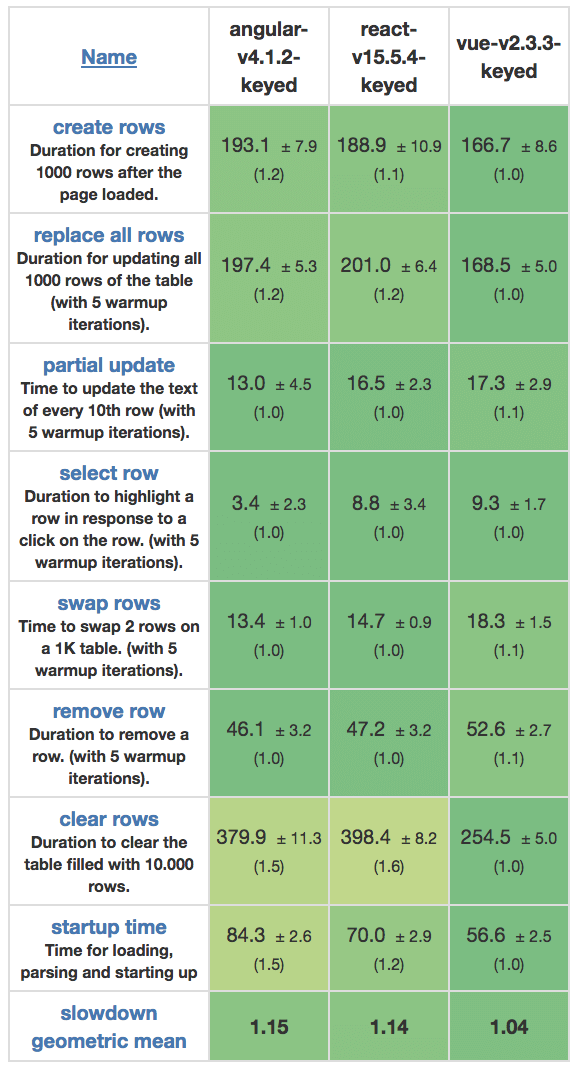
    Comparing DOM manipulations, React’s overall performance is great. It is much faster than Angular but is a bit slower than Vue.

    React offers support for Server-Side Rendering (SSR) out of the box, and could come out useful for some types of implementations.

    Built-in support for bundling and tree-shaking for minimizing end-user resource burden.

    Vue

    Library size (over the network / uncompressed): 31KB / 84.4KB

    On paper, the Vue library is only 1.5KB smaller than React (see above), but keep in mind that the Vue library includes both the Vue Router and the Vuex data store, which React doesn’t.

    Aside from being the fastest in the bunch, Vue is also a progressive framework, build from the ground up to be incrementally adoptable. The core library is focused on the view layer only and is easy to pick up and integrate with other libraries or existing projects.

    Similarly to React, Vue has built-in support for bundling and tree-shaking for minimizing end-user resource burden.

    Source: https://www.stefankrause.net/js-frameworks-benchmark6/webdriver-ts-results/table.html

    Flexibility

    React

    React focuses on UI, so the essential thing you get is its support for building user-facing components.

    What it doesn’t offer as part of the React official library is more advanced features like state management. Most of React applications are using Redux for state management, and these days MobX is gaining traction also as a React companion.

    Even React router is not an official package, but a third party package, backed by React’s team.

    Vue

    As a progressive framework, Vue allows just using its most fundamental features to build an app, but if needed, it also offers most of everything you need out of the box: Vuex for state management, Vue Router for app URL management, Vue Server-Side Renderer for Server-Side Rendering.

    Vue is more opinionated than React, for the good and the bad.

    Tooling

    React

    React has a third party CLI tool called create-react-app that helps scaffold new apps and components in a React project.

    The CLI tool also supports the ability to run end-to-end and unit tests, code linting and the local development server.

    React has great official and community support for the major IDEs.

    Vue

    Vue has an official CLI tool called Vue CLI. Very similarly to React’s create-react-app, Vue CLI tool offers scaffold of new apps.

    Also Vue has good support for all significant IDEs (not as good as React, but WebStorm and VSCode are there).

    Mobile

    React

    React has a port for building native mobile applications, it’s called React Native, and it’s the current leader of “write once (in JavaScript), use many (in native iOS and Android)” solution out there today.

    There are a plethora of apps in production built using React Native.

    Vue

    For Vue, there are more than just one option to go with for building Mobile Native apps. Although, unlike React Native, there’s no clear leader in the Vue-Mobile-Native space.

    NativeScript is the leading of these options (and it’s also a leading solution for Angular btw), but there is also Weex and Quasar.

    Community

    React

    In StackOverflow, there are almost 88,000 questions tagged with #reactjs
    There are over 40,000 npm packages available to install for React developers.

    In latest front-end tools surveys, over 40% of respondents voted they feel comfortable using React.

    In GitHub, React repo has almost 100,000 stars.

    React’s community is indeed much more significant but has the disadvantage of being more fragmented than Vue’s, and it’s harder to find straightforward answers to common problems.

    Vue

    In StackOverflow, there are 18,000 questions tagged with #vue
    For Vue, there are almost 10,000 npm packages available to install.

    In the latest surveys, 17% of respondents voted they feel comfortable using Vue. But in fact, twice as many developers are interested in learning Vue, comparing to React, so the market for Vue devs will probably grow faster than React’s in the coming future.

    The Vue repo in GitHub just passed React and went over 100,000 stars.

    Thanks to its excellent documentation, most answers to problems in Vue development could be found in the documentation right away, but also the community answers are more aligned.

    Maturity

    React

    React was released in March 2013 (5 years old at the time of writing).

    According to SimilarTech, React is in use on 205,000 unique domains. Growing at 2.46% per month.

    React is very well tested on production, more than Vue. React has built a vast community, which makes sense with an owner such as Facebook.

    Vue

    Vue was released on February 2014 (4 years old at time of writing).

    According to SimilarTech, Vue is in use on 26,000 unique domains. Growing at 3.34% per month.

    Vue became a standard around a year and a half ago. Today it is widely used, also in some bigger companies like GitLab, Alibaba, Baidu and more. Vue proved to be stable both at runtime and with updates.

    Support

    React

    React is a framework founded and maintained by Facebook. At Facebook, there’s a team that regularly supports React (and React is also being used for many projects within Facebook).

    The React team size at Facebook is said to include 10 dedicated developers. But it should be noted that multiple teams at the Facebook R&D are using React for internal and external projects, and each of them can push change requests into the library.

    React doesn’t have an actual roadmap, but work based on RFCs, as explained here.

    Vue

    Vue is an independent library, founded by Evan You. He also manages the maintenance of Vue and its roadmap ahead.

    The Vue team size includes 23 dedicated developers.

    Vue’s high-level roadmap can be reviewed in their GitHub repo, here.

    Hiring Talent

    React

    Being the most popular framework out there these days, React has an advantage if you’re in the market for React developers.

    Also, by learning React, developers will get an immediate well-worth line to their CV, as they will gain valuable experience with a popular framework as React.

    Vue

    Vue is the new “hotness” in the front-end industry. Of course, hype has also some downsides, but Vue has been gaining stable traction for a long time and developers are eager to get their hands on a Vue project as part their FOMO. These days, it is not uncommon to find developers who have some experience with Vue.


    Overall Pros

    React

    • Industry standard.
    • Skilling FEDs with the most popular framework out there.
    • Easier hiring of strong FEDs.
    • More secure future and stability, based on a stable past and a strong backing company.
    • More significant community, a plethora of tools and packages.
    • Web and mobile apps can share some code.

    Vue

    • Vue’s core modules (Vuex, Router, etc.) are built-in and work fantastic.
    • Choosing the “next” thing, and not the “current.”
    • Being more unique; leading the herd and not following it.
    • Much faster ramp-up phase, both FEDs and BEDs would feel natural in Vue code, fast.
    • Better promotes Full-Stack culture; allows cross-product development.

    Overall Cons

    React

    • Keeping the division between FEDs and BEDs; React requires to learn a lot to become an expert.
    • Would require much more time to train devs.
    • Deliver slower (at least for the initial heavy lifting).

    Vue

    • Stepping in a more experimental land, not risky, but edgy.
    • More difficult to find experienced Vue devs.
    • Fewer plugins and tools available, smaller community.
    • Not being React, devs don’t gain experience with the most popular framework today.

    More Thoughts

    For a long time React and Angular were the leading players in the framework game, while many (many!) frameworks appeared every other day trying to get into the hall of fame too. None succeeded; except lately — Vue. The most apparent appreciation and popularity Vue has attracted can be seen in references in articles, tutorials, POCs and browser developer communities.

    React is a trend-setter and a highly demanded skill in the industry. React is a clear leader today, both in industry-hype and community appreciation. It’s super-popular and, to be honest, it deserves the status very well.
    React makes it easy to build both complex and straightforward web and mobile applications, but it comes with a price — framework complexity and boilerplate. The basics are relatively intuitive, but large React projects tend to get complicated, and the fragmentation in the community does not help. The fact that React introduced many new paradigms has some negative effect on its learning curve.

    Vue is leaner, a straight-forward, and fresh framework that deserves a place on the podium for being super simple to learn, very low on boilerplate code, performant, flexible and complete package. Many web apps today, could have been built faster with Vue than with React. Vue is fun to develop with and is pretty straightforward.

    The strong vibe around Vue in the front-end community lately, can easily hint of Vue becoming at least as popular as React very soon.


    每天推荐一个 GitHub 优质开源项目和一篇精选英文科技或编程文章原文,欢迎关注开源日报。交流QQ群:202790710;微博:https://weibo.com/openingsource;电报群 https://t.me/OpeningSourceOrg

  • 2018年7月2日:开源日报第116期

    2 7 月, 2018

    每天推荐一个 GitHub 优质开源项目和一篇精选英文科技或编程文章原文,欢迎关注开源日报。交流QQ群:202790710;微博:https://weibo.com/openingsource;电报群 https://t.me/OpeningSourceOrg


    今日推荐开源项目:《猴子也能看懂的 TensorFlow 教程 Easy-TensorFlow》GitHub链接

    推荐理由:虽然说猴子大概是看不懂这个的,但是这个项目依然是一个很全面的教程,从安装到如何创建表到各种各样的类型再到重头戏如何训练神经网络,相信对于初学者来说已经可以解决不少问题了,强烈推荐给学习 TensorFlow 的朋友们,有了这个教程可以少走不少弯路。


    今日推荐英文原文:《How To Make Your Code Readable》作者:Christopher Brown

    原文链接:https://medium.com/@chbchb55/the-importance-of-readable-code-165895e939c7

    推荐理由:“’当我写这段代码的时候,只有神仙和我知道我在写什么……好了,现在只有神仙知道了”

    How To Make Your Code Readable

    We’ve all seen (and written) bad code at one point or another and hopefully we’re all working at bettering these skills and not just learning the newest framework out there.

    Why do we need to write good code, not just performant code?

    While the performance of your product or site is important, so is the way your code looks. This reasoning behind this is that the machine isn’t the only entity reading your code.
    First, and foremost, you are eventually going to have to re-read some portion of your code, if not the whole thing, and when that time comes performant code isn’t going to help you understand what you’ve written or figure out how to fix it.
    Second, if you work on a team or collaborate with other developers then any time you write code your team members have to read your code and try to interpret it in a way they understand. To make that easier for them, it’s important to consider how you name variables and functions, the length of each line, and the structure of your code, among other things.
    Lastly, it’s just nicer to look at.

    Part 1: How do you identify bad code?

    The simplest way to identify bad code, in my opinion, is to try to read your code as if it were a sentence or phrase.

    For example, here is some code:

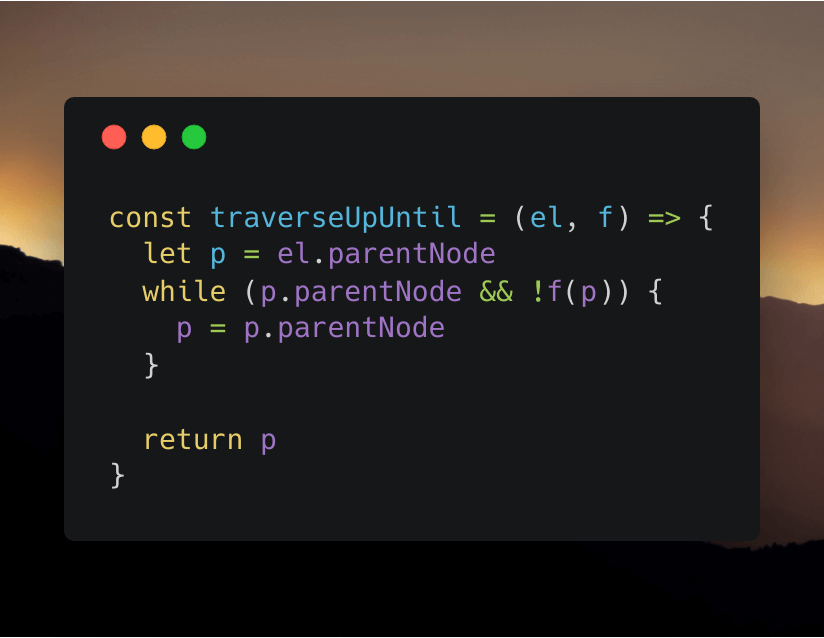
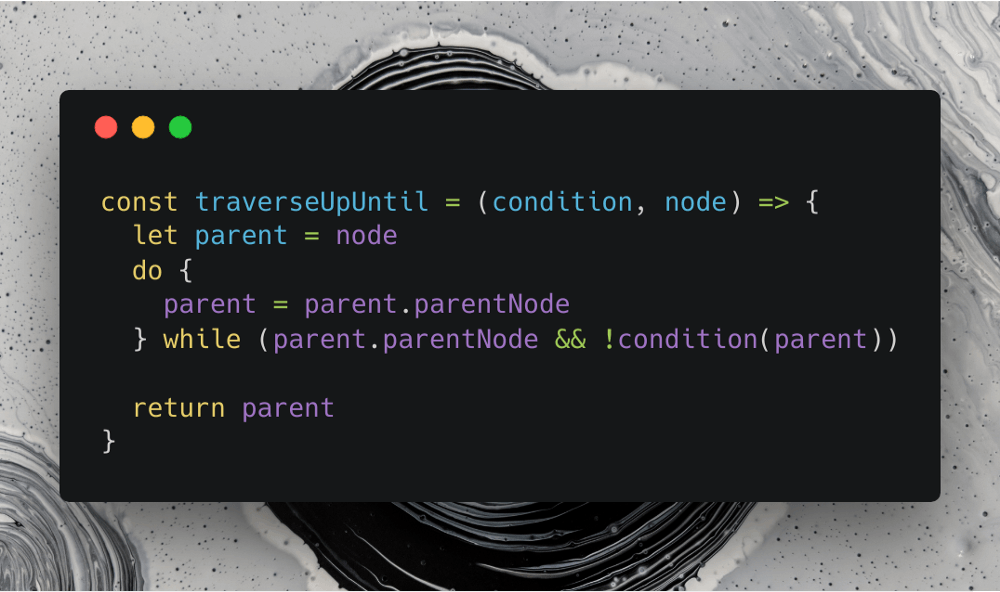
    The pictured function above, when passed an element and a conditional function returns the nearest parent node that passes the conditional function.

    const traverseUpUntil = (el, f) => {

    Following the idea that code should be readable like regular writing, the first line has three fatal flaws.

    • The parameters for the function are not readable like words.
    • While el can be understood as it is commonly used to mean element, the parameter name f does not explain its purpose.
    • If you were to use the function it would read like so: “traverse up until el passes f” which could probably better read as “traverse up until f passes, from el”. Granted, the best way to actually do this would to allow the function to be called like el.traverseUpUntil(f) but that’s a different problem.
    let p = el.parentNode

    This is the second line. Again we have a naming issue, this time with a variable. If one were to look at the code they would most likely understand what p is. It is the parentNode of parameter el . However, what happens when we look at p used anywhere else, we no longer have the context that explains what it is.

    while (p.parentNode && !f(p)) {

    In this line, the main problem we encounter is not knowing what !f(p) means or does, because “f” could mean anything at this point. What the person reading the code is supposed to understand is that !f(p) is a check to see if the current node passes the condition. If it does, stop the loop.

    p = p.parentNode

    This one is pretty self-explanatory.

    return p

    Not 100% clear what is being returned due to the bad variable name.

    Part 2: Let’s make improvments

    First we modify the parameter names and their order:(el, f) => into (condition, node) => (you can also do condition => node => which adds an extra layer of useability)
    You might be wondering why, instead of using “element”, I used “node”. I used it because of the following:

    • We are already writing code in terms of nodes, for example .parentNode , so why not make it all the same.
    • It’s shorter than writing element without losing it’s meaning. And the reason why I say this is that it works with all forms of nodes that have the property “parentNode”, not just HTML elements.

    Next we touch up on the variable name(s):

    let parent = node

    It’s very important to fully elaborate the meaning of your variable within its name, “p” is now “parent”. You may have also noticed we aren’t starting out by getting node.parentNode , instead we only get node .

    This leads us into our next few lines:

    do {
      parent = parent.parentNode
    } while (parent.parentNode && !condition(parent))

    Instead of a regular while loop I’ve opted for a do … while loop. This means that we only have to get the parent node once, as it runs the condition after the action, not the other way around. The use of the do … while loop also reaches back to being able to read the code like writing.

    Let’s try reading it: “Do parent equals parent’s parent node while there is a parent node and the condition function doesn’t return true.” While that may seem a bit weird it helps us understand what the code means when we can easily read it.

    return parent

    While many people opt to use the generic ret variable (or returnValue), it is not a good practice to name the variable you return “ret”. If you name your return variables appropriately it becomes obvious to what is being returned. However, sometimes functions can be long and daunting causing it to be more confusing. In this instance, I would suggest splitting your function into multiple functions and if it’s still too complicated adding comments can help.

    Part 3: Simplify the code

    Now that you’ve made the code readable it’s time to take out any unnecessary code. As I’m sure some of you have already noticed, we probably don’t need the variable parent at all.

    const traverseUpUntil = (condition, node) => {
      do {
        node = node.parentNode
      } while (node.parentNode && !condition(node))
      
      return node
    }

    What I’ve done is taken out the first line and replaced “parent” with “node”. This bypasses the unnecessary step of creating “parent” and goes straight to the loop.

    But what about the variable name?

    While “node” isn’t the best descriptor for this variable, it’s a decent one. But let’s not settle for decent, let’s rename it. How about “currentNode”?

    const traverseUpUntil = (condition, currentNode) => {
      do {
        currentNode = currentNode.parentNode
      } while (currentNode.parentNode && !condition(currentNode))
      
      return currentNode
    }

    That’s better! Now when we read it we know that no matter what currentNode will always represent the node we are currently at instead of it just being some node.


    每天推荐一个 GitHub 优质开源项目和一篇精选英文科技或编程文章原文,欢迎关注开源日报。交流QQ群:202790710;微博:https://weibo.com/openingsource;电报群 https://t.me/OpeningSourceOrg
  • 2018年7月1日:开源日报第115期

    1 7 月, 2018

    每天推荐一个 GitHub 优质开源项目和一篇精选英文科技或编程文章原文,欢迎关注开源日报。交流QQ群:202790710;微博:https://weibo.com/openingsource;电报群 https://t.me/OpeningSourceOrg

    今日推荐开源项目:《我在隔壁 Vuido 那看到过你 libui》GitHub链接

    推荐理由:这个项目正是昨天日报里 Vuido 用的那个 GUI 库,它现在还在开发中,诸如表格和拖放这样的功能暂时还不能使用,而且还没有一个详细的文档……不过这不影响它作为一个有潜力的 GUI 库的特性。它本来是作者为了 GO 语言而开发的 GUI 库,不过现在它还有其他语言比如 Python 和 JavaScript 等等各种版本。


    今日推荐英文原文:《13 Linux Terminal Shortcuts Every Power Linux User Must Know》作者:Abhishek

    原文链接:https://linuxhandbook.com/linux-shortcuts/

    推荐理由:快捷键是真的好用,所以这篇文章教你如何在 Linux 的命令行(实际上应该就是 Bash)里面使用方便简洁好用的快捷键

    13 Linux Terminal Shortcuts Every Power Linux User Must Know

    Brief: Here are some keyboard shortcuts that every Linux user must use. These Linux shortcuts will increase your productivity and efficiency while using the command line.

    You know what sets apart a pro user from a regular user? Mastery over the keyboard shortcuts.

    Alright! That’s not the only thing but it is undoubtedly a factor.

    Shortcuts help you to be more productive and efficient with whatever tool you use. Just think about it. If someone holds the mouse all the way down to copy entire text instead of Ctrl+A, how would you feel about it?

    Linux terminal is not an exception. There are certain Linux terminal shortcuts that every user must know and practice.

    Trust me; once you master these shortcuts, you’ll notice how good you are with using the Linux command line.

    Must Know Linux Shortcuts

    I would like to mention that some of these shortcuts may depend upon the Shell you are using. Bash is the most popular shell, so the list is focused on Bash. If you want, you may call it Bash shortcut list as well.

    Do note that I have used the capital letters in the keyboard shortcuts but this does NOT mean that you have to press the shift key while using these shortcuts.

    1. Tab

    This is the Linux shortcut you cannot live without. It will save you so much time in the Linux command line.

    Just start typing a command, filename, directory name or even command options and hit the tab key. It will either automatically complete what you were typing or it will show all the possible results for you.

    2. Ctrl + C

    These are the keys you should press in order to break out of a command or process on a terminal. This will stop a running program immediately.

    If you want to stop using a program running in the foreground, just press this key combination.

    3. Ctrl + Z

    This shortcut will send a running program in the background. Normally, you can achieve this before running the program using the & option but if you forgot to do that, use this key combination.

    4. Ctrl + D

    This keyboard shortcut will log you out of the current terminal. If you are using an SSH connection, it will be closed. If you are using a terminal directly, the application will be closed immediately.

    Consider it equivalent to the ‘exit’ command.

    5. Ctrl + L

    How do you clear your terminal screen? I guess using the clear command.

    Instead of writing C-L-E-A-R, you can simply use Ctrl+L to clear the terminal. Handy, isn’t it?

    6. Ctrl + A

    This shortcut will move the cursor to the beginning of the line.

    Suppose you typed a long command or path in the terminal and you want to go to the beginning of it, using the arrow key to move the cursor will take plenty of time. Do note that you cannot use the mouse to move the cursor to the beginning of the line.

    This is where Ctrl+A saves the day.

    7. Ctrl + E

    This shortcut is sort of opposite to Ctrl+A. Ctrl+A sends the cursor to the beginning of the line whereas Ctrl+E moves the cursor to the end of the line.

    8. Ctrl + U

    Typed a wrong command? Instead of using the backspace to discard the current command, use Ctrl+U shortcut in the Linux terminal. This shortcut erases everything from the current cursor position to the beginning of the line.

    9. Ctrl + K

    This one is similar to the Ctrl+U shortcut. The only difference is that instead of the beginning of the line, it erases everything from the current cursor position to the end of the line.

    10. Ctrl + W

    You just learned about erasing text till the beginning and the end of the line. But what if you just need to delete a single word? Use the Ctrl+W shortcut.

    Using Ctrl+W shortcut, you can erase the word preceding to the cursor position. If the cursor is on a word itself, it will erase all letters from the cursor position to the beginning of the word.

    The best way to use it to move the cursor to the next space after the targetted word and then use the Ctrl+W keyboard shortcut.

    11. Ctrl + Y

    This will paste the erased text that you saw with Ctrl + W, Ctrl + U and Ctrl + K shortcuts. Comes handy in case you erased wrong text or if you need to use the erased text someplace else.

    12. Ctrl + P

    You can use this shortcut to view the previous command. You can press it repeatedly to keep on going back in the command history. In a lot of terminals, the same can be achieved with PgUp key.

    13. Ctrl + N

    You can use this shortcut in conjugation with Ctrl+P. Ctrl+N displays the next command. If you are viewing previous commands with Ctrl+P, you can use Ctrl+N to navigate back and forth. Many terminals have this shortcut mapped to the PgDn key.


    每天推荐一个 GitHub 优质开源项目和一篇精选英文科技或编程文章原文,欢迎关注开源日报。交流QQ群:202790710;微博:https://weibo.com/openingsource;电报群 https://t.me/OpeningSourceOrg

←上一页
1 … 230 231 232 233 234 … 262
下一页→

Proudly powered by WordPress