• 开源镜像
  • 开源沙龙
  • 媛宝
  • 猿帅
  • 注册
  • 登录
  • 息壤开源生活方式平台
  • 加入我们

开源日报

  • 2018年7月8日:开源日报第122期

    8 7 月, 2018

    每天推荐一个 GitHub 优质开源项目和一篇精选英文科技或编程文章原文,欢迎关注开源日报。交流QQ群:202790710;微博:https://weibo.com/openingsource;电报群 https://t.me/OpeningSourceOrg

    今日推荐开源项目:《超小编辑器 pell》GitHub链接

    推荐理由:这看起来像是个普通的编辑器……但是它很小。它的大小甚至不到5kb,但是功能还是很齐全的,加粗下划线分段代码块插入图片和链接一样不落,就是你只能通过 url 插入图片而已……不过这也没关系,这个大小足够让它在众多编辑器中具有自己的独到之处了。


    今日推荐英文原文:《Don’t learn Machine Learning in 24 hours》作者:Rwiddhi Chakraborty

    原文链接:https://towardsdatascience.com/dont-learn-machine-learning-in-24-hours-3ea3624f9881

    推荐理由:学习是一个长久的过程,知其然,知其所以然,而不是用7行代码或者是别的什么,当然如果你需要用最快的速度完成你的目标然后不需要别的什么后续,那就另当别论。

    Don’t learn Machine Learning in 24 hours

    Recently, I came across a wonderful article by Peter Norvig — “Teach yourself programming in 10 years”.

    This is a witty and a tad bit satirical headline, taking a dig at all those coffee table programming books that aim to teach you programming in 24 hours, 7 days, 10, days, *insert a ridiculously short time line*.

    Dr. Norvig makes quite a strong case. Yes, you may come to grips with the syntax, nature, and style of a programming language in 24 hours, but that doesn’t mean you’ve become adept at the art of programming. Because programming isn’t about a language at all. Programming is about intelligent design, a rigorous analysis of time and space complexity, understanding when a certain language works over another, and so much more.

    Of course you could write a Hello World program in C++ in 24 hours, or a program to find the area of a circle in 24 hours, but that’s not the point. Do you grasp object oriented programming as a paradigm? Do you understand the use cases of namespaces and templates? Do you know your way around the famed STL? If you do, you certainly didn’t learn all this in a week, or even a month. It took you a considerable amount of time. And the more you learned, the more you realised that the abyss is deeper than it looks from the cliff.

    I’ve found a similar situation in the current atmosphere surrounding Machine Learning, Deep Learning, and Artificial Intelligence as a whole. Feeding the hype, thousands of blogs, articles, and courses have popped up everywhere. Thousands of them have the same kind of headlines — “Machine Learning in 7 lines of code”, “Machine Learning in 10 days”, etc. This has, in turn led people on Quora to ask questions like “How do I learn Machine Learning in 30 days?”. The short answer is, “You can’t. No one can. And no expert (or even one comfortable with its ins and outs) did.”

    Even if we were to forget the 10,000 hours rule for a second, you can’t do machine learning in 7 lines of code.

    Why? Because those 7 lines of code do not explain how you did in the bias-variance tradeoff, what your accuracy value means, or whether accuracy is an appropriate metric of performance in the first place, whether your model overfits, how your data is distributed, and if you’ve chosen the right model to fit the data you have, etc. There’s just so much more to it even after you’ve answered these questions.

    And since you couldn’t interpret your model, you tweak the parameters in sklearn, get a minimal improvement in accuracy, and go home happy. But did you really learn?

    In short, don’t do it in 7 lines of code. Do it over 6 months, a year. You’ll know in the middle of that period whether it interests you. Forget the glamour for now, and really get into the depths of this amazing field of research. You should definitely read this. I found it to be the best introduction for a newbie in this field. You don’t need to know math or code to read it. But after reading this, you will realise the entire gamut of concepts you need to understand in order to be fluent with this field, to think in ML, so to speak.

    There are indeed fascinating blogs to follow on this subject. Here are some of my personal favourites:

    1. http://colah.github.io/
    2. http://mark.reid.name/blog/
    3. http://karpathy.github.io/

    Medium is also a wonderful place to learn. I follow this publication almost exclusively.

    If you’re old school, take Andrew Ng’s CS229 at Stanford. This is more involved than his course on Coursera, which is also a good introduction.

    An unfortunate result of hype is that we “drown in information and starve for knowledge”. So many people do it, that we frequently lose sight of the bigger picture. Machine Learning is wonderful. It is a serious field of research and development, and is driving so many 21st century use cases.

    Just don’t do it in 24 hours.


    每天推荐一个 GitHub 优质开源项目和一篇精选英文科技或编程文章原文,欢迎关注开源日报。交流QQ群:202790710;微博:https://weibo.com/openingsource;电报群 https://t.me/OpeningSourceOrg

  • 2018年7月7日:开源日报第121期

    7 7 月, 2018

    每天推荐一个 GitHub 优质开源项目和一篇精选英文科技或编程文章原文,欢迎关注开源日报。交流QQ群:202790710;微博:https://weibo.com/openingsource;电报群 https://t.me/OpeningSourceOrg


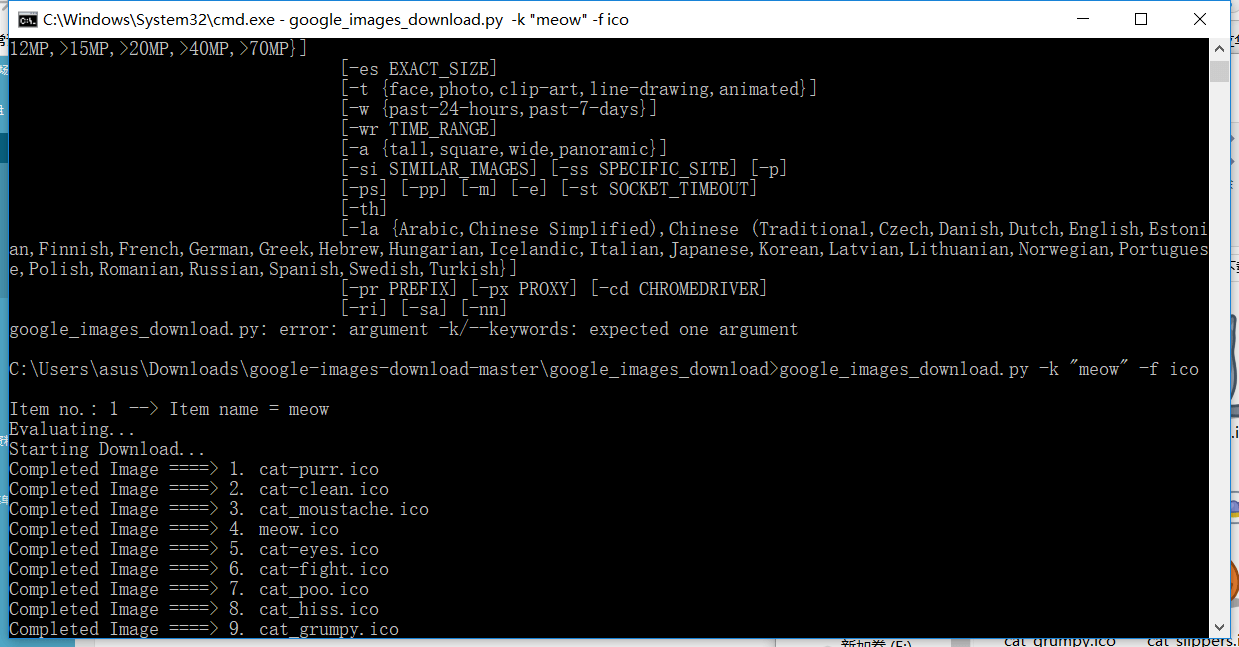
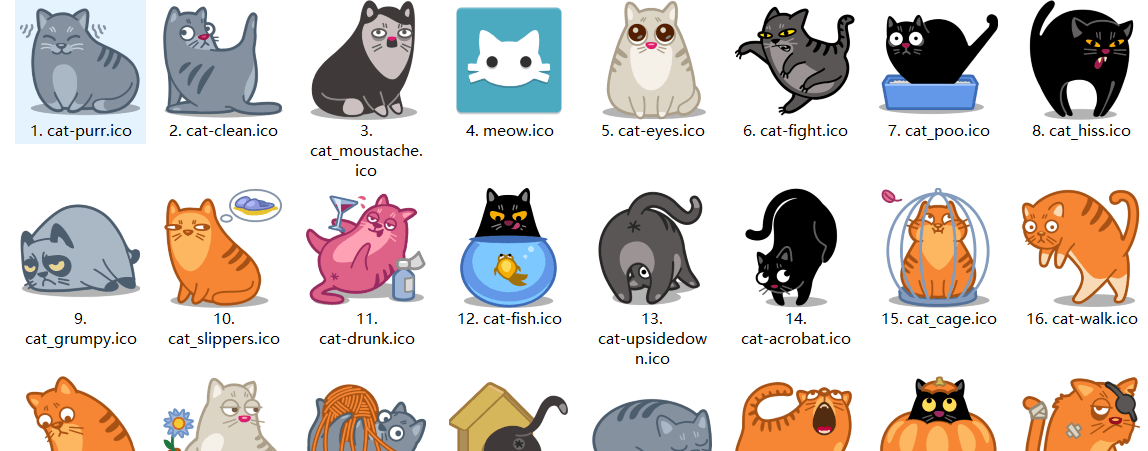
    今日推荐开源项目:《简单方便找图片 Google Images Download》GitHub链接

    推荐理由:这个项目可以让你在 Google 上简单的下载你想要的图片,当你需要一些种类的图片素材的时候很是适用,一般来说直接下载整个 zip 文件,然后运行 setup.py install ,再接着运行 google_images_download.py 然后组合你想要的命令即可。
    今日推荐英文原文:《face-api.js — JavaScript API for Face Recognition in the Browser with tensorflow.js》作者:Vincent Mühler

    原文链接:https://itnext.io/face-api-js-javascript-api-for-face-recognition-in-the-browser-with-tensorflow-js-bcc2a6c4cf07

    推荐理由:这篇文章介绍了一个人脸识别的 JavaScript 库,兴许你已经在 GitHub 上看到过这个了

    face-api.js — JavaScript API for Face Recognition in the Browser with tensorflow.js

    I am excited to say, that it is finally possible to run face recognition in the browser! With this article I am introducing face-api.js, a javascript module, built on top of tensorflow.js core, which implements three types of CNNs (Convolutional Neural Networks) to solve face detection, face recognition and face landmark detection.

    As always we will look into a simple code example, that will get you started immediately with the package in just a few lines of code. Let’s dive into it!

    First face-recognition.js, now yet another package?

    If you have read my other article about face recognition with nodejs: Node.js + face-recognition.js : Simple and Robust Face Recognition using Deep Learning, you may be aware that some time ago, I assembled a similar package, e.g. face-recognition.js, bringing face recognition to nodejs.

    At first, I did not expect there being such a high demand for a face recognition package in the javascript community. For a lot of people face-recognition.js seems to be a decent free to use and open source alternative to paid services for face recognition, as provided by Microsoft or Amazon for example. But I also have been asked a lot, whether it is possible to run the full face recognition pipeline entirely in the browser.

    Finally it is, thanks to tensorflow.js! I managed to implement partially similar tools using tfjs-core, which will get you almost the same results as face-recognition.js, but in the browser! And the best part about it is, there is no need to set up any external dependencies, it works straight out of the box. As a bonus it is GPU accelerated, running operations on WebGL.

    This was reason enough to convince me, that the javascript community needs such a package for the browser! I’ll leave it up to your imagination, what variety of applications you can build with this. 😉

    How to solve Face Recognition with Deep Learning

    If you are that type of guy (or girl), who is looking to simply get started as quickly as possible, you can skip this section and jump straight into the code. But to get a better understanding about the approach used in face-api.js to implement face recognition, I would highly recommend you to follow along, since I get asked about this quite often.

    To keep it simple, what we actually want to achieve, is to identify a person given an image of his / her face, e.g. the input image. The way we do that, is to provide one (or more) image(s) for each person we want to recognize, labeled with the persons name, e.g. the reference data. Now we compare the input image to the reference data and find the most similar reference image. If both images are similar enough we output the person’s name, otherwise we output ‘unknown’.

    Sounds like a plan! However, two problems remain. Firstly, what if we have an image showing multiple persons and we want to recognize all of them? And secondly, we need to be able to obtain such kind of a similarity metric for two face images in order to compare them…

    Face Detection

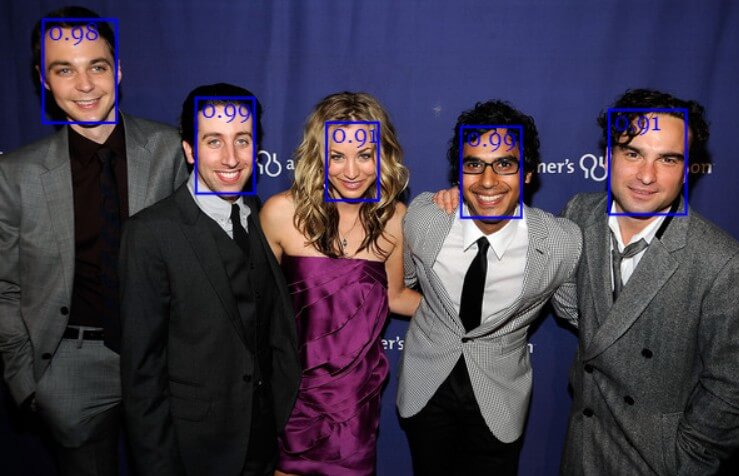
    The answer to the first problem is face detection. Simply put, we will first locate all the faces in the input image. For face detection, face-api.js implements a SSD (Single Shot Multibox Detector), which is basically a CNN based on MobileNetV1, with some additional box prediction layers stacked on top of the network.

    The network returns the bounding boxes of each face, with their corresponding scores, e.g. the probability of each bounding box showing a face. The scores are used to filter the bounding boxes, as it might be that an image does not contain any face at all. Note, that face detection should also be performed even if there is only one person in order to retrieve the bounding box.
    Face Landmark Detection and Face Alignment

    First problem solved! However, I want to point out that we want to align the bounding boxes, such that we can extract the images centered at the face for each box before passing them to the face recognition network, as this will make face recognition much more accurate!

    For that purpose face-api.js implements a simple CNN, which returns the 68 point face landmarks of a given face image:
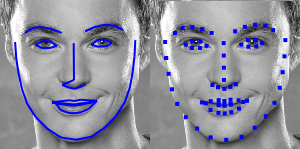
    From the landmark positions, the bounding box can be centered on the face. In the following you can see the result of face detection (left) compared to the aligned face image (right):

    Face Recognition

    Now we can feed the extracted and aligned face images into the face recognition network, which is based on a ResNet-34 like architecture and basically corresponds to the architecture implemented in dlib. The network has been trained to learn to map the characteristics of a human face to a face descriptor (a feature vector with 128 values), which is also oftentimes referred to as face embeddings.

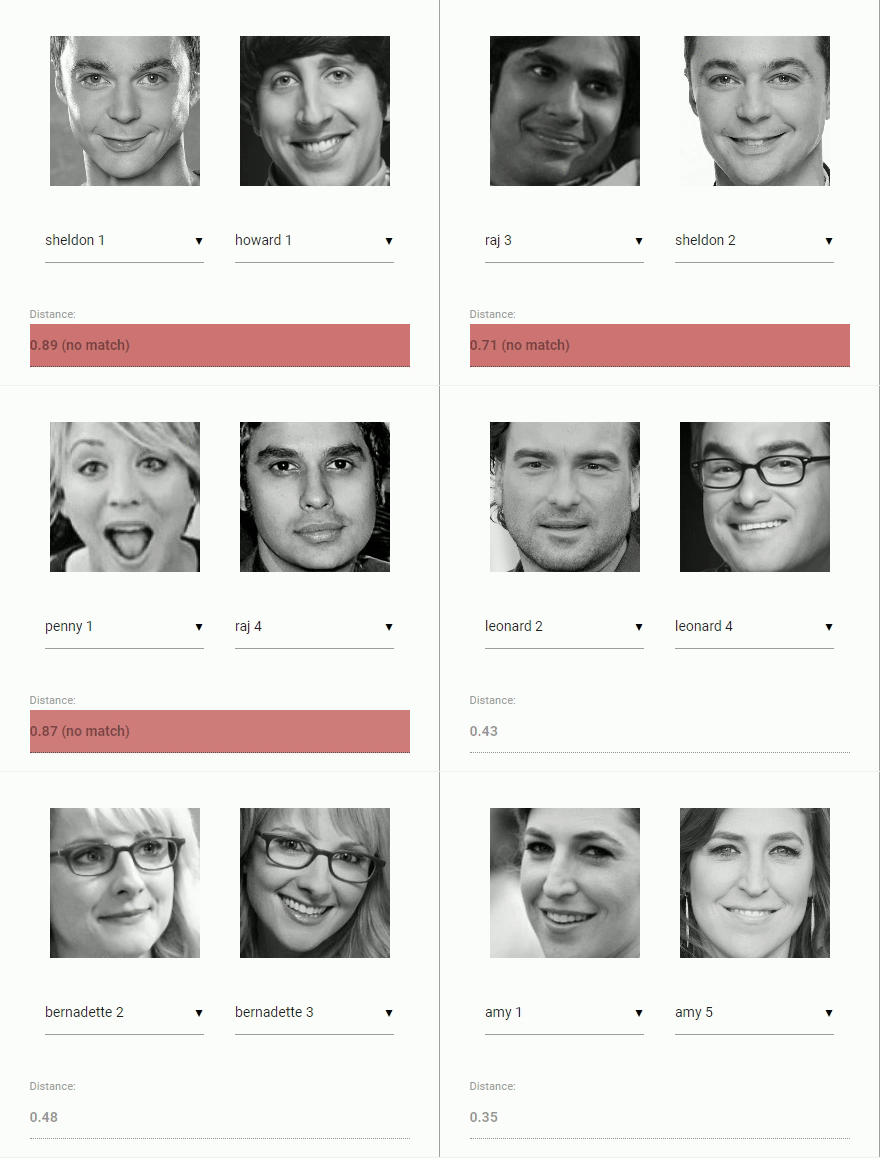
    Now to come back to our original problem of comparing two faces: We will use the face descriptor of each extracted face image and compare them with the face descriptors of the reference data. More precisely, we can compute the euclidean distance between two face descriptors and judge whether two faces are similar based on a threshold value (for 150 x 150 sized face images 0.6 is a good threshold value). Using euclidean distance works surprisingly well, but of course you can use any kind of classifier of your choice. The following gif visualizes the comparison of two face images by euclidean distance:
    And now that we ingested the theory of face recognition, we can start coding an example.

    Coding time!

    In this short example we will see step by step how to run face recognition on the following input image showing multiple persons:

    Including the Script

    First of all, get the latest build from dist/face-api.js or the minifed version from dist/face-api.min.js and include the script:

    <script src="face-api.js"></script>

    In case you work with npm:

    npm i face-api.js

    Loading the Model Data

    Depending on the requirements of your application you can specifically load the models you need, but to run a full end to end example we will need to load the face detection, face landmark and face recognition model. The model files are available on the repo and can be found here.

    The model weights have been quantized to reduce the model file size by 75% compared to the original model to allow your client to only load the minimum data required. Furthermore, the model weights are split into chunks of max 4 MB, to allow the browser to cache these files, such that they only have to be loaded once.

    The model files can simply be provided as static assets in your web app or you can host them somewhere else and they can be loaded by specifying the route or url to the files. Let’s say you are providing them in a models directory along with your assets under public/models:

    const MODEL_URL = '/models'
    
    await faceapi.loadModels(MODEL_URL)

    Or, if you only want to load specific models:

    const MODEL_URL = '/models'
    
    await faceapi.loadFaceDetectionModel(MODEL_URL)
    await faceapi.loadFaceLandmarkModel(MODEL_URL)
    await faceapi.loadFaceRecognitionModel(MODEL_URL)

    Receive a full description for all Faces from an Input Image

    The neural nets accept HTML image, canvas or video elements or tensors as inputs. To detect the face’s bounding boxes of an input with a score > minScore we simply say:

    const minConfidence = 0.8
    const fullFaceDescriptions = await faceapi.allFaces(input, minConfidence)

    A full face description holds the detecton result (bounding box + score), the face landmarks as well as the computed descriptor. As you can see faceapi.allFaces does everything discussed in the previous section under the hood for us. However, you can also obtain the face locations and landmarks manually. There are several examples available on the github repo, if this is your goal.

    Note, that the bounding boxes and landmark positions are relative to the original image / media size. In case the displayed image size does not correspond to the original image size you can simply resize them:

    const resized = fullFaceDescriptions.map(fd => fd.forSize(width, height))

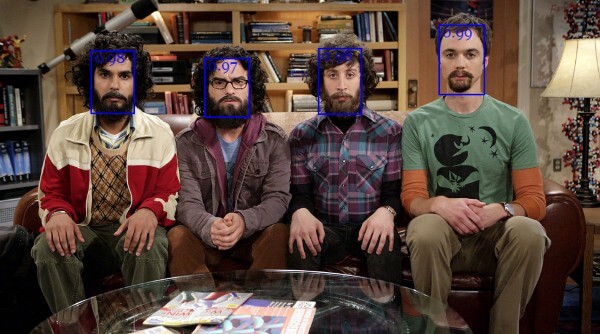
    We can visualize the detection results by drawing the bounding boxes into a canvas:

    fullFaceDescription.forEach((fd, i) => {
      faceapi.drawDetection(canvas, fd.detection, { withScore: true })
    })
    The face landmarks can be displayed as follows:

    fullFaceDescription.forEach((fd, i) => {
      faceapi.drawLandmarks(canvas, fd.landmarks, { drawLines: true })
    })
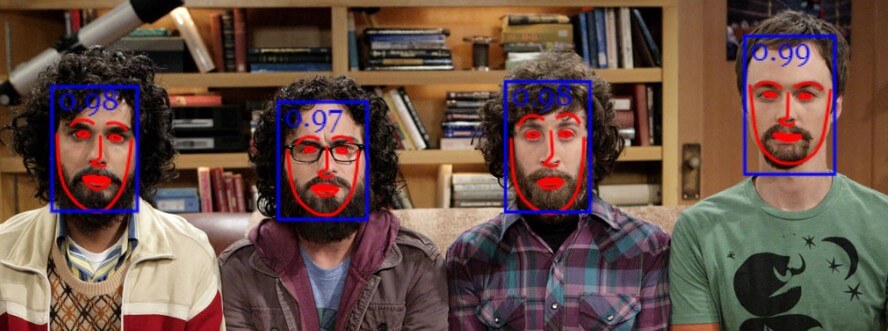
    Usually, what I do for visualization, is to overlay an absolutely positioned canvas on top of the img element with the same width and height (see github examples for more info).

    Face Recognition

    Now that we know how to retrieve the locations and descriptors of all faces given an input image, we will get some images showing one person each and compute their face descriptors. These descriptors will be our reference data.

    Assuming we have some example images for our subjects available, we first fetch the images from an url and create HTML image elements from their data buffers using faceapi.bufferToImage:

    // fetch images from url as blobs
    const blobs = await Promise.all(
      ['sheldon.png' 'raj.png', 'leonard.png', 'howard.png'].map(
        uri => (await fetch(uri)).blob()
      )
    )
    
    // convert blobs (buffers) to HTMLImage elements
    const images = await Promise.all(blobs.map(
      blob => await faceapi.bufferToImage(blob)
    ))

    Next, for each image we locate the subjects face and compute the face descriptor, just as we did previously with our input image:

    const refDescriptions = await Promsie.all(images.map(
      img => (await faceapi.allFaces(img))[0]
    ))
    
    const refDescriptors = refDescriptions.map(fd => fd.descriptor)

    Now, everything that remains to be done is to loop through the face descriptions of our input image and find the descriptor with the lowest distance in our reference data:

    const sortAsc = (a, b) => a - b
    const labels = ['sheldon', 'raj', 'leonard', 'howard']
    
    const results = fullFaceDescription.map((fd, i) => {
      const bestMatch = refDescriptors.map(
        refDesc => ({
          label: labels[i],
          distance: faceapi.euclideanDistance(fd.descriptor, refDesc)
        })
      ).sort(sortAsc)[0]
           
      return {
        detection: fd.detection,
        label: bestMatch.label,
        distance: bestMatch.distance
      }
    })

    As mentioned before, we use euclidean distance as a similarity metric here, which turns out to work pretty well. We end up with a best match for each face detected in our input image.

    Finally we can draw the bounding boxes together with their labels into a canvas to display the results:

    // 0.6 is a good distance threshold value to judge
    // whether the descriptors match or not
    const maxDistance = 0.6
    
    results.forEach(result => {
      faceapi.drawDetection(canvas, result.detection, { withScore: false })
      
      const text = `${result.distance < maxDistance ? result.className : 'unkown'} (${result.distance})`
      const { x, y, height: boxHeight } = detection.getBox()
      faceapi.drawText(
        canvas.getContext('2d'),
        x,
        y + boxHeight,
        text
      )
    })
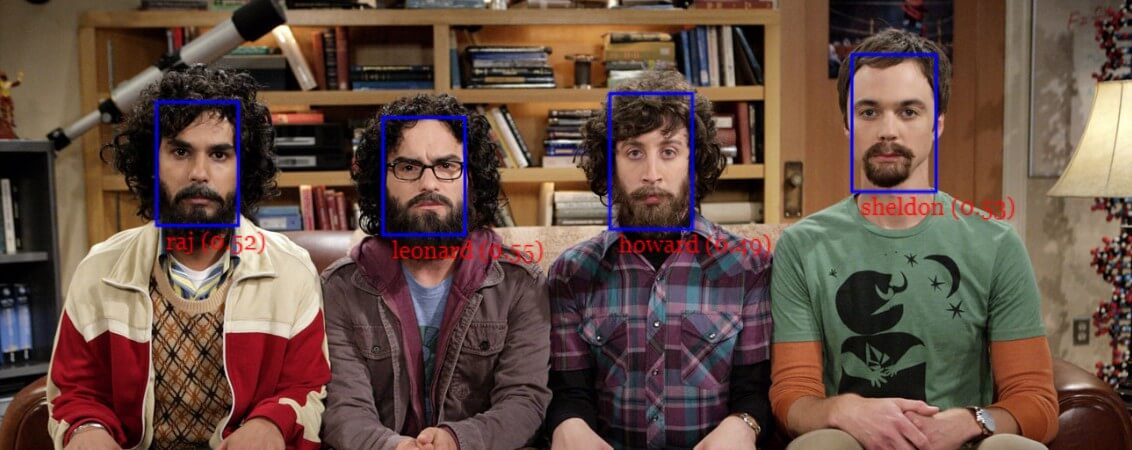
    There we go! By now, I hope you got a first idea how to use the api. Also I’d recommend to take a look at the other examples in the repo. And now, have fun playing around with the package! 😉

    If you liked this article you are invited to leave some claps and follow me on medium and/or twitter :). Also feel free to leave a star on the github repository. Stay tuned for more tutorials!


    每天推荐一个 GitHub 优质开源项目和一篇精选英文科技或编程文章原文,欢迎关注开源日报。交流QQ群:202790710;微博:https://weibo.com/openingsource;电报群 https://t.me/OpeningSourceOrg

  • 2018年7月6日:开源日报第120期

    6 7 月, 2018

    每天推荐一个 GitHub 优质开源项目和一篇精选英文科技或编程文章原文,欢迎关注开源日报。交流QQ群:202790710;微博:https://weibo.com/openingsource;电报群 https://t.me/OpeningSourceOrg


    今日推荐开源项目:《React 组件库 RSUITE》GitHub链接

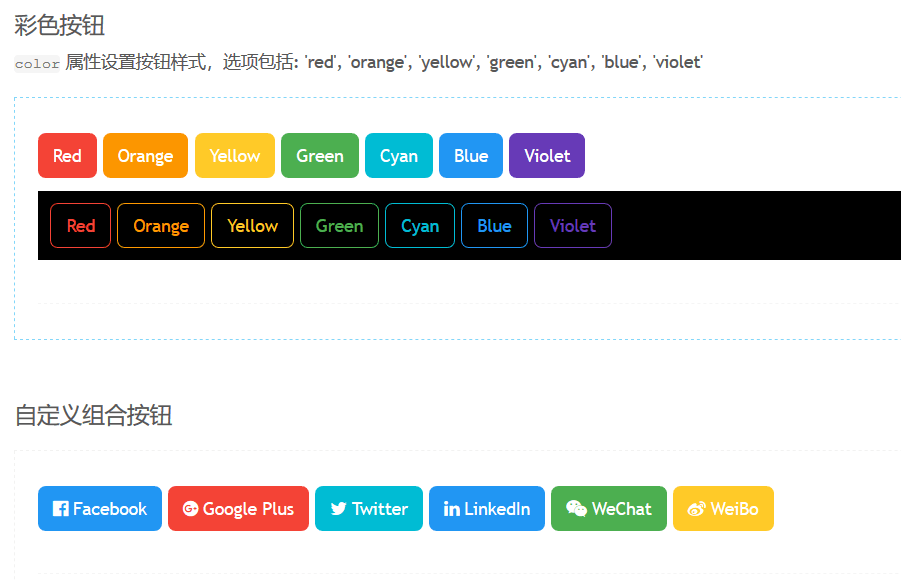
    推荐理由:顾名思义,这是个 React 组件库。它在基础组件功能的基础上又针对特定的需求作出了改进,比如图标与按钮组合,不同形状的进度条,不同样式的导航栏等等,使用 React 的朋友可以考虑把它加入自己的收藏。


    今日推荐英文原文:《How to make your next idea at work a reality? Think like a Product Manager.》作者:Anuj Behl

    原文链接:https://medium.com/@anujbehl/how-to-make-your-next-idea-at-work-a-reality-think-like-a-product-manager-f74070780d58

    推荐理由:这篇文章告诉你在让你的想法变成现实之前,你需要做的几件事情,有的时候并不是所有的想法都能成真,但是这些事能让你选出更容易成真的想法来实现它们。

    How to make your next idea at work a reality? Think like a Product Manager.

    Ever wondered why that brilliant idea of yours fell on deaf ears? According to you, it seemed like the perfect feature or product your team should build. Yet, it failed to make a mark. You are not alone. But, next time you have a crazy idea like that, do your homework and make it a reality. How? Read on.

    I see tons of engineers with tons of ideas but fail to take it forward for several reasons. Here are top 5 things that you should dive deep into to give your idea that real push.

    1. Clearly define customer problem

    Clearly, irrespective of the idea you have, there’s a customer problem behind it that led you to the idea in the first place. Understanding and defining the problem for your audience is key. Break up the problem, if possible for both new and existing customers. For example, if you are re-designing a search page, the problem could be “new customers see a blank page” and you may want to solve that by guiding them with popular content. On the other hand, existing users might see recent searches and your idea could be to show personalized content. If you have clarity, your audience will too.

    2. List business value or impact

    First and foremost, know your company’s success metrics. How does your company measure success? For example, if it’s customer engagement, then how will your idea help increase it. Think of other business values your idea brings — Maybe it’s a new way to discover content for your customers or perhaps brings flexibility for your marketing team to program content. Take note of it.

    3. Support your idea with data

    Data is king! Old saying, still holds true if you do it right. Once you have your idea, work backwards. Dig up data supporting your idea. Back to the example of re-designing a search page — Are there enough customer visits to the search page for you to invest in the idea? If yes, what are they searching for? What’s the frequency? Do you see a pattern? What are competitors doing? And so on. At times, it may be difficult to dig up the right data, be creative at finding ways around it by conducting your own surveys or researching the web.

    4. Go through the backlog

    Your backlog is an abundant source of ideas and it’s very likely your idea is somewhere on that list. It just did not get prioritized. That should not stop you, instead look deeper as to why it wasn’t prioritized and how your idea can help make a stronger case to justify its need. In fact, if you are out of ideas, start by looking at the backlog.

    5. Think of the MLP

    MLP — Minimum Lovable Product. How would you implement your idea with minimum resources and time and still manage to surprise your customers? Tough one to answer, but start thinking about the MLP as it will go a long way to get your idea across the board.

    Next time you have a crazy idea, do your homework!


    每天推荐一个 GitHub 优质开源项目和一篇精选英文科技或编程文章原文,欢迎关注开源日报。交流QQ群:202790710;微博:https://weibo.com/openingsource;电报群 https://t.me/OpeningSourceOrg

  • 2018年7月5日:开源日报第119期

    5 7 月, 2018

    每天推荐一个 GitHub 优质开源项目和一篇精选英文科技或编程文章原文,欢迎关注开源日报。交流QQ群:202790710;微博:https://weibo.com/openingsource;电报群 https://t.me/OpeningSourceOrg

    今日推荐开源项目:《机器学习视频与笔记 Coursera-ML-AndrewNg-Notes》GitHub链接

    推荐理由:顾名思义,这个项目真的是一个机器学习课程的中英字幕视频和它的笔记,还包括了课程的 python 代码和原版课件,推荐给想要开始学习机器学习的朋友们,暑假里面可以好好的看看这个课程了。

    笔记阅读地址:http://www.ai-start.com/ml2014/

    课程原地址:https://www.coursera.org/course/ml


    今日推荐英文原文:《Background Music for Coding》作者:Bradley Nice

    原文链接:https://medium.com/level-up-web/youtube-background-music-for-coding-99b592a74dc8

    推荐理由:来点音乐!每个人都喜欢不同的音乐,这篇文章就介绍了一些可能你会喜欢在工作时的音乐,别管效率那些奇奇怪怪的,喜欢就好

    Background Music for Coding

    Do you guys use background music while coding? They say that the right music allows to catch the flow and improve the concentration and performance during the task.

    Today I assembled a list of Youtube videos with music for coding. There you’ll find electronic mixes, ambient sounds, gaming soundtracks and many others. I do hope that you’ll find something that suits your taste 😉

    24/7 freeCodeCamp radio — chill tunes you can code to (no ads)

    FreeCodeCamp.org community music stream providing light coding music 24/7. The greatest advantage of this stream is that it has no ads.

    Awesome Music to Code to

    This playlist contains primarily light and electronic music to play in background for you to dive into coding and catch the flow.

    DubStep Playlist for Coding

    Feel the burst of energy with these dubstep beats.

    Programming / Coding / Hacking music vol.16 (CONNECTING LOST)

    A mix of electronic and synth music with a voice composition at the very beginning. A full list of tracks is available in the description to the video on YouTube.

    Epic Chillstep Collection 2015 [2 Hours]

    Chillstep music that is pleasing to the ear and allows to tune into coding. The tracklist is in the description.

    Concentration Programming Music

    This video includes soundtracks from video games like Deus Ex, Mirror’s Edge, Half Life 2, System Shock 2 and others. A full list of compositions is available on YouTube in the description to this video.

    College Music · 24/7 Live Radio · Study Music · Chill Music · Calming Music

    Some chill beats and calming sounds here to keep you stress-free and help you catch a creative flow.

    Concentration \ Programming Music 0000 (Part 0)

    More gaming soundtracks here. Different tracks from Deus Ex, Shadowrun Returns OST, Call of Duty Black Ops 3 and other games will make you feel like a coding hero 🙂

    Concentration Music for Programming \ Gamedev

    Electronic and light music gathered here in one video to improve your concentration and performance during coding.


    每天推荐一个 GitHub 优质开源项目和一篇精选英文科技或编程文章原文,欢迎关注开源日报。交流QQ群:202790710;微博:https://weibo.com/openingsource;电报群 https://t.me/OpeningSourceOrg
←上一页
1 … 229 230 231 232 233 … 262
下一页→

Proudly powered by WordPress