• 开源镜像
  • 开源沙龙
  • 媛宝
  • 猿帅
  • 注册
  • 登录
  • 息壤开源生活方式平台
  • 加入我们

开源日报

  • 2018年7月12日:开源日报第126期

    12 7 月, 2018

    每天推荐一个 GitHub 优质开源项目和一篇精选英文科技或编程文章原文,欢迎关注开源日报。交流QQ群:202790710;微博:https://weibo.com/openingsource;电报群 https://t.me/OpeningSourceOrg

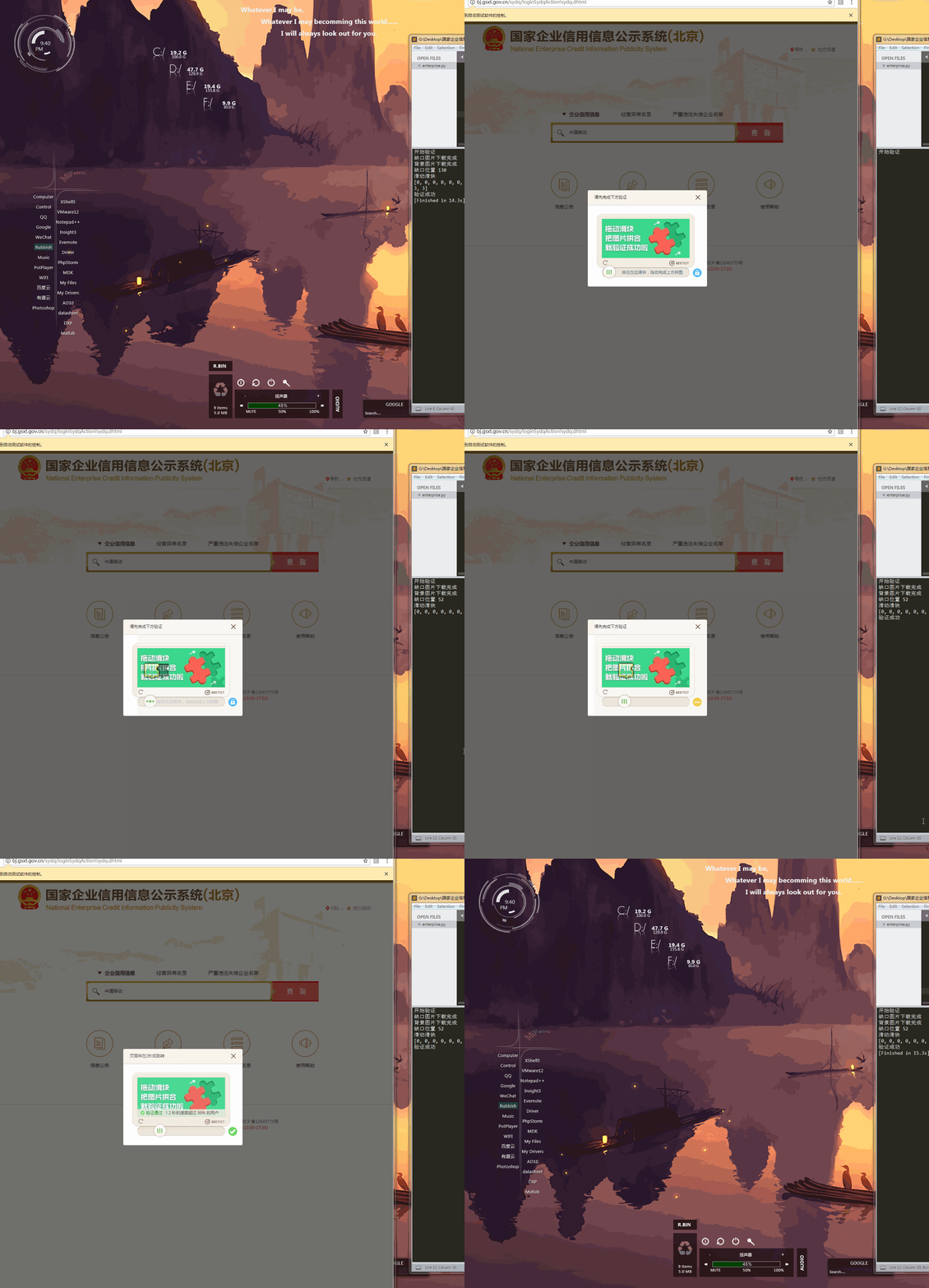
    今日推荐开源项目:《Python 二连 Python Spider》GitHub链接

    推荐理由:还在担心学不会 Python 的爬虫?没关系,Python 二连帮你解决这个问题。这个项目是作者的爬虫实战项目集合,从普通的获取信息的爬虫到能够解决验证码的爬虫实例都有,相信有一定基础的同学可以在其中学到不少爬虫的知识。

    今日推荐英文原文:《A Beginner’s Guide to React》作者:Betsy Sallee

    原文链接:https://blog.usejournal.com/a-beginners-guide-to-react-36b19943d58f

    推荐理由:给 React 初学者的指南,介绍了组件,JSX,状态等等这些方面

    A Beginner’s Guide to React

    So, you’ve decided to learn React.js. Congratulations! This guide is intended to help you in your quest to understand four fundamental aspects of this incredibly powerful library. We will be building a very simple React app along the way that allows a user to enter a search term and retrieve a list of photographs that match this term from the Unsplash API. Let’s dive in.

    Components

    Components are the building blocks of every React application. A component can be used on its own, or it can be combined with other components to create even larger components. Crucially, components are dynamic: they provide a template, which will be filled in with variable data. The central purpose of a React component is to produce some JSX from this “template” (more on JSX soon), which will be translated into HTML and rendered on the DOM.

    There are two types of React components: functional components and class-based components. A functional component is the simpler of the two: it is not aware of its state (don’t worry, I’ll explain “state” soon), and it simply receives information and turns it into JSX. You can also think of functional components as “presentational components,” as they are primarily concerned with altering the UI.

    Class-based components, on the other hand, need to be aware of what the user is doing. For example, if a user clicks or types on the page, the component needs to be able to respond in some way. In simplest terms, a class-based component needs to be aware of state.

    Class-based components have several lifecycle methods that fire at different points during instantiation and rendering, including constructor, render, and componentDidMount. The sole requirement of a class-based component is a render method, as this is the method in which the component returns JSX. Nevertheless, the component’s state is typically set in the constructor method, which is called on instantiation, so it would defeat the purpose of using a class-based component if you were to omit the constructor method. Because all class-based components extend React’s Component class, you must also call super inside the constructor method. Finally, if you plan to fetch data for use in your application, this must be done inside of componentDidMount, which fires after render.

    Our photo searching application will have four components: the App component, which will hold our other components, the SearchBar component, the PhotoList component, and the PhotoListItem component. The JSX that the PhotoList and PhotoListItem components will render will be dependent on the data that is fetched from the Unsplash API, which in turn will be dependent on the term the user enters into SearchBar. As such, our App component, because it is the container, will be the component responsible for keeping track of that search term and fetching the data. This means that App will be a class-based component, and the other components will be functional.

    JSX

    I mentioned above that the most important responsibility of components is to generate some JSX based on a template, which will then be translated into HTML. But what is JSX?

    According to the React Docs, JSX is “a syntax extension to JavaScript.” It looks extremely similar to HTML, but with some key differences. For example, you can include a vanilla JavaScript expression inside of your JSX by wrapping it in curly braces:
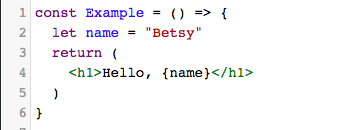
    Additionally, HTML elements might have a “class”, but elements in JSX have a “className.” They mean the same thing, and CSS will respond to a className in the same way it would a class in HTML. This distinction is made because “class” is a reserved word in ES6, and as JSX is actually JavaScript, it cannot reuse this word.

    Even though JSX looks extremely similar to HTML, it must be transpiled into vanilla JavaScript by Babel in order for the browser to be able to interpret it. For example, when Babel sees the below JSX:
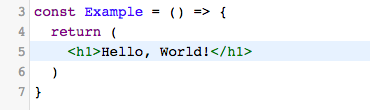
    …it turns it into the below function, which returns the result of React.createElement(). React.createElement() takes two arguments: the tag name of the element being created, and the content inside the tag.
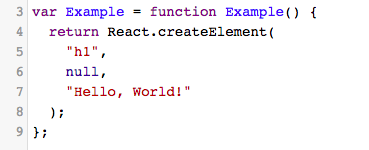
    It’s not essential that you write JSX in your React components; instead, you could write React.createElement() over and over again, and your code wouldn’t have to be transpiled. But as programmers, we like to be concise, and writing this sort of vanilla JavaScript inside your components will get messy quickly, especially when you have JSX tags nested inside one another.

    There is, however, one caveat to using JSX. Check out what happens if we try to get our component to render two sibling JSX elements:
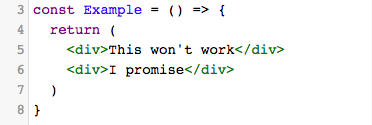
    This error arises because, when Babel transpiles a JSX tag, it turns it into a function that returns the result of React.createElement(). Because the “return” keyword is essentially a break point — that is, a point at which at the code stops running — it’s not possible to have two “return” statements inside of a component. So, in order to render sibling elements, they must be nested inside of a parent div, like so:
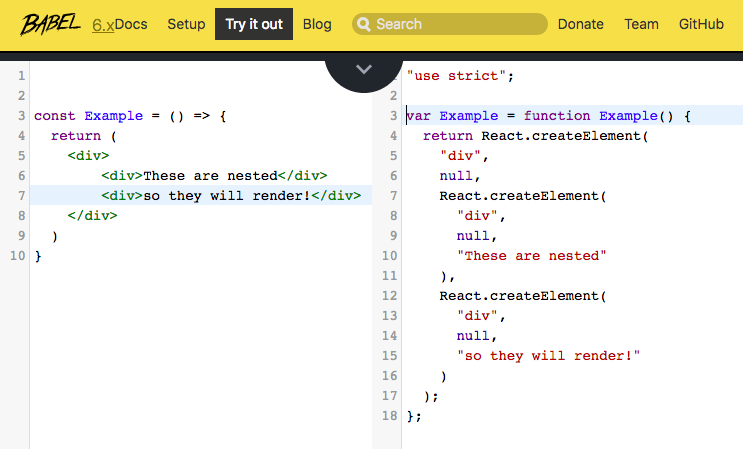
    A good rule of thumb for JSX: when in doubt, render everything inside of a single div.

    State

    State is perhaps the most confusing React concept, but it’s essential for you to understand it in order to imbue your projects with all of React’s magic. In the simplest of terms, state is a JavaScript object that records and reacts to user events. Every class-based component has its own state object, and whenever a component’s state is altered, the component, along with all of its children, re-renders.

    Initial state can only be set in the component’s constructor method, which is called on instantiation. Because our App component is class-based, we will follow that rule:
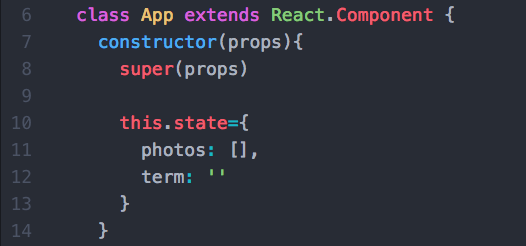
    This is the only time you should ever set this.state equal to an object. For instance, if a user interacts with the component and you need to update it to reflect their action, you must use a different syntax:

    this.setState({ term: 'sunsets'})

    One of the trickiest parts of mastering state is deciding which components in your application should have state. In order to do so, first assess which of your components depend on the data that is going to change over time. The component that has state should be the parent of all of these components, because these children components will have access to the changing data through their props object.

    But what, you ask, is a props object?

    Props

    I mentioned earlier that whenever a component’s state changes, that component and all of its children re-render. Why is it necessary for a component’s children to re-render when the parent component’s state changes? Enter: props.

    Props is an object given to a component by its parent, and it contains all of the information relevant to that particular component. If state is like the source of a waterfall, props is the water that flows downwards.

    Remember how we said that App is the class-based parent component of SearchBar and PhotoList? App is responsible for both fetching data from our Unsplash API and keeping track of the search term that we will use for that fetch. It then passes that data and any relevant methods down to SearchBar and PhotoList, and eventually to PhotoListItem, via props. The App component looks like this:
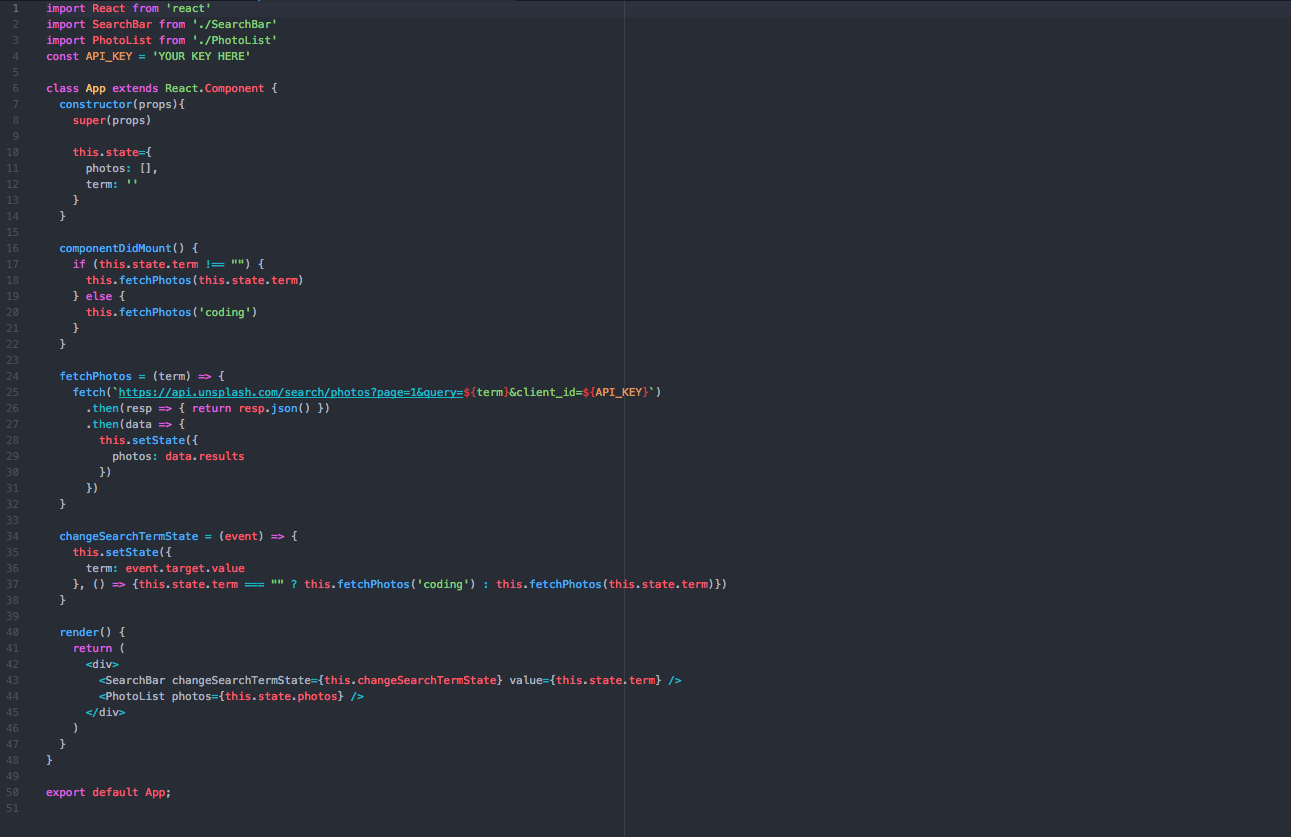
    Let’s break this down. When the App component renders for the first time, its componentDidMount method runs. Because the user hasn’t yet typed anything into the search bar, the “term” key in state is empty. As such, the component fetches photos from the API matching the default term “coding.” It then sets the returned data to the “photos” key inside of its state and re-renders. In the process of re-rendering, it passes a) the changeSearchTermState method and the “term” itself down to SearchBar as props and b) the “photos” array down to PhotoList as props.

    Now, let’s take a look at SearchBar:
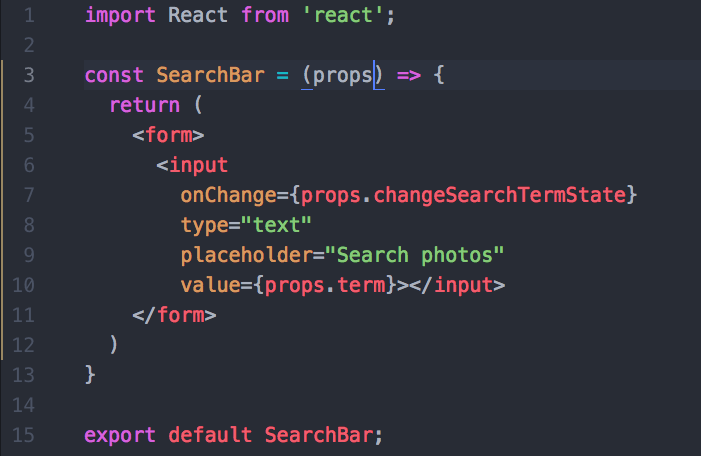
    We’ve declared the SearchBar component as a const variable, rather than a class, which means it is a purely functional component. This might seem counterintuitive, since SearchBar needs to keep track of user events. But because all of our other components, including App, depend on whatever the user types into SearchBar, we lift its state up to App (with the “term” key inside of App’s state). We can then change the value of “term” inside of App’s state with the changeSearchTermState callback inside of SearchBar’s props. Every time the user types into the input field, App’s changeSearchTermState method fires, re-setting the “term” inside of App’s state, thereby triggering a re-render, and finally, another call to the Unsplash API.

    Now, let’s move on to PhotoList. As I mentioned, PhotoList receives the photos array inside of App’s state as props. But what does it do with that data? Let’s take a look:
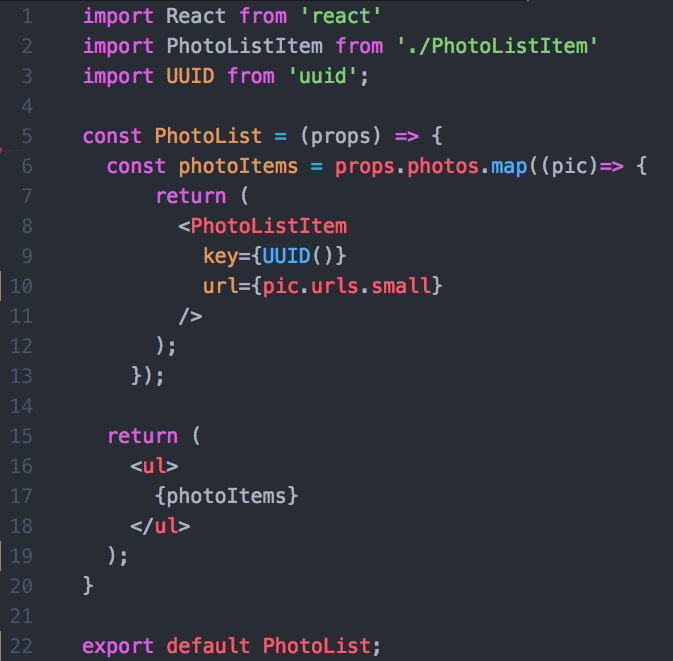
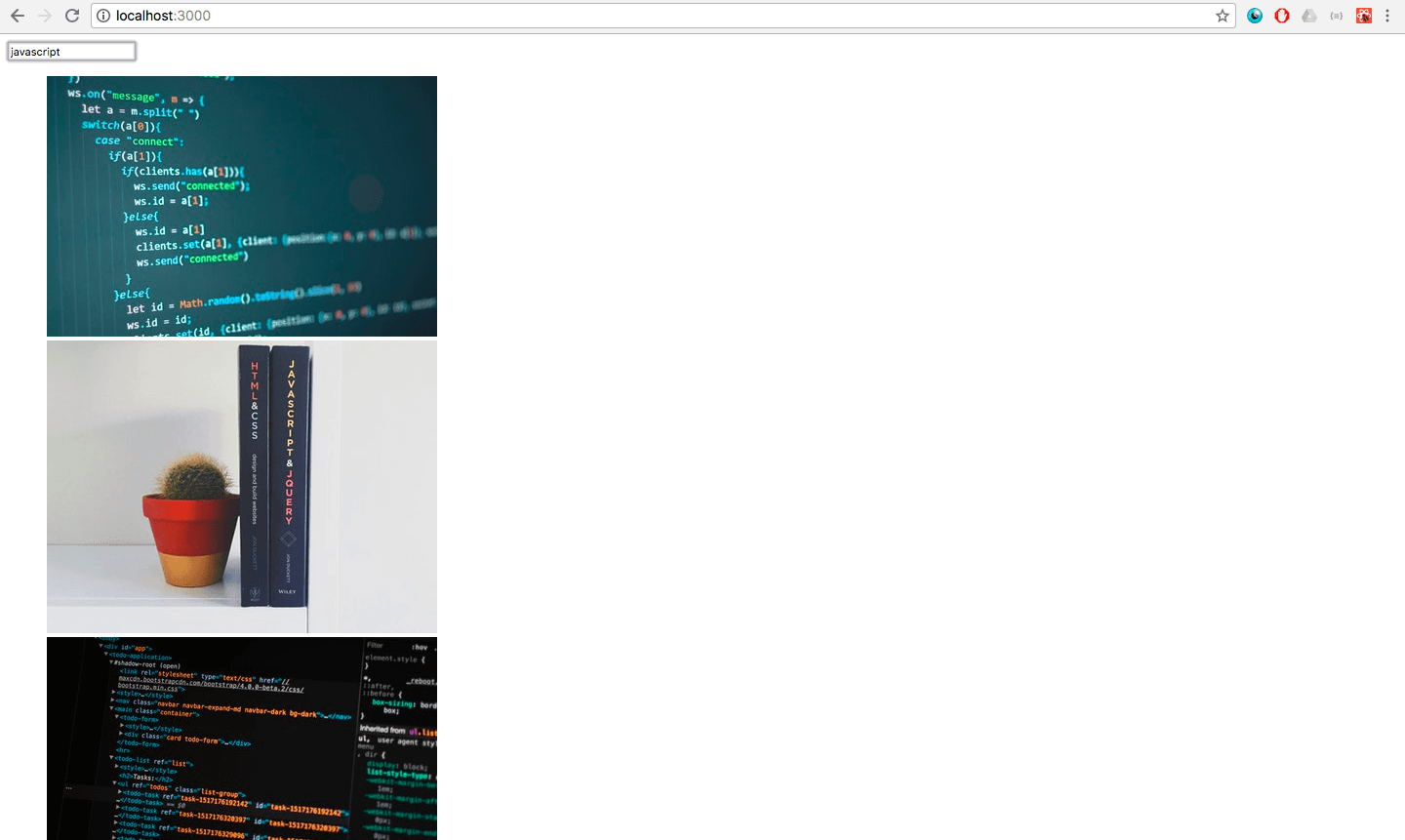
    The props object of this functional component contains all of the photos retrieved from the Unsplash API that match the user’s search term. It’s now time to iterate over the “photos” key inside of the props object, which points to an array of photos, and create an individual photoListItem out of each element in that array. And we’re even passing that PhotoListItem its own prop — a URL, which came all the way down from App’s state. All that’s left is for PhotoListItem to render its JSX to the DOM. Because each PhotoListItem has a URL inside of its props, we can set that URL as the src attribute of an img tag inside of a div, as such:
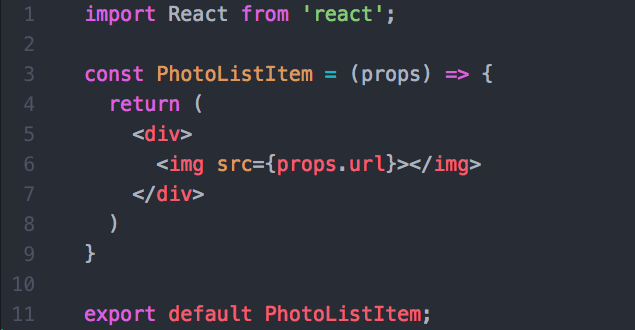
    And now, our work is done! Thanks to the power of props, we’re able to see our images on the DOM in all their (unstyled) glory.
    Conclusion

    While this guide is far from comprehensive, it is intended to give you an introduction to what I consider to be the four central pillars of React. I’ve added this completed repo to GitHub, so feel free to clone it down and take a closer look. Just remember to get your own API key for Unsplash. I also highly recommend you check out the below resources.

    Best of luck!


    每天推荐一个 GitHub 优质开源项目和一篇精选英文科技或编程文章原文,欢迎关注开源日报。交流QQ群:202790710;微博:https://weibo.com/openingsource;电报群 https://t.me/OpeningSourceOrg
  • 2018年7月11日:开源日报第125期

    11 7 月, 2018

    每天推荐一个 GitHub 优质开源项目和一篇精选英文科技或编程文章原文,欢迎关注开源日报。交流QQ群:202790710;微博:https://weibo.com/openingsource;电报群 https://t.me/OpeningSourceOrg


    今日推荐开源项目:《Python 二连 Douyin-Bot》GitHub链接

    推荐理由:还在刷抖音找不到漂亮小姐姐?没关系,Python 二连帮你解决这个问题。这个项目就是利用 Python 写出的寻找漂亮小姐姐的程序,不过人脸识别的 API 是管别的地方请求要来的。有了这个,你就不需要再花好几个小时去在抖音上寻找漂亮小姐姐了


    今日推荐英文原文:《Function Borrowing in JavaScript》作者:Betsy Sallee

    原文链接:https://medium.com/@ensallee/function-borrowing-in-javascript-4bd671e9d7b4

    推荐理由:如果你需要使用别的类里面的某个函数,继承就显得太麻烦了,因为你只是用一个函数而不是需要干什么更多的事情,这个时候函数借用兴许能帮你一把。

    Function Borrowing in JavaScript

    When we create JavaScript objects, we typically associate them with certain behavior. Consider the below example:

    class Dog {
      constructor(name, age, breed) {
        this.name = name
        this.age = age
        this.breed = breed
      }
      tellUsAboutYourSelf() {
        return `My name is ${this.name}. I am a ${this.breed} and I am ${this.age} years old.`
      }
    
      woof() {
        return "WOOF!!!"
      }
    }
    
    let fido = new Dog("Fido", 3, "dachshund")
    fido.tellUsAboutYourSelf()
    //=> 'My name is Fido. I am a dachshund and I am 3 years old.'

    We’ve created a class Dog with three properties and two methods, one of which is tellUsAboutYourSelf(). We’ve also created a new instance of Dog, which is saved into the variable fido. Pretty straightforward. Now, let’s create another class and instantiate a new instance:

    class Cat {
      constructor(name, age, breed) {
        this.name = name
        this.age = age
        this.breed = breed
      }
    
      meow() {
        return "MEOW!!!"
      }
    }
    
    let sparkles = new Cat("Sparkles", 5, "Siamese")
    sparkles.tellUsAboutYourSelf()
    //=>TypeError: sparkles.tellUsAboutYourSelf is not a function

    We’ve created a Cat object with the same properties as our Dog object, but our instance of Cat, which is saved into the variable sparkles, isn’t able to tell us about itself. We could refactor our code so that the class Cat inherits from the class Dog, but in that scenario, all of our Cat objects would be able to “woof,” which doesn’t seem appropriate or necessary. Enter: function borrowing.

    How does it work?

    Function borrowing allows us to use the methods of one object on a different object without having to make a copy of that method and maintain it in two separate places. It is accomplished through the use of .call(), .apply(), or .bind(), all of which exist to explicitly set this on the method we are borrowing.

    Given the objects we created above, take a look at function borrowing in action:

    fido.tellUsAboutYourSelf.call(sparkles)
    
    //=>’My name is Sparkles. I am a Siamese and I am 5 years old.’
    
    fido.tellUsAboutYourSelf.apply(sparkles)
    
    //=>’My name is Sparkles. I am a Siamese and I am 5 years old.’
    
    const describeSparkles = fido.tellUsAboutYourSelf.bind(sparkles)
    
    describeSparkles()
    
    //=>’My name is Sparkles. I am a Siamese and I am 5 years old.’

    Each of these examples work because this, when referenced inside a method, refers to the object that received the method call. .call(), .apply(), and .bind() work by allowing us to alter the object to which this refers inside of the .tellUsAboutYourSelf() method. Whereas .call() and .apply() immediately execute the function call, .bind() saves the function for later. Once we’ve saved the borrowed function into the variable describeSparkles, we can call invoke describeSparkles one hundred lines later and still see the same output.

    What’s the point?

    The central benefit of function borrowing is that it allows you to forego inheritance. There’s no reason for you to force a class to inherit from another if you’re only doing so in order to grant instances of the child class access to a single method. And as I mentioned above, function borrowing keeps you from having to write the same function twice and maintain it in two places, which reduces the risk of bugs.

    The most important practical application of function borrowing pertains to native methods, and specifically, to Array.prototype.slice. There are several list-like data structures that aren’t arrays, and it’s useful to be able to treat them as arrays and operate on them as such. One of the most prevalent list-like data structures that isn’t an array is arguments. The arguments object represents all the parameters passed in to a given (non-arrow) function.

    Take, for example, the below function:

    function findO() {
      var args = Array.prototype.slice.call(arguments)
      return args.filter(a => a.includes('o'))
    }
    
    findO("orchid", "tulip", "rose", "lilac")
    => [ 'orchid', 'rose' ]

    In the above example, findO is a variadic function, which means it takes a variable number of arguments. We’ve passed it four strings, and we’d like to see which of those strings contain the letter ‘o’. The arguments object holds those four strings, but we can’t simply call .filter() on arguments because it is not an array. We’re able to convert it into an array, however, by borrowing the .slice method from Array.prototype, and setting this to equal the arguments object. Once it has been converted to an array, we have access to all of the built-in methods on Array.

    Nifty!


    每天推荐一个 GitHub 优质开源项目和一篇精选英文科技或编程文章原文,欢迎关注开源日报。交流QQ群:202790710;微博:https://weibo.com/openingsource;电报群 https://t.me/OpeningSourceOrg
  • 2018年7月10日:开源日报第124期

    10 7 月, 2018

    每天推荐一个 GitHub 优质开源项目和一篇精选英文科技或编程文章原文,欢迎关注开源日报。交流QQ群:202790710;微博:https://weibo.com/openingsource;电报群 https://t.me/OpeningSourceOrg

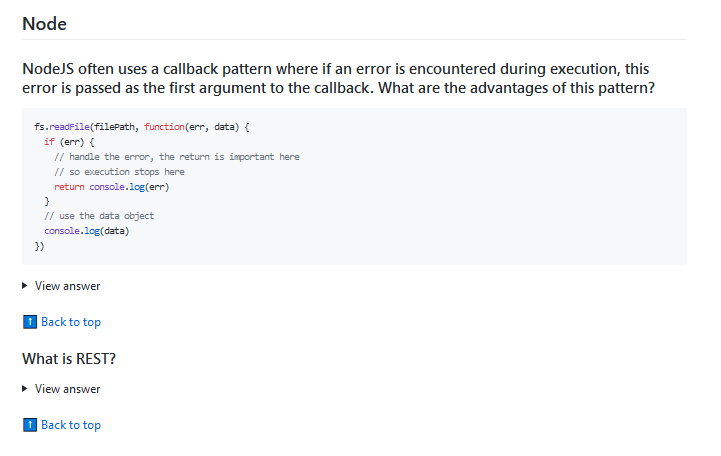
    今日推荐开源项目:《面试可能用的到的 30 Seconds of Interviews》GitHub链接

    推荐理由:这个项目搜集了关于 Web 前端的面试知识,就是 HTML ,JavaScript , CSS ,Node (虽然有点少)和安全性(很少)四个方面。虽然这些都是面试中的问题,但是如果你想要试试看自己对前端了解多少,也可以来试着回答这些问题,然后展开答案看看有何不同,兴许以后就用上了呢。


    今日推荐英文原文:《7 Basic Rules for Button Design》作者:Nick Babich

    原文链接:https://uxplanet.org/7-basic-rules-for-button-design-63dcdf5676b4

    推荐理由:设计按钮的基本准则,最起码有了这个你设计的按钮会让人用起来舒服不少,虽然现在大多数人应该都在遵守这个准则……

    7 Basic Rules for Button Design

    Buttons are an essential element of interaction design. They have a primary role in the conversation between a user and the system. In this article, I’ll review seven basic principles you need to know to create effective buttons.

    1. Make buttons look like buttons

    When it comes to interacting with user interface, users need to know instantly what is ‘clickable’ and what’s not. Every item in a design requires effort by the user to decode. Generally, the more time needed for users to decode the UI the less usable it becomes for them.

    But how do users understand whether a certain element is interactive or not? They use previous experience and visual signifiers to clarify the meaning of the UI object. That’s why it so important to use appropriate visual signifiers (such as size, shape, color, shadow, etc.) to make the element look like a button. Visual signifiers hold an essential information value — they help to create affordances in the interface.

    Unfortunately, in many interfaces the signifiers of interactivity are weak and require interaction effort; as a result, they effectively reduce discoverability.

    If clear affordances of interaction are missing and users struggle with what is “clickable” and what is not, it won’t matter how cool we make the design. If they find it hard to use, they will find it frustrating and ultimately not very usable.

    Weak signifiers is an even more significant problem for mobile users. In the attempt to understand whether an individual element is interactive or not, desktop users can move the cursor on the element and check whether the cursor changes its state. Mobile users don’t have such opportunity. To understand whether an element is interactive or not users have to tap on it — there’s no other way to check the interactivity.

    Don’t assume that something in your UI is obvious for your users

    In many cases, designers intentionally don’t identify buttons as interactive elements because they assume the interactive elements are obvious for users. When designing an interface, you should always keep in mind following rule:

    Your ability to interpret clickability signifiers aren’t the same as your users’ because you know what each element in your own design is intended to do.

    Use familiar designs for your buttons

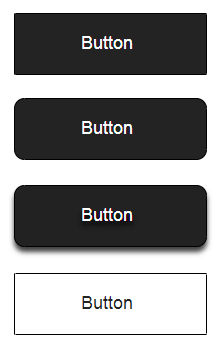
    Here are a few examples of buttons that are familiar to most users:

    • Filled button with square borders
    • Filled button with rounded corners
    • Filled button with shadows
    • Ghost button

    Among all those examples, the “Filled button with shadows” design is the clearest for users. When users see a dimensionality of an object, they instantly know that it’s something they can press.

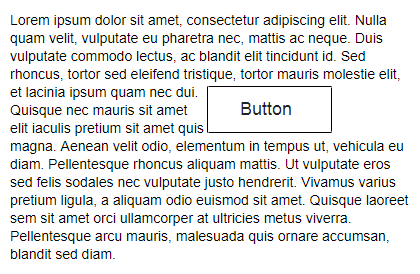
    Don’t forget about the whitespace

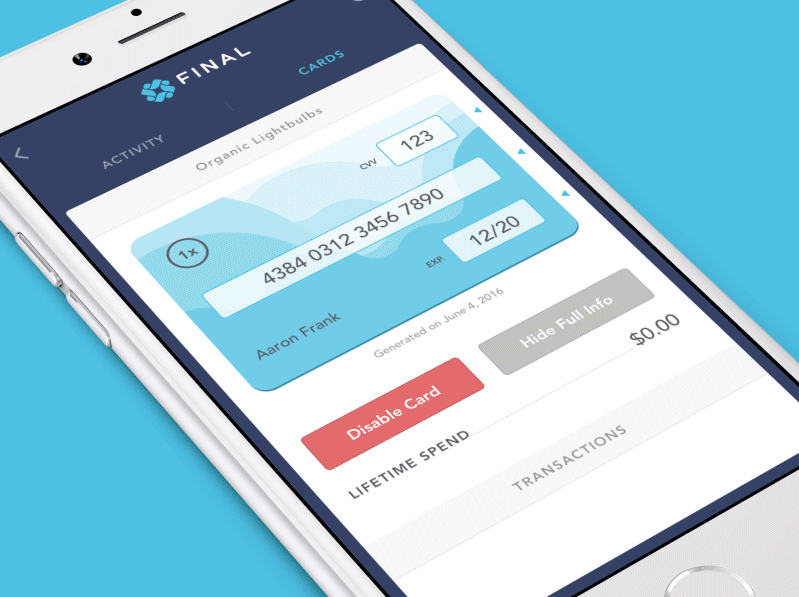
    Not only the visual properties of the button itself are important. The amount of whitespace near the button makes it easier (or harder) for users to understand whether it’s an interactive element or not. In the example, below some users might confuse the ghost button with an information box.

    2. Put buttons where users expect to find them

    Buttons should be located in places where users can easily find them or expect to see. Don’t make users hunt for buttons. If users can’t find a button, they won’t know that it exists.

    Use traditional layouts and standard UI patterns as much as possible

    Conventional placement for buttons improves discoverability. With a standard layout, users will easily understand the purpose of each element — even it’s a button without strong signifiers. Combining a standard layout with clean visual design and ample whitespace makes the layout more understandable.

    Don’t play hunt-the-button game with your users

    Tip: Test your design on discoverability. When users first navigate to a page that contains some actions that you want them to take, it should be easy to spot an appropriate button for the user.

    3. Label buttons with what they do

    Buttons with generic or misleading labels can be a huge source of frustrations for your users. Write button labels that clearly explain what each button does. Ideally, the button’s label should clearly describe its action.

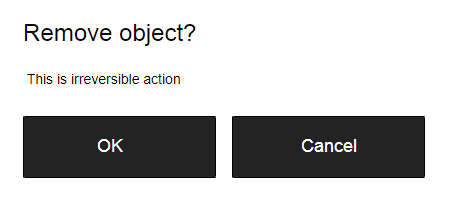
    Users should clearly understand what happens when they click on a button. Let me give you a simple example. Imagine that you accidentally triggered a delete action and now you see the following error message.

    It’s not clear what does ‘OK’ and ‘Cancel’ represent in this dialog. Most users will ask themselves “What happens when I click on ‘Cancel’?”

    Never designed a dialog box or form that consisted solely of the two buttons ‘OK’ and ‘Cancel’.

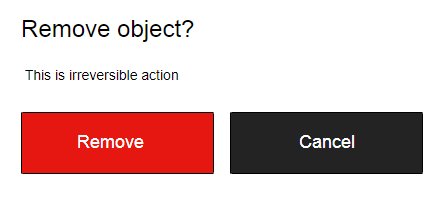
    Instead of using ‘OK’ label it’s better to use ‘Remove.’ This will make it clear what this button does for the user. Also, if ‘Delete’ is a potentially dangerous operation, you can use red color to state this fact.

    4. Properly size your buttons

    Button size should reflect the priority of this element on the screen. Large button means more important action.

    Prioritize buttons

    Make the most important button look like it’s the most important one. Always try to make the primary action button more prominent. Increase its size (by making a button bigger you make it look more important for users) and use a contrasting color to capture user attention.

    Make buttons finger-friendly for mobile users

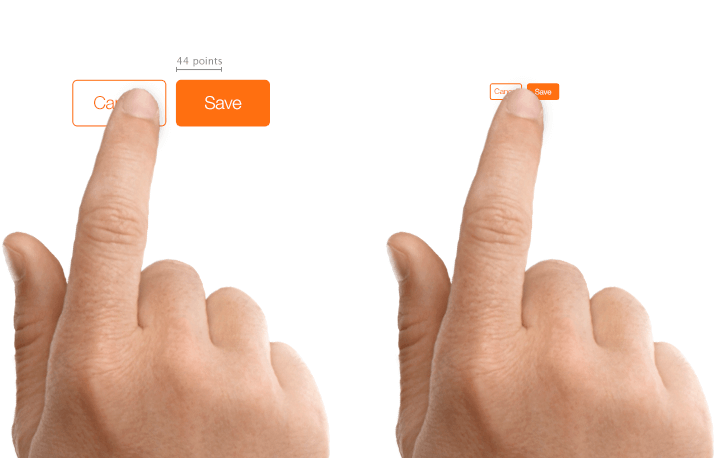
    In many mobile apps, buttons are too small. This often leads to the situation when users mistype.

    MIT Touch Lab study found that averages for finger pads are between 10–14mm and fingertips are 8–10mm. This makes 10mm x 10mm a good minimum touch target size.

    5. Mind the order

    The order for buttons should reflect the nature of a conversation between the user and the system. Ask yourself, what order users expect to have on this screen and design accordingly.

    User interface is a conversation with your users

    For example, how to order ‘Previous/Next’ buttons in pagination? It’s logical that a button that moves you forward should be on the right, and a button which moves you backward should be on the left.

    6. Avoid using too many buttons

    This is a common problem for many apps and websites. When you provide too many options, your users end up doing nothing. When designing pages in your app or website, think about the most important actions you want your users to take.

    7. Provide visual or audio feedback on interaction

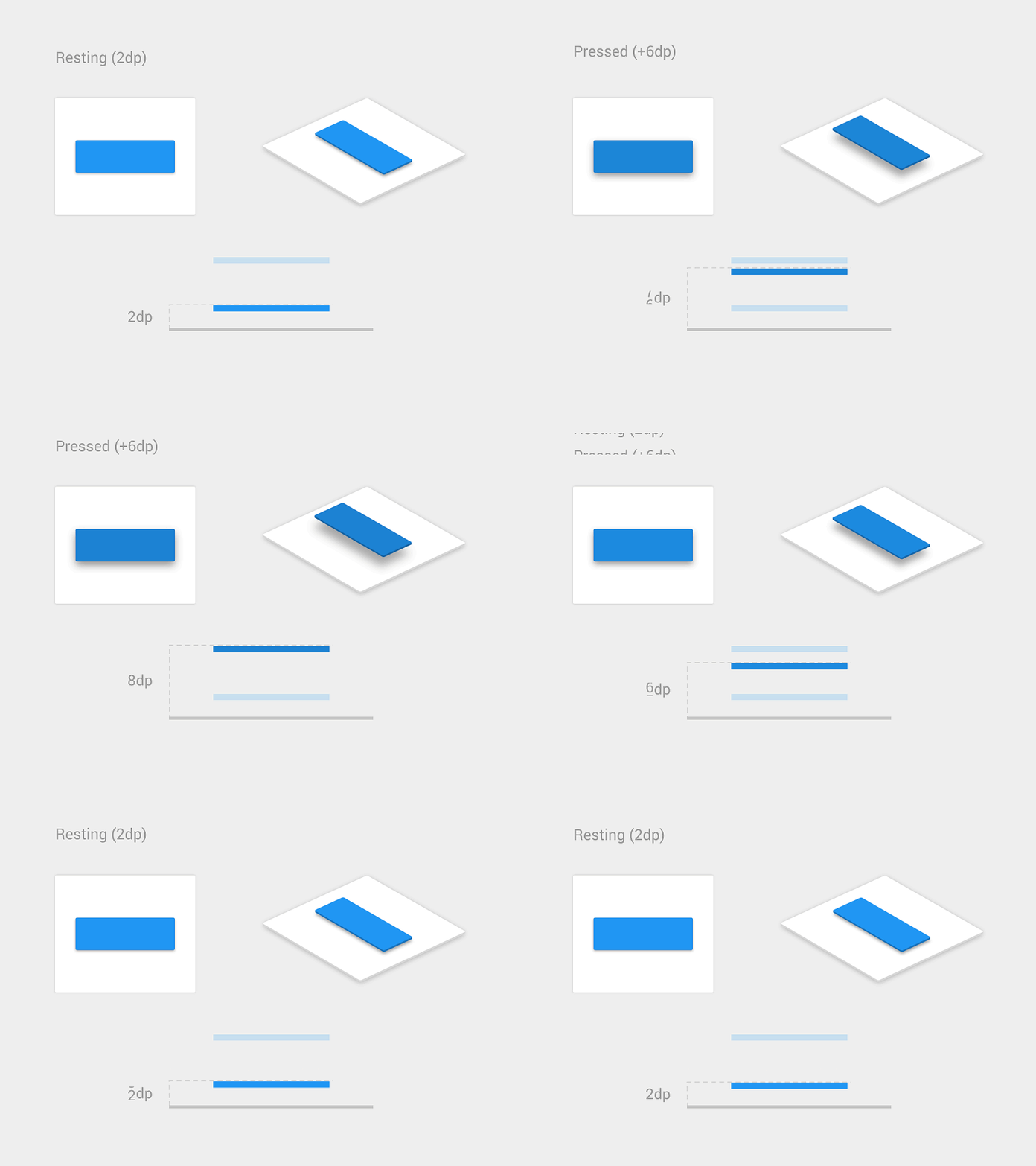
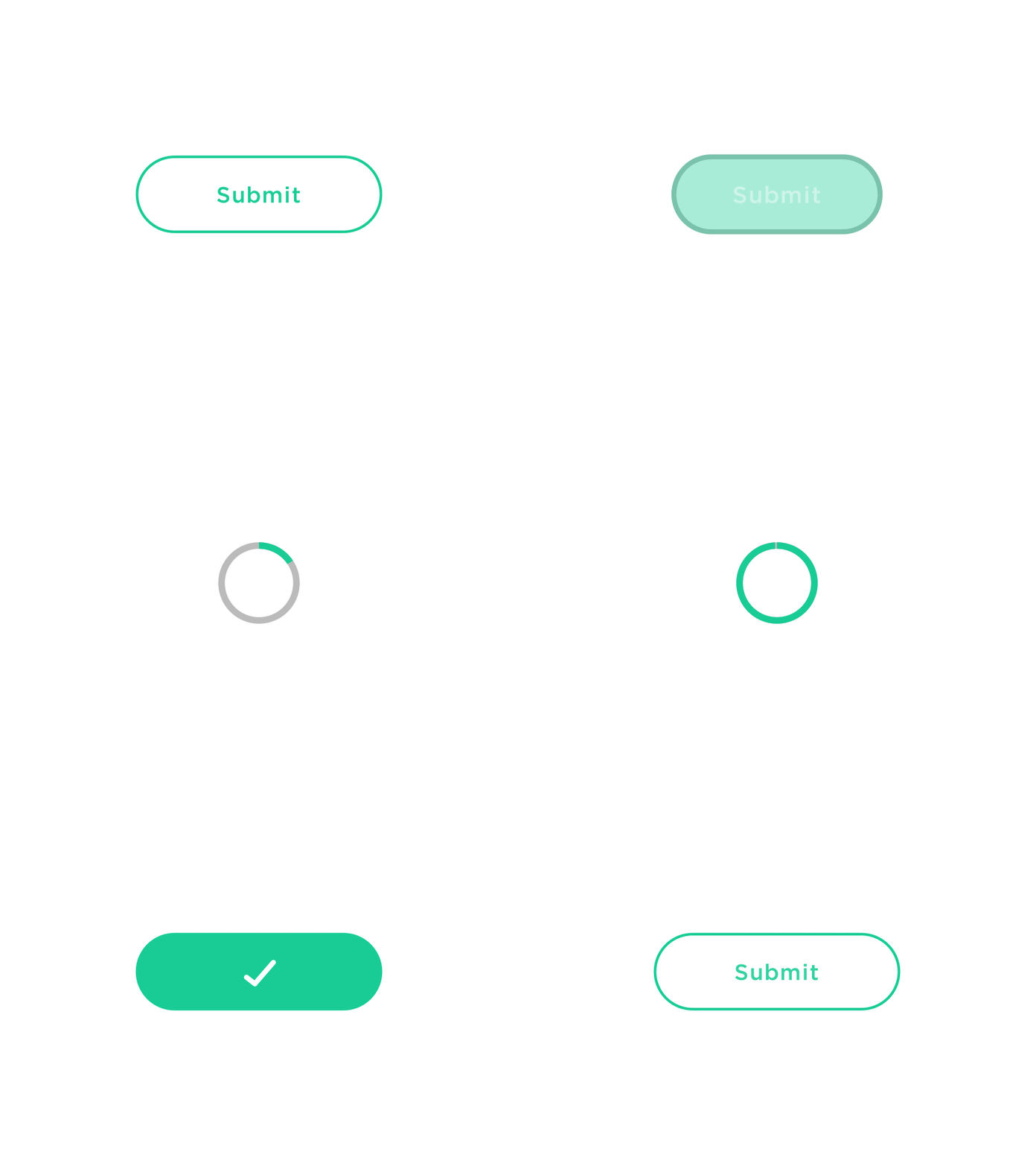
    When users click or tap on the button, they expect that the user interface will respond with appropriate feedback. Based on the type of operation, this might be either visual or audio feedback. When users don’t have any feedback, they might consider that the system didn’t receive their command and will repeat the action. Such behavior often causes multiple unnecessary operations.

    Why is this happening? As humans, we expect some feedback after we interact with an object. It might be visual, audio or tactile feedback — anything that acknowledges the fact that interaction was registered.

    For some operations, such as downloading, it’s worth not only acknowledging user input but also show a current state of the process.

    Conclusion

    Despite the fact that buttons are an ordinary element of interaction design, it’s worth putting a lot of attention to make this element as good as possible. Button UX design should always be about recognition and clarity.

    Thank you!


    每天推荐一个 GitHub 优质开源项目和一篇精选英文科技或编程文章原文,欢迎关注开源日报。交流QQ群:202790710;微博:https://weibo.com/openingsource;电报群 https://t.me/OpeningSourceOrg
  • 2018年7月9日:开源日报第123期

    9 7 月, 2018

    每天推荐一个 GitHub 优质开源项目和一篇精选英文科技或编程文章原文,欢迎关注开源日报。交流QQ群:202790710;微博:https://weibo.com/openingsource;电报群 https://t.me/OpeningSourceOrg

    今日推荐开源项目:《百日P Python-100-Days》GitHub链接

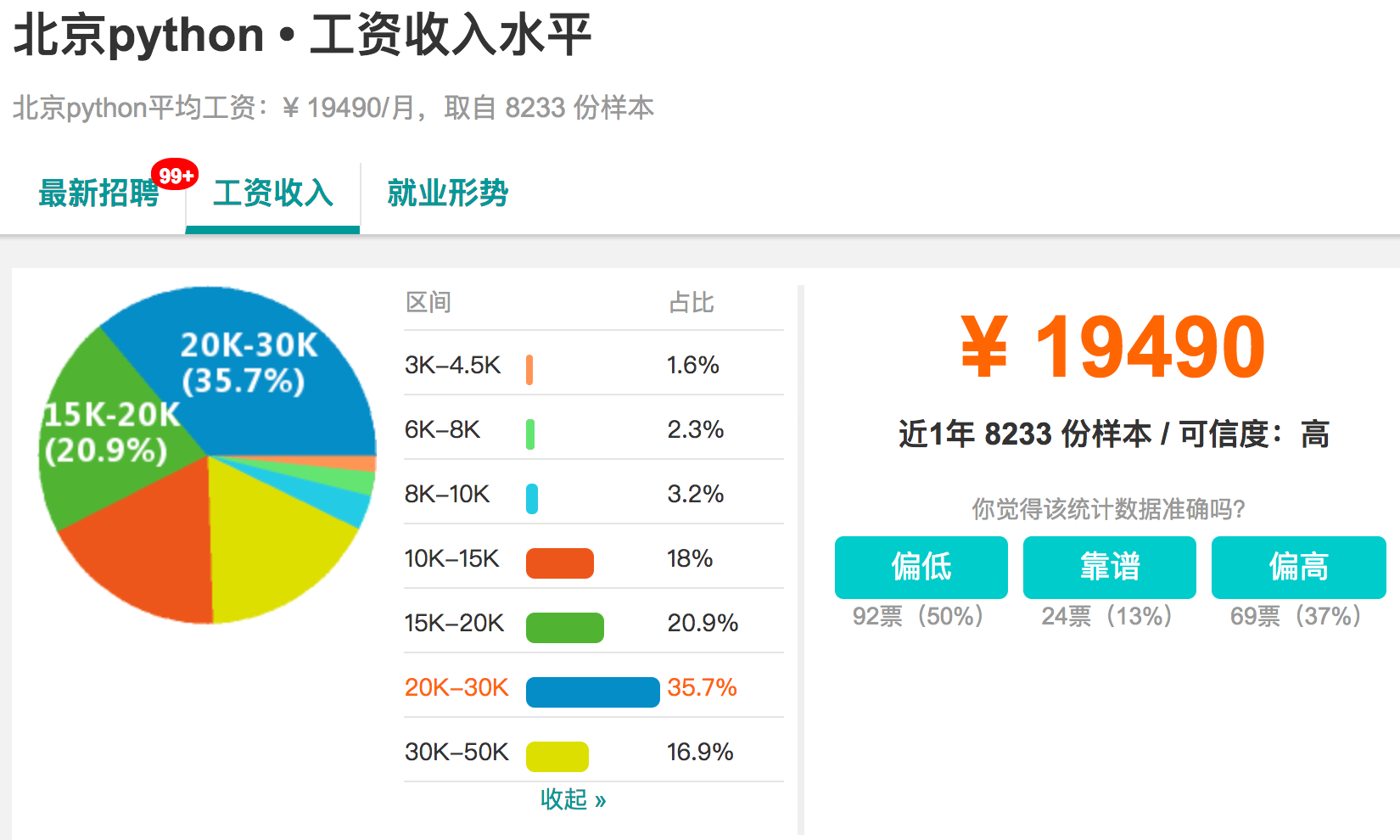
    推荐理由:这个项目是教你学 Python 的。实际上,它不仅教基本的 Python ,还教你可能用的上的 Linux 和 MySQL 这类的,即使你不想学 Python ,也可以从中选择你感兴趣的学习,或者你也可以只是来看看学 Python 的人的工资……讲道理,北京工资是真的高啊。

    Pytho


    今日推荐英文原文:《Blockchain in action: 5 interesting examples》作者:Kevin Casey

    原文链接:https://enterprisersproject.com/article/2018/7/blockchain-action-5-interesting-examples

    推荐理由:这篇文章介绍的是区块链在什么地方具有潜力,区块链很复杂,复杂到听不懂,我们也不知道它能在哪些行业派上用场,这篇文章就是解决这个问题的。

    Blockchain in action: 5 interesting examples

    What will help catalyze more blockchain projects? More real-world examples of blockchain in action. Better still: More examples of blockchain delivering measurable business value in some form, whether cost reductions, new business models, or other tangible benefits that tend to grab the CEO’s attention. Most organizations haven’t seen those examples yet, though.

    Ed Price, director of compliance at Devbridge Group, says his firm is kicking the tires on blockchain both internally and in various proof-of-concept projects for its customers – but it has yet to encounter a case where blockchain is the solution rather than one possible solution.

    “We always look for the best products or solution to fit the problem and with blockchain, we haven’t found one that required it yet,” Price says. “Given the hype and the customer interest, we continue to look for a good application candidate versus just doing blockchain because we can.”

    That’s not a solitary perspective, as shown by some recent Gartner survey stats and other points of view on this emerging technology. As Red Hat technology evangelist Gordon Haff wrote recently, a shipping executive he spoke with saw significant potential in her industry, but not universal adoption, in part because of some key industry challenges.

    [ Can you explain blockchain to non-techies? Read our related story, How to explain blockchain in plain English. ]  

    That doesn’t mean, of course, that blockchain’s potential isn’t significant. As the hunt for tangible business value continues, Price, Haff, and other experts point to a growing list of compelling real and potential use cases for blockchain.

    As Haff told us recently: “In deciding whether to use blockchain, it is helpful to think about whether [its] unique characteristics provide business value. For example, if an industry has no system of trusted middlemen – or if existing middlemen are expensive or otherwise add friction – blockchain might be a good fit.”

    So let’s look at some of the most interesting examples of blockchain in action.

    A quick note: We’re not covering examples from the financial services, banking, fintech, or related industries here; they’re a blockchain story (or many of them) unto themselves. Rather, we’re turning our focus to other industries and applications where blockchain may offer significant potential, or already offers some interesting case studies.

    “Blockchain is not just about digital money and finance – there are applications that are relevant in the early stages of exploration in every industry,” says David Schatsky, managing director at Deloitte.

    1. Supply chain management

    Supply chains are pretty much by definition full of middlemen. International trade, in particular, comes with a dizzying array of complicated logistics. Global trade is also notoriously dependent on a vast amount of paperwork.

    Multiple trials and proofs-of-concept have already begun and include some of the major names in global shipping and logistics. A recent blockchain trial on a land-and-sea trade route between Australia and China was declared a success, for example, and a significant proof-of-concept backed by PwC Australia, the Australian Chamber of Commerce and Industry, and the Port of Brisbane recently launched as well.

    Expect to see and hear plenty more blockchain buzz in supply chain management, shipping, logistics, and related industries.

    “Supply chain management is a significant growth area for blockchain, as a supply chain is a networked phenomenon that tends to be global and complicated in nature, with many participants,” Schatsky says. “At its core, blockchain can foster greater connectivity, trust, communication, and reliability in a networked setting like that.”

    Further reading (curated articles from other websites):

    • Joint blockchain trial between Australia and China a success

    • Australia’s First Blockchain Supply Chain System Unveiled at Port of Brisbane


    2. Food distribution and safety

    As a specific subset of the massive supply chain category, there are considerable potential uses of blockchain technology in food distribution and safety.

    Maryanne Morrow, founder and CEO of fintech blockchain startup 9thGear.io, points to a pilot program in China, a partnership of Walmart, IBM, and Tsinghua University in Beijing, that is testing the efficacy of blockchain in the country’s massive supply chain for pork and food distribution and safety in general.

    As Haff and Schatsky both note, blockchain may be a fit where trust is a potential issue – and it’s a huge issue in food supply: where your food comes from, how it was farmed or produced, the veracity of label claims, and so forth. (If you doubt trust is a big issue with food, pay closer attention to the news coverage of the next major food recall.)

    Further reading (curated articles from other websites):

    • Can blockchain make food safer in China?
    • 3 Innovative Ways Blockchain Will Build Trust In The Food Industry
    • Why blockchain won’t fix food safety—yet

    3. Contracts and law

    Aside from blockchain work in the financial sector, so-called “smart contracts” are arguably the biggest innovation to date, according to Christian Kameir, managing partner at the VC firm Sustany Capital, which focuses on blockchain-related investments.

    “A smart contract is a blockchain function intended to digitally facilitate, verify, or enforce the negotiation or performance of a contract,” Kameir explains.

    A lot of the actual use of smart contracts to date has been connected directly to initial coin offerings, or ICOs, and the creation of new cryptocurrencies; Kameir notes that thousands of such digital assets have been created during the past couple of years. He adds that the creation of new cryptocurrencies or tokens isn’t something that necessarily convinces business leaders of the value of blockchain and smart contracts, but he still thinks the potential is there. He points to rewards and loyalty programs as a good example.

    “Many businesses maintain loyalty systems to [give] incentives [to] clients to favor their product or services when making buying decisions,” Kameir examples, pointing to points programs (of the sort commonly offered by credit-card issuers and other loyalty programs) and airline mileage programs as common examples where a customer accumulates some kind of virtual asset for future use. “This is where a token created on an existing blockchain could replace a system which is difficult to maneuver and does not provide easy methods to be redeemed for rewards by the issuer.”

    Further reading (curated articles from other websites):

    • 5 companies already brilliantly using smart contracts

    4. Real estate and property law

    Price of Devbridge Group points to a fascinating test, conducted by the Cook County, Illinois, Recorder of Deeds, of how blockchain could be used to track and manage property titles.

    Among the CCRD’s conclusions in its final report on the project: As in other blockchain applications, there are both significant potential and also some parallel challenges – but the latter may be reasons to continue to press forward with potential wider adoption:

    “Though blockchain can make transacting real estate simpler, safer, more accurate and easier to understand, there are challenges facing its adoption. In many cases, these challenges are the very reasons why such a new structure should be adopted, and thus can also be looked at as opportunities.”

    Further reading (curated articles from other websites):

    • Blockchain Pilot Program Final Report
    • Here’s What a Blockchain Property Deed Looks Like

    5. Healthcare

    From a vertical industry perspective, healthcare is lately approaching the kind of blockchain buzz reserved for financial services. Consider the massive shift to electronic health records as an indicator of what kind of impact blockchain could have in the industry. Again, trust is a significant requirement here.

    “In the healthcare industry, blockchain technology is being utilized for medical records by establishing a secure distributed medical records system, strengthening security and privacy,” Schatsky of Deloitte says.

    “In healthcare, some of the major topics are repeatable prescriptions, sharing medical records, and payments,” says Marta Piekarska, director of ecosystem at Hyperledger. She points to companies like hashed health or Medicalchain as examples in this category.

    As Beth Israel Deaconess Medical Center CIO John Halamka detailed in an HBR article, his colleagues have tested blockchain’s viability to track and handle medication data.

    Further reading (curated articles from other websites):

    • The potential for blockchain to transform electronic health records
    • Blockchain for healthcare – closer than we think?

    Learning moments

    So, no, as Price says, you probably shouldn’t pursue a blockchain project just because you can. But the real-world examples above indicate that we’re probably not too far from a few “golden egg” moments – applications that show tangible business value, of the sort that drive wider adoption. In the meantime, there’s a lot of opportunity for testing and learning.


    每天推荐一个 GitHub 优质开源项目和一篇精选英文科技或编程文章原文,欢迎关注开源日报。交流QQ群:202790710;微博:https://weibo.com/openingsource;电报群 https://t.me/OpeningSourceOrg
←上一页
1 … 228 229 230 231 232 … 262
下一页→

Proudly powered by WordPress