• 开源镜像
  • 开源沙龙
  • 媛宝
  • 猿帅
  • 注册
  • 登录
  • 息壤开源生活方式平台
  • 加入我们

开源日报

  • 2018年7月20日:开源日报第134期

    20 7 月, 2018

    每天推荐一个 GitHub 优质开源项目和一篇精选英文科技或编程文章原文,欢迎关注开源日报。交流QQ群:202790710;微博:https://weibo.com/openingsource;电报群 https://t.me/OpeningSourceOrg


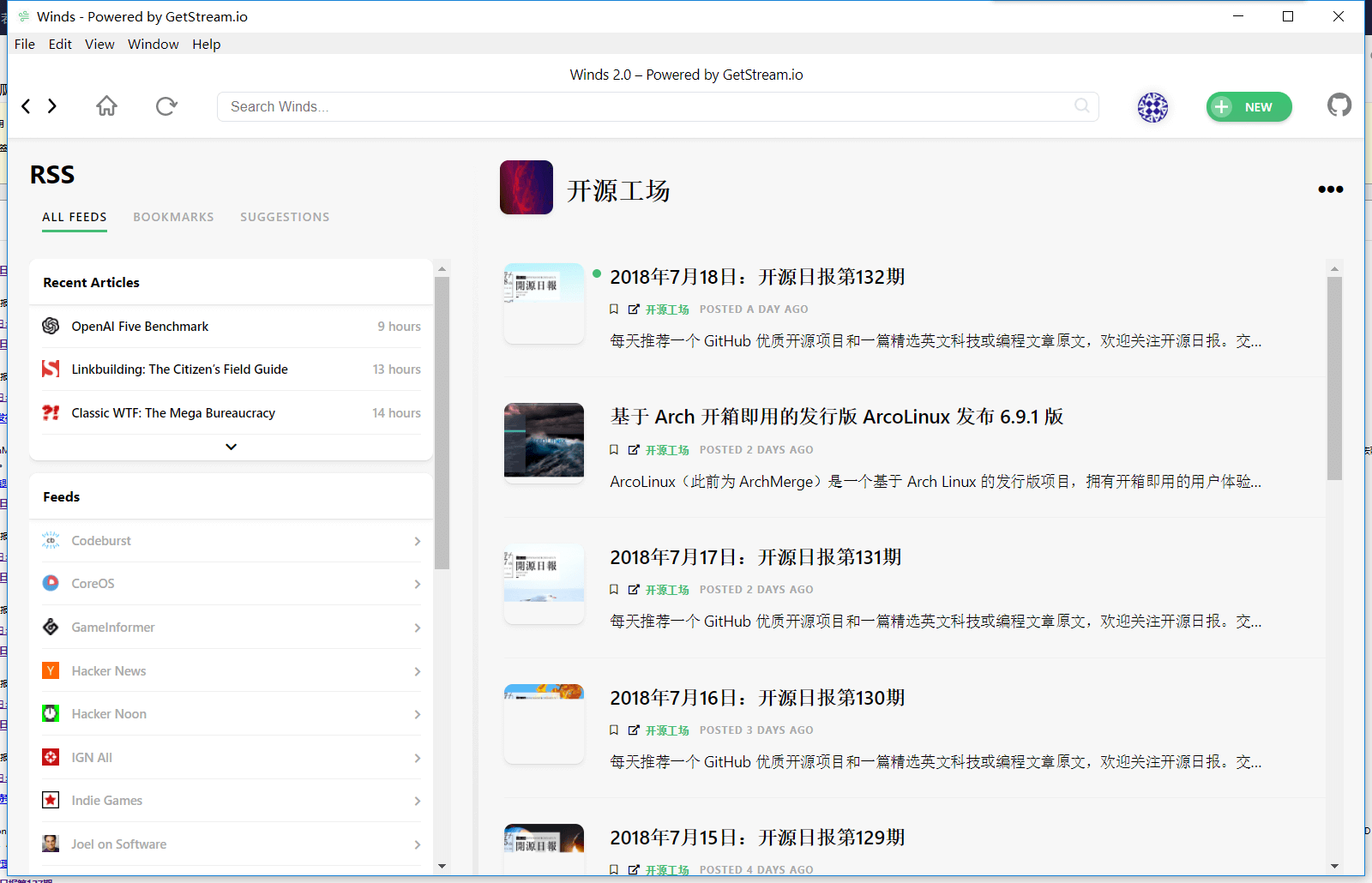
    今日推荐开源项目:《好看的 RSS 阅读器 Winds》传送门:GitHub链接

    推荐理由:这次要推荐的是一个不错的 RSS 阅读器,最起码有一部分是 RSS 的,实际上它还有 Podcasts 的功能,这个可以简单的理解为音频的 RSS 。它上面不仅有推荐的 RSS 和 Podcast,你同样也可以自己增加新的 RSS 到列表中去,而且界面也不错也支持 Windows,有兴趣的朋友兴许可以考虑换掉 FeedDemon 了。

    今日推荐英文原文:《Learn these JavaScript fundamentals and become a better developer》作者:Cristi Salcescu

    原文链接:https://medium.freecodecamp.org/learn-these-javascript-fundamentals-and-become-a-better-developer-2a031a0dc9cf

    推荐理由:顾名思义,这篇文章讲的是一些 JavaScript 的基础知识

    Learn these JavaScript fundamentals and become a better developer

    JavaScript has primitives, objects and functions. All of them are values. All are treated as objects, even primitives.

    Primitives

    Number, boolean, string, undefined and null are primitives.

    Number

    There is only one number type in JavaScript, the double precision floating point. Decimal numbers’ arithmetic is inexact.

    As you may already know, 0.1 + 0.2 does not make 0.3 . But with integers, the arithmetic is exact, so 1+2 === 3 .

    Numbers inherit methods from the Number.prototype object. Methods can be called on numbers:

    (123).toString();  //"123"
    (1.23).toFixed(1); //"1.2"

    There are global functions for converting to numbers : parseInt(), parseFloat()and Number():

    parseInt("1")       //1
    parseInt("text")    //NaN
    parseFloat("1.234") //1.234
    Number("1")         //1
    Number("1.234")     //1.234

    Invalid arithmetic operations or invalid conversions will not throw an exception, but will result in the NaN “Not-a-Number” value. isNaN() can detect NaN .

    The + operator can add or concatenate.

    1 + 1      //2
    "1" + "1"  //"11"
    1 + "1"    //"11"

    String

    A string stores a series of Unicode characters. The text can be inside double quotes "" or single quotes ''.

    Strings have methods like : substring(), indexOf()and concat() .

    "text".substring(1,3) //ex
    "text".indexOf('x')   //2
    "text".concat(" end") //text end

    Strings, like all primitives, are immutable. For example concat() doesn’t modify the existing string but creates a new one.

    Boolean

    A boolean has two values : true and false .
    The language has truthy and falsy values.
    false, null, undefined, ''(empty string), 0 and NaN are falsy. All other values, including all objects, are truthy.

    The truthy value is evaluated to true when executed in a boolean context. Falsy value is evaluated to false. Take a look at the next example displaying the false branch.

    let text = '';
    if(text) {
      console.log("This is true");
    } else {
      console.log("This is false");
    }

    Objects

    An object is a dynamic collection of key-value pairs. A key is a string. The value can be a primitive, object, or function.

    The simplest way to create an object is to use an object literal:

    let obj = {
      message : "A message",
      doSomething : function() {}
    }

    We can read, add, edit and remove an object’s properties at any time.

    • get: object.name, object[expression]
    • set: object.name = value, object[expression] = value
    • delete: delete object.name, delete object[expression]
    let obj = {}; //create empty object
    obj.message = "A message"; //add property
    obj.message = "A new message"; //edit property
    delete object.message; //delete property

    Objects are implemented as hash-maps. A simple hash-map can be created using Object.create(null) :

    let french = Object.create(null);
    french["yes"] = "oui";
    french["no"]  = "non";
    french["yes"];//"oui"

    If you want to make the object immutable, use Object.freeze() .

    Object.keys() can be used to iterate over all properties.

    function logProperty(name){
      console.log(name); //property name
      console.log(obj[name]); //property value
    }
    Object.keys(obj).forEach(logProperty);

    Primitives vs. Objects

    Primitives are treated like objects, in the sense that they have methods but they are not objects.

    Primitives are immutable, and objects are mutable.

    Variables

    Variables can be defined using var, let and const.

    var declares and optionally initializes a variable. The value of a variable that is not initialize is undefined . Variables declared with var have a function scope.

    The let declaration has a block scope.

    A variable declared with const cannot be reassigned. Its value, however, can still be mutable. const freezes the variable, Object.freeze() freezes the object. The const declaration has a block scope.

    The scope of a variable declared outside any function is global.

    Array

    JavaScript has array-like objects. An array is implemented using an object. Elements are accessed using their indices. Indices are converted to strings and used as names for retrieving values. In the next example arr[1] gives the same value as arr['1'] : arr[1] === arr['1'] .

    A simple array like let arr = ['A', 'B', 'C'] is emulated using an object like the one below:

    {
      '0': 'A',
      '1': 'B',
      '2': 'C'
    }

    Removing values from the array with delete will leave holes. splice() can be used to avoid the problem, but it can be slow.

    let arr = ['A', 'B', 'C'];
    delete arr[1];
    console.log(arr); // ['A', empty, 'C']
    console.log(arr.length); // 3

    Stack and queue can easily be implemented using the array methods:

    let stack = [];
    stack.push(1);           // [1]
    stack.push(2);           // [1, 2]
    let last = stack.pop();  // [1]
    console.log(last);       // 2
    let queue = [];
    queue.push(1);           // [1]
    queue.push(2);           // [1, 2]
    let first = queue.shift();//[2]
    console.log(first);      // 1

    Functions

    Functions are independent units of behavior.

    Functions are objects. Functions can be assigned to variables, stored in objects or arrays, passed as an argument to other functions, and returned from functions.

    There are three ways to define a function:

    • Function Declaration (aka Function Statement)
    • Function Expression (aka Function Literal)
    • Arrow Function

    The Function Declaration

    • function is the first keyword on the line
    • it must have a name
    • it can be used before definition. Function declarations are moved, or “hoisted”, to the top of their scope.
    function doSomething(){}

    The Function Expression

    • function is not the first keyword on the line
    • the name is optional. There can be an anonymous function expression or a named function expression.
    • it needs to be defined, then it can execute
    • it can auto-execute after definition (called “IIFE” Immediately Invoked Function Expression)
    let doSomething = function() {}

    Arrow Function

    The arrow function is a sugar syntax for creating an anonymous function expression.

    let doSomething = () = > {};

    Arrow functions don’t have their own this and arguments.

    Function invocation

    A function, defined with the function keyword, can be invoked in different ways:

    • Function form
    doSomething(arguments)
    • Method form
    theObject.doSomething(arguments)
    theObject["doSomething"](arguments)
    • Constructor form
    new doSomething(arguments)
    • Apply form
     doSomething.apply(theObject, [arguments])
     doSomething.call(theObject, arguments)
    • Bind form
    let doSomethingWithObject = doSomething.bind(theObject);
    doSomethingWithObject();

    Functions can be invoked with more or fewer arguments than declared in the definition. The extra arguments will be ignored, and the missing parameters will be set to undefined.

    Functions have two pseudo-parameters: this and arguments.

    this

    this represents the function’s context. Only functions defined with the function keyword have their own this context. Its value depends on how the function was invoked. See below the values of this depending on the doSomething() function invocation form:

    function doSomething(){
      console.log(this)
    }
    +------------+------------------+
    | Form       | this             |
    +------------+-------------------
    | Function   | window/undefined |
    | Method     | theObject        |
    | Constructor| the new object   |
    | apply      | theObject        |  
    | bind       | theObject        |    
    +------------+------------------+

    arguments

    The arguments pseudo-parameter gives all the arguments used at invocation. It’s an array-like object, but not an array. It lacks the array methods.

    function reduceToSum(total, value){
      return total + value;
    }
      
    function sum(){
      let args = Array.prototype.slice.call(arguments);
      return args.reduce(reduceToSum, 0);
    }
    sum(1,2,3);

    An alternative is the new rest parameters syntax. This time args is an array object.

    function sum(...args){
      return args.reduce(reduceToSum, 0);
    }

    return

    A function with no return statement returns undefined. Pay attention to the automatic semi-colon insertion when using return. The following function will not return an empty object, but rather an undefined one.

    function getObject(){ 
      return 
      {
      }
    }
    getObject()

    To avoid the issue, use { on the same line as return :

    function getObject(){ 
      return {
      }
    }

    Dynamic Typing

    JavaScript has dynamic typing. Values have types, variables do not. Types can change at run time.

    function log(value){
      console.log(value);
    }
    log(1);
    log("text");
    log({message : "text"});

    The typeof() operator can check the type of a variable.

    let n = 1;
    typeof(n);   //number
    let s = "text";
    typeof(s);   //string
    let fn = function() {};
    typeof(fn);  //function

    A Single Thread

    The main JavaScript runtime is single threaded. Two functions can’t run at the same time. The runtime contains an Event Queue which stores a list of messages to be processed. There are no race conditions, no deadlocks. However, the code in the Event Queue needs to run fast. Otherwise the browser will become unresponsive and will ask to kill the task.

    Exceptions

    JavaScript has an exception handling mechanism. It works like you may expect, by wrapping the code using the try/catch statement. The statement has a single catch block which caches all exceptions.

    It’s good to know that JavaScript sometimes has a preference for silent errors. The next code will not throw an exception when I try to modify a frozen object:

    let obj = Object.freeze({});
    obj.message = "text";

    Strict mode eliminates some JavaScript silent errors. "use strict"; enables strict mode.

    Prototype Patterns

    Object.create(), Constructor Function, and class build objects over the prototype system.

    Consider the next example:

    let service = {
     doSomething : function() {}
    }
    let specializedService = Object.create(service);
    console.log(specializedService.__proto__ === service); //true

    I used Object.create() to build a new object specializedService which has the service object as its prototype. This means that doSomething() is available on the specializedService object. It also means that the __proto__ property of specializedService points to the service object.

    Let’s now build a similar object using class.

    class Service {
     doSomething(){}
    }
    class SpecializedService extends Service {
    }
    let specializedService = new SpecializedService();
    console.log(specializedService.__proto__ === SpecializedService.prototype);

    All methods defined in the Service class will be added to the Service.prototype object. Instances of the Service class will have the same prototype (Service.prototype) object. All instances will delegate method calls to the Service.prototype object. Methods are defined once on Service.prototype and then inherited by all instances.

    Prototype chain

    Objects inherit from other objects. Each object has a prototype and inherits their properties from it.

    When you request a property which the object does not contain, JavaScript will look down the prototype chain until it either finds the requested property, or until it reaches the end of the chain.

    Functional Patterns

    JavaScript has first class functions and closures. These are concepts that open the way for Functional Programming in JavaScript. As a result, higher order functions are possible.

    Closure is an inner function that has access to the parent function’s variables, even after the parent function has executed.

    A higher order function is a function that takes another function as an input, returns a function, or does both.

    For more on the JavaScript functional side take a look at:

    Discover the power of first class functions

    How point-free composition will make you a better functional programmer

    Here are a few function decorators you can write from scratch

    Why you should give the Closure function another chance

    Make your code easier to read with Functional Programming

    Conclusion

    The power of JavaScript lies in its simplicity.

    Knowing the JavaScript fundamentals makes us better at understanding and using the language.


    每天推荐一个 GitHub 优质开源项目和一篇精选英文科技或编程文章原文,欢迎关注开源日报。交流QQ群:202790710;微博:https://weibo.com/openingsource;电报群 https://t.me/OpeningSourceOrg

  • 2018年7月19日:开源日报第133期

    19 7 月, 2018

    每天推荐一个 GitHub 优质开源项目和一篇精选英文科技或编程文章原文,欢迎关注开源日报。交流QQ群:202790710;微博:https://weibo.com/openingsource;电报群 https://t.me/OpeningSourceOrg


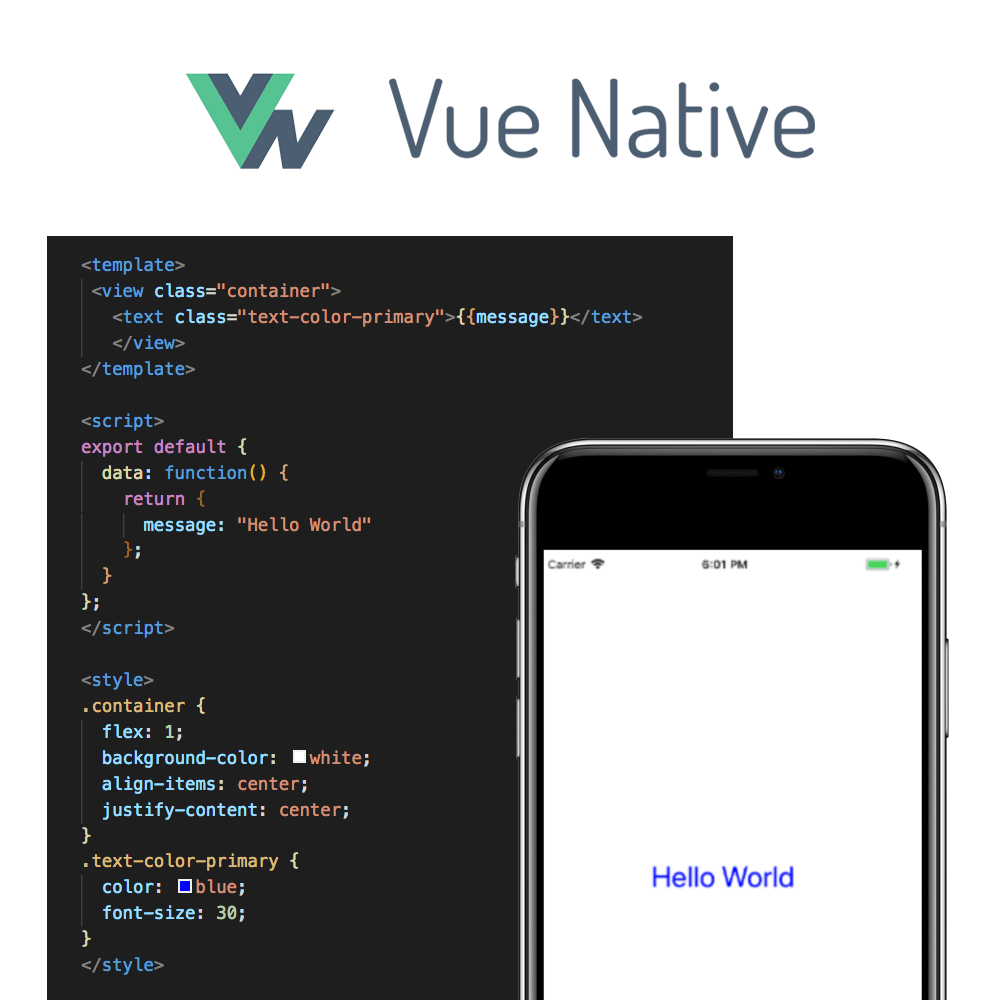
    今日推荐开源项目:《跨平台移动应用程序框架 Vue Native》传送门:GitHub链接

    推荐理由:又顾名思义,这是个移动应用程序框架,它的好处在于继承了 Vue 的优点,使用声明式的渲染等等,在官网上还提供了示例用的 App,感兴趣的朋友可以去试试看。


    今日推荐英文原文:《Introducing Vue Native》作者:GeekyAnts

    原文链接:https://blog.geekyants.com/introducing-vue-native-b66f71d50438

    推荐理由:简而言之,介绍了 Vue Native,包括了诸如 v-for 这样经常用到的指令。

    Introducing Vue Native

    We at GeekyAnts are very excited to share one of our side projects which we have been working on for a while, Vue Native!

    Though the sentiment in the JavaScript community about Vue has been mixed, we couldn’t stop ourselves to try Vue for native mobile app development.

    Hello World Example

    Here is a simple Vue Native code snippet that renders some text on the mobile screen.


    Motivation

    As a web developer, we always loved the simplicity of writing HTML code and then styling it with CSS. Vue provides us with a similar experience with .vue files.

    As a team which is very active in the React Native community with contributions like NativeBase, we are never biased about our opinion to try new frameworks and languages. Vue is one of them and it suits the use-cases to build most of our apps.

    The support for templating, styling, state-management with Vuex and router makes Vue the perfect choice.

    With Vue Native, we are bringing the same experience to native mobile app development.


    Initial Experiment

    With a quick search on the web, we came across react-vue by SmallComfort. react-vue transpiles Vue files to React & React Native Components. Kudos to the author of react-vue which solves most of the problem. Vue Native is a fork of the same.

    It Transpiles to React Native

    React Native is a direct dependency of Vue Native. Once you initialize a new app using vue-native-cli, the entry script is App.vue.

    Just like a .js file, you can compose a .vue files with many .vue files. All these .vue files are actually converted to React Native component files with .js. You can read more about it here.

    Two-way binding example

    Vue Native is also capable of achieving two-way data binding with the help of v-model directive as shown in the code snippet below.

    <template>
       <text-input v-model=”name” />
    </template>
    <script>
    export default {
     data: function() {
       return {
         name: "John Doe"
       };
     }
    };
    </script>

    Loops

    To write loops, we can use Vue’s v-for directive. The v-for directive is similar to JavaScript’s map operator.

    <template>
       <view>
    	<text v-for=”name in names” v-bind:key="name">{{name}}</text>
       </view>
    </template>
    <script>
    export default {
     data: function() {
       return {
         names: [“Gaurav”, “Neeraj”, “Sanket”, “Neeraj”]
       };
     }
    };
    </script>

    Example apps:

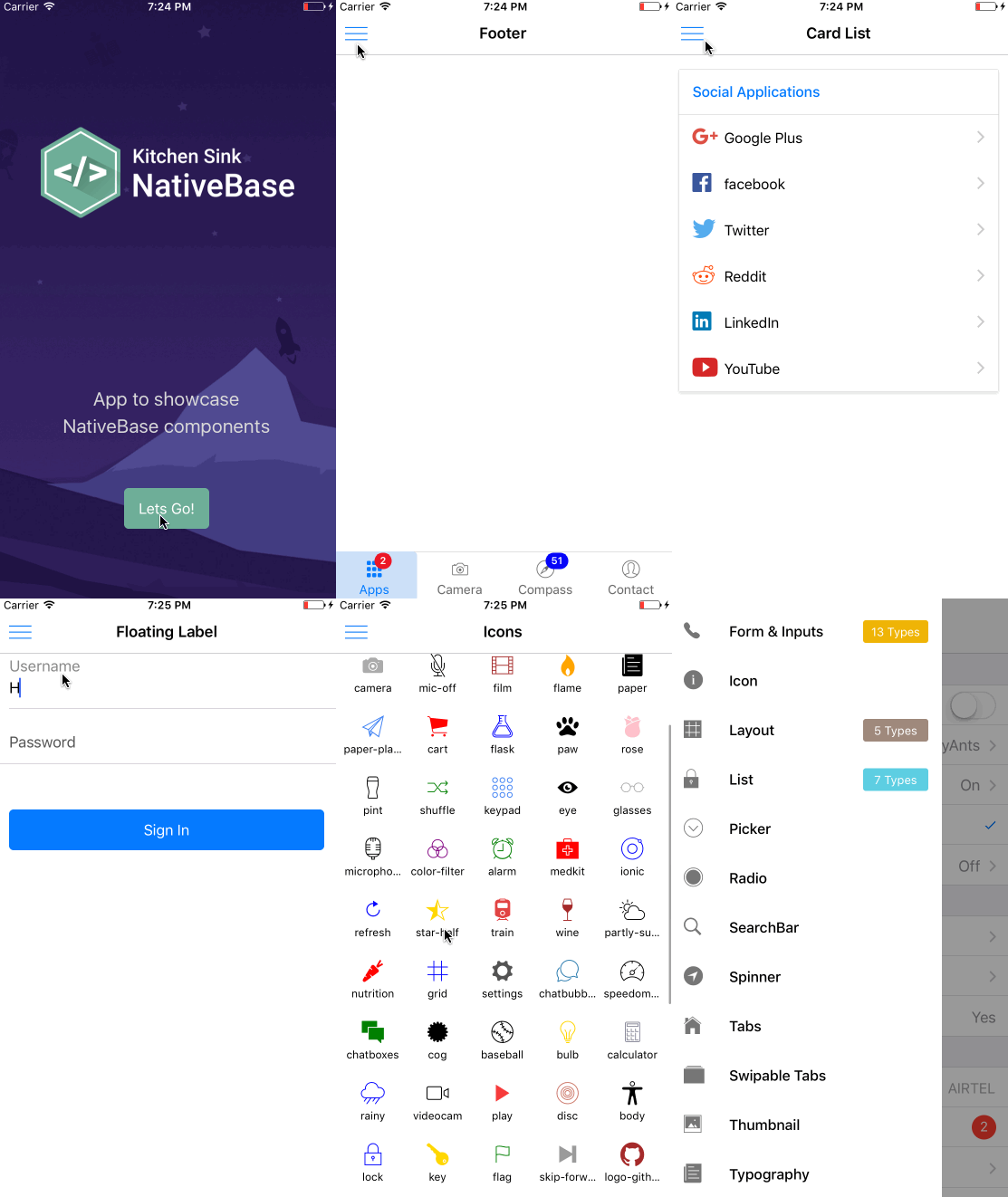
    KitchenSink app

    We have re-built our NativeBase KitchenSink App using Vue Native. You can take check out the entire source code of this app here:

    GeekyAnts/KitchenSink-Vue-Native
    KitchenSink-Vue-Native – KitchenSink app for Vue Native (using NativeBase)github.com

    Todo App

    Ankit Singhania, a Senior Software Developer at GeekyAnts, has also created a simple ToDo App using Vue Native.


    How To Get Started

    In order to use Vue Native, you will first need to install React Native on your system. Follow the steps given here to install React Native.

    Next, we can install the Vue Native CLI on your system using NPM.

    $ npm install -g vue-native-cli

    With that, all you need to do now is initialize a new Vue-Native project directory in your system.

    $ vue-native init <projectName>
    $ cd <projectName>

    You can now run this Vue Native app on an iOS or Android Simulator using the npm run command.


    Directives

    Directives are special attributes that are found in Vue. These are attributes that come with the v- prefix. Here are a few of these directives and where they can be used in Vue.

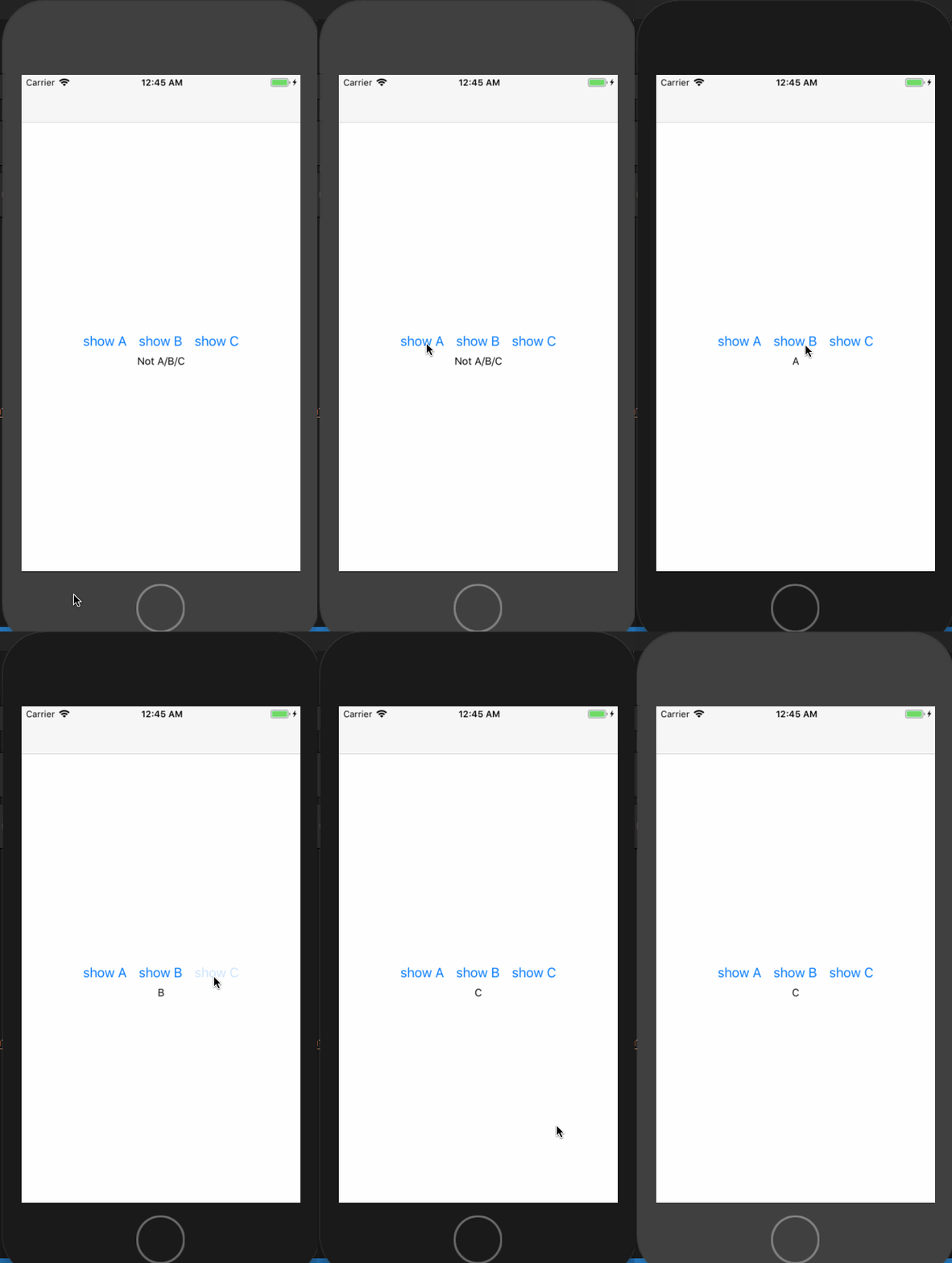
    v-if and v-else

    The v-if and v-else directives are used in Vue to write conditional code blocks.

    <template>  
     <view class="container">    
       <view class="btn-container">      
         <button title="show A" :on-press="() => handleBtnClick('A')"/>
         <button title="show B" :on-press="() => handleBtnClick('B')"/>        
         <button title="show C" :on-press="() => handleBtnClick('C')"/>      
       </view>    
       <view>      
         <text v-if="type === 'A'">
           A
         </text>      
         <text v-else-if="type === 'B'">        
           B      
         </text>      
         <text v-else-if="type === 'C'">
           C
         </text>      
         <text v-else>
           Not A/B/C      
         </text>    
       </view>  
     </view>
    </template>

    Running this code on your system will give you this output:

    v-for

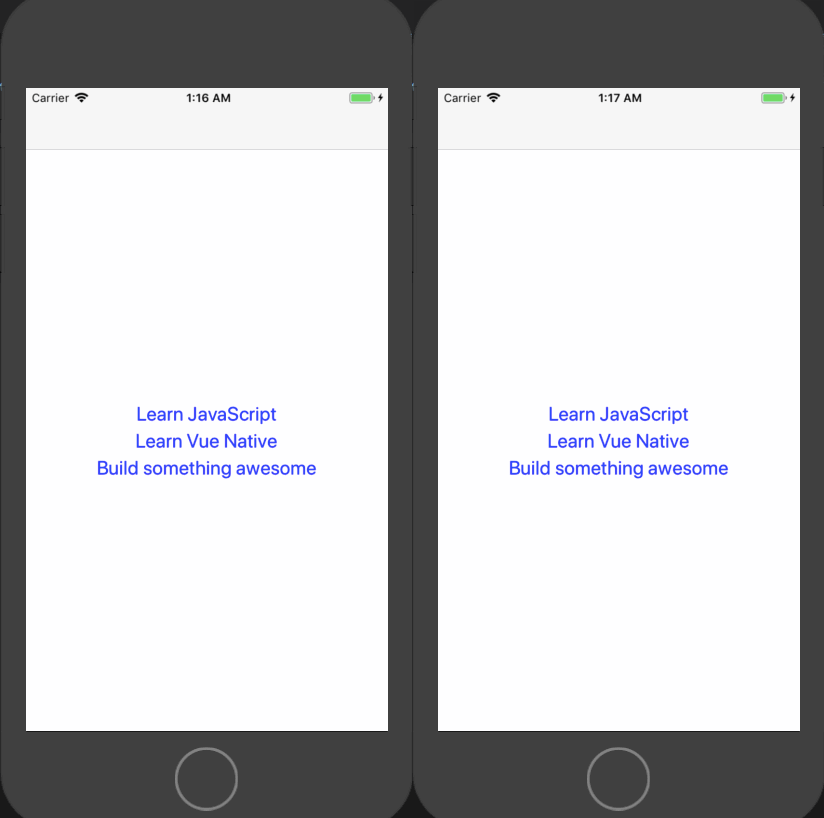
    The v-for directive is similar to JavaScript’s map operator.

    <template>
     <view class="container">
       <text
           class="text-container"
           v-for="todo in todos"
           :key="todo.text"
       >
         {{ todo.text }}
       </text>
     </view>
    </template>
    <script>
    export default {
     data: function() {
       return {
         todos: [
           { text: "Learn JavaScript" },
           { text: "Learn Vue" },
           { text: "Build something awesome" }
         ]
       };
     }
    };
    </script>

    Running this code on your system will give you this output:

    v-model

    v-model directive creates a two-way data binding on a form input element or a component. Internally it attaches value and onChangeText handler to TextInput of React Native.

    <template>
     <view class="container">
         <text-input
           class="text-input-container"
           placeholder="Type here"
           v-model="textContent"
         />
         <text
           class="text-container"
         >
           {{textContent}}
         </text>
     </view>
    </template>
    <script>
    export default {
     data: function() {
       return {
         textContent: ""
       };
     }
    };
    </script>

    The above code snippet creates a two-way data binding on textContent, so when the types something in the text-input, it will be stored in textContent, which will then be displayed right below the text-input field.


    Vue Native Router

    Vue Native uses vue-router for implementing navigation in your mobile apps. Let’s take a look at how Drawer Navigation can be implemented using Vue Native.

    It’s a simple wrapper around React Navigation of React Native.


    State Management using Vuex

    You can use Vuex as the App State Management library. Read more about it here:

    Vuex | Getting Started
    Centralized State Management for Vue.jsvuex.vuejs.org

    Limitations and known issues

    • Sometimes for a component, you might have to create a function that returns JSX code.
      For example: renderItem in FlatList must return JSX.
    • The error reporting is on the React Native level and it doesn’t map to the Vue Native code yet. We are working towards it.

    Is it production ready?

    We have rebuilt the complete NativeBase KitchenSink app in Vue Native. You can use it in production but with the known issues and limitations above.


    Vue-Native is open source! Check out the source here, and if you like it, give us a ⭐️!

    GeekyAnts/vue-native-core
    Contribute to vue-native-core development by creating an account on GitHub.github.com

    Give it a try, get involved to improve and contribute to Vue Native.


    每天推荐一个 GitHub 优质开源项目和一篇精选英文科技或编程文章原文,欢迎关注开源日报。交流QQ群:202790710;微博:https://weibo.com/openingsource;电报群 https://t.me/OpeningSourceOrg
  • 2018年7月18日:开源日报第132期

    18 7 月, 2018

    每天推荐一个 GitHub 优质开源项目和一篇精选英文科技或编程文章原文,欢迎关注开源日报。交流QQ群:202790710;微博:https://weibo.com/openingsource;电报群 https://t.me/OpeningSourceOrg


    今日推荐开源项目:《从零开始的操作系统内核 raspberry-pi-os》传送门:GItHub链接

    推荐理由:这个项目是一个关于从零开始创造操作系统内核的课程,每一节课都讲了如何在这个新内核中实现某些功能,然后解释 Linux 内核中这个功能的原理,推荐给对操作系统感兴趣的朋友们。


    今日推荐英文原文:《The 6 Types of Product Teams You’ll be Working In》作者:Ariel Verber

    原文链接:https://medium.com/swlh/the-6-types-of-product-teams-youll-be-working-in-e6f6e300834d

    推荐理由:这篇文章介绍了你以后可能要加入的六种产品团队,最后一种实在是 too naive 了。

    The 6 Types of Product Teams You’ll be Working In

    When I get an offer to join a product team, I spend the following days or even weeks considering many different parameters. I see it as a really important decision, which will greatly affect my life.

    The first thing I usually consider is the vision — the company’s long-term mission. The second thing is usually the team — the personality, ambition and skills of my future partners.

    The third most important thing for me when considering an offer is my short-term missions — the KPIs for each sprint or quarter. What drives the team? What can the team achieve in the following year that would mean success? What does the team discuss the most in the internal meetings? And how does it all align with my personal goals and ambition?

    I found it interesting that most teams are very different in the way they work and think. Each team evaluates short-term success differently. I’ve decided to do a small break-down of the characteristics of each type of team, to help myself and others make better choices in the future.

    1. User-Centered Team

    Press the button. It will improve your life

    A user-centered team is a team who puts its users above all other KPIs. User Experience Design is a major value in the company. A lot of time and effort is put into coming up with the solutions that will be the most delightful for the users. The team is very aware of its users, their needs, their pain points, and most of the team’s “fuel” is used to improve the overall satisfaction and make the users love the product more. New features are carefully examined, and only added if they bring enough value to the users.

    Examples: Medium, Duolingo

    Pros: Good user satisfaction may help with word-of-mouth growth and retention.

    Cons: When working this way, success is sometimes hard to measure. Even if many users love the product, it doesn’t mean that the product is profitable, and it may eventually shut down because of that.

    2. Growth-Centered Team

    Only 9 hours left to press the button!

    A growth-centered team is a team who’s looking mostly on numbers. The open sprint meetings will talk a lot about terms like Acquisition, Conversion, Engagement and Retention. The roadmap prioritises tasks with higher chances to impact the numbers, and not necessarily the best things for the users. It could be done by improving the product and adding value, but also by adding promotions, push notifications, and in the some cases even dark patterns. The employees are rewarded mostly according to their success in making an impact on the numbers.

    Examples: Booking.com, LinkedIn

    Pros: If the company succeeds to grow, the new resources could help with hiring talented employees and it will assist with building better products and moving fast in a later stage.

    Cons: User satisfaction could decrease, and it will make it easier for a more user-focused competitor to take over the market.

    3. Features-Centered Team

    Look at all of these buttons we’ve built for you.

    A features centered team is a team who has many new ideas it wants to build. The roadmap has deadlines for each feature, and the team’s focus is on shipping the discussed feature on time. The features usually come from users’ requests, stakeholders’ demands, or the sales team that wants specific features to use as a selling point.

    Examples: Wix, Atlassian

    Pros: Adding features may help the sales team bring a new audience.

    Cons: Having many features may take away from the product’s usability. Also, when the team is always working on new features, it may forget about improving other aspects of the product.

    4. Design-Centered Team

    Introducing: Button X. Our best button yet.

    A design-centered team is a team who prioritises the beauty and the luxury of its product above everything else. Its focus is on shipping impressive products. The designers are highly regarded, and spend a lot of time researching, ideating and sketching.

    Examples: Apple, Nike

    Pros: The users could turn into power users, or ‘fans’, and become very loyal to all current & future releases by the company.

    Cons: Good design is often not cheap. If the mass does not adopt the design — the company may fail. Also, beauty may come at the expense of usability, which will decrease the user satisfaction.

    5. Technology-Centered Team

    Once you press the button, our AI algorithms will do its magic

    A technology-centered team is a team focused mostly on improving and maintaining the technology of the company. It could spend a lot of time on refactoring the code, fixing bugs, switching to a better framework and sometimes on researching, and pushing the boundaries of new technologies.

    Examples: Amazon, Google AI

    Pros: Fast and stable products can lead to better user satisfaction. Also, sometimes these companies help change the world.

    Cons: Spending a lot of time on writing better code for simple products who are ‘good enough’ could slow down the team.

    6. The Naive Team

    Well… We’ve built a button. It kinda works. Now what?

    A naive product team is a team working on a product or a feature without a clear short-term KPI. Someone brought up an idea that was adopted by the team, and now people are working on making it work. Not much time is spent on research, design or development. It is often a common practice for validating ideas, or for a team who can allow itself to work on creative things without a clear goal in mind.

    Examples: hackathon projects, early stage startups

    Pros: The team can be creative and move faster. The idea can bring value to many – and can be monetized and improved in later stages.

    Cons: The result could be something that people don’t need, or be a low quality product that will need rethinking in the future.


    So, which team should you join?

    The answer is not black & white. As a product designer, I would probably be pretty happy in a User-Centered or a Design-Centered team, and many developers would probably prefer a Technology-Centered team. Does it mean that you shouldn’t join teams who are not obsessed about your passion? No. Teams can, and need to change according to the stage it’s in. I think usually a good balance between UX, Design, Tech and Growth is important and can be achieved with the right people, with the biggest focus being on the most important thing for the company at the current stage.

    In addition to that, as team members, we have the power to influence others. For example, even if my biggest passion is User Experience, and I join a team who cares mostly about technology — as the designer in the team I can use my communication skills and experience to demonstrate the values of being more user-centered.

    The more interesting question to ask, in my opinion, is not what type of team is it, but who are the people you’ll be working with every day, and will they be attentive to the things you find important.


    每天推荐一个 GitHub 优质开源项目和一篇精选英文科技或编程文章原文,欢迎关注开源日报。交流QQ群:202790710;微博:https://weibo.com/openingsource;电报群 https://t.me/OpeningSourceOrg
  • 2018年7月17日:开源日报第131期

    17 7 月, 2018

    每天推荐一个 GitHub 优质开源项目和一篇精选英文科技或编程文章原文,欢迎关注开源日报。交流QQ群:202790710;微博:https://weibo.com/openingsource;电报群 https://t.me/OpeningSourceOrg

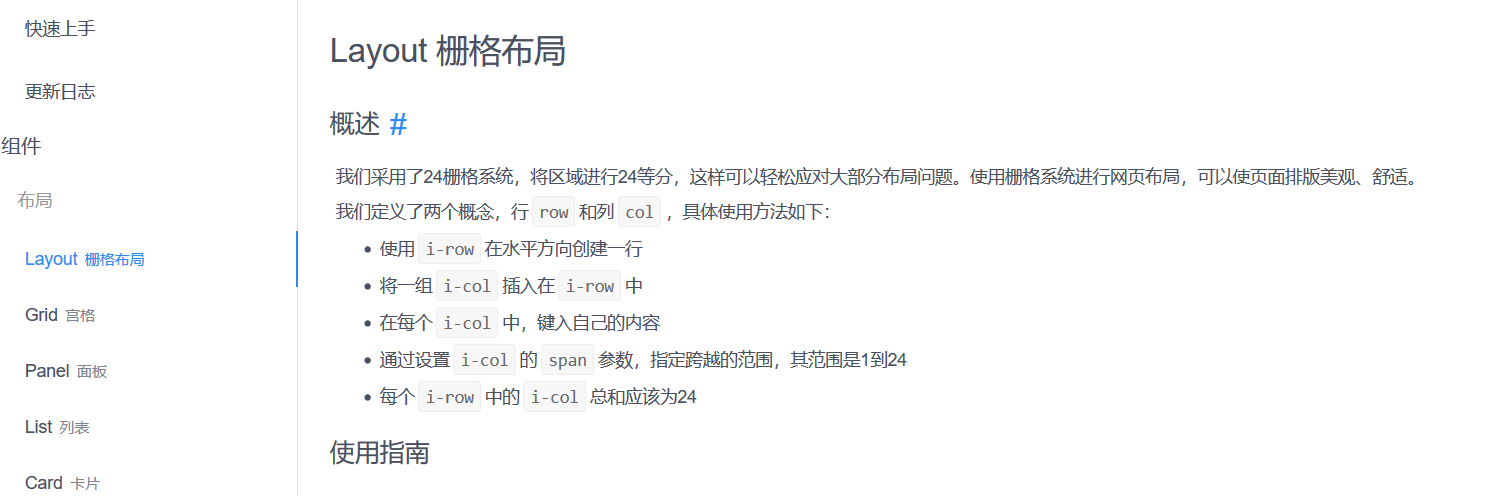
    今日推荐开源项目:《微信小程序 UI 组件库 iView Weapp》传送门:GitHub链接

    推荐理由:顾名思义这就是一个微信小程序的 UI 组件库,里面包含了有关布局,导航和表单等等常用的各种组件,正在制作微信小程序的朋友们可以考虑把它加入自己的收藏了。


    今日推荐英文原文:《An Invisible Tax on the Web: Video Codecs》作者:Judy DeMocker

    原文链接:https://blog.mozilla.org/blog/2018/07/11/royalty-free-web-video-codecs/

    推荐理由:在线观看视频看起来是免费的,但是实际上,它需要公司支付使用视频编解码器的许可费才能做到。

    An Invisible Tax on the Web: Video Codecs

    Here’s a surprising fact: It costs money to watch video online, even on free sites like YouTube. That’s because about 4 in 5 videos on the web today rely on a patented technology called the H.264 video codec.

    A codec is a piece of software that lets engineers shrink large media files and transmit them quickly over the internet. In browsers, codecs decode video files so we can play them on our phones, tablets, computers, and TVs. As web users, we take this performance for granted. But the truth is, companies pay millions of dollars in licensing fees to bring us free video.

    It took years for companies to put this complex, global set of legal and business agreements in place, so H.264 web video works everywhere. Now, as the industry shifts to using more efficient video codecs, those businesses are picking and choosing which next-generation technologies they will support. The fragmentation in the market is raising concerns about whether our favorite web past-time, watching videos, will continue to be accessible and affordable to all.

    A drive to create royalty-free codecs

    Mozilla is driven by a mission to make the web platform more capable, safe, and performant for all users. With that in mind, the company has been supporting work at the Xiph.org Foundation to create royalty-free codecs that anyone can use to compress and decode media files in hardware, software, and web pages.

    But when it comes to video codecs, Xiph.org Foundation isn’t the only game in town.

    Over the last decade, several companies started building viable alternatives to patented video codecs. Mozilla worked on the Daala Project, Google released VP9, and Cisco created Thor for low-complexity videoconferencing. All these efforts had the same goal: to create a next-generation video compression technology that would make sharing high-quality video over the internet faster, more reliable, and less expensive.

    In 2015, Mozilla, Google, Cisco, and others joined with Amazon and Netflix and hardware vendors AMD, ARM, Intel, and NVIDIA to form AOMedia. As AOMedia grew, efforts to create an open video format coalesced around a new codec: AV1. AV1 is based largely on Google’s VP9 code and incorporates tools and technologies from Daala, Thor, and VP10.

    Why Mozilla loves AV1

    Mozilla loves AV1 for two reasons: AV1 is royalty-free, so anyone can use it free of charge. Software companies can use it to build video streaming into their applications. Web developers can build their own video players for their sites. It can open up business opportunities, and remove barriers to entry for entrepreneurs, artists, and regular people. Most importantly, a royalty-free codec can help keep high-quality video affordable for everyone.

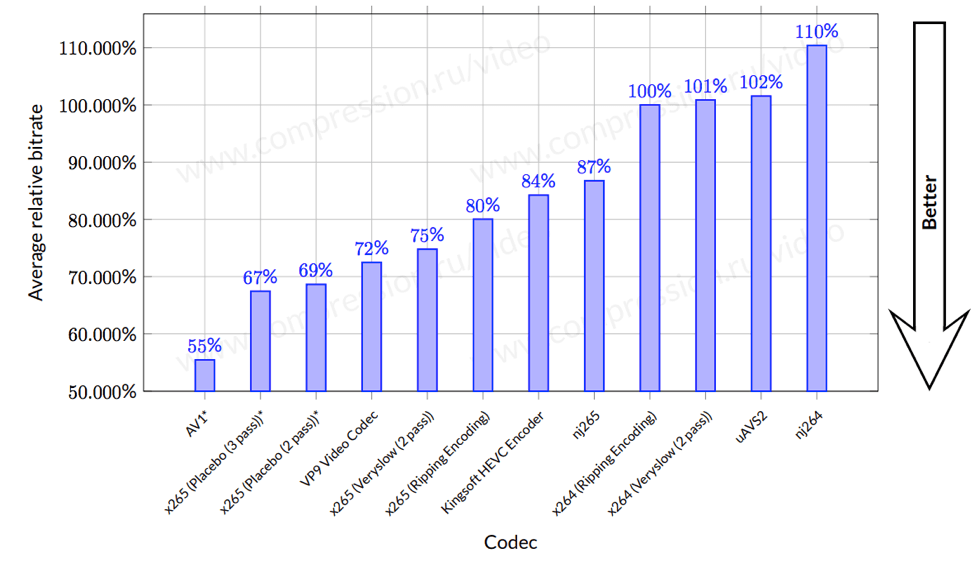
    The second reason we love AV1 is that it delivers better compression technology than even high-efficiency codecs – about 30% better, according to a Moscow State University study. For companies, that translates to smaller video files that are faster and cheaper to transmit and take up less storage space in their data centers. For the rest of us, we’ll have access to gorgeous, high-definition video through the sites and services we already know and love.

    Open source, all the way down

    AV1 is well on its way to becoming a viable alternative to patented video codecs. As of June 2018, the AV1 1.0 specification is stable and available for public use on a royalty-free basis. Looking for a deep dive into the specific technologies that made the leap from Daala to AV1? Check out our Hacks post, AV1: next generation video – The Constrained Directional Enhancement Filter.


    每天推荐一个 GitHub 优质开源项目和一篇精选英文科技或编程文章原文,欢迎关注开源日报。交流QQ群:202790710;微博:https://weibo.com/openingsource;电报群 https://t.me/OpeningSourceOrg

←上一页
1 … 226 227 228 229 230 … 262
下一页→

Proudly powered by WordPress