• 开源镜像
  • 开源沙龙
  • 媛宝
  • 猿帅
  • 注册
  • 登录
  • 息壤开源生活方式平台
  • 加入我们

开源日报

  • 2018年8月1日:开源日报第146期

    1 8 月, 2018

    每天推荐一个 GitHub 优质开源项目和一篇精选英文科技或编程文章原文,欢迎关注开源日报。交流QQ群:202790710;微博:https://weibo.com/openingsource;电报群 https://t.me/OpeningSourceOrg


    今日推荐开源项目:《我居然在 GitHub 上学数学 Awesome Math》传送门:GitHub链接

    推荐理由:在 GitHub 上面,不仅有面包,还有数学。这次的这个项目就是收录了包括拓扑,概论与统计和各种分析在内的各种听起来就很复杂的数学知识,对于数学爱好者来说可能很不错,但是如果拿去应付考试的话就……想要拿高分的同学们可以考虑多看看书而不是看这个,顺带一提,这里面还有关于机器学习的智能数学与深度学习两个方面的内容。


    今日推荐英文原文:《How to get better at writing CSS》作者:Thomas Lombart

    原文链接:https://medium.freecodecamp.org/how-to-get-better-at-writing-css-a1732c32a72f

    推荐理由:介绍如何更好的写 CSS 代码的方法

    How to get better at writing CSS

    Let’s not beat around the bush: writing great CSS code can be painful.
    A lot of developers don’t want to do CSS development. I can do everything you want, but nah! No CSS.

    When I was building apps, CSS was the part I never enjoyed. But you can’t escape it, right? I mean, we are so focused on the user experience and the design nowadays that we just can’t skip that part.

    When beginning a project, all is working fine. You have a few CSS selectors : .title input #app, easy peasy.

    But when your app gets bigger and bigger, it starts to look awful. You’re confused about your CSS selectors. You find yourself writing things like div#app .list li.item a. You keep writing the same code over and over again. You throw all your code at the end of your file because you just don’t care, CSS sucks. And there you go: 500 lines of CSS completely unmaintainable.

    I have a purpose today: to make you better at writing CSS. I want you to take a look at your older projects and think : oh boy, how could I ever write something like this?

    Ok, you might think, you have a point. But what about CSS frameworks? That’s what they stand for, isn’t it? That’s how we write good CSS code.

    Sure. But there are some downsides:

    • It often leads to commonplace design.
    • It can be difficult to customize or go beyond CSS frameworks.
    • You have to learn them before using them.

    And after all, you landed on this article and there’s a reason for that, right? So without further ado, let’s learn how to get better at CSS.

    Note: this is not an article about how to design beautiful apps. It’s about learning how to write maintainable CSS code and how to organize it.

    SCSS

    I’ll be using SCSS in my examples.

    SCSS is a CSS pre-processor. Basically, it is a superset of CSS: it adds some cool features like variables, nesting, imports, and mixins.

    I’ll talk about what features we are going to use right away.

    Variables

    You can have variables with SCSS. The main benefit: reusability. Let’s assume that you have a palette of colors for your app. Your primary color is blue.

    So you put blue everywhere: the background-color of your button, the color of your title, links. BLUE EVERYWHERE.

    And all of a sudden, you don’t like blue. You prefer green.

    • Without variables: change all the lines where you put your blue color.
    • With variables: just change the variable 😉
    // Declare a variable
    $primary-color: #0099ff;
    // References a variable
    h1 {
      color: $primary-color;
    }

    Nesting

    You can also nest your code with SCSS. So this snippet

    h1 {
      font-size: 5rem;
      color: blue;
    }
    h1 span {
      color: green;
    }

    can become this:

    h1 {
      font-size: 5rem;
      color: blue;
      
      span {
        color: green;
      }
    }

    Much more readable, isn’t it? You spend less time writing complex selectors with nesting.

    Partials and imports

    When it comes to maintainability and readability, it’s impossible to keep all your code in one big file. It can fit your needs when experimenting or building a small app, but at a professional level…don’t even try. Luckily for us, SCSS allows us to do so.

    You can create partial files by naming the file with a leading underscore: _animations.scss , _base.scss , _variables.scss , and so on.

    As for importing, well use the @import directive. For example, this is what you can do:

    // _animations.scss
    @keyframes appear {
      0% {
        opacity: 0;
      }
      100% {
        opacity: 1;
      }
    }
    // header.scss
    @import "animations";
    h1 {
      animation: appear 0.5s ease-out;
    }

    Ah! you might think. You made a mistake here! It’s _animations.scss , not animations 😉

    Nope. SCSS is smart enough to know you’re talking about a partial file when you name them that way.

    And that’s all we need to know about variables, nesting, partials, and import. SCSS has some more features like mixins, inheritance, and other directives ( @for , @if , …) but I won’t cover them here.

    If you want to know more about it, check their docs. They’re well-written and easy to understand.

    Organizing CSS Code: The BEM Methodology

    I can’t remember how many times I used to give catch-all terms to my CSS classes. You know: .button .page-1 .page-2 .custom-input .

    We often don’t know how to name things. And yet it’s important. What if you were building an app and you decided for some reasons to set it aside for some months? Or worse, what if someone takes back the project? If your CSS code hasn’t been properly named, it will be hard to know what you’re talking about at a glance.

    BEM helps us solving this problem. BEM is a naming convention and stands for Block Element Modifier.

    This methodology can make our code structured, more modular, and reusable. Now let’s explain what is a block, an element, and a modifier.

    Blocks

    Think of the block as a component. Remember when you played Legos as a kid? Well, let’s go back in time.

    How would you build a simple house? You’d need a window, a roof, a door, some walls, and that’s it. Well those are our blocks. They are meaningful on their own.

    Naming: the block name : .block
    Examples: 
    .card , .form , .post , .user-navigation

    Elements

    Now how would you build a window with your legos? Well maybe some of them look like frames, and when you assemble four of them, you get a beautiful window. Those are our elements. They are the parts of a block, and they are needed in order to build our block. But out of their block, they are useless.

    Naming: block name + __ + element name : .block__element
    Examples: 
    .post__author ,.post__date ,.post__text

    Modifiers

    Now that you’ve built your window, you may want to have a green one or a small one. Those are things called modifiers. They are flags on blocks or elements and they are used to change behaviors, apparences, and so on.

    Naming: block name OR element name + -- + modifier name: .block__element--modifier , .block--modifier
    Examples: .post--important , .post__btn--disabled

    Some notes

    • When you’re using BEM, you name with classes and only classes. No IDs, no tags. Just classes.
    • Blocks/elements can be nested into other blocks/elements, but they have to be completely independent. Remember that word: independent.
      So don’t put margins on a button because you want it to be placed under a title, otherwise your button will be tied to your title. Use utility classes instead.
    • Yes, your HTML file will be overloaded, but don’t worry — it’s a small downside compared to what BEM brings you.

    An example

    Here is an exercice for you. Go around to your favorite or most used websites and try to think of what would be the blocks, elements, and modifiers.

    For example, this is what I imagine on the Google store:
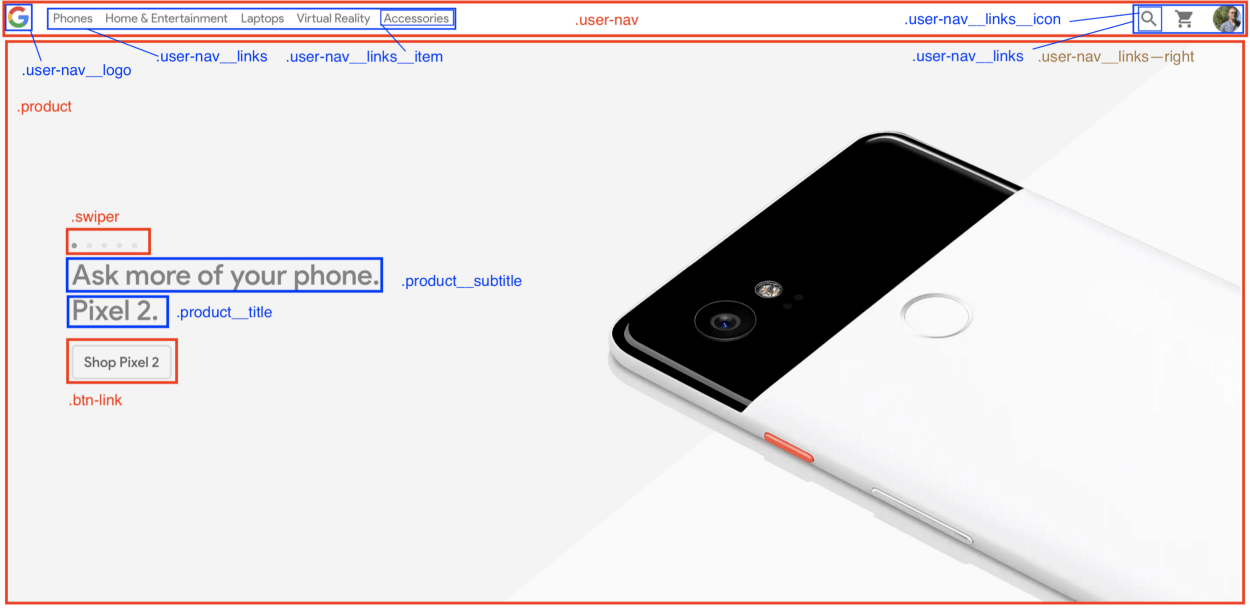
    It’s your turn. Be curious and think about what people could have done better. As always, you have to search by yourself, experiment, and create to get better at what you want.

    Organizing CSS files: the 7–1 pattern

    Still with me? Great! Now let’s see how to organize CSS files. This part will really help you be more productive, and will allow you to instantly find where you have to modify your CSS code.

    And to do so, we’ll learn about the 7–1 pattern.

    Doesn’t look like anything to me, you might think.

    Trust me, it’s fairly simple. You have to follow 2 rules:

    1. Write all your partials in 7 different folders.
    2. Import them all in one main.scss file located at the root level. And that’s it.

    The 7 folders:

    • base: in here, put all your boilerplate code. By boilerplate, I mean all CSS code you’re gonna write each time you’ll start a new project. For example: typography rules, animations, utilities (by utilities, I mean classes like margin-right-large , text-center , …) and so on.
    • components: The name is explicit here. This folder contains all the components used to build your pages like your buttons, forms, swipers, popups, and so on.
    • layout: used to layout the different parts of your page, that is to say, your header, footer, navigation, section, your own grid, and more.
    • pages: You may sometimes have a page that has its own specific style, that stands out from what you do usually. Then put your style in the pages folder.
    • themes: If you have different themes for your app (dark mode, admin, and so on) put them in this folder.
    • abstracts: Put all your functions here, along with variables and mixins. In short, all your helpers.
    • vendors: what would be an app or a project without external libraries? Put in the vendors folder all files that don’t depend on you. You may want to add your Font Awesome file, Bootstrap, and stuff like that in here.

    The main file

    This is where you’ll import all your partials.

    @import abstracts/variables;
    @import abstracts/functions;
    @import base/reset;
    @import base/typography;
    @import base/utilities;
    @import components/button;
    @import components/form;
    @import components/user-navigation;
    @import layout/header;
    @import layout/footer;
    ...

    Yes. It seems overwhelming. But I knew you would think that. This architecture is adapted to larger projects, but not to small ones. So here is a version adapted to smaller projects.

    First, you won’t need the vendors folder. Just put all your external CSS code in a link tag placed in a header. Then you can skip the themes folder, as you’ll probably have just one theme for your app. Finally, you won’t have a lot of specific styles for your pages, so you can skip that one too. Great, 4 folders left!

    Then, you have two choices:

    1. You want your CSS code to be organized and follow the 7–1 pattern, so you keep the abstracts , components , layout and base folders.
    2. You prefer having one big folder where you put all your partials files and your main.scss file, so you’ll have something similar to this:
    sass/
      _animations.scss
      _base.scss
      _buttons.scss
      _header.scss
      ...
      _variables.scss
      main.scss

    It’s up to you.

    You convinced me! But how do I use it ? I mean, browsers don’t support scss files do they?

    Good catch! This is our final step, and we’re going to learn how to compile SCSS to CSS right away.

    From SCSS to CSS

    For this, you’ll need Node.js and NPM (or Yarn).

    We’ll use a package called node-sass that allows us to compile .scss files to .css files.

    Its CLI (Command Line Interface) is fairly easy to use:

    node-sass <input> <output> [options]

    There are multiple options out there, but we’ll use only two:

    • -w: watch a directory or a file. It means that node-sasswaits for any changes in your code and when they happen, it automatically compiles to CSS. Really useful when developing.
    • --output-style: what will be the output of your CSS file. It can be one among these values: nested|expanded|compact|compressed . We’ll use it to build your CSS file.

    If you’re a curious person (which I hope you are, a developer should be curious!), go here for the full docs.

    Now we know what tools we’ll use. The rest is even simpler. Just follow these steps:

    • Create your project: mkdir my-app && cd my-app
    • Initialize it: npm init
    • Add the node-sass library: npm install node-sass --save-dev
    • Create your folders, your index.htmland your main.scss files:
    touch index.html
    mkdir -p sass/{abstracts,base,components,layout} css
    cd sass && touch main.scss
    • Add these scripts in the package.json file:
    {
      ...
      "scripts": {
        "watch": "node-sass sass/main.scss css/style.css -w",
        "build": "node-sass sass/main.scss css/style.css --output-style compressed"
      },
      ...
    }
    • Add the link that contains the reference to your compiled CSS file in the head tag of your index.html file:
    <!DOCTYPE html>
    <html lang=”en”>
    <head>
      <meta charset=”UTF-8">
      <meta name=”viewport” content=”width=device-width, initial-scale=1.0">
      <meta http-equiv=”X-UA-Compatible” content=”ie=edge”>
      <link rel=”stylesheet” href=”css/style.css”>
      <title>My app</title>
    </head>
    <body>
      <h1 class=”heading”>My app</h1>
    </body>
    </html>

    And that’s it, you’re ready to go! Run npm run watch when you’re coding and open the index.html file in your browser. If you want your CSS to be minified, just run npm run build.

    Bonuses

    Adding live reload

    You may want to add live reload to be even more productive instead of manually reloading your local index.html file.

    Once again, follow these simple steps:

    • Install the live-server package: npm install -g live-server
      Note: it’s a global package
    • Add npm-run-all to your project dependencies: npm install npm-run-all --save-dev: it will allow us to run many scripts at the same time.
    • Add these scripts to package.json:
    {
      ...
      "scripts": {
        "start": "npm-run-all --parallel liveserver watch",
        "liveserver": "live-server",
        "watch": "node-sass sass/main.scss css/style.css -w",
      },
      ...
    }

    Now when you run npm run start, you can immediately see your changes without touching anything.

    Adding autoprefixer

    We set development tools, great! Now, Let’s talk about build tools and especially one : Autoprefixer.
    It is a tool (especially a postcss plugin) that parses CSS and add vendor prefixes to CSS rules using values from Can I Use.

    Indeed, when you build a website, you may use new features that are not fully supported in all browers. Therefore, vendor prefixes are the solution to add support for these features.

    This is an example of what it looks like :

    -webkit-animation-name: myAnimation;
    -moz-animation-name: myAnimation; 
    -ms-animation-name: myAnimation;

    You guessed it, it’s tedious to write. That’s why we need autoprefixer to make our CSS code compliant with browsers without adding an extra layer of complexity.

    So what we’ll do code-wise to build our CSS is :

    1. Compile all our SCSS files into one main CSS file.
    2. Prefix our CSS file with Autoprefixer.
    3. Compress our CSS file

    This will be the last steps, so bear with me, you’re nearly done ?

    • Add two dependencies, postcss-cli and autoprefixer : npm install autoprefixer postcss-cli --save-dev
    • Modify the build script and add these scripts to package.json :
    {
      ...
      "scripts": {
        "start": "npm-run-all --parallel liveserver watch",
        "liveserver": "live-server",
        "watch": "node-sass sass/main.scss css/style.css -w",
        "compile": "node-sass sass/main.scss css/style.css",
        "prefix": "postcss css/style.css --use autoprefixer -o css/style.css",
        "compress": "node-sass css/style.css css/style.css --output-style compressed",
        "build": "npm-run-all compile prefix compress"
      ...
    }

    Now when you runnpm run build , your CSS code is compressed and vendor prefixes have been added! Awesome isn’t it?

    But you know what’s even more awesome? I set up a repo for you just in case you want to quickly get started ?

    If you want to know how I apply these skills to my portfolio, check out this repo too and the result. I hope you will understand more with those examples.


    Aaaaaand, that’s all for today! Now you’re ready to write maintainable, modular, and reusable CSS code.

    I hope you liked this article. If so, feel free to give me feedback in the comments. Bye bye until next time!


    每天推荐一个 GitHub 优质开源项目和一篇精选英文科技或编程文章原文,欢迎关注开源日报。交流QQ群:202790710;微博:https://weibo.com/openingsource;电报群 https://t.me/OpeningSourceOrg

  • 2018年7月31日:开源日报第145期

    31 7 月, 2018

    每天推荐一个 GitHub 优质开源项目和一篇精选英文科技或编程文章原文,欢迎关注开源日报。交流QQ群:202790710;微博:https://weibo.com/openingsource;电报群 https://t.me/OpeningSourceOrg



    今日推荐开源项目:《它说它比隔壁 Django 要快 Vibora》传送门:GitHub链接

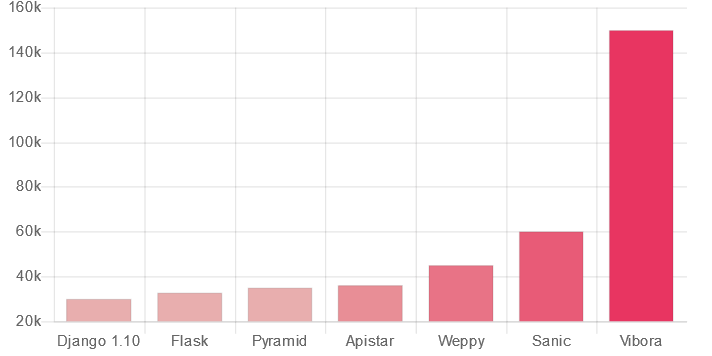
    推荐理由:Vibora 和 Django 一样是一个 Python Web 框架,相信有不少同学都已经知道 Django 了,但是这次新推出的 Vibora 的 RPC(Requests per second)是 Django 的五倍之多,可见其性能的差异……虽然说五倍是不是有点太夸张了呢……顺带一提,RPC 实际上又可以称为吞吐率,吞吐率是服务器并发处理能力的量化描述,单位是 requests/s ,指的是某个并发用户数下单位时间内处理的请求数。

    RPC 对比:


    今日推荐英文原文:《Goodbye Python. Hello Go. 》作者: Jake Wilson

    原文链接:https://thinkfaster.co/2018/07/goodbye-python-hello-go/

    推荐理由:介绍了用 Go 代替 Python 的优点和缺点

    Goodbye Python. Hello Go.

    I’ve been using Go for a lot of the tasks where I used to use Python.

    Some examples:

    • Processing Cloudfront logs stored in S3
    • Moving Terabytes of files between buckets and/or regions in S3
    • Matching up files between our database records and S3 ensuring everything is in sync.

    Most are one-off tasks which is why a scripting language has been ideal. The program needs to be written quickly and then most likely thrown away. You might be able to re-use some code, but usually you’re doing something new and unique.

    Below are some advantages of using Go for these tasks instead of Python.

    Having a Compiler is Nice

    I make stupid mistakes in Python constantly. I misname a variable or a function or I pass in the wrong arguments. Your devtools can catch some of these, but they usually require special setup. I’ve never been able to configure pylint easily, and I’m not a fan of full blown IDEs that require their own configuration.

    The worst is if you mistype a variable that’s hidden behind conditional logic. Your script might run for hours before triggering the error, and then everything blows up, and you have to restart it.

    Unit tests would catch most of these, but it’s hard to get 100% code coverage, and I don’t want to spend time writing unit tests for a one-off script.

    Compiled languages make all these problems go away. The compiler catches all the silly things you miss. Because of this, I prefer languages like Go for anything over a couple hundred lines.

    Development Speed

    The flip side to having a compiler is that usually your development speed decreases. This is especially true with C/C++ and Java.

    Go is simple enough where I found the development speed hit to be minimal. Don’t get me wrong, I can still write code faster in Python, but I probably achieve 85% of my Python productivity in Go.

    85% isn’t bad when I consider how many fewer mistakes I’ll make with the benefit of the compiler.

    Better Parallelism

    As you probably know, Go was built from the ground-up for parallel execution.

    On my team, we usually need parallel programs because we’re dealing with a lot of data in S3 or in our database.

    If the task is IO bound (which many are), then we can successfully employ Python threads. But if it’s is CPU intensive, Python will restrict you with the Global Interpreter Lock.

    I also enjoy how simple things “just work” in multi-threaded Go without doing anything special. Ever had that problem where you Ctrl-C your multithreaded python code and it doesn’t do anything?

    Easier Deployment

    I like having a single binary. I usually run code on EC2 machines to give my scripts closer network proximity to S3 and to our database. With Python, I have to ensure all the packages I need are installed on the remote machine, and that one of my coworkers hasn’t installed anything conflicting.

    Virtualenvs solve most of this problem, but I still find Go easier.

    Usually I cross compile my code on my Mac to Linux, copy it to the remote machine, and I’m off and running. All my dependencies are contained in my binary.

    Consistent Styling

    At first, the gofmt tool annoyed me, particularly their choice of using tabs instead of spaces. I thought that was insane.

    But as I use it more, I’ve come to depend on it. I get free formatting right out of the box. All of my code is always styled consistently, regardless of what project I’m working on because the formatting is a feature of the standard Go tooling.

    I have to put in much more effort to get the same effect in Python. I have to configure pylint correctly and then ensure it’s used in every single project.

    Better Tooling

    Gofmt is just one example of a general theme. All of the editors I love – VSCode, vim, and Sublime Text, all have great Golang extensions that take advantage of the standard Go tooling.

    As a result I get intellisense similar to Java, but without using a real IDE. I’ve never come close to that ability with Python.

    Disadvantages

    Whenever I read posts criticizing Go, it’s usually because of the obvious features that are missing, like generics. I’ve never had much trouble with missing generics – you’d be surprised how much you can do with maps and slices, but I have had numerous other problems.

    Go is opinionated

    First, Go is probably the most opinionated language I’ve ever used. From forcing you to use tabs instead of spaces (assuming you’re using gofmt), to forcing you to use a certain directory structure, to making you code within the GOPATH environment variable, there are many features of Go which are not easy to change.

    One of the reasons it’s so easy to learn is because you can’t change these features. If you don’t want to export every name that starts with a capital letter, then too bad for you. Fortunately, for me none of these are deal breakers, but I could understand if they are for others.

    Python is much more flexible.

    Somewhat Poor library support

    It’s not fair to compare Python and Go in this arena. Go is a lot newer after all, but I’m still baffled when I find features that Go doesn’t support out of the box. I’m even more baffled when people on StackOverflow post code which should be a built-in function, and then act like there’s no problem with every person copying and pasting that code into their project.

    2 examples that come to mind in the last couple of years:

    • Sorting a slice (fortunately this was made easier in Go 1.8)
    • Math.round only working with integers and not allowing you to Round to float values (e.g. if you want to round to the nearest .5). And before Go 1.10 there wasn’t even a math.round.

    Granted, some of these are because Go doesn’t have generics, and some of them are because I think the developers of Go are following the strategy of only adding things to the standard libraries which are absolutely necessary.

    I understand both of these points, but it’s still annoying when you encounter some trivial functionality that you have to code yourself.

    Hopefully as the language continues to evolve, these pain points become fewer and fewer.


    每天推荐一个 GitHub 优质开源项目和一篇精选英文科技或编程文章原文,欢迎关注开源日报。交流QQ群:202790710;微博:https://weibo.com/openingsource;电报群 https://t.me/OpeningSourceOrg

  • 2018年7月30日:开源日报第144期

    30 7 月, 2018

    每天推荐一个 GitHub 优质开源项目和一篇精选英文科技或编程文章原文,欢迎关注开源日报。交流QQ群:202790710;微博:https://weibo.com/openingsource;电报群 https://t.me/OpeningSourceOrg


    今日推荐开源项目:《有意思的动画 Sprite.js》传送门:GitHub链接

    推荐理由:这个跨平台的绘图模型可以让你制作出一些看起来相当有意思的动画,它不仅可以单独使用,还可以与 D3 ,Proton 或者 Matter.js 结合,创造出更加复杂的动画效果。此外它还推出了微信小程序版本,正在开发微信小程序的同学在动画这方面可以考虑一下它。

    D3:https://github.com/d3/d3

    Proton:https://github.com/a-jie/Proton

    与 D3 结合:

    与 Proton 结合:


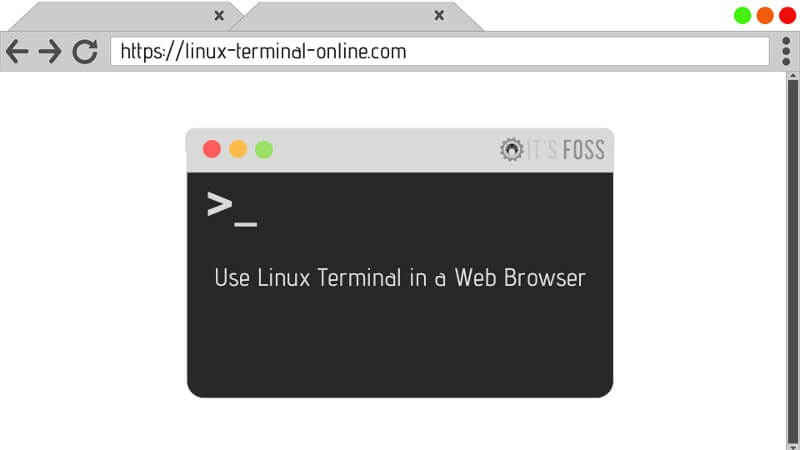
    今日推荐英文原文:《Best Online Linux Terminals and Online Bash Editors》作者:Ankush Das

    原文链接:https://itsfoss.com/online-linux-terminals/

    推荐理由:介绍了一些好用的在线 Linux 终端和 Bash 编辑器

    Best Online Linux Terminals and Online Bash Editors

    No matter whether you want to practice Linux commands or just analyze/test your shell scripts online, there’s always a couple of online Linux terminals and online bash compilers available.

    This is particularly helpful when you are using the Windows operating system. Though you can install Linux inside Windows using Windows Subsystem for Linux, using online Linux terminals are often more convenient for a quick test.

    But where can you find free Linux console? Which online Linux shell should you use?

    Fret not, to save you the hassle, here, we have compiled a list of the best online Linux terminals and a separate list of best online bash compilers for you to look at.

    Note: All of the online terminals support several browsers that include Google Chrome, Mozilla Firefox, Opera and Microsoft Edge.

    Best Online Linux Terminals To Practice Linux Commands

    In the first part, I’ll list the online Linux terminals. These websites allow you to run the regular Linux commands in a web browser so that you can practice or test them. Some websites may require you to register and login to save your sessions.

    1. JSLinux

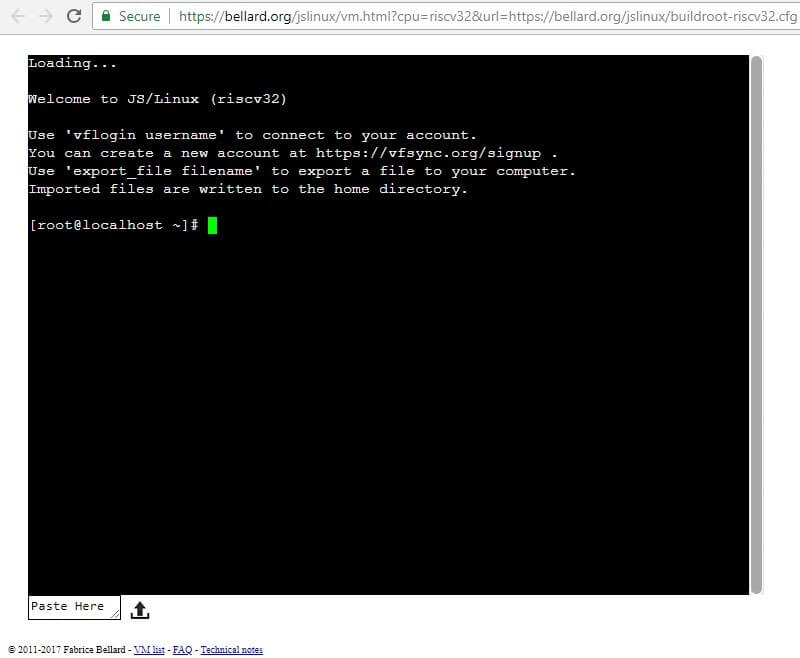
    JSLinux is more like a complete Linux emulator instead of just offering you the terminal. As the name suggests, it has been entirely written in JavaScript. You get to choose a console-based system or a GUI-based online Linux system. However, in this case, you would want to launch the console-based system to practice Linux commands. To be able to connect your account, you need to sign up first.

    JSLinux also lets you upload files to the virtual machine. At its core, it utilizes Buildroot (a tool that helps you to build a complete Linux system for an embedded system).

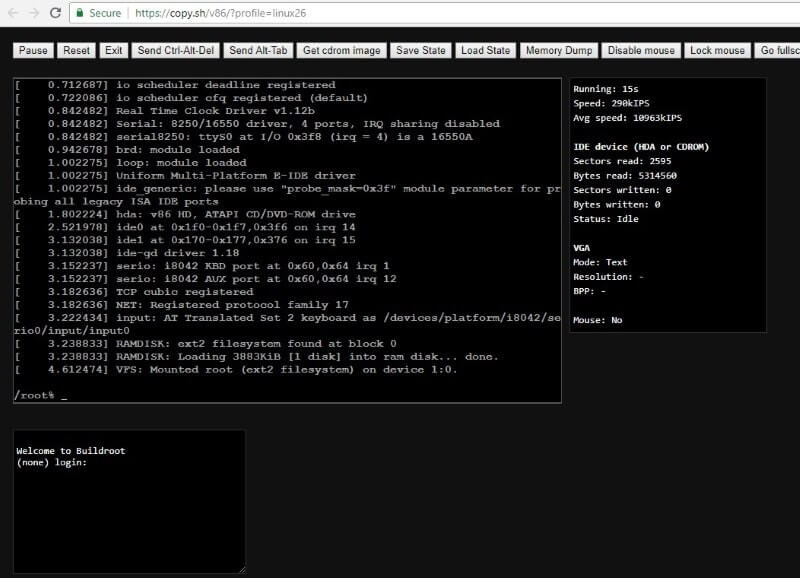
    2. Copy.sh

    Copy.sh offers one of the best online Linux terminals which is fast and reliable to test and run Linux commands.

    Copy.sh is also on GitHub – and it is being actively maintained, which is a good thing. It also supports other Operating Systems, which includes:

    • Windows 98
    •  KolibriOS
    • FreeDOS
    • Windows 1.01
    • Archlinux

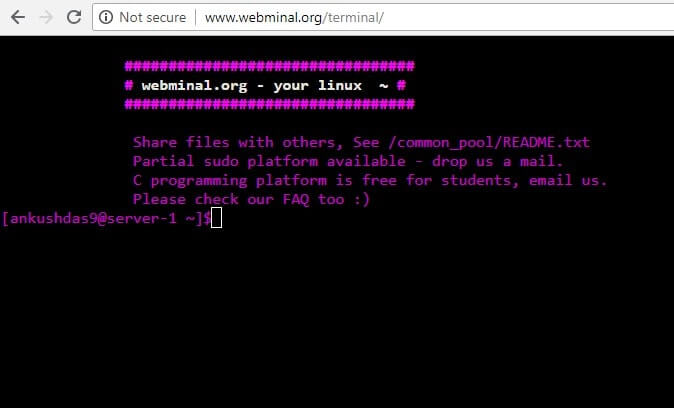
    3. Webminal

    Webminal is an impressive online Linux terminal – and my personal favorite when it comes to a recommendation for beginners to practice Linux commands online.

    The website offers several lessons to learn from while you type in the commands in the same window. So, you do not need to refer to another site for the lessons and then switch back or split the screen in order to practice commands. It’s all right there – in a single tab on the browser.

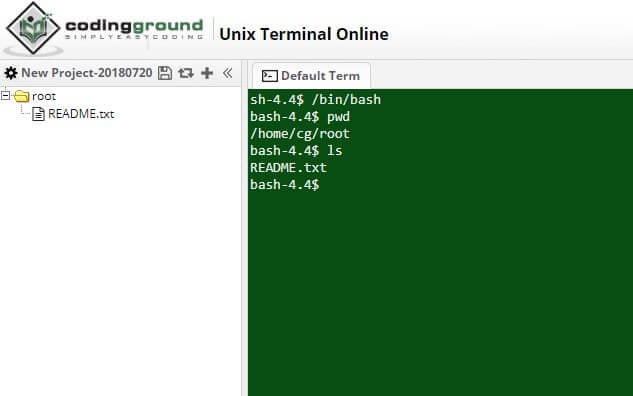
    4. Tutorialspoint Unix Terminal

    You might be aware of Tutorialspoint – which happens to be one of the most popular websites with high quality (yet free) online tutorials for just about any programming language (and more).

    So, for obvious reasons, they provide a free online Linux console for you to practice commands while referring to their site as a resource at the same time. You also get the ability to upload files. It is quite simple but an effective online terminal. Also, it doesn’t stop there, it offers a lot of different online terminals as well in its Coding Ground page.

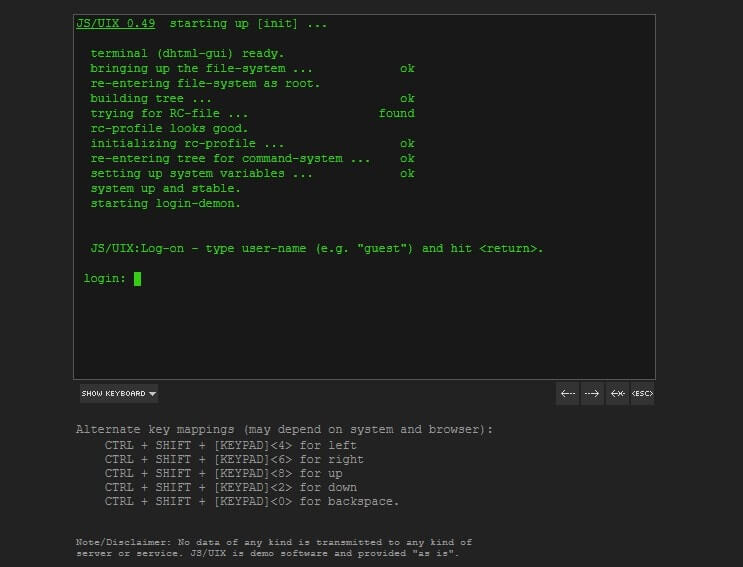
    5. JS/UIX

    JS/UIX is yet another online Linux terminal which is written entirely in JavaScript without any plug-ins. It contains an online Linux virtual machine, virtual file-system, shell, and so on.

    You can go through its manual page for the list of commands implemented.

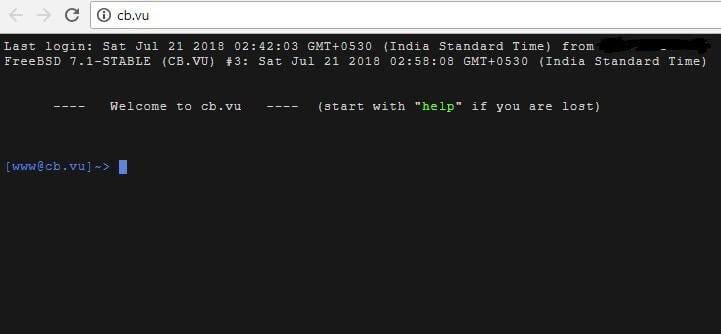
    6. CB.VU

    If you are in for a treat with FreeBSD 7.1 stable version, cb.vu is a quite simple solution for that.

    Nothing fancy, just try out the Linux commands you want and get the output. Unfortunately, you do not get the ability to upload files here.

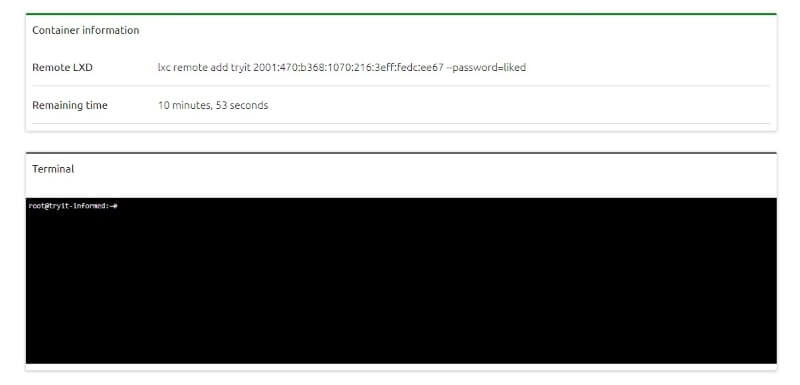
    7. Linux Containers

    Linux Containers lets you run a demo server with a 30-minute countdown on which acts as one of the best online Linux terminals. In fact, it’s a project sponsored by Canonical.

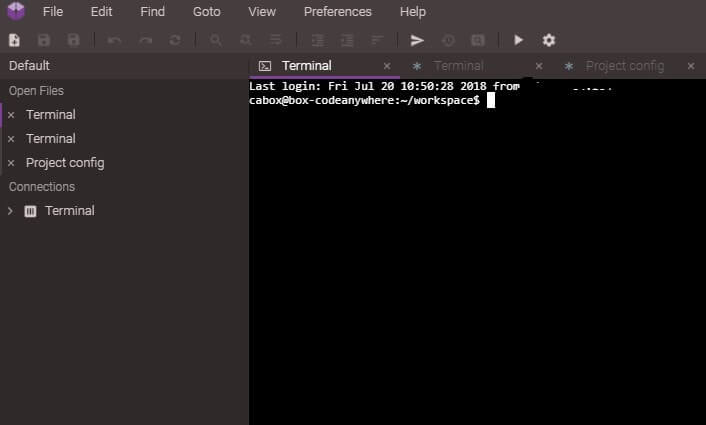
    8. Codeanywhere

    Codeanywhere is a service which offers cross-platform cloud IDEs. However, in order to run a free Linux virtual machine, you just need to sign up and choose the free plan. And, then, proceed to create a new connection while setting up a container with an OS of your choice. Finally, you will have a free Linux console at your disposal.

    Best Online Bash Editors

    Wait a sec! Are the online Linux terminals not good enough for Bash scripting? They are. But creating bash scripts in terminal editors and then executing them is not as convinient as using an online Bash editor.

    These bash editors allow you to easily write shell scripts online and you can run them to check if it works or not.

    Let’s see here can you run shell scripts online.

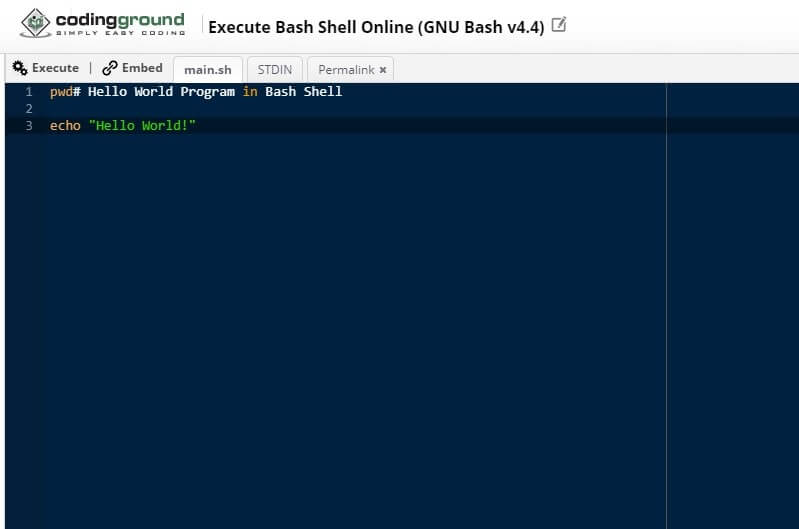
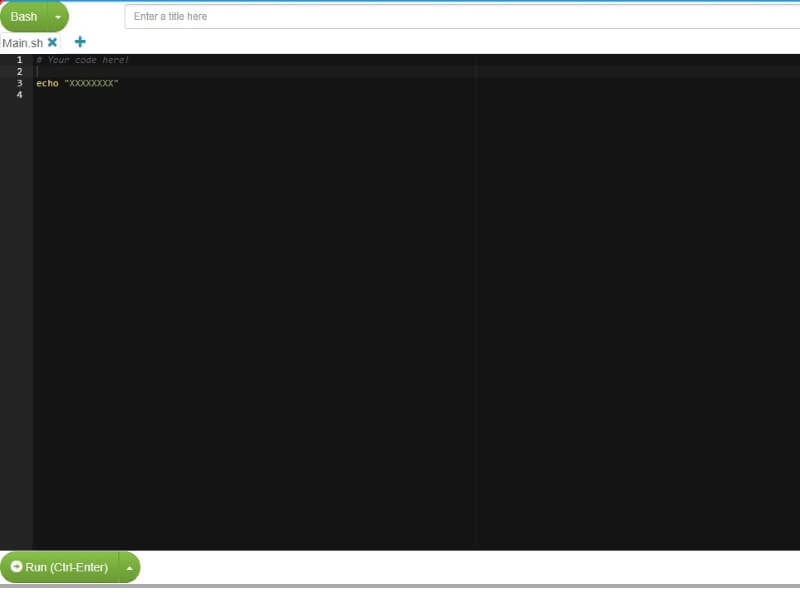
    Tutorialspoint Bash Compiler

    As mentioned above, Tutorialspoint also offers an online Bash compiler. It is a very simple bash compiler to execute bash shell online.

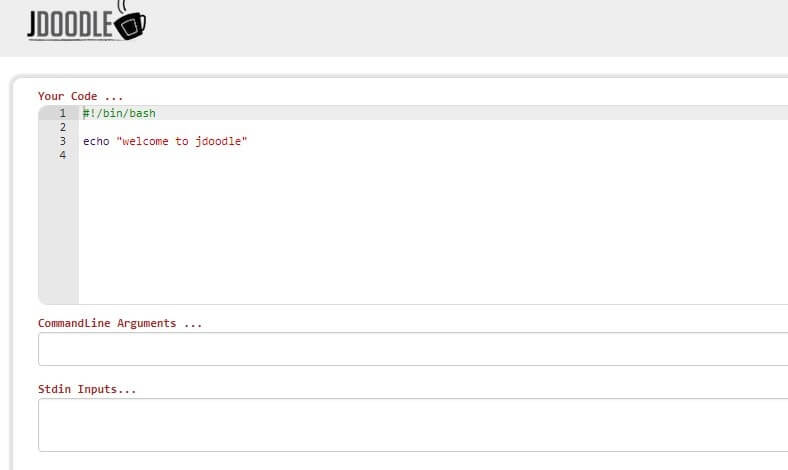
    JDOODLE

    Yet another useful online bash editor to test Bash scripts is JDOODLE. It also offers other IDEs, but we’ll focus on bash script execution here. You get to set the command line arguments and the stdin inputs, and would normally get the result of your code.

    Paizo.io

    Paizo.io is a good bash online editor that you can try for free. To utilize some of its advanced features like task scheduling, you need to first sign up. It also supports real-time collaboration, but that’s still in the experimental phase.

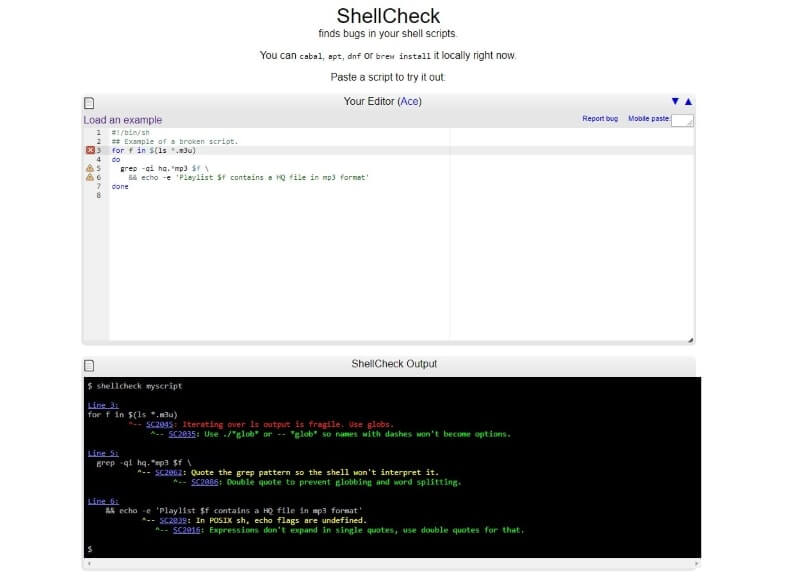
    ShellCheck

    An interesting Bash editor which lets you find bugs in your shell script. It is available on GitHub as well. In addition, you can install ShellCheck locally on supported platforms.

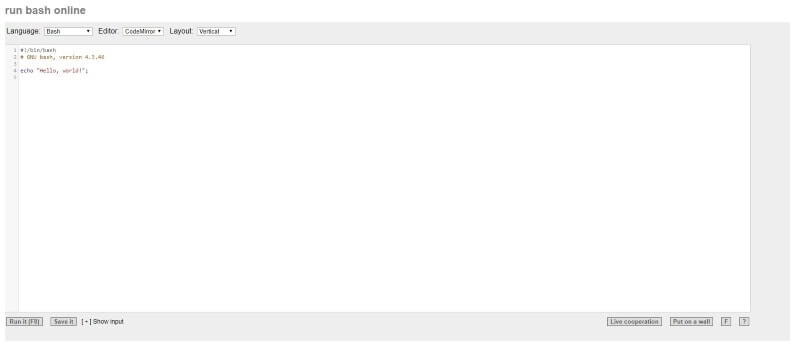
    Rextester

    If you only want a dead simple online bash compiler, Rextester should be your choice. It also supports other programming languages.

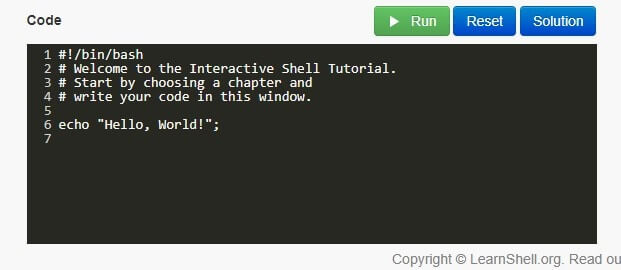
    Learn Shell

    Just like Webminal, Learnshell provides you with the content (or resource) to learn shell programming and you could also run/try your code at the same time. It covers the basics and a few advanced topics as well.

    Wrapping Up

    Now that you know of the most reliable and fast online Linux terminals & online bash editors, learn, experiment, and play with the code!

    We might have missed any of your favorite online Linux terminals or maybe the best online bash compiler which you happen to use? Let us know your thoughts in the comments below.


    每天推荐一个 GitHub 优质开源项目和一篇精选英文科技或编程文章原文,欢迎关注开源日报。交流QQ群:202790710;微博:https://weibo.com/openingsource;电报群 https://t.me/OpeningSourceOrg
  • 2018年7月29日:开源日报第143期

    29 7 月, 2018

    每天推荐一个 GitHub 优质开源项目和一篇精选英文科技或编程文章原文,欢迎关注开源日报。交流QQ群:202790710;微博:https://weibo.com/openingsource;电报群 https://t.me/OpeningSourceOrg

    今日推荐开源项目:《JS+CSS+移动应用= NativeScript》传送门:GitHub链接

    推荐理由:这个项目是一个用 JS 和 CSS 构建移动应用的框架,并且可以跨平台使用一套 JS 代码提供给安卓和 iOS 两个版本。它内部还集成了 Vue 和 Angular,如果之前用过它们,现在用这个框架会很好使的,在做安卓和 iOS 开发的朋友可以看一看。


    今日推荐英文原文:《Javascript Equality》作者:Devin Pierce

    原文链接:https://medium.com/@devinmpierce/javascript-equality-a30095ffe4c7

    推荐理由:JavaScript 中的相等,== 和 === 究竟有什么不同,这篇文章讲了在 JS 中各种各样的相等与不相等

    Javascript Equality

    Javascript is host to a number of strange and unpredictable equality rules, that can lead to unexpected, hard to track bugs if you’re not aware of them.

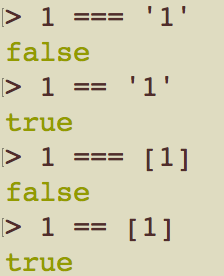
    First, let’s differentiate the equality operators, == and === . The main distinction between these two operators is that while the ===, or “strict equality” operator only sees equality between values of the same data type, the== , or “abstract equality” operator attempts to “coerce” values into the same data type, as seen here:

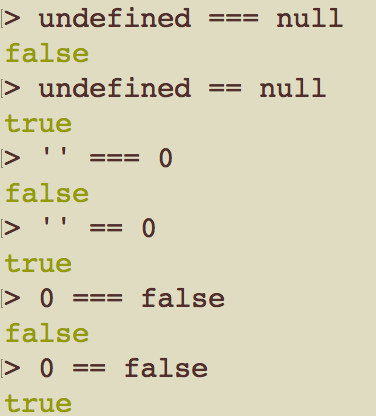
    It also coerces certain “falsy” values into equality:

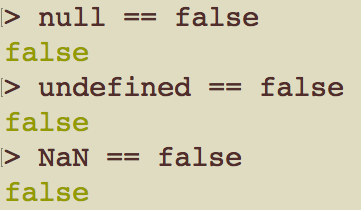
    While others do not:

    In my opinion, the implementation of == seems a bit inconsistent and unintuitive, and it is perhaps best avoided in most cases. In addition to avoiding using it wrong based on incorrect assumptions, your code will be more clear and readable if you handle type conversions explicitly yourself. If someone sees Number(string) === number , it is clear that one side expects a string. Likewise, value === undefined || value === null specifies that the value is expected to be one of the two. Ultimately, the small degree of brevity allowed by == does not seem worth the loss of clarity that it introduces, at least not to me.

    If you’re not familiar with all of Javascript’s interesting interpretations of “falsiness,” that’s up next.

    In Javascript, the following values evaluate to false:

    • false The Boolean, false
    • undefined The default, unassigned value, or lack of value
    • null Represents the same concept as undefined, but will only occur when it is assigned purposefully
    • '' An empty string
    • 0 The number zero
    • NaN Not a Number, the result of certain impossible math operations

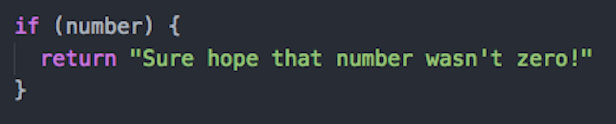
    The inclusion of '’and 0have always struck me as odd. While asserting the lack of value, such as with undefined and null , is a pretty standard logical operation, assuming an empty string or a zero value to be exceptional seems very presumptuous on the part of Javascript’s creators. Suppose you have a condition asserting the presence of a number, as opposed to undefined or NaN, but it is possible for that number to have evaluated to zero at some point. The conditional will not work properly unless you are more explicit in the condition expression.

    NaN is the value returned when math goes wrong. In Javascript, rather than throwing an error, you will get NaN if you try to do something like 1 * ‘a' , Math.sqrt(-1) , or Number('a') (trying to convert a letter string into a number.)

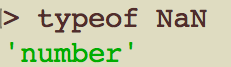
    NaN has a very odd equality quirk of it’s own. Despite it’s name, NaN itself is actually of the data type ‘number’.

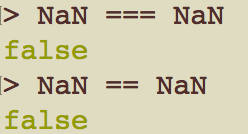
    But what does NaN think about being “not a number?”

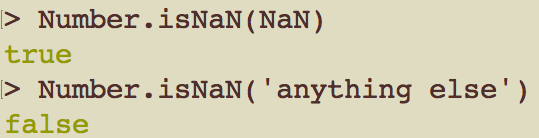
    A value ashamed of it’s own identity. Tragic. But seriously, if we need to assert that a value is NaN, and it refuses to tell us, then what are we supposed to do? Well, fortunately there’s a function designed specifically for this very purpose. It’s contained in the Number object.

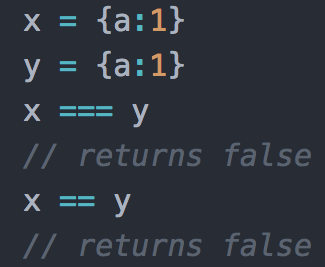
    The last, and most complicated equality rule I’m going to cover here is object equality. Consider this case:

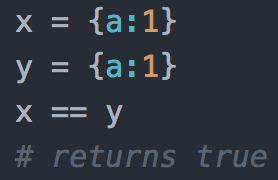
    Two identical objects, and yet they will not be considered equal. Why not? Let’s try testing the same idea, but this time with Ruby hashes:

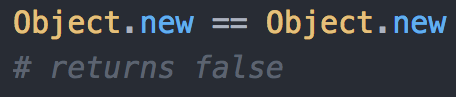
    Ruby will figure it out. What’s different about Javascript? To answer that question, first consider another example from Ruby:

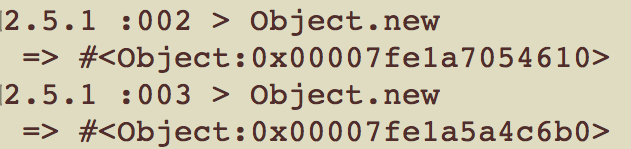
    Two brand new, blank Ruby objects, containing nothing but what they inherit from their class, are identical in every way but one:

    Their object ids differentiate them. They may be identical in their content, but they are still two separate instances, representing two distinct entities.

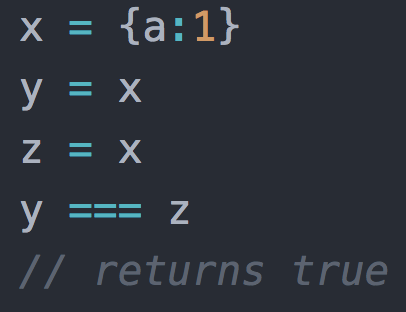
    Compared to Ruby, Javascript objects effectively do double duty, both as the language’s dictionary-style key:value data structure, but also as it’s implementation of object-orientation instances, which means it’s necessary for them to exist as distinct entities, even when they are identical in value. So when Javascript’s equality operators check two objects, they are actually checking if the two operands are references to the same object.

    Still, asserting key-value-equality between two separate objects is useful and sometimes necessary. The standard Javascript library actually has no way of doing this. But key-value-equality functions are common in Javascript libraries, including test frameworks, where they are particularly needed. Node.js also has it’s own implementation.

    You may also write your own key-value-equality function. One thing to be careful of though: suppose you write a function that simply asserts the equality of two objects’ keys and primitive values. This is known as “shallow-equality.” This assertion will once again fail if there are any nested objects that are not referentially equal, even if their content is identical. To truly assert that a nested object structure is fully equal, even if none of the object references are the same, you will need what is known as a “deep-equality” function. This will need to utilize a recursive approach to ensure total key-value-equality to an indeterminate level.


    每天推荐一个 GitHub 优质开源项目和一篇精选英文科技或编程文章原文,欢迎关注开源日报。交流QQ群:202790710;微博:https://weibo.com/openingsource;电报群 https://t.me/OpeningSourceOrg
←上一页
1 … 223 224 225 226 227 … 262
下一页→

Proudly powered by WordPress