• 开源镜像
  • 开源沙龙
  • 媛宝
  • 猿帅
  • 注册
  • 登录
  • 息壤开源生活方式平台
  • 加入我们

开源日报

  • 2018年8月8日:开源日报第153期

    8 8 月, 2018

    每天推荐一个 GitHub 优质开源项目和一篇精选英文科技或编程文章原文,欢迎关注开源日报。交流QQ群:202790710;微博:https://weibo.com/openingsource;电报群 https://t.me/OpeningSourceOrg


    今日推荐开源项目:《从 Youtube 上下载 youtube-dl》传送门:GItHub链接

    推荐理由:这是一个能让你通过命令行下载 Youtube 视频的项目,有了这个你就不需要去找提供 Youtube 下载的别的网站了,它还提供了很多(非常多)的设置,如果你有特殊的需求的话可以去那一大堆设置里面找一找兴许能找到……大概。顺带一提,在用这个下载之前,上 Youtube 还是要各位各凭本事的。


    今日推荐英文原文:《Do code comments suck?》作者:Sam Fare

    原文链接:https://medium.com/@samuel.fare/do-code-comments-suck-abd99103c45a

    推荐理由:给你的代码写注释!没有注释的代码真的很难看懂,但是有的时候,比起写注释,从最开始给变量或者函数起个简单易懂的名字更为重要。

    Do code comments suck?

    What is a comment?

    A comment is a line in your source code file that can be read by developers but is ignored by compilers and interpreters.

    What’s the point of that?

    Code is often hard to understand. Adding descriptive text allows developers to explain their code to those who will maintain the code afterwards.

    Need proof? Take the uncommented code below:

    let o_fac = new BGF()
    let bg_a = o_fac.build("ALIEN");
    bg_a.i_health(100);
    bg_a.i_armor(50);
    bg_a.i_attack(50);
    game.v_Add(bg_a);

    This block of code does several things. The result is that it is difficult for programmers to easily understand what it does.

    Now consider the same code with comments.

     // create the alien object.
    let o_fac = new BGF()
    let bg_a = o_fac.build("ALIEN");
    
    // set Alien details.
    bg_a.i_health(100);
    bg_a.i_armor(50);
    bg_a.i_attack(50);
    
    //add to game
    game.v_Add(bg_a);

    Doesn’t this seem so much easier to understand than before the comments were added? This is because a comments describe what the code is doing. whereas the code is describing how it is happening.

    As developers we like to think in ‘what’s and not ‘how’s.

    So comments help us clarify our code?

    Yes.

    That sounds like a good thing…

    Yes it is. However there are many ways to clarify our ideas in code. Of these ideas, comments are the worst.

    So what makes comments ‘the worst’?

    Well there are a few things. The first is that there is no guarantee that someone will read them. In fact, most developers just don’t bother. Our tooling is even against us. Take a look at this Webstorm screen cap. The default colour scheme makes comments a light easy-to-ignore grey:
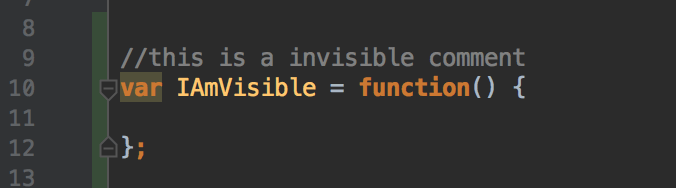
    Some code with a hidden comment.

    So why not just write a blog called ‘Please Read Comments’?

    That’s a good question. It’s because you can’t trust the comments you read.

    The executable code you write is a source of truth. We know it’s true because we are actually running it. Comments are an alternative source of truth but there is nothing to guarantee the truthfulness of them.

    Just like any other system where there are multiple sources of truth it is common for a developer to update one source and forget to update another. Can you honestly say that when you change code you read through all the surrounding comments to ensure that they remain correct?

    Well no, it’s an easy thing to forget.

    Exactly. So always make sure your systems have one source of truth.

    Ok I accept, comments aren’t perfect. Nothing in this world is. Are you saying you have a better plan?

    Yes. You show me your comment, and I’ll show you a better alternative.

    What about a comment that describes what a variable is, are you saying that it isn’t good to clarify what your variables are for?

    Clarifying what variables do is super important. That’s why we give them names. If you give your variable a meaningful name then you have no need for a comment. Better still, every place that the well-named variable is used the maintainer of your code is reminded what it’s for. There’s no need to stop reading and refer back to it’s definition. Look how much nicer the second code is.

    // Bad.
    let x; // Variable to hold id of car being displayed.
    // Good.
    let displayedCarId;

    This applies to functions too doesn’t it?

    Yes. Give functions and their parameters names that describe what they do. If you do that, there will be no need for a function header style comment.

    So what about your code from earlier, those comments describe blocks of code that achieve functionality together. That can’t be helped by good naming, can it?

    Yes it can. A few lines of code that do one thing together can be extracted into well named functions. Have a look:

    let alien = alienFactory
                  .createAlien()
                  .withStats({
                      health: 100,
                      armor: 50,
                      attack: 50
                    })
                  .getAlien();
    
    game.add(alien);

    See how the code to create an alien is now in a function that describes what it does? Same story with the stats code. The code above needs no further explanation, it does what it says.

    Using a function here also has the advantage that details are hidden. The maintainer doesn’t have to worry about how the functions work if it’s not relevant to the particular change that they are making.This makes the code easier to understand.

    The maintainer also can’t ignore the function name as they might ignore a comment. The function name is the code and thus to read the code they must read the function call and the function name.

    So what about if I have to heavily optimise some code, can I use comments then?

    Yes.

    Wait, what?

    We are Software Engineers. Engineers have tools. Comments are tools, so are functions, so are variable names. No tool fixes every problem. No tool is completely redundant. When the code can’t be improved through structuring it in a way that makes it understandable, comments are the best choice.

    So comments are good?

    No, comments suck! Most comments that I see in the wild are inappropriate. In particular comments are used as an excuse for:

    • Bad naming of variables or functions.
    • Excusing functions for being too long or too complex.

    However the rule that comments suck is a rule of thumb not a absolute. There are rare uses for comments too.


    每天推荐一个 GitHub 优质开源项目和一篇精选英文科技或编程文章原文,欢迎关注开源日报。交流QQ群:202790710;微博:https://weibo.com/openingsource;电报群 https://t.me/OpeningSourceOrg

  • 2018年8月7日:开源日报第152期

    7 8 月, 2018

    每天推荐一个 GitHub 优质开源项目和一篇精选英文科技或编程文章原文,欢迎关注开源日报。交流QQ群:202790710;微博:https://weibo.com/openingsource;电报群 https://t.me/OpeningSourceOrg



    今日推荐开源项目:《React 组件库工具 Compositor Kit》传送门:GitHub链接

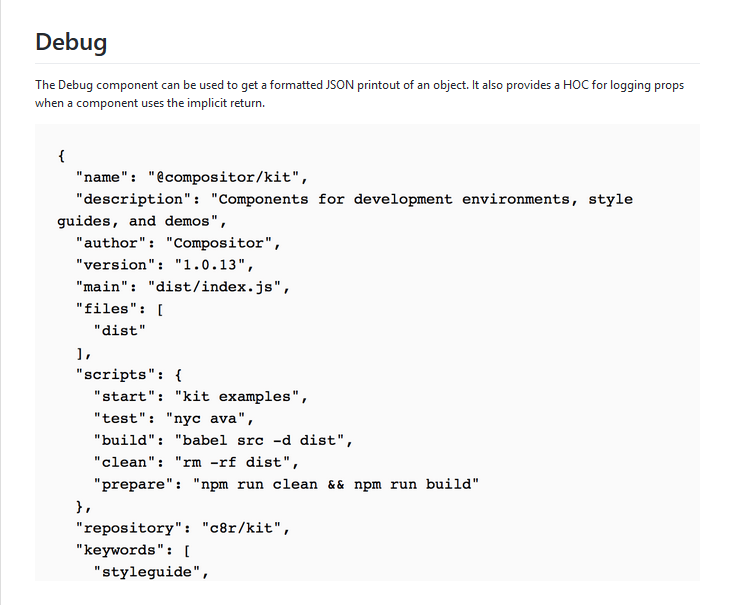
    推荐理由:这是一个可以帮助你管理手上的 React 组件,你可以很方便的通过它来改变每个组件的属性然后实际的打开它们进行测试,它还有很多测试用的组件:Debug 可以提供对象的 JSON 格式的输出用来调查它的属性,而 XRay 提供网格背景和组件的轮廓范围等等,有兴趣的朋友可以自己试试看。


    今日推荐英文原文:《Why THIS is so powerful in JavaScript》作者:Kristy Burge

    原文链接:https://medium.com/@thefrontendcat/10-things-you-will-eventually-learn-about-javascript-projects-efd7646b958a

    推荐理由:介绍了 JavaScript 中关于 this 的二三事

    Why THIS is so powerful in JavaScript

    What’s “this” all about anyways?

    In vanilla JavaScript, this is a topic that is confusing to newbies. (See what I did there?!)

    Especially to those of us learning to code from a non-programming background.

    I worked in accounting. We used acronyms like JIB, AP, or AR. But the dictionary easily defines these terms.

    The concept of “this” can be thoroughly confusing for beginners learning JavaScript as their first programming language because of the nuances.

    I remember learning about objects for the first time and ‘this’ being used in creating constructor functions, but never truly explained.

    So, let’s change that.

    Everything’s clear as mud, right?!

    What is this?

    Here’s my unofficial, no jibberish definition:

    “this” is a keyword used in JavaScript that has a special meaning depending on the context it’s being used

    The reason “this” is so confusing when you’re first learning JavaScript is because the context of “this” changes depending on how it’s used.

    You might want to think of ‘this’ as a dynamic keyword because it changes depending on the context.

    I like this excerpt from Ryan Morr’s article, Understanding Scope and Context in JavaScript:

    Context is always the value of the this keyword which is a reference to the object that “owns” the currently executing code. — Ryan Morr

    But context around ‘this’ is not really the same thing as execution context.

    So, when we want to use the ‘this’ keyword, we are using that keyword to reference an OBJECT. But which object?

    Let’s dig into some examples:

    1. When “this” points to the Window object (Global)
    2. Methods on objects
      When “this” is used as a method on an object
      When “this” is used as a method on a nested object
      When “this” is used as a method on an object (arrow functions)
    3. Function contexts
    4. The ‘new’ keyword — why this is so powerful
      Creating instances of an object from a constructor function with “new” keyword

    1. When “this” points to the Window object

    If you try to refer to ‘this’ outside of a function, it will refer to the GLOBAL context (a.k.a. the Window object in the browser).

    Functions that sit in the global context (not as a method on an object) will point the ‘this’ keyword back to the Window object.

    Try it for yourself.

    console.log(this);
    
    // returns the Window object
    // Window {	postMessage: ƒ, 
    // blur: ƒ, 
    // focus: ƒ, 
    // close: ƒ, 
    // frames: Window, …}
    
    function myFunction() {
    	console.log(this);
    }
    
    // Call the function
    myFunction(); 
    
    // returns the Window object! 
    // Window {	postMessage: ƒ, 
    // blur: ƒ, 
    // focus: ƒ, 
    // close: ƒ, 
    // frames: Window, …}

    2. Methods on Objects

    When “this” is inside an object, it refers to the object itself (*)

    Let’s say you create an object and attach a method. When ‘this’ is used inside the method, ‘this’ returns the ‘dog’ object.

    var dog = {
      name: 'Chester',
      breed: 'beagle',
      intro: function(){
        console.log(this);
      }
    };
    
    dog.intro();
    
    // returns the dog object and all of it's properties and methods
    // {name: "Chester", breed: "beagle", intro: ƒ}
    //    breed:"beagle"
    //    intro:ƒ ()
    //    name:"Chester"
    //    __proto__:Object

    Nested Objects

    The value of ‘this’ can get more convoluted based on nesting in objects.

    Anytime you have an object nested inside another object, and then ‘this’ points to the object on which the method is defined.

    Example:

    var obj1 = {
      hello: function() {
        console.log('Hello world');
        return this;
      },
      obj2: {
          breed: 'dog',
          speak: function(){
                console.log('woof!');
                return this;
            }
        }
    };
     
    console.log(obj1);
    console.log(obj1.hello());  // logs 'Hello world' and returns obj1
    console.log(obj1.obj2);
    console.log(obj1.obj2.speak()); // logs 'woof!' and returns obj2

    * But wait! Arrow functions are TOTALLY different.

    I’m not kidding.

    Remember when I said that if you use ‘this’ as a method inside an object, the ‘this’ keyword gets assigned to that object?

    Arrow functions don’t work like that.

    Instead, ‘this’ points to the Window object / global context.

    Try the code below in the console:

    var objReg = {
      hello: function() {
        return this;
      }
    };
     
    var objArrow = {
      	hello: () => this
    };
     
    objReg.hello(); // returns the objReg object that we expect
    objArrow.hello(); // returns the Window object!

    According to MDN: “An arrow function expression has a shorter syntax than a function expression and does not have its own this, arguments, super, or new.target. These function expressions are best suited for non-method functions, and they cannot be used as constructors.”

    So, listen to the experts and don’t use arrow functions as methods on your objects!

    See, it wasn’t that bad.


    3. When ‘this’ is used in a normal function context:

    When a function sits in the global scope, then the value of ‘this’ is the Window object. Think of it as the test function being a method on the context in which it sits (the window object).

    So, it makes sense then that ‘this’ will point to the Window object.

    Example:

    function test() {
      console.log('hello world');
      console.log(this);
    }
    
    test();
    
    // hello world
    // Window {postMessage: ƒ, blur: ƒ, focus: ƒ, close: ƒ, frames: Window, …}

    However, if a function is executed in strict mode, ‘this’ will return undefined because strict mode does not allow default binding.

    Try the below code in your console:

    function test() {
      'use strict';
      return this;
    }
    
    console.log( test() );
    // returns undefined, not the Window object … interesting

    So remember: if you want to use ‘this’ in strict mode, ‘this’ must be defined by the execution context because ‘this’ is not automatically attached to any object (not even the Window object).

    When ‘this’ is called from a function declared outside of an object:

    You can assign a property to the object and assign it to the function chase().

    The ‘dog’ variable doesn’t have any methods … until I create dog.foo and assign it to the chase() function.

    Invoke the new foo method (which calls chase() to execute).

    The values of ‘this’ inside of chase() point to the object ‘dog’ which called the function.

    But, chase() cannot be called without being assigned to an object first. Or it will return undefined.

    var dog = {
      breed: 'Beagles',
      lovesToChase: 'rabbits'
    };
    
    function chase() {
      console.log(this.breed + ' loves chasing ' + this.lovesToChase + '.'); 
    //   console.log(this);
    }
    
    dog.foo = chase;
    dog.foo(); // returns Beagles loves chasing rabbits.
    
    chase(); // returns undefined because when run in the global context, window object does not have these properties defined

    In this context, the function chase() returns undefined because when run in the global context, ‘this’ points to the window object by default and does not have the properties (‘breed’ or ‘lovesToChase’) defined on that object.


    4. The ‘new’ keyword and why ‘this’ is so powerful as you continue your JavaScript journey

    It’s useful to use the keyword “this” when creating constructor functions for objects because that allows the method to work on any object.

    A constructor function allows us to define an object (like Number or String, except it has its own special properties and methods).

    I love dogs, so let’s create a dog object type and store some information inside of it.

    function Dog(breed, name, friends){
        this.breed = breed;
        this.name = name;
        this.friends = friends;	
        this.intro = function() {
            console.log(`Hi, my name is ${this.name} and I’m a ${this.breed}`);
            return this;
        }; 
    }

    It’s important to note that ‘this’ does not have a value while in the constructor function.

    However, each time you create a new instance of the Dog object, the value of ‘this’ will point to the object you just instantiated. It will NOT point to the Dog prototype itself.

    Use the ‘new’ keyword with the name of the object type and pass any required parameters when instantiating the new instance of the object.

    It’s similar to doing something like this:

    var str = new String('Hello world');
    /*******
    You could do the above, but it's best to avoid it (instead do like the variable str2 below)
    (because JavaScript knows that anything inside single or double quotes has the type of String)
    Same goes for other primitives. This is for example purposes only. 
    NOTE: To clarify -- the only time I ever use the new keyword in practice is when I use a function constructor and create my own object type.
    *******/
    
    var str2 = 'Hello world';
    // both have the prototype of String and inherit all the String methods and properties
    // Using the Dog prototype, create a new instance 
    var chester = new Dog('beagle', 'Chester', ['Gracie', 'Josey', 'Barkley']);
    chester.intro();        // returns Hi, my name is Chester and I'm a beagle
    console.log(chester);   // returns Dog {breed: "beagle", name: "Chester", friends: Array(3), intro: ƒ}
    
    // Here's another example:
    var City = function(city, state) {
      this.city = city || "Phoenix";
      this.state = state || "AZ";
      this.sentence = function() {
        console.log(`I live in ${this.city}, ${this.state}.`);
      };
    };
    
    var phoenix = new City(); // use the default parameters
    console.log(phoenix); // returns the phoenix object (an instance of the City prototype)
    phoenix.sentence(); // returns "I live in Phoenix, AZ."
    
    var spokane = new City('Spokane', 'WA');
    console.log(spokane); // returns the spokane object (another instance of the City prototype)
    spokane.sentence(); // returns "I live in Spokane, WA."

    The ‘new’ keyword is important!

    It changes the context of ‘this’ to the instance that it created from the Object constructor function.

    That’s why when ‘this’ is used inside a constructor function, it doesn’t point to it’s object prototype. It actually points to the new instance of that object type.

    So, what makes THIS so powerful in this context, you’re asking?

    It allows us to scale applications and make repeatable code.

    Think about your social media accounts.

    Each account could be an object based off a prototype called ‘Friend’. Each time a new account is created, it inherits the methods and properties from its prototype, while passing in unique information like name, password, interests, job, etc.

    // Constructor Function
    var Friend = function(name, password, interests, job){
      this.fullName = name;
      this.password = password;
      this.interests = interests;
      this.job = job;
    };
    
    function sayHello(){
       // uncomment the console.log to see the object that 'this' points to
      //  console.log(this); 
      return `Hi, my name is ${this.fullName} and I'm a ${this.job}. Let's be friends!`;
    }
    
    // Create one or multiple instances of the Friend prototype with the keyword 'new'
    var john = new Friend('John Smith', 'badpassword', ['hiking', 'biking', 'skiing'], 'teacher'); 
    
    console.log(john); 
    
    // Assign the function to the greeting key on the john object
    john.greeting = sayHello; 
    
    // Call the the new method
    console.log( john.greeting() ); 
    
    // Remember, you can't call sayHello() as a function; it will return "Hi, my name is undefined and I'm a undefined. Let's be friends!"
    // Because the function's context is global and the window object does NOT have the keys that belong to the Friend prototype
    console.log( sayHello() ) ;

    Conclusion

    There’s one more way that ‘this’ can take a value in JavaScript. That’s with call, apply, and bind.

    I intentionally didn’t go over call(), apply(), and bind() in this article (since this is a 101 level article); but just know that you can set the value of ‘this’ using these three methods.

    That’s a post for another time.

    The reason I’m leaving it out of this article is because it caused me more confusion around ‘this’ as a newbie until I understood objects more deeply.

    I hope this article helped clear up some confusion around the keyword THIS in JavaScript.

    It took me some time to understand the concept and I’m still learning.

    The most helpful thing for me was to keep reading and keep practicing.

    You’ll reach the point when everything will finally click!


    每天推荐一个 GitHub 优质开源项目和一篇精选英文科技或编程文章原文,欢迎关注开源日报。交流QQ群:202790710;微博:https://weibo.com/openingsource;电报群 https://t.me/OpeningSourceOrg

  • 2018年8月6日:开源日报第151期

    6 8 月, 2018

    每天推荐一个 GitHub 优质开源项目和一篇精选英文科技或编程文章原文,欢迎关注开源日报。交流QQ群:202790710;微博:https://weibo.com/openingsource;电报群 https://t.me/OpeningSourceOrg


    今日推荐开源项目:《自带 UI 的流派 Flutter》传送门:GitHub链接

    推荐理由:这是一个移动应用 SDK(软件开发工具包),可以拿去开发安卓和 iOS 的 app。而且它还自带了不少小部件和动作 API,足够让你做出一个好看的界面;除此之外它还有加载速度快等优点,虽然它还是个测试中的项目,不过开发移动 app 的朋友可以期待一下它的发展了。


    今日推荐英文原文:《6 DevOps mistakes to avoid》作者: Daniel Oh

    原文链接:https://opensource.com/article/18/8/getting-started-devops-6-mistakes-avoid

    推荐理由:DevOps 是一套过程,方法与系统的统称,一般用于促进开发,技术运营和质量保障三方面之间的沟通协作与整合。现在很多时候在一个项目的发展中都会用到 DevOps 去增强沟通合作,这篇文章就介绍了六个在使用 DevOps 中会遇见的错误。

    6 DevOps mistakes to avoid

    As DevOps is increasingly recognized as a pillar of digital transformation, CIOs are becoming more enthusiastic about how DevOps and open source can transform enterprise culture. DevOps refers to a group of concepts that, while not all new, have catalyzed into a movement that is rapidly spreading throughout the technical community. Just look at the number of books and resources that are available to help you take your DevOps initiatives and practices to the next level.

    Still, many people don’t fully understand what DevOps means. And without the right knowledge and understanding, many DevOps initiatives fail to get off the ground. Here are six common mistakes—and how to avoid them—as you start your DevOps journey.

    1. Creating a single DevOps team

    The most common mistake organizations make is to create a brand-new team, tasked with addressing all the burdens of a DevOps initiative. It’s complicated enough for development and operations to deal with a new team that must coordinate with everyone. DevOps started with the idea of improving collaboration between teams involved in the development of software such as security, QA, and DBMS; it’s not just about development and operations. If you create a new team to address DevOps, you’re just making things more complicated.

    The secret sauce here is simplicity. Focus on culture by fostering a mindset of automation, quality, and stability. For example, you might involve everyone in a conversation about your architecture, or about common problems found in production environments in which all relevant players need to be aware of how their work affects others. DevOps is not just about a single dedicated team, but about organizations that evolve together as a DevOps team.

    2. Focusing on too many tools

    There are many tools available to help you implement DevOps initiatives. Don’t start your DevOps strategy by arguing about and selecting a bunch of different tools. You will soon see it is difficult to find the right tools for team and organizational processes because each team (developers, IT operations, security, etc.) will want to use a specific tool for their DevOps practices, even if it makes it harder to collaborate with other teams. Also, new tools are emerging all the time—there’s even one that will help integrate other tools.

    Of course, you need to have the right tools for agile software development, continuous integration, deployment, version control, and so on. Not having the right tools can prevent teams from seeing the maximum benefit from their DevOps efforts. But simply buying a continuous deployment tool or deploying application containers isn’t enough to transition your organization to DevOps.

    You will likely hear some vendors claim to have the perfect tool for your DevOps practices, but take an agnostic approach and keep in mind that there’s no single tool that can possibly cover everything you need.

    3. Focusing on speed rather than safety and quality

    Many organizations adopt a CI/CD strategy as a part of their DevOps initiatives because they need to reduce the amount of time it takes them to develop and deploy new application code. However, DevOps practitioners say that increasing speed at the expense of security and quality is a big mistake. Even if you build, test, and deploy new applications much faster in production, what if those applications don’t function as intended?

    Many enterprises make the mistake of not following their security practices well in advance

    To keep security and quality high, development teams should conduct testing as early in the development process as possible. More importantly, prove that the release candidate is ready for continuous delivery before deploying.

    4. Allowing too many branches

    In agile software development and DevOps practices, software (trunk) should always be deployable so developers are able to check into trunk—not feature branches—at least daily. If the build breaks, it can be fixed in ten minutes and a new developer can be on-boarded in one day, with a production-like environment on their developer workstation.

    It can be difficult to break developers out of the habit of using branches if they are accustomed to a traditional waterfall environment, but limiting branches can be highly beneficial. If you favor trunk-based development, have developers work at all times in a mostly coherent, single version of your codebase.

    According to Puppet’s 2017 State of DevOps report: “We found that having branches or forks with very short lifetimes (less than a day) before merged into trunk, and less than three active branches in total, are important aspects of continuous delivery, and all contribute to higher performance. So does merging code into trunk or master on a daily basis.”

    DevOps automates many aspects of how you treat your code between developers’ machines and production environments. Keeping many different conceptual flavors of your codebase around makes DevOps concerns an order of magnitude more complex.

    5. Not involving the security team

    DevOps involves more than simply putting the development and operations teams together; it is a continuous process of software development and automation, including security, audit, and compliance. Many enterprises make the mistake of not following their security practices well in advance.

    In fact, a CA Technologies survey found that security concerns were the number-one obstacle to DevOps, cited by 38% of respondents. In the same vein, the Puppet survey found that high-performing DevOps teams “spend 50% less time remediating security issues than low performers.” Clearly, these high-performing teams have found ways to communicate their security objectives and to build security early into phases of their development process.

    The DevOps practitioner should understand the processes, evaluate the controls, and identify the risks. In the end, security is always a part of DevOps practices like DevSecOps. For example, if you have any security issues in production, you can address them within your DevOps pipeline through the tools that the security team already uses. DevOps and security practices must be strictly followed. There should be no compromises.

    6. Not preparing for culture change

    Once you have the right tools for DevOps practices, you will probably face a new foundational challenge: Trying to make your teams use the tools for faster development, automated testing, continuous delivery, and monitoring. Is your Dev or Ops culture is ready for the changes?

    For example, agile methodologies generally mandate that you ship new code once a week, or even once a day. This can result in a lot of awkward, halting, and failed adoptions of agile. You face the same conceptual issues with DevOps. It can be like pulling onto a nice smooth new road with a car that has no gas.

    To avoid this, plan for a transition period. Leave enough time for the Dev and Ops teams to get used to your new practices. Make sure they have a chance to get hands-on experience with the new processes and tools. Before adopting DevOps, make sure you’ve matured your Dev and Ops culture.

    Conclusion

    Once you overcome the challenges and adopt DevOps practices, your organization will enjoy greater agility, improved customer satisfaction and employee morale, and increased productivity—all of which should help grow your business.


    每天推荐一个 GitHub 优质开源项目和一篇精选英文科技或编程文章原文,欢迎关注开源日报。交流QQ群:202790710;微博:https://weibo.com/openingsource;电报群 https://t.me/OpeningSourceOrg

  • 开源日报要在公众号上推出新功能啦!

    6 8 月, 2018

    从我们3月9日,日报正式起步以来,已经过了150天。我们在不断的改善,不断的提高,从在我们的工场里,到脸书,推特,Google+,微博,微信,大家现在能从各种不同的渠道,看到我们每天更新的日报。
    而现在,我们决定不仅仅只是增添大家阅读日报的途径,而是继续为日报加入新的内容——从明天开始,大家就可以在微信公众号上听到当日日报中英语原文的英语介绍朗读啦。目前负责朗读的是最近加入我们的张安锐同学,他是重庆大学刚毕业的研究生,希望大家可以多多支持他主持的这个新功能。
    个人介绍:张安锐,重大机械硕士,川大人工智能博士。托福一战105分。获奖学金十余万,国家级、省部级奖项100余项。曾公派到英国、迪拜等十余国家访学交流。擅长图像识别,大数据分析等领域。参加阿里巴巴等国际企业人工智能比赛获全球 top1% 成绩。

    新增功能外观:

←上一页
1 … 221 222 223 224 225 … 262
下一页→

Proudly powered by WordPress