• 开源镜像
  • 开源沙龙
  • 媛宝
  • 猿帅
  • 注册
  • 登录
  • 息壤开源生活方式平台
  • 加入我们

开源日报

  • 2018年8月12日:开源日报第157期

    12 8 月, 2018

    每天推荐一个 GitHub 优质开源项目和一篇精选英文科技或编程文章原文,欢迎关注开源日报。交流QQ群:202790710;微博:https://weibo.com/openingsource;电报群 https://t.me/OpeningSourceOrg

    今日推荐开源项目:《面试与黑话 FETopic》传送门:GitHub链接

    推荐理由:这个项目中收集了各种各样的面试问题,当然是技术上的,然后还有各种面试中的花样操作,比如问问题和自我介绍等等,这还不算重点,重点是里面还误打误撞的收录到了一份面试黑话全集,这个应该没有拒绝的理由了吧,看一看总是没有错的,毕竟只有把你和面试官的思维频率同调了才能更好的对话不是吗。


    今日推荐英文原文:《How to make a beautiful, tiny npm package and publish it》作者:Jonathan Wood

    原文链接:https://medium.freecodecamp.org/how-to-make-a-beautiful-tiny-npm-package-and-publish-it-2881d4307f78

    推荐理由:顾名思义,今天则是讲如何制作 npm 包的,如果想要先了解 Node.js 中的 npm 的话,可以去看看昨天的日报

    How to make a beautiful, tiny npm package and publish it

    If you’ve created lots of npm modules, you can skip ahead. Otherwise, we’ll go through a quick intro.

    TL;DR

    An npm module only requires a package.json file with name and version properties.

    Hey!

    There you are.

    Just a tiny elephant with your whole life ahead of you.

    You’re no expert in making npm packages, but you’d love to learn how.

    All the big elephants stomp around with their giant feet, making package after package, and you’re all like:

    “I can’t compete with that.”

    Well I’m here to tell that you you can!

    No more self doubt.

    Let’s begin!

    You’re not an Elephant

    I meant that metaphorically.

    Ever wondered what baby elephants are called?

    Of course you have. A baby elephant is called a calf.

    I believe in you

    Self doubt is real.

    That’s why no one ever does anything cool.

    You think you won’t succeed, so instead you do nothing. But then you glorify the people doing all the awesome stuff.

    Super ironic.

    That’s why I’m going to show you the tiniest possible npm module.

    Soon you’ll have hoards of npm modules flying out of your finger tips. Reusable code as far as the eye can see. No tricks — no complex instructions.

    The Complex Instructions

    I promised I wouldn’t…

    …but I totally did.

    They’re not that bad. You’ll forgive me one day.

    Step 1: npm account

    You need one. It’s just part of the deal.

    Signup here.

    Step 2: login

    Did you make an npm account?

    Yeah you did.

    Cool.

    I’m also assuming you can use the command line / console etc. I’m going to be calling it the terminal from now on. There’s a difference apparently.

    Go to your terminal and type:

    npm adduser

    You can also use the command:

    npm login

    Pick whichever command jives with you.

    You’ll get a prompt for your username, password and email. Stick them in there!

    You should get a message akin to this one:

    Logged in as bamblehorse to scope @username on https://registry.npmjs.org/.

    Nice!

    Let’s make a package

    First we need a folder to hold our code. Create one in whichever way is comfortable for you. I’m calling my package tiny because it really is very small. I’ve added some terminal commands for those who aren’t familiar with them.

    md tiny

    In that folder we need a package.json file. If you already use Node.js — you’ve met this file before. It’s a JSON file which includes information about your project and has a plethora of different options. In this tutorial, we are only going to focus on two of them.

    cd tiny && touch package.json

    How small can it really be, though?

    Really small.

    All tutorials about making an npm package, including the official documentation, tell you to enter certain fields in your package.json. We’re going to keep trying to publish our package with as little as possible until it works. It’s a kind of TDD for a minimal npm package.

    Please note: I’m showing you this to demonstrate that making an npm package doesn’t have to be complicated. To be useful to the community at large, a package needs a few extras, and we’ll cover that later in the article.

    Publishing: First attempt

    To publish your npm package, you run the well-named command: npm publish.

    So we have an empty package.json in our folder and we’ll give it a try:

    npm publish

    Whoops!

    We got an error:

    npm ERR! file package.json
    npm ERR! code EJSONPARSE
    npm ERR! Failed to parse json
    npm ERR! Unexpected end of JSON input while parsing near ''
    npm ERR! File: package.json
    npm ERR! Failed to parse package.json data.
    npm ERR! package.json must be actual JSON, not just JavaScript.
    npm ERR!
    npm ERR! Tell the package author to fix their package.json file. JSON.parse

    npm doesn’t like that much.

    Fair enough.

    Publishing: Strike two

    Let’s give our package a name in the package.json file:

    {
    "name": "@bamlehorse/tiny"
    }

    You might have noticed that I added my npm username onto the beginning.

    What’s that about?

    By using the name @bamblehorse/tiny instead of just tiny, we create a package under the scope of our username. It’s called a scoped package. It allows us to use short names that might already be taken, for example the tiny package already exists in npm.

    You might have seen this with popular libraries such as the Angular framework from Google. They have a few scoped packages such as @angular/core and @angular/http.

    Pretty cool, huh?

    We’ll try and publish a second time:

    npm publish

    The error is smaller this time — progress.

    npm ERR! package.json requires a valid “version” field

    Each npm package needs a version so that developers know if they can safely update to a new release of your package without breaking the rest of their code. The versioning system npm using is called SemVer, which stands for Semantic Versioning.

    Dont worry too much about understanding the more complex version names but here’s their summary of how the basic ones work:

    Given a version number MAJOR.MINOR.PATCH, increment the:

    1. MAJOR version when you make incompatible API changes,

    2. MINOR version when you add functionality in a backwards-compatible manner, and

    3. PATCH version when you make backwards-compatible bug fixes.

    Additional labels for pre-release and build metadata are available as extensions to the MAJOR.MINOR.PATCH format.

    https://semver.org

    Publishing: The third try

    We’ll give our package.json the version: 1.0.0 — the first major release.

    {
    "name": "@bamblehorse/tiny",
    "version": "1.0.0"
    }

    Let’s publish!

    npm publish

    Aw shucks.

    npm ERR! publish Failed PUT 402
    npm ERR! code E402
    npm ERR! You must sign up for private packages : @bamblehorse/tiny

    Allow me to explain.

    Scoped packages are automatically published privately because, as well as being useful for single users like us, they are also utilized by companies to share code between projects. If we had published a normal package, then our journey would end here.

    All we need to change is to tell npm that actually we want everyone to use this module — not keep it locked away in their vaults. So instead we run:

    npm publish --access=public

    Boom!

    + @bamblehorse/[email protected]

    We receive a plus sign, the name of our package and the version.

    We did it — we’re in the npm club.

    I’m excited.

    You must be excited.

    redacted in a friendly blue

    Did you catch that?

    npm loves you

    Cute!

    Version one is out there!

    Let’s regroup

    If we want to be taken seriously as a developer, and we want our package to be used, we need to show people the code and tell them how to use it. Generally we do that by putting our code somewhere public and adding a readme file.

    We also need some code.

    Seriously.

    We have no code yet.

    GitHub is a great place to put your code. Let’s make a new repository.

    README!

    I got used to typing README instead of readme.

    You don’t have to do that anymore.

    It’s a funny convention.

    We’re going to add some funky badges from shields.io to let people know we are super cool and professional.

    Here’s one that let’s people know the current version of our package:

    npm (scoped)

    This next badge is interesting. It failed because we don’t actually have any code.

    We should really write some code…

    npm bundle size (minified)
    Our tiny readme

    License to code

    That title is definitely a James Bond reference.

    I actually forgot to add a license.

    A license just let’s people know in what situations they can use your code. There are lots of different ones.

    There’s a cool page called insights in every GitHub repository where you can check various stats — including the community standards for a project. I’m going to add my license from there.

    Community recommendations

    Then you hit this page:

    Github gives you a helpful summary of each license

    The Code

    We still don’t have any code. This is slightly embarrassing.

    Let’s add some now before we lose all credibility.

    module.exports = function tiny(string) {
      if (typeof string !== "string") throw new TypeError("Tiny wants a string!");
      return string.replace(/\s/g, "");
    };
    Useless — but beautiful

    There it is.

    A tiny function that removes all spaces from a string.

    So all an npm package requires is an index.js file. This is the entry point to your package. You can do it in different ways as your package becomes more complex.

    But for now this is all we need.

    Are we there yet?

    We’re so close.

    We should probably update our minimal package.json and add some instructions to our readme.md.

    Otherwise nobody will know how to use our beautiful code.

    package.json

    {
      "name": "@bamblehorse/tiny",
      "version": "1.0.0",
      "description": "Removes all spaces from a string",
      "license": "MIT",
      "repository": "bamblehorse/tiny",
      "main": "index.js",
      "keywords": [
        "tiny",
        "npm",
        "package",
        "bamblehorse"
      ]
    }
    Descriptive!

    We’ve added:

    • description: a short description of the package
    • repository: GitHub friendly — so you can write username/repo
    • license: MIT in this case
    • main: the entry point to your package, relative to the root of the folder
    • keywords: a list of keywords used to discover your package in npm search

    readme.md

    @bamblehorse/tiny
    
    npm (scoped) npm bundle size (minified)
    
    Removes all spaces from a string.
    Install
    
    $ npm install @bamblehorse/tiny
    
    Usage
    
    const tiny = require("@bamblehorse/tiny");
    
    tiny("So much space!");
    //=> "Somuchspace!"
    
    tiny(1337);
    //=> Uncaught TypeError: Tiny wants a string!
    //    at tiny (<anonymous>:2:41)
    //    at <anonymous>:1:1
    Informative!

    We’ve added instructions on how to install and use the package. Nice!

    If you want a good template for your readme, just check out popular packages in the open source community and use their format to get you started.

    Done

    Let’s publish our spectacular package.

    Version

    First we’ll update the version with the npm version command.

    This is a major release so we type:

    npm version major

    Which outputs:

    v2.0.0

    Publish!

    Let’s run our new favorite command:

    npm publish

    It is done:

    + @bamblehorse/[email protected]

    Cool stuff

    Package Phobia gives you a great summary of your npm package. You can check out each file on sites like Unpkg too.

    Thank you

    That was a wonderful journey we just took. I hope you enjoyed it as much as I did.

    Please let me know what you thought!

    Star the package we just created here:

    ★ Github.com/Bamblehorse/tiny ★


    每天推荐一个 GitHub 优质开源项目和一篇精选英文科技或编程文章原文,欢迎关注开源日报。交流QQ群:202790710;微博:https://weibo.com/openingsource;电报群 https://t.me/OpeningSourceOrg
  • 2018年8月11日:开源日报第156期

    11 8 月, 2018

    每天推荐一个 GitHub 优质开源项目和一篇精选英文科技或编程文章原文,欢迎关注开源日报。交流QQ群:202790710;微博:https://weibo.com/openingsource;电报群 https://t.me/OpeningSourceOrg


    今日推荐开源项目:《自走终端记录器 termtosvg》传送门:GitHub链接

    推荐理由:这是一个可以记录 Linux 中命令行操作的记录器,你只需要先输入启动命令,然后一顿操作猛如虎,最后把结束命令输进去,你就可以得到一份包含这段操作的 SVG 动画了。最起码有了这个你就不再需要为了你优秀的操作找个录屏软件了,如果需要录制的时候,指教试试这个记录器也不错。


    今日推荐英文原文:《Understanding npm in Nodejs》作者:Gokul N K

    原文链接:https://hackernoon.com/understanding-npm-in-nodejs-fca157586c98

    推荐理由:npm 是 Node.js 中的包管理工具,这篇文章就是介绍了有关 npm 的部分。

    Understanding npm in Nodejs

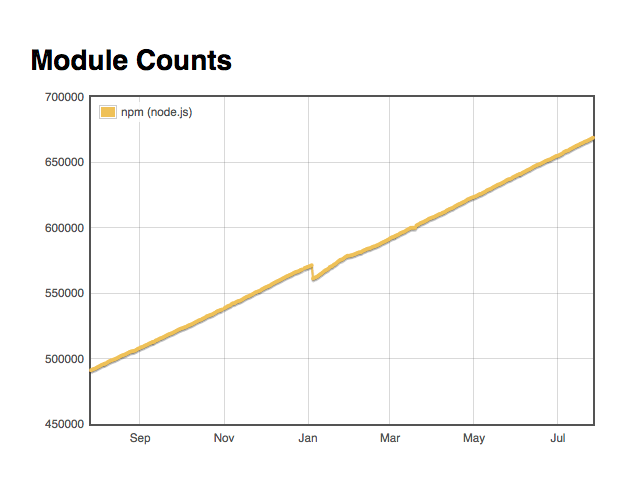
    I think npm was one of the reasons for quick adoption of nodejs. As of writing this article there are close 7,00,000 packages on npm. If you want more details about packages across different platforms you can checkout http://www.modulecounts.com/ I know it is comparing apples to organges when comparing packages across different platforms. But at-least it should give you some sense of adoption of node and javascript.

    npm package growth

    Finding the right node package

    Since there are so many packages we have a problem of plenty. For any given scenario we have multiple packages and it becomes difficult to identify the right fit for your use case. I generally look up github repos of popular projects to finalise which package to use. This may not scale up always and need more work.

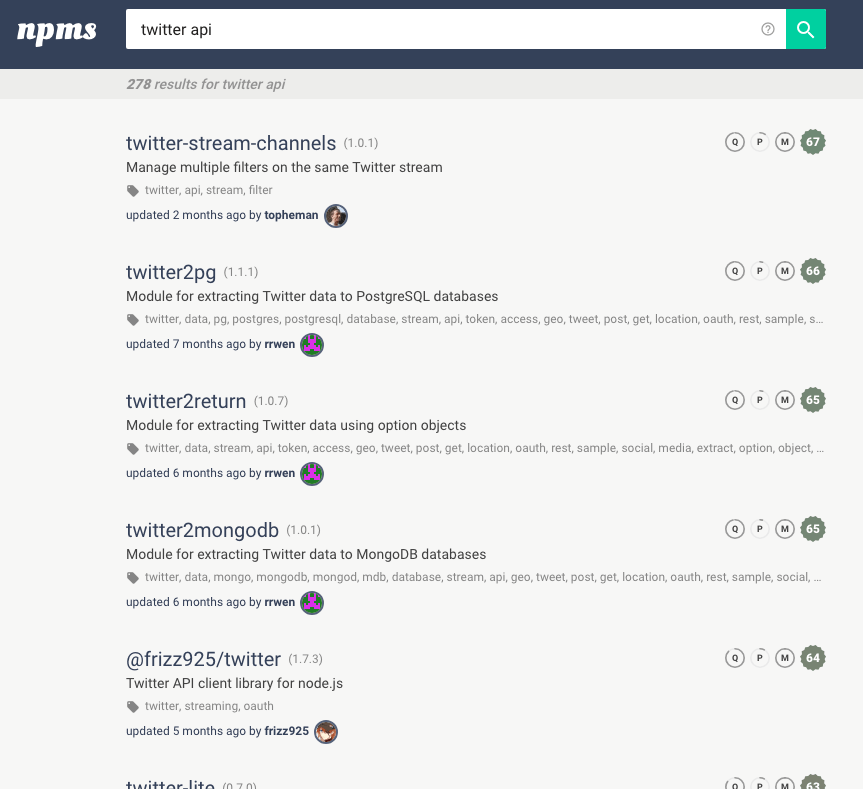
    So I have stuck to using http://npms.io/ for now. It has better search features and also has rating of various packages based on different parameters. You can read the rating logic on https://npms.io/about

    For example if you want to use twitter api packages you can search for the same which gives you an output like

    Do let me know if there is a curated list of node packages or some help groups which help us identify the right packages.

    Using additional features of npm

    If you are a node developer I am pretty sure that you have already used npm and you are comfortable with the popular commands npm init andnpm install So let us look at a few other handy commands and features.

    Since there are more than 7,00,000 packages in node I wanted to make sure that there was a simple way to keep track of my favourite packages. There seems to be a way but not very user friendly.

    Getting started

    Create an account on https://www.npmjs.com/

    From the interface I didn’t find any option to start my favorite packages. For now looks like we will have to make do with npm cli.

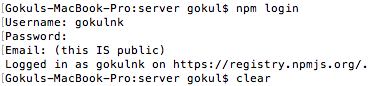
    Login on command line with your credentials.

    npm login

    One you hit the command enter your credentials. Currently it asks for email id which is public. I think npm figures out a way to mask the user email ids. I am not comfortable sharing my email id.

    npm login

    Once you are logged in, you can checkout if it was successful using the whoami command.

    npm whoami
    outptu of whoami

    Starring a package

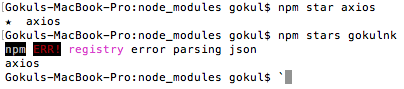
    npm star axios
    Starring a package

    If you want a list of packages you have starred then you can use npm stars

    npm stars

    The command gives you the output like show in the above image.

    npm list

    Most of the packages in npm have dependencies on other libraries and that is a good thing. It means that packages are modular. For example if you are using axios(https://www.npmjs.com/package/axios) package you can checkout https://www.npmjs.com/package/axios?activeTab=dependencies see the packages axio is using. If you want to see different packages that are using axios you can checkout https://www.npmjs.com/package/axios?activeTab=dependents

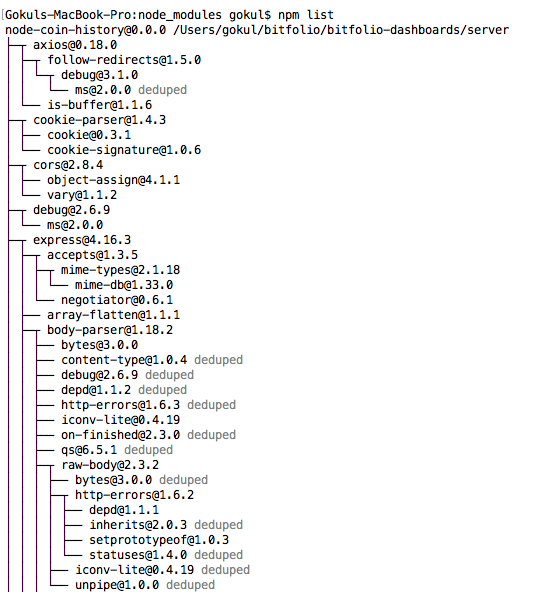
    If you want the complete dependency list you can use npm list which gives a tree output like below.

    npm list tree view

    Most of the times this is overwhelming and the first level packages should be a good enough check.

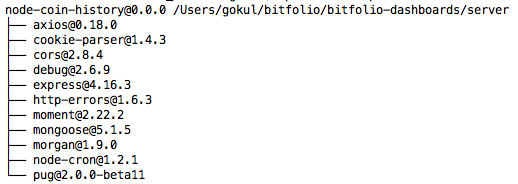
    npm list --depth=0 2>/dev/null

    If you use the above command you will get the list of first level packages in your project.

    npm list first level

    To go global or not

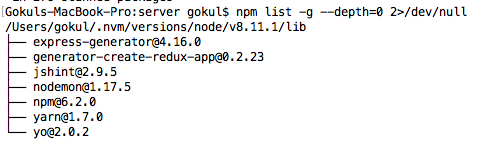
    As a rule of thumb I have tried to reduce the number of packages I install globally. It always makes sense to install the packages locally as long as they are related to the project. I only consider installing a package globally if its utility is beyond the project or has nothing to do with the project. You can run the following command to see your list of globally installed packages.

    npm list -g --depth=0 2>/dev/null

    In my case the output is

    npm list global packages

    As you can see from the list most of the packages are general purpose and have got nothing to do with individual projects. I am not sure why I installed jshint globally. My atom editor is setup with jshint and I think that should be sufficient. I will spend some time over the weekend to see why I did that.

    Security Audit

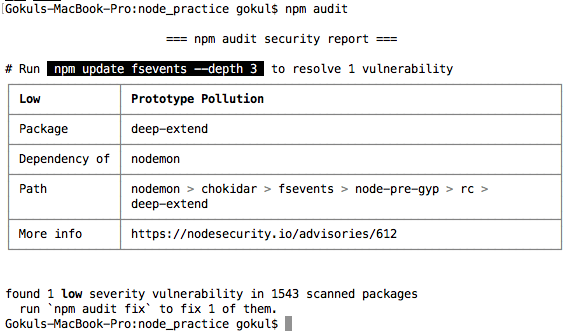
    In latest npm versions if there are any security concerns they get displayed when you run npm install command. But if you want to do an audit of your existing packages run npm audit

    npm audit

    This command gives you details of vulnerabilities in the package. It gives you details of the path so that you can judge the potential damage if any. If you want more details you can checkout the node security advisory.

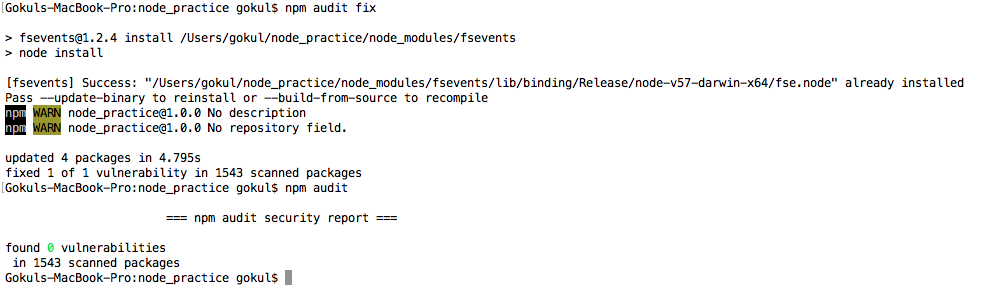
    You can run a command like npm update fsevents — depth 3 to fix the individual vulnerabilities as suggested or you can run npm audit fix to fix all the vulnerabilities at once like I did.

    npm audit fix

    NPX

    Another problem that I have faced with installing packages globally is that every time I run one of these packages it would have a latest version released. So it kind of doesn’t much sense to install them in the first place. npx comes to your rescue.

    To know more about npx read the following article.

    Introducing npx: an npm package runner
    [You can also read this post in Russian.]medium.com

    For example to run mocha on a instance all you need to do is npx mocha Isn’t that cool. The packages you saw on my instance are the ones that I had installed before coming across npx I haven’t installed any packages globally once I started using npx.

    Licence crawler

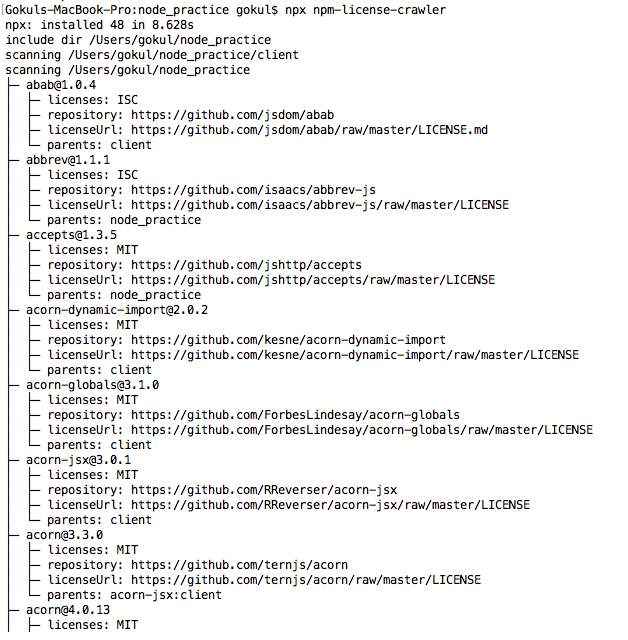
    Let us look at one sample use case for using npx While most of the packages on npm are generally under MIT licence, it is better to take a look at the licences of all the packages when you are working on a project for your company.

    npx npm-license-crawler
    npm licence details

    npm, yarn or pnpm

    Well npm is not the only option out there. You have yarn and pnpm which are popular alternatives. Yarn was more like a wrapper around npm by facebook for addressing the shortcomings of npm. With competition heating up npm has been quick in implementing the features from yarn. If you are worried about disk space you can use pnpm. If you want a detailed comparison of these three you can checkout https://www.voitanos.io/blog/npm-yarn-pnpm-which-package-manager-should-you-use-for-sharepoint-framework-projects


    每天推荐一个 GitHub 优质开源项目和一篇精选英文科技或编程文章原文,欢迎关注开源日报。交流QQ群:202790710;微博:https://weibo.com/openingsource;电报群 https://t.me/OpeningSourceOrg
  • 2018年8月10日:开源日报第155期

    10 8 月, 2018

    每天推荐一个 GitHub 优质开源项目和一篇精选英文科技或编程文章原文,欢迎关注开源日报。交流QQ群:202790710;微博:https://weibo.com/openingsource;电报群 https://t.me/OpeningSourceOrg


    今日推荐开源项目:《这个网站居然没有服务器 itty.bitty.site》传送门:GitHub链接

    推荐理由:这个项目可以让你生成一个网站。对,接下来你只需要把 html 代码填进去,然后把网址链接记下来,就可以通过这个链接在任何联网的时候打开这个网站而不需要任何的服务器之类的,当然了,缺点显而易见,你没办法从中获得或者存储任何数据,但是对于不需要这些的网站来说,兴许这是一个广泛传播自己的不错的途径。


    今日推荐英文原文:《How to Scale and Grow as a PM?》作者:Arpana Prajapati

    原文链接:https://medium.com/women-in-product-blogs/how-to-scale-and-grow-as-a-pm-43d6d0aa4c8c

    推荐理由:如何成长为一个 PM (Project Manager),这篇文章通过问答来介绍了这一点

    How to Scale and Grow as a PM?

    (left to right) Pratima Arora, Connie Kwan, Tara Seshan and Anutthara Bharadwaj

    Women in Product partnered with host Atlassian in Mountain View, CA for a lively panel discussion about how to scale and grow as a product manager. Nearly a hundred current and aspiring PMs gathered for the event. Key questions included:

    • Have you ever thought about the correlation of your own growth as a Product Manager and the growth of your company?
    • Where do you shift focus at later stages of your career and company growth?
    • How does team size and company stage impact decisions?
    • How does company size and culture affect PM role and success?

    The panel was moderated by Elain Szu, an Executive-In-Residence at Accel Partners and former PM at Trulia. Panelists featured were: Pratima Arora, Head of Confluence at Atlassian; Connie Kwan, Partner and VP of Product (as a service) at Advantary LLC; Anutthara Bharadwaj, Group PM for Atlassian; and Tara Seshan, PM at Stripe.

    Here’s some of the feedback from attendees:

    “As a career changer (in progress), helping dispel some myths was personally very confidence-boosting. It made me feel like I can do this.”

    “Actionable + specific insights (book recommendations, mentoring organizations, prioritization technique names)”

    We hope you’ll be able to join us for future WIP events. In the meantime, here are some key takeaways from the discussion.

    How do you choose the right company and team size to begin your PM career?

    • Consider starting at a larger company that has more resources for training and skill development. Then join a startup for more opportunities to lead and influence interesting projects.
    • It can be good to work in different industries — there’s a lot of learning and innovation at the intersection of industries
    • Create a personal learning plan — what do you want to learn, what do you want to gain from your next role, where are areas you need more experience?

    What are the expectations of a Product vs. Platform PM, and B2B vs. B2C PM?

    • As a Product PM, you are required to have an in-depth knowledge of the customer, find the right product/market fit, and grow the business. Depending on the stage of the company, you could be responsible for growing a million vs. a billion users. The Product PM role comes with the luxury of deep focus.
    • As a Platform PM, you have to wear two different hats. You have to not only think about the end users but also developers using your platform to generate more users for their products. Companies that have established a significant revenue stream with a product line often will then build a platform to drive 10X growth. Platform teams help product teams to scale. For example, a core component of a Ford car would be built by a platform team, but special components would be made by the product team.
    • As a B2B PM, you should have a strong business sense and sometimes more technical skills are required.
    • As a B2C PM you face the challenge that consumers can have a higher bar for usability, since they have more choices. So, when you work in B2C, it’s important to have a strong understanding of UI/UX in addition to general product sense and analytical skills.

    What surprised you the most as a new PM?

    • It’s not enough to make a case for why a feature is good for users and growing the business. You also need to justify the opportunity cost. Think about alternative investments and tradeoffs. Explain why should we build this specific feature now vs. later (or not at all).

    As a manager, how do you empower people? Who are you as a leader, and how do you lead?

    • A lot is around the art of storytelling.
    • Personality tests such as Myers Briggs or Business Chemistry taught in business schools teach you how to manage different personalities.
    • You don’t have to become a people manager to become product leader. Many companies have tracks for career growth as an individual contributor.
    • The biggest difference is you need to be Coach vs. Player.
    • Recommend the book What Got You Here Won’t Get You There to understand how to climb last few rungs of the ladder.
    • Understand that there are multiple ways to arrive at the same solution. Learn to let go. Your team may implement things differently from how you would do it — but that can be a good thing. You want to have teams with diverse skill sets.
    • What you want may not be what the entire team wants. Develop empathy.

    What are the various performance dimensions for PMs?

    • Communication skills — openness, ability to influence decisions, resolve conflicts
    • Product mastery — product sense, business sense, customer empathy
    • Leads and inspires others — story-telling
    • Delivers outcomes

    What are the biggest distractions for you, and how do you focus?

    • Email. Use tools like Confluence to consolidate comments and feedback. The book ‘The One Thing’ is also helpful.
    • Meetings. Think about what you’d do if you were not sucked into these, and do it. For example, Tara took a week off to meet a bunch of users!
    • Impromptu drop-ins. Find a corner where you can concentrate on work that requires deep thinking.
    • Note — also consider if your role is Maker or Manager. For a Maker, distraction can be devastating as it hurts creativity. For a Manager, meetings/IMs/emails are crucial.

    What are your recommendations for cross-functional collaboration?

    • Use a ‘Why, What and How’ triad model to engage with PMs, Designers and Engineers. PMs define the value and impact of the product/feature, designers help visualize the solution, and engineers make it happen.
    • At Stripe, PMs act as GM, and hence you own the relationship with design, engineering, marketing and sales. To be successful, understand each team’s motivation, the goals they have to meet, and collaborate with them effectively. Find the path of least resistance. Tip regarding dealing with sales — treat them as one of many input channels.
    • Transparency is the secret sauce of collaboration. At Atlassian, most documents except ones with legal implications are accessible to all employees.

    How do I make a move into PM with no prior experience?

    • Apply to RPM/APM programs. Facebook, Google, Atlassian and others have these.
    • Apply to jobs even if you meet 60% of the criteria. Women often don’t apply until they feel they have 100% of the job requirements — but that does not stop men. Keep perspective that a technical background (e.g. computer science degree) is not always required — you just need to be able to have productive conversations with your engineers and other key stakeholders.
    • Ask for a PM side project at your current company. Ask lot of questions.
    • Look for a mentor. Check out Everwise Mentoring.

    Hopefully these insights are useful to you in growing your PM career. Thanks again to our panelists and host Atlassian for providing this opportunity for the WIP community!

    (left to right) Elaine Szu, Anne Cocquyt and Christine Lee

    About Women in Product

    Women in Product® is a non-profit organization dedicated to increasing diversity and inclusion in product management. Founded by senior women product leaders in Silicon Valley, Women in Product’s mission is to educate, empower, and create a global community of women product managers to build impactful products at scale. Join our community: http://www.womenpm.org/join/


    每天推荐一个 GitHub 优质开源项目和一篇精选英文科技或编程文章原文,欢迎关注开源日报。交流QQ群:202790710;微博:https://weibo.com/openingsource;电报群 https://t.me/OpeningSourceOrg
  • 2018年8月9日:开源日报第154期

    9 8 月, 2018

    每天推荐一个 GitHub 优质开源项目和一篇精选英文科技或编程文章原文,欢迎关注开源日报。交流QQ群:202790710;微博:https://weibo.com/openingsource;电报群 https://t.me/OpeningSourceOrg

    今日推荐开源项目:《React 开发路线图 React Developer Roadmap》传送门:GitHub链接

    推荐理由:顾名思义,在你学习 React 的路上,你应该学习的各种各样的技能都在上面了,当你不知道学 React 学着学着就不知道要学什么了的时候,看一看这个兴许能有所启发,当然了,图表仅供参考,学习你感兴趣和有需要的东西才是最重要的,不要本末倒置了才好。


    今日推荐英文原文:《A Gentle Introduction to Stream Processing》作者:Srinath Perera

    原文链接:https://medium.com/stream-processing/what-is-stream-processing-1eadfca11b97

    推荐理由:流处理技术是一种对数据流进行处理的大数据技术,兴许经常接触大数据的朋友会对这个感兴趣

    A Gentle Introduction to Stream Processing

    What is stream Processing?

    Stream Processing is a Big data technology. It enables users to query continuous data stream and detect conditions fast within a small time period from the time of receiving the data. The detection time period may vary from few milliseconds to minutes. For example, with stream processing, you can receive an alert by querying a data streams coming from a temperature sensor and detecting when the temperature has reached the freezing point.

    It is also called by many names: real-time analytics, streaming analytics, Complex Event Processing, real-time streaming analytics, and event processing. Although some terms historically had differences, now tools (frameworks) have converged under term stream processing. ( see this Quora Question for a list of frameworks and last section of this article for history).

    It is popularized by Apache Storm, as a “technology like Hadoop but can give you results faster”, after which it was adopted as a Big data technology. Now there are many contenders.

    Why is stream Processing needed?

    Big data established that insights derived from processing data are valuable. Such insights are not all created equal. Some insights have much higher values shortly after it has happened and that value diminishes very fast with time. Stream Processing targets such scenarios. The key strength of stream processing is that it can provide insights faster, often within milliseconds to seconds.

    Following are some of the secondary reasons for using Stream Processing.

    Reasons 1: Some data naturally comes as a never-ending stream of events. To do batch processing, you need to store it, stop data collection at some time and processes the data. Then you have to do the next batch and then worry about aggregating across multiple batches. In contrast, streaming handles neverending data streams gracefully and naturally. You can detect patterns, inspect results, look at multiple levels of focus, and also easily look at data from multiple streams simultaneously.

    Stream processing naturally fit with time series data and detecting patterns over time. For example, if you are trying to detect the length of a web session in a never-ending stream ( this is an example of trying to detect a sequence). It is very hard to do it with batches as some session will fall into two batches. Stream processing can handle this easily.

    If you take a step back and consider, the most continuous data series are time series data: traffic sensors, health sensors, transaction logs, activity logs, etc. Almost all IoT data are time series data. Hence, it makes sense to use a programming model that fits naturally.

    Reason 2: Batch processing lets the data build up and try to process them at once while stream processing process data as they come in hence spread the processing over time. Hence stream processing can work with a lot less hardware than batch processing. Furthermore, stream processing also enables approximate query processing via systematic load shedding. Hence stream processing fits naturally into use cases where approximate answers are sufficient.

    Reason 3: Sometimes data is huge and it is not even possible to store it. Stream processing let you handle large fire horse style data and retain only useful bits.

    Reason 4: Finally, there are a lot of streaming data available ( e.g. customer transactions, activities, website visits) and they will grow faster with IoT use cases ( all kind of sensors). Streaming is a much more natural model to think about and program those use cases.

    However, Stream Processing is also not a tool for all use cases. One good rule of thumb is that if processing needs multiple passes through full data or have random access ( think a graph data set) then it is tricky with streaming. One big missing use case in streaming is machine learning algorithms to train models. On the other hand, if processing can be done with a single pass over the data or has temporal locality ( processing tend to access recent data) then it is a good fit for streaming.

    How to do Stream Processing?

    If you want to build an App that handles streaming data and takes real-time decisions, you can either use a tool or build it yourself. The answer depends on how much complexity you plan to handle, how much you want to scale, how much reliability and fault tolerance you need etc.

    If you want to build the App yourself, place events in a message broker topic (e.g. ActiveMQ, RabbitMQ, or Kafka), write code to receive events from topics in the broker ( they become your stream) and then publish results back to the broker. Such a code is called an actor.

    However, Instead of coding the above scenario from scratch, you can use a stream processing framework to save time. An event stream processor lets you write logic for each actor, wire the actors up, and hook up the edges to the data source(s). You can either send events directly to the stream processor or send them via a broker.

    An event stream processor will do the hard work by collecting data, delivering it to each actor, making sure they run in the right order, collecting results, scaling if the load is high, and handling failures. Among examples are Storm, Flink, and Samza. If you like to build the app this way, please check out respective user guides.

    Since 2016, a new idea called Streaming SQL has emerged ( see article Streaming SQL 101 for details). We call a language that enables users to write SQL like queries to query streaming data as a “Streaming SQL” language. There are many streaming SQL languages on the rise.

    Projects such as WSO2 Stream Processor and SQLStreams supported SQL for more than five years

    • Apache Storm added support for Streaming SQL in 2016
    • Apache Flink added support for Streaming SQL since 2016
    • Apache Kafka added support for SQL ( which they called KSQL) in 2017,
    • Apache Samza added support for SQL in 2017

    With Streaming SQL languages, developers can rapidly incorporate streaming queries into their Apps. By 2018, most of the Stream processors supports processing data via a Streaming SQL language.

    Let’s understand how SQL is mapped to streams. A stream is a table data in the move. Think of a never-ending table where new data appears as the time goes. A stream is such a table. One record or a row in a stream is called an event. But, it has a schema, and behave just like a database row. To understand these ideas, Tyler Akidau’s talk at Strata is a great resource.

    The first thing to understand about SQL streams is that it replaces tables with streams.

    When you write SQL queries, you query data stored in a database. Yet, when you write a Streaming SQL query, you write them on data that is now as well as the data that will come in the future. Hence, streaming SQL queries never ends. Doesn’t that a problem? No, it works because the output of those queries are streams. The event will be placed in output streams once the event matched and output events are available right away.

    A stream represents all events that can come through a logical channel and it never ends. For example, if we have a temperature sensor in boiler we can represent the output from the sensors as a stream. However, classical SQL ingest data stored in a database table, processes them, and writes them to a database table. Instead, Above query will ingest a stream of data as they come in and produce a stream of data as output. For example, let’s assume there are events in the boiler stream once every 10 minutes. The filter query will produce an event in the result stream immediately when an event matches the filter.

    So you can build your App as follows. You send events to stream processor by either sending directly or by via a broker. Then you can write the streaming part of the App using “Streaming SQL”. Finally, you configure the Stream processor to act on the results. This is done by invoking a service when Stream Processor triggers or by publishing events to a broker topic and listening to the topic.

    There are many stream processing frameworks available. ( See Quora Question: What are the best stream processing solutions out there?).

    I would recommend the one I have helped built, WSO2 Stream Processor (WSO2 SP). It can ingest data from Kafka, HTTP requests, message brokers and you can query data stream using a “Streaming SQL” language. WSO2 SP is open source under Apache license. With just two commodity servers it can provide high availability and can handle 100K+ TPS throughput. It can scale up to millions of TPS on top of Kafka and supports multi-datacenter deployments.

    Who is using Stream Processing?

    In general, stream processing is useful with use cases where we can detect a problem and we have a reasonable response to improve the outcome. Also, it plays a key role in a data-driven organization.

    Following are some of the use cases.

    • Algorithmic Trading, Stock Market Surveillance,
    • Smart Patient Care
    • Monitoring a production line
    • Supply chain optimizations
    • Intrusion, Surveillance and Fraud Detection ( e.g. Uber)
    • Most Smart Device Applications : Smart Car, Smart Home ..
    • Smart Grid — (e.g. load prediction and outlier plug detection see Smart grids, 4 Billion events, throughout in range of 100Ks)
    • Traffic Monitoring, Geo fencing, Vehicle and Wildlife tracking — e.g. TFL London Transport Management System
    • Sport analytics — Augment Sports with realtime analytics (e.g. this is a work we did with a real football game (e.g. Overlaying realtime analytics on Football Broadcasts)
    • Context-aware promotions and advertising
    • Computer system and network monitoring
    • Predictive Maintenance, (e.g. Machine Learning Techniques for Predictive Maintenance)
    • Geospatial data processing

    For more discussions about how to use Stream Processing, please refer to 13 Stream Processing Patterns for building Streaming and Realtime Applications.

    History of Stream Processing and its Frameworks

    Stream Processing has a long history starting from active databases that provided conditional queries on data stored in databases. One of the first Stream processing framework was TelegraphCQ, which is built on top of PostgreSQL.

    Then they grew in two branches.

    The first branch is called Stream Processing. These frameworks let users create a query graph connecting user’s code and running the query graph using many machines. Examples are Aurora, PIPES, STREAM, Borealis, and Yahoo S4. These stream processing architectures focused on scalability.

    The second branch is called Complex Event Processing. These frameworks supported query languages ( such as now we have with Streaming SQL) and concerned with doing efficent maching of events against given queries, but often run on 1–2 nodes. Among examples are ODE, SASE, Esper, Cayuga, and Siddhi. These architectures focused on efficient streaming algorithms.

    Stream Processing frameworks from both these branches were limited to academic research or niche applications such as stock market. Stream processing comes back to limelight with Yahoo S4 and Apache Storm. It was introduced as “like Hadoop, but real time”. It becomes part of the Big data movement.

    In last five years, these two branches have merged. I have discussed this in detail in a earlier post.

    If you like to know more about history of stream processing frameworks please read Recent Advancements in Event Processing and Processing flows of information: From data stream to complex event Processing.

    Hope this was useful. If you enjoyed this post you might also find Stream Processing 101 and Patterns for Streaming Realtime Analytics.


    每天推荐一个 GitHub 优质开源项目和一篇精选英文科技或编程文章原文,欢迎关注开源日报。交流QQ群:202790710;微博:https://weibo.com/openingsource;电报群 https://t.me/OpeningSourceOrg
←上一页
1 … 220 221 222 223 224 … 262
下一页→

Proudly powered by WordPress