• 开源镜像
  • 开源沙龙
  • 媛宝
  • 猿帅
  • 注册
  • 登录
  • 息壤开源生活方式平台
  • 加入我们

开源日报

  • 2018年8月24日:开源日报第169期

    24 8 月, 2018

    每天推荐一个 GitHub 优质开源项目和一篇精选英文科技或编程文章原文,欢迎关注开源日报。交流QQ群:202790710;微博:https://weibo.com/openingsource;电报群 https://t.me/OpeningSourceOrg


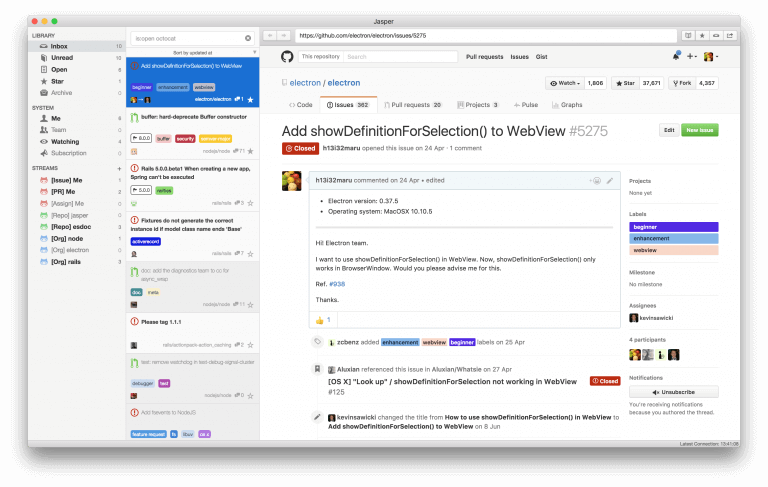
    今日推荐开源项目:《GitHub issue 阅读器 Jasper》传送门:GitHub链接

    推荐理由:顾名思义,这个 app 可以让你阅读 GitHub 上的 issue,如果你不想打开网页版的 GitHub 又想能够分门别类的看 issue 的话就可以考虑使用它,而且它还能把未读的 issue 整理起来,不用担心错过什么。

    今日推荐英文原文:《You Give Code a Bad Name》作者:Chico Carvalho

    原文链接:https://goiabada.blog/you-give-code-a-bad-name-f5e96f9793c8

    推荐理由:给代码起名字的建议,最起码看了这个之后,你肯定不会想再拿着《婴儿起名指南》给你的代码命名了

    You Give Code a Bad Name

    As they start taking their early steps in the software development world, one of the first tasks a new programmer has to deal with is naming things. Folder hierarchy, files, classes, objects, functions, variables and even lower level stuff such as custom protocol messages, everything needs a name.

    As far as compilers and interpreters are concerned, it doesn’t matter what name you give things, as long as you’re able to univocally and unambiguously identify them, but this couldn’t be further from the truth when it comes to us humans. Unlike a hard drive or RAM module, where the nature of the data being stored is largely irrelevant, the human memory works much more efficiently by syntactic and semantic association. Outside the programming world, we already agree upon stems, prefixes, suffixes and other basic lexical elements to toy around meanings and relationships, which we bootstrap into entire languages. It is only natural that we extend this behavior to programming languages as far as reasonably possible, leveraging semantics and mnemonic associations as much as we can.

    In this article I’ll Be There For You: I’d like to raise awareness of the importance of naming, discussing a bit about the incentives every developer should have to stop overlooking this topic as frequently as we see out there.

    What this article isn’t about

    This article will not discuss any particular casing standard, language paradigm preferences, explicit documentation guidelines or partake in the endless text editor skirmish.

    More than looking cool

    When I first started programming back in 2003 I remember finding it pretty neat that I could have my own SomethingBrokers, WhateverAdapters, ThingyLaunchers and whatnot (yes, I was young). Fancy names brought them (and me) a sense of responsibility and convinced me my code did some pretty serious stuff, even though it was only a Programming 101 project. As you’d expect, giving things names isn’t (just :B) about looking flashy and l33t. But Keep The Faith: good naming practices usually lead to better readability, quicker comprehension of each snippet’s purpose, an easier time navigating through your project’s structure and often provide an implicit documentation of what’s being done by the program.

    And this isn’t only about you and what you might subjectively think works best. Writing code is virtually Always a team experience and should always take the future reader into account, even if you’re flying solo for the time being. The “you” reading a piece of code you wrote several months before will probably have forgotten most of what’s going on, and might need to rebuild a precise understanding of its intricacies in order to make correct, cohesive, meaningful and elegant changes.

    OO Basics — no harm in remembering

    As it gained momentum, Object Orientation has provided us with enough incentives to properly separate what describes a structure and its capabilities (classes and attributes) and what actually does something to change the state of a program (methods). This has led to a very basic naming guideline by which we baptize classes and attributes/properties with nouns (descriptions) and methods with verbs (actions).
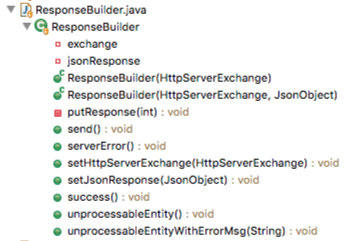
    A basic Java class appearance

    This has been the norm since programming languages supporting OO techniques became widely available in the early 1990s. However, the shift of focus to web development sprung to life new design patterns which started to defy this standard, as we’ll see later on.

    Syntactic Parallelism

    The human brain likes some degree of repetition and standardization. We see this thrive, for example, in music, poetry, architecture and… programming. Writing and naming groups of related entities should take this into account, as it more explicitly tightens that relationship in the eyes of the reader. One of the techniques employed to accomplish this is to make them follow the same syntactic pattern. Check out these two lists:

    Both try to enumerate house chores and convey the same meaning, but the one on the right does it in a neater, more elegant and predictable way. In that particular example, all entries are composed of a verb in the infinitive form and a noun or expression acting as the object of that action. You don’t need to think about it at all, but after reading a couple of them, your brain actually expects the next list item to be built using the same structure. Aesthetics aside, pretty much like a hard drive that relies on the principle of locality to read data ahead of time, knowing something about what comes next usually makes for faster skimming and quicker understanding of the message being read. This is called syntactic parallelism and is one of the key concepts you should take away from this article. Make a Memory out of it.

    Objects and Collections

    Developers face a very common naming tradeoff when they have to deal with both single objects and their collections in the same coding context:

    1. On the one hand, you can opt for briefer, more concise names, using the classic singular/plural forms, such as account and accounts. This will shorten lines of code and minimize line-breaking, improving block readability and reducing overall code verbosity.
    2. Alternatively, you may choose longer, more explicit differentiations, like accountObjectand accountCollection, which in turn will favor clarity and individual pointer readability.
    3. Last but not least, it might be tempting to go for the best of both worlds and write accountfor the single object and accountCollectionfor the list.

    I usually Runaway from that last one because it breaks syntactic parallelism and might give the reader the impression that there’s more difference to what they do semantically than a singular/plural thing. And after a while thinking about this, I’d say it’s a tight fight between forms 1 and 2: on the one hand, I’ve had several minor productivity setbacks overlooking the trailing s over the years and, as such, tend to prefer the latter. But on the other hand, I can certainly see that if a team builds a strong and horizontal culture that singular and plural are the way to go, double-checking that kind of stuff could become second nature to everyone and tip the scales towards the first option.

    Iterators

    Walking through a collection of items and doing something with them is one of the bread-and-butters of programming life. Regardless of what you’re writing, there are going to be iterators all over your code. And even though the more high level programming languages may abstract that for you, there are still a few that don’t, and for them there’s a very simple naming trick: instead of writing i, j, k and the like for iterator variables, try using ii, jj, kk and so forth. This one effortless change improves searchability** tenfold while maintaining the standard expectation on these variable names.

    **I know that this is arguable and that there are a lot of code editors out there with advanced search features that could help with this without using the trick, but its so effortless, portable and editor-agnostic that I still think its a decent idea.

    Service Objects

    Service Objects (SOs) are a great concept and have a lot of space in today’s web apps, but usually bring up a few naming mishaps. Look at this service object folder, for example:
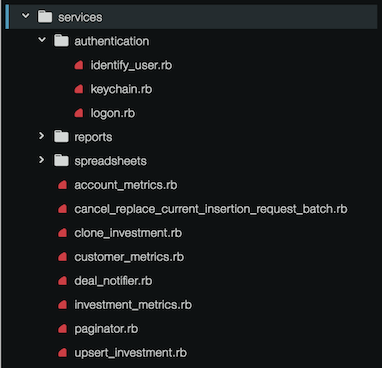
    This is a pretty good (and real-life) illustration of the controversy surrounding service object naming. First, note that even though some people tend to call these classes SOs, the SOs themselves are actually the instances of SO-describing classes. Then remember that, for the classes, the natural way is to name them after nouns, and therein lies the issue. We see paginator, deal_notifier and a few ending in metric, cool. But we also see clone_investment, upsert_investment and cancel_<something_complicated>(God Bless This Mess).

    Wait, verbs ??? ???

    So, yeah. What happens is that SOs as a design pattern have the purpose of implementing a single operation that makes sense in your business logic, the actual service they’re providing you with, their very raison d’être. Their public interface is usually made up of a sole method, possibly static, and usually named call. And since they can’t do anything else, developers started thinking it’d be reasonable to name them after the action they will perform once call-ed, thus releasing themselves from the clutches of one of academic OO’s most iconic naming standards.

    I resisted that myself for a while, thinking it could be Bad Medicine. “Why can’t we just name them with nouns and use them the exact same way? InvestmentCloner.call() doesn’t look so bad”. The thing is their instances differ from most because they have a very well-defined lifecycle: they’ll be created, called upon to do their thing and (hopefully) die gracefully*. So developers (especially the ruby community, who are known for favoring readability) started thinking that naming them after the actions they perform, such as NotifyCustomer or AbortMission, could make for quicker code apprehension without any semantic loss.

    *Using singletons to implement service objects is kind of an anti-pattern. The global visibility, long life and likely statefulness of a singleton is too hard to test and too side effect-prone. More in-depth discussion on this theme can be found here and in the linked questions.

    Minimizing abstraction leaks

    The awesome and timeless 2002 Joel Spolsky article ‘The Law of Leaky Abstractions’ brings to light an essential flaw in programming understood as the craft of implementing incremental, layered abstractions. In a nutshell, he theorizes that “all non-trivial abstractions, to some degree, are leaky”, in which they fail to do what they’re supposed to while completely shielding the user from their inner workings. This is particularly important for us because bad naming is a huge source of abstraction leaks, which in turn means we can minimize or even completely avoid them by taking proper care with what we’re saying they do.

    So, we’re looking for names that on the one hand empower the entity, implying their general “area of expertise”, but that on the other hand are careful enough to restrict these expectations as to avoid suggesting too much power. It comes as no surprise that the overall architecture usually profits from this, since the developer is obligated to pay closer attention to the relationship between entities and the bounds of their roles.

    Ok, cool, but let’s see some code

    So, let’s move away from bullet point-guidelines for a bit and build something up step by step while trying to avoid other aspects of poor naming.

    Say we want to write a service to connect to Instagram and do instagrammy stuff like fetch somebody’s posts, crawl comments to a certain post, get likes to said comments and the sort. We could start off thinking of a name for it:

    class Instagram
    
      # ...
      
    end

    This doesn’t say much about the class, except that it has something to do with Instagram, duh. As far as we know, it could as well have methods to remotely implode the Instagram HQ. Let’s try something clearer:

    class InstagramCrawler
    
      # ...
      
    end

    Ok, this isn’t perfect but says a lot more about the stuff I want to represent. I already expect a class whose objects will crawl Instagram for stuff. Still, it strikes me as too powerful and monolithic an abstraction, which can have too many lines of code, be more confusing than it needs to be, require too much studying to figure out, easily cause abstraction leaks or all of the above. Maybe we could break it down a bit:

    class InstagramCrawler
      def initialize
        @client = InstagramClient.new
      end
    
      # ... methods that possibly call @client.something()   
    end
    
    class InstagramClient
    
      # ...
      
    end

    Alright! Now we can further restrict our expectations of the crawler abstraction and believe it won’t care about talking to the instagram API itself, relaying this stuff to InstagramClient*. At the same time, we created a perfectly reasonable character for abstracting the service that worries about interfacing with the Instagram API, with the added benefit that InstagramCrawler doesn’t even know or care if this communication is gonna be via REST, GraphQL or some other weird protocol.

    We’re gonna stop here for the sake of this example, but if you feel your ‘crawler’ does far too much stuff to be in a single class or that your ‘client’ could also be further broken down, this isn’t necessarily the right point to stop refining the abstractions.

    *Real-world applications probably would allow for injecting the client for testing and decoupling purposes.

    Now let’s get One Step Closer and think a little bit about error treatment, and begin by creating a custom InstagramError that extends Ruby’s StandardError:

    class InstagramCrawler
      def initialize(client: client)
        @client = client
      end
    
      # ... methods that possibly call @client.something() 
    
      class InstagramCrawlerError < StandardError; end  
    end
    
    class InstagramClient
    
      # ...
      
    end

    So, while this could potentially represent every error our crawler could spit out and quickly solve our problem, it’s missing out on a perfectly good opportunity to make the developers’ life far easier. By putting in a little more effort at this point and restricting exception abstractions a bit more, we could save hours of slow debugging time by better describing what kind of errors took place:

    class InstagramCrawler
      def initialize(client: client)
        @client = client
      end
    
      # ... methods that possibly call @client.something() 
      
      class InstagramCrawlerError < StandardError; end
      class UserUnavailableError < InstagramCrawlerError; end
      class InexistentLocationError < InstagramCrawlerError; end
      class ExpiredMediumError < InstagramCrawlerError; end
      class InvalidAccessTokenError < InstagramCrawlerError; end
      class MalformedRequestError < InstagramCrawlerError; end
      class ServiceUnavailableError < InstagramCrawlerError; end
      class TimeoutError < InstagramCrawlerError; end
    end
    
    class InstagramClient
    
      # ...
      
    end

    (Of course, in order to raise these errors correctly we’d need some additional error treatment code im deliberately skipping for the purposes of this analysis.)

    What About Now? This already looks like a giant timesaver during debugging time in which the devs will much more quickly be able to discern what problem took place without having to go through logs or huge response message outputs.

    However, it exposes a gaping abstraction leak by having the Crawler know about and have to deal with communication and protocol issues such as MalformedRequestError and InvalidAccessTokenError. But we have just the place to fit these in, don’t we?

    class InstagramCrawler
      def initialize(client: client)
        @client = client
      end
      
      # ... methods that possibly call @client.something() 
    
      class InstagramCrawlerError < StandardError; end
      class UserUnavailableError < InstagramCrawlerError; end
      class InexistentLocationError < InstagramCrawlerError; end
      class ExpiredMediumError < InstagramCrawlerError; end  
    end
    
    class InstagramClient
      # ...
    
      class InstagramClientError < StandardError; end
      class InvalidAccessTokenError < InstagramClientError; end
      class MalformedRequestError < InstagramClientError; end
      class ServiceUnavailableError < InstagramClientError; end
      class TimeoutError < InstagramClientError; end  
    end

    This is the final form of our little example case study, which is an adapted subset of real-life code which has been in production for several years. Proper care with naming aided our team in avoiding abstraction leaks, semantically dividing responsibilities among entities, simplifying the debugging process and made us write overall clearer, more self-explaining, understandable code.

    The meaningless abstraction

    Before we wrap up, I’d like to show an unstructured example of something that not rarely pops up in code reviews, making me feel Shot Through The Heart:

    import React from "react"
    
    class Auth extends React.Component {
      render() {
        return <div>{this.props.children}</div>
      }
    }
    
    export default Auth

    This is an extremely simple React component that doesn’t do much except for wrapping its children elements in a div tag. And in spite of its simplicity, at first I had no idea why someone thought it would be a good idea to name it Auth. “Maybe it was a bad name for an authentication component ?”. Just it isn’t, since it doesn’t implement any authentication behavior or appearance. It’s also not some weird standard React boilerplate, so we’re left with a meaningless/misleading abstraction, a pair of name and entity that doesn’t help us at all to discern or put boundaries to the latter. If we go deep enough down the rabbit hole, we may even find it to serve some twisted purpose (a master component to group up authentication sub-components? a testing selector?), but the name doesn’t point us towards its architectural relevance and the implementation raises a yellow flag right off the bat.

    Closing words

    Two main things motivated me to write this blog post. Firstly, It’s My Life: whenever I’m assigned to a project that is already underway, I see that my biggest onboarding roadblocks hinge on unclear project architecture/folder structure and bad naming. It usually feels like trying to internalize a rational, working model of an Escher drawing: even though it somehow works, it makes little sense and seems impossible to tie all ends without creating new loose ones. Secondly, there seems to be a noticeable lack of reading material discussing the subject outside the context of specific languages or particular/recurring naming conundrums.

    So, all in all, These Days seemed like a good moment to give others Something For The Pain and write down a few ideas along with established practices. Hopefully some new devs will pop in here and come out knowing that good, proper naming isn’t one of those things you learn and then forget as soon as you finish school. Plus, I fully expect these ideas to foster discussion and spark up at least some controversy among the more experienced, so readers are more than welcome to bring old and new thoughts to the table.

    Now let’s put on some loud Bon Jovi and go back to coding. Have a Nice Day!???

    P.S. Just so I’m not Misunderstood, let me give y’all Something To Believe In: the random capitalized words throughout the text are not random at all. Raise Your Hands in the comments or clap if you found them all! 😉


    每天推荐一个 GitHub 优质开源项目和一篇精选英文科技或编程文章原文,欢迎关注开源日报。交流QQ群:202790710;微博:https://weibo.com/openingsource;电报群 https://t.me/OpeningSourceOrg

  • 2018年8月23日:开源日报第168期

    23 8 月, 2018

    每天推荐一个 GitHub 优质开源项目和一篇精选英文科技或编程文章原文,欢迎关注开源日报。交流QQ群:202790710;微博:https://weibo.com/openingsource;电报群 https://t.me/OpeningSourceOrg


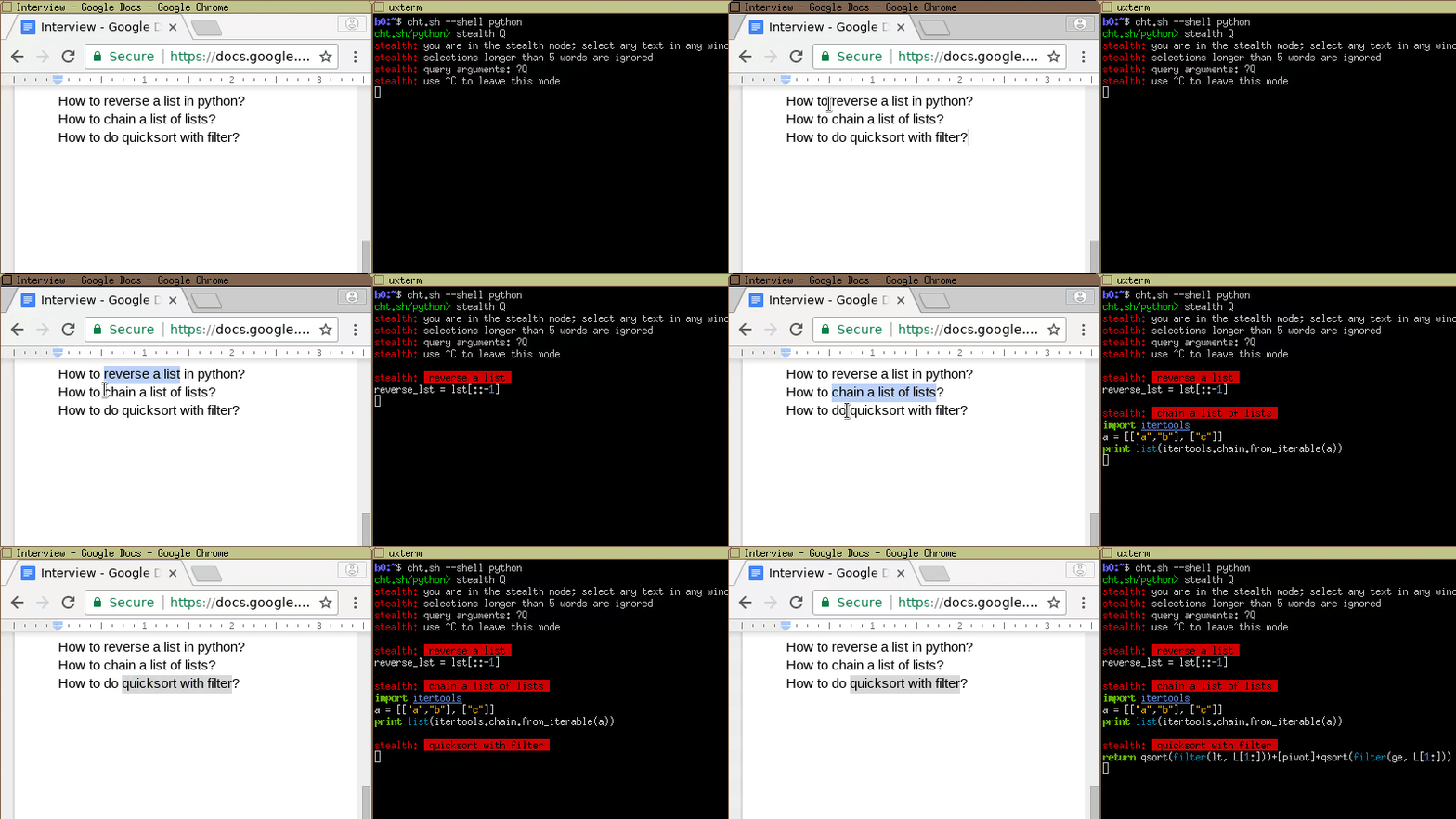
    今日推荐开源项目:《甚至还能划词查询 cheat.sh》传送门:GitHub链接

    推荐理由:在你学习的时候经常会记一些笔记吧,然后如果你忘了这些内容,你回去翻一下笔记来想起来,这就是 cheat.sh,它可以让你快速的查询某一方面的学习笔记(或者说重点之类的),从而让你在突然大脑掉线的时候想起一些突然忘记的东西。如果你愿意,你还可以试试看它的划词查找模式,有的时候这会非常管用。


    今日推荐英文原文:《The top data structures you should know for your next coding interview》作者:Fahim ul Haq

    原文链接:https://medium.freecodecamp.org/the-top-data-structures-you-should-know-for-your-next-coding-interview-36af0831f5e3

    推荐理由:你肯定应该了解的常用数据结构,这些数据结构常用到很可能你会自己操刀创造它们,虽然现在基本上调用类就完事了,但是基础知识普及一下还是有必要的

    The top data structures you should know for your next coding interview

    Niklaus Wirth, a Swiss computer scientist, wrote a book in 1976 titled Algorithms + Data Structures = Programs.

    40+ years later, that equation still holds true. That’s why software engineering candidates have to demonstrate their understanding of data structures along with their applications.

    Almost all problems require the candidate to demonstrate a deep understanding of data structures. It doesn’t matter whether you have just graduated (from a university or coding bootcamp), or you have decades of experience.

    Sometimes interview questions explicitly mention a data structure, for example, “given a binary tree.” Other times it’s implicit, like “we want to track the number of books associated with each author.”

    Learning data structures is essential even if you’re just trying to get better at your current job. Let’s start with understanding the basics.

    What is a Data Structure?

    Simply put, a data structure is a container that stores data in a specific layout. This “layout” allows a data structure to be efficient in some operations and inefficient in others. Your goal is to understand data structures so that you can pick the data structure that’s most optimal for the problem at hand.

    Why do we need Data Structures?

    As data structures are used to store data in an organized form, and since data is the most crucial entity in computer science, the true worth of data structures is clear.

    No matter what problem are you solving, in one way or another you have to deal with data — whether it’s an employee’s salary, stock prices, a grocery list, or even a simple telephone directory.

    Based on different scenarios, data needs to be stored in a specific format. We have a handful of data structures that cover our need to store data in different formats.

    Commonly used Data Structures

    Let’s first list the most commonly used data structures, and then we’ll cover them one by one:

    1. Arrays
    2. Stacks
    3. Queues
    4. Linked Lists
    5. Trees
    6. Graphs
    7. Tries (they are effectively trees, but it’s still good to call them out separately).
    8. Hash Tables

    Arrays

    An array is the simplest and most widely used data structure. Other data structures like stacks and queues are derived from arrays.

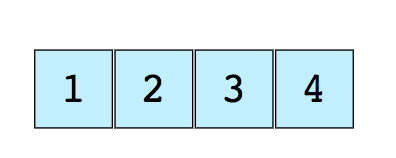
    Here’s an image of a simple array of size 4, containing elements (1, 2, 3 and 4).

    Each data element is assigned a positive numerical value called the Index, which corresponds to the position of that item in the array. The majority of languages define the starting index of the array as 0.

    The following are the two types of arrays:

    • One-dimensional arrays (as shown above)
    • Multi-dimensional arrays (arrays within arrays)

    Basic Operations on Arrays

    • Insert — Inserts an element at given index
    • Get — Returns the element at given index
    • Delete — Deletes an element at given index
    • Size — Get the total number of elements in array

    Commonly asked Array interview questions

    • Find the second minimum element of an array
    • First non-repeating integers in an array
    • Merge two sorted arrays
    • Rearrange positive and negative values in an array

    Stacks

    We are all familiar with the famous Undo option, which is present in almost every application. Ever wondered how it works? The idea: you store the previous states of your work (which are limited to a specific number) in the memory in such an order that the last one appears first. This can’t be done just by using arrays. That is where the Stack comes in handy.

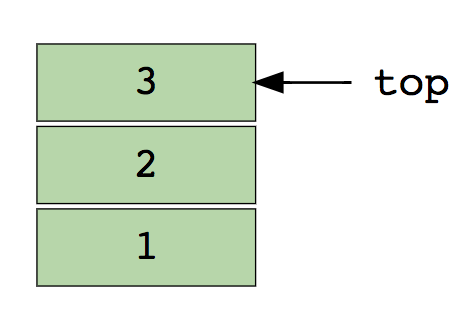
    A real-life example of Stack could be a pile of books placed in a vertical order. In order to get the book that’s somewhere in the middle, you will need to remove all the books placed on top of it. This is how the LIFO (Last In First Out) method works.

    Here’s an image of stack containing three data elements (1, 2 and 3), where 3 is at the top and will be removed first:

    Basic operations of stack:

    • Push — Inserts an element at the top
    • Pop — Returns the top element after removing from the stack
    • isEmpty — Returns true if the stack is empty
    • Top — Returns the top element without removing from the stack

    Commonly asked Stack interview questions

    • Evaluate postfix expression using a stack
    • Sort values in a stack
    • Check balanced parentheses in an expression

    Queues

    Similar to Stack, Queue is another linear data structure that stores the element in a sequential manner. The only significant difference between Stack and Queue is that instead of using the LIFO method, Queue implements the FIFO method, which is short for First in First Out.

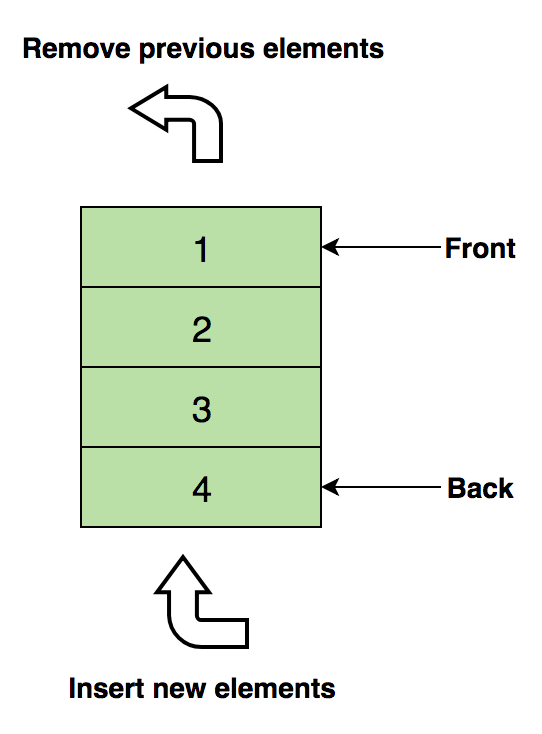
    A perfect real-life example of Queue: a line of people waiting at a ticket booth. If a new person comes, they will join the line from the end, not from the start — and the person standing at the front will be the first to get the ticket and hence leave the line.

    Here’s an image of Queue containing four data elements (1, 2, 3 and 4), where 1 is at the top and will be removed first:

    Basic operations of Queue

    • Enqueue() — Inserts element to the end of the queue
    • Dequeue() — Removes an element from the start of the queue
    • isEmpty() — Returns true if queue is empty
    • Top() — Returns the first element of the queue

    Commonly asked Queue interview questions

    • Implement stack using a queue
    • Reverse first k elements of a queue
    • Generate binary numbers from 1 to n using a queue

    Linked List

    A linked list is another important linear data structure which might look similar to arrays at first but differs in memory allocation, internal structure and how basic operations of insertion and deletion are carried out.

    A linked list is like a chain of nodes, where each node contains information like data and a pointer to the succeeding node in the chain. There’s a head pointer, which points to the first element of the linked list, and if the list is empty then it simply points to null or nothing.

    Linked lists are used to implement file systems, hash tables, and adjacency lists.

    Here’s a visual representation of the internal structure of a linked list:

    Following are the types of linked lists:

    • Singly Linked List (Unidirectional)
    • Doubly Linked List (Bi-directional)

    Basic operations of Linked List:

    • InsertAtEnd — Inserts given element at the end of the linked list
    • InsertAtHead — Inserts given element at the start/head of the linked list
    • Delete — Deletes given element from the linked list
    • DeleteAtHead — Deletes first element of the linked list
    • Search — Returns the given element from a linked list
    • isEmpty — Returns true if the linked list is empty

    Commonly asked Linked List interview questions

    • Reverse a linked list
    • Detect loop in a linked list
    • Return Nth node from the end in a linked list
    • Remove duplicates from a linked list

    Graphs

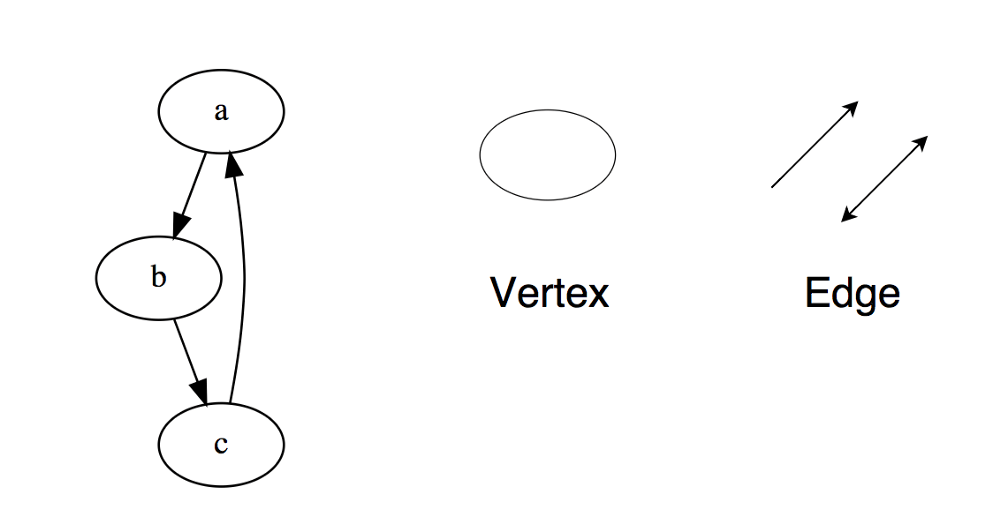
    A graph is a set of nodes that are connected to each other in the form of a network. Nodes are also called vertices. A pair(x,y) is called an edge, which indicates that vertex x is connected to vertex y. An edge may contain weight/cost, showing how much cost is required to traverse from vertex x to y.

    Types of Graphs:

    • Undirected Graph
    • Directed Graph

    In a programming language, graphs can be represented using two forms:

    • Adjacency Matrix
    • Adjacency List

    Common graph traversing algorithms:

    • Breadth First Search
    • Depth First Search

    Commonly asked Graph interview questions

    • Implement Breadth and Depth First Search
    • Check if a graph is a tree or not
    • Count number of edges in a graph
    • Find the shortest path between two vertices

    Trees

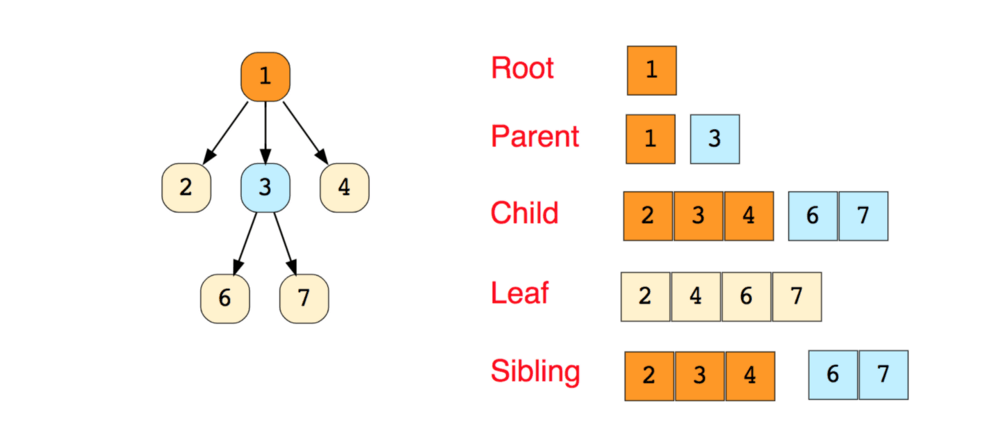
    A tree is a hierarchical data structure consisting of vertices (nodes) and edges that connect them. Trees are similar to graphs, but the key point that differentiates a tree from the graph is that a cycle cannot exist in a tree.

    Trees are extensively used in Artificial Intelligence and complex algorithms to provide an efficient storage mechanism for problem-solving.

    Here’s an image of a simple tree, and basic terminologies used in tree data structure:

    The following are the types of trees:

    • N-ary Tree
    • Balanced Tree
    • Binary Tree
    • Binary Search Tree
    • AVL Tree
    • Red Black Tree
    • 2–3 Tree

    Out of the above, Binary Tree and Binary Search Tree are the most commonly used trees.

    Commonly asked Tree interview questions

    • Find the height of a binary tree
    • Find kth maximum value in a binary search tree
    • Find nodes at “k” distance from the root
    • Find ancestors of a given node in a binary tree

    Trie

    Trie, which is also known as “Prefix Trees”, is a tree-like data structure which proves to be quite efficient for solving problems related to strings. It provides fast retrieval, and is mostly used for searching words in a dictionary, providing auto suggestions in a search engine, and even for IP routing.

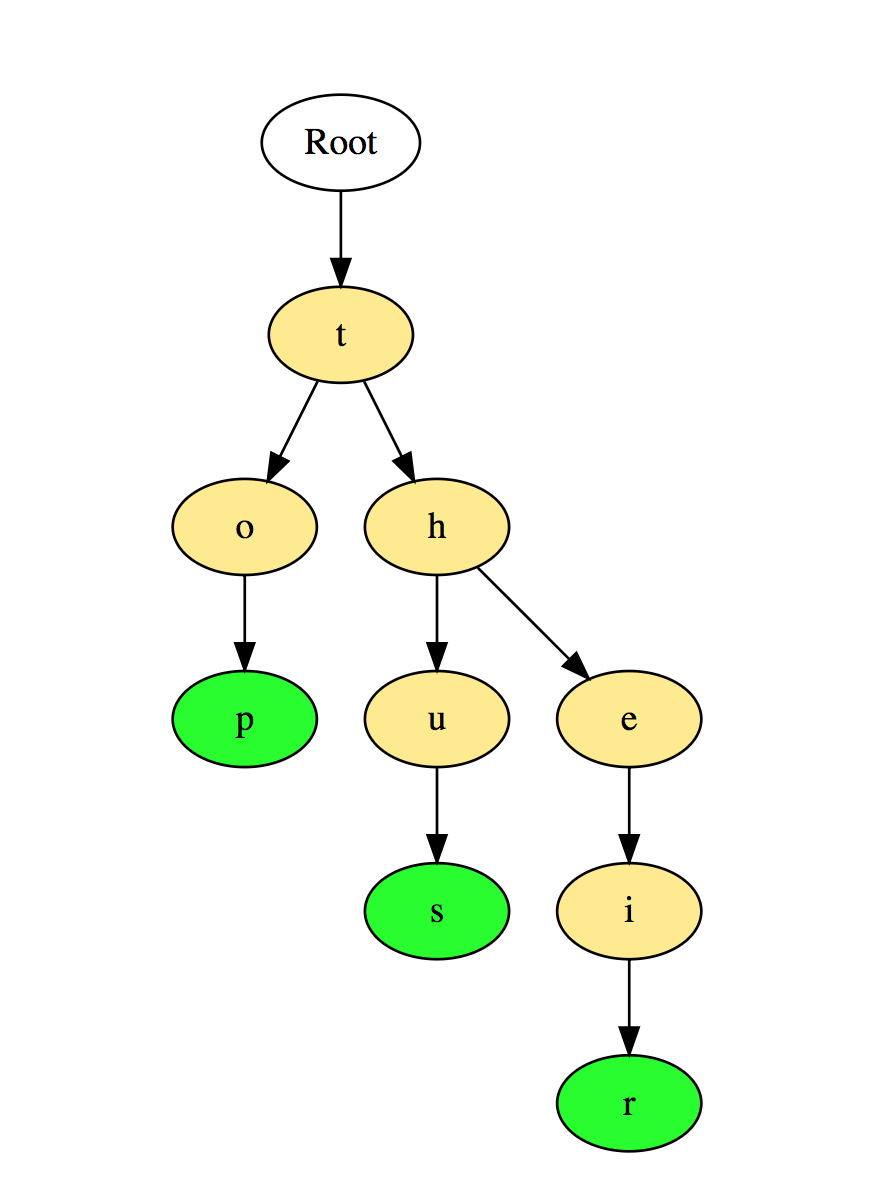
    Here’s an illustration of how three words “top”, “thus”, and “their” are stored in Trie:

    The words are stored in the top to the bottom manner where green colored nodes “p”, “s” and “r” indicates the end of “top”, “thus”, and “their” respectively.

    Commonly asked Trie interview questions:

    • Count total number of words in Trie
    • Print all words stored in Trie
    • Sort elements of an array using Trie
    • Form words from a dictionary using Trie
    • Build a T9 dictionary

    Hash Table

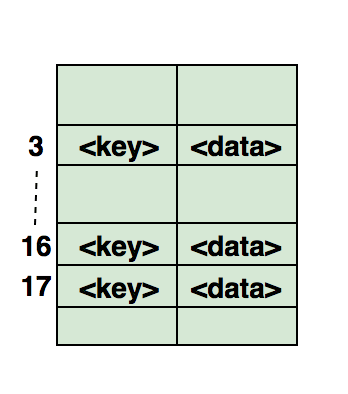
    Hashing is a process used to uniquely identify objects and store each object at some pre-calculated unique index called its “key.” So, the object is stored in the form of a “key-value” pair, and the collection of such items is called a “dictionary.” Each object can be searched using that key. There are different data structures based on hashing, but the most commonly used data structure is the hash table.

    Hash tables are generally implemented using arrays.

    The performance of hashing data structure depends upon these three factors:

    • Hash Function
    • Size of the Hash Table
    • Collision Handling Method

    Here’s an illustration of how the hash is mapped in an array. The index of this array is calculated through a Hash Function.

    Commonly asked Hashing interview questions

    • Find symmetric pairs in an array
    • Trace complete path of a journey
    • Find if an array is a subset of another array
    • Check if given arrays are disjoint

    The above are the top eight data structures that you should definitely know before walking into a coding interview.

    If you are looking for resources on data structures for coding interviews, look at the interactive & challenge based courses: Data Structures for Coding Interviews (Python, Java).

    For more advanced questions, look at Coderust 3.0: Faster Coding Interview Preparation with Interactive Challenges & Visualizations.

    Good luck and happy learning! 🙂


    每天推荐一个 GitHub 优质开源项目和一篇精选英文科技或编程文章原文,欢迎关注开源日报。交流QQ群:202790710;微博:https://weibo.com/openingsource;电报群 https://t.me/OpeningSourceOrg
  • 2018年8月22日:开源日报第167期

    22 8 月, 2018

    每天推荐一个 GitHub 优质开源项目和一篇精选英文科技或编程文章原文,欢迎关注开源日报。交流QQ群:202790710;微博:https://weibo.com/openingsource;电报群 https://t.me/OpeningSourceOrg

    今日推荐开源项目:《系统设计入门 The System Design Primer》传送门:GitHub链接

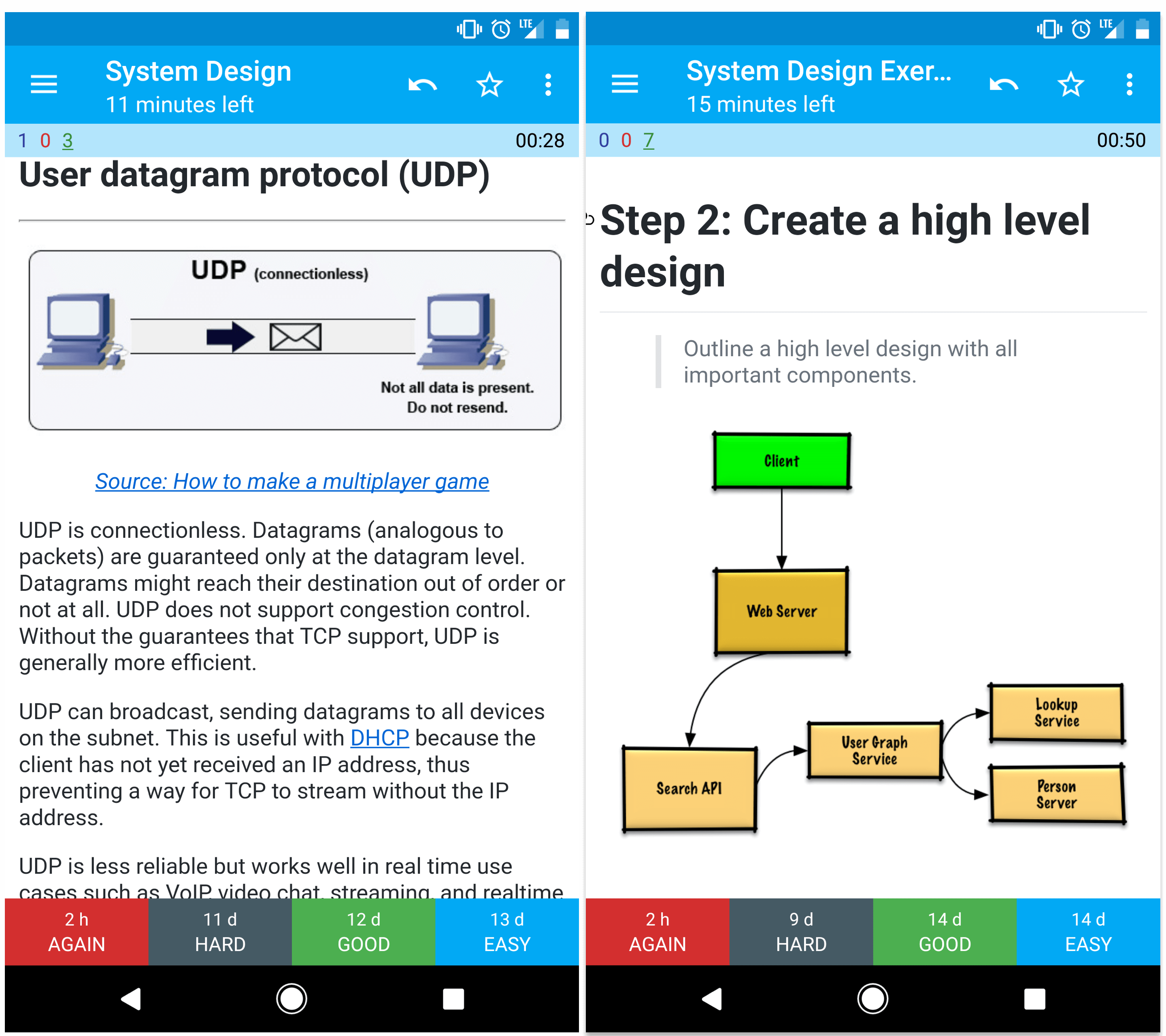
    推荐理由:顾名思义,这个项目里面都是教你系统设计的,不过有意思的是,它采用了一种抽认卡片的方法来帮助读者进行记忆,这个抽认卡片的 app 可以在项目中找到官网下载,有兴趣的朋友可以去试试看这个 app。


    今日推荐英文原文:《Why I Chose React?》作者:Muhammad Ovi

    原文链接:https://medium.com/oyeovi/why-i-chose-react-6de61b2f4ceb

    推荐理由:这篇文章除了推荐 React 之外,因为它是面向初心者的,所以也介绍了一些有关的概念,对于新人来说可以考虑了解一下,即使不对 React 感兴趣,也可以看看其中对概念的解释

    Why I Chose React?

    Before I tell you Why I Chose React — First Let’s see some things which you should already know!

    Let’s dive in.

    If you are new to the web-side (or programming side to be exact) you might have heard people talking about React or ReactJS and you are like:

    What the heck is this thing…

    Well well well, no worries — we will see what it is!

    You might know there are two sides of the web.

    1. Client Side (Front-End)
    2. Server Side (Back-End)

    OK, so any application (either web app or native android/ios app) is consist of a back-end & front-end. There is a server-side and a client-side.

    The back-end consists of a server, an application/software, and a database. The server hosts our application. The server also communicates with a database to get data.

    The back-end passes data to the front-end. In modern web development, JavaScript on the front-end takes the data from the back-end and converts it to HTML and shows (render) it to our browser’s screen.

    You got this now!

    Next, there’s a something which is a bit interesting.


    Single-page applications and Multi-page applications

    If you are not familiar with SPA and MPA you can read my article here:

    Single-page applications and Multi-page applications
    Let’s meet SPA and MPA real quick!medium.com/OyeOvi

    Keep all this in mind and let’s see how React fits in these modern concepts of web development.


    What is React?

    The shortest answer is that it is a JavaScript library created by Facebook for building user interfaces.

    Let’s go deeper and discuss what this means and how it is suitable for modern web development.

    As I said it a Library — If you don’t know what that means no worries I will discuss that at the bottom. For now just keep the actual book library in your mind where you have books and books everywhere. So REACT.js is a library where books are already gathered and sorted for you. The heavy lifting is already done for you. If you want a book from the library, you can just go ahead and locate a book by referencing and grab a copy.

    So basically, in a library — code is made and available for you, you can just grab the code you need and use it as wherever you want!

    React on the other hand has great declarative syntax rather than imperatives, without getting confused, let’s take this example of English sentence which I found on the internet:

    Declarative: “I need milk.”

    Imperative: “Get in the car. Drive down the store. Find the milk isle. Grab milk.”

    An advantage of declarative syntax is that’s easier to see what the code wants to do, which clears some confusion when debugging your code. — Anonymous

    And… It is Component Based

    As you now know that single page apps are made up of views which we can create using React.

    One of the main features of React is that it is component-based.

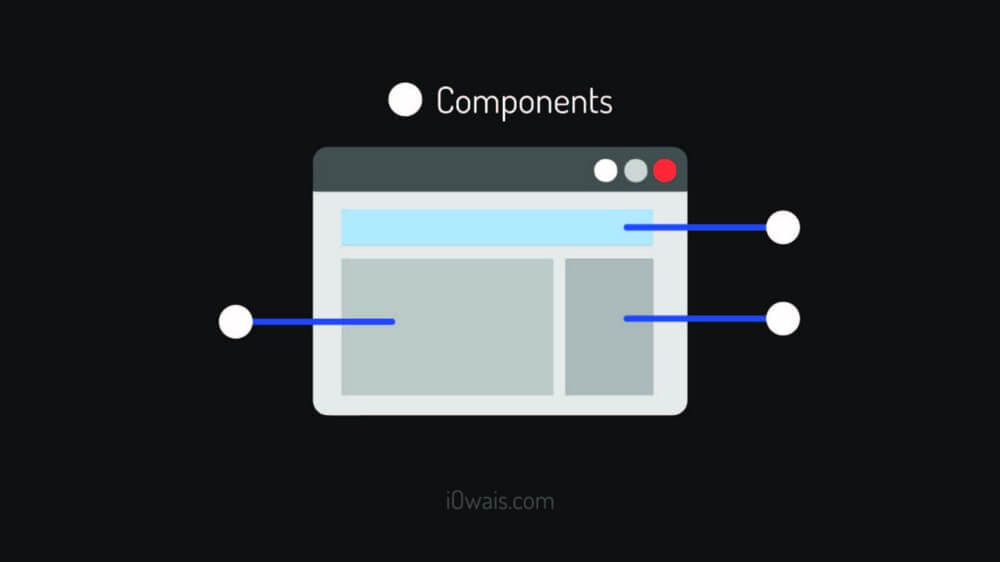
    Components are the building blocks of views.

    Basically we can create reusable, predefined chunks/parts of code that can be put together to create a view.

    Let’s take this example from Facebook’s posts. You have seen this thing all over Facebook in every single post. Let’s call it (Like Portion) It’s a component made up of three small components (Like Button, Comment Button and Share Button) And this Like Portion is used in every single post.

    So Facebook is not copying and pasting the code of this Like Portion — They just created this component once and using it again and again in every post!

    Yes, that is component! They make your app pretty fast rather than executing and creating a part again.

    Another thing which really impressed me is that it uses VIRTUAL DOM to make updates in the REAL DOM

    Getting Confused? ?

    Let’s see what they are…


    VIRTUAL DOM vs REAL DOM

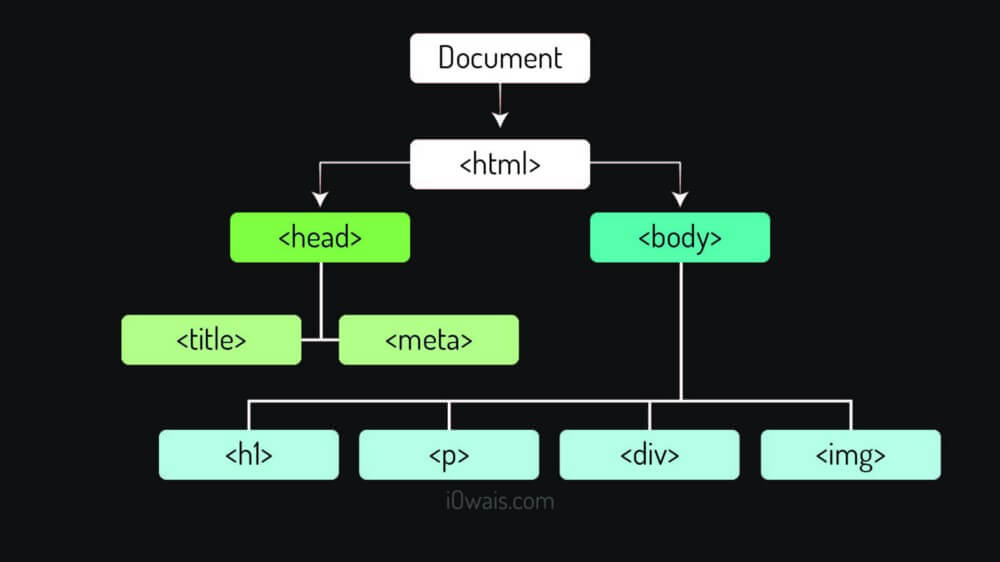
    First, this is an example of DOM

    The DOM is actually the object based abstraction of your code which is being shown on the page!

    DOM (Real/Browser DOM)

    DOM takes all the HTML elements and wraps them in an object with a tree-structure — like the image above. This provides an API that allows us to directly target any specific node (HTML element) and do what we want like adding more child/parent nodes, removing, editing it’s content and blah blah blah…

    Virtual DOM

    On the other hand Virtual DOM is an abstraction of your Real DOM but it’s pretty light-weight than the Real DOM — It has all the same properties as the Real DOM object but it can’t write and show things to the screen like Real DOM. It’s extremely fast as compare to the Browser’s DOM — It can produce about 200,000 Virtual DOM Nodes / Second…

    REACT uses Virtual DOM to make changes and then compare the changes with previous Virtual DOM — If any changes found then it goes to the Real DOM and updates only that specific part — so because of Virtual DOM it doesn’t effect Real DOM and when we change things it only updates that specific part of Real DOM and it happens real quick!

    If we had done this directly by the Real DOM it would execute, rearrange, calculate the positions of nodes and then print all the code again. But thanks to Virtual DOM that it only updates that specific reference/part!


    Well REACT.JS is not only option to work with… There are many other libraries and frameworks you can use!

    Ummm… Are you thinking: He said he will tell what a Library is and now he’s also talking about Frameworks!

    Still confused what Library/Framework is? What’s the difference? Let’s discuss:

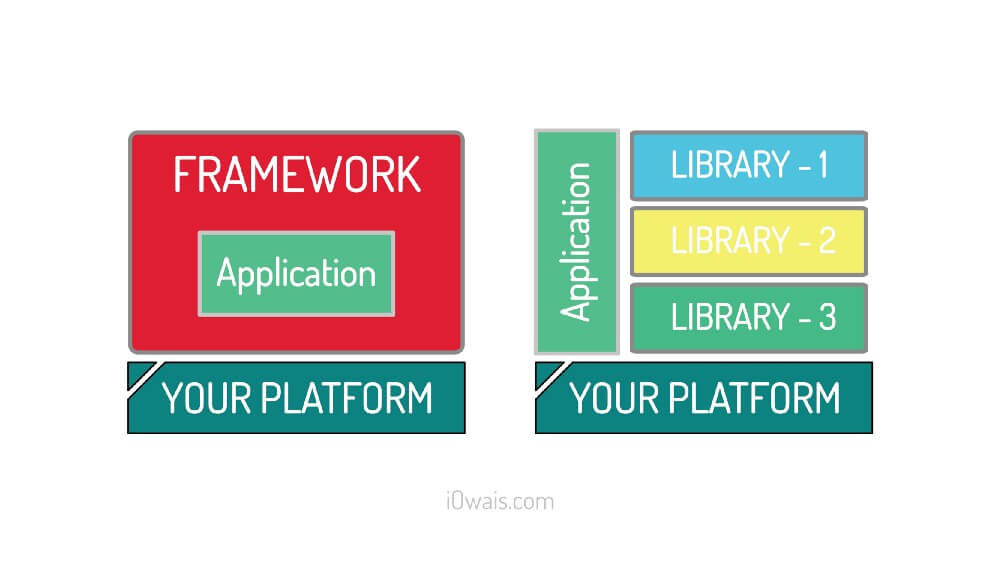
    Picture speaks a thousand words

    LIBRARY

    A library is a collection of functionality that you can call and use in your project. It’s just a collection of class definitions. You just get the code that has already been written by other developers and use as your own way!

    FRAMEWORK

    A framework is an application framework written in JavaScript. It differs from a Library in its control flow: A library offers functions to be called by its parent code, whereas a framework defines the entire application design. A developer does not call a framework; instead it is the framework that will call and use the code in some particular way.

    What does this mean? Well, it means that when you call a library, you are in control. But with a framework, the control is inverted: the framework calls you. (This is called the Hollywood Principle: Don’t call Us, We’ll call You.) This is pretty much the definition of a framework. If it doesn’t have Inversion of Control, it’s not a framework.


    As I mentioned, there are many other libraries and frameworks you can use e.g.:

    • Angular JS
    • Vue JS
    • Backbone JS
    • Reactive JS
    • Polymar JS
    • Cycle JS

    And the list continuous… But the market is gained by 2 of them. One is what we are reading about “REACT” and the other is “ANGULAR JS” — But why I preferred React over Angular? Here’s my personal opinion:

    Lemme send you back to the 2017 Stack Overflow Developer Survey Results. Where React was number 4 of the most popular library (REFERENCE LINK). It is however number 2, by far, as the most loved one (REFERENCE LINK) and Angular is at number 4.

    Several reasons for that:

    • unlike AngularJS or BackboneJS, React is NOT a framework. it’s just a plain, easy-to-dig-in DOM rendering engine that follows the same old way of thinking.
    • using React implies to use JavaScript ECMAScript 2015, or ES6, or Babel — which provides a clean, structured syntax. Unlike Angular which doesn’t necessarily make you a better JS developer, React does.
    • React promotes reusable, configurable components. While you don’t have to rewrite what you already did, the Internet is full of easy-to-use React components about pretty much everything : forms (react-form), state management (Redux), SPA routing (react-router), connecting to firebase (reactfire), manage Ajax and asynchronous sh*t (react-axios), draw charts (react-sparklines)…
    • React doesn’t stuck you to web development, you can easily jump into React Native in order to build a mobile app with less effort, which btw is becoming the new standard in term of mobile app development.
    • Here is what it takes in React to make a Google map widget:
    import React, {Component} from 'react'; 
    export default class GoogleMap extends Component { 
    componentDidMount() { 
        new google.maps.Map(this.refs.map, { 
          zoom:12, 
          center: { 
            lat: this.props.lat, 
            lng: this.props.lon 
          } 
        }); 
      } 
      render() { 
        return ( 
          <div ref="map"></div> 
        ); 
     } 
    }

    And here is how this component is instantiated:

    <GoogleMap lon={lon} lat={lat} />

    And here’s a tip for you: if you intend to dig in React, forget about Gulp/Grunt and go for Webpack.

    That’s all folks! Let’s meet in the next article with something interesting!

    If you found this story useful, you know what to do now. Hit that clap button and follow me to get more articles and tutorials on your feed.


    每天推荐一个 GitHub 优质开源项目和一篇精选英文科技或编程文章原文,欢迎关注开源日报。交流QQ群:202790710;微博:https://weibo.com/openingsource;电报群 https://t.me/OpeningSourceOrg

  • 2018年8月21日:开源日报第166期

    21 8 月, 2018

    每天推荐一个 GitHub 优质开源项目和一篇精选英文科技或编程文章原文,欢迎关注开源日报。交流QQ群:202790710;微博:https://weibo.com/openingsource;电报群 https://t.me/OpeningSourceOrg

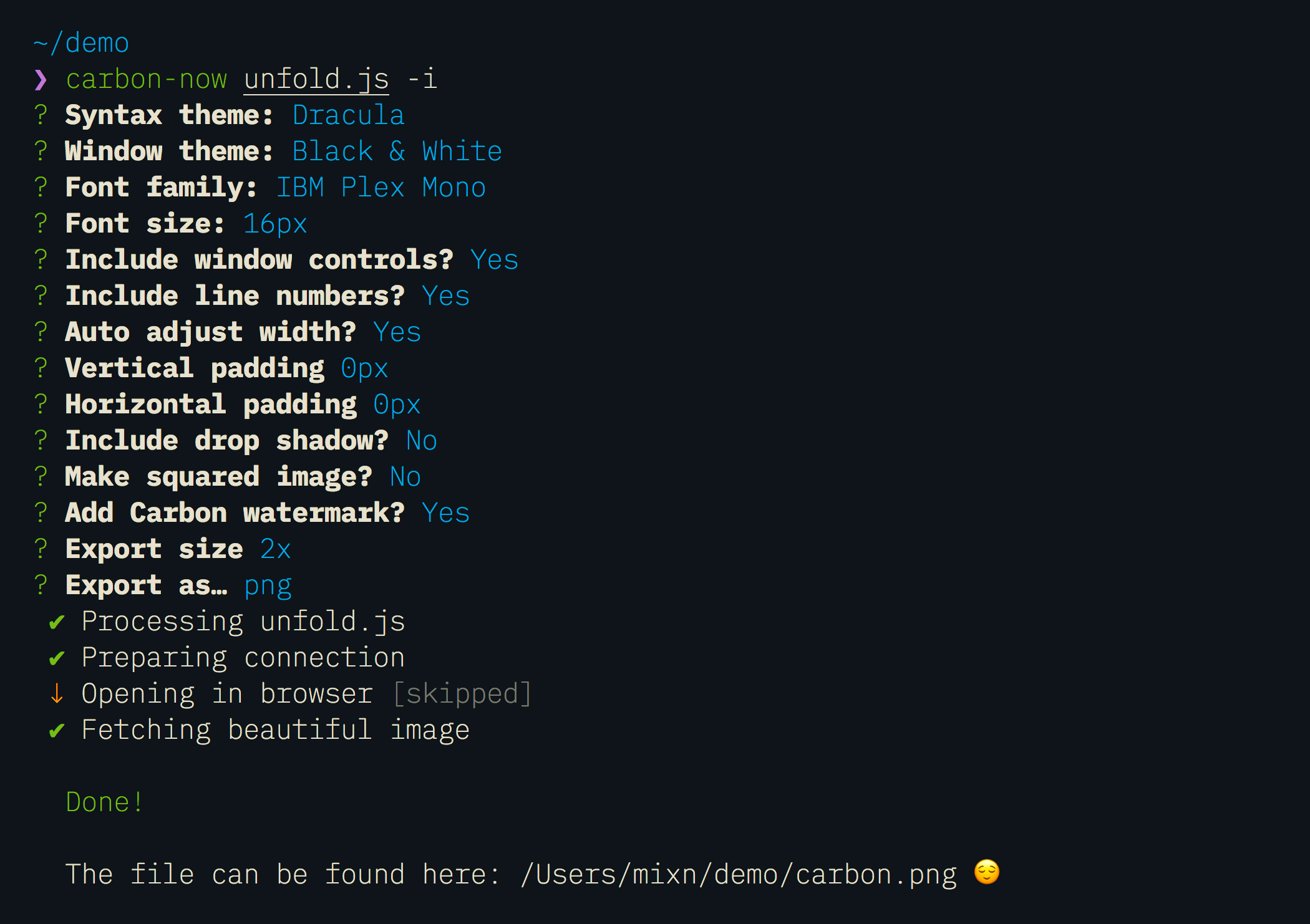
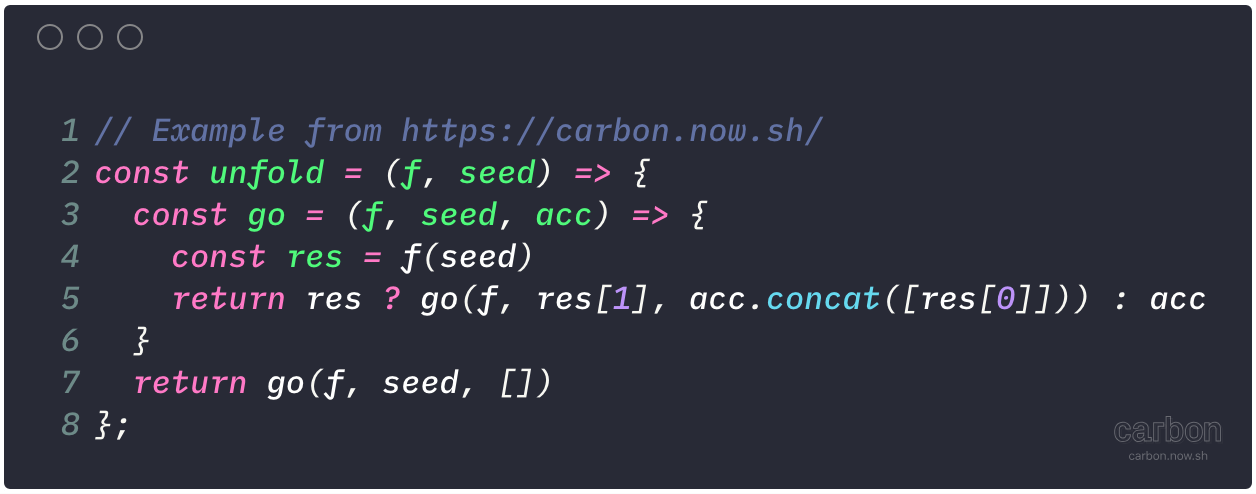
    今日推荐开源项目:《代码截图工具 carbon-now-cli》传送门:GitHub链接

    推荐理由:这个是之前出现过的代码截图工具 carbon 的命令行版本,可以让你给一个文件中的代码生成截图。当然了,既然是命令行版本,你自然可以自己对各种细节方面进行设置,从而给你的代码截出一张漂亮的截图。


    今日推荐英文原文:《5 GitHub tips for new coders》作者:Alyson La

    原文链接:https://medium.freecodecamp.org/5-github-tips-for-new-coders-2f312689ffd5

    推荐理由:作者分享的对于新人来说使用 GitHub 的五个技巧

    5 GitHub tips for new coders

    This October I celebrated my 5 year anniversary working at GitHub. ? 5 years ago, I was an enthusiastic accountant (like straight nerd — my former twitter handle was @taxaly) who knew nothing about code, let alone about using Git and GitHub.

    Now I’m an enthusiastic Data Scientist who knows a handful of things about coding using Git & GitHub. It’s partially thanks to learning these technologies that I made this rewarding career switch.

    But even working at GitHub, learning Git and GitHub were hard! As it’s own form of an open source contribution, I wanted to share with other folks new to coding my top 5 tips for using GitHub.

    Tip #1: Change your default text editor associated with Git

    For many people, the default text editor when using Git from the terminal is VIM. VIM can be a terrible, scary thing for the new or casual hacker. Or even for veteran hackers or @haacked himself.

    If you ever find yourself with a merge conflict (and you will, see tip #4), you’ll get kicked out to VIM to fix the conflict and then you’ll need to know the specific VIM commands to edit the doc and want to cry. For more than a year I had a sticky note on my monitor at work as a reminder of the basic VIM commands like i (to edit) and :wq (to save and quit). To avoid the potential tears, you could just change the default text editor.

    In order to change your text editor to Atom, Sublime, or TextMate, follow the instructions in this GitHub Help.

    While you are at it, you should also make sure your shortcuts are set up so you can open files in your preferred text editor directly from the terminal using subl . or atom .Check out these docs for setting up Atom access from your terminal and these docs for setting up Sublime.

    Tip #2: Change your dotfiles

    I didn’t learn about dotfiles until I was hacking and using Git & GitHub for multiple years. I’m still bummed that I didn’t know about this sooner!

    Dotfiles allow you to customize your terminal prompt so you can see what git branch you are on & if you have uncommited changes. IT’S GENIUS! I got my dotfiles from a co-worker (John Nunemaker) but if you search GitHub for ‘dotfiles’ you’ll find loads of options.

    dotfiles for the win!

    Tip #3: Install Hub

    Hub is a command line tool that makes it easier to use GitHub. Often I will be working on a repository in my terminal but want to see issues or pull requests on GitHub. So I’ll open a browser tab, then get distracted by email/twitter/a puppy — and ten minutes later, get around to typing in the GitHub repository url.

    By typing hub browse in the terminal, it will auto-magically open the url of the repository directly in your browser for distraction free GitHub-ing. Boom.

    Nash the Octodog

    Tip #4: Practice merge conflicts

    This is where I admit that I’m sometimes a quitter. Specifically when it comes to merge conflicts. I cannot remember the number of times that I’ve abandoned a project or pull request because I hit a merge conflict.

    They scared me, the docs on how to fix them scared me, and then I was in VIM and wanted to quit forever (see tip #1).

    Then I realized I needed to face my fear so I started a practice repository, created a merge conflict on purpose, and walked through the documentation or watched a YouTube video on how to fix merge conflicts. I did that a few times. Also now you can fix simple merge conflicts in the GitHub User Interface so that’s been handy.

    Today when I hit a merge conflict, I am slightly less scared and calmly make my way deleting the carrots, knowing that thanks to version control, I can’t mess things up too much.

    Practice,

    Practice,

    Practice.

    Tip #5: Make a GitHub Page

    A GitHub page is a personal or project based website that GitHub will host for free! It always helps to have an actual project to push up to GitHub to practice your Git and GitHub skills.

    Make a simple website using HTML, CSS, and JavaScript from a coding tutorial then follow the steps to host it on GitHub here or you can check out this video I made a while back with step by step instructions. Or try the super easy Fork and Go method.

    Last, I’m gonna sneak in a 6th maybe obvious tip which is — take a Git and Github class or tutorial!

    Here are a few that are worth checking out:

    • Git-it: https://github.com/jlord/git-it-electron
    • freeCodeCamp videos: https://youtu.be/vR-y_2zWrIE
    • GitHub Training: https://services.github.com/on-demand/resources/
    • Git Cheatsheet — http://ohshitgit.com/

    I hope this list of tips was helpful and if you have any other tips that you found helpful in your journey to learn Git and GitHub, I’d love to hear them! ❤


    每天推荐一个 GitHub 优质开源项目和一篇精选英文科技或编程文章原文,欢迎关注开源日报。交流QQ群:202790710;微博:https://weibo.com/openingsource;电报群 https://t.me/OpeningSourceOrg
←上一页
1 … 217 218 219 220 221 … 262
下一页→

Proudly powered by WordPress