• 开源镜像
  • 开源沙龙
  • 媛宝
  • 猿帅
  • 注册
  • 登录
  • 息壤开源生活方式平台
  • 加入我们

开源日报

  • 2018年9月21日:开源日报第197期

    21 9 月, 2018

    每天推荐一个 GitHub 优质开源项目和一篇精选英文科技或编程文章原文,欢迎关注开源日报。交流QQ群:202790710;微博:https://weibo.com/openingsource;电报群 https://t.me/OpeningSourceOrg


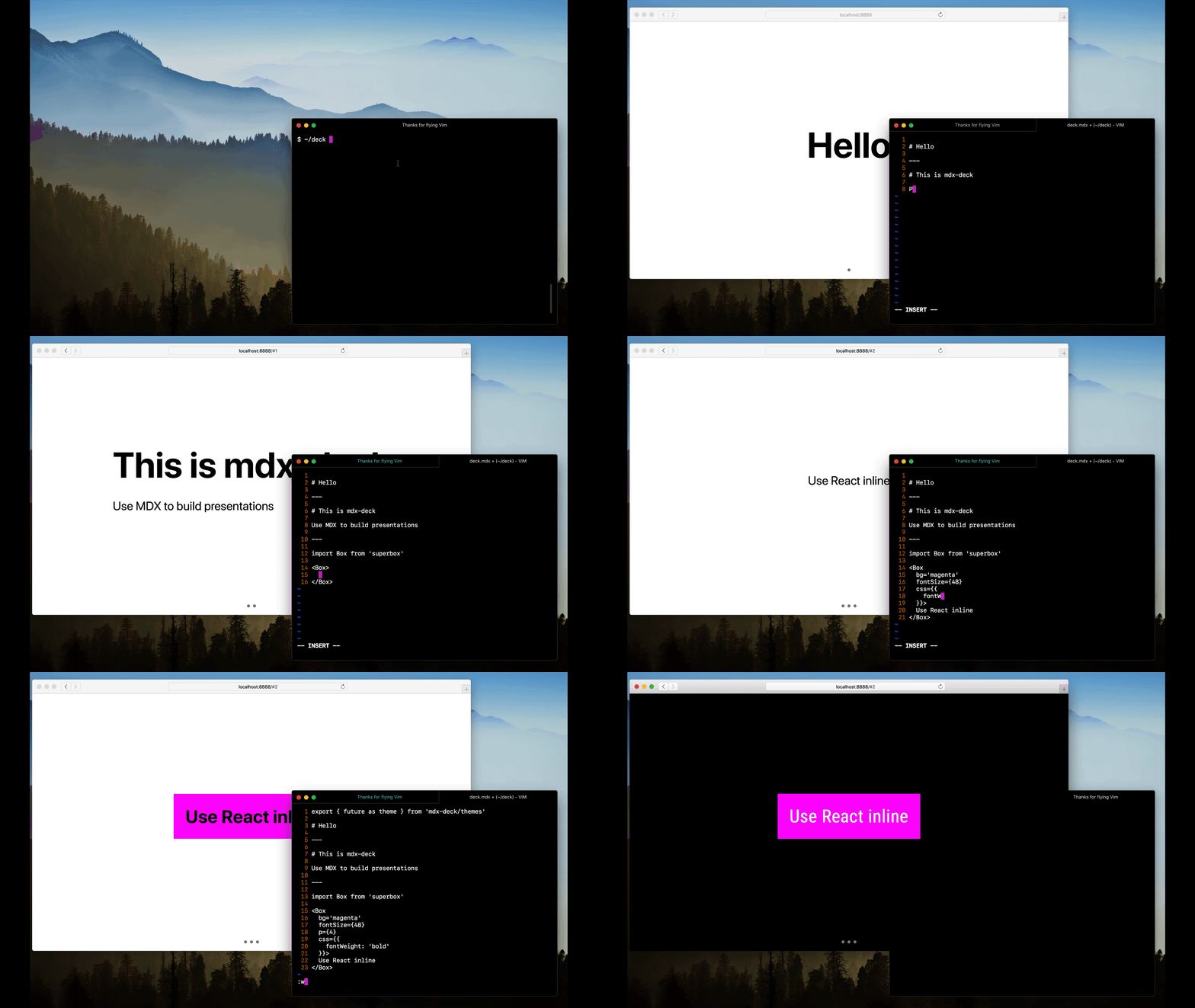
    今日推荐开源项目:《简易幻灯片 mdx-deck》传送门:GitHub链接

    推荐理由:使用 MDX 来制作一个很大的幻灯片,这个幻灯片虽然没有之前介绍过的 Big 那么大,但是基于 MDX,可以使用 markdown 来编写和可以引入 React 组件仍然为它加了不少的分,如果你想要快速制作幻灯片,就可以考虑一下它和 Big 了。

    Big :https://github.com/tmcw/big

    今日推荐英文原文:《Goodbye, Object Oriented Programming》作者:Charles Scalfani

    原文链接:https://medium.com/@cscalfani/goodbye-object-oriented-programming-a59cda4c0e53

    推荐理由:大学课堂里都说要面向对象编程,这篇文章就讲了面向对象编程的一些问题

    Goodbye, Object Oriented Programming

    I’ve been programming in Object Oriented languages for decades. The first OO language I used was C++ and then Smalltalk and finally .NET and Java.

    I was gung-ho to leverage the benefits of Inheritance, Encapsulation, and Polymorphism. The Three Pillars of the Paradigm.

    I was eager to gain the promise of Reuse and leverage the wisdom gained by those who came before me in this new and exciting landscape.

    I couldn’t contain my excitement at the thought of mapping my real-world objects into their Classes and expected the whole world to fall neatly into place.

    I couldn’t have been more wrong.

    Inheritance, the First Pillar to Fall

    At first glance, Inheritance appears to be the biggest benefit of the Object Oriented Paradigm. All the simplistic examples of shape hierarchies that are paraded out as examples to the newly indoctrinated seem to make logical sense.
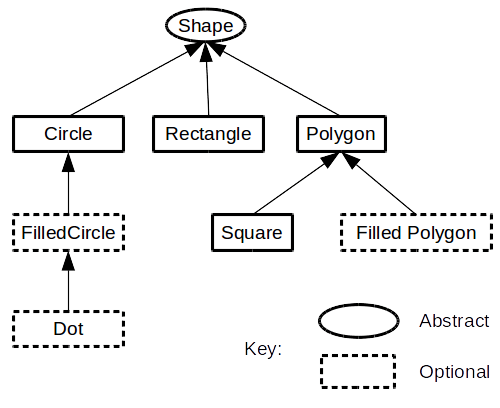
    And Reuse is the word of the day. No… make that the year and perhaps evermore.

    I swallowed this whole and rushed out into the world with my newfound insight.

    Banana Monkey Jungle Problem

    With religion in my heart and problems to solve, I started building Class Hierarchies and writing code. And all was right with the world.

    I’ll never forget that day when I was ready to cash in on the promise of Reuse by inheriting from an existing class. This was the moment I had been waiting for.

    A new project came along and I thought back to that Class that I was so fond of in my last project.

    No problem. Reuse to the rescue. All I gotta do is simply grab that Class from the other project and use it.

    Well… actually… not just that Class. We’re gonna need the parent Class. But… But that’s it.

    Ugh… Wait… Looks like we gonna also need the parent’s parent too… And then… We’re going to need ALL of the parents. Okay… Okay… I handle this. No problem.

    And great. Now it won’t compile. Why?? Oh, I see… This object contains this other object. So I’m gonna need that too. No problem.

    Wait… I don’t just need that object. I need the object’s parent and its parent’s parent and so on and so on with every contained object and ALL the parents of what those contain along with their parent’s, parent’s, parent’s…

    Ugh.

    There’s a great quote by Joe Armstrong, the creator of Erlang:

    The problem with object-oriented languages is they’ve got all this implicit environment that they carry around with them. You wanted a banana but what you got was a gorilla holding the banana and the entire jungle.

    Banana Monkey Jungle Solution

    I can tame this problem by not creating hierarchies that are too deep. But if Inheritance is the key to Reuse, then any limits I place on that mechanism will surely limit the benefits of Reuse. Right?

    Right.

    So what’s a poor Object Oriented Programmer, who’s had a healthy helping of the Kool-aid, to do?

    Contain and Delegate. More on this later.

    The Diamond Problem

    Sooner or later, the following problem will rear its ugly and, depending on the language, unsolvable head.
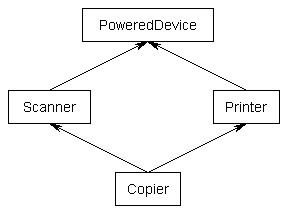
    Most OO languages do not support this, even though this seems to make logical sense. What’s so difficult about supporting this in OO languages?

    Well, imagine the following pseudocode:

    Class PoweredDevice {
    }
    Class Scanner inherits from PoweredDevice {
      function start() {
      }
    }
    Class Printer inherits from PoweredDevice {
      function start() {
      }
    }
    Class Copier inherits from Scanner, Printer {
    }

    Notice that both the Scanner class and the Printer class implement a function called start.

    So which start function does the Copier class inherit? The Scanner one? The Printer one? It can’t be both.

    The Diamond Solution

    The solution is simple. Don’t do that.

    Yes that’s right. Most OO languages don’t let you do this.

    But, but… what if I have to model this? I want my Reuse!

    Then you must Contain and Delegate.

    Class PoweredDevice {
    }
    Class Scanner inherits from PoweredDevice {
      function start() {
      }
    }
    Class Printer inherits from PoweredDevice {
      function start() {
      }
    }
    Class Copier {
      Scanner scanner
      Printer printer
      function start() {
        printer.start()
      }
    }

    Notice here that the Copier class now contains an instance of a Printer and of a Scanner. It delegates the start function to the Printer class’s implementation. It could just as easily delegated to the Scanner.

    This problem is yet another crack in the Inheritance pillar.

    The Fragile Base Class Problem

    So I’m making my hierarchies shallow and keeping them from being cyclical. No diamonds for me.

    And all was right with the world. That is until…

    One day, my code works and the next day it stops working. Here’s the kicker. I didn’t change my code.

    Well, maybe it’s a bug… But wait… Something did change…

    But it wasn’t in my code. Turns out the change was in the class that I inherited from.

    How could a change in the Base class break my code??

    This is how…

    Imagine the following Base class (It’s written in Java, but it should be easy to understand if you don’t know Java):

    import java.util.ArrayList;
     
    public class Array
    {
      private ArrayList<Object> a = new ArrayList<Object>();
     
      public void add(Object element)
      {
        a.add(element);
      }
     
      public void addAll(Object elements[])
      {
        for (int i = 0; i < elements.length; ++i)
          a.add(elements[i]); // this line is going to be changed
      }
    }

    IMPORTANT: Notice the commented line of code. This line is going to be changed later which will break things.

    This class has 2 functions on its interface, add() and addAll(). The add() function will add a single element and addAll() will add multiple elements by calling the add function.

    And here’s the Derived class:

    public class ArrayCount extends Array
    {
      private int count = 0;
     
      @Override
      public void add(Object element)
      {
        super.add(element);
        ++count;
      }
     
      @Override
      public void addAll(Object elements[])
      {
        super.addAll(elements);
        count += elements.length;
      }
    }

    The ArrayCount class is a specialization of the general Array class. The only behavioral difference is that the ArrayCount keeps a count of the number of elements.

    Let’s look at both of these classes in detail.

    The Array add() adds an element to a local ArrayList.
    The Array addAll() calls the local ArrayList add for each element.

    The ArrayCount add() calls its parent’s add() and then increments the count.
    The ArrayCount addAll() calls its parent’s addAll() and then increments the count by the number of elements.

    And all works fine.

    Now for the breaking change. The commented line of code in the Base class is changed to the following:

      public void addAll(Object elements[])
      {
        for (int i = 0; i < elements.length; ++i)
          add(elements[i]); // this line was changed
      }

    As far as the owner of the Base class is concerned, it still functions as advertised. And all of the automated tests still pass.

    But the owner is oblivious to the Derived class. And the owner of Derived class is in for a rude awakening.

    Now ArrayCount addAll() calls its parent’s addAll() which internally calls the add() which has been OVERRIDEN by the Derived class.

    This causes the count to be incremented each time the Derived class’s add() is called and then it’s incremented AGAIN by the number of elements that were added in the Derived class’s addAll().

    IT’S COUNTED TWICE.

    If this can happen, and it does, the author of the Derived class must KNOW how the Base class has been implemented. And they must be informed about every change in the Base class since it could break their Derived class in unpredictable ways.

    Ugh! This huge crack is forever threatening the stability of precious Inheritance pillar.

    The Fragile Base Class Solution

    Once again Contain and Delegate to the rescue.

    By using Contain and Delegate, we go from White Box programming to Black Box programming. With White Box programming, we have to look at the implementation of the base class.

    With Black Box programming, we can be completely ignorant of the implementation since we cannot inject code into the Base class by overriding one of its functions. We only have to concern ourselves with the Interface.

    This trend is disturbing…

    Inheritance was supposed to be a huge win for Reuse.

    Object Oriented languages don’t make Contain and Delegate easy to do. They were designed to make Inheritance easy.

    If you’re like me, you’re starting to wonder about this Inheritance thing. But more important, this should shake your confidence in the power of Classification via Hierarchies.

    The Hierarchy Problem

    Every time I start at a new company, I struggle with the problem when I’m creating a place to put my Company Documents, e.g. the Employee Handbook.

    Do I create a folder called Documents and then create a folder called Company in that?

    Or do I create a folder called Company and then create a folder called Documents in that?

    Both work. But which is right? Which is best?

    The idea of Categorical Hierarchies was that there were Base Classes (parents) that were more general and that Derived Classes (children) were more specialized versions of those classes. And even more specialized as we make our way down the inheritance chain. (See the Shape Hierarchy above)

    But if a parent and child could arbitrarily switch places, then clearly something is wrong with this model.

    The Hierarchy Solution

    What’s wrong is…

    Categorical Hierarchies don’t work.

    So what are hierarchies good for?

    Containment.

    If you look at the real world, you’ll see Containment (or Exclusive Ownership) Hierarchies everywhere.

    What you won’t find is Categorical Hierarchies. Let that sink in for a moment. The Object Oriented Paradigm was predicated upon the real world, one filled with Objects. But then it uses a broken model, viz. Categorical Hierarchies, where there is no real-world analogy.

    But the real world is filled with Containment Hierarchies. A great example of a Containment Hierarchy is your socks. They are in a sock drawer which is contained in one drawer in your dresser which is contained in your bedroom which is contained in your house, etc.

    Directories on your hard drive are another example of a Containment Hierarchy. They contains files.

    So how do we categorize then?

    Well, if you think of the Company Documents, it pretty much doesn’t matter where I put them. I can put them in a folder of Documents or a folder called Stuff.

    The way I categorize it is with tags. I tag the file with the following tags:

    Document
    Company
    Handbook

    Tags have no order or hierarchy. (This solves the Diamond Problem too.)

    Tags are analogous to interfaces since you can have multiple types associated with the document.

    But with so many cracks, it looks like the Inheritance pillar has fallen.

    Goodbye, Inheritance.

    Encapsulation, the Second Pillar to Fall

    At first glance, Encapsulation appears to be second biggest benefit of Object Oriented Programming.

    Object state variables are protected from outside access, i.e. they’re Encapsulated in the Object.

    No longer will we have to worry about global variables that are being accessed by who-knows-who.

    Encapsulation is a Safe for your variables.

    This Encapsulation thing is INCREDIBLE!!

    Long live Encapsulation…

    That is until…

    The Reference Problem

    For efficiency sake, Objects are passed to functions NOT by their value but by reference.

    What that means is that functions will not pass the Object, but instead pass a reference or pointer to the Object.

    If an Object is passed by reference to an Object Constructor, the constructor can put that Object reference in a private variable which is protected by Encapsulation.

    But the passed Object is NOT safe!

    Why not? Because some other piece of code has a pointer to the Object, viz. the code that called the Constructor. It MUST have a reference to the Object otherwise it couldn’t pass it to the Constructor?

    The Reference Solution

    The Constructor will have to Clone the passed in Object. And not a shallow clone but a deep clone, i.e. every object that is contained in the passed in Object and every object in those objects and so on and so on.

    So much for efficiency.

    And here’s the kicker. Not all objects can be Cloned. Some have Operating System resources associated with them making cloning useless at best or at worst impossible.

    And EVERY single mainstream OO language has this problem.

    Goodbye, Encapsulation.

    Polymorphism, the Third Pillar to Fall

    Polymorphism was the redheaded stepchild of the Object Oriented Trinity.

    It’s sort of the Larry Fine of the group.

    Everywhere they went he was there, but he was just a supporting character.

    It’s not that Polymorphism isn’t great, it’s just that you don’t need an Object Oriented language to get this.

    Interfaces will give you this. And without all of the baggage of OO.

    And with Interfaces, there isn’t a limit to how many different behaviors you can mix in.

    So without much ado, we say goodbye to OO Polymorphism and hello to interface-based Polymorphism.

    Broken Promises

    Well, OO sure promised a lot in the early days. And these promises are still being made to naive programmers sitting in classrooms, reading blogs and taking online courses.

    It’s taken me years to realize how OO lied to me. I too was wide-eyed and inexperienced and trusting.

    And I got burned.

    Good-bye, Object Oriented Programming.

    So then what?

    Hello, Functional Programming. It’s been so nice to work with you over the past few years.

    Just so you know, I’m NOT taking any of your promises at face value. I’m going to have to see it to believe it.

    Once burned, twice shy and all.

    You understand.

    If you liked this, click the? below so other people will see this here on Medium.

    If you want to join a community of web developers learning and helping each other to develop web apps using Functional Programming in Elm please check out my Facebook Group, Learn Elm Programming https://www.facebook.com/groups/learnelm/


    每天推荐一个 GitHub 优质开源项目和一篇精选英文科技或编程文章原文,欢迎关注开源日报。交流QQ群:202790710;微博:https://weibo.com/openingsource;电报群 https://t.me/OpeningSourceOrg

  • 2018年9月20日:开源日报第196期

    20 9 月, 2018

    每天推荐一个 GitHub 优质开源项目和一篇精选英文科技或编程文章原文,欢迎关注开源日报。交流QQ群:202790710;微博:https://weibo.com/openingsource;电报群 https://t.me/OpeningSourceOrg


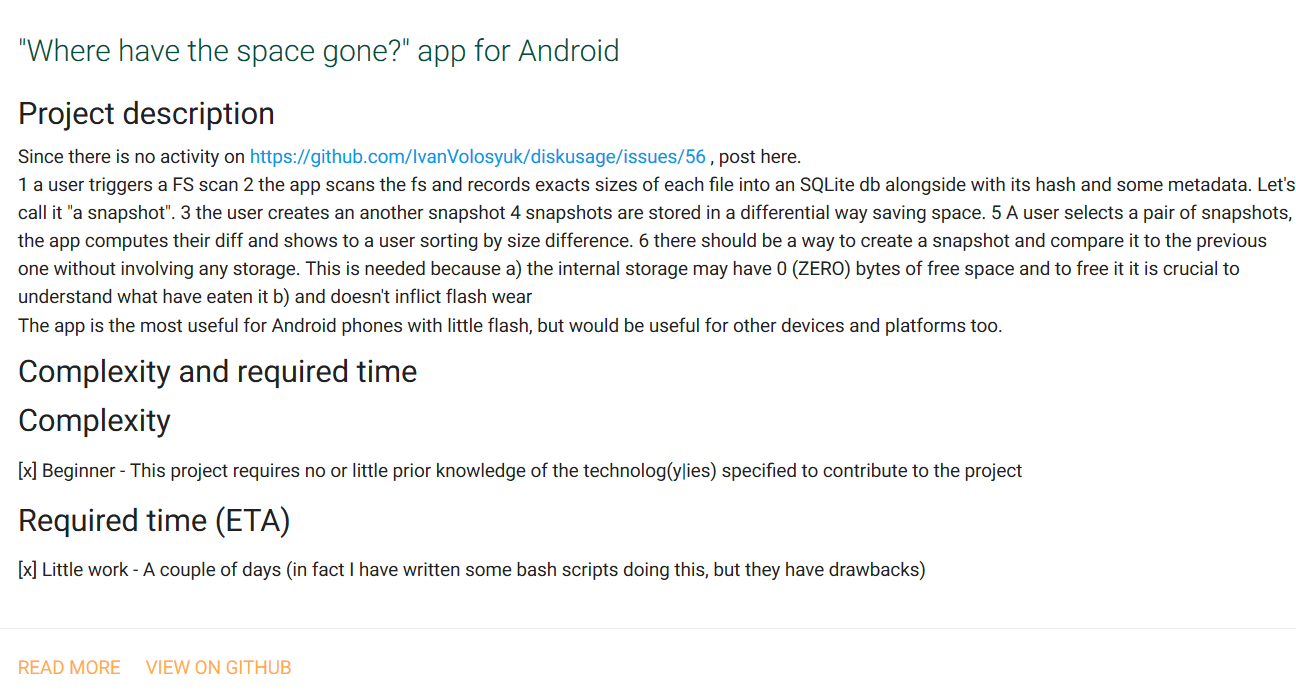
    今日推荐开源项目:《你们可真是个小机灵鬼 Open Source Ideas》传送门:GitHub链接

    推荐理由:这个项目是一个开源想法集合,你可以把自己的疯狂想法提出来然后寻找队友,亦或者作为别人疯狂想法的队友,用途各种各样,兴许你提出一个想法之后过了很久再回来,有人实现它了,然后你一看:“卧槽这什么玩意和我想象中完全不一样。”这也很有意思不是吗?


    今日推荐英文原文:《The 439 day Journey that Changed my Life》作者:Daniel Lemay

    原文链接:https://medium.freecodecamp.org/the-439-day-journey-that-changed-my-life-3c45a8cad5dd

    推荐理由:讲述了作者通过在网络上自学,最后成为了一名开发人员的故事,顺带提出了他在学习时发现的很有效的几个方面

    The 439 day Journey that Changed my Life

    It was Spring of 2017. I was beyond displeased with my current work situation. I dreaded going into work every day and being a punching bag for what wasn’t going right in the organization.

    My closest coworkers were amazing. Our relationship was one part caring about each other, and one part informal group therapy. These people are all that kept me somewhat stable.

    But this story isn’t about that place. Those details aren’t important or beneficial. All you need to know is that my work environment was beyond toxic, and I needed an exit strategy.

    At first, I started applying for other jobs my the same field. This lead to an interview scheduled for a similar position in a smaller organization.

    During this search process, I also began to question whether it was the best approach to pursue this career path. What had once felt clear continued to grow hazier. One week before my scheduled interview, I decided to try out modern web development, just to see if it would be something of interest.

    The Start of Something New

    After some research, I decided to try out freeCodeCamp. I didn’t want to invest any money up front, just in case this was another flight of fancy.

    Within the first two days, I was hooked. I canceled my interview and decided to focus on exploring this new skill in an environment I was already comfortable in.

    I flew through the sections on HTML and CSS with ease. Coming up to the foreboding gates of the JavaScript section filled me with unease. Could I actually handle logical programming? Should I stop and turn back? Maybe I should stay in a field I was already good at?

    There were so many sources of anxiety when I was learning new things, and my perfectionism wasn’t helping either. Determined, and with the encouraging words of several friends, I pushed forward.

    Starting to work with JavaScript was as challenging as I expected. But I found the mental puzzles of basic algorithms to be intriguing. Even when I was driving my car, I would be sifting through options and potential solutions in my head.

    The mental challenge — and the feeling I got when I finally solved a problem — were invigorating. There was a sense of mental euphoria after solving a problem before jumping into the next one.

    Within two months of starting, I knew that this is what I wanted to do. But I was far from having the necessary skills to be employable.

    I elected to continue teaching myself using mostly free resources for a multitude of reasons. Quitting my job to go to a code school was not a financially viable option, since I was the primary income earner for our family of three. Later on, this also ruled out the notion of internships.

    There are amazing resources available online to teach yourself for free or with minor investment, and freeCodeCamp is one of them. The downside of this approach is that there is no one watching over you to provide structure or deadlines. There are no assignment due dates, no professional grading, no mentorship.

    As a new learner, you have to seek out this additional structure if you want it. This is difficult, and requires a great deal of internal motivation and self-discipline.

    People learn in different ways and at varying paces. Traditional educational processes can often fall short of tailoring this to each learner. But I thrive best in self-directed learning environments where I can pursue what interests me, and push things forward at my own level.

    So I continued to push myself, and completed the freeCodeCamp Front End Certification in the first 5.5 months. This consisted of completing 10 projects and several dozen algorithm challenges.

    Near the end of this process, I decided that I wanted to learn React. I purchased my first paid course since starting this journey: Wes Bos’ React course. It was an amazing course and definitely helped me to get up and running faster. I used the final three projects to solidify my initial learning of React.

    After completing the Front End Certification, I began exploring the back end program at freeCodeCamp. Soon thereafter, I abandoned it in favor of other things that sparked my interest.

    One of the most valuable experiences during this journey was joining a team project with two other developers that I had never met. Chingu is an organization which helps coordinate developers of similar skillsets around the world to complete a larger project in approximately 6 weeks.

    This experience exposed me to working on a project in a team environment, and shore up best practices with git workflows. It also forced me to explore how to break down a larger application into smaller manageable parts. I have written in depth about this experience here.

    After completing this project in late 2017, I felt more confident in my abilities and started the job search.

    The Final Mile

    On a long hike, the final mile is often the most arduous. So much has been achieved and the end is in sight. However, you can be exhausted from pushing yourself and uncertain if what you’re pursuing was a wise choice. You might ask, Did I push myself too far? Everything is aching, and each step falls heavier than the previous.

    For me, April and May of this year were disheartening. I had built out several projects to show to prospective employers, was active in the community, and continued learning. Despite my best efforts, the job search was going nowhere. I wasn’t surprised, but it was disheartening. I knew that not having a formal technical education or prior work experience in the field would be a significant obstacle.

    I pretty much gave up applying to jobs posted online after having received next to 0% response rate from job boards. I suspect that these items precluded me from making it past the HR screening. To circumvent this, I focused on increasing the attention I paid to networking, as well as presenting on some topics at local meetups.

    Presenting on technical topics can be an intimidating endeavor. Not only can the fear of public speaking come into play, but imposter syndrome can further stoke that anxiety.

    For my first real presentation, I didn’t have time to get nervous. Three hours before a meetup, someone asked if I would be interested in talking about Gatsby. I had built out my site using Gatsby and loved the process, so I was happy to talk about it in an informal setting of 10–15 people.

    When I arrived later that evening, I found out it would be recorded. The presentation went well, despite having no time to prepare for it, and was well received. Later on, I would find out that the recording was shared with the developer team at the company I now work for. The presentation on Gatsby was the icebreaker that dispelled the anxiety of talking about technical topics.

    After building my site with Gatsby, I became mesmerized by GraphQL. I dove into learning as much as I could about it, and have since given four presentations of the topic. I have written more in-depth about confronting the fear of technical presentations here.

    In early May I started the interview process for the company that I am now working at, thanks to an introduction from my networking at meetups. I went through a couple rounds of conversations and interviews with different team members and joined the team on June 11, 2018. 439 days after starting this wild journey, I became a professional developer.

    Lessons Learned and What’s Next

    During the course of this journey, I have found several key concepts that are beneficial when learning new skills. These concepts are not exclusive to software development.

    Be Consistent and chip away at your goals: This is a crucial lesson that often gets overlooked. A more experienced developer put this into perspective for me when I was stuck on a larger problem. It is easy to look at the end goal in the distance and become disillusioned at the possibility of traversing the trail. We don’t get there by mentally willing it to be. Goal setting is best approached by breaking larger goals into smaller approachable ones. Setting micro-goals that align with the end goal allows for consistent check-ins and celebrating when you achieve them.

    Always be in the mindset of setting goals, working towards them, and adjusting them if needed. If a goal no longer becomes applicable or is clear that it is in not in the direction you want to go, feel free to leave it by the wayside. Consistency helps maintain inertia in achieving these goals. For development, I recommend the 100 Days of Code challenge and local meetups to immerse yourself in the community.

    Exercise motivational learning: Road maps are great in the sense that they can help keep a pulse on what technologies are in demand or popular. However, I recommend tempering that with what you desire to learn. What excites you? What is a problem you want to solve and what technologies do you need to get you there?

    It has been my experience that the more time I have spent focusing my learning on something I was passionate about, the more engaged I was. There is a correlation between my engagement and the progress I make. This was a primary reason why I stopped following a specific program after understanding the basic fundamentals of web development. Internal motivation is more impactful than external motivation.

    Always be building: Internalizing concepts comes from implementation and discovering the various subtleties to navigate. This is hard to achieve through solely reading the documentation and watching tutorials.

    When setting out to build a project, it is important to determine an appropriate level of complexity. When embarking on a new task, it should always seem barely out of reach. If it is something that seems easy you likely are not challenging yourself enough. Likewise, if it seems insurmountable, the task at hand is likely too complex.

    Fail fast and fail often, for it is in examining our failures that we can make necessary course corrections and come back stronger.

    Network and engage with people in the community: I’m an introverted person, and it takes a lot for me to go into a room full of people that I don’t know and socialize. But meetups and the associated networking can be a very valuable aspect of the learning experience and job search.

    Recognizing this importance, I pushed through some of my introverted hesitations. I learned so much from listening to other people present on things and engaging with them. Consistent attendance at a smaller meetup was one of the largest benefits. I felt comfortable asking people to review the code that I had written and give me feedback. This helped to confirm some things that I was doing well and some anti-patterns to correct.

    Don’t underestimate the importance of soft skills: It can be easy to become enraptured with a list of technical skills which a job may need. Technical skills are important and are necessary. However, soft skills are as important if not more so. The ability to talk to people, engage with different perspectives, and display empathy is of crucial importance. We work with people, and the products that we make have the opportunity for a positive or negative impact. A person with amazing technical skills, but poor soft skills can be disastrous to a team environment.

    Never stop learning: There is always more to learn, especially in software and web development. We can always be pushing ourselves further. Always be curious and dive into things that are intriguing to us. I have been focusing on static typing within JavaScript and am starting to get into ReasonML. More to come on that in the future.

    There are many great resources available to those interested in learning web development. The proliferation of these resources is the main reason I was able to learn a new skill while still working a full-time job and maintaining family time. These resources need some extra considerations and engagement by the learner, but they are an amazing way to learn new skills. I hope this article and lessons learned proves helpful in pursuing your own journey.

    If you are interested in connecting with me further, please connect with me on Twitter or check out my blog.


    每天推荐一个 GitHub 优质开源项目和一篇精选英文科技或编程文章原文,欢迎关注开源日报。交流QQ群:202790710;微博:https://weibo.com/openingsource;电报群 https://t.me/OpeningSourceOrg
  • 2018年9月19日:开源日报第195期

    19 9 月, 2018

    每天推荐一个 GitHub 优质开源项目和一篇精选英文科技或编程文章原文,欢迎关注开源日报。交流QQ群:202790710;微博:https://weibo.com/openingsource;电报群 https://t.me/OpeningSourceOrg

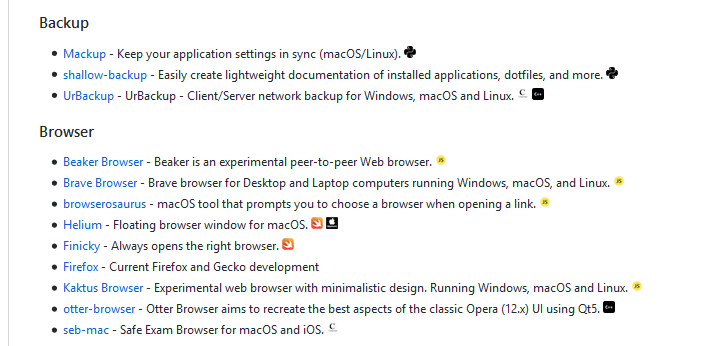
    今日推荐开源项目:《这次是 macOS 了 Awesome macOS open source applications》传送门:GitHub链接


    推荐理由:这次是给使用 macOS 的朋友们的推荐,这个项目是 macOS 上开源应用的大集合,顺带标明了它们所使用的语言,如果你在 macOS 上发现了很好的应用程序也当然欢迎放进这个项目中。


    今日推荐英文原文:《GitHub vs. GitLab — Which is Better for Open Source Projects?》作者:Dr. Michael J. Garbade

    原文链接:https://hackernoon.com/github-vs-gitlab-which-is-better-for-open-source-projects-31c45d464be0

    推荐理由:终于有人把这两个名字特别像的 GitHub 和 GitLab 拉出来做比较了,顾名思义,这篇文章通过比较说明它们各自适合哪些开源项目

    GitHub vs. GitLab — Which is Better for Open Source Projects?

    Currently, repository management services — like GitHub and GitLab — are vital aspects of successfully developing software, either individually or collaboratively.

    Without these services, it would be difficult to manage changes to open source projects while ensuring efficiency is maintained as development continues.

    For example, Asitaka relies on GitHub for tracking source code changes and collaborating with other developers.

    You can watch and learn from one of his projects where he creates a simple Instagram-like Android app in Kotlin here.

    When looking for the best code management service for open source projects, developers usually compare between the two most popular platforms: GitHub vs. GitLab.

    In this article, we’ll try to evaluate the two platforms to assist you to decide the best one for your projects.

    What is GitHub?

    As you probably know, GitHub, launched in 2008, is a git-based repository management platform that is the most popular in the world.

    Although GitHub supports the hosting of open source code, it’s not completely open source. As of June 2008, GitHub reported to having more than 28 million users and 85 million code repositories, stumping its number one position in the industry.

    In June 2008, Microsoft sent shockwaves across developers’ circles when it announced that it will acquire GitHub for $7.5 billion. Some developers backclashed because they thought that the tech giant would not maintain GitHub’s developer-first ethos.

    Projects on the platform are publicly available. However, if you want to make your project private, you’ll need a paid GitHub plan — which starts at $7 and $9 per user per month for individual developers and teams respectively.

    What is GitLab?

    GitLab, launched in 2011, is another web-based git repository that is gaining traction among enthusiasts of open source projects. The platform’s Community Edition is open sourced, allowing developers to contribute to the enhancements of its features.

    Unlike GitHub, GitLab offers free private repositories for open source projects. However, if you want to access more functionalities, you’ll need to go for the paid version, which starts at $4 per user per month.

    When Microsoft announced that it will acquire GitHub, several developers moved their projects to other competing platforms, especially GitLab, which reported a huge surge in the number of imported repositories.

    However, GitHub’s future CEO said that only an “extremely small number” of developers made a move.

    Comparison between GitHub and GitLab

    Comparing GitHub to GitLab is like comparing two twins; each is closely related with slight variations. In fact, if you’re logged into GitHub’s website, you’ll have a difficult time thinking you are not on GitLab’s.

    Over the years, the two repository management services have taken each other’s best features and integrated into their platforms.

    Here are some of the basic features they share:

    • Pull request
    • 3rd party integrations
    • Fork/clone repositories
    • Code review
    • Code snippets
    • Issue tracking
    • Advanced permission management
    • Markdown support

    Nonetheless, there are still differences between the code management repositories, something which can make you prefer one over the other.

    In fact, while technically they are close to one another, the major differences are mostly regarding philosophy.

    GitHub emphasizes on high availability and performance of its infrastructure and delegates other sophisticated functionalities to third-party tools.

    Conversely, GitLab focuses on including all features on one well-tried and well-integrated platform; it provides everything for the complete DevOps lifecycle under a single roof.

    Regarding popularity, GitHub definitely beats GitLab pants down. GitLab has a fewer number of developers pushing open source codes to the platform; though the recent GitHub acquisition gave it some upsurge.

    Additionally, regarding pricing, GitHub is more expensive, something that makes it unsuitable for users with low budgets.

    So, which one is best?

    Deciding between GitHub and GitLab for open source projects can be difficult, just like it can be difficult for a stranger to differentiate between twins.

    However, with a bit of underground digging, you can make a good decision.

    For example, if you are working with a large open source project that involves collaboration with several developers, GitHub could be your best choice.

    You’ll find a big and vibrant community on GitHub that can assist you in completing your project.

    On the other hand, if you are working on a project where price is an issue, and high performance is not emphasized, then going for GitLab can assist you to save costs.

    Furthermore, if you want a platform that is truly open source, then GitLab could be great for your project.

    Also, do you like using third-party tools for Continuous Integration (CI) and Continuous Delivery (CD) in your open source projects? Or, do you prefer built-in tools that will not require separate installing?

    If you like using pre-integrated tools for CI and CD purposes, then GitLab can serve you better; otherwise, go for GitHub.

    Wrapping up

    Ultimately, the choice between GitLab vs. GitHub depends on the specific objectives you intend to achieve with your open source programming project.

    Therefore, you should carefully evaluate your expectations and go for a repository management platform that best suits your needs.

    Or, which one do you prefer between GitHub and GitLab?

    Please share your thoughts below.


    每天推荐一个 GitHub 优质开源项目和一篇精选英文科技或编程文章原文,欢迎关注开源日报。交流QQ群:202790710;微博:https://weibo.com/openingsource;电报群 https://t.me/OpeningSourceOrg
  • 2018年9月18日:开源日报第194期

    18 9 月, 2018

    每天推荐一个 GitHub 优质开源项目和一篇精选英文科技或编程文章原文,欢迎关注开源日报。交流QQ群:202790710;微博:https://weibo.com/openingsource;电报群 https://t.me/OpeningSourceOrg


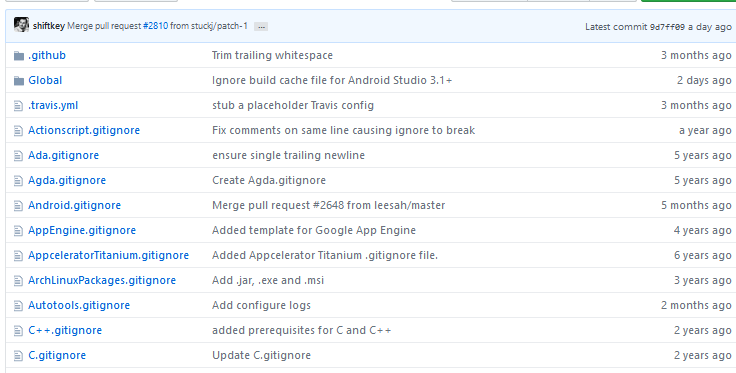
    今日推荐开源项目:《多睡觉少操心(指 Git) gitignore》传送门:GitHub链接

    推荐理由:这个项目是一份 .gitignore 文件的合集,把需要的文件放到 git 项目的根目录下就可以避免把不需要的文件提交到版本控制中,有了这个应该能省心不少。里面直接放着的是根据特定的语言框架用的模版,而 Global 文件夹中放着的则是更泛用型的比如操作系统和编辑器这样的模版,各取所需即可。


    今日推荐英文原文:《These 5 “clean code” tips will dramatically improve your productivity》作者:George Seif

    原文链接:https://medium.com/@george.seif94/these-5-clean-code-tips-will-dramatically-improve-your-productivity-b20c152783b

    推荐理由:写出高质量干净整洁代码的五个要注意的地方,可以有效的避开在队友看了你的代码之后把你打死的危机

    These 5 “clean code” tips will dramatically improve your productivity

    Quality code. Lots of people talk about it, but few actually do it right.

    Most people who code naturally know what quality code should look or feel like. It should be very easy to read and understand quickly, there shouldn’t be any major faults, edge cases should be handled, and it should be “self documenting”. Still, many people miss the mark when trying (hopefully) to write quality code.

    The cause of the mistakes are understandable in many cases. It can be challenging to predict how people will interpret your code, whether they will find it easy to read or an absolute nightmare. Not only that, once your project gets very big even you might not be able to read it!

    In such a case, it’s always good to establish some principals that you can rely on. Some go-to rules that you can always reference whenever you’re designing or writing code.

    The following 5 clean coding principals are the ones I code by! They’ve given me a massive productivity boost in my work and helped both myself and my colleagues be able to easily interpret and expand the code base which I’ve worked on. Hopefully they help you code faster and better too!

    If it isn’t tested, it’s broken

    Test, test, test. We know we should always do it, but sometimes we cut corners so we can push the project out faster. But without thorough testing, how will you 100% fully know that the code works? Yes there are very simple pieces of code, but one is always surprised when that crazy edge case comes up that you thought you didn’t need to test for!

    Do yourself and everyone on your team a favour and regularly test the code you write. You’ll want to test in a coarse to fine style. Start small with unit tests to make sure every small part works on its own. Then slowly start testing the different subsystems together working your way up towards testing the whole new system end to end. Testing in this way allows you to easily track where the system breaks, since you can easily verify each individual component or the small subsystems as the source of any issues.

    Choose meaningful names

    This is what makes code self-documenting. When you read over your old code, you shouldn’t have to look over every little comment and run every small piece of code to figure out what it all does!

    The code should roughly read like plain English. This is especially true for variable names, classes, and functions. Those three items should always have names that are self-explanatory. Rather than use a default name like “x” for example, call it “width” or “distance” or whatever the variable is supposed to represent in “read-world” terms. Coding in “real-world” terms will help make your code read in that way

    Classes and functions should be small and obey the Single Responsibility Principle (SRP)

    Small classes and functions make code approximately 9832741892374 times easier to read….

    But seriously they really do. First off, they allow for very isolated unit testing. If the piece of code you are testing is small, it’s easy to source and debug any issues that come up in the test or during deployment. Small classes and functions also allow for better readability. Instead of having a giant block of code with many loops and variables, you can reduce that block to a function that runs several smaller functions. You can then name each of those functions according to what they do and voila, human readable code!

    SRP gives you similar benefits. One responsibility means you only have to test a handful of edge cases and those cases are quite easy to debug. In addition it’s quite easy to name the function so it has real-world meaning. Since it only has one single purpose, it’ll just be named after it’s purpose, rather than trying to name a function that’s trying to accomplish so many different things.

    Catch and handle exceptions, even if you don’t think you need to

    Exceptions in code are usually edges case or errors that we would like to handle in our own specific way. For example, normally when an error is raised the program will stop; this definitely will not work for code we have deployed to production that is serving users! We’ll want to handle that error separately, perhaps try to see if it’s super critical or if we should just pass over it.

    You should always be catching and handling exceptions specifically, even if you don’t think you need to. Better to be safe than sorry. Exception handling will give you a better sense of order and control over your code, since you know specifically what will happen if a certain exception is triggered or a piece of code fails. Having a deeper understand of your code like this makes it easier to debug and makes your code more fault tolerant.

    Logs, logs, logs

    Log it. What you may ask? …. Everything that’s what! There’s no such thing as too much logs!

    Logs are your absolute number 1 source for debugging your code and monitoring your application when it’s in production. You should be logging every major “step” your program takes, any important calculations it makes, any errors, exceptions, or out of the ordinary results. It may also be useful to log the date and time that these events occur for easy tracking. All of this will make it easy to trace exactly which step in the pipeline the program failed.

    Many common programming languages such as Python come with their own logging libraries that have some very useful functions you can play with. If your application is to run as a SaaS app, then you may want to consider off-device, centralised logging. This way if one of your servers dies you can easily recover the logs!

    TL;DR

    (1) If it isn’t tested, it’s broken

    (2) Choose meaningful names

    (3) Classes and functions should be small and obey the Single Responsibility Principle (SRP)

    (4) Catch and handle exceptions, even if you don’t think you need to

    (5) Logs, logs, logs


    每天推荐一个 GitHub 优质开源项目和一篇精选英文科技或编程文章原文,欢迎关注开源日报。交流QQ群:202790710;微博:https://weibo.com/openingsource;电报群 https://t.me/OpeningSourceOrg
←上一页
1 … 210 211 212 213 214 … 262
下一页→

Proudly powered by WordPress