• 开源镜像
  • 开源沙龙
  • 媛宝
  • 猿帅
  • 注册
  • 登录
  • 息壤开源生活方式平台
  • 加入我们

开源日报

  • 2018年9月29日:开源日报第205期

    29 9 月, 2018

    每天推荐一个 GitHub 优质开源项目和一篇精选英文科技或编程文章原文,欢迎关注开源日报。交流QQ群:202790710;微博:https://weibo.com/openingsource;电报群 https://t.me/OpeningSourceOrg


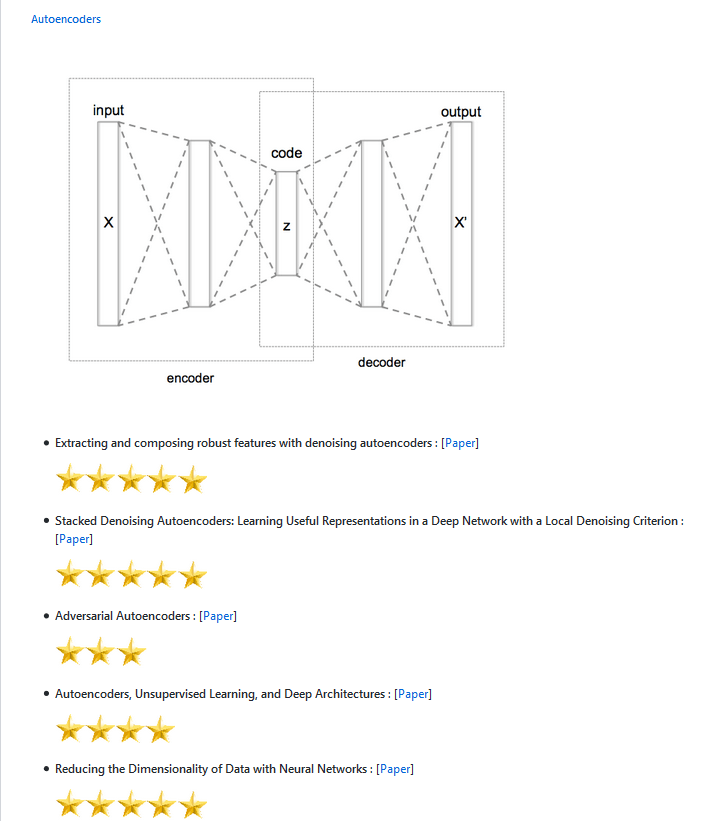
    今日推荐开源项目:《DLW Deep Learning World》传送门:GitHub链接

    推荐理由:这个关于深度学习的资源库按照目标进行分类,如果你知道你想要干什么,那么这个分类会很容易让你找到所需要的文章,不过即使你暂时没有目标,这里也提供了基础向的资源来阅读,推荐给正在学习深度学习的朋友们。

    今日推荐英文原文:《Meeting the Needs of AI》作者:Journal of Beautiful Business

    原文链接:https://journalofbeautifulbusiness.com/meeting-the-needs-of-ai-ccd6adcf3b1e

    推荐理由:关注 AI 的需求,兴许能够让 AI 更正确的发展

    Meeting the Needs of AI

    It is quite challenging to talk about AI without sounding like a buzzword-spewing technocrat these days. Amidst all the hemming and hawing that companies do to convince themselves that they’re still relevant (wink, wink), we forget that AI has needs too — and soon enough feelings. Let’s not forget that, since how AI learns is a direct reflection of how we treat it. But that aside, let’s look at why taking a holistic, scientifically rigorous approach to data that also accounts for human irrationalities is needed before AI can grow up.

    In order to dig into what AI needs, we first need to define what we mean by AI. What businesses call AI often refers to narrow (or weak) AI: playing chess, speech and image recognition, self-driving cars, computer vision, as well as natural language processing and any other tasks that leverage machine or deep learning. When your grandma hears something about AI on the news and thinks that what you’re talking about is general artificial intelligence, you can tell her that a team of AI experts at Stanford issued a press release stating that despite all the amazing strides AI has made in the past years, “computers still can’t exhibit the common sense or the general intelligence of even a five-year-old.”

    However, if AI gets all of its needs fulfilled, then it can move — much as humans did — from a very narrow and weak state towards a much stronger and more general intelligence, where each stage of the process requires a new set of needs. The very foundation of these needs begins with high quality data, AI’s basic building blocks of life.

    Basic needs: high quality data

    At the very basis of AI is data and even more important, quality data. If you don’t get this step right, all the algorithms in the world can’t help you: It will just be garbage in, garbage out. The first step is to figure out what data you actually need to accomplish what you want to achieve: what’s the minimum precision, reliability, and accuracy (validity) that you need as a baseline? What are the tools of measurement that you need to procure this data in an accurate, real-time manner? If you’re using data to optimize your user-facing product, go back to basics.

    Human beings are first and foremost emotional decision makers which, according to behavioral economics, makes us seem a bit irrational. We have biases that cause us to use data to prove our own ideas even if we have a scientific education, and regularly make emotional decisions rather than rational ones. Added to that, the context in which we perceive things often changes the actual things themselves. Oh, and finally, our decisions are heavily influenced by our social groups.

    The bottom line: Logging behaviors at face value is not enough. In today’s world, almost every form of narrow AI has a human dependency, and you must test and retest using a scientifically rigorous methodology. In the case of consumer facing products, according to neuropsychologists, human observation and data testing alone isn’t enough to accurately measure human beings. You need to get as many valid perspectives as possible on the individuals you’re researching. Think collection methods: sensors, instruments, logging, and a nice constant flow of real-time data with a great filtration (cleaning) system. After all, if learning is the generalization of past experiences combined with the results of new actions, it’s important that the data we ingest helps us be better (more efficient, etc.); that such data is measured and perceived correctly, ensuring any misperceptions are cleaned; and that there is a well-built pipeline to an abundant source that can provide as much real time data inflow as possible.

    Test for error: If your instruments are not sensitive enough or if error rates are too high, you can not move forward. Our eagerness to start building algorithms on a poor foundation is the main reason that AI isn’t moving forward.

    Keeping safe: it’s about storage.

    Clean data with high validity? Check. Reliable intake and pipeline? Check. The next thing you need to consider, once you’ve got the goods, is . . . is it secret, is it safe, are people safe? Your data is highly valuable and in the wrong hands, it could be misused and taken out of context. Anyone using your data should know the risks of what they are working with and what it is for. Max Tegmark has said that “AI safety is the most important conversation of our time.” So seriously. Once you have some great reliable and accurate data,you need to understand what impact it has and whether this data can be used for good or bad.

    If you’re an open source kind of person or sharing company kind of organization, great: make sure your documentation around your data, data collection methods, intended usage, and so on is clearly laid out and easily consumable. The bottom line is that before you go on a deep learning dive, you need to understand what the impacts of your intended experiments could yield. People have died because the basic needs of data were not met. The guy speaking out against AI is the same guy who owns a company that killed a guy as a result of AI. Let’s hope that his outspokenness was the result of his genuine concern for humanity and that this stage of AI was given an extra focus after that incident.

    The reality is that if AI is not safe, or if it begins to act in ways that are dangerous to humans, it will get shut down just like Microsoft’s chatbot that learned how to be racist from users on Twitter. If AI isn’t safe for humans, it won’t make it to the next stage of its needs. Once the data is procured in a valid way, it needs to be stored safely in a system that can scale in an unlimited way and is highly durable. IBM outlines the five key attributes of data storage for AI.

    Social needs: Who are we talking to, calling, and spawning

    The social needs of AI can be thought of in the context of which systems are talking together and how. What APIs are you calling? What is the data in vs. data out? How reliable are your data, storage, and learning neighbors? If you don’t thoroughly understand who your future algorithms are about to rub elbows with, you run a risk of compromising what you have built. As Ellen Ullman, a renowned programmer, stated, “when algorithms start to create new algorithms, it gets farther and farther away from human agency.”

    Many managers, investors, and the like will push you to call as much data as you can from what is available and build whatever you can as long as it works. Just remember that what is out there might not be as accurate as you’d like to believe, and just because it works does not mean it is ideal. Think of Google Flu: Google Flu failed to predict flu incidence even remotely accurately for 100 out of 108 weeks, despite the wealth of search data and behavioral data that Google collects. Just because a company might say they have flu data, doesn’t mean it’s good flu data. Even if it’s Google.

    Learn and grow: giving your AI some esteem

    So you’ve made it this far with your pursuits. Great! It’s time to dig into those metrics, segments, aggregates, and get this party started. Machine learning (ML) should never go from 0 to 60. You need to test your hypotheses first. Think of this phase as training, or the first steps of ML with your business or project. You also need to consider your company’s readiness. If you’re expecting to go from hiring your first machine-learning engineer to the terminator, be advised that it’s just not going to happen. Scaling AI efforts within your organization is just as important as culture change efforts: it takes time.

    The first stages of ML involve human expertise alongside experimentation: Creating hypotheses based on the data and testing it by having an experimentation framework allows you to deploy incrementally and experiment. This will allow developers to tweak labels, double check data, and get a good idea of how the data works. It also helps the business to see the potential impact. This is a great place to establish baselines to measure future results against. Think logistic regressions or division based algorithms. Start simple. You need to think of cost to the business: what is the cheapest way to validate your hypotheses? I’m pretty sure you’re super excited to get to that next level, but not quite yet. Nail this stage and you’re going to be so much happier when you hit the next level.

    Once you have a good understanding of your data, you can start to think about leveraging more complex algorithms, engaging in deep learning if your data set is big enough, or even adaptive learning. Always focus on the business objective at hand. AI is a tool and as Pei Wang has said, AI can be defined by structure, behavior, capability, function, and principle, and all of these different types of AI “will end up at different summits.” Understanding the summit your business is trying to reach, and optimizing your A/B testing, data, and algorithms around it, will help you achieve the business goals you’ve set and allow your AI to grow and thrive.

    This is where traditional machine learning versus deep learning approaches become entirely dependent on your approach and business needs. As Sid Reddy mentions, “a key issue for machine learning algorithms is selection bias.” Meaning, someone with domain expertise is necessary for any ML process: Both the training data and algorithm selection ought to be selected by an individual with domain expertise. Domain expertise is still necessary for either a deep learning or machine learning pursuit.

    AI actualization

    AI actualization is a lot like human self actualization at the peak of Maslow’s hierarchy of needs. We like to think that we occupy that space in fleeting moments, but as a species we’re just not quite advanced enough yet to live there. The ultimate state of AI is, of course, a point where it could start at the base of Maslow’s hierarchy of needs and progress along with humans. This would mean that AI had achieved broad intelligence. For this to happen, think of every category of human intelligence: sound, sight, hearing, taste, touch, smell, proprioception, memory, recall, divergent thinking, and so on. Think of the parameters and data sets needed to make these up, inform them, and the biological as well as social mechanisms needed to be able to act them out in real time.

    For AI to become more general its needs for real-time learning, the understanding of context with memory, the ability to plan and reason, metacognition, and so on, all must be met. As more valid environmental and psychological data sets become available, AI will have larger social sets to connect and learn from. Because AI broadly learns from we humans, and our understanding of our own mind, greater scientific understanding in the fields of neurological, behavioral, and social psychology are needed. And this brings us all the way back to the importance of AI’s lifeblood: healthy data.

    In conclusion

    You can understand where your company’s AI efforts currently are based on the conversations people are having. If they’re focused on safety needs, it means they probably have a pretty reliable data set. If they’re talking about social needs, it means that they’ve had multiple ethical conversations. If they’ve jumped straight to algorithms that they think they can just dump data into, make sure to ask what they’ve done so far.

    The reality is that most of us aren’t having these conversations. We’re focused on plugging in whatever data we can find and expecting algorithms to just handle it. We’re jumping to conclusions. The mass reality is that most companies never moved past the whole “big data” hype era and are still figuring out how to properly understand what is good clean data and what is garbage. This is perhaps why KPMG found that CEOs don’t trust their data. Reports like this tell us that right now, beyond any other need, the majority of companies using AI are still at square one of AI’s needs: sound data. You can help the evolution of AI by turning to your organization and questioning the validity of your data and better understanding the business need behind the AI solution. In the coming years, as more and more companies began to care about the importance of data durability, integrity, and validity it will be time to create the next step for mankind in its pursuit of AI: the great discourse on AI safety.

    Joe Schaeppi is the cofounder of 12traits and a 2018 House of Beautiful Business Resident.

    The Journal is a production of The Business Romantic Society, hosts of the House of Beautiful Business. Sign up for the monthly newsletter at https://www.beautifulbusinessletters.com/


    每天推荐一个 GitHub 优质开源项目和一篇精选英文科技或编程文章原文,欢迎关注开源日报。交流QQ群:202790710;微博:https://weibo.com/openingsource;电报群 https://t.me/OpeningSourceOrg

  • 2018年9月28日:开源日报第204期

    28 9 月, 2018

    每天推荐一个 GitHub 优质开源项目和一篇精选英文科技或编程文章原文,欢迎关注开源日报。交流QQ群:202790710;微博:https://weibo.com/openingsource;电报群 https://t.me/OpeningSourceOrg


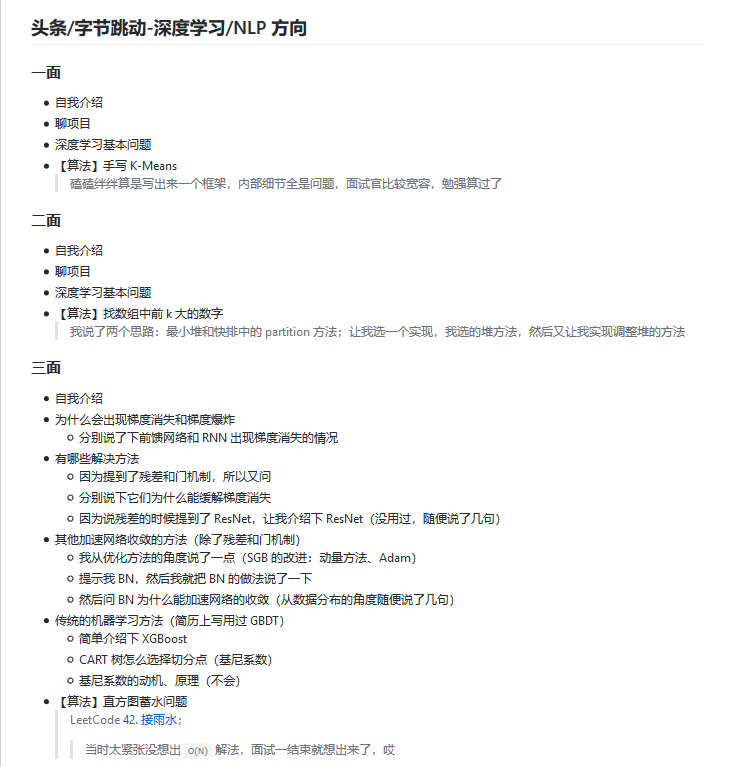
    今日推荐开源项目:《算法和机器学习 Algorithm_Interview_Notes-Chinese》传送门:GitHub链接

    推荐理由:这个项目是关于算法和机器学习方面的面试笔记,如果你想要找一个与这些相关的工作,或者只是想提升自己的能力,那么这个项目兴许会合你的胃口。它还提供了一些面试的过程,即使不去看技术方面的,看看面试过程涨涨见识还是很不错的。


    今日推荐英文原文:《A definitive guide to conditional logic in JavaScript》作者:Nick Gard

    原文链接:https://medium.freecodecamp.org/a-definitive-guide-to-conditional-logic-in-javascript-23fa234d2ca3

    推荐理由:JS 中关于条件逻辑的指南

    A definitive guide to conditional logic in JavaScript

    I am a front-end engineer and mathematician. I rely on my mathematical training daily in writing code. It’s not statistics or calculus that I use but, rather, my thorough understanding of Boolean logic. Often I have turned a complex combination of ampersands, pipes, exclamation marks, and equals signs into something simpler and much more readable. I’d like to share this knowledge, so I wrote this article. It’s long but I hope it is as beneficial to you as it has been to me. Enjoy!

    Truthy & Falsy values in JavaScript

    Before studying logical expressions, let’s understand what’s “truthy” in JavaScript. Since JavaScript is loosely typed, it coerces values into booleans in logical expressions. if statements, &&, ||, and ternary conditions all coerce values into booleans. Note that this doesn’t mean that they always return a boolean from the operation.

    There are only six falsy values in JavaScript — false, null, undefined, NaN, 0, and "" — and everything else is truthy. This means that [] and {} are both truthy, which tend to trip people up.

    The logical operators

    In formal logic, only a few operators exist: negation, conjunction, disjunction, implication, and bicondition. Each of these has a JavaScript equivalent: !, &&, ||, if (/* condition */) { /* then consequence */}, and ===, respectively. These operators create all other logical statements.

    Truth Tables

    First, let’s look at the truth tables for each of our basic operators. A truth table tells us what the truthiness of an expression is based on the truthiness of its parts. Truth tables are important. If two expressions generate the same truth table, then those expressions are equivalent and can replace one another.

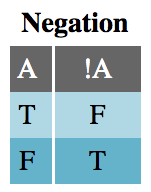
    The Negation table is very straightforward. Negation is the only unary logical operator, acting only on a single input. This means that !A || B is not the same as !(A || B). Parentheses act like the grouping notation you’d find in mathematics.

    For instance, the first row in the Negation truth table (below) should be read like this: “if statement A is True, then the expression !A is False.”

    Negating a simple statement is not difficult. The negation of “it is raining” is “it is not raining,” and the negation of JavaScript’s primitive true is, of course, false. However, negating complex statements or expressions is not so simple. What is the negation of “it is always raining” or isFoo && isBar?

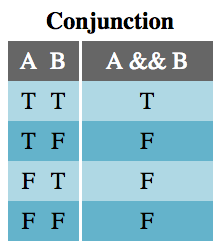
    The Conjunction table shows that the expression A && B is true only if both A and B are true. This should be very familiar from writing JavaScript.

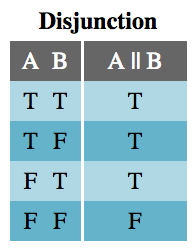
    The Disjunction table should also be very familiar. A disjunction (logical OR statement) is true if either or both of A and B are true.

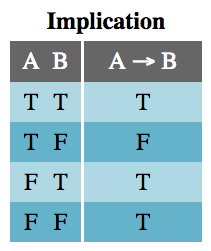
    The Implication table is not as familiar. Since A implies B, A being true implies B is true. However, B can be true for reasons other than A, which is why the last two lines of the table are true. The only time implication is false is when A is true and B is false because then A doesn’t imply B.

    While if statements are used for implications in JavaScript, not all ifstatements work this way. Usually, we use if as a flow control, not as a truthiness check where the consequence also matters in the check. Here is the archetypical implication if statement:

    function implication(A, B) {
      if (A) {
        return B;
      } else {
        /* if A is false, the implication is true */
        return true;
      }
    }

    Don’t worry that this is somewhat awkward. There are easier ways to code implications. Because of this awkwardness, though, I will continue to use →as the symbol for implications throughout this article.

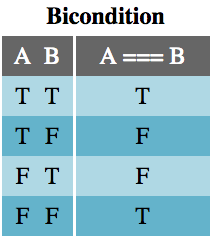
    The Bicondition operator, sometimes called if-and-only-if (IFF), evaluates to true only if the two operands, A and B, share the same truthiness value. Because of how JavaScript handles comparisons, the use of === for logical purposes should only be used on operands cast to booleans. That is, instead of A === B, we should use !!A === !!B.


    The Complete Truth Table

    Caveats

    There are two big caveats to treating JavaScript code like propositional logic: short circuiting and order of operations.

    Short circuiting is something that JavaScript engines do to save time. Something that will not change the output of the whole expression is not evaluated. The function doSomething() in the following examples is never called because, no matter what it returned, the outcome of the logical expression wouldn’t change:

    // doSomething() is never called
    false && doSomething();
    true || doSomething();

    Recall that conjunctions (&&) are true only if both statements are true, and disjunctions (||) are false only if both statements are false. In each of these cases, after reading the first value, no more calculations need to be done to evaluate the logical outcome of the expressions.

    Because of this feature, JavaScript sometimes breaks logical commutativity. Logically A && B is equivalent to B && A, but you would break your program if you commuted window && window.mightNotExist into window.mightNotExist && window. That’s not to say that the truthiness of a commuted expression is any different, just that JavaScript may throw an error trying to parse it.

    The order of operations in JavaScript caught me by surprise because I was not taught that formal logic had an order of operations, other than by grouping and left-to-right. It turns out that many programming languages consider &&to have a higher precedence than ||. This means that && is grouped (not evaluated) first, left-to-right, and then || is grouped left-to-right. This means that A || B && C is not evaluated the same way as (A || B) && C, but rather as A || (B && C).

    true || false && false; // evaluates to true
    (true || false) && false; // evaluates to false

    Fortunately, grouping, (), holds the topmost precedence in JavaScript. We can avoid surprises and ambiguity by manually associating the statements we want evaluated together into discrete expressions. This is why many code linters prohibit having both && and || within the same group.

    Calculating compound truth tables

    Now that the truthiness of simple statements is known, the truthiness of more complex expressions can be calculated.

    To begin, count the number of variables in the expression and write a truth table that has 2ⁿ rows.

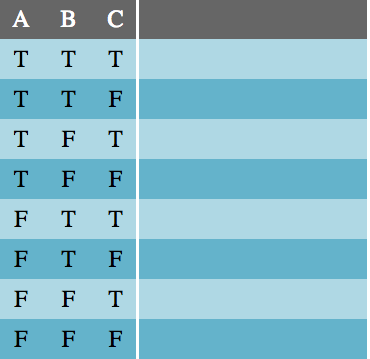
    Next, create a column for each of the variables and fill them with every possible combination of true/false values. I recommend filling the first half of the first column with T and the second half with F, then quartering the next column and so on until it looks like this:

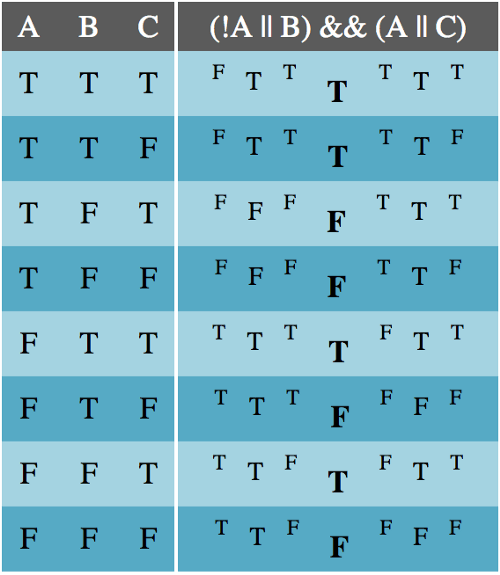
    Then write the expression down and solve it in layers, from the innermost groups outward for each combination of truth values:

    As stated above, expressions which produce the same truth table can be substituted for each other.

    Rules of replacements

    Now I’ll cover several examples of rules of replacements that I often use. No truth tables are included below, but you can construct them yourself to prove that these rules are correct.

    Double negation

    Logically, A and !!A are equivalent. You can always remove a double negation or add a double negation to an expression without changing its truthiness. Adding a double-negation comes in handy when you want to negate part of a complex expression. The one caveat here is that in JavaScript !! also acts to coerce a value into a boolean, which may be an unwanted side-effect.

    A === !!A

    Commutation

    Any disjunction (||), conjunction (&&), or bicondition (===) can swap the order of its parts. The following pairs are logically equivalent, but may change the program’s computation because of short-circuiting.

    (A || B) === (B || A)
    (A && B) === (B && A)
    (A === B) === (B === A)

    Association

    Disjunctions and conjunctions are binary operations, meaning they only operate on two inputs. While they can be coded in longer chains — A || B || C || D — they are implicitly associated from left to right — ((A || B) || C) || D. The rule of association states that the order in which these groupings occur make no difference to the logical outcome.

    ((A || B) || C) === (A || (B || C))
    ((A && B) && C) === (A && (B && C))

    Distribution

    Association does not work across both conjunctions and disjunctions. That is, (A && (B || C)) !== ((A && B) || C). In order to disassociate B and C in the previous example, you must distribute the conjunction — (A && B) || (A && C). This process also works in reverse. If you find a compound expression with a repeated disjunction or conjunction, you can un-distribute it, akin to factoring out a common factor in an algebraic expression.

    (A && (B || C)) === ((A && B) || (A && C))
    (A || (B && C)) === ((A || B) && (A || C))

    Another common occurrence of distribution is double-distribution (similar to FOIL in algebra):
    1. ((A || B) && (C || D)) === ((A || B) && C) || ((A || B) && D)
    2. ((A || B) && C) || ((A || B) && D) ===
    ((A && C) || B && C)) || ((A && D) || (B && D))

    (A || B) && (C || D) === (A && C) || (B && C) || (A && D) || (B && D)
    (A && B) ||(C && D) === (A || C) && (B || C) && (A || D) && (B || D)

    Material Implication

    Implication expressions (A → B) typically get translated into code as if (A) { B } but that is not very useful if a compound expression has several implications in it. You would end up with nested if statements — a code smell. Instead, I often use the material implication rule of replacement, which says that A → B means either A is false or B is true.

    (A → B) === (!A || B)

    Tautology & Contradiction

    Sometimes during the course of manipulating compound logical expressions, you’ll end up with a simple conjunction or disjunction that only involves one variable and its negation or a boolean literal. In those cases, the expression is either always true (a tautology) or always false (a contradiction) and can be replaced with the boolean literal in code.

    (A || !A) === true
    (A || true) === true
    (A && !A) === false
    (A && false) === false

    Related to these equivalencies are the disjunction and conjunction with the other boolean literal. These can be simplified to just the truthiness of the variable.

    (A || false) === A
    (A && true) === A

    Transposition

    When manipulating an implication (A → B), a common mistake people make is to assume that negating the first part, A, implies the second part, B, is also negated — !A → !B. This is called the converse of the implication and it is not necessarily true. That is, having the original implication does not tell us if the converse is true because A is not a necessary condition of B. (If the converse is also true — for independent reasons — then A and B are biconditional.)

    What we can know from the original implication, though, is that the contrapositive is true. Since B is a necessary condition for A (recall from the truth table for implication that if B is true, A must also be true), we can claim that !B → !A.

    (A → B) === (!B → !A)

    Material Equivalence

    The name biconditional comes from the fact that it represents two conditional (implication) statements: A === B means that A → B and B → A. The truth values of A and B are locked into each other. This gives us the first material equivalence rule:

    (A === B) === ((A → B) && (B → A))

    Using material implication, double-distribution, contradiction, and commutation, we can manipulate this new expression into something easier to code:
    1. ((A → B) && (B → A)) === ((!A || B) && (!B || A))
    2. ((!A || B) && (!B || A)) ===
    ((!A && !B) || (B && !B)) || ((!A && A) || (B && A))

    3. ((!A && !B) || (B && !B)) || ((!A && A) || (B && A)) ===
    ((!A && !B) || (B && A))

    4. ((!A && !B) || (B && A)) === ((A && B) || (!A && !B))

    (A === B) === ((A && B) || (!A && !B))

    Exportation

    Nested if statements, especially if there are no else parts, are a code smell. A simple nested if statement can be reduced into a single statement where the conditional is a conjunction of the two previous conditions:

    if (A) {
      if (B) {
        C
      }
    }
    // is equivalent to
    if (A && B) {
      C
    }

    (A → (B → C)) === ((A && B) → C)

    DeMorgan’s Laws

    DeMorgan’s Laws are essential to working with logical statements. They tell how to distribute a negation across a conjunction or disjunction. Consider the expression !(A || B). DeMorgan’s Laws say that when negating a disjunction or conjunction, negate each statement and change the && to ||or vice versa. Thus !(A || B) is the same as !A && !B. Similarly, !(A && B)is equivalent to !A || !B.

    !(A || B) === !A && !B
    !(A && B) === !A || !B

    Ternary (If-Then-Else)

    Ternary statements (A ? B : C) occur regularly in programming, but they’re not quite implications. The translation from a ternary to formal logic is actually a conjunction of two implications, A → B and !A → C, which we can write as: (!A || B) && (A || C), using material implication.

    (A ? B : C) === (!A || B) && (A || C)

    XOR (Exclusive Or)

    Exclusive Or, often abbreviated xor, means, “one or the other, but not both.” This differs from the normal or operator only in that both values cannot be true. This is often what we mean when we use “or” in plain English. JavaScript doesn’t have a native xor operator, so how would we represent this?
    1. “A or B, but not both A and B”
    2. (A || B) && !(A && B) direct translation
    3. (A || B) && (!A || !B) DeMorgan’s Laws
    4. (!A || !B) && (A || B) commutativity
    5. A ? !B : B if-then-else definition

    A ? !B : B is exclusive or (xor) in JavaScript

    Alternatively,
    1. “A or B, but not both A and B”
    2. (A || B) && !(A && B) direct translation
    3. (A || B) && (!A || !B) DeMorgan’s Laws
    4. (A && !A) || (A && !B) || (B && !A) || (B && !B) double-distribution
    5. (A && !B) || (B && !A) contradiction replacement
    6. A === !B or A !== B material equivalence

    A === !B or A !== B is xor in JavaScript

    Set Logic

    So far we have been looking at statements about expressions involving two (or a few) values, but now we will turn our attention to sets of values. Much like how logical operators in compound expressions preserve truthiness in predictable ways, predicate functions on sets preserve truthiness in predictable ways.

    A predicate function is a function whose input is a value from a set and whose output is a boolean. For the following code examples, I will use an array of numbers for a set and two predicate functions:isOdd = n => n % 2 !== 0; and isEven = n => n % 2 === 0;.

    Universal Statements

    A universal statement is one that applies to all elements in a set, meaning its predicate function returns true for every element. If the predicate returns false for any one (or more) element, then the universal statement is false. Array.prototype.every takes a predicate function and returns true only if every element of the array returns true for the predicate. It also terminates early (with false) if the predicate returns false, not running the predicate over any more elements of the array, so in practice avoid side-effects in predicates.

    As an example, consider the array [2, 4, 6, 8], and the universal statement, “every element of the array is even.” Using isEven and JavaScript’s built-in universal function, we can run [2, 4, 6, 8].every(isEven) and find that this is true.

    Array.prototype.every is JavaScript’s Universal Statement

    Existential Statements

    An existential statement makes a specific claim about a set: at least one element in the set returns true for the predicate function. If the predicate returns false for every element in the set, then the existential statement is false.

    JavaScript also supplies a built-in existential statement: Array.prototype.some. Similar to every, some will return early (with true) if an element satisfies its predicate. As an example, [1, 3, 5].some(isOdd) will only run one iteration of the predicate isOdd (consuming 1 and returning true) and return true. [1, 3, 5].some(isEven) will return false.

    Array.prototype.some is JavaScript’s Existential Statement

    Universal Implication

    Once you have checked a universal statement against a set, say nums.every(isOdd), it is tempting to think that you can grab an element from the set that satisfies the predicate. However, there is one catch: in Boolean logic, a true universal statement does not imply that the set is non-empty. Universal statements about empty sets are always true, so if you wish to grab an element from a set satisfying some condition, use an existential check instead. To prove this, run [].every(() => false). It will be true.

    Universal statements about empty sets are always true.

    Negating Universal and Existential Statements

    Negating these statements can be surprising. The negation of a universal statement, say nums.every(isOdd), is not nums.every(isEven), but rather nums.some(isEven). This is an existential statement with the predicate negated. Similarly, the negation of an existential statement is a universal statement with the predicate negated.

    !arr.every(el => fn(el)) === arr.some(el => !fn(el))
    !arr.some(el => fn(el)) === arr.every(el => !fn(el))

    Set Intersections

    Two sets can only be related to each other in a few ways, with regards to their elements. These relationships are easily diagrammed with Venn Diagrams, and can (mostly) be determined in code using combinations of universal and existential statements.

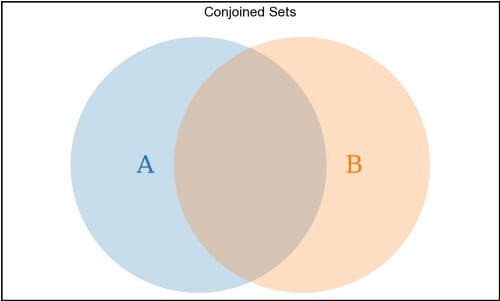
    Two sets can each share some but not all of their elements, like a typical conjoined Venn Diagram:

    A.some(el => B.includes(el)) && A.some(el => !B.includes(el)) && B.some(el => !A.includes(el)) describes a conjoined pair of sets

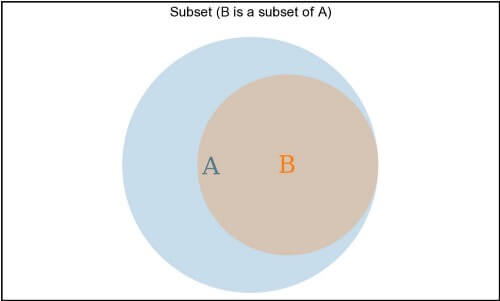
    One set can contain all of the other set’s elements, but have elements not shared by the second set. This is a subset relationship, denoted as Subset ⊆ Superset.

    B.every(el => A.includes(el)) describes the subset relationship B ⊆ A

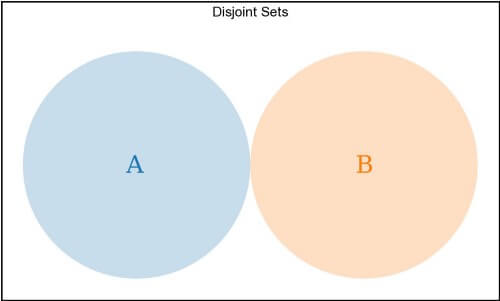
    The two sets can share no elements. These are disjoint sets.

    A.every(el => !B.includes(el)) describes a disjoint pair of sets

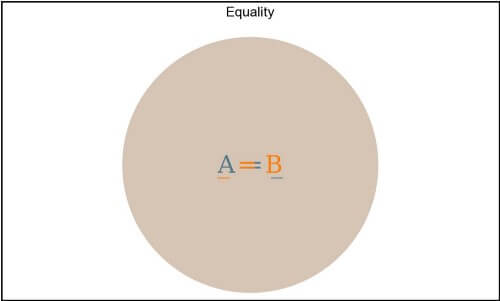
    Lastly, the two sets can share every element. That is, they are subsets of each other. These sets are equal. In formal logic, we would write A ⊆ B && B ⊆ A ⟷ A === B, but in JavaScript, there are some complications with this. In JavaScript, an Array is an ordered set and may contain duplicate values, so we cannot assume that the bidirectional subset code B.every(el => A.includes(el)) && A.every(el => B.includes(el)) implies the arrays A and B are equal. If A and B are Sets (meaning they were created with new Set()), then their values are unique and we can do the bidirectional subset check to see if A === B.

    (A
    === B) === (Array.from(A).every(el => Array.from(B).includes(el))
    && Array.from(B).every(el => Array.from(A).includes(el))
    , given that A and Bare constructed using new Set()

    Translating Logic to English

    This section is probably the most useful in the article. Here, now that you know the logical operators, their truth tables, and rules of replacement, you can learn how to translate an English phrase into code and simplify it. In learning this translation skill, you will also be able to read code better, storing complex logic in simple phrases in your mind.

    Below is a table of logical code (left) and their English equivalents (right) that was heavily borrowed from the excellent book, Essentials of Logic.

    View a screen-readable version of this code-to-English translation chart here.

    Below, I will go through some real-world examples from my own work where I interpret from English to code, and vice-versa, and simplify code with the rules of replacement.

    Example 1

    Recently, to satisfy the EU’s GDPR requirements, I had to create a modal that showed my company’s cookie policy and allowed the user to set their preferences. To make this as unobtrusive as possible, we had the following requirements (in order of precedence):

    1. If the user wasn’t in the EU, never show the GDPR preferences modal.
    2. 2. If the app programmatically needs to show the modal (if a user action requires more permission than currently allowed), show the modal.
    3. If the user is allowed to have the less-obtrusive GDPR banner, do not show the modal.
    4. If the user has not already set their preferences (ironically saved in a cookie), show the modal.

    I started off with a series of if statements modeled directly after these requirements:

    const isGdprPreferencesModalOpen = ({
      shouldModalBeOpen,
      hasCookie,
      hasGdprBanner,
      needsPermissions
    }) => {
      if (!needsPermissions) {
        return false;
      }
      if (shouldModalBeOpen) {
        return true;
      }
      if (hasGdprBanner) {
        return false;
      }
      if (!hasCookie) {
        return true;
      }
      return false;
    }

    To be clear, the above code works, but returning boolean literals is a code smell. So I went through the following steps:

    /* change to a single return, if-else-if structure */
    let result;
    if (!needsPermissions) {
      result = false;
    } else if (shouldBeOpen) {
      result = true;
    } else if (hasBanner) {
      result = false;
    } else if (!hasCookie) {
      result = true
    } else {
      result = false;
    }
    return result;
    /* use the definition of ternary to convert to a single return */
    return !needsPermissions ? false : (shouldBeOpen ? true : (hasBanner ? false : (!hasCookie ? true : false)))
    /* convert from ternaries to conjunctions of disjunctions */
    return (!!needsPermissions || false) && (!needsPermissions || ((!shouldBeOpen || true) && (shouldBeOpen || ((!hasBanner || false) && (hasBanner || !hasCookie))))
    /* simplify double-negations and conjunctions/disjunctions with boolean literals */
    return needsPermissions && (!needsPermissions || ((!shouldBeOpen || true) && (shouldBeOpen || (!hasBanner && (hasBanner || !hasCookie))))
    /* DeMorgan's Laws */
    return needsPermissions && (!needsPermissions || ((!shouldBeOpen || true) && (shouldBeOpen || ((!hasBanner && hasBanner) || (hasBanner && !hasCookie))))
    /* eliminate tautologies and contradictions, simplify */
    return needsPermissions && (!needsPermissions || (shouldBeOpen || (hasBanner && !hasCookie)))
    /* DeMorgan's Laws */
    return (needsPermissions && !needsPermissions) || (needsPermissions && (shouldBeOpen || (hasBanner && !hasCookie)))
    /* eliminate contradiction, simplify */
    return needsPermissions && (shouldBeOpen || (hasBanner && !hasCookie))

    I ended up with something that I think is more elegant and still readable:

    const isGdprPreferencesModalOpen = ({
      needsPermissions,
      shouldBeOpen,
      hasBanner,
      hasCookie,
    }) => (
      needsPermissions && (shouldBeOpen || (!hasBanner && !hasCookie))
    );

    Example 2

    I found the following code (written by a coworker) while updating a component. Again, I felt the urge to eliminate the boolean literal returns, so I refactored it.

    const isButtonDisabled = (isRequestInFlight, state) => {
      if (isRequestInFlight) {
        return true;
      }
      if (enabledStates.includes(state)) {
        return false;
      }
      return true;
    };

    Sometimes I do the following steps in my head or on scratch paper, but most often, I write each next step in the code and then delete the previous step.

    // convert to if-else-if structure
    let result;
    if (isRequestInFlight) {
      result = true;
    } else if (enabledStates.includes(state)) {
      result = false;
    } else {
      result = true;
    }
    return result;
    // convert to ternary
    return isRequestInFlight
      ? true
      : enabledStates.includes(state)
        ? false
        : true;
    /* convert from ternary to conjunction of disjunctions */
    return (!isRequestInFlight || true) && (isRequestInFlight || ((!enabledStates.includes(state) || false) && (enabledStates.includes(state) || true))
    /* remove tautologies and contradictions, simplify */
    return isRequestInFlight || !enabledStates.includes(state)

    Then I end up with:

    const isButtonDisabled = (isRequestInFlight, state) => (
      isRequestInFlight || !enabledStates.includes(state)
    );

    In this example, I didn’t start with English phrases and I never bothered to interpret the code to English while doing the manipulations, but now, at the end, I can easily translate this: “the button is disabled if either the request is in flight or the state is not in the set of enabled states.” That makes sense. If you ever translate your work back to English and it doesn’t make sense, re-check your work. This happens to me often.

    Example 3

    While writing an A/B testing framework for my company, we had two master lists of Enabled and Disabled experiments and we wanted to check that every experiment (each a separate file in a folder) was recorded in one or the other list but not both. This means the enabled and disabled sets are disjointed and the set of all experiments is a subset of the conjunction of the two sets of experiments. The reason the set of all experiments must be a subset of the combination of the two lists is that there should not be a single experiment that exists outside the two lists.

    const isDisjoint = !enabled.some(disabled.includes) && 
      !disabled.some(enabled.includes);
    const isSubset = allExperiments.every(
      enabled.concat(disabled).includes
    );
    assert(isDisjoint && isSubset);

    Conclusion

    Hopefully this has all been helpful. Not only are the skills of translating between English and code useful, but having the terminology to discuss different relationships (like conjunctions and implications) and the tools to evaluate them (truth tables) is handy.


    每天推荐一个 GitHub 优质开源项目和一篇精选英文科技或编程文章原文,欢迎关注开源日报。交流QQ群:202790710;微博:https://weibo.com/openingsource;电报群 https://t.me/OpeningSourceOrg
  • 2018年9月27日:开源日报第203期

    27 9 月, 2018

    每天推荐一个 GitHub 优质开源项目和一篇精选英文科技或编程文章原文,欢迎关注开源日报。交流QQ群:202790710;微博:https://weibo.com/openingsource;电报群 https://t.me/OpeningSourceOrg

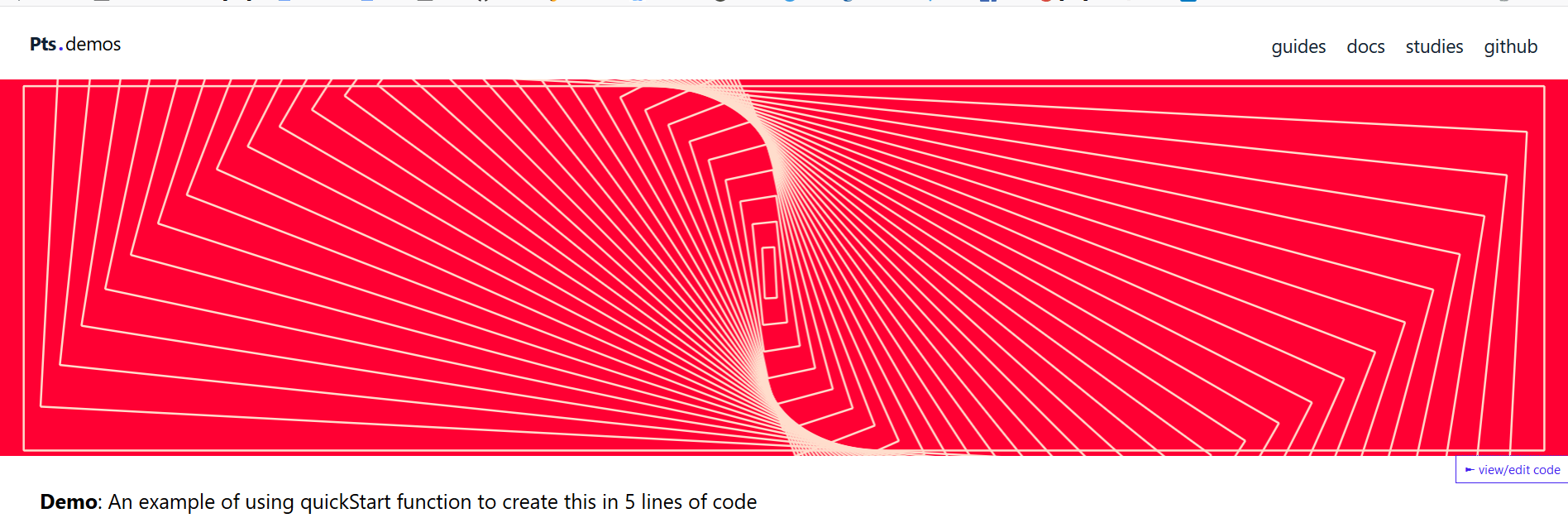
    今日推荐开源项目:《这些 demo 看着让人头晕 Pts》传送门:GitHub链接

    推荐理由:一个用于可视化和创造性代码的 JS 库……说真的,如果想要在这上面寻找创意的话可算是来对地方了,官网上放着的各种 demo 真的是秀到头皮发麻,看久了甚至还会头晕。如果你想试试看这些可能见都没见过的 demo ,完全可以来这里看看,即使不用,全程观光也是非常值得的。


    今日推荐英文原文:《Minesweeper in TypeScript and React》作者:Tomche Delev

    原文链接:https://medium.com/@tdelev/minesweeper-in-typescript-and-react-f5f8a5d57383

    推荐理由:用 TypeScript 和 React 制作自己的扫雷,自己玩自己的扫雷还是很有意思的

    Minesweeper in TypeScript and React

    One of the games that I occasionally play to relax is Minesweeper.

    I have extensive experience with JavaScript front-end technologies starting from jQuery and nowadays Angular. Being open to new technologies I have tried React in few hello world projects. Implementing Minesweeper in TypeScript and React seemed like an interesting challenge and opportunity to learn more.

    In this post I will try to explain how I did it and maybe encourage or learn you how to implement your clone of this or maybe some other game.

    If you’re just interested in seeing the final solution visit or clone the GitHub repository or if you just want to play it click here.

    Before we start

    You will need to have installed (or install) on your machine:

    • NodeJS and npm
    • Yarn (optional)
    • Create React App

    Creating React Application

    We will bootstrap the React project with using the option --script-version=react-script-ts that would instruct create-react-app to use Create React App (with TypeScript) configuration.

    In my previous experience with Angular I find TypeScript a real joy to work. And having daily experience with statically typed languages (Java, Kotlin) I was not interested in using pure ES6. On the other side, learning and investing time in Flow was not worth it having a previous (great) experience with TypeScript. Read this great article to find out more about using TypeScript + React.

    npx create-react-app --scripts-version=react-scripts-ts minesweeper

    To start the application just execute:

    cd minesweeper
    npm start
    # or yarn start

    Structuring the React app

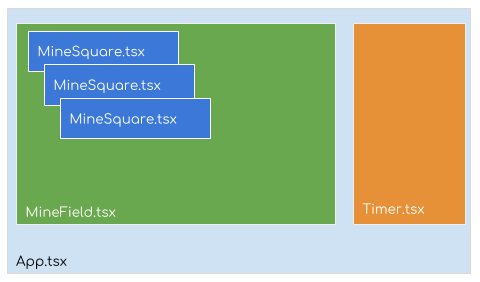
    One of the important steps in implementing any React application is how to brake down the UI in components and how to compose them. On the following image is the structure of the React components that we will need to implement for Minesweeper.

    React components structure

    The final design was to brake down the game in three separate components:

    • MineSquare – will host a single square that is a possible mine, number indicating of neighbour bombs or just empty square if no bombs around
    • MineField – will host the game container as a grid (rows x columns) of mines
    • Timer – will be an external component that will show the elapsed time since the game started.

    Next create a directory components in your src directory and create a separate file for each of the listed components.

    This is how an empty component should look like:

    import * as React from "react";
    
    export const MineField = (props: PropType) => (
        <div className="game-board">
            {'MineField'}
        </div>
    );

    In React you can create components as class that extends the React.Componentclass or as functions (possibly arrow) for functional (stateless) components.

    Minesweeper game domain

    The game domain are the classes and data structures used to represent the state of the game.

    export interface Point {
        x: number;
        y: number;
    }
    
    /**
     * bombs = -1 - it is a bomb
     * bombs >= 0 - count of bombs around
     */
    export class Mine {
        constructor(public position: Point,
                    public isOpened = false,
                    public bombs = 0,
                    public isFlagged = false,
        ) {
        }
    }
    
    export class Game {
        constructor(public state: Array<Array<Mine>>,
                    public totalBombs = 0,
                    public exploded = false
        ) {
        }
    }

    The game Minesweeper is represented as two-dimensional array (matrix) of mines Array<Array<Mine>> or Mine[][]. Each Mine has:

    • position (x,y coordinates) in the matrix of mines
    • isOpened a boolean field which is true when a mine field is opened
    • bombs a number which encodes if there is a bomb (-1) or positive number representing the count of bombs around that mine.
    • isFlagged which represents if the mine is marked (flagged) by the user as potential bomb.

    It was really hard to get the naming right for the game domain, having to deal with mines/bombs, mine field as single field with mine or field of mines :).

    The Game class represents the state of the Minesweeper game which is the two dimensional array of mines. Also it contains auxiliary fields for the count of total bombs and state if there is exploded bomb (game is finished).

    MineSquare component

    The MineSquare is a functional (stateless) component. That means that it should render the property field: Mine and just propagate an event when interaction happens. It can not keep or mutate any state.

    export const MineSquare = (props: MineProps) => {
        const field = props.field;
        return (
            <button className={'mine-button' + (field.isOpened ? '' : ' mine-opened')}
                    tabIndex={props.index}
                    onClick={() => props.onLeftClick(field)}>
                {renderField(field)}
            </button>
        );
    };
    
    function renderField(field: Mine) {
        if (field.isOpened) {
            if (field.bombs > 0) {
                return (<span className={`bombs-${field.bombs}`}>{field.bombs}</span>);
            } else if (field.bombs == 0) {
                return ''
            } else {
                return (<i className='fas fa-xs fa-bomb bomb'/>);
            }
        } else {
            if (field.isFlagged) {
                return (<i className='fas fa-xs fa-flag'/>);
            } else {
                return '';
            }
        }
    }
    
    export interface MineProps {
        index: number;
        field: Mine;
        onLeftClick: (field: Mine) => void;
    }

    The Mine will be rendered as HTML button element since the click is the natural interaction for this HTML element. Depending on the state of the field: Mine we will render the different content inside the button element. The function renderField(field: Mine) does exactly that. So when the field is opened (user explored that field) it can be:

    • bombs == -1 so we render a bomb (using FontAwesome bomb icon for this)
    • bombs == 0 the field is just empty
    • bombs > 0 we render the number of bombs in that field.

    When the field is opened and flagged we render a flag icon.

    The component propagates the mouse onClick event to indicate user interaction with this field.

    In minesweeper there are two types of interaction user can have with a field, to explore it or to flag it as potential mine. Maybe better choice is to represent these with different events such as mouse left and right click. But because of a buggy behaviour of the right click, my final choice was to encode these two different events with only left click and a pressed state of a certain keyboard key (ctrl in my case).

    MineField component

    The MineField component is also functional and is responsible of rendering the full state of the game (the two-dimensional array of mines). Each field is rendered as a separate MineSquare component. It will also propagate the click event from each MineSquare component.

    export const MineField = (props: MineFieldProps) => (
        <div className="game-board">
            {
                props.game.state.map((row, i) => (
                        <div key={i} className="board-row">
                            {
                                row.map((field, j) => (
                                        <MineSquare key={`${i}-${j}`}
                                                    index={j + row.length}
                                                    field={field}
                                                    onLeftClick={(field) => props.onLeftClick(field)}/>
                                    )
                                )
                            }
                        </div>
                    )
                )
            }
        </div>
    );
    export interface MineFieldProps {
        game: Game;
        onLeftClick: (field: Mine) => void;
    }

    This component is very simple, it should just render the two-dimensional array of mines as grid. Each row is grouped in a separate HTML container divelement and with CSS it is all aligned. To uniquely identify each row we can use the row index i as a React key property, and for each MineSquare component the key would be the combination of indices i and j (the current row and column).

    Timer component

    The Timer is another stateless component responsible for rendering the elapsed seconds since the game started. To render the seconds in appropriate format 00:00 it uses a custom function secondsToString from our utility module named time.

    export const Timer = (props: TimerProps) => (
        <h3>{time.secondsToString(props.elapsedSeconds)}</h3>
    );
    
    export interface TimerProps {
        elapsedSeconds: number;
    }

    Here is the implementation of the secondsToString function.

    function leadZero(num: number) {
        return num < 10 ? `0${num}` : `${num}`;
    }
    
    export const time = {
        secondsToString: function (seconds: number) {
            const min = Math.floor(seconds / 60);
            const sec = seconds % 60;
            return `${leadZero(min)}:${leadZero(sec)}`;
        }
    };

    One of the known drawbacks of TypeScript and JavaScript language in general is the lack of powerful standard library. But instead of relying on myriad of external modules for simple functions such as leadZero or secondsToString I think it’s better to just implement them.

    Game state

    So far we have implemented the simple (stateless) components of the game. To make the game alive we need to implement initialization of new game state (new game action) and all possible modifications.

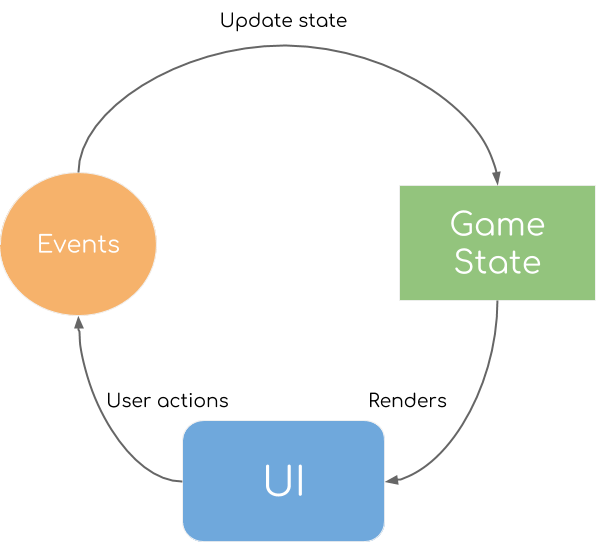
    Simplified game loop

    Most of the simple games are following some kind of game loop as shown in the image above. The users through the UI are having interactions with the game and are generating actions. Sometimes actions are generated automatically as the time passing, but in Minesweeper that is not the case. On each action, the state of the game is modified and then rendered back on the UI.

    In the case of Minesweeper, the user can make three possible actions on not opened field (mine square):

    • mark it as potential bomb
    • open it

    and if the field is already opened the user can explore neighbours.

    Generating new game state

    Generating new game state means initializing the two-dimensional array of Mine objects. Some of these mines need to be bombs and we make this decision by using pseudo-random number generator to implement sort of uniform distribution of a mine being a bomb. The BOMBS_PROBABILITY (by default 0.15 or 15%) is the probability of a mine having a bomb. While we create mines we generate a pseudo-random number using Math.random() which has generates a double with uniform distribution in the range of 0-0.99.

    After we have initialized the game state with Array<Array<Mine>> we need to update the bombs count of all mines that are neighbouring a bomb. The function fillBombsCount does just that, by traversing all the neighbours of a mine and incrementing the bombs count for each neighbour that is a bomb.

    The traverseNeighbours is the utility function that iterates all eight (top left, top, top right, left, right, bottom left, bottom, bottom right) of the neighbours of a given mine.

    const BOMBS_PROBABILITY = 0.15;
    
    const dx = [-1, 0, 1, -1, 1, -1, 0, 1];
    const dy = [-1, -1, -1, 0, 0, 1, 1, 1];
    
    function newGame(rows: number, columns: number): Game {
        let totalMines = 0;
        let estimatedMines = Math.floor(rows * columns * BOMBS_PROBABILITY);
        const state = Array(rows).fill(null).map((r, i: number) => {
            return Array(columns).fill(null).map((c, j: number) => {
                const isMine = Math.random() < BOMBS_PROBABILITY;
                if (isMine) {
                    totalMines += 1;
                    return new Mine({x: i, y: j}, false, -1, false);
                } else {
                    return new Mine({x: i, y: j}, false, 0, false);
                }
            });
        });
        while (totalMines < estimatedMines) {
            const randX = Math.floor(Math.random() * rows);
            const randY = Math.floor(Math.random() * columns);
            if (!isMine(state[randX][randY])) {
                ++totalMines;
                state[randX][randY].bombs = -1;
            }
        }
        if (totalMines > estimatedMines) {
            const mines = state.map(row => row.filter(mine => !isMine(mine)))
                .reduce((prev, current) => prev.concat(current));
    
            while (totalMines > estimatedMines) {
                const randMineIndex = Math.floor(Math.random() * mines.length);
                mines[randMineIndex].bombs = 0;
                --totalMines;
            }
        }
        fillBombsCount(state);
    
        return new Game(state, totalMines);
    }
    
    function traverseNeighbours(fields: Array<Array<Mine>>, startMine: Mine, onField: (field: Mine) => Mine) {
        let inBounds = (point: Point) => point.x >= 0 && point.x < fields.length &&
            point.y >= 0 && point.y < fields[0].length;
        const start = startMine.position;
        dx.map((x, i) => ({dx: x, dy: dy[i]}))
            .map(deltas => ({x: start.x + deltas.dx, y: start.y + deltas.dy}))
            .filter((point: Point) => inBounds(point))
            .map((point: Point) => onField(fields[point.x][point.y]));
        /*for (let i = 0; i < dx.length; ++i) {
            let ii = start.x + dx[i];
            let jj = start.y + dy[i];
            if (ii >= 0 && ii < fields.length && jj >= 0 && jj < fields[0].length) {
                onField(fields[ii][jj]);
            }
        }*/
    }

    Updating game state

    The function update is a generic function for updating the game state without modifying it. It iterates all of the game state mines and applies a function f that should apply the actual transformation for a mine. This function is used in all functions that need to update the game state in any way.

    function update(game: Game, f: ((b: Mine) => Mine), exploded = false): Game {
        const updated = game.state.slice().map(row => {
            return row.slice().map(field => {
                return f(field);
            });
        });
        return new Game(updated, game.totalBombs, game.exploded || exploded);
    }

    Mark mine field

    The function markMine is used for two user actions. The first action is when user wants to mark a mine field as a potential bomb. We do that, only when the current state of the field is not opened by updating the game state where we set that field as flagged and not opened. The second possible action for a user is to explore already opened field that has a count of bombs.

    function markMine(game: Game, opened: Mine): Game {
        if (opened.isOpened && !opened.isFlagged) return exploreOpenedField(game, opened);
        return update(game, (field: Mine) => {
            if (field == opened) {
                return new Mine(field.position, false, field.bombs, !field.isFlagged);
            } else {
                return new Mine(field.position, field.isOpened, field.bombs, field.isFlagged);
            }
        });
    }

    Exploring opened field

    To explore open field is a potentially game ending action that needs to explore all neighbour fields of that field. The opened field that a user explores must have all its neighbour bombs flagged right. If a neighbour field that is a bomb is not flagged, the game ends.

    function exploreOpenedField(game: Game, opened: Mine): Game {
        const updated = update(game, (field: Mine) => field);
        let hitMine = false;
        traverseNeighbours(updated.state, opened, field => {
            if (!field.isOpened && !field.isFlagged) {
                if (isMine(field)) {
                    hitMine = true;
                } else {
                    field.isOpened = true;
                    if (field.bombs == 0) {
                        updateZeros(updated.state, field);
                    }
                }
            }
            return field;
        });
        if (hitMine) {
            return endGame(game);
        }
        return updated;
    }

    To implement this function we use the generic traverseNeighbours and for each neighbour field that is not opened and not flagged:

    • if it’s a mine we should end the game
    • if it’s not we should set as opened and if we open a zero-bomb field we should open all other connected zero-bomb fields.

    Open mine

    function endGame(game: Game): Game {
        return update(game, (field) => {
            if (isMine(field)) {
                return new Mine(field.position, true, field.bombs, field.isFlagged);
            } else {
                return new Mine(field.position, field.isOpened, field.bombs, field.isFlagged);
            }
        }, true);
    }
    
    function openMine(game: Game, field: Mine): Game {
        if (field.isFlagged) return game;
        else if (isMine(field)) {
            return endGame(game);
        } else {
            const openField = (openedField: Mine) => (field: Mine) => {
                if (field === openedField) {
                    return new Mine(field.position, true, field.bombs, false);
                } else {
                    return new Mine(field.position, field.isOpened, field.bombs, field.isFlagged);
                }
            };
            let result = update(game, openField(field));
            if (field.bombs == 0) {
                updateZeros(result.state, field);
            }
            return result;
        }
    }

    Traversing connected zero-bomb fields

    The function updateZeros traverses using a recursive DFS (Depth-First Search) algorithm all connected zero-bomb fields.

    function updateZeros(fields: Array<Array<Mine>>, start: Mine) {
        traverseNeighbours(fields, start, (field => {
            if (!field.isOpened && !isMine(field)) {
                field.isOpened = true;
                if (field.bombs == 0) {
                    updateZeros(fields, field);
                }
            }
            return field;
        }));
    }

    Check if game is completed

    On each state modifying action we need to check if the state of game has reached an end state. For the game Minesweeper that state is when all the fields are explored correctly. That means that a mine field that contains a bomb is flagged and otherwise it’s opened.

    function checkCompleted(game: Game): boolean {
        const and = (a: boolean, b: boolean) => a && b;
        return game.state.map(row => {
            return row.map(field => {
                return isMineCovered(field);
            }).reduce(and);
        }).reduce(and);
    }
    function isMineCovered(field: Mine) {
        if (isMine(field)) {
            return field.isFlagged;
        } else {
            return field.isOpened;
        }
    }

    The function checkCompleted checks for the end state by iterating all fields and mapping them in to a boolean value. The true value means field is explored correctly and false means not explored correctly. Combining all these values using logical AND would yield final true only if all fields are explored correctly, which would mean the end state is reached.

    Count flagged fields

    The function countFlagged is used to count all the flagged fields in the game state to show the current progress of flagged/total bombs.

    function countFlagged(game: Game): number {
        const plus = (a: number, b: number) => a + b;
        return game.state.map(row => {
            return row.map(field => {
                return field.isFlagged ? 1 : 0;
            }).reduce(plus, 0);
        }).reduce(plus, 0);
    }

    Putting all together in App component

    Once we have implemented all the game state modifications and checks we can put it all together. The actual game state is initialized and modified in the component App.

    class App extends React.Component<AppProps> {
        controlDown = false;
        startTime: Date;
        state = {
            rows: this.props.rows,
            columns: this.props.columns,
            game: game.newGame(this.props.rows, this.props.columns),
            completed: false,
            flagged: 0,
            elapsedSeconds: 0
        };
    
        isControlKey(code: string) {
            return code === "ControlLeft" || code === "ControlRight";
        }
    
        timer: any;
    
        componentDidMount() {
            document.onkeydown = (e: KeyboardEvent) => {
                if (this.isControlKey(e.code)) {
                    this.controlDown = true;
                }
            };
            document.onkeyup = (e: KeyboardEvent) => {
                if (this.isControlKey(e.code)) {
                    this.controlDown = false;
                }
            };
            this.startTimer();
        }
    
        startTimer() {
            this.startTime = new Date();
            this.timer = setInterval(() => {
                const now = new Date();
                const elapsedMs = now.getTime() - this.startTime.getTime();
                this.setState({
                    elapsedSeconds: Math.floor(elapsedMs / 1000)
                });
            }, 1000);
        }
    
        updateState(field: Mine, updateFn: (game: Game, field: Mine) => Game) {
            this.setState((prevState: any, props) => {
                const updatedGame = updateFn(prevState.game, field);
                const completed = game.checkCompleted(updatedGame);
                if (completed || updatedGame.exploded) {
                    clearInterval(this.timer);
                }
                return {
                    game: updatedGame,
                    completed: completed,
                    flagged: game.countFlagged(updatedGame)
                };
            });
        }
    
        public onSquareLeftClick(field: Mine) {
            if (this.controlDown) {
                this.updateState(field, game.openMine);
            } else {
                this.updateState(field, game.markMine);
            }
        }
    
        startGame(rows: number, columns: number) {
            clearInterval(this.timer);
            this.startTimer();
            this.setState({
                rows: rows,
                columns: columns,
                game: game.newGame(rows, columns),
                completed: false,
                flagged: 0,
                elapsedSeconds: 0
            });
        }
    
        public render() {
            return (
                <div className="game">
                    <div className="menu">
                        <ul className="level-menu">
                            <li onClick={(e) => this.startGame(6, 8)}>Easy</li>
                            <li onClick={(e) => this.startGame(10, 14)}>Medium</li>
                            <li onClick={(e) => this.startGame(20, 30)}>Hard</li>
                        </ul>
                    </div>
                    <MineField
                        game={this.state.game}
                        onLeftClick={(field: Mine) => this.onSquareLeftClick(field)}/>
                    <Timer elapsedSeconds={this.state.elapsedSeconds}/>
                    <div className='status'>Completed: {this.state.completed ? 'YES' : 'NO'}</div>
                    <div className='status'>{this.state.flagged}/{this.state.game.totalBombs}</div>
                    <div className='help'>
                        <h3>How to play</h3>
                        <ol>
                            <li>Left Click to mark possible mine or to explore fields around opened field</li>
                            <li>Ctrl + Left Click to open field</li>
                        </ol>
                    </div>
                </div>
            );
        }
    }
    
    export interface AppProps {
        rows: number;
        columns: number;
    }

    The final piece of the puzzle, the App component is the only stateful component that keeps and modifies the game state. The state of the component contains:

    • the number of rows and columns of the Minesweeper grid
    • the game state
    • the elapsed seconds since the game started
    • the number of flagged fields (computed from the game state)
    • and a boolean flag indicated if the game is completed (also computed from the game state).

    The state is initialized at the beginning of the component on a new game state. We use the React lifecycle method componentDidMount to bind two keyboard events onkeydown and onkeyup to track the state of ctrl key. We also start a timer using JavaScript setTimeout function that we use to modify the elapsed seconds state.

    The function updateState is used to update the state of the React component using this.setState. This is a HOF (higher-order function) that accepts the actual game state modification function as updateFn as argument. Once the game state is modified, the final state of the component is updated and the UI should be rendered. This function is called on the user generated event onSquareLeftClick. When the ctrl button is down a mine is opened and otherwise mine is marked (or explored).

    The actual rendering of the UI is pretty simple. We render a simple menu of three links that allow to start new game with the chosen difficulty. Then we render the MineField component with the current game state and the Timercomponent showing the elapsed seconds. Finally, we render a information on the current status of the game, such as is it completed and number of flagged fields vs total bombs.

    Conclusion

    Implementing any simple game is an interesting programming challenge. Many times a challenging part is to implement the game state and functions (algorithms) that mutate the state. Favouring functional programming I tried to implement most of these functions as mostly pure functions by using functional constructs such as map and reduce. Also, three out of four React components are functional (stateless or pure functions).

    Hopefully sharing my solution and explaining it in this post was interesting and learning experience. If you feel inspired to start learning these technologies by implementing your own Minesweeper or other game, that would be great. And finally, it would be perfect if you also share your code and experience.


    每天推荐一个 GitHub 优质开源项目和一篇精选英文科技或编程文章原文,欢迎关注开源日报。交流QQ群:202790710;微博:https://weibo.com/openingsource;电报群 https://t.me/OpeningSourceOrg
  • 2018年9月26日:开源日报第202期

    26 9 月, 2018

    每天推荐一个 GitHub 优质开源项目和一篇精选英文科技或编程文章原文,欢迎关注开源日报。交流QQ群:202790710;微博:https://weibo.com/openingsource;电报群 https://t.me/OpeningSourceOrg

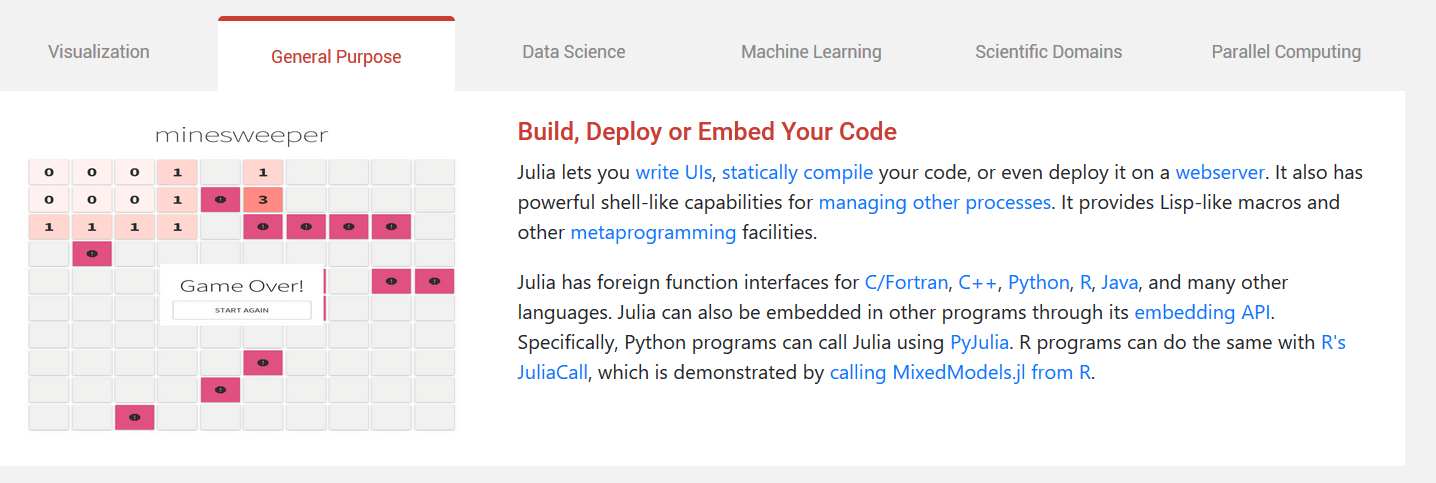
    今日推荐开源项目:《计算特化的语言 Julia》传送门:GitHub链接

    推荐理由:这是一个特化了计算方面的开源编程语言,有不少和计算有关的工具都是由它编写的,这可以在它们的官网上看到。不仅仅是计算,它也有提供给深度学习和机器学习的工具;即使是不需要这些的场合,你也可以干出诸如使用 Python 调用 PyJulia 来执行 Julia 或者在 Julia 中调用 Python 函数这样的事情,兴许这会让它可以更为广泛的使用。如果你对它感兴趣不妨一直关注它。


    今日推荐英文原文:《5 Ways to Develop Team Creativity》作者:The Heart Warsaw

    原文链接:https://magazine.theheart.tech/5-ways-to-develop-team-creativity-df49563862eb

    推荐理由:顾名思义,提升你带领的开发团队的创造性的方法

    5 Ways to Develop Team Creativity

    Sophia Loren once said, “There is a fountain of youth: it is your mind, your talents, the creativity you bring to your life and the lives of people you love. When you learn to tap this source, you will truly have defeated age.”

    It is not just individuals, but also teams, that have the potential to age and even slip into irrelevance. It is quiet, it is subtle, but one day they wake up realizing they have lost touch and can’t keep up with an ever changing world. Tapping into creativity is the key that keeps your team competitive and young, no matter the age, in a market that is a constant battlefield fighting to stay relevant.

    Inspired by a conversation with Per Kristiansen of LEGO Serious Play, here are 5 suggestions for you and your team to develop more creativity.

    1. Understand that everyone has creativity

    There is something that has been placed into humanity that longs to create. It is the reason we dream, the reason we stare in awe at sunset or look for hours at an endless ocean. It is what makes us appreciate music, a beautiful painting or a good book. Even though we may not be able to reproduce these things, there is something that draws us to them. This is common in every person and when we look at the similarities that bond us, we know, that everyone has, locked within them, this little thing called creativity.

    There needs to be a mindset shift. Many people have the world divided into two groups: those who are creative and those who are not. Understanding that creativity rests inside of every person, allows you as a leader to see, not only yourself, but also your team as an incredible source of creative potential.

    2. Remember that everyone wants to use their creativity

    When we recognize that we all have creativity, the next step is remember that everyone wants to use it. Because creativity is unique in every person, and the way in which they look at the world is unique, everyone will have new and different ways of creative expression. Perhaps you have a solution to a problem, and perhaps it is a good solution. If, however, you want to develop team creativity, why not allow them to come up with the answer instead? It very well may be different than yours, but, by remembering that your team wants to use their creativity, they will both feel empowered and have an opportunity to contribute. There is nothing more stifling for a team than having the longing to be creative, but never having the opportunity to do it. As a leader, look for and encourage opportunities for your team.

    3. Engage Your Hands

    Much of business has become head focused. It is about information — gaining it and giving it. If we are to tap into our own source of creativity, as well as the sources of our team, a great way to do this is by engaging the hands, not just the head. There is something magical that happens when hands move. In order to develop creativity on a personal level, consider taking up a hobby such as gardening, woodwork or cooking.

    On a team level, consider adding physical elements to problem solving. Per Kristiansen has helped countless teams and organizations solve problems by first getting their hands moving. With a pile of LEGO bricks and a simple command such as, “With these bricks build your perfect client.”, teams begin moving pieces, thinking about colors, stacking, unstacking and releasing their collective creativity. Before long they have created what is most important to them and can describe in great detail what they have created and why. Next time, instead of just thinking about the solution, get some LEGO bricks and build the solution.

    4. Give space for creativity

    Many times leaders do not give space for their teams to be creative. Creativity isn’t something that can be forced during a 30 minute lunch break. It takes time to open up and produce something inspiring and we can’t do that if our lives have no margin. If you want to develop team creativity, make sure that you give them the margin and space in their lives to think and act creatively.

    Time isn’t the only issue that needs to be considered when it comes to space. This can also be the literal, physical surroundings you are in. If you and your team are in an office that smothers creativity, consider solving problems in an outside location. There are some very unique spaces that are designed to help teams tap into their creativity and inspire them to think differently.

    Giving space, both in the margins of life and in the surroundings, is one of the most important principles for developing your creative genius.

    5. Play

    Per Kristiansen mentioned, “We don’t stop playing because we grow old, we grow old because we stop playing.” If you are going to develop creativity, you will most effectively develop it in the context of play. It is when our minds are free to experiment, free to learn, free to enjoy and laugh that some of our best ideas and insights come. Using a simulation games workshop instead of a lecture based conference has helped countless organizations and teams create and connect more.

    There are many great ways to help develop creativity, and these five are simply suggestions that have worked for many teams and individuals. If you and your team can “learn to tap this source”, and “bring creativity to your life and the lives of those you love”, you will have found that fountain of youth. What is more, in an intense market, you will find that you never slip into irrelevance and maybe you will just have a little more fun along the way!


    每天推荐一个 GitHub 优质开源项目和一篇精选英文科技或编程文章原文,欢迎关注开源日报。交流QQ群:202790710;微博:https://weibo.com/openingsource;电报群 https://t.me/OpeningSourceOrg
←上一页
1 … 208 209 210 211 212 … 262
下一页→

Proudly powered by WordPress