• 开源镜像
  • 开源沙龙
  • 媛宝
  • 猿帅
  • 注册
  • 登录
  • 息壤开源生活方式平台
  • 加入我们

开源日报

  • 开源日报第958期:《showdown》

    23 11 月, 2020
    开源日报 每天推荐一个 GitHub 优质开源项目和一篇精选英文科技或编程文章原文,坚持阅读《开源日报》,保持每日学习的好习惯。
    今日推荐开源项目:《showdown》
    今日推荐英文原文:《Google gets web allies by letting outsiders help build Chrome’s foundation》

    今日推荐开源项目:《showdown》传送门:项目链接
    推荐理由:showdown是一个将markdown转html的库,前后端均可用. 可以再客户端(浏览器)或服务端(Node.js)中共同使用showdown.简单小巧, 快速实现转换
    今日推荐英文原文:《Google gets web allies by letting outsiders help build Chrome’s foundation》作者:Stephen Shankland
    原文链接:https://www.cnet.com/news/google-gets-web-allies-by-letting-outsiders-help-build-chromes-foundation/
    推荐理由:浏览器巨头google chrome 以Chromium著称. Chromium是开源的, 所以不少市面上的浏览器都是基于这个内核做的. 随着Chromium浏览器队伍的不断壮大, Chromium也得到了不断的提升与进步.

    Google gets web allies by letting outsiders help build Chrome’s foundation

    Google is loosening control over the core of its Chrome browser, a move that helps Microsoft, Samsung and Brave build competitors while advancing the search giant’s vision of the web.

    Over the past six months, Google welcomed a new outside developer into the leadership of its Chromium project, the software that powers the similarly named browser. The Alphabet subsidiary is also granting outsiders access to its previously proprietary software development system and allows outside features even when Google doesn’t incorporate them into the flagship Chrome browser.

    Chromium is open-source software, which means anyone can modify and use it. Even with open source projects, however, outsiders can have trouble convincing organizers to accept their changes and additions, making it harder to contribute and benefit.

    Google took pains to draw attention to the changes at the BlinkOn conference earlier this week. “It’s really cool to see so many people and groups with different priorities coming together and finding solutions that not only meet their individual agendas but also advance the common goal of improving the web,” said Danyao Wang, a Chrome engineer at Google.

    Opening up to outside influence fits into Google’s broader strategy for the web. The allied-yet-competing Chromium-based browsers spread Google’s web technology, a software foundation for richly interactive web apps as opposed to static web pages and simple forms. Google sees that ability as critical to the future of the web, a vision that stands in stark contrast to Apple’s view. The iPhone maker doesn’t want web apps to inherit the same capabilities as mobile and desktop apps, a power expansion that threatens its rich iOS ecosystem.

    Apple and one of its allies, Mozilla, worry that letting web apps communicate with USB and Bluetooth devices or access PC file systems opens up too many security risks. Google and its allies say web apps are inherently safer than native apps thanks to protective browser sandboxing technology and security forged in an unforgiving environment devoid of app store reviewers checking for malware. Limiting advanced interactivity to native apps will cripple the web’s long-term health, they say.

    Google, which already accounts for 66% of web usage via Chrome, according to analytics firm StatCounter, has attracted powerful allies. Microsoft, Samsung and Brave are the most prominent companies building Chromium-based browsers. Others include Vivaldi, Opera, Yandex and UC Browser. Microsoft now ships Edge to millions of Windows PCs, Samsung is the top Android phone maker and 20 million people use Brave each month.

    Apple didn’t respond to requests for comment. Mozilla didn’t comment.

    Google opens up Chromium

    Expanding governance is the most significant change to the Chromium project. Before the change, Google engineers largely decided whether Chromium would accept or reject major new features. A new nomination process that began earlier this year allows outsiders into the inner circle. Manuel Rego Casanovas of open-source developer firm Igalia joined in March through the process.

    “We’re looking forward to more representation in the coming year,” Alex Russell, who heads Chrome’s web standards work, said in a statement.

    Chromium project leaders are also accepting features from other companies into Chromium even if they won’t be added to Chrome. One example is the StorageAccess interface, a privacy-related project Apple’s Safari browser team launched to govern how websites store and access some types of data, said Yoav Weiss, who also spoke at BlinkOn. Allowing non-Chrome features is a deliberate decision to give other developers the ability to design Chromium-based browsers that can achieve their priorities, Google said.

    Chromium allies don’t have to ship all the web features Google likes. Indeed, Brave strips out some features like WebUSB. However, most of the Chromium code base makes it into the non-Chrome browsers, furthering Google’s vision.

    Brave Chief Executive Brendan Eich wants Google to go farther in sharing control. “The Chromium playing field and rules still tilt steeply in Google’s favor,” Eich said. Brave disables Chromium features it views as nonstandard and privacy risks, but Google doesn’t accept those changes in Chromium, he said.

    Helping developers build Chromium

    Google also now lets outsiders use its formerly internal software to build system called Goma that can tap the power of Google’s data centers to build Chromium. Ordinarily that can take hours, slowing the pace of iteration for developers eager to experiment with new features. Goma will enable more people to contribute to Chromium, Google said.

    The search giant is also inviting outside developers to its internal educational events. Earlier this month, Google replaced its internal Chrome University events, which explain how the browser works, with the first Chromium University. Sixty organizations participated.

    The company could go farther and contribute Chromium to a neutral foundation, an approach Google and other companies have taken with earlier open-source projects. The Linux Foundation is responsible for the core of the Linux operating system. Google contributed its Kubernetes data center software to the Cloud Native Computing Foundation in 2015. LLVM, an important software building tool that blossomed under Apple’s oversight, is now run by the LLVM Foundation.

    Google isn’t planning a Chromium Foundation, and outside contributors aren’t asking for one, the company said.

    Microsoft didn’t comment on whether it would like to see a neutral foundation, but did say it’s working closely with Chromium team members, “bring the best of Chromium together with the best of Microsoft Edge.”

    Non-Google Chromium participation increases

    The changes are having an effect. Among the hundreds of Chromium contributors, 90 new ones came from Google over the last year but even more came from outside, Weiss said. Microsoft, which converted its Edge browser into a Chromium project over the last two years, is the top outside contributor, accounting for 35 percent of non-Google contributors in 2020. Intel, Igalia, Yandex, Opera, Samsung, LG Electronics and Arm also contribute substantially.

    In terms of changes to the code base, Igalia leads the non-Google crowd. Microsoft is “closing that gap quickly,” Weiss said. Since November of last year, 161 Microsoft developers made 1,835 changes to Chromium, improving things like battery life, web accessibility for people with issues like vision impairment, WebXR virtual reality and augmented reality abilities, and modernized styling for web controls and forms. Since Microsoft first joined Chromium in December 2018, it’s made 4,443 changes.

    “Other companies are increasing their investment in Chromium and the web platform, and that is awesome,” Weiss said.

    Correction, 11:27 a.m.: Chromium has had two other non-Google engineer overseers earlier, but Manuel Rego Casanovas is the first to arrive through a new nomination process.


    下载开源日报APP:https://opensourcedaily.org/2579/
    加入我们:https://opensourcedaily.org/about/join/
    关注我们:https://opensourcedaily.org/about/love/
  • 开源日报第957期:《? cows》

    22 11 月, 2020
    开源日报 每天推荐一个 GitHub 优质开源项目和一篇精选英文科技或编程文章原文,坚持阅读《开源日报》,保持每日学习的好习惯。
    今日推荐开源项目:《? cows》
    今日推荐英文原文:《A Beginner’s Guide To Debugging for Beginners》

    今日推荐开源项目:《? cows》传送门:项目链接
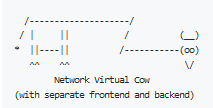
    推荐理由:这个项目里收集了非常多的牛——用 ASCII 码画的许多有意思的牛,比如这个体现了前后端分离的牛:
    今日推荐英文原文:《A Beginner’s Guide To Debugging for Beginners》作者:Dave Frame
    原文链接:https://devdaveframe.medium.com/a-beginners-guide-to-debugging-for-beginners-21eb119a8445
    推荐理由:面向新手的调试指南

    A Beginner’s Guide To Debugging for Beginners

    Basic Strategies and Principles for a Less Stressful Debugging Experience

    “If debugging is the process of removing software bugs, programming must be the process of putting them in.” — Edsger Dijkstra
    Bugs. They’re inevitable. In the same way that most writing is revision, most programming demands debugging. That means developers get lots of opportunities to confront our own understanding. It’s great. Okay, it doesn’t always feel great. If I can appropriate another writing truism from Dorothy Parker, I hate debugging, I love having debugged. And while I have occasionally tried arguing or even bargaining with my laptop, I’ve never found it a particularly effective method. Luckily, we have lots of tools and strategies that are much more effective. Below, I’ll outline a few that I’ve found particularly useful for arriving at the coveted state of having debugged.

    But first… do you have a moment to talk about unit testing?

    Write a Test

    In an ideal world, crimes against maintainability and the user experience are caught before they are committed. That means saving time debugging might mean spending time writing tests. Tests allow us to make assertions about the shape of our data and expected output for our functions and components before a mistaken assumption becomes a problem. It’s a much more elegant solution than printing or console.logging until the problem reveals itself. Of course, that requires investing time in learning testing. If you’re not there yet, have no fear, we have options.

    Read the Error Message

    Now, say we haven’t written tests or we’re just humans whose codebase hasn’t reached 100% coverage. If we’re encountering our bug in the wild, we’re likely to be confronted by a helpful message showing us the error of our ways… more or less. Error messages can present as cryptic one-liners, the computer equivalent of a shoulder shrug, or daunting walls of text with lots of cascading failures. However, at a minimum, try looking at the very top. The first problem the computer encountered is likely to be the source of the problem. Even if it doesn’t quite get you there on its own, it will probably provide you with a file and line number; that’s a great place to start.

    Google It

    As beginners, the chances our problem has never been encountered before are pretty low. It’s worth leaning on the wisdom of those who came before. Plugging the error into Google will likely return a slew of blogs, GitHub issues, and Stack Overflow posts on similar problems. A little research could go a long way to point you in the right direction.

    Check for Typos

    Mismatched quotes or brackets, a period where a comma belongs, a comma where a period belongs, variable or function misspellings, there are so many ways to be off by one character. I’ve found it’s a good idea to try ruling out simple grammatical errors before spending hours questioning your sanity and grasp on basic logic just to find a missing semicolon. It might also be a good idea to check the docs and make sure your syntax is correct.

    Make Your Own Assertions About Input and Output

    Just because we haven’t formalized our assertions as tests, doesn’t mean we can’t start doing some legwork ourselves. I find it helpful to articulate how I’m expecting my inputs and outputs to look. Then, if I’m lucky, I’m just a print/console.log away from confirming or refuting those assumptions.

    Inspect Your Input

    Often enough, errors can be the result of bad assumptions about the shape of our data. This is especially true if we’re pulling that data from an external API or passing it down through callbacks or React props. In the case of external APIs, it might be worth using a tool like Postman to familiarize ourselves with the way data is structured when it arrives. If our input is in-house, we can always fall back on print/console.log inside our function. Or, we can move forward with a tool custom-built for the job…

    Debug with the Debugger

    What is it in a name? In this case, it’s a pretty good hint. If our inputs are what we expected but we’re still not getting the output we wanted, it might be time to slow things down. Whether it’s byebug for Ruby, pdb for Python, or just plain old debugger for JavaScript, there should be some utility available to us for setting breakpoints in our code. This allows us to freeze our code at a particular point and peek at the inner workings of our function to see what our variables look like at any given time. Remember that filename and line number from the error message? The line before that might be a good place to start.

    Check Your Logic

    If we’ve made it this far, our input looks fine, and our variables add up, it’s time to consider the possibility that we really are mistaken. At that point, there are a few options that boil down to more articulation of expectations. Sometimes all we need to see a problem with our logic is to hear ourselves explain it. We can start by rubber ducking — just talk through your thought process with any old inanimate object. I personally use stress bear:


    If that isn’t helping it might be time to get another human involved. Bring in a friend or colleague and start from the top. If you’ve tried to no avail, or you don’t have any colleagues on hand, it might be time to make your first Stack Overflow post!

    I hope that helped! Feel free to leave a comment if you have any other tips. Good luck and happy bug hunting!
    下载开源日报APP:https://opensourcedaily.org/2579/
    加入我们:https://opensourcedaily.org/about/join/
    关注我们:https://opensourcedaily.org/about/love/
  • 开源日报第956期:《Netease-cloud-music-gtk》

    21 11 月, 2020
    开源日报 每天推荐一个 GitHub 优质开源项目和一篇精选英文科技或编程文章原文,坚持阅读《开源日报》,保持每日学习的好习惯。
    今日推荐开源项目:《Netease-cloud-music-gtk》
    今日推荐英文原文:《15 Mistakes Every Developer Has Made in Their Life》

    今日推荐开源项目:《Netease-cloud-music-gtk》传送门:项目链接
    推荐理由:该项目是专为 Linux 系统打造的网易云网易云音乐播放器,基于Rust + GTK开发,稳定,极速,且简洁。
    今日推荐英文原文:《15 Mistakes Every Developer Has Made in Their Life》作者:Daan
    原文链接:https://medium.com/better-programming/15-mistakes-every-developer-has-made-in-their-life-7b7ef03cc84c
    推荐理由:一些开发人员容易犯的错误。比如说,为了修改 bug 将代码缝缝补补,最后计算机也许能读懂,但是自己读不懂了。

    15 Mistakes Every Developer Has Made in Their Life

    Making mistakes is human and is actually what makes us grow. You shouldn’t be afraid to make mistakes. Chances are that you’ve made a lot of mistakes that are on this list. If not, that’s great. Try to learn from the mistakes other developers have made so you don’t have to make them yourself. 1. Quick and dirty fixes in code with a long lifespan. The problem with quick and dirty solutions is that they kill the quality of the code base. Chances are that such a solution will add unnecessary technical debt. In the long run, quick and dirty fixes will come back and bite you. You’ll probably end up refactoring your quick and dirty solution at some point in the future. 2. Lack of practice. As we all know, practice makes perfect. So if you want to grow as a developer, you need to practice more. The biggest mistake you can make is to not learn any new things every once in a while. If you want to learn something new, like a programming language, you probably have to do it outside of your daily job. That’s an investment that you have to make in yourself in order to stay relevant. 3. Underestimating the workload. Estimating the workload is one of the hardest things in software development. How often have you heard “I could easily do this feature in one story point” in a Scrum refinement? Chances are that things aren’t quite that easy and your intended solution won’t work. When it comes to estimates, make sure you count in time for things like testing as well — not just for the developer. 4. Writing obvious comments. We’ve all seen comments like this before. They don’t explain anything but focus on what the code is doing (e.g. a comment like “looping over the products” when there is a foreach loop). Whenever you’re in that situation, don’t write a comment that focuses on what the code is doing. Focus on the why of this code instead. 5. Commenting out blocks of code. We’ve all seen entire blocks of code containing multiple functions being commented out. No one knows why this block of code is still there or if it’s still relevant. The reason no one deletes this block of code is that everyone assumes that someone else might need it. Just delete the commented out code block. If it turns out that the code is still necessary, it will be in version control. 6. Only testing the happy-path scenario. When writing tests, you should take into consideration more than just the happy path. Think about some scenarios where things don’t work out as intended. What’s the worst-case scenario? Make sure to test that scenario as well. 7. Messy formatting of code. This is a mistake that’s most often made by inexperienced developers. It makes code harder to read and frustrates other developers who have to read your code. Fixing messy code can be done by installing a linter that formats your code. 8. Not logging any relevant information. Useful logs provide great help to developers. Having log messages can give you a lot of insight into where things went wrong inside your code and will save you a lot of debugging time. Good log messages provide context about what the user was doing when a specific error occurred. 9. Reinventing the wheel as a lack of knowledge. This mistake happens when a developer doesn’t know what’s already available in the framework. As a result of this lack of knowledge, new methods get implemented by the developer that are almost identical to a method that’s already available in the framework. 10. Starting to code without knowing the solution. This might seem exciting at first, but it will come back and bite you. Planning and organizing your code is an essential part of coding. You shouldn’t start coding without a plan. Think about problems that you might find along the way and how can you tackle them. This makes you more aware of the fact that there’s a lot to think about before writing code. 11. The art of writing bad commit messages. We’ve probably all committed this one before. “Fixed a bug” or “WIP” are not great commit messages. Having good commit messages is important and you should take the time to write a good commit message. A good commit message provides useful information about what has changed and why. When things really go south, the revision history is a great resource to quickly find out where exactly things went wrong. 12. Having magic numbers in your code. Magic numbers are unique values with unexplained meaning or multiple occurrences that can and should be replaced with named constants. The thing with magic numbers is that they’re not readable and don’t provide any context for the developer. On top of that, magic numbers are often used multiple times in different places within a program, which makes it error-prone. 13. Too many things going on in one function. Try to let your functions do one thing and one thing only. Don’t let a function fetch, process, and output the data. Split all of these responsibilities up into different functions. One for fetching, one for processing, and another one to output the data. Keeping a function focused on a single concern is what makes it more robust. 14. Not writing automated tests. Initially, it will cost you a little bit more time than doing manual tests when you start writing automated tests. In the long run, you’ll be glad you took the time to write these automated tests. Having to test everything manually is boring, time-consuming, and the human factor makes it more prone to errors. 15. Making things unnecessarily complex (aka over-engineering). Implementing certain design patterns for the heck of it is something that most developers have done. Just because you see an opportunity to implement a design pattern doesn’t mean you should. All this accomplishes is adding more technical debt to the code base.
    下载开源日报APP:https://opensourcedaily.org/2579/
    加入我们:https://opensourcedaily.org/about/join/
    关注我们:https://opensourcedaily.org/about/love/

  • 开源日报第955期:《ShameCom》

    20 11 月, 2020
    开源日报 每天推荐一个 GitHub 优质开源项目和一篇精选英文科技或编程文章原文,坚持阅读《开源日报》,保持每日学习的好习惯。
    今日推荐开源项目:《ShameCom》
    今日推荐英文原文:《Google Pay revamps with new focus on managing bank accounts and finances》

    今日推荐开源项目:《ShameCom》传送门:项目链接
    推荐理由:整个校招高峰算下来的时间并不长,如果你不做好充足的准备,时间一晃就过去了,机会没准就这样错过了,但是话又说回来,现在很多企业在校招过程中会出现各种各样的污点行为,比如毁意向书、毁两方协定、毁三方协定、试用期裁员、大量裁应届生等。 为了帮助大家在校招中避免踩坑,有人在Github上创建了一个名为ShameCom的项目,专用于记录在校园招聘中的具有污点行为的公司。目前已经在Github上标星2K。
    今日推荐英文原文:《Google Pay revamps with new focus on managing bank accounts and finances》作者:Richard Nieva, Eli Blumenthal
    原文链接:https://www.cnet.com/personal-finance/google-pay-revamps-with-new-focus-on-managing-bank-accounts-and-finances/
    推荐理由:搜索巨头谷歌也在发展自己的移动支付, 最近google pay进行了关于用户管理银行账户和财务的改进, 并表示移动支付的开发部门不会和其他部门共享信息, 以保护用户的隐私.

    Google Pay revamps with new focus on managing bank accounts and finances

    Google wants its software to become the center of people’s financial lives. The search giant on Wednesday said it’s overhauling its Google Pay service, which lets people pay for stuff using their phones, and extending the focus to online banking, shopping and loyalty programs.

    It’s partnering with a handful of banks and financial institutions to create “a new mobile-first bank account,” called Plex, managed through the Google Pay app. Starting next year, institutions including Citi, BBVA and the Stanford Federal Credit Union will offer the Plex accounts, which come with no monthly fees or overdraft charges.

    Google hopes to lure people to its software with the promise of a better user experience. It said its artificial intelligence will make it easier to search through purchases. For example, it will show you a charge from a taqueria if you search for something more vague like “Mexican restaurant.” The app will also send spending reports and other insights to help with budgeting. While Google provides the technology, the money is handled by the bank, the company said.

    The announcement underscores a major push into financial services by the biggest tech companies in the world, from Apple to Samsung. But the effort could be dogged by trust problems Silicon Valley has faced in recent years, as the public, lawmakers and media take a harder look at the tech industry’s privacy and data collection practices.

    Asked about those concerns, Caesar Sengupta, Google’s vice president of payments, said the company won’t share transaction history with third parties. He said the data also won’t be shared with other parts of Google, so it won’t feed into the company’s massive digital advertising operation, which accounts for the vast majority of the company’s more than $160 billion in annual revenue.

    “Payments and money are an area that is deeply personal,” he said in an interview. “And you do want to have very, very tight control over it.”

    Google also wants the app to compete with other payment services like Venmo. People will be able to use it to pay friends, split a check or order from a business. They can use it to pay for parking meters in 400 cities or buy gas from Shell, ExxonMobil and other gas stations at certain locations. The app will also be a hub for loyalty programs and deals, with offers from businesses including Burger King, Sweetgreen and REI.

    Google is the latest tech company to revamp its payment offering, though it’s not going as far as other companies have gone.

    In 2018, wireless carrier T-Mobile began the rollout of a banking service it calls T-Mobile Money. The company partnered with BankMobile, a division of Customers Bank, to offer its customers a banking option that had no overdrafts, ATM fees and up to 4% interest on checking account balances of up to $3,000, as long as they deposit at least $200 a month.

    Last year, Apple announced its own branded credit card, called Apple Card, that offered no annual or late fees, daily cash back and a titanium physical card. The card, launched in partnership with Goldman Sachs, is designed to be used with its Apple Pay mobile payment service on iPhones, iPads and Macs. The company incentivized purchases made digitally, with 2% daily cash on purchases made with the Wallet app on an iPhone or Apple Watch, compared to 1% on purchases made with the physical card.

    Earlier this year, Samsung announced it would be offering a debit card as part of its Samsung Pay payment service on Galaxy devices. Partnering with SoFi, Samsung’s card similarly had no account, overdraft or account management fees. Amazon has been offering a credit card to Prime members for years, with 5% back at its own store while other companies like Venmo have recently added rewards to incentivize paying with debit cards or apps.

    Google’s announcement on Wednesday could draw heat in Washington, where the company is already under intense scrutiny. Making a deeper investment in banking may rankle regulators and lawmakers who are already concerned over the tech giant’s power. Last month, the US Department of Justice filed a landmark antitrust case against Google over the company’s search and search advertising businesses.


    下载开源日报APP:https://opensourcedaily.org/2579/
    加入我们:https://opensourcedaily.org/about/join/
    关注我们:https://opensourcedaily.org/about/love/
←上一页
1 … 19 20 21 22 23 … 262
下一页→

Proudly powered by WordPress