• 开源镜像
  • 开源沙龙
  • 媛宝
  • 猿帅
  • 注册
  • 登录
  • 息壤开源生活方式平台
  • 加入我们

开源日报

  • 2018年10月7日:开源日报第213期

    7 10 月, 2018

    每天推荐一个 GitHub 优质开源项目和一篇精选英文科技或编程文章原文,欢迎关注开源日报。交流QQ群:202790710;微博:https://weibo.com/openingsource;电报群 https://t.me/OpeningSourceOrg

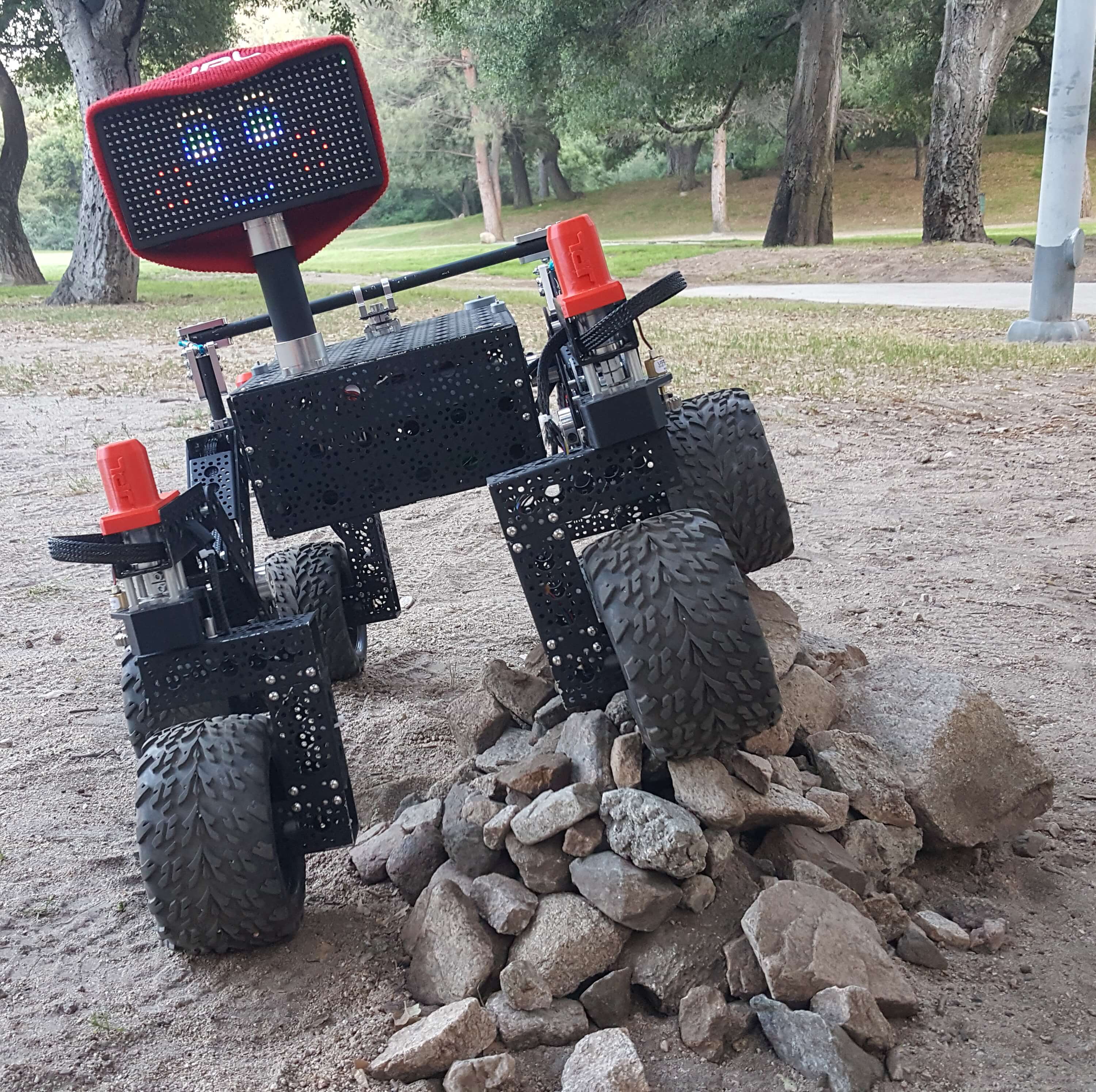
    今日推荐开源项目:《我在 GitHub 上都看见了什么玩意啊 open-source-rover》传送门:GitHub链接

    推荐理由:这个项目会教你如何制作一个有六个轮子的……火星探测车。如果你现在开始,兴许在寒假开始之前你就能做好它了,你只需要一些 Linux 和 Python 知识,然后再找些切割钻孔焊接工具之类的,然后就是祈祷不会出现意料之外的问题,就可以开始了。

    今日推荐英文原文:《10 Useful Tools and Libraries for Programmer and IT Professionals》作者:javinpaul

    原文链接:https://hackernoon.com/10-useful-tools-and-libraries-for-programmer-and-it-professionals-914e64e0eabc

    推荐理由:一些有用的工具,包括 Git 和 SQL 等等,兴许这篇文章对于那些刚刚开始编程的初心者来说正合适

    10 Useful Tools and Libraries for Programmer and IT Professionals

    Every trade has their tools and software development is no different. A good programmer knows his tools better than others and also have access to more powerful and advanced tools than an average programmer, but, there are certain tools which you expect every software developer should know and this list is all about such tools.

    In this list, I am going to share 10 essential tools, which I believe every programmer or software developer should know and know well.

    10 Tools Every Programmer Should Know

    Some of you may think 10 tools are nothing but, to be honest, if every programmer knows these truly well, he can accomplish a lot in his day to day job.

    Anyway, without any further ado, let’s see my list of 10 tools every software developer should know and know well.

    1. Git and Github

    A good knowledge of any source control repository is mandatory for any programmer or software developer because you need to do check-in, checkout of code every day.

    And, to become a better developer you should also know advanced concepts like branching and merging.

    In today’s world, Git and Github have become synonymous with source control repository and version control tool.

    This is the single most important tool for a programmer now and that’s why I suggest every programmer learn Git and Github truly well.
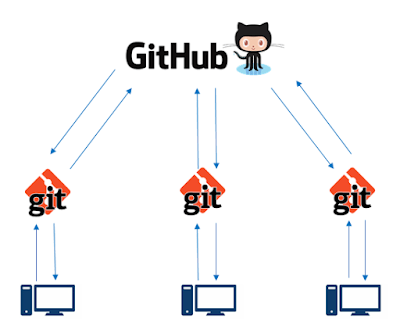
    If you are a beginner or a programmer who wants to improve his Git knowledge, I suggest you to go check out Git Complete: The definitive, step-by-step guide to Git course from Udemy. One of the best course to learn Git in depth.

    2. SQL

    This is another essential tool or programming language every programmer should learn. SQL is actually standards Standard Query language and used to work with the database. By using SQL you can read, update, and delete data from tables.

    Since we use database everywhere in the real world, a programmer should have a good understanding of SQL.

    Apart from knowing basic commands e.g. SELECT, INSERT, UPDATE and DELETE, a programmer should also know how to write complex queries using joins, aggregate functions, subqueries and other advanced functionalities.
    If you are new to SQL or want to take your SQL skills to next level then The Complete SQL Bootcamp is a good place to start with.

    3. Python

    You might be surprised that as a Java developer, why I am suggesting every programmer learn Python? Well, there is a reason for it. Python is a powerful high-level, object-oriented programming language which is very versatile.

    You can not only create big applications like you do in Java but also you can use Python to create useful scripts to automate stuff.

    It also has numerous modules which make almost anything possible, starting from accessing the file system, developing web applications to machine learning.

    I can’t say more but to show you this picture which clearly explains why every programmer should learn Python.
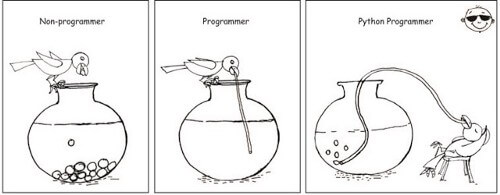
    It also has simple easy-to-use syntax, making it the perfect language for someone trying to learn computer programming for the first time. If you want to learn Python then The Complete Python Bootcamp course is a great place to start with.

    4. Excel or any SpreadSheet

    The Microsoft Excel is another essential tool for programmers and software developers. Don’t mistake it just for a spreadsheet application, you can do a lot more using Excel then you can ever imagine.

    The biggest reason to learn Microsoft Excel is that you will find it everywhere. Everybody uses it, starting from business to BA, QA and project managers. You can use it generate reports, automate and reconcile stuff and a lot more.
    If you want to go beyond just copy pasting stuff into excel to learn functions like VLOOKUP, I suggest you join the Microsoft Excel — Excel from Beginner to the Advanced course on Udemy. One of the best course to learn Excel in depth.

    5. Word or Similar

    Microsoft Word is not as popular as Microsoft Excel but still its one of the essential tool for programmers and software engineers.

    As a developer, you often need to create documents e.g. software design documents, requirement documents etc and Microsoft Word is the best tool for that.

    It provides sophisticated formatting options to create really good looking documentation.

    If you are a beginner or an intermediate developer who wants to improve your knowledge of Microsoft world then I suggest you go through Master Microsoft Word Beginner to the Advanced course on Udemy.

    6. PowerPoint

    Along with Microsoft Excel and Word, Powerpoint forms the trilogy of essential office tools and that’s why they are also essential for Software engineers and IT professionals including developer, QA, BA, and project manager.

    Microsoft PowerPoint is the most popular tool to create presentations and as a programmer, many times you need to do presentations e.g. presenting your ideas to business, your plans to managers and doing many knowledge sharing sessions between teams and that’s why you just can’t ignore powerpoint.

    If you want to learn Powerpoint or improve your knowledge then Master Powerpoint presentations course on Udemy is a good place to start with.

    7. Text Editors (SubLime)

    Every programmer should know one text editor pretty well. Software developer do a lot of text processing job and knowing a text editor will always help.

    Apart from NotePad, which is a very good, omnipresent basic text editor, I encourage the programmer to learn some advanced text editors e.g. Sublime or NotePad++.

    They support regular expression search and replace and Macros which will help you a lot with your everyday work. If you want to learn more about a sublime text editor, Sublime Text for Rapid Web Development is a good place to start with.

    8. Linux commands

    Just like SQL, Linux commands is another essential tool for programmers. Every programmer has to work on UNIX sometime and many of us spend most of our day on Linux machine.

    A good knowledge of Linux commands means you can find what you want, you can know what’s going on with the machine and you can troubleshoot any issues with your application running on Linux.
    This is a must-have skill for every programmer and if you are not comfortable with Linux commands you must spend some time to learn it, especially if you have some exploring to Linux. For beginners, Linux Command Line Basics is a good place to start with.

    9. SVN

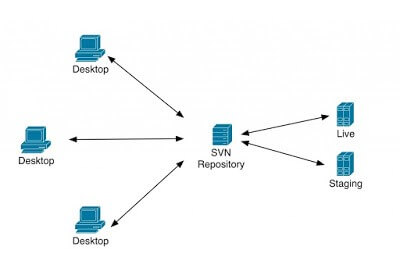
    Even though Git has taken almost 70% market share in terms of version control system, there are still projects where SVN (also known as subversion) is used.

    Not just on the property but also on open source and that’s why knowing tortoise SVN is good for programmers.

    It’s the same tool, I have started with SVN 12 years back and it’s still around. If you are a beginner or someone who want to improve his SVN knowledge and learn some advanced concepts like branching and merging in SVN then Introduction to SVN by John Sonmez on Pluarlsight is a good course to start with.
    10. Powershell or Cygwin

    Once you worked in Linux, you feel constraint while working in Windows because there is nothing like Linux commands in Windows and Powershell just solves that problem for once and all.

    Windows PowerShell is a shell developed by Microsoft for the purposes of task automation and configuration management.

    This powerful shell is based on the .NET framework and it includes a command-line shell and a scripting language so that you can automate stuff and create a script as you do in Linux.

    If you want to start with PowerShell then I suggest you look at Learning Windows PowerShell course on Udemy, I have bought it recently to improve my Powershell skills.
    That’s all about essential tools for every programmer. These are some of the basic tools which everyone need be it a web developer working in JavaScript, a Java developer working on server-side code, or a mobile developer working on Android or iOS apps.

    A good knowledge of these tools goes a long way in your software development career because you will use these tools each and every day and appreciate the time and effort you put initially to learn them.

    Other Programming Articles You may like
    10 Books Every Programmer Must Read
    10 Tips to Improve Your Programming skill
    10 Object-Oriented Design Principle Every Programmer should know
    Top 10 Programming languages to Learn
    10 Articles Every Programmer Should Read
    10 Framework and Library Java and Web Developer Should Learn

    Closing Notes

    Thanks, You made it to the end of the article …

    If you like this article, then please share with your friends and colleagues, and don’t forget to follow javinpaul on Twitter!

    P.S. — If you need some FREE resources, you can check out this list of free data structure and algorithm courses to start your preparation.


    每天推荐一个 GitHub 优质开源项目和一篇精选英文科技或编程文章原文,欢迎关注开源日报。交流QQ群:202790710;微博:https://weibo.com/openingsource;电报群 https://t.me/OpeningSourceOrg
  • 2018年10月6日:开源日报第212期

    6 10 月, 2018

    每天推荐一个 GitHub 优质开源项目和一篇精选英文科技或编程文章原文,欢迎关注开源日报。交流QQ群:202790710;微博:https://weibo.com/openingsource;电报群 https://t.me/OpeningSourceOrg


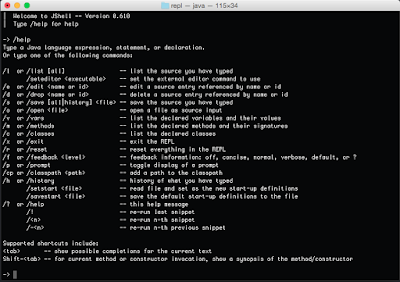
    今日推荐开源项目:《移动端的图表 F2》传送门:GitHub链接

    推荐理由:顾名思义,这是一个移动端的图表库,但是实际上他们还出了其他东西——一个图形语法 G2 和一个图表库 G6,你可以在官网上看到它们。除此之外,F2 本身也提供了中文的文档,如果想要在移动端上创建图表的话,试试这个兴许很不错。即使不是移动端,G2 和 G6 也能满足你的需要。


    今日推荐英文原文:《These are the best free courses to help you learn Java 8 and Java 9》作者:javinpaul

    原文链接:https://medium.freecodecamp.org/these-are-the-best-free-courses-to-help-you-learn-java-8-and-java-9-a7615c8644ab

    推荐理由:学习 Java 8 和 Java 9 的资源合集,顺带介绍了一些它们的新功能

    These are the best free courses to help you learn Java 8 and Java 9

    After the introduction of the six-month release cycle on Java 10, it’s very difficult to keep up with the latest changes in every Java version. But If you’re looking for some free resources on Java, such as books, tutorials, and other learning materials, then you have come to the right place.

    There are so many resources available to master the features that were introduced in Java 8 and Java 9.

    In the past, I have shared some of the best Java 8 tutorials and books. In this article, I am going to share some of the best and free Java 8 and Java 9 courses from Udemy and Pluarlsight.

    These courses are pretty similar to any paid course you might normally buy and many of these are made free for a promotional or educational purpose. You can join these courses to learn JDK 8 and JDK 9 features in just a couple of days.

    I used to begin learning new programming features with books, but, nowadays, online courses are my preferred method of learning. There are so many good free courses available.

    Though, sometimes, I have noticed that free courses turn into paid courses, especially after the instructor reaches their promotional targets, hence you should check the price before you join these courses.

    A good idea is to join the courses now, while they are free. Once you are enrolled in the course, you will have free, unlimited access, even after it is turned into a paid course. This means that you can learn whenever you want.

    Even if you are not learning now, you can learn more when you have some free time or your priorities change — there is no harm in enrolling.

    Why should you Learn Java 8 and Java 9?

    If you are wondering about the benefit of learning the features of Java 8 and Java 9, then, let me tell you. If you want to be relevant as a Java developer in today’s job market, you should learn Java 8 now.

    I have mentioned previously in my post 10 Things Java Developers Should Learn in 2018, and I am saying it again: learn Java 8 sooner rather than later.

    It’s been more than four years since Java 8 was first released, and it was received very well by the Java community. It had several interesting features and language enhancements, like lambda expressions, Stream APIs for bulk operations, new Date and Time APIs for better handling of dates, Default and Static methods on the interface, Method reference, and many more.

    Nowadays, more and more companies are adopting the Java 8 style of coding. If you don’t know write code in Java 8 style, such as using lambda and functional programming concepts, you may be left behind.

    Not only is Java 8 essential to being relevant in the Java community, but it also improves your productivity and makes writing Java code fun, once you know the basics. That’s where these courses can help!

    Coming to Java 9, it didn’t have the spark of Java 8. But it was still packed with some interesting features, like modules and some API enchantments. Knowing those features will, eventually, help you write better Java code and create a better application in Java.

    Courses to Learn Java 8 and Java 9

    Here is my list of the free online courses to learn Java 8 and Java 9. This list includes courses that are suitable for beginners as well as experienced Java programmers who are not familiar with the JDK 8 and JDK 9 features.

    You don’t need to attend all the courses. You can watch a preview and make a decision on whether to join or not. At the bare minimum, you can join one course on Java 8 and another on Java 9 to get yourself up to speed.

    And, since these courses are absolutely free, you have nothing to lose by joining them.

    Java 9 Programming for Complete Beginners in 250 Steps

    This is an excellent Java course for beginners, especially those who are starting it for the first time. This course covers the latest version of Java, or Java 9.

    If you want to learn Java from scratch, you can join this course. You will not only learn new features of Java 8 and Java 9, such as functional programming, lambdas, and streams, but also other important concepts of Java.

    You need to act fast to get this course for free because I am sure instructor Ranga Karanam will make this course paid very soon, once he reaches his promotional target with more than 31K students that have already joined.

    Anyway, I personally like Ranga’s teaching style and the way he presents concepts, like JShell and Spring concepts in his Spring Framework courses. You will learn a lot in a short period of time — there is no doubt about it.

    Java 9 Programming for Complete Beginners in 250 Steps

    Java 8: Basics for Beginners

    This is a very short course for learning some key features of Java 8, including lambda expressions, method references, functional interface, default methods, Stream APIs, and Optional class.

    You will not only learn those, but you will also learn the new Date and Time API and other less popular but useful changes.

    Even though this course doesn’t provide a comprehensive overview, you can check this out for a quick overview, especially if you are in rush and don’t have much time to spend on self-learning.

    Java 8: Basic for Beginners

    What’s New in Java 8?

    This is a more comprehensive course on Java 8, and it covers almost all the features you need to know.

    The author, Jose Paumard, has 20 years of experience in computer programming and that shows in this course. You will learn about how lambda expressions and Stream API makes coding in Java fun again.

    It not only covers major features, such as Date and Time API, but it also covers small API enhancements, like StringJoinger and the join() method in the String class for joining Strings in Java 8.

    You will also learn about JavaFX and JavaScripting using the Nashorn engine. Overall, this is a great course to learn Java 8, but the course, unfortunately, is not exactly free.

    What’s New in Java 8?

    It’s from Pluralsight, and you need a membership to get access to the course. The only way you can get access for free is by signing up for a 10-day free trial, which is not bad.

    There is also a good chance that your company might have a Corporate Pluralsight license, and then you can get this course for free on your company account.

    What’s New in Java 9?

    This is an awesome course to learn Java 9 features. In this course, Sander Mak, author of the popular book Java 9 Modularity, has explained some important Java 9 changes.

    The course is divided into 6 sections. The first section covers Java modularity, and since the instructor is also the author of the book Java Modularity, you can expect this to be the most comprehensive coverage you can get.

    The second section focuses on a more interesting and interactive change from Java 9 — JShell. You will learn about REPL and how to use JShell.

    The third section focuses on small language and library improvements, such as changes in Stream API, Optional, factory methods on Collections, and other improvements. This is the section you will love because you will be using these changes in your day to day life.

    What’s New in Java 9?

    The fourth section focuses on HTTP/2 and Process API changes, while the fifth section focuses on Desktop Java Enhancements, like JavaFX updates.

    The sixth and last section focuses on performance and security enhancements. It explains G1 Garbage Collection changes and the compact String feature introduced in Java 9.

    As with any other Pluralsight course, you need a membership to join this course, either a monthly or annual membership. Though membership doesn’t cost much ($35 per month to access their 5000+ courses), you can still get this and the Java 8 course for free by signing up for a 10-day free trial which is more than enough time to complete these courses.

    That’s all for now about some of the best, free courses to learn new features of Java 8 and Java 9. I strongly encouraged you to take at least one Java 8 and one Java 9 course to get yourself familiar with new features, particularly the JDK 8 features like lambda expressions, Stream API, Collectors, Optional, and new Date and time API.

    Other Free Programming resources you may like:

    5 Free Spring Framework Courses for Java Developers
    Top 5 Courses to learn Web Development in 2018
    5 Courses to Learn Big Data and Apache Spark
    Top 5 Courses to Learn Spring Boot in 2018
    5 Free Data Structure and Algorithms Courses
    5 Free Linux Courses for Programmers and Developers

    Thanks for reading this article. If you find these free Java 8 and Java 9 courses useful, then please share with your friends and colleagues.

    P.S. — You might know that Java 11 has just launched and there is a lot of talk about whether it’s FREE or not if you want to learn more and what’s new in Java 11 then don’t forget to check out Sander Mak’s What’s New in Java 11: Long-term Support course on Pluralsight. Thanks to Mak, it’s #FREE for one week.


    每天推荐一个 GitHub 优质开源项目和一篇精选英文科技或编程文章原文,欢迎关注开源日报。交流QQ群:202790710;微博:https://weibo.com/openingsource;电报群 https://t.me/OpeningSourceOrg
  • 2018年10月5日:开源日报第211期

    5 10 月, 2018

    每天推荐一个 GitHub 优质开源项目和一篇精选英文科技或编程文章原文,欢迎关注开源日报。交流QQ群:202790710;微博:https://weibo.com/openingsource;电报群 https://t.me/OpeningSourceOrg
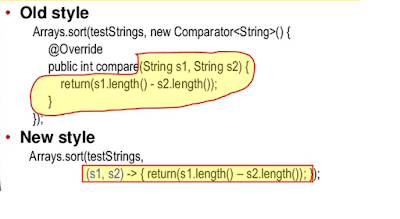

    今日推荐开源项目:《这是什么?是代码 Code Surfer》传送门:GitHub链接

    推荐理由:一个 React 组件,能够帮助你突出你的代码,如果你有一大堆代码要说明,为什么要把它们丢在编辑器里,然后用你的鼠标去划出重要的那部分?试试这个吧,这可比鼠标划过去简单而管用得多。


    今日推荐英文原文:《Passing Code Reviews Fast》作者:Jackie Tung

    原文链接:https://medium.com/@jackie.tung/passing-code-reviews-fast-b58148ab3395

    推荐理由:让别人在审查你的代码的时候花费更少的时间,这其中有一条是在任何时候都很适用的——线下对话,这可比线上对话有效率得多(至少你们不会再发表情包了)

    Passing Code Reviews Fast

    Coming from being a code monkey on Wall Street trading desks, I recall the culture shock during code reviews in my first job in Silicon Valley. Why are we nitpicking indentation and variable names? Who gives a sh*t about being Pythonic? Unit tests? Pfft! Is a LGTM from me, to me not enough?

    Four years later, I’m fully adjusted. I get that having code reviews probably is a sensible idea. This article won’t debate the merits of code review culture, nor recommend tooling of any kind. Instead, I will focus on human aspects to sustainably getting to “ship it!“ as fast as possible.

    Ask Nicely

    Specific reviewers usually have no obligation to look at your code at all. Even if they do look, timeframes are not guaranteed.

    In short, each code review performed is a favor granted by the reviewer. So ask nicely. For example:

    • Never take eventual code acceptance for granted. It’s disrespectful to diligent reviewers. Blind accepts by indifferent reviewers defeats the whole purpose of code review.
    • Correctly frame urgent requests as your own fault for not planning ahead, not the fault of reviewers being slow. It’s up to you to address all feedback as fast as you can.

    Digest Feedback

    Accepting feedback often means extra work. This leads to a reflex to resist actionable feedback — I have seen it in myself and others. This typically manifests as grasping at weak technical arguments to avoid making changes.

    In the extreme, this can lead to people not wanting to review your code at all. It is a losing proposition: They cannot accept code without reasonable fixes; but you have a reputation for being unwilling to listen.

    Take a step back, fight the inertia, and be open to feedback. It might be good for you.

    Talk Offline

    Text-only communication is terrible at expressing tone and emotions. It is common for review feedback messages to be taken the wrong way.

    Once an issue escalates beyond the purely objective (e.g. A is better than B, because 1+1=2), just walk over and have a real conversation. Communication bandwidth is much better face-to-face for most people anyway.

    Trolls

    On the off-chance that you think you are being trolled — that nothing you ever code seems good enough — what are you to do? First you should establish that the reviewer is indeed being unreasonable. What if your code really is crap? While the reviewer’s attitude is uncalled for, perhaps you need to improve your coding skills also.

    You need a second opinion. Lay out the evidence for your manager or peer. They can let you know whether it’s you or them.

    What doesn’t kill you makes you stronger — So relax: getting trolled in code reviews from time to time probably just makes you a better professional software engineer.

    Perfect is the Enemy of Good

    There is always a smarter way, or an extra abstraction that makes the code more generic, scalable, extensible, or harder-to-read, etc. Some reviewers enjoy pointing this out.

    But code needs to be shipped to provide value today. What’s the best way to handle this? Perfection is seldom required and never budgeted for. Perhaps polishing this specific piece of code to handle 1000x load is not an efficient use of your development time.

    Here is one reasonable way to handle this:

    • Thank the reviewer for the great feedback.
    • Explain the immediate value provided by the baseline code change.
    • Add a TODO documenting the suggested improvement as an inline comment.
    • Add a task to your team’s project management system (cc. the reviewer).
    • Allow management to prioritize this accordingly.

    Obviously, spamming this strategy to deflect every suggestion won’t make you popular. When appropriately used however, this is graceful way to break an impasse for all parties. The reviewer feels like his smart idea is acknowledged (and credited in the TODO); you get to ship; users get value now. Win, win, win!

    Preemptive Strike

    Perhaps you made a conscious coding decision to take certain shortcuts rather than reach for perfection. Write a comment right then and there! Explain the justifications and preemptively add a TODO. This saves time during code review, and lets reviewers (and maintainers) know that you were thoughtful and deliberate about your code.

    The Follow-Up Change

    Suppose you agree with a suggestion for a big improvement, but it involves lots of additional code. Should you do it right now? If the baseline code is functional and correct, it might not be a good idea. Other reviewers might have already spent time reviewing and are satisfied with the baseline code. In your subconscious rush to rewrite the algorithm and inject more code, what’s to say that no new bugs are introduced? If there is no obvious harm done to push the code as is, then just do so.

    But you must make a follow-up change. This is similar to the TODO prioritization strategy earlier, except that you work on the improvement immediately after the baseline code passes review and is pushed to trunk.

    Make sure you follow through though, or your reputation goes to sh*t.


    每天推荐一个 GitHub 优质开源项目和一篇精选英文科技或编程文章原文,欢迎关注开源日报。交流QQ群:202790710;微博:https://weibo.com/openingsource;电报群 https://t.me/OpeningSourceOrg
  • 2018年10月4日:开源日报第210期

    4 10 月, 2018

    每天推荐一个 GitHub 优质开源项目和一篇精选英文科技或编程文章原文,欢迎关注开源日报。交流QQ群:202790710;微博:https://weibo.com/openingsource;电报群 https://t.me/OpeningSourceOrg


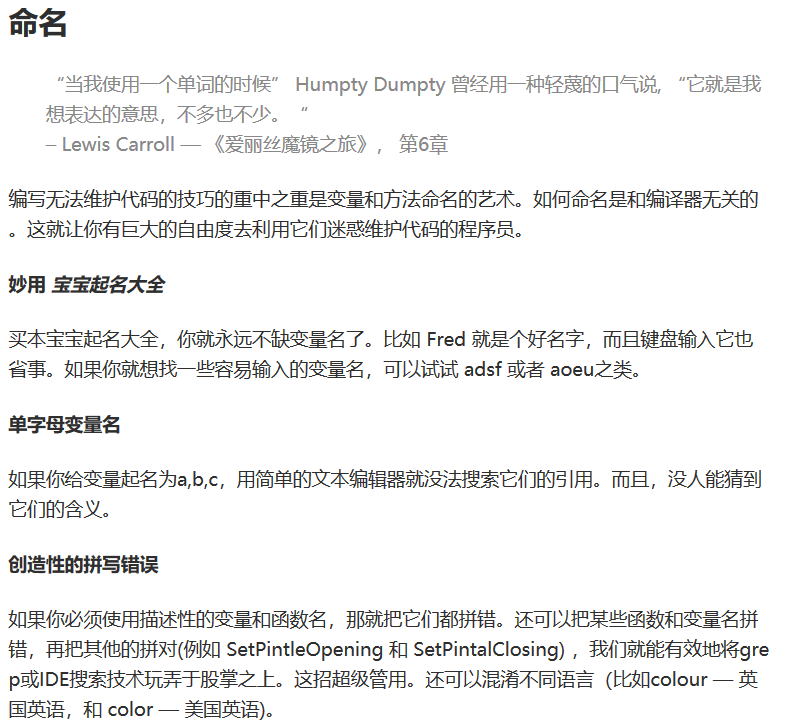
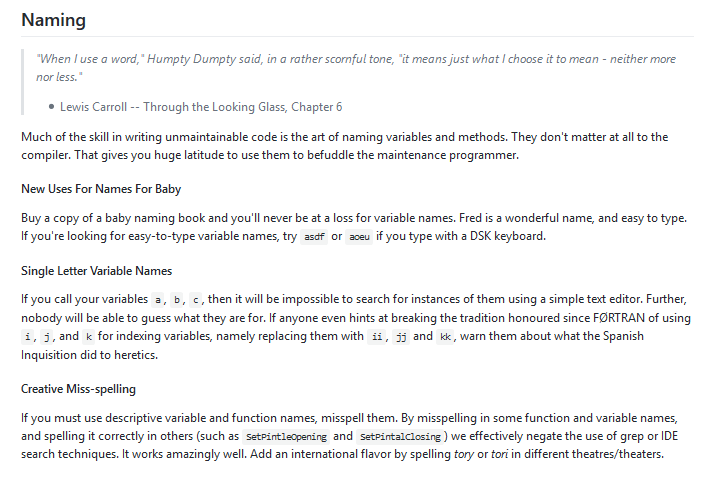
    今日推荐开源项目:《无法维护的代码 unmaintainable-code》传送门:GitHub链接

    推荐理由:如何写出无法维护的代码,又名,如何激起看你代码的人对你的杀心。这是有中文版的,如果英文版看不懂就放弃这玩意实在是太可惜了,不过看归看,如果真的有人敢用在自己的代码上的话……满身疮痍不可避。如果看完之后发现自己有可能有其中的问题,马上改掉它,无论是什么代码都需要维护的,要知道,从开发到结束都是一遍就能跑起来代码,这世界上有一份就足够了。


    今日推荐英文原文:《How to understand any programming task》作者:Justin Fuller

    原文链接:https://medium.freecodecamp.org/how-to-understand-any-programming-task-aea41eabe66e

    推荐理由:兴许现在你还没遇到,不过你迟早会在编程的道路上遇上一些一下子无法理解的任务,这篇文章将教会你如何理解的你的任务

    How to understand any programming task

    The day has finally arrived. Is it your first day on your job, or have you been doing this for ten years? It doesn’t matter. We all eventually find ourselves with a task that we simply do not understand.

    So what should you do? Should you just get started and hope it works? Should you immediately tell your boss that you can’t do this because you don’t understand?

    I imagine that you know the answer is neither!

    In programming, as with any other profession, I have found that it’s almost impossible to go through a week (and sometimes not even a day) without finding some problem that I don’t understand.

    But don’t fret! I have great news. Not only can you fix this problem, but it can also be a good thing.

    It means that in some way you are expanding your skill and knowledge beyond what you’ve done and known before.

    In the next few paragraphs I’m going to detail how you can bridge the gap between the requirements you’ve been handed, and the knowledge you need to complete the task you’ve been given.

    About ‘requirements’

    You may have noticed that I used the word “requirements”. That word might have certain connotations depending on where you work.

    In my experience, big companies love requirements and small companies sometimes “don’t do requirements”. I think this is perfectly fine for our purposes here.

    That’s because in the end all we’re doing as software engineers is solving problems.

    You could receive an extensive one hundred page report on how to solve that problem (I once had an hour long meeting about the text for a button). Or maybe your CEO will meander over to your desk and casually ask if you can solve the problem by Friday.

    Either way — you’ve been given a task, and you need to be sure you fully understand that problem in order to address it correctly!

    About the steps

    Not all of the steps given below are needed for every problem. Only the hardest problems to understand may require you to carefully proceed through all the steps that will be discussed in this article.

    Many of the questions may not be answerable through the requirements that you’ve been given, or through your personal experience alone.

    You may have to ask other developers, your team lead, product owner, business analyst, or even your grandma. Maybe you’ll have to ask all of them by the time you’re done!

    That’s fine though. It means you’ll be taking scattered knowledge and condensing it to reside in one place. That place is in yourself and now you will be able to produce the best possible result!

    A final warning before you learn the steps: don’t over-formalize this process. The point here is to help you quickly understand a problem. It shouldn’t create barriers or red tape! Instead it should provide you with a systematic plan to tackle a problem you don’t understand.

    The first step: Analyzing the task

    In this step, you will seek to understand what you’ve been asked to do. You’re not trying to figure out how to do it yet!

    The distinction here is important. It can be dangerous to jump straight in to implementation without thinking through all the consequences, or worse, without identifying exactly what it is you’ve been asked to do.

    Classify the task

    To classify a task means to determine what kind of work you’ll be doing to solve this problem. Here are some examples of types of tasks:

    • Bug fix
    • New feature
    • New application
    • Research Assignment
    • Performance improvement

    Remember that these are not all the possible options.

    The goal here is to determine what kind of work you are expected to do. This is important because it has a direct effect on what work you do.

    This step is particularly important for vague requirements. An example of a vague requirement is: “We need a way to purge our clients’ caches after an update to the website.”

    There can be a few possible interpretations.

    1. You need to immediately implement some cache purging mechanism so that clients always see the latest updates.
    2. You need to research all the ways that clients’ caches are stored and determine the best way or ways to bust those caches after every update of the website.
    3. The clients’ caches already should be being cleared and you need to find and fix the bug that is preventing them from clearing.

    At this point, if you aren’t absolutely sure which meaning is being used, you should ask for clarification before proceeding.

    State what the task is in one or two simple sentences.

    Summarize the complicated requirements as if you’ve been asked what you are working on today. Maybe it won’t be that simple, but you should be able to boil it down to a sentence or two.

    If you can’t summarize the task it probably means you are going to need to split it up into multiple tasks. So essentially this step becomes a litmus test to determine if you’ve organized your tasks into small enough chunks.

    Here’s a good example of a summary: “When we update the site, we append a unique number to the files so that the browser knows it needs to use the latest code.”

    This task passes the simplicity litmus test and you probably don’t need to create multiple tasks.

    A bad example might look like: “When we update the site we append a unique number to the files so that the browser knows it needs to use the latest code. We also have to send a message to our CDN letting it know that it needs to update the files. Also the IOS and Android apps will need to have an update sent to the app store. Also…”

    This one clearly fails the test. There’s a lot of work to do and it may need to be identified and tracked separately.

    Outline the major parts

    In whatever form is most convenient for you, you should now make a list of the major things that must be done.

    These should still be very simple summaries of each major step.

    These should not be a step by step or detailed guide of how to fix the issue.

    Remember that you are still analyzing the task you were given. I would recommend writing these down somehow. I personally record them in my Notes app.

    Our caching task is very simple and may not actually need an outline. For this example we’ll consider a more complex issue.

    Our next task is a new feature: “Each user should be shown a targeted advertisement for an internal product. This ad should be tailored to fit their individual needs based on the data we have collected.”

    To outline the major parts you will need to think clearly about what each part of the requirement will have you do.

    • Our current advertisements will need to be broken down in such a way that they can correlate to some specific user metric.
    • There will need to be a way for our marketing team to map new advertisements to a piece or pieces of user data (without coding!)
    • The system will need to aggregate metrics about a user that are relevant to our advertisements.
    • Finally, you need to create some kind of system that receives a user id and outputs an advertisement.

    The beauty of a list like this is that it can be used to quickly verify with your team or boss! So in this example, maybe you’ve run it by your team lead and he decided that there needs to be one more major piece:

    • Users should be able to tell us when they don’t want to see certain ads any more.

    Because after all, we don’t want to annoy our beloved users! By taking the time to think about our task for just a couple minutes, we’ve saved hours or days of pain later by identifying and planning for an important task before getting started with coding.

    Before we move on, I want to address a possible criticism that you might have.

    You might be thinking: “In a proper business this is the type of work that should be done before requirements ever reach the developer”, and I definitely agree with you!

    However, we sadly don’t live in a perfect world. Sometimes requirements aren’t always completely fleshed out before they get to a developer. This means we must all do our best to properly evaluate the requirements before development starts.

    Define the problem or problems that you are trying to solve.

    Answer the question, “why will someone use this?”, or “what actual or perceived real world problem am I trying to fix?”

    Hopefully the answer is obvious. For our cache example you could say, “users will always see the latest updates.” For the advertisement example, “users will see relevant ads instead of ads they don’t care about.”

    If the answer isn’t obvious then it’s probably time to ask someone why you are doing this task! Asking this question will lead to either you having a clearer understanding of the task at hand, or it will lead to a re-think of what you’ve been asked to do.

    Hopefully you see the benefits to either of those answers! A deeper understanding of the problem and purpose will allow you to make decisions in your implementation that actually serve the business goals. Identifying bad solutions or problems that don’t make sense will avoid wasted effort on work that would never solve a problem in the end.

    The second step: Interpreting and evaluating the requirements

    At this point you should have an understanding of what it is that you will be doing and why you are doing it.

    Your next step will be to understand the details of what you are doing, how you are expected to do it, and why you are doing it that way.

    Clarify all the important terms related to your task.

    You may find that this step is more important if you are a new developer on a team or if you work in a large company. Both of those situations make it more likely that you will find unknown terms in your requirements.

    Terms can be business terms, like the names of products, customers, or processes. They can also be development terms like names of tools, applications, models, services, or libraries.

    You must be sure to understand all the important terms, without any vagueness, so that you can be certain you are implementing your task correctly.

    You might understand that you need to create a way to access the aggregated user information, but do you understand what it means to add it to the “dao”?

    You might understand that you need to format the advertisement data, but do you understand what the “MADF” (Marking advertisement data feed) is?

    Neither do I.

    This is why you must identify and define all the important terms. You have a greater chance of implementing the task incorrectly if you get the definitions wrong.

    Identify how the task should be done

    At this point you should now begin to look at how the task should be done. This step can vary widely depending on where you work and the particular task you’ve been given.

    On some teams you won’t be told how to implement requirements, you’ll just be told what functionality you should end up with.

    Others will detail every step you should take.

    Most likely your experience falls somewhere in the middle.

    If your team hasn’t given you instructions then you can’t do much on this step. If you have been given instructions, then at this point you’ll want to begin to become familiar with the steps you’ll need to take.

    This step seems pretty obvious, but the order it comes in is something you should pay special attention to.

    The natural inclination can be to dive into all the details of the task before ensuring that the purpose of the task is understood.

    Since you’ve taken the time to understand your task first, you will now have a clearer goal in mind when evaluating the steps you need to take.

    Determine if the problems were solved

    This is where the analysis stage and the interpretation stage come together. In the analysis stage you focused on the big picture goals and outcomes, the what and why.

    In the interpretation step you focused on the details, the how.

    The reason it’s called interpretation and evaluation is that you will now compare the how to the what and the why. You interpret the details by considering the bigger picture. You will evaluate the details and determine if the original problem was solved.

    Ask yourself: Will the steps I’ve been given result in the outcome that your task was intended to create? Will this outcome actually solve the original problem?

    If you feel confident that all the problems are solved, and all the details make sense, you are ready to begin your work! Otherwise, you must move to the third stage to resolve any conflicts.

    The third step: Think critically

    At this stage you should confidently be able to state that you understand the problem and the solution. The very last step is to make sure that you have the right solution.

    In order to create the best possible product we should all feel like we have the responsibility to speak up when something just doesn’t make sense.

    On the other hand, we don’t want to disagree out of turn. You shouldn’t say something is wrong because “it feels wrong” or because “I don’t like it”. You must have concrete and well thought out reasons.

    So lets lay down some ground rules about disagreements.

    Know when to disagree

    • Don’t disagree until you understand fully.

    Never say that something is wrong until you are absolutely sure you understand what you are disagreeing with.

    If you can’t confidently state the problem and the intended solution, you shouldn’t disagree. If you haven’t verified your understanding, you shouldn’t disagree. Only when you know you have the most complete understanding possible should you begin to disagree.

    If you find that you don’t have all the information you need, then it might be time to stop and revisit any of the previous steps before you tell someone that the requirements are wrong.

    • Don’t disagree over subjective matters. Focus on actual potential problems.

    “I don’t like how this is done” is subjective. “This will cause performance issues because of the number of operations involved.” is an objective reason. Other examples of subjective reasons might include, “This isn’t how I’ve done it elsewhere” and “I would have designed this solution slightly differently, but only because of personal preferences.”

    • Have well reasoned explanations of your disagreements ready to be presented.

    If you can’t explain why something is wrong, can you really say that you actually know it’s wrong? I would suggest writing down the reasons why something is wrong and what can be done to fix it.

    Alternatively, if you don’t have a solution to fix it, state clearly at the beginning that you don’t know.

    Be careful about when you disagree with others. The bulk of your time should be spent on understanding and listening before you disagree.

    If you followed all the steps up until this point it’s very likely that you have a good understanding. But take great care to keep an open mind that you may have missed something!

    I like to start conversations by saying, “I’m not disagreeing with you, I just don’t understand.” Later comes the disagreement if necessary, but hopefully never before understanding.

    Know how to disagree

    In order to make sure we disagree objectively, here are a few measures that will help you determine if your disagreement is valid.

    Objective disagreements do one or more of the following:

    • Show that the solution is uninformed.
    • Show that the solution is misinformed.
    • Show that the problem or solution is illogical.
    • Show that the solution is incomplete.

    To be uninformed is not an insult, but instead it means that information was lacking when a solution was created. Perhaps they did not know about a system that currently exists and can perform the actions that are needed.

    To be misinformed means that the solution came from incorrect information.

    In this case they might think an existing system does something that it actually does not. For example, maybe the SEO (search engine optimization) team asked you to have Google indexed a logged in page on your application. Google can’t do that. They were misinformed about what Google’s crawler does.

    An illogical problem or solution is one that simply does not make sense. As a developer I think a common illogical request you might see is for one feature that could break another feature. It could be considered illogical to do that because it would hurt, rather than help.

    A solution being incomplete may actually be intended. In software development we often try to start by making an MVP (minimum viable product). This means that we may, at first, purposely leave out functionality that isn’t absolutely necessary.

    Instead you should only consider a solution to be incomplete if it doesn’t solve the immediate problem that you’ve been asked to fix, or if the steps provided aren’t sufficient to create a working product or feature.

    Summary

    Remember, don’t over-formalize this process. It should be quick and probably consist of jotting down a few thoughts in your Notes app. Then it could possibly lead to a few conversations with your coworkers to clarify what you’re supposed to be doing. That’s all!

    Here’s a simplified list of the steps:

    Step 1 — Analyze

    • Classify
    • Summary
    • Outline
    • Define the problem

    Step 2 — Interpret and Evaluate

    • Clarify terms
    • Identify the tasks
    • Determine if the problem will be solved

    Step 3 — Think Critically

    • Know when to disagree
    • Know how to disagree

    Thanks for reading! I’d love to hear from you. Do you have a system that you use to understand complicated programming tasks? Would you add to or drop anything from this list? Please feel free to leave a comment sharing what you think.


    每天推荐一个 GitHub 优质开源项目和一篇精选英文科技或编程文章原文,欢迎关注开源日报。交流QQ群:202790710;微博:https://weibo.com/openingsource;电报群 https://t.me/OpeningSourceOrg
←上一页
1 … 206 207 208 209 210 … 262
下一页→

Proudly powered by WordPress