• 开源镜像
  • 开源沙龙
  • 媛宝
  • 猿帅
  • 注册
  • 登录
  • 息壤开源生活方式平台
  • 加入我们

开源日报

  • 2018年10月31日:开源日报第237期

    31 10 月, 2018

    每天推荐一个 GitHub 优质开源项目和一篇精选英文科技或编程文章原文,欢迎关注开源日报。交流QQ群:202790710;微博:https://weibo.com/openingsource;电报群 https://t.me/OpeningSourceOrg


    今日推荐开源项目:《别人家的 HTML 和 CSS(Ver2.0) purecss-vignes》传送门:GitHub链接

    推荐理由:不知道各位还记不记得那个拿着 HTML 和 CSS 画画的人,如果没有印象的话,可以去看看之前的日报(传送门),保证会给你留下一个深刻的印象。这次介绍的是他画的复古海报,如果喜欢的话希望能够给这个项目一个 star,然后当然还是要提醒一下,用 chrome 能够获得最佳体验,浏览器不兼容看起来不太对记得换浏览器。

    观赏链接:http://diana-adrianne.com/purecss-vignes/


    今日推荐英文原文:《Effective Data Validation in JavaScript》作者:A. Sharif

    原文链接:https://medium.com/javascript-inside/effective-data-validation-in-javascript-5c2f3e75249e

    推荐理由:在 JS 中验证数据通常使用外部库或者自己写个函数,而这篇文章介绍了如何对一个简单的验证函数做出改进使得它更易用

    Effective Data Validation in JavaScript

    Introduction

    Most applications will need to validate data at some point. This data might be provided by an external service or via user interaction or input. This is nothing special and in most cases we might have a helper library or common functions for validating that data.

    This write-up is intended to provide another way of validating data.


    Basic Validation Functions

    Let’s take a look at the following example, where we want to guarantee that the provided user name has a minimum length of 8 characters:

    const checkUserName = data =>
      data && data.length > 8 
        ? data 
        : “Minimum of 8 characters required!”;
    
    // validate the username
    checkUserName(“User A”); // => “Minimum 8 characters required!”

    This validation function already works as expected and returns the appropriate error message if the provided input is invalid. Now let’s take a look at another situation, where we might want to define a different message.

    const checkUserName = (data, errorMsg) =>
      data && data.length > 8 
        ? data 
        : errorMsg;
    
    // validate the username
    checkUserName(“User A”, “Minimum of 8 characters is required!”); 
    // => “Minimum of 8 characters is required!”

    Again, we can dynamically define the error message when needed, but we also might want to be able to define the validation function itself. This would leave our checkUserName function to have no concept of what a user name actually is.

    const runValidation = (data, validation, errorMsg) =>
      validation(data) ? data : errorMsg;
    
    // validate the username
    runValidation(
      “User A”,
      data => data && data.length > 8,
      “Minimum 8 of characters required!”
    ); // => “Minimum of 8 characters required!”

    We renamed our checkUserName function to runValidation, as this function is independent of any context. It expects the data, a validation function and an error message.

    Taking a closer look at runValidation, we might notice that if we wanted to run checkUserName with different data, we would have to redefine the validation function and error message every time as well.
    But we’re mainly interested in defining the specific validation function and error message once, and then running that function with different data.

    Our next attempt is to enable providing data as against a defined validation function.

    const runValidation = (validation, errorMsg) => data =>
      validation(data) ? data : errorMsg;
    
    // validate the username
    const validateUserName = runValidation(
      data => data && data.length > 8,
      “Minimum 8 characters required!”
    );
    
    validateUserName(“User A”); // => “Minimum 8 characters required!”

    This approach ensures that the validation function can be defined once and run multiple times with different inputs. If you recall, we’re calling validateUserName with just the data, just like in the very first example now.

    Our current implementation ensures validation functions to be built dynamically and this is already quite useful. But in the next section, we will see how we can improve this concept and the overall convenience.


    Error Handling

    Now that we have a better understanding of how to build dynamic validations, let’s take a look at how we would work with the results of said validations.

    We would probably assign the result to a value and depending on the expected outcome do something with the result. f.e. display an error message or perform some other actions. Let’s see how we might approach this for the validateUserName case.

    const result = validateUserName(“User A”);

    In the example above we would get back an error message. So we would either display an error message or the actual user name. But we can see a problem here, as we can’t distinguish between the two result types. We can’t highlight the error, as the result doesn’t provide any further information. We need to refactor our runValidation to return true if the provided data is valid.

    const runValidation = (validation, errorMsg) => data =>
      validation(data) ? true : errorMsg;
    
    // validate the username
    const validateUserName = runValidation(
      data => data && data.length > 8,
      “Minimum 8 characters required!”
    );
    
    validateUserName(“User A”); // => “Minimum 8 characters required!”

    By changing our function, we are able to distinguish between an error and a successful validation.

    const result = validateUserName(“User A”);
    
    if (result === true) {
     // work with the data
    } else {
     // display an error message
    }

    We still need to do a lot of work and we might even need to handle multiple validations and return all errors at once. This would mean we have to collect these results and then combine them. We can improve the overall handling.


    Improved Validation Constructors

    In the following section we will see how we might be able to add more convenience when working with the validation results.
    What if we were able to build a pipeline, not needing to manually handle the case, but define what should happen when the validation is run?

    Let’s see how this might look like.

    const createUserName = createValidation(
      a => a && a.length > 6,
      “Minimum of 7 characters required”
    );

    This looks very similar to the validateUserName function, but this function states that we are creating a user name in this case. To better understand why this might make sense let’s take a look at the following example.

    const createUserName = createValidation(
      a => a && a.length > 6, 
      “Minimum of 7 characters required”
    );
    
    createUserName(“User A”).cata({
      error: e => e // error message,
      success: data => data // the valid data
    });

    We are providing a quasi constructor function. All we need to do is pass in a branching function, telling createUserName how to handle each case.
    Now that we have a better understanding of the benefits, let’s see how we might implement the createValidation function.

    const createValidation = (fn, errorMsg, type) => data => {
      const result = fn(data);
      return {
        cata: branch =>
          result 
            ? branch.right(result, type) 
            : branch.left(errorMsg, type),
        type
      };
    };

    The function itself needs the validation function and optionally an error message and a type. The type might be useful if we want to distinguish between as well as do something depending on that type. Type can also be replaced with something else that might provide context. The actual implementation might vary, depending on the specific case, but the important aspect is that result is an object enabling user land to define how to handle the result outcome via the cata function.


    Example: Form Validation

    To see why this approach is useful, let’s take a look at form validating.
    We might have a form, where we might provide a user name, a phone and an email address.

    const EMAIL = “EMAIL”;
    const PHONE = “PHONE”;
    
    const createUserName = createValidation(
      a => a && a.length > 5, 
      “Minimum of 6 characters required”
    );
    
    const createEmail = createValidation(
      a => a && a.length > 6,
      “Minimum of 7 characters required”,
      EMAIL
    );
    
    const createPhone = createValidation(
      a => a && a.length > 7,
      “Minimum of 8 characters required”,
      PHONE
    );

    Ignore the naive validation functions, these depend on the specific case you’re trying to validate. But more interestingly we can map the results of a form to the different validation constructors.

    const formValues = {
      email: createEmail(“foo@”),
      phone: createPhone(“987654321”),
      userName: createUserName(“UserA”)
    };

    What’s missing is a custom validation function, that expects the form values and returns an object that maps the field names to the result. The implementation is up to user land, but the following example should highlight the fact, that we can implement the mapping as needed.

    const validateFormValues = values =>
      Object.keys(values).map(key => ({
        [key]: values[key].cata({
          left: e => e,
          right: a => a
        })
      })
    );

    Now we can call our newly created validateFormValues function with the form values and get back an array of objects containing a result for each field value.

    const errors = validateFormValues(formValues);

    The result will have the following structure:

    [
      { email: “Minimum of 7 characters required” }, 
      { phone: true }, 
      { userName: “Minimum of 6 character required” }
    ]

    The result can be a single object or an array of error messages etc. This depends on our specific case and can be implemented as needed via defining a specific mapping function.

    Example: Safely Accessing Deeply Nested Data

    We will take a look at one final example, just to clarify the benefits of this way of validating data. Our createValidation can be used to create a function that can safely access deeply nested data for example. There are better and more efficient ways to handle this, but it’s useful for demonstrating that we can use this approach in different situations.

    const getValue = createValidation(a => {
      try {
        return a();
      } catch (e) {
        return false;
      }
    });
    
    const safelyAccessDeepNestedData = (data, defaultValue) => {
      return getValue(data).cata({
        left: () => defaultValue,
        right: a => a
      });
    };

    This enables us to access a deep nested value.

    const a = 1;
    const b = { c: { d: 2 } };
    
    safelyAccessDeepNestedData(() => a.b.c); // => undefined
    safelyAccessDeepNestedData(() => b.c.d); // => 2

    Summary

    This approach might be useful in situations where we want to control the outcome of the validation result. We might even use this function to validate data inside a React component f.e., either rendering an error message or nothing depending on the validation result.

    If there is interest, there is a possibility of a follow-up to this write-up showing how to leverage these ideas directly in React f.e.


    If you have any questions or feedback please leave a comment here or connect via Twitter: A. Sharif


    每天推荐一个 GitHub 优质开源项目和一篇精选英文科技或编程文章原文,欢迎关注开源日报。交流QQ群:202790710;微博:https://weibo.com/openingsource;电报群 https://t.me/OpeningSourceOrg


  • 2018年10月30日:开源日报第236期

    30 10 月, 2018

    每天推荐一个 GitHub 优质开源项目和一篇精选英文科技或编程文章原文,欢迎关注开源日报。交流QQ群:202790710;微博:https://weibo.com/openingsource;电报群 https://t.me/OpeningSourceOrg



    今日推荐开源项目:《常用组件合集 frankui-weapp》传送门:GitHub链接

    推荐理由:这个微信小程序的组件合集包括了诸如折线图柱状图和横向滚动 tag 这些常见而好用的组件,除了这些,自定义日期和城市这些组件也在更新中,在开发微信小程序时这些组件能为程序提供更好的用户体验,如果需要的话可以考虑把这些加入收藏之中了。


    今日推荐英文原文:《iOS app requirements checklist》作者:Martin Mitrevski

    原文链接:https://medium.com/swlh/ios-app-requirements-checklist-77940946f20c

    推荐理由:对 iOS 上的 app 适用的需求清单,有些需求即使客户不提出也需要考虑,比如断网时的行为和支持的语言等等,在开发之前看一看这篇文章兴许会帮上不少忙

    iOS app requirements checklist

    When we are starting with the development of a new app, we are usually going through the requirements defined by our client and start thinking of concepts, architecture and estimates. Those requirements can range from just a vague idea written in few sentences, to a detailed specification, with mockups, use-cases and acceptance criteria (which is rarely the case).

    However, even when all the functional requirements of the product are defined, there are things that are either assumed to be done by the client, or they are not even taken in consideration when defining the specification. This can happen due to lack of technical knowledge, assumptions or thinking that the effort is too low and that can be defined later. Unfortunately, these things are usually not that small and can have big impact on the cost of the project. This post will look at several such things, so you can have a rough overview and checklist what needs to be asked at the beginning of a project.

    One of the biggest misunderstandings can happen about the usage of an app without an internet connection. Apps nowadays are usually connecting to REST services on a backend system to take the required data and present it to the users. And everything works great when you have internet connection.

    However, how the app behaves when you don’t have access to the internet needs to be defined as soon as possible, since it can have a big impact on the timeline and costs of the project. There are several options here.

    Not usable offline

    This is the simplest and cheapest option — the app is not working without internet connection. Whenever a request to the backend fails, the app should present a popup that an error occurred and the screen which needs to present that data is empty.

    Read-only offline

    This is a more complex option — you should store the latest saved (or pre-bundled) data when connection is available and present it to the user. In such cases, you can either implement file system cache, use one of the many database options, or if it’s small amount of data, you can get away with User Defaults. However, any action that you do which requires changes in the backend (let’s say I want to add a product offline), is not possible and shows a popup that you need to have an internet connection to do that.

    Read-write offline

    This is the most complex option. It supports the read-only mode above, but also it supports making changes to the data even when there’s no internet connection. For this, usually, you will need to implement a sync mechanism between the database on the backend and the local storage or database on the mobile phone.

    The sync mechanism needs to be further defined since its various possibilities can have varying impact on the complexity and cost of the project. The complicated part here is what happens when there are changes in the mobile app and on the backend on the same set of data. When synchronisation is performed, there’s a conflict between the data on the mobile phone and on the server. There are several conflict resolution approaches.

    One of them always wins

    For example, we can say that our conflict resolution mechanism is to take the latest changes from the backend (or the phone) and use only those. The changes from the other side are discarded. This is the easiest option, but it leads to losing the discarded data, which might have been crucial to the user.

    Newer wins

    Better option would be to keep timestamp of the changes. When a conflict happens, we take the newer changes and discard the ones which were older. This approach is a small upgrade on the previous one, but it still loses data. Quick win in both approaches is to ask the user to pick the data they want to keep.

    Merging

    The most complicated approach is to merge the conflicting data and present it to the user in an understandable way, so they are able to see which data will be merged based on the changes done. It should also allow the user to discard merging and pick one side or the other side’s changes. Something similar to git or svn conflict resolutions.

    As you can see, the complexity for offline usage can range from something really simple to very complex implementations that can take weeks to develop.

    Should it work on iPad and/or landscape?

    Very common point of misunderstanding. If the app should work on iPad, this should be known in advance. Although every responsible developer should use auto layout, size classes and all the other UI technologies for flexible layout, such a requirement needs to be known in advance, because it can have impact on the project organisation and effort. Another issue is that the iPads are much larger screens, which means that the UI of the app can be pretty empty if just the iPhone app is scaled to an iPad screen. Asking for an iPad design can help with planning and structuring the project.

    The same applies to landscape support, where you should always be careful with the proper usage of auto layout constraints and continuous testing of the app.

    Minimum supported OS version and device?

    The minimum supported iOS version should be clarified at the beginning of the project as well. For example, consider the following scenario: You need to develop an augmented reality app. You pick ARKit, develop everything and send the app for testing to the client. However, they can’t install the app. Their device is iPhone 6 with iOS 10 installed. You can ask them to install iOS 11, which already raises eyebrows since the customer will rush to check what’s the OS versions distribution on the market. And iOS 10 is only 2 years old, which reduces the market size for the app.

    When you finally convince them to install iOS 11, you realise that ARKit is supported on iPhone 6S and above. In these unfortunate cases, the client has the upper hand, since you haven’t asked the right questions at the beginning.

    Developing a custom AR solution for the older devices and OS versions is crazy, it will require an insane amount of work, computer vision knowledge and it will never be as good as ARKit. But if you have that in mind at the beginning, you can say that the minimum supported version is iOS 11 and minimum supported device is iPhone 6S. Anything lower than that will cost you 100 times more. The ball is then in the client’s hands and they can decide if the small market share is worth the effort.

    Supported languages?

    Every good developer should store the texts in the app in a separate text file and reference only the keys in code. That makes adding different languages in the app a lot easier, without requiring changes in code.

    However, even if you do that, you need to ask what are the supported languages. For example, if one of those is the Arabic language, the effort might be bigger. This is because Arabic languages are from right to left. Although the operating system has support for changing everything from right to left when the Arabic language is selected, you need to be careful and check if new images are needed, if the view hierarchy needs to be re-organised and so on.

    Fancy animations?

    Animations are not something that can be described in a specification document. Software for creating mockups can produce some animations, but with limited possibilities. Clients usually have an example app that is serving as an inspiration to them, whether that’s for the UI or for the functionalities. Be sure to find out what’s that app and check the animations in action. Some animations can take several days to develop and having the right view hierarchy from the start is certainly a time and cost saver.

    Easily configurable features?

    Knowing the business side and intentions of the app are crucial for the success of the project. You need to understand what’s the goal of the client to develop that app. This is important for defining the appropriate architecture of the system. For example, let’s say the client wants to sell the app as a white-label product to other businesses, with different pricing for different features. This means that you should design the system to make it really easy to turn on and off the features. It also means that styles, fonts, and images should be easily replaceable.

    On the other hand, if that’s something that the customer would not need or plan, you should make the app simpler and less configurable and save time and money. Deciding which approach to take is not an easy process and requires deep understanding of the business logic of the app, as well as previous experiences. More on this topic here.

    Conclusion

    These are some of the things to keep in mind at the beginning of a project. There are a lot more, but these are the most common ones I’ve encountered. It’s crucial to understand what needs to be developed, so you can have a clear picture of the effort needed.

    What do you think about these not easily visible requirements? Did you have trouble with them in the past? Please share your experiences in the comments section.


    每天推荐一个 GitHub 优质开源项目和一篇精选英文科技或编程文章原文,欢迎关注开源日报。交流QQ群:202790710;微博:https://weibo.com/openingsource;电报群 https://t.me/OpeningSourceOrg

  • 2018年10月29日:开源日报第235期

    29 10 月, 2018

    每天推荐一个 GitHub 优质开源项目和一篇精选英文科技或编程文章原文,欢迎关注开源日报。交流QQ群:202790710;微博:https://weibo.com/openingsource;电报群 https://t.me/OpeningSourceOrg


    今日推荐开源项目:《主要是为学生提供的资源 A-to-Z-Resources-for-Students》传送门:GitHub链接

    推荐理由:想必大家在刚刚开始上大学的时候还没有足够的意识和信息渠道去把握提升自己的机会,作者也是这样的,所以他们收集了会适合学生的资源以供学习。不管是不是学生,如果你能在这里找到所需要的资源(比如代码相关或者一些活动的情报),那对于作者来说就是最好不过的事情。


    今日推荐英文原文:《Javascript async await: Introduction to asynchronous JavaScript》作者:Lokesh Gupta

    原文链接:https://medium.com/@glokesh94/javascript-async-await-introduction-to-asynchronous-javascript-a6380b183d6b

    推荐理由:这篇文章对在 JS 中的异步进行了介绍,包括它们的优缺点和在 ES7 中新增的 async 和 await 的一些介绍。

    Javascript async await: Introduction to asynchronous JavaScript

    Resource accesses are time consuming. But asynchronous programming does not require JavaScript and Node.js to wait, but takes the opportunity to do other things.

    JavaScript handles functions as a first-class citizen. This means that functions and data can be processed identically: programmers can not only pass data values such as numbers and strings to a function, but also other functions. The same applies to return values.

    The idea for functions that expect and return as parameters comes from functional programming.There, such constructs are referred to as higher order functions.

    A common example in JavaScript is processing all elements of an array. The classical counting loop is replaced by a call to the forEach function. It expects a function as a parameter that is called for each value of the array:

    let primes = [ 2, 3, 5, 7, 11 ];
    
    primes.forEach(prime => {
      console.log(prime ** 2);
    });
    
    // => 4, 9, 25, 49, 121

    From a technical point of view, it is the lambda expression

    prime => {
      console.log(prime ** 2);
    }

    For a callback. The concept is not new and is also known in other languages, including C based on function pointers and C # where delegates are used.

    Occasionally one encounters the claim that a callback is a sign of asynchronous code. However, this is not true: The forEach function works synchronously, as the following code proves:

    primes.forEach(prime => {
      console.log(prime ** 2);
    });
    
    console.log('done');
    
    // => 4, 9, 25, 49, 121, done

    If the callback was called asynchronously, the output of done should have been premature, for example:

    // => 4, done, 9, 25, 49, 121

    Synchronous and asynchronous callbacks

    Nevertheless, there are also asynchronous callbacks, as an equally common example shows:

    setTimeout(() => {
      console.log('World')
    }, 10);
    
    console.log('Hello');
    
    // => Hello, World

    Although the call to the setTimeout function occurs before calling the output of Hello, the code outputs Hello first, then [/ i] World [/ i]

    Asynchronous callbacks are most commonly used in Node.js when accessing an external resource such as the file system or network:

    const http = require('http');
    
    http.get('http://www.thenativeweb.io', res => {
      console.log(res.statusCode); // => 200
    });
    
    console.log('Requesting...');

    The program first issues the message Requesting … before it can retrieve the status code of the network access. The example therefore shows well the asynchronous, non-blocking access to I / O resources propagated by Node.js.

    What looks at first glance like a pure sophistry, on closer inspection turns out to be a real problem.Namely, errors in asynchronous callbacks can not be intercepted and handled externally by try and catch, as the following code snippet shows:

    try {
      http.get('http://www.thenativeweb.local', res => {
        console.log(res.statusCode);
      });
    } catch (e) {
      console.log('Error', e);
    }
    
    // => Unhandled 'error' event
    //      getaddrinfo ENOTFOUND www.thenativeweb.local www.thenativeweb.local:80

    Moving try and catch into the callback does not solve the problem because the program could never call it because of the failed name resolution.

    Solution approaches in comparison

    In Node.js, there are two common ways to handle the problem. Some APIs trigger an error event, but most call callback, but with an Error object as the first parameter. The function http.get follows the first approach, which is why the retrieval of the web page is to be implemented as follows:

    http.get('http://www.thenativeweb.local', res => {
      console.log(res.statusCode);
    }).on('error', err => {
      console.log('Error', err);
    });
    
    // => Error { [Error: getaddrinfo ENOTFOUND www.thenativeweb.local www.thenativeweb.local:80]
    //      code: 'ENOTFOUND',
    //      errno: 'ENOTFOUND',
    //      syscall: 'getaddrinfo',
    //      hostname: 'www.thenativeweb.local',
    //      host: 'www.thenativeweb.local',
    //      port: 80 }

    Much more frequently, however, one encounters callbacks that expect a potential error as the first parameter and the actual data as the second parameter. An example of this is the fs.readFile function, which allows a file to be loaded and read by the file system:

    const fs = require('fs');
    
    fs.readFile('/etc/passwd', (err, data) => {
      if (err) {
        return console.log('Error', err);
      }
      console.log(data.toString('utf8'));
    });

    It is important to pay attention to such functions to actually query the err parameter and to respond appropriately. A missing if query quickly results in an error being swallowed, which rarely matches the desired behavior.

    Code analysis tools such as ESLint often have rules that check that the program is querying the err parameter. In the example of ESLint, the rule handle-callback-err implements the appropriate mechanism.

    In addition, care must be taken to stop further execution of the function in the event of an error — for example with a return statement.

    Consistency, advantages and disadvantages

    Consistent asynchronous APIs

    Another decisive factor for the consistency and reliability of an API is that a function always behaves in a similar way: when it accepts a callback, it should either always be called synchronously or always asynchronously, but not switch from case to case.

    The previously mentioned blog entry summarizes this in the simple rule “Choose sync or async, but not both” and justifies it as follows:

    “Because sync and async callbacks have different rules, they create different bugs.” (Or vice versa.) Requiring application developers to plan and test both sync and async cases is just too hard, and it’s simple to solve in the library: if the callback must be deferred in any situation, always defer it. “

    Isaac Z. Schlueter, the author of npm, warns in his blog entry “Designing APIs for Asynchrony” that APIs should be designed so that their behavior with respect to synchronous or asynchronous execution is not deterministic.

    To address the problem, there are two functions that seem to be interchangeable at first glance: process.nextTick and setImmediate. Both expect a callback as a parameter and execute it at a later time. Therefore, the call from

    process.nextTick(() => {
      // Do something...
    });

    and the of

    setImmediate(() => {
      // Do something...
    });

    To be equivalent. Internally, however, the two variants differ: process.nextTick delays the execution of the callback to a later date, but executes it before I / O accesses occur and the Eventloop takes over control again.

    Therefore, recursive calls to the function may cause the handover to be delayed further and effectively “starve” the event loop. Accordingly, the effect is called “Event Loop Starvation”.

    The setImmediate function overcomes the problem by moving the callback to the next iteration of the event loop. The blog entry for the release of Node.js 0.10 describes the differences between the two functions in more detail.

    Usually, however, process.nextTick is sufficient to call a callback asynchronously instead of synchronously. Along the way, code that works both ways is generally asynchronous:

    let load = function (filename, callback) {
      load.cache = load.cache || {};
    
      let data = load.cache[filename];
    
      if (data) {
        return callback(null, data.toString('utf8')); // Synchronous
      }
    
      fs.readFile(filename, (err, data) => {
        if (err) {
          return callback(err);
        }
    
        load.cache[filename]= data;
        callback(null, data.toString('utf8')); // Asynchronous
      });
    };

    Bringing the code with process.nextTick in a completely asynchronous form, the use is consistent and reliable possible. However, it is important to remember to adjust the position of the return statement to the new procedure:

    let load = function (filename, callback) {
      load.cache = load.cache ||Â {};
    
      let data = load.cache[filename];
    
      if (data) {
        return process.nextTick(() => {
          callback(null, data.toString('utf8')); // Now asynchronous as well
        });
      }
    
      fs.readFile(filename, (err, data) => {
        if (err) {
          return callback(err);
        }
    
        load.cache[filename]= data;
        callback(null, data.toString('utf8')); // Asynchronous
      });
    };

    Advantages and disadvantages of synchronous and asynchronous code

    If you compare the asynchronous implementation of the load function with the synchronous variant, you will notice that the synchronous code is shorter and easier to understand. In addition, there is no risk of swallowing a mistake. If synchronous code fails, an exception is thrown which, if left untreated, causes the process to be aborted.

    let load = function (filename) {
      load.cache = load.cache ||Â {};
    
      let data = load.cache[filename];
      if (data) {
        return data.toString('utf8');
      }
    
      data = fs.readFileSync(filename);
      load.cache[filename]= data;
    
      return data.toString('utf8');
    };

    Synchronous code also allows the use of classical flow control tools such as for loops or try-catch blocks. The only drawback is at a standstill while waiting for an external resource. The Node.js documentation therefore recommends avoiding the use of synchronous functions when an asynchronous counterpart is available:

    “In busy processes, the programmer is forced to use the asynchronous versions of these calls.”

    The decision between synchronous and asynchronous code is thus ultimately a balance between good readability on the one hand and high-performance execution on the other hand. It would be desirable to combine both.

    Promises, yield

    Approach with Promises

    A relatively common approach is the use of promises. These are special objects that can return a function synchronously, but whose value is set by the program at a later time.

    ECMAScript 2015 (formerly ECMAScript 6 “Harmony”) contains the Promise constructor as standard, which is why the use of a polyfill is no longer mandatory. Unfortunately, the big exception is once again Internet Explorer.

    To create a promise, one must call the constructor and pass a callback, which in turn takes two functions: resolve and reject. They are to be used to fulfill the promise or to break it in case of error:

    return new Promise((resolve, reject) => {
      // ...
    });

    Writing the asynchronous load function to the use of a promise results in the following code. Primary, it differs from the asynchronous variant only by the lack of callback:

    let load = function (filename) {
      load.cache = load.cache || {};
    
      return Promise((resolve, reject) => {
        let data = load.cache[filename];
    
        if (data) {
          return process.nextTick(() => {
            resolve(data.toString('utf8'));
          });
        }
    
        fs.readFile(filename, (err, data) => {
          if (err) {
            return reject(err);
          }
    
          load.cache[filename]= data;
          resolve(data.toString('utf8'));
        });
      });
    };

    Calling the load function returns a Promise, which in turn provides functions such as then and catch to handle the returned data or error:

    load('/etc/passwd').then(data => {
      // ...
    }).catch(err => {
      // ...
    });

    Since asynchronous functions in Node.js always follow the scheme of first passing an error to parameters and then passing the actual data, it is easy to write a promisify function that transforms any callback-based function into one that Promises uses:

    let promisify = function (obj, fn) {
      return function (...args) {
        return new Promise((resolve, reject) => {
          obj[fn].apply(obj, [...args, (err, ...result) => {
            if (err) {
              return reject(err);
            }
            resolve(...result);
          }]);
        });
      };
    };

    In order to use a callback-using function based on a promise, it has to be packed once with promisify into a corresponding function:

    let fsReadFile = promisify(fs, 'readFile');
    
    fsReadFile('/etc/passwd').then(data => {
      // ...
    }).catch(err => {
      // ...
    });

    Because promises can cling to each other, chains can arise from then functions, and at the end, a single call to catch is enough to handle errors. Although this solves the problem of so-called Callback Hell, makes the asynchronous code, however, unreadable.

    In addition, the classical flow control constructs still can not be used, and bugs may continue to go down if the developers forget to call catch.

    Therefore, the original goal of making the code shorter and more readable is hard to come by.

    Generator functions and yield

    In addition to Promises, ES2015 includes two additional new language features that are of interest in the context of asynchronous programming. This refers to so-called generator functions, on the other hand the keyword yield.

    The idea behind the latter is to interrupt the execution of a function in order to be able to prematurely return an already calculated value from a whole series of values to be calculated. An example is the calculation of prime numbers, because the task is time consuming for large numbers:

    let isPrimeFactor = function (factor, number) {
      return number % factor === 0;
    };
    
    let isPrime = function (candidate) {
      if (candidate < 2) {
        return false;
      }
    
      for (let factor = 2; factor <= Math.sqrt(candidate); factor++) {
        if (isPrimeFactor(factor, candidate)) {
          return false;
        }
      }
    
      return true;
    };
    
    let getPrimes = function (min, max) {
      let primes = [];
    
      for (let candidate = min; candidate <= max; candidate++) {
        if (isPrime(candidate)) {
          primes.push(candidate);
        }
      }
    
      return primes;
    }

    Calling the getPrimes function with small numbers and a small interval will quickly return the desired result:

    let primes = getPrimes(1, 20);
    // => [ 2, 3, 5, 7, 11, 13, 17, 19 ]

    For larger values and intervals, however, the function calculates a few seconds depending on the selected numbers. It would be helpful to be able to output primes that have already been calculated while the others are still running.

    yield in action

    This is exactly what the keyword yield allows. In principle, it behaves like the return statement, but stores the state of the function so that it can be continued at a later time. However, it is not possible to use the keyword in any function, but only in generator functions. They are defined in JavaScript with function * instead of function:

    let getPrimes = function * (min, max) {
      for (let candidate = min; candidate <= max; candidate++) {
        if (isPrime(candidate)) {
          yield candidate;
        }
      }
    }

    When a generator function is called, unlike a normal function, it does not execute the code contained in it, but first returns an iterator object. It then calls the next function to do the actual function, but only until the first call to yield:

    let iterator = getPrimes(1, 10);
    
    console.log(iterator.next());
    // => { value: 2, done: false }

    When the next function is called again, the program continues to execute the function until it encounters another yield or the end of the code to be executed:

    let iterator = getPrimes(1, 10);
    
    console.log(iterator.next()); // => { value: 2, done: false }
    console.log(iterator.next()); // => { value: 3, done: false }
    console.log(iterator.next()); // => { value: 5, done: false }
    console.log(iterator.next()); // => { value: 7, done: false }
    console.log(iterator.next()); // => { value: undefined, done: true }

    To simplify the handling of iterators, ES2015 knows the for-of-loop that generates and iterates through an iterator:

    for (let prime of getPrimes(1, 10)) {
      console.log(prime);
    }
    // => 2, 3, 5, 7

    Of particular interest is that you can pass parameters to the next function, which are available in the getPrimes function as the return value of yield. This can be used, for example, to write a loop for the calculation of infinitely many primes, which can be aborted from the outside:

    let getPrimesFrom = function * (min) {
      for (let candidate = min; ; candidate++) {
        if (isPrime(candidate)) {
          let shallContinue = yield candidate;
    
          if (!shallContinue) {
            return;
          }
        }
      }
    }

    For example, processing can be stopped as soon as five primes have been calculated. The first call to next does not yet accept a parameter because it only starts the execution of the function, and therefore no yield has yet been reached, to which a return value could be passed:

    let primesIterator = getPrimesFrom(1);
    console.log(primesIterator.next());      // => { value: 2, done: false }
    console.log(primesIterator.next(true));  // => { value: 3, done: false }
    console.log(primesIterator.next(true));  // => { value: 5, done: false }
    console.log(primesIterator.next(true));  // => { value: 7, done: false }
    console.log(primesIterator.next(true));  // => { value: 11, done: false }
    console.log(primesIterator.next(false)); // => { value: undefined, done: true }

    Generator functions, async and await

    Generator functions for asynchronous programming

    Looking at the line

    let shallContinue = yield candidate;

    is isolated, it is noticeable that the return of the variable candidate and the acceptance of the return value take place separately: The external call of next determines how much time elapses in between. In the end, this is equivalent to pausing a function, which can be executed while waiting for other code.

    If the same procedure were applicable to asynchronous code, an asynchronous call could be written as follows:

    let data = yield fs.readFile('/etc/passwd');

    The possibility would greatly improve the readability of asynchronous code because the only difference between an asynchronous and a synchronous call would be the use of the keyword yield.

    However, the function fs.readFile would then have to be written in such a way that it does not expect a callback, but instead returns an object synchronously, which can be maintained and reacted elsewhere. That’s exactly what Promises allows:

    let fsReadFile = promisify(fs, 'readFile');
    let data = yield fsReadFile('/etc/passwd');

    The example still does not work because there is still a flow control that responds to the promise and calls intern next. This is what the module co.

    ES7: async and await

    However, there is no need to use co in the foreseeable future, as the next version of JavaScript, ES7, has built-in support for using the async and await keywords. The keyword async then replaces the generator functions, await replaces yield.

    If ES7 were already available today, the load function could be written as follows:

    let fsReadFile = promisify(fs, 'readFile');
    
    let load = async function (filename) {
      load.cache = load.cache || {};
    
      let data = load.cache[filename];
      if (data) {
        return data.toString('utf8');
      }
    
      data = await fsReadFile(filename);
      load.cache[filename]= data;
    
      return data.toString('utf8');
    };

    With the exception of the two new keywords, this corresponds exactly to the synchronous code. In this way, not only the readability improved significantly, but developers can also escape the Callback Hell.

    In addition, it is no longer possible to accidentally swallow errors, as async and await ensure that in the case of a rejected promise, an exception is thrown, which must be intercepted with try and catch. Last but not least, the other constructs can also be used for sequential control, for example for loops.

    The only catch is that await can only be used in functions that are marked as async. This means that there must be an async function at the top level. However, this can be done easily by using an asynchronous lambda expression as the “main” function that runs automatically:

    (async () => {
      let data = await load('/etc/passwd');
      console.log(data);
    })();

    Although the code reads like synchronous code, it behaves asynchronously: Node.js does not block while waiting for the file to finish loading. Under the hood, he still works with promises and callbacks, but for developers, the syntax hides in an elegant way.

    This means, however, that an unhandled exception has to be intercepted, since it also appears asynchronously. Therefore, it is advisable to use a top-level global try:

    (async () => {
      try {
        let data = await load('/etc/passwd');
        console.log(data);
      } catch (err) {
        console.error(err);
      }
    })();

    Alternatively, you can react to the event process.unhandledRejection:

    process.on('unhandledRejection', (reason, p) => {
      console.error(`Unhandled Rejection at: Promise ${p}, reason: ${reason}`);
    });
    
    (async () => {
      let data = await load('/etc/passwd');
      console.log(data);
    })();

    Of particular interest is the ability of await to simultaneously wait for multiple asynchronous functions to be executed in parallel. The alternative keyword await *, which is described in the associated proposal, is used for this purpose.

    Although the new keywords are not yet finalized in ES7 and ES7 is not yet widely available, the new syntax can still be used. The Babel project makes that possible by offering a compiler that will translate future executable ES2015 and ES7 code into ES5 executable code today.

    The easiest way to install Babel globally via npm:

    npm install -g babel

    The compiler uses the local version of Node.js as the execution environment. Since the language features of ES7 are still classified as experimental, the support for them should be explicitly activated when calling Babel:

    babel-node --optional es7.asyncFunctions app.js

    Alternatively, Babel can also be installed in other ways. The documentation describes the different approaches.

    Conclusion

    The uncertainty of the past, which approach should be used for asynchronous programming, is slowly coming to an end: JavaScript supports Promises and will contain the two new keywords async and await in the upcoming version ES7, which simplify the handling of Promises with an elegant syntax.

    There is therefore no reason to base new APIs on Promises in order to be prepared for the future. Because Promises are consistently available as part of ES2015, with the exception of Internet Explorer, many do not even need a polyfill.

    Since the keywords async and await are syntactically strongly based on their role models in C #, it can be assumed that not much changes in their syntax. Therefore, there is no reason to use them in conjunction with Babel, especially since the project is already establishing itself more and more as the de facto standard in the field of JavaScript compilers.

    The biggest challenge of all of this is gradually porting the huge ecosystem of JavaScript and Node.js. The use of functions such as promisify is to be viewed permanently only as a workaround and should be avoided in the long term. Until then, however, the function does a good job of building a bridge between the old and the new world.


    每天推荐一个 GitHub 优质开源项目和一篇精选英文科技或编程文章原文,欢迎关注开源日报。交流QQ群:202790710;微博:https://weibo.com/openingsource;电报群 https://t.me/OpeningSourceOrg

  • 2018年10月28日:开源日报第234期

    28 10 月, 2018

    每天推荐一个 GitHub 优质开源项目和一篇精选英文科技或编程文章原文,欢迎关注开源日报。交流QQ群:202790710;微博:https://weibo.com/openingsource;电报群 https://t.me/OpeningSourceOrg
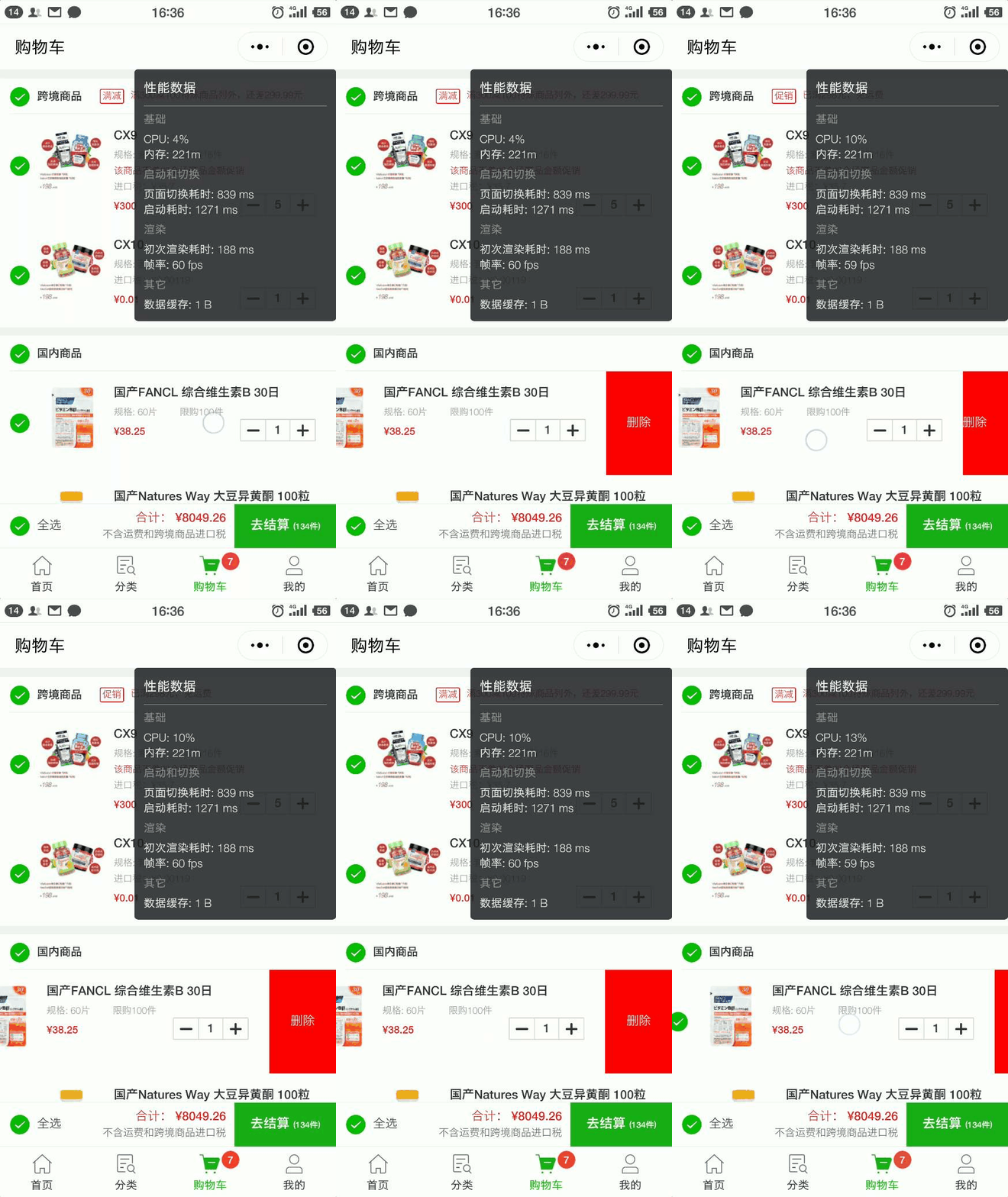

    今日推荐开源项目:《左划删除 minapp-slider-left》传送门:GitHub链接

    推荐理由:相信大家在各种地方都见过左划然后弹出删除按钮这样的操作吧,这个项目就是为微信小程序提供的左划删除实现方案,如果有正在寻找这类问题解决方案的朋友可以参考一下这个项目,具体的参数和事件说明都已经给出了,可以根据自己的需要进行调整。

    具体效果:


    今日推荐英文原文:《Understanding JavaScript Data Types and Variables》作者:Codesmith

    原文链接:https://codeburst.io/understanding-javascript-data-types-and-variables-ea191be3a37f

    推荐理由:为 JS 初学者提供的介绍 JS 中数据类型和变量的文章

    Understanding JavaScript Data Types and Variables

    Welcome, Fresh Coders!

    If you’ve ever had the pleasure(or displeasure)of sitting through an Algebra 1 class, you’ve probably heard about variables. You know, x + 4 = 6 and all that good stuff. Don’t worry. JavaScript variables are much less scarier. You get to declare them so that you know exactly what they are. And, for the love of all that’s holy, don’t name your variables x or y or z. Give them reader-friendly names so that you’re not staring at a quadratic equation by the time you’re finished coding.

    First, before we start messing around with variables and learning what variable deceleration even means, let’s learn to need them. By that I mean let’s get a little cozy with operators and data.

    Data Types

    Open up your Twitter or Instagram account and you’re hit with a log in screen prompting you to enter your information. When you enter your username and password, you’ve just entered data. You fill out a survey, you like a post, you order ten fidget spinners on Amazon — all of that is data.

    In JavaScript, this data is divided into three groups:

    1 ) Numbers

    Numbers are exactly what you’ve known them to be all your life — 1, 50, 22.3, 5…Integers, decimals, fractions.

    JavaScript is real friendly when it comes to numbers, because you don’t have to specify the type of number. We call this behavior untyped. JavaScript is untyped because determining whether a number is an integer or a decimal(float) is taken care of by the language’s runtime environment.

    Why don’t you try entering typeof 5 into the editor and hit the run button. You should get 'number'.

    Pro tip: typeof 5 is called a statement. You wrote JavaScript code and expected to get a value in return.

    2) Strings: “Hello there”

    Strings are simply fields of text. Even the words you’re reading now form a string. To encase these words, we use quotes. Keep in mind that strings aren’t limited to run-on sentences.

    In JavaScript, this is also a string: "123";

    typeof "1,2,3";
    
    typeof "hello world";

    You can probably guess by now that your passwords are stringy bytes of data.

    3) Boolean: True, False

    Don’t let the name throw you off. It’s the namesake of the mathematician George Bool. Booleans only have two values: true and false.

    typeof true;
    typeof false;

    As you’ll come to know, these are important values when it comes to adding logic to our programs.With just those two values, you can create a complex system of loops and conditions.

    But let’s not get ahead of ourselves. We will explore the depths of conditions and loops another time.

    For now, let’s move onto what makes all of this data worthwhile.

    Operators

    What’s the use of data if you can’t do anything to it? That’s where operators come in. Each data type (Numbers, Strings, Boolean) share a set of operators that you can use to come up with nifty solutions to problems. There are four important categories of operators that you’ll use throughout your time as a JavaScript developer and they are

    1)Arithmetic Operators

    addition +

    Number:1234 + 4579;

    String:"hello" + "Jerry";

    Yes, you can add a string. There’s a fancy term for this called string concatenation. Notice how the two strings glob together. We can solve this problem by adding an empty string in between.

    "hello" + " " + "Jerry";

    Boolean: true + false;

    Performing arithmetic operations on boolean values actually returns a value. In this case, the value 1 isn’t just any ordinary 1. It’s a bitwise 1. In the language of computers, this translates to true. So, we can conclude that true plus false equals true.

    Why is that so? You’ll understand once we turn true and false into what our computer actually sees.

    computer:
    true: 1, false: 0
    result:
    1 + 0 or 0 + 1 = 1

    subtraction –

    Number:1234 - 1234;
    String: NaN Note: NaN(Not a Number) is the error you’ll get when you try to subtract String values.
    Boolean: true - false; or false - true;

    division /

    Number:1234 / 1234;
    String: NaN
    Boolean: true / false; or false/true;

    multiplication /

    Number:1234 * 1234;
    String: NaN
    Boolean: true * false; or false * true;

    modulo %

    This cool operator tells us the remainder of a division of two values.

    Number: 10%3;String: NaNBoolean: true % false; or false % true;

    Increment ++

    ++ is a fancy way to say add 1 to any value. It matters where you put the incrementer. Oh, and by the way, we need variables now. JavaScript’s interpreter can’t read ++10 if 10 is not saved inside a variable. why? Because plus, plus is what we call syntactic sugar. It’s something that was created to make life easier for developers, because it turns out we’re pretty lazy. Instead of saying 10 + 1, we get to forgo adding the 1. Since plus,plus is technically not a real arithmetic operator, you need to define a variable so that you won’t get errors.

    Before we start our lesson on variables, try playing around with them. Type this into a code editor:

    var cookies = 5;
    console.log(cookies++); > 5
    console.log(++cookies); > 7

    The variable names are arbitrary. You can name them whatever you like. As we’ll explore later, it’s best to name them appropriately.

    Pro tip: var cookies = 5; is called an expression. You defined what value cookie has but you didn’t ask for its value. As you learned earlier, this would be a statement: cookies;

    Note: console.log() is a web tool that prints JavaScript code to a console. Every web browser has a console you can access. This “web tool” is really called a Web API. It’s much easier to think of API’s as a set of tools that make your job a whole lot easier.

    So…why are we not getting the values we expect???

    Well, writing the variable before ++ gives us the original value before it can be incremented and vice versa.

    Think of it this way: we asked the baker for 5 cookies before he knew we wanted to add one more to the order(cookies | ++).

    We receive a receipt saying we ordered five, but when we ask for one more, the baker runs back to get us one more(so, we have 6 cookies now).

    The baker returns, but we ask for one more again(++ | cookies).

    Finally, when we ask for our cookies, our total is 7 cookies.

    JavaScript’s interpreter is that poor baker when it comes to incrementing and decrementing.

    decrement — -

    Number: -- number

    String: NaN
    Boolean: --true

    += Plus Equals, and -= Minus Equals, and *= Times Equals, and /= Divided Equals

    It turns out programmers are lazier than you thought. Yes, there are more arithmetic shortcuts.

    Say you have var score = 5; and, instead of incrementing score by 1, you want to increment it by 6.

    Normally you’d write score = score + 6;

    With Plus Equals you simply have to write it as score += 6;
    Why don’t you try it out with different operators?

    2. Comparison Operators

    logical operators return true or false. Without them, we wouldn’t have all of the apps that are available to us.

    operators

    equals ==
    not equal !=
    greater >
    less <
    greater/equal< =
    less/equal> =

    There’s also a special triple equals(===). This checks to make sure that the types are the same as well.

    Try this out: 3 == '3';. You got true, right? The fact that JavaScript ignored our stringed ‘3’ can cause some unwanted bugs. To fix this, add another equals. Now you should get false. That’s because triple equals also ensures that the types are exactly the same as well.

    Operators are useful for conditional logic. Let’s use an if/else statement to test out an equals operator.

    If ('you feel overwhelmed by this new topic'){
     'Do not worry. Sometimes the best way to learn is to try and fail'
    }else {
     'Let's get this show on the road!'
    }

    Try this real if/else statement.

    if(2==3){
     console.log('correctomundo');
    }else {
    console.log('wrooong');
    }

    Note: the end of if statements don’t receive semi-colons. Here’s a pro tip: Exclude them from any statements or expressions ending in a bracket.
    Be sure to use different data types in your if/else statement. You can even play around with all of the operators you’ve learned so far.

    3. Logical Operators

    Logical and &&, Logical or||, Logical not !

    Logical operators allows us to add complexity to our conditional statements. Practically, if you want maximum control over a condition, you’d use && because all of the conditions must be met in order to be true. Conversely, if you want the condition to be more inclusive, you’d use || because only one condition has to be true to get a return value of true.

    if(2==2&&3==3&&3==2){
     console.log('correctomundo');
    }else {
    console.log('wrooong');
    }

    Variables, Finally!

    So, you were introduced to variables prematurely. Even then, you saw how badly we needed a variable in order to get the increment and decrement operator working.
    Now, let’s think of numbers, strings, and booleans as Snap chat photos that ghost away after a short period. They don’t stay around long enough to be useful. If you want to use the same data, you’d have to re-type it somewhere else in your JavaScript file.

    Imagine having to write this formula over and over again: 1/2(60 * 120);

    Or this really long string: "superkalafragilisticespialadocious";.

    What a variable does is allow us to save data so that we can use it again.
    Let’s declare two variables

    var triangleArea, poppinsQoute;

    Now for some takeaways:

    The var keyword creates what’s called a global variable. It’s like taking a shower in public. Everyone can see you. In JavaScript, we have blocks, like neighborhood blocks. Within our if/else statements, we wrote a block of code that only ran based on certain conditions. Those two variables can be accessed within that block, because we declared them in a global scope.

    Think of scope as perspective. From the perspective of the outside, we can’t always see what is inside someone’s house. But from the inside, we can see everything that’s outside.

    We shouldn’t be able to look inside an if/else statement and see its local variables. Local variables are variables that are declared within a block.
    pro tip: any code within curly braces form a block.

    if(3==3){
     var number = 3;
    }

    Notice the assignment operator. In this example, I’ve declared and initialized my variable at the same time. The equals sign in this case is not the same as the equal sign you use in math. It simply means that you want to assign particular data to a variable you made up. The operator used is called an assignment operator.

    Alright. Remember what I mentioned about global and local variables. You’re probably guessing that if I were to use this variable outside of the block, we should get an error.

    if(3==3){
     var number = 3;
    }
    
    console.log(number);

    Wait…we were still able to access the variable outside of the block. Did we just acquire X-Ray vision? So all this talk about local and global variables must be a lie then, right?

    Well, the problem with the var keyword is that it loves to expose itself in public. Even if it’s defined within a block, it’ll still want to be seen by everyone. The only thing that can tame it is a function.

    function test(){
      var number = 3;
    }
    console.log(3);

    We will get into functions another time, but all you need to know for now is that functions create their own scope. They’re like highly secured mansions.
    That’s all fine and dandy that functions are so secure, but how do I secure an if/else statement?

    There is a new way to declare variables as of Es6. Every so often Ecma International comes up with new ways for us to code in JavaScript. What they’ve come up with to solve this issue is the let keyword.

    Let’s use it!

    if(3==3){
     let number = 3;
    }
    console.log(number);

    Great. Now we truly have global and local variables.

    Going back to our original variable declarations, var triangleArea, poppinsQoute;, you can see that we are able to declare multiple variables at the same time by separating them with a comma. Also, look at how the second word in the variable name starts off with a capitalized letter. This convention is called camel case. It’s good to stick to this convention so that your code is legible to you and to others that might look at your code one day.

    The Variable Warehouse

    We’ve messed around with variables a little, but we haven’t pushed them to the limit. Let’s see what we can put inside of a variable.

    numerical statement

    triangleArea = 1/2(60 * 120);

    strings

    poppinsQoute = "superkalafragilisticespialadocious";

    boolean

    let true_ = true;

    Wait. Why the underscore? See, you can’t name a variable anything that is already named by those who’ve designed the language. Just make sure that you don’t start naming your variables with numbers: 123true.

    logical statement

    let check = (2==2&&3==3&&4==4);

    The parenthesis is there for readability. You can plug this right into your if statement and it’ll work beautifully.

    if(check){
     console.log("true");
    }

    Pro tip: I did not have to type check === true because the if statement automatically checks for true or false.

    functions

    var myFunction = function(){
      return 'hello';
    }

    variables also consume functions. These functions are called anonymous functions because they aren’t named.

    arrays

    var myArray = [1,3,4,5];

    Arrays are a collection of data.

    objects

    var myObject = {me: "too", save: "me"};

    Objects also hold a collection of data.

    Other variables.

    var newVariable = oldVariable;

    Multiple variables!

    var varOne = varTwo = varThree = 1;

    Don’t try this one at home, because it has unwanted side effects. Variable assignment works from right to left. So in order for varOne to finally receive value, the other two variables are pushed to the global scope automatically. This means even functions won’t recognize varTwo and varThree as local variables. This is called leaking and is a pretty big no,no.

    Closing Note

    Variables are here to stay so make sure you get into the habit of using them. Whenever you find yourself using the same data type repeatedly, try sticking it into a variable. You’ll be happy you did.


    每天推荐一个 GitHub 优质开源项目和一篇精选英文科技或编程文章原文,欢迎关注开源日报。交流QQ群:202790710;微博:https://weibo.com/openingsource;电报群 https://t.me/OpeningSourceOrg

←上一页
1 … 200 201 202 203 204 … 262
下一页→

Proudly powered by WordPress