• 开源镜像
  • 开源沙龙
  • 媛宝
  • 猿帅
  • 注册
  • 登录
  • 息壤开源生活方式平台
  • 加入我们

开源日报

  • 2018年11月8日:开源日报第245期

    8 11 月, 2018

    每天推荐一个 GitHub 优质开源项目和一篇精选英文科技或编程文章原文,欢迎关注开源日报。交流QQ群:202790710;微博:https://weibo.com/openingsource;电报群 https://t.me/OpeningSourceOrg


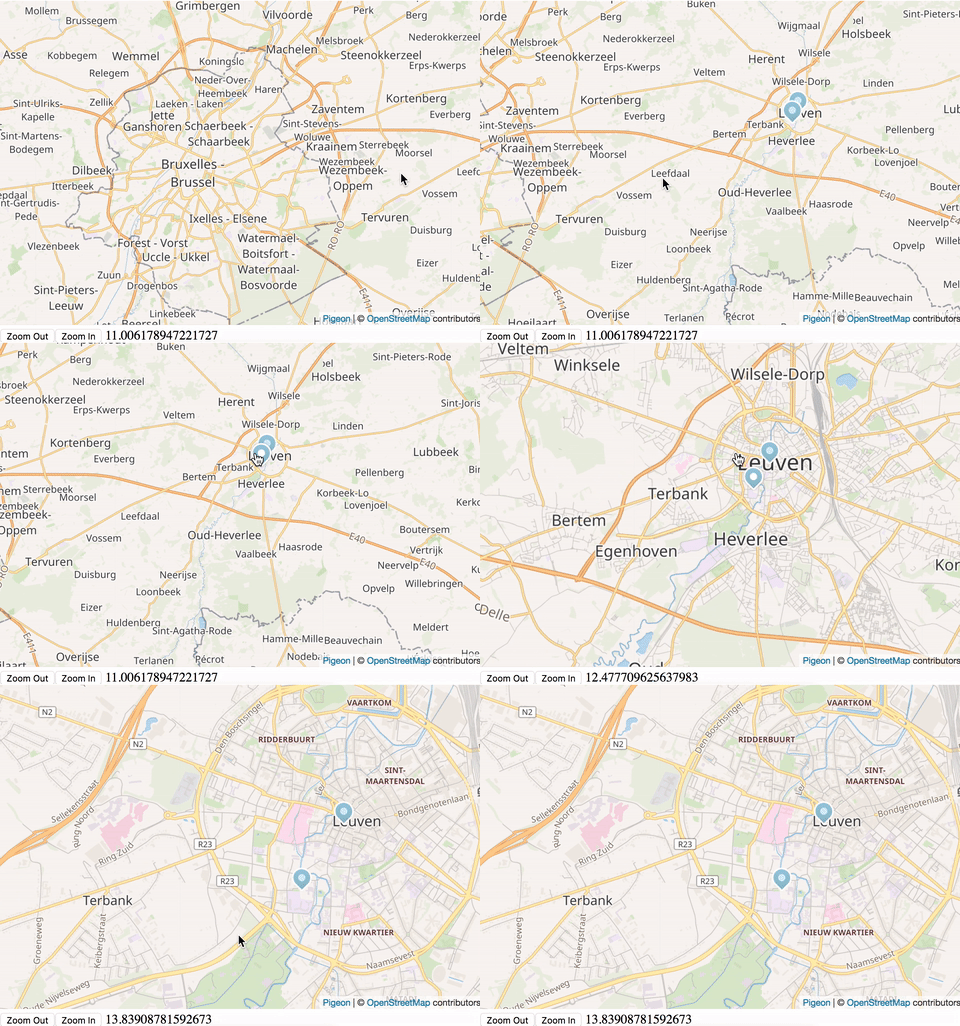
    今日推荐开源项目:《咕咕咕 pigeon-maps》传送门:GitHub链接

    推荐理由:这个项目是一个轻型的 React 地图,比起有更多功能的 Google 地图来说更加注重便于加载的性能,而且作为地图插件来说也依然具备基础的功能。当然了,兴许大家还会有个疑问:“为什么项目叫做鸽子地图?” 当然了,即使起了鸽子的名字,它也不会真的咕咕咕,下面是作者给出的原话:

    Pigeons are experts in magnetoreception. Good pigeons can find their way home from anywhere.

    Magnets were essential in making the first maps. With a good map you can find your way home from anywhere.

    Thus, pigeon.

    今日推荐英文原文:《Beginner’s Web Development Guide Part 2: Backend》作者:Pavels

    原文链接:https://medium.com/devtrailsio/beginners-web-development-guide-part-2-backend-fd466212dbfc

    推荐理由:Web 开发系列教程第二部分——语言(包括编译语言和脚本语言),数据库以及消息处理

    Beginner’s Web Development Guide Part 2: Backend

    This post is part of a series of posts for beginner web developers. Also check out “Part 1: Frontend”, “Part 3: Platforms and Tools” and “Part 4: Cloud Deployment”.

    Today we continue our intro to web development. In the previous post we started with exploring frontend development, and today we are going to talk about backend development.

    Backend development, also sometimes called server-side development, refers to developing the processes that happen on the server and are usually not visible to the users. A web UI can send requests to the backend asking to render some HTML, save user input in a database, authenticate a user, send an email or process a payment request. Although this part of the application is transparent for the user, it’s in no way less important. This is the heart and brains of your application.
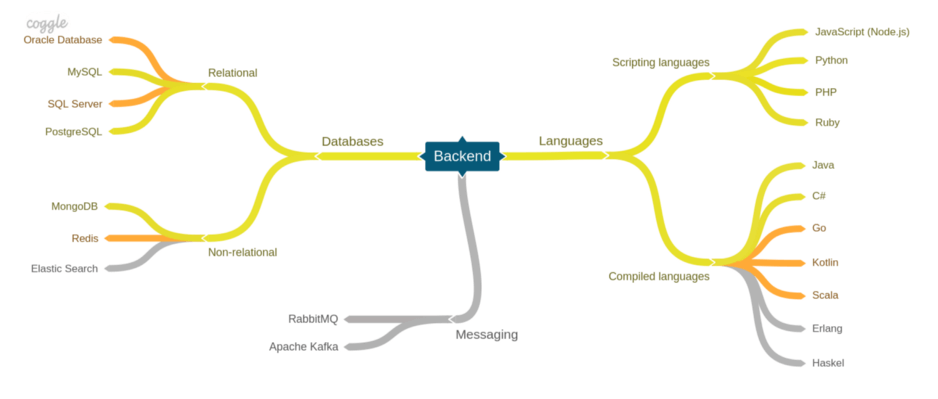
    The color coding of the chart is very simple: yellow lines show the basic things you need to learn, orange represents more advanced topics that you can leave for later, and grey are niche topics that might be useful for special projects.

    Languages

    Compared to frontend development, the choice of programming languages on the backend is much wider and you are free to one a solution depending on your use case and environment.

    There are many ways to classify programming languages, and we made an arbitrary decision to group them by scripting and compiled languages. Have to admit, though, that this is not completely accurate. Some of the scripting languages are actually compiled on the fly, and some compiled languages could have interpreters. This division, however, serves as a convenient starting point for our analysis.

    Scripting languages

    Languages that don’t require explicit compilation before execution are called scripting languages, or interpreted languages. As opposed to compiled languages, they do not produce a binary executable. Rather the code is evaluated and run on the fly. Sometimes, scripting languages are easier to get started with, since you don’t have to write code in a strict manner required by the compiler. This, however, means that errors that could have been discovered during compilation will only become apparent during runtime.

    Some of the more popular scripting languages are:

    • Node.js is a server-side JavaScript runtime. It supports its own set of JavaScript features and provides a set of API’s to satisfy backend use cases, such as working with the file system. Learning Node.js is a great choice since by learning a single language you’ll be able to work both on the frontend and the backend. Node.js has several popular frameworks, such as express, koa or LoopBack.
    • Python is a general-purpose programming language. It’s simple syntax and clear constructs make it quite easy to learn for beginners. Python is widely used for developing applications but has also gained significant traction for doing scientific research and working with artificial intelligence. There are currently two major versions being used: Python 2 and Python 3. One of the popular projects developed on Python is the Django content management system. Flask is a popular micro-framework for web development.
    • PHP — another popular programming language for web applications. The language itself has a low entry barrier for beginners but also provides more advanced features for intermediate users. Some of the most popular projects created on PHP are WordPress and Drupal, with the former being arguably the most used content management system in the world. Notable frameworks are Laravel, Symfony and CodeIgniter.
    • Ruby — a scripting language designed to be simple and natural to read and write. The most popular development framework for Ruby is Ruby on Rails. Jekyll, a popular static website generator is built on Ruby.

    Compiled languages

    Code written using a compiled language needs to be first compiled into a binary file before it can be executed. Although this needs an explicit extra step to be performed by the developer, it also brings additional benefits. The compiler can analyze the code for mismatches and give you early feedback about potential problems. Some compilers can also optimize the resulting bytecode for a particular platform ensuring superior performance. Although compiled languages might have a higher entry barrier than scripting languages, they are usually preferable in large projects due to the additional safety measures and more descriptive code.

    There’s a large selection of languages to choose from.

    • Java is a high-level object-oriented programming language developed by Sun Microsystems and currently maintained by Oracle. Java designed to be portable between different platforms: the sources are compiled to Java bytecode that can be run on a Java Virtual Machine for any platform. It’s a highly mature language with a lot of different frameworks for developing web applications, the most popular being Spring. Additionally, Java can be used for developing Android applications. Although there are trends in considering Java old fashioned and inferior to other JVM languages, such as Kotlin, it is still one of the most popular programming languages. Java is extremely popular in the enterprise sector.
    • C# is another high-level object-oriented programming language developed by Microsoft. Originally developed to be used on Windows, it can now be used to build cross-platform applications using the relatively new .NET Core runtime. One of the most popular frameworks for building web applications using C# is ASP.NET Core. C# is popular among companies adopting Microsoft’s technology stack.
    • Go is a relatively young language developed by Google that’s quickly gaining popularity. It’s designed to be less verbose than Java or C# and based on simple primitives, intentionally leaving out some of the complex constructs that are present in other languages. Go is extremely fast, has a minimal memory footprint and has first-class concurrency support, so it’s a good candidate for projects where speed and low resource consumption are of importance. The library and tool ecosystem around Go is still developing and we’re seeing a lot of interesting projects appear among the community. Go has gained significant popularity in blockchain development.
    • Kotlin is a language developed by JetBrains and a close competitor of Java. Kontlin runs on the Java virtual machine, but can also be compiled into JavaScript. It’s designed to be less verbose than Java, adds first-class function support and offers additional safety measures to avoid common errors. Like Java, it can also be used to develop Android applications.
    • Scala is another JVM-based language and an alternative to Java. It has a more concise syntax, additional safety features and makes heavy use of functional programming.
    • Erlang — a functional language designed for concurrency and high availability. Erlang is popular in applications where high performance and scalability is critical. Popular use cases include image and signal processing or analysis of large amounts of data.
    • Haskell — another functional programming language that is valued for its powerful typing system and a design that helps to produce clear and reliable code. Since it’s a functional language, it also scales efficiently and offers good performance.

    Databases

    An important ability of most applications is to store user’s data. It is usually done using special software called database management systems (DBS). A DBS provides access to underlying data storages allowing allow the applications to store, retrieve and update data. There are different kinds of databases optimized for different shapes and volumes of data. In this guide, we’ll have a look at the two most popular types: relational and non-relational.

    Relational

    Relational databases store data in tables, where rows represent entries, and columns — entry attributes. Rows in different tables can be linked using foreign keys to represent relations between different types of entries. For example, if you’re building an online store, you might have a table for storing orders with columns such as “order number”, “client name” and “shipping address” where each row represents a separate order. Information about the ordered items will be stored in a different table called “order items”, with references to the order table.

    Most relational databases use a language called Structured Query Language (SQL) or its dialect to query or modify the data. Because of this, they are often called SQL databases.

    Popular relational databases are:

    • Oracle Database is a database developed by Oracle. Due to its high scalability and powerful feature set, it’s often used by large enterprises. Its less frequently used for small and midsize projects due to its high license costs.
    • MySQL — a free open-source database developed by a Swedish company MySQL AB and currently owned by Oracle. MySQL can use different storage engines for each table to store and use data differently. MySQL is used for a wide range of cases, however, it is very popular for web applications, especially in the so-called LAMP (Linux, Apache, MySQL, PHP) stack. It also offers several paid editions for large-scale users.
    • SQL Server also referred to as MSSQL, is a database maintained by Microsoft. It has a number of different editions for handling various workloads and data volumes. SQL Server is a major competitor of Oracle and is popular among Microsoft stack users.
    • PostgreSQL — is a free open source database developed by a worldwide team of volunteers. It provides a rich set of features and is capable of handling large workloads.

    Non-relational

    Non-relation databases store data in models other than tables. There are different models you can choose depending on your use cases, such as storing key-value pairs, documents, graph relations or time-series. Although non-relation databases have been around for a while, they have recently experienced a surge of popularity due to simpler design and easier scaling.

    Non-relation databases are also referred to as NoSQL databases since most of them use their own query language instead of SQL.

    These three databases are frequently used in web development.

    • MongoDB is a free open source document database that stores JSON-like objects. You can store and retrieve these objects and map them to objects in your application. It also has the usual querying and aggregation capabilities. MongoDB is a good candidate for applications where data consistency is not a primary concern.
    • Redis is an in-memory key-value database often used to temporarily store cached data and transfer messages. Since such data does not necessarily need to be persisted, saving data to disk can either be disabled or delayed, to increase performance. Redis can store different values types, such as strings, numbers, lists, maps etc.
    • Elastic Search is an open-source text search and analytics engine. It allows you to store text documents and produces a searchable text index. Elastic Search is commonly used for log analytics (particularly as part of the ELK stack) and free text document search.

    Messaging

    Sometimes server-side components need to trigger jobs that need to be executed in the background. For example, asking for a business-reports may trigger a lengthy process that will generate the report and e-mail it to the user, without the user having to wait for it. To do that we need to be able to send a message to a different component and be sure that it’s processed successfully. If the job fails, it needs to be restarted. Software that provides such functionality is called a message broker.

    The two most popular messages brokers are:

    • RabbitMQ is a traditional message broker that supports different message delivery models and routing rules. It guarantees that the message will be delivered and processed by the consumer. Failed messages can be stored in the dead-letter queue. RabbitMQ works through the standard AMPQ protocol that is also supported by other message brokers and client libraries.
    • Apache Kafka is a stream processing engines, that can also be used as a message broker. Apart from providing most of the standard message broker features, it also offers advanced features, such as being able to re-process messages from history. It also provides greater performance that allows processing high volumes of messages.

    If you endured these two chapters, then you should already have an idea of technologies used for both backend and frontend development. I encourage you to follow the links and do some research before you decide and what do you want to specialise in.

    In the next chapter, we’ll have a look at the tooling that every developer should know.


    每天推荐一个 GitHub 优质开源项目和一篇精选英文科技或编程文章原文,欢迎关注开源日报。交流QQ群:202790710;微博:https://weibo.com/openingsource;电报群 https://t.me/OpeningSourceOrg

  • 2018年11月7日:开源日报第244期

    7 11 月, 2018

    每天推荐一个 GitHub 优质开源项目和一篇精选英文科技或编程文章原文,欢迎关注开源日报。交流QQ群:202790710;微博:https://weibo.com/openingsource;电报群 https://t.me/OpeningSourceOrg


    今日推荐开源项目:《喵与哈希 meow_hash》传送门:GitHub链接

    推荐理由:虽然大部分人可能都知道但是这里还是解释一下,hash function,即散列函数,可以按照需要记录的数据中关键码的值来提供一个表中的位置以便于存储,而这个项目就是一个不考虑任何加密的情况下可以很快生成目标位置的 hash function,当然了,你也不用担心它的冲突问题。如果你不需要加密的 hash 函数就可以关注一下它了,等它正式完成之后肯定能帮上忙。


    今日推荐英文原文:《Beginner’s Web Development Guide Part 1: Frontend》作者:Pavels

    原文链接:https://medium.com/devtrailsio/beginners-web-development-guide-part-1-frontend-ca59f1877ec5

    推荐理由:Web 开发系列教程第一部分——前端用得到的语言和工具

    Beginner’s Web Development Guide Part 1: Frontend

    A few days ago I’ve posted a short essay on why I decided to start the DevTrails project mentioned, that I will begin working on the first guide. Most of my personal background is in web development, so I thought this is a good place to start. It’s also one of the largest segment of the industry with high demand both in startups and in the enterprise sector. This guide will start with the very basics, so I feel that it might be more interesting for beginners, but intermediate developers might discover something new as well.

    For beginners, it’s easy to get into web development because there are many languages with relatively low entry barriers, a lot of free open-source tooling and many frameworks that simplify development. On the other hand, there is so much to choose from. The difficult part about development is that you need to combine a lot of components together for your application to work. Which UI framework to choose? Where to store your data? PHP, Python, Ruby or something else? How to host your application? I hope this guide will shed some light on this and help you figure out your way around web development and maybe even start a career.

    The guide will we split into several parts and today we’ll start with the first one — Frontend development, and introduce you to the most important languages and tools in this area.


    Frontend development languages and tools

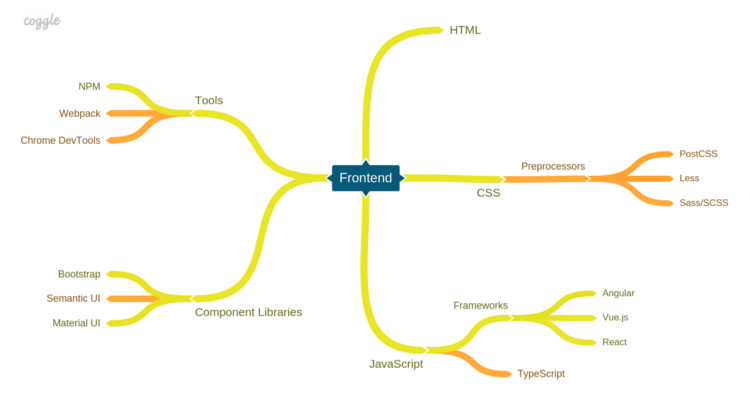
    We’ll start with a sort of a map of the frontend landscape that depicts the things you should at least know about to orientate in this area.

    The color coding of the chart is very simple: yellow lines show the basic things you need to learn, while orange represents more advanced topics that you can leave for later.

    Frontend development, also known as UI development, refers to creating web user interfaces, the parts of the application that the user sees and interacts with. Frontend development stands firmly on three pillars: HTML for markup, CSS for styling and JavaScript for logic and interactions. Although these three technologies stood the test of time, the underlying tools and frameworks change constantly. This section will give you a starting point to start the exploration of the frontend ecosystem.

    Frontend development is also tightly related to web design and user experience and the border between the two can be different in each company. In general frontend developers focus on technical issues, while web designers are concerned with aesthetics and user experience.

    HTML

    Hyper Text Markup Language (HTML) is a markup language that allows you to structure the information that is displayed to the user. Its the An HTML document consists of elements each represented by an HTML tag, such as a heading, a paragraph of text or a text input field. HTML documents can also link to other documents using hyperlinks. Each tag carries its own type of content, has a certain appearance and attached behavior. Once you get a hang of HTML, you will be able to create very simple static HTML pages.

    CSS

    Cascading Style Sheets (CSS) is a styling language used to describe the visual appearance of HTML elements. It can be used to controls aspects like the positioning of an element, its dimensions, text style or colors, or almost any other visual aspect of a website. Styles are defined as a set of rules that can be applied to a single element of a subset of elements on the page. Recent CSS features allow you to go way beyond basic styling and control more complex visual aspects, such as animations.

    Preprocessors

    CSS is a powerful language but it has its constraints when it comes to code reuse, verbosity, and isolation. Because of this, maintaining a large CSS code base can be difficult. To address these shortcomings, a number of solutions have been created by the community. These languages and their compilers are generally referred to as CSS preprocessors.

    • Sass/SCSS extends the capabilities of CSS to make your CSS code base more maintainable. Some of the features, such as nesting, make CSS less verbose and easier to write, while other such as variable and mixins allow for code reuse. It also supports importing other SCSS files that allows you to break your code into smaller files. Some popular CSS frameworks such as Compass are based on Sass.
    • PostCSS is a tool that uses JavaScript plugins to transform CSS files. You can add plugins that perform code analysis, add variable support, optimize code and etc. In contrast to SCSS or Less, which are custom formats, there are a lot of plugins for PostCSS that emulate the upcoming standard CSS features.
    • Less is a preprocessor with a feature set similar to Sass. Despite their similarity, there are a number of differences in the underlying implementations. Although being popular in the past, a lot of developers are now moving away from Less in favor of Sass or PostCSS.

    JavaScript

    JavaScript (JS) is the most used programming language for developing user interfaces for the web. It allows you to add custom behavior to your websites, such as reacting to user events, loading data from web services and showing or hiding elements on a page. It also allows you to interact with the browser through various APIs. You can use it to both add separate interactive elements to your website or create complex web applications.

    Another term that you may encounter related to JavaScript is ECMAScript which is actually a language specification for JavaScript. In most cases, they can be treated as synonyms.

    Frameworks

    JavaScript is a powerful language, but if your looking to make a complex application, using it without a framework will result in masses of complex boilerplate code. To make it simpler, there are a number of frameworks out there that help with the basic functionality such as HTML manipulation, data loading, overall application architecture and etc. The three most popular frameworks at the moment are React, Angular and Vue.js.

    • React is a library for building user interfaces developed by Facebook. React is based around creating components, such as a button or a side menu, that can render HTML based on input parameters. React components are written using an extension to JavaScript called JSX, that allows you to conveniently combine JavaScript code and HTML. Components can be composed together to create complex UI elements and whole applications. React is not a framework per se, it only provides the view layer, however, its rich ecosystem of tools and libraries has everything you’ll need to create complex applications. React is easy to start with, but with time you are expected to learn new libraries to fill the missing gaps.
    • Angular — a component-oriented “batteries included” type of framework developed by Google. Angular applications are usually written in TypeScript. It provides most o the things you’ll need to build a web application including a CLI tool to bootstrap, develop and build the project as well as libraries to manage forms, data loading, routing, etc. Although it does provide most of the things out of the box, it has a higher abstraction and complexity levels, and the need to learn TypeScript as a primary development language makes the initial learning curve steeper.
    • Vue.js is a framework designed to be modular and incrementally adoptable. You can start using it as a view layer and add additional libraries as you need them. In contrast to other frameworks, the most important libraries are maintained by the core Vue.js team.

    You might also encounter other frameworks out there that have a smaller community or are getting superseded, such as Ember.js or AngularJS.

    TypeScript

    TypeScript extends JavaScript to add static type checking and the latest ECMAScript features, such as async/await, classes or arrow functions. As a result, TypeScript compiles into vanilla JavaScript. Having static type checking in place means that the compiler will notify you when you are trying to use a function or variable in a manner that does not match its signature. This also gives code editors the ability to provide better code navigation and refactoring capabilities. Typings are optional, so you can introduce them gradually in your existing JavaScript project. Using TypeScript makes it much easier to work on projects with larger code bases.

    Component Libraries

    Component libraries are collections of components that can be used to assemble your application. Some of them implement the most common components such as buttons and drop downs, while others also provide utilities for creating complex responsive layouts. Although each of them has its own distinctive visual style, they can usually be customized to match the design and branding of your project. Most of them are available as plain CSS and JavaScript, however, they are often ported to work with other popular JavaScript frameworks. Some of the more popular libraries are:

    • Bootstrap is a powerful framework for creating responsive web applications. It comes with a large set of components as well as utilities for creating layouts and a theming engine. You can add user interactions to components, such as a dropdown, minimal knowledge of JavaScript. There is also a wide selection of ready-made website themes built with Bootstrap.
    • Semantic UI is another popular UI library with all kinds of components and a theming engine. However, to make the components interactive, you are expected to write some JavaScript code.
    • Material UI — a popular implementation of Google’s Material Design. It provides a set of components as well as guidelines on how your application should look and feel like according to Google. There are other implementations available for Angular or vanilla JavaScript.

    Some other honorable mentions include ant-design, Foundation, Bulma and Pure.

    Frontend tools

    The frontend ecosystem is known for its large arsenal of helpful tools each designed for their own purpose. Since there are so many of them, there’s no way we can cover everything in this guide, so instead, we’ll focus on several that are important to get started with.

    NPM

    Npm actually means two things:
    1. A software registry that contains thousands of open-source libraries and tools that you can install and use in your project.
    2. A CLI tool that allows to install, update and remove packages from the registry.

    Using npm allows you to install libraries that will be used by your project and document them in a JSON file. Storing this file together with the code base means that you can explicitly declare the dependencies of your project and quickly install them on different environments. You can also use it to publish your own libraries and share them with other developers.

    The npm CLI tool also allows you to run scripts that can be used to execute tests, compile code or perform code analysis.

    An analog to npm is Yarn, that offers some performance improvements and better support for library development and is compatible with the npm package registry.

    Webpack

    Webpack is a popular module bundler. It allows you to merge different kinds of assets, such as JavaScript code, CSS styles, HTML templates and even images into bundles that can be more effectively loaded by the browser. When using Webpack, you split your code into modules. Each module can import other modules. Webpack then analyses the import graph and bundles resources together. Apart from bundling, Webpack uses loaders and plugins to transform bundled code, e.g. perform compilation, code analysis or minification. Webpack can be tricky to start with, but it’s the cornerstone of most of the modern build setups.

    Rollup.js is sometimes used as an alternative to Webpack.

    Chrome DevTools

    Chrome DevTools is a rich set of tools available in the Chrome browser. It can be used for a wide range of debugging cases, such as browsing the source code or HTML elements, tracking network requests and measuring the performance of different parts of your application. It allows you to edit pages on the fly which can be useful to quickly test a small set of changes. Having a firm grasp of this tools will save you countless hours of debugging. You can also use it to look under the hood of other web pages and see how they work. Similar tools are also available in other browsers.


    This should be enough to get you started on frontend development track. Don’t worry, this is just the tip of the iceberg. If you feel that this is something that you want to learn in more detail, then you will have a whole lot of interesting stuff waiting for you.

    In the next chapter, we’ll do an overview of backend development and see what we have on the server-side.


    每天推荐一个 GitHub 优质开源项目和一篇精选英文科技或编程文章原文,欢迎关注开源日报。交流QQ群:202790710;微博:https://weibo.com/openingsource;电报群 https://t.me/OpeningSourceOrg

  • 2018年11月6日:开源日报第243期

    6 11 月, 2018

    每天推荐一个 GitHub 优质开源项目和一篇精选英文科技或编程文章原文,欢迎关注开源日报。交流QQ群:202790710;微博:https://weibo.com/openingsource;电报群 https://t.me/OpeningSourceOrg


    今日推荐开源项目:《奇幻文学作品 awesome-fantasy》传送门:GitHub链接

    推荐理由:对喜欢看奇幻类作品的朋友来说绝对是值得关注的项目,里面收集了各种奇幻类的文学作品,比如大家都知道的哈利波特,冰与火之歌和指环王这些,兴许你能在里面找到还没读过的适合自己的作品。顺带一提,评分不应该是你评价一部作品的关键因素,在你读过之前,你很难判定它究竟是不是一部适合你的作品。


    今日推荐英文原文:《Top 12 Things That Destroy Developer Productivity》作者:John Lafleur

    原文链接:https://hackernoon.com/top-12-things-that-destroy-developer-productivity-2ddf0abc190

    推荐理由:小编在此衷心的希望看完这篇文章的各位以后工作的时候不要遇上文中写的这些东西……光是想象一下都觉得遇上之后会变的相当麻烦

    Top 12 Things That Destroy Developer Productivity

    A lot of articles address the role of tech leads and engineering managers. One common theme we often come across is how to increase a team’s productivity. But before you focus your energy trying to increase their productivity, you might first want to consider what’s destroying it, to have a sound base on which you can build. Unfortunately, even though Peopleware was published almost 30 years ago, we see lots of teams suffering from huge productivity loss in some (negatively) remarkable ways!

    No one expects a programmer to get work done without access to a computer, but there are many companies that expect programmers to get work done without access to their mind. This is equally unrealistic.

    So let’s deep dive into our list of 12 things that prevent your developers from getting “into the zone” and being productive. I will try to prioritize this list from most to least impactful. Feel free to comment!

    If you’re wondering if all this is worth the investment, just consider the developer’s salaries. Even 10% more productivity is a LOT!

    1) Interruptions & Meetings

    Interruptions are the top productivity killer for developers, in my mind. Developers can’t easily go back to where they were right before an interruption. They need to get into the mindset for development and then slowly trace back to where they left off. This can easily take more than 30 minutes. And the more interruptions, the more frustration, the less quality work, the more bugs — and it goes on.

    “The more times you trip me up while I’m trying to get started — the longer between each time I’m going to try. If you fill my morning with interruptions — don’t be surprised when the day is unproductive.” A developer on Reddit

    What about meetings? The only difference between a meeting and an interruption is that a meeting is a planned interruption, which makes it even worse. Developers can’t progress on a task if they know that they will have an interruption while working on it. So if they have a meeting in one or two hours, they will not be able to progress on anything, as most engineering tasks take more time.

    As Paul Graham wrote, “A single meeting can blow a whole afternoon by breaking it into two pieces, each too small to do anything hard in.”

    How can this be avoided? This part is well documented; you have no excuse. Hold short status meetings at the very start of the day or just before lunch, for example, to avoid unnecessary interruptions.

    2) Micro-management

    Of the different types of managers, micro-managers might be the worst in terms of the developers’ productivity. Sure, micro-managers tend to have more meetings and unplanned interruptions. But it’s not only that. They show a lack of trust, and by doing so, you feel they constantly undermine your skills and your ability to get things done. Any motivation a developer had between interruptions will be just gone at that point. The impact goes beyond productivity. Micro-managers might be the first reason for developers to leave, or at the very least, to change teams.

    3) Vagueness

    There are many ways to illustrate vagueness. Bug reports like “It’s broken, fix it!” don’t have enough information for developers to work off of. By the way, having a bug report template can help in that case.

    Or unclear specification on a feature, in which case developers will start implementing what feels right to them, before they have to start again from scratch once the manager better details the expected behavior.

    Unclear prioritization also belongs in this category. The time that a developer spends wondering if they are working on the right task can so easily be avoided. And if ever they get a comment from the manager asking why they worked on this particular task (while priorities were not defined)…well, you get it — a lot of frustration…

    4) Seagull Management

    Have you ever heard of it? It happens when managers are totally uninvolved in the work, but… they just swoop down once in a while to shit all over everything. “This is wrong, and this, and this looks bad,” etc., before flying away again. I have to admit I loved the image, but unfortunately, this happens more often than we would like it to. This behavior is deeply frustrating to developers; they won’t be able to get back in the zone in the next few hours, and sometimes not even for days.

    5) Credit Greediness

    Have you ever had a manager or other developer who took all the credit for the work you have done in the past weeks? Developers value competence above all. Taking the credit for someone else is taking the other’s competence for yourself and removing it from him or her. This is pretty high up on my list, as I feel it creates so much tension that it just destroys the whole developers’ productivity for quite a while.

    6) Environment — Noises, Motion, Workspace Design…

    This might seem strange to non-programmers, but the environment in which developers work has an important impact on their activities. For instance, having some white noise — loud AC, hearing cars and trucks roll by — helps them focus better. That’s why so many of us put headsets on! I actually just discovered RainyMood — really great ?!

    Similarly, if the workspace is designed to have as much motion as possible, that won’t help them focus! Or having the desktop computer screens oriented in such a way that they are highly visible to the managers…well, that creates some extra stress and even more opportunities to be interrupted.

    7) Scope Creepiness

    Scope creep (also called focus creep, requirement creep, feature creep, and sometimes kitchen sink syndrome) in project management refers to uncontrolled changes in a project’s scope. This can occur when the scope of a project is not properly defined, documented, or controlled.

    Scope creep turns relatively simple requests into horribly complex and time-consuming monsters! And most of the time it happens during development! For instance, for a simple feature:
    Version 1 (before implementation): feature is “Show a map of the location”
    Version 2 (when version 1 almost finished): feature is changed to “Show a 3D map of the location”
    Version 3 (when version 2 almost finished): feature again changed to “Show a 3D map of the location that the user can fly through”

    8) Product Definition Process

    So this one might seem strange at first glance, but is actually pretty easy to understand. If a product team defines its team’s priorities without ever validating (through customer feedback or any other means) the interest of the corresponding features, and the developers see that most features are eventually just not used, they will feel that what they do is useless and will lose their motivation. We all want to feel impactful, and that may be even more important to developers!

    9) Lack of Consideration to Technical Debt

    Technical debt is a deliberate decision to implement not-the-best solution or write not-the-best code to release software faster. Taking on some technical debt is inevitable and can increase speed in software development in the short run. However, in the long run, it contributes to system complexity, which slows the developers down. Non-programmers often underestimate the loss of productivity and are tempted to always move forward, and that becomes an issue.
    But if refactoring is never part of the priorities, it will not only impact productivity but also product quality.

    10) Tool Multiplicity & Hardware

    Developers use many tools to program, push and merge their code every day. The more automation, the better. It goes without saying that if you use “ancient” tools, this will impact your productivity. Similarly, having a big screen vs only a laptop can have an impact. Given the cost of hardware and the developer’s salary, having just a 5% productivity gain is definitely worth any investment on that point! Just give the tools and hardware that your developer team prefers (individually for hardware, but as a group for the tools).

    11) “How” Documentation

    When learning how to code, we were told to comment early and often. The idea is that it’s better to have too many comments than to have too few. Unfortunately, many programmers incorrectly interpret this to mean that they must comment every single line of code, which is why we often see code like this (from Jeff Atwood’s post on “Coding Without Comments”):

    r = n / 2; // Set r to n divided by 2

    // Loop while r — (n/r) is greater than t while ( abs( r — (n/r) ) > t ) { r = 0.5 * ( r + (n/r) ); // Set r to half of r + (n/r)

    }

    Do you have any idea what this code does? Me neither. The problem is that while there are plenty of comments describing what the code is doing, there are none describing why it’s doing it. If there were a bug in the program and you stumbled across this code, you wouldn’t know where to begin.

    12) Impossibly Tight Deadlines

    This last one is linked to the tendency of managers to ask developers for estimates, then push them to lower those estimates as much as possible, and then magically consider them as deadlines! Managers will even consider that, as the developers themselves “decided” on the estimate, they committed to the deadlines, and therefore the deadlines should be considered valid enough to be shared to upper management.

    Not surprisingly, developers feel that those deadlines are unreasonable and arbitrarily tight; this creates tension and an inability to focus.

    How are all those things unique to developers?
    If you look at all 12 things, they are actually pretty common to most other project-based jobs. It’s just that the impact of each of these is even more important for developers, as they need deep focus to progress on their tasks.

    If you recognize some points mentioned above within your company, it might be interesting to address them with your developers. Talk to them; find out if these are an issue and how it can be resolved. Whatever they say, the most important thing is to trust their feedback and insights. And while today’s technology is very different from 30 years ago, the lesson is still the same. You can’t ignore the human factor when you consider team productivity. Iterate on your processes, environment and work habits with your team, and let them guide you on how to have the highest productivity and impact.

    Before you go…

    Did you find the article interesting? Please holding down the ? to say “thanks” and help others find it!
    If you are interested in articles about engineering leadership, productivity and how to scale a team, check out our blog at Anaxi.

    You can also check out my latest article:

    How to be a 20x engineer (instead of a 10x)
    We’ve all heard about the 10x engineer phrase, haven’t we? Did you know that the original study back in the 1960s…hackernoon.com

    Follow me on Twitter to stay connected. Thank you!


    每天推荐一个 GitHub 优质开源项目和一篇精选英文科技或编程文章原文,欢迎关注开源日报。交流QQ群:202790710;微博:https://weibo.com/openingsource;电报群 https://t.me/OpeningSourceOrg

  • 2018年11月5日:开源日报第242期

    5 11 月, 2018

    每天推荐一个 GitHub 优质开源项目和一篇精选英文科技或编程文章原文,欢迎关注开源日报。交流QQ群:202790710;微博:https://weibo.com/openingsource;电报群 https://t.me/OpeningSourceOrg


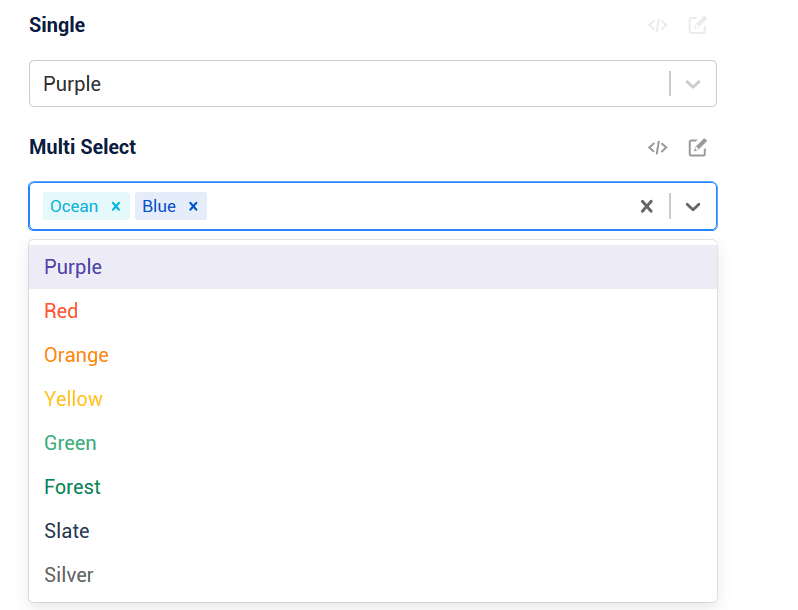
    今日推荐开源项目:《选择组件 react-select》传送门:GitHub链接

    推荐理由:这是用在 React 上的选择组件,顾名思义,它以一个用下拉菜单来选择选项的组件为基础,在此之上提供了诸如单选,多选,必选项和自定义样式这样的功能,可以满足大部分的需求,使用 React 的朋友可以考虑把它加入自己的收藏夹了。

    示例:


    今日推荐英文原文:《Why Pair Programming Matters》作者:Anna Conaway

    原文链接:https://medium.com/@annaconaway19/why-pair-programming-matters-7df529265692

    推荐理由:今天我们来了解一下配对编程的重要性,实际上,最重要的应该是——Teamwork is fun!找人一起合作总是比一个人有意思的。

    Why Pair Programming Matters

    Three weeks into Flatiron School’s web development bootcamp and several pair programming assignments later, I am a total convert — pair programming is the way to go. Everyone’s had the terrible, grade school, group project experience where YOU end up doing all the work, so being forced to pair up when learning an entirely foreign (and difficult) skill, like computer programming, must be just as awful, right? Wrong!

    “two person handshaking in front of MacBook Pro” by rawpixel on Unsplash

    What is pair programming? The act of programming with a partner, where one person drives (or types out the code) while the other navigates (or dictates) the code being written.


    Now, why should you do it? For me, pairing has been an especially helpful to my progress as someone new to the field, but the benefits can go far beyond one’s first few months in the field. These are a few of my favorite things:

    Efficiency. Miriam-Webster defines efficient as “capable of producing desired results with little or no waste (as of time or materials).” Unless one of you is Michael Scott, with zero focus skills, having two brains to work on the same tough problem, parse it out and talk it through, will almost always lead to a faster and more abstract result than if you’d worked on it separately.

    You’ll get smarter! Believe it or not, you can actually learn some things from your peers. Especially with languages like Ruby, where there are multiple ways to accomplish a single task, there’s a pretty high chance that your partner’s thought process will be different than yours. Soak it in and take that new knowledge into your next project!

    Accountability. You both know this project is going in your portfolio and you both know that someone else (your partner) is looking at this code, literally all the time. This means there’s less likelihood for long distractions (though breaks are encouraged!) or lazy coding habits. Of course, this is assuming both parties are interested in succeeding, but even the laziest of programmers want to showcase a good body of work.

    Better code. Similar to the point of getting smarter with a partner, the more you share your code and knowledge with one another, the more likely you’ll be able to abstract your code further and end up with better design, which is critical in Object-Oriented Programming. It also doesn’t hurt to explain your thought processes. As you talk through tougher concepts and explain them to someone else, they’ll sink in a little deeper for both parties.

    Teamwork is fun! When you’re working toward the same goal in a field that you love, embrace the teamwork. Grade school group projects were partially awful because they were about a subject you cared 0% about, but you love programming, right!? The end product is the obvious goal but that doesn’t mean you can’t enjoy the process. Take time to learn about your partner, figure out how you each work best and use it to your advantage to make pair programming an enjoyable experience.

    As much as pair programming can benefit a company’s employees or you as an individual, it’s not as widely used as it could be — ya know, why pay two people to do one job? But, from what I’ve learned and experienced, the long-term benefits can far outweigh the short-term, when everyone is on board.


    每天推荐一个 GitHub 优质开源项目和一篇精选英文科技或编程文章原文,欢迎关注开源日报。交流QQ群:202790710;微博:https://weibo.com/openingsource;电报群 https://t.me/OpeningSourceOrg

←上一页
1 … 198 199 200 201 202 … 262
下一页→

Proudly powered by WordPress