• 开源镜像
  • 开源沙龙
  • 媛宝
  • 猿帅
  • 注册
  • 登录
  • 息壤开源生活方式平台
  • 加入我们

开源日报

  • 2018年11月16日:开源日报第253期

    16 11 月, 2018

    每天推荐一个 GitHub 优质开源项目和一篇精选英文科技或编程文章原文,欢迎关注开源日报。交流QQ群:202790710;微博:https://weibo.com/openingsource;电报群 https://t.me/OpeningSourceOrg


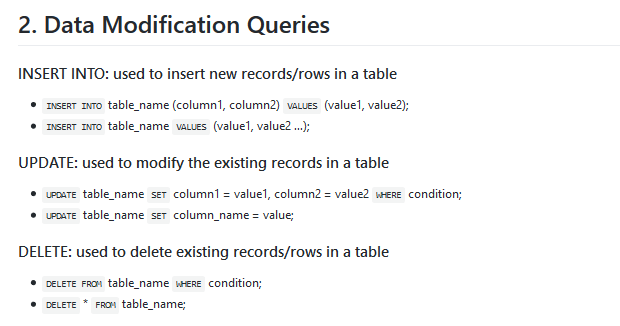
    今日推荐开源项目:《当你碰到困难想想想 quick-SQL-cheatsheet》传送门:GitHub链接

    推荐理由:关键时刻忘了 SQL 的指令?想想想也想不起来了?看看这个项目吧,上面是列举出的 SQL 各种命令一览,包括经常会用得到的增删改查这些,如果你刚刚开始使用 SQL 推荐你把这个收藏凄凉,忘了指令的话就赶快查一查记下来吧,毕竟这种常用的东西应该像副本攻略一样记在脑子里才好用。

    今日推荐英文原文:《Why You Should Learn Python For Your First Programming Language》作者:Austin Howard Tech

    原文链接:https://medium.com/@austinhowardtech/why-you-should-learn-python-for-your-first-programming-language-da770a759e87

    推荐理由:选择 Python 作为第一个学习的编程语言的理由, Python 的确可以用一些比在 C++ 这样的语言中更简单的方式来实现使用者的想法,如果你更希望把精力集中在寻找好的想法上,可以试试看使用 Python。

    Why You Should Learn Python For Your First Programming Language
    Looking to get into programming, but don’t know where to start? Maybe you’ve heard of some of the most popular programming languages, but you’re unsure of which one is best to learn first?

    Python is hands-down the best language to start with if you want to learn how to program. There’s a reason why 70% of introductory programming courses teach Python at US universities according to Tech Republic.

    Learning Programming Is Hard, Python Makes It Easier

    Python is one of the most popular, beginner friendly languages, and it’s also the first language I learned back in 2014. Since then, I’ve learned many others and I can definitely say that Python has the smallest learning curve, especially for first time programmers.

    It’s common for people learning programming for the first time to get discouraged with the learning curve. EVERYONE experiences this difficult learning curve at the beginning.

    Understanding the concepts of programming and the nuances of a language is incredibly difficult on the first go.

    It’s important to choose a language like Python that minimizes that learning curve to avoid frustration and discouragement that might turn you away.

    Let me explain to you why Python is the best…
    Easy Readability. It’s Closer To Natural Language.

    Python is a ‘high level language’, which means that the code is highly abstracted from machine level language (the lowest of which being 1s and 0s). ‘Low level languages’ are the opposite ‘high level languages’.

    The higher the level of the language, the more easy it is for humans to read and interpret. It’s far more difficult to understand code that has a ton of symbols and numbers, than code that looks like natural language.

    Would you rather start learning code that looks like mostly numbers and symbols, and is cluttered and overwhelming?

    Or start learning code that looks more like natural language and is well organized?

    Whitespace Rules Teach Clean Code Habits

    Python also enforces rules on whitespace. Whitespace is the space in-between your lines of code to be executed. Many languages allow for there to be no whitespace, but Python is not one of them.

    The whitespace rules that Python requires forces the code to be properly indented, and much more organized compared to other languages. For beginners, understanding and practicing coding with Python is much easier when you’re able to work with structured, clean, readable lines of code.

    Better Prepared For Working On A Team Of Developers

    In the long run, you’ll develop much better writing etiquette, and you’ll develop a healthy habit of writing clean code. Messy coding habits can make your life much more difficult when you advance to more difficult projects.

    Once you begin working in teams as a developer, the cleanliness and organization of your code will be vital for maintaining a functional software product.

    The lines of code that you’re responsible for writing will be integrated into thousands or millions of other lines depending on the size of the project your team is working on.

    There Are Tons Of Good Python Tutorials

    Community, resources, and tutorials are all invaluable aspects to any software. This is especially true for programming languages.

    Since Python is one of the most popular programming languages, there is massive support, and a lot of documentation for everything.

    For several years there has been a flood of YouTubers creating content for Python. I’ve spent a ton of time watching guide and tutorials to solve various problems.

    Here are some of the best, and some of my favorite YouTube Python tutorial channels! I highly recommend subscribing to some of these channels to build up your resources.

    My All-Time 3 Best Python Tutorial Channels On YouTube:

    sentdex: smart guy I’ve been watching for over a year, tons of interesting Python tutorials from the basics of Python, embedded systems and arduino, all the way to advanced machine learning and A.I. | #1

    Traversy Media: super helpful tutorials on everything you need to know about beginning with Python, and some of the best Python and Django web tutorials I’ve seen. I’d say this is the place to go for web development tutorials on YouTube in general…it’s that good! | #2

    Cs Dojo: this guy’s channel is probably the most popular for Python guides and tutorials, getting 1–2 million views for his videos. I haven’t personally used any of his material for resources but I’ve seen him everywhere in the community. | #3

    Leave your favorite Python YouTube channels in the comments so that everyone can check them out. It would be awesome to accumulate a big comment sections full of the best resources!

    Being resourceful is a crucial skill for a software developer.

    Often when writing software you’ll run into problems that you have to scan YouTube, or online documentation for solutions. You’ll NEVER know everything there is to know about programming so there’s no way around this. It’s just part of what you have to do.

    The sheer quantity of available resources makes Python so much easier to learn. Some other programming languages have much smaller communities so it can be difficult to find solutions to problems you run into along the way.
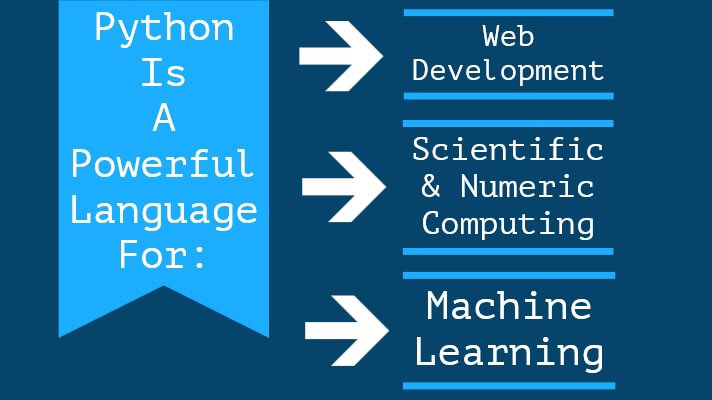
    You Can Do So Much With Python

    Python is a versatile language and is capable of handling many different jobs with pretty good performance and efficiency. Here are 3 of the main things you can do with Python:

    1. Web Development

    Making websites, small and large, can be done with Python. Huge websites like Reddit, Spotify, Quora, YouTube, and Google are all powered by Python.

    Read More: 20 of the Most Popular Python and Django Websites | by Shuup

    Web development is done with Python’s main web frameworks, Django, and Flask. Instead of building a website from scratch, front to back, frameworks already have the pieces and tools you need to put together a site.

    Django is a pretty robust framework that’s been around for a while. The documentation is amazing and there are a ton of tutorials. The first ever website I built for a homeowners association was built with Django, and I had a great experience.

    2. Scientific and Numeric Computing

    Python is incredibly useful for scientific and numeric applications. Analyzing data for research is popular in Big Data, which is a growing area in the industry. There is so much data out there now so applications dealing with massive amounts of data are in higher demand.

    My introductory Computer Science course as Denison University was Discovering Computer Science: Scientific Data and Dynamics. We strictly used Python for everything. We analyzed and modeled data on gene sequences, used recursion with the Turtle Python graphics module to draw fractals, and even to do artwork by using algorithms to draw plants, flowers, and trees.

    A really good article by activewizards.com on the Top 20 Python Libraries for data science in 2018, has Numpy (#1), SciPy (#2), and Pandas (#3). In my opinion, these libraries are pretty much as good as it gets for data science.

    3. Machine Learning

    Python is popular for machine learning. Part of this is because Python is so useful for numeric computing, which is really what is happening with machine learning.

    Some of the most popular open-source Python machine learning open-source projects are Tensorflow, Sci-kit-learn, Keras, PyTorch, and Theano.

    Read More: Top 20 Python AI and Machine Learning Open Source Projects | by DataQuest

    The best way to learn about Machine Learning with Python is to jump into some tutorial projects and following along yourself.

    The best YouTube channel for Python AI and Machine Learning tutorials is sentdex. I highly recommend checking this guy out, he has over 1,000 videos on his channel and most of them are Python tutorials and projects.
    Python Developers Are Well Paid

    Once you learn Python and get some personal projects under your belt, you can eventually become a paid developer. As Python becomes more popular, companies all over the world are looking for more Python developers, and they’re willing to pay a hefty sum for them too.

    According to ZipRecruiter, in a recent article posted on Oct. 23, 2018, the average annual pay for a Python developer in the US is over $113k per year! Some annual salaries were as high as $169k. These are big bucks!

    Fun Fact: On that same article by ZipRecruiter, it mentions that North Carolina is ranked number 50 out of 50 states in the US for Python developer salaries. I live in NC!

    Python is also the #2 most in-demand programming language as of 2018. Coding Dojo claimed that Python grew in popularity by 5,000 job postings from the previous year according to analyzed data from Indeed.com.

    Most decent sized software companies probably produce or use Python code somewhere in some of their projects. There’s no shortages of job opportunities that’ll pay well for a Python developer.

    Conclusion

    The Learning Curve Is Not As Steep With Python

    Python is the best language to learn programming because of how incredibly user-friendly it is compared to a lot of others. Most importantly, all of these reasons decrease the learning curve that can be steep when learning to program with other languages.

    It’s much closer to natural language that is much easier for humans to understand.

    Python Enforces Cleaner Coding Habits — Making You A Better Team Member

    The structure of Python helps to avoid overwhelming clutter, and enforces good habits for writing clean code for first time programmers.

    Choosing Python as your introduction to programming will make you a much better team member once you start working with other developers. You’ll develop better programming habits, organization, and clean code is crucial for writing functional code that is readable to other programmers who will need to eventually need to read your code whenever they’re making changes. Larger projects have thousands and even millions of lines of code that’re created by many different programmers, so clean code is essential to maintaining large repositories.

    Your fellow Python developers will appreciate your work is you write better code.

    You Can Do Some Much With Python

    Python has a ton of useful applications. It’s really popular for Web Development, Scientific & Numeric Computing, Machine Learning & AI, and Scripting & Automation for so many things.

    Python Is Become One Of The Most Popular Languages

    The fact that Python is so versatile, powerful, and efficient, means that a ton of people are using Python. Python is becoming one of the most popular languages!

    Python Developers Make Pretty Good Money

    Python developers are also well paid, averaging 6-figure salaries in the US, and the demand for developers is growing rapidly.

    Python was also the first language I learned when I first started programming back in 2013–2014. I had a phenomenal experience with Python and it got me hooked on programming!


    每天推荐一个 GitHub 优质开源项目和一篇精选英文科技或编程文章原文,欢迎关注开源日报。交流QQ群:202790710;微博:https://weibo.com/openingsource;电报群 https://t.me/OpeningSourceOrg

  • 2018年11月15日:开源日报第252期

    15 11 月, 2018

    每天推荐一个 GitHub 优质开源项目和一篇精选英文科技或编程文章原文,欢迎关注开源日报。交流QQ群:202790710;微博:https://weibo.com/openingsource;电报群 https://t.me/OpeningSourceOrg


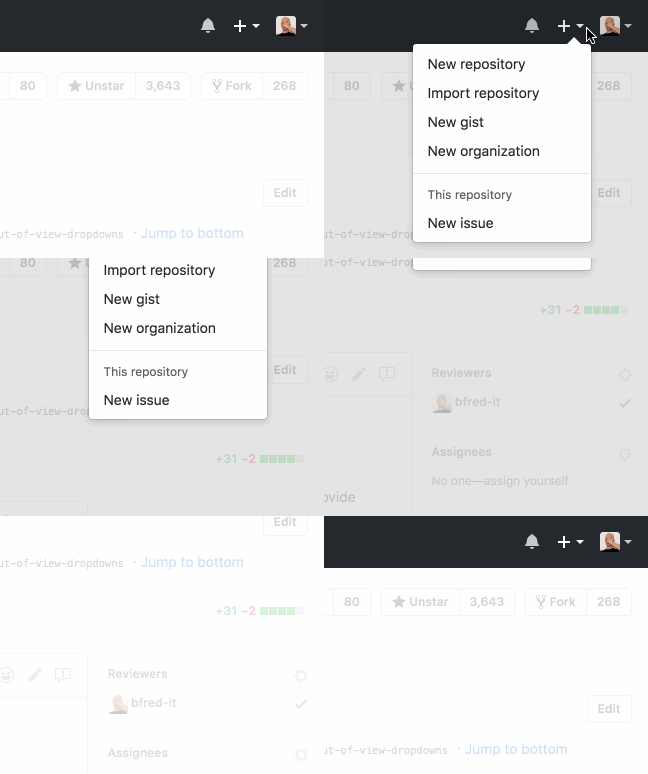
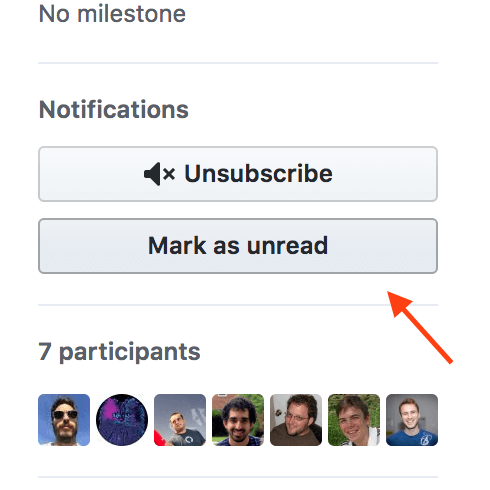
    今日推荐开源项目:《GitHub 加强版 refined-github》传送门:GitHub链接

    推荐理由:经常使用 GitHub 的朋友这下可有好东西用了,这个项目是在浏览器上增强 GitHub 功能的插件,包括标记 issue 和 pr 为未读这样的功能性加强和诸如下拉菜单不可见时自动关闭这样的 UI 方面的加强,在之后它们会推出更多功能,小编已经开始期待这个插件究竟能够把 GitHub 加强到什么样的地步了。


    今日推荐英文原文:《10 things to learn on the way to becoming a JavaScript Master》作者:Lukas Gisder-Dubé

    原文链接:https://levelup.gitconnected.com/10-things-to-learn-on-the-way-to-become-a-javascript-master-f4fc632b2bb7

    推荐理由:目标是宝可梦大师……不对,JS 大师!这篇文章介绍了在成为 JS 大师之前你需要了解的十个地方

    10 things to learn on the way to becoming a JavaScript Master

    Photo by Nathz Guardia on Unsplash

    I guess you are a web developer. Hopefully you are doing fine and you have a great job, maybe you are even self-employed or working as a freelancer. The future of the field looks great, as I described in my last article. Maybe you are just starting out as a web developer, maybe you have been working as a programmer for a longer period already. However comfortable you are with JavaScript, it is always good to get a refresher on some topics to read up about or get them on the radar in the first place. Here are 10 things you definitely have to learn before you can call yourself a master in JavaScript.

    1. Control Flow

    Probably the most basic topic on the list. One of the most important, maybe the most important one. If you do not know how to proceed with your code, you will have a hard time. Knowing the ins and outs of basic control flow is definitely a must.

    • if else — If you don’t know these, how did you write code before?
    • switch — is basically if else in a more eloquent way, use it as soon as you have multiple of different cases.
    • for — Do not repeat yourself, this is what loops are for. Besides the normalfor -loop `for of` and for in come in very handy. You can also use an arrow function in a lot of cases for a clearer structure. The big advantage of for -loops is that they are blocking, so you can use async await in them.
    • Advanced conditionals — Using the ternary and logical operators can make your life a lot easier, especially when you try to do things inline, meaning that you don’t want to save values to use them later. Example:
    // ternary
    console.log(new Date().getHours() < 12 ? 'Good Morning!' : 'Time for a siesta')
    
    
    // logical operators
    const isJsMaster = prompt('Are you a JavaScript master?') === 'true'
    console.log(isJsMaster && 'proficient coder')

    2. Error handling

    This took a while for me. It does not matter if you are working on frontend or backend, the first year or so, you will probably default to console.log or maybe console.error for ‘handling’ errors. To write good applications, you definitely have to change that and replace your lazy logs with nicely handled errors. You may want to check out how to build your own Error constructor and how to catch them correctly, as well as showing the user what the actual problem is.

    3. Data Models

    Similar to moving through your application continuously, you have to decide where to group specific information chunks and where to keep them separate. This does not only apply to building database models, but also function parameters and objects or variables. Example:

    const calcShape = (width, height, depth, color, angle) => {...}
    const calcShape = ({width, height, depth, color, angle}) => {...}

    4. Asynchronity

    This is a very important aspect of JavaScript, Either you are fetching data from the backend or you are processing requests asynchronously in the backend itself. In pretty much all usecases, you will encounter asynchronity and its caveats. If you have no idea what that is, you will probably get a weird error, which you will try to fix for a couple of hours. If you know what it is, but you don’t really know what to do about it, you will end up in callback-hell. The better approach is to use promises and/or async await in your apps.

    5. DOM Manipulation

    This is an interesting topic. Normally it is somewhat left out in the day today life as a developer. Maybe you learned jQuery and never felt the need to pick up some native DOM manipulation skills, maybe you are just using a frontend framework, where there is rarely a need for custom DOM manipulation. However, I think this is a crucial part of understanding JavaScript, at least in the frontend. Knowing how the DOM works and how to access elements gives you a deep understanding of how websites work. In addition, there will be the point where you have to do some custom DOM manipulation, even when you use modern frontend frameworks, and you definitely do not want to put jQuery in your package.json just to access an element.

    Photo by LinkedIn Sales Navigator on Unsplash

    6. Node.js / Express

    Even as a frontend developer, you should know the basics of node.js. Ideally, you would also know how to spin up a simple express server and add some routes or change existing ones. JavaScript is great for writing scripts to help you automate a lot of tasks. Therefore, knowing how to read files, work with filepaths or buffers gives you a good toolset to build anything.

    7. Functional Approach

    There is an everlasting debate about functional vs. object-oriented programming. You probably can achieve the same thing with both of the approaches. In JavaScript, it is even easier, you have both of the approaches available. Libraries like lodash give you a really nice collection of tools for building applications with a functional approach. Nowadays, it is not even necessary to use external libraries any more. A lot of the most important functions have been implemented in the official JavaScript specification. You definitely should know how to use map `reduce` filter `forEach` and `find`.

    8. Object Oriented Approach

    Similar to the functional approach, you also have to get familiar with object oriented JavaScript, if you want to master it. I neglected that part for a long time in my career and just worked my way through with a workaround, but sometimes it is definitely better to use objects/classes and instances to implement specific functionality. Classes are widely used in React, MobX or custom constructors.

    9. Frontend Framework

    The big three are React.js, Angular and Vue.js. If you are looking for a job nowadays, you will almost always have one of those listed as a prerequisite. Even if they change quite quickly, it is important to grasp the general concept of those to understand how applications work. Also, it is just easier to write apps that way. If you haven’t decided which train you want to jump on, my suggestions is React.js. I have been working with it for the last couple of years and did not regret my decision.

    10. Bundling / Transpilation

    Unfortunately, this is a big part of web development. On the one hand I should not say unfortunate, because it is great to be able to write code with all the newest features. On the other hand, the reason why I’m saying that is that we always have to keep in mind that there’s older browsers around that may not support these features, therefore we have to transpile our code into something else that the old browsers understand. If you work with node.js, you will probably have less exposure to transpiling your code. The de-facto standard for transpilation is babel.js, so get familiar with it. As for bundling your code and tying everything together, you have a couple of options. Webpack was the dominant player for a long time. Some time ago, parcelpopped up out of nowhere and is now my preferred solution, since it is so performant and easy to configure, although not perfect.

    BONUS: Regular Expressions

    This is not specific to JavaScript, but incredibly helpful in a lot of use cases. Just as confusing as well. Getting to know the syntax of Regular Expressions definitely takes some time and remembering all of the different options is impossible.

    Update: Testing

    As Paul Kamma pointed out, testing is a really important part of software development, JavaScript is no exception. When writing code, you (hopefully) test it before you push the feature, even if it might be manual. A better approach is using automated tests, different test types are unit testing, end-to-end testing, load testing, security tests or frontend-tests (e.g. is a component mounted or not). There are a lot of different test environments, enzyme, jasmine, mocha, chai, etc. My favourite solution at the moment is ava.js, so go check it out if you did not work with automated tests so far.


    Hopefully you know all of the topics listed above already. If not, put in the work and try to become a master in JavaScript! It is definitely worth it. Remember that practicing is everything when it comes to coding, so even if you are not familiar with these concepts or know them but you don’t really know how to apply them, it will come in the future.

    What do you think about the list? Is something missing? Do you think other topics are more important when coding? Let me know in the comments!


    About the Author: Lukas Gisder-Dubé co-founded and led a startup as CTO for 1 1/2 years, building the tech team and architecture. After leaving the startup, he taught coding as Lead Instructor at Ironhack and is now building a Startup Agency & Consultancy in Berlin. Check out dube.io to learn more.


    每天推荐一个 GitHub 优质开源项目和一篇精选英文科技或编程文章原文,欢迎关注开源日报。交流QQ群:202790710;微博:https://weibo.com/openingsource;电报群 https://t.me/OpeningSourceOrg

  • 2018年11月14日:开源日报第251期

    14 11 月, 2018

    每天推荐一个 GitHub 优质开源项目和一篇精选英文科技或编程文章原文,欢迎关注开源日报。交流QQ群:202790710;微博:https://weibo.com/openingsource;电报群 https://t.me/OpeningSourceOrg


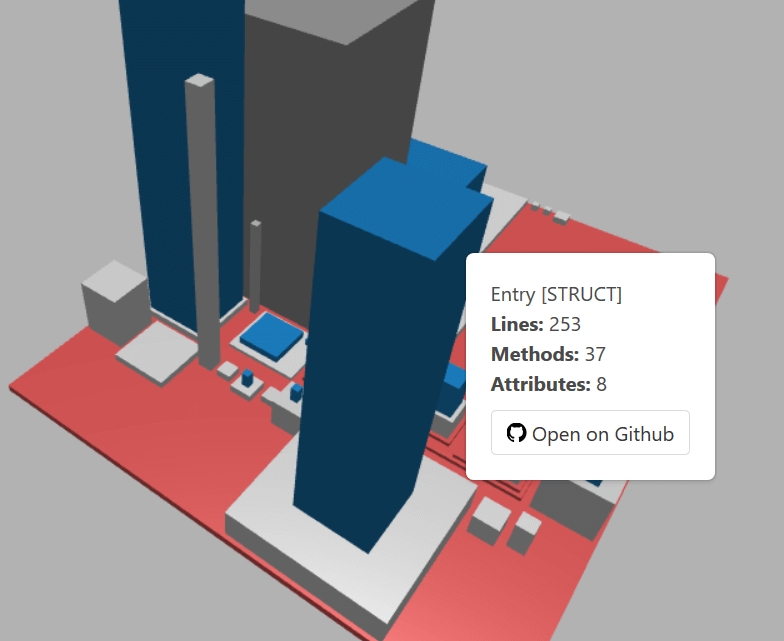
    今日推荐开源项目:《代码城 gocity》传送门:GitHub链接

    推荐理由:如果你在 GitHub 上建立过只使用 Go 的项目的话,这个项目将会非常有意思。这个项目可以将你的项目中的代码变为一座城市,包将会变成地面,文件变成地基,而代码中的数据结构这些将会变成楼房展现出来,看着自己的代码变成一座城市还是相当有意思的。


    今日推荐英文原文:《You Should Learn To Code》作者:Chukwuemeka Ndukwe

    原文链接:https://medium.com/@Mexzy/you-should-learn-to-code-7e8523a583dc

    推荐理由:学习编写代码的六个理由,虽然绝大部分时候这个技能不会像文中说的一样让你当上英雄就是了,但是——兴许哪天就用得上了不是吗?

    You Should Learn To Code

    You know how annoying it is when you get married, and then meet the love of your life shortly after? It happened to me.

    I got admitted into university to study Electronics and Computer Engineering in a school where the focus was on hardware systems, midway I discovered web development and it completely changed my life trajectory.

    Do I wish I went to study computer science or software engineering specifically? The answer is a resounding yes! but I don’t feel too bad about it considering that I went ahead to teach myself everything I know about programming and it turns out that most developers (about 69%) in the world today are self taught.

    The past few years, my experiences have convinced me that in a few years being able to code might be the equivalent of “being computer literate” is today, in other words, required.

    This would be a good time to explain what I mean by coding;

    Coding is basically writing instructions for a computer to execute.

    Now this definition is deliberately vague and is to make sure my point is not missed.

    Software/App/Web Development is a highly specialized skill which takes years to hone and not everybody will tend towards that field, but we code everyday without even knowing, for example when you set up your excel sheet to make automatic calculations based on the figures placed into the columns, that’s a form of coding, when you copy and paste short-codes in your WordPress site back-end, that’s a form of coding, when you set (or code) your microwave to a certain temperature, time, task, that’s also you coding.

    There are many examples like these of normal “non-technical” people applying coding to their everyday lives or work, and with the era of technology inescapability we are in right now, these scenarios are expected to increase not reduce, and that in and of itself is a good reason to learn how “this coding thing” works.

    Below are a few reasons why I think you should learn how to code;

    It might soon be required

    Just 20 years ago, “Computer literacy” was not something you would typically be asked about at a job interview. Today, from teachers to lawyers, to engineers, employers expect you to be reasonably computer savvy in order to be considered for employment, even if computers don’t have much of a role in their core duties. This is because computers have become ubiquitous and have become an invaluable tool for productivity in the workplace.

    It’s impossible to know what the next frontier will be in this context, what we can do is make hypotheses based on available data, and I feel pretty comfortable in stating that in less than 20 year, basic coding skills will be required for a large number of positions.

    Everyday there are new productivity tools being introduced, to the workplace, and while they are all easily manipulated via a front-end framework, some of them have more powerful, advanced tools that can only be accessed by typing some basic codes, employers will want people who would not panic at the sight of a few lines of code.

    Programming at its core, is the solving of problems through the use of code. Programmers have a unique way of looking at problems which they have to solve using their code. This method of problem solving can be applied to non-computer related problems.An ability to think like this becomes invaluable to employers who start looking for candidates with these skills to fill other non-technical roles.

    Financially rewarding

    In 2017, the average salary for a Javascript developer was $110,000 per-annum, Java $99,000, Perl $98,000. And it’s only been going up as the demand for programmers has been going up year after year. There are more jobs for programmers than there are programmers available to fill those positions.

    6 to 12 months intense study on web development is able to get you a well paying remote or on-site job as a programmer for a big or small firm.

    The skills of a programmer are also in demand on the open market and you could make a really decent living as a freelancer,especially with the advent of sites like Upwork, Freelancer, e-lancer, Fiverr etc.

    You could also build a software company that could make , or get sold for millions or billions of dollars, (Its rare, but it could happen).

    Sense of Accomplishment

    This is more intangible and difficult to explain, but if you played with Lego’s as a child, try to remember how you felt after building something really good with your toys.

    There’s something satisfying about seeing an idea go from conception to completion, as a programmer you have the opportunity to translate your ideas into reality. This means you can work on projects that you really care about.

    Building a piece of software, website, mobile app from scratch while extremely intensive, is very emotionally rewarding. There is no feeling like handing over what you built to the client and watching them use it, watching it evolve, change & impact actual lives.

    You will catch yourself visiting the site at odd hours just to see how its going, even fixing issues the client has not paid for and probably has not noticed.

    Freedom

    You don’t need to sit in an office for 10 hours a day in order to do your job as a programmer, more and more companies are beginning to incorporate remote working models into their systems, large companies like Taxify, Uber, Microsoft etc have hundreds of remote programmers scattered around the world. Nowadays, most companies would not object if you decided that you wanted to work from home on certain days as long as you have a track record of meeting your deliverables as at when due. This gives you the ability to be able to have a full life both within and outside work.

    Lifelong Learning

    The brain like any other muscle, has to be exercised in order to be kept healthy. As a programmer, you have to constantly keep yourself abreast of new tech, old tech, as well as future tech. You will find yourself constantly reading, practicing, learning etc and this will keep your brain sharp. It’s not uncommon to see coders who are advanced in age still sharp, and able to write powerful programs, this is testament to the power of their brains & thinking faculties even at that age,

    and last and definitely the least…

    Its Cool

    Imagine this, there’s a problem at a big company, their website (which is key to customer conversion) is down, their in-house tech guy doesn’t know what to do, the manager is losing his mind, everyone is going crazy, there is chaos, panic and utter madness in the office, in the midst of all that, someone remembers that their friend is a very good programmer, the friend is you, they give you a call, asking you to please help, you come in to their office (after negotiating a huge sum of course), spend 3 to 6 hours working on it and eventually its solved. The day is saved, you are a hero, everyone is in awe of you… cool right?

    Lol. now wake up! Admittedly, this scenario would most likely never happen,but having a skill that not too many people in the world can boast of is quite heady, it makes you feel good about yourself whether programmers would admit this or not. As humans, being a part of an exclusive club has always been a huge draw, and that’s not about to change.

    One of the worst kept secrets in the world is that programming is a skill anyone can learn, people are not born with the skill, just like any other skill, dedication and good old hard work is enough to make you a master.

    I have said so much about why you should learn how to code, now i’ll tell you how.

    Below is a list of beginner friendly and free sources for easing you into the world of the coder. Maximize these resources, and I assure you your life will change.

    Codecademy

    Freecodecamp

    Udacity

    In summary, computers are taking over everything, 1000 years ago only 20% of the world population could read and write, its not that far fetched to imagine that in a few short years, basic coding skills will become a basic marker for who is literate and who isn’t.

    Give yourself an advantage, learn how to code today.


    每天推荐一个 GitHub 优质开源项目和一篇精选英文科技或编程文章原文,欢迎关注开源日报。交流QQ群:202790710;微博:https://weibo.com/openingsource;电报群 https://t.me/OpeningSourceOrg

  • 2018年11月13日:开源日报第250期

    13 11 月, 2018

    每天推荐一个 GitHub 优质开源项目和一篇精选英文科技或编程文章原文,欢迎关注开源日报。交流QQ群:202790710;微博:https://weibo.com/openingsource;电报群 https://t.me/OpeningSourceOrg

    今日推荐开源项目:《React 基本库 libreact》传送门:GitHub链接

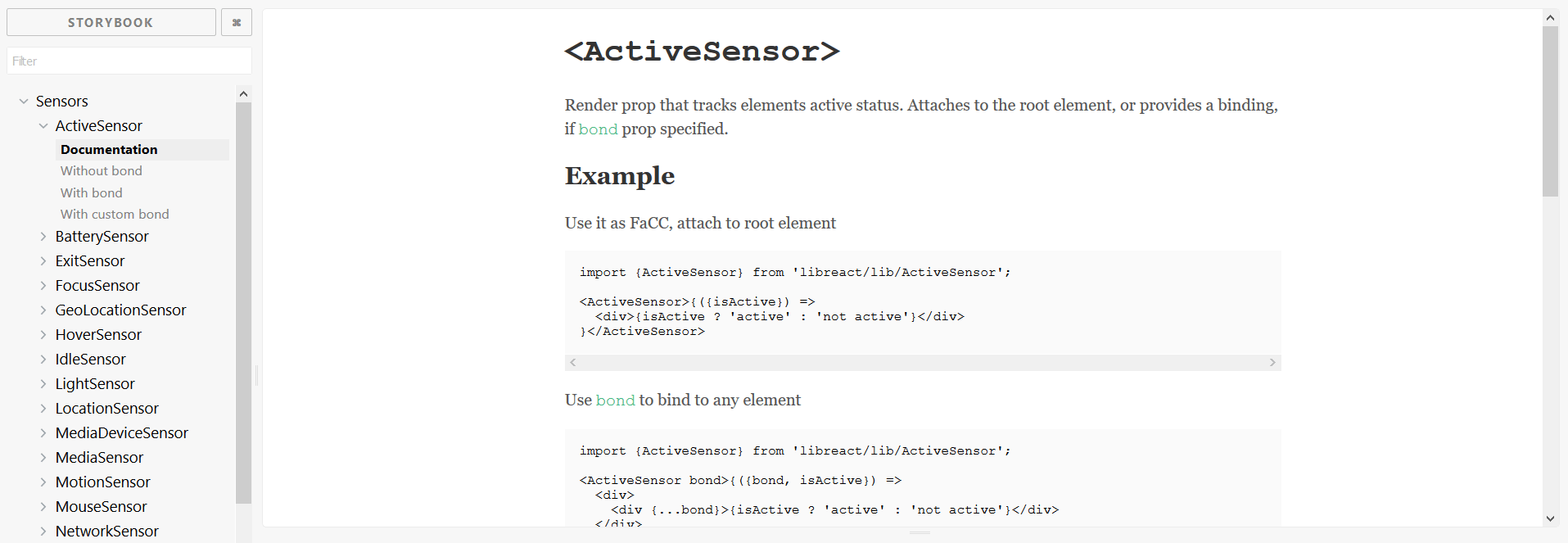
    推荐理由:顾名思义,这个基本库里包含了使用 React 时你用得上的工具,大部分都是组件,包括了 UI 界面,动画,传感器等等,兴许它们中有一些可以作为你正在寻找的实现方法的备选项。如果你想更有效率的寻找你需要的工具推荐使用它们的 Storybook,那里面还提供了一些示例以供参考。

    Storybook 地址:https://streamich.github.io/libreact/demos/


    今日推荐英文原文:《Beginner’s Web Development Guide Part 4: Cloud Deployment》作者:Pavels

    原文链接:https://medium.com/devtrailsio/beginners-web-development-guide-part-4-cloud-deployment-82fdcd40d7ef

    推荐理由:Web 开发系列教程第四部分——云部署,将你的应用程序部署在较大的云提供商的云上可以得到更好的服务与更广的可访问区域

    Beginner’s Web Development Guide Part 4: Cloud Deployment

    This post is part of a series of posts for beginner web developers. Also check out “Part 1: Frontend”, “Part 2: Backend”, and “Part 3: Platforms and Tools”.

    Once you’re done developing your applications, it’s time to deploy it. There are multiple cloud providers that offer all the necessary services to build and deploy your applications, the largest of them being Amazon Web Services, Microsoft Azure and Google Cloud Platform. There are also smaller players that provide more tailored services that can be easier to set up for beginners.

    Why clouds? We believe, that deploying an application into a cloud-based service nowadays is the best way to go. Pricewise you might find better offers from local data centers available in your region, but joining a larger cloud provider will grant you access to a lot of modern services and different geographical regions. Unless you have compelling legal or financial reasons to host in a local datacenter, clouds seem like a better alternative.

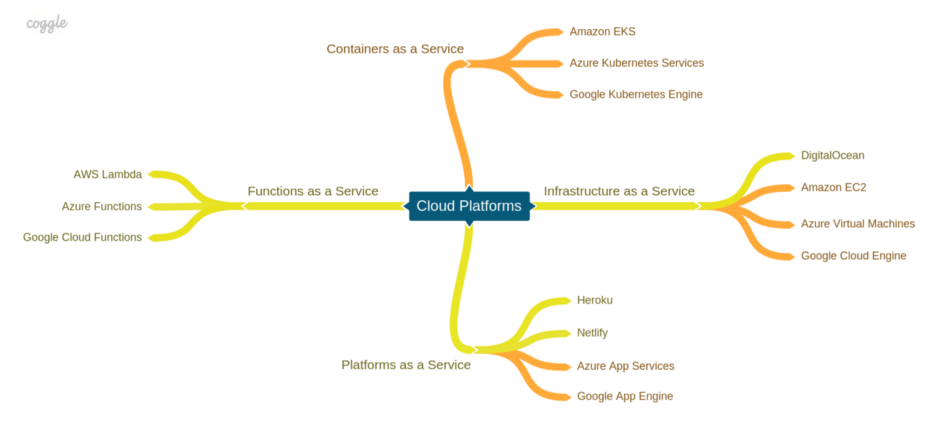
    When we’re talking about application hosting, there are several layers of abstraction you can choose, from infrastructure as a service, meaning virtual machines, disks, and networks, to containers as a service, a high-level abstraction for running containers over a cluster of machines. Lower abstraction levels give you more control over the setup, but also require more work and technical skills to configure, while higher-level services make things easier, often reducing the level of control and transparency.

    ? Infrastructure as a Service

    Infrastructure as a Service (IaaS) refers to services that allow you to run virtual machines, file systems, and virtual networks. To make onboarding easier, some platforms provide you with pre-configured images of machines built for different purposes, such as an Apache server on Ubuntu or a PostgreSQL server. You can create a VM based on one of those images and then tailor it to your needs, for example, install software, configure networking and setup security and firewalls. Although IaaS gives you the most control over your services, it’s also requires the most efforts to set up. It’s a good choice when you need to host something other than a plain web application.

    Here are some of the popular IaaS services from different providers.

    • ? DigitalOcean is a cloud platform that offers IaaS services in data centers worldwide. Setting up a VM in DigitalOcean is relatively simple, however, it only offers Linux virtual machines. DigitalOcean offers $100 worth of credits for 60 days to try their services.
    • ? Amazon EC2 is the Amazon’s IaaS offering and a leader in the overall market share. EC2 offers different kinds of virtual machines with flexible configuration, however, the initial setup can be more challenging. It offers a free 12 month tier for some of the smaller VM types.
    • ? Azure Virtual Machines is an IaaS offering from Microsoft with a large number of pre-configured images. Microsoft offers $200 worth of credits for one month and 750 hours of small VM’s for 12 months.
    • ? Google Compute Engine is a service in the Google Cloud Platform that offers $300 credits for a 12 month trial period, an always-free micro VM instance.

    ? Platform as a Service

    Platform as a Service (PaaS) is a type of service for running web applications designed for easier setup. Unlike IaaS, PaaS services provide a complete technology stack to run your application without the need to set up the environment on your own. Some of the other concerns that are usually handled by PaaSes are:

    • A user interface for managing, running or stopping your application;
    • Basic monitoring and logging capabilities;
    • Horizontal and vertical scaling to cope with increasing loads;
    • Environment configuration;
    • Health checks to make sure your application is running and accessible.

    Some PaaSes have a limited set of languages they natively support, but nowadays most of them support running Docker containers, meaning you can run an application written in almost any technology. PaaSes are usually designed for running web applications, and might not be suitable to run daemons or other kinds of software.

    Some of the popular PaaS offerings are:

    • ? Heroku is one of the oldest PaaS services out there. It supports running applications written in Ruby, Java, PHP, Node.js, and others, as well as deploying applications in Docker containers. Heroku offers a free tier, however, your application will be put to sleep after 30 minutes of inactivity.
    • ? Netlify is a service for hosting static websites. It offers a fully fledged free tier with support for automated deployment, HTTPS, redirects, A/B testing, form submission and backend logic using AWS Lambda functions.
    • ? Azure App Service is an offering from Microsoft Azure. It allows hosting applications written in different languages on both Windows or Linux, as well as running Docker applications. There’s a free shared instance available for the Windows app service.
    • ? Google App Engine is a service on Google Cloud that supports deploying applications written in Java, Python, Node.js, Go and PHP and Docker applications. There’s also a limited free tier available.

    ? Function as a Service

    Function as a service (FaaS), sometimes also referred to as serverlesscomputing, is a relatively new concept in cloud computing. It’s designed to deploy simple atomic functions into a runtime without the need to worry about the infrastructure and a lot of operational concerns, such as logging and monitoring. Such functions can be invoked as regular services via HTTP requests, but a lot of platforms also provide the ability to react to various events such file uploads, a message in a queue or a modification in a database. The pricing model of FaaSes is also different. Instead of uptime, you pay for execution counts and consumed resources. This makes it a financially attractive solution for parts of your application that don’t need to be up all the time or need to scale dynamically.

    Functions have their downsides though. The tooling for most platforms is still in its infancy and local development may be not as smooth as with regular applications. The situation, however, can improve as the serverless movement is gaining momentum.

    Popular cases for using functions include simple backend services that can be implemented with a minimal amount of code or post-processing to different events in your applications.

    Most large cloud providers also has a function offering:

    • ? AWS Lambda offers integrations with other Amazon services such as S3, DynamoDB, Kinesis, SNS, and CloudWatch as well as the ability to orchestrate function-based workflows using Step Functions. The AWS SAM tools allows testing your functions locally before deployment. The free tier offers 1M requests and 400,000 Gb seconds computing power per month.
    • ? Azure Functions is a similar offering from Microsoft that allows integrating with Azure services, such as Blob Storages, Storage Queues, CosmosDB and etc. Azure Functions can be integrated into Logic Apps to form complex workflows. It currently supports C#, F#, JavaScript, and Python as well as Java but in preview. It also offers 1M requests and 400,000 Gb seconds computing power per month.
    • ? Google Cloud Functions provides similar integrations to Google Cloud services, however, only JavaScript and Python functions are supported at the moment. Local development is supported only for JavaScript functions.

    ? Containers as a Service

    With the rise of containers and Kubernetes as the dominant orchestration platform new “Kubernetes as a service” solutions are rolled out by all the major cloud platforms. Such services are commonly referred to as Containers as a Service (CaaS). Since hosting your own Kubernetes cluster is not a trivial task, deploying to a managed cloud cluster is a better alternative for most cases. Such services offer maintained control planes, upgrades, guaranteed cluster uptime and middleware so you can focus on developing your application.

    • ? Amazon EKS provides a managed Kubernetes cluster with control nodes deployed to multiple availability zones to ensure uptime, built-in security features, and the ability to integrate with other AWS services. However, the process of setting up a new cluster is not as straightforward as it could be. There is no free tier available, and you need to pay both for the worker nodes, and a fixed fee per cluster.
    • ? Azure Kubernetes Services (AKS) offers a relatively easy initial setup process and a competitive pricing model, that doesn’t charge anything for managing the cluster, but only for node VMs.
    • ? Google Kubernetes Engine has received a lot of positive reviews from the community, which is to be expected from the company that created Kubernetes. It’s praised for its simple setup and operations. It does, however, offer less integrated services than other platforms.

    The cloud landscape is actively developing and providers are racing to offer new innovative services and competitive pricing. Keep an eye out for new offerings from major cloud platforms but also follow smaller platforms that offer more tailored solutions.

    This completes the four-chapter “Beginner’s Web Development Guide” for now. Hope it helped you find your way around the industry and gave you an idea on which direction to follow next. As a next step, I plan to compose it into a single presentable guide and publish it on devtrails.io so keep posted!

    If you have any questions or comments, feel free to leave them here or reach out on twitter @devtrails.io.


    每天推荐一个 GitHub 优质开源项目和一篇精选英文科技或编程文章原文,欢迎关注开源日报。交流QQ群:202790710;微博:https://weibo.com/openingsource;电报群 https://t.me/OpeningSourceOrg

←上一页
1 … 196 197 198 199 200 … 262
下一页→

Proudly powered by WordPress