• 开源镜像
  • 开源沙龙
  • 媛宝
  • 猿帅
  • 注册
  • 登录
  • 息壤开源生活方式平台
  • 加入我们

开源日报

  • 2018年11月20日:开源日报第257期

    20 11 月, 2018

    每天推荐一个 GitHub 优质开源项目和一篇精选英文科技或编程文章原文,欢迎关注开源日报。交流QQ群:202790710;微博:https://weibo.com/openingsource;电报群 https://t.me/OpeningSourceOrg


    今日推荐开源项目:《为什么你们就是不能加个空格呢 pangu.js》传送门:GitHub链接

    推荐理由:推荐给所有不想看见英文、数字、符号这些和中文挤在一起的朋友,这个项目里提供了 Chrome 和 Firefox 的插件,让你能够在浏览网页时再也看不到这样的现象——插件会帮你加一个空格;而且如果你正在像我一样一边核对别人的文章一边看着他英文中文挤在一起而给他加空格的话,我强烈推荐你使用下面这个工具,一劳永逸。

    一劳永逸:https://zizhengwu.github.io/daft-auto-spacing/


    今日推荐英文原文:《How to write code which others will understand?》作者:Kamil Lelonek

    原文链接:https://blog.lelonek.me/how-to-write-code-which-others-will-understand-9005ca818b0f

    推荐理由:为什么我们要写别人看得懂的代码,实际上可以用很简单的方法概括——如果你曾经被别人的代码搞的头皮发麻,那么为了大家都不再遭受这样的罪,你就应该好好写代码,避免让你的代码搞的别人头皮发麻。

    How to write code which others will understand?

    Do you write your code for other developers or just for yourself?

    Code reviews for the greater good

    If you know me, you also probably know I like code reviews. Both making and receiving. Every so often, they teach me new things, more often than not, they help me understand a codebase, and, frequently, they let me provide feedback, predict and prevent potential bugs.

    I strive to not make style-related suggestions (they should be handled by automatic linters and formatters) but I still cannot resist proposing syntax changes in some places (like avoiding ifs or using one-liners even if this is mentioned in our guidelines). Nevertheless, I feel doubtful when I have to review code I don’t understand — either because of an unknown domain or because of… its complexity.

    In this article, I’d like to focus on the latter aspect, since the former one is pretty simple to solve — you may leverage the opportunity to ask questions and do deep dives into surrounding code or you just look for someone else who would be a better fit to provide a review.

    Your code is not yours

    Have you ever wondered who’s gonna read your code? Have you ever thought how complex your code is for others? Have you ever considered the readability of what you’ve written?

    Any fool can write code that a computer can understand. Good programmers write code that humans can understand. — Martin Fowler

    From time to time, when I see code snippets, I cannot believe in empathy among programmers. Each of us has struggled with a piece of code that was overcomplicated which possibly means each of us has written such a thing as well.

    Recently, I’ve seen something like this:

    defmodule Util.Combinators do
      def then(a, b) do
        fn data -> b.(a.(data)) end
      end
    
      def a ~> b, do: a |> then(b)
    end

    And that’s OK, maybe someone has lots of fantasy or a mathematical background. I didn’t want to rewrite that immediately but unconsciously I felt something was not right. “There must be a better way to write it. Let’s see how the code is used” — I thought. I quickly browsed the codebase to finally find:

    import Util.{Reset, Combinators}
    
    # ...
    
    conn = conn!()
    
    Benchee.run(
      # ...
      time: 40,
      warmup: 10,
      inputs: inputs,
      before_scenario: do_reset!(conn) ~> init,
      formatter_options: %{console: %{extended_statistics: true}}
    )

    Alright, so not only ~> is imported but also someconn!/0 and do_reset/1functions. Let’s see theReset module then:

    defmodule Util.Reset  do
      alias EventStore.{Config, Storage.Initializer}
      
      def conn! do
        {:ok, conn} = Config.parsed() |> Config.default_postgrex_opts() |> Postgrex.start_link()
         conn
      end
      
      def do_reset!(conn) do
        fn data ->
          Initializer.reset!(conn)
          data
        end
      end
    end

    Regarding conn!, there are a couple of solutions to make it simpler but it’s already easy to grasp so I won’t niggle over this. I would focus on do_reset!/1though. Not to mention the name, as if it wasn’t complicated enough, the function returns a function that returns its argument and resets the Initializer by the way.

    I decided to deconstruct it step-by-step. According to bencheedocumentation, the before_scenario hook takes the input of the scenario as an argument. The return value becomes the input for the next steps. So what the author probably meant was to:

    1. Initialize Postgrex connection
    2. Reset EventStore
    3. Take the given inputs as a configuration (e.g. number of accounts)
    4. Prepare data for tests (e.g. create users, log them into the app)
    5. Run benchmarks

    It seems to be quite easy to follow and write. In the entire refactoring, I will neither show you nor change the init function, as it’s not that relevant here.

    My first step was to explicitly do aliasing instead of an implicit import. I’ve never really liked magic functions appearing in my code, even though importing Ecto.Query makes queries really elegant. Now, the Connectionmodule looks like:

    defmodule Benchmarks.Util.Connection do
      alias EventStore.{Config, Storage.Initializer}
    
      def init! do
        with {:ok, conn} =
               Config.parsed()
               |> Config.default_postgrex_opts()
               |> Postgrex.start_link() do
          conn
        end
      end
    
      def reset!(conn),
        do: Initializer.reset!(conn)
    end

    Next, I wanted to write a hook like suggested in the documentation:

    before_scenario: fn inputs -> inputs end

    The only thing left is to prepare the data. The final result is as follows:

    alias Benchmarks.Util.Connection
    
    conn = Connection.init!()
    
    # ...
    
    Benchee.run(
      inputs: inputs,
      before_scenario: fn inputs ->
        Connection.reset!(conn)
    
        init.(inputs)
      end,
      formatter_options: %{console: %{extended_statistics: true}}
    )
    
    Connection.reset!(conn)

    Is the code perfect now? Probably not yet. Is it faster to grasp though? I hope so. Could it be written like that from the very beginning? Definitely!

    What’s your problem dude?

    When I showed my solution to its owner, I’ve just heard: “cool”. I didn’t expect anything of course or maybe just a self-reflection from the author.

    My biggest problem is that such code worked. Thus, except it was overengineered, I had no arguments to refactor it, as the understandability is a pretty individual opinion. If I have to convince other devs, I will need to ensure they neither get it nor they are able to use it in their own cases. If I have to convince business people, I would probably tell I don’t understand this code, but they may say “well, you’re just a bad developer then ¯\_(ツ)_/¯”.

    It’s (not) management fault

    It is not a surprise business people expect results. The cheaper they are and the faster they come, the better. The pressure is on developers though. Managers usually look at software in terms of deadlines, budget, and speed. I’m not blaming them whatsoever here, I’m just trying to explain the possible reasons of bad code because management usually doesn’t care about code quality (at least not directly). Business cares about finding a big lead, making the next sale, cutting costs, and getting new features out yesterday.

    When programmers are under pressure, they take many shortcuts. They start writing down what comes to their mind just to make it work, without thinking about maintainability in the future. No one even thinks about tests then. It’s very hard to write elegant code quickly. No matter how experienced you are and what skills you have in general — you need to skip thinking about some things when your time is limited.

    Management will be more receptive if you tie poor code quality to wasted money. E.g.: it takes longer to fix bugs and add features, more time is spent bouncing between devs and QA, there’s lower user satisfaction due to high bug count, more customer support resources are needed, etc. I know and I’ve worked with great managers and product owners. They understood the values of the solid codebase. They were able to accept a slower development process which results in faster maintenance in the future though. I also worked with poor business people. The only things they cared were users acquisition, fast product growth, and short-term goals. Many quick wins were taken which led to projects failures.

    Quick fix, quick win?

    Many times you were probably involved in so-called rapid development. It could happen either to patch some bug quickly or to deliver a proof of concept as soon as possible. More often than not, this involved a dirty and unreadable code. The problem is many times such part of software becomes a production one and has to be maintained and extended without many chances to be refactored. Do we even have time to think about others then?

    The role of empathy

    Empathy is understanding and being sensitive to the experiences of others without those experiences being explicitly communicated to you.

    If you’re developing software, it’s almost always going to be for or with other people. And because software development involves others, empathy can be useful there.

    Your code is another form of communication. When architecting and developing a system, we should strive to share an understanding with the people who will interact with our code.

    In addition, with empathy, you’re more likely to build maintainable code. Other developers may not think about the advantage that empathy givesthem. They’re quick to sacrifice maintainability for speed. They don’t think about other developers or their future self at the component level of the system. By using empathy as your secret weapon, you’ll write cleaner code with proper documentation.

    Empathy allows a developer to comprehend what it’s like for someone else to clean up their mess, and in turn, makes them want to cause fewer messes for others. It helps the developers take responsibility for their own work.

    Summary

    Recently, I’ve written a code in Elixir like:

    result = calculate_results()
    Connection.close(conn)
    result

    I immediately thought about Ruby tap method which would help me to rewrite this code like:

    calculate_result().tap do
      Connection.close(conn)
    end

    IMO, that would be more elegant without this intermediate result variable. I thought how I could achieve that in Elixir and with statement came to my mind:

    with result = calculate_results(),
         Connection.close(conn),
      do: result

    The outcome would be the same and the real result would be returned. However, with statement is not intended to do such things and I’m pretty sure it would cause a lot of confusion in this case.

    I didn’t decide to do such a thing just for my convenience and I left the initial idea — maybe not so elegant but far more readable. I ask you to do the same, to not overcomplicate your code when it’s not necessary. Think twice before writing something exotic that your colleagues won’t understand and, after some time, you as well.

    The only takeaway from this article I have for you is this:
    “Please, please always consider OTHERS while writing YOUR code”.


    每天推荐一个 GitHub 优质开源项目和一篇精选英文科技或编程文章原文,欢迎关注开源日报。交流QQ群:202790710;微博:https://weibo.com/openingsource;电报群 https://t.me/OpeningSourceOrg


  • 2018年11月19日:开源日报第256期

    19 11 月, 2018

    每天推荐一个 GitHub 优质开源项目和一篇精选英文科技或编程文章原文,欢迎关注开源日报。交流QQ群:202790710;微博:https://weibo.com/openingsource;电报群 https://t.me/OpeningSourceOrg



    今日推荐开源项目:《我的意思是所有人都该看看这个 How-To-Ask-Questions-The-Smart-Way》传送门:GitHub链接

    推荐理由:相信我,如果你没看过这个提问的智慧,你一定得去看看,不管是为了自己,还是为了以后可能会因为你的问题向你提供帮助的人,学会正确有效的提出问题可以让你更快的获得能够帮助你的人的支援。最起码,看了这个之后,你应该不会问诸如 “我的主机板有问题了,谁来帮我?” 这样的蠢问题了。

    实际上这个精读注解版也值得一看:https://hacpai.com/article/1536377163156#toc_h3_14


    今日推荐英文原文:《How To Be A Good Customer》作者:Yellow Blog

    原文链接:https://medium.com/@blog_81869/how-to-be-a-good-customer-96f9191902f9

    推荐理由:如何成为一个好的顾客来支持为你工作的开发团队,这与如何成为一个好的开发团队成员同样重要

    How To Be A Good Customer

    Based on real cases: check out our tips on how to stay focused, confident, and cooperative when working with your engineering team

    If you Google how to find the best software engineering team, you’ll get a number of decent articles covering the topic quite in depth. Unfortunately, the same can’t be said about the client’s role in the development process, which, from our experience, contributes to one half of the product’s success.

    To prove this, we looked back at the real cases we encountered during our work and came up with five tips on how to be a more engaged and helpful client.

    Stay involved

    We know it’s not easy to stay focused when you have several projects running at the same time — or when you are physically thousands of miles away, which is also sometimes the case. However, there are multiple ways to keep in touch with the development team and the progress they make.

    Make sure you are aware of all the project updates. They may come to you as a brief weekly report or a new project build — it depends on how the workflow is organized on the developers’ side. This will give you a general overview of how things are going.

    Participate in all video calls, meetups, and discussions along with your project manager. As a result, you’ll become aware of the project details, on the one hand, and learn how you can help on the other.

    Hint: Don’t hope that the team will read your mind. You are the one who has the vision. If you see that the project goes in the wrong direction, be sure to interject at any stage and put everything back on track.

    Some time ago, we worked on an application for a client from the travel industry. When he felt he was not happy with the application design, he prepared a mood board with carefully-selected designs and colors for us to refer to. Need we mention that the result was just as he imagined it?

    Participate proactively!

    Start small

    When creating an app from scratch, make sure the release version includes only the necessary minimum of features. Ideally — just one essential feature that makes a new product viable enough to enter the market.

    Launching a simple app version can give you answers to a bunch of important questions. How do users react to the product? Do they use it in the way you thought they would? What features do they turn to most often?

    Hint: Give users some time to play around with the application and use the chance to discover their real expectations of the product. Thus, you”ll be able to provide new features in small portions — in just the right time — making users crave more.

    For instance, if you launch a new messenger, don’t include video calls in the release version. Text messages will definitely cover the users’ needs while you are trying to get a clue of what else they may want. Otherwise, you risk finding out upon release that your target users never really make video calls and prefer voice messages instead.

    Another argument in favor of starting small is the issue of money. Don’t invest everything you have in a product that may not even work as you want it to. Launching a simple version to understand how users react to it and then adding one new feature at a time sound like a much more reasonable plan from the money perspective.

    Be ready to pivot

    Just as we mentioned in the previous point — be prepared to learn that all your assumptions about the product, its usage, and audience might be wrong. As we established from our own experience, the only way to give users what they want is to experiment.

    Hint: Be flexible. If something doesn’t work as you expected it to — change the direction.

    StickerBox is our pet product that allows people to take photos of their friends and transform them into fun stickers. When we launched the app, we thought users would mostly like to make custom stickers and manually tweak them to their liking. Soon after release, we found out they were much more amused with the stickers provided by the app.

    We challenged ourselves to make a U-turn. We removed most of the customization features and released a version offering ready-made stickers with just one button click. A simple “one-button-to-magic” approach — and the popularity of the app rocketed.

    Trust your team

    Be sure to make a responsible choice of the team to work with, and, once having made up your mind, learn to trust them as professionals.

    Sometimes clients, especially those with no technical or design background, are prone to micromanagement due to a lack of knowledge. At the same time, any project requires making dozens of microdecisions every day, both technical and non-technical ones, and overcontrolling may dramatically slow down progress.

    Hint: If you feel you are close to overcontrolling, or simply need a second opinion about the project, consider inviting a third-party expert.

    We advise finding someone you trust as a person and as a professional. It may be a technical consultant, a design expert, or a strategist, depending on what part of the project you worry about the most. The expert will join the team once or twice a week and report to you if anything doesn’t go as you have expected.

    However, don’t rely fully on the expert’s opinion. Software products are not entirely about coding or design. Even if you cannot tell whether everything is okay with the code, you still can evaluate if the project solves your problem.

    Join the team

    Sometimes clients who come to us with an idea of a product do not fully understand how it should be implemented. “We think that the market needs this, but we are not quite sure how it should work.” — we hear these words quite often.

    Prototyping is a generally good way of finding the right realization for the project. A simple black-and-white wireframe may give an understanding of what features should or should not be added to the future application. But what if you’ve never even heard about prototyping?

    Hint: If nothing else is the option, don’t hesitate to simply sit and brainstorm with the development team.

    One time we had a client with an idea of an easy-to-use messenger for in-family communication. He felt he should occupy the niche but didn’t really know how to do it.

    We took the idea of a messenger as a basis and started brainstorming. As a result, we came up with several bright ideas, such as a timeline of family events and an interactive family tree, and then the application saw the light of day.

    Sometimes, it feels so tempting to step back and shift to other tasks once the project is safely delegated. Sometimes, vice versa, it seems impossible to entrust the realization of your vision and ideas to a team.

    We hope these recommendations will help you maintain balance between these two extremes and stay in tune with the development team. In fact, being a cooperative client requires effort, but it’s definitely rewarding for both sides, and, above all, the product.


    每天推荐一个 GitHub 优质开源项目和一篇精选英文科技或编程文章原文,欢迎关注开源日报。交流QQ群:202790710;微博:https://weibo.com/openingsource;电报群 https://t.me/OpeningSourceOrg

  • 2018年11月18日:开源日报第255期

    18 11 月, 2018

    每天推荐一个 GitHub 优质开源项目和一篇精选英文科技或编程文章原文,欢迎关注开源日报。交流QQ群:202790710;微博:https://weibo.com/openingsource;电报群 https://t.me/OpeningSourceOrg


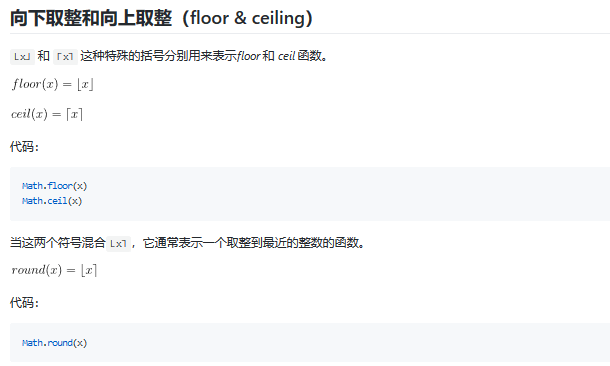
    今日推荐开源项目:《数学符号 math-as-code》传送门:GitHub链接

    推荐理由:当你在研究某本数学书然后发现一个惊人的事实:看不懂符号啊怎么办——的时候,这个项目兴许可以帮上你的忙。这个项目将数学符号和 JS 代码进行对比,从而帮助程序员理解数学符号,从简单的等于不等于和绝对值这样的到点乘和叉乘以及向上/下取整这些平时不太常见的,单单看书不太能理解的话配合 JS 代码兴许能让你更好的理解——毕竟对于经常看代码的人来说,它们可能比文字更亲切些。


    今日推荐英文原文:《What is Git?》作者:Devon Campbell

    原文链接:https://medium.com/@devon_56979/what-is-git-5ff706ad59bc

    推荐理由:Git 是一个版本控制系统,当你用习惯之后,你会发现它会对不管是单人还是团队的工作提供不小的便利,而且能够帮你在需要版本回退的时候救你一命

    What is Git?

    And why should web developers care?

    Git is a version control system. Let’s break down the jargon and figure out what that means to us web developers.

    What is “version control?”

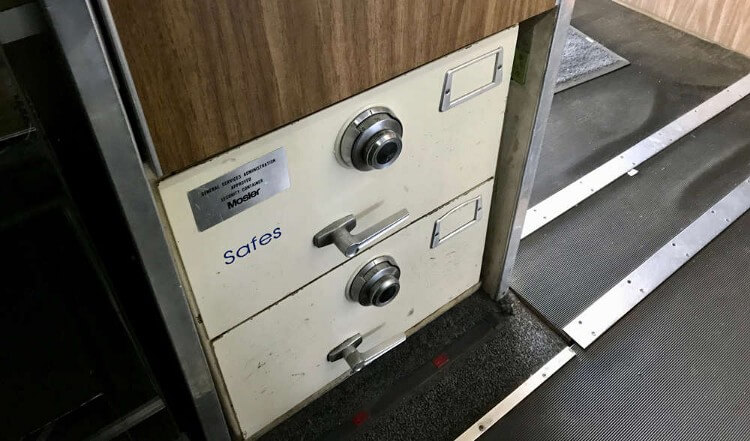
    For anyone curious, pictured above are the built-in safes on-board the Nixon-era Air Force One.

    A version control system allows you to keep track of more than just what’s currently in a file. You also track what changed at various points in time. If you just have an HTML file on your hard drive, the contents of that file are whatever they were the last time you clicked “Save” in your editor. Make some more changes and click “Save” again: the file will now reflect your latest changes. The previous changes are lost forever.

    What is a “commit?”

    Git gives you an additional “class” of saving. Normal saving works just like before, overwriting whatever was previously saved with the new version. You can also commit your changes to version control. A commit sets up a point in time you can roll back to with Git. If you realize you made a mistake at some point in the past, Git allows you to roll back to any of your previous commits.

    Committing in Practice

    I’m working on a social networking app. I just added a tab that will allow people to see their connections in the app. This required changes in several files in my project. I’ve made those changes and saved all of the files. Now, I can commit these new changes to Git. I’ll run git commit -am "Adds connections tab" to stage (more on that later) and commit all changes. The -am options are for adding all unstaged changes to the stage and providing a message for the commit respectively.

    I’ve added a handful of additional features since the connections tab, but my users are up in arms about the connections tab. I’m losing users at an alarming rate, and I need to pull back on that feature.

    This would be a real pain without source control since some of the subsequent features built on top of the connections tab. I would have to hunt down everything I’d done since that change. Instead, I can revert back to the prior commit to be right back where I was before connections.

    That’s how committing works, but let’s look at an entire Git workflow. First, though, let’s take a step back and learn how to set up Git on your system.

    Getting Started with Git

    The best way to install Git on the Mac is using the Homebrew package manager. If you have Homebrew installed, you can run brew install git in your terminal. Once that’s done, you can run git from the terminal to confirm the installation worked.

    ? Homebrew

    Homebrew is a package manager for the Mac. It makes installing and updating command-line apps easier. Install it by pasting the installation command shown on their web page into your Mac’s terminal.

    On Windows, you can download the Git installer from the Git downloads page. The Windows installer should install Git-Bash which gives you a shell command line in Windows. (You’ll use this the same way you would use the terminal of a Mac or on Linux.d

    Most Linux distributions will have Git available in their default package repositories.

    Git GUI vs. Command Line

    The temptation to go straight to a GUI is strong, especially with an application with as many different features as Git. You have quite a few options if you decide to go down that road.

    I’d recommend you learn the command-line interface instead. Here’s why:

    1. No Git GUI will ever expose all the functionality of Git. Take a look at the reference for just the git commitcommand. I’d be shocked if a single GUI can even expose the options for just this single command, let alone all the other Git commands.
    2. The commands you need to use on a daily basis are pretty easy to learn. Even though git has dozens of commands, you’ll probably learn 3–4 of them and search for the correct command when you need to do something offered by one of the others.

    The command line lacks the discoverability of a good GUI, but that’s not a huge deal since you need only a few commands on a regular basis. That coupled with the fact that, via the command line, you’ll have access to all of Git’s functionality leads me to recommend the command line.


    You want to leave your ? job to become a web developer. I want to help. Head over to Rad Devon to sign up for a free mentoring session!


    Git Basic Workflow

    We’ve looked at a quick example of how you might commit, but we missed a lot of the context around that. Let’s look at a simple workflow for how you might use git.

    git init

    The first step is to initialize a git repository. The repository is just the container that stores all the version history for a project. You do that by navigating to the project directory on your computer in the terminal and running git init from there.

    You can do this just after you’ve created a new directory for a brand new project, or you can do it in an existing project directory if you want to start using Git version control with that project. This is an important command, but you’ll only use it once per project.

    git add

    Now you have a repository initialized in your project directory, but it doesn’t know which files it needs to care about. By default, it won’t care about any of them. You tell it which files to track using git add.

    You could just start adding files one by one until you have added everything you care about, but that sounds like a lot of work. You probably want most of the files under version control. Wouldn’t it be easier to tell Git which files you don’t want it to care about and then add everything else? Fortunately, Git has a way to do that too.

    Create a text file in the root directory of your project named .gitignore. (Take the note of the leading dot. This makes the file invisible so that it doesn’t clutter up your directory listings. If you leave it out, Git won’t know what to ignore.) This is just a standard text file. Each line is a file pattern. Git will ignore any files matching any of these patterns.

    These patterns are the same kinds of patterns you use in other terminal commands. Maybe you’ve deleted all the text files in a directory by using rm *.txt. *.txt is a file pattern. They can have wildcards (like *) that match anything, or they can simply be the name of a file or directory (like node-modules). If you want to know more about the .gitignore file, check out the Git documentation.

    ? Which Files to Ignore

    You know how to ignore files now, but it may not be obvious which files you’d want to ignore. In general, you only want files that you have written yourself in source control. In a simple project like just some HTML and CSS, that might be everything. If your project has dependencies or gets built inside the project directory, you would want to ignore those. You’d also want to ignore any editor configuration files or any files that are specific to you or your computer.

    Here’s an example .gitignore file from a GatsbyJS project:

    node_modules/
    public
    .gatsby-context.js
    .DS_Store
    .intermediate-representation/
    .cache/
    yarn.lock

    node_modules is ignored because it’s where dependencies are installed. public gets ignored because that’s where the project gets built. .DS_Store is a file macOS creates in every directory. .gatsby-context.js is generated automatically by Gatsby. yarn.lock should be in version control according to Yarn, but Gatsby’s project scaffolding adds it to the ignore file.

    If you have all the files you don’t want in version control ignored using a .gitignore file, you can now add everything else with git add ..

    git status

    git status shows you which files are staged, which have changes that aren’tstaged, and which files are not yet watched (but also not ignored). I run it pretty often between other commands just to see exactly what state everything is in and make sure I haven’t accidentally staged something I thought was ignored.

    git commit

    Once you have some changes (or newly added files) staged with git add, you’ll create a commit with git commit. Again, this creates a snapshot you’ll be able to revert back to if something goes wrong. A commit can capture a single save to a single file. It can capture multiple saves to a single file. A single commit can represent one save each to many files or many saves to many files.

    When you’re thinking about how often to commit, keep in mind that you won’t be able to get back to any state between commits. If you do a week’s worth of work but forget to commit, committing once at the end, the only history you have is a single commit for all that work. That means, if you need to revert, you can either revert the entire week’s work or none of it.

    The Git Loop

    Now that you have your project in place, you’ll start going through the Git loop. Here’s what it looks like:

    1. Make your changes
    2. Save them
    3. Stage your changes with git add
    4. Commit changes with git commit
    5. Repeat

    You’ll occasionally run git status to make sure everything is tracked and staged as you’d expect, but, otherwise, this is the bulk of your Git life as a web developer. You don’t know everything you’ll ever need to know to use Git (You can’t even revert changes which is core to the value of version control.), but you probably won’t need to do anything else for a while. When that time comes, use your search skills to find the commands to accomplish the task in front of you. (It’s one of my core principles of becoming a web developer: learn what you need to know just in time!)

    Building a Git Habit

    Your challenge for now is to build a habit around using Git… even when you don’t need to. You’ll need to be using Git when you really screw something up, but, once that has happened, it will be too late to start using it.

    Make sure each new project starts with a git commit and you’re committing as you go. Get into the habit now so that when the day does come that you need to go back to last week (and it will), you’ll already have your Git safety net in place.


    每天推荐一个 GitHub 优质开源项目和一篇精选英文科技或编程文章原文,欢迎关注开源日报。交流QQ群:202790710;微博:https://weibo.com/openingsource;电报群 https://t.me/OpeningSourceOrg

  • 2018年11月17日:开源日报第254期

    17 11 月, 2018

    每天推荐一个 GitHub 优质开源项目和一篇精选英文科技或编程文章原文,欢迎关注开源日报。交流QQ群:202790710;微博:https://weibo.com/openingsource;电报群 https://t.me/OpeningSourceOrg


    今日推荐开源项目:《算法而不是语言 Python》传送门:GitHub链接

    推荐理由:别误会,这个项目可不是介绍的 Python 而是用 Python 实现的各种算法,包括我们很熟悉的冒泡排序快速排序以及兴许对于初学者来说没怎么用到的密码学算法这些,如果你正在学习 Python 的话这个项目对你来说应该会有帮助,使用新的语言实现原来的算法可以帮助你更好的理解和运用它,而且兴许你可以在这里找到一些对你的项目很有帮助的算法。


    今日推荐英文原文:《The tools and resources that landed me a front-end developer job》作者:Syk Houdeib

    原文链接:https://medium.freecodecamp.org/the-tools-and-resources-that-landed-me-a-front-end-developer-job-1314c6f1fa7f

    推荐理由:在做前端开发时用得上的工具和资源,如果你也对前端有兴趣可以留意一下

    The tools and resources that landed me a front-end developer job

    Learning front-end development can be a bit overwhelming at times. There are so many resources and tools, and so little time. What should you pick? And what should you focus on?

    In my previous article How I switched careers and got a developer job in 10 months, I talked about my journey. I was an English teacher with no related experience, and I managed to land a front-end developer job in a Madrid startup.

    In this article, I would like to dive deep into the resources and tools that I used to get there.

    We will visit the courses I took, see their pros and cons. And talk about the projects I made with them. Then we’ll have a detailed tour around all the other cornerstones of succeeding on this journey. Things like using GitHub, building a portfolio, and staying motivated.

    What to study and where?

    I sat in front of the screen staring at an image of the sun. I wanted to scream, laugh, and cry all at once. This was not any image of the sun, this was an image that I had just pulled from the NASA database! I had finally managed it after what seemed like forever trying to figure out how to use the NASA API. I felt like a top hacker, I will soon be able to control traffic lights!

    In fact, I was nowhere near controlling traffic lights, and I still am not. But what I didn’t know at that moment was that I was only days away from getting a real job offer.

    Sun Image source: NASA Image and Video Library

    So how does someone go from no knowledge in front-end development to a job in the field? What do you have to study and where do you do it?

    When I first started learning, this was one of my biggest concerns. My time was precious and I needed to invest it in the best way possible. I get asked this question all the time, especially by my Twitter community. This is something that beginners always worry about.

    It may come as a surprise to many, but I would pick this as the least important factor out of the entire process of career change. It’s not as decisive as it may seem at first.

    You will learn and get better at this no matter what you use, as long as you are persistent, and remain motivated.

    Don’t get me wrong, there are sub-level courses out there and others that are great. And finding out the right path to learn all the skills necessary is very important.

    Yet, even the best laid out path and the greatest course would be of no use if you lose motivation halfway through. So the question is not which courses are the best, but which ones follow a method that will keep you motivated. This depends on you as an individual and how you learn.

    My tip is before you dive in, spend some time understanding your learning style. And find the methodologies that work for you. It’s also OK to try out different courses and styles before you commit.

    My courses

    Throughout my 10-month intense study process, I navigated my way through the multitude of material available. I looked for what I needed at each moment and what kept me excited and engaged. I jumped in and out of courses, took bits from here and there and only measured my progress by what I’m learning.

    I had a full-time job, so I needed resources that allowed me to set the pace myself. Financially, I couldn’t afford a boot camp or expensive courses. So I made the most of all the free and discounted resources available. And by the time I got the job, I had spent under a 100€.

    There’s a link at the end of this section to all the resources I mention here.

    YouTube first

    The first web development tutorial I watched was Jake Wright’s Learn HTML in 12 Minutes, followed by Learn CSS in 12 Minutes. This resulted in my very first web page. It took very little time and was very motivating. It is basic and a bit dated, but it’s perfect for absolute beginners with zero knowledge.

    I also regularly used a lot of Traversy Media and LevelUpTuts tutorial videos.

    The Web Developer Bootcamp — Colt Steele

    This is one of Udemy’s most popular web development courses. It is often sold at a discounted price. Colt is a good instructor. It takes you from the beginning and builds slowly. And you will end up with a bunch of good-looking projects to show.

    However, the course is very extensive, and if you are only interested in front-end it might be too much. The code-along style is good for beginners. But it doesn’t encourage you to solve problems on your own, which is what you need to learn.

    I made the RGB Colour Game and Patatap Clone. They are fun and make for a good talking point in interviews. And to have a functioning web app early on is a nice boost of confidence.

    FreeCodeCamp.org

    This is my immediate first recommendation for anyone starting out in web development. You sign-up and instantly start writing code. There is zero preparation and setup time. You get hooked — need those green ticks!

    The curriculum covers all you need to learn modern development. It has an active community. It is free. And on top of that, the organisation itself and its mission are great.

    But the best part is the projects. It takes a while to get there and you got to build them from scratch. But this is exactly the kind of practice you need to develop your skills. And despite not having a direct guide to follow, the active community means you always can find an answer.

    I made a tribute page to my favourite star (the hydrogen type, not the red carpet type), my portfolio, and a React random quote generator.

    JavaScript 30 — Wes Bos

    Wes is one of my favourite instructors. You know when you do any of his courses that you are getting the latest and most in-depth look at the subject. I would recommend any of his courses without hesitation.

    I mainly worked on his free JavaScript 30 course, and I cannot overstate how useful it was. Each one of the quick projects I did became a reference. I would come back to again and again, to remember how I did this or that. I referred to them when I was preparing technical tests, interviews, and in my first weeks on the job. That’s probably the best that can be said about a course!

    Some of these awesome projects include a clock, a drum machine, and a search tool.

    Lynda.com

    I took advantage of the free trial and did a bunch of courses. I found Christina Truong to be an excellent instructor. I learned a lot from her courses about advanced CSS, workflow tools, and getting a website online. I also improved my Git skills with Ray Villalobos.

    The courses on Lynda.com were very good. But their catalogue is not specialised enough towards web development. It lacks the coherence of other more focused platforms.

    Treehouse

    Speaking about specialised, Treehouse is a great example. I also only did the free trial to get a taste, and I like it. It has very well defined tracks and a lot of in-depth learning material.

    Learn Enough Command Line to Be Dangerous — Michael Hartl

    It’s a simple short tutorial but it gave me what I needed to demystify the command line and start using the basics.

    JavaScript and React for Developers — Cassidy Williams

    Cassidy is a very knowledgeable instructor and her style is enjoyable to learn with. This course pushed me hard and forced me to deal with advanced concepts. I started it towards the end of my 10-month journey towards my first job.

    I learnt how to use an API to make calls and display returned data. I created a GitHub user search app which was a great moment in my learning experience. Then I started on the Nasa media search app I mentioned in the beginning.

    I was still working on it when I had to pause to do a take-home challenge for a job interview. The challenge was pretty much exactly what I was doing on the course.

    I completed the challenge, and got the job!

    Front-End Web Developer Nanodegree (FEND) — Udacity

    A few months after I started learning I got a Google scholarship to do a front-end course on Udacity . Then I was selected for the second phase which was actually the full Udacity FEND program. That was very fortunate for me.

    But, it’s important to stress a point here. If you don’t get a scholarship or can’t afford a nanodegree it has no influence on your chances of making it. While this was a positive experience that helped me a lot, it was not the deciding factor. In fact, I got the job months before I finished the FEND program.

    By the time I got the scholarship, I knew I was serious about making a career change. So without it, I would have started investing more money into my education. I would have gone the monthly subscription route in Treehouse or Udacity for example.

    The course itself is of excellent quality. The instructors are top industry practitioners with real knowledge and experience in the subject. The projects are challenging and exciting. You get mentors and very valuable code review for your projects.

    But without a doubt, the best thing about the course and this experience was the active and highly engaged community. This should always be the first thing you look for in any resource. You end up learning as much from course mates as from instructors.

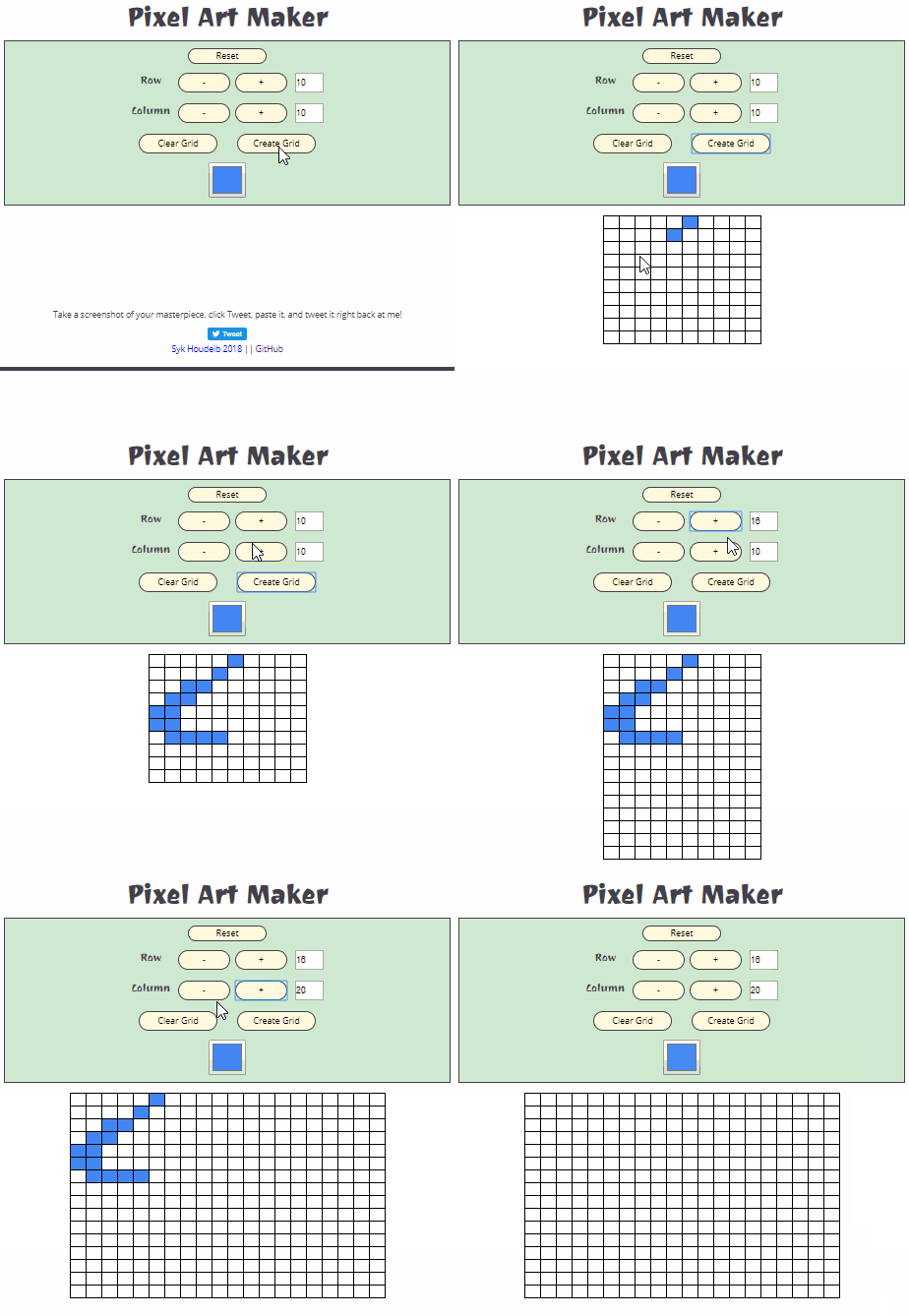
    The Pixel Art project was only one of the many excellent projects of the course. It was the most complex project I had built up to that point. It really engaged me and helped me “think like a programmer” as I tried to add more features.

    Learning Tracker

    If you would like to see more details about exactly what I did those first 10 months, checkout My-Learning-Tracker. It’s a GitHub repo where you can find every course I did and links to it. Plus many other useful resources. You can even fork it and use it as a template for your own learning tracker.

    Beyond courses: the cornerstones of success

    Courses and tutorials are great, but on their own they aren’t enough. There are plenty of other essential tools to succeed. You should give these at least as much importance as the courses you choose.

    Here are the things I found invaluable on my way from zero to a developer job.

    Staying motivated

    This was the top priority. Lose that and I got nothing. There were three things that helped me stay motivated when things got tough.

    First was my goal. I had set an objective to get a front-end developer job in a startup within a year. That made it easier to stay focused and push through moments of self-doubt and low motivation.

    Second, my network of close people. Especially my partner and a close friend who were both learning at the same time. It was very helpful doing the process with other people. They were going through the same feelings. And it was great being able to bounce ideas off of each other, reinforce our learning, and pick up tips.

    And third was the online communities. I learned a lot from people around me and constantly got encouragement and understanding.

    Staying motivated is a challenge but it can be done. It’s all about feeling that we are progressing. Keep building things, no matter how small. And don’t replicate learning methods that have failed you in the past.

    Social tools

    Top of this list for me is Twitter. It put me in touch with professionals and learners alike. It kept me informed and was a constant source of material and resources. And it helped me network and in the end, played a role in helping me find a job.

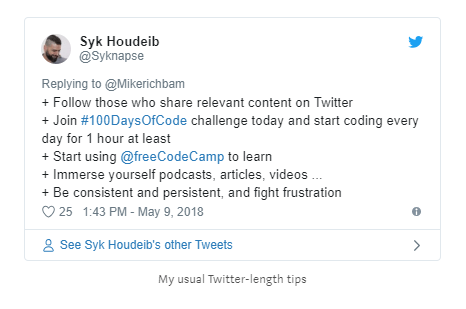
    At the heart of my Twitter experience are the closely related communities of freeCodeCamp, #100DaysOfCode, and #CodeNewbie. These are very active and supportive communities that helped me every step of the way. Alexander Kallaway’s #100DaysOfCode challenge is a beautifully simple idea that really works. Code every day a minimum of an hour, commit publicly, encourage others.

    I can’t say enough about the great role played by this community in keeping me motivated and accountable. A warm shout-out to all the good friends I made on this journey.

    GitHub

    The minute you enter into the world of code you immediately start hearing about GitHub. It can be a very intimidating place when you visit it for the first time. And since it is all about open source and collaboration you might not think that it is relevant to you as a beginner. Trust me it is.

    It’s the cornerstone of your work as a programmer. You are going to use Git with a Git hosting service on a daily basis in any job. And you quickly realise that the basics are quite simple.

    Once I got past my initial confusion, GitHub became the centre of my learning experience. It essentially became my default portfolio. That’s where all my code lived. And using GitHub Pages I got a place to host all my projects for free. I also used it to keep track of my learning, and to collaborate.

    This was even more important since I had no previous experience in the field. I only had my GitHub to show what I knew. It became the best reflection of what I could do and what I was learning, and it’s the first place most employers will look at. So I made sure it was full of projects and detailed documentation.

    A highlight moment in my learning process came when I decided to help my course mates at Udacity. I noticed that many were intimidated by GitHub. So I created a simple project for contribution with a step by step tutorial. I creatively named it Contribute-To-This-Project. Teaching is the best way to learn, and no matter how little you know, you can still help someone learn something.

    Build a portfolio

    Even with an active GitHub profile, you still need a portfolio to show your work. It’s also good practice to build a fully functional website. If you have no projects to put in your portfolio, make it and then start adding things to it as you go.

    I came up with an idea for my portfolio very early on. I drew it on a page and imagined it would be a long time before I have the skills to make it a reality. In fact, I started building it much sooner than I thought. And that is good because that first grand vision is never going to be perfect.

    It was the most complex thing I had attempted on my own from scratch. A deep learning experience that benefited me enormously. I had to constantly research to figure out how to do what I wanted to do. I spent loads of time reading MDN documentation and Stack Overflow. I had to deal with frustrations, waste hours trying to fix a bug which would turn out to be a single spelling mistake.

    But this is exactly what learning to program is all about. Those are precisely the skills I use every day on the job. Learning how to research, debug, problem-solve, and deal with frustration are the keys to becoming a developer.

    Then I finished my portfolio, and it looked and worked almost exactly as I’d hoped. I was over the moon –Behold my creation!– and almost immediately aware that it was totally useless as a portfolio! I took a deep breath, accepted it, and started building my new portfolio the next day. I wanted this one to be simple and functional. A place to showcase my work and a bit about me. It needed to work on every device. It didn’t need fireworks and magic.

    This brings me nicely to my next related point.

    Build things on your own

    Those two sites I built from scratch were the foundation of my learning. Doing something without a tutorial can be daunting. But it is great for learning, even if the result is not great. Those early pitfalls are a treasure of learning that helped prepare me during the first tough weeks on the job.

    It doesn’t mean that I shunned tutorials and directed projects. But it pushed me to add extra features to anything I was building, to take it further and do more on my own.

    It’s not important what you build, you will learn from it. For instance, I built a very simple temperature converter. That’s not exactly an exciting project but it was a challenge that I had to figure out completely on my own. And I was proud to have it working properly when I finished.

    Podcasts, articles, talks, meetups

    There is so much to learn if you are starting from scratch. Active learning time was not enough for me. I used my passive time to immerse myself and understand as much as possible about this new world I wanted to enter.

    I read articles, watched videos of talks, listened to podcasts. I generally tried to use every opportunity I had to get deeper into the concepts beyond the syntax.

    Meetups and conferences are great. I lived in a small town and managed a single tech-related event throughout that time. But if you have the chance don’t be intimidated. No one will stop you and demand you prove yourself worthy!

    Here are some of my favourite resources:

    • Command Line Heroes — Red Hat Podcast
    • Base.cs — Computer science podcast with Vaidehi Joshi
    • Syntax.fm — Wes Bos and Scott Tolinski podcast
    • CodeNewbie — Saron Yitbarek podcast
    • FreeCodeCamp Medium publication
    • Hacker Noon articles
    • Smashing Magazine — CSS articles
    • CSS-Tricks
    • Newsletters: JavaScript Weekly and Frontend Focus.
    • Crash Course: Computer Science — YouTube series
    • CS50 — YouTube videos of CS Harvard lectures
    • And of course YouTube in general for talks and non-technical aspects of the field. Here’s a link to my playlist containing many of my favourite programming YouTubers.

    Good Luck

    My learning process was intense and sometimes relentless. But it’s important to avoid burnout. I put a lot of effort into taking regular breaks, eating well, working out regularly, and resting every now and then. When it started to feel too much, I would take an afternoon or a full day off to disconnect completely.

    It was a lot of hard work and sacrifice, but for me, it was worth every second. I am very happy with my new career as a front-end developer and I would do it all again if I have to.

    And don’t be hard on yourself, your journey and the difficulties you will face will be different. Just keep going.


    I really hope you enjoyed this article and found it useful. If you did, please click the clap button — lots of times :). And if you share it even more people will get to see it, and that would be awesome!
    Follow me on Twitter and let me know if there’s anything you would like me to write about in more detail.


    每天推荐一个 GitHub 优质开源项目和一篇精选英文科技或编程文章原文,欢迎关注开源日报。交流QQ群:202790710;微博:https://weibo.com/openingsource;电报群 https://t.me/OpeningSourceOrg

←上一页
1 … 195 196 197 198 199 … 262
下一页→

Proudly powered by WordPress