• 开源镜像
  • 开源沙龙
  • 媛宝
  • 猿帅
  • 注册
  • 登录
  • 息壤开源生活方式平台
  • 加入我们

开源日报

  • 2018年11月24日:开源日报第261期

    24 11 月, 2018

    每天推荐一个 GitHub 优质开源项目和一篇精选英文科技或编程文章原文,欢迎关注开源日报。交流QQ群:202790710;微博:https://weibo.com/openingsource;电报群 https://t.me/OpeningSourceOrg


    今日推荐开源项目:《掘金翻译计划 gold-miner》传送门:GitHub链接

    推荐理由:掘金翻译计划是一个专门翻译掘金网上英文文章的社区,TensorFlow 的官中文档就是他们翻译的,除此之外,还包括诸如人工智能和区块链这样前沿的技术以及前后端这样泛用的技术,在需要学习这些技术的时候来这个社区寻找合适的文章也是一个选择。当然了,他们也欢迎新译者的加入和新文章的推荐。


    今日推荐英文原文:《How to save hours of debugging with logs》作者:Maya Gilad

    原文链接:https://medium.freecodecamp.org/how-to-save-hours-of-debugging-with-logs-6989cc533370

    推荐理由:作者在接触日志时获得的一些经验,兴许这会在需要调查日志来修复错误的时候帮上忙

    How to save hours of debugging with logs

    A good logging mechanism helps us in our time of need.

    When we’re handling a production failure or trying to understand an unexpected response, logs can be our best friend or our worst enemy.

    Their importance for our ability to handle failures is enormous. When it comes to our day to day work, when we design our new production service/feature, we sometimes overlook their importance. We neglect to give them proper attention.

    When I started developing, I made a few logging mistakes that cost me many sleepless nights. Now, I know better, and I can share with you a few practices I’ve learned over the years.

    Not enough disk space

    When developing on our local machine, we usually don’t mind using a file handler for logging. Our local disk is quite large and the amount of log entries being written is very small.

    That is not the case in our production machines. Their local disk usually has limited free disk space. In time the disk space won’t be able to store log entries of a production service. Therefore, using a file handler will eventually result in losing all new log entries.

    If you want your logs to be available on the service’s local disk, don’t forget to use a rotating file handler. This can limit the max space that your logs will consume. The rotating file handler will handle overriding old log entries to make space for new ones.

    Eeny, meeny, miny, moe

    Our production service is usually spread across multiple machines. Searching a specific log entry will require investigating all them. When we’re in a hurry to fix our service, there’s no time to waste on trying to figure out where exactly did the error occur.

    Instead of saving logs on local disk, stream them into a centralized logging system. This allows you to search all them at the same time.

    If you’re using AWS or GCP — you can use their logging agent. The agent will take care of streaming the logs into their logging search engine.

    To log or not log? this is the question…

    There is a thin line between too few and too many logs. In my opinion, log entries should be meaningful and only serve the purpose of investigating issues on our production environment. When you’re about to add a new log entry, you should think about how you will use it in the future. Try to answer this question: What information does the log message provide the developer who will read it?

    Too many times I see logs being used for user analysis. Yes, it is much easier to write “user watermelon2018 has clicked the button” to a log entry than to develop a new events infrastructure. This is not the what logs are meant for (and parsing log entries is not fun either, so extracting insights will take time).

    A needle in a haystack

    In the following screenshot we see three requests which were processed by our service.

    How long did it take to process the second request? Is it 1ms, 4ms or 6ms?

    2018-10-21 22:39:07,051 - simple_example - INFO - entered request 2018-10-21 22:39:07,053 - simple_example - INFO - entered request 2018-10-21 22:39:07,054 - simple_example - INFO - ended request 2018-10-21 22:39:07,056 - simple_example - INFO - entered request 2018-10-21 22:39:07,057 - simple_example - INFO - ended request 2018-10-21 22:39:07,059 - simple_example - INFO - ended request

    Since we don’t have any additional information on each log entry, we cannot be sure which is the correct answer. Having the request id in each log entry could have reduced the number of possible answers to one. Moreover, having metadata inside each log entry can help us filter the logs and focus on the relevant entries.

    Let’s add some metadata to our log entry:

    2018-10-21 23:17:09,139 - INFO - entered request 1 - simple_example
    2018-10-21 23:17:09,141 - INFO - entered request 2 - simple_example
    2018-10-21 23:17:09,142 - INFO - ended request id 2 - simple_example
    2018-10-21 23:17:09,143 - INFO - req 1 invalid request structure - simple_example
    2018-10-21 23:17:09,144 - INFO - entered request 3 - simple_example
    2018-10-21 23:17:09,145 - INFO - ended request id 1 - simple_example
    2018-10-21 23:17:09,147 - INFO - ended request id 3 - simple_example

    The metadata is placed as part of the free text section of the entry. Therefore, each developer can enforce his/her own standards and style. This will result in a complicated search.

    Our metadata should be defined as part of the entry’s fixed structure.

    2018-10-21 22:45:38,325 - simple_example - INFO - user/create - req 1 - entered request
    2018-10-21 22:45:38,328 - simple_example - INFO - user/login - req 2 - entered request
    2018-10-21 22:45:38,329 - simple_example - INFO - user/login - req 2 - ended request
    2018-10-21 22:45:38,331 - simple_example - INFO - user/create - req 3 - entered request
    2018-10-21 22:45:38,333 - simple_example - INFO - user/create - req 1 - ended request
    2018-10-21 22:45:38,335 - simple_example - INFO - user/create - req 3 - ended request

    Each message in the log was pushed aside by our metadata. Since we read from left to right, we should place the message as close as possible to the beginning of the line. In addition, placing the message in the beginning “breaks” the line’s structure. This helps us with identifying the message faster.

    2018-10-21 23:10:02,097 - INFO - entered request [user/create] [req: 1] - simple_example
    2018-10-21 23:10:02,099 - INFO - entered request [user/login] [req: 2] - simple_example
    2018-10-21 23:10:02,101 - INFO - ended request [user/login] [req: 2] - simple_example
    2018-10-21 23:10:02,102 - INFO - entered request [user/create] [req: 3] - simple_example
    2018-10-21 23:10:02,104 - INFO - ended request [user/create [req: 1] - simple_example
    2018-10-21 23:10:02,107 - INFO - ended request [user/create] [req: 3] - simple_example

    Placing the timestamp and log level prior to the message can assist us in understanding the flow of events. The rest of the metadata is mainly used for filtering. At this stage it is no longer necessary and can be placed at the end of the line.

    An error which is logged under INFO will be lost between all normal log entries. Using the entire range of logging levels (ERROR, DEBUG, etc.) can reduce search time significantly. If you want to read more about log levels, you can continue reading here.

    2018-10-21 23:12:39,497 - INFO - entered request [user/create] [req: 1] - simple_example
    2018-10-21 23:12:39,500 - INFO - entered request [user/login] [req: 2] - simple_example
    2018-10-21 23:12:39,502 - INFO - ended request [user/login] [req: 2] - simple_example
    2018-10-21 23:12:39,504 - ERROR - invalid request structure [user/login] [req: 1] - simple_example
    2018-10-21 23:12:39,506 - INFO - entered request [user/create] [req: 3] - simple_example
    2018-10-21 23:12:39,507 - INFO - ended request [user/create [req: 1] - simple_example
    2018-10-21 23:12:39,509 - INFO - ended request [user/create] [req: 3] - simple_example

    Logs analysis

    Searching files for log entries is a long and frustrating process. It usually requires us to process very large files and sometimes even to use regular expressions.

    Nowadays, we can take advantage of fast search engines such as Elastic Search and index our log entries in it. Using ELK stack will also provide you the ability to analyze your logs and answer questions such as:

    1. Is the error localized to one machine? or does it occur in all the environment?
    2. When did the error started? What is the error’s occurrence rate?

    Being able to perform aggregations on log entries can provide hints for possible failure’s causes that will not be noticed just by reading a few log entries.

    In conclusion, do not take logging for granted. On each new feature you develop, think about your future self and which log entry will help you and which will just distract you.

    Remember: your logs will help you solve production issues only if you let them.


    每天推荐一个 GitHub 优质开源项目和一篇精选英文科技或编程文章原文,欢迎关注开源日报。交流QQ群:202790710;微博:https://weibo.com/openingsource;电报群 https://t.me/OpeningSourceOrg


  • 2018年11月23日:开源日报第260期

    23 11 月, 2018

    每天推荐一个 GitHub 优质开源项目和一篇精选英文科技或编程文章原文,欢迎关注开源日报。交流QQ群:202790710;微博:https://weibo.com/openingsource;电报群 https://t.me/OpeningSourceOrg



    今日推荐开源项目:《JS 的 3D 动画 three.js》传送门:GitHub链接

    推荐理由:让你可以使用 JS 做出各种 3D 效果的库,目前在 GitHub 上已经获得了 46k+ 的 star 数。你可以在它们的官网上看到相当丰富的示例和详细的文档,兴许你在一开始接触这个库的时候可能都不敢相信 JS 竟然能实现这样的的效果。如果需要的话不妨了解一下这个库,兴许能为个人网站增色不少。


    今日推荐英文原文:《Tips on how to become a software developer》作者:Francisco Gaytan

    原文链接:https://medium.com/@chesco.me/tips-on-how-to-become-a-software-developer-6b47c6693736

    推荐理由:给想要成为开发者的人的一些小建议,包括前端后端和移动开发三个方面

    Tips on how to become a software developer

    How do I get started as a developer? This is probably the question I get asked the most on social media. I run a page on Instagram called @thedevelife, with 47k followers at the time I’m writing this. That question comes up at least once a day. It is also a hard question to answer.

    Sometimes people get glamoured by the pictures they see on Instagram of a dude attempting to be code at the beach on a sunny day. I’ve been a programmer for more than ten years, and I have not been able to code at the beach efficiently. I have attempted it a couple times, but it did not work out for me. At least in my experience that has been the case. What I’m trying to say is that sometimes people want to become programmers for the wrong reasons. Aspiring developers like the freedom being portrayed in social media, but sometimes that is all it is, just a portrayal. There is a lot of freedom that comes along with being able to work from any place with a WiFi connection, but there still some limitations. There are a lot of good things that come from being a programmer, the biggest, in my opinion, is knowing that someone out there is using an application you built in their everyday life. I became a programmer because I love to create cool shit and then eventually the perks of being a programmer came along.

    When I give advice to someone on how to get started, I lead with the following questions.

    What do you see yourself doing as a developer?

    Do you see yourself working on the front-end, back-end, maybe programming for mobile devices?

    Depending on the answer to these questions, the steps anyone looking to become a developer should take might be slightly different. There isn’t an answer that fits all situations. Also, I cannot provide advice on areas I have not enough experience with like Big Data, AI or IOT. I am familiar with back-end development, mobile, and web development being my strength (my kung-fu is pretty strong when doing work for the web), so if you want to pursue any of those areas I have deficiencies on, I apologize (sad face), I can’t be of value there.

    Let me start with bad news first. If you aren’t able to sit in front of the computer for long periods of time and work late nights, sorry to say this might not be for you. I say this because you will have to work long hours to develop an application worthwhile, once that application goes live you might be required to work even longer hours. If the app goes down for whatever reason, you will be expected to show up in the office (or get online at 3AM) to help resolve the issue. At the very least you will have to respond as soon as possible, even if you are working on another project. If you don’t like the sound of this, maybe being a developer might not be for you.

    Something else you will need is to have is a mind of a problem solver. I have met programmers who struggle because they are not able to solve a problem or are not resourceful enough to look and find the information that will aid them to resolve the issue at hand. You will not be expected to have a swift solution to every problem that is thrown at you, but the expectation of you being able to solve issues will definitely be a factor in your success as a dev.

    Now that we got all the negativity out of the way let’s get into something more constructive. Don’t try to take on too much too fast. I suggest you get proficient at one thing at a time before moving onto learning something else. Figuring out where you want to end up working will help with this. If you’re going to be a full-stack web developer, focus on either the front-end or the back-end until you learn it, then and only then move on to the other. Trying to learn both at the same time might overwhelm you. Let’s explore or this scenario a bit more. Let’s assume you will choose to learn the front-end first, then move on to the back-end and you know your way around a computer, but have not taken any computer science courses.

    Front-End Web Development

    HTML, CSS and Javascript. Those are the main things you will need to learn to be able to build a UI. JavaScript can be used on the back-end, but in this case, JavaScript will be used for the UI. HTML and CSS, go hand in hand, and without being familiar with those two, you won’t get far, so I advise you learn these first. Then you can get familiar with JavaScript, pure JS without jQuery or any other framework or library. I would only devote enough time to learn how to access DOM elements (by the way if you don’t know what some of the acronyms or terms mean, I will make a list at the bottom of the most common ones) and make simple manipulations to HTML elements. Once you feel comfortable moving around the DOM, I recommend choosing a JavaScript framework. I like ReactJS (technically, React is a library, but many refer to it as a framework), there is also Angular and VueJS which are very popular. All have their pros and cons, the reason why I chose React is that is the most versatile, and once you know ReactJS, the learning curve to learn React Native is small, this will be an advantage if you ever want start building mobile applications. Take some time to do some research and pick the one you think is the best.

    Mobile Development

    Like web development there a few flavors you can choose from. You can be a truly native developer and learn Java or Kotlin to develop for Android then learn Swift to code for iOS devices. Or, you can choose React Native for which you need to learn JavaScript and develop for both platforms, Android, and iOS at the same time. I personally chose this route because using React Native is just a hop away if you are already familiar with ReactJS. React or React Native will require you to have knowledge of JavaScript. Another advantage is that if you start with mobile development using React Native moving your skills to web development the learning curve will be minimal.

    Back-End Development

    Here is where you can choose from a plethora of frameworks, some of them are PHP, Python, Java, Ruby On Rails, NodeJs and many more. The best approach for planning out your back-end is to develop a RESTful API your web application or mobile application can access to be able to send and retrieve data securely. All the frameworks or languages mentioned above can help you achieve this. The frameworks I work with are .NET Framework and .NET Core with C# as the language of choice. Again, I was pragmatic with my approach I chose C# because I can build applications for many platforms and there is a ton of documentation on how to get started with Web APIs. The main thing to keep in mind is to make sure you can reuse your code and/or web API(s) as much as you can.

    I don’t expect this to be a guide on how to become a developer. I would look at it more like a set of tips that I wish someone would have shared with me when I was starting out. I’d love to hear your thoughts on this, you can find me at @chesco.me or @thedevlife on Instagram.


    每天推荐一个 GitHub 优质开源项目和一篇精选英文科技或编程文章原文,欢迎关注开源日报。交流QQ群:202790710;微博:https://weibo.com/openingsource;电报群 https://t.me/OpeningSourceOrg
  • 2018年11月22日:开源日报第259期

    22 11 月, 2018

    每天推荐一个 GitHub 优质开源项目和一篇精选英文科技或编程文章原文,欢迎关注开源日报。交流QQ群:202790710;微博:https://weibo.com/openingsource;电报群 https://t.me/OpeningSourceOrg


    今日推荐开源项目:《古老的开源 MS-DOS》传送门:GitHub链接

    推荐理由:MS-DOS 是 20 世纪的操作系统了,它诞生在 20 世纪的末尾,然后在 21 世纪开始时被 Windows 取而代之。对于大多数人来说在 20 世纪的末尾他们才刚刚出生而已,对于 MS-DOS 的熟悉度肯定是比不上 Windows 的。不过虽然 Windows 10 明天突然开源了这种事情应该是不会发生,但是微软把这个古老的操作系统 MS-DOS 开源了,对它有兴趣的朋友可以去看看这个项目;兴许 20 年或者 50 年以后, Windows 10 也会变成古老的操作系统在 GitHub 上开源吧。


    今日推荐英文原文:《Cookies vs. LocalStorage: What’s the difference?》作者:Faith Chikwekwe

    原文链接:https://medium.com/@faith.chikwekwe/cookies-vs-localstorage-whats-the-difference-d99f0eb09b44

    推荐理由:Cookies 是服务器在用户端暂存的数据,而 LocalStorage 则是服务器在用户端进行的更大的数据存储,这篇文章为我们对比了这两者的不同

    Cookies vs. LocalStorage: What’s the difference?

    Cookies — Photo by rawpixel on Unsplash

    For a long time, cookies were the main way to store information about users visiting your app or website. They were used to record stateful elements like shopping cart items or options changed by a user. They were also used to remember user browsing habits or to keep a user logged in while they went from page to page. Then, HTML5 appeared on the scene and introduced LocalStorage as another data storage option. This new Javascript object (along with SessionStorage) boasted a much large storage capacity than cookies at a whopping 5MB. In this article, we will compare and contrast cookies and LocalStorage.

    Cookies — Small, but Mighty
    First, we’ll start by exploring basic information about cookies. We’ll also go over some of their pros and cons. So, what are cookies? According to whatarecookies.com, they are small text files that are placed on a user’s computer by a website. They hold a very small amount of data at a maximum capacity of 4KB. Cookies are used in different ways, such as in storing the pages visited on a site or a user’s login information. They are limited in that they can only store strings.

    Many secure websites employ cookies to validate their users’ identities after they’ve logged in to prevent them from having to re-enter their credentials on every page. Another use for cookies is to customize or adjust user experience based on limited browsing history on the site.

    Two Types of Cookies — Photo by Oliya Nadya on Unsplash

    Two Types of Cookies
    There are two types of cookies: persistent cookies and session cookies. Session cookies do not contain an expiration date. Instead, they are stored only as long as the browser or tab is open. As soon as the browser is closed, they are permanently lost. This type of cookie might be used to store a banking user’s credentials while they are navigating within their bank’s website since their information would be forgotten as soon as the tab is closed.

    Persistent cookies do have an expiration date. These cookies are stored on the user’s disk until the expiration date and then permanently deleted. They can be used for other activities such as recording a user’s habits while on a particular website in order to customize their experience every time they visit.

    Macbook — Photo by rawpixel on Unsplash

    LocalStorage — A More Permanent Solution
    After HTML5 came out, many uses of cookies were replaced by the use of LocalStorage. This is because LocalStorage has a lot of advantages over cookies. One of the most important differences is that unlike with cookies, data does not have to be sent back and forth with every HTTP request. This reduces the overall traffic between the client and the server and the amount of wasted bandwidth. This is because data is stored on the user’s local disk and is not destroyed or cleared by the loss of an internet connection. Also, as mentioned before, LocalStorage can hold up to 5MB of information. This is a whole lot more than the 4KB that cookies hold.

    LocalStorage behaves like persistent cookies in terms of expiration. Data is not automatically destroyed unless it is cleared through Javascript code or unless there is an expiration date set. This can be good for larger bits of data that need to be stored for longer periods of time. Also, with LocalStorage you can not only store strings but also Javascript primitives and objects.

    People visiting a website — Photo by John Schnobrich on Unsplash

    Uses of LocalStorage
    In my back-end web development course, we discussed cases where LocalStorage would be superior to cookies. An example of a good use of LocalStorage might be in an application used in regions without a persistent internet connection. My course instructor, Dani Roxberry, built such an application in the past and used LocalStorage to protect and store data collected in areas with spotty WiFi or data connections.

    In order for this to be a good use of LocalStorage, the threat level of the data stored in this situation would have to be very low. To protect client privacy, it would be good to upload the data when connection is re-established and then delete the locally stored version. Additionally, it would be advantageous to encrypt data that was being stored so that it would not be easily hacked. In our class discussion, we also established that highly vulnerable data, such as financial information, could not be stored or secured properly using LocalStorage in this way.

    Conclusion
    While these storage options have their positives and negatives, they both have applications in modern web development. Cookies are smaller and send server information back with every HTTP request, while LocalStorage is larger and can hold information on the client side.

    When you make your next application, think about these various uses and decide which type of storage is right for you.


    每天推荐一个 GitHub 优质开源项目和一篇精选英文科技或编程文章原文,欢迎关注开源日报。交流QQ群:202790710;微博:https://weibo.com/openingsource;电报群 https://t.me/OpeningSourceOrg

  • 2018年11月21日:开源日报第258期

    21 11 月, 2018

    每天推荐一个 GitHub 优质开源项目和一篇精选英文科技或编程文章原文,欢迎关注开源日报。交流QQ群:202790710;微博:https://weibo.com/openingsource;电报群 https://t.me/OpeningSourceOrg


    今日推荐开源项目:《基于 Java 的社区平台 symphony》传送门:GitHub链接

    推荐理由:这个开源的社区平台几乎已经完成了绝大多数作为一个普通论坛需要的功能,而且还提供了诸如连接个人博客内容和论坛帖子内容,编辑时自动处理剪贴板这样的方便功能。不过相比于开源版,推荐企业网站和盈利网站使用的闭源商业版则增添了更多方便的特性,不过在小编看来……购买闭源版那  ¥20000 价格还是不算少的。

    顺带一提,这个英文单词的意思可不是同情心,同情心是 Sympathy,交响乐才是 Symphony。


    今日推荐英文原文:《That time I coded 90-hours in one week.》作者:Bob Jordan

    原文链接:https://medium.com/@bmjjr/that-time-i-coded-90-hours-in-one-week-a28732cac754

    推荐理由:当作者终于获得了安详美好的环境来专心写代码时他都干了些什么

    That time I coded 90-hours in one week.

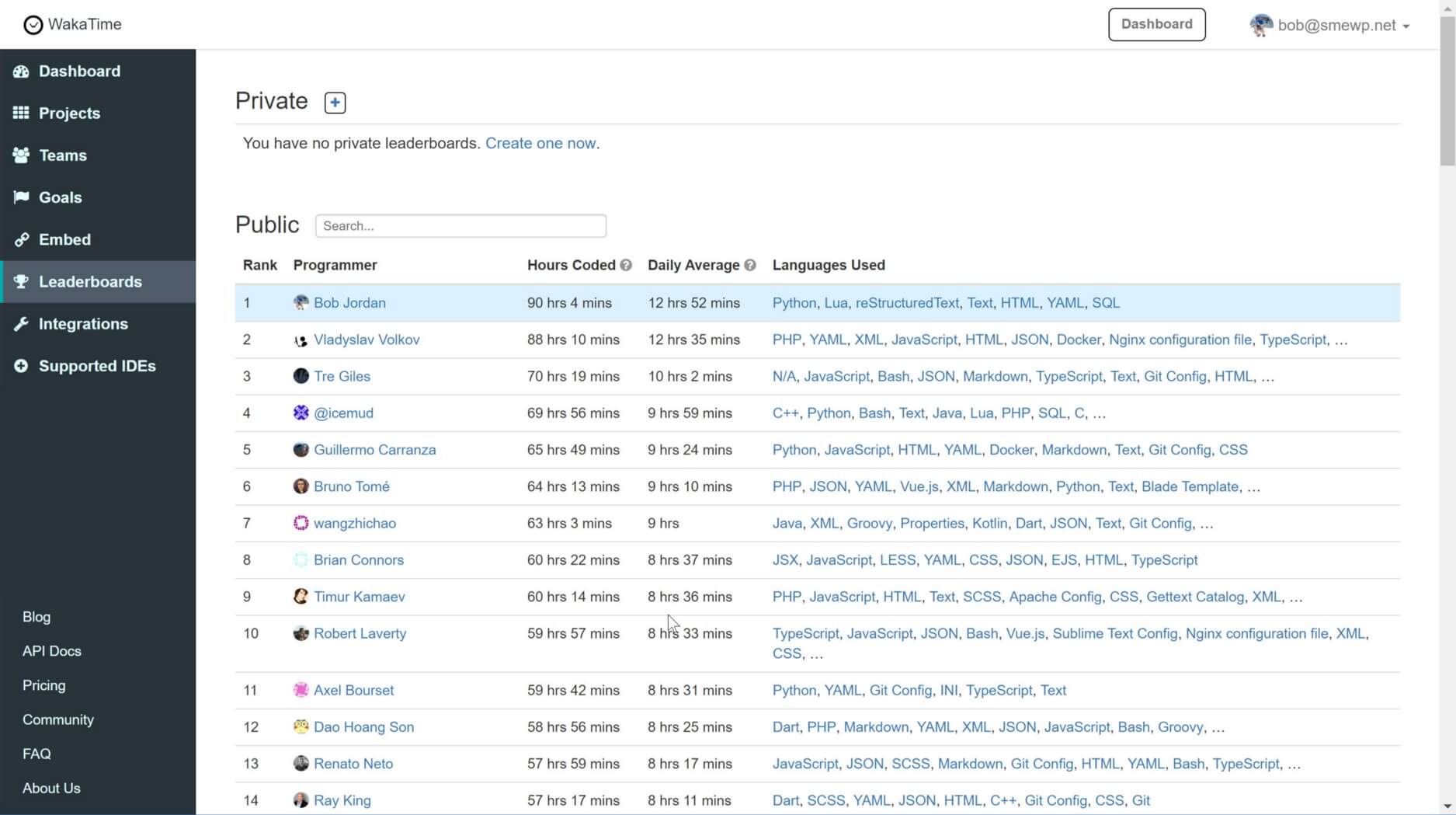
    That’s me, in 1st place, for hours coded in a week. Uh, I won?

    This past month in October, for various reasons, I had more time to code than I’ve probably ever had.

    One week, I was able to focus on coding pretty much every waking hour. That week, I hit the #1 spot on the Wakatime coding hours leaderboard, with over 90-hours of programming time recorded.

    How and why did this happen? Let me back up a bit.

    My family and I live in Shenzhen, China, which is right next to Hong Kong. The first week of October is a major national holiday here.

    Most companies shut down for the week, and people will travel back to their hometowns for holiday break. So, my wife, who is from China, decided to take our two kids back to her hometown, to visit my in-laws.

    The in-laws live in a fairly remote place, in the far North, along the border with Russia and North Korea. It’s a 14-hour trip one-way. So, my wife planned to stay the entire month. Meanwhile, I stayed behind in Shenzhen, to work.

    Now, it is a great trip, up North to see the in-laws. I get to do things like, throw rocks across a river at North Korea. And inevitably, each trip, my in-laws speak at length about how much fatter I became since my last visit.

    Then, they give me acupuncture and make tasty Chinese medicines for me to drink three times per day. Yes, I missed some good times at the in-law’s house. Luckily, I’m on a diet, and I’ll see them again soon, in February.

    My children, visiting the in-laws, in the North of China

    But, let’s face it. Otherwise, it was glorious. I love to code. But, it’s hard to get that focused zone time, in your spare time, with the kids crawling on you.

    At this point, I’ve been using Wakatime to track my coding hours for about three years. In all that time, I never tried to be #1 for hours coded. I’m just trying to ship some useful software for my business.

    But, when I looked up after hitting several +12 hour days of coding this month, and found myself in the top 10, with the wife and kids out-of-town, well OK, game on. But, it was challenging and almost didn’t happen.

    One programmer by the name of Vladyslav Volkov came on strong with his PHP fu, day after bloody day. I’ve seen days where like 70-hours over the trailing week, would take the top spot. Nope, not this week. Hell, I felt like I was in Rocky IV. I had to respond with several all-day drives, to finally take the #1 spot from Vladyslav, and ultimately maintain it for an entire day.

    Hard to find that kind of competitive drive when you are coding alone and not tracking your time!

    Now, time for observations and takeaways. I want to review, how does my work in October, translate into programming productivity and code quality?

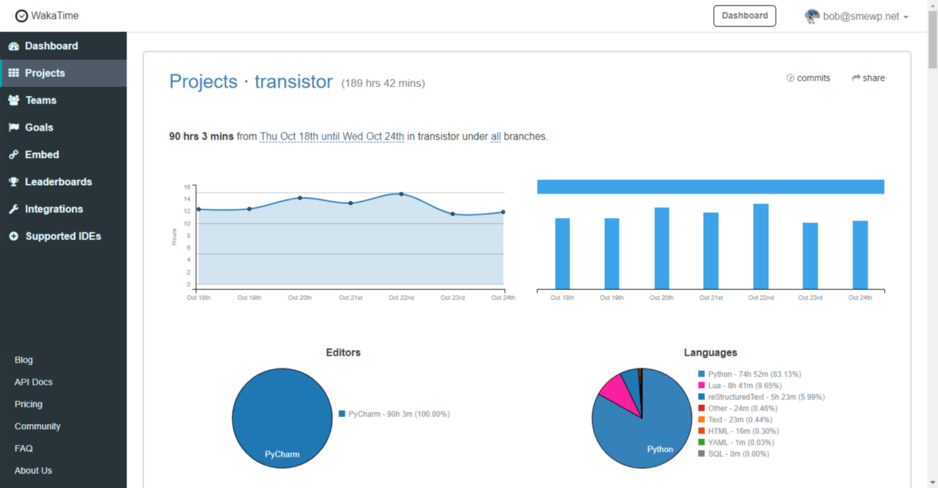
    Wakatime, breakdown of a 90-hour week.

    I know that some of you hackers may immediately think, “if he spent 90 hours programming in a week, it probably means, his skills are not very good.”

    Well, I’m the management. Not strictly a professional programmer. I need to do a lot of other work through the week, besides programming. So, there may be some truth to that.

    Programming with python has been a serious focus of my spare time over the past seven years. Before that, my skills were basically wrapped up in being a standard MBA excel jockey, with a few Access databases thrown in for depth. Which, by the way, Access can be handy. No slight from me.

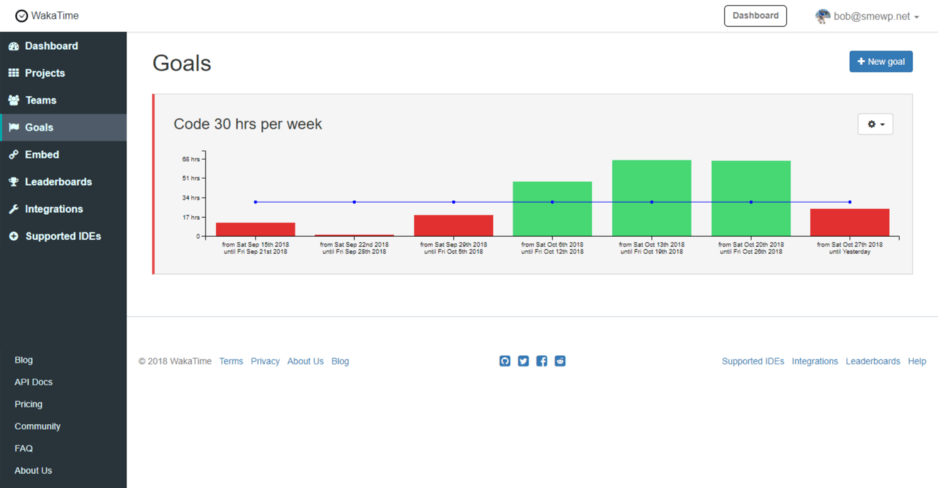
    With that, practice makes perfect. One Wakatime feature I like is that it allows setting a running goal for coding hours. For several years now, I’ve had a running stretch goal to hit 30 hours of coding each week.

    I have a running stretch goal to achieve 30 hours of coding per week. I don’t always get there!

    Hitting that 30-hour mark on top of everything else I deal with at work and with family is difficult. When I do achieve it, I’ve either had a rare week where everything went exceptionally smooth or else, I’ve gone out of my way to make it happen.

    But now, after several years of work and practice, I’m finally at the point where I can keep my fingers hitting the keyboard, whenever I have time to code. For me, that didn’t come quick or easy.

    Further, it can be a shock, after working a 12-hour day, to only end up credited for a fraction of that time. In my case, this was generally due to, #1) reading external docs, #2) googling, and #3) searching stack overflow.

    All those things are great, to a point. But, they are easy to overuse, and can ultimately become a hindrance toward making real skill improvement.

    With that, a key behavior tracking my coding time helped me change is, now I read a lot more source code, as the first source. And, my work is better for it.


    So what am I working on? Well, from a top level. The current end-to-end experience of designing and building custom manufactured products really sucks. I’m building BOM Quote Manufacturing with a vision to make it better.

    The strategy I chose in starting BOM Quote MFG seven years ago, out of necessity to earn a living while bootstrapping, is what I call, “Factory First.”

    By that, I mean quite literally, first, we built a fully licensed export CM factory in Shenzhen, China. We help customers by building and shipping their custom designed retail packaged products.

    Doing all the offline stuff to get our private factory setup in China, took several years of work with a hefty dose of patience. Now, we are following up with custom software, to help us improve our service, efficiencies, and scale.

    With that, nearly all my 30-hours per week coding goal over these last three years went toward building our core bomquote.com web app. It aims to wrap a solid layer of communication and processes, around our interaction with both customers and suppliers.

    One of the problems we repeatedly face boils down to gathering and assimilating data which is available on the internet.

    For example, data about pricing and stock status for electronic components, as listed on many websites which sell such things.

    Fact is, much of the data that we need to move quotes forward, especially early in the product development process, is available on the internet. We need to automate that web data gathering.

    So, I present Transistor, a flexible web scraping and data persistence framework. Transistor will serve as the nucleus of our own web data collection efforts, at BOM Quote Manufacturing.

    Transistor supports using scrapinghub’s Splash “javascript rendering service” as a headless browser. It also supports their crawlera “smart proxy” service. Transistor uses well-known libraries like python-requests, beautifulsoup4, mechanicalsoup, and gevent. Scrapy is not required.

    Frankly, at this point, you should probably just use Scrapy, unless you suspect you have some valid reasons for not using it as I did. But, further detailing Transistor and it’s use, is better left to the README and future articles.


    Transistor started as a utility module inside our core bomquote.com web app. I worked on it about 32 hours and had written the first 2000 lines of code before I decided to break it out into a dedicated repository.

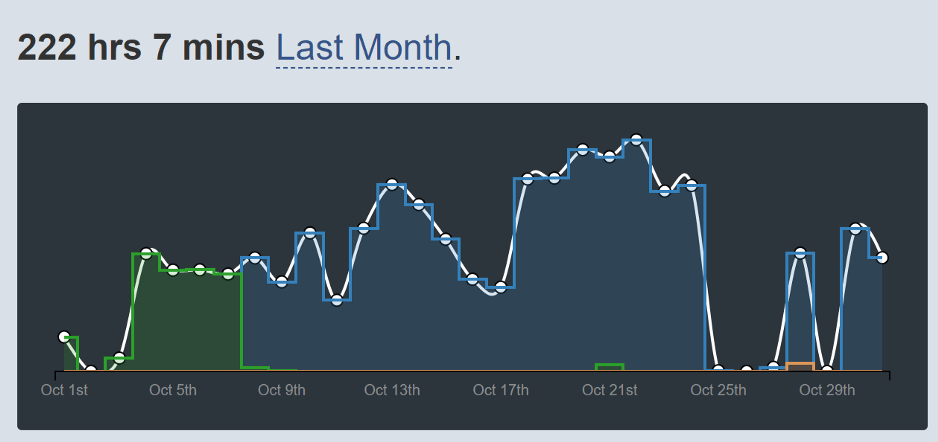
    My development hours, over the Month of October

    That first 32 hours and 2,000 lines of code, is the part in green in the chart above. And, below is how my time looks in Wakatime for the for Transistor repository, from the initial commit with that first 2,000 LOC on October 7th:

    Wakatime dashboard for Transistor

    In summary, I logged about 220 total hours on Transistor in October. Factoring in about four days off from coding, that’s a little over 8-hours per day in daily average coding hours, for the days I worked.

    In moving beyond hours tracked, Wakatime runs out of legs. I use other apps for insight, including codecov.io and codeclimate.com. Those two overlap a bit, in that Code Climate offers some feedback on test coverage, if you use it. While, I’ve always preferred to continue using codecov.io for test coverage, due to it’s UI.

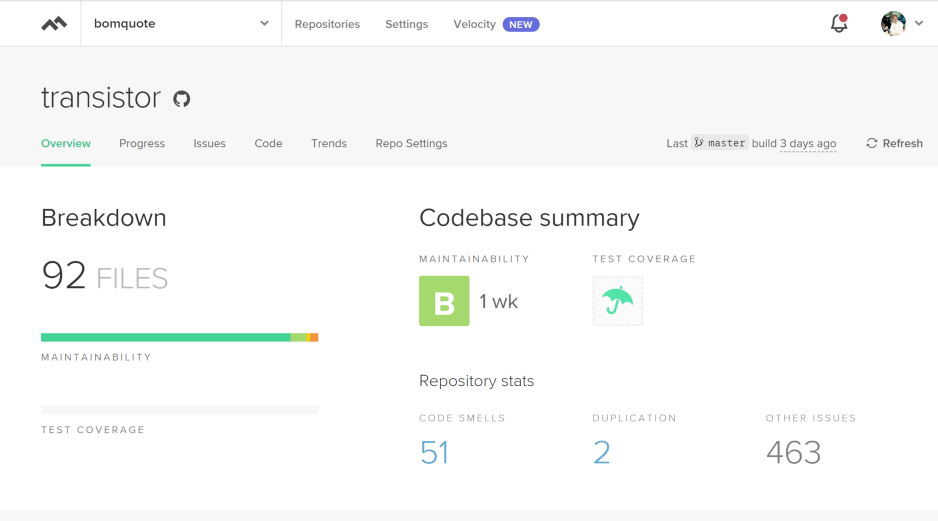
    But hands down, Code Climate is the best service I use to provide feedback on my code, other than test coverage. And, here is what Transistor looked like at the end of October, on the overview page, in Code Climate:

    Code Climate, overview page

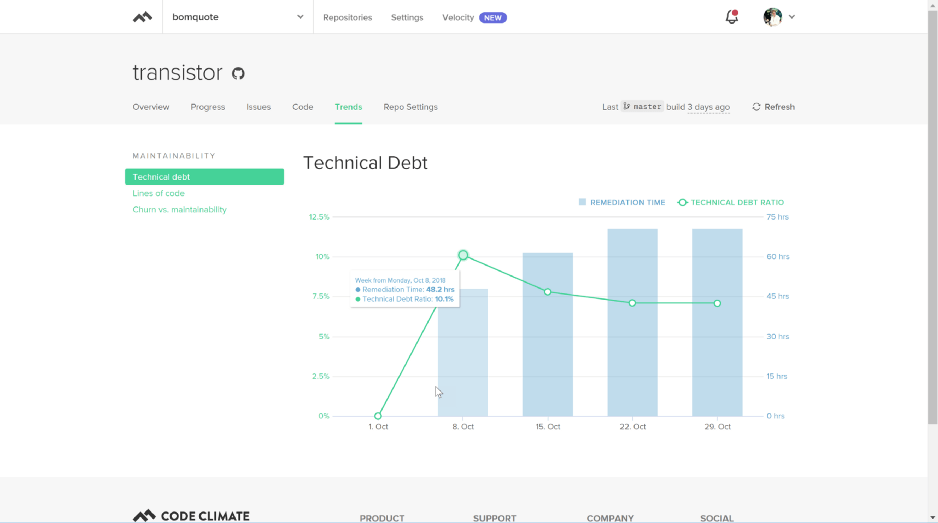
    Clicking on the “Trends” tab will bring up a “Maintainability” page with a few different sections. The view defaults to the first section, “Technical Debt,” shown below:

    Code climate, technical debt page.

    The technical debt section reports, I started with about 50 hours technical debt on my first commit, in that first 2000 lines of code. But the first 2000 lines of code only took me about 32 hours. So, I coded 32 hours to create 50 hours of technical debt? Seems a bit off.

    Over the following two weeks, total debt hours increased, while the debt to lines-of-code ratio decreased, as I committed an additional 2,000 lines of code. While only adding 20 hours more technical debt over that time frame.

    So, what is technical debt? Basically, it is a measure of the estimated time required to resolve items that Code Climate surmises I should fix in my code.

    For example, functions and class methods with high “cognitive complexity.” In my case, there were two “D” graded files for my initial pass at low-level website scrape logic, with about 300 lines of code in each file.

    I knew that code was nasty when I wrote it, but thanks Code Climate, for confirming it. And, most of the 463 other issues are PEP-8 infractions for line code length. Should be 79 chars while I set mine at 88 chars. Sorry, not sorry.

    Takeaway? I love the code grades and smell highlights. But, it also seems to me, they’ve overstated the technical debt workload. It should take me like one day, to clean up a majority of the noted technical debt issues. Definitely, not seventy hours of work.

    Further, it is off by such an amount that, I’d hate to expose my team to those time estimates as anchor points. The code climate algorithm could use some management tuning. Shouldn’t blindly accept that number from the team.

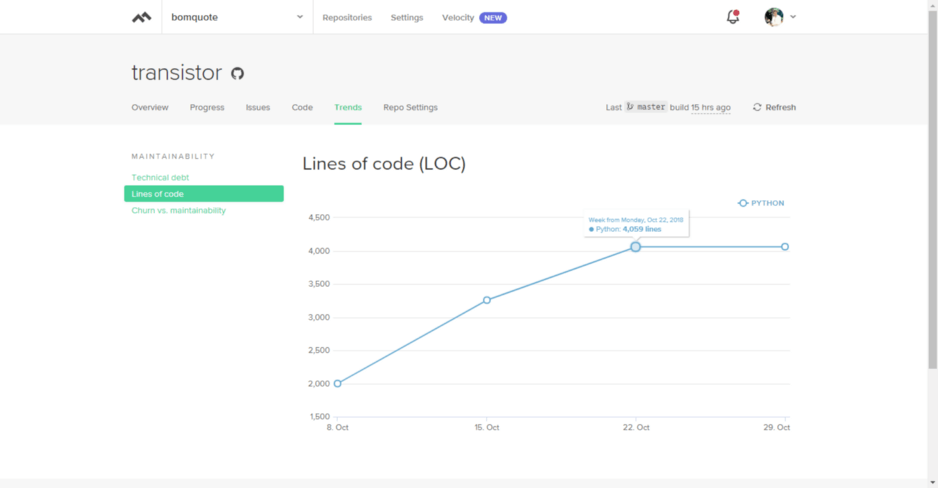
    Next, Code Climate has a lines-of-code chart. It shows, my first repository commit was on October 8th. And, it shows that in October, I committed about 4000 lines of code to Transistor.

    Code climate, lines of code page.

    In my first week developing Transistor, I had an open canvas. So, it was not super challenging to write 2000 lines of python code from scratch. But after that, it became more difficult to churn out lines.

    This chart shows, I only wrote 800–900 lines, the week I worked 90 hours, Oct 17-Oct 24th. Looking back, by then, I was more constrained in my canvas and spent much of the week optimizing Lua scripts to reduce crawl time. The result was, my LOC per work-hour, dropped quickly.

    Takeaway? Lines of code helps tell a story, but it isn’t the full story. Productivity gauged on LOC must be done in full light of the situation.


    Now, if you’ve made it this far, some of you TDD adherents may be saying, “but the test coverage! How are the tests!”

    Well, I love tests. And, we will use Transistor in our bomquote.com web app, which currently has +1300 tests. I did write 24 tests to help ensure I didn’t break things while abstracting into a more general framework.

    But, working solo on a new framework with a churning API while in create mode, I’d prefer to write most tests when I’m done creating. That’s non-zone time work which I’ll fit in-between helping my kids play Minecraft.

    Next, a note about ergonomics. I use the classic Microsoft Sculpt accessories, and I don’t try an all-day coding session without them. I also always use a high-quality solid aluminum trackpad which stays very cool to the touch against my skin. This soothes my wrist when I use the mouse.

    Lastly, if you don’t use a programming time tracker like Wakatime, I can recommend it. I’d probably be about half as productive, without tracking my time. If you are serious about getting coding done, track your time.

    Happy coding!


    每天推荐一个 GitHub 优质开源项目和一篇精选英文科技或编程文章原文,欢迎关注开源日报。交流QQ群:202790710;微博:https://weibo.com/openingsource;电报群 https://t.me/OpeningSourceOrg

←上一页
1 … 194 195 196 197 198 … 262
下一页→

Proudly powered by WordPress