• 开源镜像
  • 开源沙龙
  • 媛宝
  • 猿帅
  • 注册
  • 登录
  • 息壤开源生活方式平台
  • 加入我们

开源日报

  • 2018年11月28日:开源日报第265期

    28 11 月, 2018

    每天推荐一个 GitHub 优质开源项目和一篇精选英文科技或编程文章原文,欢迎关注开源日报。交流QQ群:202790710;微博:https://weibo.com/openingsource;电报群 https://t.me/OpeningSourceOrg


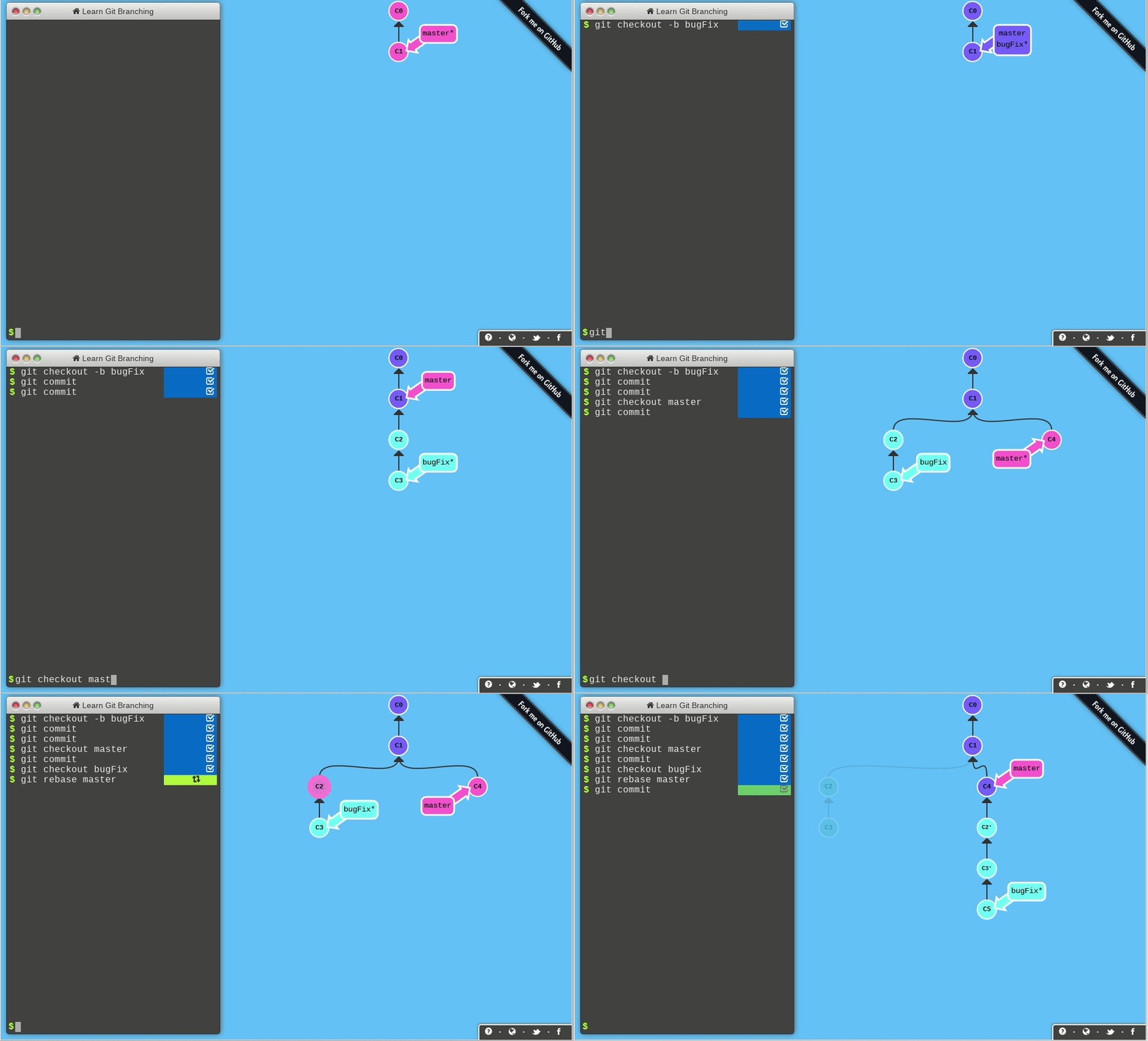
    今日推荐开源项目:《Git 的生动形象学习法 learnGitBranching》传送门:GitHub链接

    推荐理由:如果你是 Git 的初学者,现在还在对各种命令搞不清楚,那么这个项目就是一个不可错过的好教程。不同于普通的 Git 教程,它在右边提供了一个可视的板块可以让你更轻松的理解自己的所作所为究竟改变了什么,生动形象简单方便,你可以选择跟着它提供的教程一步步走,当你熟练之后也可以直接打开沙盒模式随意的输入命令来观察,不管怎么说,对于 Git 的初学者这会是一个好选择。

    今日推荐英文原文:《How Can I Maximise my Software Team’s Productivity?》作者:Rizwan Iqbal

    原文链接:https://medium.com/seerene/how-can-i-maximise-my-software-teams-productivity-2013f2a60430

    推荐理由:当你作为领队时,让你的团队更具有生产力所需要注意的几个关键点

    How Can I Maximise my Software Team’s Productivity?

    Often resembling an endless treadmill of balancing the interests of man and machine in the name of the abstract ideal of ‘’Results’’, the task of maximising a software team’s productivity preoccupies many engineering managers’ minds. Between ensuring that developers are completing their tasks efficiently and to a high standard, while considering the essential human element of considering how a software team consists of a team of individuals who must be kept in a happy and peaceful state of mind, it isn’t simple at the best of times.

    Engineering Managers must keep close at heart the needs to understand how to repay technical debt in a timely manner, whether their engineers are productive, how to overcome obstacles so that they can do their jobs as easily as possible, the matter of ensuring quality work and how to perform weekly 1:1s with their developers. To help them balance between these various and often contradictory elements, a dependable strategy can be instrumental in helping them ensure that none of these factors slip through the net in the day-to-day activity of a software team.

    This involves a careful, ergonomic balancing of the drive for hard, factual achievement in a scope of objective data and soft, subjective human nature, where an optimum system of exchange and feedback creates a sparkling golden balance where developers’ efforts feed into fruitful maintenance and expansion of a codebase.

    Measuring Developer Throughput

    Counting as the first key measure of productivity, engineering managers commonly refer to a calculation of developer throughput as a means of judging their current degree of productivity, and so as a way of understanding how far they could improve beyond this level. As a reading that defines the amount of logic added over a week, calculated as effort and delta logic points divided by the total number of working hours, throughput indicates how effectively developers’ time converts to results in the codebase.

    Amongst all this comes the considerations of ensuring that developers integrate thorough documentation to their workflow, ensuring that future development has a greater chance of happening seamlessly. Such increases readability for those new to the company and enables them a positive level of throughput from the outset. Measuring throughput also allows the manager to identify and mentor struggling engineers with a lower throughput, where tools can help to indicate where they’re perhaps needing some assistance with a certain skill-set; with java, typescript, and so on. Addressing these issues can be a simple, single step to unblocking an obstacle to productivity.

    Preserving Quality

    Of course, speed comes with a greater quantity of commits, with stale branches resulting in merge conflicts and delayed productivity. In striving for maximised productivity, it’s important to have a team commit often, and understand the importance of each commit after it’s merged to a branch.

    However, speed shouldn’t come at the expense of quality, and it’s equally important for managers to have processes in place that make it easier to write and test code accurately, even while working at speed. Developers shouldn’t be tempted to compromise on the sophistication of their code in order to commit work more quickly, and measuring code coverage enables managers to understand whether the standard is slipping, or whether the developers’ efforts continue to sustain an overall measure of improvement. However, code coverage shouldn’t be an absolute measure unless enforced through code reviews.

    Team Churn & Being Human

    Although a software developer’s work sits on a computer and happens through a screen, it’s important to remember that all teams consist of human individuals where each person has their own methods of approaching work and understanding the concepts within. Applying a team churn metric indicates the degree of procrastination present in the team, by showing how much time sits between engineers first being presented with a task and their completion of the work set and measuring activity on the project over time. This is an area where the appropriate tools can be of huge assistance to engineering managers for seeing how their workforce are coping with the demand, by visualising the dynamic between specific applications or projects and the teams and analysing this relationship according to a series of performance metrics.

    However, maximising a software team’s productivity ultimately rests upon applying intuitive, careful human judgement to accurate data readings, and it’s essential to remember that numbers don’t necessarily speak the truth on behalf of subjective individuals, and the best engineering managers excel from an ability to engage and interact with every member of a team. A high amount of time spent on a task may simply indicate a high degree of difficulty from the complexity of the code, or a backlog of undocumented work. While accurate metric readings for developer throughput and team churn support informed evaluations on the manager’s behalf, it’s always essential to combine this degree of sensitive intuition with objective data.

    Developing Beyond

    Once the evaluations have been made and the manager has defined the appropriate sites for improvement, what remains is integrating fresh goals and objectives at the heart of the team and encouraging the fluid communication and collaboration that promotes progress for the group of engineers. By looking at where skills could be matched with metrics — such as, assigning an engineer with strong readings in tackling complex code to an area of the codebase with high complexity, — and preparing training scenarios with developing resources in mind, managers can steer their team to maximising their productivity with a careful balance between human and metrical elements. Human behaviour shifts and changes, as does that of a codebase, and considering a team as dynamic and capitalising upon the potential for positive change by identifying key areas of focus can sit as the bottom line for a software team’s success.

    Interested in finding out more? Head to Seerene.me to uncover more pearls of wisdom on transforming the efficiency of a software team.


    每天推荐一个 GitHub 优质开源项目和一篇精选英文科技或编程文章原文,欢迎关注开源日报。交流QQ群:202790710;微博:https://weibo.com/openingsource;电报群 https://t.me/OpeningSourceOrg

  • 2018年11月27日:开源日报第264期

    27 11 月, 2018

    每天推荐一个 GitHub 优质开源项目和一篇精选英文科技或编程文章原文,欢迎关注开源日报。交流QQ群:202790710;微博:https://weibo.com/openingsource;电报群 https://t.me/OpeningSourceOrg


    今日推荐开源项目:《对不起,这个表情制作真的是可以为所欲为的 sorry》传送门:GitHub链接

    推荐理由:相信大家已经在各种地方看过对不起有钱真的可以为所欲为的 gif 了,这个项目就是可以让大家自己填词的 gif 生成器。不仅可以为所欲为,元首和工作细胞的 gif 也同样支持,如果想要增加自己表情收藏的话完全可以试一试这个。


    今日推荐英文原文:《Flutter: the good, the bad and the ugly》作者:Marco Bellinaso

    原文链接:https://medium.com/asos-techblog/flutter-vs-react-native-for-ios-android-app-development-c41b4e038db9

    推荐理由:在移动端 app 开发中作为新生势力的 Flutter 的优缺点

    Flutter: the good, the bad and the ugly

    Here’s the app I developed to experiment with Flutter, Little Tales. It’s an audio player for fairy tales, with content included and some specialised features. The first three screens with a dark theme are from the Android version, while those with a light theme are running on iOS.

    This time last year I published an article with my impressions of React Native, which was all the rage in 2016 and 2017, with companies such as Facebook, Instagram, Tesla, Walmart, Airbnb, Skype and more investigating it, or even actually implementing apps (or subsections) with it.

    But this year, React Native seems to be losing (or have already lost) much of its appeal, with some notable companies have announced they are abandoning it (check out this article by Airbnb’s Gabriel Peal, or this other one by Udacity’s Nate Ebel). Talking to developers and judging from what’s being published in articles, or from what recruiters look for on LinkedIn, it would appear that it’s just not that hot anymore. To be clear though, it’s not dead and the fact that it didn’t work so well for some companies doesn’t mean that it won’t work for others. Many of these companies used it on subsections of their apps rather than on all of it, which is one of the reasons it was so complex to use. However, one can’t deny that if big companies that contribute to the popularity of a technology (by writing about it and creating popular open-source libraries for it) eventually decide to leave it, it has an impact on the community. At the very minimum, teams that were previously on the fence about using it had an easier decision to make, using posts such as the above to back up their arguments.

    But in 2017 something else happened. Google publicly released an early alpha version of its own cross-platform technology for mobile apps, Flutter, during the Google IO developers conference. Fast forward to this year’s conference and the brand announced that Flutter was ready for production and at the end of September it had a Release Preview 2. Read the full announcement on its blog — here are just some highlights:

    1. The theme for this last release is pixel-perfect iOS apps (while the focus previously had mostly been on Android’s Material Design).
    2. Note the app’s reduced package size, with a minimal Android app now just 4.7MB when built in release mode.
    3. Flutter, which has been open-source since the beginning, entered the list of the top 50 most active repos on GitHub.
    4. Some big companies are using it, such as as Alibaba (Android, iOS), Tencent (Android, iOS), and Google Ads (Android, iOS). There’s also a video on how Alibaba used Flutter to build its Xianyu app (Android, iOS), currently used by more than 50 million customers in China.
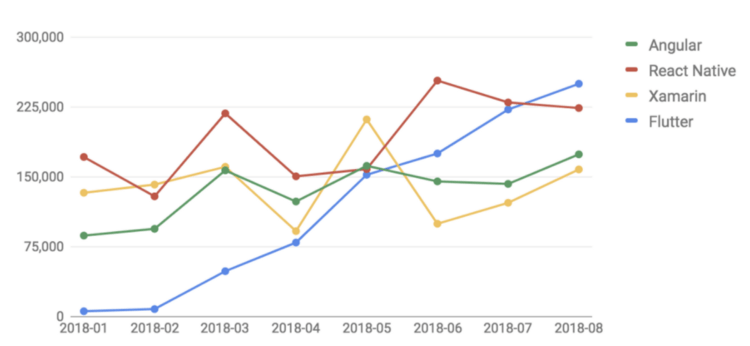
    5. This chart shows how Flutter is getting a lot of momentum on Stack Overflow:

    So, this intrigued me enough to check it out, understand what it is all about, and create a real application with it (because, as always, just reading the documentation is not enough to get a real feeling of something new). It definitely helped that the last Friday of the month at ASOS is Tech Develops, where the entire tech department — almost a thousand people — are free to investigate any new tech we’re interested in.

    You see some screens (for both Android and iOS) at the top of this page, and can download the Android version from the Play Store — feedback is appreciated!

    What is Flutter and what does it do?

    1. It’s an open-source software development kit (SDK), developed by Google, to quickly build iOS and Android apps, sharing most of the code. It works in conjunction with the Android and iOS SDKs, which also means you still need a macOS machine to build for iOS (just like you do for React Native and Xamarin). The installation for Android was very smooth for me — I just followed the instructions on the website and used the ‘flutter doctor’ command, but I initially had some issues with the iOS setup. This article by Laxman Sahni helped set it up correctly.
    2. It uses the Dart programming language, also developed by Google. Yes, another language to learn but don’t worry, it’s super easy if you’re familiar with Java, JS, Kotlin, Swift or C#.
    3. The application is compiled ahead-of-time into native ARM code, not at runtime as in React Native. This gives better performance because there’s no JS bridge in the middle to parse and execute the code. However it also means there’s no over-the-air update option by downloading a new bundle of JS code at runtime.
    4. Rather than being a wrapper on top of the iOS/Android-specific native UI components (which is what React Native and Xamarin do), it really draws the UI from scratch on a ‘screen canvas’, through a fast C++ 2D graphics library called Skia (which also serves as the graphics engine for Google Chrome, Chrome OS, Android, Mozilla Firefox and Firefox OS, and many other products). The Skia project started back in 1996 and was acquired by Google in 2005, although it’s released under the BSD license and anyone can use it. This has huge consequences — I talk more about this in the pros and cons sections below.
    5. Similarly to React Native, Flutter is also based on a ‘unidirectional data flow’ architecture, or reactive programming, briefly but clearly explained here by Elizabeth Denhup. In even fewer words, the app reacts to user input by changing variables/properties (or more generically, the ‘state’ of the screen or view), and the UI is re-rendered according to the new state. Functions don’t change the UI (the colour of button, the text of a label, the content of a list, etc.), directly.
    6. Again, similarly to React Native, there is hot reloading (thank God!). You just change something in the code editor, save, and the UI refreshes on the Android emu or iOS sim. It’s so convenient and fast that it’s hard to go back once you try it and it makes up for the fact that the UI is created programmatically and therefore there’s no visual editor for it.
    7. Flutter is extensible with third-party plugins that add new custom-drawn UI components or wrap platform-specific features not already covered by the built-in classes (eg: for video/audio, monetisation, storage, camera, augmented reality, machine learning etc.). Here’s the best collection of plugins I’ve found. There are many, but not as many as you might need.
    8. Linked to the previous point, Flutter makes it relatively easy to write platform-specific code by either executing different code after checking Platform.isIOS and Platform.isAndroid (if there’s a difference in the UI widgets you want to instantiate, or logic in your .dart file), or by writing your own native plugins (if you really need to wrap platform-specific functionalities not provided by Flutter already).
    9. Also linked to point 7, performance should not be a problem for typical apps (at least in release mode — debug mode is significantly slower because it uses a virtual machine to run Dart code), as the UI is written by a fast low-level C++ lib, and other functionalities map to their native counterparts. However, you must do it right, by minimising the number of redraws and by redrawing only parts that actually depend on the changed state. Refer to this article by Andrea Bizzotto and this other one by Simon Lightfoot to find out more.
    10. You can use any text editor and the flutter command to write and build apps, but the recommended approach is to use one of the editors that support the Flutter plugin, namely Android Studio (my choice), VS Code or Intelli J. This gives you intellisense, autocompletion, some debugging tools and spares that you need to use the command-line to compile/run the apps.
    The sample Flutter Gallery app, which showcases many of the Android and iOS UI components.

    To get a sense of the performance and the look and feel of a Flutter app in comparison to a Native app, just download the Flutter Gallery app from the Play Store (and maybe look at its source code on GitHub). Also, refer to the Widget Catalog page in the official docs.

    The good

    You do know the movie ‘The Good, the Bad and the Ugly’, right?
    1. The fact that Flutter does its own UI drawing rather than being a wrapper around the platform-specific native components has both pros and cons. The pro is that if something is rendered in some way on your test iPhone with iOS 12, for example, it should be rendered in exactly the same way, not only on any other iOS version but also on any Android phone. With React Native or Xamarin, the UI components have a number of properties that are only supported in one platform or the other, or maybe they are supported but translated in slightly different ways to their native counterparts behind the scenes. This means that you either need to test on a lot of devices and OS versions (and potentially write platform specific code to fix some situations), or just know that it might look broken (or at least different) for some users. Your app might even crash if you use an attribute or a feature that’s not supported on a specific OS version. With Flutter you will be much safer (at least for the UI part of the app). You should still check the app on multiple devices, especially if you use third party plugins that do map to underlying platform-specific native components. This will be the case if you use things like audio/video, push notifications, in-app billing etc.). The negative side of this approach is covered in the next section of the article.
    2. Hot reloading is just too useful, it’s a developer’s dream come true: ⌘+S in the editor, and the app reloads in a sec on the sim! Goodbye to the endless build / wait / run / wait / test / start-over endless process. In reality you still need to rebuild when you change assets and plugins, change something in the navigation, state initialisation or logic, but most UI changes are applied immediately while the app is running. For apps that are UI-heavy, this is where you’d dedicate most of your time.
    3. I like the overall principle of small reusable components that react to a change in the ‘state’, which is also one of React’s and React Native’s core ideas. Reactive apps can also be developed in pure iOS and Android development of course, but it’s easier and more natural with Flutter (and RN). This is because it’s at the core of the technology, rather than something that’s provided by third-party libs and implemented in dozens of different ways.
    4. Dart is simple but a powerful and complete language, comparable to Swift, Kotlin or Java. Asynchronous programming with async/await/Future is a breeze, and it also feels complete and consistent (I can’t say the same about JavaScript).
    5. Flutter and Dart have built-in support for both unit testing for logic, and widget testing for UI/interactions. For example, you can send tap and scroll gestures, find child widgets in the widget tree, read text, and verify that the values of widget properties are correct. The official docs does a good job at clearly presenting what’s available. This article by Devon Carew shows how the Flutter plugin makes it all well integrated into your code editor.
    6. I love the built-in support for theming every aspect of the app’s UI. The most difficult part in creating the light and dark themes of my app was actually picking the right colour (I created just two, but could have created 10 with the same approach). In terms of code, it’s just a few lines (basically set the theme property of the root MaterialApp object — see this for a full example).

    Bonus: This is an advantage of any cross-platform technology in reality, not just Flutter, but I’m still going to mention it: creating an app for both platforms at the same time makes it much easier to keep them aligned at all times. With the traditional development process, you might launch both platforms at the same time and with feature parity but then after a short while you realise that one platform is performing better than the other (in terms of downloads, sales, ad revenues, …). Then you start cutting costs on the other, which means that one is partially left behind.

    The not-so-good

    Also taken from the movie…really, watch it if you haven’t already. (Or maybe I’m just old and you’re too young to like these things, who knows).
    1. As mentioned a couple of times already, Flutter paints the UI on its own custom way, it doesn’t create native components. It does a very good job at replicating Android’s Material Design and also iOS-specific components with its Cupertino library but it’s still not native under the hood. This has a few implications, such as:
      (A) If iOS 13 changed the way a segmented control or a UISwitch is rendered, your Flutter app that uses CupertinoSegmentedControl or CupertinoSwitch would keep the old look until Flutter is updated and you rebuild it. One can argue that many users wouldn’t care (most of my non-techy friends wouldn’t care and wouldn’t even notice, for example, they’d just care about the app looking pretty enough rather than whether it’s 100 per cent consistent with the OS’s pure look and feel), but it might be a deal breaker if you’re a purist.
      (B) If you plan to use Flutter for just a section of an existing app (which is covered here in Flutter’s wiki, here in an article by Tomek Polański, and here in an article by Jan Reehuis), you might see a difference between the native part and Flutter part. Again, this might bother you (and your users) or not. Much less of a problem for new apps that are 100 per cent Flutter of course.
      (C) To make things as easy as possible for you as a dev, and assuming that your users don’t care about the native look of the app, you could just use MaterialApp (which uses Material Design components) and compile it for both Android and iOS. It will work fine, despite the non-native appearance, and it is in fact what I did for my app. If, instead, you do care about this, and decide to use MaterialApp for Android and a CupertinoAppfor iOS, you’ll be duplicating most if not all the code for your UI (which can be a considerable part of your app), and you’ll make the architecture more complex. Consider this carefully and decide if it’d be worthwhile.
    2. Here is a decent list of great looking UI components and other pluginson GitHub, but it’s nowhere as rich as the plugins you can find for React Native and even Xamarin. It’s probably just because Flutter is much newer and with a smaller community but that’s how things are at the moment. Choices are limited, and many plugins are old, not maintained, and maybe don’t even work anymore with the current Dart/Flutter versions. Some components (especially non-UI ones, that map platform-specific features) are only available for either iOS or Android, but not both (typically they support Android, because Android devs are more into Flutter than iOS devs at the moment, since Flutter comes from Google). It’s true however that filling in the gaps and writing the platform-specific code just for the missing platform is still better than starting from scratch and things will improve for sure if Flutter keeps getting more and more popularity.
    3. Debugging is not at its best. You can use the print/debugPrintstatements, look at logs, and use tools to profile the CPU/memory or visualise the view hierarchy, but we’re on a different planet in comparison to what you do in Xcode or Android Studio working with the native SDKs. (More about your options in the official docs here.)
    4. The error screen or logs that you get when there’s a layout error (or something else at a lower level) can be very confusing and obscure, as it points to some line of code of the framework that is maybe many levels of abstractions below what you directly interact with. On native iOS and Android, errors are usually clearer to understand, and, if not, you can typically just copy and paste the full error on Google and be reasonably confident that you’ll get a useful list of links that tell you more. With Flutter, since the community is still relatively small, not so much.
    5. Creating the UI programmatically (in the same .dart files where your code for the screen is) is easy and direct. It also means there’s not much separation. I would prefer to create the UI with markup code (similar to what you do in native Android apps) in separate files.
    6. On Android, the vast majority of developers use Clean Architecture and MVP (model-view-presenter). On iOS, it can be MVC, MVVM (model-view-viewmodel) or Viper. In both cases (but even more for Android) there are clear and well known architectural patterns that have proven to work well for large apps. For Flutter (and React Native as well), it feels like it’s all still being defined, there is no ‘standard’ or ‘almost-universally-accepted’ architectural approach. All articles show simple samples, which is normal because they still need to take people onboard before talking about more advanced aspects. However, if you plan to use Flutter for a rather large project, it would be preferable to have a clear idea of how to structure it, so that it’s scalable and easily maintainable as the app grows in size and complexity. I highly recommend watching this video from Brian Egan to start looking deeper into this (it covers layering your code, Redux and testing) and checking out his samples on GitHub. I also recommended this article about Streams and RxDart by Didier Boelensand these other posts about Redux and overall architectural review. Again, I’m definitely not saying Flutter doesn’t allow you to build apps with a clean and maintainable architecture, but just that there’ll be some trial /error / experimentation / study involved, as it’s not something as mature and widely used as what we’re accustomed to in native iOS/Android apps.

    Conclusions

    I could almost copy and paste what I wrote last year about React Native, but instead, here’s the link to it again. To summarise: there’s lots of potential, it’s very easy to get started and actually create something real, and there are many good principles and ideas. However the community is still small and bits and pieces are missing in terms of cross-platform plugins, or there is not much choice in the best case. Also, you must be OK with the fact that you won’t have a 100 per cent native-looking UI, and that if you want to at least be as close as possible for both iOS and Android, your code and structure will get more complex.

    Personally, I think this is a very useful technology (that you can already use) for those situations where:

    1. You must be as quick as possible to reach the widest user base possible — say a startup that is starting from scratch and wants to release for both platforms. See if there’s traction in one or both, and then invest more, polish things etc. You could see this as a very advanced prototype, which can be further polished later still staying on Flutter or replaced by a native version and a dedicated team.
    2. The UI is not the biggest concern anyway — for example Enterprise/B2B apps, where you want to have a line-of-business app that employees/customers can use with any type of device, but aren’t too concerned about it being consistent with everything else in the OS ecosystem. This is what Groupon did for its app for merchants (but not end users), for example.

    What I can say in closing is that creating my first simple app has been very enjoyable for the most part, and even though I have developed quite a few iOS and Android native apps in the past, I’m sure it took me less time to create this one in Flutter (albeit I started with no knowledge of it) than what it would have taken me to create two separate native apps. Not bad, I’d say!


    每天推荐一个 GitHub 优质开源项目和一篇精选英文科技或编程文章原文,欢迎关注开源日报。交流QQ群:202790710;微博:https://weibo.com/openingsource;电报群 https://t.me/OpeningSourceOrg
  • 2018年11月26日:开源日报第263期

    26 11 月, 2018

    每天推荐一个 GitHub 优质开源项目和一篇精选英文科技或编程文章原文,欢迎关注开源日报。交流QQ群:202790710;微博:https://weibo.com/openingsource;电报群 https://t.me/OpeningSourceOrg


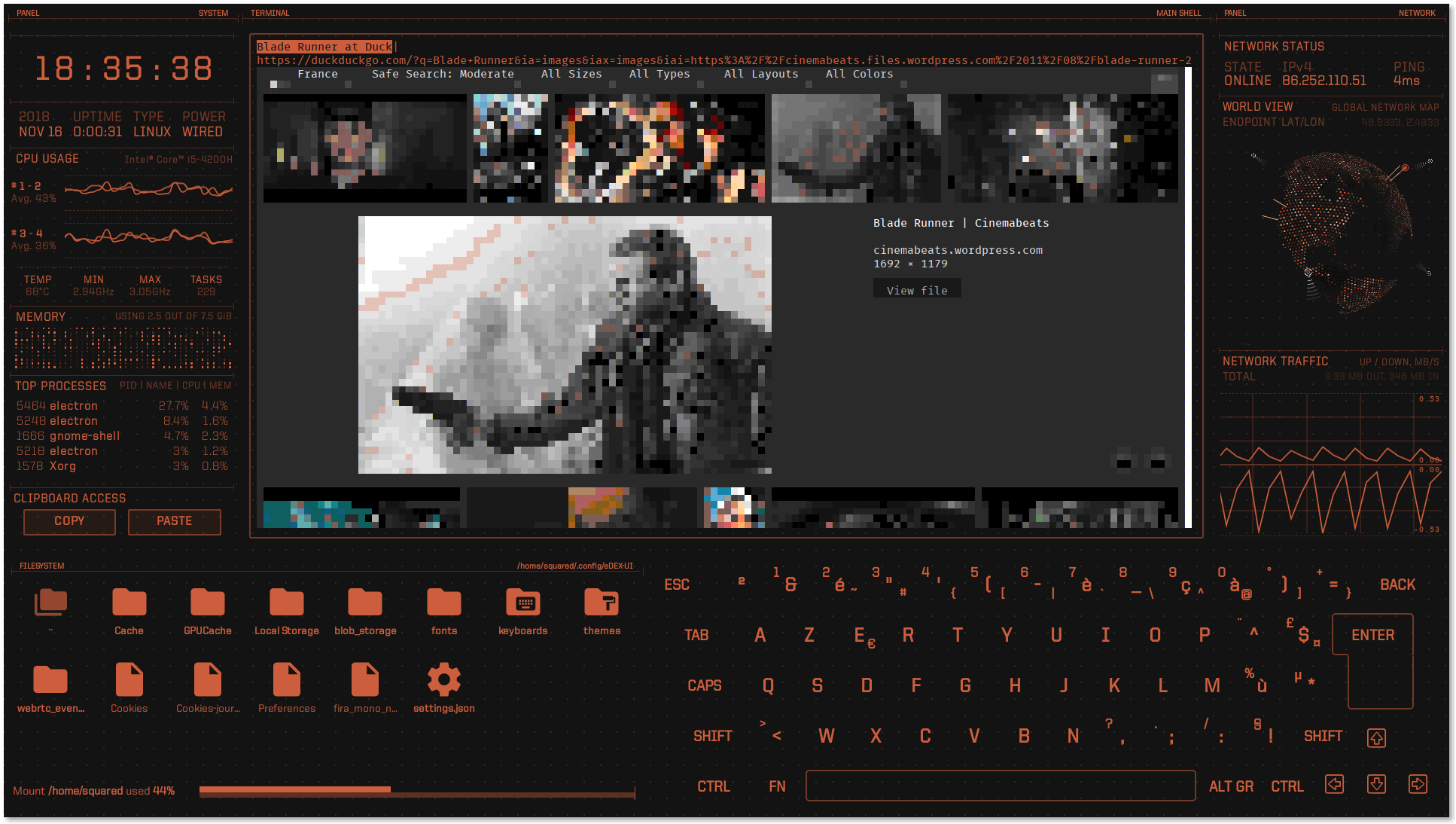
    今日推荐开源项目:《这玩意就像电影里的那个 edex-ui》传送门:GitHub链接

    推荐理由:这个项目能够让你的命令行界面变成一个桌面——超酷的桌面。上面放上各种各样的电脑当前情况,摆个文件管理器和键盘,再把画风放上面一加,就像电影里面那些超酷的桌面一样,如果你想要自己试试看成为电影里的主角,或者……用这个让你的朋友们吓一跳,都是很容易做到的事。


    今日推荐英文原文:《How to Manage Product Strategy and Prioritize Like a Pro? Guide for Product Managers》作者:Alexander Sergeev

    原文链接:https://medium.com/@humanoit/how-to-manage-product-strategy-and-prioritize-like-a-pro-guide-for-product-managers-3641011140f2

    推荐理由:如何管理产品战略和优先级,主要介绍了产品战略,按照 GIST 来进行的计划和对优先级进行排序的方法

    How to Manage Product Strategy and Prioritize Like a Pro? Guide for Product Managers

    What will you do in product management if you can not deal with strategic planning? How will you succeed if you are not able to prioritize correctly?

    No kidding — a clear strategy and powerful prioritization really matter in product management. Any ambitious product manager should strive to develop skills and abilities that will help him/her to build a great strategy like famous far-sighted commanders.

    These thoughts pushed our team to compile best ideas for creating the Ultimate Guide to Product Strategy Planning and Prioritizing.

    In this guide, we share the insights for product and project managers and everyone who wants to learn more about product strategy and the power of prioritization.

    Why is it worth to be read?

    The Guide will be useful for product managers, project managers, marketers, and team leads if they want to know:

    1. How to define, describe and manage product strategy like a Pro?
    2. How to apply a GIST planning system, created by Itamar Gilad?
    3. How to simplify GIST for small projects and small teams?
    4. How to choose the best way for ideas and features prioritization?
    5. How to score features using appropriate methods?

    Here’re the most important extracts:

    Part 1. Product Strategy

    Any product strategy is a basis for the entire product lifecycle. It is aimed to achieve a specific objective. Let’s say, it’s like a route getting you from point A to point B.

    A product strategy consists of 4 parts: vision, goals, metrics and actionable plan.

    • Product vision that includes details on the market opportunity, target customers, product positioning, a competitive analysis, and a market plan. It also describes who the customers are and what they need.
    • Product goals that should be measurable and time-bound objectives that have clearly defined metrics associated with them. Product goals help you to set what you want to achieve in the next quarter or another period of time (to increase revenue, expand into new countries, increase mobile adoption, and so on).
    • Product metrics that allow you to measure the progress of goals achievement. They should be specific and measurable.
    • Actionable plan

    Part 2. All about GIST

    The concept of GIST planning is clearly described in Itamar Gilad’s article.

    In fact, plans quickly go out of sync with reality — the longer they are the more they are wrong. Roadmaps and Gantt charts are helpful, however, there is no room for agility — changes at the top cause huge ripple effects of replanning and project cancellations at the bottom.

    The usage of GIST planning system assists to solve such problem: you get the lightweight plans that are built for change. They lower management overhead, improve team velocity and autonomy, set a proper cross-company alignment and ultimately products and solutions.

    The author’s version of the GIST planning system as the abbreviation consists of the following blocks:

    • Goals describe the company strategy in terms of desired outcomes: where we want to be, by when, and how will we know that we got there.
    • Ideas describe hypothetical ways to achieve the goals. They are hypothetical because there can be many ideas on how to achieve a given objective, but at most 1 in 3 ideas will deliver a positive result. Product managers collect all ideas in an Idea Bank, prioritize them using appropriate prioritization methods and frameworks and put as many ideas as possible to the test in order of priority.
    • Step Projects occur when the bigger project behind the idea should be broken into small parts, each no more than 10 weeks long (according to GIST). Each step-project is like an experiment that tests the idea.
    • Tasks are the parts of every step-project. This part of the system is well covered by Agile planning tools, Kanban boards, and other modern development project management techniques. There is nothing to change at this level.

    The process of GIST planning may seem too complicated, that’s why we offer a simplified version of the system.

    Part 3. How to simplified GIST?

    This planning approach may look redundant for small projects. The Step Projects Itamar Gilad writes about what is needed for large projects when the cost of developing a single feature can reach hundreds of thousands dollars.

    Step Projects are really useful for large projects because they help to validate ideas as soon as possible in order not to spend huge sums on the full development of the idea. However, for example, in mobile apps development, you can act without Step Projects. So after we’ve chosen the best ideas with the help of prioritization, we write the tasks for their implementation, collect the requirements, write specifications and push them to development. At the end of the sprint, we put them to production and can collect data and feedback of users.

    The simplified process looks easy: we set goals, choose appropriate metrics for control and collect the ideas that can improve these metrics. Then we conduct a Lean prioritization of ideas, apply features scoring, and finally write the task for the features that have won. Then the features get broken into tasks and they are pushed to development. And that’s it.

    Part 4. Lean Prioritization is the way to success

    There are many prioritization techniques, frameworks, and methods. In the Ultimate Guide, we describe in details the following:

    2×2 matrix for prioritization as the classic approach based on the initial Eisenhower matrix with two axes. Choosing the framework, you may set your own criteria and score product ideas, features and tasks. For example, such prioritization methods as Value vs Effort, Value vs Risk, Value vs Cost can be easily visualized with the help of this framework. Here’s the explanation of Value vs Effort system:

    ICE Scoring — the simple way to get things done and prioritize product features without extra requirements. All you need is to calculate the score per idea, according to the formula: Impact*Confidence*Ease=ICE Score, where:

    Impact demonstrates how much your idea will positively affect the key metric you’re trying to improve; Confidence shows how I’m sure about all my estimates — both about impact and effort (how my estimations look like a truth); Ease is about the easiness of implementation. It is an estimation of how much effort and resources are required to implement this idea.

    These values are rated on a relative scale of 1–10 so not to over-weigh any of them. You can choose what 1–10 means, as long the rating stays consistent.

    RICE Scoring that includes 4 components: Reach rates how many people each feature will effect within a certain period of time and how many of them will notice the changes; Impact demonstrates how the feature will contribute to the product and how will the project impact your customers; Confidenceshows how I’m sure about all my estimation — both about impact and effort (how much my estimations look like a truth); Effort is estimated as a number of “person-months”, weeks or hours, depending on needs. It is the work that one team member can do in a specific month.

    You need to rank proposed features with a Reach, Impact, Confidence, and Effort, and use the final score you’ve come up with to decide what should be implemented at first.

    Part 5. Features Scoring

    Weighted Scoring allows evaluating features by your own criteria. Each criterion can have its own weight and scale (from 0…to 10). Using this prioritization approach, you can take your features or initiatives, rank them with the help of a benefit-versus-cost framework on a number of criteria, and then use the scores you’ve come up with to decide which initiatives make the cut. This method of scoring can be useful for companies to evaluate what they think is the relative impact on strategic objectives for a group of possible new features.

    Other prioritization techniques and methodologies

    Nowadays product managers may find dozens of classic and innovative prioritization techniques and approaches. We combine the most interesting of them in Hygger University section. Here’re top-6 according to their popularity among our users:

    • Value vs Cost
    • Kano model
    • MoSCoW prioritization method
    • Buy a Feature
    • Feature buckets
    • KJ Method

    What’s next?

    If the process of prioritization was successful, then everything is rather simple: all tasks go to development according to Scrum or Kanban and the product manager will have to track their progress.

    You may get more details about Scrum and Kanban development from our articles:

    • How to do Kanban with Hygger Software?
    • How to Do Scrum with Hygger Software?

    Here I’ve tried to combine the most important points from the guide that is posted on Hygger blog. Of course, many of its parts are written here in brief and generally. If you are interested in details and more insights, feel free to dive into the original article.

    Have a nice read!


    每天推荐一个 GitHub 优质开源项目和一篇精选英文科技或编程文章原文,欢迎关注开源日报。交流QQ群:202790710;微博:https://weibo.com/openingsource;电报群 https://t.me/OpeningSourceOrg

  • 2018年11月25日:开源日报第262期

    25 11 月, 2018

    每天推荐一个 GitHub 优质开源项目和一篇精选英文科技或编程文章原文,欢迎关注开源日报。交流QQ群:202790710;微博:https://weibo.com/openingsource;电报群 https://t.me/OpeningSourceOrg


    今日推荐开源项目:《各种语言各种算法 Algorithms》传送门:GitHub链接

    推荐理由:兴许你已经在 GitHub 上看到过不少使用不同的语言实现算法的项目了,这个项目相当于一个总集篇,将各种算法的各种语言实现方法集合起来,还包括一些常见的数据结构,虽然现在的算法和数据结构种类并不算丰富,语言的种类也仅限于 C/C++,Java 和 Python,如果你想为这个总集篇添砖加瓦的话也非常欢迎做出贡献。


    今日推荐英文原文:《George’s Five Rules for Debugging》作者:George Alan Heimel

    原文链接:https://medium.com/square360/georges-five-rules-for-debugging-ddd37dda57c4

    推荐理由:调试代码的五条准则,这玩意就像解数学题,不是你做不对,而是没有看见正确的方法,如果真的想调好它,就一定要记住——永远不要放弃。

    George’s Five Rules for Debugging

    With all the automation available, sometimes we need to step back and review the basics.

    Between modern IDE’s, automated linting, advanced cli’s and technology like Selenium, it is easy for developers to let the tools do the testing. It is also possible to have all the automated testing in the world tell you your code is perfect, yet we don’t end up with the results we expect. On those rare occasions, the developers’ fervent cry of “that’s impossible” rings out, and we need to get back to basics to ease the pain.

    I have boiled my years of code writing and debugging down to a set of five seemingly simple rules. If they seem overly simplified… they ARE. They have been condensed because much more detail than this then people forget them or they glaze over and don’t get through all the rules. These rules scratch the surface of more complex discussions, but this is meant to introduce those larger topics. I may expand upon some of them in the future.

    Rule #1: There is ALWAYS a reason

    Despite the statements like:

    • That’s impossible
    • It can’t be doing that
    • There is no reason for that code not to work

    There is ALWAYS a reason that code either breaks, gives the wrong result or won’t even compile. ALWAYS. Even when the linter says it is all good. Sometimes we get so deep into the code and what we are currently looking at we lose sight of the bigger picture. Most web, app or software project these days are complicated things. The more ambitious the project, the more moving parts and details there are. There are just so many ways that can affect your code that we can get lost in the errors and not remember that.

    PEBKAC

    Take a step back. Take a deep breath. Then take another look. Don’t rely solely on the tools. Review your logic and step through it. Look at how the piece you are working on fits into the larger whole. There is a reason for a problem and many times it is a PEBKAC issue. Problem Exists Between Keyboard and Chair.

    And for goodness sake when you are trying to fix something, please don’t change ten things and then wonder which one did not work. Sometimes debugging requires a little patience and a lot of small changes. Be methodical and precise like a scalpel, don’t be the shotgun.

    Rule #2: RTFM & WTFV

    Most developers are pretty smart people. Sometimes too smart for their own good. We all think “I don’t need the intro or basic tutorial. I can jump into the advanced stuff because I’ve used something similar before!”

    Ok, sure. Most of us can get by with the ‘learn as we do’ method for most simple projects. The issue arises when you are several weeks into a larger, more complicated project and realize that you wrote everything based on a wrong assumption about that new framework, language, tool, etc.. You will now have to waste time and sleep to fix it. Take the basic step and:

    Read the F***ing Manual or Watch the F***ing Video.

    Photo by Christin Hume on Unsplash

    Sometimes there is a small crucial detail in the basics of a new programming ‘thing’ you are using. Stop whining, put on your big person pants and just do it. Even if you fly through the basic information at least get through it. I have seen many projects get delayed because of having to refactor based on a developer’s lack of basic knowledge about the language or tool they are trying to use. In no way am I saying that the person was not, in fact, a damn fine developer. They just skipped to the end of the book and missed a few crucial sentences at the beginning.

    Unfortunately, it seems that every couple of days there is a new framework, or language or major version of an existing tool that we need to understand so we can be effective. There is a lot to know and to keep up with. Oh well, good thing we are smart people huh?

    Rule #3: Please refer back to rules 1 & 2

    So we looked at the code and diagrammed our logic. We spend a couple of hours reviewing the documentation and tutorials. Now… zilch. No breakthrough, no solution. Unfortunately, that usually means you did not look in the right places. No one said this would be easy.

    Rule #4: Blame the original author

    Photo by Gem & Lauris RK on Unsplash

    On occasion, well more often lately, there is something that changed in either a tool or a library you use. If you are a web developer this is especially true of javascript frameworks, libraries, and tools. The pace of updates has increased to a somewhat hectic level. Fortunately, there are a lot of people doing this work and using these tools. Google provides a gateway to other developers trials and tribulations. Sites like Experts Exchange and StackOpen, and the support forums for the specific tool provider are all great places to look for solutions or similar issues.

    So now we have checked all the issue trackers and wiki’s and forums to see if anyone else is having the same problem. We still need to fix the issue. Gather the intel and refer back to Rule #1.

    Rule #5: Get a shot of bourbon and start again

    Photo by Adam Wilson on Unsplash

    Sometimes we really can’t see the forest for the trees. Staring at screens of code for hours, looking for the one thing that is out of place can be mentally and physically exhausting. If you have been back through the rules the minimum of three times required and still do not have an answer, perhaps it is time to give your poor tired brain a break.

    Sometimes just walking away from the problem and relaxing a little bit clears out the all the noise and lets your brain churn on the issue in the background. Especially after trying to debug a particularly difficult issue, the mix of frustration, anger, and exhaustion can cloud anyone’s reasoning skills.

    Just not looking at the screen and talking through the issue with someone else may give you new insight. When it seems the answer will never come, especially if you are on a deadline (what are those?) the internal and external noise can be very distracting and prevent you from seeing an answer.

    The definition of insanity is doing the same thing over and over again, but expecting different results. — Albert Einstein

    Get some food. Have a shot of your favorite vice. Maybe even get a good night’s sleep. I keep a nice collection of small batch Bourbons that need some attention every once in a while. I am not suggesting picking up a life altering, self destructive habit; just take a break. I have come up with solutions to problems in those twilight moments just before falling asleep. Give your head time to clear out the junk from the previous attempts and look at the problem from a fresh perspective.

    Then… you guessed it. Back to Rule #1


    每天推荐一个 GitHub 优质开源项目和一篇精选英文科技或编程文章原文,欢迎关注开源日报。交流QQ群:202790710;微博:https://weibo.com/openingsource;电报群 https://t.me/OpeningSourceOrg
←上一页
1 … 193 194 195 196 197 … 262
下一页→

Proudly powered by WordPress