• 开源镜像
  • 开源沙龙
  • 媛宝
  • 猿帅
  • 注册
  • 登录
  • 息壤开源生活方式平台
  • 加入我们

开源日报

  • 2018年12月6日:开源日报第273期

    6 12 月, 2018

    每天推荐一个 GitHub 优质开源项目和一篇精选英文科技或编程文章原文,欢迎关注开源日报。交流QQ群:202790710;微博:https://weibo.com/openingsource;电报群 https://t.me/OpeningSourceOrg


    今日推荐开源项目:《VS Code 使用者的福音 awesome-vscode》传送门:GitHub链接

    推荐理由:这个项目里记录了非常多的 VSCode 中有用的工具和资源,不仅有在使用各种语言比如 C++ 和 Python 的编程中有用的工具,还有关于 Git 和数据库的——你甚至能直接在 VSCode 中就查看你的数据库。如果你是 VSCode 的使用者,那么这里面就可能有一些能够给你提供便利的工具。


    今日推荐英文原文:《How to bring good fortune to your Linux terminal》作者:Jason Baker

    原文链接:https://opensource.com/article/18/12/linux-toy-fortune

    推荐理由:Linux 命令行里的一个小玩具 —— 兴许在你没事可做或者想转移一下注意力的时候可以玩一玩

    How to bring good fortune to your Linux terminal

    It’s December, and if you haven’t found a tech advent calendar that sparks your fancy yet, well, maybe this one will do the trick. Every day, from now to the 24th, we’re bringing you a different Linux command-line toy. What’s a command-line toy, you ask? It could be a game or any simple diversion to bring a little happiness to your terminal.

    You may have seen some of these before. We hope you’ll find something new, too. Either way, we hope you have fun following along.Today’s toy, fortune, is an old one. Versions of it date back to the 1980s when it was included with Unix. The version I installed in Fedora was available under a BSD license, and I grabbed it with the following.

    $ sudo dnf install fortune-mod -y

    Your distribution may be different. On some, you may need to install the fortunes separately from fortune itself (try searching your package manager for “fortunes*”). You can also check out the source code on GitHub. Then, just run fortune to get, well, a fortune.

    $ fortune
    "Time is an illusion. Lunchtime doubly so."
    -- Ford Prefect, _Hitchhiker's Guide to the Galaxy_

    So why do you need fortunes at the terminal? For fun, of course. Perhaps you’d like to add them to the message of the day on your system?

    Personally, I like using the fortune command as a built-in piece of dummy data when I’m using the terminal to parse text, particularly with regular expressions, and want something simple to try it out on.

    For example, let’s say I was testing our a transformation with the tr command to replace letter the letter e with a numeral 3.

    $ fortune | tr 'eE' '3'
    Unix 3xpr3ss:
    All pass3ng3r bring a pi3c3 of th3 a3roplan3 and a box of tools with th3m to
    th3 airport. Th3y gath3r on th3 tarmac, arguing constantly about what kind
    of plan3 th3y want to build and how to put it tog3th3r. 3v3ntually, th3
    pass3ng3rs split into groups and build s3v3ral diff3r3nt aircraft, but giv3
    th3m all th3 sam3 nam3. Som3 pass3ng3rs actually r3ach th3ir d3stinations.
    All pass3ng3rs b3li3v3 th3y got th3r3.

    So what fortunes come with your distribution? Take a look in your /usr/share/games/fortune directory to find them all. Here are a few of my favorites.

    Never laugh at live dragons.
    -- Bilbo Baggins [J.R.R. Tolkien, "The Hobbit"]
    I dunno, I dream in Perl sometimes...
    -- Larry Wall in <[email protected]>
    I have an existential map. It has "You are here" written all over it.
    -- Steven Wright

    Looking for more on fortune? You can, of course, always check out the man page to learn more about the options, or read a little bit more about the history of the command on Wikipedia.

    Do you have a favorite command-line toy that you think I ought to profile? The calendar for this series is mostly filled out but I’ve got a few spots left. Let me know in the comments below, and I’ll check it out. If there’s space, I’ll try to include it. If not, but I get some good submissions, I’ll do a round-up of honorable mentions at the end.

    Check out yesterday’s toy, Drive a locomotive through your Linux terminal, and check back tomorrow for another!


    每天推荐一个 GitHub 优质开源项目和一篇精选英文科技或编程文章原文,欢迎关注开源日报。交流QQ群:202790710;微博:https://weibo.com/openingsource;电报群 https://t.me/OpeningSourceOrg

  • 2018年12月5日:开源日报第272期

    5 12 月, 2018

    每天推荐一个 GitHub 优质开源项目和一篇精选英文科技或编程文章原文,欢迎关注开源日报。交流QQ群:202790710;微博:https://weibo.com/openingsource;电报群 https://t.me/OpeningSourceOrg


    今日推荐开源项目:《PDF 表格提取 camelot》传送门:GitHub链接

    推荐理由:这个项目可以让你提取出 PDF 文件中的表格,虽然不能做到 100% 的精确,不过也总比使用手动重新制作表格来的更方便一些。尽管现在已经有了不少同类的工具,但是它相比起其他人来说还是有不小的优势,关于这些项目之间的对比可以参考下面的链接。当然了,如果你不喜欢命令行工具,它也有使用浏览器进行操作的版本。

    项目对比:https://github.com/socialcopsdev/camelot/wiki/Comparison-with-other-PDF-Table-Extraction-libraries-and-tools

    浏览器操作的另一个版本:https://github.com/camelot-dev/excalibur


    今日推荐英文原文:《What Students REALLY Learn from Computer Science》作者:Hsuanwei Fan

    原文链接:https://medium.com/edmodoblog/more-than-coding-what-students-really-learn-from-computer-science-3d6870387fbc

    推荐理由:学生在学习 CS 时不仅仅只学到了知识,他们还会得到各种思考方式上的提高

    What Students REALLY Learn from Computer Science

    Photo by Fotis Fotopoulos on Unsplash

    In January of 2016, President Obama launched a new “Computer Science for All” initiative to help increase the availability of Computer Science courses in U.S. public schools. This was in response to the growing number of STEM jobs in computing as well as the gap between that demand and the number of students graduating with CS degrees.

    Since then, district and school leaders around the country and the world have taken steps toward adding more CS classes to their curriculum, as well as asking teachers to find creative ways to embed programming lessons into their respective subjects.

    However, some doubts about narrowly focusing on giving students coding skills have loomed. From worries that artificial intelligence might eventually replace the need for human programmers (much like automation may eventually replace manual labor) to critiques of teaching coding without also teaching critical thinking skills, some researchers and educators are wary of teaching programming simply because it’s trendy.

    This is the model of CS education that I believe in.

    As a secondary science and CS teacher, I was thrilled to discover CollegeBoard’s new AP Computer Science Principles class. The course was designed not just to give students basic coding skills but also introduce broader, multidisciplinary concepts, including ways to think about technology and how it will continue to impact society.

    This is the model of CS education that I believe in. We need to expose our students to skills that will allow them to thrive in a rapidly-changing world — including ways of thinking, questioning, and working together, as teachers have always aimed to do.

    When students study computer science, they learn so much more than a new programming language. Here are 5 valuable skills that students gain from a thoughtfully-designed CS lesson:

    Computational Thinking

    Computational thinking is an incredibly useful approach and skill set for students and professionals in every field, not just those with computers. Breaking down what seems like an immense problem into smaller pieces that can be tackled step-by-step is a skill students will practice from their very first programming lesson. What basic functions does your app need to accomplish? What are all the inputs, assets, and interactions required to make it work?

    Photo by Chris Ried on Unsplash

    As students learn to build apps, web pages, or programs in code, they’re also learning to recognize and make use of repeating patterns. (And if you recognize similarities between a current obstacle and a problem you previously solved, what can you learn from your past approach?) Abstracting data into representations that humans can easily understand and interact with is a highly sought-after skill, no matter your field.

    When asked whether CS should be mandatory for every student, the CEO of Code.org Hadi Partovi replied:

    Computational thinking — which is the logic, algorithmic thinking, and problem-solving aspects of computer science — provides an analytical backbone that is useful for every single student, in any career.

    Algorithmic Thinking

    Technically, understanding and creating algorithms is a part of computational thinking. But it’s such an essential part of what students learn in a CS class that it needs to be highlighted separately!

    Even though it sounds like technical jargon, an algorithm is simply a list of steps or rules you take when solving a problem, whether it’s as complex as calculating rocket trajectories or as simple as the correct order of ingredients you put into your cookie batter.

    As your students learn the importance of the order of operations in getting a robot or a computer program to comply with what they want it to do, they are learning an important method of problem-solving that will help them in every aspect of life — not just STEM classrooms.

    Visual Thinking

    When education innovators started to add the “A” to STEAM (Science, Technology, Engineering, Art+Design, and Math), I was thrilled. My middle school students absolutely loved coding lessons, starting from day one of “Hour of Code” when they tried to guide Moana safely around obstacles in her path to building their own Android apps with MIT’s AppInventor.

    But the part that students look forward to the most? Seeing what they created come to life. When they watch characters from Frozen creating snowflake patterns that correspond to the instructions they wrote in code, whether they pass each stage or not, they’re thrilled.

    CS lessons allow students to see the relationship between the code they write and the stunning visual results they produce, whether you’re teaching them how to format a new website, personalize a blog’s appearance, or create animation with Scratch.

    Teamwork

    For a couple of years, I used Project Lead the Way’s CS curriculum in my middle school class. One of my favorite aspects of the curriculum, both during training and in my classroom, was that it constantly required students to solve problems, program, and design in pairs.

    Photo by Val Vesa on Unsplash

    Initially, this practice was met with a lot of complaints and despair. (Reactions ranged from “They have cooties,” to “You have enough laptops so each of us can just write our own program!”) Over time, though, even my star coders realized that everyone had valuable contributions to share. Coding is a complex process that often requires multiple pairs of eyes to scan for little errors or recognize elusive patterns. Professional software engineers constantly work collaboratively in project planning, task prioritization, and the implementation of code.

    Stubborn students might find the activities in your first few CS lessons to be manageable on their own, but once they’re tasked with a multi-step project, they’ll be grateful to learn the value of teamwork. After all, that project requires researching the needs and desirability of potential users (to make a program or app appealing and easy to use), visually designing its interface, and creating an outline (or pseudocode) for the complex code that will eventually make the program run.

    Grit

    Last but certainly not least, programming can become gruesome for students. When a student has edited their code 30 times (and asked several classmates to provide a fresh pair of eyes) but still can’t figure out why their program is not working properly, the frustration is palpable.

    It is important for us as teachers to hold back on providing the solution right away, as tempting as that may be. I find it highly rewarding to guide students closer to the concept that we are exploring for the day in inquiry-based science lessons and the same is true in teaching CS. Students may be able to take a shortcut and plug math equations into Wolfram Alpha to see possible solutions, but the “right answer” is harder to find when they’re creating something from scratch.

    As a mentor, you can help guide students with questions, and keep them motivated by reminding them how rewarding it is to finally solve a problem at the end of a long road of perseverance and tackling the obstacle from multiple creative approaches.


    每天推荐一个 GitHub 优质开源项目和一篇精选英文科技或编程文章原文,欢迎关注开源日报。交流QQ群:202790710;微博:https://weibo.com/openingsource;电报群 https://t.me/OpeningSourceOrg

  • 2018年12月4日:开源日报第271期

    4 12 月, 2018

    每天推荐一个 GitHub 优质开源项目和一篇精选英文科技或编程文章原文,欢迎关注开源日报。交流QQ群:202790710;微博:https://weibo.com/openingsource;电报群 https://t.me/OpeningSourceOrg


    今日推荐开源项目:《网页 → PDF percollate》传送门:GitHub链接

    推荐理由:这个命令行工具可以让你把网页转换成 PDF 文件,这个项目转换的核心实际上是 puppeteer,利用它给出的 page.pdf() 来进行转换。这个工具还支持你在命令中加入 CSS 的小片段来更改网页设置,诸如页边距和字体这些,在以后还会加入关于直接使用自己的 CSS 文件来取代网页自身 CSS 的相关命令,如果需要经常将网页转为 PDF 保存的话可以将这个项目作为一个不错的工具使用。


    今日推荐英文原文:《The Baseline Costs of JavaScript Frameworks》作者:Ankur Sethi

    原文链接:https://blog.uncommon.is/the-baseline-costs-of-javascript-frameworks-f768e2865d4a

    推荐理由:在使用 JS 框架时,它们会带来一些不可优化的基线加载时间,简单地说——在这个加载时间结束之前你没办法打开你的应用。作者对几种不同 JS 框架的基线加载时间进行了对比。

    The Baseline Costs of JavaScript Frameworks

    I’ve been more or less mute for the last four weeks because I somehow managed to get an injury inside my throat. Not being able to talk means going out and meeting people is not much fun (wonder what that says about me), so I’ve been spending a lot of time tinkering at home.

    … and some days I just do this

    I’ve been curious for a while about how much impact merely including a JavaScript framework has on the performance of a web page. I started thinking about this a few months ago, when I spent a rather frustrating afternoon trying to improve the parse and evaluation time of a JavaScript bundle on a cheap phone, only to find that most of the bundle’s size was taken up by React and its associated libraries.

    Truth is, when you build your application on top of a modern JavaScript framework, you agree to pay a certain baseline performance cost that can never be optimized away. In exchange for paying this cost, you gain maintainability, developer efficiency, and (hopefully) better performance during runtime.

    Well, duh. You didn’t need me to tell you that.

    However, let’s phrase this differently: when you build your app on top of a JavaScript framework, you’re making peace with the fact that your app will never load in less than X seconds, for some value of X that varies from framework to framework.

    So what exactly is this baseline performance cost, this X? Glad you asked! I had a free afternoon and a Redmi 6A lying around, so I ran some numbers using React, Vue, and Angular.

    Methodology

    Here’s how I arrived at the benchmark results you’ll see below:

    1. Initialized new React, Vue, and Angular projects using create-react-app, Vue CLI, and Angular CLI. I didn’t make any changes to the projects generated by these tools.
    2. Installed routing and data management libraries in each project, and made sure they were part of the JavaScript bundle.
    3. Deployed all three projects to Netlify. Here are the pages: React, Vue, Angular.
    4. Connected a Xiaomi Redmi 6A to my computer and ran a profile on all three pages using the Chrome DevTools.

    The routing and data management libraries I used for each project were: react-router and redux for React, vue-router and vuex for Vue, and the built-in Angular router and ngrx for Angular.

    When I ran my benchmarks, I was interested in two numbers:

    1. The time taken to download all the JavaScript required to render the page. I only took the content download time into account, and ignored the network latency, the time required to setup an SSL connection, etc. because I don’t have as much control over these factors as my bundle size.
    2. Time taken to parse, compile, and evaluate the JavaScript bundle

    I should mention that the Redmi 6A is a pretty new device, and most Indian users are still using the older Redmi 5A with a slower CPU.

    The Numbers

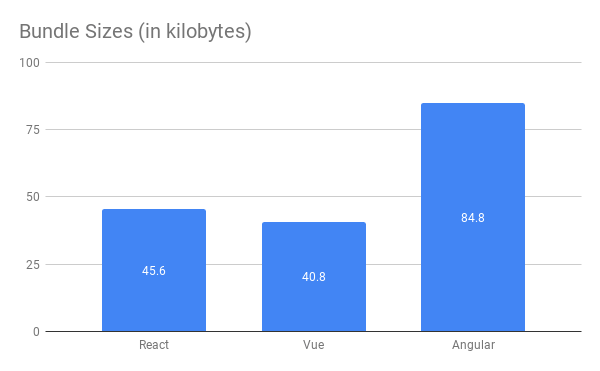
    Here are the numbers, starting with the bundle sizes for each application.

    Gzipped bundle sizes for all three frameworks plus their routing and data management libraries

    Angular’s JavaScript bundle is about twice large as the bundles for Vue and React! My guess is that this is because Angular has a much larger API surface and ships with the entirety of RxJS. I’m hoping somebody more familiar with Angular can enlighten me here.

    Time requires to parse and evaluate the JavaScript bundle for each framework

    While it takes a respectable 200 milliseconds for Chrome to parse and evaluate the React and Vue bundles, it takes over half a second to evaluate the Angular bundle. That’s a large enough interval for your users to notice, and can really cut into your performance budget.

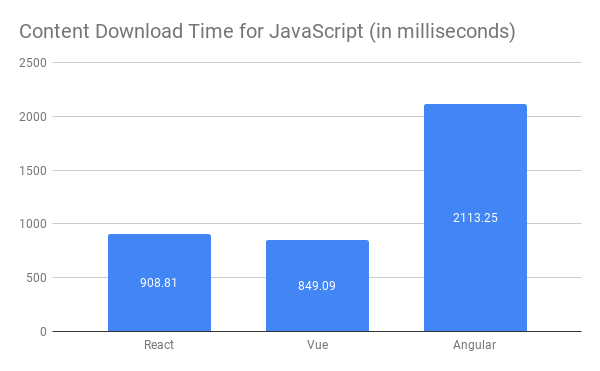
    Content download time, without taking network latency and other factors into account

    Unsurprisingly, the React and Vue bundles are downloaded in under a second, but the Angular bundle takes over 2 seconds to download.

    What’s important here is not how large or small the numbers are, or the relative performance of the three frameworks compared to each other. What’s noteworthy is the fact that your React application will never load faster than about 1.1 seconds on an average phone in India, no matter how much you optimize it. Your Angular app will always take at least 2.7 seconds to boot up. The users of your Vue app will need to wait at least 1 second before they can start using it.

    This is when we haven’t even started looking at some of the other essential libraries that most projects end up using. This includes polyfills, form management libraries, date and time libraries, utility libraries such as lodash, drag and drop libraries, charting libraries, etc.

    If you want your application to become interactive on your users’ devices in under 5 seconds, can you afford to spend a fifth of that time just booting up React?

    Are Frameworks Evil?

    I’m not advocating that frameworks are evil, or that you should write all your applications in VanillaJS. That would waste far too much productive developer time, and the result will probably end up performing badly at runtime. Frameworks exist for a reason.

    But it’s important to consider your audience. If you’re building for resource constrained devices — which you certainly are if your product targets a country like India — you could consider using a lighter framework such as Riot or Preact. Your users will thank you.

    Or consider not using a framework at all. For websites that primarily display content, it’s more efficient and cost-effective to just send some server-rendered HTML down the wire. If there are areas of your website that require interactivity, you can always use JavaScript to build those specific parts.

    In the end, it’s important to strike a balance between developer productivity and user experience. The answer will vary from project to project, so don’t take anyone’s advice as gospel.

    Build for your own audience, not somebody else’s. Run benchmarks on devices that represent real-world scenarios, and then decide what technologies make sense for you.


    Are you struggling with performance issues in your JavaScript applications? Uncommon can help!

    We’ve helped a large number of clients build, grow, and optimize their front-end applications. Our growing list of happy clients includes Insider, Quintype, Pratham Books, and abof.com.

    Want to reach out to us? Write to us at [email protected], or get in touch through our website.


    每天推荐一个 GitHub 优质开源项目和一篇精选英文科技或编程文章原文,欢迎关注开源日报。交流QQ群:202790710;微博:https://weibo.com/openingsource;电报群 https://t.me/OpeningSourceOrg

  • 2018年12月3日:开源日报第270期

    3 12 月, 2018

    每天推荐一个 GitHub 优质开源项目和一篇精选英文科技或编程文章原文,欢迎关注开源日报。交流QQ群:202790710;微博:https://weibo.com/openingsource;电报群 https://t.me/OpeningSourceOrg


    今日推荐开源项目:《各种各样的爬虫 awesome-spider》传送门:GitHub链接

    推荐理由:顾名思义,这个项目是一个各种各样爬虫的集合。这些爬虫大部分都是 Python 的,如果有正在学习爬虫方面知识的同学可以用这些项目来作为参考。因为真的是各种各样的爬虫,所以你们可能会在里面看到一些奇怪的东西……不过利用爬虫可以得到相当多的数据,从而制作出一些有意思的东西这一点倒是毋容置疑的,比如说对 B 站用户写个报告这样的事情也能做到。

    B 站用户报告:https://github.com/airingursb/bilibili-user


    今日推荐英文原文:《5 ways open source software companies make money》作者:Ajay Kulkarni

    原文链接:https://blog.timescale.com/how-open-source-software-makes-money-time-series-database-f3e4be409467

    推荐理由:开源是如何让软件公司赚到钱的?相信这个疑问大家都曾经有过,这篇文章就介绍了开源软件公司赚钱的方法

    5 ways open source software companies make money

    A guide on how to evaluate the long-term sustainability of the business behind any open-source software you are using (or considering working on yourself). Article co-authored by Mike Freedman.

    (Interested in helping us build the next great open-source company? Timescale is hiring!)

    As open source software becomes more and more popular, one of the most common questions we hear is: How do these projects make money?

    Or, to put it another way: How do I know that these companies, who are building all this open source software I’m using, won’t go out of business?

    And since we’re the co-founders of TimescaleDB, an open source time-series SQL database company, this question can also mean, How do I know that you won’t go out of business?

    All are variations of the same straightforward question. But the answer is complex, and quickly evolving.

    There is already a cohort of open-source software companies, some of which are public, that are surpassing $100M (or even $1B) in annual revenue: RedHat, Cloudera / Hortonworks (Hadoop), MuleSoft, Automattic (WordPress), Elastic, MongoDB, Acquia (Drupal), Hashicorp, Confluent (Kafka), Databricks (Spark), and more. (Here are over 30 of them.) If we analyze their success, we see a common pattern to how they’ve built sustainable businesses.

    In this article we describe that common pattern by sharing 5 business models these open-source software companies use to make money.

    If you are adopting open-source software in your own company, or working on an open-source business of your own, or even just considering working for an open-source startup, understanding these business models will help you evaluate not just the software, but also the long-term sustainability of the business behind that software.

    But first, there are two requirements every open-source company needs before it can even consider making money.

    What every open-source company needs before it can consider making money

    Prerequisite #1: Broad adoption

    The first prerequisite is broad adoption: the open-source project needs to have a large user base and community.

    Broad adoption is necessary because an open-source company can capture only a small amount of the value it creates. To be clear: an open-source company gives most, if not all, of its developed software away for free, and most of its users will never pay for that software.

    In fact, most open-source monetization rates (the conversion rate from users to paying customers) are fairly small: often in the low single-digit percentages (if not lower). But given a large enough community, that conversion rate can be enough. This dynamic is one of the drivers behind the economies of scale in the open-source model. In other words, the need to have broad adoption is one of the reasons why there are often category “winners” in open-source.

    This need for a large up-front investment in adoption is also why most successful open-source companies today start off as projects in a large company (e.g., Hadoop/HDFS at Yahoo!, Kafka at LinkedIn, Kubernetes at Google), as research areas in academia (e.g., Spark at Berkeley), or as VC-backed startups.

    Prerequisite #2: Primary credibility

    The second prerequisite is primary credibility within the community. This is important because it enables the open-source company to build an efficient sales and marketing process, which is especially important given the low monetization rates.

    Having “primary credibility” means that anyone who needs help with the software reaches out to the open-source company and not someone else for assistance. Not having this credibility means having to slog it out with others in the market for that attention, leading to a far less efficient business model and lower margins.

    The value of primary credibility, which today is often achieved by being the main contributors to the project, can be seen by comparing the market caps, annualized revenue, and multiples of Elastic ($4.59 billion market cap, $160 million revenue, 29x) and MongoDB ($3.97 billion market cap, $155 million revenue, 26x) vs. (pre-merger) Hortonworks ($1.23 billion market cap, $262 million revenue, 5x) and Cloudera ($1.73 billion market cap, $367 million revenue, 5x). (Market caps as of November 27, 2018; revenue numbers are from latest reported fiscal year.)

    Because Elastic and MongoDB had primary credibility in their respective communities, they were able to build a much more efficient business model, and capture far more value with less revenue than either Hortonworks or Cloudera, who had to raise more money and fight fiercely over the Hadoop market. (One could even speculate that the need to possess primary credibility was one of the reasons behind the recent Hortonworks/Cloudera merger.)

    Once an open-source company has broad adoption and primary credibility, it can build a pipeline of companies who need assistance, and start layering in a variety of business models to build a sustainable business.

    Now, let’s talk about those business models.

    The 5 open-source business models

    From analyzing successful open-source companies today, five common business models emerge:

    1. Support
    2. Hosting
    3. Restrictive licensing
    4. Open-core
    5. Hybrid licensing

    1. Support

    The support model, also known as the “RedHat” model, goes like this: sell deployment and integration services, production-oriented “insurance policies”, certified binaries, trainings, bug fixes, etc., to businesses deploying the project in production.

    This model becomes limiting over the long-term for a few reasons: (1) support often requires a lot of manual work, and so reduces business margins; (2) scaling is hard because support work is often not easily repeatable; (3) it creates perverse incentives on the part of the open-source company, where making the product easier to use cannibalizes support revenue. In fact, this model works very well when the project requires complex deployments with sprawling ecosystems, which often goes against building the best user experience.

    This model is also notoriously inefficient, typically converting less than 1% of all users into paying customers. This inefficiency should come as no surprise. Open-source software itself is free. In order to feel the need to pay for support, a company needs to rely on the project for mission critical systems. Yet over time, companies that do rely heavily on the project will naturally invest their own engineering efforts to understand the project, reducing the need for external support. So there’s only a small usage window where this model works.

    The support model is still where every open-source company starts today. Yet, with all these challenges, and the fact that RedHat is still the only company to build a multi-billion dollar revenue business in open-source in the past 25 years, it’s become clear that open-source companies need better business models than just support.

    2. Hosting

    Hosting means offering a fully-managed version of your project, so that when users want to try out the project, or even deploy it in production, they can spin up a remote server with the software in just a few clicks, and not have to worry about operating it in steady state (i.e., not worry about backups, downtime, upgrades, etc.).

    Given the popularity of the cloud and managed services in general, it should come as no surprise that this has also become a popular model for open-source. In particular, this has become a common way for the public cloud providers (and in particular, AWS) to monetize open-source projects without giving back to the community, which has led to some complaints and tensions (and the emergence of other models, which we’ll soon discuss).

    The hosting-only model can work well. Some companies (e.g. Databricks, Acquia) have been quite successful with it. Yet typically hosting is layered in with a few of the following other models.

    3. Restrictive licensing

    The restrictive licensing model creates a legal reason for users of open-source software to pay. It does this by providing an open-source license with slightly onerous terms, such that anyone using the software in production is highly incentivized to strike a commercial deal with the vendor. The GPL and AGPL licenses, as well as the newly created Commons Clause (adopted by certain Redis modules), are examples of this model. In particular, AGPL and Commons Clause (as well as the new SSPL launched by MongoDB) are licenses also designed to defend against the public cloud providers.

    But this approach has limitations: the GPL-based license restrictions do not restrict unmodified usage, and only apply if one makes modifications and does not want to open-source them; the Common Clause has some ambiguity in its language, and it remains to be seen how this will play out in the courts. Still, the largest drawback of this approach is that these licenses hurt adoption, often turning off potential users. In particular, there are quite a few large companies who have explicit policies against using restrictive licenses. Because of the inherent friction of this approach, many rule it out, relying on other business models.

    4. Open-core

    Open-core has quickly emerged as the most popular way for open-source companies to make money. The idea behind open-core is that the majority of the code base is open-source, while a smaller percentage (targeted at production or enterprise users) is proprietary. The proprietary portion may be packaged into separate modules or services that interface with the open-source base, or could be distributed in a forked version of the open-source base.

    Typically the proprietary features are ones needed for production deployments and/or at scale. (As an example, for an open-source database, features like monitoring, administration, backup/restore, and clustering are often proprietary.) One benefit here is that it allows the open-source company to license the core with a very permissive license (e.g., Apache 2), while retaining the ability to charge for proprietary features. It also allows open-source companies to defend against free-loading participants (e.g., such as the public cloud providers) by keeping certain features in the proprietary code base.

    The challenge with this model is in balancing the open-source value versus the proprietary: if an open-source company gives away too much, then it gives up the opportunity to make money; but if it gives away too little, then the open-source project effectively becomes “lame-ware” (and the project will likely fail to get broad adoption).

    Another challenge is that cleanly separating the open-source from proprietary features in code is sometimes difficult. Even if separating them is easy, maintaining two different code bases can also be challenging from an engineering process perspective: e.g., managing independently versioned releases that might need to interoperate and/or porting code back-and-forth to prevent code divergence over time. And often engineers would rather work in the open-source repo than the “business” repo. But despite all these reasons, this model is quite powerful.

    5. Hybrid licensing

    The hybrid licensing model is the newest one on this list. Initially popularized by CockroachDB (Jan 2017), and later adopted by Elastic (Feb 2018), hybrid licensing takes the open-core approach but improves on it in a few key ways.

    What hybrid licensing does is intermingle open-source and proprietary software in the same repository, and then make the code for the entire repo available. That is, the entire repository is “open code” (or “source available”), just not all licensed under an OSI-approved open-source license. Users can choose to use a binary with just the open-source bits (available under an open-source license), or use a binary with both the open-source and proprietary bits (available under the proprietary license). The proprietary licensed binary often will have paid functionality that is off by default, but can be unlocked by purchasing a license key.

    The advantages of this approach for an open-source company include all of the ones listed under open-core, plus a few more: (1) having everything in the same code base makes it easier to manage engineering process and development; (2) it enables the entire team to work on the core project; (3) it allows users to upgrade from free to paid in-place, often without downtime (and without needing to interact with a salesperson); (4) it allows external community members to comment on, file issues on, and (if they so choose) contribute to proprietary features using the same workflow they’d normally use for open-source features (e.g., via GitHub).

    The largest challenge is also the same as open-core: balancing the quantity and value of open-source vs. proprietary features.

    A business model layer cake

    We just discussed five common open-source business models, yet there is no one-size-fits-all. Some will find success with a purely managed offering model, e.g., Databricks. Others will have such broad adoption, like SQLite (reportedly billions of installs), that they will be able to support a small core development team with just support and warranties.

    That said, most open-source companies will make money using a combination of the five models we discussed, forming a revenue layer cake. For example, by combining support and licensing, or support and hosting and open-core.

    If you adopt open-source software in your company, these are also the various ways you can support an open-source business, and ensure that the software continues to improve and be maintained. So if you do decide to use open-source software, and if there is a company behind the project, please support it.

    This post, like another that preceded it, was built on the shoulders of giants. A big thank you to all of the following people who have shared their open-source wisdom and time with myself and my co-founder Mike over the past few years: Harry Weller (RIP), Forest Baskett, Greg Papadopoulos, and the rest of the team at NEA; Peter Fenton, Chetan Puttagunta, and Eric Vishria and the rest of the team at Benchmark; Rob Bearden, Shaun Connolly, Herb Cunitz, Mitch Ferguson, Jeff Miller, and the rest of the Hortonworks diaspora; Gaurav Gupta from Elastic; Jay Kreps from Confluent; Spencer Kimball from CockroachDB; and so many, many more. We are honored to have such great peers in our industry.



    每天推荐一个 GitHub 优质开源项目和一篇精选英文科技或编程文章原文,欢迎关注开源日报。交流QQ群:202790710;微博:https://weibo.com/openingsource;电报群 https://t.me/OpeningSourceOrg

←上一页
1 … 191 192 193 194 195 … 262
下一页→

Proudly powered by WordPress