Photo by Nigel Tadyanehondo on Unsplash
When I got my first job as a new developer, I thought I had a good foundation of programming concepts. I knew there were things I didn’t know yet, but what I didn’t know was just how many slang and buzz words existed that don’t show up programming courses. When you are new, like I was, imposter syndrome is extremely high and you really don’t want to prove how “unqualified” you are by admitting you don’t know what people are talking about.
Because of that, I decided I would devote this post defining a couple of these new phrases for you in a safe environment. That way you don’t have to admit you feel like an imposter.
(I want to emphasize, it is ok to feel like an imposter. It’s something that never goes away. With a field that grows and changes as fast as this one does, you will never ‘arrive’ and be all knowing. One of the biggest differences between green developers and seasoned ones are that they are willing to admit that they don’t know something and are willing to ask “What is that?” The sooner you learn to get over that ‘imposter’ feeling, the more quickly you will improve as a developer.)
NO-OP: A no-op means “No Operation” and means probably what you think it means, it does nothing. It used when you write code that intentionally does nothing. The first time I heard this, it went something like this. “Unfortunately, the API required me to pass in a function, so I passed in a no-op.” I was just sitting back thinking, “Oh this must be some crazy functional programming jargon like a monad. This is way above what I can understand right now.” I was almost a little disappointed to learn what it really meant.
WIP Commit: You may also hear “commit that as a wip” or something similar. When I first hear this, my knowledge of git commands were: git add ., git commit -m, and git push origin master. In fact that was usually what I did every time. In that order. So I just assumed it was some sort of git command that I hadn’t learned yet. After searching for how to use git whipI eventually learned it that a it wasn’t ‘whip’, it’s ‘wip’ and it stands for Work In Process. Sometimes you just need save your changes in it’s current state and the current state is not finished, it’s a … well you know.
Talking to a rubber duck: Also called, rubber duck debugging, this is processes of talking through the code, bug, or whatever out loud. By describing the problem out loud, it forces you to stay focused and often times you find the solution on your own by talking through it. Why a rubber duck?This process was made famous from an influential book called The Pragmatic Programmer where a programmer kept a rubber duck with him to talk to it, which would help him think through the problem and solution much easier. As a green developer, I would often times hear things like, “Can you be my rubber duck for a moment?” or “Thanks for being my rubber duck.” Essentially, what is being said is “Can I talk through this problem out loud with you? I don’t expect/need you to help me get the answer, I just want to talk through the issue.”
Uncle Bob: Speaking of influential writings, another pair of influential writings in the developer world are The Agile Manifesto and Clean Code: A Handbook of Agile Software Craftsmanship. Robert C. Martin authored or co-authored both of them. Both are extremely influential writings on what makes code “clean” and “easy to maintain.” The reason I put it here is that, when I was new, I would hear people talk about Uncle Bob like he was Jesus and/or Satan. I would hear things like, “This code would make Uncle Bob proud” or “Uncle Bob wouldn’t like this, but I’m doing it anyway”. What was really being said was that “I’m proud of my code and how ‘clean’ it is” or “I know this doesn’t follow principals of ‘clean code’, but I have reasons why.” Why Uncle Bob? He refers to himself as Uncle Bob and even his consulting company is named Uncle Bob. Why did he chose to refer to himself as Uncle Bob? I could not find an answer that was from a trusted source, so I decided not to speculate. The world may never know.
What jargon used to trip you up? Comment below or tweet to me. I want to make this a regular series of post and would love the help compiling a much bigger list of jargon and buzz words. Thanks for the help.
每天推荐一个 GitHub 优质开源项目和一篇精选英文科技或编程文章原文,欢迎关注开源日报。交流QQ群:202790710;微博:https://weibo.com/openingsource;电报群 https://t.me/OpeningSourceOrg
I got
married in 2012 at the age of 24. We a kid in 2013, another one in 2016,
and another one coming in Feb 2019. We moved 8 times. Learning to code
and working on side projects from like -2 weeks to 8 weeks or so of a
newborn’s life is really hard. I did it once and I’ll never do it again.
Just take a break. It’s tough to change careers, learn to code, and
then improve enough to build good stuff. It’s even tougher when you have
little kids.
And
before I say anything else, I have to mention my wife Katie who has
been the rock of our family since day 1. She’s put up with a LOT. Having
someone like her is a huge blessing and a huge help.
I was going to put her picture in here but she just gave me the look of “don’t you dare.” ?
So is it possible?
Yep, it is.
Is it hard?
Yep, it is.
Is it worth it?
Totally.
I
started learning to code in Python at my Sr. Analyst job. But things
didn’t really ramp up until I got a Jr. Web Dev job a few years later.
What made the difference:
people were relying on my work
clear, defined tasks/projects
set of tools chosen for me*
* If nobody is choosing for you, then just choose and go with it. Skills transfer well in the coding world
How can you duplicate this to learn from home?
get together with another person wanting to learn and work together to get something in production
before
you jump in, write down exactly what you want to build, generally what
you want it to look like, and what you want it to do
just pick something and go with it (for me, it was Ruby on Rails)
My
real learning came when I got hired as a junior developer on a
marketing team. Really all I had to do was build marketing websites, not
even linked to marketing tools. But it was an amazing start because I
had people who were relying on me. I had defined projects and set
expectations. I had other people to ask how to do stuff. The last one I
think was the least important for learners, you can get help from a lot
of people across the world.
I started tinkering with code about 8 years ago. Since then, I’ve dabbled in Angular, built stuff with Rails, jumped into React, and have several projects underway.
So how did I learn to build and deploy stuff?
Code At Night
How do you learn to code and change careers with little kids?
The
answer: harden up and get to it. If you’re not working towards building
something, it’ll be the worst. If you are, it’ll suck a lot less.
That
might be too harsh, but the trick is to just put in the hours. I would
go to work, come home in the evening, help with the kids until they went
to bed, and then start coding at 8 PM or so. This is when most parents
start winding down to hit the hay.
The
key to my learning was just doing it. I logged many, many late nights
trying to figure out how to hook up Stripe Connect so my clients could
accept money and I could strip a fee off the top.
If
you want to learn how to code, it’s going to take a while. And that’s
okay because you can build little stuff on your way to bigger, better
stuff.
Make
a version of Tic-Tac-Toe that you and a friend can try out. Build a
real estate investment helper that pulls all the houses in a zip code
and parses out the ones built in 1990 over 2000 square feet. Pull in
tweets that have exactly your name in them.
And then build bigger stuff.
But where can you learn new stuff?
Onlineclasses
like those ones linked and tutorials. The main way I’ve learned how to
code is building. I’m not a really good idea generator, but my friend
is. So he’d throw out an idea and we’d try and build it. And we built a
ton of stuff:
a CRM and route manager for pest control companies
a route manager for garbage bin cleaning companies
an embeddable ticketing widget
an embeddable email capture widget
an election task manager
a bank account watcher
a mobile weather app
a book reading tracker
a smart SEO-centric blogging tool
an online store
a video player/course manager
and more that I can’t remember right now.
All but a few of these projects are in production (on the web for anyone to see), which is another story altogether. ?
That
was all in about 8 months. I went from not knowing how to send an email
to have hundreds of people using my app in production.
Truthfully, there’s nothing really special about me or my brain. You can do it if you put your back into it. Sweat equity
The
key to improving is to try and consume as much good development content
as you can sustain. I like the word sustain on the end because you can
listen to 10 eBooks in a weekend, but if you don’t keep practicing
coding and trying out new things and looking up how professionals do it,
most of that info will slip away and you won’t be a better coder.
Lessons Learned & Keys To Improving
Practicing the right stuff will also make a big difference.
Learn how to test your software.
From
2010–2016, I wrote a grand total of 0 tests. I didn’t know how to test
software other than running in the browser and pretending to be a user.
Learning how to write good tests and really practicing writing tests
will make a huge difference.
Review apps you finish and see what you can learn from your own work
This
one is huge. You have a perfect opportunity to look over your own code
and Google different parts of it. See if there’s a faster way to write
that loop, or see if you even need that loop at all. Audit your packages
and make sure you’re actually using them all. Get a better
understanding of what that CSS library already has — maybe you’re
duplicating classes. Optimizing your own work can be some of the best
learning experiences you’ll have.
Keep watching/reading tutorials and reading/listening to books by smart people
These
don’t have to be code-centric. They could be about business, marketing,
sociology, networking, or whatever. Or they could be all about how to
use React Hooks. Think about where you’re at, think about what is the
thing that’s most out of whack or behind, and focus on that. What you
focus on will change over and over and over again. So just think about
what you need to work on the most, and do that. If many things seem tied
as the worst, pick one and go with it. The most important thing is to
keep going, keep consistently learning and trying.
Speed Learning for Total Beginners
Jump right into a text editor
Don’t
fear the editor. Jump right into a .html file, open it in the browser,
and start trying stuff out. Try out what the difference CSS styles do.
See what happens when you nest HTML elements (put one inside another).
Push your best thing live as quickly as possible
There’s
something about having your project live that really inspires you to
build more. Maybe it’s that now you have something you can share with
other people. Whatever it is, I think having a project, a website, a
blog you built live is important.
Keep consistently learning and developing
It
can be hard to have other things come up. At the time of writing this
article, I’ll have another kid in 2 months. Learning and developing will
have to slow down for a bit. I tried developing through paternity leave
and it was awful.
Iterate on your favorite project
Many
times, you’ll figure out something you could build that can actually be
a benefit to someone. While you’re still learning and trying out new
things, I think a really good thing to do to progress is to have a look
at your own work and see what could be improved. As stated earlier, it
can be a delightful, productive experience
Join meetups and code groups
Looking
at other experienced people’s code can be a huge benefit. Talking to
them about how they did that in person can also be huge. This could also
include conferences big and small.
Work on open source projects
Learning
how to log an issue, implement the fix, create a pull request, and push
your code up for review can be an unparalleled way to learn. You’ll get
free feedback, sometimes from some of the world’s best developers.
Where else could you get that?
To
wrap up, if you want to learn to code, you should chase that dream. It
can be the best thing ever. Even if it just helps you think a different
way, that could pay off big time in your non-coding job.
If
you have kids and are dead at 8PM and don’t see how you could do it.
Just go for it. If you get sick, take some Vitamin C, sleep when you
can, and keep at it. It’ll be super hard and take a long time.
While open
source software has been around for decades, its adoption level and
breadth of focus have exploded in recent years. Most companies now make
regular use of open source software — and that usage is increasing.
However, there is a potential downside to the open source explosion that
may be heading our way. Is it possible that the open source movement
will backfire on us? This blog will explore that possibility.
OPEN SOURCE STARTED FOCUSED
In
the early days of open source software, there was heavy focus on a
smaller number of large projects that were broadly adopted. Web browsers
and web server software (Apache)
were two early and popular open source focal points. Both of these
areas are now dominated by open source. There is no turning back from
open source in areas like these since the software is an integral part
of so many consumers’ and companies’ processes.
This isn’t to say that a wide range of open source projects didn’t exist years ago. But, only a small set of open source projects made it into the hands of a broad swath of the population. This focus made it easier to get contributors to keep the software up to date and to add new features.
OPEN SOURCE TODAY IS WIDELY SPREAD
Open
source is no longer focused only on broad functionality that the masses
require. There are now also open source projects focused on targeted,
niche areas. Within the analytics world, for example, we have R and Python
that cover a broad range of analytic capabilities. But we also have
niche projects that address only certain aspects of the analytics
process. These include projects like D3 for visualization and Scikit-learn
for machine learning libraries. On the technology and operating system
side, there are a wide array of options available ranging from Hadoop, to Spark, to PostgreSQL.
The
point is that there are now multiple open source projects focused on
identical subject areas. As opposed to a single analytics-focused open
source project, there are dozens or hundreds. Companies are also
adopting and incorporating multiple of these projects into their
internal processes. This works fine as long as the community keeps the
software up to date. However, it can become a big problem if some of the
projects end up abandoned or mostly ignored by the developer community
that “owns” it.
HOW OPEN SOURCE MIGHT BACKFIRE
There
are only so many top-notch programmers who know a given subject area
well and who also have time they are willing to devote to contributing
to open source projects. As more and more projects open up, the pool of
available contributors is stretched further and further and they are
forced to focus on a few projects they are most passionate about.
This
is where the potential problem comes in. A few years down the road as
many of the long-standing Apache HTTP server contributors retire, will
younger programmers have interest in taking up an “old, unexciting”
project like Apache HTTP server? They may instead opt to contribute to
sexier options like TensorFlow
in the AI space. This means that even mature, widely deployed open
source software could struggle to maintain support over time.
Worse,
will the new projects mature effectively? With developers hopping from
project to project, open source could become like the nightclub scene.
The hot club this month with all the crowds could be dead in six months
as a new club takes over the market. The new club gets all the attention
for a while until yet another club takes over.
For
example, Hadoop was among the hottest, sexiest open source projects out
there for a few years. There was no problem getting world class
contributors to help Hadoop grow and expand very quickly. Today,
however, Hadoop is becoming widely regarded as yesterday’s news.
Much of the contributor community may start to move on to other, sexier
projects. This does not bode well for Hadoop’s ability to maintain
enterprise readiness in the long term. Keep in mind that Hadoop is
simply an illustrative example of the broader issue. I’m not trying to
pick on Hadoop.
HEDGING YOUR BETS
Not
long ago, many organizations were hesitant to implement open source
tools at all. Further, when open source was implemented, it was at a
strategic, enterprise level. Today, most organizations have embraced
open source and are allowing groups such as analytics organizations to
implement open source tools specific to their domain. If that hot new
open source analytical tool doesn’t take off as expected, an
organization will be stuck with orphaned software that has no support
structures in place.
Much
of the open source software being implemented today is far less mature
and far more niche than implementations of the past. Are we heading for a
future filled with a lot of half-completed, unsupported, low quality
open source projects in place? Possibly so.
The
action to take is to be careful and deliberate in your pursuit of open
source toolsets. Don’t just install every up and coming project and
start building critical processes with it. Focus on implementing mature
projects with a wide contributor base and make sure the project looks
like it will be here for the long haul. Then, track and monitor the
state of any implemented open source tool carefully so that there is
time to react if the project looks to be heading for trouble. Finally,
build your processes in such a way (like a Lego kit!) that it is easy to swap out components without disrupting the entire chain.
The
last thing anyone wants is to be caught with a mission critical piece
of software that suddenly needs to be replaced. The software may be free
but fixing the problem will be far from it.
I discovered that my memory for numbers, dates, and equations was average at best, but my memory for images and stories was fantastic. If I found a way to represent something visually there was a pretty good chance I would remember it forever. If not, ?.
What started as a study hack quickly became my default way to absorb and retain knowledge. Whether it’s machine learning algorithms, statistical concepts, or organizational design, visualizations are a huge part of how I interpret and internalize the world.
For the past couple of years, I’ve been coaching product leaders and product teams trying to transform the way a giant organization works. We talk about things like communicating priorities, why iterative development is important, and how to balance tech debt versus refactoring. When those concepts come up, I draw out my mental model of that idea and it (almost) always helps us communicate much more effectively.
Here are a few of the drawings I make over and over again.
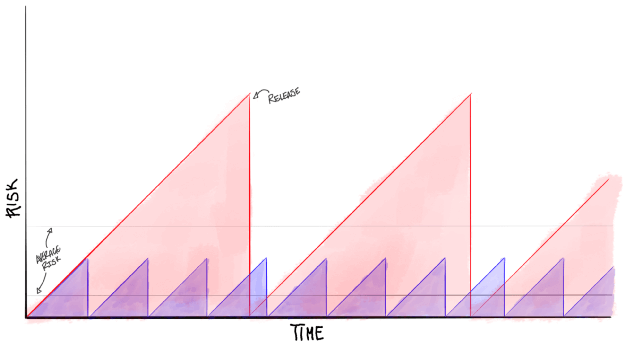
Small, frequent releases are safer than big, infrequent releases.
Most companies (particularly big established ones) operate a lot more like the red line than the blue. They let work build up over time and only release infrequently. Sometimes it’s because they have some technology that inhibits them from releasing more often. Sometimes it’s a cultural thing. But regardless of the cause, they don’t ship as often as they could.
Delaying releases increase risk. There’s the risk of bugs, the risk that priorities change and you have to throw the code out before it ships, and the risk of having built completely the wrong thing. Shipping early and often is an antidote to those risks.
With small releases, it can seem like you have problems more often. But those problems will be minor and manageable instead of big and ugly. If you let work build up before releasing, then you risk problems that are an order of magnitude worse.
Faster releases = lower risk.
Iterations
Iterative improvements beat big bets.
Big bets are exciting. They feel great to announce and watching people rally around an idea is super satisfying. But, as anyone who’s tried something new knows, it’s pretty hard to get it right on the first try. Big, inflexible bets often cause more problems than they solve.
To illustrate this idea, I like to use a golf metaphor. (The worst offenders of this fallacy tend to be big fancy executives so using golf makes the snarky party of my brain all warm and fuzzy.)
Imagine you’re playing golf on a dim, damp, foggy morning. You know the hole is somewhere to the east but you’re not sure exactly where. To complicate matters, your absentminded caddy forgot all but one of your clubs.
Would you rather have a driver (big, powerful, decisive, can cover lots of distance with ease) or a putter (puny, timid, can only hit the ball a few feet at a time)?
In this thinly veiled metaphor, most people pick the driver. They spend hours bashing the ball around a hundred yards per swing trying to get closer and closer to the hole. They overshoot it, turn around, redirect, and try again. After a few dozen swings most people give up, call the ball close enough, and retreat to the clubhouse for a consolation drink.
Meanwhile, the people who pick the putter are slowly chipping away at the distance to the hole, making constant small adjustments to direction. Once they get close enough to see the hole clearly it’s a simple matter of tapping it in. The putter may look inefficient in the short-term but long-term it’s much better.
In the long run, small, incremental improvements to a product are a much more efficient path to success.
Backlogs & Story Sizing
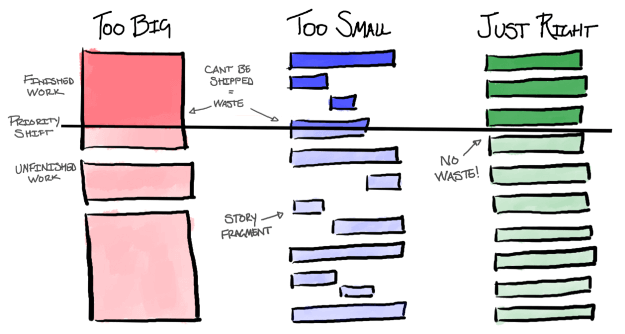
Well-sized stories mean less wasted work.
A lot of the teams I coach are used to working on gigantic hunks of work. For those teams, a single task might take weeks or months to accomplish. That’s fine if priorities never shift but in an agile environment, priorities tend to move around a lot (Responding to change over following a plan). And when priorities shift, work in progress gets paused or thrown out. That’s how it should work. Teams should always focus on the most important things. But all of that shelved and tossed work leads to a lot of waste.
One way to limit waste is controlling how quickly priorities can change. If you’ve ever heard “that’s not in scope for our next sprint” you’ve heard this approach in action. Locking scope does a good job of limiting waste but it comes at the cost of flexibility. For most teams, that cost is too high.
A five-minute copy change should never take four weeks and a formal prioritization process.
We can also approach waste from the other direction. Instead of trying to stop priorities from changing, we can focus on making priority shifts as painless as possible (Welcome changing requirements, even late in development). Appropriate story sizing is a fantastic way to do that.
Stories should be as small as possible while having some self-contained nugget of customer value.
If a story is too big when priorities shift you’ll have invested a bunch of time into work that can’t be put into production. If a story is too small, when priorities shift you’ll be left with a bunch of work fragments that are “done” but not useful without more time.
Well-sized stories keep your work in progress small, your level of risk low, and your teams nimble.
Are these visuals helpful?
If so, let me know in the comments below or on twitter. If the feedback is positive, I’ll write up a few of my other favorites.