今日推荐开源项目:《绿色回复 DeepCreamPy》
推荐理由:一个基于深度学习的工具,通过神经网络来填充图片中被删去的区域(在示例中的绿色区域)。不过实际上,它对其他颜色的抹去也一样可以进行修复,它最大的局限性在于对现实生活中的照片以及黑白色照片无能为力,而且也没有办法对 gif 动图生效。尽管如此,它还是能对不少照片起到效果,在要用这个工具做什么上还是请各位自行发挥吧,它能做的可不只是去掉绿色而已。
今日推荐英文原文:《Recursion — What is it?》作者:John Mark Redding
原文链接:https://medium.com/@johnmarkredding/recursion-what-is-it-643169503159
推荐理由:这篇文章是面向编程新手的——介绍了递归的概念,这玩意是经常用得上的
Recursion — What is it?
We’ll go over the definition of recursion, and some examples of how it could be used. Next we’ll go over the efficiency, and sum up why you might use it.
What it is…
Recursion is a method of problem solving which relies on recursion to solve the problem.
Good definition, right? You’ll see why that sort of makes sense.
In the mean-time, here is a better definition: Recursion is a method of problem solving which relies on solving smaller versions of the same problem to complete the solution.
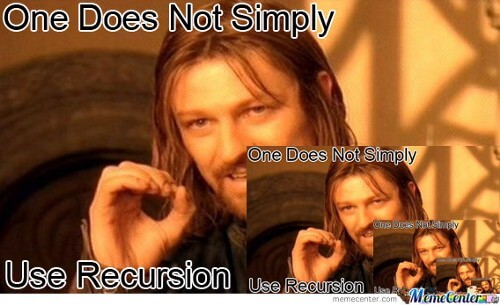
In programming, it usually just refers to a function which calls itself.
Recursion: a function which calls itself
Sounds simple, right, but this can get you in trouble.
Attribution
When using recursion you answer the smallest version of a problem possible, and make a clause that stops the recursive call if that smallest version is met.
This is called the base-case, or the exit condition.
What it looks like
Here are some of the basic examples of how it works.
Factorial.rb
A basic factorial function in Ruby.
def factorial(num)
  #base case – the point at which the problem stops calling itself.
  if num == 2
    2
  else
    num * factorial(num - 1)
  end
end

puts factorial(gets.chomp.to_i)
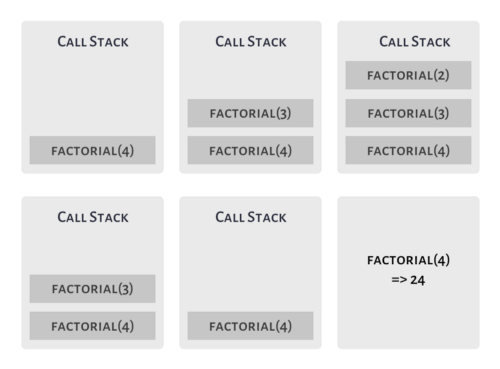
factorial(4) => 24
In math, this would essentially be: 4 × 3 × 2 = 24.
We don’t multiply by 1 as the result will be the same.
This looks rather elegant. Get a number, if it is 2, return it, otherwise, multiply, and break it down.
Palindrome.js
function pal(word) {
  if (word.length <= 1) {
    return true
  } else {
    let fChar = word.shift()
    let lChar = word.pop()
    if (fChar == lChar) {
      return pal(word)
    } else {
      return false
    }
  }
}

let eve = ['e','v','e']
let steve = ['s','t','e','v','e']

console.log(`Is ${eve.join("")} a palindrome: ${pal(eve)}`)
console.log(`Is ${steve.join("")} a palindrome: ${pal(steve)}`)
This is essentially what the function is checking, though you may not have the reverse function available to you in all projects.
Efficiency
So, recursion seems fun and all, but is it actually efficient?
Efficiency is going to depend on the application of the recursion, and which language or compiler being used. In most cases looping will be more memory efficient, as recursion takes up memory in the call stack.
Often, in the case of larger problems, programmers find a simple solution using recursion, even if looping is possible. It is then up to the compiler to maximize efficiency. Some compilers will actually convert a recursive function to its iterative equivalent.
Generally, from searching around, there is no particular benefit to using recursion other than simplicity of code. Source.
What is it again?
Recursion is impressive to many because it looks rather simple, and does so much. It requires breaking down problems to their smallest instance. Even so, it often doesn’t offer any distinct advantages over looping.
So, if you want to impress interviewers, or simplify your code’s readability, learn some recursion. Learn it anyway, as you’ll run into it in other developers code. But think about whether the it will actually benefit your program.
今日推荐英文原文:《Learning, Coding, & Freelancing as a Dad》
今日推荐开源项目:《Guna Glider.js》传送门:GitHub链接
推荐理由:顾名思义,这个 JS 库可以帮你创建一个像各种网站上看到的轮播屏那样的滚动屏幕 —— 而只需要 2.8 kb 的大小。它最大的特点就在于方便和简单上,你可以很轻松的照着官网上的 demo 写出一个滚动屏幕来。如果网站上有这方面的需求的话,这个库将会是不错的选择。
今日推荐英文原文:《Teaching prisoners how to code》作者:[Andy Mayer](https://medium.com/@andymayer?source=post_header_lockup)
原文链接:https://medium.com/yoomee/teaching-prisoners-how-to-code-429ffaf31370
推荐理由:如何教监狱里的犯人编写代码
Teaching prisoners how to code
Yoomee has been working closely with non-profit Code4000 to help break the cycle of crime by teaching prisoners coding.
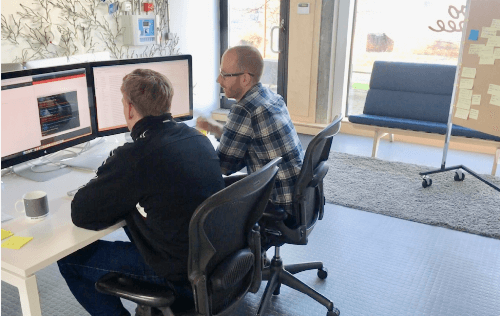
Josh (left) with volunteer mentor Ryan (right)
Code4000 is Europe’s first prison coding workshop and is currently running a pilot with 32 prisoners at HMP Humber. The training is intense for the prisoners: nine-to-five, every day.
Five years ago Yoomee started a small in-house experiment to teach young offenders to code, but back then we didn’t have the resources to apply the lessons learned. Now we are working with Code4000 who teach prisoners how to code so they can find tech jobs when they are released.
“There’s a huge demand for coders, a huge shortfall in the UK and the rest of Europe,” said Michael Taylor, CEO of Code4000. “And prisoners have plenty of time, which is one thing you really need to learn how to code! They’ve taken to it with great speed. Some of our coders don’t even have level one maths or English, but they’re building websites within the first six to eight weeks.”
This year, Yoomee has been helping to pilot work placements for prisoners who are allowed travel on day-release to the Yoomee office whilst they serve their sentence in an open prison. We’ve recently taken on Josh, a prisoner, to work as a chatbot developer at the Yoomee office at Park Hill, Sheffield.
Josh is currently serving at HMP Hatfield which is an open prison that allows him to be released on a temporary license (ROTL). This means he can spend the day working at Yoomee rather than in the prison.
How does Code4000 work in prison?
The first phase is a training phase, teaching the prisoners the basics of HTML, CSS and Javascript, before moving onto more advanced concepts like Git, TDD, MVC, databases and full stack development using Ruby on Rails.
Prisoners aren’t allowed direct access to the internet, so they start with exercises downloaded from Code.org before moving onto building simple starter games like Pong, Breakout and Asteroids.
After that, they learn the basics of web development: how to code in both HTML (which covers the layout and structure of web pages) and CSS (which covers the style and design of web pages).
Once they’re ready, the students will enter the second stage: putting their skills to work on real projects for external clients.
The third stage will involve temporary day releases for prisoners so they can go to work with clients independently. The fourth and final step will be to help them find full-time employment as developers in time for their release. And it’s these last two stage that Yoomee has been helping with.
Introducing Josh
Josh learnt Ruby on Rails whilst attending the Code4000 workshop in HMP Humber and his skills are already impressive. He’s now working on real-world projects whilst at Yoomee. Projects include a software upgrade for Off-Axis and an AI-powered chatbot for a local mental health charity Sheffield Flourish.
“Coding is about problem-solving. Being a prisoner requires ingenious thinking to make the most of limited resources. Prisoners are adept at problem-solving and bring that into the coding world.”
The time needed to support Josh has decreased significantly since he started in the Yoomee office, and he’s now much more able to support himself using online resources such as Stack Overflow.
Yoomee is also very grateful for local tech volunteers such as freelance developer Ryan Brooks. Volunteers like Ryan are essential to help to speed up the onboarding process by committing regular time each week — mentoring and providing advice and insights on career development.
Next steps
The plan is to significantly expand the programme with Code4000 in Sheffield and so Yoomee is looking for volunteers to help mentor the new coders. So, if you also believe that an understanding of code unlocks a life of opportunities and has the power to transform lives please do get in touch with us.
In the meantime, you can find out more by watching Michael’s talk at TEDx Stockholm last month (below).
今日推荐英文原文:《Why Academia Needs to Get Better at Teaching Programming》
今日推荐开源项目:《自由价更高 awesome-free-software》传送门:***GitHub链接***
推荐理由:一个自由软件的列表。自由软件指的是那些允许用户对这些软件自由的进行诸如使用和改进这些行为的软件,而并不是只是指的免费的软件。如果你对自由软件感兴趣的话这个项目正好适合你,兴许这些软件里面就有一些能够帮上你的忙;或者说只是把这个列表当成一个软件列表来寻找适合的软件也是一种可行的应用方式。
今日推荐英文原文:《Why Academia Needs to Get Better at Teaching Programming》作者:Dan Spector
原文链接:https://medium.com/@danno2423/why-academia-needs-to-get-better-at-teaching-programming-4da2ef01dab0
推荐理由:学术界应当增强编程教学的原因
Why Academia Needs to Get Better at Teaching Programming
I wrote this in 2017, when I was a grad student struggling to learn to code. Fortunately, I understand things a lot better now. But I had some insights that I thought were important to share with students and educators who might be experiencing difficulties with programming in an academic environment.
I’m trying to learn something called Data Driven Documents, or D3. It’s a JavaScript library that visualizes data. But before you can make an awesome visualization comparing how many gallons of hair gel Trump used in his lifetime, or how many toenail clippings could be transformed into organic matter to power an ecohome, consider this — one must actually learn to code to get to this high-level thinking. And you know what coding involves?
A lot of tedious, small, complicated parts of a whole. I’m talking about arrays, anonymous functions, key-value pairs, markup languages, accessor functions. I could stack up this jargon from here to the moon and we would still have plenty left to get to Pluto. But the thing about coding is, it’s more like riding a bike than memorizing a textbook. Once you understand how it works, you kind of just do it. The problem lies in getting to that point.
Coding is hard, at least to me. It’s learning an entirely new language and set of logic. It has foundations in things like math, which unfortunately is difficult. And while a strong programming foundation can be applied across languages, the technologies themselves change rapidly. This JavaScript library I am learning hardly existed five years ago. And yet it’s managed to change the way people think about journalism, data, and even communication.
The pattern I am seeing is that the younger the person is, the more likely they are to have coding skills. I’ve had four teachers in my lifetime that have taught me programming in a formal classroom setting, and they’ve all been under the age of 35. It’s almost as if programming, especially web technologies, has only become ubiquitous in the past 15 years. If you knew programming before the web existed, you were probably a super nerd who coded on punch cards.
Anyhow, the upshot of this is that I don’t see many qualified older teachers who can teach these valuable skills. Tenure-track academia tends to be chock full of people who are good at teaching theory and principles. But when it comes to explaining how Fizz Buzz works or even why a div is useful, they are totally in the dark. Skills-based training often gets placed on the shoulders of adjunct faculty, many of whom do not have adequate time and resources. And that is a problem.
The job market today is the most unforgiving it has ever been. Not because the work doesn’t exist, but because it requires skills that have high barriers to entry and are very difficult to obtain. This is especially true among entry-level jobs. Unfortunately, many entry-level jobs do not place the emphasis on higher-level thinking. It is more about skills — i.e. can you actually do the work? But for some fields, higher-level strategic thinking and skills are intertwined. This is certainly true for programming.
But the problem with programming is that in terms of writing functional code, syntax is everything. You are writing instructions that are interpreted by a computer. Even in so-called higher-level languages with more room for error, one mistake can break the entire application. Naturally, it is tough to move onto the fun design thinking when you don’t even understand the basics of JavaScript.
This is where I am frustrated. I do not feel that traditional academia is well suited for skills-based education. Classes meet for short periods of time and are often varied in breath. It is hard to spend the necessary amount of time learning an incredibly difficult skill like programming if one is juggling many other classes. Also, a lot of the classes I have taken are very principle-focused and already expect you to possess the technical know-how in order to apply the theory.
I can unequivocally say that the hardest part of graduate school has been mastering the technical tools to execute design concepts. One might counter, isn’t the only way to learn a skill is to try and fail in one’s own time? This method might work for GUIs or other more user-friendly applications. But for programming is an entirely new paradigm of thinking. It needs to be taught carefully and iteratively. It is like a system of building blocks, and if one doesn’t understand the basic elements, there is no way to learn more complicated concepts.
Right now, I am teaching myself the very basics of JavaScript and D3 because I did not understand the tool I built. I was helped very heavily by my teachers, who graciously lent their expertise to polish my project. Could I have built it from scratch, on my own? Or even explain why some parts of it were coded the way they were? To be honest, no.
I don’t want to blame the teachers here. The coding instructors are mostly all adjunct, trying to pull off something very different than what academia was designed to achieve. In my coding class last semester, the teacher had 12 weeks to teach HTML, CSS, JavaScript, and D3. Unfortunately, 2 of the classes fell during breaks, so there were only 10 classes in total. How do you teach so much content in 10 classes, when classes meet once a week and there are 15 different people who not only need to learn concepts, but also require individual help? Somehow the teacher, who was fantastic, managed to squeeze everything in.
But because of the time crunch, many people (including me) did not truly understand what they were doing.
But is this problem just limited to academia? It’s clear there is a big push to get people excited about STEM. But learning the basics can be difficult and tedious. Excitement alone cannot save us.
Maybe the question is, are there enough resources to help people learn this stuff? Do we have teachers who actually know these skills? And if not, how can we better prepare teachers and incentivize them to actually want to teach?
A lot of the problem falls within the primary and secondary school systems. If programming is so difficult and yet so integral to being useful in today’s economy, it should probably start being taught in middle school. It is hard for post-secondary education to teach such a daunting skill to people who have no background, while also requiring students to receive a well-rounded education.
But to get even more extreme, what if the entire model of education was changed. What if colleges didn’t have breath requirements, but instead only expected you to get good at one thing? It turns out these things do exist, in the form of coding bootcamps and other trade schools. It is kind of ironic that people spend a lot of their lives receiving a well-rounded education, but then default to going to an extremely specialized place that teaches such a specific, technical ability. But that’s what the economy wants today, especially in an entry-level position. If someone doesn’t know how to write a sentence, why would someone hire them to be a journalist? And if they can’t code Fizz Buzz, why would they be hired to visualize data? It’s almost as if the cart is being put before the horse, and no one knows how to ride the horse. In fact, the horse didn’t even exist 30 years ago, because it was a punch card.
If you can’t tell, I think about this often and it makes me frustrated. I do not mean to throw any of my more theory-based teachers under the bus. Most truly recognize the challenges of the modern learning environment. I suppose I just want to get people talking about academia can better teach hard skills.
At the risk of sounding like a cold-hearted you-know-what, I do not want to discount the importance of liberal arts thinking and being well-rounded. I am the ultimate liberal arts cheerleader who majored in political science, loved every minute of it, and then lived with his parents for three years after school. There is nothing I love more than reading a novel. I am a writer first and foremost. In fact, I would probably only be a writer if it wasn’t for things like the Internet upending the entire economy and making it hard for people who don’t know computers to get a job.
But the this doesn’t have to be a funeral procession. These are exciting times. I’m not going to go into the whole power of technology thing. But to quote a masked hero, with great power comes great responsibility. If we don’t understand tech, it’s going to replace us (and to a degree, already has). Academia is going to be a major casualty, as skills become more degree-agnostic and knowledge is offered cheaply and conveniently online. Soon, the only advantage academia might have over the Internet is that it can hire real live humans to teach stuff. Shouldn’t these humans be equipped with the skills that their students need to survive in this crazy world? And maybe even health insurance and job security? (A person can dream..)
Academia is a frustrating, hair-wrenching, awkward as hell, and occasionally wonderful place. For all the innovations it produced, teaching must continue to be one of them. Here are some suggestions I have to make a classroom a better environment to learn coding:
Teach students the importance of learning programming fundamentals. If a student just wants to skip the boring stuff and “make art”, be honest with them about the long road ahead.
Concentrate on get something working first, no matter how verbose, before worrying about efficiency.
Discourage copying and pasting.
Let them know about all the amazing resources outside of the classroom for learning to code. Stack Overflow is a necessary part of any programmer’s life, and half the battle with coding is learning how to ask the right questions. Making an account and figuring out how to write questions has really helped me on my journey. In addition, there are a lot more fun and beginner-friendly resources out there. For instance, I really enjoy The Coding Train.
Above all, concentrate on programming in the vanilla language before moving onto more abstract libraries. In my opinion, learning how Fizz Buzz works is infinitely more important than starting out with something a bit more sexy. And it still is the most common weed out question for programmers, so why not get it out of the way now?
Sorry, this is a bonus. Coding isn’t for everyone. In fact, I disliked it for quite a while. If it wasn’t for a couple of amazing instructors, I probably would be struggling a lot more than I currently am. A lot of the problem was that I had no idea what was going on, I didn’t think it was creative, and I didn’t know I could combine it with my other interests. I literally thought that by learning to code, I would get sucked into the void and abandon my identity as a writer/journalist/actual human being. But it only takes one talented teacher to convince someone otherwise 😉
The Fresh Prince and DJ Jazzy Jeff had a sort of protocol that included a rad handshake. On the web, our protocol is HTTP.
HTTP are the four letters at the beginning of your URLs, right? That’s all you really have to know about it to build for the web, but, just like understanding binary, it can help you understand problems you otherwise wouldn’t. It’s not required material, but it makes you a more well-rounded developer.
Since it’s the primary communication protocol our software will be using, let’s learn a little about HTTP!
What is HTTP?
HTTP stands for hypertext transfer protocol. That’s a set of rules (protocol) for sending and receiving (transfer) web pages (hypertext). Even though it’s still called HTTP, it’s now used for sending lots of things besides hypertext — for example, JSON and images.
How does HTTP work?
HTTP communication happens between a client and a server. The client makes the HTTP request, and the server responds to it. Your web browser is an HTTP client. When you visit a web page, your browser sends an HTTP request to a server which sends a response. It’s (almost) that simple.
Actually, a single web page is usually comprised of multiple requests. What usually happens is a request is made for some HTML, and the server responds with the HTML. The browser starts rendering the HTML and makes additional requests for any other resources it needs to render the page — like Javascript files, CSS files, and images.
Parts of a Request
Here’s what a raw request to RadDevon.com for the home page looks like:
GET / HTTP/2
Host: raddevon.com
User-Agent: curl/7.54.0
Accept: */*
When you type raddevon.com into your address bar and press return, your browser sends this request to my host. Here are the parts:
GET– The request method. It tells the server what the request is intended to do. This request wants the server to send back some data. MDN has a nice request method reference.
/– The resource we’re requesting. Since the homepage is at the root of the server, that’s the resource we’re requesting here.
HTTP/2– The protocol. This particular request is made using version 2 of HTTP.
The other three lines are headers. These give the receiving server additional information about this request.
Host is pretty obvious. It identifies the target host.
User-Agent identifies the client sending the request. I sent this one using cURL which is a simple Unix command line HTTP client. When you make a request with a browser, this will show the name of the browser and the version.
Accept tells the server which types of responses the client can receive.
There are other headers you can use in your requests. These are just the ones this request happens to use. You can even create your own headers to send additional info to the server.
Beyond headers, your request might also have a body. When a form is submitted, that data is usually sent to the server in the request body.
Why do I need to understand HTTP?
Understanding how HTTP works, and, particularly, understanding the various response status codes and what they mean helps you debug your applications and handle errors appropriately. Knowing that each resource used on your pages (scripts, images, stylesheets, etc.) represents a separate request can also help you make your applications more performant.
Is this helping you? My goal is to help people transition into web development careers. ??? Sign up for a free mentoring session at Rad Devon, and I’ll help you figure out your next steps.
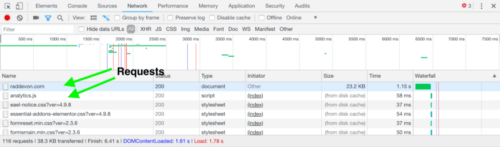
Here’s how you can look at the requests the browser is making for your application. Your browser’s developer tools will show you all the requests, the response statuses, and even the request headers and the response body. Here’s an example viewing the requests Chrome makes for RadDevon.com in the Chrome developer tools “Network” tab:
When you first switch to the “Network” tab, it may be empty. Just refresh and it will capture all the requests as the page reloads.
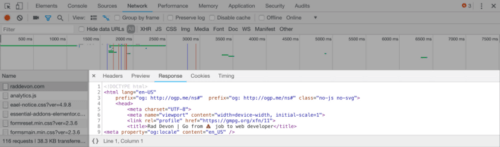
Each row represents a request the browser made to render this page. If you click the request, you’ll see several tabs with more information about that request. Here’s the response tab for the main request that returns the HTML of the Rad Devon homepage:
How do requests impact performance?
The time it takes a request to complete is the sum of time time it takes the request to get to the server, the time for the server to prepare the response, and the time for the response to get back. Each request has some overhead beyond the time it takes for the data you requested to come back. If you can reduce the sizes of your resources and the number of requests, you can reduce the amount of time it takes to load your page.
Imagine you’re helping someone bake a cake. You’ve offered to be their “runner” and get them all the things they need while they focus on baking. They start by asking you to get flour. You walk over to the cabinet, grab the flour, and bring it back.
Next, they ask you for cocoa powder. You go back to the cabinet, slightly annoyed, grab the cocoa powder, and bring it to them. Now, they ask you for baking powder. OK, this is getting a little ridiculous. Wouldn’t it be nice if they just asked you for all the things they need from the cabinet, and you could grab them all in a single trip?
Bingo. Even though it might take you a little longer to get back to them with all the items since they’re a little heavier, it’s a lot quicker than making three trips. You could also make the process faster if you’re grabbing just the amount of each item they need instead of lugging over a 5-pound bag of each. If it turns out they don’t need the cocoa powder at all, that’s going to speed things up too!
This is the same approach you might take when optimizing for performance in your web application. Try these optimizations in order:
Eliminate unnecessary requests by dropping any images or scripts you don’t absolutely need.
Reduce weight by optimizing images and minifying code.
Reduce the number of requests by concatenating all Javascript and CSS into a single file each.
Check out the “Time” column in your developer tools to understand which requests are making your page slow.
Understanding HTTP doesn’t just help with performance. It can also make your app more usable and make it easier to debug. When your application is not behaving as expected, it can be because of a problem with a request. That makes being able to understand what the “Network” tab is showing you valuable for debugging. The HTTP status code is a great place to start.
What are HTTP status codes?
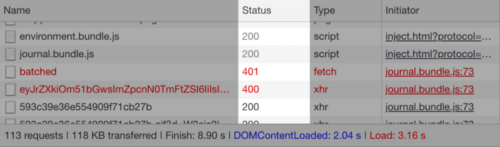
HTTP status code are returned to the HTTP client by the server along with the rest of the response. They inform the client whether the request succeeded and, if it failed, give some information about why. Here’s what they look like in Chrome developer tools:
The status code is a three-digit number. Here are the ranges and what each one means:
100– Responses in the 100s are described as “informational responses.” I personally have never seen one of these response codes in the wild. I’m sure they’re out there, but I doubt they’re very common.
200– This was a successful request with no caveats. If you asked the server to do something, it did it. If you asked for some data, it returned it.
300– Your request was redirected. This response is probably still fine because the server knew the location of the resource you requested… even though it wasn’t where you thought it was.
400– The 400 range are client errors. That means something in the request was not what the server expected. Maybe you sent a URL parameter that isn’t supported for the endpoint you made the request to. You probably won’t get back anything useful in the response body if the code is in the 400s.
500– The 500 range are server errors. The request was fine, but something broke on the server. Like the 400 range, you probably won’t get back any useful data on a 500.
That covers the ranges, but each status code inside those ranges has a more specific meaning. MDN has a great article running down the meaning of each response code. This can help you narrow even further the issues you’re having with your application. It can also help you handle unsuccessful requests in your application more intelligently.
For example, if a request comes back with a 400 because your user entered invalid data into a form which was then passed on to an API via a parameter, you might want to display an error message that tells them how to provide valid data. On the other hand, if you get a 500 error meaning something bad happened on the server, there’s probably nothing your user can do to make that right.
Why status codes aren’t always reliable
Understanding status codes can be useful for debugging and for writing your application to handle errors. The problem is that they aren’t always reliable. Here’s why.
When writing server-side code, developers have full discretion to choose the error code that makes sense to them. The descriptions above are what each range is supposed to mean, but that doesn’t mean they’re implemented this way in every application. In fact, they are not.
You may get a 500 response with useful data in the body, or you may get a 200 back with an error message. Each application is a unique snowflake, so make sure you know what will actually come back when you’re writing your front-end code.
Quick Wins from Understanding HTTP
Even if you’ve been building for the web without an understanding of HTTP, it’s still worthwhile to gain at least a cursory understanding. You’ll have better tools to improve performance, you can easily handle errors coming back from the server, and you can debug problems that might have otherwise eluded you.
It’s a nice suite of benefits in exchange for a bit of reading and some poking around in your browser’s developer tools.

 Attribution
When using recursion you answer the smallest version of a problem possible, and make a clause that stops the recursive call if that smallest version is met.
This is called the base-case, or the exit condition.
What it looks like
Here are some of the basic examples of how it works.
Factorial.rb
A basic factorial function in Ruby.
Attribution
When using recursion you answer the smallest version of a problem possible, and make a clause that stops the recursive call if that smallest version is met.
This is called the base-case, or the exit condition.
What it looks like
Here are some of the basic examples of how it works.
Factorial.rb
A basic factorial function in Ruby.
 So, recursion seems fun and all, but is it actually efficient?
Efficiency is going to depend on the application of the recursion, and which language or compiler being used. In most cases looping will be more memory efficient, as recursion takes up memory in the call stack.
So, recursion seems fun and all, but is it actually efficient?
Efficiency is going to depend on the application of the recursion, and which language or compiler being used. In most cases looping will be more memory efficient, as recursion takes up memory in the call stack.
 Often, in the case of larger problems, programmers find a simple solution using recursion, even if looping is possible. It is then up to the compiler to maximize efficiency. Some compilers will actually convert a recursive function to its iterative equivalent.
Generally, from searching around, there is no particular benefit to using recursion other than simplicity of code. Source.
What is it again?
Recursion is impressive to many because it looks rather simple, and does so much. It requires breaking down problems to their smallest instance. Even so, it often doesn’t offer any distinct advantages over looping.
So, if you want to impress interviewers, or simplify your code’s readability, learn some recursion. Learn it anyway, as you’ll run into it in other developers code. But think about whether the it will actually benefit your program.
Often, in the case of larger problems, programmers find a simple solution using recursion, even if looping is possible. It is then up to the compiler to maximize efficiency. Some compilers will actually convert a recursive function to its iterative equivalent.
Generally, from searching around, there is no particular benefit to using recursion other than simplicity of code. Source.
What is it again?
Recursion is impressive to many because it looks rather simple, and does so much. It requires breaking down problems to their smallest instance. Even so, it often doesn’t offer any distinct advantages over looping.
So, if you want to impress interviewers, or simplify your code’s readability, learn some recursion. Learn it anyway, as you’ll run into it in other developers code. But think about whether the it will actually benefit your program.

 Josh (left) with volunteer mentor Ryan (right)
Code4000 is Europe’s first prison coding workshop and is currently running a pilot with 32 prisoners at HMP Humber. The training is intense for the prisoners: nine-to-five, every day.
Five years ago Yoomee started a small in-house experiment to teach young offenders to code, but back then we didn’t have the resources to apply the lessons learned. Now we are working with Code4000 who teach prisoners how to code so they can find tech jobs when they are released.
“There’s a huge demand for coders, a huge shortfall in the UK and the rest of Europe,” said Michael Taylor, CEO of Code4000. “And prisoners have plenty of time, which is one thing you really need to learn how to code! They’ve taken to it with great speed. Some of our coders don’t even have level one maths or English, but they’re building websites within the first six to eight weeks.”
This year, Yoomee has been helping to pilot work placements for prisoners who are allowed travel on day-release to the Yoomee office whilst they serve their sentence in an open prison. We’ve recently taken on Josh, a prisoner, to work as a chatbot developer at the Yoomee office at Park Hill, Sheffield.
Josh is currently serving at HMP Hatfield which is an open prison that allows him to be released on a temporary license (ROTL). This means he can spend the day working at Yoomee rather than in the prison.
How does Code4000 work in prison?
The first phase is a training phase, teaching the prisoners the basics of HTML, CSS and Javascript, before moving onto more advanced concepts like Git, TDD, MVC, databases and full stack development using Ruby on Rails.
Prisoners aren’t allowed direct access to the internet, so they start with exercises downloaded from Code.org before moving onto building simple starter games like Pong, Breakout and Asteroids.
After that, they learn the basics of web development: how to code in both HTML (which covers the layout and structure of web pages) and CSS (which covers the style and design of web pages).
Once they’re ready, the students will enter the second stage: putting their skills to work on real projects for external clients.
The third stage will involve temporary day releases for prisoners so they can go to work with clients independently. The fourth and final step will be to help them find full-time employment as developers in time for their release. And it’s these last two stage that Yoomee has been helping with.
Introducing Josh
Josh learnt Ruby on Rails whilst attending the Code4000 workshop in HMP Humber and his skills are already impressive. He’s now working on real-world projects whilst at Yoomee. Projects include a software upgrade for Off-Axis and an AI-powered chatbot for a local mental health charity Sheffield Flourish.
“Coding is about problem-solving. Being a prisoner requires ingenious thinking to make the most of limited resources. Prisoners are adept at problem-solving and bring that into the coding world.”
The time needed to support Josh has decreased significantly since he started in the Yoomee office, and he’s now much more able to support himself using online resources such as Stack Overflow.
Yoomee is also very grateful for local tech volunteers such as freelance developer Ryan Brooks. Volunteers like Ryan are essential to help to speed up the onboarding process by committing regular time each week — mentoring and providing advice and insights on career development.
Next steps
The plan is to significantly expand the programme with Code4000 in Sheffield and so Yoomee is looking for volunteers to help mentor the new coders. So, if you also believe that an understanding of code unlocks a life of opportunities and has the power to transform lives please do get in touch with us.
In the meantime, you can find out more by watching Michael’s talk at TEDx Stockholm last month (below).
Josh (left) with volunteer mentor Ryan (right)
Code4000 is Europe’s first prison coding workshop and is currently running a pilot with 32 prisoners at HMP Humber. The training is intense for the prisoners: nine-to-five, every day.
Five years ago Yoomee started a small in-house experiment to teach young offenders to code, but back then we didn’t have the resources to apply the lessons learned. Now we are working with Code4000 who teach prisoners how to code so they can find tech jobs when they are released.
“There’s a huge demand for coders, a huge shortfall in the UK and the rest of Europe,” said Michael Taylor, CEO of Code4000. “And prisoners have plenty of time, which is one thing you really need to learn how to code! They’ve taken to it with great speed. Some of our coders don’t even have level one maths or English, but they’re building websites within the first six to eight weeks.”
This year, Yoomee has been helping to pilot work placements for prisoners who are allowed travel on day-release to the Yoomee office whilst they serve their sentence in an open prison. We’ve recently taken on Josh, a prisoner, to work as a chatbot developer at the Yoomee office at Park Hill, Sheffield.
Josh is currently serving at HMP Hatfield which is an open prison that allows him to be released on a temporary license (ROTL). This means he can spend the day working at Yoomee rather than in the prison.
How does Code4000 work in prison?
The first phase is a training phase, teaching the prisoners the basics of HTML, CSS and Javascript, before moving onto more advanced concepts like Git, TDD, MVC, databases and full stack development using Ruby on Rails.
Prisoners aren’t allowed direct access to the internet, so they start with exercises downloaded from Code.org before moving onto building simple starter games like Pong, Breakout and Asteroids.
After that, they learn the basics of web development: how to code in both HTML (which covers the layout and structure of web pages) and CSS (which covers the style and design of web pages).
Once they’re ready, the students will enter the second stage: putting their skills to work on real projects for external clients.
The third stage will involve temporary day releases for prisoners so they can go to work with clients independently. The fourth and final step will be to help them find full-time employment as developers in time for their release. And it’s these last two stage that Yoomee has been helping with.
Introducing Josh
Josh learnt Ruby on Rails whilst attending the Code4000 workshop in HMP Humber and his skills are already impressive. He’s now working on real-world projects whilst at Yoomee. Projects include a software upgrade for Off-Axis and an AI-powered chatbot for a local mental health charity Sheffield Flourish.
“Coding is about problem-solving. Being a prisoner requires ingenious thinking to make the most of limited resources. Prisoners are adept at problem-solving and bring that into the coding world.”
The time needed to support Josh has decreased significantly since he started in the Yoomee office, and he’s now much more able to support himself using online resources such as Stack Overflow.
Yoomee is also very grateful for local tech volunteers such as freelance developer Ryan Brooks. Volunteers like Ryan are essential to help to speed up the onboarding process by committing regular time each week — mentoring and providing advice and insights on career development.
Next steps
The plan is to significantly expand the programme with Code4000 in Sheffield and so Yoomee is looking for volunteers to help mentor the new coders. So, if you also believe that an understanding of code unlocks a life of opportunities and has the power to transform lives please do get in touch with us.
In the meantime, you can find out more by watching Michael’s talk at TEDx Stockholm last month (below).

 I’m trying to learn something called Data Driven Documents, or D3. It’s a JavaScript library that visualizes data. But before you can make an awesome visualization comparing how many gallons of hair gel Trump used in his lifetime, or how many toenail clippings could be transformed into organic matter to power an ecohome, consider this — one must actually learn to code to get to this high-level thinking. And you know what coding involves?
A lot of tedious, small, complicated parts of a whole. I’m talking about arrays, anonymous functions, key-value pairs, markup languages, accessor functions. I could stack up this jargon from here to the moon and we would still have plenty left to get to Pluto. But the thing about coding is, it’s more like riding a bike than memorizing a textbook. Once you understand how it works, you kind of just do it. The problem lies in getting to that point.
Coding is hard, at least to me. It’s learning an entirely new language and set of logic. It has foundations in things like math, which unfortunately is difficult. And while a strong programming foundation can be applied across languages, the technologies themselves change rapidly. This JavaScript library I am learning hardly existed five years ago. And yet it’s managed to change the way people think about journalism, data, and even communication.
The pattern I am seeing is that the younger the person is, the more likely they are to have coding skills. I’ve had four teachers in my lifetime that have taught me programming in a formal classroom setting, and they’ve all been under the age of 35. It’s almost as if programming, especially web technologies, has only become ubiquitous in the past 15 years. If you knew programming before the web existed, you were probably a super nerd who coded on punch cards.
Anyhow, the upshot of this is that I don’t see many qualified older teachers who can teach these valuable skills. Tenure-track academia tends to be chock full of people who are good at teaching theory and principles. But when it comes to explaining how Fizz Buzz works or even why a div is useful, they are totally in the dark. Skills-based training often gets placed on the shoulders of adjunct faculty, many of whom do not have adequate time and resources. And that is a problem.
The job market today is the most unforgiving it has ever been. Not because the work doesn’t exist, but because it requires skills that have high barriers to entry and are very difficult to obtain. This is especially true among entry-level jobs. Unfortunately, many entry-level jobs do not place the emphasis on higher-level thinking. It is more about skills — i.e. can you actually do the work? But for some fields, higher-level strategic thinking and skills are intertwined. This is certainly true for programming.
But the problem with programming is that in terms of writing functional code, syntax is everything. You are writing instructions that are interpreted by a computer. Even in so-called higher-level languages with more room for error, one mistake can break the entire application. Naturally, it is tough to move onto the fun design thinking when you don’t even understand the basics of JavaScript.
This is where I am frustrated. I do not feel that traditional academia is well suited for skills-based education. Classes meet for short periods of time and are often varied in breath. It is hard to spend the necessary amount of time learning an incredibly difficult skill like programming if one is juggling many other classes. Also, a lot of the classes I have taken are very principle-focused and already expect you to possess the technical know-how in order to apply the theory.
I can unequivocally say that the hardest part of graduate school has been mastering the technical tools to execute design concepts. One might counter, isn’t the only way to learn a skill is to try and fail in one’s own time? This method might work for GUIs or other more user-friendly applications. But for programming is an entirely new paradigm of thinking. It needs to be taught carefully and iteratively. It is like a system of building blocks, and if one doesn’t understand the basic elements, there is no way to learn more complicated concepts.
Right now, I am teaching myself the very basics of JavaScript and D3 because I did not understand the tool I built. I was helped very heavily by my teachers, who graciously lent their expertise to polish my project. Could I have built it from scratch, on my own? Or even explain why some parts of it were coded the way they were? To be honest, no.
I don’t want to blame the teachers here. The coding instructors are mostly all adjunct, trying to pull off something very different than what academia was designed to achieve. In my coding class last semester, the teacher had 12 weeks to teach HTML, CSS, JavaScript, and D3. Unfortunately, 2 of the classes fell during breaks, so there were only 10 classes in total. How do you teach so much content in 10 classes, when classes meet once a week and there are 15 different people who not only need to learn concepts, but also require individual help? Somehow the teacher, who was fantastic, managed to squeeze everything in.
But because of the time crunch, many people (including me) did not truly understand what they were doing.
But is this problem just limited to academia? It’s clear there is a big push to get people excited about STEM. But learning the basics can be difficult and tedious. Excitement alone cannot save us.
Maybe the question is, are there enough resources to help people learn this stuff? Do we have teachers who actually know these skills? And if not, how can we better prepare teachers and incentivize them to actually want to teach?
A lot of the problem falls within the primary and secondary school systems. If programming is so difficult and yet so integral to being useful in today’s economy, it should probably start being taught in middle school. It is hard for post-secondary education to teach such a daunting skill to people who have no background, while also requiring students to receive a well-rounded education.
But to get even more extreme, what if the entire model of education was changed. What if colleges didn’t have breath requirements, but instead only expected you to get good at one thing? It turns out these things do exist, in the form of coding bootcamps and other trade schools. It is kind of ironic that people spend a lot of their lives receiving a well-rounded education, but then default to going to an extremely specialized place that teaches such a specific, technical ability. But that’s what the economy wants today, especially in an entry-level position. If someone doesn’t know how to write a sentence, why would someone hire them to be a journalist? And if they can’t code Fizz Buzz, why would they be hired to visualize data? It’s almost as if the cart is being put before the horse, and no one knows how to ride the horse. In fact, the horse didn’t even exist 30 years ago, because it was a punch card.
If you can’t tell, I think about this often and it makes me frustrated. I do not mean to throw any of my more theory-based teachers under the bus. Most truly recognize the challenges of the modern learning environment. I suppose I just want to get people talking about academia can better teach hard skills.
At the risk of sounding like a cold-hearted you-know-what, I do not want to discount the importance of liberal arts thinking and being well-rounded. I am the ultimate liberal arts cheerleader who majored in political science, loved every minute of it, and then lived with his parents for three years after school. There is nothing I love more than reading a novel. I am a writer first and foremost. In fact, I would probably only be a writer if it wasn’t for things like the Internet upending the entire economy and making it hard for people who don’t know computers to get a job.
But the this doesn’t have to be a funeral procession. These are exciting times. I’m not going to go into the whole power of technology thing. But to quote a masked hero, with great power comes great responsibility. If we don’t understand tech, it’s going to replace us (and to a degree, already has). Academia is going to be a major casualty, as skills become more degree-agnostic and knowledge is offered cheaply and conveniently online. Soon, the only advantage academia might have over the Internet is that it can hire real live humans to teach stuff. Shouldn’t these humans be equipped with the skills that their students need to survive in this crazy world? And maybe even health insurance and job security? (A person can dream..)
Academia is a frustrating, hair-wrenching, awkward as hell, and occasionally wonderful place. For all the innovations it produced, teaching must continue to be one of them. Here are some suggestions I have to make a classroom a better environment to learn coding:
I’m trying to learn something called Data Driven Documents, or D3. It’s a JavaScript library that visualizes data. But before you can make an awesome visualization comparing how many gallons of hair gel Trump used in his lifetime, or how many toenail clippings could be transformed into organic matter to power an ecohome, consider this — one must actually learn to code to get to this high-level thinking. And you know what coding involves?
A lot of tedious, small, complicated parts of a whole. I’m talking about arrays, anonymous functions, key-value pairs, markup languages, accessor functions. I could stack up this jargon from here to the moon and we would still have plenty left to get to Pluto. But the thing about coding is, it’s more like riding a bike than memorizing a textbook. Once you understand how it works, you kind of just do it. The problem lies in getting to that point.
Coding is hard, at least to me. It’s learning an entirely new language and set of logic. It has foundations in things like math, which unfortunately is difficult. And while a strong programming foundation can be applied across languages, the technologies themselves change rapidly. This JavaScript library I am learning hardly existed five years ago. And yet it’s managed to change the way people think about journalism, data, and even communication.
The pattern I am seeing is that the younger the person is, the more likely they are to have coding skills. I’ve had four teachers in my lifetime that have taught me programming in a formal classroom setting, and they’ve all been under the age of 35. It’s almost as if programming, especially web technologies, has only become ubiquitous in the past 15 years. If you knew programming before the web existed, you were probably a super nerd who coded on punch cards.
Anyhow, the upshot of this is that I don’t see many qualified older teachers who can teach these valuable skills. Tenure-track academia tends to be chock full of people who are good at teaching theory and principles. But when it comes to explaining how Fizz Buzz works or even why a div is useful, they are totally in the dark. Skills-based training often gets placed on the shoulders of adjunct faculty, many of whom do not have adequate time and resources. And that is a problem.
The job market today is the most unforgiving it has ever been. Not because the work doesn’t exist, but because it requires skills that have high barriers to entry and are very difficult to obtain. This is especially true among entry-level jobs. Unfortunately, many entry-level jobs do not place the emphasis on higher-level thinking. It is more about skills — i.e. can you actually do the work? But for some fields, higher-level strategic thinking and skills are intertwined. This is certainly true for programming.
But the problem with programming is that in terms of writing functional code, syntax is everything. You are writing instructions that are interpreted by a computer. Even in so-called higher-level languages with more room for error, one mistake can break the entire application. Naturally, it is tough to move onto the fun design thinking when you don’t even understand the basics of JavaScript.
This is where I am frustrated. I do not feel that traditional academia is well suited for skills-based education. Classes meet for short periods of time and are often varied in breath. It is hard to spend the necessary amount of time learning an incredibly difficult skill like programming if one is juggling many other classes. Also, a lot of the classes I have taken are very principle-focused and already expect you to possess the technical know-how in order to apply the theory.
I can unequivocally say that the hardest part of graduate school has been mastering the technical tools to execute design concepts. One might counter, isn’t the only way to learn a skill is to try and fail in one’s own time? This method might work for GUIs or other more user-friendly applications. But for programming is an entirely new paradigm of thinking. It needs to be taught carefully and iteratively. It is like a system of building blocks, and if one doesn’t understand the basic elements, there is no way to learn more complicated concepts.
Right now, I am teaching myself the very basics of JavaScript and D3 because I did not understand the tool I built. I was helped very heavily by my teachers, who graciously lent their expertise to polish my project. Could I have built it from scratch, on my own? Or even explain why some parts of it were coded the way they were? To be honest, no.
I don’t want to blame the teachers here. The coding instructors are mostly all adjunct, trying to pull off something very different than what academia was designed to achieve. In my coding class last semester, the teacher had 12 weeks to teach HTML, CSS, JavaScript, and D3. Unfortunately, 2 of the classes fell during breaks, so there were only 10 classes in total. How do you teach so much content in 10 classes, when classes meet once a week and there are 15 different people who not only need to learn concepts, but also require individual help? Somehow the teacher, who was fantastic, managed to squeeze everything in.
But because of the time crunch, many people (including me) did not truly understand what they were doing.
But is this problem just limited to academia? It’s clear there is a big push to get people excited about STEM. But learning the basics can be difficult and tedious. Excitement alone cannot save us.
Maybe the question is, are there enough resources to help people learn this stuff? Do we have teachers who actually know these skills? And if not, how can we better prepare teachers and incentivize them to actually want to teach?
A lot of the problem falls within the primary and secondary school systems. If programming is so difficult and yet so integral to being useful in today’s economy, it should probably start being taught in middle school. It is hard for post-secondary education to teach such a daunting skill to people who have no background, while also requiring students to receive a well-rounded education.
But to get even more extreme, what if the entire model of education was changed. What if colleges didn’t have breath requirements, but instead only expected you to get good at one thing? It turns out these things do exist, in the form of coding bootcamps and other trade schools. It is kind of ironic that people spend a lot of their lives receiving a well-rounded education, but then default to going to an extremely specialized place that teaches such a specific, technical ability. But that’s what the economy wants today, especially in an entry-level position. If someone doesn’t know how to write a sentence, why would someone hire them to be a journalist? And if they can’t code Fizz Buzz, why would they be hired to visualize data? It’s almost as if the cart is being put before the horse, and no one knows how to ride the horse. In fact, the horse didn’t even exist 30 years ago, because it was a punch card.
If you can’t tell, I think about this often and it makes me frustrated. I do not mean to throw any of my more theory-based teachers under the bus. Most truly recognize the challenges of the modern learning environment. I suppose I just want to get people talking about academia can better teach hard skills.
At the risk of sounding like a cold-hearted you-know-what, I do not want to discount the importance of liberal arts thinking and being well-rounded. I am the ultimate liberal arts cheerleader who majored in political science, loved every minute of it, and then lived with his parents for three years after school. There is nothing I love more than reading a novel. I am a writer first and foremost. In fact, I would probably only be a writer if it wasn’t for things like the Internet upending the entire economy and making it hard for people who don’t know computers to get a job.
But the this doesn’t have to be a funeral procession. These are exciting times. I’m not going to go into the whole power of technology thing. But to quote a masked hero, with great power comes great responsibility. If we don’t understand tech, it’s going to replace us (and to a degree, already has). Academia is going to be a major casualty, as skills become more degree-agnostic and knowledge is offered cheaply and conveniently online. Soon, the only advantage academia might have over the Internet is that it can hire real live humans to teach stuff. Shouldn’t these humans be equipped with the skills that their students need to survive in this crazy world? And maybe even health insurance and job security? (A person can dream..)
Academia is a frustrating, hair-wrenching, awkward as hell, and occasionally wonderful place. For all the innovations it produced, teaching must continue to be one of them. Here are some suggestions I have to make a classroom a better environment to learn coding: