• 开源镜像
  • 开源沙龙
  • 媛宝
  • 猿帅
  • 注册
  • 登录
  • 息壤开源生活方式平台
  • 加入我们

开源日报

  • 开源日报第970期:《什么都有一点 water.css》

    5 12 月, 2020
    开源日报 每天推荐一个 GitHub 优质开源项目和一篇精选英文科技或编程文章原文,坚持阅读《开源日报》,保持每日学习的好习惯。
    今日推荐开源项目:《什么都有一点 water.css》
    今日推荐英文原文:《9 Ways to Improve Your Google Search Results》

    今日推荐开源项目:《什么都有一点 water.css》传送门:项目链接
    推荐理由:这个项目是一个简单的 css 库,对于那些简单的 HTML 页面来说,这个库可以从各方面都对其显示的效果进行一点简单的改造,最后达到一个简单的好看的效果——不管是各种表单控件还是斜体黑体各种样式的文字,连表格都提供了美化样式,而这些都只需要简单的引入这个库即可实现。
    今日推荐英文原文:《9 Ways to Improve Your Google Search Results》作者:Ali Haider
    原文链接:https://medium.com/better-programming/9-ways-to-improve-your-google-search-results-9b1a03bad645
    推荐理由:求人先求己的第一步就是学会查谷歌

    9 Ways to Improve Your Google Search Results

    Knowing how to Google for answers is a key part of any dev’s job

    Google is a powerful tool, but you’re missing out on a lot of that power if you simply type words into it. Today, we will remove the training wheels and unleash Google’s true potential that you have not seen before. We all type phrases into Google, then it shows results, and we search through them. This is the incorrect way — or rather inefficient use of mighty Google. But why is just typing words into Google not that great? On average, over 3.8 million searches are being made every minute. Google has the difficult task of catering to all these people from different parts of the world, of different ages, and with different needs. Google somehow has to keep them all happy. So it averages out the results or, in other words, shows a wide range of results. You will get search results by the method mentioned above, but they won’t be tailored to your needs. As a result, you will keep searching forever or miss out on the best results. The algorithms behind Google’s searches can lead to a lot of irrelevant results. But this is what we will uncover today: how to use appropriate operators to get the results we truly need and weed out the rest.

    1. Outdated Results

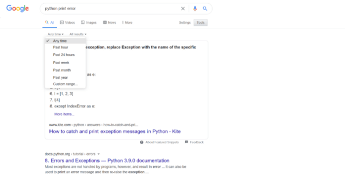
    If you are searching for something related to technology or computer science, you need to have the latest results in front of you. Surprisingly, Google will sometimes return results that are a decade old. Here is a simple and quick solution:
    • Go to “Tools.”
    • Click on “Any time.”
    • Click on the past year or whatever you prefer.
    2. Exact Phrase

    This is a powerful technique in which you narrow down the results, thus obtaining the best ones. To search for exact phrases, wrap your words in double quotes (e.g. “Python”). This way, Google will precisely search for that word only. The main difference between just typing straight away and using an operator is that you will get a wide variety of results when you type directly. The results might be irrelevant. When you are confident that you know what you are looking for, wrap your phrases in double quotes and see the difference.

    3. Search for Specific File Type

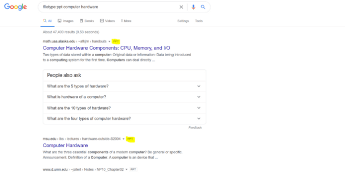
    Sometimes, you need a PDF, JPEG, or flash file. You can use the filetype: operator. For example, if you were searching for a PPT file:
    4. Search From a Specific Site

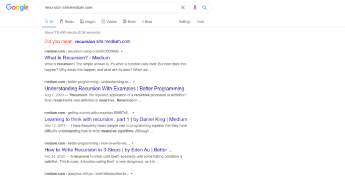
    This is something I use very often and absolutely love. Suppose you love a website and want the result from that website only. Or you trust a website, it has authority, and you know you will get the best information regarding your query from that specific website. Then you can use the site: operator. Whenever I have any doubt regarding any computer science concept, I usually refer to medium.com to get accurate and top-notch content in seconds:
    5. The * Operator

    Often, we don’t remember the information completely — be it a name or lyrics. By using the * operator, we can let Google know that the information is missing in between. Google then takes appropriate action.

    6. Exclude Words With a —

    If you don’t want specific words to appear in the search results, use this operator by starting with a dash.

    7. The or Operator

    This operator is used to search for more than one phrase. This gives additional words for Google to look for. To use it, write your phrases on either side of “or.”

    8. Compulsory Word

    This is a convenient and powerful operator that I use quite often. While performing a Google search, you can tell Google to place great importance on specific words and include them as a requirement.

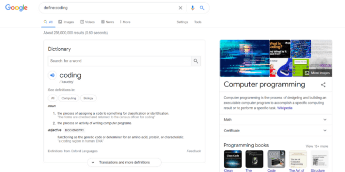
    9. Search for a Definition

    Looking for a definition of something is common on Google. To return results with a definition, use the define: operator: Thanks for reading!
    下载开源日报APP:https://opensourcedaily.org/2579/
    加入我们:https://opensourcedaily.org/about/join/
    关注我们:https://opensourcedaily.org/about/love/
  • 开源日报第969期:《插件 Enhanced GitHub》

    4 12 月, 2020
    开源日报 每天推荐一个 GitHub 优质开源项目和一篇精选英文科技或编程文章原文,坚持阅读《开源日报》,保持每日学习的好习惯。
    今日推荐开源项目:《插件 Enhanced GitHub》
    今日推荐英文原文:《Speaking Machine and Human in the Second Machine Age》

    今日推荐开源项目:《插件 Enhanced GitHub》传送门:项目链接
    推荐理由:该项目是一个作用在 GitHub 网页上的插件,能够显示单个文件/库的大小,一键复制文件内容,以及下载单个文件。
    今日推荐英文原文:《Speaking Machine and Human in the Second Machine Age》作者:John Maeda
    原文链接:https://johnmaeda.medium.com/speaking-machine-and-human-in-the-second-machine-age-40fd589886b
    推荐理由:随着科技发展,每次工业革命的重心都越来越抽象了,从运转的齿轮到看不见的电磁波,再到云。

    Speaking Machine and Human in the Second Machine Age

    When I was first starting to formally study design in the late 80s, I came across a book at the MIT Press bookstore with the weighty title, “Theory and Design in the First Machine Age,” written by the architectural critic Reyner Banham.

    It had a handwritten yellow discount sticker atop an austerely designed black cover with big white type and orange-red horizontal lines. Its original publication date of 1960 partially explained why the book cover looked out of fashion and yet it still stood out in a way that spoke to me. The price definitely worked for me too.

    My first read didn’t get me anywhere because the book was written in design-ese. At the time I spoke fluent engineer-ese, which made it easier for me to read equations, principles, and anything involving computation. But the book stayed with me throughout the years, and eventually by the fourth read I found myself chuckling at Banham’s droll yet witty prose. I guess that was proof that by then I’d become fluent in design-ese too. And yet the title’s reference to “the first machine age” signaled to me that the ability to speak engineer-ese was still highly relevant.

    Machines don’t need to take breaks, you can pour fuel into them while they’re running, and they can operate continuously.

    The kind of machines that Banham refers to are mechanical, steam-powered ones that disrupted how civilization works. The steam engine of the 1700s was the technological catalyst for “the first industrial revolution” because it radically altered what a business could accomplish. Before the steam-powered locomotive, the only alternative to long-distance transportation was horses. Horses need to take regular rests, eat, and sleep. Machines don’t need to take breaks, you can pour fuel into them while they’re running, and they can operate continuously.

    And then electricity came onto the scene as a viable technology during the late 1800s. All of the sudden, there was no need for a bulky steam engine to sit on-site and take up space. Instead, the electricity could be transmitted at a distance to power on-site electric motors, with the added perk of bringing the high-tech invention of incandescent light. This changeover from steam to electrical power marks “the second industrial revolution”, during a period when British manufacturers were dominant and had mastered using steam power. The resulting complacency and resistance to change — just as manufacturing in the U.S. was kicking off — resulted in the British getting disrupted by the upstart Americans who used electricity to power their factories. You can read a lot of this subtext in Banham’s book. Design’s centrality switched from being European-centric to US-centric, primarily due to this technology shift.

    Banham’s book ends when it’s just starting to get even more interesting. Because the “third industrial revolution” of the personal computer took off only a decade after Banham’s declaration of the first machine age. My favorite way to describe this big shift is the famous Steve Jobs quote to describe the personal computer as “a bicycle for the mind.” In other words, computing machines had transcended just supercharging physical power and instead had enabled humanity to refigure their cognition powers with a new level of efficiency. And just a few decades later, the so-called “fourth industrial revolution” began to emerge with billions of people all connected through computing machinery running at an ethereal scale we commonly refer to as “the cloud.”

    The cloud projects no tangible trace of its existence, but it responds to those who speak machine during this second machine age.

    In 1999, David Bowie accurately called out this fourth industrial revolution as our being “on the cusp of something exhilarating and terrifying.” Each industrial revolution has moved the center of gravity into dimensions that are increasingly intangible and difficult to comprehend. During Banham’s era, it was possible to see the mechanical results of technology with one’s eyes and touched it with one’s hands. A steam engine hissed. An electric generator quietly hummed. A personal computer silently blinks its LED. The cloud projects no tangible trace of its existence, but it responds to those who speak machine during this second machine age. Knowing the language of the first machine age won’t get you far these days. It’s a beautiful history to know, but be prepared to receive a yellow discount sticker if you don’t keep up.

    I’ll be posting weekly as part of the Medium team’s special invitation for me to share what I’ve learned over the years about how to speak both machine and human. If the topic of How To Speak Machine interests you, there’s a book for that. Thank you for tuning in! — JM


    下载开源日报APP:https://opensourcedaily.org/2579/
    加入我们:https://opensourcedaily.org/about/join/
    关注我们:https://opensourcedaily.org/about/love/

  • 开源日报第968期:《笔记 takenote》

    3 12 月, 2020
    开源日报 每天推荐一个 GitHub 优质开源项目和一篇精选英文科技或编程文章原文,坚持阅读《开源日报》,保持每日学习的好习惯。
    今日推荐开源项目:《笔记 takenote》
    今日推荐英文原文:《3 Libraries to Remove Unused CSS》

    今日推荐开源项目:《笔记 takenote》传送门:项目链接
    推荐理由:这是一个由开发者开发,面向开发者的基于浏览器的笔记记录应用。它使用了更类似于 IDE 的环境来让开发者快速记录,并且支持拖放,搜索与笔记间链接等常用操作;而且放弃了 markdown 编辑器中很常见所见即所得功能——毕竟作为面向开发者的应用,这个功能的确有些鸡肋。
    今日推荐英文原文:《3 Libraries to Remove Unused CSS》作者:Floriel
    原文链接:https://medium.com/better-programming/3-libraries-to-remove-unused-css-f09ffc9777da
    推荐理由:能够完成清除 CSS 代码中冗余任务的库

    3 Libraries to Remove Unused CSS

    And why you would use a library to do this task

    The 2020 State of CSS Survey had a section dedicated to utility libraries. In that section, the question was about the usage of StyleLint, PurgeCSS, and PurifyCSS. Two of those libraries are for removing unused CSS. As the author of PurgeCSS and a contributor to PurifyCSS, I want to take a moment to explain what problems those libraries can solve and compare the three most popular libraries to do this job.

    Why Do You Need a Library to Remove Unused CSS?

    Like every library, their usage depends on use cases and there are situations where it doesn’t make sense to use them. The most common use case for the libraries in this article is to remove unused CSS with CSS frameworks.

    CSS frameworks

    My past experiences with Bootstrap were not pleasant, mainly because I wanted to use CSS frameworks for small websites. They always ended up being bloated — especially for a single static page. Bootstrap offered the possibility to go on the website and select what features you will use to download a trimmed version of their CSS framework. The developer experience was poor.

    In comparison, TailwindCSS has the option to use PurgeCSS to remove the unused CSS automatically. When using TailwindCSS, you rarely ask yourself if you should consider another framework to trim down your website. And you rarely have to change your settings to deactivate rules.

    Legacy websites

    Another use case is the legacy sites that got out of hand. While you can ask for developer resources to clean up the CSS mess accumulated over time, you can take the initiative by using this tool first. Those libraries will add value to your website right away and help identify the unused CSS.

    Critical pages

    Some companies have different teams taking care of multiple parts of the website. One team can be in charge of the main application page, another in charge of the signup and payment pages, and another will handle settings and administration pages.

    In those situations, code is not always seen between the teams. They might choose to have a common CSS framework and not remove any CSS from it to take advantage of caching. But there should still be an exception for critical pages.

    Pages that are seen once and require high loading performances, such as the signup and payment pages, can use those libraries to remove unused CSS from their framework and preload the full version once on the final signup step. Overview and Comparison

    PurgeCSS

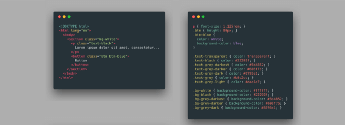
    Here’s how PurgeCSS works. First, we look at the content of our website. It will be everything except our styles. For a simple project, it could be HTML and JavaScript files. We want to get a list of selectors that could be used in our CSS from this content. Looking at the image below, we can see where the selectors are:

    Initial HTML and CSS file

    Once we have the list, the primary process begins. We parse the CSS file using PostCSS. Then, we walk through the Abstract Syntax Tree (AST). We take a look at each rule and analyze the selectors that compose it. If we notice a selector that is not present in the list, it means it is not used and we remove the rule.

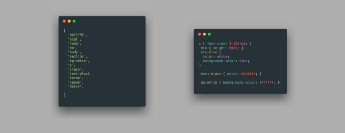
    In the CSS file above, PurgeCSS iterates over the rules, starting with p. It sees p in the list and so decides not to remove it. For text-transparent, it does not see it in the list and the rule is removed:

    Perceived selectors (left)/CSS output (right)

    PurgeCSS provides the possibility to create an extractor. An extractor is a function that takes the content of a file and extracts the list of CSS selectors used in it. It allows for more precise removal of unused CSS.

    You can specify which extractors you want to use for each file type, allowing you to get the most accurate results. But using specific extractors is optional and you can rely on the default one.

    PurifyCSS

    PurifyCSS works in a similar way to PurgeCSS. It analyzes the files, the content, and the CSS separately. It can work with any file — not just HTML or JavaScript.

    But the main flaw with PurifyCSS is its lack of modularity. Compared to PurgeCSS, it has essentially one extractor defined that cannot be changed. The extractor of PurifyCSS takes every word and is based on some use cases.

    Let’s take as an example .hello-world. PurifyCSS’s extractor is designed to work with JavaScript and it is possible to concatenate strings to form a class name. For that reason, it will see hello and world as used class names instead of hello-world.

    Since every word is considered a selector, a lot of selectors can be erroneously used. It will also not work with special characters that are often used by utility CSS frameworks.

    UnCSS

    UnCSS approaches the problem in a different way. Instead of analyzing the file, it attempts to run your website and look for the selectors in your CSS files. As indicated in its README, UnCSS starts by loading the files with jsdom and the JavaScript is executed. This way, it can work with React single-page applications that would have no HTML.

    Then, PostCSS parses all the stylesheets. UnCSS looks at the list of selectors defined in the stylesheets and runs document.querySelector on the website. If the function doesn’t find the selector, it is removed from the CSS.

    Because of its HTML emulation and JavaScript execution, UnCSS effectively removes unused selectors from web applications.

    However, its emulation can have a cost in terms of performance and practicality. To remove unused CSS from Pug template files, you would need to convert Pug to HTML and emulate the page inside jsdom. After this step, UnCSS can run document.querySelector on each selector.

    Another issue with this process is that you have some common use cases where elements will not be present initially. You might have to click on a button on your website to make a modal appear or make another section appear.

    With UnCSS, you have the ability to click on elements on your website. But it creates a maintenance burden. You can see it as creating a small Cypress/Selenium test to go through your application and discover all the hidden sections.

    At the moment, UnCSS is probably the most accurate tool to remove unused CSS for a few situations. If you do not use server-side rendering and have a simple one-page website with HTML and JavaScript, it should work correctly and outperform PurgeCSS in terms of CSS size.
    下载开源日报APP:https://opensourcedaily.org/2579/
    加入我们:https://opensourcedaily.org/about/join/
    关注我们:https://opensourcedaily.org/about/love/
  • 开源日报第967期:《狗勾 dog-api-images》

    2 12 月, 2020
    开源日报 每天推荐一个 GitHub 优质开源项目和一篇精选英文科技或编程文章原文,坚持阅读《开源日报》,保持每日学习的好习惯。
    今日推荐开源项目:《狗勾 dog-api-images》
    今日推荐英文原文:《What’s A Human-Powered Computer?》

    今日推荐开源项目:《狗狗 dog-api-images》传送门:项目链接
    推荐理由:这个项目是 dog-api 中的狗狗图片仓库,顾名思义这里有极其大量的狗狗元素,包含各种各样类别的狗狗图片,对于那些喜欢狗狗但是没法养的人来说,这个仓库或许能拿来望梅止渴,补充自己的狗狗能量。
    今日推荐英文原文:《What’s A Human-Powered Computer?》作者:John Maeda
    原文链接:https://johnmaeda.medium.com/whats-a-human-powered-computer-14997285111
    推荐理由:事实证明计算机是真的比人快很多

    What’s A Human-Powered Computer?

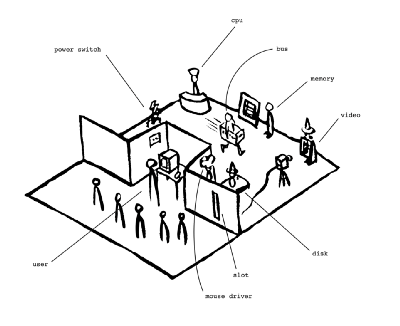
    In the spring of 1993, my experiences as a hardware and software engineer collided with the art world as an installation in Kyoto benefitting from the educational direction of edutech pioneer Nobuyuki Ueda. Having worked for too long in the abstract world of electricity and cyberspace, I hungered to see it made real, in order to understand it better. Thus was born the Human Powered Computer Experiment, which was “performed” by Dr. Ueda’s graduate students in a two-day long workshop where human beings embodied the working components of a computer.


    At the time computers still had disk drives, so the entire system started up by turning on a power switch, and then placing a giant cardboard disk into a slot through a partition. On one side of the divider sat the computer user; the other half was for the human-powered computation to happen. The performance area spanned two floors of empty space so that visitors could view what was occurring on both sides at the same time.


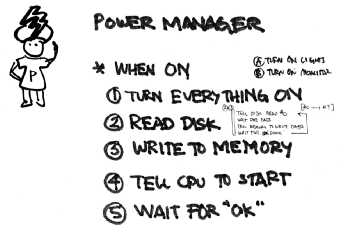
    When the power switch (made out of paper) was flipped to “ON,” the corresponding person playing the “power manager” role was watching and followed a handwritten script:


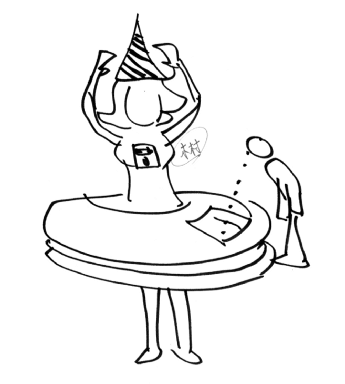
    She was waiting for the disk to be placed into the slot so that information could be read off of the disk’s platter through a window — just like the way a computer would read information from a floppy disk.

    Each of the “sectors” of the floppy disk were pieces of paper that would spin into view one by one.

    As information was being read off of the disk, the bus would then deliver the data to the relevant component — CPU, memory, mouse driver, GPU, etc — to do the work of “booting” the computer to become operational.

    The “bus” role involved carrying information on whiteboard cards to different components inside the computer.

    A Human-Powered Computer Is Slooooow

    The computer was programmed to track the position of the mouse (a cardboard box on a grid) and to display the corresponding location on the computer screen. That means when you moved the mouse, the cursor graphic would move on the video screen in a corresponding way — which happens fluidly on a regular computer. Writing the program was a matter of taping instructions onto the cardboard platter of the disk, and then inserting it into the partition from the user side to the computation side. The disk drive picked up the disk, wore it, and then proceeded to spin the disk platter to the first sector.

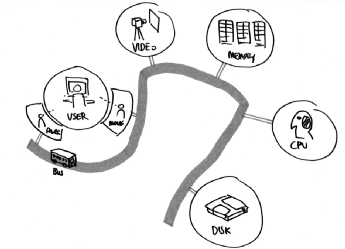
    The bus carried information on whiteboard cards between different components of the computer.

    The bus took the first instruction packet and then delivered it to the right destinations, and after three hours of delivering subsequent cards of information, it finally went to read an x-y coordinate from the mouse manager. The bus carried that information over to the video manager, and subsequently the screen was updated with the new position. One can imagine how unfavorable it would be for their computer to take three hours to move the position of their mouse on screen. You can watch a reenactment of those three hours — condensed to an artistically reinterpreted three minutes — in this video by Dr. Ueda’s team(https://vimeo.com/2745677).

    What learnings came from the experiment?

    The big takeaway was that computers are extremely fast, and when you try to replicate that with human beings, you see how slow we move by comparison. Another thing we noticed was when one of the first computer programs I wrote “crashed.” But it was okay because we had a good excuse to take a lunch break to refresh ourselves, and then noted how the real computer didn’t need any rest at all.

    One outcome that I didn’t expect was how insightfully Professor Ueda’s students — all pursuing Education degrees — could articulate how to improve the computer’s operation with suggestions like this:
    • Couldn’t there be two buses instead of just one to speed things up?
    • Why wasn’t the video manager closer to the CPU so it waits less often?
    They were of course describing technological advances that we’ve come to expect in modern computing architectures, and exhibited their new competency to speak machine. If you wonder why I became so interested in enabling more people to learn how to speak machine, this experiment is how I really began this work.

    The underlying motivation for running this experiment came from learning about the Bauhaus and its approach to finding new ways to leverage new electrical, chemical, and mechanical technologies during the 1st and 2nd Industrial Revolutions in service of human beings. The 3rd and 4th Industrial Revolutions are about computing and the need for more people who can speak machine (and human). What are these four Industrial Revolutions? I’ll cover that in my next post.
    下载开源日报APP:https://opensourcedaily.org/2579/
    加入我们:https://opensourcedaily.org/about/join/
    关注我们:https://opensourcedaily.org/about/love/
←上一页
1 … 16 17 18 19 20 … 262
下一页→

Proudly powered by WordPress