• 开源镜像
  • 开源沙龙
  • 媛宝
  • 猿帅
  • 注册
  • 登录
  • 息壤开源生活方式平台
  • 加入我们

开源日报

  • 2019年1月31日:开源日报第329期

    31 1 月, 2019
    开源日报 每天推荐一个 GitHub 优质开源项目和一篇精选英文科技或编程文章原文,坚持阅读《开源日报》,保持每日学习的好习惯。
    今日推荐开源项目:《iOS ios-developer-tools》
    今日推荐英文原文:《How to make your Team and your JavaScript Project better in 2019》

    今日推荐开源项目:《iOS ios-developer-tools》传送门:GitHub链接
    推荐理由:iOS 开发者用得上的工具合集,包含了 IDE,命令行工具,编译器,调试和分析各种方面。如果想在新的一年内着手开始玩 iOS 开发的话,可以考虑把这个项目加入收藏夹中,或者说你需要寻找一个更适合你的新工具的话,它兴许也能帮上你的忙。
    今日推荐英文原文:《How to make your Team and your JavaScript Project better in 2019》作者:Manuel Bieh
    原文链接:https://medium.com/@manuelbieh/how-to-make-your-team-and-your-javascript-project-better-in-2019-a8d19f1c0d2f
    推荐理由:让你的团队和 JS 项目更好的发展的方法

    How to make your Team and your JavaScript Project better in 2019

    When I join a new project (which happens quite often since I’m working as an independent freelance developer) I usually have a look at the current project setup first. It’s a good way to get a quick overview of how the project is organized, what tools they’re using or most of the times, unfortunately, they are not using.

    I like clean, thoughtful and well-designed setups and processes a lot and I appreciate a healthy and sustainable code base as it makes working with your company’s code a lot easier, a lot less painful and it makes your developers faster in the long run since it results in a much more maintainable code base.

    So when I have a look at your package.json for example there are a few things I’d like to see there and I would really recommend and encourage you to somehow integrate them in your workflow. They might be hard in the beginning and sometimes your developers will curse for a moment but trust me once you’ve done that and you got used to it there is no way back.

    The Tools

    Let’s start with a tool that was (and still is) controversely discussed in the dev community. It seems like you either love it or you hate it. I was in the second group at first and I’ll explain why in a bit. I’m talking about Prettier.

    Prettier

    It’s a tool that formats your code in a completely unified way. You can either use the Format on Save option in your IDE, format it manually, or even create a Git hook to format all files that are being committed automatically.

    Many developers I talked to who disliked Prettier said that they want to have control over how their code is formatted and that they often disagree with how Prettier formats code. As mentioned in the beginning, that was also me in the beginning. Until I found the true value of the tool.

    Most of the time it is not about you, but about your colleagues.

    Ever wondered about that super strange coding style your colleague uses when formatting code? The same thought you have when reading that colleague’s code, your colleague will very likely have when he’s reading your code, ever thought about that? Won’t happen with Prettier.

    Prettier has only very few options and formats your code based on some really sophisticated rules. They are open to new PRs, too. While you won’t always agree to how Prettier thinks your code should be formatted it’s freeing up so much mental energy, believe me.

    Spend your energy on thinking about what to write and not how to write it! Write it however you like, hit CTRL+S and watch Prettier do its job. It really frees up so much mental energy. I’d say it has probably become the most valuable tool in my developer toolchain since switching to Git in 2010.

    Another clear plus: we can end the debate whether to use semicolons or not and if 2 or 4 spaces is the right level of indentation. You can delegate that decision mostly to a computer program and write the code exactly you feel is right for you.

    So my recommendation here, if it has not happened yet: add Prettier to your projects! Even more: have your files automatically run through Prettier to make sure that even colleagues who still refuse to use it in their IDE push their code in a way everybody can read. I remember that one colleague who refused to use it and later committed mock data for tests with an array of 25 objects. All. In. One. Line. No. Don’t be that guy, please.

    Which leads us directly to our next candidate:

    Husky, lint-staged and install-deps-postmerge

    Husky simply describes itself in its readme with:

    Git hooks made easy

    And yup. That is what it is. It makes writing Git hooks a bliss! No more shell scripts that work only on your machine, no more need to install ruby or python only to run a certain Git hook. Install Husky, create a .huskyrc file and put a few simple commands in there.

    Husky works especially great in combination with lint-staged and install-deps-postmerge. lint-stage runs linters against all your staged files allowing you to modifiy files before they are eventually pushed to GitHub. install-deps-postmerge on the other side runs after you merged files from remote (e.g. via git merge), then checks your package.json and your lockfiles (yarn lock, package-lock.json) for changes and automatically updates your dependencies.

    In my typical setup I use it to automatically have all my staged files run through Prettier before they land on GitHub. That’s typically a pre-commit hook I add. Another one is an ESLint check which lets your commit fail to avoid having potentially harmful code in your code base. Which leads us to our next very useful tool.

    ESLint

    It’s hard to imagine that there are still teams out there not using ESLint in their JavaScript projects but believe me, there are. I don’t even care that much about what rules exactly you use and how you configured them but you should at least cover the most common mistakes that can lead to serious bugs in your code (like no-redeclare, no-undef or many many others).

    If you can catch bugs at devtime instead of runtime, why should you not do that? I created my own personal eslint-config and published it as a package on npm. A client asked me to take a day to figure out which rules make most sense in their React project back in 2016 and so I created my very own package from this newly acquired knowledge with all the rules I found helpful. You can find it here: https://www.npmjs.com/package/eslint-config-wiremore

    Although I’m really trying to keep it up-to-date on a regular basis there might be ESLint configs that are even better and more regularly maintained than mine. I can really recommend to have a look at the eslint-airbnb-config for that matter.

    ESLint integrates really good with Prettier by the way. So together they’re a great combination.

    cross-env and dotenv

    When I develop software I am following the 12 factor methodology. This is something I recommend all my clients as that makes your software predictable, maintainable and understandable. Part of that methodology is to III. store config in the environment. And by environment, of course, environment variables are meant.

    This is where cross-env and dotenv come into play. Both tools are designed to make your life as a developer easier when it comes to dealing with env vars. cross-env as the name indicates let’s you use env variables on all different platforms (Windows, Unix, Mac) without having to think about special syntaxes, try to detect the OS or terminal the user is using etc. Just prefix a command you want to run with cross-env followed by the env variable(s) you want to set and you’re all set.
    $ cross-env HELLO=world node -e 'console.log(process.env.HELLO)'
    > world
    
    The other tool, dotenv, is for pulling all the env vars into your application at runtime (node) or build time (webpack, rollup, etc.). It allows you to keep all your env vars in a single .env file which is loaded automatically once you import dotenv into your application.

    dotenv also respects your commandline env vars which then take precedence over env vars from your .env file by default. It goes nicely hand in hand with cross-env so I recommend using them together to add some more maintainability to your setup.

    The Processes

    There are tools on the one side but there are also processes on the other side. Tools can help you get your processes right, support you to keep your codebase clean and tidy but for certain things you need to establish certain processes where tools are limited or not suitable.

    Document what you are doing, and how, and why it was done the way it was

    Something most developers don’t like to do is to write documentation. I know it’s hard sometimes to write things down instead of writing code but having a good documentation is so important, especially if you’re having a high fluctuation and you’re off- and onboarding new team members regularly. And a good documentation doesn’t have to be the size of a whole book. You can start with a simple README.md in your repository.

    Setup a project as if you were new to your own team, clone the repo, install all dependencies, gather all the necessary environment variables and put it in your .env file. Write down every single step. Don’t forget the obivous things you have done a long time ago: installing Node/nvm. Installing helpful editor plugins such as Prettier or ESLint. Provide links for all that and try to think of it as if you were onboarding a Junior Developer to your team.

    Then write down all links to your develop, staging and production environment. Give hints where pull requests are deployed to (if they are) and where to find the link to your CI. I guarantee you it probably won’t even take an hour but will in return save you hours of work in the future, whenever you are onboarding new people or setting up the project from scratch. Encourage your colleagues to fix things if they are outdated.

    This way they could even create their first Pull Request which is always a good feeling. Creating a Pull Request on your first day in a new project always feels rewarding, even if the only thing you actually fix is a typo or a broken link but it gives you the strong feeling that now, after your first PR, you’re really a member of the team already.

    If you’re building installable packages (e.g. via npm) writing a changelog is also a great idea usually. And sometimes also a “decisions” document can be useful. Use it to note down why you have done certain things the way you’ve done it. It can give future team members valuable hints.

    Development workflow

    Ideally your main branches (usually master and/or develop and sometimes also stage/staging) are protected and nobody in your team has the access rights to directly push code to one of these branches. All work should be done on branches! In my opinion it does not really matter that much if you’re working on feature branches or developer branches or if you’re strictly following Gitflow or not but more important is that you should really never have any of your developers directly push into one of the main branches!

    The goal is to make sure that every single change has been peer reviewed and approved by at least one other member of your dev team. All large Git services (GitHub, Gitlab, Bitbucket) have such a feature. This is an easy way to make sure that at least the most obvious bugs can get caught before they are deployed. It also splits responsibility from a single person to at least two persons — the original creator of the PR and the reviewer.

    Doing it that way also makes sure that code can be understood by others. If some parts of the code are not understood easily by other members of your team who review your branch you should think about either simplifying it and since that is not always easily possible at least add some comments there to have some inline documentation of what is going on there.

    Keep your Pull Requests small. They are easier to review. They are easier to revert. And they are easier to fix if a bug is discovered while in review.

    And probably most important: encourage your team members to have a good review culture! Take it serious and don’t underestimate the value of a thorough code review. I have had a project where I spend an hour or even longer on an average work day in code reviews and I have never before seen such a high quality code base.

    What is the value of a high quality code base? Developer satisfaction, retention and in the long run: you gain speed by understanding what has been done months ago while at the same time not having to waste hours of fixing bugs every day only because you were careless 3 months ago, just to save 20 minutes of your time. Of course code reviews alone don’t make your code bug free or better maintainable per se but from my experience I can say the more priority the review process had in a team, the less technical debt had been accumulated over time.

    This, in turn usually makes your developers happy since nobody likes smelly code and that automatically makes your developers want to write clean code to keep standards high.

    Keep your dependencies up to date

    There is nothing worse than discovering a bug in a new version of a browser or a device and not being able to fix it because some of your old dependencies are incompatible to other dependencies from your dependency tree which are needed to get this bug fixed. Been there. Done that. Spent almost a week only to update the dependencies in a project that hadn’t gotten any love for almost one and a half years.

    During that time a new iPhone and a new iOS was released and for some weird reason my client’s site didn’t work properly anymore. The source for this bug was deep down in the dependency tree and required an update of one of the project’s core dependencies which itself required a new jQuery version etc. etc. etc. Long story short: it was a pain.

    So even if you’re only in “maintenance mode” with your product you should at least spend some effort to update your depenencies regularly. At least, say, every 2 months. You should spend even more time to update your dependencies if you’re still actively developing your product. If you do that regularly, at least monthly, it is usually done within half an hour. Given that you have tests for the most important parts of your application of course. In npm you can run npm outdated to see which of your dependencies are outdated, in yarn you can even update them easily by running yarn upgrade-interactive in your terminal.

    Conclusion

    There are many ways to increase the quality of your codebase, the happiness of your developers and the overall performance of your company. Some of them require a little change in the mindset of the people involved, some of them can be implemented in a few minutes and have massive impact on the success of your team, your product and your company.

    In this text I tried to illustrate some of the things you can usually implement pretty quickly and without too much resistance. I encourage you to try that. Not everything that works great in one team works equally well in another team. The things I described are mostly considered “best practice” though, so they should work at least for most of the teams.

    Give it a try! And tell me if you did and it worked for you and your team!
    下载开源日报APP:https://opensourcedaily.org/2579/
    加入我们:https://opensourcedaily.org/about/join/
    关注我们:https://opensourcedaily.org/about/love/

  • 2019年1月30日:开源日报第328期

    30 1 月, 2019
    开源日报 每天推荐一个 GitHub 优质开源项目和一篇精选英文科技或编程文章原文,坚持阅读《开源日报》,保持每日学习的好习惯。
    今日推荐开源项目:《干货 HyperDL-Tutorial》
    今日推荐英文原文:《10 Signs You Will Suck at Programming》

    今日推荐开源项目:《干货 HyperDL-Tutorial》传送门:GitHub链接
    推荐理由:深度学习系列的相关文章合集,总结了在深度学习实践中的一些经验。介绍了诸如深度学习框架,神经网络的设计和使用场景等等,还有一些这方面的面试题来加强理解,如果想要了解深度学习的话不妨看看这个,语言采用的是中文所以可以很简单的读懂。
    今日推荐英文原文:《10 Signs You Will Suck at Programming》作者:Jonathan Bluks
    原文链接:https://medium.com/@jonathanbluks/10-signs-you-will-suck-at-programming-5497a6a52c5c
    推荐理由:在学习编程的过程中会遇上的一些难题,虽然很少人会无法学习编程,但是在学习过程中大家很可能都会遇上这些问题

    10 Signs You Will Suck at Programming

    I often see questions on Reddit or Quora along the lines of “How do I know if I’ll succeed as a programmer?” (In fact this post expands on an answer I gave on Quora a while back.) When someone is considering a career change, or is interested in software development and curious about what it takes, inevitably the question of programming comes up.

    In fact, I think this is a major barrier to entry in people’s minds when they don’t have any formal training in computing. It’s natural to think that if you aren’t good at programming, then your desire is a non-starter. It’s kind of like if you want to be an actor and wonder if you’ll be good at acting.

    As an Educator that teaches Full-Stack Web Development, I have taught many “first time programmers”. And the good news is that I have rarely found a student that couldn’t learn to program. I see it as a basic human skill, just like reading, writing, and arithmetic. Anyone can do it, it is part of our human capacities, but does need to be learned.

    Over the past two years of teaching, I have witnessed various students struggle in the process, and some common themes that come up in their struggles. If you look at this list and see them in yourself, rest assured, you will truly suck at programming and should probably find something else to do with your time. But, if you are still committed to your goal of becoming a developer, you can easily face these issues and change.

    Programming is a basic human skill, just like reading, writing and arithmetic. Anyone can learn to program with time and effort.

    The following list will help you know if you will suck at programming — and what you can do about it if you want to change.

    1 | Lack of curiosity

    If you lack curiosity about computers and how technology works, you will never be successful as a programmer.

    A fundamental requirement for learning is an active interest in the thing you are learning. If you do not possess a mind that is curious about technology, you will not have the energy it takes to persist in learning the broad and deep knowledge required to be a successful programmer.

    In contrast, the world of technology is like a huge ocean of interesting domains, inter-connected ideas, and possibilities that can excite the imagination. It takes an inherent internal motivation to want to dive in and discover all that you can.

    Find Your Curiosity: Ask yourself if programming truly interests you. If your honest answer is that it doesn’t, go find something that you are interested in. Save yourself the time and energy. But if your answer is “Yes”, then push yourself find something new that you haven’t noticed before, recognize the vast ocean and dive a little deeper.

    2 | Lack of autonomy and resourcefulness

    If you don’t develop the ability to solve problems for yourself, you will never be successful as a programmer.

    Without a doubt, to be a successful developer, you have to be confident in your OWN ability to learn. This is actually a fundamental life skill — if you are are over the age of 18, nobody is obligated to teach you anything. That’s reality. It’s up to you to find the information and help that you need to learn what is important to you.

    In the world of development, all the information you need is found in that magical place formerly known as the Information Super Highway. This massive library has one huge doorway: Google. Learning that you can simply type whatever you want into Google and get to the information you need is the first hurdle to cross when you want to learn the skills needed to be in technology.

    In addition to being a good googler, all programming languages have documentation and specifications that are very explicit about how the language works. It’s like using a dictionary — when you see a word you don’t recognize, you look it up. The quickest, most reliable way to build your skill as a programmer is to simply read the documentation. It’s literally all there.

    Use the Resources: Recognize that all the answers you need really are out there. When you have a question, force yourself to google it before asking someone else for the answer and check the documentation. Save the time of others for when you have tried and truly failed to find the answer you need.

    3 | Lack of persistence in the face of a problem

    If you give up easily in the face of problems, you will never be successful as a programmer.

    The essence of programming is solving problems. That’s the whole reason computers were invented! Whenever you begin working on a program you will encounter a whole “stack” of problems. And once you resolve a problem, there is almost always another problem right behind it. You are making progress, but there are always new problems to face.

    Facing that stack of problems can be daunting and discouraging. If you feel like things should “just work”, then you won’t have the energy to persist as the problems continue and little by little knock down your emotional resolve. It’s literally your job to figure out why things aren’t working.

    From my in-class experience, there are usually one or two students per class who seem to have knack for encountering more problems than other students — often quite random and obscure problems. I remind the student that the more problems they face upfront, the possibility of learning more deeply and thoroughly increases. If they can gain understanding through these problems, they will quickly find that they are more confident because they have faced and resolved more problems than the average student.

    Patient Acceptance: You need to recognize that problems come with the territory and are not problems, but in fact challenges. Every challenge you face and overcome gives you deeper understanding and a better ability to face new challenges, and quickly resolve old ones.

    4 | No feeling of success in overcoming a problem

    If you don’t feel a sense of excitement and accomplishment after solving a problem, you will never be successful as a programmer.

    Related to the previous issue of giving up too easily is a lack of “good feelings” once you have successfully resolved a problem. When fixing bugs and issues becomes a treadmill that never seems to end, you lose touch with the excitement that comes in overcoming a problem.

    There is actually a dopamine hit that you need when you overcome a problem. This is similar to the experience of completing a level in a video game, or solving a challenge like a crossword or sudoku. We all know that there is a good feeling that comes from persisting through a challenge and then finally winning at the end. But if you have lost the ability to feel those feelings, or never truly cared in the first place, you will not be able experience the joy that comes from programming. If you see programming as a grind where you just want to get a result as easily as you can, you will never truly be a successful programmer.

    Celebrate Your Wins: Whenever you solve a problem that you struggled with, no matter how small, always take pride in your accomplishment, take a break and congratulate yourself for a job well done. Let the feeling of success sink in and energize you for the next problem you face.

    5 | Impatient about learning and understanding

    If you are impatient about learning and expect to master everything quickly and effortlessly, you will never truly be successful at programming.

    As humans we are limited creatures. Even though our world moves faster and faster, and computers are a bit cause of that, we can only move as fast as we are able. Our brains work at a certain speed, and depending on our past, our beliefs, our emotional states, our health…we will all learn and integrate information at different speeds.

    The world of technology is like a vast ocean. You will never get to the end of it, you will never get to a point where you are a master with nothing else to learn. If you let yourself get overwhelmed, you will always feel a pressure to “catch up” and feel that you never know enough. If you can’t accept what you know and then learn a little bit more, you will feel like you are getting nowhere, and give up.

    Instead, you need to enjoy the journey of learning for itself. Every little bit of knowledge you gain, or new skill you gain needs to make you excited. Like solving problems, you need to let yourself feel the pride of recognizing that you have taken a step forward, even if it is a small one.

    Acknowledge Your Progress: There is a lot to learn, and the journey of programming never ends. But the knowledge is cumulative, so take pride it what you do know, and trust that every effort you take in your learning will create a strong foundation of knowledge for wherever your career takes you.

    6 | Getting bored/tired from thinking

    If you are lazy in your thinking and see concentrated, focused thinking as a chore, you will never truly be successful at programming.

    Programming is a thinking activity. As humans we are really good at thinking, but the reality is that even though we naturally spend all day doing it, we are lazy in our thinking. The ability to maintain concentrated, focused effort on a single problem over a period time is difficult if you aren’t used to it.

    Symptoms of this include staring blankly at the screen, feeling a cloud descend on your thoughts, procrastinating on a problem, flipping between browser tabs, and desperately scanning StackOverflow for “an answer”. These are signs that you have hit a mental limitation and need to find a way through.

    While programming, you will get tired and thinking literally burns physical energy just like exercising our bodies. When you aren’t used to exerting the mental energy needed to it can feel difficult to stay focused. But it is just like going to the gym, the more that you do it, the stronger you will get.

    Your Mind is a Muscle: Trust that your brain is like a muscle — as you use it, it gets better and more efficient in it’s thinking. As you put pieces together and develop mental concepts, it becomes much easier to discover solutions.

    7 | Inability to think for yourself

    If you expect others to think for you, and are unwilling to look at the details of your own situation, you will never be a truly successful programmer.

    When you are learning something new, it is easy to feel like you lack the knowledge and experience to have your own opinions. Taking initiative or doing/saying the wrong thing seems risky.

    There is an inherent fear we all have in being wrong. When that fear of being wrong inhibits your exploration and curiosity, you stifle the ability to develop true knowledge, knowledge that is gained from experience and “failure”. When you need to rely on the “guru’s” opinion, a popular blogger, a best practice, or the “textbook” answer, then you have not truly integrated a working knowledge of programming.

    You need to develop you own opinions about what works and what doesn’t. You need to understand why you think your solution works, and what the benefits are. You need to developed a nuanced perspective that goes beyond what is obvious. You need to be able to “argue” your side, and then if you change, you can own the new perspective you have gained.

    Think for yourself: Through your experience and critical thinking skills, develop your own perspectives. Make reasonable guesses, take a position, and be willing to change as new information comes to light.

    8 | Rigid, narrow and/or disorganized thinking

    If you are rigid in your thinking, and you have difficulty keeping your code organized — and by extension your thoughts organized and focused, you will never be successful at programming.

    There are two extremes that I sometimes see in students. The first is a rigid and narrow approach to thinking. This attitude refuses help, and despite feedback, doesn’t change. Things are seen from one perspective only, and suggestions are ignored.

    A second extreme I see is disorganized thinking. Students seem to make things more complicated than necessary, their code is messy and hard to follow. They overthink problems and write 100 lines of code, when 10 would have been sufficient.

    When these two mindsets are combined the result is an uptight approach to programming, like a brute force approach that leads to layers and layers of fixes and “hacks”. What is required is the ability to go back over the solution, reevaluate it, give up on the initial approach, and reorganize.

    Not being able to see other possibilities or receive feedback inhibits the ability to grow and improve. Being disorganized slows you down and prevents you from seeing patterns that would otherwise be obvious. And the overall quality of your work is diminished.

    Self Reflection: You need to take a step back, and look at the bigger picture of how you are approaching things. How can you do this better? Is there anything you can do to make your life easier? What are you missing that could help you?

    9 | Needing the “right” answer instead of recognizing a spectrum of “good” and “bad” answers

    If you see the end goal of programming as finding the right solution, rather than a spectrum of solutions, you will never truly be successful as a programmer.

    When starting to learn the skills or programming, students often want to know whether what they have done is “right”. The answer is always “it depends.”

    Computer Science is a science of evaluating tradeoffs. Given different sets of circumstances, which would be the better path? It all depends on the circumstances and goals. When you see programming as a test with either a right answer or wrong answer, you are losing sight of the bigger picture, and giving up your creativity. Any answer can be “right” if you can justify it given the circumstances.

    The reality is that programming is more like writing poems or short stories (or potentially novels if the programs are large). There is an aesthetic and beauty that can be seen in your code, and sometimes it is only recognizable by you and other programmers. The reasons you decided on your solution, and the way you conceived of your answer is more important than the “right way” or the “wrong way”. Having the mind of an artist allows you to play with options and possibilities, rather than thinking there is only one way. That is the beauty of programming, there are many ways to solve a problem, and the consideration of different possibilities leads to a feeling about which way is best for the situation.

    Get Creative: Recognize that there are numerous ways to solve a problem, and through experience and exposure, you will develop a nuanced understanding overtime about which solutions feel better than others. Looking at the big picture, imagining different possibilities and trusting your gut will lead to better solutions that are more satisfying.

    10 | Not paying careful attention to details

    If you gloss over details, and overlook little things, you will never be a truly successful programmer.

    Computers are precise machines. When it comes to programming a computer, you need to provide the necessary commands precisely in the way a computer expects. If you don’t, nothing will work. There isn’t a middle ground where things mostly work — it either does or it doesn’t.

    That means that when you are programming you have to have an eye for details. Every space, bracket, or semi-colon counts. When out of place, nothing will work. When the computer spits back an error message, you have to be able to look at that message and understand exactly what it is telling you. And the reality is that if you miss details like that, you could spend hours tracking down a problem that was literally the result of a typo.

    As they say, the devil is in the details. And that is definitely true for programming.

    Pay Attention to the Details: The details matter and you have to accept that. Once you do, you can begin to always be scanning your code for anything that is out of place. You can organize your code and use tools that help you identify issues quickly.

    Bonus: Being Business-Minded

    This is a side observation that I have noticed — students who are particularly business-minded, are often focused on the outcome rather than process. They want to get a “working app” that will move them forward on their business idea, they want to “get to market first”, and they see the learning curve as a barrier to their goal of getting their business going.

    In reflecting on students that were difficult to truly help grow as programmers, I found an impatience with the process inhibiting the learning needed to truly understand technology. They tend to see technology as a means to an end, rather than a legitimate domain of knowledge to be explored and enjoyed.

    As a natural extension of this, I have found certain students that were more business inclined, and struggled with their learning, often quickly had freelance clients signed up for work that they didn’t actually have the skills do themselves! They would scramble to find resources/templates to get a project working for a client, or, outsource the work to someone else. They truly sucked at programming, but were amazing at getting people to pay them to program!

    So what I would add, is that students who desire to start businesses, are excellent at sales, networking, and business development may struggle more than others to learn the skills of development. Their natural desire to create financial opportunities and connect people to solutions makes them impatient with the tedious details involved in programming.

    Conclusion

    While programming can be a difficult skill to learn, it is certainly one that most people can learn. The above list contains attitudes and mindsets that get in the way, but most people can overcome them and develop a competency in the area of programming — if not mastery.

    If you are interested in learning to program, I encourage you to begin the journey. Keep the above list in mind, and start exploring the many resources available online that can get you moving forward quickly. You won’t regret it.
    下载开源日报APP:https://opensourcedaily.org/2579/
    加入我们:https://opensourcedaily.org/about/join/
    关注我们:https://opensourcedaily.org/about/love/

  • 2019年1月29日:开源日报第327期

    29 1 月, 2019
    开源日报 每天推荐一个 GitHub 优质开源项目和一篇精选英文科技或编程文章原文,坚持阅读《开源日报》,保持每日学习的好习惯。
    今日推荐开源项目:《从小做起 awesome-programming-for-kids》
    今日推荐英文原文:《Top 5 Linux Distributions for Development in 2019》

    今日推荐开源项目:《从小做起 awesome-programming-for-kids》传送门:GitHub链接
    推荐理由:相信大家都已经看到过各种各样的教小孩子们学编程的书了,这个项目就是一个推荐给小孩子的关于编程学习的资源合集。不过这些资源并不是按照类别分的,而是按照学习者的受教育程度来分的,如果家里有小孩的话兴许可以让他拿这些去培养兴趣之类的,在学习中锻炼一下逻辑能力也是不错的收获。
    今日推荐英文原文:《Top 5 Linux Distributions for Development in 2019》作者:Jack Wallen
    原文链接:https://www.linux.com/blog/2019/1/top-5-linux-distributions-development-2019
    推荐理由:2019 年里适合开发人员的 Linux 发行版

    Top 5 Linux Distributions for Development in 2019

    One of the most popular tasks undertaken on Linux is development. With good reason: Businesses rely on Linux. Without Linux, technology simply wouldn’t meet the demands of today’s ever-evolving world. Because of that, developers are constantly working to improve the environments with which they work. One way to manage such improvements is to have the right platform to start with. Thankfully, this is Linux, so you always have a plethora of choices.

    But sometimes, too many choices can be a problem in and of itself. Which distribution is right for your development needs? That, of course, depends on what you’re developing, but certain distributions that just make sense to use as a foundation for your task. I’ll highlight five distributions I consider the best for developers in 2019.

    Ubuntu

    Let’s not mince words here. Although the Linux Mint faithful are an incredibly loyal group (with good reason, their distro of choice is fantastic), Ubuntu Linux gets the nod here. Why? Because, thanks to the likes of AWS, Ubuntu is one of the most deployed server operating systems. That means developing on a Ubuntu desktop distribution makes for a much easier translation to Ubuntu Server. And because Ubuntu makes it incredibly easy to develop for, work with, and deploy containers, it makes perfect sense that you’d want to work with this platform. Couple that with Ubuntu’s inclusion of Snap Packages, and Canonical’s operating system gets yet another boost in popularity.

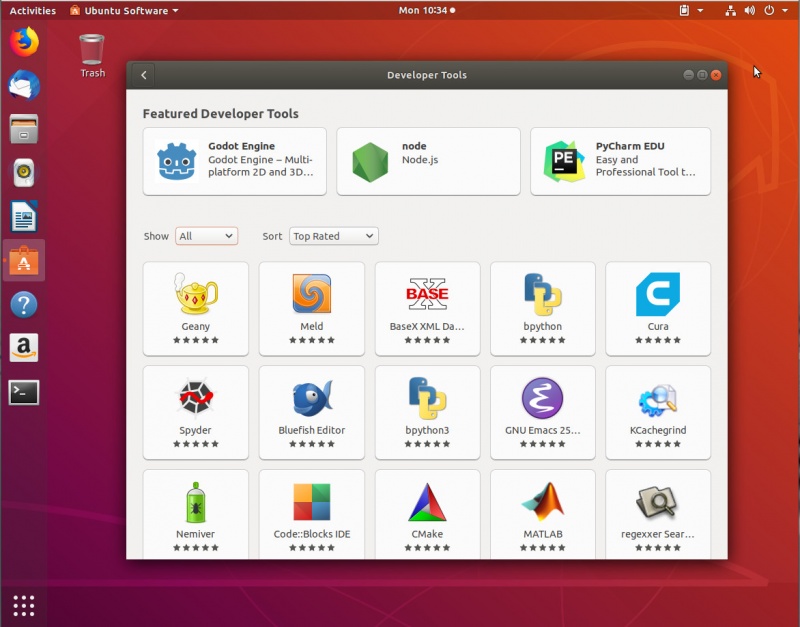
    But it’s not just about what you can do with Ubuntu, it’s how easily you can do it. For nearly every task, Ubuntu is an incredibly easy distribution to use. And because Ubuntu is so popular, chances are every tool and IDE you want to work with can be easily installed from the Ubuntu Software GUI (Figure 1).


    Figure 1: Developer tools found in the Ubuntu Software tool.

    If you’re looking for ease of use, simplicity of migration, and plenty of available tools, you cannot go wrong with Ubuntu as a development platform.

    openSUSE

    There’s a very specific reason why I add openSUSE to this list. Not only is it an outstanding desktop distribution, it’s also one of the best rolling releases you’ll find on the market. So if you’re wanting to develop with and release for the most recent software available, openSUSE Tumbleweed should be one of your top choices. If you want to leverage the latest releases of your favorite IDEs, if you always want to make sure you’re developing with the most recent libraries and toolkits, Tumbleweed is your platform.

    But openSUSE doesn’t just offer a rolling release distribution. If you’d rather make use of a standard release platform, openSUSE Leap is what you want.

    Of course, it’s not just about standard or rolling releases. The openSUSE platform also has a Kubernetes-specific release, called Kubic, which is based on Kubernetes atop openSUSE MicroOS. But even if you aren’t developing for Kubernetes, you’ll find plenty of software and tools to work with.

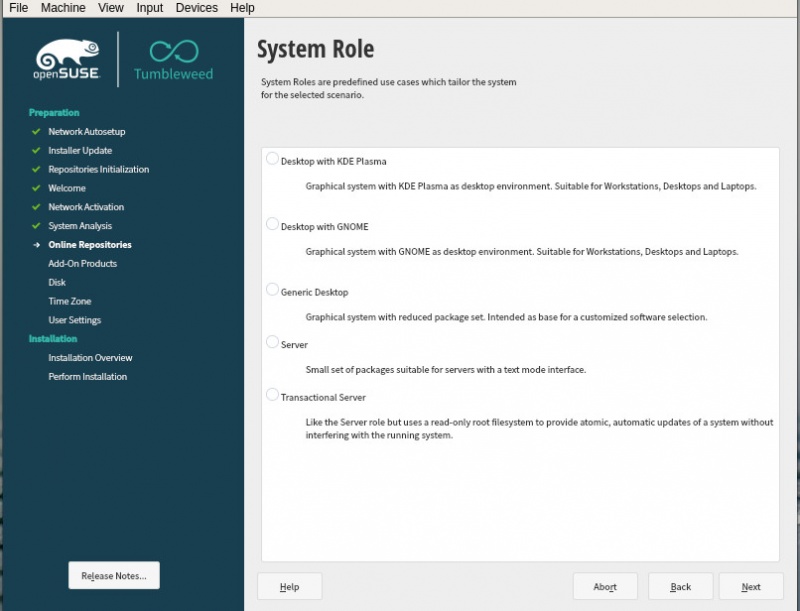
    And openSUSE also offers the ability to select your desktop environment, or (should you chose) a generic desktop or server (Figure 2).

    Figure 2: The openSUSE Tumbleweed installation in action.

    Fedora

    Using Fedora as a development platform just makes sense. Why? The distribution itself seems geared toward developers. With a regular, six month release cycle, developers can be sure they won’t be working with out of date software for long. This can be important, when you need the most recent tools and libraries. And if you’re developing for enterprise-level businesses, Fedora makes for an ideal platform, as it is the upstream for Red Hat Enterprise Linux. What that means is the transition to RHEL should be painless. That’s important, especially if you hope to bring your project to a much larger market (one with deeper pockets than a desktop-centric target).

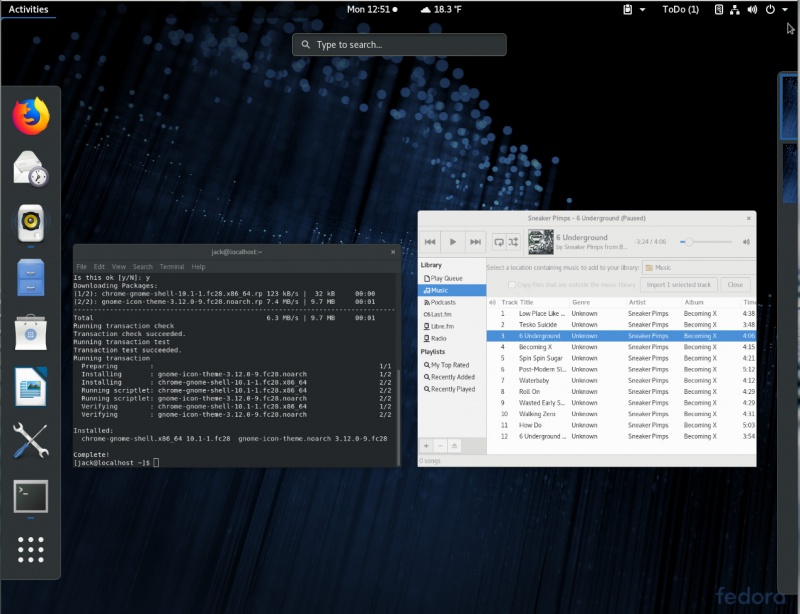
    Fedora also offers one of the best GNOME experiences you’ll come across (Figure 3). This translates to a very stable and fast desktops.

    Figure 3: The GNOME desktop on Fedora.

    But if GNOME isn’t your jam, you can opt to install one of the Fedora spins (which includes KDE, XFCE, LXQT, Mate-Compiz, Cinnamon, LXDE, and SOAS).

    Pop!_OS

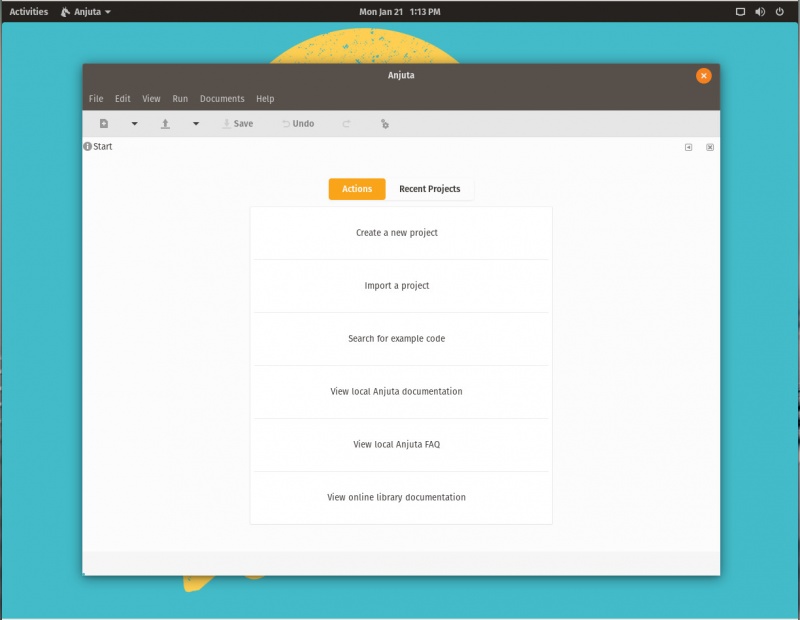
    I’d be remiss if I didn’t include System76’s platform, customized specifically for their hardware (although it does work fine on other hardware). Why would I include such a distribution, especially one that doesn’t really venture far away from the Ubuntu platform for which is is based? Primarily because this is the distribution you want if you plan on purchasing a desktop or laptop from System76. But why would you do that (especially given that Linux works on nearly all off-the-shelf hardware)? Because System76 sells outstanding hardware. With the release of their Thelio desktop, you have available one of the most powerful desktop computers on the market. If you’re developing seriously large applications (especially ones that lean heavily on very large databases or require a lot of processing power for compilation), why not go for the best? And since Pop!_OS is perfectly tuned for System76 hardware, this is a no-brainer. Since Pop!_OS is based on Ubuntu, you’ll have all the tools available to the base platform at your fingertips (Figure 4).

    Figure 4: The Anjunta IDE running on Pop!_OS.

    Pop!_OS also defaults to encrypted drives, so you can trust your work will be safe from prying eyes (should your hardware fall into the wrong hands).

    Manjaro

    For anyone that likes the idea of developing on Arch Linux, but doesn’t want to have to jump through all the hoops of installing and working with Arch Linux, there’s Manjaro. Manjaro makes it easy to have an Arch Linux-based distribution up and running (as easily as installing and using, say, Ubuntu).

    But what makes Manjaro developer-friendly (besides enjoying that Arch-y goodness at the base) is how many different flavors you’ll find available for download. From the Manjaro download page, you can grab the following flavors:
    • GNOME
    • XFCE
    • KDE
    • OpenBox
    • Cinnamon
    • I3
    • Awesome
    • Budgie
    • Mate
    • Xfce Developer Preview
    • KDE Developer Preview
    • GNOME Developer Preview
    • Architect
    • Deepin
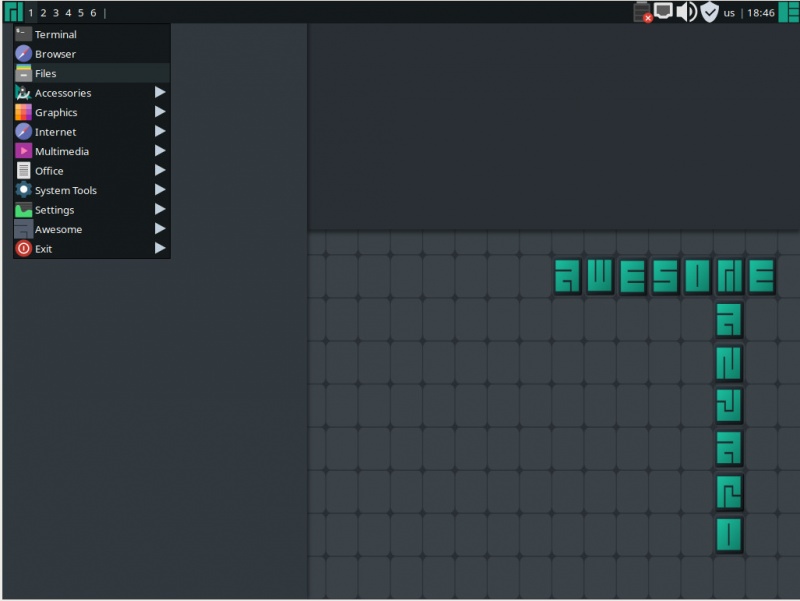
    Of note are the developer editions (which are geared toward testers and developers), the Architect edition (which is for users who want to build Manjaro from the ground up), and the Awesome edition (Figure 5 – which is for developers dealing with everyday tasks). The one caveat to using Manjaro is that, like any rolling release, the code you develop today may not work tomorrow. Because of this, you need to think with a certain level of agility. Of course, if you’re not developing for Manjaro (or Arch), and you’re doing more generic (or web) development, that will only affect you if the tools you use are updated and no longer work for you. Chances of that happening, however, are slim. And like with most Linux distributions, you’ll find a ton of developer tools available for Manjaro.

    Figure 5: The Manjaro Awesome Edition is great for developers.

    Manjaro also supports the Arch User Repository (a community-driven repository for Arch users), which includes cutting edge software and libraries, as well as proprietary applications like Unity Editor or yEd. A word of warning, however, about the Arch User Repository: It was discovered that the AUR contained software considered to be malicious. So, if you opt to work with that repository, do so carefully and at your own risk. Any Linux Will Do

    Truth be told, if you’re a developer, just about any Linux distribution will work. This is especially true if you do most of your development from the command line. But if you prefer a good GUI running on top of a reliable desktop, give one of these distributions a try, they will not disappoint.
    下载开源日报APP:https://opensourcedaily.org/2579/
    加入我们:https://opensourcedaily.org/about/join/
    关注我们:https://opensourcedaily.org/about/love/
  • 2019年1月28日:开源日报第326期

    28 1 月, 2019
    开源日报 每天推荐一个 GitHub 优质开源项目和一篇精选英文科技或编程文章原文,坚持阅读《开源日报》,保持每日学习的好习惯。
    今日推荐开源项目:《用得上的技巧 css_tricks》
    今日推荐英文原文:《Superintelligence Versus You》

    今日推荐开源项目:《用得上的技巧 css_tricks》传送门:GitHub链接
    推荐理由:一些在编写 CSS 时可能用得上的技巧,比如垂直居中这样几乎人人都会用得上的和手风琴样式这些看起来相当不错的样式编写方法,如果要经常编写网页的话不妨来这里看看。当然了,如果你实在对画面右下角的那只猫感兴趣的话,项目底部也有关于猫的部分。
    今日推荐英文原文:《Superintelligence Versus You》作者:Erik Hoel
    原文链接:https://medium.com/s/story/superintelligence-vs-you-1e4a77177936
    推荐理由:为什么 AI 支配人类的黑暗未来只会是幻想

    Superintelligence Versus You

    upposedly atheist intellectuals are now spending a lot of time arguing over the consequences of creating “God.” Often they refer to this supreme being as a “superintelligence,” an A.I. that, in their thought experiments, possesses magical traits far beyond just enhanced intelligence. Any belief system needs a positive and negative aspect, and for this new religion-replacement, the “hell” scenario is that this superintelligence we cannot control might decide to conquer and destroy the world.

    Like their antecedents—Hegel, Marx, J.S. Mill, Fukayama, and many others—these religion-replacement proposers view history as a progression toward some endpoint (often called a “singularity”). This particular eschaton involves the creation of a superintelligence that either uplifts us or condemns us. The religious impulse of humans—the need to attribute purpose to the universe and history—is irrepressible even among devoted atheists. And, unfortunately, this worldview has been taken seriously by normally serious thinkers.

    I and others have argued that rather than new technologies leading to some sort of end-of-history superintelligence, it’s much more likely that a “tangled bank” of all sorts of different machine intelligences will emerge: some small primitive A.I.s that mainly filter spam from email, some that drive, some that land planes, some that do taxes, etc. Some of these will be much more like individual cognitive modules, others more complex, but they will exist, like separate species, adapted to a particular niche. As with biological life, they will bloom across the planet in endless forms, most beautiful. This view is a lot closer to what’s actually happening in machine learning on a day-to-day basis.

    Evolution is an endless game that’s fundamentally nonprogressive.


    The logic behind this tangled bank is based on the fundamental limits of how you can build an intelligence as an integrated whole. Just like evolution, no intelligence can be good at solving all classes of problems. Adaptation and specialization are necessary. It’s this fact that ensures evolution is an endless game and makes it fundamentally nonprogressive. Organisms adapt to an environment, but that environment changes, maybe even due to that organism’s adaptation, and so on, for however long there is life. Put another way: Being good at some things makes it harder to do others, and no entity is good at everything.

    In a nonprogressive view, intelligence is, from a global perspective, very similar to fitness. Becoming more intelligent at X often makes you worse at Y, and so on. This ensures that intelligence, just like life, has no fundamental endpoint. Human minds struggle with this view because without an endpoint there doesn’t seem to be much of a point either.

    Despite the probable incoherence of a true superintelligence (all knowing, all seeing, etc.), some argue that, because we don’t fully know the formal constraints on building intelligences, it may be possible to build something that’s superintelligent in comparison to us and that operates over a similar class of problems. This more nuanced view argues that it might be possible to build something more intelligent than a human over precisely the kinds of domains humans are good at. This is kind of like an organism outcompeting another organism for the same niche.

    Certainly this isn’t in the immediate future. But let’s assume, in order to show that concerns about the creation of superintelligence as a world-ending eschaton are overblown, that it is indeed possible to build something 1,000x smarter than a human across every problem-solving domain we engage in.

    Even if that superintelligence were created tomorrow, I wouldn’t be worried. Such worries are based on a kind of Doctor Who-esque being. A being that, in any circumstance, can find some advantage via pure intelligence that enables victory to be snatched from the jaws of defeat. A being that, even if put in a box buried underground, would, just like Doctor Who, always be able to use its intelligence to both get out of the box and go on to conquer the entire world. Let’s put aside the God-like magical powers often granted superintelligences—like the ability to instantaneously simulate others’ consciousnesses just by talking to them or the ability to cure cancer without doing any experiments (you cannot solve X just by being smart if you don’t have sufficient data about X; ontology simply doesn’t work that way)—and just assume it’s merely a superintelligent agent lacking magic.

    The important thing to keep in mind is that Doctor Who is able to continuously use intelligence to solve situations because the show writers create it that way. The real world doesn’t constantly have easy shortcuts available; in the real world of chaotic dynamics and P!=NP and limited data, there aren’t orders-of-magnitude more efficient solutions to every problem in the human domain of problems. And it’s not that we fail to identify these solutions because we lack the intelligence. It’s because they don’t exist.

    An example of this is how often superintelligence can be beaten by a normal human at all sorts of tasks, given either the role of luck or small asymmetries between the human and the A.I. For example, imagine you are playing chess against a superintelligence of the 1,000x-smarter-than-humans-across-all-human-problem-solving-domains variety. If you’re one of the best chess-players in the world, you could at most hope for a tie, although you may never get one. Now let’s take pieces away from the superintelligence, giving it just pawns and its king. Even if you are, like me, not well-practiced at chess, you could easily defeat it. This is simply a no-win scenario for the superintelligence, as you crush it on the board, mercilessly trading piece for piece, backing it into a corner, finally toppling its king.

    That there are natural upper bounds on performance from being intelligent isn’t some unique property of chess and its variants. In fact, as strategy games get more complex, intelligence often matters less. Because the game gets chaotic, predictions are inherently less precise due to amplifying noise, available data for those predictions becomes more limited, and brute numbers, positions, resources, etc., begin to matter more.

    Let’s bump the complexity of the game you’re playing against the superintelligence up to the computer strategy game Starcraft. Again, assuming both players start perfectly equal, let’s grant the superintelligence an easy win. But, in this case, it would take only a minor change in the initial conditions to make winning impossible for the superintelligence. Tweaking, say, starting resources would put the superintelligence into all sorts of no-win scenarios against even a mediocre player. Even just delaying the superintelligence from starting the game by 30 seconds would probably be enough for great human players to consistently win. You can give the superintelligence whatever properties you want—maybe it thinks 1,000x faster than a human. But its game doesn’t run 1,000x faster, and by starting 30 seconds earlier, the human smokes it.

    Intelligence is only one of many things that affect the outcome of even the most strategic games — and often not a very important one.


    The point is that our judgments on how effective intelligence alone is for succeeding at a given task are based on situations when all other variables are fixed. Once you start manipulating those variables, instead of controlling for them, you see that intelligence is only one of many things that affect the outcome of even the most strategic games—and often not a very important one.

    We can think of a kind of ultimate strategy game called Conquer the World. You’re born into this world with whatever resources you start with, and you, a lone agent, must conquer the entire earth and all its nations, without dying. I hate to break it to you: There’s no way to consistently win this game. It’s not just because it’s a hard game. It’s because there is no way to consistently win this game, no matter your intelligence or strategy—it just doesn’t exist. The real world doesn’t have polarity reversals and there are many tasks with no shortcuts.

    The great whirlwind of limbs, births, deaths, careers, lovers, companies, children, consumption, nations, armies—that is, the great globe-spanning multitudinous mass that is humanity—has so many resources and numbers and momentum it is absurd to think that any lone entity could, by itself, ever win a war against us, no matter how intelligent that entity was. It’s like a Starcraft game where the superintelligence starts with one drone and we start with literally the entire map covered by our bases. It doesn’t matter how that drone behaves, it’s just a no-win scenario. Barring magical abilities, a single superintelligence, with everything beyond its senses hidden in the fog of war, with limited data, dealing with the exigencies and chaos and limitations that define the physical world, is in a no-win scenario against humanity. And a superintelligence, if it’s at all intelligent, would know this.

    Of course, no thought experiment or argument is going to convince someone out of a progressive account of history, particularly if the progressive account operates to provide morality, structure, and meaning to what would otherwise be a cold and empty universe. Eventually the workers must rise up, or equality for all must be achieved, or the chosen nation-state must bestride the world, or we must all be uplifted into a digital heaven or thrown into oblivion. To think otherwise is almost impossible.

    Human minds need a superframe that contains all others, that endows them with meaning, and it’s incredibly difficult to operate without one. This “singularity” is as good as any other, I suppose.

    Humans just don’t do well with nonprogressive processes. The reason it took so long to come up with the theory of evolution by natural selection, despite its relatively simple logic and armchair-derivability, is its nonprogressive nature. These are things without linear frames, without beginnings or ends or reasons why. When I was studying evolutionary theory back in college, I remember at one moment feeling a dark logic click into place: Life was inevitable, design inevitable, yet it needed no watchmaker and had no point, and that this pointlessness was the reason why I was, why everyone was. But such a thought is slippery, impossible to hold onto for a human, to really keep believing in the trenches of the everyday. And so, when serious thinkers fall for silly thoughts about history coming to an end, we shouldn’t judge. Each of us, after all, engages in such silliness every morning when we get out of bed.

    下载开源日报APP:https://opensourcedaily.org/2579/
    加入我们:https://opensourcedaily.org/about/join/
    关注我们:https://opensourcedaily.org/about/love/
←上一页
1 … 177 178 179 180 181 … 262
下一页→

Proudly powered by WordPress