• 开源镜像
  • 开源沙龙
  • 媛宝
  • 猿帅
  • 注册
  • 登录
  • 息壤开源生活方式平台
  • 加入我们

开源日报

  • 2019年3月11日:开源日报第361期

    11 3 月, 2019
    开源日报 每天推荐一个 GitHub 优质开源项目和一篇精选英文科技或编程文章原文,坚持阅读《开源日报》,保持每日学习的好习惯。
    今日推荐开源项目:《要走的路中文版 the-way-to-go_ZH_CN》
    今日推荐英文原文:《Building Code》

    今日推荐开源项目:《要走的路中文版 the-way-to-go_ZH_CN》传送门:GitHub链接
    推荐理由:这个项目是《Go 语言入门》的中文译本,目前的翻译进度已经到了全书正文将近大半的位置。项目中还提供了关于 Go 的学习资料和社区索引,同时还有一个面向新手的视频教程,对于正在学习 Go 语言的朋友来说这个项目应该能提供不小的帮助。
    今日推荐英文原文:《Building Code》作者:Paul Cathill
    原文链接:https://medium.com/snipette/building-code-9e57dd33062a
    推荐理由:编程语言的历史

    Building Code

    We, humans, have always been on the lookout for somebody to do our heavy and unwanted lifting. First it was simple machines, then steam powered beasts, and at the end a bunch of semiconductors and a quartz.

    But how do you get a simple stone to do what you want? How do you explain to an electric circuit what you want from it? Through a programming language, of course.

    Where did these programming languages come from and who made them up? Everything starts with a theory, and programming was no exception.

    Let us start our story with the Analytical Engine. It was a kind of mechanical computer designed by Charles Babbage, one that worked with gears and springs instead of wires and chips. And in 1843, Babbage’s work was being translated by a certain Ada Lovelace.

    Ada didn’t stop at translation. At the end of the book she added her own notes on how to use the proposed engine to calculate Bernoulli numbers. Although far from a proper programming language, it was the first step in the right direction.

    The next step was Turing machines — again not a computer but a mathematical model for one. A physical model of a Turing machine could be programmed to do some limited computations, like solving mathematical functions, but it was way too simple and far away from anything we could call a programming language.

    A language should be readable and expressive. What is use for it if we can only say “ga-ga” and “go-go”? So this subject was shelved until the magical time of 1940, when an earlier version of modern computers, big and full of electricity, came to life and kicked off a whole wave of theories and practices.

    The first programming language with a bunch of useful commands was Assembly Language. It is confusing, crazy looking and sometime quite scary, but it allows programmers to communicate with the hardware of a given computer in a rather straightforward manner.

    It’s kind of like building a house but without any tools at all. You have to assemble it brick by brick, and make measurements on the palm of your hand. Not very easy to make, but it does produce a very fast and light executable application — so light that it’s still used today for very delicate operations, although the art of Assembly Language only known by the grey bearded wizards and sorcerers.

    Assembly Language was useful, but people wanted more. They wanted something more “high-level”, more understandable and friendly.

    They wanted something they could speak.


    It took some thought and effort, but in 1952 Autocode programming language was developed, for a humongous computer at the University of Manchester.

    Autocode was the first programming language that used a compiler, a special piece of software that took your program and translated it directly into machine code for a fast execution. This way nobody had to write in machine code ever again, thanks almighty. But Autocode did have a very limited use, as it was specifically designed for a specific computer. Now you are building a house with some basic hands tools, like a hammer and a crooked saw.

    Programming languages are used to write software. But did you know that they are also software themselves?

    Every programming language has a compiler, which is usually written using another programming language. The compiler is what reads your program, and translates it into machine code that your computer can understand.

    For example, Autocode compiler was written using Assembly languages, but the next iteration of its compiler was written using Autocode and then compiled with the first compiler. Confusing, isn’t it?

    Well, a compiler is a software, it is written and then compiled into a machine code, losing its affiliation to a language. So you can use a compiler to write a better compiler, because after it is compiled it is just a machine code. It is like making a better tools with a set of simpler tools, until you got your own power saw.

    The next big thing was FORTRAN (Formula Translation). Engineered at IBM back in 1954, it was the first high-level programming language for general purpose and general use. It got around and quickly became the crowd’s favourite, and in some circle still is, especially where you need a lightning fast performance but you are scared of old Assembly Language. FORTRAN gave you some simple, English-like commands such as IF, ELSE and READ — still unpowered, but now you got a hand drill and some nails.

    The year 1959 was quite fruitful for programming languages. First came COBOL (Common Business Oriented Languages), created and sponsored by U.S Department of Defence. From ground up it was designed to be used by big businesses, and so it ended up in systems like ATM, telephones, credit cards services, hospitals and other large infrastructures.

    Then came LISP, masterminded to be used for artificial intelligence research, but then skewed for a more general use. It was one of the first functional programming languages, which in simple terms means that you use just functions to build a software, there is no permanent state whatsoever.

    Now these languages actually gave you some power tools to build your house, not many, but you do get a chainsaw.

    The 60s and early 70s brought a wind of change. Computers were becoming cheaper and more accessible. Their metal husks spread all around the world, finding places in many universities and even some homes.

    More people wanted to use computers, but not many could overcome the complexities of the earlier programming languages. That was until engineers from the Dartmouth University came up with BASIC — the Beginner’s All-purpose Symbolic Instruction Code — to help their students to get into ever growing field of programming and computation.

    The BASIC syntax simplified the flow of many loops, IF got THEN, FOR got TO and NEXT, DO got UNTIL. Now you did not have to deal with strange commas and dots, as long as you knew some basic English you could understand what was going on.

    BASIC was a great success and became the first language for many students, and if you are familiar with Microsoft, you will notice that a forked version of it became their flagship product. This was more akin to building an Ikea furniture, you got your pre-made parts, clear instructions and some tools, you just have to work out how to put it all together.

    With the rise of these higher level programming languages, a more structured and elegant code could be written, and in many cases people took it to heart, trying to add a touch of beauty to their work. And it could mean anything, some take pride in writing the shortest code possible, other the most confusing code feasible, and some enjoy adding their own flavour to the structure of their software.

    Another language that opened the doors to programming for many was Pascal, specifically designed to teach students about mystical art of computers. It was made to be easy to pick up, but hard to master. And it is still around, used in many organizations with somewhat outdated infrastructures. Pascal played a big role for Apple computers and was their main go-to language back in eighties.

    In the 70’s, something happened that forever changed the world we know. The granddaddy of it all, the all great and all powerful C programming language was developed at Bell Labs by famous Dennis Ritchie. It is quick, it is elegant, it is simple, it is powerful, it is multi-platform and it got the best syntax of them all.

    Yes, I said it — fight me if you want.

    Together with Unix it spread like a wildfire, trumping everything before and everything after it. It is still employed to this day and for many it is their most loved and cherished companion.

    C also influenced and was used to code half of the current heavy hitters, like Ruby, C#, Java, PHP and many, many others. There is probably a little bit of C on most of the devices around us today. It gives you all the best hand tools, powered and unpowered, but you still have to get your hands dirty if you want to build a three stories high mansion.

    The 80’s followed up with more C-flavoured languages. First Objective-C was created as an extension of C to support, you might guessed it already, object-oriented programming, a concept where a code is broken down into objects with data and functions to manipulate said data. Although it never reached the mainstream, it did find its way into Apple’s macOS and iOS operating system.

    Then there was C++ by famous and loved Bjarne Stroustrup. And it is a colossal language, taking power of C and expanding it in all directions, making it one of the most widely used languages in the whole wide world. And today it is everywhere, from game engines, to operation systems and high-performance software. Now you have cranes and excavators, heavy machinery and fine tools, you can build a hut or a skyscraper, C++ lets you do it all.

    When the 90s rolled in things started to accelerate. Computers went far and beyond, becoming gaming console, web servers, entertainment units and anything you can think of.

    And every solution needed a specific programming language, and so languages started to pop up left and right. Influenced by their predecessors, but designed to serve narrower purposes. Haskell popped in 1990 as a purely functional programming language, designed to deal with a large amount of complicated calculations and numbers crunching. Python in 1991 took a niche of a light and quick code. Visual Basic introduced a drag-and-drop style of programming with a support of graphical user interface.

    In the wild 1995 Java hit the scene, developed by Sun Microsystems for smaller, hand-held devices and later sweeping all across the World Wide Web. Then came PHP, master of web developing. JavaScript enhance our browsing experience. C# made C++ friendlier (or even too friendly) and made hacking together cool apps and then cool anything a breeze.

    Scala merged functional with object-oriented programming, making a hot but very handy mess. And the list continues, and it will grow and grow as every year new languages pop up, bringing new solutions and solving new problems. These, let’s call them smaller languages, are more like specific tools for window making, floor laying, wall painting, it is hard to build a house using one, but you can lay some nice tiles with them.

    These days it is hard to predict where programming language will go. There are more computers, mode devices and more machines. Gone are the days when a programmer knew a single language, today you better know ten if you want to get a lowly position in some high organization. Languages gained specializations and the field of computer programming grew into a major engineering endeavour.

    We do not know where we will end up, but there will be computers and there will be programming languages. They might be written or oral, telepathic or self-generating. But they will be there, bending the machine to our wants and our needs.
    下载开源日报APP:https://opensourcedaily.org/2579/
    加入我们:https://opensourcedaily.org/about/join/
    关注我们:https://opensourcedaily.org/about/love/
  • 2019年3月10日:开源日报第360期

    10 3 月, 2019
    开源日报 每天推荐一个 GitHub 优质开源项目和一篇精选英文科技或编程文章原文,坚持阅读《开源日报》,保持每日学习的好习惯。
    今日推荐开源项目:《轻松 30 秒 30-seconds-of-code》
    今日推荐英文原文:《6 AI Developments to Follow in 2019》

    今日推荐开源项目:《轻松 30 秒 30-seconds-of-code》传送门:GitHub链接
    推荐理由:一些在写 JS 代码时用得上的小技巧,它们真的很小以至于你能在 30 秒之内理解它们。在工作的闲暇之余看看这些兴许能发现些让你眼前一亮的改进工作效率的方法。其他的 30 秒系列也值得一看——包括 CSS,PHP 和 Python 这些关于语言的以及关于面试问题的 30 秒 interview,其中肯定有一些你能用得上的技巧。
    今日推荐英文原文:《6 AI Developments to Follow in 2019》作者:Jaxson Khan
    原文链接:https://medium.com/@jaxson/6-ai-developments-to-follow-in-2019-2642a446d0c1
    推荐理由:2019 年的六大 AI 发展趋势

    6 AI Developments to Follow in 2019

    Everybody and their neighbor (plus their neighbor’s dog) is buzzing about artificial intelligence today. It’s tempting to roll your eyes at the speed of this hype train. But, you have to admit: there’s a lot to it. We are coming very far very fast in terms of how AI can transform our personal and working lives. And it’s poised to become a key part of our day-to-day, as common and as transformative as electricity.

    Perhaps the most interesting thing about AI is that, while it can automate and do “work” at greater efficiency, it uses machine learning to “think” and “learn” over time, strategizing, designing, recognizing patterns, and making decisions. If that sounds a lot like a human brain, it’s because deep learning, one of the most important methods of machine learning, is based on the idea of a neural network, modeling the structure and function of the human brain.

    And the impact of all this is huge. Some estimate a staggering $13 trilllion in global economic activity by 2030 thanks to AI. And millions of new jobs are expected in the coming years. (At Springboard, we recently launched the first AI / machine learning course in the world with a job guarantee because we anticipate so much growth in this space.)

    With things moving so quickly, we decided to pause and look back at some of the new AI developments over the past year or so. Not another rhetorical trend piece, but a real overview of some of the new areas and advancements to watch out for.

    Voice Assistants Are Handling Nearly Half of Searches


    It’s clear that AI assistants such as Siri, Alexa, Google Assistant, and Cortana are becoming far more useful. Powered by natural language processing, voice assistants are now handling an estimated 40 percent of all searches. And one in six Americans now owns an Alexa-compatible speaker.

    AI assistants are constantly improving because they are always receiving more data from users. That enables them to get better at speech recognition and request handling. Not to mention, the major players are rapidly adding features and nurturing developer ecosystems around these assistants. They will continue to better anticipate our behaviors and understand our habits, proactively recommending actions and services for us.

    On the other hand, one area where the buzz may be overdoing it is robot calling assistants. A recently hyped example is Google Duplex, which is an AI that makes audio calls. Experts think that robot calling assistants are still a bit early, so there is a ways to go before you can confidently have a virtual secretary make your calls and run your life on your behalf.

    Ultimately, we’ll still need a combination of human and artificial intelligence for the foreseeable future. But chatbots and AI assistants are one of the main examples where progress and consumer adoption has been rapid. And the more data these assistants get, the faster they will improve. It’s a self-fulfilling cycle of development.

    Facial Recognition Is Becoming Minority Report-Like

    During the past year, we’ve heard more about facial recognition becoming as advanced as in the sci-fi action film Minority Report.

    Real-time facial recognition will become far more common, particularly in public spaces and retail. The technology to combine web tracking with physical biometrics is enabling companies to rapidly understand who you are and then serve up relevant content (often advertising). Some interesting examples include:
    1. Major League Baseball will soon start allowing fans to validate tickets by scanning their face.
    2. Singapore’s new mega-mall will track shoppers and recommend deals to them, on the fly.
    3. The organizing committee behind the 2020 Olympics in Tokyo has said it will include facial recognition systems in order to improve security.
    Not to mention that many of us now have facial recognition built into our smartphones, enabling us to effortlessly unlock and interact with them faster than ever before. For now, facial recognition seems like it will certainly make existing experiences better — faster, more personalized, and more secure.

    But there are clear concerns: privacy and anonymity, for example, as well as more potential for fraud. Consider the fact that 3D printing is simultaneously becoming high fidelity and accessible. What if, for example, someone could scan your face and print a mask? Hackers have continued to prove that they can rapidly beat face ID, so it may take some time before it’s secure enough to deploy en masse.

    More Businesses Are Moving AI From Pilots to Production

    While much of the talk around the development of AI and machine learning focuses on consumer experiences (AI assistants, home speakers, self-driving cars), some of the best benefits are poised to reach businesses, particularly the enterprise.

    Over the past couple of years, as AI hype has reached a fever pitch, many companies have been scrambling for an AI anything — a product, a strategy, or at least the appearance of engaging with the technology. In 2019, expect many businesses to move from showcasing and piloting AI technologies to soft launches and global deployments of AI platforms. Some examples:
    • Financial services are now running real-time logs of thousands of transactions per second, parsing them through machine learning algorithms.
    • Retailers are grabbing data from receipts and loyalty programs, then passing it to AI engines to determine how to sell products better.
    • Manufacturers are using predictive technology to know what stresses their machinery and to predict when it is likely to break down or fail.
    Data is more valuable than ever — some have even said that “data is the new oil.” Reams of data are vital to making AI engines work, enabling them to learn. So some traditional businesses, including in manufacturing and agriculture, are leveraging their businesses to provide data as a service. One example is John Deere, which is using their vast access to agricultural data to assist farmers.

    Global consulting firm PwC also recently published their 2019 AI predictions report, which goes deeper into the priorities that businesses should consider.

    AI Will Not Take Our Jobs

    Rest assured, a robot is not going to take your job.

    There are fears left and right that we will be left jobless and hopeless as supersmart AI steals all of our jobs. Others actually paint this picture as the ultimate goal, enabling humans to live a life full of leisure. The truth is altogether more benign, and somewhere in the middle.

    Fact: AI is likely to create more jobs than it will destroy. Yes, AI will automate routine work, starting in lower-skilled areas with repeatable, measurable tasks. But research firm Gartner predicts that by 2020 AI will create more jobs than it will eliminate. Often in major periods of transition due to technology, temporary job loss will occur, but it will be followed by business transformation, growth, and hiring — and “AI is likely to follow this path.”

    Gartner predicts that 1.8 million jobs will be lost, most notably in manufacturing industries. But they also estimate that 2.3 million jobs could be created in education, healthcare, and the public sector. These jobs will be opened up by growth in the industries. And coupling AI with human intelligence will enable a whole new set of opportunities.

    Ultimately, AI automation is a reality, and some jobs will be lost. But what is being underestimated is what Gartner calls “AI augmentation,” the opportunity for AI to work alongside human professionals, enabling people to reduce repetitive tasks and be more productive. That will help reduce the time spent on tedious tasks and create more time for creative work.

    U.S. vs. China: The Race for AI Dominance

    Much attention is being paid to China’s focus on AI. They’ve invested heavily in their Made in China 2025 plan, which, among other areas, declares AI a critical pillar of competitiveness. There are many reports that China is outpacing the U.S. in the number of AI startups and AI-related patents created. Some experts say that China will be the next global AI superpower.

    So, the race between China and the U.S. is heating up, as the U.S. makes its own investments in AI. It’s even been dubbed the new space race.

    There are a few key considerations to note here. One is that overall competition and tensions between the U.S. and China have reached a fever pitch, particularly given the recent trade war and related discussions.

    An effect of this tension is a rapid set of moves to “insource” or “reshore” critical technologies. For example, Huawei is now aiming to develop its own AI processing chipsin order to reduce its reliance on U.S. manufacturers like Intel and Nvidia.

    The optics of working with China has also affected some U.S. technology companies very publicly. For example, Google and Microsoft both faced immense public criticism recently for doing business with China. Google’s been involved in a secret project to produce a censored search engine in collaboration with the Chinese government called Dragonfly. Its employees protested dramatically after finding this out. The company had previously resolved to not censor its search engine and this has prevented them, for years, from entering the Chinese market.

    U.S. companies are also facing unique challenges compared to their Chinese counterparts when it comes to working with the government, particularly on defense. Both Microsoft and Google have come under fire for using their machine learning technology to support the U.S. military, specifically around drone technology.

    Ethical and Transparent AI Is in Demand — and in Development

    The past year has seen many technology companies come under fire for ethical lapses, especially around data privacy and nefarious algorithms. Continued fallout from Facebook’s involvement in the 2016 U.S. election (and many other elections around the world), scrutiny of Google’s many projects, including Sidewalk Labs, and security breaches among technology companies are, not surprisingly, leading to rising mistrust among many consumers.

    Worse still, the effects of that mistrust are often magnified in the context of AI and algorithms, particularly because these are relatively autonomous computers making decisions of their own accord. Algorithms drive many parts of the modern internet experience, especially on social networks, where one’s “feed” is determined by many different signals and patterns. Some people have accused feeds of promoting content that plays to their emotions, leaning heavily toward outrage and other negative emotions. But the real concern around AI in this context is that we don’t know who, what, or how decisions are being made by the products and services that we use.

    It’s the black box problem: who’s in control and what are the factors that are changing an experience? Because of growing skepticism, there’s a greater onus on companies and demand for technical and transparent AI. Luckily, there is a lot of work being done to ensure that AI is more ethical going forward.

    The first is around that black box issue. The goal is to make the workings of AI easier to understand, building trust, not only to reassure the public, but to improve the AI itself by exposing bias in data and algorithms. Recently, IBM improved decision traceability of its AI through OpenScale technology. The company now provides real-time insights into what decisions are made — and also how they are made, what data is used, what is weighted, and potential bias.

    Another way that AI development is being improved is through data control. It’s a change that’s largely been necessitated due to government regulation, including the recently passed General Data Protection Regulation. GDPR has given citizens some protection against decisions that have a significant impact on their lives, including decisions made solely by machines. It gives citizens legal protection and it made major international companies in particular adhere to better standards.

    It’s increasingly clear that we need a new social contract between people and AI, if development and adoption are going to continue positively. People need to feel that AI is fair and that they won’t be singled out or targeted. They need to trust it. To that effect, experts and human rights activists from around the world collaborated on a universal declaration that aims to protect the rights to equality and non-discrimination in the development of AI.

    Another positive development is that AI might start to be accredited for ethics. According to a recent Forbes article, “the Institute of Electrical and Electronics Engineers (IEEE), which has 395,000 members in 160 countries, has launched an initiative on the ethics of autonomous and intelligent systems. One of its goals is to help consumers to identify which AI products incorporate ethical aspects and to have the information to take responsibility for their choices.” And they go on to compare the initiative to food labeling in supermarkets. Imagine being able to pick which products you use and which AIs you engage with, based on their ethical rating.
    下载开源日报APP:https://opensourcedaily.org/2579/
    加入我们:https://opensourcedaily.org/about/join/
    关注我们:https://opensourcedaily.org/about/love/
  • 2019年3月9日:开源日报第359期

    9 3 月, 2019
    开源日报 每天推荐一个 GitHub 优质开源项目和一篇精选英文科技或编程文章原文,坚持阅读《开源日报》,保持每日学习的好习惯。
    今日推荐开源项目:《职场风云 Awesome-offer》
    今日推荐英文原文:《How to Send Emails to Very Busy People (and a Case Study Teardown)》

    今日推荐开源项目:《职场风云 Awesome-offer》传送门:GitHub链接
    推荐理由:一个关于程序员求职和工作方面的文章合集。从求职方面的关于公司和招聘,一直到关于入职方面,最后还有一些在入职后关于工作方面的经验总结,不管是已经踏入职场或者是正打算寻找工作的人都能从中或多或少的学到点什么。文章的最后还有一些各种方面的经验总结,比如说猎头心得和法律相关这些……但是有一篇文章推荐大家都看一看——如何给很忙的人发邮件,之后我们会介绍这篇文章。
    今日推荐英文原文:《How to Send Emails to Very Busy People (and a Case Study Teardown)》作者:Zak Slayback
    原文链接:https://medium.com/the-mission/how-to-send-emails-to-very-busy-people-and-a-case-study-teardown-8dd7b3428f8e
    推荐理由:如何有效的写电子邮件发给那些很忙的人

    How to Send Emails to Very Busy People (and a Case Study Teardown)

    If I were to make a list of my personal superpowers, it would include things like finding the best diners in a city, seeing opportunities being left by others, and actually getting in the door with anybody. I have built a library of email scripts around these skills.

    For me, the ability to send emails that work and get replies from Very Busy People essentially built the beginning of my career and has taken me to a place where I can pursue any path I would want to.

    This ability to send emails that work to Very Busy People developed over years of trying to get in the doors with CEOs and Presidents of companies, founders and investors, and just interesting people whom I admired. I thought I was good at writing emails (I am a good writer, after all!) and would read, proofread, and verify my emails before sending them. It was not until I actually had to start sending these emails to Very Busy People (and not just peers, professors, or run of the mill professionals) that I realized that most people are terrible at writing emails.

    Even worse, as this skill has paid its returns, I’ve started becoming a Very Busy Person (although on the lower end of the spectrum) and have become the recipient of emails from others.

    These are some of the notes I’ve learned about writing emails that work. If you master this skill, you master the skill of getting in the door with anybody. If you master that skill, the world is your oyster.

    The No-Reply Psychology

    I’m not going to break down an obviously-bad email for you. That’d be punching down and it would be too easy. Obviously-bad emails tend to be big blocks of text, have no clear call to action, have terrible, irrelevant subject lines, and just obviously look like time-sucks. These are emails that only somebody very charitable with their time works with.

    Instead, it’s more useful to break down why an email that looks good is not working.

    Here’s the psychology of the average person writing an email to a Very Busy Person:

    “This person is very busy and receives lots of emails per day. I need to make it clear to them why they should reply to my email and I need to make it clear what I am emailing them about.”

    “So, I am going to do the following: clear subject line, clear paragraphs (no giant blocks of text!), clear ask, and I’ll even throw in a piece of collateral as an attachment for them.”

    They end up drafting an email like this:

    Dear Mr. Slayback,

    I am a student at the University of Emailing who came across one of your articles recently and I enjoyed it. I have found myself a student of emailing for some time and realized that what you said about writing emails to Very Busy People was spot-on. I decided to enroll at the University of Emailing after I had reached a plateau in my career as a student. No matter what I tried to do, my emails were not getting replies. My career stagnated. My earnings dipped. What was worst: I could not easily switch jobs because I did not know how to write emails!

    I’m writing a term paper on the nature of emails and the history of the E-Mail system. I’ve attached my draft of it here. As you will see, we have to go into why email has been and continues to be the best way to get a hold of people and have to answer objections from people who think that email is irrelevant for the 21st century. I’d love your thoughts on it when you get a minute. Do you have time for a phone call?

    Looking forward to hearing from you.

    Chaz This email looks good from the outside. It has some basic components of an okay email: — clear subject line — clear paragraphs — clear call to action/ask — piece of collateral — signature implying a response This email would not get a response from most Very Busy People.

    The Psychology of Very Busy People

    Bad email senders think that Very Busy People have a psychology that is different from their own. Okay email senders know that Very Busy People are just like you and I but fail to write emails like that. Great email senders know that Very Busy People are just like you and I and that they have even less time.

    Imagine for a moment that you are an Average Busy Person. You rush out the door to go to work in the morning, shuffle between calls and meetings, come home and may get a little bit of downtime in the late afternoon or evening. Now imagine you received the above email during your Average Busy day. You know what the person wants you to do — he wants you to (1) skim his paper, (2) think of feedback, and (3) schedule a time to chat about feedback with him — but the chances that you have that time right now are very low. So you tell yourself you will come back to it when you have time.

    Very Busy People are just like that except they never have time to come back to it. They mark the email as unread or move it to an inbox with a “to-do” label, but unless it is an urgent and important item for them, it is more likely to collect cyber-dust than it is to garner a reply.

    The worst emails for Very Busy People are those that are written well but have no clear ask. “Hop on a call,” “collaborate together,” “would love your feedback,” and “interested in connecting,” are all terms that infect these cancerous messages. They just signal, “Time Suck!” to the Very Busy Person but look like clear asks to the sender. The sender then is confused or offended when the Very Busy Person does not respond. The ask should be crystal clear and should not be open-ended at all. If it is a first email, it should be a very low-cost ask, too.

    The life of a Very Busy Person is constantly managing the intersection of the urgent and the important. Your email is probably neither for them, so you should make the cost of responding essentially zero.

    Writing Emails for Very Busy People

    That brings us to the question, what would be a better way of emailing a Very Busy Person?

    I’m building The Complete Guide to Connecting With Anybody that you can get by joining my email list at www.zakslayback.com . I send out regular teardowns like this and other guides on professional development.

    The email written for a Very Busy Person has such a low cost of immediately responding that it looks like more work to come back to the email later and respond. This is cost in terms of time and mental energy.

    A better way of writing the above email could look like this:

    Mr. Slayback,

    I am a student at the University of Emails and I came across your article on writing emails for Very Busy People. I thought it was engaging and wanted to ask you a quick question about emails that would help me with an upcoming term paper.

    Would you say that email is:

    A) Likely to be replaced by a new form of communication sometime soon.
    B) Unlikely to be replaced by a new form of communication sometime soon.
    C) B, but also that email has not even yet reached its peak value for businesses.

    I’d appreciate your thoughts on the above — it would help me with a section on my paper that I can’t quite get past.

    I appreciate your time.

    Chaz

    This email does essentially the same as the above but is more likely to garner a response from a Very Busy Person. It does not require that the Very Busy Person read a term paper or download an attachment, it does not even require typing out a full sentence in response (“A” would be an appropriate response), and it makes responding less costly than marking to come back to later.

    Building in canned responses is a great way to make it easier for a Very Busy Person to respond. Once you have their response, then you can try your luck in asking for more like a phone call.

    I am using this technique right now in an email exchange with a Very Busy Person who is one of the most prominent academics in the world. After an initial phone call with him and a friend several weeks ago, I followed up about a product that he wanted to send along to some people in our networks. My email to him was very clear that I:
    • Appreciate his time.
    • Need the product he offered from him.
    • Can answer any questions he has.
    He responded merely with an email asking how many products to send along. My reply to that was just a number. He had the product immediately sent along.

    Once this product arrives, I will then follow up with a thank you message and request a brief phone call with him.

    If I were to request the phone call and the product at the same time, the likelihood of getting both would be considerably lower than breaking them apart to what is essentially a personalized drip campaign.

    Remember:

    • Can your responses for them.
    • Be ultra-specific in your asks.
    • Do not be a time-suck.
    • Play the long game. Focus on getting a response first before asking for everything that you might want from this person.
    If you follow this psychology, “make your emails easier to respond to than coming back to them later,”you will increase your chances of getting responses from Very Busy People markedly.

    The next step is to totally eliminate this stressful overhead by having reliable, go-to, and tested email scripts upon which you can rely. Thankfully, I already put the together for you.
    下载开源日报APP:https://opensourcedaily.org/2579/
    加入我们:https://opensourcedaily.org/about/join/
    关注我们:https://opensourcedaily.org/about/love/

  • 2019年3月8日:开源日报第358期

    8 3 月, 2019
    开源日报 每天推荐一个 GitHub 优质开源项目和一篇精选英文科技或编程文章原文,坚持阅读《开源日报》,保持每日学习的好习惯。
    今日推荐开源项目:《它不会直接教你玩摄影 awesome-OpenSourcePhotography》
    今日推荐英文原文:《Understanding SQL Injections》

    今日推荐开源项目:《它不会直接教你玩摄影 awesome-OpenSourcePhotography》传送门:GitHub链接
    推荐理由:一个关于摄影方面知识和工具的集合——说是这么说,但是它并不会教你如何拍照就是了。准确的说这个项目中提供了很多关于照片和视频方面的知识和工具——包括处理照片和视频以及照片管理等等,当然了也包括一些工具和库。如果你需要处理一些与照片和视频有关的工作的话,兴许这里可以找到你想要的东西。
    今日推荐英文原文:《Understanding SQL Injections》作者:Scott Cosentino
    原文链接:https://medium.com/@scottc130/understanding-sql-injections-47049fcf9acb
    推荐理由:关于一个常见的漏洞——SQL注入,如果有在使用数据库的话就需要想办法防止这种情况的产生了。

    Understanding SQL Injections

    Code injection vulnerabilities are rated as the most common vulnerability according to the OWASP 2017 Top 10 List. Most commonly, SQL injections are used to compromise databases and applications, in order to cause data leaks and unauthorized access. As someone involved in the field of tech, it is essential that you understand this vulnerability, so you can actively prevent it from happening to your applications.

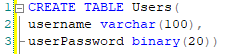
    To best understand the vulnerability, let’s build a sample database and application, and see how SQL interacts with the typical application. Suppose we have a simple SQL database, with a table called users, defined below:
    Query to create user table
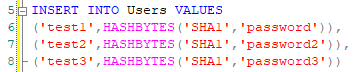
    In this table, we will insert some sample users to have some data to work with:
    Query to insert users and hashed passwords
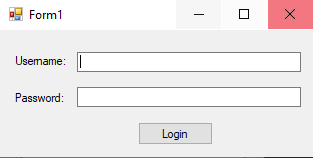
    We now have a database similar to one that might be used for authentication on any application. To see how we can interact with the database, I will create a basic VB.net application. Here we have a simple login form:
    Login form for application
    And some code that will take input from the form and check if the username and password supplied exist in the database:
    Dim sqlCommand as SqlCommand
    
    Dim username As String
    Dim password As String
    
    username = usernameTextbox.Text
    password = passwordTextbox.Text
    
    sqlConnection.Open()
    sqlCommand = New SqlCommand("SELECT COUNT(*) FROM Users WHERE Username = '" & username & "' AND userPassword = HASHBYTES('SHA1','" & password & "')", sqlConnection)
    
    If sqlCommand.ExecuteScalar() > 0 Then
       MsgBox("Login Successful")
    Else
       MsgBox("Login Failed")
    End If
    
    Now, we can test the application to see how the SQL query is built and executed against the database. If we add a breakpoint, we can step through the application to see the values of each of the variables to better understand what is happening.

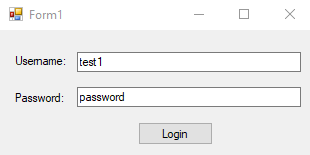
    To start, the user inputs their credentials, and presses “Login”
    User inputs credentials
    Once login is pressed, the SQL query to check the user is built by concatenating the username and password inputs into a query, and running it against the database. The end SQL query looks like this:
    SELECT COUNT(*) FROM Users
    WHERE Username = 'test1'
    AND userPassword = HASHBYTES('SHA1','password')
    
    The important thing to note is how this query is built. The user input is concatenated directly into the query, then the query is executed against the database. With the current query, the execution would yield a result of 1, given that there is one record matching the username and password, and this is ok and expected behavior. But what if a user inputted the character ‘ into the username?
    User inputs ‘ as username
    Now, the query would be built as:
    SELECT COUNT(*) FROM Users
    WHERE Username = '''
    AND userPassword = HASHBYTES('SHA1','password')
    
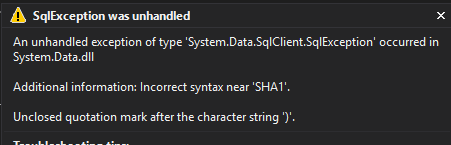
    If we let this execute agains the database, we get the following result:
    SQL exception for query
    We get an SQL exception telling us that our query syntax is incorrect! So how is this possible? When the user inputs the ‘ character, it is concatenated to the query, and the query is run against the database. SQL is interpreting the ‘ character as a closing quote for the username string, causing a mismatch in quotes and therefore a syntax error in the query.

    Already, this situation is bad, as the user can cause the program to crash just by entering a single character. However, it gets worse. The user can do a lot more damage by altering the query completely.

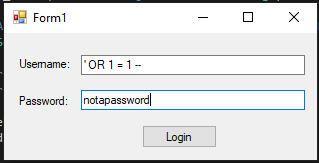
    Consider the input shown below:
    Malicious user input
    If the attacker were to enter these values, the query that results from it would be:
    SELECT COUNT(*) FROM Users 
    WHERE Username = ''
    OR 1 = 1 -- '
    AND userPassword = HASHBYTES('SHA1','notapassword')
    
    Let’s break this query down to understand it. The filter is going to get all the situations where Username = ‘’, and 1 =1. Since 1 will always equal 1, this will return all of the records. The final piece of the input, the two dashes ( — ) is a comment in SQL. Everything after those two characters is ignored.

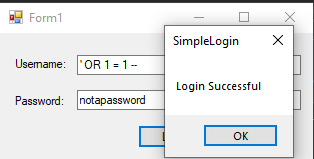
    The result of this query is to return the count of everything in the Users database. Since this is going to be greater than 1, the user will be authenticated with access, even though they did not enter valid credentials!
    User is given access
    This is obviously bad news, as we never want a user to be able to gain access to an application without proper credentials. So, how do we avoid this issue?

    Some people might suggest removing any ‘ character, however this might be a valid input (consider a name like O’Reily). This being the case, there is a better solution.

    The best answer to this problem is parameterized queries. Parameterized queries will generate the SQL execution plan before input is added, meaning it will avoid executing code inputted by the user. If we wanted to modify our original code to use parameterized queries, we could do so as follows:
    Dim sqlCommand As SqlCommand
    
    Dim query As String = "SELECT COUNT(*) FROM Users WHERE Username = @username AND userPassword = HASHBYTES('SHA1',@password)"
    
    Dim username As String
    Dim password As String
    
    username = usernameTextbox.Text
    password = passwordTextbox.Text
    
    sqlConnection.Open()
    
    sqlCommand = New SqlCommand(query, sqlConnection)
    
    sqlCommand.Parameters.Add("@username", SqlDbType.VarChar, 300).Value = username
    
    sqlCommand.Parameters.Add("@password", SqlDbType.VarChar, 300).Value = password
    
    If sqlCommand.ExecuteScalar() > 0 Then
    
    MsgBox("Login Successful")
    
    Else
    
    MsgBox("Login Failed")
    
    End If
    
    
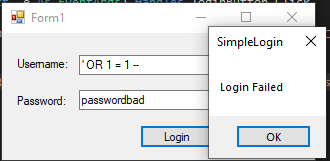
    Doing this will solve our issue
    User is now rejected access
    The parameterized version of the query is significantly more secure, and will help you be safe from SQL injection attacks. It is important to use this method when accessing SQL databases, otherwise your data may be destroyed or improperly accessed by attackers!
    下载开源日报APP:https://opensourcedaily.org/2579/
    加入我们:https://opensourcedaily.org/about/join/
    关注我们:https://opensourcedaily.org/about/love/
←上一页
1 … 169 170 171 172 173 … 262
下一页→

Proudly powered by WordPress