• 开源镜像
  • 开源沙龙
  • 媛宝
  • 猿帅
  • 注册
  • 登录
  • 息壤开源生活方式平台
  • 加入我们

开源日报

  • 开源日报第974期:《Hoppscotch》

    9 12 月, 2020
    开源日报 每天推荐一个 GitHub 优质开源项目和一篇精选英文科技或编程文章原文,坚持阅读《开源日报》,保持每日学习的好习惯。
    今日推荐开源项目:《Hoppscotch》
    今日推荐英文原文:《Google’s 2020: Search giant clashes with DC over antitrust, misinformation》

    今日推荐开源项目:《Hoppscotch》传送门:项目链接
    推荐理由:Hoppscotch是一个免费开源的API请求构建器。除了REST API支持外,它还支持GraphQL。它能够轻松快捷地为你的API生成文档。它是高度可配置的,提供身份验证,这绝对是你必备的工具之一。
    今日推荐英文原文:《Google’s 2020: Search giant clashes with DC over antitrust, misinformation》作者:Richard Nieva
    原文链接:https://www.cnet.com/news/googles-2020-search-giant-clashes-with-dc-over-antitrust-misinformation/
    推荐理由:搜索巨头谷歌在2020年,与华盛顿特区因反垄断和错误信息发生冲突。与员工发生争执后,谷歌现在正与立法者和监管机构交恶。不知道科技巨头和美国政府的对抗会产生什么样的结果。

    Google’s 2020: Search giant clashes with DC over antitrust, misinformation

    Almost exactly a year ago, Google co-founders Larry Page and Sergey Brin dropped some bombshell news. After more than 20 years, the two men were stepping down from company leadership. Sundar Pichai would take the reins of Google parent Alphabet going forward.

    Pichai, who was already running the conglomerate’s biggest unit, was experienced in the battles that mark corporate life. The soft-spoken executive had dealt with employee protests over Google’s work in China and the company’s handling of sexual misconduct allegations against senior executives. The fallout from those labor scrapes continues to this day.

    2020, however, would bring even more bruising fights to Pichai’s office. Tensions with Washington had been rising for years. Now Google was facing even more heat from lawmakers and regulators, who were increasingly uneasy with its power and influence.

    The year about to end will be remembered at Google for the federal government ratcheting up its fight with the tech giant. Long-standing antitrust woes coalesced into a once-in-a-generation lawsuit brought by the US Department of Justice. Lawmakers circled around the company as it failed to corral election misinformation running rampant on YouTube, Google’s video arm. An unprecedented pandemic spawned hoaxes that drew ire from all corners. Pichai was called to task in Washington.

    Google’s battles with the government didn’t prevent it from launching new products, including its flagship Pixel 5 phone and a next-generation Nest smart speaker. But those announcements were at times overshadowed by the controversy Google faced at a corporate level.

    Here’s a look at some of the biggest challenges Google faced this year.

    A landmark antitrust case

    Google’s biggest crisis in recent history came in October. After a more-than-yearlong investigation, the DOJ filed a landmark antitrust lawsuit against the company for alleged monopolies in search and search advertising.

    The lawsuit alleges that Google broke antitrust law by cutting deals with phone makers like Apple and Samsung to be the default search engine on their devices, a move that boxed out competitors. Google has also been accused of taking advantage of the dominance of its Android operating system to pressure device makers into preloading its apps on phones powered by the software.

    Google has denied engaging in anticompetitive behavior. It said the DOJ case is “deeply flawed.”

    Google isn’t alone in facing antitrust blowback from Washington. In July, Pichai appeared virtually at a hearing before the House Judiciary Committee’s antitrust subcommittee, alongside Facebook CEO Mark Zuckerberg, Amazon CEO Jeff Bezos and Apple CEO Tim Cook. Most of the attacks, however, were lobbed at Pichai, who withstood withering grillings from both Republicans and Democrats. The heat Pichai absorbed took the focus off the other tech leaders. Bezos, the world’s richest man, appeared bored at times and was caught snacking on camera.

    Google’s antitrust woes will only mount as the year draws to a close. A group of seven states plans to file another lawsuit against Google this month. The suit is expected to be consolidated with the federal government’s case.

    Election misinformation abounds

    The 2016 election was marred by Russian interference as agents exploited big tech platforms to sow discord among voters. As a result, Google and its peers, Facebook and Twitter, have been in the doghouse in Washington.

    With another high-stakes election this year, tech companies were eager to prove they were prepared. YouTube game-planned for months, introducing fact-check labels to counter misinformation about mail-in ballots or false election results.

    Still, misinformation flourished on the site. In the days after the Nov. 3 presidential election, YouTube was criticized for refusing to take down videos posted by One America News, a far-right news organization. The clips falsely declared victory for President Donald Trump and baselessly claimed that opponents had rigged the contest. YouTube prevented the videos from earning revenue and slapped labels on them with the warning “Results may not be final.” The label also appeared with all election-related search results and videos.

    The company took down multiple livestreams broadcasting fake election results hours before polls closed anywhere in the country, but not before the videos were already viewed by thousands of people.

    Lawmakers weren’t happy. In a letter to YouTube CEO Susan Wojcicki, Senate Democrats expressed concern over the impact of false news designed to delegitimize President-elect Joe Biden’s victory. The senators also said they’re worried about the effect misinformation could have on two January runoff elections in Georgia, which will decide which party controls the Senate.

    Coronavirus confusion

    The COVID-19 crisis has also tested Google’s relationship with Washington.

    When the pandemic took hold in March, the first public communication between Google and the Trump administration led to confusion. During a White House address to declare the pandemic a national state of emergency, Trump said Google was working with the administration on a website to give people information about coronavirus testing.

    Caught off guard, Google and government officials sought to clarify the project and its scope. Turns out that Verily, a corporate sibling of Google focused on health and life sciences, was designing the website to provide online screening tools for testing. Initially the website would be focused only on the San Francisco Bay Area, where Google is based.

    After the site launched, Senate Democrats — including now Vice President-elect Kamala Harris — worried about the privacy implications of the project. The lawmakers raised concerns about the website’s compliance with the Health Insurance Portability and Accountability Act, or HIPAA, the federal law regulating the security and privacy of certain medical information. The senators also took issue with the website requiring a Google account to take the screening diagnostic, a requirement that also drew scrutiny from privacy advocates.

    Google has launched tools to try to help people through the pandemic, including contact tracing software and COVID-19 mapping features. Still, the company has gotten in trouble for helping spread misinformation about the virus through videos. In May, Rep. Adam Schiff, a Democrat from California, wrote to Google and YouTube urging the platforms to warn users if they’d engaged with bogus coronavirus information, like conspiracy theories linking the virus to 5G towers, even if the content had since been taken down.

    YouTube’s primary approach to combating misinformation is to add fact-check labels that link to official sources, like the US Centers for Disease Control and Prevention. The company launched a COVID-19 label earlier on during the pandemic, and added another label about vaccine information last month.
    下载开源日报APP:https://opensourcedaily.org/2579/
    加入我们:https://opensourcedaily.org/about/join/
    关注我们:https://opensourcedaily.org/about/love/

  • 开源日报第973期:《捷径购买 inventory-hunter》

    8 12 月, 2020
    开源日报 每天推荐一个 GitHub 优质开源项目和一篇精选英文科技或编程文章原文,坚持阅读《开源日报》,保持每日学习的好习惯。
    今日推荐开源项目:《捷径购买 inventory-hunter》
    今日推荐英文原文:《5 Front-End Challenges That Will Get You Pumped Up to Code》

    今日推荐开源项目:《捷径购买 inventory-hunter》传送门:项目链接
    推荐理由:一个用于抢购商品的脚本,通过不断检测是否能添加到购物车来帮助用户更快的做出反应按下购买按钮,而且这个项目是在本地运行,能够节省下使用公用服务可能存在的些许延迟——而在抢购的时候,成败自然取决于你的速度。
    今日推荐英文原文:《5 Front-End Challenges That Will Get You Pumped Up to Code》作者:Indrek Lasn
    原文链接:https://medium.com/better-programming/5-front-end-challenges-that-will-get-you-pumped-up-to-code-cfaae64646c7
    推荐理由:在前端学习中推荐的一些值得完成的项目

    5 Front-End Challenges That Will Get You Pumped Up to Code

    Get really good at coding by building these projects

    Some individuals are particularly excellent at coding, and you could also belong to that group.

    Not a single person became a pro at programming overnight. Mastering programming involves putting in tons of work. You’ll have to be coding as often as possible to get really good at it.

    Yes, some people are geniuses — I’m not one of them — but even geniuses need to put in the work.

    Getting good starts with practice, practice, and more practice.

    Without further ado, here are the coding ideas I promised. Use each idea as a source of inspiration. Pick something that makes you excited to code and get on with it.

    Use whatever tools or programming language you prefer. With each idea, I’ll add a list of stuff you’ll learn by building it.

    1. Interactive Rasterized Triangle

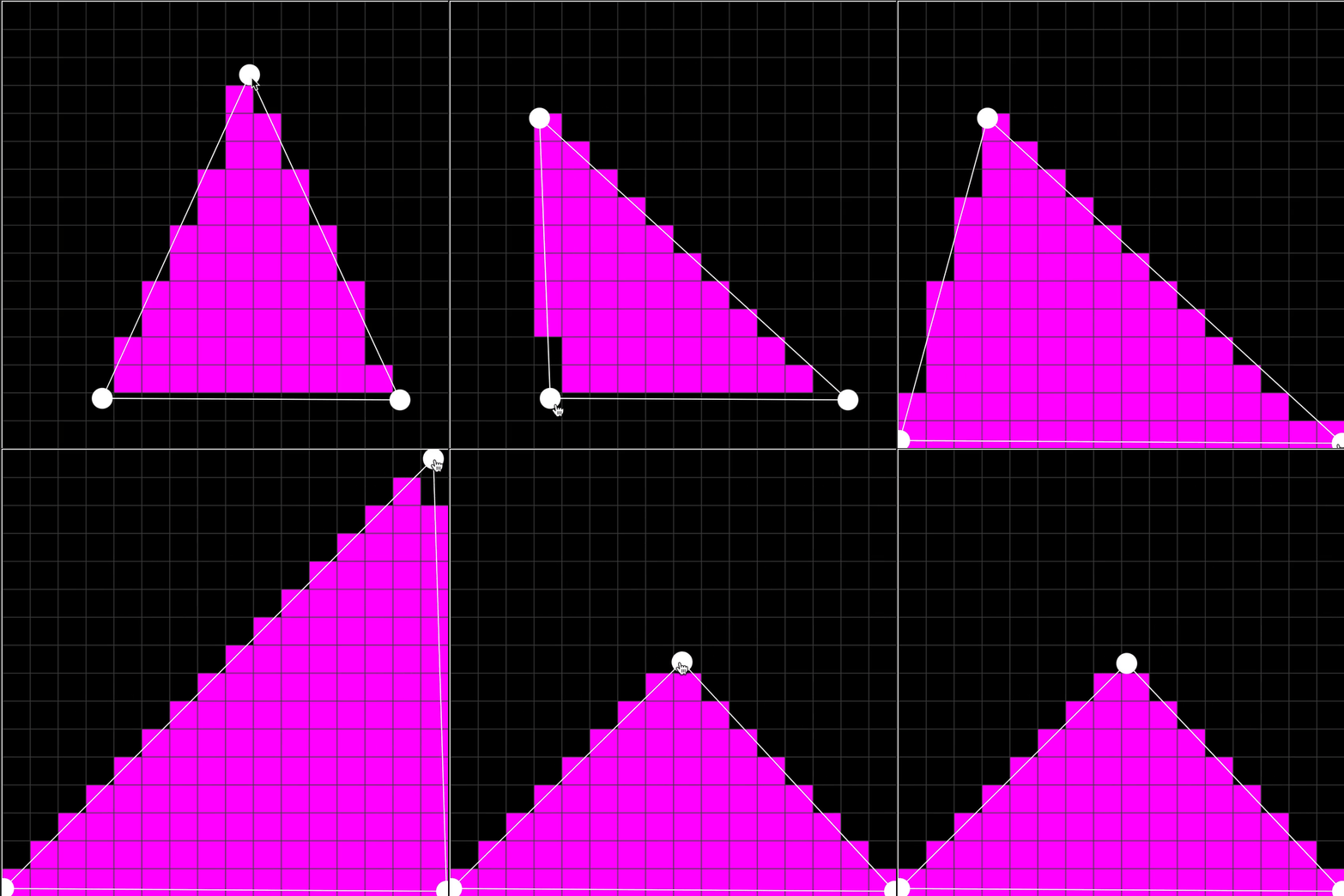
    • “Rasterization is the task of taking an image described in a vector graphics format and converting it into a raster image (a series of pixels, dots, or lines, which, when displayed together, create the image which was represented via shapes).” — Wikipedia

    Rasterizing a triangle ?? — By Lea Rosema

    Pretty cool, huh? Well done, Lea Rosema!

    Check out the source code(https://codepen.io/terabaud/pen/VwKLqdw) if you’re not sure where to start. It gets easier when you just start coding and chip the problem away. I promise.

    What you will learn by building this

    • Loops, loops, loops! — You’ll need to recalculate a lot of graphics when the user drags the triangle corners.
    • HTML, CSS, JavaScript — Notice how the triangle is composed of individual tiny squares.
    • Working event listeners — Whenever the user drags around the triangle, it changes width and height. Check out the source code for examples.

    2. Rasterized Fish

    If the example above is way over your head, I can totally relate. I’m a bit rusty at the moment and unsure if I could recreate it in a single work session.

    Source: Wikipedia

    How about creating something similar without the interactions? A rasterized fish. It still looks awesome, even without all the fancy interactions.

    What you will learn by building this

    • HTML, JavaScript — You’ll need to recreate the fish somehow. Notice how the fish is composed of squares.
    • CSS — You can use CSS to create the individual squares and color them. Or you could also use JavaScript for that.

    3. CSS Houdini Party Cube

    Neat! A flamboyant, jumping square!

    CSS Houdini Party Cube ? — By Jhey(https://codepen.io/jh3y/pen/rNLXrGo)

    If you’re unsure how to get started with this one, check out the Mozilla “Creating 3D objects using WebGL”(https://developer.mozilla.org/en-US/docs/Web/API/WebGL_API/Tutorial/Creating_3D_objects_using_WebGL) article for inspiration and ideas.

    What you will learn by building this

    • Advanced concepts for CSS animations — How will you make the square jump around in joy?
    • JavaScript event listeners — For instance, there’s the “activate party mode” button that lets users start or finish the animation.

    4. Twitter Profile Card Clone

    Twitter is probably the most common way for developers to communicate with each other. Why not learn how to code the profile section?

    My Twitter profile

    The profile above belongs to me, but you can use any profile you like. Don’t worry about the data. You can use plain dummy data and hardcode the profile.

    Although, if you’re feeling keen, Twitter does have an API you can use to make things much more dynamic.

    What you will learn by building this

    • Working with HTML and CSS.
    • After you’re done, try using a framework such as React, Vue, Angular, or Svelte. See if you can do it with a front-end JavaScript library too.
    • Note: Being able to use a JavaScript library makes you much more hireable and stand out from the crowd.
    • Optional: How to use the Twitter API and fetch data from it. You can use React combined with React Hooks for this.
    • Note: I wrote an article about using React with Hooks to fetch data from an API. Check it out.

    5. Reddit Public Access Network Clone

    Reddit Public Access Network, commonly known as RPAN, is a live streaming service run by Reddit. It launched on August 19, 2019.

    Source: Reddit Public Access Network

    Whenever I have some time to kill, I watch RPAN and see what other people are up to.

    It’s a fun way to have a quick conversation and see how different our lives really are.

    Start simple and just do the HTML and CSS parts. Come back later and finish the rest of the functionality.

    What you will learn by building this

    • HTML and CSS — Just the very basic layout. You can hardcode this.
    • Optional: Video Player — If you’re up for it, implement the video player.
    • Optional: Websocket-powered chatroom.
    Happy hacking! Thanks for reading.
    下载开源日报APP:https://opensourcedaily.org/2579/
    加入我们:https://opensourcedaily.org/about/join/
    关注我们:https://opensourcedaily.org/about/love/
  • 开源日报第972期:《无人机模拟器 UAV-simulation》

    7 12 月, 2020
    开源日报 每天推荐一个 GitHub 优质开源项目和一篇精选英文科技或编程文章原文,坚持阅读《开源日报》,保持每日学习的好习惯。
    今日推荐开源项目:《无人机模拟器 UAV-simulation》
    今日推荐英文原文:《This One Chart Explains Your Entire Relationship With Ideas》

    今日推荐开源项目:《无人机模拟器 UAV-simulation》传送门:项目链接
    推荐理由:该项目为基于基于 Cesium 的无人机飞行模拟器,有非常详细的导航和发动机等模块的数据,支持离线地图。
    今日推荐英文原文:《This One Chart Explains Your Entire Relationship With Ideas》作者:Jack Shepherd
    原文链接:https://medium.com/swlh/this-one-chart-explains-your-entire-relationship-with-ideas-7e51202587bb
    推荐理由:大脑:这个主意棒极了!手:并不。

    This One Chart Explains Your Entire Relationship With Ideas

    The Creative Process, in one infinitely depressing chart

    The key thing to remember about ideas is that having one is usually much better in theory.

    The first big problem comes from the temptation to fill up the vast gulf between conception and execution with anything other than the grim and brutal work of twisting your idea into something that can exist out in the world. We’ll come back to this.

    The second big problem is that once your idea comes into contact with the corrosive atmosphere that is reality, it is going to change, inexorably, into something else. Impurities will be introduced. Compromises will have to be made. The thing you produce will not look like the thing you imagined. This brings us back to problem number one. Every serious creative endeavor is an all-out battle to manage the lopsided relationship between your idea in its pure, unadulterated form … and the broken, stitched-together thing that it must inevitably become before it limps out into the world.

    The task of managing this deeply dysfunctional relationship is like steering a boat on a narrow strait between two dangerous cliffs: On one side is the danger that you will fall in love with your idea in its perfected state—dreaming about the accolades and awards you will receive once it’s safely out in the world; imagining all the infinite possibilities it contains. On the other side is the danger that you will despair when you see what your idea is actually becoming as you shape it—obsessing about its imperfections; agonizing over the jagged lines and smudges you’ve introduced onto your once pristine canvas.

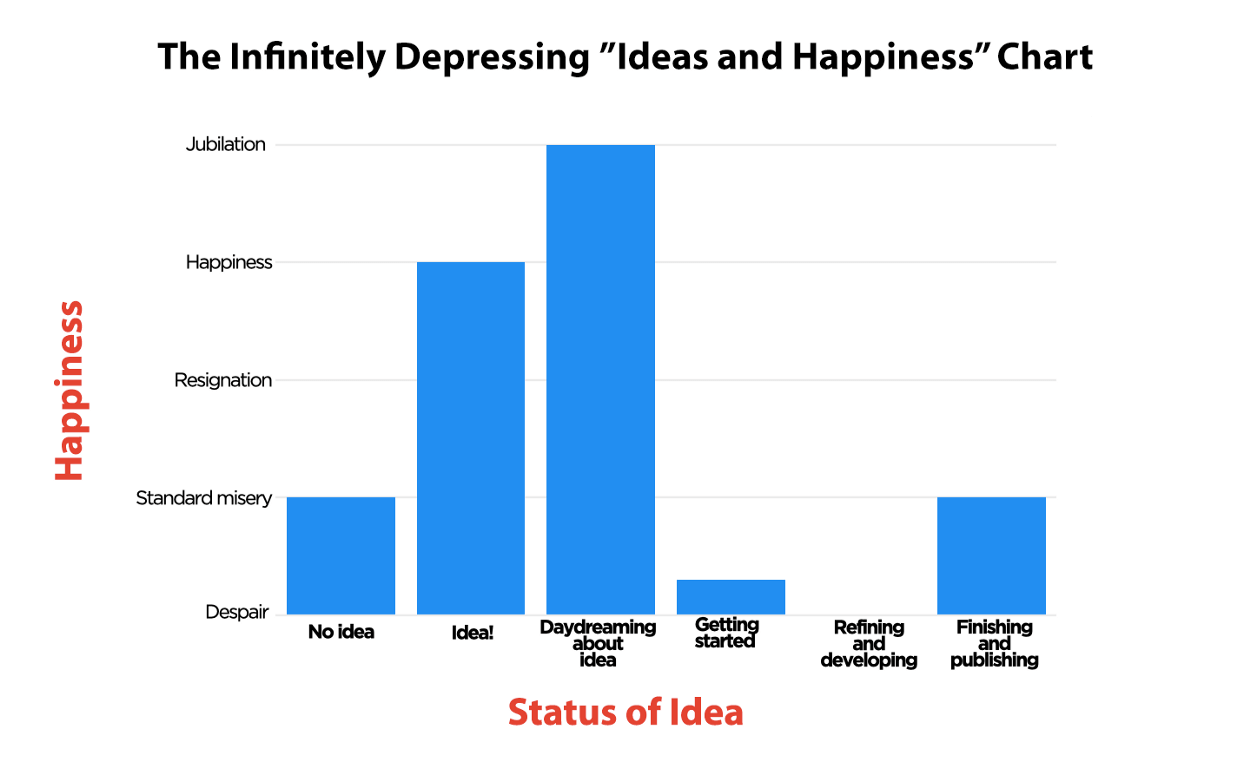
    The whole process is, to put it bluntly, a massive pain in the ass. I like to visualize this with something I call “The Infinitely Depressing Ideas and Happiness Chart.” It looks like this.

    (Photo: Jack Shepherd)
    In the life cycle of an idea, there is only one truly satisfying moment, and it’s the moment when you have it. In its untarnished form, it is beautiful to look at, thrilling to contemplate, and fun to play with. It is incredibly tempting to just keep it here, where no harm can come to it. Unfortunately, the rest of the process is a minefield, and—importantly—it’s especially dangerous because each new setback is in direct conflict with the beautiful lie that got you started on this whole lark: That your idea was already perfect.

    I like to think about ideas a lot like I remember Boy Scout camp being:
    • Not much fun before
    • Definitely not fun during
    • Not much fun after
    • But usually a good experience in retrospect
    (Photo: Focus Features)
    This might seem, as far as advice on creativity goes, ever-so-slightly bleak. But I have found it to be an immensely useful weapon when it comes to the arduous work of ploughing on with an idea when your brain is telling you it’s not working, or it’s not right, or it’s not going to be worth it. It doesn’t mean (by any stretch) that every thing you make is going to be a masterpiece, but the knowledge that the nagging doubts that beset the work are just as much a lie as the overblown expectations that got you into it in the first place is often just the tool you need to forge ahead. And it’s always better to make something than it is to sit around thinking about it.
    下载开源日报APP:https://opensourcedaily.org/2579/
    加入我们:https://opensourcedaily.org/about/join/
    关注我们:https://opensourcedaily.org/about/love/

  • 开源日报第971期:《Swagger-Bootstrap-UI》

    6 12 月, 2020
    开源日报 每天推荐一个 GitHub 优质开源项目和一篇精选英文科技或编程文章原文,坚持阅读《开源日报》,保持每日学习的好习惯。
    今日推荐开源项目:《Swagger-Bootstrap-UI》
    今日推荐英文原文:《A smart Rubik’s Cube has become my 2020 fidget toy》

    今日推荐开源项目:《Swagger-Bootstrap-UI》传送门:项目链接
    推荐理由:该 UI 增强包主要包括两大核心功能:文档说明 和 在线调试 文档说明:根据 Swagger 的规范说明,详细列出接口文档的说明,包括接口地址、类型、请求示例、请求参数、响应示例、响应参数、响应码等信息,使用 swagger-bootstrap-ui 能根据该文档说明,对该接口的使用情况一目了然。 在线调试:提供在线接口联调的强大功能,自动解析当前接口参数,同时包含表单验证,调用参数可返回接口响应内容、headers、Curl 请求命令实例、响应时间、响应状态码等信息,帮助开发者在线调试,而不必通过其他测试工具测试接口是否正确,简介、强大。
    今日推荐英文原文:《A smart Rubik’s Cube has become my 2020 fidget toy》作者:Scott Stein
    原文链接:https://www.cnet.com/news/best-smart-thermostat-for-2020/
    推荐理由:魔方是大家小时候都会接触的一种玩具. 如今, 富有创意的人结合AI发明了智能魔方. 这个魔方搭配的应用程序将会展示如何还原魔方, 以及提供基于魔方的其他有意思的小游戏.

    A smart Rubik’s Cube has become my 2020 fidget toy

    I had a Rubik’s Cube as a kid. Yeah, who didn’t. I also had almost all the Rubik’s puzzles: a 4-by-4-inch cube, and several versions of Rubik’s Magic. But that original cube, while it always made me dream of other dimensions, also fried my brain. I never learned to solve more than a couple of sides, even with books to study. I gave up, and accepted the scrambled colors.

    When I heard there was a Bluetooth-connected, phone-paired Rubik’s Cube, designed for speed-cubers to time their fastest solving runs, I shrugged. I can’t even solve one slowly. But I was wrong, so wrong. The connected cube is brilliant, and it’s become a comfort blanket. It’s a Cube That Solves Itself. Its extra training modes and mini-games make this one of the best surprise holiday gifts I can think of.

    GoCube, the maker of Rubik’s Connected, introduced its first connected cube years ago, but I missed the boat on that one. The first GoCube ($80) has a cradle charger and is a bit more fancy-looking, while the $60 Rubik-branded Connected Cube is less expensive and has a plug-in dongle-charger that charges up the cube (lasting weeks so far on a charge). The GoCube and Rubik’s Connected Cubes both pair with a phone, connecting with an app that turns the cube into a motion-sensitive, connected toy.

    The Connected Cube feels just like a regular Rubik’s Cube, with smooth turning mechanisms and sticker-applied colors. The app knows how many turns your cube has been through, and all you have to do is line up the center colors to match an on-screen illustration. Then select the “solve” button, and instructions pop up. Follow them, and your cube is back to perfect form like magic.

    That sounds like cheating, but it’s also part of the learning process. Another subsection of the app goes through learning how to solve the cube, teaching step-by-step turn algorithms. This process still fried my brain, but I’ll keep trying.

    The app also has some clever mini-games, using the turning cube to play games like some sort of Rubik’s controller. There’s a Guitar Hero-like rhythm music game, a Simon pattern-matching game and a few others. The app also is a gateway to register speed runs for cube solving, and games aimed solely at time-testing those skills.

    I don’t know if I’ll really use the app with the Connected Cube forever, or if I’ll lose interest. But the real point is, it’s sort of like smart training wheels. It’s an educational app for your Rubik’s Cube. Eventually I might go it on my own, or follow YouTube videos and blogs. Consider the Connected Cube a special sort of smart instruction set.

    It sits next to me now as I’m writing this. Fully solved. I know I can mess it up again at any time and still get it back to normal. It’s comforting. If only the rest of the world were like this.
    下载开源日报APP:https://opensourcedaily.org/2579/
    加入我们:https://opensourcedaily.org/about/join/
    关注我们:https://opensourcedaily.org/about/love/

←上一页
1 … 15 16 17 18 19 … 262
下一页→

Proudly powered by WordPress