• 开源镜像
  • 开源沙龙
  • 媛宝
  • 猿帅
  • 注册
  • 登录
  • 息壤开源生活方式平台
  • 加入我们

开源日报

  • 开源日报第380期:《从搞事情开始 project-based-learning》

    30 3 月, 2019
    开源日报 每天推荐一个 GitHub 优质开源项目和一篇精选英文科技或编程文章原文,坚持阅读《开源日报》,保持每日学习的好习惯。
    今日推荐开源项目:《从搞事情开始 project-based-learning》
    今日推荐英文原文:《Best Linux Distros for Beginners》

    今日推荐开源项目:《从搞事情开始 project-based-learning》传送门:GitHub链接
    推荐理由:一个各种语言的教程合集,只不过大部分都是介绍如何动手制造一些东西的。当有了一些语言方面的基础之后,要想了解更多关于这个语言的知识的话除了通读教程还有一种方法就是动手制作了。最开始可能需要寻找各种教程和示例——总而言之就是学习已有的经验来了解这个语言在制作时需要用到的功能,但是随着熟练度的增加你就可以很轻松的记下它们,这个时候就不再需要教程了,这些知识已经成为了你自己的东西。不过要注意的是如果一开始就专心于应用而没有打好语言基础的话,反而会拖慢学习进度。
    今日推荐英文原文:《Best Linux Distros for Beginners》作者:Adrian Uzoni
    原文链接:https://thishosting.rocks/best-linux-distros-beginners/
    推荐理由:推荐给初学者的 Linux 发行版

    Best Linux Distros for Beginners

    So, you heard about Linux so many times but never had the guts to finally commit to the change cause of those scary stories that you heard on how complex setting up Linux is, and the choice of the Linux distribution in the first place? Well, you shouldn’t worry about that anymore because we got you covered.

    Firstly, let’s cover some basic terms.

    What is Linux and what are “Distros”?

    Just like Windows and Mac OS X, Linux is an operating system, and not just a simple one, it’s the most secure, stable, open-source operating system there is, and the best part is it’s completely free.

    Linux comes in different “flavors” named “distros”, each with different features and characteristics. For example, there are specialized Linux distros like distros for gaming, distros for programming and lightweight distros for old PCs. Some of the other types of distros are:
    • Privacy-oriented distros like Tails
    • Hacking distros like Kali
    • Audio/Video production distros like Ubuntu Studio
    • And many more.
    Generally, these specialized distros aren’t really recommended for everyone, they’re great for people that actually need them, but they’re not that great for general use. So if you’re not a gamer it doesn’t make sense to use a gaming Linux distro, though technically you still can. You can customize and install any (compatible) software on any distro, no matter the type. We’ll focus on distros for beginners that are good for general use, without the need for complex installation and customization tasks.

    7 best Linux distros for beginners

    We will keep it simple and cover the best beginner-friendly Linux distros. We will begin with distros for those coming from Windows or MacOS, distros that are lightweight, optimized and run well even on an older machine, and perfect as daily drivers.

    1. Linux Mint


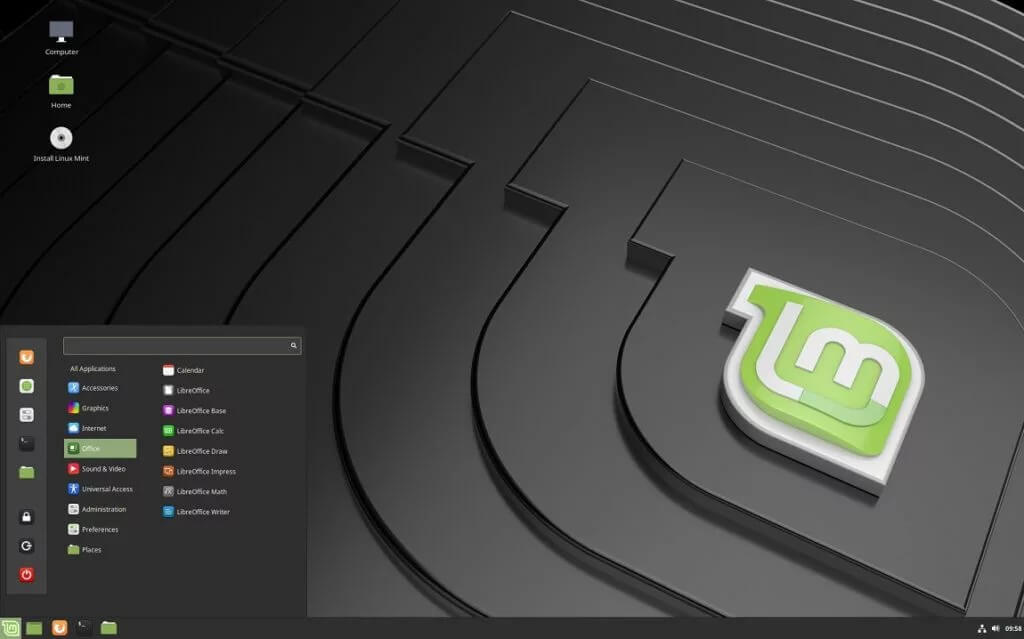
    First on the list is Linux Mint, which was designed for ease of use and a ready-to-run out-of-the-box experience. Anyone that switches from Windows will find this distro very intuitive and will feel right at home. The installation itself is easier than most Linux distributions, and it comes with all the required software to get you up to speed. Another thing, unlike most Linux distributions, Mint includes proprietary third-party browser plugins, Java, media codecs etc. There are different desktop editions of Mint including Cinnamon, MATE, and Xfce. Cinnamon represents the most modern, innovative and full-featured desktop with all the bells and whistles, it’s slick and beautiful. MATE is based on a classic desktop environment and its main feature is stability. And finally, Xfce is the most lightweight edition, and will run comfortably on any configuration, old or new. Best Linux Mint edition? There’s no right or wrong, simply put it’s the one that fits your requirements best.

    2. Ubuntu
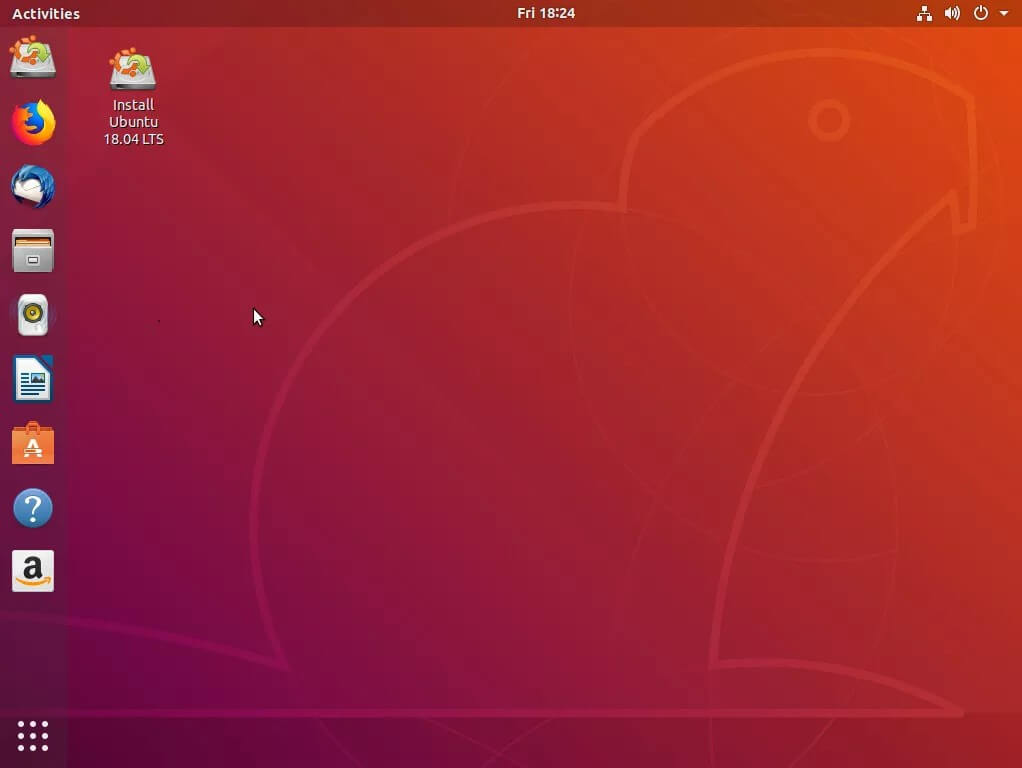

    Next in line is Ubuntu, and chances are, if you ever searched Linux on the Internet, you have surely come across this one. Ubuntu is surely amongst the best Linux distros out there, since originally it was the first Linux OS distribution designed with the aim of simplifying Linux and offering it to the general public. Installing Ubuntu is a breeze and it also comes with all the functionality you need out-of-the-box. It features a Software Center, so finding and installing applications is effortless. Being the most popular Linux Distro, it has the biggest ever-expanding community, with regular updates ensuring that your system is always secure and up-to-date. It’s the most widely used distro out there, both for servers and desktops.

    There’s a comparison of Linux Mint and Ubuntu here.

    3. Elementary OS


    Elementary OS is one of the, if not THE best looking Linux distro. It features many custom apps including Photos, Music, Videos, Calendar, Terminal, Files and a custom desktop environment called Pantheon which I’m sure that users who come from macOS will know to appreciate. It’s based on Ubuntu so it comes with all the known benefits, from easy and fast installation to an Appcenter for quick setup. It’s a fairly light and stable distro which makes it run on almost anything. Regular updates are ensured, so your system will run like a dream.

    4. Peppermint
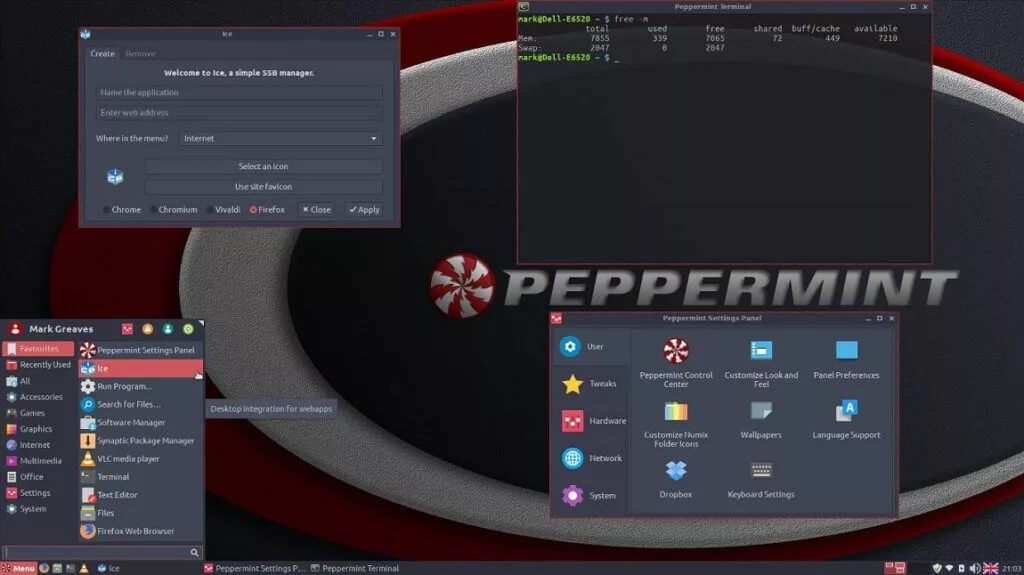

    Another great lightweight distro is Peppermint. It’s a stable, cloud-oriented distribution based on Ubuntu. What makes this distro special is it’s unique desktop environment which is kind of a hybrid of LXDE and Xfce, it resembles Windows UI, so again, it’s great for those switching from Windows. Another strong point of this distro is its ability to be easily integrated with web apps, through its Ice application. All in all, I would definitely recommend trying this distro, especially cause of its extremely low system requirements, and quite simple UI.

    5. Solus


    Moving right along, we have Solus OS and this one is a little bit special. It’s a completely new, and beautiful Linux OS that isn’t based on anything. It’s kind of a fresh start, and this is not a bad thing at all. Everything is built in-house and it comes in 3 flavors, from the fully featured Budgie edition, to the more familiar Gnome version, and finally to the most lightweight MATE version, so you definitely have something to choose from. It’s a simple rock solid OS, updated frequently, so if you are tired of those Ubuntu-based distros and want to try something new, this is the one.

    Now, to cover the needs of those of you that want to slap a fully-fledged OS on your bleeding-edge hardware in order to get some work done, but also some fun gaming sessions we recommend:

    6. Manjaro Linux
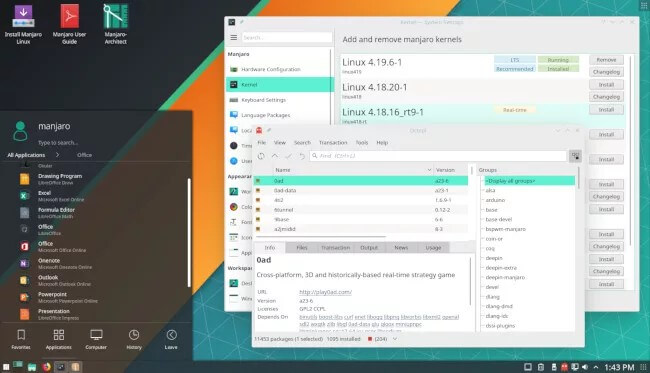

    Manjaro Linux is a distro that recently has gained popularity and with good reasons. It’s a fast, beautiful, user-friendly, desktop-oriented Linux OS distribution. It features a user-friendly installer, and it comes with everything you need pre-installed. The highlight of Manjaro is its amazing hardware support, thanks to its hardware detection manager, so you won’t need to worry about installing additional drivers. And if you find yourself stuck with a problem and looking for support, Manjaro has a great community ready to help you out. Some may argue that Manjaro should not be used by beginners, so beware, though everything can be done via the GUI and it’s a super-powerful and great looking distro.

    7. Zorin OS


    Another Linux distro which helps Windows refugees is Zorin OS. It’s an Ubuntu-based well designed and polished distribution. Without a doubt, its desktop environment resembles the all familiar Windows desktop, ensuring an effortless transition into the Linux world. Of course, it comes with a huge list of preinstalled software. Another highlight is the amazing theme engine called ‘Zorin look changer’ which offers high customization options and finally, it comes with Wine and PlayOnLinux so you can run most of your beloved Windows apps and games here too.

    Honorable Mentions

    A quick list of a few more distros so you can continue your research and explore more Linux distros:
    • KDE Neon
    • Deepin
    • Fedora
    • MX Linux
    • PCLinuxOS
    • Linux Lite
    • Kubuntu, Xubuntu, Lubuntu, Ubuntu Mate, Ubuntu Budgie, and most other Ubuntu derivatives
    • This is a great guide with more examples
    The best thing about most of the Linux distros is that you can try them without installing them by using a bootable USB drive, so I would encourage you to go and get an ISO and try out all the listed Linux distributions and then choose the best one. Have fun!

    How to choose the best Linux distro if you’re a beginner

    Here are a few quick and simple guidelines to help you choose the best distro for you:
    • If you’re feeling overwhelmed, just choose the distro that looks best to you. You can install most of the software on any distro of your choosing, as long as it’s compatible. All the distros we featured in our article can run pretty much the same pre-installed apps. Even if an app is not pre-installed in the distro you’re looking at, it’s pretty easy to find and install it using the distro’s Software/App center. It’s all done via the GUI.
    • If you’re moving away from Windows or Mac and want to keep using a similar interface, then choose one of the distros that specialize in that, like Peppermint, Linux Mint, Zorin, Elementary etc.
    • Don’t start with a distro like Arch Linux. Although a true powerhouse and a great distro, it’s not really recommended for beginners. Though, if you want to really learn Linux and how everything works, it’s a great starting distro. Either way, I wouldn’t recommend it as your main OS if you’re a beginner.
    • You can always dual-boot, run a virtual machine, or try a distro via a live USB. So you can keep using Windows/Mac, but switch to a Linux distro anytime. Dual-booting would be best if you don’t want to quit your main OS cold turkey.
    • Quickly go through the distro’s website to learn more about the distro before using it. This way you’ll know if it actually meets your needs beforehand, instead of using it and reinstalling a different distro afterward.
    That’s pretty much it.

    Frequently Asked Questions about Linux distros for beginners

    If you’re a beginner, it’s understandable that you’ll have a lot of questions about Linux distros and Linux in general. We’ll try to cover some of them here, but you can always google anything.

    What are standard and rolling release cycles?

    Linux distros tend to use two types of release cycles: standard releases and rolling releases. Some people prefer the concept on standard release since updates come less frequently and generally, the software tends to be more stable since it’s well tested, while others opt out for rolling releases which means frequent update delivery. So if you like stability and “peace of mind”, go with a standard release cycle. If you like the latest software and drivers, go with a rolling release cycle.

    Is everything in Linux done via the command line interface?

    No. That’s a common misconception. You can do pretty much everything via a GUI. Some tutorials you find online may have instructions only for the Terminal (CLI), but you can find an alternative tutorial that uses a GUI tool.

    Can I run Linux on my PC/hardware?

    Chances are, yes, you can. It’s best if you check the distro’s requirements, but most Linux distros are well-optimized and don’t need powerful hardware, especially the lightweight ones.

    How to install a distro?

    You’ll need to check the distro’s official site or google a tutorial. But basically, you need a USB flash drive/CD drive, you need an ISO image, and a tool to burn the iso image to the (bootable) drive. There are a number of tools that do this in a couple of clicks. Some even download the ISO for you. Once you have the drive ready, you just boot your system into the drive and follow the easy on-screen steps.

    Should I use an antivirus on my Linux distro?

    Depends. In most cases – not really. You should still follow security principles and have common sense when it comes to downloading files, running scripts etc.

    What distro should I use for my server?

    Either CentOS or Ubuntu, depending on the requirements of the software you’re planning on hosting.
    下载开源日报APP:https://opensourcedaily.org/2579/
    加入我们:https://opensourcedaily.org/about/join/
    关注我们:https://opensourcedaily.org/about/love/

  • 开源日报第379期:《清者自清 logoly》

    29 3 月, 2019
    开源日报 每天推荐一个 GitHub 优质开源项目和一篇精选英文科技或编程文章原文,坚持阅读《开源日报》,保持每日学习的好习惯。
    今日推荐开源项目:《清者自清 logoly》
    今日推荐英文原文:《Which are the most insecure languages?》

    今日推荐开源项目:《清者自清 logoly》传送门:GitHub链接
    推荐理由:这个项目提供了一个有意思的样式来让使用者定制属于自己的 logo——只需要填入想要的文本,选择想要的颜色之后下载就可以了,之后 todo list 里的分享和自定义字体功能也值得期待。虽然自定义颜色很有意思,不过这个项目的默认颜色在某种意义上可能会引起误会……
    今日推荐英文原文:《Which are the most insecure languages?》作者:Steven J. Vaughan-Nichols
    原文链接:https://www.zdnet.com/article/which-are-the-most-insecure-languages/#ftag=RSSbaffb68
    推荐理由:实际上,使用编程语言的最终还是人

    Which are the most insecure languages?

    From top to bottom, technology is riddled with security errors. At the lowest level, we have hardware errors such as Intel’s Meltdown and Spectre bugs. Just above those, we have programming language security holes, and boy, do we have a lot of those!

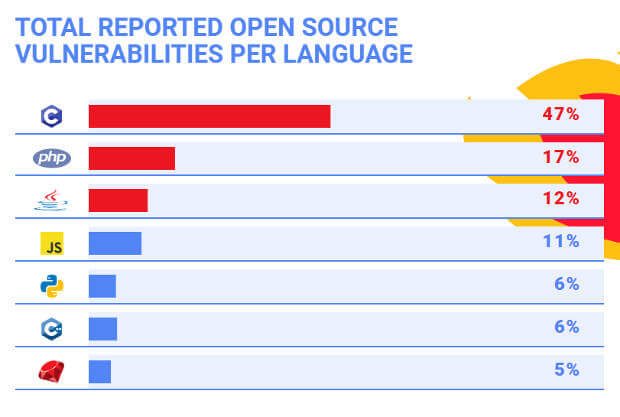
    WhiteSource, an open-source security company, recently did a study of open source security vulnerabilities in the seven most widely used languages over the past decade. To find the bugs, the company used it language security database. This contains data on open-source vulnerabilities from multiple sources such as the National Vulnerability Database (NVD), security advisories, GitHub issue trackers, and open-source projects issue trackers.

    Here’s what the company found: These languages are C, Java, JavaScript, Python, Ruby, PHP, and C++. There are no surprises.

    There’s also no surprise as to which language had the most security bugs. That’s C, by a wide margin. Nearly 50 percent of all reported vulnerabilities were in C.

    As Kees “Case” Cook, Google Linux kernel security engineer, said recently: “C is a fancy assembler. It’s almost machine code.” In addition, “C comes with some worrisome baggage, undefined behaviors, and other weaknesses that lead to security flaws and vulnerable infrastructure.”

    But, WhiteSource argued, “This is not to say that C is less secure than the other languages. The high number of open source vulnerabilities in C can be explained by several factors. For starters, C has been in use for longer than any of the other languages we researched and has the highest volume of written code. It is also one of the languages behind major infrastructure like OpenSSL and the Linux kernel. This winning combination of volume and centrality explains the high number of known open-source vulnerabilities in C.”

    They have a point. But, having programmed and fought with C for decades now, it really is way too easy to make terrible security blunders in C. For example, C contains a great deal of undefined behavior, which leaves all kinds of nasty possibilities open.

    C++, however, has the “honor” of having the most high-severity vulnerabilities in the past five years. Buffer errors, which have long plagued C, are also now being discovered often in C++

    That said, JavaScript, perhaps the most popular language, is also the only one that saw a “continuous rise in the number of vulnerabilities in the past 10 years.”

    Before making too much fun of JavaScript, those results, WhiteSource points out, are misleading. Most of JavaScript’s Common Weakness Enumeration (CWE)s are Path Traversal and crypto security holes from JavaScript packages, which are barely used, maintained, or supported.

    So, why are they — and other language problems — showing up? New automated programs, such as Source Code Analysis Tools, are spotting vulnerabilities, which otherwise would have been overlooked.

    The one language, which has been showing well on security holes, is — drumroll, please — Python. Yes, good old — often made fun of — Python.

    Nearly all languages share some CWEs. Two CWEs reigned supreme and featured among the three most common 70 percent of languages: Cross-Site-Scripting (XSS), aka CWE-79 and Input Validation, otherwise known as CWE-20.

    Other CWEs that show up a lot are: Information Leak/ Disclosure (CWE-200), Path Traversal (CWE-22), and CWE-264 Permissions, Privileges, and Access Control. The last is being displaced recently with its more specific, close relative — Improper Access Control (CWE-284).

    But is C really the worse and Python the best? WhiteSource thinks that’s much too simple a conclusion: “While the game of ‘my programming language is safer than yours’ is certainly a fun way to pass time … finding the answer will probably not help you create the most innovative or secure software out there.”

    No, instead you should spend your time “staying on top of known open-source vulnerabilities and understanding the strong and weak points in the programming languages you and your team are using.”

    In the end, security is not about the languages, but how you use them.
    下载开源日报APP:https://opensourcedaily.org/2579/
    加入我们:https://opensourcedaily.org/about/join/
    关注我们:https://opensourcedaily.org/about/love/
  • 开源日报第378期:《清理系统 uncss》

    28 3 月, 2019
    开源日报 每天推荐一个 GitHub 优质开源项目和一篇精选英文科技或编程文章原文,坚持阅读《开源日报》,保持每日学习的好习惯。
    今日推荐开源项目:《清理系统 uncss》
    今日推荐英文原文:《Why you should take the jobs no one else wants》

    今日推荐开源项目:《清理系统 uncss》传送门:GitHub链接
    推荐理由:假如你正在写一个网页,你的 HTML 和 CSS 文件正在不断增大,CSS 里面的类越来越多,在不断的换来换去之后你可能会留下一些用不上的类在 CSS 中。虽然放着它们也只不过占下一些空间而已,不过在你需要精简空间的时候一个个找实在是有些麻烦。这个项目需要你放入 CSS 和引入它的 HTML,之后它就会清除掉那些没用的类并返回一个有用的 CSS。使用方法也很简单,只需要一个浏览器就能解决问题。
    今日推荐英文原文:《Why you should take the jobs no one else wants》作者:Eric Shander
    原文链接:https://opensource.com/open-organization/19/3/jobs-no-one-wants
    推荐理由:兴许接受没人愿意的工作是一个意外的好机会

    Why you should take the jobs no one else wants

    So often, we describe open organizations as places overflowing with highly engaged people—places where leaders emerge spontaneously to tackle urgent problems, where people opt-in to challenging initiatives they know they can influence and drive, where teams act with initiative and few top-down mandates.

    And it’s all true. I see it regularly at Red Hat.

    But what about the jobs that no one in the organization seems especially excited to do? What about the jobs people seem like they’re actively avoiding? These exist in all organizations—including open ones.

    But what might surprise you is that those are the jobs I consistently recommend people step up to take.

    The jobs that “no one wants” are exactly the jobs offering the greatest opportunities for growth. And to be perfectly frank, that’s because they’re often the jobs that require the biggest investments of time, energy, and critical judgement.

    The job people seem to be shying away from is typically the one that’s attached to something in bad shape. Maybe a project has been mismanaged. Maybe a business unit is losing money. Maybe a team’s morale is in decline. Whatever the case, these are the situations that might not immediately promise glory.

    I like to think about this kind of work as if I were staring at a broken down, rusted out bus in need of repair. The fun part of working with that bus would be operating it: using it to haul passengers, strategizing about the most efficient routes to run with it, driving it through all kinds of circumstances that could improve people’s lives.

    But the broken down clunker in front of you can’t do any of that until it’s road-ready. You’ve got to perform the long, arduous work of fixing its internals and making sure its most basic systems are up, running, and effective. Most people, I think, would look at a vehicle in that state and just throw up their hands. They’d prefer to start their work with a bus that’s already in tip-top shape.

    The jobs that “no one wants” are exactly the jobs offering the greatest opportunities for growth.

    The same is true of ailing teams and initiatives in an organization. Taking on the task of leading them means doing lots of trying—often personally draining—work just to get the team or project in a place where it can begin fulfilling its basic functions. It’s not glamorous; it’s the kind of nuts-and-bolts work required of anyone trying to rehabilitate something. And it presents ample opportunities for struggle and criticism.

    So let’s say you’ve done that work. You’ve taken the dilapidated bus that was destined for the scrap heap and gotten it to a place where it’s drivable. You’re still not ready to drive it, because you need to fill it.

    This is the next critical task for someone working to get a team or project back on track: preparing and coordinating the people who’ll make that initiative succeed. Does everyone on your bus want to move in the same direction? Do they all agree on a destination? Where is everyone going to sit (after all, there can be only one driver)? And critically, who’s got a hand on the exit lever (because, unfortunately, you might need to help those passengers relinquish their seats).

    Only now—only after all the work of repairing the bus and aligning everyone inside it—are you ready to accomplish higher-level work. Only now can you successfully drive it anywhere, think strategically or long-term about where it’s going, and experiment with new routes and techniques on the road to success.
    Those initial phases—all the steps involved in rehabilitating something—are the jobs people tend to avoid.
    I faced this all-too-familiar situation when I became CFO at Red Hat—a position to which I was appointed expressly on an interim basis when my predecessor left the company to pursue another opportunity. I faced a decision: Pour all of my energy into starting at the beginning during a turbulent time of transition and making the best of my newfound role, or pursue something external that I could likely step right into with greater ease.

    Those initial phases—all the steps involved in rehabilitating something—are the jobs people tend to avoid.

    I chose to stick around and devote myself entirely to earning the top finance spot in a dynamic, fast-growing software company. And that meant playing mechanic for a bit.

    I needed to determine where other leaders in the finance organization were sitting on the bus (and where they felt they should be sitting). Some were already making a break for the emergency exit. Others were on board but didn’t have any concrete idea about what success would ultimately require of us. I got to work building relationships with my passengers (board members, peers, and others), and refocused all the in-transit transformation activities. It all required immediate (and tough) decisions in conditions that were essentially unprecedented for me.

    But those are the kind of jobs that have lasting personal impacts. Those are the jobs that will stretch you, the jobs that will make you uncomfortable—and discomfort is the surest sign of personal and professional growth. If you’re not uncomfortable, you’re not growing—and you’re not helping your organization grow either.

    Working in an open organization doesn’t magically make this kind of work disappear. But in many ways, it does make these jobs easier.

    The jobs that others don’t want are often the jobs that can make you feel incredibly lonely, because in most cases they’ll force you to initially strike out in a new direction. I still remember my first day, sitting in a new office and gradually realizing that I no longer had a boss I could simply defer to (that would have been CEO Jim Whitehurst and, well, I didn’t think barraging him with questions would make the best impression!).

    But in open organizations, where leaders tend to work transparently and collaboratively by default, that lonliness eases. In open organizations, leaders taking on hard work can share their goals, challenges, frustrations, and success stories more candidly with others—and that, undeniably, goes a long way toward eliminating those feelings of isolation.

    Pretty soon, you’ll have racked up enough small wins to inspire confidence in what you’re doing and to inspire others to join you. That’s how a reputation for being the “person who takes the jobs nobody wants” turns into a reputation for being the “person who gets things done.”
    下载开源日报APP:https://opensourcedaily.org/2579/
    加入我们:https://opensourcedaily.org/about/join/
    关注我们:https://opensourcedaily.org/about/love/

  • 开源日报第377期:《优化系统 clean-css》

    27 3 月, 2019
    开源日报 每天推荐一个 GitHub 优质开源项目和一篇精选英文科技或编程文章原文,坚持阅读《开源日报》,保持每日学习的好习惯。
    今日推荐开源项目:《优化系统 clean-css》
    今日推荐英文原文:《12 open source tools for natural language processing》

    今日推荐开源项目:《优化系统 clean-css》传送门:GitHub链接
    推荐理由:在引入各种 min.css 的时候相信大家都会发现这些 CSS 和我们自己写的完全不一样——它们从来都是排的密密麻麻严丝合缝。虽然看起来一点都不方便,但是的确这会节省些不必要的空间。这个项目就可以让我们也能把 CSS 排的密密麻麻,如果你不需要太复杂的设定,那么只需要打开浏览器把你的 CSS 文件丢进去就可以了,不过在此之前你需要确保你已经改好了你的 CSS,没有人会希望在那堆严丝合缝的样式表里寻找需要修改的某个数字的。
    今日推荐英文原文:《12 open source tools for natural language processing》作者:Dan Barker
    原文链接:https://opensource.com/article/19/3/natural-language-processing-tools
    推荐理由:对自然语言处理有帮助的开源工具集合

    12 open source tools for natural language processing

    Natural language processing (NLP), the technology that powers all the chatbots, voice assistants, predictive text, and other speech/text applications that permeate our lives, has evolved significantly in the last few years. There are a wide variety of open source NLP tools out there, so I decided to survey the landscape to help you plan your next voice- or text-based application.

    For this review, I focused on tools that use languages I’m familiar with, even though I’m not familiar with all the tools. (I didn’t find a great selection of tools in the languages I’m not familiar with anyway.) That said, I excluded tools in three languages I am familiar with, for various reasons.

    The most obvious language I didn’t include might be R, but most of the libraries I found hadn’t been updated in over a year. That doesn’t always mean they aren’t being maintained well, but I think they should be getting updates more often to compete with other tools in the same space. I also chose languages and tools that are most likely to be used in production scenarios (rather than academia and research), and I have mostly used R as a research and discovery tool.

    I was also surprised to see that the Scala libraries are fairly stagnant. It has been a couple of years since I last used Scala, when it was pretty popular. Most of the libraries haven’t been updated since that time—or they’ve only had a few updates.

    Finally, I excluded C++. This is mostly because it’s been many years since I last wrote in C++, and the organizations I’ve worked in have not used C++ for NLP or any data science work.

    Python tools

    Natural Language Toolkit (NLTK)

    It would be easy to argue that Natural Language Toolkit (NLTK) is the most full-featured tool of the ones I surveyed. It implements pretty much any component of NLP you would need, like classification, tokenization, stemming, tagging, parsing, and semantic reasoning. And there’s often more than one implementation for each, so you can choose the exact algorithm or methodology you’d like to use. It also supports many languages. However, it represents all data in the form of strings, which is fine for simple constructs but makes it hard to use some advanced functionality. The documentation is also quite dense, but there is a lot of it, as well as a great book. The library is also a bit slow compared to other tools. Overall, this is a great toolkit for experimentation, exploration, and applications that need a particular combination of algorithms.

    SpaCy

    SpaCy is probably the main competitor to NLTK. It is faster in most cases, but it only has a single implementation for each NLP component. Also, it represents everything as an object rather than a string, which simplifies the interface for building applications. This also helps it integrate with many other frameworks and data science tools, so you can do more once you have a better understanding of your text data. However, SpaCy doesn’t support as many languages as NLTK. It does have a simple interface with a simplified set of choices and great documentation, as well as multiple neural models for various components of language processing and analysis. Overall, this is a great tool for new applications that need to be performant in production and don’t require a specific algorithm.

    TextBlob

    TextBlob is kind of an extension of NLTK. You can access many of NLTK’s functions in a simplified manner through TextBlob, and TextBlob also includes functionality from the Pattern library. If you’re just starting out, this might be a good tool to use while learning, and it can be used in production for applications that don’t need to be overly performant. Overall, TextBlob is used all over the place and is great for smaller projects.

    Textacy

    This tool may have the best name of any library I’ve ever used. Say “Textacy” a few times while emphasizing the “ex” and drawing out the “cy.” Not only is it great to say, but it’s also a great tool. It uses SpaCy for its core NLP functionality, but it handles a lot of the work before and after the processing. If you were planning to use SpaCy, you might as well use Textacy so you can easily bring in many types of data without having to write extra helper code.

    PyTorch-NLP

    PyTorch-NLP has been out for just a little over a year, but it has already gained a tremendous community. It is a great tool for rapid prototyping. It’s also updated often with the latest research, and top companies and researchers have released many other tools to do all sorts of amazing processing, like image transformations. Overall, PyTorch is targeted at researchers, but it can also be used for prototypes and initial production workloads with the most advanced algorithms available. The libraries being created on top of it might also be worth looking into.

    Node tools

    Retext

    Retext is part of the unified collective. Unified is an interface that allows multiple tools and plugins to integrate and work together effectively. Retext is one of three syntaxes used by the unified tool; the others are Remark for markdown and Rehype for HTML. This is a very interesting idea, and I’m excited to see this community grow. Retext doesn’t expose a lot of its underlying techniques, but instead uses plugins to achieve the results you might be aiming for with NLP. It’s easy to do things like checking spelling, fixing typography, detecting sentiment, or making sure text is readable with simple plugins. Overall, this is an excellent tool and community if you just need to get something done without having to understand everything in the underlying process.

    Compromise

    Compromise certainly isn’t the most sophisticated tool. If you’re looking for the most advanced algorithms or the most complete system, this probably isn’t the right tool for you. However, if you want a performant tool that has a wide breadth of features and can function on the client side, you should take a look at Compromise. Overall, its name is accurate in that the creators compromised on functionality and accuracy by focusing on a small package with much more specific functionality that benefits from the user understanding more of the context surrounding the usage.

    Natural

    Natural includes most functions you might expect in a general NLP library. It is mostly focused on English, but some other languages have been contributed, and the community is open to additional contributions. It supports tokenizing, stemming, classification, phonetics, term frequency–inverse document frequency, WordNet, string similarity, and some inflections. It might be most comparable to NLTK, in that it tries to include everything in one package, but it is easier to use and isn’t necessarily focused around research. Overall, this is a pretty full library, but it is still in active development and may require additional knowledge of underlying implementations to be fully effective.

    Nlp.js

    Nlp.js is built on top of several other NLP libraries, including Franc and Brain.js. It provides a nice interface into many components of NLP, like classification, sentiment analysis, stemming, named entity recognition, and natural language generation. It also supports quite a few languages, which is helpful if you plan to work in something other than English. Overall, this is a great general tool with a simplified interface into several other great tools. This will likely take you a long way in your applications before you need something more powerful or more flexible.

    Java tools

    OpenNLP

    OpenNLP is hosted by the Apache Foundation, so it’s easy to integrate it into other Apache projects, like Apache Flink, Apache NiFi, and Apache Spark. It is a general NLP tool that covers all the common processing components of NLP, and it can be used from the command line or within an application as a library. It also has wide support for multiple languages. Overall, OpenNLP is a powerful tool with a lot of features and ready for production workloads if you’re using Java.

    StanfordNLP

    Stanford CoreNLP is a set of tools that provides statistical NLP, deep learning NLP, and rule-based NLP functionality. Many other programming language bindings have been created so this tool can be used outside of Java. It is a very powerful tool created by an elite research institution, but it may not be the best thing for production workloads. This tool is dual-licensed with a special license for commercial purposes. Overall, this is a great tool for research and experimentation, but it may incur additional costs in a production system. The Python implementation might also interest many readers more than the Java version. Also, one of the best Machine Learning courses is taught by a Stanford professor on Coursera. Check it out along with other great resources.

    CogCompNLP

    CogCompNLP, developed by the University of Illinois, also has a Python library with similar functionality. It can be used to process text, either locally or on remote systems, which can remove a tremendous burden from your local device. It provides processing functions such as tokenization, part-of-speech tagging, chunking, named-entity tagging, lemmatization, dependency and constituency parsing, and semantic role labeling. Overall, this is a great tool for research, and it has a lot of components that you can explore. I’m not sure it’s great for production workloads, but it’s worth trying if you plan to use Java.
    下载开源日报APP:https://opensourcedaily.org/2579/
    加入我们:https://opensourcedaily.org/about/join/
    关注我们:https://opensourcedaily.org/about/love/

←上一页
1 … 164 165 166 167 168 … 262
下一页→

Proudly powered by WordPress