• 开源镜像
  • 开源沙龙
  • 媛宝
  • 猿帅
  • 注册
  • 登录
  • 息壤开源生活方式平台
  • 加入我们

开源日报

  • 开源日报第392期:《像模像样的文档 docsify》

    11 4 月, 2019
    开源日报 每天推荐一个 GitHub 优质开源项目和一篇精选英文科技或编程文章原文,坚持阅读《开源日报》,保持每日学习的好习惯。
    今日推荐开源项目:《像模像样的文档 docsify》
    今日推荐英文原文:《The Linux desktop is in trouble》

    今日推荐开源项目:《像模像样的文档 docsify》传送门:GitHub链接
    推荐理由:这个项目可以帮助你生成有模有样的文档页面,不过只需要你写好 markdown 文件即可。它会帮你解析你的那一堆 .md 然后生成 html 文件,只要按照一定的规则,就可以轻松的做出一个便于阅读的文档页面,你兴许已经在很多地方看到这个熟悉的目录+内容组合了,如果没有,可以在下面这个项目中看看——用 docsify 来写文档页面的项目集合。
    awesome-docsify:https://github.com/docsifyjs/awesome-docsify
    今日推荐英文原文:《The Linux desktop is in trouble》作者:Steven J. Vaughan-Nichols
    原文链接:https://www.zdnet.com/article/the-linux-desktop-is-in-trouble/#ftag=RSSbaffb68
    推荐理由:关于 Linux 桌面在目前的状况下存在的一些问题

    The Linux desktop is in trouble

    I’m a big believer in the Linux desktop. Heck, I used to run a site called Desktop Linux. And I believe that, as Microsoft keeps moving Windows to a Desktop-as-a-Service model, Linux will be the last traditional PC desktop operating system standing. But that doesn’t mean I’m blind to its problems.

    First, even Linus Torvalds is tired of the fragmentation in the Linux desktop. In a recent TFiR interview with Swapnil Bhartiya, Torvalds said, “Chromebooks and Android are the path toward the desktop.”

    Why? Because we don’t have a standardized Linux desktop.

    For example, better Linux desktops, such as Linux Mint, provide an easy way to install applications, but under the surface, there are half-a-dozen different ways to install programs. That makes life harder for developers. Torvalds wishes “we were better at having a standardized desktop that goes across the distributions.”

    Torvalds thinks there’s been some progress. For software installation, he likes Flatpak. This software program, like its rival Snap, lets you install and maintain programs across different Linux distros. At the same time, this rivalry between Red Hat (which supports Flatpak) and Canonical (which backs Snap) bugs Torvalds. He’s annoyed at how the “fragmentation of the different vendors have held the desktop back.”

    None of the major Linux distributors — Canonical, Red Hat, SUSE — are really all that interested in supporting the Linux desktop. They all have them, but they’re focused on servers, containers, the cloud, and the Internet of Things (IoT). That’s, after all, is where the money is.

    True, the broad strokes of the Linux desktop are painted primarily by Canonical and Red Hat, but the desktop is far from their top priority. Instead, much of the nuts and bolts of the current generation of the Linux desktop is set by vendor-related communities: Red Hat, Fedora, SUSE’s openSUSE, and Canonical’s Ubuntu.

    Another major player in setting the tone of the Linux desktop are the smaller Linux communities. These include Linux Mint, Manjaro Linux, MX Linux, elementary OS, and Solus. They’re all doing good work, but they’re also running on a shoestring basis.

    Take Mint, my own personal favorite desktop. Its lead developer, Clement “Clem” Lefebvre, recently wrote:
    “It’s not always easy to achieve what we want, sometimes it’s not even easy to define what we want to achieve. We can have doubts, we can work really hard on something for a while and then question it so much, we’re not even sure we’ll ship it. We can get demotivated, uncertain, depressed even by negative reactions or interactions, and it can lead to developers stepping away from the project, taking a break or even leaving for good.”
    These are not the words of a happy man.

    Lefebvre continued:
    “It’s all about Muffin [Linux Mint’s default windows manager] at the moment. We’re trying to make it smoother, to make the windows feel lighter… radical changes and refactoring occurred, it’s eating a lot of time and we’re chasing regressions left, right and center. This is documented at https://github.com/linuxmint/cinnamon/issues/8454. It’s a really tough exercise, it creates tensions within the team but the potential is there, if we can make our WM snappier it’s worth the hassle.”
    It has indeed created tensions. Jason Hicks, Muffin maintainer and member of the Linux Mint team, observed on Reddit, as reported by Brian Fagioli:
    “I also have a life outside open-source work, too. It’s not mentally sound to put the hours I’ve put into the compositor. I was only able to do what I could because I was unemployed in January. Now I’m working a job full time, and trying to keep up with bug fixes. I’ve been spending every night and weekend, basically every spare moment of my free time trying to fix things.
    There’s also been tension because we’re 1-2 months from a release. We’ve had contentious debate about input latency, effects of certain patches, and ways to measure all of this. Other team members are going through their own equally hard circumstances, and it’s an unfortunate amount of stress to occur all at once at the wrong times. We’re human at the end of the day. I wish these aspects didn’t leak into the blog post so much, so just wanted to vent and provide some context. If you take away anything from it, please try the PPA and report bugs. We need people looking for things that might get stuck in cinnamon 4.2.”
    I’ve heard this before. There have been a lot of Linux desktop distros over the years. They tend to last for five or six years and then real life gets in the way of what’s almost always a volunteer effort. The programmers walk away, and the distro then all too often declines to be replaced by another.

    It is not easy building and supporting a Linux desktop. It comes with a lot of wear and tear on its developers with far too little reward. Mint is really a winner and I hope to see it around for many more years to come. But I worry over it.

    Looking ahead, I’d love to see a foundation bring together the Linux desktop community and have them hammer out out a common desktop for everyone. Yes, I know, I know. Many hardcore Linux users love have a variety of choices. The world is not made up of desktop Linux users. For the million or so of us, there are hundreds of millions who want an easy-to-use desktop that’s not Windows, doesn’t require buying a Mac, and comes with broad software and hardware support. Are you listening Linux Foundation?

    Such a desktop, in turn, would be more commercially successful than our current hodgepodge of desktops. This would mean that many more Linux desktop developers could make a living from their work. That would improve the Linux desktop overall quality. It’s a virtuous cycle, which would help everyone.

    Let’s try to make this happen shall we? Otherwise, the traditional Linux desktop, in all its variations, will remain a niche operating system for power users.
    下载开源日报APP:https://opensourcedaily.org/2579/
    加入我们:https://opensourcedaily.org/about/join/
    关注我们:https://opensourcedaily.org/about/love/

  • 开源日报第391期:《弹钢琴 AutoPiano》

    10 4 月, 2019
    开源日报 每天推荐一个 GitHub 优质开源项目和一篇精选英文科技或编程文章原文,坚持阅读《开源日报》,保持每日学习的好习惯。
    今日推荐开源项目:《弹钢琴 AutoPiano》
    今日推荐英文原文:《Happy 14th anniversary Git: What do you love about Git?》

    今日推荐开源项目:《弹钢琴 AutoPiano》传送门:GitHub链接
    推荐理由:一个用来放松的浏览器钢琴。兴许你手上有那么一些很适合用钢琴重现的 BGM,但是你手边没有一台真正的钢琴,这个时候你就可以试试看这个浏览器钢琴了。虽然钢琴的键位太多要用键盘弹的时候有些吃力,不过效果还是不错的,只要多练习一下你也能自己重现喜欢的 BGM,等你弹完之后,你也可以把自制的琴谱通过 issue 贡献出去作为其他人的借鉴。
    今日推荐英文原文:《Happy 14th anniversary Git: What do you love about Git?》作者: Jen Wike Huger
    原文链接:https://opensource.com/article/19/4/what-do-you-love-about-git
    推荐理由:Git 自诞生起已经过了 14 年,那么问题来了,你喜欢它的哪一点呢

    Happy 14th anniversary Git: What do you love about Git?

    In the 14 years since Linus Torvalds developed Git, its influence on software development practices would be hard to match—in StackOverflow’s 2018 developer survey, 87% of respondents said they use Git for version control. Clearly, no other tool is anywhere close to knocking Git off its throne as the king of source control management (SCM).

    In honor of Git’s 14th anniversary on April 7, I asked some enthusiasts what they love most about it. Here’s what they told me.

    (Some responses have been lightly edited for grammar and clarity)

    “I can’t stand Git. Incomprehensible terminology, distributed so that truth does not exist, requires add-ons like Gerrit to make it 50% as usable as a nice centralized repository like Subversion or Perforce. But in the spirit of answering ‘what do you like about Git?’: Git makes arbitrarily abstruse source tree manipulations possible and usually makes it easy to undo them when it takes 20 tries to get them right.” —Sweet Tea Dorminy

    “I like that Git doesn’t enforce any particular workflow and development teams are free to collaborate in a way that works for them, be it with pull requests or emailed diffs or push permission for all.” —Andy Price

    “I’ve been using Git since 2006 or 2007. What I love about Git is that it works well both for small projects that may never leave my computer and for large, collaborative, distributed projects. Git provides you all the tools to rollback from (almost) every bad commit you make, and as such has significantly reduced my stress when it comes to software management.” —Jonathan S. Katz

    “I appreciate Git’s principle of “plumbing” vs. “porcelain” commands. Users can effectively share any kind of information using Git without needing to know how the internals work. That said, the curious have access to commands that peel back the layers, revealing the content-addressable filesystem that powers many code-sharing communities.” —Matthew Broberg

    “I love Git because I can do almost anything to explore, develop, build, test, and commit application codes in my own Git repo. It always motivates me to participate in open source projects.” —Daniel Oh

    “Git is the first version control tool I used, and it went from being scary to friendly over the years. I love how it empowers you to feel confident about code you are changing while it gives you the assurance that your master branch is safe (obviously unless you force-push half-baked code to the production/master branch). Its ability to reverse changes by checking out older commits is great too.” —Kedar Vijay Kulkarni

    “I love Git because it made several other SCM software obsolete. No one uses VS, Subversion can be used with git-svn (if needed at all), BitKeeper is remembered only by elders, it’s similar with Monotone. Sure, there is Mercurial, but for me it was kind of ‘still a work in progress’ when I used it while upstreaming Firefox support for AArch64 (a few years ago). Someone may even mention Perforce, SourceSafe, or some other ‘enterprise’ solutions, but they are not popular in the FOSS world.” —Marcin Juszkiewicz

    “I love the simplicity of the internal model of SHA1ed (commit → tree → blob) objects. And porcelain commands. And that I used it as patching mechanism for JBoss/Red Hat Fuse. And that this mechanism works. And how Git can be explained in the great tale of three trees.” —Grzegorz Grzybek

    “I like the generated Git man pages which make me humble in front of Git. (This is a page that generates Git-sounding but in reality completely nonsense pages—which often gives the same feeling as real Git pages…)” —Marko Myllynen

    “Git changed my life as a developer going from a world where SCM was a problem to a world where it is a solution.” —Joel Takvorian
    下载开源日报APP:https://opensourcedaily.org/2579/
    加入我们:https://opensourcedaily.org/about/join/
    关注我们:https://opensourcedaily.org/about/love/

  • 开源日报第390期:《即使是普通人也能适用 public-speaking-with-meaning》

    9 4 月, 2019
    开源日报 每天推荐一个 GitHub 优质开源项目和一篇精选英文科技或编程文章原文,坚持阅读《开源日报》,保持每日学习的好习惯。
    今日推荐开源项目:《即使是普通人也能适用 public-speaking-with-meaning》
    今日推荐英文原文:《Searchable list of certified open hardware projects》

    今日推荐开源项目:《即使是普通人也能适用 public-speaking-with-meaning》传送门:GitHub链接
    推荐理由:到了这年头不管是谁都可能要面对一两次当众讲话的事件的,而这个项目正式为了让普通人也能做好当众讲话而产生的一个系列,里面介绍的大部分都是对于普通人也不难做到的技巧——比如不要装模作样,不要滥用名言等等;即使那些更高级的技巧需要实战经验来掌握,但是看完之后肯定能够避开一些当众讲话的误区。
    今日推荐英文原文:《Searchable list of certified open hardware projects》作者:Michael Weinberg
    原文链接:https://opensource.com/article/19/3/certified-hardware-list
    推荐理由:一个经过认证的开源硬件项目列表,具体网站是https://certification.oshwa.org/list.html

    Searchable list of certified open hardware projects

    In this article, and hopefully more to come, I will share interesting examples of hardware that has been certified by the Open Source Hardware Association (OSHWA).

    As an introduction to this series, I’ll start with a little background.

    What is open source hardware?

    Open source hardware is hardware that is, well, open source. The Open Source Hardware Association maintains a formal definition of open source hardware, but fundamentally, open source hardware is about two types of freedom. The first is freedom of information: Does a user have the information required to understand, replicate, and build upon the hardware? The second is freedom from legal barriers: Will legal barriers (such as intellectual property rights) prevent a user who is trying to understand, replicate, and build upon the hardware from doing so? True open source hardware is open to everyone to do with as they see fit.

    What is the Open Source Hardware Association?

    The Open Source Hardware Association is the umbrella organization for the open source hardware community. In addition to hosting the formal definition (mentioned above), OSHWA puts on the annual Open Hardware Summit and maintains the Open Source Hardware Certification Program.

    What is the Open Source Hardware Certification Program?

    “Open source hardware” can mean different things to different people. The Certification Program makes it easy to identify hardware that fully complies with the community definition of open source hardware. Certification is free, and hardware that has been certified is allowed to use the OSHW certification logo and a unique identifier assigned by OSHWA. The certification process makes it easy to be sure that you have provided all of the information needed for someone else to make use of your hardware and removed any legal barriers to use it.

    Show me the hardware! A searchable list

    Take a look at the entire list of certified projects. In this post, I’ll share two of my favorites.

    A conference badge


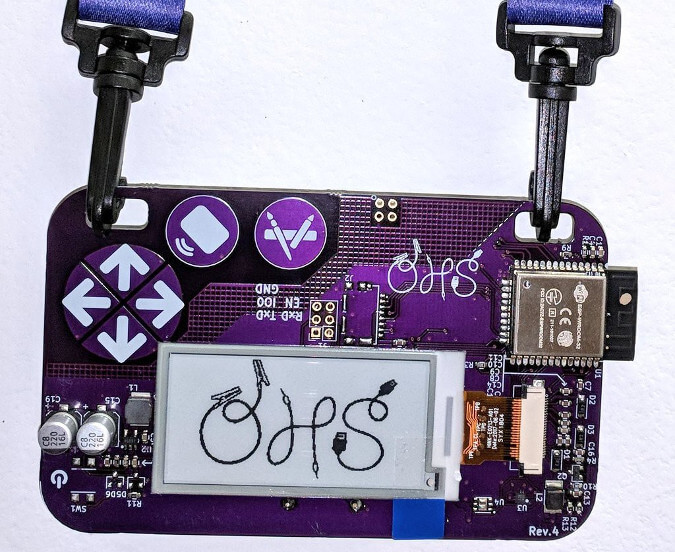
    The first is the badge for the 2018 Open Hardware Summit. The Summit always has great badges, and last year they were fully open sourced and certified (UID: US000133). The badges have an ESP32 micro-controller with built-in WiFi and E-Paper displays for the wearer’s name (or any other information, as the text can be customized and updated via a web app), and they are powered by two AA batteries.

    The badge is a good example of how Open Source Hardware Certification handles third-party components. The ESP32 and the WiFi chip are not open source. However, that is not necessarily a barrier to certification. Certification requires the creator to open source what is known as the “creator’s contribution.” In other words, the creators need to open source all the elements they are responsible for and have the ability to openly license. Non-open components are allowed as long as they are documented and freely available without having to sign a non-disclosure agreement (NDA).

    A business card holder


    The second is a concrete business card holder. Besides its elegance, it is an important reminder that open source hardware is more than things that need batteries and soldering. The world of open source hardware is incredibly broad and should not be thought of only in the context of electronics (although there are plenty of open source electronics). The documentation for the holder includes tips on how to 3D-print the mold and how to pour and finish the concrete. Complete documentation is a great thing!

    Hopefully, this has given you a small taste of things to come. In the coming months, the open source hardware roundup will highlight the broad range of certified open source hardware. Want to be included? If you want your hardware to be featured in an upcoming roundup, the first step is to get certified!
    下载开源日报APP:https://opensourcedaily.org/2579/
    加入我们:https://opensourcedaily.org/about/join/
    关注我们:https://opensourcedaily.org/about/love/
  • 开源日报第389期:《甚至没有类 water.css》

    8 4 月, 2019
    开源日报 每天推荐一个 GitHub 优质开源项目和一篇精选英文科技或编程文章原文,坚持阅读《开源日报》,保持每日学习的好习惯。
    今日推荐开源项目:《甚至没有类 water.css》
    今日推荐英文原文:《5 open source tools for teaching young children to read》

    今日推荐开源项目:《甚至没有类 water.css》传送门:GitHub链接
    推荐理由:这是一个里面没有一个自定义类的 CSS 文件——只不过它改装了那些默认的标签,从而让你在需要简单的写点什么的时候不需要自己再去整一些新的样式把原来的样式覆盖掉。虽然在网页很简单的时候它的加入已经足够,但是在网页开始变得复杂的时候它并不能帮你省下太多的功夫,该自己动手的地方还是要自己动手的。
    我只是想写点简单的演示内容,所以我不想给它们加上样式,但是默认样式真的太丑了。——作者
    今日推荐英文原文:《5 open source tools for teaching young children to read》作者: Laura B. Janusek
    原文链接:https://opensource.com/article/19/4/early-literacy-tools
    推荐理由:幼儿阅读教学工具

    5 open source tools for teaching young children to read

    Anyone who sees a child using a tablet or smartphone observes their seemingly innate ability to scroll through apps and swipe through screens, flexing those “digital native” muscles. According to Common Sense Media, the percentage of US households in which 0- to 8-year-olds have access to a smartphone has grown from 52% in 2011 to 98% in 2017. While the debates around age guidelines and screen time surge, it’s hard to deny that children are developing familiarity and skills with technology at an unprecedented rate.

    This rise in early technical literacy may be astonishing, but what about traditional literacy, the good old-fashioned ability to read? What does the intersection of early literacy development and early tech use look like? Let’s explore some open source tools for early learners that may help develop both of these critical skill sets.

    Balancing risks and rewards

    But first, a disclaimer: Guidelines for technology use, especially for young children, are constantly changing. Organizations like the American Academy of Pediatrics, Common Sense Media, Zero to Three, and PBS Kids are continually conducting research and publishing recommendations. One position that all of these and other organizations can agree on is that plopping a child in front of a screen with unmonitored content for an unlimited set of time is highly inadvisable.

    Even setting kids up with educational content or tools for extended periods of time may have risks. And on the flip side, research on the benefits of education technologies is often limited or unavailable. In short, there are many cases in which we don’t know for certain if educational technology use at a young age is beneficial, detrimental, or simply neutral.

    But if screen time is available to your child or student, it’s logical to infer that educational resources would be preferable over simpler pop-the-bubble or slice-the-fruit games or platforms that could house inappropriate content or online predators. While we may not be able to prove that education apps will make a child’s test scores soar, we can at least take comfort in their generally being safer and more age-appropriate than the internet at large.

    That said, if you’re open to exploring early-education technologies, there are many reasons to look to open source options. Open source technologies are not only free but open to collaborative improvement. In many cases, they are created by developers who are educators or parents themselves, and they’re a great way to avoid in-app purchases, advertisements, and paid upgrades. Open source programs can often be downloaded and installed on your device and accessed without an internet connection. Plus, the idea of open source in education is a growing trend, and there are countless resources to learn more about the concept.

    But for now, let’s check out some open source tools for early literacy in action!

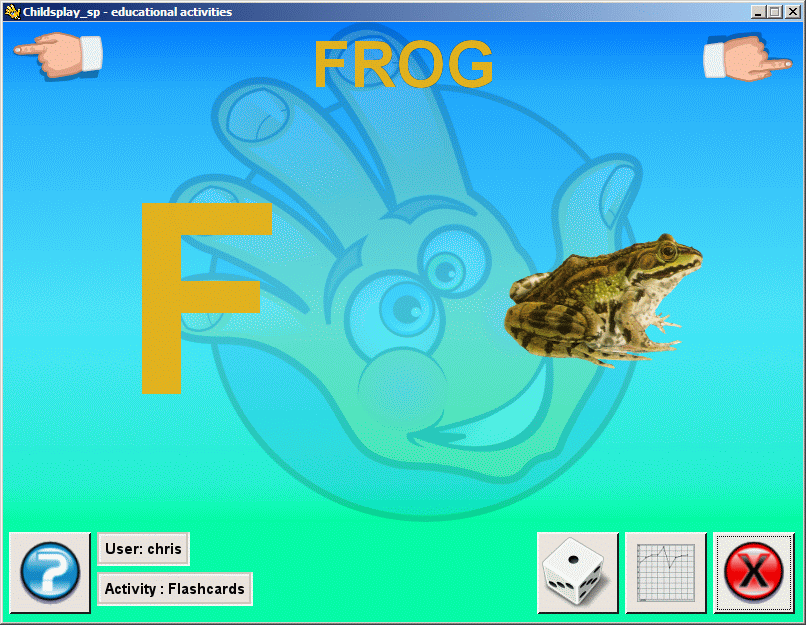
    Childsplay


    Let’s start simple. Childsplay, licensed under the GPLv2, is the most basic of the resources on this list. It’s a compilation of just over a dozen educational games for young learners, four of which are specific to letter recognition, including memory games and an activity where the learner identifies a spoken letter.

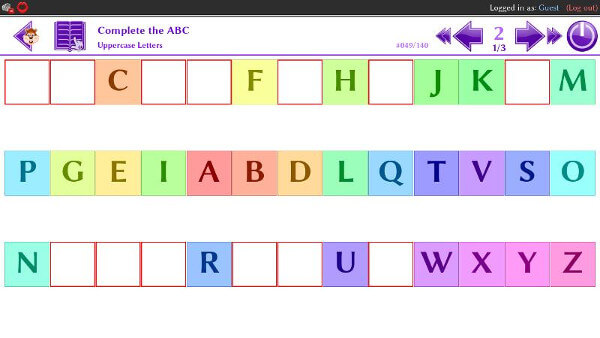
    eduActiv8


    eduActiv8 started in 2011 as a personal project for the developer’s son, “whose thirst for learning and knowledge inspired the creation of this educational program.” It includes activities for building basic math and early literacy skills, including a variety of spelling, matching, and listening activities. Games include filling in missing letters in the alphabet, unscrambling letters to form a word, matching words to images, and completing mazes by connecting letters in the correct order. eduActiv8 was written in Python and is available under the GPLv3.

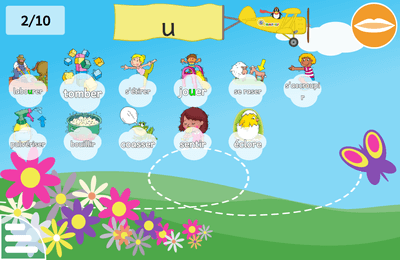
    GCompris


    GCompris is an open source behemoth (licensed under the GPLv3) of early educational activities. A French software engineer started it in 2000, and it now includes over 130 educational games in nearly 20 languages. Tailored for learners under age 10, it includes activities for letter recognition and drawing, alphabet sequencing, vocabulary building, and games like hangman to identify missing letters in words, plus activities for learning braille. It also includes games in math and music, plus classics from tic-tac-toe to chess.

    Feed the Monster


    The quality of the playful “monster” graphics in Feed the Monster definitely sets it apart from the others on this list, plus it supports nearly 40 languages! The app includes activities for sorting letters to form words, memory games to match words to images, and letter-tracing writing activities. The app is developed by Curious Learning, which states: “We create, localize, distribute, and optimize open source mobile software so every child can learn to read.” While Feed the Monster’s offerings are geared toward early readers, Curious Mind’s roadmap suggests it’s headed towards a more robust personalized literacy platform growing on a foundation of research with MIT, Tufts, and Georgia State University.

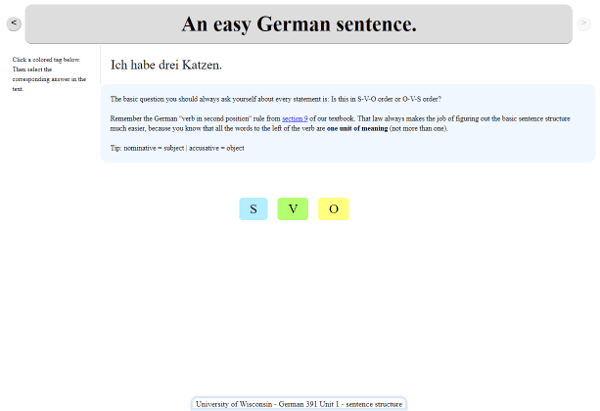
    Syntax Untangler


    Syntax Untangler is the outlier of this group. Developed by a technologist at the University of Wisconsin–Madison under the GPLv2, the application is “particularly designed for training language learners to recognize and parse linguistic features.” Examples show the software being used for foreign language learning, but anyone can use it to create language identification games, including games for early literacy activities like letter recognition. It could also be applied to later literacy skills, like identifying parts of speech in complex sentences or literary techniques in poetry or fiction.

    Wrapping up

    Access to literary environments has been shown to impact literacy and attitudes towards reading. Why not strive to create a digital literary environment for our kids by filling our devices with educational technologies, just like our shelves are filled with books?
    下载开源日报APP:https://opensourcedaily.org/2579/
    加入我们:https://opensourcedaily.org/about/join/
    关注我们:https://opensourcedaily.org/about/love/

←上一页
1 … 161 162 163 164 165 … 262
下一页→

Proudly powered by WordPress