• 开源镜像
  • 开源沙龙
  • 媛宝
  • 猿帅
  • 注册
  • 登录
  • 息壤开源生活方式平台
  • 加入我们

开源日报

  • 开源日报第404期:《象棋 awesome-chess》

    23 4 月, 2019
    开源日报 每天推荐一个 GitHub 优质开源项目和一篇精选英文科技或编程文章原文,坚持阅读《开源日报》,保持每日学习的好习惯。
    今日推荐开源项目:《象棋 awesome-chess》
    今日推荐英文原文:《TDD Changed My Life》

    今日推荐开源项目:《象棋 awesome-chess》传送门:GitHub链接
    推荐理由:相信大家小时候都有看到过街边老人们摆出象棋决斗的经历,这次要推荐的项目就是关于象棋的资源合集——虽然是国际象棋。国际象棋的下法与中国象棋有不少相似之处,比如能十字前进的车与走日字的马,不过因为存在王车易位和兵的升变这样的特殊行动方式,实际玩起来和象棋还是有很大差距的,作为平时休闲娱乐的手段尝试一下也无妨。
    今日推荐英文原文:《TDD Changed My Life》作者:Eric Elliott
    原文链接:https://medium.com/javascript-scene/tdd-changed-my-life-5af0ce099f80
    推荐理由:介绍了 TDD——Test Driven Development 的优点

    TDD Changed My Life

    It’s 7:15 am and customer support is swamped. We just got featured on Good Morning America, and a whole bunch of first time customers are bumping into bugs.

    It’s all-hands-on-deck. We’re going to ship a hot fix NOW before the opportunity to convert more new users is gone. One of the developers has implemented a change he thinks will fix the issue. We paste the staging link in company chat and ask everybody to go test the fix before we push it live to production. It works!

    Our ops superhero fires up his deploy scripts, and minutes later, the change is live. Suddenly, customer support call volume doubles. Our hot-fix broke something else, and the developers erupt in synchronized git blame while the ops hero reverts the change.

    Why TDD?

    It’s been a while since I’ve had to deal with that situation. Not because developers stopped making mistakes, but because for years now, every team I’ve led and worked on has had a policy of using TDD. Bugs still happen, of course, but the release of show-stopping bugs to production has dropped to near zero, even though the rate of software change and upgrade maintenance burden has increased exponentially since then.

    Whenever somebody asks me why they should bother with TDD, I’m reminded of this story — and dozens more like it. One of the primary reasons I switched to TDD is for improved test coverage, which leads to 40%-80% fewer bugs in production. This is my favorite benefit of TDD. It’s like a giant weight lifting off your shoulders.
    TDD eradicates fear of change.
    On my projects, our suites of automated unit and functional tests prevent disastrous breaking changes from happening on a near-daily basis. For example, I’m currently looking at 10 automated library upgrades from the past week that I used to be paranoid about merging because what if it broke something?

    All of those upgrades integrated automatically, and they’re already live in production. I didn’t look at a single one of them manually, and I’m not worried at all about them. I didn’t have to go hunting to come up with this example. I popped open GitHub, looked at recent merges, and there they were. What was once manual maintenance (or worse, neglect) is now automated background process. You could try that without good test coverage, but I wouldn’t recommend it.

    What is TDD?

    TDD stands for Test Driven Development. The process is simple:
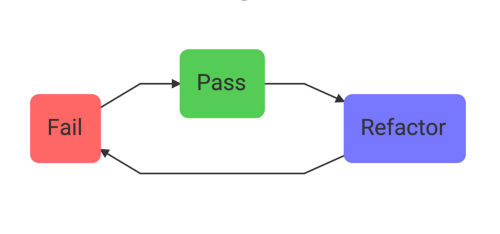
    Red, Green, Refactor
    • Before you write implementation code, write some code that proves that the implementation works or fails. Watch the test fail before moving to the next step (this is how we know that a passing test is not a false positive — how we test our tests).
    • Write the implementation code and watch the test pass.
    • Refactor if needed. You should feel confident refactoring your code now that you have a test to tell you if you’ve broken something.

    How TDD Can Save You Development Time

    On the surface, it may seem that writing all those tests is a lot of extra code, and all that extra code takes extra time. At first, this was true for me, as I struggled to understand how to write testable code in the first place, and struggled to understand how to add tests to code that was already written.

    TDD has a learning curve, and while you’re climbing that learning curve, it can and frequently does add 15% — 35% to implementation times. But somewhere around the 2-years in mark, something magical started to happen: I started coding faster with unit tests than I ever did without them.

    Several years ago I was building a video clip range feature in a UI. The idea was that you’d set a starting point for a video, and and ending point, and when the user links to it, it would link to that precise clip, rather than the whole video.

    But it wasn’t working. The player would reach the end of the clip and keep on playing, and I had no idea why.

    I kept thinking it had to do with the event listener not getting hooked up properly. My code look something like this:
    video.addEventListener('timeupdate', () => {
      if (video.currentTime >= clip.stopTime) {
        video.pause();
      }
    });
    
    Change. Compile. Reload. Click. Wait. Repeat.

    Each change took almost a minute to test, and I tried a hilariously large number of things (most of them 2–3 times).

    Did I misspell timeupdate? Did I get the API right? Is the video.pause() call working? I’d make a change, add a console.log(), jump back into the browser, hit refresh, click to a moment before the end of the clip, and then wait patiently for it to hit the end. Logging inside the if statement did nothing. OK, that’s a clue. Copy and paste timeupdate from the API docs to be absolutely sure it wasn’t a typo. Refresh, click, wait. No luck!

    Finally, I placed a console.log() outside the if statement. “This can’t help,” I thought. After all, that if statement was so simple, there’s no way I could have screwed up the logic. It logged. I spit my coffee on the keyboard. WTF?!
    Murphy’s Law of Debugging: The thing you believe so deeply can’t possibly be wrong so you never bother testing it is definitely where you’ll find the bug after you pound your head on your desk and change it only because you’ve tried everything else you can possibly think of.
    I set a breakpoint to figure out what was going on. I inspected the value of clip.stopTime. undefined??? I looked back at my code. When the user clicks to select the stop time, it places the little stop cursor icon, but never sets clip.stopTime. “OMG I’m a gigantic idiot and nobody should ever let me anywhere near a computer again for as long as I live.”

    Years later I still remember this because of that feeling. You know exactly what I’m talking about. We’ve all been there. We’re all living memes.
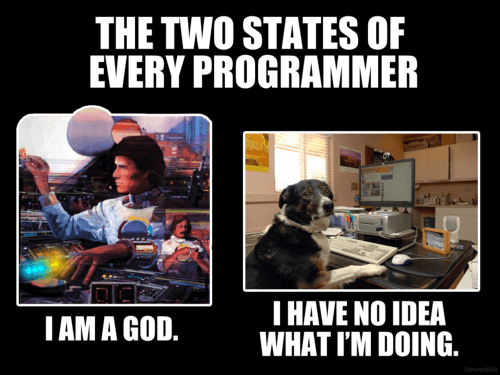
    Actual photos of me while I’m coding.

    If I was writing that UI today, I’d start with something like this:
    describe('clipReducer/setClipStopTime', async assert => {
      const stopTime = 5;
      const clipState = {
        startTime: 2,
        stopTime: Infinity
      };
    
      assert({
        given: 'clip stop time',
        should: 'set clip stop time in state',
        actual: clipReducer(clipState, setClipStopTime(stopTime)),
        expected: { ...clipState, stopTime }
      });
    });
    
    Granted, superficially, that looks like a whole lot more code than clip.stopTime = video.currentTime. But that’s the point. This code acts like a specification. Documentation, along with proof that the code works as documented. And because it exists, if I change the way I position the stop time cursor on the x, y axis, I don’t have to worry about whether or not I’m breaking the clip stop time code in the process.
    Note: Want to write unit tests like this? Check out “Rethinking Unit Test Assertions”.
    The point is not how long it takes to type this code. The point is how long it takes to debug it if something goes wrong. If this code broke, this test would give me a great bug report. I’d know right away that the problem is not the event handler. I’d know it’s in setClipStopTime() or the clipReducer() which implements the state mutation. I’d know what it’s supposed to do, the actual output, and the expected output — and more importantly — so would a coworker, 6-months into the future who’s trying to add features to the code I built.

    One of the first things I do in every project is set up a watch script that automatically runs my unit tests on every file change. I often code with two monitors side-by-side and keep my dev console with the watch script running on one monitor while I code on the other. When I make a change, I usually know within 3 seconds whether or not that change worked.

    For me, TDD is far more than a safety net. It’s also constant, fast, realtime feedback. Instant gratification when I get it right. Instant, descriptive bug report when I get it wrong.

    TDD Taught Me How to Write Better Code

    I’m going to admit something embarrassing: I had no idea how to build apps before I learned TDD with unit testing. How I ever got hired would be beyond me, but after interviewing hundreds and hundreds of developers, I can tell you with great confidence: there are a lot of developers in the same boat. TDD taught me almost everything I know about effective decoupling and composition of software components (meaning modules, functions, objects, UI components, etc.)

    The reason for that is because unit tests force you to test components in isolation from each other, and from I/O. Given some input, the unit under test should produce some known output. If it doesn’t, the test fails. If it does, it passes. The key is that it should do so independent of the rest of the application. If you’re testing state logic, you should be able to test it without rendering anything to the screen or saving anything to a database. If you’re testing UI rendering, you should be able to test it without loading the page in a browser or hitting the network.

    Among other things, TDD taught me that life gets a lot simpler when you keep UI components as minimal as you can. Isolate business logic and side-effects from UI. In practical terms, that means that if you’re using a component-based UI framework like React or Angular, it may be advantageous to create display components and container components, and keep them separate.

    For display components, given some props, always render the same state. Those components can be easily unit tested to be sure that props are correctly wired up, and that any conditional logic in the UI layout works correctly (for example, maybe a list component shouldn’t render at all if the list is empty, and it should instead render an invitation to add some things to the list).

    I knew about separation of concerns long before I learned TDD, but I didn’t know how to separate concerns.

    Unit testing taught me about using mocks to test things, and then it taught me that mocking is a code smell, and that blew my mind and completely changed how I approach software composition.

    All software development is composition: the process of breaking large problems down into lots of small, easy-to-solve problems, and then composing solutions to those problems to form the application. Mocking for the sake of unit tests is an indication that your atomic units of composition are not really atomic, and learning how to eradicate mocks without sacrificing test coverage taught me how to spot a myriad of sneaky sources of tight coupling.

    That has made me a much better developer, and taught me how to write much simpler code that is easier to extend, maintain, and scale, both in complexity, and across large distributed systems like cloud infrastructure.

    How TDD Saves Whole Teams Time

    I mentioned before that testing first leads to improved test coverage. The reason for that is that we don’t start writing the implementation code until we’ve written a test to ensure that it works. First, write the test. Then watch it fail. Then write the implementation code. Fail, pass, refactor, repeat.

    That process builds a safety net that few bugs will slip through, and that safety net has a magical impact on the whole team. It eliminates fear of the merge button.

    That reassuring coverage number gives your whole team the confidence to stop gatekeeping every little change to the codebase and let changes thrive.

    Removing fear of change is like oiling a machine. If you don’t do it, the machine grinds to a halt until you clean it up and crank it, squeaking and grinding back into motion.

    Without that fear, the development cadence runs a lot smoother. Pull requests stop backing up. Your CI/CD is running your tests — it will halt if your tests fail. It will fail loudly, and point out what went wrong when it does.

    And that has made all the difference.
    下载开源日报APP:https://opensourcedaily.org/2579/
    加入我们:https://opensourcedaily.org/about/join/
    关注我们:https://opensourcedaily.org/about/love/

  • 开源日报第403期:《新手上路 first-contributions》

    22 4 月, 2019
    开源日报 每天推荐一个 GitHub 优质开源项目和一篇精选英文科技或编程文章原文,坚持阅读《开源日报》,保持每日学习的好习惯。
    今日推荐开源项目:《新手上路 first-contributions》
    今日推荐英文原文:《The Perfect Software》

    今日推荐开源项目:《新手上路 first-contributions》传送门:GitHub链接
    推荐理由:俗话说得好,万事开头难。这一点在各种地方都是相同的——特别是你与别人合作的时候,你会更加小心翼翼确保不给别人添麻烦。这个项目就是一个给 GitHub 新手的贡献指南,让初来乍到的新手也能简单的为开源项目做出贡献,一旦成功的迈出了第一步,后面的负担和压力就小得多了。
    今日推荐英文原文:《The Perfect Software》作者:Hassan Habib
    原文链接:https://medium.com/@hassanhabib/the-perfect-software-2d7905693d56
    推荐理由:完美的软件是不存在的,我们无法预知未来,我们能做的只是让它更能够适应未来

    The Perfect Software

    Don’t ever think there’s such a thing as perfect software, there’s no such a thing.

    There are, however, relatively satisfying experiences that slowly decline as technology advances and new tools are implemented for better experiences.

    The trick here is to build your software to be adaptive to the inevitably upcoming changes before you know what they really are, or how they are going to be.

    Because the software you build is nothing but a reflection of who you are, how you felt, and your pattern of thought at the time of developing that software, I see building adaptive software as more than just an intelligent move to build a better experience. It’s also a humble gesture that indicates that what you’re building is not perfect, because you’re not perfect either. Your software is ready to learn new tricks and evolve and morph itself to provide better experiences to its users.

    Everywhere in every possible software house you can think of, you’ll hear some developers talking about making the code “perfect” — it’s like mirage developers endlessly chasing what they’ll never find.

    This eventually causes a lot of tension between the business and the developers involved, because the business will never understand why they need to spend more money to get the same experience, and developers will never be able to explain to non-technical stakeholders why putting in four more weeks of development without any observable results is important for the business.

    Some thinkers (such as uncle Bob) suggest that making the software “right” is a part of the risk developers should take and include that in their development efforts, as a part of delivering features.

    But then again, he’ll say even after taking that risk, the software itself must be in a continuous maintenance state, because software rots, and it requires continuous effort to keep it up to date.

    So, what is an adaptive software, what are the measures of success for an adaptive software?

    Modularization

    The first and most important sign of an adaptive software is modularization or componentization.

    Modularized software with pluggable, configurable and reusable components makes it a lot easier to change these components and adapt new patterns to provide better experiences.

    But with modularization comes abstraction, and abstraction is the tough part. Because abstraction isn’t just about building contracts that both the provider and the consumer should honor, it’s also the art of predicting upcoming changes that you don’t fully understand, or know the nature of.

    Building contracts is just like predicting the future. It’s about how long it can hold off, and both sides try to bend it backwards before they decide to sunset your work and build v2.0.

    Building v2.0 is a declaration that your prediction of the business needs only lived so long before you went into this dark area where all your predictions and expectations have failed.

    That’s why I stress on the notion that developers and engineers are two very different creatures. The first thinks all the problems lie in the code in front of their eyes, while the latter don’t just think of the big picture and the entire process end to end, but they also consider how the software will actually hold up for the next three to five years before it turns into a legacy that everyone tries to stay away from because it’s a pain to understand let alone support.

    The Experience

    In addition to modularization, there’s the other side of the coin, which is the experience.

    A successfully adaptive software should evolve not just on the back-end but also to the end-users. They should see something better, not just the same experience, but better, faster, easier and feel improved intuitiveness.

    In Steve Jobs’ own words, he used to say: “Our software should know what users want before they even know they want it.”

    And as hard as that is, it’s actually a very achievable, realistic experience that Apple succeeded at some point in time and turned it into reality.

    Using the latest UI framework isn’t enough to build a better experience and provide an actual business value to the end-user, just the same way buying the fastest car doesn’t magically turn you overnight into an F-1 racer.

    Modern tools will help you turn your vision into a reality faster, but if you have no vision and your software isn’t experience-driven, then the tools are just as good as any others. Tools don’t inspire vision, vision comes from the tools you were born with — your mind, spirit and personal experiences.

    David Pullara

    While I was writing this article, my friend and mentor David Pullara brought a good point. I can summarize it in one excellent question which is, “Are all modern adaptations of software good?”

    And my answer is that I don’t really think so. Some adaptations might cause an end to the software forever and a loss of its customer base.

    Engineers must be intelligent enough to understand that building adaptive software then evolving it must be governed by some principles whether the adaptation will actually contribute to both developers’ and users’ experiences or not.

    I’ve been to companies where they decided to adapt a new technology just because it’s new (and shiny) — but, that adaptation brought a miserable experience to both developers and end-users.

    The Future

    Engineering software that will be used by users that have different tastes, opinions and accessibilities can be very challenging, especially considering that these very same users could have two different opinions based on their moods, what devices they used to utilize the software and all different levels of variables.

    A deeper understanding of people in general, staying in tune with how different people react to different software experiences and interacting and communicating with a wide variety of people can immensely help build better software that people could actually appreciate.

    Dear engineers, don’t lock yourself in your office building and design software for users you haven’t even met once. Get out of your offices and meet with your end users, listen carefully and welcome their feedback, challenge their thoughts and think deeply about not just what they are saying, but what they are really saying.

    In some companies there are product owners and program managers to do that part, but then a lot of things get lost in the translation. I highly recommend that even if you have a product owner on your team, try to get involved in these end-user meeting. Sit and listen, take notes and put yourself in your potential end-user shoes. This is how you build software.

    My favorite story here is when Steve Jobs wanted to sell a printer to potential customers. He didn’t really show them the printer, he showed them a piece of paper that had the print on it. He showed them what the printer could do. He sold them on the experience. It’s the end product that actually matters. There’s a lot to learn there.
    下载开源日报APP:https://opensourcedaily.org/2579/
    加入我们:https://opensourcedaily.org/about/join/
    关注我们:https://opensourcedaily.org/about/love/
  • 开源日报第402期:《搭积木 tailwindcss》

    21 4 月, 2019
    开源日报 每天推荐一个 GitHub 优质开源项目和一篇精选英文科技或编程文章原文,坚持阅读《开源日报》,保持每日学习的好习惯。
    今日推荐开源项目:《搭积木 tailwindcss》
    今日推荐英文原文:《Can you tell me what a Class is?》

    今日推荐开源项目:《搭积木 tailwindcss》传送门:GitHub链接
    推荐理由:兴许在这之前你已经用过 bootstrap 这样的 CSS 框架了——它为你提供了不少 UI 组件让你直接拿来用,只需要一些微小的改动。但是如果你希望自己整一个有自己风格的网页的话,这个 CSS 框架会适合你,它并没有提供 UI 组件,但是给了你很多非常小的类来调整各种细节,你要做的就是把它们像搭积木一样组合起来,直到你觉得满意为止,这就是它最大的不同之处。
    今日推荐英文原文:《Can you tell me what a Class is?》作者:Rob Parker
    原文链接:https://medium.com/@into.the.parker/can-you-tell-me-what-a-class-is-61d8f61e284a
    推荐理由:关于类的定义和工作方式

    Can you tell me what a Class is?

    ….is the one of the questions I was asked during a phone interview last week.

    A Class is something I see and use almost every day when programming, but when asked to describe what a Class is, I struggled a little. Which is interesting because you would think that something you see and use everyday would be easy to describe to someone. I guess I had never really had to think, and then describe in detail, what a Class is.

    In my head I understood it and that was that….but in retrospect that was very foolish of me.
    So what is a Class?

    In Computer Science jargon a Class is described as the following.
    In object-oriented programming, a class is an extensible program-code-template for creating objects, providing initial values for state (member variables) and implementations of behavior (member functions or methods).In many languages, the class name is used as the name for the class (the template itself), the name for the default constructor of the class (a subroutine that creates objects), and as the type of objects generated by instantiating the class; these distinct concepts are easily conflated.
    Pulled from Wikipedia, It’s a solid explanation, and I would be comfortable to give that in response to a question asking what a Class is.

    So what if the next question was, what defines the behaviour or structure of a Class…

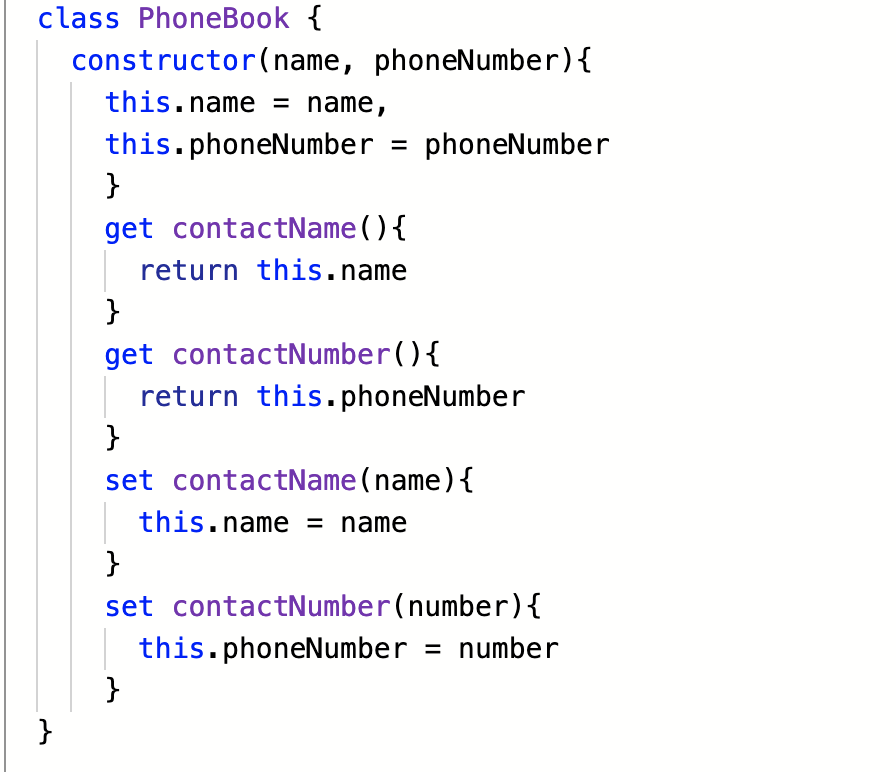
    Let’s take a look at a Class in JavaScript.

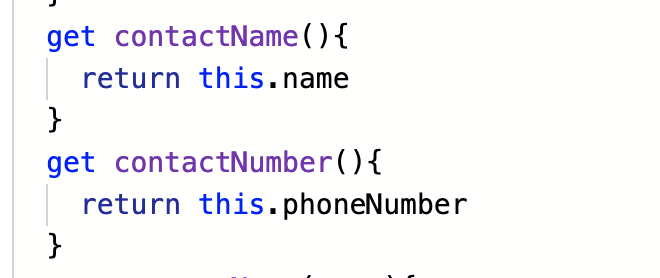
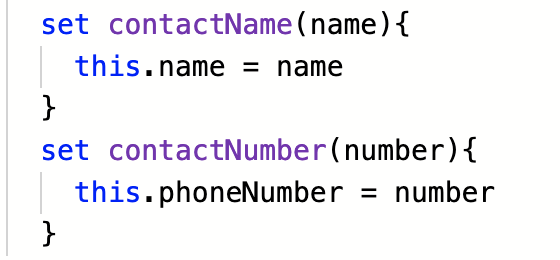
    This PhoneBook Class contains a constructor method to set the variables when the Class is instantiated and a getter and setter method.

    Getter functions are meant to simply return (get) the value of an object’s private variable to the user without the user directly accessing the private variable.

    Setter functions are meant to modify (set) the value of an object’s private variable based on the value passed into the setter function. This change could involve calculations, or even overwriting the previous value completely.

    The behaviour of Class or its instances is defined using methods. Methods are subroutines with the ability to operate on objects or classes. These operations may alter the state of an object or simply provide ways of accessing it.

    Let’s see how it all works.

    Firstly we need to instantiate the Class to create an instance of the Class.

    The syntax for Class creation very much depends on the type of Class and the contents of its constructor method.

    In my example I create a variable named “bob” and using the “new” key word I assign it an instance of Phonebook passing through a name and phone number.


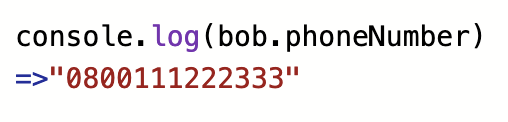
    Pretty cool right? So we have a variable that contains an instance of the PhoneBook Class we now can access the data stored within the object with the get methods inherited from the Class.

    It only gets getter…


    By using dot notation we can access the get contactName and contactNumber getter methods by adding the variable name that defined in the constructor method.

    Setters….


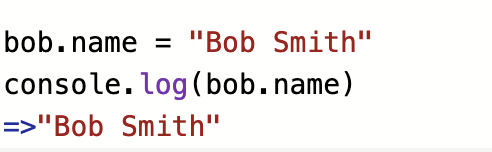
    Very similar to the dot notation we used to access the data stored in our object variables we update the in same way but assign a value to the variable. This is only possible due the setter methods inherited from the Class.

    Classes are awesome, and so is Object Oriented Programming. I would recommend checking out FreeCodeCamp for more content and tutorials on Classes and Objects.
    下载开源日报APP:https://opensourcedaily.org/2579/
    加入我们:https://opensourcedaily.org/about/join/
    关注我们:https://opensourcedaily.org/about/love/
  • 开源日报第401期:《史学 awesome-computer-history》

    20 4 月, 2019
    开源日报 每天推荐一个 GitHub 优质开源项目和一篇精选英文科技或编程文章原文,坚持阅读《开源日报》,保持每日学习的好习惯。
    今日推荐开源项目:《史学 awesome-computer-history》
    今日推荐英文原文:《How to be a great programmer》

    今日推荐开源项目:《史学 awesome-computer-history》传送门:GitHub链接
    推荐理由:一个关于计算机历史的资源合集。这里面的大部分资源都是 20 世纪时候的东西了,你能在这里面发现我们现在熟知的 TCP/IP,UTF-8,命令行以及现在常用的 ping 命令等等,有的时候知道这些常用玩意儿的历史也是个挺有意思的事情。
    今日推荐英文原文:《How to be a great programmer》作者:Amy M Haddad
    原文链接:https://medium.freecodecamp.org/how-to-be-a-great-programmer-34939494996d
    推荐理由:优秀程序员的共通基础

    How to be a great programmer

    As we all know, great programmers build amazing features, websites, apps, and the like. But what do they have in common?

    In my research, it’s not just about knowing a language really well or having a particular educational background. It’s that the really talented programmers have mastered the fundamentals. That foundation is what enables them to build great things and come up with breakthrough ideas.

    Think of a pyramid. It has a large base, but gradually gets smaller and thinner toward the top. Learning the fundamentals of programming forms that base. Everything takes off from there.

    So what are those fundamentals? Based on my experience and the programmers whose backgrounds I’ve researched, I see programming fundamentals as a two-part approach.

    Problem Solver Extraordinaire

    First, you have to be an effective problem solver. This is an important place to start since programming is problem-solving.

    Although there are many ways to solve a problem, there are a few parts of the process that stand out to me. Programmers who are also great problem solvers distill a problem to its essence, in order to identify their overall aim and begin a problem with purpose. Then, they break each problem into small, manageable parts — attacking each part in turn, and sometimes in visual terms by drawing a picture to make it “real world.”

    The process is harder than it sounds. When I started to program, I hit a wall: like many others, I never learned how to problem solve in school; it’s a skill that’s not readily taught. I was given a problem set in math class and just dove in, which is what I did when I started to program. Unsurprisingly, I was spinning my wheels unnecessarily and hitting roadblocks on the simplest of problems.

    Things began to change when I began learning about the problem solving process, and how to problem solve effectively. I now begin a problem with intent. I have George Polya’s book, How to Solve It, to thank for that bit of advice.

    I’ve adapted some of Polya’s ideas to programming, like understanding the problem. “The problem must be understood,” Polya writes. This includes being able to “point out the principal parts of the problem, the unknown, the data and the condition.” For each problem, I pull out a sheet of paper and write answers to these questions: what am I solving for or trying to find? (unknown); what am I given? (data); and what constraints or details do I need to be aware of? (condition).

    Understanding the problem may seem obvious, but the obvious is easily overlooked. On more than one occasion, I’ve poured hours into a problem only to realize much later that I missed a small, but critical detail in the problem statement. Writing out problem details slows me down mentally, and helps me think through exactly what I need to do, which is half of the battle.

    From there, I make a plan, which is another of Polya’s suggestions. It makes sense. I write an outline before I write an article. An artist makes a sketch of the painting before working on the painting itself. A builder uses drawings and blueprints to build a house. It’s no different with programming. Instead of rushing into doing, I need to start by thinking about what I’m setting out to do and make a plan of attack.

    There are many ways to go about this. Sometimes I outline the steps I need to take in numerical order: first do this, second do that. Other times I make the problem visual. When I was learning about for loops, I pulled out a handful of almonds and physically iterated through the pile. It’s a silly example, but it helped me think through the problem.

    I’ll also draw pictures or diagrams. For a recursive problem, I’ll draw a diagram of what’s happening on each recursive call until I hit the base case. Almost always, however, I find a way to simplify the problem to make it more manageable and to help me spot a pattern. Above all, the aim for me is to enter a problem with purpose, and maintain that sense of purpose throughout.

    Despite the best made plans, problems are still hard and I still get stuck. Becoming a great problem solver takes time; it’s a skill I’m still working on and it’s definitely worth the effort. It’s a difference you can see.

    When I read code written by a great problem solver, it’s clean and easy to understand. Variables are well named. Functions are short and crisp. Each line of code has a specific purpose; the fluff is removed. The clarity of the code mirrors the programmer’s thought-process: I can read the program from top to bottom and know exactly what’s going on. That’s great problem solving, and that’s what I’m striving for.

    What about your Computer?

    Learning computer science is the second programming fundamental. I recently started learning computer science, and love it because I’m moving beyond surface level. I’m going “behind the scenes” to learn what happens when I use a built-in function, for example. I’m also learning about memory and run time, among many other topics. In short, I’m learning why a computer does the things it does.

    Knowing the “why” enhances my contextual knowledge and makes me a more informed programmer. As a result, I’m more thoughtful with the code I write. Now that I know a bit about run time, for instance, I’ll opt to use a binary search instead of iterating through each element in a list.

    It’s also enriching my understanding of how core programming concepts work. For example, I was working on a recursive problem and I wasn’t getting the solution I anticipated. After close examination, I learned why: it had to do with the execution of the call stack, an idea that would’ve escaped me just a few months ago.

    Or take classes. I struggled immensely with classes for the longest time, and was terrified to use one. I knew how to write a class, but wasn’t confident when and why I’d use one. That changed when I learned what actually happens in my computer when I create instances and call methods. It finally clicked, once I had some context. For both recursion and classes, computer science bridged gaps in my knowledge.

    All too often, the fundamentals get pushed aside. Progress can be slow, and people tend to pick more “fun” stuff to work on when given the option. That’s a shame. Programmers who master the fundamentals seem to code with confidence: they know the “how” and “why” of their programming choices, which improves their work and builds their credibility with others.

    Plus, a solid grasp of the fundamentals makes learning new languages and technologies easier to do. For example, taking the time to really understand core concepts like iteration, recursion, and abstraction with one language will help when learning another. Simply put, there’s a lot to gain and little to lose by mastering the fundamentals.
    下载开源日报APP:https://opensourcedaily.org/2579/
    加入我们:https://opensourcedaily.org/about/join/
    关注我们:https://opensourcedaily.org/about/love/

←上一页
1 … 158 159 160 161 162 … 262
下一页→

Proudly powered by WordPress