• 开源镜像
  • 开源沙龙
  • 媛宝
  • 猿帅
  • 注册
  • 登录
  • 息壤开源生活方式平台
  • 加入我们

开源日报

  • 开源日报第978期:《学以致用 get-my-ps5》

    13 12 月, 2020
    开源日报 每天推荐一个 GitHub 优质开源项目和一篇精选英文科技或编程文章原文,坚持阅读《开源日报》,保持每日学习的好习惯。
    今日推荐开源项目:《学以致用 get-my-ps5》
    今日推荐英文原文:《Why Do You Need to Specialize?》

    今日推荐开源项目:《学以致用 get-my-ps5》传送门:项目链接
    推荐理由:学习高数不能让你在买菜时更好的砍价,但是学习 Node 能让你更快的查到有没有 PS5 卖。这个 Node 项目和前几天的那个大同小异,通过轮询来查找 PS5 是否可以购买,然后在成功时顺便帮你打开浏览器(如果你希望,这个项目还提供了闹铃功能让你从被窝里跳起来)。最近 PS5 着实非常流行,选择抢购 PS5 作为学习路上的一个试做项目没准会是个好选择——既可以锻炼能力又可以实打实的派上用场。
    今日推荐英文原文:《Why Do You Need to Specialize?》作者:Szymon Adamiak
    原文链接:https://medium.com/better-programming/why-do-you-need-to-specialize-97b2e0a18dc8
    推荐理由:成为水晶公一样的全才很困难,而且大部分时候并非那么必要

    Why Do You Need to Specialize?

    The programming market is larger than ever. You have to stand out to get noticed

    What do you want out of your professional life?

    To find your first job? Earn more money? Freelance or build a product? Whatever it is, the easiest way to achieve your goal is to specialize.

    Specialize at the Beginning of Your Career

    The need for specialization for beginners is stronger than ever. The number of software development jobs and tools is overwhelming. You can learn hundreds of different languages or frameworks and use them in a myriad of domains.

    You can’t learn it all. Even if you could, no one will believe you did.

    You shouldn’t learn it all.

    What you should do is make a plan. Find something you want to learn, check the typical requirements for the position you’re aiming at, and learn it one thing at a time.

    For example, if you want to become a front-end developer, you’ll soon discover you need to learn HTML, CSS, JavaScript, and a JavaScript framework. You should learn exactly those things in exactly that order. And learn one framework of your choice. Not two or five. One.

    To find a job, you’ll need a bit more (especially version control), but the other things are easier and you can learn them just before job seeking. Everything else is just a distraction.

    It sounds easy, but it’s not.

    The most common beginner’s mistake is trying to learn several things at the same time. Trying to bite off more than you can chew leaves you confused and discouraged.

    This simple and narrowly specialized approach will serve you well. By only focusing on a few skills, you’ll be able to go deep and your future employer will appreciate it. If my company worked in React, I’d hire someone with strong JavaScript and React foundations rather than someone who knows a bit of React, Angular, and Vue.

    And it’s more than that. If you pick your technological stack and stick with that stack, it says something about you. Now I know you can decide on your own and you are not a hype-driven person. I can assume you’re persistent enough to dig deeper — not only scratch the surface as long as something is fun. In short, I can believe you’re an asset and I should have you on my team. And that’s the only thing that matters when job seeking.

    Specialize Later in Your Career

    You’re an established software developer. How does it feel? It’s cool, isn’t it? But I bet you’re wondering how to further your career. What should you do next? Maybe learn another framework? Do a bit of freelancing? Build a killer app?

    Whatever it is, narrower specialization is the key. If you’re specialized in a language or framework, you’re competing with tens of thousands of other developers. And you can safely assume they’re more or less on your skill level.

    It may sound gloomy, but most software developers are interchangeable from the employer’s perspective. To earn more money or become a successful freelancer, you need to stand out. Some of your skills have to be so good that they can’t ignore you. You have to be a specialist.

    And it’s no wonder why. Think about it from employer’s/client’s perspective. Let’s say you’ve got lots of data you want to show your users. Who would you rather hire? A data visualization expert or a JavaScript engineer? Or you want to build a huge eCommerce site. Would you prefer someone who is an eCommerce expert or someone who built one small eCommerce app two years ago but is a good developer overall?

    Clients and employers love specialists because they can trust them. Specialists have a proven track record of delivering similar products. It’s a no-brainer.

    The best part of it? They are ready to pay very well for your expertise.

    And it’s only the beginning. If you’re an expert, you can create multiple income streams. You may build a specialized product based on your expertise. You can teach others. Write a book or create a course.

    Being a specialized expert opens many doors that are closed to regular, all-around software developers. It allows you to leverage your skills in a way you couldn’t even imagine.

    Isn’t Specialization Dangerous?

    It is. Everything is dangerous.

    What are the risks? Your specialty may die. In 2010, Steve Jobs famously killed Flash in his letter Thoughts on Flash, explaining why he will not allow Flash on iPhones. Thousands of developers who were Flash experts were in danger. It turned out they picked the wrong specialty.

    But did they really? Jobs’ letter was a huge blow to Flash and its owner Adobe. But Flash was very much alive for a few years. Only in 2017 did Adobe announce it would discontinue Flash by 2020.

    Technologies don’t die overnight. The developers who bet on Flash had years to retrain. Whatever you choose, you’ll always have time to become an expert in another technology.

    By being an expert in something, it’s much easier for you to learn similar things. You can’t go deep in any technology and specialize without sound general knowledge. That’s a hidden advantage of expertise — you may not notice it, but you’re a generalist too.

    For example, to be a React expert, you need to be proficient with JavaScript. And if you’re proficient with JavaScript, you can easily learn a new framework if necessary.

    To hedge your bets as a specialist, you should actively seek domains close to yours and explore them. After all, you don’t have to be an expert in just one thing. Or you can change your specialty. No matter what you do, make sure you’re an expert in something. It will pay off.
    下载开源日报APP:https://opensourcedaily.org/2579/
    加入我们:https://opensourcedaily.org/about/join/
    关注我们:https://opensourcedaily.org/about/love/
  • 开源日报第977期:《spring-boot-demo》

    12 12 月, 2020
    开源日报 每天推荐一个 GitHub 优质开源项目和一篇精选英文科技或编程文章原文,坚持阅读《开源日报》,保持每日学习的好习惯。
    今日推荐开源项目:《spring-boot-demo》
    今日推荐英文原文:《FDA panel backs Pfizer’s COVID-19 vaccine for emergency use in US》

    今日推荐开源项目:《spring-boot-demo》传送门:项目链接
    推荐理由:spring boot demo是一个用来深度学习并实战spring boot的项目,目前总共包含一个66集成demo,已经完成54个。 该项目已成功集成驱动器(监控),admin(可视化监控),logback(日志),aopLog(通过AOP记录web请求日志),统一异常处理(json级别和页面级别),freemarker(模板引擎),thymeleaf(模板引擎),Beetl(模板引擎),Enjoy(模板引擎),JdbcTemplate(通用JDBC操作数据库),JPA(强大的ORM框架) ,mybatis(强大的ORM框架),通用Mapper(快速操作Mybatis),PageHelper (),mybatis 通用的Mybatis分页插件-plus(快速操作Mybatis),BeetlSQL(强大的ORM框架),upload(本地文件上传和七牛云文件上传),redis(缓存),ehcache(缓存),email(发送各种类型邮件),task(基础定时任务),quartz(动态管理定时任务),xxl- job(分布式定时任务),swagger(API接口管理测试),security(基于RBAC的动态权限认证),SpringSession(Session共享),Zookeeper(结合AOP实现分布式锁),RabbitMQ(消息队列),Kafka(消息队列),websocket(服务端推送监控服务器运行信息),socket.io(聊天室),ureport2(中国式报表),打包成war文件,集成ElasticSearch(基本操作和高级查询) ,Async(异步任务),IntegratedDubbo(采用官方的starter),MongoDB的(文档数据库),Neo4j的(图数据库),搬运工(容器化), ,JPA多数据源,Mybatis多数据源,GrayLog(代码生成器 日志收集),JustAuth(),LDAP(第三方登录 增删改查),,动态添加/切换数据源单机限流(AOP + Guava RateLimiter),分布式限流(AOP + Redis + Lua),ElasticSearch 7.x的(使用官方 Rest High Level Client), HTTPS,Flyway(数据库初始化)。
    今日推荐英文原文:《FDA panel backs Pfizer’s COVID-19 vaccine for emergency use in US》作者:Abrar Al-Heeti
    原文链接:https://www.cnet.com/news/fda-panel-backs-pfizers-covid-19-vaccine-for-emergency-use-in-us/
    推荐理由:疫情仍在美国肆虐, 疫苗的开发进度也是全球范围内的焦点. 美国食品和药物管理局的一个咨询小组周四正式提出辉瑞公司在美国的疫苗具有紧急使用授权, 若得到授权该疫苗可在几天之内在美国推出。

    FDA panel backs Pfizer’s COVID-19 vaccine for emergency use in US

    A US Food and Drug Administration advisory panel on Thursday formally recommended emergency use authorization for Pfizer’s COVID-19 vaccine in the United States. If the FDA chooses to accept the recommendation, the vaccine could be rolled out in the US within days.

    Pharmaceutical giant Pfizer, which developed the vaccine with German partner BioNTech, said last month that the vaccine demonstrated 95% effectiveness in clinical trials. The companies applied for emergency use authorization from the FDA in late November. A review published by the FDA on Tuesday confirmed that the vaccine meets the standard for emergency use authorization.

    The recommendation came out of a daylong FDA meeting Thursday. An independent panel of experts, known as the Vaccines and Related Biological Products Advisory Committee, has been discussing the Pfizer vaccine in detail.

    Pfizer and BioNTech have conducted human trials on more than 43,000 people in six countries. They initially reported more than 90% effectiveness for the vaccine, before a final data analysis found that it was 95% effective in preventing COVID-19, with no serious side effects.

    The Pfizer vaccine — as well as another from US drug developer Moderna, which is said to be 94% effective — is an experimental RNA vaccine. It uses synthetic messenger RNA, or mRNA, a molecule that tells cells how to build proteins. It can then trick cells into producing proteins typically found in SARS-CoV-2, the virus that causes COVID-19, which in turn can then stimulate the immune system — without making patients sick — to protect against infection. Moderna has also applied for FDA emergency approval for its coronavirus vaccine.

    Given that there are more than 330 million people in the US, not everyone will be able to get the vaccine right away. Health care workers will be prioritized, as well as people at higher risk of infection due to age, underlying conditions or profession.

    Administering the coronavirus vaccine

    On Tuesday, the UK became the first country to start administering the Pfizer COVID-19 vaccine, following clinical approval. The first person to receive the vaccine outside of a clinical trial was 90-year-old Margaret Keenan, who was given the first of two injections needed. Four million people in the UK are expected to begin the process by the end of December. Canada approved Pfizer’s vaccine on Wednesday.

    There are several dozen coronavirus vaccines in various stages of clinical trials, with some almost ready to be submitted for potential authorization. Most experts say we’ll have many more ready to distribute by early 2021.

    In a panel earlier this week, Dr. Anthony Fauci, director of the US National Institute of Allergy and Infectious Diseases, said the sooner the United States can convince the overwhelming majority of people to get vaccinated, the sooner things will be “close to normal.”

    The first cases of COVID-19 were reported in China a year ago this month. By March, a pandemic was in full force. According to the Johns Hopkins coronavirus dashboard, more than 69 million cases have been confirmed worldwide and nearly 1.6 million people have died of COVID-19 as of Thursday.
    下载开源日报APP:https://opensourcedaily.org/2579/
    加入我们:https://opensourcedaily.org/about/join/
    关注我们:https://opensourcedaily.org/about/love/

  • 开源日报第976期:《在 hover 之前 MagneticButtons》

    11 12 月, 2020
    开源日报 每天推荐一个 GitHub 优质开源项目和一篇精选英文科技或编程文章原文,坚持阅读《开源日报》,保持每日学习的好习惯。
    今日推荐开源项目:《在 hover 之前 MagneticButtons》
    今日推荐英文原文:《How to Think Like a Software Engineer for Beginners》

    今日推荐开源项目:《在 hover 之前 MagneticButtons》传送门:项目链接
    推荐理由:这个按钮库可以在浏览器上提供别具一格的按钮——在鼠标接近按钮(当然是指在用户眼中呈现的按钮图标)时而并非移到按钮上时就产生动画效果,以此来让用户更清楚的感受到自己操作带来的反馈,在需要增强用户获得的操作反馈的场景下,这会是个很好的灵感。
    今日推荐英文原文:《How to Think Like a Software Engineer for Beginners》作者:Quinten Lisowe
    原文链接:https://medium.com/swlh/how-to-think-like-a-software-engineer-for-beginners-39afb8db11c
    推荐理由:对于初学者来说能够提供帮助的思考方式

    How to Think Like a Software Engineer for Beginners

    The way programmers program programs are not always obvious when first starting out. When I was young and would see special effects in movies and TV shows, I would ask my dad “How do they make special effects?” And he would respond “With computers”.

    Despite being the most generic answer you could possibly give, I could barely pronounce the word breakfast at the time so who was I to question such a reasonable and well thought out explanation.

    And so with a solid foundation I went on to attempt to program several times throughout my middle and high school career. You’d think that after trying and failing hopelessly to learn something new several times over the course of years I’d get the point and try something else.

    Lucky for, well, somebody probably, that part of my brain that’s supposed to say “This is bad for your health and you need to stop” burnt out a long time ago. So now I get to share with you all how to think like a software engineer .

    There are a few things that I’ve found to be universal when learning how to write software:

    1. The language doesn’t matter*

    I put the asterisk here because this only applies if you have no idea what you want to program. If you want to program websites , go with JavaScript or PHP. If robotics , C or C++, etc.

    All of the languages listed here can be used to accomplish any of the listed objectives. I grouped them as such because these languages are most commonly used to accomplish these objectives and thus have a thriving and supportive community of users built around them which will make the process so much easier for you .

    You’ll find that despite programming having a reputation of being a very solitary occupation, it is in fact very collaborative and you will come to rely on those around you for support and teamwork. For everyone else though that just wants to learn how to program, the tout de suite explanation for which language is the best to learn is the one that you can find a tutorial for.

    While a language’s documentation will contain the knowledge you seek, it is often buried under mountains of other irrelevant information which will take practice to learn how to efficiently sift through. Your goal at this point is to do something — anything. Establishing a habit of technical thinking is more important right now than getting everything 100% correct. Do not get caught up trying to do something the best way.

    Most projects beginners will work on are so general they can be accomplished with just about any language . There are two main reasons why this seems to be the case. The first is that at some point some person somewhere on the internet was too stubborn to learn the language that was already designed to accomplish the task. The other, probably more common reason, is the general “because I can” mentality.

    Many programs software engineers make are a result of the maker attitude. These programs aren’t built for any particular reason other than to exist. It exists because someone wanted it to and for no ulterior reason.

    The programmers proceeded to bodge a solution based on the language that they already knew (shout out to Tom Scott). As a result, it’s a rare case when there is only a single programming language that can accomplish any individual goal. This brings us to our second point…

    2. Work on a personal project

    I’ll admit it’s kind of a chicken and egg situation. You don’t know enough about programming at this point to start a project and you don’t have any projects you’re working on because you don’t know what to do because you don’t know how to program.

    At this point in your journey it’s common to get stuck in what’s known as Tutorial Hell. You’ll watch tutorial after tutorial for programming language after programming language ; the rational being that before you start to program you have to know how to program in any given language. While this might make sense with something like using a power tool, with programming this simply isn’t true. You’ll never know everything a given language has to offer and you will always be learning. It is an evolutionary process rather than a singular moment where you just know how to program.

    Your best chance to learn how to program is to pick an idea that sounds cool, and yes, without knowing how to program at all, figure out how to make it. It may sound daunting and out of order, but I can assure you this is the best way to learn.

    When you first start out, it will be difficult. Every other keystroke you’ll be trying to google how to accomplish even the simplest of tasks. Keyword here being “trying “. Often times you won’t even know the name of what you’re trying to accomplish so you’ll be stuck with googling random phrases in a vain attempt to describe what you’re looking for. Over time you’ll learn that just like a hammer is a tool for a carpenter, search engines are a tool for software engineers. Just like a carpenter you too will learn the best way to use your tool. You’ll eventually start to remember solutions to problems instead of having to look them up every single time. It gets easier, I promise, just stick with it .

    3. Break down problems

    While every program is unique in its own design and application, the solutions to most programs can often be discovered by a series of common strategies. The first and probably the most significant of which is to solve problems and then write the code. This is a strategy that I still use to this day years later to solve complex problems.

    For example, if you want to create your own tic-tac-toe program, it’s much easier to write down the steps to accomplish such a thing on a physical piece of paper in normal human words and only then try to translate the steps into a functioning program. Doing it this way stops you from being bogged down with all sorts of programming errors when all you want to do is solve your problem and build your project.

    You may be thinking, “Wait , so I have to write down everything I do twice? That seems…. excessive. Why not just solve the problem in my head or solve it as I go along?” — Fear not, you can do this and the programming police aren’t going to come and arrest you. Over time as you become a better problem solver you will need to do this less and less. This is mainly an effective strategy for solving problems which are complicated or which you haven’t come across before — which as a beginner is nearly everything .

    When you come across a problem you don’t know how to solve just break it down until you have a list of problems that you do know how to solve. This is a process you will become very familiar with and it applies across languages, applications, and skill levels. Just like how you might not know how to make a rocket, but you know how to use a screwdriver to screw metal plates together, you might not know how to build your own website but you do know how to open up notepad and watch a YouTube video.

    4. Be amazed

    This one is a little more subjective than the others, but I wanted to include it in here because it can be very helpful in between the grind of learning to take a moment to be amazed at what other people have created. While I was over here trying to figure out why my program won’t run for the fifth time in the last 20 minutes just to find out I had unintentionally uninstalled the programming language, I would look online in awe and amazement at what others were creating.

    It inspired me. It served as a reminder of why I was putting myself through this mind numbing and sometimes infuriating process. It gave me a goal, something to work towards. If I wanted even a chance at a future where I could be the one to build artificial intelligence, virtual worlds or the next Google I knew I had to put in the work.

    I hope this article helps give you a mental kickstart on how to approach learning to write software. With any luck, one day you will become the teacher to others, giving back to the community just as they did for you, thereby inspiring the next generation of software engineers.
    下载开源日报APP:https://opensourcedaily.org/2579/
    加入我们:https://opensourcedaily.org/about/join/
    关注我们:https://opensourcedaily.org/about/love/

  • 开源日报第975期:《RapidJSON》

    10 12 月, 2020
    开源日报 每天推荐一个 GitHub 优质开源项目和一篇精选英文科技或编程文章原文,坚持阅读《开源日报》,保持每日学习的好习惯。
    今日推荐开源项目:《RapidJSON》
    今日推荐英文原文:《Salting and Hashing Explained》

    今日推荐开源项目:《RapidJSON》传送门:项目链接
    推荐理由:该项目是基于 C++ 的 JSON 解析/生成器,对 JSON 格式的文件提供高效分析,并提供 SAX 及 DOM 风格的 API。
    今日推荐英文原文:《Salting and Hashing Explained》作者:Rakshit Dwivedi
    原文链接:https://medium.com/better-programming/salting-and-hashing-explained-b76f5af83554
    推荐理由:给哈希密码加点盐。

    Salting and Hashing Explained

    Learn how hashing and salt protect user data as well as how to use them in Node.js

    (Photo by Jason Tuinstra on Unsplash.)
    User information and data are highly sensitive information that must be secure. Therefore, it is highly necessary that robust measures are taken to protect it at all costs. Furthermore, passwords should never be stored as plain text on a database. They should be strongly encrypted to avoid chaos among users.

    In this article, we will discuss how salt and hashing work to encrypt user passwords as well as the risks inherent with storing sensitive user information in plain text.

    How Hashing Works

    A hashing algorithm (MD5 hash) grabs the user-input password and converts it into an indecipherable string. This is called a hashed password. Anyone who launches an attack on your database cannot make sense of it because hashing works only one way. This means that once a password is hashed, you can’t go back the other way around to convert it into plain text again. And for this reason, hashing user passwords is a crucial task that should be done when designing the back end.

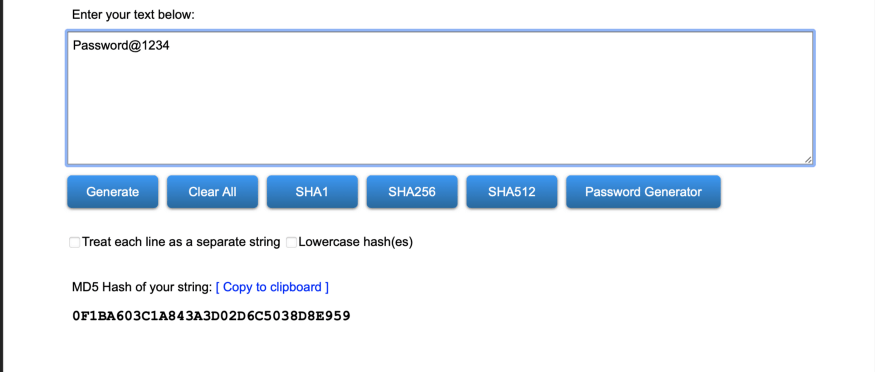
    Here is an example of how a password is hashed:

    If you want to play around yourself to see how hashing generates a new string, head to MD5 Hash Generator.

    Why Hashing Is Not Sufficient

    When you look at the example above, you may notice that the hashed string doesn’t make sense to you at all. If you think that just hashing your password would suffice, you are wrong. The reason why is a hashing algorithm does not inherently produce a unique string for the same password text each time it’s received. In other words, suppose your password looks like the example above (Password@1234). Each time the algorithm receives the same input string, it will always produce the same hash string (i.e. 0F1BA603C1A843A3D02D6C5038D8E959). This is not ideal because a hacker can launch a rainbow attack on your database to crack the passwords stored inside.

    Let me tell you a little about rainbow table attacks as well.

    Rainbow table attack

    An attacker can use a pre-built table of passwords mapped with their respective hash strings. Then they will use randomly hashed strings to run it against the table database. If a match is found, they can simply look at the password that was used to create the hash and map it to crack the password. For this reason, it’s not suggested to use names, birthdates, or commonly used strings such as “password,” “12345678,” and so on.

    Salt With Hashing

    Our problem with hashing is fixed with a simple solution: using salt. Salt is a randomly generated, fixed-length value that is designed to be unique with each user password. Salt is appended with the current password string and fed into the hashing system to produce a newly hashed result every time a user creates a password. This means that if you and I have the same password, our hashed strings would be different. And since rainbow table attacks heavily depend on finding a match, it would render them useless.

    The bcrypt library, which creates both salt and hashed data with strong cryptography algorithms backing it, is great for this purpose.

    How to Add Salt and Hash in Node

    Installing bcrypt

    Run the following command in your terminal:

    npm install bcrypt

    Salting and hashing user password

    const bcrypt = require('bcrypt');
    
    const userSchema = new mongoose.Schema({
      email: {
        type: String,
        unique: true,
        required: true
      },
        passwrod: {
            type: String,
            required: true
        }
    });
    
    userSchema.pre('save', function(next) {
        const user = this;
        if (!user.isModified('password')) {
            return next();
        }
    
        bcrypt.genSalt(10, (err, salt) => {
            if(err) {
                return next(err);
            }
    
            bcrypt.hash(user.password, salt, (err, hash) => {
                if(err) {
                    return next(err);
                }
                user.password = hash;
                next();
            });
        });
    });
    
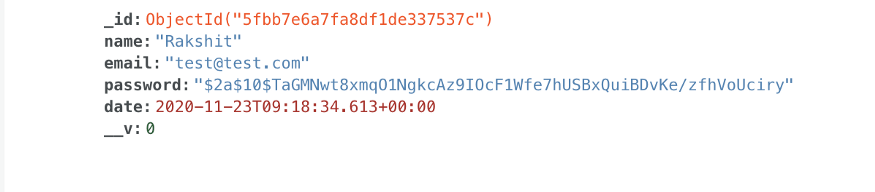
    Here’s an example of how a user password with some other information will be stored in the database:

    Conclusion

    It’s always recommended to encrypt the sensitive information of each user on the database. When you are designing the back-end system, always keep in mind the risks that come together with any action. Hence, some software companies hire ethical hackers to breach their network security to find loopholes in the system. From a programmer’s perspective, it’s a good practice to test your code before deploying it to mainstream users.


    下载开源日报APP:https://opensourcedaily.org/2579/
    加入我们:https://opensourcedaily.org/about/join/
    关注我们:https://opensourcedaily.org/about/love/

←上一页
1 … 14 15 16 17 18 … 262
下一页→

Proudly powered by WordPress