• 开源镜像
  • 开源沙龙
  • 媛宝
  • 猿帅
  • 注册
  • 登录
  • 息壤开源生活方式平台
  • 加入我们

开源日报

  • 开源日报第420期:《性能书 go-perfbook》

    9 5 月, 2019
    开源日报 每天推荐一个 GitHub 优质开源项目和一篇精选英文科技或编程文章原文,坚持阅读《开源日报》,保持每日学习的好习惯。
    今日推荐开源项目:《性能书 go-perfbook》
    今日推荐英文原文:《How to Start Your Own (Machine Learning) Projects》
    今日推荐开源项目:《性能书 go-perfbook》传送门:GitHub链接
    推荐理由:一般来说,把代码写出来之后才是真正工作的开始——改 bug,优化性能和组合各个模块等等。这个项目就是介绍如何提高 Go 代码性能的方法。虽然你迟早要想着让你的程序跑的更快,但是只有在你真的需要这样的时候才应该花时间加快它的速度,毕竟你原本可以拿这些时间干点更重要的。
    今日推荐英文原文:《How to Start Your Own (Machine Learning) Projects》作者:Daniel Bourke
    原文链接:https://towardsdatascience.com/do-hit-songs-have-anything-in-common-37599940590
    推荐理由:自己整一个终究和看着课程整一个不同,这一点并不仅仅适用于机器学习

    How to Start Your Own (Machine Learning) Projects

    Dave started speaking.

    The test results came back. Wylder’s deaf.

    Completely?

    Yeah well, he didn’t register anything on the hearing scale, even when they were playing a noise as loud as a jet taking off in his ears.

    What happens next?

    We’ve got more testing coming up, if he’s eligible he’ll be getting Cochlear Implants to assist with hearing. But they’re unsure yet.

    Dave is my best friend. Wylder is his son. He was born unable to hear. The Doctor said, “A 1 in 100,000 chance.”

    I knew I couldn’t do much except listen. Feeling helpless is not a good feeling.

    A few weeks later, we were at Wylder’s Switch On. An event where he would have his Cochlear Implants switched on for the first time enabling him to hear. He’d passed all the tests and was a prime candidate for the devices.

    When they came on the lady played three sounds. One high, one midrange and one low. She tracked Wylder’s response to each of them. “The software will build in the gaps between.” She said.

    There would be several subsequent appointments required to get the implants working at their full capabilities but for the first time, even if only slightly, Wylder could hear.

    The morning before the event I got up early and started the Bioinformatics Specialization on Coursera. I wanted to know more. Had to know more. What’s Bioinformatics? It’s the crossover of biology and technology. Wikipedia adds a bit more depth.
    Bioinformatics is an interdisciplinary field that develops methods and software tools for understanding biological data. As an interdisciplinary field of science, bioinformatics combines biology, computer science, information engineering, mathematics and statistics to analyze and interpret biological data.
    Why Bioinformatics? I wanted to learn more about what was going on with Wylder. What’s a cochlea? What caused it? Was it a gene? Which gene? Could what I knew about programming help?

    Why Coursera? Because it’s where the foundation of a lot of my learning has begun over the past 2-years.

    The keyword is foundation. Courses and specialisations are great for this. But the real way knowledge grows is by tinkering, exploring, expanding, building upon these foundations.

    So I built my own project. One to explore the DNA. To find the genes involved in inner ear hair cell development. What did they do? The hair cells are what translate sound waves into electric signals the brain can interpret as sound. Could I use what I’d been learning manipulating DNA with code in the Bioinformatics Specialization? Yes.

    But it turned out to be all wrong.

    Everything I did had no biological or scientific grounding. I made a video about it and someone in the comments said so. I already knew. I put a clause at the start of the video and one in the description saying so.

    What’s the point if it was wrong?

    We’ll get to that. Better to start with why first.

    Why your own projects?

    When you started learning to ride a bike, you had training wheels on. You learned how to peddle, how to brake, how to move the handlebars.

    But you were missing something. The most important skill for riding a bike. Balance.

    It was only once the training wheels came off did you learn how to balance.

    I used the Applied Data Science with Python Specialization on Coursera to build a foundation of knowledge in data science. But I learned way more when I worked on building A Gentle Introduction to Exploratory Data Analysis. It was wrong too. People who read it did their own research and told me. So I fixed it. And then there was another error someone else found. Every error I fixed, I learned something new. Something deeper. Something I didn’t see before.

    Having a foundation of knowledge is important. Knowing how to peddle, how to brake and how to steer is important for riding a bike. But learning more about these things isn’t going to help you when the training wheels come off.

    It’s the same with courses. You can keep completing more courses, improving your foundation of knowledge (and you should) but don’t mistake this for competency.

    Doing more courses on how to peddle better won’t enable you to ride a bike.

    Only once you take your training wheels off do you learn to ride.

    Something that might not work

    That’s how the best projects start out.

    When you go on a journey, it’s nice to have a compass and a map. But what if you only had to choose one? Which is more important?

    The compass.

    Why?

    Because a map only has a set number of paths. A compass can be used in an unlimited number of ways.

    That’s how you can structure your own projects. Start with a direction you want to head in. A thought, an idea. That’s your compass.

    Planning out the steps you’ll take is valuable but don’t let it hold back exploration.

    No great project ever started with someone knowing the exact path they were going to take in advance. If you already knew how it was going to work out, you’d get bored. A known future is already the past.

    The crossover rule

    Here’s where the remixing of ideas comes in. Let’s say you’ve been learning about data science and machine learning. You’ve done some courses but now you’re looking for more.

    It’s unlikely you’ll ever be the best at one thing. You can try but remember, competition is fierce. A better option is to be the best at the crossover. The crossover of two things, three things, four things. Not too many though, otherwise the quality will start to decline.

    How does this relate to projects?

    You can take the foundation of knowledge you’ve been building through courses and combine it with the research you’ve done on mental health. How can you use data to show others insights into the world of mental health?

    If you’re a musician you can use machine learning to construct a new song out of the old recording tapes you have.

    The examples are endless but the formula stays the same. Whatever your interests, health, art, technology, science, finance, engineering, weather, where’s the crossover?
    The crossover happens when you take one of your skills and pair it with another.

    Permission to be wrong

    Get something wrong on the test and it used to come back with a red cross saying you’re wrong next to it.

    School reinforces avoiding being wrong. Life encourages it.

    This doesn’t mean you should have the goal of being wrong. But when you’re starting on new work of your own. A project which might not work, give yourself permission to be wrong.

    Why?

    Because being wrong will adjust your compass. It’s a learning opportunity. Now you know where not to go.

    My next project will be better because my last one had mistakes in it.

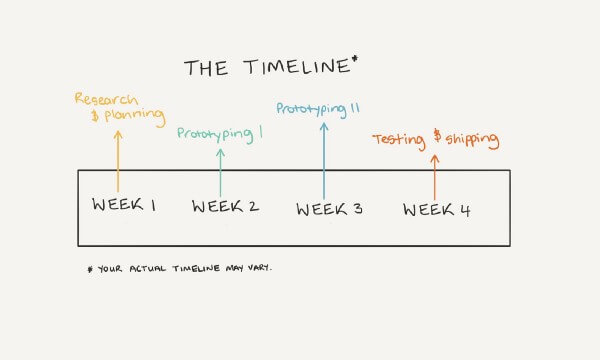
    Create a timeline and start small

    I’m going to work on this for four weeks.
    That’s what you could say. One hour per day for four weeks is a good amount of time.

    You can adjust the numbers to suit your needs. But having a deadline gives you something to work towards.

    My brother and I were at the cafe. He started speaking.

    I’ve been looking at this course.

    Show me.

    He showed me. I read through it. I spoke.

    But you’ve already done all these things? The foundations, you’ve done, the advanced data structures you’ve done, the publishing your own project, you’ve done. What are you looking to get out of it?

    I’m not sure I think it would help to learn more.

    How about you build a small app a month? Call it App a Month and share a story about each one.

    Yeah you’re right, week one could be design, week two planning and prototyping, same with week three, then publish in week four.

    His eyes were on fire with ideas. I smiled. Then spoke.

    Now you’re thinking.

    You may not be able to control whether your project amounts to be everything you imagine but dedicating a set amount of time and effort is something you can.

    There will always be interruptions. Life happens. When it does, take care of it and return to your project with the timeline in mind.

    Once you’ve picked something to work on, shut everything else out for a period of time.

    Start when you’re 70% ready

    That’s enough. You’ll never be 100% ready.

    A story to share

    You’ve picked something which might not work, you’ve used the crossover rule. You started when you weren’t quite ready. And you’ve stuck to your timeline.

    Now what?

    Ship it. Share what you’ve done.

    Now others can critique your work, show you where you’re wrong, show you where you’re right, help you get better, that’s what you’re after, isn’t it?

    The next time someone asks what you’ve been working on, you’ve got a story.

    I started working on a bioinformatics project, I didn’t know how it would turn out but I had an idea in mind. I wanted to see if I could combine what I’d been learning in the Bioinformatics Speciailzation on Coursera to my best friends son. He was born deaf so I looked into what genes cause hearing loss in infants. I found the ATOH1 gene. It’s responsible for triggering hair cell growth in the ear. Hair cells are what convert soundwaves to electric signals. It took me about a month of research and building but when I had something I made a video about it and published my code online. I realised none of what I’d found was biologically or scientifically sound. Someone pointed it out to me. But now I know where I’d go next. I’m hooked.

    My bioinformatics project was wrong. But I learned something. I learned what to do next.

    My Exploratory Data Analysis tutorial had errors in it. People were kind enough to point them out for me. It made it better. It made my future work better.

    You’ve heard mine. What’s yours?
    下载开源日报APP:https://opensourcedaily.org/2579/
    加入我们:https://opensourcedaily.org/about/join/
    关注我们:https://opensourcedaily.org/about/love/
  • 开源日报第419期:《古老的训练 Python-programming-exercises》

    8 5 月, 2019
    开源日报 每天推荐一个 GitHub 优质开源项目和一篇精选英文科技或编程文章原文,坚持阅读《开源日报》,保持每日学习的好习惯。
    今日推荐开源项目:《古老的训练 Python-programming-exercises》
    今日推荐英文原文:《Beyond Coding — Soft skills to avoid project failures》

    今日推荐开源项目:《古老的训练 Python-programming-exercises》传送门:GitHub链接
    推荐理由:学以致用,锻炼自己所学最好的方法就是拿去干点什么。这个项目就是一个 Python 的习题集——虽然已经是很久以前的东西了,但是并不妨碍我们拿它来锻炼自己,就像做算法题一样的钻研它们就好了。顺带一提,答案和题目之间的距离很近,在思考时小心不要顺手一眼扫到答案的好。
    今日推荐英文原文:《Beyond Coding — Soft skills to avoid project failures》作者:Viral Shah
    原文链接:https://medium.com/@viral_shah/beyond-coding-soft-skills-to-avoid-project-failures-4ed7821fa93a
    推荐理由:写代码以外的技能和写代码同样重要

    Beyond Coding — Soft skills to avoid project failures

    Before you read any further, go and get a can of chilled Beer ?
    Ready?
    Alright! Now for every sentence that you’ve heard before take a big chug. Go!
    • “The clients changed the requirements at the last moment and hence, the entire project got delayed. It’s not our fault!”
    • “This is not how the system was designed to be used. They don’t use it right!”
    • “Our System is too complicated and technical; they will not understand it.”
    • “We said the software was not ready but, they pushed it to production anyway.”
    • “We made an amazing product but if the management doesn’t know how to sell it properly, it’s not our concern!”
    But you know what? It is our problem. It is our concern!

    Why is this our concern?

    If the products we build won’t sell, the companies that hire us won’t profit and we will be laid off. The sales team will sell something else, managers will manage someone else, but we — the Software developers — will be out of jobs.

    As Software developers, we are the most powerful employees of a software development company. With our code, we shape the products and spring them to life. But the success of a software product demands a lot more than just good code. And when those demands are not met, the product will fail.

    So are we just supposed to sit back helplessly? Just because it is not our job?

    I think not.

    If only we keep your eyes and ears open, we can often sense the upcoming fiasco long before it happens. Often, the root cause for a predestined disaster is one or more person not doing their job correctly. Either because that person is lazy or unskilled or a person with that role simply does not exist.

    Such a scenario is fairly common in all projects. These missing gaps are what triggers chaos and when the chaos is unchecked, it will lead to failure.

    However, Chaos is not bad. Chaos is inevitable. Chaos is an opportunity.

    Facing things head on and fixing it, is the only way forward. As developers, we are right in the middle of all the Chaos and in the perfect position to grab this opportunity and climb this proverbial ladder. Doing so will help you build successful products. It will help you stand out among the crowd that keeps whining about things.

    But first, it is imperative that you equip yourself with a strong foundation of skillset — soft skills, communication skills, non-technical skills. You need to look at a project beyond just the scope of programming. You need to understand the business, manage the clients, communicate effectively, sell your ideas, tackle people problems, and many other things.

    Before I proceed further, let’s get two things out of the way,
    • No amount of soft-skills will compensate for your coding skills.
    • Without these skills, you can still become an Efficient developer but not an Effective developer.
    “Efficiency is doing things right; effectiveness is doing the right things” — Peter Drucker
    So if you really want to, you can always escape these responsibilities, blame it on someone else or hide in someone else’s shadow. But by doing that, you will not progress much. That much, I can guarantee!

    Okay, enough build-up now. Let’s get to the actual topic.

    Btw, this would be a good time to refill your Beer ?

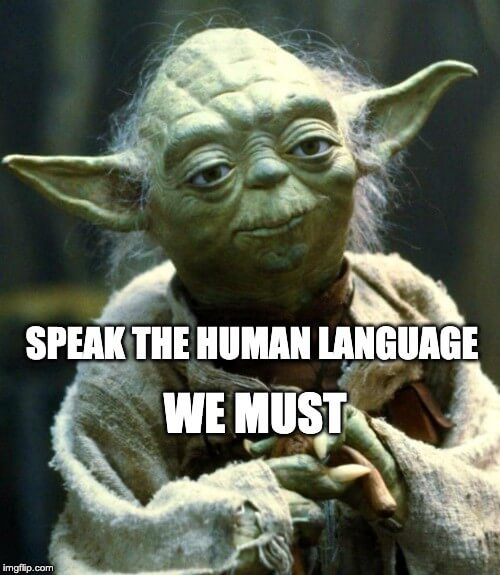
    Speak the Human language

    As much as I would love to live in a Nerdvana (Nerd-Nirvana ?) where everyone talks in pseudo-code, algorithms and technical jargons, unfortunately, we are not there (yet).

    To the normal humans, our technical lingo is nothing more than gibberish mumbo jumbo that they often pretend to understand but almost completely ignore. They only speak the Human language.

    R.I.P Yoda. Credits: imgflip.com

    Simple tips to improve your language skills

    • Describe your work without referring to any programming languages or technologies.
    • Talk about a product without referring to its architecture or implementation details.
    • When describing a system, focus on what problem the system is solving rather than how.
    • Gauge your audience’s background on the topic that you are discussing and consciously apply some abstraction on the details that you get into.
    • Listen — to the people above you, people below you, people you admire, people you have contempt for. More you observe and listen, more you will become self-aware about the word choices you make.

    Language skills boost your career

    We often complain about how non-technical managers do not understand and appreciate our work. Sometimes even another developer in your team might not understand what is obvious to you. Well, take some effort and make them understand it. Simplify your language, drop the jargons, paraphrase if you need to, give a bit of background if necessary.
    “If you can’t explain it simply, you don’t understand it well enough” — Albert Einstein
    Whatever you do, just don’t be a condescending jerk. Nobody likes a jerk!

    If you apply this regularly, people are more likely to understand you, respect you, open up to you, involve you in important decisions and when the time comes, probably recommend you for a promotion ?.

    You are not being a kiss-ass. You are being the guy who gets shit done!

    Furthermore, I strongly encourage you to hang out more with all sorts of people. Practice your communication skills with them. Different job-backgrounds will often give them a different viewpoint. They will teach you more about various aspects of business and give you a wider perspective. Honestly, not only will this help your career but also help you expand your horizons.

    Understand — The Business

    As a developer, we can practically make a health-care system without understanding how doctors, hospitals and medical insurance work. Theoretically, as long as someone gathers all the requirements for us, we can translate that to code and Bam! the system is ready for use.

    But is it though?

    Exhaustive requirement gathering is hard…really hard

    No amount of due diligence can ensure that all the client requirements are well documented beforehand. Granular details will always be left out. And as a developer, you will make many assumptions on those details while building the system.

    Also, it is highly risky to assume that a client knows what he really wants or knows what is the best option for them.

    Whenever a business user starts telling me what to make and how to make, I always ask them ‘Why?’ If the answer is not deep enough for me, I will ask them again, ‘Why?’ I’ll keep on probing with ‘Why’ & ‘Why not’ till they get to the real business problem that they are trying to solve.

    But to understand the problem, you need to understand the business, its users and the processes. Sometimes you even need to get acquainted with the lingo. You need to see the big picture and recognize where your small system fits in the entire picture.

    Simple tips for understanding the business & requirements

    • Do some homework before you speak with clients.
    • Cut the middleman out wherever possible. Talk directly with the end user.
    • Observe the users in their natural environment if possible. Analyze their tools, business processes & workflows.
    • Do not be afraid to ask questions, many questions.
    • Do not rush into suggesting solutions.
    • Make sure your entire team and your client understand the problem statement and are all on an agreement before they start working on it.
    Knowing the business helps you have more meaningful conversations. It will also give you the confidence to make reasonable assumptions and create feasible solutions. Solutions that will still be relevant in the long run. And at times, in spite of knowing everything you will still be stuck with multiple choices. It’s fine. Just lay them down in front of your client (in human language), explaining the choices and the impact of the choices and let them make the final decision. They are after all the business experts!

    Think like a User and then validate with a User

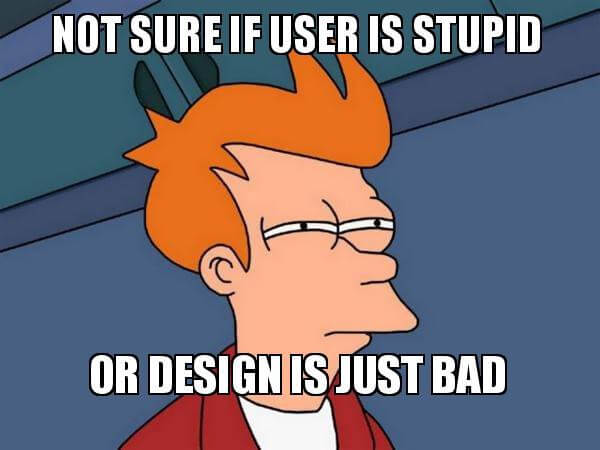
    You can make a system that does everything your user needs but if they believe it’s not going to add any value to their life, they won’t use it. Hence, it’s not enough to make something functional. It also needs to be intuitive and usable.

    R.I.P Futurama. Credits: makeameme.org

    You should constantly test the usability of a product for the end user. If you are going to have multiple users, with a wide range of requirements and skill sets, it is necessary to analyze the system from each of their’s perspective. After all, users are the ultimate jury of your product.

    UX is an extremely important part of the system and UX is not the same UI. If you have doubts, please check out this article in which Cameron Chapman explores the core differences between UX and UI.

    Simple tips to improve the usability of a product

    • Build a rapport with your end users. You have to get comfortable enough to ask for feedback and them to give it honestly.
    • Understand their mental models & business workflows and try not to deviate much from it.
    • Learn users’ terminology and incorporate it.
    • Create simple wireframes or whiteboard drawings to get early feedback.
    • Add user-friendly labels, messages, tooltips, info icons wherever needed. Don’t wait for people to ask for it. It’s your job to give it by default!
    • Proactively take feedback from your users.
    • Create a convenient channel for users to submit bugs and feature requests.
    UX is a really fun and wide field to explore. Some of it is science and some of it is just art. Don’t be overwhelmed by it. Just try to learn some of its basics.

    When things go wrong

    Inevitably, there will be goof-ups and expectations will sometimes not be met. That’s alright. Happens to the best of us. Stop blaming each other; go and talk to your users. In my experience, users normally don’t bite. They get angry, they get disappointed, but they don’t bite. In fact, if you listen to their problems, acknowledge them and start talking about possible solutions, they will appreciate it.

    Most importantly, be objective and keep an open mind. Criticism is not always an easy thing to digest. But, it’s a powerful feedback tool. If you make a mistake, accept it. If others make one, stop dwelling over it. Adapt, learn, practice and improve.

    Effective written communication

    In today’s age, every working professional naturally does some form of writing. The software industry is no exception. As you progress in your workplace, you too are expected to do it and do it effectively. You may not even realize the number of written artifacts that you might be creating:

    Architecture docs, Systems designs, PRDs, BRDs, User stories, Workflows, Case studies, Job Descriptions, Recommendations, Resumes, Presentations, Diagrams… and at the very least everyone writes Emails!

    Everything I mentioned in “speak the human language” is also applicable here. But unlike spoken communication, written communication has limited scope for explanations and clarifications. Plus it is more concrete and formal. Hence, it is absolutely important that you nail this one.

    Simple tips to effective written communication

    • Write first, edit later
    • Brevity is your friend. Remove whatever is not necessary.
    • Short and simple sentences.
    • Don’t beat around the bush.
    • Be confident in your tone.
    • Format your text. Break long text into smaller paras.
    • Use a diagram or an image when something is hard to describe.
    • Improve your word and PPT skills.
    • Maintain a flow in your content.
    • Do not digress, focus on the topic
    • Give a proper name, headings, sub-headings, etc.
    • Proofread. Spell check. Add credits, references and additional links.
    There are many medium articles for effective writing. You can start with this nice article by Lindsey Lazarte.

    Taking a Stand

    Aah, this is the hard one, Always easier said than done.

    When you take a stand against people, most people will succumb to the baser human instincts and tend to not like you; especially, in the moment. But if your reasoning is sound and you give them an honest chance to fix things, most of them — the kind that really matters — will respect you in the long run.

    It’s a long topic and I should someday probably write another article about it. But here’s the gist of it.

    I believe in talks to resolve issues.
    I believe in negotiations and discussions.
    I believe in compromises for the greater good.

    But there’s a limit to everything.

    I do not believe in letting people with power take advantage of the weak ones. I do not believe in sacrificing your ethics and values.

    Sometimes too much is too much and you have to stand up against it.

    It can be something small or big, doesn’t matter. At times you have to stop the diplomacy and take a stand. You might be standing up to an important client, your manager, your mentor, your team or your colleagues. It’s not easy, but it’s necessary.

    And I also wanna clarify as to what I mean by standing up to someone. Standing up doesn’t mean you post mean things about someone on social media or try to publicly ridicule and humiliate them. These are ineffective and cheap tactics. What I mean by standing up, is approaching the person, looking them in the eye and telling them your thoughts about a situation. Warning them in a polite tone and giving them a chance to react on it and rectify the situation. You need patience and self-restraint. But if things still don’t get resolved, you do what you gotta do.

    Conclusion

    Soft-skills are what helps people stand out in the crowd. There are many layers to learning these skills and mastering them may take a lifetime. But, ignoring them breaks projects and careers. Hopefully, I have equipped you with some basic tips to start working. Obviously, this is not an exhaustive list. I’ve only covered the ones which I think are the most important and underrated ones.
    下载开源日报APP:https://opensourcedaily.org/2579/
    加入我们:https://opensourcedaily.org/about/join/
    关注我们:https://opensourcedaily.org/about/love/
  • 开源日报第418期:《增强型失败反馈 stackprinter》

    7 5 月, 2019
    开源日报 每天推荐一个 GitHub 优质开源项目和一篇精选英文科技或编程文章原文,坚持阅读《开源日报》,保持每日学习的好习惯。
    今日推荐开源项目:《增强型失败反馈 stackprinter》
    今日推荐英文原文:《How learning design principles can make developers more valuable—and better teammates.》

    今日推荐开源项目:《增强型失败反馈 stackprinter》传送门:GitHub链接
    推荐理由:如果你的 Python 代码失败了,你应该会查找你的崩溃信息,然后看看哪个函数哪个位置出了个问题,但是如果你想要更容易的看到反馈的话,这个项目会很好的帮助你。在原来的基础上,它增添了具体的崩溃点和相关参数,能够让你更轻松的找出你写错的地方。

    今日推荐英文原文:《How learning design principles can make developers more valuable—and better teammates.》作者:
    原文链接:https://medium.com/@chrisaraymond/learning-design-can-make-developers-more-valuable-and-better-teammates-6201ef1091f7
    推荐理由:与设计者一起工作时的建议——迟早要和他们合作的

    How learning design principles can make developers more valuable—and better teammates.

    It’s spring in the Northern Hemisphere. The days are longer and the spirit lifts— even those of designers who grow weary of being told that they have to make all the effort to build bridges with developers. There’s at least one blog post a month preaching to, if not haranguing, designers to:
    • learn to code
    • develop a shared language with engineers (actually, learn to speak “developer”)
    • make sure that they don’t do any number of things to “piss off” developers
    • not propose designs that are “too visionary” (translation: hard to code)
    • validate their designs with “rigor” so that developers will “respect them”(!)
    Taking these steps will make designers “more valuable.”

    I’ll just make one observation here and move on:
    No professional wants to be told that they’re more valuable only if they learn another profession’s skills. It has to be a two-way street, with each profession learning enough about the other’s to collectively build a great product or website.
    What follows was sparked by — and in some ways a response to — a thoughtful piece by Jenny Wen, a product designer with Dropbox. It’s based on my own experience working in two engineering-driven enterprise software companies over the past year. Consider it my advice to developers.

    How to work effectively with designers

    Think like a designer

    Build your own repository of design knowledge. If a designer says no to a demo of your coded prototype, push back respectfully and use the opportunity to learn how design works. Figure out what’s effective in an interface design and what’s not and why; use that knowledge to improve your code.

    Ask your UX designer about the research they’ve done on users, and the problems they’ve found that the users have in using the app; ask them to illuminate how that information has shaped her design solution. Even better, ask to observe usability tests. This knowledge will enable you to collaborate on building a product that works well and is engaging to users and meets business goals.

    Ask designers to explain the Gestalt principles or other communication reasons underlying a design. Use that insight, if needed, it to propose solutions that designers may not have thought of that might be more easily compatible with the existing codebase. Plus, it’s helpful to build an understanding of the way design principles work for future projects or building new layouts/templates in code when there’s not a designer around.

    If a designer proposes a design that calls for code or css you may not be familiar with, rather than dismissing it in favor of what you already know how to do, see it as an opportunity to build your knowledge base and stretch your front-end developer muscles. Be open to getting references; don’t assume a designer is “telling you how to do your job” by calling your attention to new approaches to building UI with best practices you may not be on top of. No one can know everything.

    Learn what makes a designer tick

    You may think all designers are frustrated artists who only care about things “looking pretty.” Of course, we don’t want apps that look like they were built in 2005 (gradients anyone?). But for most of us, “pretty” is an interface that is clean, consistent, and uses typographic hierarchy, color, alignments and spacing to transform the strictly functional into engagingly usable. You might be surprised to find that we like good code, too: Many of the advances in css—like flexbox, grid, and responsive images—not only enhance the user interface, they help improve performance across platforms and devices. Writing more elegant structured css and semantic html leads to code that is easier to maintain and to smaller files. All this effort contributes to faster rendering which enhances user experience and gets the blessing of Google for being mobile friendly.

    Train their engineering muscles

    Invite designers to your team code reviews or check-ins. These are opportunities to have designers understand the problem at hand, and pay dividends in the future, when they’re able to contribute valuable ideas back to the front-end codebase/components. It will also help you develop your ability to communicate engineering and technical concepts to non-developers and promote a mutually shared vocabulary.

    Get to a solution together

    While it’s tempting, and probably very comfortable, to spend your time with your head in your IDE, signal your openness to having a designer come to you with a sketch and listen to the reasons behind a proposed design solution. Talk it through together, and don’t dismiss a design concept just because it might require you to do some additional research or move out of your coding comfort zone. Similarly, if you have an idea, sketch it out on paper and talk it through with the designer.

    If a proposed interaction is truly not technically feasible with the platform you’re working in, see if together you can come up with another approach to meet the goal of the proposed design.

    Conclusion

    These ideas reflect my own experience working at two engineering-driven organizations with legacy enterprise software — a common situation that many UX and interaction designers find themselves in. In these settings, where advocating for user research and usability testing is almost another full-time job, being told to also learn to code to accommodate developers can, to be frank, feel like piling on.

    Designers and developers have something to offer to build a great product. Most UX designers I know are delighted to learn about code if developers are equally eager to learn our language, too!

    I’d argue that sending designers down a one-way street to accommodate engineering is actually holding back developers honing their skills — and may well result in poorer quality, less performant code — and apps that are less competitive in the marketplace.
    下载开源日报APP:https://opensourcedaily.org/2579/
    加入我们:https://opensourcedaily.org/about/join/
    关注我们:https://opensourcedaily.org/about/love/
  • 开源日报第417期:《指南 shepherd》

    6 5 月, 2019
    开源日报 每天推荐一个 GitHub 优质开源项目和一篇精选英文科技或编程文章原文,坚持阅读《开源日报》,保持每日学习的好习惯。
    今日推荐开源项目:《指南 shepherd》
    今日推荐英文原文:《10 Mistakes You Should Avoid as a Web Developer》
    (这里放日报封面) (请检查,本文勾上了且只勾了《开源日报》这一个分类,请检查,有添加文章 Tag,请检查,有添加文章摘要,请检查,有添加特色图像,有添加bigger图片,有选中头图“布局设置”为占满屏幕的那张“第3张”) (请检查,预览时候,所有图片和文字显示正常,且勾上了百度熊掌号-原创提交) (请检查,本文的信息已经添加到 https://pm.openingsource.org/projects/daily/wiki日报摘要里,每个月的摘要信息单独发一个page,格式参照 https://opensourcedaily.org/daily-index/2018-5/,标题,URL,正文等格式均需保持一致) (检查上述都完成之后,请删掉括号里的字,包括这一句,每天发布时间为早晨8点左右)
    今日推荐开源项目:《指南 shepherd》传送门:GitHub链接
    推荐理由:一个用于制作浏览器中教程功能的 JS 库。如果你的页面需要准备一个教程的话,比起直接写文字用这个会有更好的表现。为了在其他框架上能够更好的使用,它还提供了对诸如 React,Vue 等框架的包装器,让其能更简单的应用于框架中。
    今日推荐英文原文:《10 Mistakes You Should Avoid as a Web Developer》作者:Subhajit Dutta
    原文链接:https://medium.com/@ajay.dutta94/10-mistakes-you-should-avoid-as-a-web-developer-c4ad4d2570f6
    推荐理由:有些时候这些错误并不只会发生在 Web 开发者身上

    10 Mistakes You Should Avoid as a Web Developer


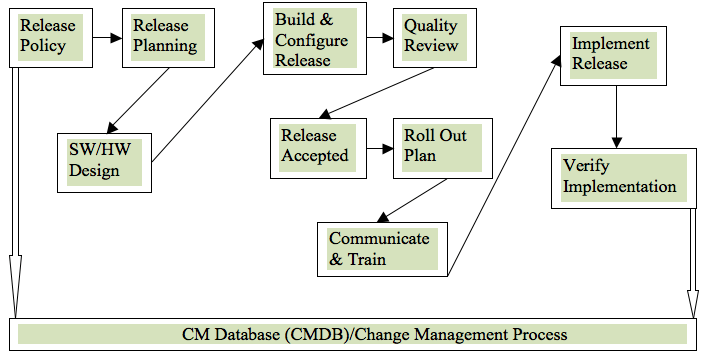
    Release process

    We as a developer always try to follow best practices while writing code, developing websites or developing an Android or IOS app.

    Sometimes development workflow becomes too complex and with a lot of tools and techniques out there, it becomes confusing for a developer to choose from various development patterns.

    Here are some mistakes we generally make while delivering or developing web-based products…

    Not tracking errors in production

    I feel like this is the most ignored point of web development.

    We often test our code with staging and production environment before deploying to production. We also write automated tests and follow TDD pattern just to make sure it does not crash in production and forget about tracking error/bugs in live production websites.

    There are various tools out there to track bugs/errors depending upon language or framework you use for developing a website.

    For JS error tracking you can use
    • Sentry
    • TrackJS
    • Rollbar

    Making Changes directly on the Server

    Yaa, I know, we all do it or have done it. When we need a small and critical change or a critical bug fix in the website, we often end up editing code directly in the server. Changes that we make in the server, if not pushed to repo, may be lost in the next deployment. That’s the double work for a developer to write the same code again in the local system.

    Downtime while deploying

    While deploying code to the server, it is very much possible that the server goes offline in case of typical deployment policies. That can be super annoying for a user if the website stops working while he/she is using it. So, it is always recommended to use a deployment policy that deploys the code to the server without stopping the website.

    Not Worrying about security in the code

    I have seen many developers doing this. We often hide secret credentials like API keys, client secrets or other secret credentials somewhere in the code itself. If that is on the client side, it can be super risky.

    It is always recommended to store secret credentials in a place where it is out of reach of visitors. Eg. We can use encrypted storage or ENV variables.

    Not Notifying Team Members

    The typical developer is always busy working on new features and making changes to their code. Sometimes they have to wait until the deployment finishes to see if the reflected changes are working as they should.

    Having a poor communication channel and not notifying everyone on the team about a finished or failed deployment is a huge mistake. Developers lose their focus while waiting for a notification they’ll never get.

    Using The Same Environment for Development and Production

    Everyone loves simplicity. So why bother with the added complexity of separate environments for development and production? Pushing changes directly to a production server is like playing with fire. Sooner or later, you’re bound to get burned. Now, the excuse for those using a manual workflow is that deploying to two different platforms takes too much time. But that’s just another reason to automate!

    Having No Backup Plan

    Having a backup plan is like having insurance. If you wait until you need it, it will be too late! If a change that’s deployed to the production server actually breaks the server, you’re in trouble if you have no backup plan. You’ll need to start at the beginning, successively performing new deployments to get everything back to a normal state. That takes a lot of time and resources; significantly more than rolling back to a prior deployment, which those of us with a backup plan can perform.

    Not using Caching on the client side

    No one wants to wait (and wait and wait) for your site to load. So, it is also one of the important things to keep in mind while developing a website that we use fast loading mechanism like Caching and Lazy Loading.
    1. Caching: Make sure you cache static assets like CSS, JS, and images in the browser storage so that browsers do not download it every time from the server.
    2. Lazy Loading: Always try to lazy load external scripts or images only when they are required. Code Lazy Loading can be achieved through Webpack and progressive image loading can be achieved through “intersection observer”

    Performing Manual Deployments

    Manual deployments are time consuming, complex and frequently cause great trouble. A couple of inadvertent keystrokes made by an inexperienced developer and bang! You’ve got yourself the virtual equivalent of a nuclear meltdown. All the time you thought you were saving is instantly gone as you rush to put everything back together again.

    Poorly Communicating When a Deployment Occurs

    It’s always a good idea to let your team know when you’re ready to deploy. That way they can be available if additional support is required or the changes don’t perform as expected. Manual notification isn’t ideal because it’s susceptible to error, and using different platforms for communication and notifications unnecessarily complicates matters.

    Conclusion: Ultimately, Website Deployment on Production in Sitecore must ensure that the step — by — step approach is properly followed using the full potential of development, quality assurance, staging and production. To complete the cycle, always verify the release before switching from disaster recovery to live.
    下载开源日报APP:https://opensourcedaily.org/2579/
    加入我们:https://opensourcedaily.org/about/join/
    关注我们:https://opensourcedaily.org/about/love/
←上一页
1 … 154 155 156 157 158 … 262
下一页→

Proudly powered by WordPress